
OpenCV provides the cv2.resize() function, which allows you to resize images efficiently. By selecting different interpolation methods, you can control the balance between image quality and resizing speed.
Syntax:
cv2.resize(src, dsize[, dst[, fx[, fy[, interpolation]]]])
Parameters:
- src: Source/input image.
- dsize: Desired size (width, height). Order is width first, then height.
- dst(Optional): Output image, rarely used explicitly.
- fx(optional): Scale factor along the horizontal axis.
- fy(optional): Scale factor along the vertical axis.
- interpolation(optional): Interpolation method to use.
Return Value: Returns a resized image as a NumPy array, which can be displayed, saved, or further processed.
Note: Use either dsize or fx/fy for scaling, dsize: when you know exact width & height and fx/fy: when you want to scale by a factor. Do not set both together (unless dsize=None)
Interpolation Methods
Interpolation is the method used to decide pixel colors when an image is resized. Below are some methods:
Method | When to Use | Description |
|---|---|---|
cv2.INTER_AREA | Shrinking | Minimizes distortion while downscaling. |
cv2.INTER_LINEAR | General resizing | Balances speed and quality |
cv2.INTER_CUBIC | Enlarging | Higher quality for upscaling |
cv2.INTER_NEAREST | Fast resizing | Quick but lower quality |
Example: Resizing images using OpenCV
import cv2
import matplotlib.pyplot as plt

image = cv2.imread("grapes.jpg")

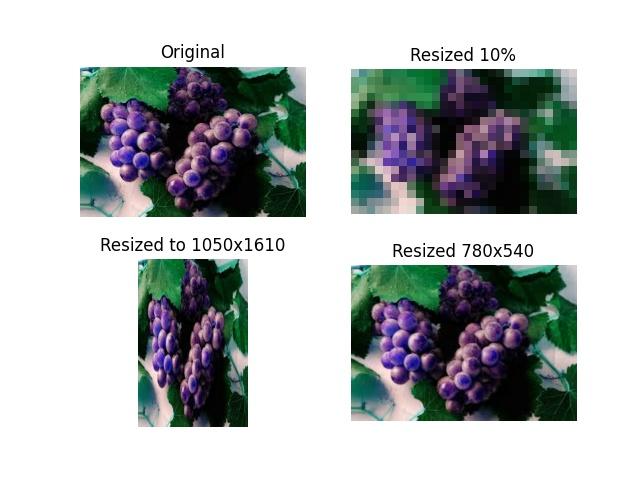
small = cv2.resize(image, None, fx=0.1, fy=0.1, interpolation=cv2.INTER_AREA)

large = cv2.resize(image, (1050, 1610), interpolation=cv2.INTER_CUBIC)
medium = cv2.resize(image, (780, 540), interpolation=cv2.INTER_LINEAR)

titles = ["Original", "10% (INTER_AREA)", "1050x1610 (INTER_CUBIC)", "780x540 (INTER_LINEAR)"]
images = [image, small, large, medium]

plt.figure(figsize=(10, 8))
for i in range(4):
    plt.subplot(2, 2, i + 1)
    plt.imshow(cv2.cvtColor(images[i], cv2.COLOR_BGR2RGB))  # Convert BGR → RGB
    plt.title(titles[i])
    plt.axis("off")

plt.tight_layout()
plt.show()
Output
Explanation:
- cv2.imread(): Loads the image in BGR format.
- cv2.resize(): Resizes the image using either scale factors (fx, fy) or exact dimensions (dsize). INTER_AREA: Downscaling, INTER_CUBIC: Upscaling (smooth results) and INTER_LINEAR: General resizing
- cv2.cvtColor(): Converts image from BGR to RGB for correct Matplotlib display.
- plt.subplot(): Arranges multiple images in a 2×2 grid.
- plt.title(): Adds a title for each image.
- plt.axis("off"): Hides axis lines and labels.
- plt.tight_layout(): Adjusts spacing between images.
