
A Python dictionary is a data structure that stores data in key-value pairs, where each key is unique and is used to retrieve its associated value. It is mainly used when you want to store and access data by a name (key) instead of by position like in a list.
Example: This example shows how a dictionary stores data using keys and values.
data = { "name": "Jake", "age": 22 }
print(data)
Output
{'name': 'Jake', 'age': 22}
Explanation:
- "name" and "age" are keys
- "Jake" and 22 are their values
- dictionary stores data in key : value format
Creating a Dictionary
A dictionary is created by writing key-value pairs inside { }, where each key is connected to a value using colon (:). A dictionary can also be created using the dict() function.
d1 = {1: 'Geeks', 2: 'For', 3: 'Geeks'}
print(d1)

# using dict() constructor
d2 = dict(a = "Geeks", b = "for", c = "Geeks")
print(d2)
Output
{1: 'Geeks', 2: 'For', 3: 'Geeks'}
{'a': 'Geeks', 'b': 'for', 'c': 'Geeks'}
Accessing Dictionary Items
A value in a dictionary is accessed by using its key. This can be done either with square brackets [ ] or with the get() method. Both return the value linked to the given key.
d = { "name": "Kat", 1: "Python", (1, 2): [1,2,4] }

# Access using key
print(d["name"])

# Access using get()
print(d.get("name"))
Output
Kat
Kat
Adding and Updating Dictionary Items
New items are added to a dictionary using the assignment operator (=) by giving a new key a value. If an existing key is used with the assignment operator, its value is updated with the new one.
d = {1: 'Geeks', 2: 'For', 3: 'Geeks'}

# Adding a new key-value pair
d["age"] = 22

# Updating an existing value
d[1] = "Python dict"
print(d)
Output
{1: 'Python dict', 2: 'For', 3: 'Geeks', 'age': 22}
Removing Dictionary Items
Dictionary items can be removed using built-in deletion methods that work on keys:
- del: removes an item using its key
- pop(): removes the item with the given key and returns its value
- clear(): removes and returns the last inserted key–value pair
- popitem(): removes all items from the dictionary
d = {1: 'Geeks', 2: 'For', 3: 'Geeks', 'age':22}

# Using del
del d["age"]
print(d)

# Using pop()
val = d.pop(1)
print(val)

# Using popitem()
key, val = d.popitem()
print(f"Key: {key}, Value: {val}")

# Using clear()
d.clear()
print(d)
Output
{1: 'Geeks', 2: 'For', 3: 'Geeks'}
Geeks
Key: 3, Value: Geeks
{}
Iterating Through a Dictionary
A dictionary can be traversed using a for loop to access its keys, values or both key-value pairs by using the built-in methods keys(), values() and items().
d = {1: 'Geeks', 2: 'For', 'age':22}

# Iterate over keys
for key in d:
    print(key)

# Iterate over values
for value in d.values():
    print(value)

# Iterate over key-value pairs
for key, value in d.items():
    print(f"{key}: {value}")
Output
1
2
age
Geeks
For
22
1: Geeks
2: For
age: 22
Read in detail: Ways to Iterating Over a Dictionary
Nested Dictionaries
A nested dictionary is a dictionary that contains another dictionary as one of its values. Below diagram shows how a nested dictionary works, where key 3 points to another dictionary inside the main dictionary.
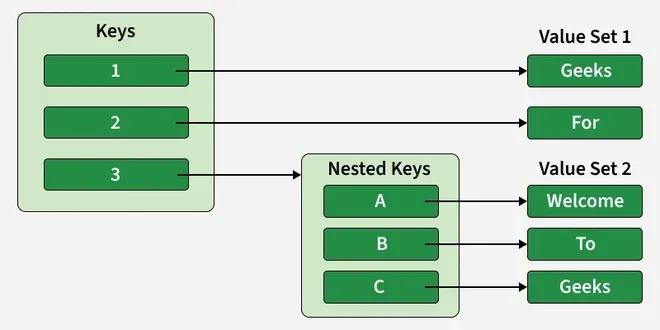
The arrows show how each key is connected to its corresponding value.
d = {1: 'Geeks', 2: 'For', 3: {'A': 'Welcome', 'B': 'To', 'C': 'Geeks'}}
print(d)

Output
{1: 'Geeks', 2: 'For', 3: {'A': 'Welcome', 'B': 'To', 'C': 'Geeks'}}
Read in Detail: Python Nested Dictionary
Related Links:
- Python Dictionary Quiz
- Dictionary Comprehension
- Dictionary Methods
- Dictionary Creation Programs.
- Dictionary Add/Append Programs.
- Dictionary Removal Programs.
- Dictionary Access Programs.
- Dictionary Conversion Programs.
- Python Dictionary Copy Vs Deep Copy
- Python Dictionary Exercise

