


- Support via WhatsApp


How can I send push notifications with the message API?
Using HTTP Post (not GET) in the programming language of your application and send a request to http://www.pushsafer.com/api or over a secure connection to https://www.pushsafer.com/api! To customize the push notification to your needs, the following values can be transmitted: title, message, icon, icon color, sound, vibration, image(s), device or device group, url, url title, time to live, priority, retry, expire, answer.
Here are some examples:
<?php
$url = 'https://www.pushsafer.com/api';
$data = array(
	't' => urlencode($title),
	'm' => urlencode($message),
	's' => $sound,
	'v' => $vibration,
	'i' => $icon,
	'c' => $iconcolor,
	'd' => $device,
	'u' => urlencode($url),
	'ut' => urlencode($urltitle),
	'p' => $picture,
	'k' => $private_key
);
$options = array(
	'http' => array(
		'header'  => "Content-type: application/x-www-form-urlencoded\r\n",
		'method'  => 'POST',
		'content' => http_build_query($data)
	)
);
$context  = stream_context_create($options);
$result = file_get_contents($url, false, $context);
?>
<?php
$ch = curl_init();
$data = array(
	't' => urlencode($title),
	'm' => urlencode($message),
	's' => $sound,
	'v' => $vibration,
	'i' => $icon,
	'c' => $iconcolor,
	'd' => $device,
	'u' => urlencode($url),
	'ut' => urlencode($urltitle),
	'p' => $picture,
	'k' => $private_key
);
$postString = http_build_query($data, '', '&');
curl_setopt($ch, CURLOPT_URL, 'https://www.pushsafer.com/api' );
curl_setopt($ch, CURLOPT_POST, 1);
curl_setopt($ch, CURLOPT_POSTFIELDS, $postString);
curl_setopt($ch, CURLOPT_RETURNTRANSFER, true);
curl_setopt($ch, CURLOPT_SSL_VERIFYPEER, false );
$response = curl_exec($ch);
curl_close($ch);
?>
$.ajax({
  type: "POST",
  url: 'https://www.pushsafer.com/api',
  data:  {
		t: escape(title),
		m: escape(message),
		s: sound,
		v: vibration,
		i: icon,
		c: iconcolor,
		d: device,
		u: escape(url),
		ut: escape(urltitle),
		p: picture,
		k: private_key
  }
});
var xhttp;
if (window.XMLHttpRequest) {
    xhttp = new XMLHttpRequest();
    } else {
    // code for IE6, IE5
    xhttp = new ActiveXObject("Microsoft.XMLHTTP");
}
xhttp.open("POST", "https://www.pushsafer.com/api", true);
xhttp.setRequestHeader("Content-type", "application/x-www-form-urlencoded");
xhttp.send("t="+escape(title)+"&m="+escape(message)+"&s="+sound+"&v="+vibration+"&i="+icon+"&c="+iconcolor+"&d="+device+"&u="+escape(url)+"&ut="+escape(urltitle)+"&k="+private_key);
npm install pushsafer-notifications
var push = require( 'pushsafer-notifications' );

var p = new push( {
    k: 'Your20CharPrivateKey',             // your 20 chars long private key
    debug: true
});

var msg = {
    m: 'This is a Node.js test message',   // message (required)
    t: "Node.js Test",                     // title (optional)
    s: '8',                                // sound (value 0-50)
    v: '2',                                // vibration (empty or value 1-3)
    i: '5',                                // icon (value 1-176)
    c: '#FF0000',                          // iconcolor (optional)
    u: 'https://www.pushsafer.com',        // url (optional)
    ut: 'Open Link',                       // url title (optional)
    d: '221'                               // the device or device group id
};

// console.log( p );

p.send( msg, function( err, result ) {
    //console.log( 'ERROR:', err );
    console.log( 'RESULT', result );
    // process.exit(0);
});
curl -s \
  --form-string "t=title" \
  --form-string "m=message" \
  --form-string "s=sound" \
  --form-string "v=vibration" \
  --form-string "i=icon" \
  --form-string "c=iconcolor" \
  --form-string "d=device" \
  --form-string "u=url" \
  --form-string "ut=urltitle" \
  --form-string "p=picture" \
  --form-string "k=private_key" \
  https://www.pushsafer.com/api
require "net/https"
url = URI.parse("https://www.pushsafer.com/api")
req = Net::HTTP::Post.new(url.path)
req.set_form_data({
  :t => title,
  :m => message,
  :s => sound,
  :v => vibration,
  :i => icon,
  :c => iconcolor,
  :d => device,
  :u => url,
  :ut => urltitle,
  :p => picture,
  :k => private_key,
})
res = Net::HTTP.new(url.host, url.port)
res.use_ssl = true
res.verify_mode = OpenSSL::SSL::VERIFY_PEER
res.start {|http| http.request(req) }
var options= new NameValueCollection {
		{ "t", title },
		{ "m", message },
		{ "s", sound },
		{ "v", vibration },
		{ "i", icon },
		{ "c", iconcolor },
		{ "d", device },
		{ "u", url },
		{ "ut", urltitle },
		{ "p", picture },
		{ "k", private_key }
};
using (var client = new WebClient())
{
    client.UploadValues("https://www.pushsafer.com/api", options);
}
use LWP::UserAgent;
LWP::UserAgent->new()->post(
  "https://www.pushsafer.com/api", [
  "t" => title,
  "m" => message,
  "s" => sound,
  "v" => vibration,
  "i" => icon,
  "c" => iconcolor,
  "d" => device,
  "u" => url,
  "ut" => urltitle,
  "p" => picture,
  "k" => private_key,
]);
package require http
set url "https://www.pushsafer.com/api"
::http::geturl $url -query [::http::formatQuery k "privateKey" t "Title" m "Message" d "deviceID" i "Icon" s "Sound" v "Vibration" c "IconColor" u "URL" ut "URLTitle" l "Time2Live" p "Base64EncodedImageString"]
from urllib.parse import urlencode
from urllib.request import Request, urlopen
import base64

# local image from drive
file = 'logo.jpg'
image = open(file, 'rb')
image_read = image.read()
image1 = base64.encodebytes(image_read)

# remote image from url
image2 = base64.b64encode(urlopen("https://www.google.de/images/branding/googlelogo/1x/googlelogo_color_272x92dp.png").read())

url = 'https://www.pushsafer.com/api'
post_fields = {
	"t" : 'Test',
	"m" : 'Test Message',
	"s" : 11,
	"v" : 3,
	"i" : 33,
	"c" : '#FF0000',
	"d" : 'a',
	"u" : 'https://www.pushsafer.com',
	"ut" : 'Open Pushsafer',
	"k" : '[private_key]',
	"p" : 'data:image/jpeg;base64,'+str(image1.decode('ascii')),
	"p2" : 'data:image/png;base64,'+str(image2.decode('ascii')),
	}

request = Request(url, urlencode(post_fields).encode())
json = urlopen(request).read().decode()
print(json)
sUrl = "https://www.pushsafer.com/api"

sRequest = "k=YourKey&d=DeviceID&t=Title Here&m=Test Message sned with VBScript&i=20&s=37&v=3"

HTTPPost sUrl, sRequest

Function HTTPPost(sUrl, sRequest)
  set oHTTP = CreateObject("Microsoft.XMLHTTP")
  oHTTP.open "POST", sUrl,false
  oHTTP.setRequestHeader "Content-Type", "application/x-www-form-urlencoded"
  oHTTP.setRequestHeader "Content-Length", Len(sRequest)
  oHTTP.send sRequest
  HTTPPost = oHTTP.responseText
 End Function
With every message API-call you get a response with http header code and a JSON string for evaluation
HTTP/1.0 200 OKJSON
{ "status":1, "success":"message transmitted", "available":1823, "message_ids":"1324312:118,1324313:324" }
availableavailable API calls
message_idsunique message ids divided by comma
and associated device ID with seperated by colon
HTTP/1.0 250 invalid keyJSON
{ "status":0, "error":"invalid key" }
HTTP/1.0 255 invalid key or empty messageJSON
{ "status":0, "error":"invalid key or empty message" }
HTTP/1.0 260 empty messageJSON
{ "status":0, "error":"empty message" }
HTTP/1.0 270 invalid deviceJSON
{ "status":0, "error":"invalid device" }
HTTP/1.0 275 invalid device groupJSON
{ "status":0, "error":"invalid device group" }
HTTP/1.0 280 not enough API callsJSON
{ "status":0, "error":"not enough API calls" }
| Endpoint | https://www.pushsafer.com/api-m |
| Method | POST or GET |
| Parameter |
k = Private Keyd = Device IDm = Message ID (optional) empty = display all messages or with message ID for displaying the individual message
|
| Example | https://www.pushsafer.com/api-m?k={private_key}&d={device} |
Response
<?php
{
    "status": 1,
    "messages": {
        "21231": {
            "id": "21231",
            "title": "Pushsafer Test Push",
            "message": "This is only a test",
            "icon": "22",
            "iconcolor": "#FFCCCC",
            "sound": "12",
            "vibration": "3",
            "url": "https:\/\/www.pushsafer.com",
            "url_title": "Open Pushsafer",
            "image1": "",
            "image2": "",
            "image3": "",
            "time2live": "",
            "date_sent": "2018-08-21 16:00:23",
            "status_sent": "1",
            "priority": "2",
            "retry": "1",
            "retries": "10",
            "expire": "2018-08-21 18:00:23",
            "expired": "1",
            "reply": "1",
            "replied": "1",
            "answer": "This is a test answer",
            "answeroptions": "yes|no|maybe",
            "answerforce": "1",
            "location_lat": "51.0410180581",
            "location_lon": "12.3791688397",
            "location_time": "2019-07-01 22:29:30"
        }
    }
}
?>
HTTP/1.0 250 invalid authenticationJSON
{ "status": 0, "error": "invalid authentication" }
| Endpoint | https://www.pushsafer.com/api-d |
| Method | POST or GET |
| Parameter | k = Private Keyu = Username or E-mail Address |
| Example | https://www.pushsafer.com/api-d?k={private_key}&u={username} |
Response
HTTP/1.0 200 OKJSON
{ "status":1, "devices":{ "a":"All Devices", "gs40":"Group: iOS", "gs44":"Group: Windows", "gs46":"Group: Android", "gs47":"Group: Browser", "53":"iPhone4", "78":"GT-P5110", "82":"Cindys iPhone6", "86":"iPad Air", "123":"iPhone6p", "143":"Windows Firefox", "267":"Lumia 550", "269":"PC Office WIN10", "318":"Windows Chrome", "418":"BV2000s", "484":"CUBOT GT72E", "1351":"HUAWEI MT7-L09", "1520":"Cindy's SATELLITE PRO" } }
HTTP/1.0 250 invalid authenticationJSON
{ "status":0, "error":"invalid authentication" }
| Endpoint | https://www.pushsafer.com/api-de |
| Method | POST or GET |
| Parameter | k = Private Keyu = Username or E-mail Address |
| Example | https://www.pushsafer.com/api-de?k={private_key}&u={username} |
Response
HTTP/1.0 200 OK
JSON
{
    "status":1,
    "devices":{
        "a":{
            "id":"a",
            "name":"All active devices",
            "status":1
        },
        "gs1":{
            "id":"gs1",
            "name":"Group: iOS",
            "status":1
        },
        "1":{
            "id":"1", // device id
            "name":"iPhone XS Max",  // device name
            "status":1, // device status
            "sent":234, // messages sent to this device
            "platform":"iOS", // possible values (iOS, Android, Windows, Chrome, Firefox, Opera, Edge, Yandex, Telegram)
            "location_lat":"51.0407778894", // last location latitude
            "location_lng":"12.3798235675", // last location longitude
            "location_time":"2023-02-11 16:42:09", // last synchronization of device location
            "isguest":"1", // is guest device 1/0
            "created":"2016-04-02 12:31:55", // date of registration
            "lastsync":"2023-02-10 20:10:29" // last synchronization of device
        }
    }
}
HTTP/1.0 250 invalid authenticationJSON
{ "status":0, "error":"invalid authentication" }
| Endpoint | https://www.pushsafer.com/api-dn |
| Method | POST or GET |
| Parameter |
k = Private Keyu = Username or E-mail Addressd = Device IDn = Device Name
|
| Example | https://www.pushsafer.com/api-dn?k={private_key}&u={user}&d={device_id}&n={devicename} |
Response
HTTP/1.0 200 OKJSON
{ "status":1, "deviceupdated":123 }
HTTP/1.0 250 invalid authenticationJSON
{ "status":0, "error":"invalid authentication" }
HTTP/1.0 270 invalid deviceJSON
{ "status":0, "error":"invalid device" }
HTTP/1.0 276 invalid device nameJSON
{ "status":0, "error":"invalid device name" }
| Endpoint | https://www.pushsafer.com/api-ds |
| Method | POST or GET |
| Parameter |
k = Private Keyu = Username or E-mail Addressd = Device IDs = Status on/off
|
| Example | https://www.pushsafer.com/api-ds?k={private_key}&u={user}&d={device_id}&s=on |
Response
HTTP/1.0 200 OKJSON
{ "status":1, "deviceupdated":123 }
HTTP/1.0 250 invalid authenticationJSON
{ "status":0, "error":"invalid authentication" }
HTTP/1.0 270 invalid deviceJSON
{ "status":0, "error":"invalid device" }
HTTP/1.0 295 invalid statusJSON
{ "status":0, "error":"invalid status" }
| Endpoint | https://www.pushsafer.com/api-dd |
| Method | POST or GET |
| Parameter |
k = Private Keyu = Username or E-mail Addressd = Device ID |
| Example | https://www.pushsafer.com/api-dd?k={private_key}&u={user}&d={device_id} |
Response
HTTP/1.0 200 OKJSON
{ "status":1, "devicedeleted":123 }
HTTP/1.0 250 invalid authenticationJSON
{ "status":0, "error":"invalid authentication" }
HTTP/1.0 270 invalid deviceJSON
{ "status":0, "error":"invalid device" }
| Endpoint | https://www.pushsafer.com/api-g |
| Method | POST or GET |
| Parameter | k = Private Keyu = Username or E-mail Address |
| Example | https://www.pushsafer.com/api-g?k={private_key}&u={user} |
Response
HTTP/1.0 200 OKJSON
{ "status":1, "groups":{ "gs111":{ "name":"iOS", "devices":"123|1234|12345" }, "gs123":{ "name":"Android", "devices":"4321|54321|1543" }, "gs222":{ "name":"Alarm", "devices":"1111|2222|3333|4444" } } }
HTTP/1.0 250 invalid authenticationJSON
{ "status":0, "error":"invalid authentication" }
| Endpoint | https://www.pushsafer.com/api-ga |
| Method | POST or GET |
| Parameter |
k = Private Keyu = Username or E-mail Addressg = Group names = Status on/offd = Device IDs seperated by | (optional)
|
| Example | https://www.pushsafer.com/api-ga?k={private_key}&u={user}&g={groupname}&s=off&d=1|2|3 |
Response
HTTP/1.0 200 OKJSON
{ "status":1, "groupadded":"gs1234" }
HTTP/1.0 250 invalid authenticationJSON
{ "status":0, "error":"invalid authentication" }
HTTP/1.0 270 invalid devicesJSON
{ "status":0, "error":"invalid devices" }
HTTP/1.0 275 invalid group nameJSON
{ "status":0, "error":"invalid group name" }
HTTP/1.0 285 group existsJSON
{ "status":0, "error":"group exists" }
HTTP/1.0 295 invalid statusJSON
{ "status":0, "error":"invalid status" }
| Endpoint | https://www.pushsafer.com/api-gun |
| Method | POST or GET |
| Parameter |
k = Private Keyu = Username or E-mail Addressg = Groups IDn = Group name
|
| Example | https://www.pushsafer.com/api-gun?k={private_key}&u={user}&g={groupid}&n={groupname} |
Response
HTTP/1.0 200 OKJSON
{ "status":1, "groupupdated":"gs1234" }
HTTP/1.0 250 invalid authenticationJSON
{ "status":0, "error":"invalid authentication" }
HTTP/1.0 275 invalid groupJSON
{ "status":0, "error":"invalid group" }
HTTP/1.0 276 invalid group nameJSON
{ "status":0, "error":"invalid group name" }
HTTP/1.0 285 group name existsJSON
{ "status":0, "error":"group name exists" }
| Endpoint | https://www.pushsafer.com/api-gus |
| Method | POST or GET |
| Parameter |
k = Private Keyu = Username or E-mail Addressg = Groups IDs = Status on/off
|
| Example | https://www.pushsafer.com/api-gus?k={private_key}&u={user}&g={groupid}&s=on |
Response
HTTP/1.0 200 OKJSON
{ "status":1, "groupupdated":"gs1234" }
HTTP/1.0 250 invalid authenticationJSON
{ "status":0, "error":"invalid authentication" }
HTTP/1.0 275 invalid groupJSON
{ "status":0, "error":"invalid group" }
HTTP/1.0 295 invalid statusJSON
{ "status":0, "error":"invalid status" }
| Endpoint | https://www.pushsafer.com/api-gud |
| Method | POST or GET |
| Parameter |
k = Private Keyu = Username or E-mail Addressg = Groups IDd = Devices IDs seperated by | |
| Example | https://www.pushsafer.com/api-gud?k={private_key}&u={user}&g={groupid}&d=1|2|3 |
Response
HTTP/1.0 200 OKJSON
{ "status":1, "groupupdated":"gs1234" }
HTTP/1.0 250 invalid authenticationJSON
{ "status":0, "error":"invalid authentication" }
HTTP/1.0 270 invalid devicesJSON
{ "status":0, "error":"invalid devices" }
HTTP/1.0 275 invalid groupJSON
{ "status":0, "error":"invalid group" }
| Endpoint | https://www.pushsafer.com/api-gd |
| Method | POST or GET |
| Parameter |
k = Private Keyu = Username or E-mail Addressg = Groups ID
|
| Example | https://www.pushsafer.com/api-gd?k={private_key}&u={user}&g={groupid} |
Response
HTTP/1.0 200 OKJSON
{ "status":1, "groupdeleted":"gs1234" }
HTTP/1.0 250 invalid authenticationJSON
{ "status":0, "error":"invalid authentication" }
| Endpoint | https://www.pushsafer.com/api-k |
| Method | POST or GET |
| Parameter |
k = Private Keyu = Username or E-mail Address
|
| Example | https://www.pushsafer.com/api-k?k={private_key}&u={user} |
Response
HTTP/1.0 200 OKJSON
{ "status":1, "success":"valid key", "available-api-calls":21398 }
HTTP/1.0 250 invalid authenticationJSON
{ "status":0, "error":"invalid authentication" }
| Endpoint | https://www.pushsafer.com/api-i |
| Method | GET |
| Parameter |
k = Private Keyl = Language en/de (optional)
|
| Example | https://www.pushsafer.com/api-i?k={private_key}&l=en |
Response
{
   "icons":{
      "1":"[001] Pushsafer bell",
      "2":"[002] Exclamation mark in a circle",
      "3":"[003] Question mark in a circle",
      .
      .
      .
   },
   "status":1,
   "request":"5560beb535027a8140cbad0e89cf688a"
}
{
   "error":[
      {
         "message":"authorization not valid"
      }
   ]
}
| Endpoint | https://www.pushsafer.com/api-s |
| Method | GET |
| Parameter |
k = Private Keyl = Language en/de (optional)
|
| Example | https://www.pushsafer.com/api-i?k={private_key}&l=en |
Response
{
   "sounds":{
      "0":"[00] Silent",
      "1":"[01] Ahem (IM)",
      "2":"[02] Applause (Mail)",
      "3":"[03] Arrow (Reminder)",
      .
      .
      .
   },
   "status":1,
   "request":"bd814fc29327cb953236609aac966704"
}
{
   "error":[
      {
         "message":"authorization not valid"
      }
   ]
}
In the profile settings you can specify a callback URL..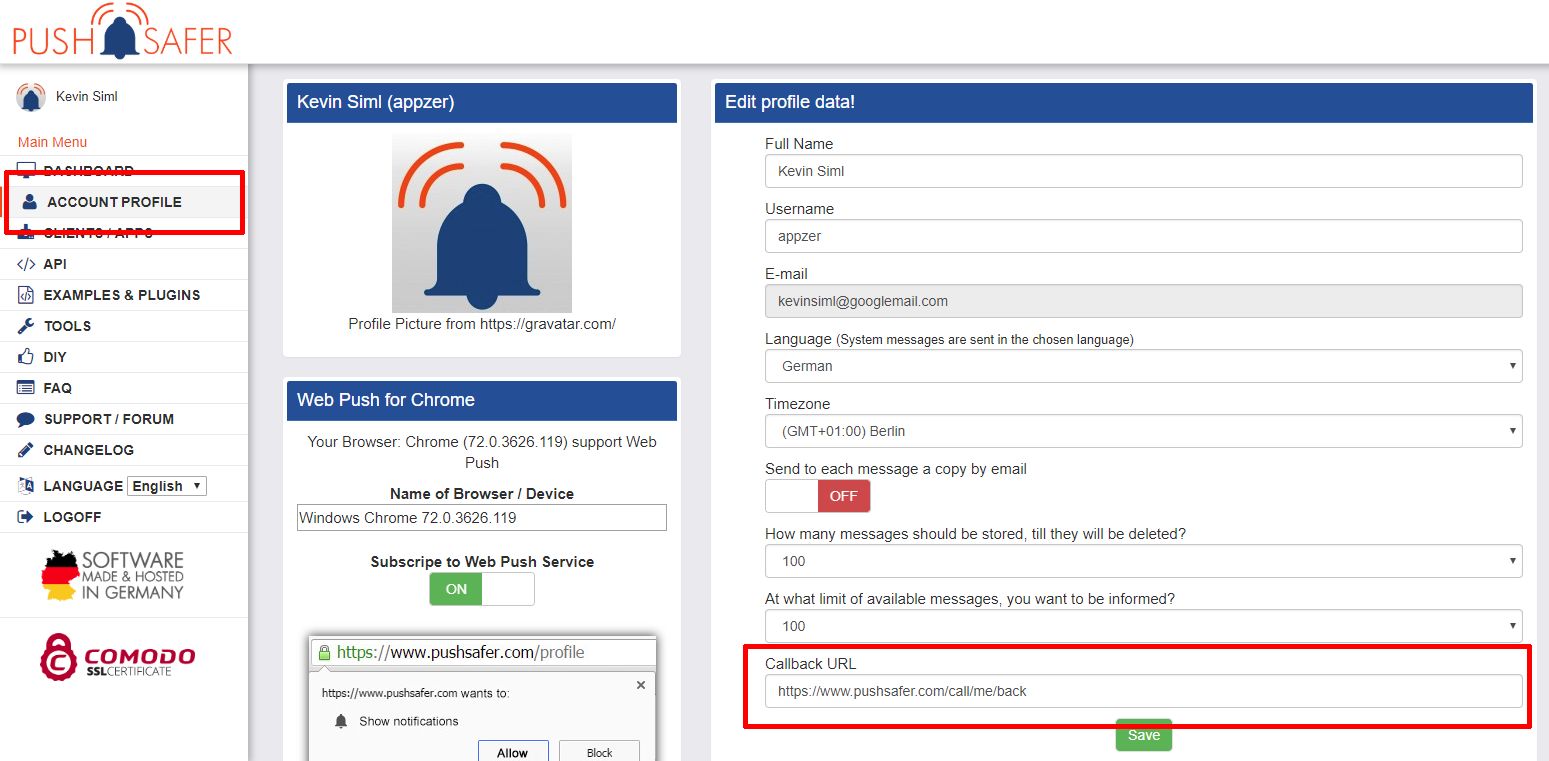
For positive actions, such as sending push-notifications or registering new devices, the JSON response code are sent to this URL via POST with the parameter json. With this function you have the possibility to create automatisms in your own system or match registered device to an account.
Example: https://www.pushsafer.com/call/me/back
$json = $_POST['json'];
if($json){
	$file = 'callback.txt';
	// open data
	$current = file_get_contents($file);
	// insert new line
	$current.= "\n".date("Y-m-d H:i:s", time()).' '.$json;
	// write data
	file_put_contents($file, $current);
}
Response code for sending push-notifications
{
	"status":1,
	"success":"message transmitted",
	"available":1823,
	"message_ids":"1324312:118,1324313:324"
}
Response code for registering a new device
{
	"action": "add-device",
	"id": "27899",
	"name": "iPhone XS",
	"group": "gs123",
	"guest": "1"
}
Response code for deleting a device
{
	"action": "delete-device",
	"id": "27899"
}
Response code for sending answers
{
	"action": "answer transmitted",
	"message_id":3427899,
	"answer": "my answer"
}
Response code for deleting a single message
{
	"action":"delete-message",
	"deviceid":"119",
	"messageid":"32217892"
}
Response code for deleting selected messages
{
	"action":"delete-selected-messages",
	"deviceid":"119",
	"messageids":"32395612,32399839,32623589"
}
Response code for deleting all messages
{
	"action":"delete-all-message",
	"deviceid":"119"
}

Permissions iOS

On iOS, the following permissions must be allowed to transfer the locations correctly
- Loction = always
- Motion & Fitness, used to detect if the device is moving. Only when device is moving - locations are transmitted (protection of the battery life)
- Background App Refresh & Mobile Data, if aktivated the location data can be transmitted when the app is in background
Permissions Android

Separate permission for Android >=8

Permissions Windows 10
Location tracking in Windows 10 requires the following permissions: Location & Background Apps


If a firewall denied the access, please allow this ip address!
IPv4 = 212.83.36.91
IPv6 = 2a00:f48:cafe:a911::1
Use parameters to configure your push-notification, press the orange parameter to get a more detailed description:
k = Private or Alias Key*
Example: 3SAz1a2iTYsh19eXIMiO
d = Device
Single Device ID or Device Group ID or all Devices
d=a = to all devicesd=gs23 = to a device groupd=52 = to a single deviced=52|65|78 = to multiple devices of same account
t = Title
m = Message*
s = Sound empty=device default or a number 0-62
v = Vibration empty=device default or a number 1-3
(only iOS & Android)
i = Icon Standard = 1 or a number 1-181
c = Icon Color Standard = Empty
or a Hexadecimal Colorcode, Example: #FF0000
(only Android >5.0, Windows 10 & Client APP)
LED Notification Color
(only Android, device needs a RGB LED)
u = URL/Link u="https://www.pushsafer.com"
ut = URL Title ut="Open Link"
Open other apps through push notifications by usingURL schemes
p = Picture Data URL with Base64-encoded stringp2 = Picture 2 Data URL with Base64-encoded stringp3 = Picture 3 Data URL with Base64-encoded string
data:image/gif;base64,R0l...BOw==data:image/jpeg;base64,C4s...Cc1==data:image/png;base64,G0G...h5r==
is = Image Size smaller image = faster loading time0 = 1024px1 = 768px2 = 512px3 = 256px
l = Time to Live Integer number 0-43200: Time in minutes,
after a message automatically gets purged.
pr = Priority
-2 = lowest priority
-1 = lower priority
0 = normal priority
1 = high priority (Time-Sensitive Notifications)
2 = highest priority (Critical Alerts)
re = Retry / resendInteger 60-10800 (60s steps): Time in seconds, after a message should resend.
ex = ExpireInteger 60-10800: Time in seconds, after the retry/resend should stop.
a = Answer
1 = Answer is possible0 = Answer is not possible.
ao = Answer Options
predefined answer options divided by a pipe character e.g. Yes|No|Maybe
af = Force Answer
1 = yes0 = no
cr = Confirm / resend
Integer 10-10800 (10s steps) Time in seconds after which a message should be sent again before it is confirmed.
g = GIPHY GIF Code f.e. 8dMU9pN4pGwEfVpdY4* required parameters
max. size of all POST parameters = 8192kb
BBCode. Formatting can only be displayed in the client apps but not in the Push-Notification itselfs. The following BBCodes are accepted:[b]Word[/b] Word bold[i]Word[/i] Word italic[u]Word[/u] Word underline[s]Word[/s] Word crossed out[left]Word[/left] Text left-aligned[center]Word[/center] Text center-aligned[right]Word[/right] Text right-aligned[size=18]Word[/size] Text in font-size 18 pixel
optimal font size 8-48[color=blue]Word[/color] Word blue[color=#FF0000]Word[/color] Word red
Hex codes and most color names are supported.[url=http://www.domain.com]Link[/url] display a link
Combined values are also possible:[b][u][color=#980000]Word[/color][/u][/b] = Word
Line break: \n or BBCode [br]
empty = Device Default0 = Silent1 = Ahem (IM)2 = Applause (Mail)3 = Arrow (Reminder)4 = Baby (SMS)5 = Bell (Alarm)6 = Bicycle (Alarm2)7 = Boing (Alarm3)8 = Buzzer (Alarm4)9 = Camera (Alarm5)10 = Car Horn (Alarm6)11 = Cash Register (Alarm7)12 = Chime (Alarm8)13 = Creaky Door (Alarm9)14 = Cuckoo Clock (Alarm10)15 = Disconnect (Call)16 = Dog (Call2)17 = Doorbell (Call3)18 = Fanfare (Call4)19 = Gun Shot (Call5)20 = Honk (Call6)21 = Jaw Harp (Call7)22 = Morse (Call8)23 = Electricity (Call9)24 = Radio Tuner (Call10)25 = Sirens26 = Military Trumpets27 = Ufo28 = Whah Whah Whah29 = Man Saying Goodbye30 = Man Saying Hello31 = Man Saying No32 = Man Saying Ok33 = Man Saying Ooohhhweee34 = Man Saying Warning35 = Man Saying Welcome36 = Man Saying Yeah37 = Man Saying Yes38 = Beep short39 = Weeeee short40 = Cut in and out short41 = Finger flicking glas short42 = Wa Wa Waaaa short43 = Laser short44 = Wind Chime short45 = Echo short46 = Zipper short47 = HiHat short48 = Beep 2 short49 = Beep 3 short50 = Beep 4 short51 = The Alarm is armed52 = The Alarm is disarmed53 = The Backup is ready54 = The Door is closed55 = The Door is opend56 = The Window is closed57 = The Window is open58 = The Light is off59 = The Light is on60 = The Doorbell rings61 = Pager short62 = Pager longOnly intended for use in conjunction with Pushsafer, you can download all sounds here!
 =
= 1
 =
= 2
 =
= 3
 =
= 4
 =
= 5
 =
= 6
 =
= 7
 =
= 8
 =
= 9
 =
= 10
 =
= 11
 =
= 12
 =
= 13
 =
= 14
 =
= 15
 =
= 16
 =
= 17
 =
= 18
 =
= 19
 =
= 20
 =
= 21
 =
= 22
 =
= 23
 =
= 24
 =
= 25
 =
= 26
 =
= 27
 =
= 28
 =
= 29
 =
= 30
 =
= 31
 =
= 32
 =
= 33
 =
= 34
 =
= 35
 =
= 36
 =
= 37
 =
= 38
 =
= 39
 =
= 40
 =
= 41
 =
= 42
 =
= 43
 =
= 44
 =
= 45
 =
= 46
 =
= 47
 =
= 48
 =
= 49
 =
= 50
 =
= 51
 =
= 52
 =
= 53
 =
= 54
 =
= 55
 =
= 56
 =
= 57
 =
= 58
 =
= 59
 =
= 60
 =
= 61
 =
= 62
 =
= 63
 =
= 64
 =
= 65
 =
= 66
 =
= 67
 =
= 68
 =
= 69
 =
= 70
 =
= 71
 =
= 72
 =
= 73
 =
= 74
 =
= 75
 =
= 76
 =
= 77
 =
= 78
 =
= 79
 =
= 80
 =
= 81
 =
= 82
 =
= 83
 =
= 84
 =
= 85
 =
= 86
 =
= 87
 =
= 88
 =
= 89
 =
= 90
 =
= 91
 =
= 92
 =
= 93
 =
= 94
 =
= 95
 =
= 96
 =
= 97
 =
= 98
 =
= 99
 =
= 100
 =
= 101
 =
= 102
 =
= 103
 =
= 104
 =
= 105
 =
= 106
 =
= 107
 =
= 108
 =
= 109
 =
= 110
 =
= 111
 =
= 112
 =
= 113
 =
= 114
 =
= 115
 =
= 116
 =
= 117
 =
= 118
 =
= 119
 =
= 120
 =
= 121
 =
= 122
 =
= 123
 =
= 124
 =
= 125
 =
= 126
 =
= 127
 =
= 128
 =
= 129
 =
= 130
 =
= 131
 =
= 132
 =
= 133
 =
= 134
 =
= 135
 =
= 136
 =
= 137
 =
= 138
 =
= 139
 =
= 140
 =
= 141
 =
= 142
 =
= 143
 =
= 144
 =
= 145
 =
= 146
 =
= 147
 =
= 148
 =
= 149
 =
= 150
 =
= 151
 =
= 152
 =
= 153
 =
= 154
 =
= 155
 =
= 156
 =
= 157
 =
= 158
 =
= 159
 =
= 160
 =
= 161
 =
= 162
 =
= 163
 =
= 164
 =
= 165
 =
= 166
 =
= 167
 =
= 168
 =
= 169
 =
= 170
 =
= 171
 =
= 172
 =
= 173
 =
= 174
 =
= 175
 =
= 176
 =
= 177
 =
= 178
 =
= 179
 =
= 180
 =
= 181
Only intended for use in conjunction with Pushsafer, you can download all icons here!
