
Your Free Key to
Faster Internet!
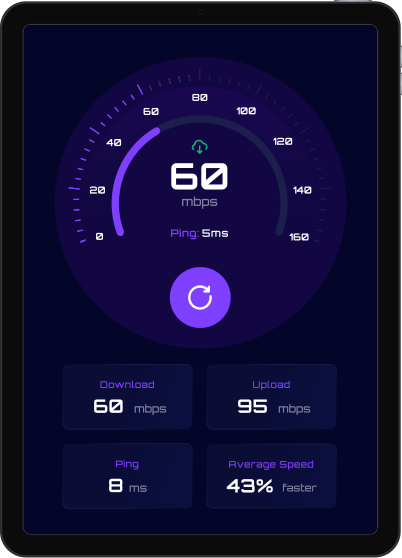
BoostNet is a free speed test app designed to instantly measure your internet performance. Get accurate results on download and upload speeds, along with average speed over time, helping you identify and troubleshoot connectivity issues with ease. Optimize your online experience by ensuring you’re always getting the speeds you pay for!



App Features
Discover the ease of one-click installation and enjoy our vast library of free, stunning 4K HD screensavers. Keep your screen fresh with regularly updated, captivating visuals!
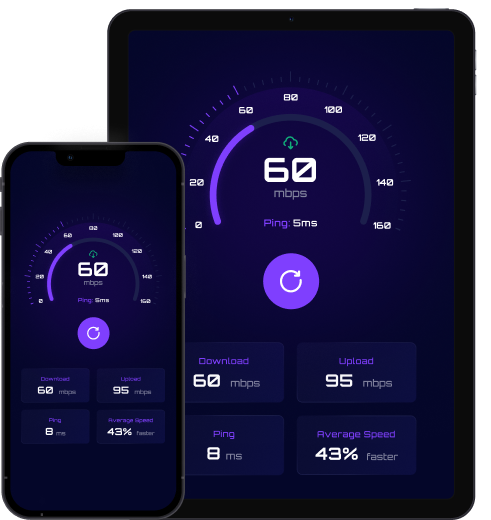
Access all powerful features and get unlimited speed tests without any cost.
Quickly measure your current download and upload speeds with a single tap.
View your average internet speed over time to monitor trends and identify inconsistencies.
Easily determine if your internet speed is meeting expectations or if there are potential connectivity problems.
Get the App
You can download the app from the link below
FAQ
What is Boostnet?
Boostnet is a free internet speed measurement application that allows you to test your internet connection speed, including download speed, upload speed, and latency.
What are the current available operating systems?
Bostnet is currently available on Huawei devices and LG TV platforms, with Tizen (Samsung Smart TV) and Windows versions coming soon.
Why is Boostnet free?
Boostnet is free because we have integrated our own SDK within the app. This SDK helps us extract and validate publicly available information on the internet, which supports the app’s operation without charging users. There are no hidden fees, in-app purchases, or subscription costs.
What information does Boostnet collect?
We do not track, store, or collect any other personal user information such as your name, email, browsing history, or device details beyond what’s necessary for speed testing. Boostnet only uses your IP address.
Is my privacy protected when using Boostnet?
Yes. We are committed to user privacy. The only identifier we collect is your IP address, which is necessary to perform internet speed tests. We do not track your personal activities or information.
Is Boostnet safe to use?
Yes, Boostnet is completely safe. Our SDK only extracts and validates publicly available information on the internet. We do not access your personal files, contacts, messages, or any sensitive data on your device.
We’re proud to have obtained certifications from trusted sources such as Appesteem, which can provide users with added confidence in our product.
What does the integrated SDK do?
Our SDK extracts and validates publicly available information from the internet. This process happens in the background and does not interfere with your device’s performance or access any of your private data. The SDK operation is what allows us to offer Boostnet for free.
Does Boostnet slow down my internet or device?
No. The SDK operates efficiently in the background with minimal resource usage. When you’re not actively running a speed test, Boostnet has negligible impact on your internet speed.
How accurate are Boostnet's speed tests?
Boostnet provides highly accurate speed measurements by testing your connection to nearby servers. For best results, ensure no other devices or applications are heavily using your internet connection during the test.
How do I use Boostnet?
Simply open the app and tap the “GO”. Boostnet will automatically measure your download speed, upload speed, and ping/latency. Results are displayed within seconds.
Can I test my speed multiple times?
Yes, you can run as many speed tests as you’d like. We recommend running multiple tests at different times of day to get a better understanding of your internet performance.
What do the speed test results mean?
- Download Speed: How fast data downloads to your device (measured in Mbps)
- Upload Speed: How fast data uploads from your device (measured in Mbps)
- Ping/Latency: Response time of your connection (measured in milliseconds – lower is better)
Why do my speed test results vary?
Internet speeds can fluctuate based on network congestion, time of day, number of connected devices, server location, and your ISP’s current performance. Multiple factors can affect your results.
Does Boostnet work on all internet connections?
Yes, Boostnet works with all types of internet connections including Wi-Fi, mobile data, fiber, DSL, and cable.
Do I need to create an account to use Boostnet?
No account creation is required. Simply download the app and start testing your internet speed immediately.
How much data does a speed test use?
A typical speed test uses a small amount of data, usually between 10-50 MB depending on your internet speed. The faster your connection, the more data is transferred during the test.No account creation is required. Simply download the app and start testing your internet speed immediately.
Can I use Boostnet offline?
No, an active internet connection is required to perform speed tests.
How can I contact support?
For support inquiries, please visit [email protected]. We’re here to help with any questions or issues you may experience.
