database mahasiswa

ANDI

Private Sub Text1_KeyPress(KeyAscii As Integer)
If KeyAscii = 13 Then
Text2.SetFocus
End If
LCase (Text1.Text)
End Sub

Private Sub Cmdpro_Click()
Dim s As String
Text5.Text = “20” & Left(Text2.Text, 2)
s = Mid(Text2.Text, 3, 1)
If s = “1” Then
s = “Sistem Informasi”
ElseIf s = “2” Then
s = “Manajemen Informasi”
ElseIf s = “3” Then
s = “Tekhnik Informasi”
End If
Text3.Text = s
b = Mid(Text2.Text, 4, 2)
If b = “00” Then
b = “strata 1”
ElseIf b = “01” Then
b = “Diploma 3”
ElseIf b = “02” Then
b = “Diploma 2”
End If
Text4.Text = b
Text6.Text = Right(Text2.Text, 3)
End Sub

Private Sub Cmdbaru_Click()
Data1.Recordset.AddNew
Text1.SetFocus
End Sub

Private Sub Cmdsim_Click()
Data1.Recordset.Update
Data1.Recordset.AddNew
Text1.SetFocus
Text1 = “”
Text2 = “”
Text3 = “”
Text4 = “”
Text5 = “”
Text6 = “”
End Sub

Private Sub Cmdhap_Click()
Data1.Recordset.AddNew
Text1.SetFocus
Text1 = “”
Text2 = “”
Text3 = “”
Text4 = “”
Text5 = “”
Text6 = “”
End Sub

Private Sub Cmdkel_Click()
Unload Me
End Sub
Private Sub Command6_Click()
Data1.Refresh
Text1.SetFocus
End Sub


Posted in Uncategorized | Leave a comment

TUGAS VISUAL BASIC KESEKIAN KALINYA

ALHAMDULILLAH,,AHAYDE TUGAS CLEAR…………. 🙂

ANDI

Private Sub Cmdlagi_Click()

txtnm.SetFocus
txtnm.Text = “”
txtnikText = “”
txtgol.Text = “”
txtjbt.Text = “”
txtgp.Text = “”
txttj.Text = “”
txtks.Text = “”
txtksta.Text = “”
txttg.Text = “”
txtbg.Text = “”
txttahun.Text = “”
End Sub

Private Sub Cmdpro_Click()
Dim jbt, bg As String
Dim gp, tj, tg As Currency
txttahun.Text = Left(txtnik.Text, 4)
G = Mid(txtnik.Text, 5, 1)
If G = “A” Then
G = “A”
jbt = ” KOMANDAN”
gp = “1000000000”
tj = “1000000”
ElseIf G = “B” Then
G = “B”
jbt = ” Seksi KEUANGAN”
gp = “40000000”
tj = “500000”
ElseIf G = “C” Then
G = “C”
jbt = “CREW”
gp = “30000000”
tj = “500000”
ElseIf G = “D” Then
G = “D”
jbt = ” Juru Parkir”
gp = “200000”
tj = “100000”
ElseIf G = “E” Then
G = “E”
jbt = ” Juru Kunci”
gp = “1000”
tj = “1000”
End If
txtgol.Text = G
txtjbt.Text = jbt
txtgp.Text = gp
txttj.Text = tj
KS = Mid(txtnik.Text, 7, 1)
If KS = “S” Then
KS = “S”
ksta = ” SINGGLE”
ElseIf KS = “B” Then
KS = “B”
ksta = “BERDUA”
ElseIf KS = “D” Then
KS = “D”
ksta = “DUDA”
ElseIf KS = “J” Then
KS = “J”
ksta = “JANDA”
ElseIf KS = “BA” Then
KS = “BA”
ksta = “BANYAK ANAK”
End If
txtks.Text = KS
txtksta.Text = ksta
tg = Val(txtgp.Text) + Val(txttj.Text)
txttg.Text = tg
B = Right(txtnik.Text, 3)
If B = “BOS” Then
txtbg.Text = “BOS ok”
ElseIf B = “ADM” Then
txtbg.Text = “ADMINISTRASI”
ElseIf B = “SDM” Then
txtbg.Text = “SUMBER DAYA MANUSIA”
ElseIf B = “EDP” Then
txtbg.Text = “IT UNIT”
ElseIf B = “SPM” Then
txtbg.Text = “KEAMANAN”
End If
End Sub

Private Sub Cmdulang_Click()
txtnm.SetFocus
txtnm.Text = “”
txtnik.Text = “”
End Sub

Private Sub Command4_Click()
Unload Me
End Sub
Private Sub txtnm_KeyPress(KeyAscii As Integer)
If KeyAscii = 13 Then
txtnik.SetFocus
End If
End Sub

Posted in Uncategorized | Leave a comment

Visual Basic # Huruf Mutu

Image
Private Sub Combo1_Click()
Dim nama, jurusan As String

Select Case Combo1.Text
Case “12100536”
nama = “RULLY ISTIAWAN”
jurusan = “ANDI ISWANTO”

Case “11100014”
nama = “”
jurusan = “SISTEM INFORMASI”

Case “11100156”
nama = “ADITYA”
jurusan = “MANAJEMEN INFORMATIKA”

Case “10100157”
nama = “VANESSA”
jurusan = “MANAJEMEN INFORMATIKA”
End Select

Text1.Text = nama

Text2.Text = jurusan

Text3.SetFocus

End Sub
Private Sub Command1_Click()

Dim kuis, tugas, uts, uas, na As Integer

Dim hm As String

kuis = Val(Text3.Text)

tugas = Val(Text4.Text)

uts = Val(Text5.Text)

uas = Val(Text6.Text)

na = Val(kuis + tugas + uts + uas) / 4

Text7.Text = na
Select Case Text7.Text
Case Is > 80
hm = “ASELOLE”

Case Is > 70
hm = “NIKMAT”

Case Is > 60
hm = “ENAK”

Case Is > 50
hm = “NIKMAT”

Case Is < 50
hm = “ENAK”
End Select
Text8.Text = hm
End Sub

Private Sub Command2_Click()
Unload Me
End Sub
Private Sub Command3_Click()
Combo1.Text = “”
Text1.Text = “”
Text2.Text = “”
Text3.Text = “”
Text4.Text = “”
Text5.Text = “”
Text6.Text = “”
Text7.Text = “”
Text8.Text = “”
End Sub

Private Sub Form_Load()
Combo1.AddItem “12100536”
Combo1.AddItem “11100014”
Combo1.AddItem “11100156”
Combo1.AddItem “10100157”
End Sub

Private Sub Label1_Click()

End Sub

Private Sub Text3_KeyPress(KeyAscii As Integer)
If KeyAscii = 13 Then
Text4.SetFocus
End If
End Sub

Private Sub Text4_KeyPress(KeyAscii As Integer)
If KeyAscii = 13 Then
Text5.SetFocus
End If
End Sub

Private Sub Text5_KeyPress(KeyAscii As Integer)
If KeyAscii = 13 Then
Text6.SetFocus
End If
End Sub


Posted in Uncategorized | Leave a comment

Visual Basic #8 Data Mahasiswa

untitled


Private Sub Cmdinput_Click()
Dim S As String
Txtth.Text = “20″ & Left(Txtnpm.Text, 2)
S = Mid(Txtnpm.Text, 3, 1)
If S = “1″ Then
Txtjur.Text = “Sistem Informasi”
ElseIf S = “2″ Then
Txtjur.Text = “Manajemen Informatika”
ElseIf S = “3″ Then
Txtjur.Text = “Tehnik Informatika”
ElseIf S = “4″ Then
Txtjur.Text = “Manajemen & Komp. Akuntansi”
End If
S = Mid(Txtnpm.Text, 4, 2)
If S = “00″ Then
Txtprog.Text = “Strata Satu”
ElseIf S = “02″ Then
Txtprog.Text = “Diploma Tiga”
ElseIf S = “03″ Then
Txtprog.Text = “Diploma Empat”
ElseIf S = “04″ Then
Txtprog.Text = “Diploma Dua”
End If
Txtnor.Text = Right(Txtnpm.Text, 3)
End Sub

Private Sub Cmdout_Click()
Unload Me
End Sub

Private Sub Cmdreset_Click()
Txtnm.SetFocus
Txtnm.Text = “”
Txtnpm.Text = “”
Txtjur.Text = “”
Txtprog.Text = “”
Txtth.Text = “”
Txtnor.Text = “”
End Sub

Private Sub Txtnm_Keypress(KeyAscii As Integer)
If KeyAscii = 13 Then
Txtnpm.SetFocus
End If
End Sub

Private Sub Txtnpm_KeyPress(KeyAscii As Integer)
If KeyAscii = 13 Then
Cmdinput.SetFocus
End If
End Sub

Posted in Uncategorized | Leave a comment

Visual Basic #7

untuk yang satu ini perpaduan gaji dan nama karyawan 

untitled


Private Sub cbogolongan_Click()
Dim gapok, pajak, tunjangan, total As Variant
Select Case Cbogolongan.Text
Case “I”
gapok = 1500000
tunjangan = 150000
Case “II”
gapok = 2000000
tunjangan = 200000
Case “III”
gapok = 2500000
tunjangan = 250000
Case “IV”
gapok = 3000000
tunjangan = 300000
Case Else
gapok = 0
tunjangan = 0
End Select
total = gapok + tunjangan
pajak = total * 0.1
txtgapok.Text = gapok
txttunjangan.Text = tunjangan
txtpajak.Text = pajak
txttotal.Text = total – pajak
End Sub
Private Sub Cmdbatal_Click()
kosong
End Sub

Private Sub Cmdkeluar_Click()
Unload Me
End Sub
Private Sub Cmdlagi_Click()
kosong
End Sub
Private Sub Form_load()
Cbogolongan.AddItem “I”
Cbogolongan.AddItem “II”
Cbogolongan.AddItem “III”
Cbogolongan.AddItem “IV”
End Sub

Public Sub kosong()
txtnidn.Text = Clear
txtnama.Text = Clear
Cbogolongan.Text = Clear
txtgapok.Text = Clear
txttunjangan.Text = Clear
txtpajak.Text = Clear
txttotal.Text = Clear
txtnidn.SetFocus
End Sub

 Private Sub txtnidn_keypress(keyascii As Integer)

If keyascii = 13 Then
txtnama.SetFocus
End If
End Sub

Posted in Uncategorized | Leave a comment

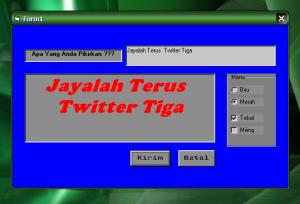
visual basic tugas #6

saya menyebutkan visual basic program tulis keinginan anda

seperti gambar dibawah ini

untitled

Untuk membuat program seperti diatas  mosukan kode listing dibawah ini…

Private Sub Check1_Click()
Label2.FontBold = Check1.Value
End Sub

Private Sub Check2_Click()
Label2.FontItalic = Check2.Value
End Sub

Private Sub Command1_Click()
Label2.Caption = Text1.Text
End Sub

Private Sub Command2_Click()
End
End Sub

Private Sub Option1_Click()
Label2.ForeColor = vbBlue
End Sub

Private Sub Option2_Click()
Label2.ForeColor = vbRed
End Sub

Private Sub Text1_Change()

End Sub

Posted in Uncategorized | Leave a comment

Tugas Visual Basic Twiter 3


images

berikut adalah listing code tugas visual basic,,,
PERHITUNGAN HARGA SETELAH DISKON 10 %

Private Sub Cmdhtg_Click()

Txtdskn.Text = Val(Txthrg.Text) * 0.2

Txtbyr.Text = Val(Txthrg.Text) – Val(Txtdskn.Text)

End Sub

Private Sub Cmdagain_Click()

Txthrg = “”

Txtdskn = “”

Txtbyr = “”

End Sub

Private Sub Cmdout_Click()

End

End Sub

Continue reading

Posted in Uncategorized | Leave a comment

KULIAH ITU…

Kuliah adalah bagian yang tidak terhindarkan dalam sebuah proses belajar. Kuliah adalah sebuah proses satu arah dalam transfer ilmu, dari yang memberi kuliah, guru atau dosen, kepada murid. Kuliah bisa jadi adalah pintu masuk pertama dari sebuah pembelajaran. Continue reading

Posted in Uncategorized | Leave a comment

BERSAMA KAWAN-KAWAN

643933_4147436879807_672187549_n

Posted in Uncategorized | Leave a comment

MIRAS

DAMPAK MINUMAN BERALKOHOL

Pada jumlah yang sangat terbatas seperti dilakukan oleh masyarakat di dalam acara keluarga, upacara keagamaan seperti pesta perkawinan, syukuran, atau penyambutan tamu keluarga dalam santap malam, minuman keras tidak akan membawa bahaya. Akan tetapi jika diminum dalam jumlah yang berlebihan, bukan saja bahaya yang timbul serta berkembang menjadi keributan, bahayabahaya lainnya siap menanti. Continue reading

Posted in Uncategorized | Leave a comment