-
-
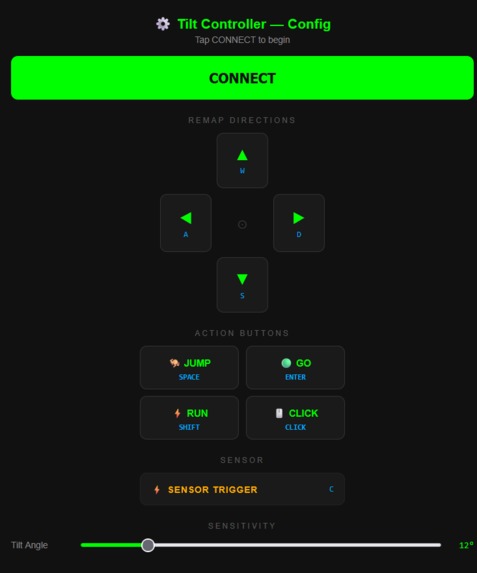
Computer Dashboard Display
-
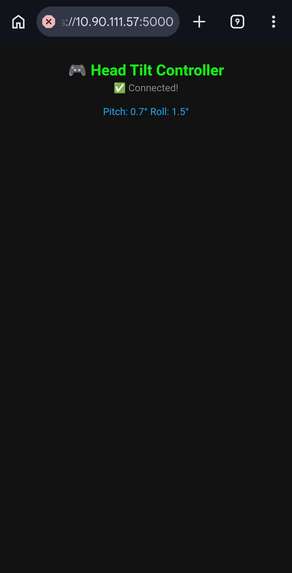
Phone display for IMU dashboard
-
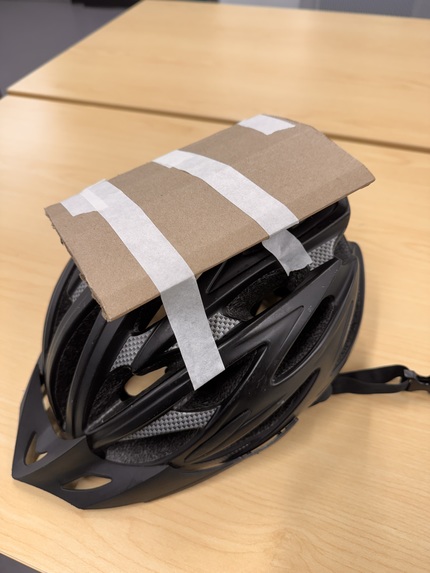
Helmet Used for IMU
-
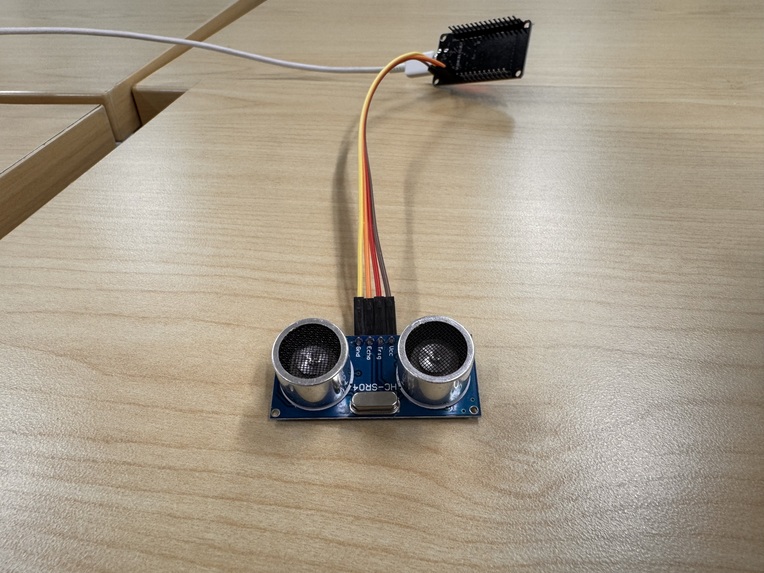
Arduino Ultrasonic Sensor Used


Inspiration
In the early hours of TechHack, we stopped by the GT Tools for Life table, and left with a story we couldn't shake off. RockyNoHands was paralyzed from the neck down at 19. Rather than walking away from the games he loved, he found a way back. He didn't just play, he dominated. He became a competitive gamer, a streamer, and a two-time Guinness World Record holder in Fortnite. His story forced us to confront something uncomfortable: the tools hadn't kept up with the player. The entire gaming industry had implicitly decided that a standard controller was the only valid interface, and that anyone who couldn't use one simply didn't get to play. Pondering upon that, we strongly disagreed. And we only had a day to do something about it.
What it does
AdaptLink is a real-time, multi-modal adaptive game controller that translates head movement, proximity, and voice into standard keyboard inputs — making any PC game playable without hands.
- Head Tilt via iPhone IMU: We exploit the gyroscope already built into any modern Phone, streaming DeviceOrientation data at 50Hz over a secure WebSocket connection. Pitch and roll angles are filtered against a configurable dead zone, calibrated to the user's neutral head position, and mapped to directional keypresses in real time. Every direction is remappable and sensitivity is adjustable live from the phone UI — no code, no config files.
- Proximity Action Trigger via ESP32 + HC-SR04 — An ESP32 microcontroller continuously pings an HC-SR04 ultrasonic sensor, measuring distance via the time-of-flight of reflected sound waves. When the user's head crosses a configurable distance threshold, the server fires a keypress. Leaning forward becomes a button press. The threshold is tunable — giving users with different ranges of motion a consistent, reliable trigger.
- Voice Commands via ElevenLabs Scribe v2 — Rather than fixed-interval recording (which cut off words and sent silence), we built a full Voice Activity Detection pipeline. We continuously poll microphone input in 300ms chunks, compute RMS loudness in floating point (integer math overflowed when squaring 16-bit samples), and begin buffering only when speech is detected. Recording ends after a configurable silence window. The audio is sent to ElevenLabs Scribe v2 for transcription, and the result is matched against a user-defined command dictionary. A second ElevenLabs TTS call speaks back confirmation — closing the feedback loop.
All three streams are handled by a single async Python WebSocket server. Every input translates to a pyautogui keypress — invisible to the game, compatible with everything.
How we built it
- Signal pipeline: The iPhone's DeviceOrientation API provides beta (pitch) and gamma (roll) in degrees. We stream this at ~50Hz over wss://. The Python server applies a calibration offset and dead zone filter before mapping to keypresses.
- Ultrasonic firmware: The ESP32 sketch triggers the HC-SR04 with a 10μs HIGH pulse on GPIO 13, reads the echo duration on GPIO 12, and converts to centimeters using duration × 0.034 / 2. It streams distance readings over serial at 40ms intervals. On the server side, we threshold this against a configurable proximity value.
- Voice Activity Detection: We use sounddevice to open a continuous InputStream at 16kHz mono — a single persistent stream rather than repeatedly opening and closing the mic (which caused audible clicks). Each 300ms chunk is evaluated with floating-point RMS: (chunk.astype(float32) ** 2).mean() ** 0.5 / 32768. Speech onset triggers buffering; sustained silence ends it. The WAV buffer is sent to ElevenLabs Scribe v2 via their Python SDK.
- Unified async server: asyncio + websockets runs three concurrent WebSocket listeners on separate ports — one for the iPhone, one for the ESP32, and one for the browser dashboard. All three write into shared mutable state that pyautogui reads from the main thread.
Challenges we ran into
- Phone gyroscope access requires HTTPS — with no helpful error message. Web broswers silently block DeviceOrientationEvent on non-secure origins. What looked like a sensor failure was actually a certificate issue. We built a local HTTPS server with a self-signed SSL cert using pyOpenSSL, then separately had to get the Phone to trust the cert for the WebSocket port — which required serving a dummy HTTP page on a second port so Safari could prompt the user to accept it.
- Voice activity detection required rebuilding from scratch. Our first approach used fixed-interval recording — it cut off words mid-sentence, sent pure silence, and was inconsistent. Switching to VAD introduced a new bug: our RMS calculation overflowed because squaring 16-bit PCM samples as integers exceeds int32 range. We rewrote the calculation in float32. Then the silence detection window was too short, ending utterances before the speaker finished. Then thresholds that worked on one microphone failed on another. Each fix revealed the next problem.
- Keeping the game window in focus. pyautogui sends keypresses to whatever window is active. Any tap on the phone UI, terminal, or browser silently breaks control. We worked around this with careful UI design — the phone controller hides itself after connecting — but it's a fundamental limitation of keyboard emulation that a virtual controller driver would solve.
- Synchronizing three independent async streams. IMU data arrives at 50Hz. Ultrasonic at 25Hz. Voice is event-driven and unpredictable. Shared mutable state with asyncio required careful design to avoid race conditions between streams fighting over the same key.
Accomplishments that we're proud of
- Built a zero-cost adaptive controller from hardware people already own — the only required component is a smartphone
- Solved a non-obvious Phone HTTPS/gyroscope access problem under time pressure with no prior experience in mobile SSL
- Engineered a full VAD audio pipeline from scratch — onset detection, floating-point RMS, configurable silence windowing, and async ElevenLabs integration
- Unified three physically different input modalities — optical, inertial, and acoustic — into a single latency-optimized Python server
- Made the system genuinely reprogrammable without code — direction remapping, key binding, and sensitivity tuning are all accessible from the phone UI
- Built something that works with any PC game, unmodified; from the game's perspective, it's just a keyboard
What we learned
- Browser security policies (like iOS requiring HTTPS for sensor access) create invisible failure modes that look like hardware bugs
- Robust audio capture is harder than it looks: VAD, buffer management, integer overflow, and device variance are all real problems at 16kHz
- The distance between "technically working" and "actually usable" is enormous in accessibility hardware (threshold tuning and calibration UX matter as much as the core functionality)
- Async architecture is essential when combining streams with different timing characteristics — blocking one stream blocks everything
What's next for AdaptLink
- Virtual controller emulation via vJoy or ViGEm — enabling PlayStation and Xbox compatibility without keyboard emulation
- Eye tracking integration using webcam-based gaze estimation for users without head mobility
- On-device ESP32 WebSocket server to eliminate the need for a tethered PC during sensor setup
- Per-user calibration profiles: saved configurations for different users and games
- Latency optimization — investigate BLE HID for sub-10ms input latency vs. current WebSocket approach
- Custom 3D-printed mounting hardware designed for wheelchairs and standard headbands
Built With
- android
- elevenlabs-api
- esp32
- flask
- hc-sr04
- html/css
- iphone-imu
- javascript
- openssl
- pyautogui
- python
- websockets


Log in or sign up for Devpost to join the conversation.