-
-
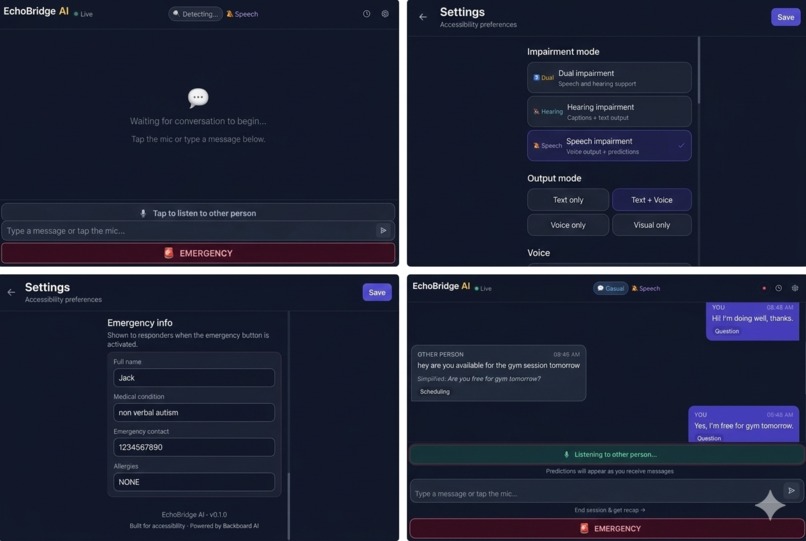
UI/UX

EchoBridge AI
Real-Time Communication Bridge for Speech & Hearing Impairments
Inspiration
Over 1.5 billion people worldwide live with some form of hearing or speech impairment. For many of them, everyday conversations — at the doctor's office, at a store checkout, with a new colleague — carry a hidden tax: the gap between hearing something and being able to respond. Existing AAC (Augmentative and Alternative Communication) tools are slow, clinical, and isolating. A person types one letter at a time while the other person waits, increasingly uncomfortable. The conversation dies.
We wanted to change that. Not by building another keyboard — but by building a bridge: a system that understands context, anticipates what you want to say, and lets you respond in seconds instead of minutes.
The target: reduce average response latency from 30s to under 3s.
What It Does
EchoBridge AI is a real-time communication assistant that works in three steps:
1. Listen — A microphone captures what the other person is saying. Google Speech-to-Text transcribes it in real time, streaming partial transcripts word by word.
2. Predict — While the other person is still speaking, EchoBridge runs a 5-stage AI pipeline that detects conversation context, understands intent, and generates 5 ranked reply suggestions ordered by confidence.
3. Respond — The user taps a reply tile. Their chosen response is spoken aloud via ElevenLabs TTS. Or they can type their own response.
Key Features
- Streaming predictions — tiles appear and update while the other person is still talking, ready the instant speech ends
- Context detection — automatically adapts to medical appointments, retail interactions, professional meetings, and emergencies
- Emergency mode — one-tap broadcast of contact info and a pre-configured message
- Session recap — AI-generated summary of topics and action items
- Pacing alerts — notifies when the other person speaks above 180 WPM
- Multiple output modes — voice only, text + voice, text only, or visual only
How We Built It
Architecture
The backend is a FastAPI + WebSocket server running a 5-stage async pipeline:
PARTIAL_SPEECH → Router → Speech → Context → Predictions → Output
Each stage is an independent agent that degrades gracefully if its service is unavailable. The pipeline runs non-blocking via asyncio.create_task() so new messages never wait for a prior pipeline to complete.
Router Agent — Keyword-scores the last 5 messages across domains (medical, retail, emergency, professional) to detect context.
Speech Agent — Removes filler words, calculates WPM, triggers pacing alerts above 180 WPM.
Context Agent — Sends conversation history to Backboard AI to extract simplified text, intent classification, and urgency level.
Prediction Agent — Generates 6 ranked reply options. Partial predictions use word-count staging:
SPECULATIVE— fewer than 5 words heardLIKELY— 5 to 10 words heardCONFIDENT— more than 10 words heard
Confidence stage drives tile opacity in the UI.
- Output Agent — Runs ElevenLabs TTS if voice mode is active, saves transcript to Supabase, assembles the final
PipelineOutput.
Frontend
Next.js + TypeScript + TailwindCSS communicates over a persistent WebSocket. Optimistic messages appear in the chat instantly — the backend result replaces them when the pipeline completes, keeping the UI responsive regardless of server latency.
Deployment
- Backend: Python 3.12, gunicorn + UvicornWorker, systemd service on a Vultr Ubuntu VPS
- Frontend: Next.js behind nginx with path-based routing (
/api/*and/ws/*→ backend port 8000,/*→ frontend port 3000) - HTTPS: Cloudflare Tunnel for zero-config SSL, enabling microphone access in the browser
Challenges We Faced
Latency is everything. The entire value proposition collapses if predictions arrive after the other person finishes talking. We attacked latency at every layer:
- Partial transcript streaming: predictions begin generating after the first few words, not at end-of-utterance
- Non-blocking pipeline:
asyncio.create_task()means the WebSocket receive loop never stalls on a slow inference call - Optimistic UI: messages appear in the chat immediately, before the backend responds
commitStreamingPredictions(): when speech ends, partial predictions are immediately promoted to final state — zero visual gap between listening and responding
The skip_predictions trap. An early skip_predictions flag was added to suppress tile updates on typed messages. It backfired: it wiped all prediction tiles at exactly the wrong moment — when the other person finished speaking. The fix was removing the flag entirely and letting the pipeline always produce predictions.
WebSocket reliability. Mid-session disconnects are fatal in this use case. We built a reconnect-safe ConnectionManager that preserves full session state across reconnects, with a visual banner so the user never loses conversational context.
Speaker attribution. When both parties are transcribed, every message showing "Other person" is disorienting. Correctly threading the speaker field from the frontend mic hook through the WebSocket payload, Pydantic schema, each pipeline agent, and out to the transcript required coordinated changes across 6 files.
What We Learned
- Real-time AI products live and die by perceived latency, not actual latency. Optimistic UI and streaming partials make a 2s pipeline feel instant.
- Graceful degradation matters. Every agent returns a reasonable result even if its external service fails. The app is usable without any API keys.
- Accessibility UX is genuinely hard. Tile size, font weight, confidence opacity, the "★ Best" badge — every micro-decision either reduces or adds cognitive load for someone already under pressure in a live conversation.
What's Next
- Named Cloudflare Tunnel + custom domain for a permanent production URL
- Auth0 integration for persistent user profiles across devices
- Sentence completion within tiles (not just full reply suggestions)
- Haptic feedback on mobile when predictions are ready
- Offline mode with on-device STT for environments without internet
Built With
- backboard
- bash
- cloudfare
- cloudinary
- elevenlabs
- fastapi
- gunicorn
- next.js
- nginx
- pydantic
- python
- react
- rest
- supabase
- systemd
- tailwindcss
- typescript
- vultr
- websocket


Log in or sign up for Devpost to join the conversation.