
Description
Instant Image Generator is the most powerful and complete image management plugin for WordPress. Stop wasting time searching for images across multiple websites, downloading them to your computer, and re-uploading to WordPress. With Instant Image Generator, you can search, preview, and import millions of free images directly into your WordPress Media Library — all without ever leaving your dashboard.
🔍 Search across 5+ image sources including Pixabay, Pexels, Unsplash, Openverse, and Giphy — all from a single, unified search bar. Or use the AI-powered image generation with OpenAI DALL·E and Google Gemini Imagen to create completely unique images from text descriptions.
USEFUL LINKS 👇
🚀 Why Instant Image Generator?
Finding the right image for your blog post, page, or product shouldn’t be a chore. Traditional workflows require you to open a new tab, search a stock photo website, download the image, switch back to WordPress, upload it, and then insert it. That’s 6 steps for a single image.
With Instant Image Generator, it’s just 2 steps: Search Import. Done.
Whether you’re a blogger crafting your next viral post, an agency building client websites, a WooCommerce store owner adding product images, or a content creator who needs fresh visuals daily — this plugin transforms your workflow and saves you hours every week.
Instant Image Generator integrates seamlessly into both the WordPress Media Library page and the WordPress Media Modal (the popup that appears when you click “Add Media” or set a Featured Image). This means you can access millions of images from anywhere in WordPress — while editing a post, creating a page, or managing your media.
✨ Key Features
🔍 Global Search — One Search, All Sources
Search across all enabled image providers simultaneously with the Global Search tab. Type your keyword once, and instantly see results from Pixabay, Pexels, Unsplash, Openverse, and Giphy combined in a beautiful masonry grid. No more switching between tabs — find the perfect image faster than ever.
📸 5+ Free Image Sources
Access millions of royalty-free, high-quality images from the world’s best stock photo libraries:
- 🟣 Pexels — Beautiful free stock photos curated by talented creators
- 🟢 Pixabay — Over 4.2 million free stock photos, illustrations, and vectors
- ⬛ Unsplash — The internet’s source for freely-usable high-resolution photos
- 🟠 Openverse — Open-licensed images from WordPress, Flickr, NASA, Wikimedia, and 10+ more sources
- 🎬 Giphy — The world’s largest library of animated GIFs with smart animation control
🤖 AI Image Generation
Create completely unique, one-of-a-kind images using artificial intelligence:
- OpenAI DALL·E — Generate stunning AI images from text prompts using OpenAI’s latest image generation model
- Google Gemini Imagen 3.0 — Create photorealistic images with Google’s cutting-edge Imagen 3.0 model with customizable size (512px to 2048px) and batch generation (1-4 images)
⬇️ One-Click Import to Media Library
Every image you find can be imported directly to your WordPress Media Library with a single click. No downloading, no uploading, no FTP — just click “Import” and the image appears in your Media Library instantly, ready to use in posts, pages, and products.
🖼️ WordPress Media Modal Integration
Access Instant Image Generator directly from the WordPress Media Modal — the popup that appears when you set a Featured Image, add media to a post, or use any media selector. A dedicated “Instant Images” tab appears right alongside “Upload Files” and “Media Library” for seamless workflow integration.
🏷️ Smart Image Metadata
When importing images, the plugin automatically sets:
- Alternative Text — Image title from the source for better SEO and accessibility
- Image Title — Human-readable title for organization
- Caption with Attribution — “Photo by [Author Name]” for proper credit
- Each metadata field can be individually enabled or disabled in General Settings
🎛️ Advanced Filtering
Every image source has provider-specific filters to help you find exactly what you need:
- Pixabay — Filter by Order (Popular/Latest), Type (Photo/Illustration/Vector), Category (20+ categories), Color (14 colors with visual swatches), and Orientation
- Openverse — Filter by Source (WordPress, Flickr, NASA, SpaceX, Wikimedia, and 10+ more) and Orientation (Square/Tall/Wide)
- Unsplash — Filter by Order (Latest/Relevant)
- Pexels — Curated photo collections
- Giphy — Trending GIFs
🎬 GIF Animation Control
Giphy GIFs are displayed as still thumbnails by default to save bandwidth and reduce visual noise. Simply hover over any GIF to see it animate. A visual “GIF” badge indicates animated content. Preview modal shows the full-size animated version.
📋 Batch Selection & Import
Need multiple images at once? Use the batch selection feature to select multiple images across any provider, then import them all to your Media Library in one operation with a beautiful progress indicator.
❤️ Favorites & Bookmarks
Found an image you love but don’t need right now? Add it to your Favorites with one click. Your bookmarked images are saved locally and accessible anytime from the dedicated Favorites tab.
🔍 Search History
Your recent searches are automatically saved and displayed as suggestions when you click the search bar. Navigate search history with keyboard arrows and select with Enter for lightning-fast repeat searches.
👁️ Full-Size Image Preview
Click any image to open the preview modal with a large, high-resolution view. The modal features:
- Full-size image display on a dark background
- Sidebar with title, author info, and action buttons
- Previous/Next navigation with keyboard arrow keys
- Multiple import options (Original, Downsized, etc.)
- Add to Favorites button
- View Original source link
⚙️ Comprehensive Dashboard Settings
General Settings:
* Max Image Upload Width & Height
* Default Provider selection
* Alternative Text auto-fill toggle
* Image Title auto-fill toggle
* Image Attribution (Caption) toggle
* Media Modal tab visibility
Display Settings:
* Default View Mode (Grid/List)
* Items Per Page (20-100 with slider)
* Thumbnail Size (Small/Medium/Large)
* Load More Mode (Auto Scroll / Manual Button)
Image Sources:
* Enable/disable individual providers
* Drag-and-drop provider ordering
* Global Search on/off toggle
* Provider order reflects in Image Generator tabs
Custom Image Sizes:
* View all WordPress registered image sizes
* Add custom image sizes with Name, Width, Height, and Crop
* Delete custom sizes (WordPress defaults are protected)
🎨 Beautiful, Modern UI
Built with React and Tailwind CSS, the plugin features a stunning, responsive interface that looks great on any screen size. Professional card-based layouts, smooth transitions, color-coded provider tabs, masonry image grids, and skeleton loading states provide a premium user experience.
🔒 Secure & Lightweight
- All API communications secured with WordPress nonces
- API keys stored securely in WordPress options
- No external tracking or analytics
- Loads assets only where needed
- Clean, optimized React bundle
🏆 Perfect For
- 📝 Bloggers — Find the perfect header image in seconds
- 🏢 Agencies — Build client websites faster with instant image access
- 🛒 WooCommerce Stores — Add product images without leaving WordPress
- 📰 News & Magazine Sites — Source images for articles quickly
- 🎨 Designers — AI-generate unique visuals from text descriptions
- 📱 Social Media Managers — Find trending GIFs and images instantly
- 👨💻 Developers — Add placeholder images during development
Checkout our other Plugins 👑
Explore the best free addons for Elementor and Gutenberg to boost your site with advanced blocks, sliders and eCommerce tools.
-
Element Pack – Build responsive websites from scratch with an all-rounder package of 300+ widgets and 2700+ ready-to-use assets for Elementor.
-
Prime Slider – The revolutionary slider builder addon for Elementor with a next-gen superb interface and 50+ unique slider designs.
-
Ultimate Post Kit – Best blogging addon for building a quality blogging website with fine-tuned post layouts, carousels, sliders and lists.
-
Ultimate Store Kit – The only eCommerce addon for answering all your online store design problems in one package for WooCommerce and EDD.
-
Pixel Gallery – The first Elementor-based WordPress gallery addon offering 60+ flexible and customizable gallery builder widgets.
-
ZoloBlocks – Mind-blowing dynamic block plugin for Gutenberg with powerful and advanced features offering a greater web design experience.
-
Augmented Reality Viewer – Bring your products to life with immersive 3D and AR experiences directly inside your WordPress website.
-
Dark Reader – Instantly transform your website into a sleek, eye-friendly dark mode experience with smooth and elegant styling.
-
Instant Image Generator – Generate AI-powered images or import visuals instantly from popular platforms like Unsplash, Openverse, Pixabay, Pexels and Giphy — all from one place.
-
Live Copy Paste – Seamlessly copy and paste sections, widgets and entire pages across domains with zero hassle.
-
One Accessibility – Make your website inclusive and accessible to everyone with essential accessibility enhancements and compliance-ready tools.
-
QR Code Generator & Scanner – Create and manage dynamic QR codes directly from your WordPress dashboard for smarter engagement and tracking.
-
Smart Admin Assistant – Enhance your WordPress dashboard with productivity-focused tools and smart site management features.
-
Spin Wheel – Engage visitors with an interactive spinning wheel that offers discounts, coupons and promotional rewards.
-
Swift Checkout for WooCommerce – Simplify the WooCommerce checkout process to improve user experience and boost conversion rates.
Visit BdThemes to learn about our services, Elementor page builder-based products, informative blogs and documentation.
Screenshots
Instant Image Generator Overview 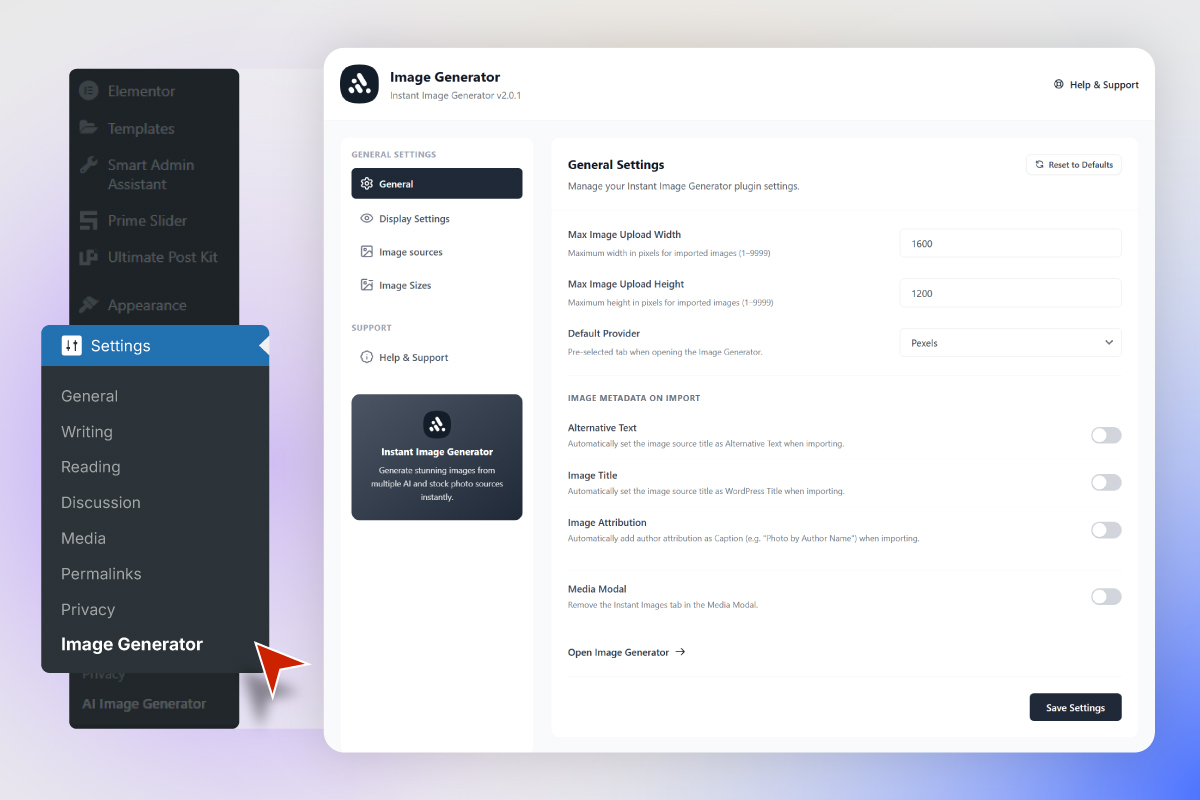
Admin Dashboard — General Settings 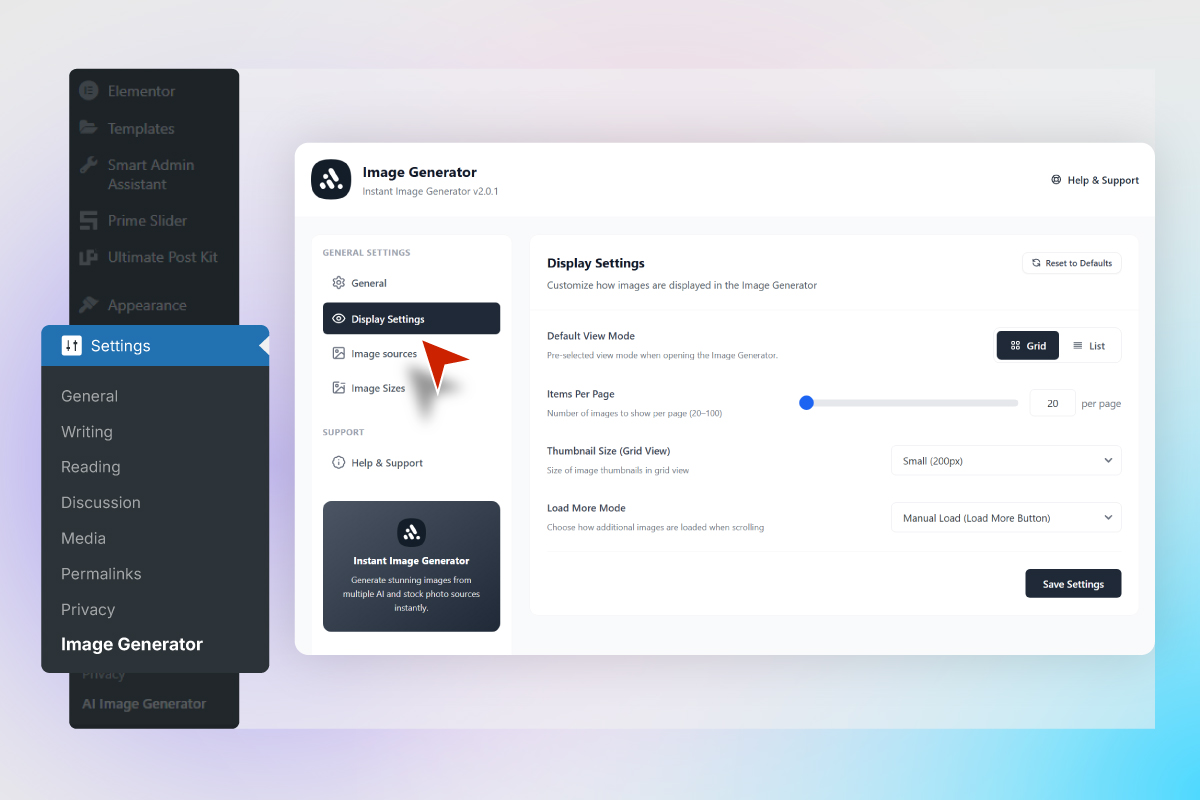
Admin Dashboard — Display Settings 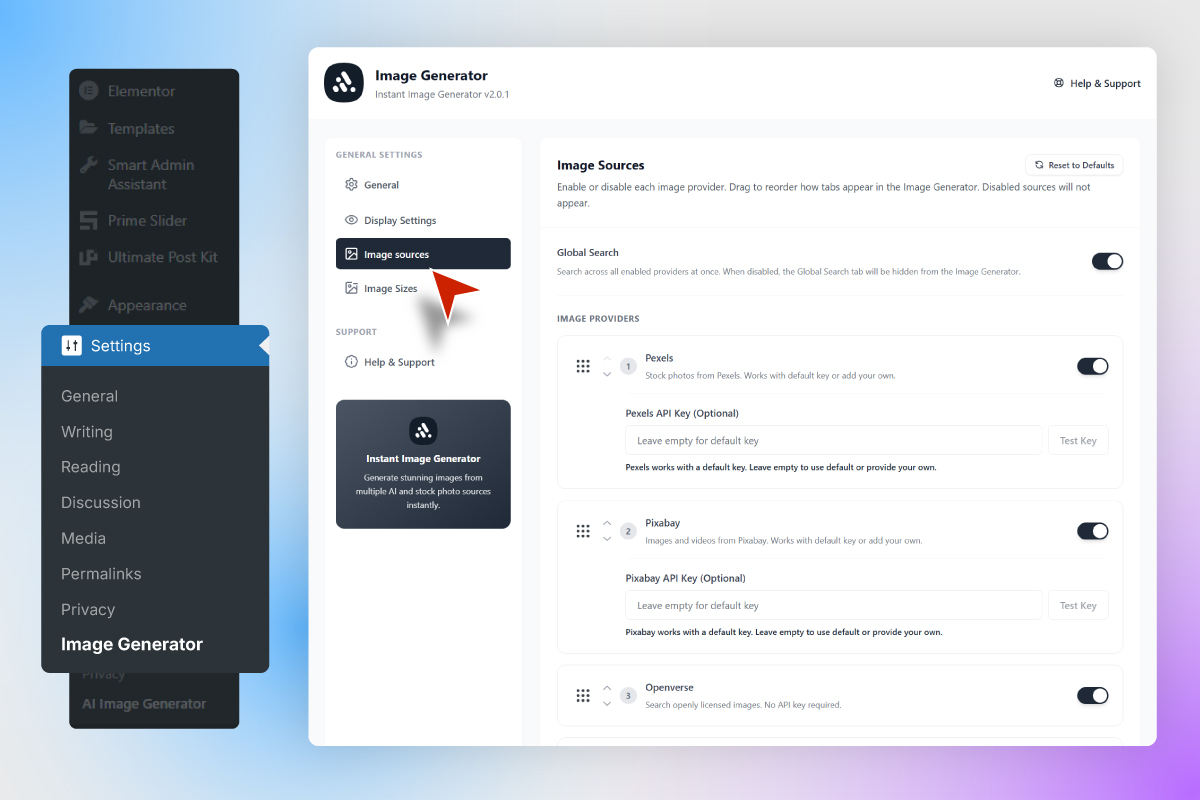
Admin Dashboard — Image Sources with Drag & Drop Ordering 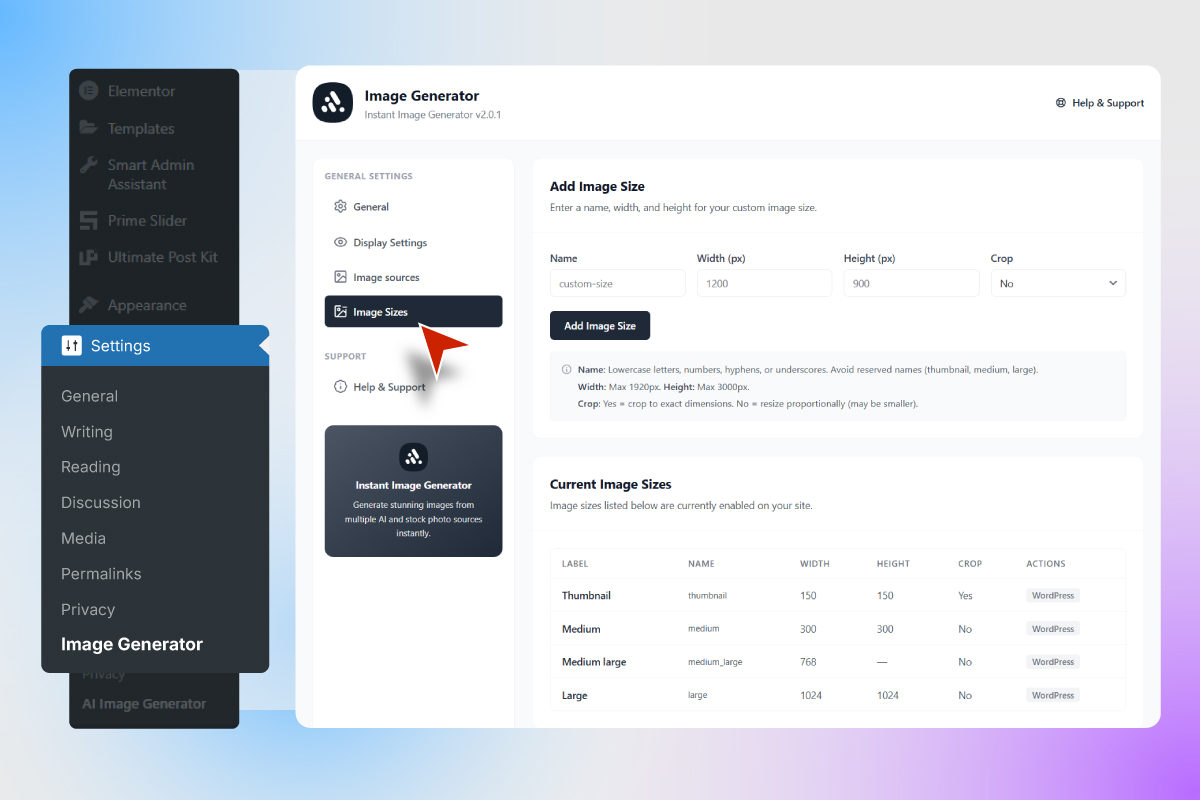
Custom Image Sizes Management 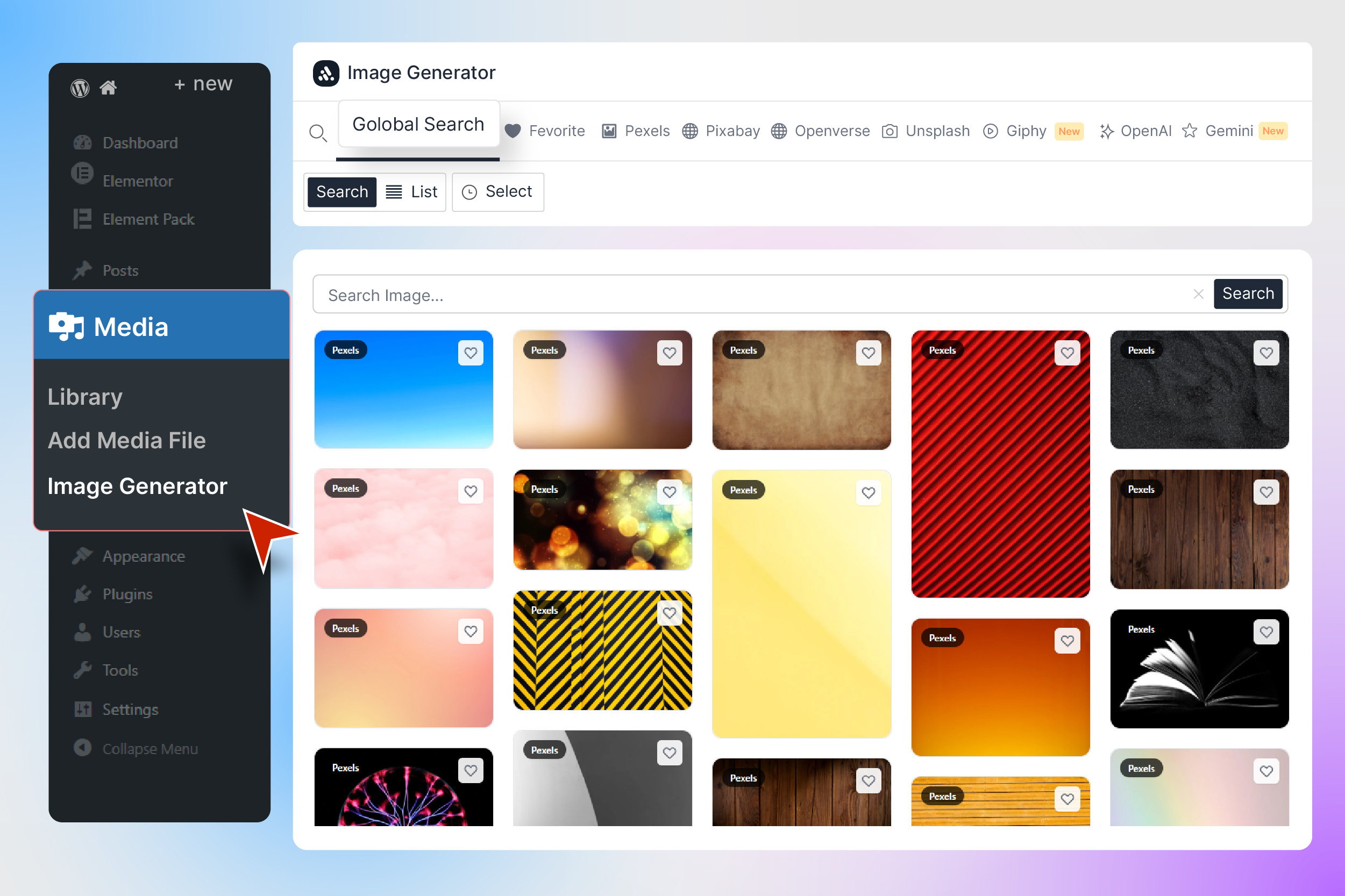
Global Search — Search across all image providers at once 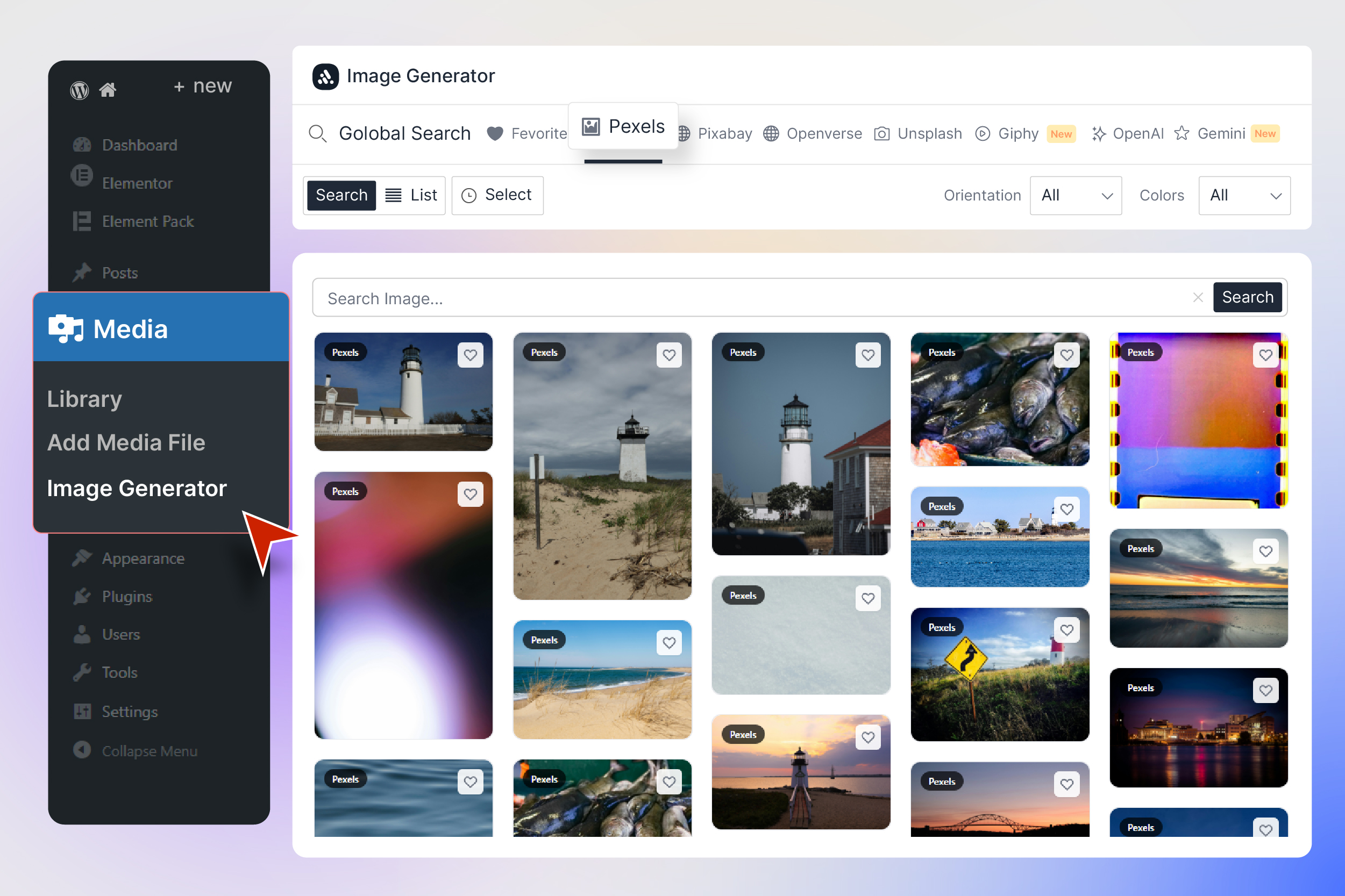
Image Generation with Pexels Layout 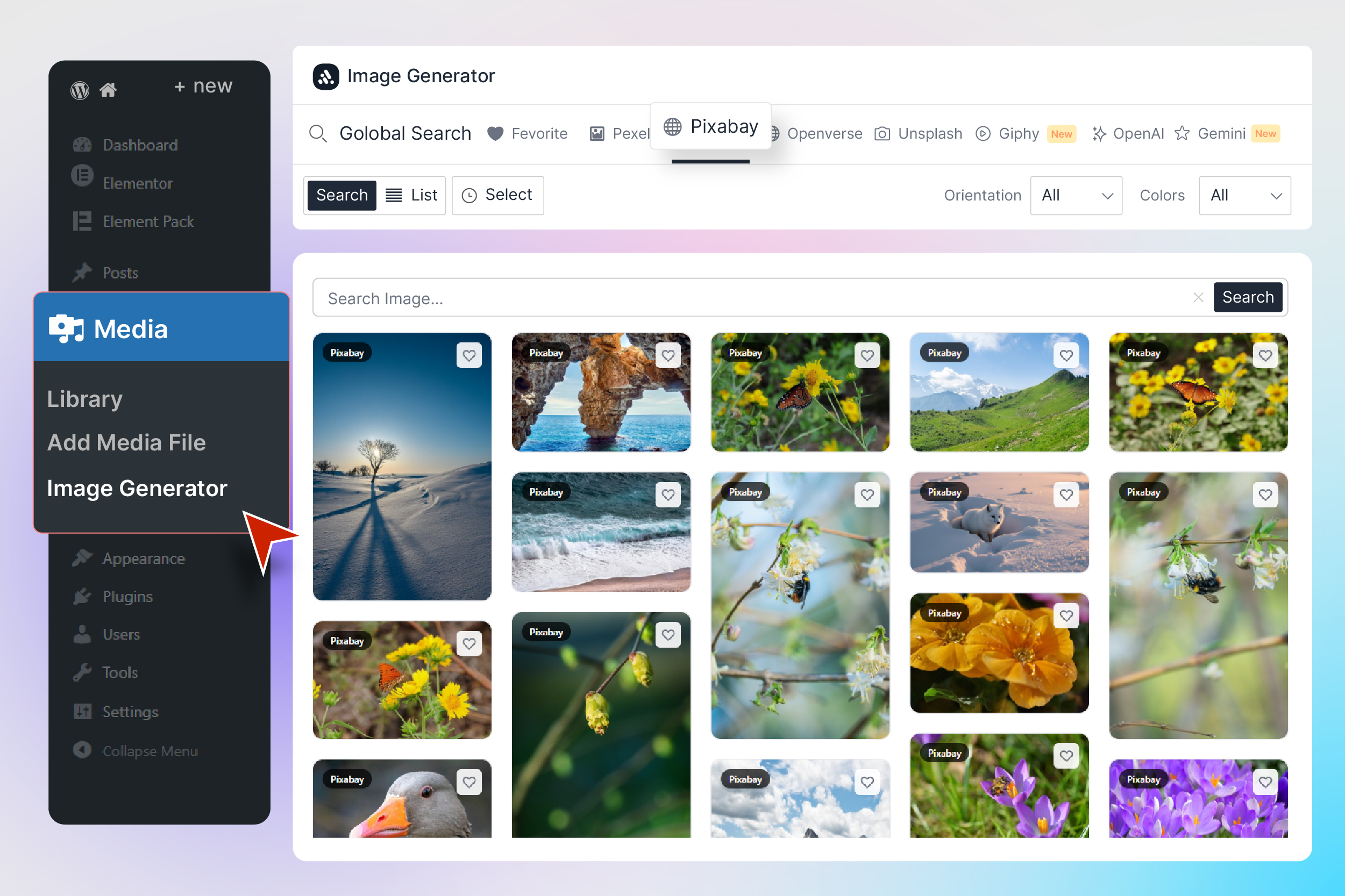
Pixabay Advanced Filters (Order, Type, Category, Color, Orientation) 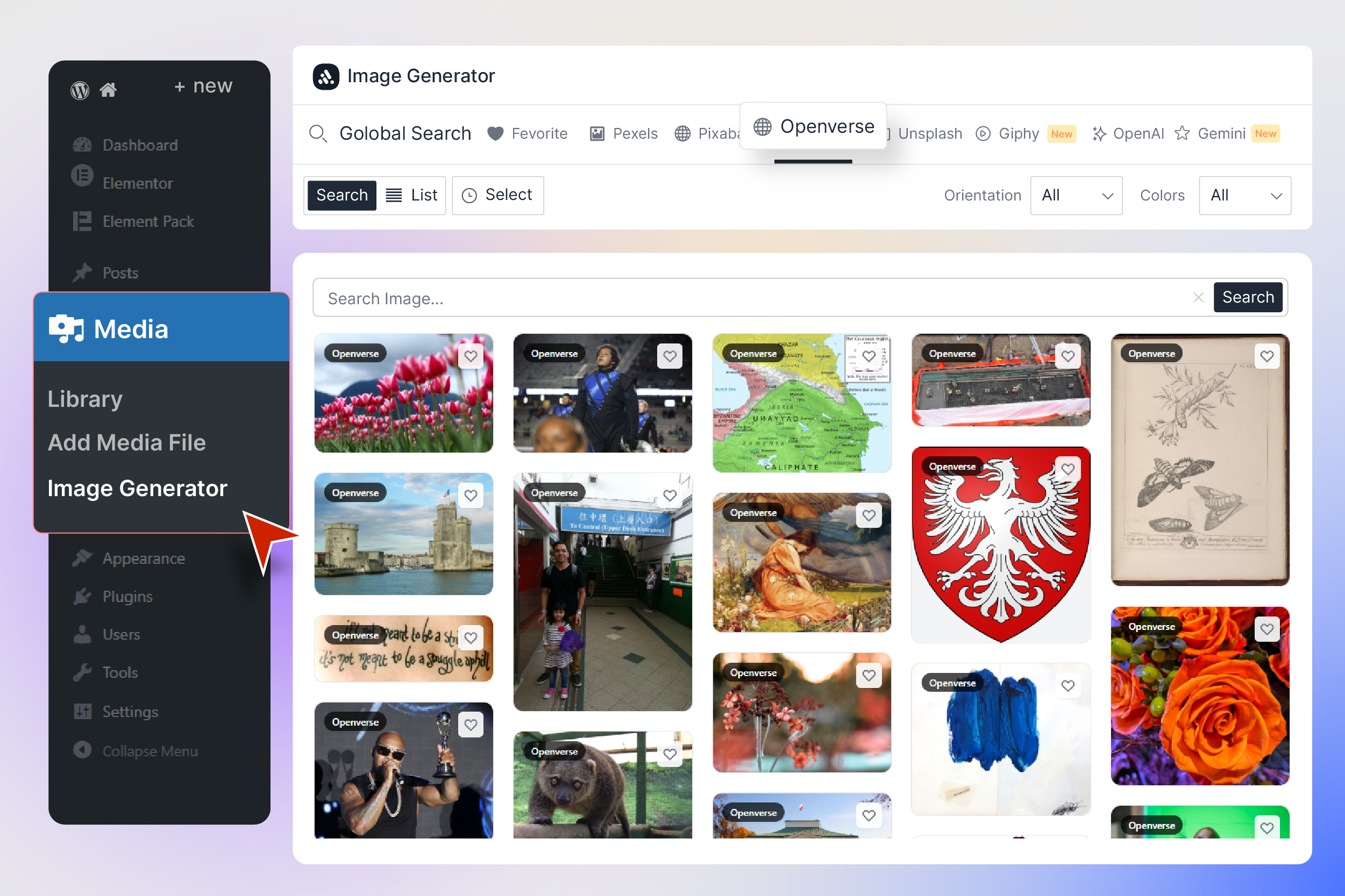
AI Image Generation with Openverse 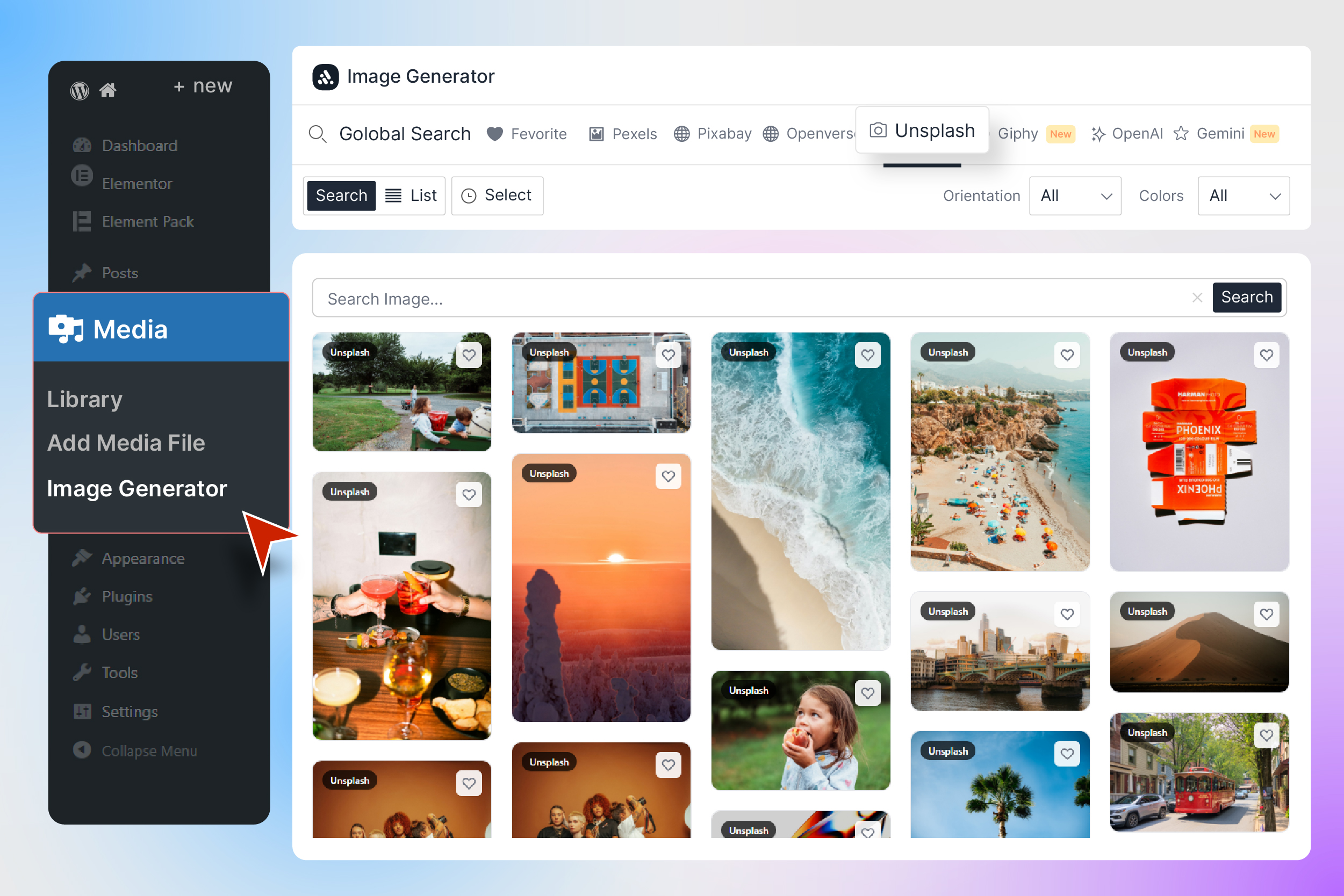
AI Image Generation with Unsplash 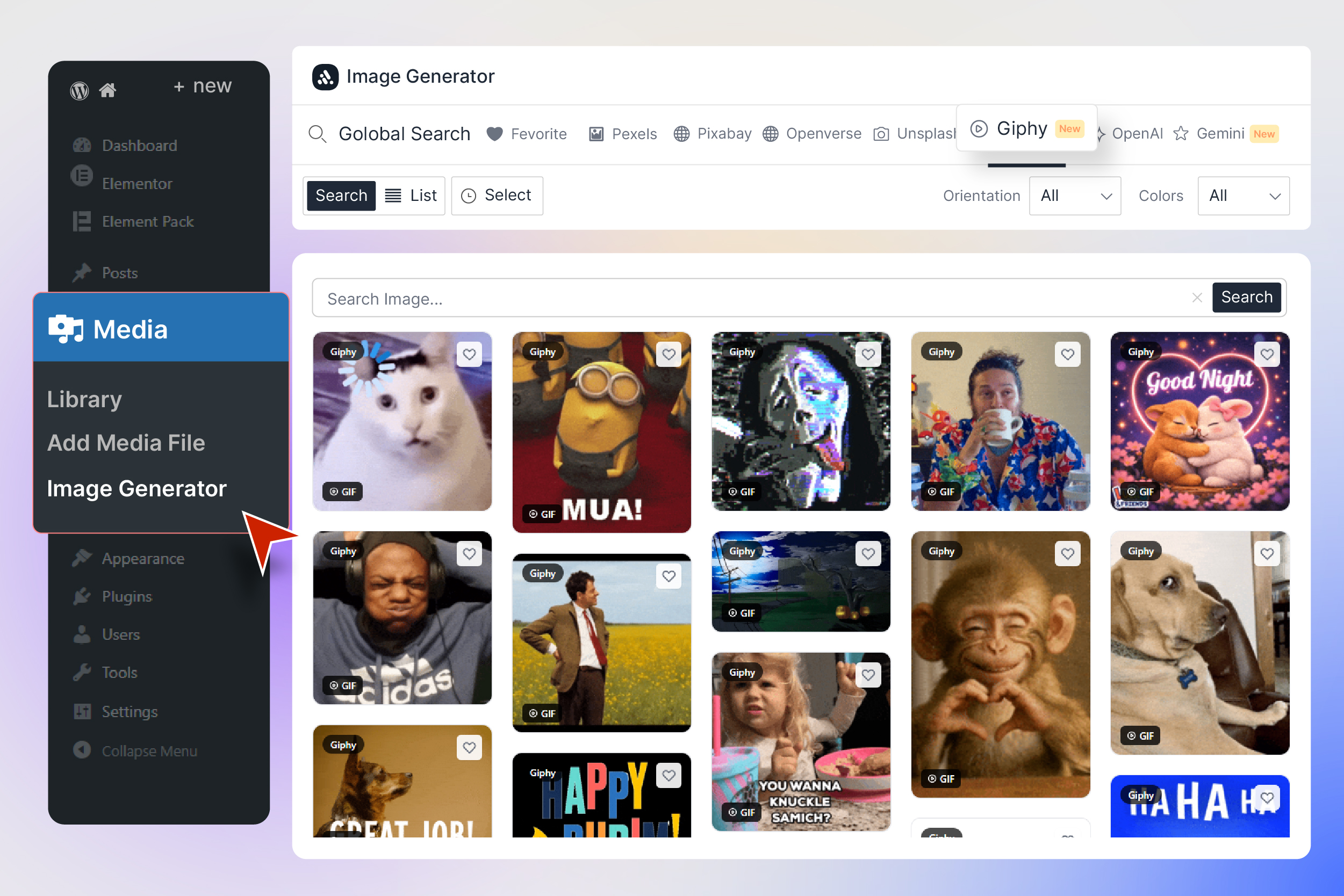
GIF Animation Control — Hover to Play 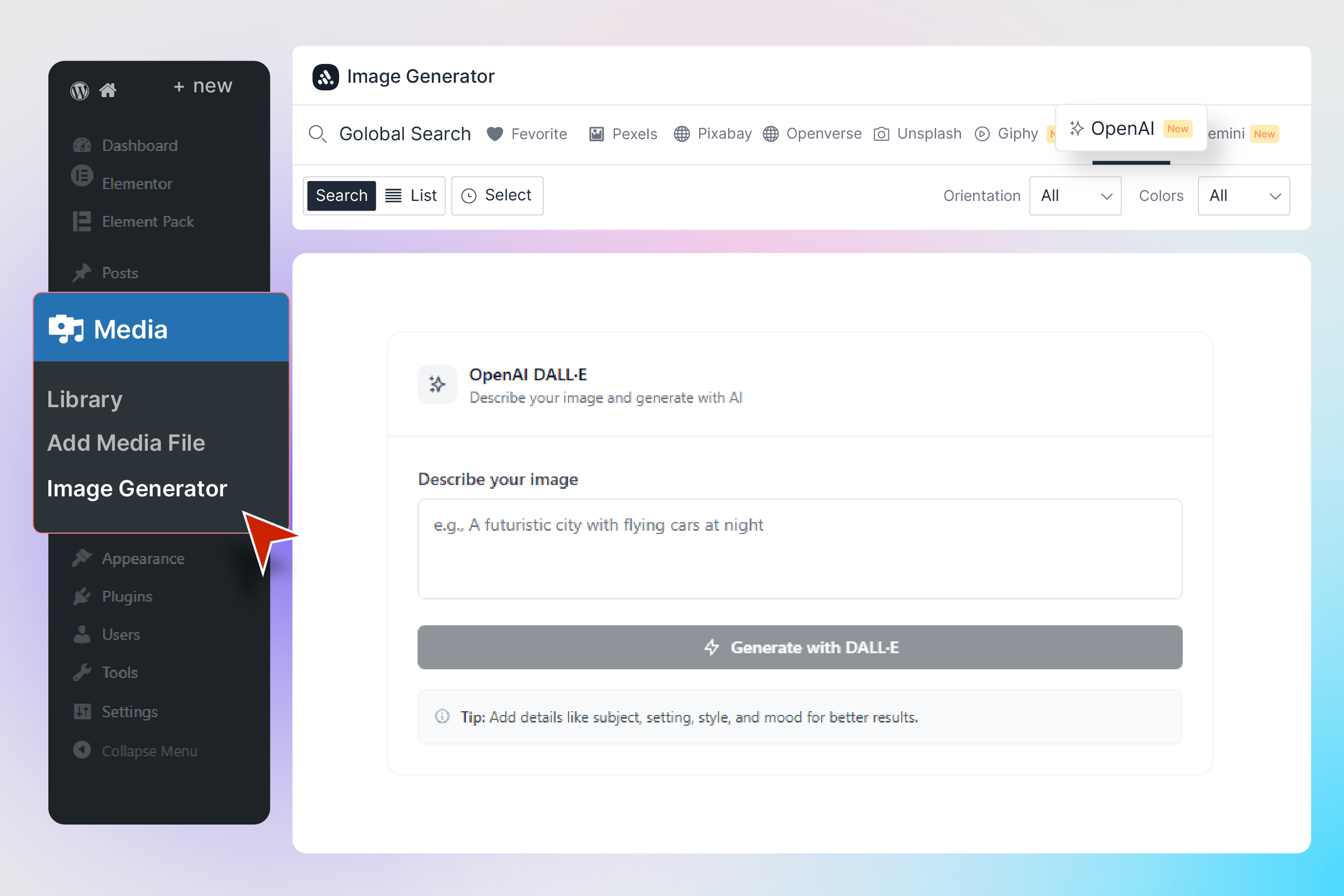
AI Image Generation with OpenAI DALL·E 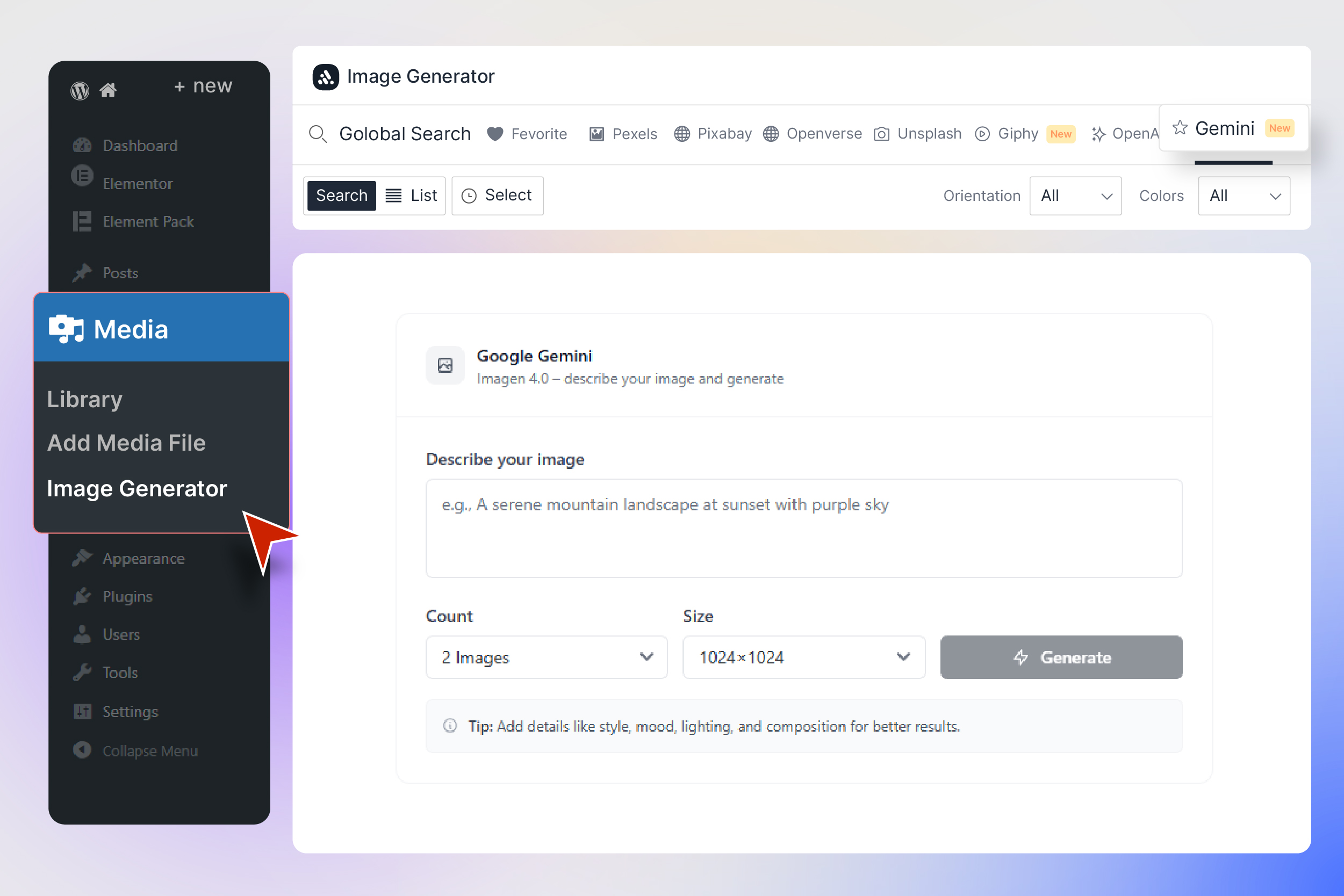
AI Image Generation with Google Gemini 
Checkout our other Addons


Installation
Installing Instant Image Generator is quick and easy:
From WordPress Dashboard
- Navigate to Plugins Add New
- Search for “Instant Image Generator”
- Click Install Now and then Activate
- Go to AI Image Dashboard to configure your settings
- Navigate to Media Image Generator to start finding images!
Manual Installation
- Download the plugin ZIP file
- Upload the
ai-imagefolder to/wp-content/plugins/ - Activate the plugin through the Plugins menu in WordPress
- Configure your API keys in AI Image Dashboard Image Sources
API Key Setup (Optional)
- Unsplash — Get your free Access Key from Unsplash Developers
- Giphy — Get your free API Key from GIPHY Developers
- OpenAI — Get your API Key from OpenAI Platform
- Gemini — Get your free API Key from Google AI Studio
- Pexels, Pixabay, Openverse — No API key required! Works out of the box.
FAQ
-
1. Do I need API keys to use this plugin?
-
Not for all sources! Pexels, Pixabay, and Openverse work completely out of the box with no API key required. You only need API keys for Unsplash, Giphy, OpenAI (DALL·E), and Google Gemini. All API keys are free to obtain from their respective developer portals. The plugin works great even if you only use the free sources that don’t require keys.
-
2. Are the images free to use? Can I use them commercially?
-
Yes! All images from Pixabay and Pexels are released under their respective free licenses that allow commercial use without attribution (though attribution is appreciated). Unsplash images are free for commercial and non-commercial use. Openverse images carry Creative Commons licenses — check individual image licenses before commercial use. Giphy GIFs are subject to Giphy’s terms of service. AI-generated images (OpenAI/Gemini) are subject to the respective AI provider’s usage policies.
-
3. How does the WordPress Media Modal integration work?
-
When the plugin is active and the “Media Modal” setting is enabled (it’s ON by default), an “Instant Images” tab automatically appears in the WordPress media selector popup. This is the same popup that appears when you click “Add Media” in the classic editor, “Set Featured Image,” or use any media selection button. You can search and import images directly from this popup without leaving the page you’re editing.
-
4. What happens when I import an image?
-
When you click “Import,” the plugin downloads the image from the source and uploads it directly to your WordPress Media Library. The image is saved in your
/wp-uploads/folder just like any manually uploaded image. Depending on your settings, the plugin can automatically set the Alternative Text (for SEO), Title, and Caption (with author attribution like “Photo by John Doe”). The filename is generated from the image title for clean, SEO-friendly URLs. -
5. Can I control what metadata is added to imported images?
-
Absolutely! In AI Image Dashboard General Settings, you’ll find three toggle switches under “Image Metadata on Import”:
- Alternative Text — When ON, automatically sets the image’s source title as the WordPress Alt Text (great for SEO and accessibility)
- Image Title — When ON, sets the source title as the WordPress attachment title
- Image Attribution — When ON, adds “Photo by [Author Name]” as the image caption
Each toggle works independently, so you can enable or disable any combination you prefer.
-
6. How does Global Search work?
-
Global Search is a powerful feature that searches all your enabled image providers simultaneously. When you type a keyword in the Global Search tab, the plugin sends requests to Pexels, Pixabay, Unsplash, Openverse, and Giphy at the same time and combines the results into a single masonry grid. Each image shows a provider badge so you know where it came from. If you disable a provider in your Dashboard settings, it’s automatically excluded from Global Search results.
-
7. How do I generate AI images with OpenAI or Gemini?
-
First, add your API key in AI Image Dashboard Image Sources (for OpenAI or Gemini). Then navigate to the Image Generator page and click the OpenAI or Gemini tab. Enter a descriptive text prompt (e.g., “A serene mountain lake at sunset with reflections”) and click Generate. For Gemini, you can also choose the image size (512px, 1024px, or 2048px) and number of images (1-4). Generated images can be imported to your Media Library with one click, just like stock photos.
-
8. Can I reorder the image source tabs?
-
Yes! Go to AI Image Dashboard Image Sources. You’ll see all your providers listed as cards with drag handles. Simply drag and drop the cards to rearrange them, or use the up/down arrow buttons for precise positioning. The order you set here is reflected in the Image Generator page tabs. You can also enable or disable the Global Search tab separately with its own toggle at the top of the section. Click “Save Settings” to persist your changes.
-
9. What is the GIF animation control feature?
-
To improve page performance and reduce visual clutter, Giphy GIFs are displayed as still thumbnails by default. When you hover your mouse over a GIF, it comes alive and starts animating. A small “GIF” badge with a play icon appears on each GIF card so you can easily identify animated content. In the full-size preview modal, GIFs always play at their full animation. This feature helps keep the gallery fast and responsive even when browsing hundreds of GIFs.
-
10. Does the plugin slow down my website?
-
No. The plugin only loads its assets (JavaScript and CSS) on admin pages where they’re needed — the Dashboard settings page, the Image Generator page, and admin pages where the WordPress Media Modal is available. It adds zero frontend code to your public-facing website. Your visitors will never notice the plugin is installed. The React-based interface is optimized for performance with lazy loading, debounced search, and efficient image rendering.
Reviews


Contributors & Developers
“Instant Image Generator (AI Image by Gemini, Dall-E and One Click Image from Unsplash, Openverse, Pixabay, Pexels, Giphy)” is open source software. The following people have contributed to this plugin.
Contributors


“Instant Image Generator (AI Image by Gemini, Dall-E and One Click Image from Unsplash, Openverse, Pixabay, Pexels, Giphy)” has been translated into 2 locales. Thank you to the translators for their contributions.
Interested in development?
Browse the code, check out the SVN repository, or subscribe to the development log by RSS.
Changelog
2.1.0 [3rd March 2026]
- Added: Wikimedia Commons image provider tab support in dashboard and Global Search
- Added: Wikimedia provider filters (Media Type, Sort)
- Added: Wikimedia support in Block Toolbar “Generate Image” provider menu and smart fallback flow
- Added: Admin API notification system with countdown timers
- Improved: Wikimedia search handling and result ordering in proxy endpoint
- Fixed: First-install imports no longer auto-apply Alt Text, Image Title, or Attribution until saved in settings
2.0.1 [26th February 2026]
- Added: Default API keys for Unsplash & Giphy (works without user configuration)
- Added: Encrypted API key storage for enhanced security
- Improved: All free image sources now work out of the box
- Improved: Better code maintainability and performance
- Improved: Enhanced API key protection system
- Fixed: WordPress Plugin Checker compatibility issues
- Fixed: Removed unused functions, variables, and imports
2.0.0 [24th February 2026]
- Added: Complete plugin rebuild with React and Tailwind CSS for modern UI/UX
- Added: Global Search — search across all image providers simultaneously
- Added: Unsplash image source support
- Added: Openverse image source support (WordPress, Flickr, NASA, SpaceX, Wikimedia, and more)
- Added: Giphy GIF source with animation control (hover to play)
- Added: Google Gemini Imagen 3.0 AI image generation
- Added: WordPress Media Modal integration (“Instant Images” tab)
- Added: Advanced provider-specific filters (Source, Orientation, Order, Type, Category, Color)
- Added: Batch selection and import for multiple images
- Added: Favorites and bookmarking system
- Added: Search history with keyboard navigation
- Added: Full-size image preview modal with sidebar and next/prev navigation
- Added: Smart image metadata on import (Alt Text, Title, Caption with attribution)
- Added: Individual toggle controls for Alt Text, Title, and Attribution metadata
- Added: Drag-and-drop provider ordering in dashboard
- Added: Global Search on/off toggle
- Added: Display Settings tab (View Mode, Items Per Page, Thumbnail Size, Load More Mode)
- Added: Custom Image Sizes management (add/delete custom WordPress image sizes)
- Added: Professional admin dashboard with sidebar navigation
- Added: Grid and List view toggle
- Added: Infinite scroll with manual “Load More” button fallback
- Added: Loading skeleton animations
- Added: Responsive design for all screen sizes
- Added: Generate Image from content in page/post
- Improved: Image import now uses original source title for filename
- Improved: Media library auto-refreshes after import in media modal
- Improved: Provider tabs respect enabled/disabled state and custom ordering
1.5.11 [1st December 2025]
- Updated: Made compatible with WordPress version 6.9
1.5.10 [17th November 2025]
- Updated: Made Compatible with WordPress 6.8.3
1.5.9 [11th May 2025]
- Updated: System improved
1.5.8 [5th May 2025]
- Fixed: OpenAI avatar issue fixed
- Updated: Modal design improved
1.5.7 [22th April 2025]
- Added: Made Compatible with WordPress Version 6.8
- Added: Plugin page action menu settings added
- Fixed: Pexels avatar issue fixed
- Improved: Pexels image preview and upload by default original size
- Updated: System improved
1.5.5 [24th November 2024]
- Added: Image URL copy Button Added
- Improved: Grid Layout Improved
- Improved: Open AI Improved
1.5.4 [13th November 2024]
- Added: New system added
1.5.2 [9th November 2024]
- Fixed: Security issue fixed
1.5.1 [20th August 2024]
- Updated: System improved
1.5.0 [3rd July 2024]
- Added: Pexels Support added
- Added: Pixabay Support added
- Updated: System improved
1.0.0
- Initial Release
