

Description
You don’t need complex plugins or integrations to start accepting payments with iDEAL | WERO (and other payment methods) in WordPress! Get (test) payments running on your site within 15 minutes!
Use Paytium to create a simple payment form for a product or service. Accept donations or create a small webshop. Paytium supports one-time payments and subscriptions/recurring payments.
iDEAL | WERO ? This most popular payment method in the Netherlands will become WERO. In the Netherlands, the migration from iDEAL to WERO will begin in late 2026 and be completed by the end of 2027. Meanwhile as introduction the combined logo. What does this mean for you?
Please do read ‘What’s the big deal about iDEAL | WERO?’ further down this page.
Accept popular payment methods
Besides iDEAL | WERO you can also accept payments with credit cards/debit cards, PayPal Bancontact , SEPA , Bitcoin, Belfius and other payment methods! View a full list at Mollie.
After completing a short and guided setup, you can start adding payment forms with iDEAL | WERO and other payment methods to your posts or pages. Shortcodes can be inserted with a few clicks directly from the iDEAL | WERO button in the WordPress editor.
Paytium forms can be added in the Classic editor as shown in the below video, and as a block in the new Block editor. In the block editor, add the new “Paytium Code” block by typing /Paytium.
Flexible: get creative with iDEAL | WERO payments
There is no limit to the amount of Mollie iDEAL | WERO forms you can create in your posts and pages. You can use different amount types.
- static, users just click the “Pay € 20” button
- dynamic, users select an amount in a dropdown
- custom, users enter an amount in a text field
Pro versions: when you need to grow
When your payment form really starts to bring in some money, and you need to grow, or want to automate things, consider the Pro versions!
- Custom text after payment
- Automatic emails
- MailChimp
- ActiveCampaign
- MailPoet
- Invoices
- Export payments
- Zapier
Examples of what you can do
- Collect donations for charity, allow people to enter their own amounts
- Add a link to your site on your invoices and ask customers to pay online
- Sell simple products, with registration of customer address details
- Accept online payments for services such as a workshop or coaching sessions
- And more!
Custom fields: collect all the information you need
Need more information from your customers, or want to ship something? Add your own fields and view the collected information in the WordPress admin. You can create an email field, text fields, radio buttons and more! Read more in the manual.
Yes, this is the Gravity Forms & iDEAL | WERO alternative you have been waiting for!
Why payments via Mollie?
Why does Paytium only support Mollie as payment service provider?
- Mollie is one of the better payment provider with 32 cents per iDEAL | WERO transaction
- Besides iDEAL | WERO , Mollie also supports many many other payment methods, and you just need one Mollie account
- Your money can be automatically wired to your bank account daily
- No hidden, setup or monthly costs, only pay for actual transactions for most Mollie users, (Depending on the amount and Mollie custom terms for increased risk or specific sectors. For specific, often “high-risk” sectors/businesses, a minimum Mollie monthly fee of €20 (or equivalent) may apply. This is not a standard Mollie subscription fee for everyone, but a measure to cover increased operational costs resulting from stricter anti-money laundering (WWFT) regulations and monitoring, thus deemed subject to custom terms for increased risk or for specific sectors).
- For most standard Mollie users, no fixed monthly fees applies, but only is charged per actual transaction depending on the amount.
- Fully certified by “De Nederlandsche Bank” (DNB), just like the big banks
- Mollie is reliable & one of the very best in payments
- Super fast and friendly helpdesk (via email and telephone)
Read more about Mollie
Automatically process recurring payments
Paytium also supports recurring payments, even for iDEAL | WERO payments. Setup a simple subscription, ask customers to pay once to confirm, and see how the next payments come into your bank account automatically.
Yes, recurring payments also work with iDEAL | WERO payments! When iDEAL | WERO is used for the first payment, the next (automatic) payments are processed with SEPA (automatische incasso). Read more in the recurring payments for WordPress manual. More insight ? Also read Subscriptions Pro/Subscription fee increase
What’s the big deal about iDEAL | WERO?
Paytium supports almost all Mollie payment methods, including iDEAL| WERO but excluding Klarna.
The payment method iDEAL is a Dutch payment method supported by almost all Dutch banks.
iDEAL is a semi-automated direct online transfer from the consumers bank account to your Mollie account/bank account for the Netherlands. Even though iDEAL is the most popular payment method in the Netherlands, other payment methods like PayPal are also popular. Our advice is to always accept at least iDEAL|WERO as payment method in your payment forms, and also enable all other payment methods that are available via Mollie. Consumers like to make payments in their favorite payment method, so it’s best to just allow them to make the payments in anyway they like!
This most popular payment method in the Netherlands iDEAL will become WERO.
The payment method WERO will be new, one, uniform, interoperable digital, pan-European wallet and a payment system method launched by the European Payments Initiative (EPI). WERO will enable direct, account-to-account payments between European countries, replacing local payment systems. Yes, replacing iDEAL.
This transition will happen in phases. The first step is the new combined iDEAL|WERO logo as introduction. Aside from the logo, nothing will change in terms of functionality. Checkout will remain the same. iDEAL|WERO payments are through the Mollie dashboard. Behind the scenes Mollie will be making the necessary system preparations to enable the actual transition. In the Netherlands, the migration from iDEAL to WERO will begin in late 2026 and be completed by the end of 2027. WERO payments will then be activated through the Mollie dashboard.
Paytium will continue to support almost all Mollie payment methods, including WERO but excluding Klarna.
Built by a payments expert
Paytium plugin was created by payments expert and the Dutch developer David de Boer
The Paytium plugin is in continuous development, simplifying processes for Paytium users and is adapted to the latest financial market standards. Ultimately, achieving easier end-user goals.
User-friendly, convenient, and above all, affordable.
Advice, support or feedback
You can always ask us anything about online payments and iDEAL. Just email us at support@paytium.nl.
More information
- Visit the Paytium website
- WordCamp 2015 presentation: “iDEAL in WordPress”
- WordCamp 2016 presentation: “Trends In Online Payments”
Screenshots
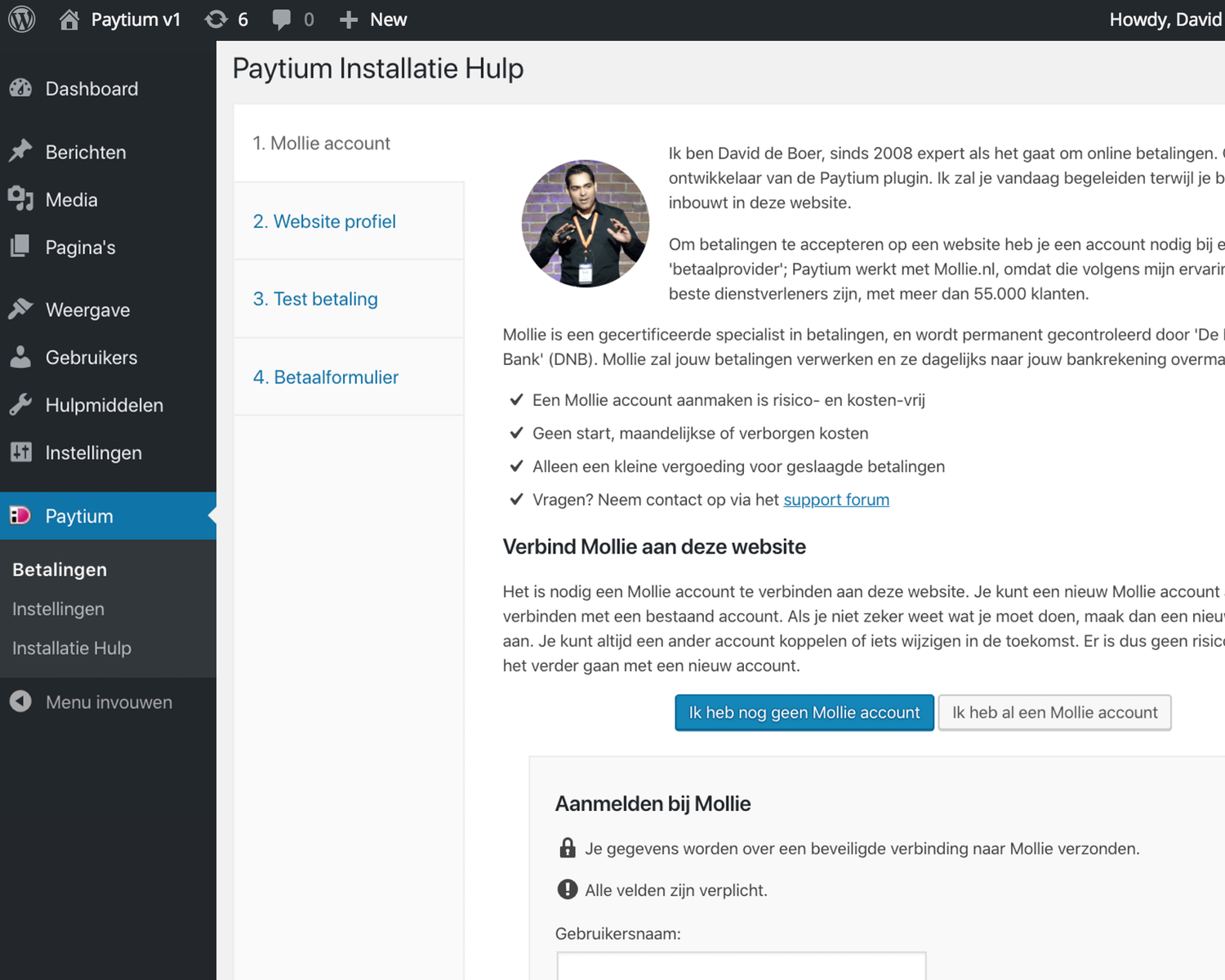
Easy to get started with accepting payments – The built-in wizard helps you to quickly connect your WordPress website to your new or existing Mollie.com account. You can be accepting real payments within one business day (often faster)! The entire process is explained in detail in the wizard itself. 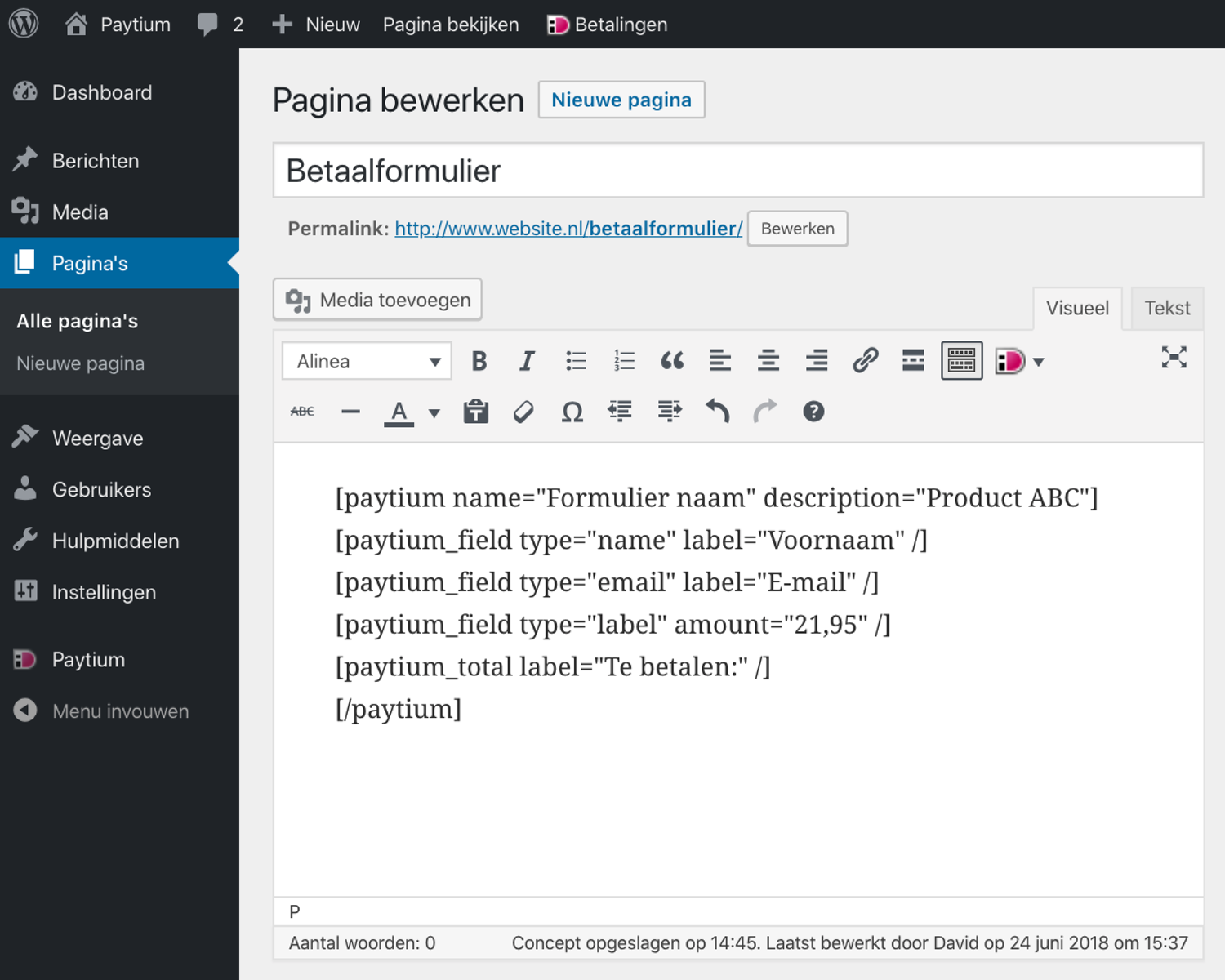
Add payment buttons to posts or pages – Click on the iDEAL | WERO icon in the WordPress editor to quickly add shortcodes in your posts or pages. These shortcodes will be converted to payment buttons and your visitors can use iDEAL | WERO or other payment methods to pay for your products or services. 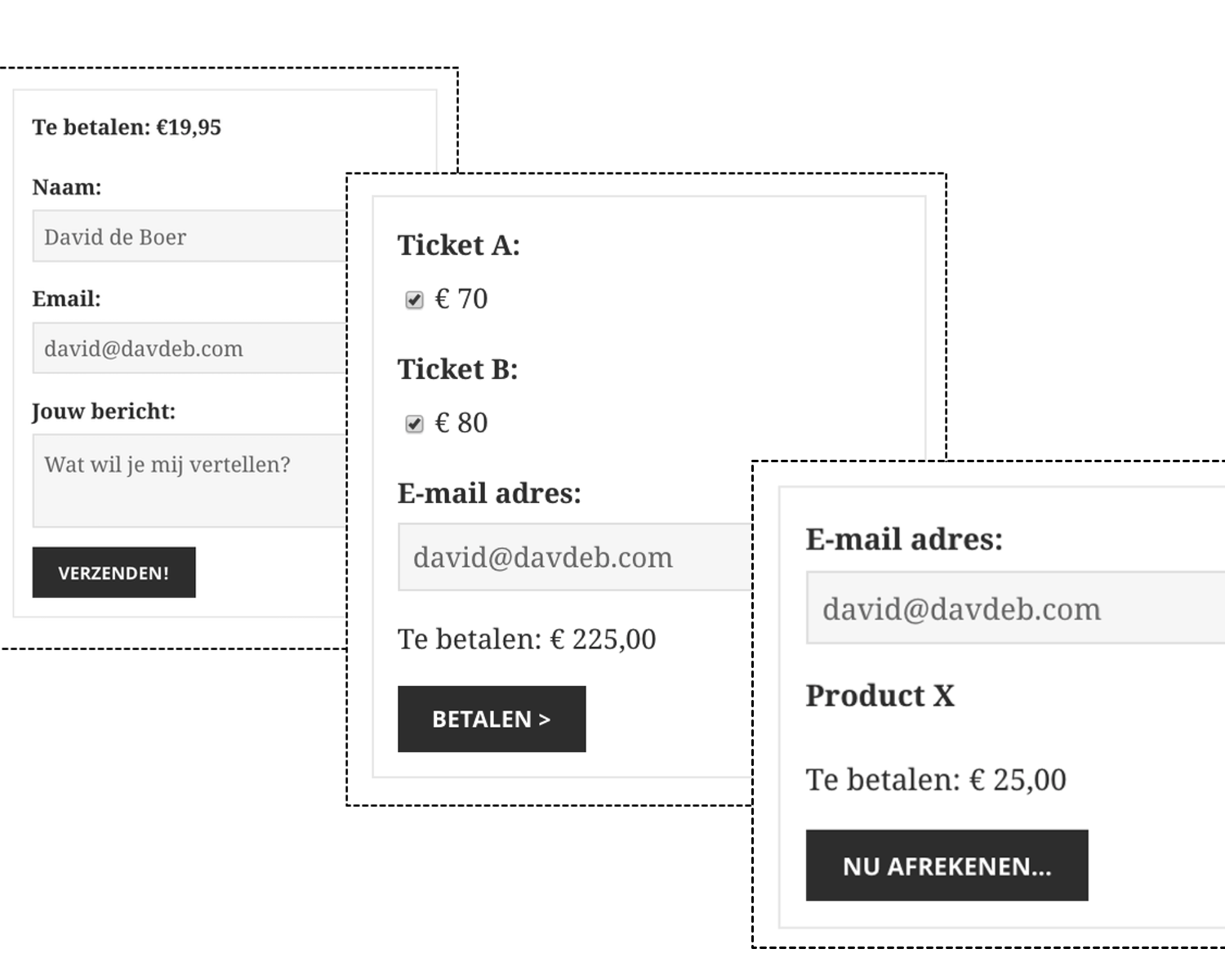
Payment buttons are flexible – Set a static amount to be paid, ask for donations (custom amounts!) or allow visitors to select an amount for a specific product/service via a dropdown. 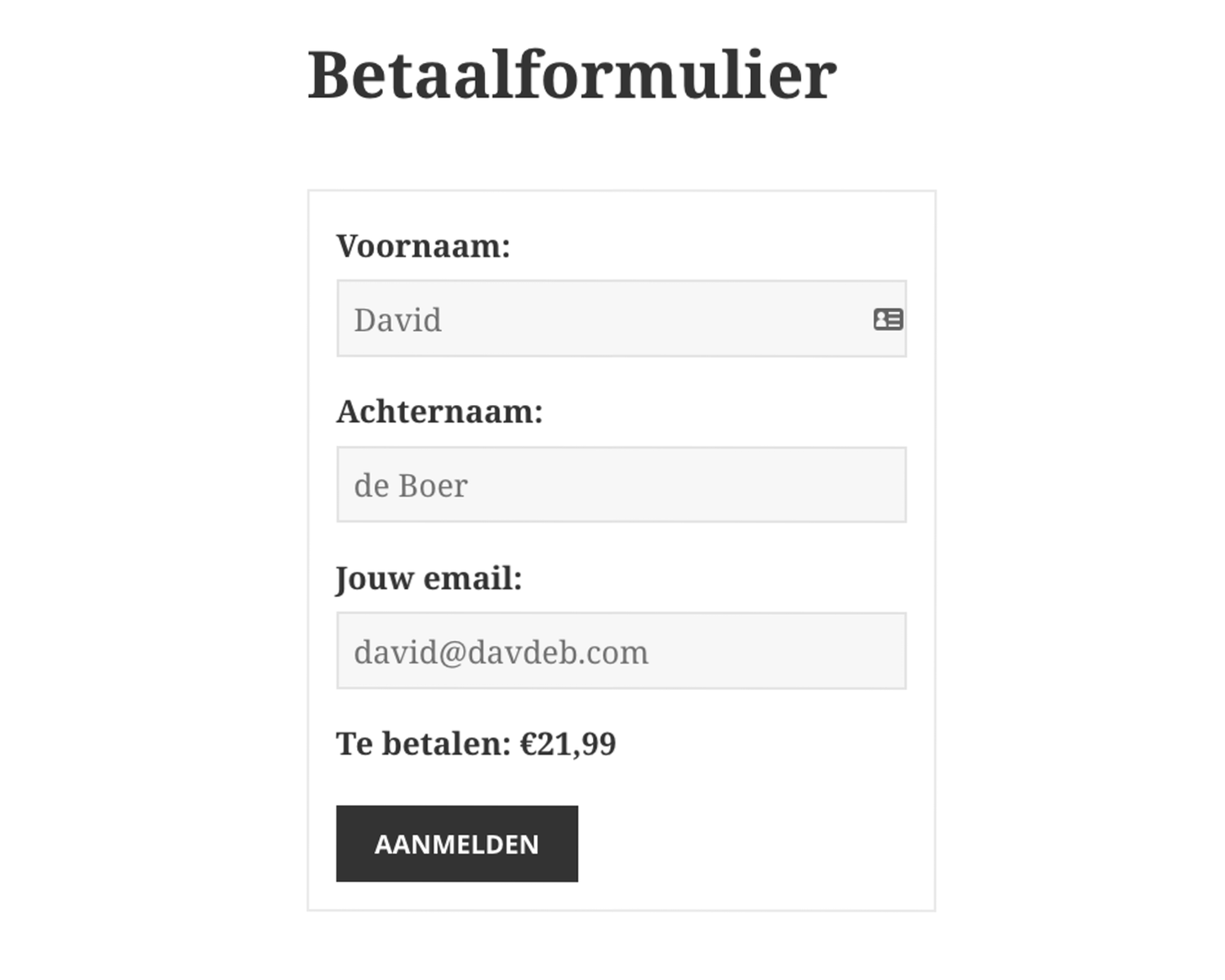
Collect customer details – Need more information, or want to ship something to your visitors? Add your own custom fields and new fields will be added to the payment button! 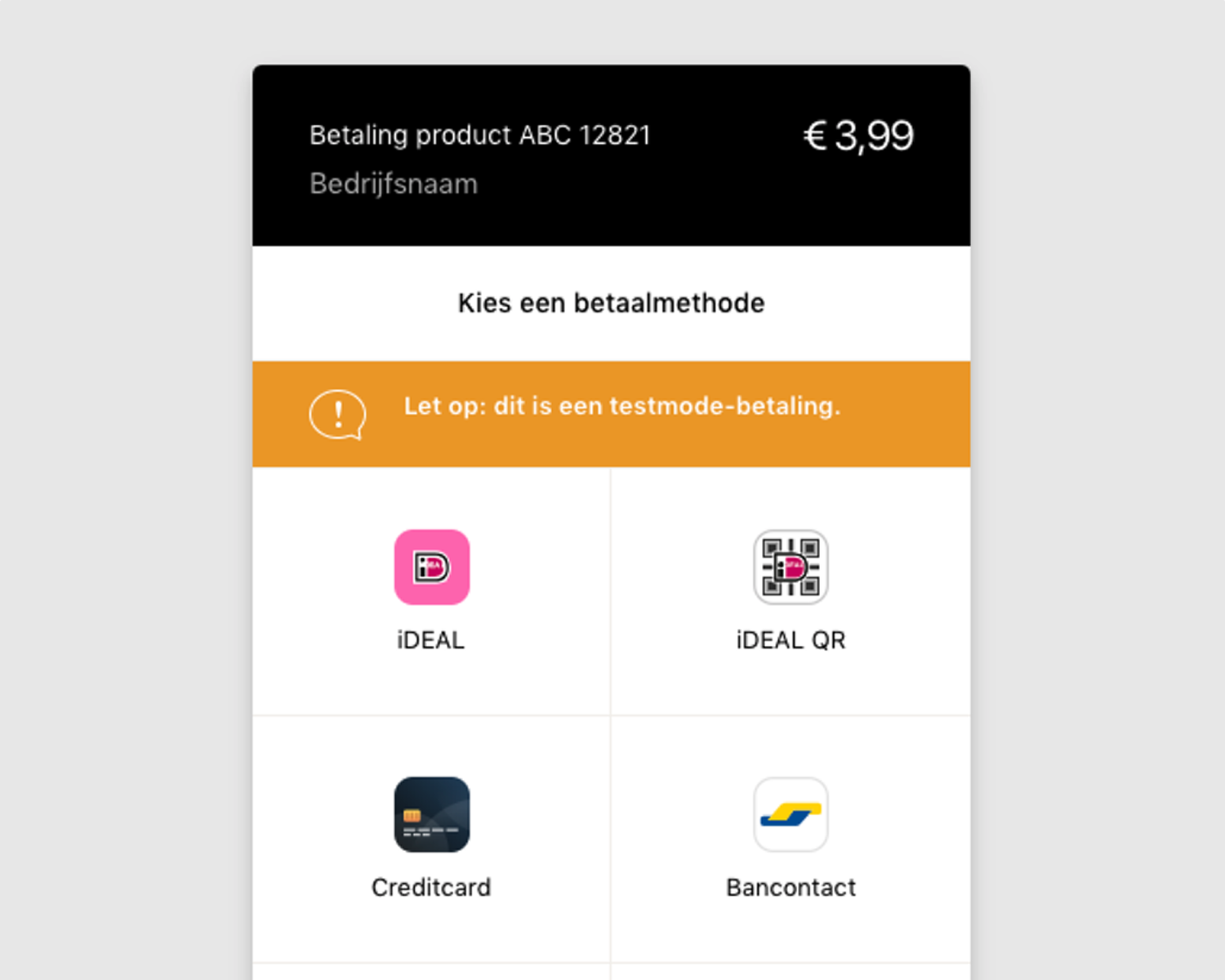
Payments processed via Mollie.com – After clicking “Pay” visitors will immediately be redirected to secure payment provider Mollie, which will process the payments and wire the funds to your own bank account. Mollie is certified by the Dutch national bank ‘De Nederlandsche Bank (DNB)’. 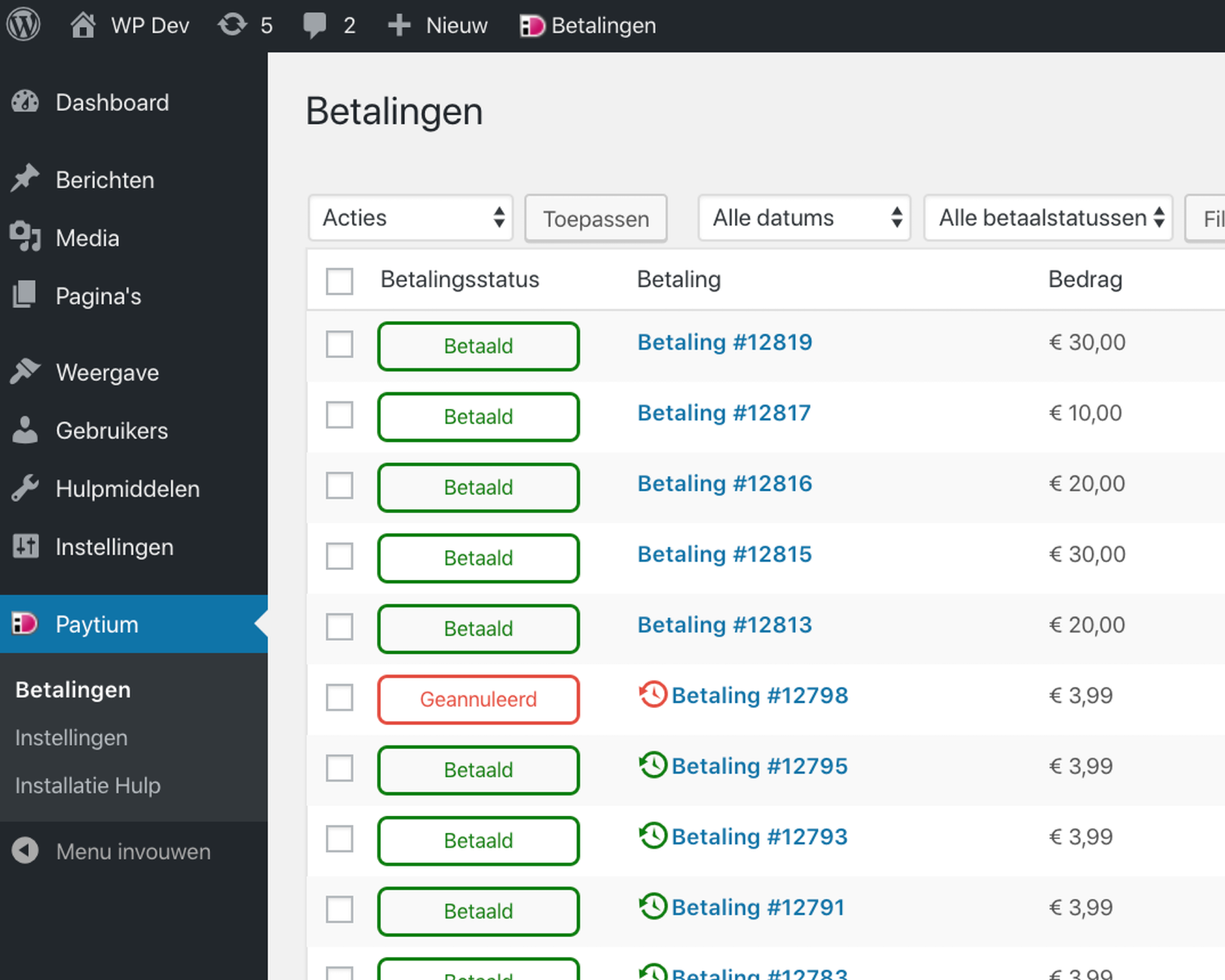
Review all payments and their status – Check the status of all payments directly in the WordPress admin. Use the built-in “Order Status” to keep track of your own processing directly in WordPress.


Blocks
This plugin provides 1 block.
- Paytium Code
Installation
Plugin installation
The easiest way to install Paytium is to login to WordPress and go to Plugins > New Plugin. Search for “Paytium” and open the detail view. Click “Install now”.
For a manual installation download the plugin from the WordPress repository, and after unzipping it, upload the folder “paytium” to the “wp-content/plugins” directory of your WordPress site.
Read more about the various options in the manual.
Setup your Mollie account
You can create a new Mollie account or connect an existing account via the Setup Wizard (“Installatie hulp” in Dutch) in Paytium itself under Paytium > Setup Wizard. The Setup Wizard helps you configure your Mollie account, so you can start accepting payments as soon as possible.
Mollie is a Dutch payment service provider (PSP) which will process your payments and wire your payments to your bank account. They are certified by the Dutch national bank (DNB) and are checked just as strict as normal Dutch banks.
Add payment forms with shortcodes
After having set up your Mollie account, you can navigate to Posts or Pages in WordPress and open an existing or new page/post. In the page/post edit view you will now see an iDEAL | WERO icon in the WordPress editor. Use that iDEAL | WERO icon to add default Paytium shortcodes. Feel free to edit texts or amounts. These shortcodes will be transformed to actual iDEAL | WERO payment forms and buttons on your site.
Read more about the various options in the manual.
FAQ
-
Where can I find the documentation?
-
Paytium is a relatively simple plugin but… we have documentation anyway! To learn more please read the manual. If you still have questions, feel free to email support@paytium.nl.
-
Can I get advice about iDEAL | WERO and this plugin?
-
Yes, it would be our pleasure to advice you on the best way to implement iDEAL | WERO payments, email support@paytium.nl.
-
Can I accept recurring payments?
-
Yes, you can! Learn more about recurring payments in the recurring payments for WordPress manual! Or when your business expands see recurring payments Pro for WordPress manual!
-
Can I use my own (custom) form fields?
-
You can create your own payment forms by using custom fields in Paytium. Read more in the custom fields manual.
-
Does Paytium work on local WordPress installations?
-
No, it does not unless you use a service like ngrok. Payments can not be processed when originating from a desktop or localhost WP installation. We advice installing and using Paytium on live sites only, maybe in a sub directory, for example yourdomain.nl/test.
-
Do I need a chamber of commerce (KVK) number?
-
Yes, according to law you really need to be a company, and have a “Kamer van Koophandel” number to accept iDEAL | WERO payments.
-
What if the Setup Wizard doesn’t work?
-
Go directly to Mollie (create an account if you haven’t already), login to your account and copy the API Keys to Paytium > Settings.
-
Can I redirect users to another page after the payment?
-
Yes, you can with the commercial version Paytium Plus, Pro, Premium or custom code it yourself. View code examples or visit Creating own text after payment in our manual.
-
Can I just change the text after payment (without redirect)?
-
Yes, you can! Consider using the commercial version Paytium Plus, Pro, Premium.
Plugin Say What could also be an option.
Reviews


Contributors & Developers
“Paytium: Mollie payment forms & donations” is open source software. The following people have contributed to this plugin.
Contributors

“Paytium: Mollie payment forms & donations” has been translated into 1 locale. Thank you to the translators for their contributions.
Translate “Paytium: Mollie payment forms & donations” into your language.
Interested in development?
Browse the code, check out the SVN repository, or subscribe to the development log by RSS.
Changelog
5.0.2 – Februari 16, 2026
All Paytium versions
- Update public.js workflow for dynamically loaded forms Elementor
- iDEAL logo replaced to iDEAL|WERO
5.0.1 – January 14, 2026
All Paytium versions
NEW : Mollie V3 library API update target function fix
* Tested with the latest version WP 6.9
* Tested & compatible Mollie Library version V3 3.6.0
* Tested & compatible PHP 8.2 <> PHP 8.4
5.0.0 – December 16, 2025
All Paytium versions
NEW: Mollie V3 library API update
* Tested with the latest version WP 6.9
* Tested & compatible up to Mollie Library version V3 3.6.0
* Tested & compatible up to PHP 8.4
* Tested up to Elementor version 3.33.0
* Ultimate Member tested for creating user profile in WP using Paytium user meta fields
* Mollie compatibility check notification added to Paytium, if multiple Mollie versions are detected.
Plus, Pro, Premium
- Tested MailPoet up to version 5.17
- FIX : MailChimp integration updated
4.4.16 – June 2, 2025
All Paytium versions
NEW: Mollie API update 5
4.4.15 – March 20, 2025
All Paytium versions
NEW: Mollie API update 4
* Tested up to WP 6.7.2
* Tested up to PHP 8.4
Plus, Pro, Premium
FIX : MailChimp : Mailchimp newsletter
FIX : Export Payments : Export payments php 8
NEW: Redirect Pro – Upsell transfer Redirect fields Pro Functionality
NEW: Invoices – {items_table} and {extended_items_table} tags update
4.4.14 – January 21, 2025
All Paytium versions
NEW: Mollie API update 3
Plus, Pro, Premium
FIX: MailChimp : Mailchimp newsletter
FIX: Export Payments : export payments php 8
4.4.13 – November 29, 2024
All Paytium versions
FIX:
* Show currency symbol only if interval_amounts not empty
* Update Gutenberg editor when saving forms
Plus, Pro, Premium
NEW
* Automatic Emails – New option in Email template > not to send emails unless it has has
been included in the form code & added column in email template list to show option is
enabled or not with possibility to adapt
FIX
* Allow comma in paytium_links query
4.4.12 – November 21(A14HB), 2024
All Paytium versions
- Tested up to WordPress 6.7
- Paytium code tested, updated, security payment process checks enhanced & vulnerability patched
FIX - Combined use Customer first/lastname and “user_data”
Plus, Pro, Premium
NEW
* Subscription Pro /Query param fields – Add functionality checkbox/radio/dropdown type
Extra Fields to Paytium payment links / redirect before payment
* Subscription Pro /Query param fields – Paytium security to functionality checkbox/radio/dropdown type Extra Fields to Paytium payment links / redirect before payment
4.4.11 – October 19 , 2024
All Paytium versions
- Tested up to WordPress 6.6.4
FIX : - PHP notices
- Email attachment security issue addressed
- Update chargeback/refund status change handle
Plus, Pro, Premium
FIX:
* MailPoet API integration update
4.4.10 – August 6 , 2024
All Paytium versions
- Mollie library update 2
- Tested up to PHP 8.3
4.4.9 – August 6 , 2024
All Paytium versions
- Mollie library update 1
4.4.8 – August 1 , 2024
All Paytium versions
- Tested up to WordPress 6.6
FIX: - Multiple open fields in simple product or service ‘vrij bedrag’ for total amount
- “data-pt-price“ of the open amount field validation check
NEW: - Update translations file
- Update public.js file
Plus, Pro, Premium
FIX:
*Subscription discount code for recurring payment
4.4.7 – June 11, 2024
All Paytium versions
- Tested up to WordPress 6.5.4
- Mollie update
4.4.6 – May 29, 2024
All Paytium versions
- FIX : Recurring payments subscription renewal payment display
- FIX : Form Amounts validation
- Tested up to WordPress 6.5.3
- Mollie API update
4.4.5 – April 11, 2024
All Paytium versions
- FIX : function call forms without payment
- Tested up to WordPress 6.5.2
Plus, Pro, Premium
- FIX: Discount codes – no first payment
- NEW : General Limits Total Pro – Total number check feature update
4.4.4 – January 30, 2024
All Paytium versions
FIX : Improvement adjustment to PHP Warning: Undefined property: Mollie
API subscription link Mollie response processing fix
Plus, Pro, Premium
FIX: Volume -, multiple use discount codes & calculator Pro : Discount Pro
code
FIX: Newsletter Checkbox to confirm subscription to newsletter
New : Volume -, multiple use discount codes & calculator Pro : Small
Improvement in Pro Discount code
4.4.3 – December 27, 2023
All Paytium versions
- Tested up to WordPress 6.4.2
- FIX : possible vulnerabilities
Plus, Pro, Premium
NEW : Discount Codes & Volume Discount Codes, Discount codes Multiple.    use & Paytium Calculator - Make some strings translatable in Discount Codes
FIX : [limit_data] total at checkbox behavior amount
4.4.2 – November 21, 2023
All Paytium versions
NEW:
* Spinner element of the input type number value in IOS devices
* Tested up to WordPress 6.4
* Tested up to PHP 8
FIX:
* WP User role “role-slug”
* Check added if nonce field exist on ‘my profile’ page- PHP Warning:
Undefined array key “paytium_user_profile_nonce
* Settings appearance settings “description“ attribute
Plus, Pro, Premium
NEW :
* Subscriptions Pro: Subscription fee increase
* MailerLite: MailerLite link for Payment forms
* General Limits Total Pro: Total number check
* Volume Discount Codes: Quantity/ Amount volume discount features
* Discount Pro Multiple Use Code: Multiple use discount code
* Calculator form: Several arithmetic calculations & quote request
* Invoices: {items_table} quantity articles ordered visible on invoice
* Query parameters Extra fields Pro feature: Saving query params in Paytium
form using hidden fields
* MailChimp: Add MailChimp tags link to form
* MailChimp: Multiple groups support add (newsletter_groups)
4.4.1 – March 27, 2023
All Paytium versions
- FIX: PHP notice fix
- Tested up to WordPress 6.2
4.4.0 – January 24, 2023
All Paytium versions
- Overall Plugin Security issues & Quality issues addressed, functions sanitized, validated, & escaped.
- Tested up to WordPress 6
4.3.7 – November 25, 2022
All Paytium versions
- Tested up to WordPress 6.1.1
- Potential Security issues addressed
- Setup Wizard:connect-Mollie.php Live & Test API keys
- Invoices:Invoice.php download invoice button, update option, get invoice id, inline scripts
- My Profile:My-Profile.php error get payment id, invoice id
- Newsletters:apply_ filter ‘pt_after_email_field’ in newsletters
4.3.6 – September 19, 2022
Plus,Pro, Premium
NEW:
* Zapier code: with a webhook URL to apply second webhook URL to a certain form in payment form.
* Discount Codes: Applying discount code only to First payment of a Recurring Payment subscription.
* Discount Codes : Applying discount to all payments excluding First payment of a Recurring Payment subscription
* Discount Codes: Setting 1 discount code for a particular item in 1 form for different members to use.
All Paytium Versions
NEW:
* Extra Field : Add Paytium check to submit contact data with payment status when checkbox not checked
* Quantity Field input : Select quantity input to get value selected when minimum quantity is set for Mobile & Tablet
FIX:
* Extra Field:Checkbox notice on non existing array indexes in debug log
* My Profile/User Profile: User created via user_data shortcode payment assigned to subscription.
4.3.5 – June 24, 2022
All Paytium Versions
FIX:
*Conflict with Mollie Libs – GF Mollie by Indigo plugin
NEW:
*Maximum File size upload
*Validation by file type update WP MIME types
*Extra Field – non mandatory / default / no value – empty space instead of
TAG
Most awesome new features: memberships, crowdfunding, limits, field quantities, file uploads.
4.3.4 – April 21, 2022
All versions
- FIX – move optional parameters after required PHP8
Plus,Pro, Premium
- FIX – replace email tag with empty string if not filled
4.3.3 – March 8, 2022
Plus, Pro, Premium versions
- FIX – Conflict between combining Discount codes with Limits & Stocks
- FIX – To add shortcodes processing into Invoice template -> to add a do_shortcode() option for shortcode processing to invoice template for retrieving extra additional external info of user data on invoice template
All versions
- FIX – Relevant optional extra data customs fields for detailed viewing in Payments & no Payments form when showing payment details.
4.3.2 – February 2, 2022
Plus, Pro, Premium
FIX
* Updated CSV Files encoding for newer Microsoft Excel compatibility.
4.3.1 December 15th, 2021
All Paytium versions
NEW
‘Submission without payment’ will not send an email when/if status is paid.
4.3.0 – November 21st, 2021 (A11HB)
FIX
* Canceled /cancelled Status fix
4.1.5 – October 19th, 2021
FIX
* Fix bug where new version updates would keep showing even after installing latest version
4.1.4 – October 12th, 2021
NEW
* Attribute minimum amount “[paytium_total]” field
FIX
* Conflict between Dynamic Content for Elementor Pro conditional fields plugin and Molliev2 library
4.1.3 – June 9th, 2021
- Fix bug where library ID’s would conflict
4.1.2 – May 3rd, 2021
- Recurring Payments: Paypal Recurring payments in Mollie library
4.1.1 – April 11th, 2020
- IMPORTANT: Subscriptions: Update interval amounts to use slash / as separator, see https://www.paytium.nl/handleiding/recurring-payments/#bezoeker-zelf-interval-laten-kiezen
- Subscription interval amounts: disabled this, so users can also allow customers to select an own interval with custom amount
- Add -appearance: radio (webkit, moz, ms, o) to radio buttons for themes that remove it
- Messages after payment: Check that current page/post is not equal to source page/post, if it isn’t – don’t replace payment form with message after payment. This allows users to show a new form after a payment redirect.
- Label fields: add more options like step
- Improve validation for open amounts to accept more versions with and without decimals
- Memberships/Content: Fix issue where subscriptions weren’t checked properly
- Dropdowns: update "Select an amount" to "Select an option"
- Correct placeholder in First Name field
- Subscriptions: also allow creating subscriptions with mandates that are pending (for Belfius, ING Home’Pay and KBC)
- Add "width: 100%" for textarea’s too
- Switch jquery-ui.css UI CSS to be inline (don’t load from code.jquery.com)
4.1.0 – February 20th, 2020
NEW
* Subscriptions first payment: If user set a First Payment Label, override the default translation with that
* Subscriptions: add option for customers to select if they want a recurring payment (yes/no) and update interval options to support "once"
* Subscriptions: add option to allow users to select the interval themselves with radio buttons
* Form design: small improvements to default form design; border-radius for form and button, improved colours
* Fields: add "class" option so you can set a custom class for form field groups
* Added new hook "paytium_after_paytium_user_data_processing" after users are created when a payment is paid
* Quantity with label fields: add option to show amount besides the quantity/number box (for order forms)
FIX
* Postcode field: remove default "1234 ABC" postcode
* Date field validation: parse the date entered by customers in a different way to also support leading zeroes
* Message after (subscription) payment: remove Mollie subscription ID as it’s not useful to communicate this to customers
* Terms & Conditions field: add label tags around text
* Label field: move some data (hidden fields) higher in the process so quantity without amounts also works
* Add custom validator for open amount fields with a minimum amount that supports comma’s and dots as decimal separator
* Dropdowns: also add first option text support to dropdowns without amounts
* Creating users after payment: convert user role to lowercase, because many users don’t use the lowercase slug, but the user role name, even though this is explained in the manual
* Add check that public.js is really loaded and otherwise add notification for admin with link to FAQ ‘JavaScript problemen’
* Better CSS formatting for quantity box
* Fix PHP error by checking array is not empty
4.0.2 – December 20th, 2019
FIX
* Server side validation: store and check if a field is required and filled, before checking structure of entered data
* Add support for minlenght and validation to fields
4.0.1 – December 17th, 2019
FIX
* Terms checkbox: make it possible to set required to false, Terms are required by default
* After payment message: improve code flow so it better supports custom post types (like Events)
* Form validation: exclude fields for user-data from validation
* Setup Wizard: improve instructions in "Connect a Mollie account"
4.0.0 – December 11th, 2019
NEW
* Implement basic amount validation after forms are submitted (if you are using custom javascript in your form to manipulate amounts, test this before updating!)
* Date validation: make sure a year contains a maximum of 4 characters
* Add server side validation for some fields (postcode, email, date)
* Add dedicated birthday field, allows selecting a date up to 85 years in the past in the datepicker
* Date field: add default placeholder and validation for correct format (DD-MM-YYY), allow dropdown for month and year in datepicker
* Add dedicated postcode field, with validation for Dutch postcodes
* Add cookie with payment key after payment that can be used later (for Paytium Content)
* Fields: add maxlength and placeholder support
* Add new [paytium_show /] shortcode that allows showing total number and amount of payments
* Crowdfunding: allow showing only the progress bar anywhere on the website, without a full Paytium form
* Crowdfunding: add option to not show decimals in amounts in progress bar
* Setup Wizard: add explanations for Paytium shortcodes with Block editor, Divi, Elementor and other page builders/editors
FIX
* Subscriptions: First Payment gets a new and improved implementation to fix multiple issues with displaying incorrect amounts
* Correct autocomplete value for email fields to email (was name)
* Update item limits "Only %s left" so it’s easier to translate
* Limits: also apply limits to max attribute for number/quantity option in fields
* Item limits: update when message "Only x left!" is shown to 10 left instead of 15
* Fix PHP error in Statistics and Item Limits
* Fix issues with "Administrator test-mode" where incorrect mode was used for cancelling subscriptions etc.
* Fix issue with dropdowns and user data (for user registration), where data in dropdowns wasn’t registered
* Redirect to Mollie with a GET redirect by forcing a 303 in wp_redirect(), to fix “The form times out, please try againâ€
* Fix two PHP errors by checking that variable is an array
* Move currency conversion for amounts to better location in code flow
* In public.js update_checkbox_field() make sure function only runs when object is an event
* Changes to handling of API keys, making it more logical and "Administrator test mode" more stable
* Paytium Content/Memberships: optimize usage of undocumented feature "period"
* Add a link to FAQ for warning "No suitable payment methods found"
* More flexible max setting for quantity (use items left or quantity max depending on situation)
* Remove duplicate email validation (now use only Parsley)
3.1.2 – October 1st, 2019
- Fix – Tested up to WordPress 5.3
- Fix – Paytium Block: update for WordPress 5.3, add new quantity example, further UI improvements
- Fix – Shortcode inserter (WordPress Classic editor): add new example with quantity option and minor improvements
Subscriptions
* Fix – Also store user/author ID (of customer) with renewal payments
* Fix – Add extra warning message after payment for end-users when payment is paid but creating the subscription failed
* Fix – Update first payment date to be correct
* Fix – Add a note explaining that SEPA Direct Debit payments that were already pending before cancelling a subscription, can not be cancelled (also added to manual)
* Fix – When no "times" is set for subscriptions, show "Unlimited" in interface instead of nothing
* Fix – Improve format/design of link to Subscription in Edit > Payment > Subscription information
* Fix – Change date format of subscription cancelled date
* Fix – Show both first payment date and start of renewal payment date in interface
* Fix – Update the error shown when a subscription’s first payment is not paid, so it’s clearer what happened
* Fix – Add first payment tax and label option for subscription shortcode
- Fix – Remove pt_float_amount_to_currency() from get_item_data(), it’s to early, causes issues later in the process
- Fix – Revert "Remove id attribute from individual radio fields (to get HTML validation)"
