<?xml version="1.0" encoding="UTF-8"?>
<feed xmlns="http://www.w3.org/2005/Atom" xmlns:thoughtbot="https://thoughtbot.com/feeds/" xmlns:feedpress="https://feed.press/xmlns" xmlns:media="http://search.yahoo.com/mrss/" xmlns:podcast="https://podcastindex.org/namespace/1.0">
  <feedpress:locale>en</feedpress:locale>
  <link rel="hub" href="https://feedpress.superfeedr.com/"/>
  <title>Giant Robots Smashing Into Other Giant Robots</title>
  <subtitle>Written by thoughtbot, your expert partner for design and development.
</subtitle>
  <id>https://robots.thoughtbot.com/</id>
  <link href="https://thoughtbot.com/blog"/>
  <link href="https://feed.thoughtbot.com/" rel="self"/>
  <updated>2026-08-14T00:00:00+00:00</updated>
  <author>
    <name>thoughtbot</name>
  </author>
  <entry>
    <title>Buying Time, Choosing Words: Consulting Through Diplomatic Communication</title>
    <link rel="alternate" href="https://feed.thoughtbot.com/link/24077/17417636/buying_time_choosing_words"/>
    <author>
      <name>Valeria Graffeo</name>
    </author>
    <id>https://thoughtbot.com/blog/buying_time_choosing_words</id>
    <published>2026-08-14T00:00:00+00:00</published>
    <updated>2026-08-13T08:49:57Z</updated>
    <content type="html"><![CDATA[<p>Consulting leaves a lot of room for the expectation that you’ll have an answer on the spot. Sometimes I do, sometimes I don’t, and sometimes I disagree with what I’m hearing.</p>

<p>I’m not necessarily successful or famous for this. I’m not a maestro here trying to give you the truth about consulting. I am sharing what I do, as a practitioner, from these years as a consultant.</p>

<p>1) When I don’t have an opinion yet</p>

<p>You know the moment: “I suddenly feel unprepared, hearing about this piece of technology or service for the first time now” or “I have never encountered this type of problem before”.
How do I buy myself time?
I do not want to project fake confidence. I am not a “fake it until you make it” type.
Side note: it feels stressful in that moment, but in hindsight, I know I don’t want to only solve problems I’ve already solved before in my career.</p>

<p>You may hear me saying things like “let me look that up” or even better “let’s figure it out together.”
It changes the whole dynamic: I can gather more knowledge from the other side, and start reasoning together with them.
Instead of admitting a gap and leaving it hanging, or hiding it, I turn it into shared work, a moment of learning in the open, and get a more detailed picture even if I do not know the implementation details yet.
Later, I will still need time to research and come up with solutions, but this keeps the conversation going and being constructive, rather than becoming awkward.</p>

<p>Some other times there is a feeling that gets in the way, and I find myself doubling-down with stressful negative thoughts that consume energy, like: “I’m a consultant, they hired me because I’m supposed to be the expert”.</p>

<p>I’ve learned to go past that feeling. Not knowing something in the moment doesn’t cancel the expertise, it’s being honest. Being kind to your own brain about it matters more than performing certainty.</p>

<p>2) When I have an opinion, but it’s controversial</p>

<p>The real insight here is telling apart a value from a scar.</p>

<p>Example: “Capacity doesn’t change just because priorities did. If we’re adding something mid-sprint, something else of equal effort has to go”. That’s a principle, and I hold it firmly, even if it could be controversial, and it puts the client in front of trade-offs they may not like to hear.
Capacity is finite. That doesn’t mean pushing back or reducing scope, it means addressing the request flexibly: moving it on the timeline, and being clear that “the team is at capacity” isn’t the same as “we shouldn’t do this”.</p>

<p>“In this project we are going to be working with service X”
From my past experience, I remember that working with service X was a nightmare.
This is one data point from one context, and treating it as universal truth is where bias sneaks in.
The fix isn’t suppressing the experience, it’s presenting it as evidence to check rather than a verdict.
Instead of saying a service “is terrible,” I try to hand it over as evidence: “this is what I’ve seen, worth checking if it still holds here” to keep the information useful without using my previous bad experience as an objective fact.</p>

<p>3) When my opinion contradicts theirs</p>

<p>I need to make a distinction here:
If it is a “normal” disagreement I will try to stop for a second, breathe, try not to take it personally, make my recommendation backed by my reasoning (and I may not be right, you know?) and be constructive.
Instead, I don’t promise something I know is wrong, or even just feels wrong, just to make the client happy. Maybe they will receive it, maybe not. But I did what I could.
Building software shouldn’t be an intense life-or-death matter except when it touches my principles and ethics (examples: exploiting user privacy). At that point, I draw a line and feel free to be more direct, to avoid giving room for other interpretations.</p>

<p>None of this makes not-knowing comfortable, or disagreement painless. But naming these moments instead of pretending they do not happen has made them easier to sit with for me, as I still work on this skill every day.</p>

<aside class="related-articles"><h2>If you enjoyed this post, you might also like:</h2>
<ul>
<li><a href="https://thoughtbot.com/blog/find-a-third-way-home">Find A Third Way Home</a></li>
<li><a href="https://thoughtbot.com/blog/turn-down-the-wrong-work">Turn Down the Wrong Work</a></li>
<li><a href="https://thoughtbot.com/blog/once-bitten-twice-shy">Once Bitten Twice Shy</a></li>
</ul></aside>
<img src="https://feed.thoughtbot.com/link/24077/17417636.gif" height="1" width="1"/>]]></content>
    <summary>How I buy time when I don't know, soften opinions shaped by bias, and hold my ground when it actually matters.</summary>
    <thoughtbot:auto_social_share>true</thoughtbot:auto_social_share>
  </entry>
  <entry>
    <title>thoughtbot around the world, meet us at upcoming events</title>
    <link rel="alternate" href="https://feed.thoughtbot.com/link/24077/17415320/thoughtbot-around-the-world-meet-up-with-us-at-upcoming-events"/>
    <author>
      <name>Fernando Perales</name>
    </author>
    <id>https://thoughtbot.com/blog/thoughtbot-around-the-world-meet-up-with-us-at-upcoming-events</id>
    <published>2026-08-12T00:00:00+00:00</published>
    <updated>2026-08-11T14:53:35Z</updated>
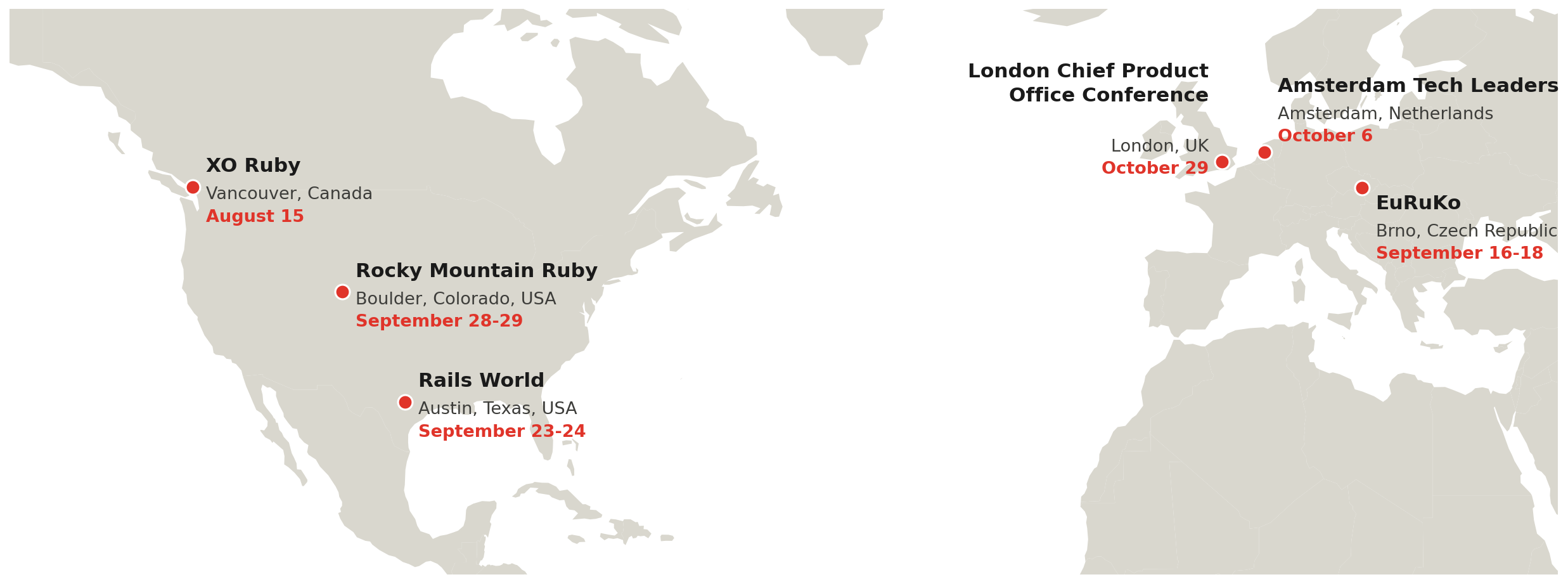
    <content type="html"><![CDATA[<p>Fall is shaping up to be a busy season for thoughtbot. Over the next two
months, thoughtbotters are speaking, attending, and hosting events across
six cities on two continents. If you’re nearby, come find us.</p>

<p><img src="https://images.thoughtbot.com/fmdvcnovsbfruqhdebu3jss8noqi_conference_map.png" alt="thoughtbot around the world"></p>
<h2 id="xo-ruby-vancouver-august-15-vancouver-canada">
  
    XO Ruby Vancouver, August 15, Vancouver, Canada
  
</h2>

<p><a href="https://www.xoruby.com/event/vancouver/">XO Ruby Vancouver</a> kicks things
off. <a href="https://thoughtbot.com/blog/authors/fernando-perales">Fernando Perales</a> will be speaking on “The Ruby Guide
to Responsible LLM Integration,” a talk about the production challenges of
wiring large language models into Ruby applications: malformed input, data
leaks, prompt injection, outages, and rate limits, and the patterns that
keep things stable once real users start hitting them.</p>
<h2 id="euruko-2026-september-16-18-brno-czech-republic">
  
    EuRuKo 2026, September 16-18, Brno, Czech Republic
  
</h2>

<p><a href="https://2026.euruko.org/">EuRuKo</a>, the European Ruby Conference, returns
for another year, this time in Brno. <a href="https://thoughtbot.com/blog/authors/sarah-lima">Sarah Lima</a> and <a href="https://thoughtbot.com/blog/authors/remy-hannequin">Rémy
Hannequin</a> are co-presenting <a href="https://2026.euruko.org/speaker-sarah-remy.html">It’s about
Time</a>, a hands-on workshop
on why timekeeping in Ruby is trickier than it looks: time zones, daylight
saving quirks, leap seconds, and the bugs they cause in persistence,
background jobs, and tests. EuRuKo has one of the best community atmospheres
on the Ruby calendar, and it’s always worth the trip.</p>
<h2 id="rails-world-2026-september-23-24-austin-texas">
  
    Rails World 2026, September 23-24, Austin, Texas
  
</h2>

<p><a href="https://rubyonrails.org/world/2026/speakers">Rails World</a> lands in Austin
this year, and two thoughtbotters are speaking. <a href="https://thoughtbot.com/blog/authors/tess-griffin">Tess Griffin</a>
is presenting <a href="https://rubyonrails.org/world/2026/sessions/sharding">Sharding Is Hard: Let’s Make It
Easier!</a>, on when
vertical scaling stops being enough, how to pick a shard key, and how to
keep transactions consistent across shards. <a href="https://thoughtbot.com/blog/authors/joel-quenneville">Joël
Quenneville</a> is presenting <a href="https://rubyonrails.org/world/2026/speakers/joel-quenneville">Harness Engineering on
Rails</a>, on
treating AI agents less like chatbots to prompt and more like reactive
systems that improve code by iterating on standards, tests, and linters
instead of one mistake at a time. Rails World has become the biggest event
on the Rails calendar, and we’re glad to be part of it again.</p>
<h2 id="rocky-mountain-ruby-september-28-29-boulder-colorado">
  
    Rocky Mountain Ruby, September 28-29, Boulder, Colorado
  
</h2>

<p>Right on the heels of Rails World, <a href="https://rockymtnruby.dev/">Rocky Mountain
Ruby</a> brings a single-track, two-day conference to
Boulder. <a href="https://thoughtbot.com/blog/authors/fernando-perales">Fernando Perales</a> is speaking on “Slowly We Rot:
signs of a Rails app’s decay,” a talk about the patterns of decline he’s seen
again and again after 13 years consulting on Rails apps: how a quiet TODO
comment turns into code nobody wants to touch, why the rot compounds, and
what to do about it before a rewrite starts to look like the only option.</p>
<h2 id="amsterdam-tech-leaders-october-6-amsterdam-netherlands">
  
    Amsterdam Tech Leaders, October 6, Amsterdam, Netherlands
  
</h2>

<p>Next up is something a little different: a Tech Leaders meetup in Amsterdam
on October 6, hosted by thoughtbot. It’s part of the same
<a href="https://thoughtbot.com/blog/our-uk-tech-leader-tour">community series</a> that’s
been growing in London, Bristol, and Austin: casual, in-person conversations
for engineering leaders. More details are coming soon.</p>
<h2 id="london-chief-product-officer-conference-2026-october-29-london-uk">
  
    London Chief Product Officer Conference 2026, October 29, London, UK
  
</h2>

<p>We’re also headed to the <a href="https://luma.com/CPO">London Chief Product Officer
Conference 2026</a>, where [Bethan Ashley]<a href="https://thoughtbot.com/blog/authors/bethan-ashley">bethan
ashley</a> is hosting and moderating a round table on product leadership.
It’s a chance to dig into the questions CPOs are wrestling with alongside
peers, in a smaller, conversation-driven format.</p>
<h2 id="tech-leaders-meetups-ongoing">
  
    Tech Leaders meetups, ongoing
  
</h2>

<p>Alongside these conference stops, thoughtbot runs a recurring <a href="https://luma.com/thoughtbot">Tech Leaders
meetup series</a>: casual, in-person conversations
for engineering leaders, hosted every few weeks in whichever city we can
gather a room. Coming up: a <a href="https://luma.com/thoughtbot">Tech Leaders Meetup</a>
in London on August 18, Austin Tech Leaders on August 20, and Boston Tech
Leaders x Webflow Conf ‘26 on September 2. Past editions have popped up in
London, Bristol, Manchester, and Austin, including a Tech Leaders x SXSW
2026 stop back in March. Follow <a href="https://luma.com/thoughtbot">the calendar</a>
to see what’s next near you.</p>

<p>That’s six conference stops across two continents this fall, plus an
ongoing run of Tech Leaders meetups. If you’re at any of these events, find
us. We’d love to say hi.</p>

<aside class="related-articles"><h2>If you enjoyed this post, you might also like:</h2>
<ul>
<li><a href="https://thoughtbot.com/blog/upcoming-react-and-react-native-conferences-for-2024">Upcoming React and React-Native Conferences for 2024</a></li>
<li><a href="https://thoughtbot.com/blog/this-week-in-dev-jan-26-2024">This Week in #dev (Jan 26, 2024)</a></li>
<li><a href="https://thoughtbot.com/blog/this-week-in-open-source-6-30">This Week in Open Source (June 30, 2023)</a></li>
</ul></aside>
<img src="https://feed.thoughtbot.com/link/24077/17415320.gif" height="1" width="1"/>]]></content>
    <summary>From Vancouver to Amsterdam, thoughtbotters are on the road this fall.</summary>
    <thoughtbot:auto_social_share>true</thoughtbot:auto_social_share>
  </entry>
  <entry>
    <title>Modeling State Transitions in Postgres</title>
    <link rel="alternate" href="https://feed.thoughtbot.com/link/24077/17412215/modeling-state-transitions-in-postgres"/>
    <author>
      <name>Thiago Araújo Silva</name>
    </author>
    <id>https://thoughtbot.com/blog/modeling-state-transitions-in-postgres</id>
    <published>2026-08-11T00:00:00+00:00</published>
    <updated>2026-08-10T16:43:34Z</updated>
    <content type="html"><![CDATA[<p>On most projects I’ve consulted on, status starts as a column. It
works, until someone asks “who was denied last Tuesday?” and the
schema can’t answer. At that point, you can’t retrofit history you
never recorded.</p>

<p>There’s a better way: model each status change as its own row from
the start. You get full history and the current state in one design,
without sacrificing read performance. Here’s how.</p>

<p>Say we have a <code>users</code> table with <code>name</code> and <code>status</code> columns:</p>

<table>
<thead>
<tr>
<th>id</th>
<th>name</th>
<th>status</th>
</tr>
</thead>
<tbody>
<tr>
<td>1</td>
<td>Paul Winston</td>
<td><code>pending</code></td>
</tr>
<tr>
<td>2</td>
<td>Bob Marley</td>
<td><code>ready_for_review</code></td>
</tr>
<tr>
<td>3</td>
<td>Carlos Lagrande</td>
<td><code>denied</code></td>
</tr>
</tbody>
</table>

<p>This design has an obvious limitation: if we change a user’s status,
we can’t be sure of:</p>

<ul>
<li>
<em>What</em> the previous status was;</li>
<li>
<em>When</em> the status changed.</li>
</ul>

<p>Now imagine your stakeholders start asking questions like:</p>

<ul>
<li>Who was denied last Tuesday?</li>
<li>How long did users stay in each status?</li>
<li>Which users were denied and later re-approved?</li>
</ul>

<p>These questions require history the current design has already thrown
away. A single modeling change answers all of them efficiently,
without sacrificing the one thing the current design does well:
getting the current status.</p>
<h2 id="the-user-statuses-table">
  
    The user statuses table
  
</h2>

<p>Instead of updating a <code>status</code> column on <code>users</code>, we create a separate
table where each status change is a new row:</p>
<div class="highlight"><pre class="highlight sql"><code><span class="k">CREATE</span> <span class="k">TABLE</span> <span class="n">user_statuses</span> <span class="p">(</span>
  <span class="n">id</span> <span class="nb">BIGINT</span> <span class="k">GENERATED</span> <span class="n">ALWAYS</span> <span class="k">AS</span> <span class="k">IDENTITY</span> <span class="k">PRIMARY</span> <span class="k">KEY</span><span class="p">,</span>
  <span class="n">user_id</span> <span class="nb">BIGINT</span> <span class="k">NOT</span> <span class="k">NULL</span> <span class="k">REFERENCES</span> <span class="n">users</span><span class="p">(</span><span class="n">id</span><span class="p">),</span>
  <span class="n">status</span> <span class="nb">VARCHAR</span> <span class="k">NOT</span> <span class="k">NULL</span><span class="p">,</span>
  <span class="n">created_at</span> <span class="n">TIMESTAMPTZ</span> <span class="k">NOT</span> <span class="k">NULL</span> <span class="k">DEFAULT</span> <span class="n">now</span><span class="p">()</span>
<span class="p">);</span>
</code></pre></div>
<p>When a user’s status changes, we insert a new record. We never
update or delete existing ones.</p>

<table>
<thead>
<tr>
<th>id</th>
<th>user_id</th>
<th>status</th>
<th>created_at</th>
</tr>
</thead>
<tbody>
<tr>
<td>1</td>
<td>1</td>
<td><code>pending</code></td>
<td>2026-07-10 09:00:00</td>
</tr>
<tr>
<td>2</td>
<td>1</td>
<td><code>ready_for_review</code></td>
<td>2026-07-12 14:30:00</td>
</tr>
<tr>
<td>3</td>
<td>1</td>
<td><code>approved</code></td>
<td>2026-07-15 11:00:00</td>
</tr>
<tr>
<td>4</td>
<td>2</td>
<td><code>pending</code></td>
<td>2026-07-11 10:00:00</td>
</tr>
<tr>
<td>5</td>
<td>2</td>
<td><code>denied</code></td>
<td>2026-07-13 16:45:00</td>
</tr>
</tbody>
</table>

<aside class="info">
  <p>Notice the table is called <code>user_statuses</code>, not
  <code>user_status_history</code> or
  <code>user_status_events</code>. Calling it “history” implies that
  the real status lives somewhere else and this table is just a log.
  Calling it “events” suggests an event-driven architecture where
  these records trigger downstream reactions. Neither is what’s
  happening here. This table <em>is</em> the source of truth for what
  a user’s status is, right now and at any point in the past.</p>
</aside>

<p>It’s worth stepping back and asking: what <em>is</em> a user’s current
status? With this model, the answer becomes a definition:</p>

<blockquote>
<p>A user’s current status is their most recently recorded status.</p>
</blockquote>

<p>Not a value we store and keep in sync, but a query we run against the
timeline. Adding a <code>status</code> column on <code>users</code> to speed up reads would
mean caching a fact already derivable from <code>user_statuses</code>, a
violation of <a href="https://en.wikipedia.org/wiki/Third_normal_form">Third Normal Form</a>
that creates two sources of truth that can drift apart.</p>

<p>If an attribute has a lifecycle, discrete transitions like <code>pending</code>
to <code>approved</code>, consider tracking its changes by default, as
retrofitting history after the fact means backfilling data you never
recorded. The rest of this article shows that it’s possible to query it
efficiently.</p>
<h2 id="querying-the-current-status">
  
    Querying the current status
  
</h2>

<p>There is a tradeoff, of course. Normalized data like this is harder to
query. “Give me each user’s current status” used to be a simple column
read. Now it requires finding the most recent <code>user_statuses</code> row per
user. But harder to query does not mean slow. With the right approach
and proper indexing, it’s possible to keep the data normalized and
still have good query performance.</p>

<p>There are several ways to do this in SQL, and they differ in
clarity, composability, and performance.</p>

<aside class="warn">
  <p>You might be tempted to add a <code>current</code> boolean column
  to make querying easy. But maintaining it requires unsetting all
  existing rows for that user and setting the new one on every status
  change. If keeping a field consistent requires that much work, the
  field probably doesn’t belong in the model.</p>
</aside>

<p>All of the approaches below benefit from a composite index that lets
Postgres locate a user’s most recent status without scanning the
entire table:</p>
<div class="highlight"><pre class="highlight sql"><code><span class="k">CREATE</span> <span class="k">INDEX</span> <span class="n">idx_user_statuses_user_id_created_at</span>
  <span class="k">ON</span> <span class="n">user_statuses</span> <span class="p">(</span><span class="n">user_id</span><span class="p">,</span> <span class="n">created_at</span> <span class="k">DESC</span><span class="p">,</span> <span class="n">id</span> <span class="k">DESC</span><span class="p">)</span>
  <span class="n">INCLUDE</span> <span class="p">(</span><span class="n">status</span><span class="p">);</span>
</code></pre></div>
<p>The B-tree is organized by <code>(user_id, created_at DESC, id DESC)</code> for
fast lookups. <a href="https://use-the-index-luke.com/blog/2019-04/include-columns-in-btree-indexes"><code>INCLUDE (status)</code></a> stores <code>status</code> in
the index leaf pages as a non-key column, so Postgres can answer
queries without fetching the row from the heap. This turns an Index
Scan into an <a href="https://use-the-index-luke.com/sql/clustering/index-only-scan-covering-index">Index Only Scan</a>.</p>

<aside class="info">
  <p>All the approaches below sort by <code>created_at DESC, id
  DESC</code>, not just <code>created_at DESC</code>. Since
  <code>created_at</code> is not unique, sorting by it alone may produce
  a non-deterministic result. Adding <code>id DESC</code> as a
  tiebreaker guarantees a stable result. I wrote about this in <a href="https://thoughtbot.com/blog/do-you-really-know-how-to-order-by">Do
  you really know how to ORDER BY?</a></p>
</aside>
<h3 id="correlated-subquery">
  
    Correlated subquery
  
</h3>

<p>The most straightforward approach. A subquery in the <code>SELECT</code> returns
a single value per user. Simple and portable across databases.</p>
<div class="highlight"><pre class="highlight sql"><code><span class="k">SELECT</span>
  <span class="n">users</span><span class="p">.</span><span class="n">id</span><span class="p">,</span>
  <span class="n">users</span><span class="p">.</span><span class="n">name</span><span class="p">,</span>
  <span class="p">(</span>
    <span class="k">SELECT</span> <span class="n">status</span>
    <span class="k">FROM</span> <span class="n">user_statuses</span>
    <span class="k">WHERE</span> <span class="n">user_statuses</span><span class="p">.</span><span class="n">user_id</span> <span class="o">=</span> <span class="n">users</span><span class="p">.</span><span class="n">id</span>
    <span class="k">ORDER</span> <span class="k">BY</span> <span class="n">created_at</span> <span class="k">DESC</span><span class="p">,</span> <span class="n">id</span> <span class="k">DESC</span>
    <span class="k">LIMIT</span> <span class="mi">1</span>
  <span class="p">)</span> <span class="k">AS</span> <span class="n">current_status</span>
<span class="k">FROM</span> <span class="n">users</span><span class="p">;</span>
</code></pre></div>
<p>If you only need the status, this works well. But each additional
column from the latest status (like <code>created_at</code>) requires another
correlated subquery, which doubles the index lookups.</p>

<aside class="warn">
  <p>You might see <a href="https://gist.github.com/thiagoa/9bcec7dba3676522c785d580d4f25af1">variations
  that use <code>MAX(id)</code></a> instead of <code>ORDER BY ...
  LIMIT 1</code>. This assumes the highest <code>id</code> is
  always the latest status, which <a href="https://thoughtbot.com/blog/do-you-really-know-how-to-order-by">breaks
  during backfills or data corrections</a>. <code>ORDER BY
  created_at DESC, id DESC</code> expresses the business rule
  directly.</p>
</aside>
<h3 id="window-function">
  
    Window function
  
</h3>

<p>Numbers every row per user with <code>ROW_NUMBER()</code>, then filters to the
first. This solves the multiple-column problem: you can select
anything from the latest row. With the right index (like ours),
Postgres can stop early per partition and avoid scanning extraneous
rows.</p>

<p>The main downside is ergonomic: the query requires wrapping
in a subquery just to filter on the computed row number. This
doesn’t usually play well with ORM pagination, as the ORM won’t
know the query needs to be wrapped in yet another subquery for
<code>COUNT(*)</code> or <code>LIMIT</code>/<code>OFFSET</code> to work correctly.</p>
<div class="highlight"><pre class="highlight sql"><code><span class="k">SELECT</span> <span class="n">users</span><span class="p">.</span><span class="n">id</span><span class="p">,</span> <span class="n">users</span><span class="p">.</span><span class="n">name</span><span class="p">,</span> <span class="n">latest</span><span class="p">.</span><span class="n">status</span>
<span class="k">FROM</span> <span class="n">users</span>
<span class="k">LEFT</span> <span class="k">JOIN</span> <span class="p">(</span>
  <span class="k">SELECT</span>
    <span class="n">user_id</span><span class="p">,</span>
    <span class="n">status</span><span class="p">,</span>
    <span class="n">ROW_NUMBER</span><span class="p">()</span> <span class="n">OVER</span> <span class="p">(</span>
      <span class="k">PARTITION</span> <span class="k">BY</span> <span class="n">user_id</span>
      <span class="k">ORDER</span> <span class="k">BY</span> <span class="n">created_at</span> <span class="k">DESC</span><span class="p">,</span> <span class="n">id</span> <span class="k">DESC</span>
    <span class="p">)</span> <span class="k">AS</span> <span class="n">row_number</span>
  <span class="k">FROM</span> <span class="n">user_statuses</span>
<span class="p">)</span> <span class="n">latest</span> <span class="k">ON</span> <span class="n">latest</span><span class="p">.</span><span class="n">user_id</span> <span class="o">=</span> <span class="n">users</span><span class="p">.</span><span class="n">id</span> <span class="k">AND</span> <span class="n">latest</span><span class="p">.</span><span class="n">row_number</span> <span class="o">=</span> <span class="mi">1</span><span class="p">;</span>
</code></pre></div><h3 id="distinct-on">
  
    DISTINCT ON
  
</h3>

<p>Keeps the first row per group based on the <code>ORDER BY</code>. Concise and
Postgres-native, but it sorts all status rows for the involved users
before deduplicating.</p>
<div class="highlight"><pre class="highlight sql"><code><span class="k">SELECT</span> <span class="k">DISTINCT</span> <span class="k">ON</span> <span class="p">(</span><span class="n">user_statuses</span><span class="p">.</span><span class="n">user_id</span><span class="p">)</span>
  <span class="n">users</span><span class="p">.</span><span class="n">id</span><span class="p">,</span> <span class="n">users</span><span class="p">.</span><span class="n">name</span><span class="p">,</span> <span class="n">user_statuses</span><span class="p">.</span><span class="n">status</span>
<span class="k">FROM</span> <span class="n">users</span>
<span class="k">LEFT</span> <span class="k">JOIN</span> <span class="n">user_statuses</span> <span class="k">ON</span> <span class="n">user_statuses</span><span class="p">.</span><span class="n">user_id</span> <span class="o">=</span> <span class="n">users</span><span class="p">.</span><span class="n">id</span>
<span class="k">ORDER</span> <span class="k">BY</span> <span class="n">user_statuses</span><span class="p">.</span><span class="n">user_id</span><span class="p">,</span> <span class="n">user_statuses</span><span class="p">.</span><span class="n">created_at</span> <span class="k">DESC</span><span class="p">,</span> <span class="n">user_statuses</span><span class="p">.</span><span class="n">id</span> <span class="k">DESC</span><span class="p">;</span>
</code></pre></div>
<aside class="info">
  <p><code>DISTINCT ON</code> is
  <a href="https://gist.github.com/thiagoa/9566bba15e1e4426b4a0ba97c75963f3">much
  faster with <code>INNER JOIN</code> than <code>LEFT JOIN</code></a>. If
  your data model enforces that every user has at least one status
  row, for example by inserting an initial status on user creation,
  <code>INNER JOIN</code> is safe and makes <code>DISTINCT ON</code>
  viable.</p>
</aside>
<h3 id="lateral-join">
  
    Lateral join
  
</h3>

<p>Runs a subquery per row in the outer query that can reference that
row’s columns. With an index, each lookup reads exactly one row.
Unlike <code>DISTINCT ON</code>, it reads exactly one status row per user.</p>
<div class="highlight"><pre class="highlight sql"><code><span class="k">SELECT</span> <span class="n">users</span><span class="p">.</span><span class="n">id</span><span class="p">,</span> <span class="n">users</span><span class="p">.</span><span class="n">name</span><span class="p">,</span> <span class="n">latest</span><span class="p">.</span><span class="n">status</span>
<span class="k">FROM</span> <span class="n">users</span>
<span class="k">LEFT</span> <span class="k">JOIN</span> <span class="k">LATERAL</span> <span class="p">(</span>
  <span class="k">SELECT</span> <span class="n">status</span>
  <span class="k">FROM</span> <span class="n">user_statuses</span>
  <span class="k">WHERE</span> <span class="n">user_statuses</span><span class="p">.</span><span class="n">user_id</span> <span class="o">=</span> <span class="n">users</span><span class="p">.</span><span class="n">id</span>
  <span class="k">ORDER</span> <span class="k">BY</span> <span class="n">created_at</span> <span class="k">DESC</span><span class="p">,</span> <span class="n">id</span> <span class="k">DESC</span>
  <span class="k">LIMIT</span> <span class="mi">1</span>
<span class="p">)</span> <span class="n">latest</span> <span class="k">ON</span> <span class="k">true</span><span class="p">;</span>
</code></pre></div>
<p>For each user, Postgres dips into <code>user_statuses</code>, grabs the most
recent row via the index, and moves on.</p>

<p>Unlike the window function approach, the outer query stays flat,
so ORMs can add <code>LIMIT</code>/<code>OFFSET</code> or wrap it with <code>COUNT(*)</code>
without issues.</p>
<h2 id="benchmarking-the-approaches">
  
    Benchmarking the approaches
  
</h2>

<p>I ran <code>EXPLAIN ANALYZE</code> on all four approaches.</p>

<details>
<summary>Benchmark setup</summary>
<pre>
-- Postgres 17, 100,000 users, 5,000,000 status changes (roughly 50
-- per user), with a covering index on (user_id, created_at DESC,
-- id DESC) INCLUDE (status).

CREATE TABLE users (
  id BIGINT GENERATED ALWAYS AS IDENTITY PRIMARY KEY,
  name VARCHAR NOT NULL
);

CREATE TABLE user_statuses (
  id BIGINT GENERATED ALWAYS AS IDENTITY PRIMARY KEY,
  user_id BIGINT NOT NULL REFERENCES users(id),
  status VARCHAR NOT NULL,
  created_at TIMESTAMPTZ NOT NULL DEFAULT now()
);

INSERT INTO users (name)
SELECT 'User ' || n
FROM generate_series(1, 100000) AS n;

INSERT INTO user_statuses (user_id, status, created_at)
SELECT
  (random() * 99999)::int + 1,
  (ARRAY['pending', 'ready_for_review',
         'approved', 'denied', 'onboarding']
  )[floor(random() * 5 + 1)::int],
  now() - (random() * interval '365 days')
FROM generate_series(1, 5000000);

CREATE INDEX idx_user_statuses_user_id_created_at
  ON user_statuses (user_id, created_at DESC, id DESC)
  INCLUDE (status);
</pre>
</details>
<h3 id="with-a-single-user">
  
    With a single user
  
</h3>

<table>
<thead>
<tr>
<th>Approach</th>
<th>Execution Time</th>
</tr>
</thead>
<tbody>
<tr>
<td>Correlated subquery</td>
<td>0.015 ms</td>
</tr>
<tr>
<td>Window function</td>
<td>0.048 ms</td>
</tr>
<tr>
<td><code>DISTINCT ON</code></td>
<td>0.4 ms</td>
</tr>
<tr>
<td>Lateral join</td>
<td>0.012 ms</td>
</tr>
</tbody>
</table>

<p>For a single user, all approaches are sub-millisecond. The differences
are negligible at this scale.</p>

<details>
<summary>Queries and plans (single user)</summary>
<pre>
---------- CORRELATED SUBQUERY ----------

EXPLAIN ANALYZE
SELECT
  users.id,
  users.name,
  (
    SELECT status
    FROM user_statuses
    WHERE user_statuses.user_id = users.id
    ORDER BY created_at DESC, id DESC
    LIMIT 1
  ) AS current_status
FROM users
WHERE users.id = 42;

-- Plan: index-only scan with LIMIT 1

Index Scan using users_pkey on users  (rows=1)
  SubPlan 1
    -&gt;  Limit  (rows=1 loops=1)
          -&gt;  Index Only Scan using idx_user_statuses_user_id_created_at
                on user_statuses  (rows=1 loops=1)

---------- WINDOW FUNCTION ----------

EXPLAIN ANALYZE
SELECT users.id, users.name, latest.status
FROM users
LEFT JOIN (
  SELECT
    user_id, status,
    ROW_NUMBER() OVER (
      PARTITION BY user_id
      ORDER BY created_at DESC, id DESC
    ) AS row_number
  FROM user_statuses
) latest ON latest.user_id = users.id AND latest.row_number = 1
WHERE users.id = 42;

-- Plan: index-only scan over this user's rows, stops at row 1

Nested Loop Left Join  (rows=1)
  -&gt;  Index Scan using users_pkey on users  (rows=1)
  -&gt;  Subquery Scan on latest  (rows=1)
        Filter: (latest.row_number = 1)
        -&gt;  WindowAgg  (rows=1)
              Run Condition: (row_number() &lt;= 1)
              -&gt;  Index Only Scan using idx_user_statuses_user_id_created_at
                    on user_statuses  (rows=2)

---------- DISTINCT ON ----------

EXPLAIN ANALYZE
SELECT DISTINCT ON (user_statuses.user_id)
  users.id, users.name, user_statuses.status
FROM users
LEFT JOIN user_statuses ON user_statuses.user_id = users.id
WHERE users.id = 42
ORDER BY user_statuses.user_id,
         user_statuses.created_at DESC,
         user_statuses.id DESC;

-- Plan: sorts all ~40 status rows for this user, then deduplicates

Unique  (rows=1)
  -&gt;  Sort  (rows=40)
        Sort Method: quicksort  Memory: 27kB
        -&gt;  Nested Loop Left Join  (rows=40)
              -&gt;  Index Scan using users_pkey on users  (rows=1)
              -&gt;  Index Only Scan using idx_user_statuses_user_id_created_at
                    on user_statuses  (rows=40)

---------- LATERAL JOIN ----------

EXPLAIN ANALYZE
SELECT users.id, users.name, latest.status
FROM users
LEFT JOIN LATERAL (
  SELECT status
  FROM user_statuses
  WHERE user_statuses.user_id = users.id
  ORDER BY created_at DESC, id DESC
  LIMIT 1
) latest ON true
WHERE users.id = 42;

-- Plan: index-only scan with LIMIT 1, single pass

Nested Loop Left Join  (rows=1)
  -&gt;  Index Scan using users_pkey on users  (rows=1)
  -&gt;  Limit  (rows=1 loops=1)
        -&gt;  Index Only Scan using idx_user_statuses_user_id_created_at
              on user_statuses  (rows=1 loops=1)
</pre>
</details>
<h3 id="with-a-page-of-15-users">
  
    With a page of 15 users
  
</h3>

<table>
<thead>
<tr>
<th>Approach</th>
<th>Execution Time</th>
</tr>
</thead>
<tbody>
<tr>
<td>Correlated subquery</td>
<td>0.2 ms</td>
</tr>
<tr>
<td>Window function</td>
<td>0.7 ms</td>
</tr>
<tr>
<td><code>DISTINCT ON</code></td>
<td>1,903 ms</td>
</tr>
<tr>
<td>Lateral join</td>
<td>0.07 ms</td>
</tr>
</tbody>
</table>

<p>The correlated subquery, window function, and lateral join are all
sub-millisecond. <code>DISTINCT ON</code> is catastrophically slower: Postgres
can’t push the <code>LIMIT</code> through the <code>Unique</code> node, so it hash-joins
all 5 million status rows, sorts them on disk, and only then
returns 15.</p>

<aside class="info">
  <p><code>DISTINCT ON</code> can be made faster at page size by
  <a href="https://gist.github.com/thiagoa/96227d846b56aa606c3f58a865edfb03">pre-filtering
  the users with a subquery</a>, but the workaround is awkward to
  express through an ORM.</p>
</aside>

<details>
<summary>Queries and plans (page of 15)</summary>
<pre>
---------- CORRELATED SUBQUERY ----------

EXPLAIN ANALYZE
SELECT
  users.id,
  users.name,
  (
    SELECT status
    FROM user_statuses
    WHERE user_statuses.user_id = users.id
    ORDER BY created_at DESC, id DESC
    LIMIT 1
  ) AS current_status
FROM users
ORDER BY id
LIMIT 15;

-- Plan: index-only scan with LIMIT 1, loops=15

Limit  (rows=15)
  -&gt;  Index Scan using users_pkey on users  (rows=15)
        SubPlan 1
          -&gt;  Limit  (rows=1 loops=15)
                -&gt;  Index Only Scan using idx_user_statuses_user_id_created_at
                      on user_statuses  (rows=1 loops=15)

---------- WINDOW FUNCTION ----------

EXPLAIN ANALYZE
SELECT users.id, users.name, latest.status
FROM users
LEFT JOIN (
  SELECT
    user_id, status,
    ROW_NUMBER() OVER (
      PARTITION BY user_id
      ORDER BY created_at DESC, id DESC
    ) AS row_number
  FROM user_statuses
) latest ON latest.user_id = users.id AND latest.row_number = 1
ORDER BY users.id
LIMIT 15;

-- Plan: index-only scan, stops after first row per partition

Limit  (rows=15)
  -&gt;  Merge Left Join  (rows=15)
        -&gt;  Index Scan using users_pkey on users  (rows=15)
        -&gt;  Materialize  (rows=15)
              -&gt;  Subquery Scan on latest  (rows=15)
                    Filter: (latest.row_number = 1)
                    -&gt;  WindowAgg  (rows=15)
                          Run Condition: (row_number() &lt;= 1)
                          -&gt;  Index Only Scan using idx_user_statuses_user_id_created_at
                                on user_statuses  (rows=681)

---------- DISTINCT ON ----------

EXPLAIN ANALYZE
SELECT DISTINCT ON (user_statuses.user_id)
  users.id, users.name, user_statuses.status
FROM users
LEFT JOIN user_statuses ON user_statuses.user_id = users.id
ORDER BY user_statuses.user_id,
         user_statuses.created_at DESC,
         user_statuses.id DESC
LIMIT 15;

-- Plan: hash joins all 5 million rows, sorts on disk, then returns 15

Limit  (rows=15)
  -&gt;  Unique  (rows=15)
        -&gt;  Sort  (rows=5000000)
              Sort Method: external merge  Disk: 330696kB
              -&gt;  Hash Right Join  (rows=5000000)
                    -&gt;  Seq Scan on user_statuses  (rows=5000000)
                    -&gt;  Hash
                          -&gt;  Seq Scan on users  (rows=100000)

---------- LATERAL JOIN ----------

EXPLAIN ANALYZE
SELECT users.id, users.name, latest.status
FROM users
LEFT JOIN LATERAL (
  SELECT status
  FROM user_statuses
  WHERE user_statuses.user_id = users.id
  ORDER BY created_at DESC, id DESC
  LIMIT 1
) latest ON true
ORDER BY users.id
LIMIT 15;

-- Plan: index-only scan with LIMIT 1, loops=15

Limit  (rows=15)
  -&gt;  Nested Loop Left Join  (rows=15)
        -&gt;  Index Scan using users_pkey on users  (rows=15)
        -&gt;  Limit  (rows=1 loops=15)
              -&gt;  Index Only Scan using idx_user_statuses_user_id_created_at
                    on user_statuses  (rows=1 loops=15)
</pre>
</details>

<p>These numbers assume the first page. With a high <code>OFFSET</code>, all
approaches degrade because Postgres processes every skipped row
before returning results. At <code>OFFSET 99000</code>, even the lateral
join takes around 157 ms to return 15 rows.
<a href="https://use-the-index-luke.com/no-offset">Cursor pagination</a> avoids this entirely by filtering
with <code>WHERE id &gt; :last_seen_id</code> instead of skipping rows.</p>
<h3 id="with-all-users-100000">
  
    With all users (100,000)
  
</h3>

<table>
<thead>
<tr>
<th>Approach</th>
<th>Execution Time</th>
</tr>
</thead>
<tbody>
<tr>
<td>Correlated subquery</td>
<td>223 ms</td>
</tr>
<tr>
<td>Window function</td>
<td>459 ms</td>
</tr>
<tr>
<td><code>DISTINCT ON</code></td>
<td>2,823 ms</td>
</tr>
<tr>
<td>Lateral join</td>
<td>174 ms</td>
</tr>
</tbody>
</table>

<p><code>DISTINCT ON</code> is the slowest by far: it hash-joins all 5 million
rows, then sorts them on disk. The window function walks the index
in order and stops early per partition. The correlated subquery
and lateral join are neck and
neck: both do an index-only scan with <code>LIMIT 1</code>, executed once
per user: 100,000 random reads into the index. The correlated
subquery would fall behind if it needed more columns, since each
additional column requires another subplan.</p>

<details>
<summary>Queries and plans (100,000 users)</summary>
<pre>
---------- CORRELATED SUBQUERY ----------

EXPLAIN ANALYZE
SELECT
  users.id,
  users.name,
  (
    SELECT status
    FROM user_statuses
    WHERE user_statuses.user_id = users.id
    ORDER BY created_at DESC, id DESC
    LIMIT 1
  ) AS current_status
FROM users;

-- Plan: index-only scan with LIMIT 1, executed once per user (loops=100000)

Seq Scan on users  (rows=100000)
  SubPlan 1
    -&gt;  Limit  (rows=1 loops=100000)
          -&gt;  Index Only Scan using idx_user_statuses_user_id_created_at
                on user_statuses  (rows=1 loops=100000)

---------- WINDOW FUNCTION ----------

EXPLAIN ANALYZE
SELECT users.id, users.name, latest.status
FROM users
LEFT JOIN (
  SELECT
    user_id, status,
    ROW_NUMBER() OVER (
      PARTITION BY user_id
      ORDER BY created_at DESC, id DESC
    ) AS row_number
  FROM user_statuses
) latest ON latest.user_id = users.id AND latest.row_number = 1;

-- Plan: walks all 5 million rows in index order, stops at first per partition

Merge Right Join  (rows=100000)
  -&gt;  Subquery Scan on latest  (rows=100000)
        Filter: (latest.row_number = 1)
        -&gt;  WindowAgg  (rows=100000)
              Run Condition: (row_number() &lt;= 1)
              -&gt;  Index Only Scan using idx_user_statuses_user_id_created_at
                    on user_statuses  (rows=5000000)
  -&gt;  Index Scan using users_pkey on users  (rows=100000)

---------- DISTINCT ON ----------

EXPLAIN ANALYZE
SELECT DISTINCT ON (user_statuses.user_id)
  users.id, users.name, user_statuses.status
FROM users
LEFT JOIN user_statuses ON user_statuses.user_id = users.id
ORDER BY user_statuses.user_id,
         user_statuses.created_at DESC,
         user_statuses.id DESC;

-- Plan: hash joins all 5 million rows, then sorts on disk

Unique  (rows=100000)
  -&gt;  Sort  (rows=5000000)
        Sort Method: external merge  Disk: 330696kB
        -&gt;  Hash Right Join  (rows=5000000)
              -&gt;  Seq Scan on user_statuses  (rows=5000000)
              -&gt;  Hash
                    -&gt;  Seq Scan on users  (rows=100000)

---------- LATERAL JOIN ----------

EXPLAIN ANALYZE
SELECT users.id, users.name, latest.status
FROM users
LEFT JOIN LATERAL (
  SELECT status
  FROM user_statuses
  WHERE user_statuses.user_id = users.id
  ORDER BY created_at DESC, id DESC
  LIMIT 1
) latest ON true;

-- Plan: one index-only scan with LIMIT 1 per user, single pass

Nested Loop Left Join  (rows=100000)
  -&gt;  Seq Scan on users  (rows=100000)
  -&gt;  Limit  (rows=1 loops=100000)
        -&gt;  Index Only Scan using idx_user_statuses_user_id_created_at
              on user_statuses  (rows=1 loops=100000)
</pre>
</details>
<h3 id="without-the-index">
  
    Without the index
  
</h3>

<p>The window function and lateral join are the two strongest approaches
with our covering index. How much of that performance comes from the
index itself? I dropped it and re-ran both on all 100,000 users:</p>

<table>
<thead>
<tr>
<th>Approach</th>
<th>With index</th>
<th>Without index</th>
</tr>
</thead>
<tbody>
<tr>
<td>Window function</td>
<td>459 ms</td>
<td>1,946 ms</td>
</tr>
<tr>
<td>Lateral join</td>
<td>174 ms</td>
<td>~4 hours</td>
</tr>
</tbody>
</table>

<p>The window function is about 4x faster with the index. Because the
index <a href="https://use-the-index-luke.com/blog/2019-04/include-columns-in-btree-indexes">includes <code>status</code> as a non-key column</a>,
Postgres can do an <a href="https://use-the-index-luke.com/sql/clustering/index-only-scan-covering-index">index-only scan</a> over all 5
million rows without touching the heap at all. Without the index, it
falls back to a sequential scan plus an external merge sort on disk.</p>

<p>The lateral join went from the fastest to the slowest. With the index,
it reads one row per user: 100,000 fast lookups. Without it, each
lookup becomes a sequential scan of all 5 million rows, repeated
100,000 times.</p>

<details>
<summary>Queries and plans (without index)</summary>
<pre>
---------- WINDOW FUNCTION ----------

EXPLAIN ANALYZE
SELECT users.id, users.name, latest.status
FROM users
LEFT JOIN (
  SELECT
    user_id, status,
    ROW_NUMBER() OVER (
      PARTITION BY user_id
      ORDER BY created_at DESC, id DESC
    ) AS row_number
  FROM user_statuses
) latest ON latest.user_id = users.id AND latest.row_number = 1;

-- Plan: sequential scan + external merge sort on disk

Hash Right Join  (rows=100000)
  -&gt;  Subquery Scan on latest  (rows=100000)
        Filter: (latest.row_number = 1)
        -&gt;  WindowAgg  (rows=100000)
              Run Condition: (row_number() &lt;= 1)
              -&gt;  Sort  (rows=5000000)
                    Sort Method: external merge
                    -&gt;  Seq Scan on user_statuses  (rows=5000000)
  -&gt;  Hash  (rows=100000)
        -&gt;  Seq Scan on users  (rows=100000)

---------- LATERAL JOIN ----------

EXPLAIN ANALYZE
SELECT users.id, users.name, latest.status
FROM users
LEFT JOIN LATERAL (
  SELECT status
  FROM user_statuses
  WHERE user_statuses.user_id = users.id
  ORDER BY created_at DESC, id DESC
  LIMIT 1
) latest ON true;

-- Plan: sequential scan of all 5 million rows per user (loops=100000)

Nested Loop Left Join  (rows=100000)
  -&gt;  Seq Scan on users  (rows=100000)
  -&gt;  Limit  (rows=1 loops=100000)
        -&gt;  Sort  (rows=1 loops=100000)
              Sort Method: top-N heapsort  Memory: 25kB
              -&gt;  Seq Scan on user_statuses  (rows=50 loops=100000)
                    Filter: (user_id = users.id)
                    Rows Removed by Filter: 4999950
</pre>
</details>

<aside class="warn">
  <p>The index is not optional. It’s what makes the whole design work.</p>
</aside>
<h2 id="filtering-users-by-status">
  
    Filtering users by status
  
</h2>

<p>A common application query is “give me all users whose current
status is X.” This needs to be fast.</p>
<div class="highlight"><pre class="highlight sql"><code><span class="k">SELECT</span> <span class="n">users</span><span class="p">.</span><span class="n">id</span><span class="p">,</span> <span class="n">users</span><span class="p">.</span><span class="n">name</span>
<span class="k">FROM</span> <span class="n">users</span>
<span class="k">LEFT</span> <span class="k">JOIN</span> <span class="k">LATERAL</span> <span class="p">(</span>
  <span class="k">SELECT</span> <span class="n">status</span>
  <span class="k">FROM</span> <span class="n">user_statuses</span>
  <span class="k">WHERE</span> <span class="n">user_statuses</span><span class="p">.</span><span class="n">user_id</span> <span class="o">=</span> <span class="n">users</span><span class="p">.</span><span class="n">id</span>
  <span class="k">ORDER</span> <span class="k">BY</span> <span class="n">created_at</span> <span class="k">DESC</span><span class="p">,</span> <span class="n">id</span> <span class="k">DESC</span>
  <span class="k">LIMIT</span> <span class="mi">1</span>
<span class="p">)</span> <span class="n">latest</span> <span class="k">ON</span> <span class="k">true</span>
<span class="k">WHERE</span> <span class="n">latest</span><span class="p">.</span><span class="n">status</span> <span class="o">=</span> <span class="s1">'ready_for_review'</span><span class="p">;</span>
</code></pre></div>
<p>The lateral join finds each user’s current status, then the outer
<code>WHERE</code> filters to the ones we care about. No index can express
“users whose latest status is X,” so Postgres checks every
user’s latest status.</p>

<p>For all 100,000 users, that means one index-only scan per user
and a post-filter to discard the non-matches. For a page of 15
using
<a href="https://use-the-index-luke.com/no-offset">cursor pagination</a> it stays fast, since Postgres picks
up from the last seen ID and stops as soon as it fills the page:</p>
<div class="highlight"><pre class="highlight sql"><code><span class="k">SELECT</span> <span class="n">users</span><span class="p">.</span><span class="n">id</span><span class="p">,</span> <span class="n">users</span><span class="p">.</span><span class="n">name</span>
<span class="k">FROM</span> <span class="n">users</span>
<span class="k">LEFT</span> <span class="k">JOIN</span> <span class="k">LATERAL</span> <span class="p">(</span>
  <span class="k">SELECT</span> <span class="n">status</span>
  <span class="k">FROM</span> <span class="n">user_statuses</span>
  <span class="k">WHERE</span> <span class="n">user_statuses</span><span class="p">.</span><span class="n">user_id</span> <span class="o">=</span> <span class="n">users</span><span class="p">.</span><span class="n">id</span>
  <span class="k">ORDER</span> <span class="k">BY</span> <span class="n">created_at</span> <span class="k">DESC</span><span class="p">,</span> <span class="n">id</span> <span class="k">DESC</span>
  <span class="k">LIMIT</span> <span class="mi">1</span>
<span class="p">)</span> <span class="n">latest</span> <span class="k">ON</span> <span class="k">true</span>
<span class="k">WHERE</span> <span class="n">latest</span><span class="p">.</span><span class="n">status</span> <span class="o">=</span> <span class="s1">'ready_for_review'</span>
  <span class="k">AND</span> <span class="n">users</span><span class="p">.</span><span class="n">id</span> <span class="o">&gt;</span> <span class="p">:</span><span class="n">last_seen_id</span>
<span class="k">ORDER</span> <span class="k">BY</span> <span class="n">users</span><span class="p">.</span><span class="n">id</span>
<span class="k">LIMIT</span> <span class="mi">15</span><span class="p">;</span>
</code></pre></div>
<p>How many users Postgres scans per page depends on how common the
status is. If 20% of users are currently <code>ready_for_review</code>, it
checks roughly 75 users to fill a page of 15. If the status is
rare, it scans more, but each check is a single index-only probe.
The query above runs in about 0.35 ms.</p>
<h2 id="what-this-data-model-enables">
  
    What this data model enables
  
</h2>

<p>Now that we have the full timeline of status changes, we can
answer questions that a single status column never could.</p>
<h3 id="who-was-denied-last-tuesday">
  
    Who was denied last Tuesday?
  
</h3>
<div class="highlight"><pre class="highlight sql"><code><span class="k">SELECT</span> <span class="k">DISTINCT</span> <span class="n">users</span><span class="p">.</span><span class="n">id</span><span class="p">,</span> <span class="n">users</span><span class="p">.</span><span class="n">name</span>
<span class="k">FROM</span> <span class="n">users</span>
<span class="k">JOIN</span> <span class="n">user_statuses</span> <span class="k">ON</span> <span class="n">user_statuses</span><span class="p">.</span><span class="n">user_id</span> <span class="o">=</span> <span class="n">users</span><span class="p">.</span><span class="n">id</span>
<span class="k">WHERE</span> <span class="n">user_statuses</span><span class="p">.</span><span class="n">status</span> <span class="o">=</span> <span class="s1">'denied'</span>
  <span class="k">AND</span> <span class="n">user_statuses</span><span class="p">.</span><span class="n">created_at</span> <span class="o">&gt;=</span> <span class="s1">'2026-07-14'</span>
  <span class="k">AND</span> <span class="n">user_statuses</span><span class="p">.</span><span class="n">created_at</span> <span class="o">&lt;</span> <span class="s1">'2026-07-15'</span><span class="p">;</span>
</code></pre></div>
<p>No lateral join needed here. We are querying the history directly, not
deriving the current state.</p>
<h3 id="how-long-did-users-stay-in-each-status">
  
    How long did users stay in each status?
  
</h3>

<p>This is where window functions actually shine. <code>LEAD()</code> lets us peek
at the next row in the sequence to calculate the duration of each
status:</p>
<div class="highlight"><pre class="highlight sql"><code><span class="k">SELECT</span>
  <span class="n">user_id</span><span class="p">,</span>
  <span class="n">status</span><span class="p">,</span>
  <span class="n">created_at</span> <span class="k">AS</span> <span class="n">started_at</span><span class="p">,</span>
  <span class="n">LEAD</span><span class="p">(</span><span class="n">created_at</span><span class="p">)</span> <span class="n">OVER</span> <span class="p">(</span>
    <span class="k">PARTITION</span> <span class="k">BY</span> <span class="n">user_id</span>
    <span class="k">ORDER</span> <span class="k">BY</span> <span class="n">created_at</span><span class="p">,</span> <span class="n">id</span>
  <span class="p">)</span> <span class="k">AS</span> <span class="n">ended_at</span><span class="p">,</span>
  <span class="n">LEAD</span><span class="p">(</span><span class="n">created_at</span><span class="p">)</span> <span class="n">OVER</span> <span class="p">(</span>
    <span class="k">PARTITION</span> <span class="k">BY</span> <span class="n">user_id</span>
    <span class="k">ORDER</span> <span class="k">BY</span> <span class="n">created_at</span><span class="p">,</span> <span class="n">id</span>
  <span class="p">)</span> <span class="o">-</span> <span class="n">created_at</span> <span class="k">AS</span> <span class="n">duration</span>
<span class="k">FROM</span> <span class="n">user_statuses</span>
<span class="k">ORDER</span> <span class="k">BY</span> <span class="n">user_id</span><span class="p">,</span> <span class="n">created_at</span><span class="p">,</span> <span class="n">id</span><span class="p">;</span>
</code></pre></div>
<p>The last status for each user will have a <code>NULL</code> duration, which makes
sense: it’s still the current one.</p>

<p>Window functions are a natural fit here. Unlike our earlier
benchmark where we only needed the latest row per user, this query
genuinely needs every row because it computes across the full
timeline.</p>
<h3 id="which-users-were-denied-and-later-re-approved">
  
    Which users were denied and later re-approved?
  
</h3>
<div class="highlight"><pre class="highlight sql"><code><span class="k">SELECT</span> <span class="k">DISTINCT</span> <span class="n">users</span><span class="p">.</span><span class="n">id</span><span class="p">,</span> <span class="n">users</span><span class="p">.</span><span class="n">name</span>
<span class="k">FROM</span> <span class="n">users</span>
<span class="k">JOIN</span> <span class="n">user_statuses</span> <span class="n">denied</span>
  <span class="k">ON</span> <span class="n">denied</span><span class="p">.</span><span class="n">user_id</span> <span class="o">=</span> <span class="n">users</span><span class="p">.</span><span class="n">id</span>
  <span class="k">AND</span> <span class="n">denied</span><span class="p">.</span><span class="n">status</span> <span class="o">=</span> <span class="s1">'denied'</span>
<span class="k">JOIN</span> <span class="n">user_statuses</span> <span class="n">approved</span>
  <span class="k">ON</span> <span class="n">approved</span><span class="p">.</span><span class="n">user_id</span> <span class="o">=</span> <span class="n">users</span><span class="p">.</span><span class="n">id</span>
  <span class="k">AND</span> <span class="n">approved</span><span class="p">.</span><span class="n">status</span> <span class="o">=</span> <span class="s1">'approved'</span>
  <span class="k">AND</span> <span class="n">approved</span><span class="p">.</span><span class="n">created_at</span> <span class="o">&gt;</span> <span class="n">denied</span><span class="p">.</span><span class="n">created_at</span><span class="p">;</span>
</code></pre></div>
<p>This joins the history table against itself: one join finds the
<code>denied</code> row, the other finds an <code>approved</code> row that came after
it. No derived state, just facts in the timeline.</p>
<h2 id="wrap-up">
  
    Wrap-up
  
</h2>

<p>When an attribute changes over time and those changes matter to your
domain, model it as a separate table of timestamped rows. Don’t update
a column in place and lose what was there before.</p>

<p>To query the current value, use a <code>LATERAL JOIN</code> with a composite
index. It reads one row per lookup, returns as many columns as you
need, and composes well with the rest of your query. Window
functions are a close second with the right index, thanks to a
Run Condition optimization that stops early per partition.
Correlated subqueries work for simple cases but don’t scale to
multiple columns. <code>DISTINCT ON</code> scans the entire history table
and gets slower as it grows.</p>

<p>The payoff is that the same table that gives you the current status
also gives you the full timeline, duration analysis, pattern matching,
and operational metrics. One modeling decision, many questions
answered.</p>

<aside class="related-articles"><h2>If you enjoyed this post, you might also like:</h2>
<ul>
<li><a href="https://thoughtbot.com/blog/debugging-why-your-specs-have-slowed-down">Debugging Why Your Specs Have Slowed Down</a></li>
<li><a href="https://thoughtbot.com/blog/rust-doesn-t-have-named-arguments-so-what">Rust Doesn’t Have Named Arguments. So What?</a></li>
<li><a href="https://thoughtbot.com/blog/let-rails-help-you">Let Rails Help You</a></li>
</ul></aside>
<img src="https://feed.thoughtbot.com/link/24077/17412215.gif" height="1" width="1"/>]]></content>
    <summary>Status starts as a column. Then someone asks "who was denied last Tuesday?" and the schema can't answer. Model each status change as its own row from the start, without sacrificing read performance.
</summary>
    <thoughtbot:auto_social_share>true</thoughtbot:auto_social_share>
  </entry>
</feed>