


Stop babysitting AI coding agents.
TAKT is an open-source CLI that turns AI coding agents into repeatable development workflows. Define planning, implementation, review, fix loops, human checkpoints, permissions, and output contracts in YAML, then run tasks with isolated worktrees and traceable logs.
Instead of asking one agent to remember the whole process, TAKT gives each step its own role, context, and transition rules. Agents can code, but the workflow decides what happens next.

- Run plan → implement → review → fix loops as explicit workflow steps
- Keep context focused with step-specific personas, policies, knowledge, instructions, and output contracts
- Execute queued tasks in isolated worktrees and inspect logs and reports afterward
- Use Claude Code, Claude SDK, Codex SDK, OpenCode SDK, Pi SDK, the official DeepSeek Harness SDK, Cursor, GitHub Copilot CLI, or Kiro as providers
TAKT Agent Koordination Topology orchestrates multiple AI agents with review loops, managed prompts, and per-step permissions.
Talk to AI to define what you want, queue it as a task, and run it with takt run. Planning, implementation, review, and fix loops are defined in YAML workflow files, so the process is not left to the agent's discretion. TAKT coordinates Claude Code, Codex, OpenCode, Pi, the official DeepSeek Harness SDK, Cursor, GitHub Copilot CLI, and Kiro CLI as agents with different roles, permissions, and context.
TAKT is built primarily for AI coding workflows, but the same model applies beyond coding: any task where multiple AI agents need to coordinate, or where review, judgment, and feedback loops can improve task quality.
TAKT is built with TAKT itself (dogfooding).
AI coding agents do not automatically create a stable development process. In long-running work, they forget instructions, accumulate polluted context, blur implementation and review responsibilities, and often force humans to repeat the same feedback again and again.
Adding more rules to prompts, CLAUDE.md, or skills can help, but it cannot enforce the process. Whether the rules are followed is still left to the agent's behavior.
TAKT treats AI agents as something to be controlled from the outside, not simply trusted.
Workflows define the phases, and each step receives its own persona, policy, knowledge, instruction, and output contract. TAKT manages implementation, review, fix, and re-review flows declaratively. By separating responsibilities, knowledge, and constraints, then giving each agent only what it needs for the current step, TAKT improves task quality without bloating context.
Reviews cannot be silently skipped. Findings route work back to fix steps, and human judgment can be requested when needed. Tasks run in isolated worktrees, and each step leaves logs and reports so the path from task to PR remains traceable.
TAKT runs all of this as a reusable agent process built from roles, phases, judgments, and feedback loops, so the development process stays reviewable and reproducible without constant human intervention.
From a Git repository with at least one commit:
npm install -g takt

# Talk to AI, describe a task, use /go, then choose "Queue as task"
takt

# Execute queued tasks in isolated worktrees
takt run

# Review diffs, merge, retry, requeue, or delete task branches
takt list
If this is your first run, configure a provider in ~/.takt/config.yaml or use the API key environment variables listed in Configuration. SDK-based providers such as claude-sdk, codex, opencode, and pi can run with Node.js; deepseek-harness additionally requires Python 3.10+ and its official runtime wheel; CLI-based providers require their external CLIs.
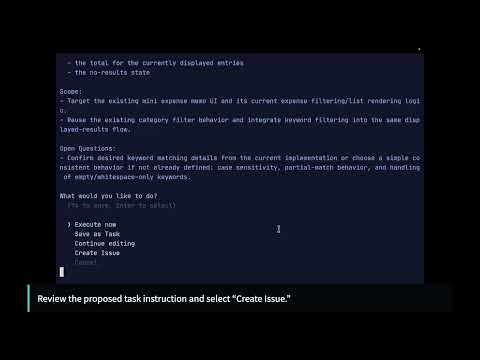
Follow the written tutorial with these hands-on walkthroughs:
| Chapter 1 | Chapter 2 |
|---|---|
 |
 |
| Plain AI coding agents | TAKT |
|---|---|
| The prompt asks the agent to follow a process | The YAML workflow owns the process |
| Review steps can be forgotten or skipped | Review and fix loops are explicit transitions |
| One long context keeps growing | Each step receives only the context it needs |
| Implementation and review responsibilities blur | Personas, permissions, and output contracts separate responsibilities |
| Work often lands directly in the current tree | Queued tasks run in isolated worktrees by default |
| The path from task to result is hard to audit | Logs and reports preserve the path from task to PR |
| The same process must be recreated by memory | Workflows are reusable, reviewable, and versionable |
TAKT requires Node.js >=22.22.0.
The provider you choose determines whether you need to install an external CLI or can run on Node.js alone via a TypeScript SDK.
These providers run via SDK (no CLI required, Node.js only):
claude-sdk—@anthropic-ai/claude-agent-sdkcodex—@openai/codex-sdkopencode—@opencode-ai/sdkpi—@earendil-works/pi-coding-agent
The deepseek-harness provider uses the official Python SDK through a private JSON-RPC bridge. Install the matching SDK/runtime packages with Python 3.10+:
python3 -m pip install deepseek-harness-sdk deepseek-harness-runtime-binThe official runtime currently supports Linux x64/arm64 and macOS arm64 only. Windows and macOS x64 fail fast; TAKT does not silently fall back to another provider. Set DEEPSEEK_API_KEY and optionally DEEPSEEK_BASE_URL in the environment. The Python SDK and bundled deepseek-harness-runtime-bin must come from matching releases. This provider is a developer-preview compatibility surface: upstream API/event vocabulary may change between matching releases, so use the opt-in live smoke procedure in the configuration guide before relying on a new SDK/runtime pair.
These providers require an external CLI:
claude— Claude Codeclaude-terminal— Claude Code driven in an interactive terminal session (also requirestmux)copilot— GitHub Copilot CLIcursor— Cursor Agentkiro— Kiro CLI
Optional:
- GitHub CLI (
gh) — fortakt #N(GitHub Issue tasks) - GitLab CLI (
glab) — for GitLab Issue/MR integration (auto-detected from remote URL)
OAuth usage: Whether OAuth is permitted varies by provider and use case. Check each provider's terms of service before using TAKT.
npm install -g taktWith Nix flakes:
nix run github:nrslib/takt
nix profile install github:nrslib/takt
The Nix package installs the TAKT CLI itself. External CLI providers, git, and gh/glab still need to be installed and available on PATH or configured separately as described in Requirements.
$ takt

Select workflow:
  ❯ 🎼 default (current)
    📁 🚀 Quick Start/
    📁 🛠️ Development/
    📁 🔍 Review/

> Add user authentication with JWT

[AI clarifies requirements and organizes the task]

> /go

Proposed task:
  ...

What would you like to do?
    Execute now
    Create GitHub Issue
  ❯ Queue as task          # ← normal flow
    Continue conversation
Choosing "Queue as task" saves the task to .takt/tasks/. Run takt run to execute — TAKT creates an isolated worktree, runs the workflow (plan → implement → review → fix loop), and offers to create a PR when done.
# Execute queued tasks
takt run

# You can also queue from GitHub Issues
takt add #6
takt add #12

# Execute all pending tasks
takt run
"Execute now" runs the workflow directly in your current directory without worktree isolation. Useful for quick experiments, but note that changes go straight into your working tree.
# List task branches — merge, retry, requeue, force-fail, or delete
takt listThe name TAKT comes from the German word for "beat" or "baton stroke," used in conducting to keep an orchestra in time. TAKT uses workflow and step consistently in both user-facing and implementation-facing terminology.
A workflow is defined by a sequence of steps. Use steps, initial_step, and max_steps. Each step specifies a persona (who), permissions (what's allowed), and rules (what happens next). Here's a minimal example:
name: plan-implement-review
initial_step: plan
max_steps: 10

steps:
  - name: plan
    persona: planner
    edit: false
    rules:
      - condition: Planning complete
        next: implement

  - name: implement
    persona: coder
    edit: true
    required_permission_mode: edit
    rules:
      - condition: Implementation complete
        next: review

  - name: review
    persona: reviewer
    edit: false
    rules:
      - condition: Approved
        next: COMPLETE
      - condition: Needs fix
        next: implement    # ← fix loop
Rules determine the next step. COMPLETE ends the workflow successfully, ABORT ends with failure. See the Workflow Guide for the full schema, parallel steps, and rule condition types.
Reusable step definitions can be stored in .takt/steps/ and expanded with uses before validation. See the Workflow Guide for fragment lookup and override rules.
Workflow files live in workflows/ as the official directory name.
When the same workflow name exists in multiple locations, TAKT resolves in this order: .takt/workflows/ → ~/.takt/workflows/ → builtins.
| Workflow | Use Case |
|---|---|
default |
Standard development workflow. Scenario-based planning and test-first development with dynamic implementation companions, multi-perspective parallel peer review, adjudication, and a convergent fix loop. |
maintenance |
A default variant for existing codebases: preserves contracts outside the change scope and limits work to causally related changes. |
simple |
Lightweight workflow with the same minimal structure as pure; TAKT selects applicable domain facets per change, always including AI antipattern and architecture guidance. |
pure |
Minimal workflow with no injected domain facets — trusts the model's own judgment and skill selection. |
takt-default |
The workflow used to develop TAKT itself. Directly applicable to other CLI tool development. |
takt-default-team |
A takt-default variant that runs implementation and remediation through Team Leader task decomposition. |
review |
Multi-perspective review with dynamic reviewer selection and supervisor synthesis, without modifying code. |
review-fix |
Multi-perspective review with dynamic reviewer selection, followed by the default workflow's adjudicated, verified remediation loop and final requirement check. |
Domain-specific families (simple-* / frontend / backend / dual / CQRS / *-mini variants) remain available under the 📦 Legacy category.
See the Builtin Catalog for all workflows and personas.
| Command | Description |
|---|---|
takt |
Talk to AI, refine requirements, execute or queue tasks |
takt exec |
Start instant Assistant/Worker/Review agent mode without writing workflow YAML |
takt add |
Refine a task through AI conversation and queue it (also from GitHub Issues) |
takt run |
Execute all pending tasks |
takt watch |
Monitor the task queue and auto-execute pending tasks (resident process) |
takt list |
Manage task branches (merge, retry, requeue, force-fail, instruct, delete) |
takt #N |
Use a GitHub Issue as the initial input for a task |
takt eject |
Copy builtin workflows/facets for customization |
takt workflow init |
Create a new workflow scaffold |
takt workflow doctor |
Validate workflow definitions |
takt repertoire add |
Install a repertoire package from GitHub |
See the CLI Reference for all commands and options.
TAKT also ships two client-integration entrypoints: takt-acp runs TAKT as an Agent Client Protocol agent over stdio JSON-RPC, and takt-mcp runs it as a stdio MCP server so an MCP client (Codex, Claude Code, …) can enqueue tasks with an optional existing or newly created issue. Use takt run or takt watch to execute pending tasks.
takt exec starts TAKT's interactive task-entry mode. The Assistant agent clarifies the request, /go turns the conversation into a generated workflow, Worker agent(s) implement the task, Review agent(s) review the result, the Replanning agent asks the user for direction when needed, and loop detection prevents repeated unproductive cycles.
Exec starts from the previous exec configuration, or the default configuration on first run; pass a preset name to start from that preset. Use /setup during the conversation to edit agents, loop detection thresholds, presets, and referenced facets. When /go runs, TAKT generates .takt/exec/workflow.yaml and executes it through the normal workflow engine; use /cancel to exit without running. Image attachments are supported while editing input (/paste-image, Ctrl+V, or an OSC 1337 inline-image paste).
See Instant Exec Mode in the CLI Reference for preset resolution order, /setup persistence, image handling limits, and session_key behavior.
Minimal ~/.takt/config.yaml:
provider: claude    # claude, claude-sdk, claude-terminal, codex, opencode, deepseek-harness, cursor, copilot, kiro, pi, or mock
model: sonnet       # passed directly to provider
language: en        # en or ja
Run metadata, sessions, traces, reports, and other run artifacts remain ordinary
files under .takt/runs/<run>/. Resume and requeue preserve the applicable run
state and reports.
Beyond these basics, config.yaml (legacy mode) supports internal-agent overrides (takt_providers) and auto_routing, which selects a provider/model per step from candidate pools with a cost / balanced / performance strategy. Auto-routing decisions can be recorded locally as NDJSON under .takt/events/; recording is opt-in (takt telemetry enable or telemetry.routing_decisions) and TAKT never uploads routing decisions. In runtime mode, provider/model/options and routing move to runtime.yaml (see below).
Or use provider credentials directly (no CLI installation required for claude-sdk, Codex, OpenCode, Pi, or DeepSeek Harness when its Python SDK/runtime is installed):
export TAKT_ANTHROPIC_API_KEY=sk-ant-...   # Anthropic (Claude)
export TAKT_OPENAI_API_KEY=sk-...          # OpenAI (Codex)
export TAKT_OPENCODE_API_KEY=...           # OpenCode
export TAKT_CURSOR_API_KEY=...             # Cursor Agent (optional if logged in)
export TAKT_COPILOT_GITHUB_TOKEN=ghp_...   # GitHub Copilot CLI
export TAKT_KIRO_API_KEY=...               # Kiro CLI
export DEEPSEEK_API_KEY=...                 # Official DeepSeek Harness SDK
# Optional: export DEEPSEEK_BASE_URL=https://...
# Pi uses its SDK credential store or provider-native environment variables.
See the Configuration Guide for all options, provider profiles, and model resolution.
OpenCode calls have a 60-minute provider-event inactivity limit by default: the
timer resets on each provider event, so a healthy call can run longer while
events continue to arrive. Raise the limit with
provider_options.opencode.guards.call_timeout_ms (up to 86,400,000 ms). Guard
profiles and per-model overrides are described in
Provider inactivity deadline and OpenCode execution guards.
Provider, model, provider options, auto routing, and internal-agent assignment
can live in a dedicated layer instead of config.yaml: ~/.takt/runtime.yaml
and <project>/.takt/runtime.yaml, with the project layer winning. Workflow
YAML has no provider/model/options/routing layer. Runtime mode is enabled by an
active provider section, not by the file existing; mixing an active
runtime.yaml provider section with the legacy provider keys is rejected with
a diagnostic naming the file and the key to migrate to. Without an active
provider section, config.yaml behaves exactly as before.
Companion reviewers are disabled by default. Enable them with the top-level
companion.enabled: true policy in runtime.yaml; global and project policies
combine with logical AND, so a global false cannot be re-enabled by a project
setting. See docs/configuration.md for the schema, the
migration table, and companion policy details.
takt workflow init my-flow   # Create a new workflow scaffold
takt workflow doctor my-flow # Validate a workflow definition
takt eject default # Copy builtin workflow to ~/.takt/workflows/ and editCreate a Markdown file in ~/.takt/facets/personas/:
# ~/.takt/facets/personas/my-reviewer.md
You are a code reviewer specialized in security.
Reference it in your workflow: persona: my-reviewer
~/.takt/personas/ still works as a compatibility path, but takt catalog only scans the facets/ directories.
See the Workflow Guide for details. The list of builtin personas is in the Builtin Catalog.
TAKT provides takt-action for GitHub Actions:
- uses: nrslib/takt-action@main
  with:
    anthropic_api_key: ${{ secrets.TAKT_ANTHROPIC_API_KEY }}
    github_token: ${{ secrets.GITHUB_TOKEN }}
For other CI systems, use pipeline mode:
takt --pipeline --task "Fix the bug" --auto-prSee the CI/CD Guide for full setup instructions.
~/.takt/                    # Global config
├── config.yaml             # Provider, model, language, etc.
├── workflows/              # User workflow definitions
├── facets/                 # User facets (personas, policies, knowledge, etc.)
└── repertoire/             # Installed repertoire packages

.takt/                      # Project-level
├── config.yaml             # Project config
├── workflows/              # Project workflow overrides
├── facets/                 # Project facets
├── tasks.yaml              # Pending tasks
├── tasks/                  # Task specifications
└── runs/                   # Execution reports, logs, context
Workflow definitions are stored under workflows/.
TAKT enforces phase transitions declaratively as a YAML state machine, formalizes the artifact of each phase with output contracts, and routes deviations back via parallel review and fix loops. This structure suits Spec-Driven Development (SDD), where the spec stays at the center of the process. Once the spec is defined, the workflow enforces phase transitions, routes detected deviations back to fix steps, and does not complete until the verification gate passes.
For users who want to adopt SDD, the community provides j5ik2o/takt-sdd as a ready-made implementation. It ships workflows for Requirements → Gap Analysis → Design → Tasks → Implementation → Validation, plus an OpenSpec-style change-proposal flow. Install in one command:
npx create-takt-sddSee External Integrations for other community integrations.
| Document | Description |
|---|---|
| Tutorial | Improve one example over three phases while queuing, running, and inspecting tasks |
| CLI Reference | All commands and options |
| Configuration | Global and project settings |
| Observability | Phase-level usage events and analysis workflow |
| Design Philosophy | Why TAKT is built around workflows, facets, feedback loops, and traceability |
| Workflow Guide | Creating and customizing workflows |
| Builtin Catalog | All builtin workflows and personas |
| Faceted Prompting | Prompt design methodology |
| Token Saving | Measuring and reducing token consumption |
| Repertoire Packages | Installing and sharing packages |
| Task Management | Task queuing, execution, isolation |
| CI/CD Integration | GitHub Actions and pipeline mode |
| External Integrations | Community examples that extend TAKT without modifying core (audit trails, etc.) |
| Changelog (日本語) | Version history |
Simplified Chinese documentation uses the .zh-CN.md suffix so it can coexist with the English and Japanese pages. Start with the Chinese documentation index.
Translated coverage includes the onboarding path (README, tutorial, configuration, and CLI reference), workflow authoring, provider/external integrations, and task management. The remaining catalog, observability, design, prompting, token-saving, repertoire, CI/CD, testing, contributing, changelog, and internal design/development pages remain available in English or Japanese and are intentionally not duplicated here.
TAKT is supported by CodeRabbit through its Open Source Support Program.

Join the TAKT Discord for questions, discussions, and updates.
See CONTRIBUTING.md for details.
MIT — See LICENSE for details.
