Start with any input
- YOU
- Drop text, a sketch, a reference figure, a PDF page, or a lab photo.
- SCIFIG
- Generates a journal-grade draft in one of 6 publication styles — or let Auto decide.
- YOU GET
- A publication-ready first draft in seconds.
From any input to a ready-to-use scientific figure — editable at every step.
Figure prompt
Core Subject (e.g., Cas9 protein cutting DNA)
Action / Details (e.g., Double strand break, detailed molecular view)
Start with 100 free credits|No credit card required
Get up to 300 free credits on day one when you join through an invite.
Trusted by 100K+ researchers from leading institutions:













Seven creative paths
Type a prompt, sketch by hand, drop a reference, upload a PDF, snap a lab photo, or refine in canvas — SciFig handles every path with editable output.
Three stages, one editable workflow
Generate, enhance, and vectorize your scientific figures in one place.
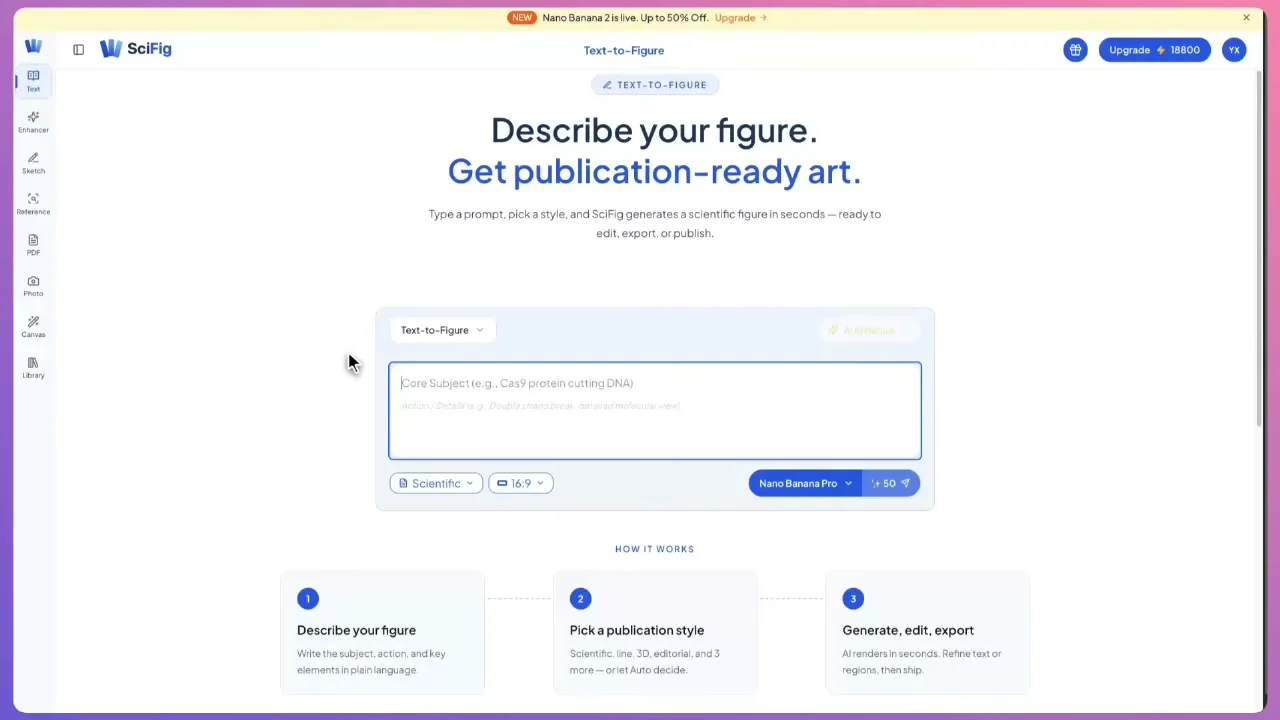
From text, sketch, reference, PDF, or photo, SciFig generates your figure in one of six publication styles — scientific, line, 3D, editorial, sketch, or watercolor — engineered to match Nature, Cell, and Science. Auto mode skips the style overlay and follows your prompt alone.
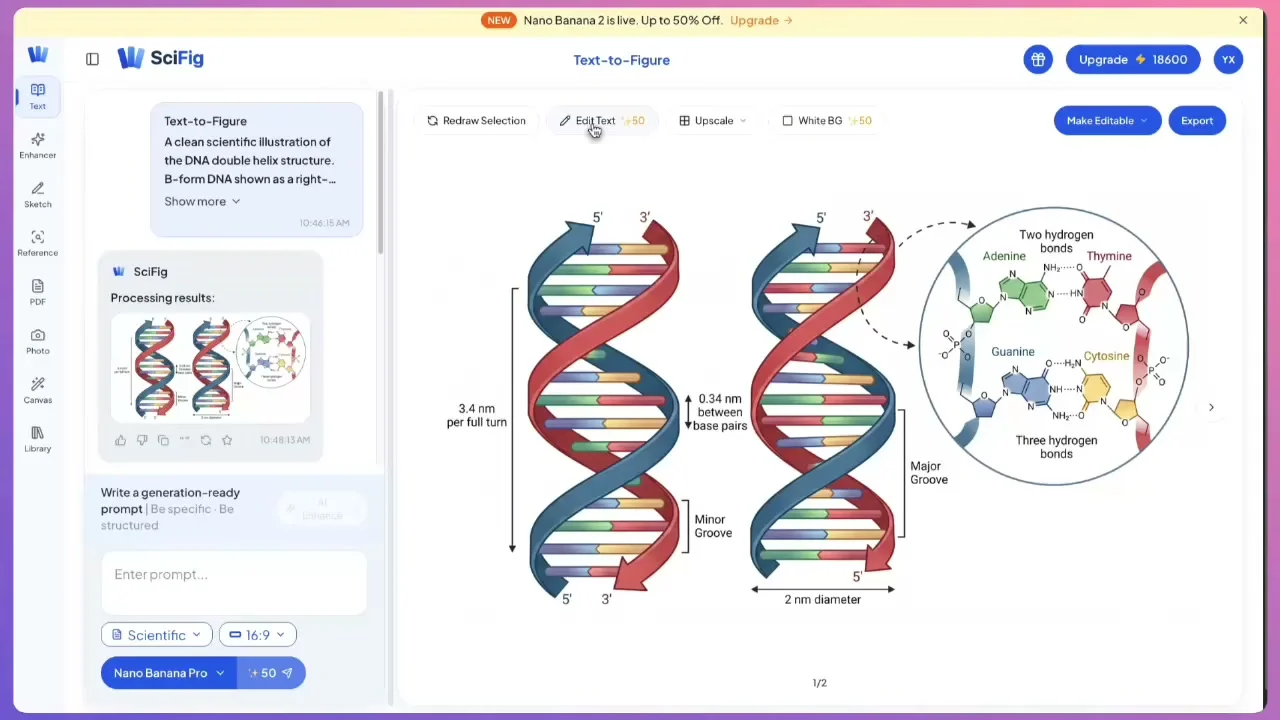
Unlike one-shot AI, SciFig keeps everything editable after generation — change any text's content, font, size, or position directly, open the figure in Canvas for element-level edits, or feed a PDF as context for smarter edits.
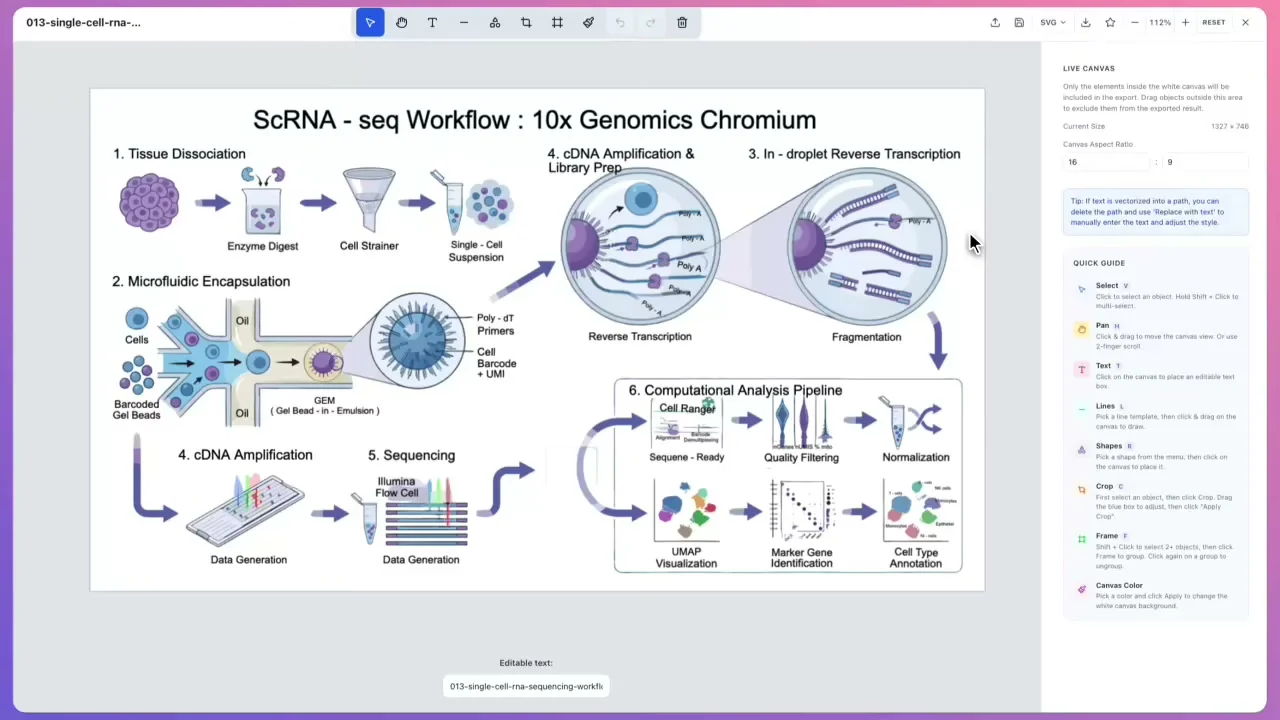
Export figures as editable PPTX or layered SVG, then fine-tune every shape, color, and label in SciFig's built-in canvas with full undo/redo. No Illustrator or Figma roundtrip needed.
Why it is different
A general AI image generator hands you a flat picture. A scientific figure generator gives you accurate structures and output you can still edit.
| General AI image generators | SciFig | |
|---|---|---|
| Editable after generation | Flat raster only — regenerate the whole image to change one label | Vectorize once, then edit every shape and text object |
| Export formats | PNG / JPG | PNG, JPG, layered SVG, and editable-shape PPTX |
| Scientific accuracy | Plausible-looking, often wrong structures and terminology | Built on discipline-specific terminology, and you correct anything the model gets wrong |
| Resolution | Fixed output size | One-click Upscale to 4K / 8K PNG for large-format printing |
Trusted by researchers
See how researchers use a scientific figure maker to create editable scientific figures, images, and diagrams for papers, presentations, and teaching.
10x
Faster scientific figure creation
6
AI generation modes
4+
Export formats
“I used to spend an entire day revising scientific figures for submission. With SciFig I describe the change in one sentence and get a publication-ready scientific figure in minutes.”

Dr. Wei L.
Postdoc, Molecular Biology, Stanford
“The editable PPT export is a game-changer. I can fine-tune labels and colors on a scientific diagram right in PowerPoint instead of going back to Illustrator every time a reviewer asks for changes.”

Prof. James R.
Associate Professor, Biomedical Engineering, MIT
“Our lab switched from BioRender last semester. The layered SVG output and built-in canvas give us far more control over every scientific illustration, and the AI actually understands scientific context.”

Maria S., PhD
PhD Candidate, Neuroscience, UCL
“I run a lab of 15 people. Before SciFig every student came to me for scientific figure help. Now they generate journal-quality scientific figures on their own — I just review and approve.”

Prof. Yuki T.
Principal Investigator, Systems Biology, ETH Zürich
“As a journal editor I see hundreds of scientific figures a month. Papers with SciFig scientific images consistently have cleaner layouts, correct labeling, and proper resolution. It shows.”

Dr. Elena V.
Associate Editor, Cell Reports Methods
“I teach undergraduate mechanics, and SciFig turned my free-body diagram prep from a two-hour chore into a ten-minute step. I just type what I need and get a clean, editable scientific diagram for every slide.”

Daniel M.
Lecturer, Mechanics, University of Toronto
“As a materials scientist I am constantly fighting journal requirements for vector formats. With SciFig I generate a polished scientific illustration and export straight to SVG as an editable vector — no more redrawing figures the night before submission.”

Dr. Anja K.
Materials Scientist, Max Planck Institute
“In our epidemiology group, building a PRISMA-style study flow diagram used to take half a day. Now I sketch the logic once, and SciFig gives us a clear scientific figure in minutes that everyone on the team can revise.”

Sofia L.
Research Coordinator, Epidemiology, Karolinska Institutet
“SciFig basically rescued my thesis slides. I describe a complex ecosystem concept, export the scientific image straight to PPTX, and drop it into my presentation instead of spending hours in PowerPoint.”

Mikkel H.
Master's Student, Environmental Science, University of Copenhagen
How it works
Start with a description, sketch, reference, PDF, or photo; refine every label and export an editable research figure.
Scientific figures across disciplines
Explore research figures created worldwide — across life sciences, chemistry, physics, engineering, and medicine.
Life sciences — Pathways, cell structures, and mechanism diagrams. A biology figure maker for the molecular and cellular work your readers need to grasp at a glance.
Chemistry and materials — Reaction schemes, molecular structures, and instrument schematics, exported as editable vectors you can relabel without redrawing.
Physics and engineering — Free-body diagrams, circuits, and Bode plots, each with a dedicated scientific diagram generator instead of a general-purpose canvas.
Medicine and public health — Study flows, PRISMA diagrams, and clinical scientific illustration for manuscripts, posters, and teaching material.
Practical guide
A practical guide to making scientific figures, diagrams, and illustrations with clear structure and editable output.
Text-to-Figure
Generate a figure from a plain-language description
Tools
All SciFig figure generators and the vector editor in one place.
Models
Default to GPT Image 2 for journal papers; switch to Nano Banana Pro for slides and posters; pick Nano Banana 2 for routine figure work
Tutorials
Seven short walkthroughs of the AI scientific figure generator
Blog
Tutorials, tool comparisons, and publication tips for researchers.
Inspiration
Explore publication-ready scientific figure examples, copy the prompts, and use them as starting points for your own work.
Circuit Diagram Maker
Generate accurate circuit diagrams with labeled schematic symbols for research papers, lab reports, and technical publications.
Free Body Diagram Generator
Create accurate, publication-ready free body diagrams with labeled force vectors for weight, normal force, friction, and tension in seconds.
Graphical Abstract Maker
Generate a publication-ready graphical abstract — a single-panel visual summary that captures your study's methods, key finding, and result with clear icons and flow arrows.
FAQ
Common questions about creating scientific figures with SciFig.

Ready to publish
Free to start · No credit card required · Built for researchers
As featured on: