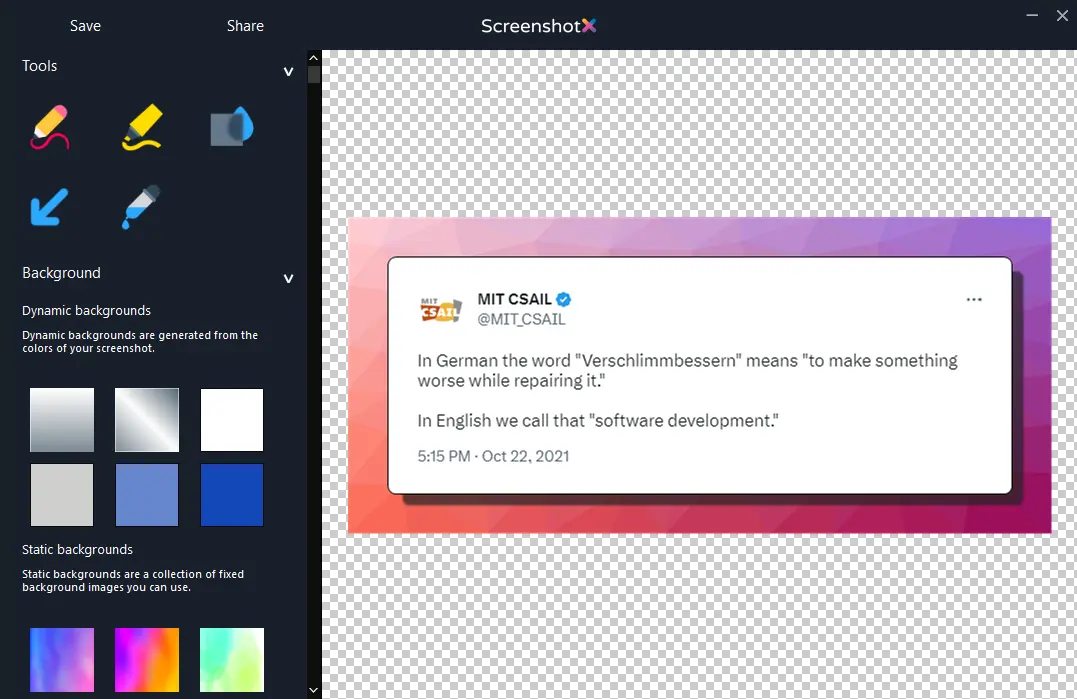
ScreenshotX is a new screenshot snipping tool for Windows.
A lightweight, freeware app without ads or nonsense.
Works in Windows 11, 10, 8 and 7.
Latest version: 1.1
Focus on the content. ScreenshotX will take care of the rest. This is how it works:
Taking a pretty screenshot in Windows has never been this easy!
ScreenshotX will automatically detect a solid color background and balances your screenshot content to the center. You can use the blur tool to retract sensitive information
ScreenshotX automatically balances screenshots and includes a blur tool to redact sensitive information
ScreenshotX comes with 21
translations:
English, Chinese, Czech, Danish, Finnish, German, Greek, Hindi, Indonesian, Japanese, Korean,
Malay, Norwegian, Portuguese, Romanian, Slovak, Spanish, Thai, Turkish, Ukrainian and
Vietnamese.
All these translations are built-in, there is no separate download. You can change the program’s
language from the General Settings menu.
You can also share screenshots with ScreenshotX
directly from the app and without the need to create an account.
Just click the Share button and your screenshot is instantly uploaded to cloud and you get its
sharing URL.
The Share URLs look something like this:
ScreenshotX.com/i/111111
You also get an Administrative URL which looks something like this:
ScreenshotX.com/admin/42e7ef1e018bf2ce458c5a67088940d57b0b850x
The shared screenshots are automatically removed after 30 days, or you can also remove your
shared screenshot yourself from the app or using its Administrative URL.
This is 100% free software. If you find it useful, please consider supporting us. You can visit GreatSoftwareCompany.com/support-us to see all the ways you can support us. If you are on a tight budget, there are many ways you can support us also without spending a single penny.
Thank you for considering supporting us. We really appreciate it!
ScreenshotX is Freeware, without any ads, spyware or registration.
Just a simple and easy way to create pretty screenshots in Windows.
Works in Windows 11, 10, 8 and 7.
Latest version: 1.1

File size: 3.0 MB
The download button starts the download for the Setup version.
If you want to download the Portable version,
👉 please click
here.
The Setup version installs the program to your Windows like any normal
software.
A Portable version
is a single executable file that you can run and then remove it after you are done.
Change Log
What is new compared to version 1.0: