

Copying an array in Java means creating another array that contains the same elements as the original array. Java provides several ways to copy arrays, including using a loop, Arrays.copyOf(), System.arraycopy(), and clone().
Example:
Input: arr[] = {10, 20, 30, 40, 50}
Output: Copied Array = {10, 20, 30, 40, 50}
Different Ways to Copy an Array
The commonly used methods are:
1. Copying an Array Using a for Loop
The simplest approach is to create a new array and copy each element individually using a for loop.
import java.util.Arrays;

public class GFG {
    public static void main(String[] args) {

        int[] a = {1, 8, 3};

        // Create a new array of the same size
        int[] b = new int[a.length];

        // Copy elements from a[] to b[]
        for (int i = 0; i < a.length; i++) {
            b[i] = a[i];
        }

        // Modify the copied array
        b[0]++;

        System.out.println("Original Array: " + Arrays.toString(a));
        System.out.println("Copied Array: " + Arrays.toString(b));
    }
}
Output
Original Array: [1, 8, 3]
Copied Array: [2, 8, 3]
Explanation:
- A new array
bis created with the same length asa. - Each element of
ais copied intob. - Since
aandbare different arrays, modifyingbdoes not affecta.
2. Using clone() Method
The clone() method can be used to create a copy of an array without manually iterating over its elements.
Cloning of Single-Dimensional Array
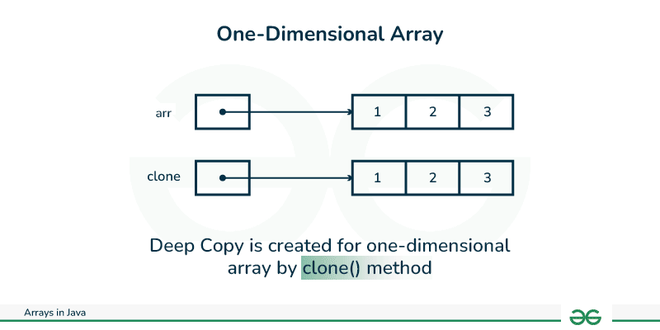
When you clone a single-dimensional array, such as Object[], a shallow copy is performed.
class Geeks {
    public static void main(String args[])
    {
        int intArray[] = { 1, 2, 3 };

        int cloneArray[] = intArray.clone();

        // will print false as shallow copy is created
        System.out.println(intArray == cloneArray);

        for (int i = 0; i < cloneArray.length; i++) {
            System.out.print(cloneArray[i] + " ");
        }
    }
}
Output
false
1 2 3
Explanation:
- This program demonstrates cloning a one-dimensional array using the clone() method, which creates a shallow copy.
- The original and cloned arrays have the same contents but are different objects in memory (intArray == cloneArray returns false).
Cloning Multidimensional Array
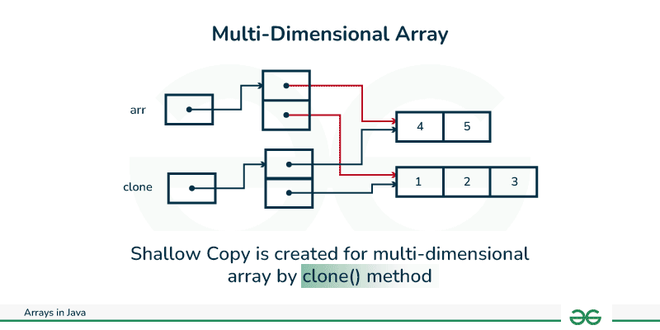
A clone of a multi-dimensional array (like Object[][]) is a "shallow copy,"
class Geeks {
    public static void main(String args[])
    {
        int intArray[][] = { { 1, 2, 3 }, { 4, 5 } };

        int cloneArray[][] = intArray.clone();

        // will print false
        System.out.println(intArray == cloneArray);

        // will print true as shallow copy is created
        // i.e. sub-arrays are shared
        System.out.println(intArray[0] == cloneArray[0]);
        System.out.println(intArray[1] == cloneArray[1]);
    }
}
Output
false
true
true
Explanation: This program shows that cloning a multi-dimensional array creates a shallow copy—the top-level array is duplicated, but inner arrays are still shared references.
3. Using System.arraycopy()
The System.arraycopy() method copies a specified number of elements from one array to another.
public class GFG {

    public static void main(String[] args) {

        int a[] = { 1, 8, 3 };

        // Creating an array b[] of same size as a[]
        int b[] = new int[a.length];

        // Copying elements of a[] to b[]
        System.arraycopy(a, 0, b, 0, 3);

        // Changing b[] to verify that
        // b[] is different from a[]
        b[0]++;

        System.out.println("");

        for (int i = 0; i < a.length; i++)
            System.out.print(a[i] + " ");

        System.out.println("");

        for (int i = 0; i < b.length; i++)
            System.out.print(b[i] + " ");
    }
}
Output
1 8 3
2 8 3
Explanation: After copying with System.arraycopy(), the first element of "b" is incremented, so b[0] becomes 2, but a[0] remains 1.
4. Using Arrays.copyOf()
The Arrays.copyOf() method creates a new array and copies elements from the original array up to the specified length.
import java.util.Arrays;

class GFG {

    public static void main(String[] args) {

        int a[] = { 1, 8, 3 };

        // Create an array b[] of same size as a[]
        // Copy elements of a[] to b[]
        int b[] = Arrays.copyOf(a, 3);

        // Change b[] to verify that
        // b[] is different from a[]
        b[0]++;

        System.out.println("");

        // Iterating over array a[]
        for (int i = 0; i < a.length; i++)
            System.out.print(a[i] + " ");

        System.out.println("");

        // Iterating over array b[]
        for (int i = 0; i < b.length; i++)
            System.out.print(b[i] + " ");
    }
}
Output
1 8 3
2 8 3
Explanation: The Arrays.copyOf() method copies the elements of "a" to "b". After modifying b[0], we see that only "b" is affected.
5. Using Arrays.copyOfRange()
The Arrays.copyOfRange() method is used when we want to copy a specific range of elements from an array.
import java.util.Arrays;

class GFG {

    public static void main(String[] args) {

        int a[] = { 1, 8, 3, 5, 9, 10 };

        // Creating an array b[] and
        // copying elements of a[] to b[]
        int b[] = Arrays.copyOfRange(a, 2, 6);

        // Changing b[] to verify that
        // b[] is different from a[]
        b[0]++;  // Modify b[0] to check if it affects a[]

        // Iterating over array a[]
        System.out.println("");
        for (int i = 0; i < a.length; i++)
            System.out.print(a[i] + " ");

        // Iterating over array b[]
        System.out.println("");
        for (int i = 0; i < b.length; i++)
            System.out.print(b[i] + " ");
    }
}
Output
1 8 3 5 9 10
4 5 9 10
Explanation:
b[0]++increments the first element of arrayb[].- Since
b[]is a separate copy of the specified range froma[], modifyingb[]does not affecta[]. - The output will confirm that changes in
b[]do not alter the original arraya[].
Shallow Copy Vs Deep Copy
| Feature | Shallow Copy | Deep Copy |
|---|---|---|
| Meaning | Copies the outer object/array, but nested objects are shared. | Copies the outer object/array and creates independent copies of nested objects. |
| Nested References | References are shared. | References are not shared. |
| Modification | Changes to nested objects can affect the original. | Changes to nested objects do not affect the original. |
| Memory | Requires less memory. | Requires more memory. |
| Example | int[][] b = a.clone(); | Clone each inner array separately. |
