

A nested loop is a loop placed inside another loop. The inner loop executes completely for each iteration of the outer loop. Python allows any combination of for and while loops to be nested.
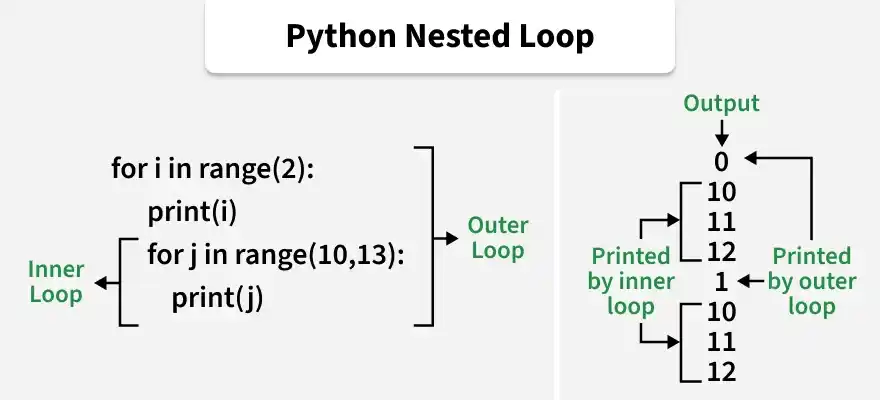
Example: Here, we use a nested for loop to print pairs of numbers.
for i in range(1, 3):
    for j in range(1, 4):
        print(i, j)
Output
1 1
1 2
1 3
2 1
2 2
2 3
Explanation: outer loop runs 2 times. For each iteration of the outer loop, the inner loop runs 3 times, printing all possible pairs of i and j.
Syntax
for/while outer_loop:
for/while inner_loop:
# Code inside inner loop
Parameters:
- outer_loop: loop that controls how many times the inner loop executes.
- inner_loop: loop that runs completely during each iteration of the outer loop.
Examples
Example 1: Here, we use nested for loops to print the multiplication tables of 2 and 3.
for i in range(2, 4):
    for j in range(1, 11):
        print(i, "*", j, "=", i * j)
    print()
Output
2 * 1 = 2
2 * 2 = 4
2 * 3 = 6
2 * 4 = 8
2 * 5 = 10
2 * 6 = 12
2 * 7 = 14
2 * 8 = 16
2 * 9 = 18
2 * 10 = 20
3 * 1 = 3
3 * 2 = 6
3 * 3 = 9
3 * 4 = 12
3 * 5 = 15
3 * 6 = 18
3 * 7 = 21
3 * 8 = 24
3 * 9 = 27
3 * 10 = 30
Explanation: outer loop selects the table (2 and 3). For each value of i, the inner loop runs from 1 to 10 and prints the multiplication table.
Example 2: Here, we combine a for loop and a while loop to display every subject for each student.
students = ["Emma", "Daniel"]
subjects = ["Math", "Science", "English"]

for student in students:
    index = 0
    while index < len(subjects):
        print(student, "-", subjects[index])
        index += 1
Output
Emma - Math
Emma - Science
Emma - English
Daniel - Math
Daniel - Science
Daniel - English
Explanation: outer for loop iterates through each student. For every student, the inner while loop iterates through all subjects, printing every student-subject combination.
Example 3: Here, we use nested for loops to print a simple triangle pattern.
rows = 5

for i in range(1, rows + 1):
    for j in range(i):
        print("*", end=" ")
    print()
Output
*
* *
* * *
* * * *
* * * * *
Explanation: outer loop controls the number of rows. During each iteration, the inner loop prints the required number of stars for that row before moving to the next line.
Using break
break statement immediately exits the current loop when a specified condition becomes True. In nested loops, it only terminates the inner loop.
for i in range(2, 4):
    for j in range(1, 11):
        if i == j:
            break
        print(i, "*", j, "=", i * j)
    print()
Output
2 * 1 = 2

3 * 1 = 3
3 * 2 = 6
Explanation: outer loop continues running normally. Whenever i == j, the break statement terminates only the inner loop, so the remaining iterations of that inner loop are skipped.
Using continue
continue statement skips the current iteration of the loop and moves directly to the next iteration.
for i in range(2, 4):
    for j in range(1, 11):
        if i == j:
            continue
        print(i, "*", j, "=", i * j)
    print()
Output
2 * 1 = 2
2 * 3 = 6
2 * 4 = 8
2 * 5 = 10
2 * 6 = 12
2 * 7 = 14
2 * 8 = 16
2 * 9 = 18
2 * 10 = 20

3 * 1 = 3
3 * 2 = 6
3 * 4 = 12
3 * 5 = 15
3 * 6 = 18
3 * 7 = 21
3 * 8 = 24
3 * 9 = 27
3 * 10 = 30
Explanation: When i == j, the continue statement skips that iteration of the inner loop. Therefore, 2 * 2 and 3 * 3 are not printed, while all other iterations continue normally.
Nested List Comprehension
Nested loops can also be written in a single line using nested list comprehensions. This is useful for creating nested lists in a compact way. Below is the syntax:
new_list = [[expression for item in inner_sequence]
for item in outer_sequence]
matrix = [[j for j in range(3)]
          for i in range(3)]

print(matrix)
Output
[[0, 1, 2], [0, 1, 2], [0, 1, 2]]
Explanation: inner list comprehension creates the list [0, 1, 2]. The outer list comprehension repeats this process three times, producing a nested list with three rows.
