
Points
The points are the central entity that Qdrant operates with. A point is a record consisting of a vector and an optional payload.
It looks like this:
// This is a simple point
{
    "id": 129,
    "vector": [0.1, 0.2, 0.3, 0.4],
    "payload": {"color": "red"},
}
You can search among the points grouped in one collection based on vector similarity. This procedure is described in more detail in the search and filtering sections.
This section explains how to create and manage vectors.
Any point modification operation is asynchronous and takes place in 2 steps. At the first stage, the operation is written to the Write-ahead-log.
After this moment, the service will not lose the data, even if the machine loses power supply.
Point IDs
Qdrant supports using both 64-bit unsigned integers and UUID as identifiers for points.
Examples of UUID string representations:
- simple:
936DA01F9ABD4d9d80C702AF85C822A8 - hyphenated:
550e8400-e29b-41d4-a716-446655440000 - urn:
urn:uuid:F9168C5E-CEB2-4faa-B6BF-329BF39FA1E4
That means that in every request UUID string could be used instead of numerical id. Example:
PUT /collections/{collection_name}/points
{
    "points": [
        {
            "id": "5c56c793-69f3-4fbf-87e6-c4bf54c28c26",
            "payload": {"color": "red"},
            "vector": [0.9, 0.1, 0.1]
        }
    ]
}
from qdrant_client import QdrantClient, models

client = QdrantClient(url="http://localhost:6333")

client.upsert(
    collection_name="{collection_name}",
    points=[
        models.PointStruct(
            id="5c56c793-69f3-4fbf-87e6-c4bf54c28c26",
            payload={
                "color": "red",
            },
            vector=[0.9, 0.1, 0.1],
        ),
    ],
)
import { QdrantClient } from "@qdrant/js-client-rest";

const client = new QdrantClient({ host: "localhost", port: 6333 });

client.upsert("{collection_name}", {
  points: [
    {
      id: "5c56c793-69f3-4fbf-87e6-c4bf54c28c26",
      payload: {
        color: "red",
      },
      vector: [0.9, 0.1, 0.1],
    },
  ],
});
use qdrant_client::qdrant::{PointStruct, UpsertPointsBuilder};
use qdrant_client::Qdrant;

let client = Qdrant::from_url("http://localhost:6334").build()?;

client
    .upsert_points(
        UpsertPointsBuilder::new(
            "{collection_name}",
            vec![PointStruct::new(
                "5c56c793-69f3-4fbf-87e6-c4bf54c28c26",
                vec![0.9, 0.1, 0.1],
                [("color", "Red".into())],
            )],
        )
        .wait(true),
    )
    .await?;
import static io.qdrant.client.PointIdFactory.id;
import static io.qdrant.client.ValueFactory.value;
import static io.qdrant.client.VectorsFactory.vectors;

import io.qdrant.client.QdrantClient;
import io.qdrant.client.QdrantGrpcClient;
import io.qdrant.client.grpc.Points.PointStruct;
import java.util.List;
import java.util.Map;
import java.util.UUID;

QdrantClient client =
    new QdrantClient(QdrantGrpcClient.newBuilder("localhost", 6334, false).build());

client
    .upsertAsync(
        "{collection_name}",
        List.of(
            PointStruct.newBuilder()
                .setId(id(UUID.fromString("5c56c793-69f3-4fbf-87e6-c4bf54c28c26")))
                .setVectors(vectors(0.05f, 0.61f, 0.76f, 0.74f))
                .putAllPayload(Map.of("color", value("Red")))
                .build()))
    .get();
using Qdrant.Client;
using Qdrant.Client.Grpc;

var client = new QdrantClient("localhost", 6334);

await client.UpsertAsync(
	collectionName: "{collection_name}",
	points: new List<PointStruct>
	{
		new()
		{
			Id = Guid.Parse("5c56c793-69f3-4fbf-87e6-c4bf54c28c26"),
			Vectors = new[] { 0.05f, 0.61f, 0.76f, 0.74f },
			Payload = { ["color"] = "Red" }
		}
	}
);
import (
	"context"

	"github.com/qdrant/go-client/qdrant"
)

client, err := qdrant.NewClient(&qdrant.Config{
	Host: "localhost",
	Port: 6334,
})

client.Upsert(context.Background(), &qdrant.UpsertPoints{
	CollectionName: "{collection_name}",
	Points: []*qdrant.PointStruct{
		{
			Id:      qdrant.NewID("5c56c793-69f3-4fbf-87e6-c4bf54c28c26"),
			Vectors: qdrant.NewVectors(0.05, 0.61, 0.76, 0.74),
			Payload: qdrant.NewValueMap(map[string]any{"color": "Red"}),
		},
	},
})
and
PUT /collections/{collection_name}/points
{
    "points": [
        {
            "id": 1,
            "payload": {"color": "red"},
            "vector": [0.9, 0.1, 0.1]
        }
    ]
}
client.upsert(
    collection_name="{collection_name}",
    points=[
        models.PointStruct(
            id=1,
            payload={
                "color": "red",
            },
            vector=[0.9, 0.1, 0.1],
        ),
    ],
)
client.upsert("{collection_name}", {
  points: [
    {
      id: 1,
      payload: {
        color: "red",
      },
      vector: [0.9, 0.1, 0.1],
    },
  ],
});
use qdrant_client::qdrant::{PointStruct, UpsertPointsBuilder};
use qdrant_client::Qdrant;

let client = Qdrant::from_url("http://localhost:6334").build()?;

client
    .upsert_points(
        UpsertPointsBuilder::new(
            "{collection_name}",
            vec![PointStruct::new(
                1,
                vec![0.9, 0.1, 0.1],
                [("color", "Red".into())],
            )],
        )
        .wait(true),
    )
    .await?;
import static io.qdrant.client.PointIdFactory.id;
import static io.qdrant.client.ValueFactory.value;
import static io.qdrant.client.VectorsFactory.vectors;

import io.qdrant.client.QdrantClient;
import io.qdrant.client.QdrantGrpcClient;
import io.qdrant.client.grpc.Points.PointStruct;
import java.util.List;
import java.util.Map;

QdrantClient client =
    new QdrantClient(QdrantGrpcClient.newBuilder("localhost", 6334, false).build());

client
    .upsertAsync(
        "{collection_name}",
        List.of(
            PointStruct.newBuilder()
                .setId(id(1))
                .setVectors(vectors(0.05f, 0.61f, 0.76f, 0.74f))
                .putAllPayload(Map.of("color", value("Red")))
                .build()))
    .get();
using Qdrant.Client;
using Qdrant.Client.Grpc;

var client = new QdrantClient("localhost", 6334);

await client.UpsertAsync(
	collectionName: "{collection_name}",
	points: new List<PointStruct>
	{
		new()
		{
			Id = 1,
			Vectors = new[] { 0.05f, 0.61f, 0.76f, 0.74f },
			Payload = { ["color"] = "Red" }
		}
	}
);
import (
	"context"

	"github.com/qdrant/go-client/qdrant"
)

client, err := qdrant.NewClient(&qdrant.Config{
	Host: "localhost",
	Port: 6334,
})

client.Upsert(context.Background(), &qdrant.UpsertPoints{
	CollectionName: "{collection_name}",
	Points: []*qdrant.PointStruct{
		{
			Id:      qdrant.NewIDNum(1),
			Vectors: qdrant.NewVectors(0.05, 0.61, 0.76, 0.74),
			Payload: qdrant.NewValueMap(map[string]any{"color": "Red"}),
		},
	},
})
are both possible.
Vectors
Each point in qdrant may have one or more vectors. Vectors are the central component of the Qdrant architecture, qdrant relies on different types of vectors to provide different types of data exploration and search.
Here is a list of supported vector types:
| Dense Vectors | A regular vectors, generated by majority of the embedding models. |
| Sparse Vectors | Vectors with no fixed length, but only a few non-zero elements. Useful for exact token match and collaborative filtering recommendations. |
| MultiVectors | Matrices of numbers with fixed length but variable height. Usually obtained from late interaction models like ColBERT. |
It is possible to attach more than one type of vector to a single point. In Qdrant we call these Named Vectors.
Read more about vector types, how they are stored and optimized in the vectors section.
Upload points
To optimize performance, Qdrant supports batch loading of points. I.e., you can load several points into the service in one API call. Batching allows you to minimize the overhead of creating a network connection.
The Qdrant API supports two ways of creating batches - record-oriented and column-oriented. Internally, these options do not differ and are made only for the convenience of interaction.
Create points with batch:
PUT /collections/{collection_name}/points
{
    "batch": {
        "ids": [1, 2, 3],
        "payloads": [
            {"color": "red"},
            {"color": "green"},
            {"color": "blue"}
        ],
        "vectors": [
            [0.9, 0.1, 0.1],
            [0.1, 0.9, 0.1],
            [0.1, 0.1, 0.9]
        ]
    }
}
client.upsert(
    collection_name="{collection_name}",
    points=models.Batch(
        ids=[1, 2, 3],
        payloads=[
            {"color": "red"},
            {"color": "green"},
            {"color": "blue"},
        ],
        vectors=[
            [0.9, 0.1, 0.1],
            [0.1, 0.9, 0.1],
            [0.1, 0.1, 0.9],
        ],
    ),
)
client.upsert("{collection_name}", {
  batch: {
    ids: [1, 2, 3],
    payloads: [{ color: "red" }, { color: "green" }, { color: "blue" }],
    vectors: [
      [0.9, 0.1, 0.1],
      [0.1, 0.9, 0.1],
      [0.1, 0.1, 0.9],
    ],
  },
});
or record-oriented equivalent:
PUT /collections/{collection_name}/points
{
    "points": [
        {
            "id": 1,
            "payload": {"color": "red"},
            "vector": [0.9, 0.1, 0.1]
        },
        {
            "id": 2,
            "payload": {"color": "green"},
            "vector": [0.1, 0.9, 0.1]
        },
        {
            "id": 3,
            "payload": {"color": "blue"},
            "vector": [0.1, 0.1, 0.9]
        }
    ]
}
client.upsert(
    collection_name="{collection_name}",
    points=[
        models.PointStruct(
            id=1,
            payload={
                "color": "red",
            },
            vector=[0.9, 0.1, 0.1],
        ),
        models.PointStruct(
            id=2,
            payload={
                "color": "green",
            },
            vector=[0.1, 0.9, 0.1],
        ),
        models.PointStruct(
            id=3,
            payload={
                "color": "blue",
            },
            vector=[0.1, 0.1, 0.9],
        ),
    ],
)
client.upsert("{collection_name}", {
  points: [
    {
      id: 1,
      payload: { color: "red" },
      vector: [0.9, 0.1, 0.1],
    },
    {
      id: 2,
      payload: { color: "green" },
      vector: [0.1, 0.9, 0.1],
    },
    {
      id: 3,
      payload: { color: "blue" },
      vector: [0.1, 0.1, 0.9],
    },
  ],
});
use qdrant_client::qdrant::{PointStruct, UpsertPointsBuilder};

client
    .upsert_points(
        UpsertPointsBuilder::new(
            "{collection_name}",
            vec![
                PointStruct::new(1, vec![0.9, 0.1, 0.1], [("city", "red".into())]),
                PointStruct::new(2, vec![0.1, 0.9, 0.1], [("city", "green".into())]),
                PointStruct::new(3, vec![0.1, 0.1, 0.9], [("city", "blue".into())]),
            ],
        )
        .wait(true),
    )
    .await?;
import static io.qdrant.client.PointIdFactory.id;
import static io.qdrant.client.ValueFactory.value;
import static io.qdrant.client.VectorsFactory.vectors;

import io.qdrant.client.QdrantClient;
import io.qdrant.client.QdrantGrpcClient;
import io.qdrant.client.grpc.Points.PointStruct;
import java.util.List;
import java.util.Map;

QdrantClient client =
    new QdrantClient(QdrantGrpcClient.newBuilder("localhost", 6334, false).build());

client
    .upsertAsync(
        "{collection_name}",
        List.of(
            PointStruct.newBuilder()
                .setId(id(1))
                .setVectors(vectors(0.9f, 0.1f, 0.1f))
                .putAllPayload(Map.of("color", value("red")))
                .build(),
            PointStruct.newBuilder()
                .setId(id(2))
                .setVectors(vectors(0.1f, 0.9f, 0.1f))
                .putAllPayload(Map.of("color", value("green")))
                .build(),
            PointStruct.newBuilder()
                .setId(id(3))
                .setVectors(vectors(0.1f, 0.1f, 0.9f))
                .putAllPayload(Map.of("color", value("blue")))
                .build()))
    .get();
using Qdrant.Client;
using Qdrant.Client.Grpc;

var client = new QdrantClient("localhost", 6334);

await client.UpsertAsync(
	collectionName: "{collection_name}",
	points: new List<PointStruct>
	{
		new()
		{
			Id = 1,
			Vectors = new[] { 0.9f, 0.1f, 0.1f },
			Payload = { ["color"] = "red" }
		},
		new()
		{
			Id = 2,
			Vectors = new[] { 0.1f, 0.9f, 0.1f },
			Payload = { ["color"] = "green" }
		},
		new()
		{
			Id = 3,
			Vectors = new[] { 0.1f, 0.1f, 0.9f },
			Payload = { ["color"] = "blue" }
		}
	}
);
import (
	"context"

	"github.com/qdrant/go-client/qdrant"
)

client, err := qdrant.NewClient(&qdrant.Config{
	Host: "localhost",
	Port: 6334,
})

client.Upsert(context.Background(), &qdrant.UpsertPoints{
	CollectionName: "{collection_name}",
	Points: []*qdrant.PointStruct{
		{
			Id:      qdrant.NewIDNum(1),
			Vectors: qdrant.NewVectors(0.9, 0.1, 0.1),
			Payload: qdrant.NewValueMap(map[string]any{"color": "red"}),
		},
		{
			Id:      qdrant.NewIDNum(2),
			Vectors: qdrant.NewVectors(0.1, 0.9, 0.1),
			Payload: qdrant.NewValueMap(map[string]any{"color": "green"}),
		},
		{
			Id:      qdrant.NewIDNum(3),
			Vectors: qdrant.NewVectors(0.1, 0.1, 0.9),
			Payload: qdrant.NewValueMap(map[string]any{"color": "blue"}),
		},
	},
})
Python client optimizations
The Python client has additional features for loading points, which include:
- Parallelization
- A retry mechanism
- Lazy batching support
For example, you can read your data directly from hard drives, to avoid storing all data in RAM. You can use these
features with the upload_collection and upload_points methods.
Similar to the basic upsert API, these methods support both record-oriented and column-oriented formats.
Column-oriented format:
client.upload_collection(
    collection_name="{collection_name}",
    ids=[1, 2],
    payload=[
        {"color": "red"},
        {"color": "green"},
    ],
    vectors=[
        [0.9, 0.1, 0.1],
        [0.1, 0.9, 0.1],
    ],
    parallel=4,
    max_retries=3,
)
Record-oriented format:
client.upload_points(
    collection_name="{collection_name}",
    points=[
        models.PointStruct(
            id=1,
            payload={
                "color": "red",
            },
            vector=[0.9, 0.1, 0.1],
        ),
        models.PointStruct(
            id=2,
            payload={
                "color": "green",
            },
            vector=[0.1, 0.9, 0.1],
        ),
    ],
    parallel=4,
    max_retries=3,
)
Idempotence
All APIs in Qdrant, including point loading, are idempotent. It means that executing the same method several times in a row is equivalent to a single execution.
In this case, it means that points with the same id will be overwritten when re-uploaded.
Idempotence property is useful if you use, for example, a message queue that doesn’t provide an exactly-once guarantee. Even with such a system, Qdrant ensures data consistency.
Named vectors
If the collection was created with multiple vectors, each vector data can be provided using the vector’s name:
PUT /collections/{collection_name}/points
{
    "points": [
        {
            "id": 1,
            "vector": {
                "image": [0.9, 0.1, 0.1, 0.2],
                "text": [0.4, 0.7, 0.1, 0.8, 0.1, 0.1, 0.9, 0.2]
            }
        },
        {
            "id": 2,
            "vector": {
                "image": [0.2, 0.1, 0.3, 0.9],
                "text": [0.5, 0.2, 0.7, 0.4, 0.7, 0.2, 0.3, 0.9]
            }
        }
    ]
}
client.upsert(
    collection_name="{collection_name}",
    points=[
        models.PointStruct(
            id=1,
            vector={
                "image": [0.9, 0.1, 0.1, 0.2],
                "text": [0.4, 0.7, 0.1, 0.8, 0.1, 0.1, 0.9, 0.2],
            },
        ),
        models.PointStruct(
            id=2,
            vector={
                "image": [0.2, 0.1, 0.3, 0.9],
                "text": [0.5, 0.2, 0.7, 0.4, 0.7, 0.2, 0.3, 0.9],
            },
        ),
    ],
)
client.upsert("{collection_name}", {
  points: [
    {
      id: 1,
      vector: {
        image: [0.9, 0.1, 0.1, 0.2],
        text: [0.4, 0.7, 0.1, 0.8, 0.1, 0.1, 0.9, 0.2],
      },
    },
    {
      id: 2,
      vector: {
        image: [0.2, 0.1, 0.3, 0.9],
        text: [0.5, 0.2, 0.7, 0.4, 0.7, 0.2, 0.3, 0.9],
      },
    },
  ],
});
use std::collections::HashMap;

use qdrant_client::qdrant::{PointStruct, UpsertPointsBuilder};
use qdrant_client::Payload;

client
    .upsert_points(
        UpsertPointsBuilder::new(
            "{collection_name}",
            vec![
                PointStruct::new(
                    1,
                    HashMap::from([
                        ("image".to_string(), vec![0.9, 0.1, 0.1, 0.2]),
                        (
                            "text".to_string(),
                            vec![0.4, 0.7, 0.1, 0.8, 0.1, 0.1, 0.9, 0.2],
                        ),
                    ]),
                    Payload::default(),
                ),
                PointStruct::new(
                    2,
                    HashMap::from([
                        ("image".to_string(), vec![0.2, 0.1, 0.3, 0.9]),
                        (
                            "text".to_string(),
                            vec![0.5, 0.2, 0.7, 0.4, 0.7, 0.2, 0.3, 0.9],
                        ),
                    ]),
                    Payload::default(),
                ),
            ],
        )
        .wait(true),
    )
    .await?;
import static io.qdrant.client.PointIdFactory.id;
import static io.qdrant.client.VectorFactory.vector;
import static io.qdrant.client.VectorsFactory.namedVectors;

import io.qdrant.client.grpc.Points.PointStruct;
import java.util.List;
import java.util.Map;

client
    .upsertAsync(
        "{collection_name}",
        List.of(
            PointStruct.newBuilder()
                .setId(id(1))
                .setVectors(
                    namedVectors(
                        Map.of(
                            "image",
                            vector(List.of(0.9f, 0.1f, 0.1f, 0.2f)),
                            "text",
                            vector(List.of(0.4f, 0.7f, 0.1f, 0.8f, 0.1f, 0.1f, 0.9f, 0.2f)))))
                .build(),
            PointStruct.newBuilder()
                .setId(id(2))
                .setVectors(
                    namedVectors(
                        Map.of(
                            "image",
                            vector(List.of(0.2f, 0.1f, 0.3f, 0.9f)),
                            "text",
                            vector(List.of(0.5f, 0.2f, 0.7f, 0.4f, 0.7f, 0.2f, 0.3f, 0.9f)))))
                .build()))
    .get();
using Qdrant.Client;
using Qdrant.Client.Grpc;

var client = new QdrantClient("localhost", 6334);

await client.UpsertAsync(
	collectionName: "{collection_name}",
	points: new List<PointStruct>
	{
		new()
		{
			Id = 1,
			Vectors = new Dictionary<string, float[]>
			{
				["image"] = [0.9f, 0.1f, 0.1f, 0.2f],
				["text"] = [0.4f, 0.7f, 0.1f, 0.8f, 0.1f, 0.1f, 0.9f, 0.2f]
			}
		},
		new()
		{
			Id = 2,
			Vectors = new Dictionary<string, float[]>
			{
				["image"] = [0.2f, 0.1f, 0.3f, 0.9f],
				["text"] = [0.5f, 0.2f, 0.7f, 0.4f, 0.7f, 0.2f, 0.3f, 0.9f]
			}
		}
	}
);
import (
	"context"

	"github.com/qdrant/go-client/qdrant"
)

client, err := qdrant.NewClient(&qdrant.Config{
	Host: "localhost",
	Port: 6334,
})

client.Upsert(context.Background(), &qdrant.UpsertPoints{
	CollectionName: "{collection_name}",
	Points: []*qdrant.PointStruct{
		{
			Id: qdrant.NewIDNum(1),
			Vectors: qdrant.NewVectorsMap(map[string]*qdrant.Vector{
				"image": qdrant.NewVector(0.9, 0.1, 0.1, 0.2),
				"text":  qdrant.NewVector(0.4, 0.7, 0.1, 0.8, 0.1, 0.1, 0.9, 0.2),
			}),
		},
		{
			Id: qdrant.NewIDNum(2),
			Vectors: qdrant.NewVectorsMap(map[string]*qdrant.Vector{
				"image": qdrant.NewVector(0.2, 0.1, 0.3, 0.9),
				"text":  qdrant.NewVector(0.5, 0.2, 0.7, 0.4, 0.7, 0.2, 0.3, 0.9),
			}),
		},
	},
})
Available as of v1.2.0
Named vectors are optional. When uploading points, some vectors may be omitted.
For example, you can upload one point with only the image vector and a second
one with only the text vector.
When uploading a point with an existing ID, the existing point is deleted first, then it is inserted with just the specified vectors. In other words, the entire point is replaced, and any unspecified vectors are set to null. To keep existing vectors unchanged and only update specified vectors, see update vectors.
Sparse vectors
Available as of v1.7.0
Points can contain dense and sparse vectors.
A sparse vector is an array in which most of the elements have a value of zero.
It is possible to take advantage of this property to have an optimized representation, for this reason they have a different shape than dense vectors.
They are represented as a list of (index, value) pairs, where index is an integer and value is a floating point number. The index is the position of the non-zero value in the vector. The values is the value of the non-zero element.
For example, the following vector:
[0.0, 0.0, 0.0, 0.0, 0.0, 0.0, 1.0, 2.0, 0.0, 0.0]
can be represented as a sparse vector:
[(6, 1.0), (7, 2.0)]
Qdrant uses the following JSON representation throughout its APIs.
{
  "indices": [6, 7],
  "values": [1.0, 2.0]
}
The indices and values arrays must have the same length.
And the indices must be unique.
If the indices are not sorted, Qdrant will sort them internally so you may not rely on the order of the elements.
Sparse vectors must be named and can be uploaded in the same way as dense vectors.
PUT /collections/{collection_name}/points
{
    "points": [
        {
            "id": 1,
            "vector": {
                "text": {
                    "indices": [6, 7],
                    "values": [1.0, 2.0]
                }
            }
        },
        {
            "id": 2,
            "vector": {
                "text": {
                    "indices": [1, 2, 4, 15, 33, 34],
                    "values": [0.1, 0.2, 0.3, 0.4, 0.5]
                }
            }
        }
    ]
}
client.upsert(
    collection_name="{collection_name}",
    points=[
        models.PointStruct(
            id=1,
            vector={
                "text": models.SparseVector(
                    indices=[6, 7],
                    values=[1.0, 2.0],
                )
            },
        ),
        models.PointStruct(
            id=2,
            vector={
                "text": models.SparseVector(
                    indices=[1, 2, 3, 4, 5],
                    values=[0.1, 0.2, 0.3, 0.4, 0.5],
                )
            },
        ),
    ],
)
client.upsert("{collection_name}", {
  points: [
    {
      id: 1,
      vector: {
        text: {
          indices: [6, 7],
          values: [1.0, 2.0],
        },
      },
    },
    {
      id: 2,
      vector: {
        text: {
          indices: [1, 2, 3, 4, 5],
          values: [0.1, 0.2, 0.3, 0.4, 0.5],
        },
      },
    },
  ],
});
use std::collections::HashMap;

use qdrant_client::qdrant::{PointStruct, UpsertPointsBuilder};
use qdrant_client::Payload;

client
    .upsert_points(
        UpsertPointsBuilder::new(
            "{collection_name}",
            vec![
                PointStruct::new(
                    1,
                    HashMap::from([("text".to_string(), vec![(6, 1.0), (7, 2.0)])]),
                    Payload::default(),
                ),
                PointStruct::new(
                    2,
                    HashMap::from([(
                        "text".to_string(),
                        vec![(1, 0.1), (2, 0.2), (3, 0.3), (4, 0.4), (5, 0.5)],
                    )]),
                    Payload::default(),
                ),
            ],
        )
        .wait(true),
    )
    .await?;
import static io.qdrant.client.PointIdFactory.id;
import static io.qdrant.client.VectorFactory.vector;

import io.qdrant.client.grpc.Points.NamedVectors;
import io.qdrant.client.grpc.Points.PointStruct;
import io.qdrant.client.grpc.Points.Vectors;
import java.util.List;
import java.util.Map;

client
    .upsertAsync(
        "{collection_name}",
        List.of(
            PointStruct.newBuilder()
                .setId(id(1))
                .setVectors(
                    Vectors.newBuilder()
                        .setVectors(
                            NamedVectors.newBuilder()
                                .putAllVectors(
                                    Map.of(
                                        "text", vector(List.of(1.0f, 2.0f), List.of(6, 7))))
                                .build())
                        .build())
                .build(),
            PointStruct.newBuilder()
                .setId(id(2))
                .setVectors(
                    Vectors.newBuilder()
                        .setVectors(
                            NamedVectors.newBuilder()
                                .putAllVectors(
                                    Map.of(
                                        "text",
                                        vector(
                                            List.of(0.1f, 0.2f, 0.3f, 0.4f, 0.5f),
                                            List.of(1, 2, 3, 4, 5))))
                                .build())
                        .build())
                .build()))
    .get();
using Qdrant.Client;
using Qdrant.Client.Grpc;

var client = new QdrantClient("localhost", 6334);

await client.UpsertAsync(
	collectionName: "{collection_name}",
	points: new List<PointStruct>
	{
		new()
		{
			Id = 1,
			Vectors = new Dictionary<string, Vector> { ["text"] = ([1.0f, 2.0f], [6, 7]) }
		},
		new()
		{
			Id = 2,
			Vectors = new Dictionary<string, Vector>
			{
				["text"] = ([0.1f, 0.2f, 0.3f, 0.4f, 0.5f], [1, 2, 3, 4, 5])
			}
		}
	}
);
import (
	"context"

	"github.com/qdrant/go-client/qdrant"
)

client, err := qdrant.NewClient(&qdrant.Config{
	Host: "localhost",
	Port: 6334,
})

client.Upsert(context.Background(), &qdrant.UpsertPoints{
	CollectionName: "{collection_name}",
	Points: []*qdrant.PointStruct{
		{
			Id: qdrant.NewIDNum(1),
			Vectors: qdrant.NewVectorsMap(map[string]*qdrant.Vector{
				"text": qdrant.NewVectorSparse(
					[]uint32{6, 7},
					[]float32{1.0, 2.0}),
			}),
		},
		{
			Id: qdrant.NewIDNum(2),
			Vectors: qdrant.NewVectorsMap(map[string]*qdrant.Vector{
				"text": qdrant.NewVectorSparse(
					[]uint32{1, 2, 3, 4, 5},
					[]float32{0.1, 0.2, 0.3, 0.4, 0.5}),
			}),
		},
	},
})
Inference
Instead of providing vectors explicitly, Qdrant can also generate vectors using a process called inference. Inference is the process of creating vector embeddings from text, images, or other data types using a machine learning model.
You can use inference in the API wherever you can use regular vectors. For example, while upserting points, you can provide the text or image and the embedding model:
PUT /collections/{collection_name}/points
{
  "points": [
    {
      "id": 1,
      "vector": {
        "my-bm25-vector": {
          "text": "Recipe for baking chocolate chip cookies",
          "model": "qdrant/bm25"
        }
      }
    }
  ]
}
from qdrant_client import QdrantClient, models

client = QdrantClient(
    url="https://xyz-example.qdrant.io:6333",
    api_key="<your-api-key>",
    cloud_inference=True
)

client.upsert(
    collection_name="{collection_name}",
    points=[
        models.PointStruct(
            id=1,
            vector={
                "my-bm25-vector": models.Document(
                    text="Recipe for baking chocolate chip cookies",
                    model="Qdrant/bm25",
                )
            },
        )
    ],
)
import { QdrantClient } from "@qdrant/js-client-rest";

const client = new QdrantClient({ host: "localhost", port: 6333 });

client.upsert("{collection_name}", {
    points: [
        {
            id: 1,
            vector: {
                'my-bm25-vector': {
                    text: 'Recipe for baking chocolate chip cookies',
                    model: 'Qdrant/bm25',
                },
            },
        },
    ],
});
use qdrant_client::{
    Payload, Qdrant,
    qdrant::{DocumentBuilder, PointStruct, UpsertPointsBuilder},
};
use std::collections::HashMap;

let client = Qdrant::from_url("<your-qdrant-url>").build()?;

client
    .upsert_points(UpsertPointsBuilder::new(
        "{collection_name}",
        vec![PointStruct::new(
            1,
            HashMap::from([(
                "my-bm25-vector".to_string(),
                DocumentBuilder::new("Recipe for baking chocolate chip cookies", "qdrant/bm25")
                    .build(),
            )]),
            Payload::default(),
        )],
    ))
    .await?;
import static io.qdrant.client.PointIdFactory.id;
import static io.qdrant.client.ValueFactory.value;
import static io.qdrant.client.VectorFactory.vector;
import static io.qdrant.client.VectorsFactory.namedVectors;

import io.qdrant.client.QdrantClient;
import io.qdrant.client.QdrantGrpcClient;
import io.qdrant.client.grpc.Points.Document;
import io.qdrant.client.grpc.Points.Image;
import io.qdrant.client.grpc.Points.PointStruct;
import java.util.List;
import java.util.Map;

QdrantClient client =
    new QdrantClient(
        QdrantGrpcClient.newBuilder("xyz-example.qdrant.io", 6334, true)
            .withApiKey("<your-api-key")
            .build());

client
    .upsertAsync(
        "{collection_name}",
        List.of(
            PointStruct.newBuilder()
                .setId(id(1))
                .setVectors(
                    namedVectors(
                        Map.of(
                            "my-bm25-vector",
                            vector(
                                Document.newBuilder()
                                    .setModel("qdrant/bm25")
                                    .setText("Recipe for baking chocolate chip cookies")
                                    .build()))))
                .build()))
    .get();
using Qdrant.Client;
using Qdrant.Client.Grpc;

var client = new QdrantClient(
host: "xyz-example.qdrant.io", port: 6334, https: true, apiKey: "<your-api-key>");

await client.UpsertAsync(
    collectionName: "{collection_name}",
    points: new List<PointStruct>
    {
        new()
        {
            Id = 1,
            Vectors = new Dictionary<string, Vector>
            {
                ["my-bm25-vector"] = new Document()
                {
                    Model = "qdrant/bm25",
                    Text = "Recipe for baking chocolate chip cookies",
                },
            },
        },
    }
);
import (
	"context"

	"github.com/qdrant/go-client/qdrant"
)

client, err := qdrant.NewClient(&qdrant.Config{
    Host:   "xyz-example.qdrant.io",
    Port:   6334,
    APIKey: "<paste-your-api-key-here>",
    UseTLS: true,
})

client.Upsert(context.Background(), &qdrant.UpsertPoints{
	CollectionName: "{collection_name}",
	Points: []*qdrant.PointStruct{
		{
			Id: qdrant.NewIDNum(uint64(1)),
			Vectors: qdrant.NewVectorsMap(map[string]*qdrant.Vector{
				"my-bm25-vector": qdrant.NewVectorDocument(&qdrant.Document{
					Model: "qdrant/bm25",
					Text:  "Recipe for baking chocolate chip cookies",
				}),
			}),
		},
	},
})
Qdrant uses the model to generate the embeddings and store the point with the resulting vector.
Modify points
To change a point, you can modify its vectors or its payload. There are several ways to do this.
Update vectors
Available as of v1.2.0
This method updates the specified vectors on the given points. Unspecified vectors are kept unchanged. All given points must exist.
REST API (Schema):
PUT /collections/{collection_name}/points/vectors
{
    "points": [
        {
            "id": 1,
            "vector": {
                "image": [0.1, 0.2, 0.3, 0.4]
            }
        },
        {
            "id": 2,
            "vector": {
                "text": [0.9, 0.8, 0.7, 0.6, 0.5, 0.4, 0.3, 0.2]
            }
        }
    ]
}
client.update_vectors(
    collection_name="{collection_name}",
    points=[
        models.PointVectors(
            id=1,
            vector={
                "image": [0.1, 0.2, 0.3, 0.4],
            },
        ),
        models.PointVectors(
            id=2,
            vector={
                "text": [0.9, 0.8, 0.7, 0.6, 0.5, 0.4, 0.3, 0.2],
            },
        ),
    ],
)
client.updateVectors("{collection_name}", {
  points: [
    {
      id: 1,
      vector: {
        image: [0.1, 0.2, 0.3, 0.4],
      },
    },
    {
      id: 2,
      vector: {
        text: [0.9, 0.8, 0.7, 0.6, 0.5, 0.4, 0.3, 0.2],
      },
    },
  ],
});
use std::collections::HashMap;

use qdrant_client::qdrant::{
    PointVectors, UpdatePointVectorsBuilder,
};

client
    .update_vectors(
        UpdatePointVectorsBuilder::new(
            "{collection_name}",
            vec![
                PointVectors {
                    id: Some(1.into()),
                    vectors: Some(
                        HashMap::from([("image".to_string(), vec![0.1, 0.2, 0.3, 0.4])]).into(),
                    ),
                },
                PointVectors {
                    id: Some(2.into()),
                    vectors: Some(
                        HashMap::from([(
                            "text".to_string(),
                            vec![0.9, 0.8, 0.7, 0.6, 0.5, 0.4, 0.3, 0.2],
                        )])
                        .into(),
                    ),
                },
            ],
        )
        .wait(true),
    )
    .await?;
import static io.qdrant.client.PointIdFactory.id;
import static io.qdrant.client.VectorFactory.vector;
import static io.qdrant.client.VectorsFactory.namedVectors;

import io.qdrant.client.grpc.Points.PointVectors;
import java.util.List;
import java.util.Map;

client
    .updateVectorsAsync(
        "{collection_name}",
        List.of(
            PointVectors.newBuilder()
                .setId(id(1))
                .setVectors(namedVectors(Map.of("image", vector(List.of(0.1f, 0.2f, 0.3f, 0.4f)))))
                .build(),
            PointVectors.newBuilder()
                .setId(id(2))
                .setVectors(
                    namedVectors(
                        Map.of(
                            "text", vector(List.of(0.9f, 0.8f, 0.7f, 0.6f, 0.5f, 0.4f, 0.3f, 0.2f)))))
                .build()))
    .get();
using Qdrant.Client;
using Qdrant.Client.Grpc;

var client = new QdrantClient("localhost", 6334);

await client.UpdateVectorsAsync(
	collectionName: "{collection_name}",
	points: new List<PointVectors>
	{
		new() { Id = 1, Vectors = ("image", new float[] { 0.1f, 0.2f, 0.3f, 0.4f }) },
		new()
		{
			Id = 2,
			Vectors = ("text", new float[] { 0.9f, 0.8f, 0.7f, 0.6f, 0.5f, 0.4f, 0.3f, 0.2f })
		}
	}
);
import (
	"context"

	"github.com/qdrant/go-client/qdrant"
)

client, err := qdrant.NewClient(&qdrant.Config{
	Host: "localhost",
	Port: 6334,
})

client.UpdateVectors(context.Background(), &qdrant.UpdatePointVectors{
	CollectionName: "{collection_name}",
	Points: []*qdrant.PointVectors{
		{
			Id: qdrant.NewIDNum(1),
			Vectors: qdrant.NewVectorsMap(map[string]*qdrant.Vector{
				"image": qdrant.NewVector(0.1, 0.2, 0.3, 0.4),
			}),
		},
		{
			Id: qdrant.NewIDNum(2),
			Vectors: qdrant.NewVectorsMap(map[string]*qdrant.Vector{
				"text": qdrant.NewVector(0.9, 0.8, 0.7, 0.6, 0.5, 0.4, 0.3, 0.2),
			}),
		},
	},
})
To update points and replace all of its vectors, see uploading points.
Delete vectors
Available as of v1.2.0
This method deletes just the specified vectors from the given points. Other vectors are kept unchanged. Points are never deleted.
REST API (Schema):
POST /collections/{collection_name}/points/vectors/delete
{
    "points": [0, 3, 100],
    "vectors": ["text", "image"]
}
client.delete_vectors(
    collection_name="{collection_name}",
    points=[0, 3, 100],
    vectors=["text", "image"],
)
client.deleteVectors("{collection_name}", {
  points: [0, 3, 10],
  vector: ["text", "image"],
});
use qdrant_client::qdrant::{
    DeletePointVectorsBuilder, PointsIdsList,
};

client
    .delete_vectors(
        DeletePointVectorsBuilder::new("{collection_name}")
            .points_selector(PointsIdsList {
                ids: vec![0.into(), 3.into(), 10.into()],
            })
            .vectors(vec!["text".into(), "image".into()])
            .wait(true),
    )
    .await?;
import static io.qdrant.client.PointIdFactory.id;

import java.util.List;

client
    .deleteVectorsAsync(
        "{collection_name}", List.of("text", "image"), List.of(id(0), id(3), id(10)))
    .get();
await client.DeleteVectorsAsync("{collection_name}", ["text", "image"], [0, 3, 10]);
import (
	"context"

	"github.com/qdrant/go-client/qdrant"
)

client.DeleteVectors(context.Background(), &qdrant.DeletePointVectors{
	CollectionName: "{collection_name}",
	PointsSelector: qdrant.NewPointsSelector(
		qdrant.NewIDNum(0), qdrant.NewIDNum(3), qdrant.NewIDNum(10)),
	Vectors: &qdrant.VectorsSelector{
		Names: []string{"text", "image"},
	},
})
To delete entire points, see deleting points.
Update payload
Learn how to modify the payload of a point in the Payload section.
Delete points
REST API (Schema):
POST /collections/{collection_name}/points/delete
{
    "points": [0, 3, 100]
}
client.delete(
    collection_name="{collection_name}",
    points_selector=models.PointIdsList(
        points=[0, 3, 100],
    ),
)
client.delete("{collection_name}", {
  points: [0, 3, 100],
});
use qdrant_client::qdrant::{DeletePointsBuilder, PointsIdsList};

client
    .delete_points(
        DeletePointsBuilder::new("{collection_name}")
            .points(PointsIdsList {
                ids: vec![0.into(), 3.into(), 100.into()],
            })
            .wait(true),
    )
    .await?;
import static io.qdrant.client.PointIdFactory.id;

import java.util.List;

client.deleteAsync("{collection_name}", List.of(id(0), id(3), id(100)));
using Qdrant.Client;

var client = new QdrantClient("localhost", 6334);

await client.DeleteAsync(collectionName: "{collection_name}", ids: (ulong[])[0, 3, 100]);
import (
	"context"

	"github.com/qdrant/go-client/qdrant"
)

client, err := qdrant.NewClient(&qdrant.Config{
	Host: "localhost",
	Port: 6334,
})

client.Delete(context.Background(), &qdrant.DeletePoints{
	CollectionName: "{collection_name}",
	Points: qdrant.NewPointsSelector(
		qdrant.NewIDNum(0), qdrant.NewIDNum(3), qdrant.NewIDNum(100),
	),
})
Alternative way to specify which points to remove is to use filter.
POST /collections/{collection_name}/points/delete
{
    "filter": {
        "must": [
            {
                "key": "color",
                "match": {
                    "value": "red"
                }
            }
        ]
    }
}
client.delete(
    collection_name="{collection_name}",
    points_selector=models.FilterSelector(
        filter=models.Filter(
            must=[
                models.FieldCondition(
                    key="color",
                    match=models.MatchValue(value="red"),
                ),
            ],
        )
    ),
)
client.delete("{collection_name}", {
  filter: {
    must: [
      {
        key: "color",
        match: {
          value: "red",
        },
      },
    ],
  },
});
use qdrant_client::qdrant::{Condition, DeletePointsBuilder, Filter};

client
    .delete_points(
        DeletePointsBuilder::new("{collection_name}")
            .points(Filter::must([Condition::matches(
                "color",
                "red".to_string(),
            )]))
            .wait(true),
    )
    .await?;
import static io.qdrant.client.ConditionFactory.matchKeyword;

import io.qdrant.client.grpc.Common.Filter;

client
    .deleteAsync(
        "{collection_name}",
        Filter.newBuilder().addMust(matchKeyword("color", "red")).build())
    .get();
using Qdrant.Client;
using static Qdrant.Client.Grpc.Conditions;

var client = new QdrantClient("localhost", 6334);

await client.DeleteAsync(collectionName: "{collection_name}", filter: MatchKeyword("color", "red"));
import (
	"context"

	"github.com/qdrant/go-client/qdrant"
)

client, err := qdrant.NewClient(&qdrant.Config{
	Host: "localhost",
	Port: 6334,
})

client.Delete(context.Background(), &qdrant.DeletePoints{
	CollectionName: "{collection_name}",
	Points: qdrant.NewPointsSelectorFilter(
		&qdrant.Filter{
			Must: []*qdrant.Condition{
				qdrant.NewMatch("color", "red"),
			},
		},
	),
})
This example removes all points with { "color": "red" } from the collection.
Conditional updates
Available as of v1.16.0
All update operations (including point insertion, vector updates, payload updates, and deletions) support configurable pre-conditions based on filters.
PUT /collections/{collection_name}/points
{
    "points": [
        {
            "id": 1,
            "vector": [0.05, 0.61, 0.76, 0.74],
            "payload": {
                "city": "Berlin",
                "price": 1.99,
                "version": 3
            }
        }
    ],
    "update_filter": {
        "must": [
            {
                "key": "version",
                "match": {
                    "value": 2
                }
            }
        ]
    }
}
from qdrant_client import QdrantClient, models

client = QdrantClient(url="http://localhost:6333")

client.upsert(
    collection_name="{collection_name}",
    points=[
        models.PointStruct(
            id=1,
            vector=[0.05, 0.61, 0.76, 0.74],
            payload={
                "city": "Berlin",
                "price": 1.99,
                "version": 3,
            },
        ),
    ],
    update_filter=models.Filter(
        must=[
            models.FieldCondition(
                key="version",
                match=models.MatchValue(value=2),
            ),
        ],
    ),
)
import { QdrantClient } from "@qdrant/js-client-rest";

const client = new QdrantClient({ host: "localhost", port: 6333 });

client.upsert("{collection_name}", {
  points: [
    {
      id: 1,
      vector: [0.05, 0.61, 0.76, 0.74],
      payload: {
        city: "Berlin",
        price: 1.99,
        version: 3
      },
    }
  ],
  update_filter: {
    must: [
      {
        key: "version",
        match: {
          value: 2
        }
      }
    ]
  }
});
use qdrant_client::qdrant::{PointStruct, UpsertPointsBuilder, Filter, Condition};
use qdrant_client::{Payload, Qdrant};
use serde_json::json;

let client = Qdrant::from_url("http://localhost:6334").build()?;

let points = vec![
    PointStruct::new(
        1,
        vec![0.05, 0.61, 0.76, 0.74],
        Payload::try_from(json!({
            "city": "Berlin",
            "price": 1.99,
            "version": 3
        })).unwrap(),
    )
];

client
    .upsert_points(
        UpsertPointsBuilder::new("{collection_name}", points)
            .wait(true)
            .update_filter(Filter::must([Condition::matches("version", 2)]))
    ).await?;
import static io.qdrant.client.ConditionFactory.match;
import static io.qdrant.client.PointIdFactory.id;
import static io.qdrant.client.ValueFactory.value;
import static io.qdrant.client.VectorsFactory.vectors;

import io.qdrant.client.QdrantClient;
import io.qdrant.client.QdrantGrpcClient;
import io.qdrant.client.grpc.Common.Filter;
import io.qdrant.client.grpc.Points.PointStruct;
import io.qdrant.client.grpc.Points.UpsertPoints;
import java.util.Map;

QdrantClient client =
    new QdrantClient(QdrantGrpcClient.newBuilder("localhost", 6334, false).build());

client
    .upsertAsync(
        UpsertPoints.newBuilder()
            .setCollectionName("{collectionName}")
            .addPoints(
                PointStruct.newBuilder()
                    .setId(id(1))
                    .setVectors(vectors(0.05f, 0.61f, 0.76f, 0.74f))
                    .putAllPayload(Map.of("city", value("Berlin"), "price", value(1.99)))
                    .build())
            .setUpdateFilter(Filter.newBuilder().addMust(match("version", 2)).build())
            .build())
    .get();
using Qdrant.Client;
using Qdrant.Client.Grpc;
using static Qdrant.Client.Grpc.Conditions;

var client = new QdrantClient("localhost", 6334);

await client.UpsertAsync(
    collectionName: "{collection_name}",
    points: new List<PointStruct>
    {
        new PointStruct
        {
            Id = 1,
            Vectors = new[] { 0.05f, 0.61f, 0.76f, 0.74f },
            Payload = {
                ["city"] = "Berlin",
                ["price"] = 1.99,
                ["version"] = 3
            }
        }
    },
    updateFilter: Match("version", 2)
);
import (
    "context"

    "github.com/qdrant/go-client/qdrant"
)

client, err := qdrant.NewClient(&qdrant.Config{
    Host: "localhost",
    Port: 6334,
})

client.Upsert(context.Background(), &qdrant.UpsertPoints{
    CollectionName: "{collection_name}",
    Points: []*qdrant.PointStruct{
        {
            Id:      qdrant.NewIDNum(1),
            Vectors: qdrant.NewVectors(0.05, 0.61, 0.76, 0.74),
            Payload: qdrant.NewValueMap(map[string]any{
                "city": "Berlin", "price": 1.99, "version": 3}),
        },
    },
    UpdateFilter: &qdrant.Filter{
        Must: []*qdrant.Condition{
            qdrant.NewMatchInt("version", 2),
        },
    },
})
While conditional payload modification and deletion covers the use-case of mass data modification, conditional point insertion and vector updates are particularly useful for implementing optimistic concurrency control in distributed systems.
A common scenario for such mechanism is when multiple clients try to update the same point independently. Consider the following sequence of events:
- Client A reads point P.
- Client B reads point P.
- Client A modifies point P and writes it back to Qdrant.
- Client B modifies point P (based on the stale data) and writes it back to Qdrant, unintentionally overwriting changes made by Client A.
To prevent such situations, Client B can use conditional updates.
For this, we would need to introduce an additional field in the payload, e.g. version, which would be incremented on each update.
When Client A writes back the modified point P, it would set the condition that the version field must be equal to the value it read initially.
If Client B tries to write back its changes later, the condition would fail (as the version has been incremented by Client A), and Qdrant would reject the update, preventing accidental overwrites.
Instead of version, applications can use timestamps (assuming synchronized clocks) or any other monotonically increasing value that fits their data model.
This mechanism is especially useful in the scenarios of embedding model migration, where we need to resolve conflicts between regular application updates and background re-embedding tasks.
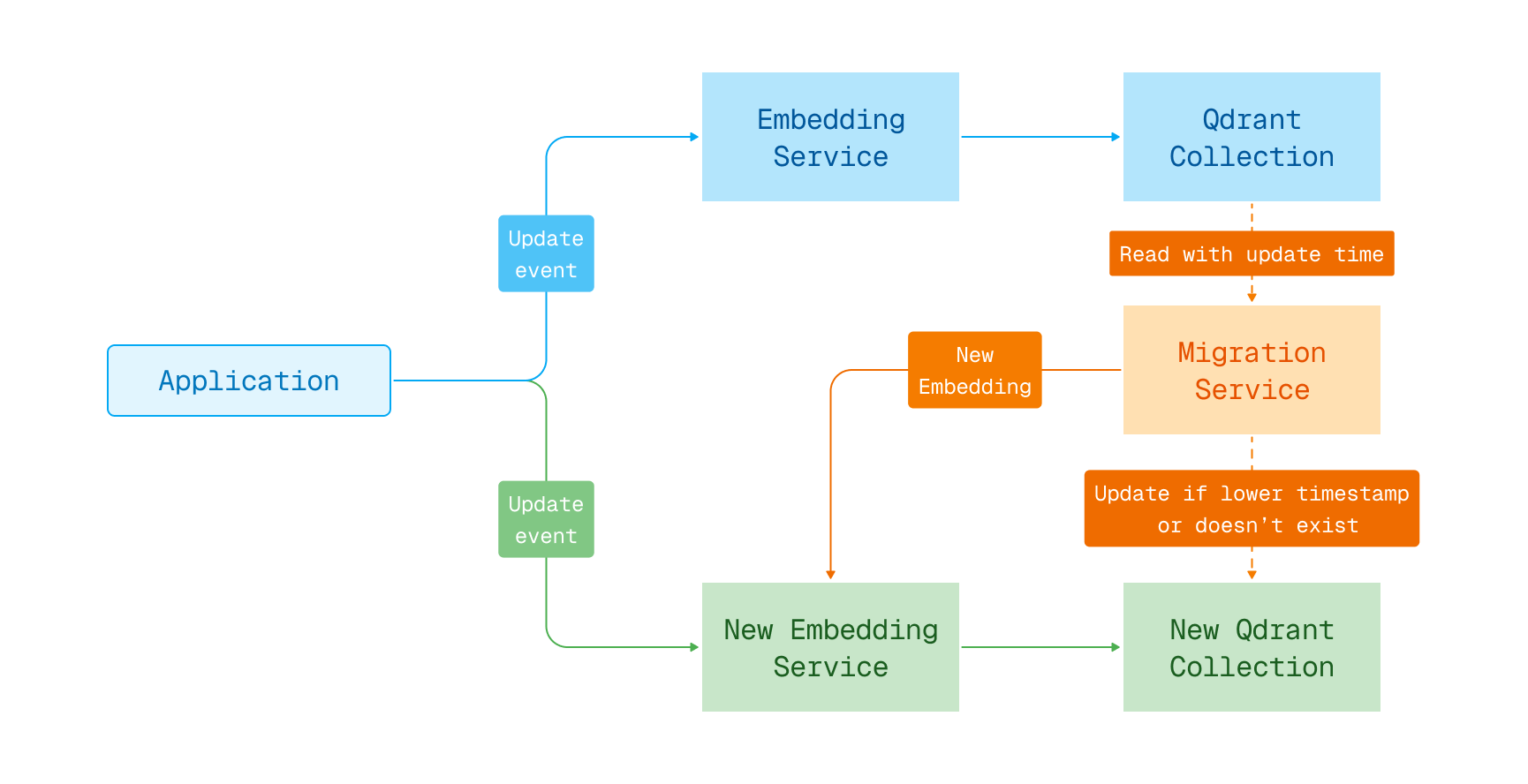
Embedding model migration in blue-green deployment
Retrieve points
There is a method for retrieving points by their ids.
REST API (Schema):
POST /collections/{collection_name}/points
{
    "ids": [0, 3, 100]
}
client.retrieve(
    collection_name="{collection_name}",
    ids=[0, 3, 100],
)
client.retrieve("{collection_name}", {
  ids: [0, 3, 100],
});
use qdrant_client::qdrant::GetPointsBuilder;

client
    .get_points(GetPointsBuilder::new(
        "{collection_name}",
        vec![0.into(), 30.into(), 100.into()],
    ))
    .await?;
import static io.qdrant.client.PointIdFactory.id;

import java.util.List;

client
    .retrieveAsync("{collection_name}", List.of(id(0), id(30), id(100)), false, false, null)
    .get();
using Qdrant.Client;

var client = new QdrantClient("localhost", 6334);

await client.RetrieveAsync(
	collectionName: "{collection_name}",
	ids: [0, 30, 100],
	withPayload: false,
	withVectors: false
);
import (
	"context"

	"github.com/qdrant/go-client/qdrant"
)

client, err := qdrant.NewClient(&qdrant.Config{
	Host: "localhost",
	Port: 6334,
})

client.Get(context.Background(), &qdrant.GetPoints{
	CollectionName: "{collection_name}",
	Ids: []*qdrant.PointId{
		qdrant.NewIDNum(0), qdrant.NewIDNum(3), qdrant.NewIDNum(100),
	},
})
This method has additional parameters with_vectors and with_payload.
Using these parameters, you can select parts of the point you want as a result.
Excluding helps you not to waste traffic transmitting useless data.
The single point can also be retrieved via the API:
REST API (Schema):
GET /collections/{collection_name}/points/{point_id}
Scroll points
Sometimes it might be necessary to get all stored points without knowing ids, or iterate over points that correspond to a filter.
REST API (Schema):
POST /collections/{collection_name}/points/scroll
{
    "filter": {
        "must": [
            {
                "key": "color",
                "match": {
                    "value": "red"
                }
            }
        ]
    },
    "limit": 1,
    "with_payload": true,
    "with_vector": false
}
client.scroll(
    collection_name="{collection_name}",
    scroll_filter=models.Filter(
        must=[
            models.FieldCondition(key="color", match=models.MatchValue(value="red")),
        ]
    ),
    limit=1,
    with_payload=True,
    with_vectors=False,
)
client.scroll("{collection_name}", {
  filter: {
    must: [
      {
        key: "color",
        match: {
          value: "red",
        },
      },
    ],
  },
  limit: 1,
  with_payload: true,
  with_vector: false,
});
use qdrant_client::qdrant::{Condition, Filter, ScrollPointsBuilder};

client
    .scroll(
        ScrollPointsBuilder::new("{collection_name}")
            .filter(Filter::must([Condition::matches(
                "color",
                "red".to_string(),
            )]))
            .limit(1)
            .with_payload(true)
            .with_vectors(false),
    )
    .await?;
import static io.qdrant.client.ConditionFactory.matchKeyword;
import static io.qdrant.client.WithPayloadSelectorFactory.enable;

import io.qdrant.client.grpc.Common.Filter;
import io.qdrant.client.grpc.Points.ScrollPoints;

client
    .scrollAsync(
        ScrollPoints.newBuilder()
            .setCollectionName("{collection_name}")
            .setFilter(Filter.newBuilder().addMust(matchKeyword("color", "red")).build())
            .setLimit(1)
            .setWithPayload(enable(true))
            .build())
    .get();
using Qdrant.Client;
using static Qdrant.Client.Grpc.Conditions;

var client = new QdrantClient("localhost", 6334);

await client.ScrollAsync(
	collectionName: "{collection_name}",
	filter: MatchKeyword("color", "red"),
	limit: 1,
	payloadSelector: true
);
import (
	"context"

	"github.com/qdrant/go-client/qdrant"
)

client, err := qdrant.NewClient(&qdrant.Config{
	Host: "localhost",
	Port: 6334,
})

client.Scroll(context.Background(), &qdrant.ScrollPoints{
	CollectionName: "{collection_name}",
	Filter: &qdrant.Filter{
		Must: []*qdrant.Condition{
			qdrant.NewMatch("color", "red"),
		},
	},
	Limit:       qdrant.PtrOf(uint32(1)),
	WithPayload: qdrant.NewWithPayload(true),
})
Returns all point with color = red.
{
  "result": {
    "next_page_offset": 1,
    "points": [
      {
        "id": 0,
        "payload": {
          "color": "red"
        }
      }
    ]
  },
  "status": "ok",
  "time": 0.0001
}
The Scroll API will return all points that match the filter in a page-by-page manner.
All resulting points are sorted by ID. To query the next page it is necessary to specify the largest seen ID in the offset field.
For convenience, this ID is also returned in the field next_page_offset.
If the value of the next_page_offset field is null - the last page is reached.
Order points by payload key
Available as of v1.8.0
When using the scroll API, you can sort the results by payload key. For example, you can retrieve points in chronological order if your payloads have a "timestamp" field, as is shown from the example below:
POST /collections/{collection_name}/points/scroll
{
    "limit": 15,
    "order_by": "timestamp", // <-- this!
}
client.scroll(
    collection_name="{collection_name}",
    limit=15,
    order_by="timestamp", # <-- this!
)
client.scroll("{collection_name}", {
  limit: 15,
  order_by: "timestamp", // <-- this!
});
use qdrant_client::qdrant::{OrderByBuilder, ScrollPointsBuilder};

client
    .scroll(
        ScrollPointsBuilder::new("{collection_name}")
            .limit(15)
            .order_by(OrderByBuilder::new("timestamp")),
    )
    .await?;
import io.qdrant.client.grpc.Points.OrderBy;
import io.qdrant.client.grpc.Points.ScrollPoints;

client.scrollAsync(ScrollPoints.newBuilder()
  .setCollectionName("{collection_name}")
  .setLimit(15)
  .setOrderBy(OrderBy.newBuilder().setKey("timestamp").build())
  .build()).get();
await client.ScrollAsync("{collection_name}", limit: 15, orderBy: "timestamp");
import (
	"context"

	"github.com/qdrant/go-client/qdrant"
)

client, err := qdrant.NewClient(&qdrant.Config{
	Host: "localhost",
	Port: 6334,
})

client.Scroll(context.Background(), &qdrant.ScrollPoints{
	CollectionName: "{collection_name}",
	Limit:          qdrant.PtrOf(uint32(15)),
	OrderBy: &qdrant.OrderBy{
		Key: "timestamp",
	},
})
You need to use the order_by key parameter to specify the payload key. Then you can add other fields to control the ordering, such as direction and start_from:
"order_by": {
    "key": "timestamp",
    "direction": "desc" // default is "asc"
    "start_from": 123, // start from this value
}
order_by=models.OrderBy(
    key="timestamp",
    direction=models.Direction.DESC,  # default is "ASC"
    start_from=123,  # start from this value
)
order_by: {
    key: "timestamp",
    direction: "desc", // default is "asc"
    start_from: 123, // start from this value
}
use qdrant_client::qdrant::{start_from::Value, Direction, OrderByBuilder};

OrderByBuilder::new("timestamp")
    .direction(Direction::Desc.into())
    .start_from(Value::Integer(123))
    .build();
import io.qdrant.client.grpc.Points.Direction;
import io.qdrant.client.grpc.Points.OrderBy;
import io.qdrant.client.grpc.Points.StartFrom;

OrderBy.newBuilder()
  .setKey("timestamp")
  .setDirection(Direction.Desc)
  .setStartFrom(StartFrom.newBuilder()
    .setInteger(123)
    .build())
  .build();
using Qdrant.Client.Grpc;

new OrderBy
{
 Key = "timestamp",
 Direction = Direction.Desc,
 StartFrom = 123
};
import "github.com/qdrant/go-client/qdrant"

qdrant.OrderBy{
	Key:       "timestamp",
	Direction: qdrant.Direction_Desc.Enum(),
	StartFrom: qdrant.NewStartFromInt(123),
}
When sorting is based on a non-unique value, it is not possible to rely on an ID offset. Thus, next_page_offset is not returned within the response. However, you can still do pagination by combining "order_by": { "start_from": ... } with a { "must_not": [{ "has_id": [...] }] } filter.
Counting points
Available as of v0.8.4
Sometimes it can be useful to know how many points fit the filter conditions without doing a real search.
Among others, for example, we can highlight the following scenarios:
- Evaluation of results size for faceted search
- Determining the number of pages for pagination
- Debugging the query execution speed
REST API (Schema):
POST /collections/{collection_name}/points/count
{
    "filter": {
        "must": [
            {
                "key": "color",
                "match": {
                    "value": "red"
                }
            }
        ]
    },
    "exact": true
}
client.count(
    collection_name="{collection_name}",
    count_filter=models.Filter(
        must=[
            models.FieldCondition(key="color", match=models.MatchValue(value="red")),
        ]
    ),
    exact=True,
)
client.count("{collection_name}", {
  filter: {
    must: [
      {
        key: "color",
        match: {
          value: "red",
        },
      },
    ],
  },
  exact: true,
});
use qdrant_client::qdrant::{Condition, CountPointsBuilder, Filter};

client
    .count(
        CountPointsBuilder::new("{collection_name}")
            .filter(Filter::must([Condition::matches(
                "color",
                "red".to_string(),
            )]))
            .exact(true),
    )
    .await?;
import static io.qdrant.client.ConditionFactory.matchKeyword;

import io.qdrant.client.grpc.Common.Filter;

client
    .countAsync(
        "{collection_name}",
        Filter.newBuilder().addMust(matchKeyword("color", "red")).build(),
        true)
    .get();
using Qdrant.Client;
using static Qdrant.Client.Grpc.Conditions;

var client = new QdrantClient("localhost", 6334);

await client.CountAsync(
	collectionName: "{collection_name}",
	filter: MatchKeyword("color", "red"),
	exact: true
);
import (
	"context"

	"github.com/qdrant/go-client/qdrant"
)

client, err := qdrant.NewClient(&qdrant.Config{
	Host: "localhost",
	Port: 6334,
})

client.Count(context.Background(), &qdrant.CountPoints{
	CollectionName: "midlib",
	Filter: &qdrant.Filter{
		Must: []*qdrant.Condition{
			qdrant.NewMatch("color", "red"),
		},
	},
})
Returns number of counts matching given filtering conditions:
{
  "count": 3811
}
Batch update
Available as of v1.5.0
You can batch multiple point update operations. This includes inserting, updating and deleting points, vectors and payload.
A batch update request consists of a list of operations. These are executed in order. These operations can be batched:
- Upsert points:
upsertorUpsertOperation - Delete points:
delete_pointsorDeleteOperation - Update vectors:
update_vectorsorUpdateVectorsOperation - Delete vectors:
delete_vectorsorDeleteVectorsOperation - Set payload:
set_payloadorSetPayloadOperation - Overwrite payload:
overwrite_payloadorOverwritePayload - Delete payload:
delete_payloadorDeletePayloadOperation - Clear payload:
clear_payloadorClearPayloadOperation
The following example snippet makes use of all operations.
REST API (Schema):
POST /collections/{collection_name}/points/batch
{
    "operations": [
        {
            "upsert": {
                "points": [
                    {
                        "id": 1,
                        "vector": [1.0, 2.0, 3.0, 4.0],
                        "payload": {}
                    }
                ]
            }
        },
        {
            "update_vectors": {
                "points": [
                    {
                        "id": 1,
                        "vector": [1.0, 2.0, 3.0, 4.0]
                    }
                ]
            }
        },
        {
            "delete_vectors": {
                "points": [1],
                "vector": [""]
            }
        },
        {
            "overwrite_payload": {
                "payload": {
                    "test_payload": "1"
                },
                "points": [1]
            }
        },
        {
            "set_payload": {
                "payload": {
                    "test_payload_2": "2",
                    "test_payload_3": "3"
                },
                "points": [1]
            }
        },
        {
            "delete_payload": {
                "keys": ["test_payload_2"],
                "points": [1]
            }
        },
        {
            "clear_payload": {
                "points": [1]
            }
        },
        {"delete": {"points": [1]}}
    ]
}
client.batch_update_points(
    collection_name="{collection_name}",
    update_operations=[
        models.UpsertOperation(
            upsert=models.PointsList(
                points=[
                    models.PointStruct(
                        id=1,
                        vector=[1.0, 2.0, 3.0, 4.0],
                        payload={},
                    ),
                ]
            )
        ),
        models.UpdateVectorsOperation(
            update_vectors=models.UpdateVectors(
                points=[
                    models.PointVectors(
                        id=1,
                        vector=[1.0, 2.0, 3.0, 4.0],
                    )
                ]
            )
        ),
        models.DeleteVectorsOperation(
            delete_vectors=models.DeleteVectors(points=[1], vector=[""])
        ),
        models.OverwritePayloadOperation(
            overwrite_payload=models.SetPayload(
                payload={"test_payload": 1},
                points=[1],
            )
        ),
        models.SetPayloadOperation(
            set_payload=models.SetPayload(
                payload={
                    "test_payload_2": 2,
                    "test_payload_3": 3,
                },
                points=[1],
            )
        ),
        models.DeletePayloadOperation(
            delete_payload=models.DeletePayload(keys=["test_payload_2"], points=[1])
        ),
        models.ClearPayloadOperation(clear_payload=models.PointIdsList(points=[1])),
        models.DeleteOperation(delete=models.PointIdsList(points=[1])),
    ],
)
client.batchUpdate("{collection_name}", {
  operations: [
    {
      upsert: {
        points: [
          {
            id: 1,
            vector: [1.0, 2.0, 3.0, 4.0],
            payload: {},
          },
        ],
      },
    },
    {
      update_vectors: {
        points: [
          {
            id: 1,
            vector: [1.0, 2.0, 3.0, 4.0],
          },
        ],
      },
    },
    {
      delete_vectors: {
        points: [1],
        vector: [""],
      },
    },
    {
      overwrite_payload: {
        payload: {
          test_payload: 1,
        },
        points: [1],
      },
    },
    {
      set_payload: {
        payload: {
          test_payload_2: 2,
          test_payload_3: 3,
        },
        points: [1],
      },
    },
    {
      delete_payload: {
        keys: ["test_payload_2"],
        points: [1],
      },
    },
    {
      clear_payload: {
        points: [1],
      },
    },
    {
      delete: {
        points: [1],
      },
    },
  ],
});
use std::collections::HashMap;

use qdrant_client::qdrant::{
    points_update_operation::{
        ClearPayload, DeletePayload, DeletePoints, DeleteVectors, Operation, OverwritePayload,
        PointStructList, SetPayload, UpdateVectors,
    },
    PointStruct, PointVectors, PointsUpdateOperation, UpdateBatchPointsBuilder, VectorsSelector,
};
use qdrant_client::Payload;

client
    .update_points_batch(
        UpdateBatchPointsBuilder::new(
            "{collection_name}",
            vec![
                PointsUpdateOperation {
                    operation: Some(Operation::Upsert(PointStructList {
                        points: vec![PointStruct::new(
                            1,
                            vec![1.0, 2.0, 3.0, 4.0],
                            Payload::default(),
                        )],
                        ..Default::default()
                    })),
                },
                PointsUpdateOperation {
                    operation: Some(Operation::UpdateVectors(UpdateVectors {
                        points: vec![PointVectors {
                            id: Some(1.into()),
                            vectors: Some(vec![1.0, 2.0, 3.0, 4.0].into()),
                        }],
                        ..Default::default()
                    })),
                },
                PointsUpdateOperation {
                    operation: Some(Operation::DeleteVectors(DeleteVectors {
                        points_selector: Some(vec![1.into()].into()),
                        vectors: Some(VectorsSelector {
                            names: vec!["".into()],
                        }),
                        ..Default::default()
                    })),
                },
                PointsUpdateOperation {
                    operation: Some(Operation::OverwritePayload(OverwritePayload {
                        points_selector: Some(vec![1.into()].into()),
                        payload: HashMap::from([("test_payload".to_string(), 1.into())]),
                        ..Default::default()
                    })),
                },
                PointsUpdateOperation {
                    operation: Some(Operation::SetPayload(SetPayload {
                        points_selector: Some(vec![1.into()].into()),
                        payload: HashMap::from([
                            ("test_payload_2".to_string(), 2.into()),
                            ("test_payload_3".to_string(), 3.into()),
                        ]),
                        ..Default::default()
                    })),
                },
                PointsUpdateOperation {
                    operation: Some(Operation::DeletePayload(DeletePayload {
                        points_selector: Some(vec![1.into()].into()),
                        keys: vec!["test_payload_2".to_string()],
                        ..Default::default()
                    })),
                },
                PointsUpdateOperation {
                    operation: Some(Operation::ClearPayload(ClearPayload {
                        points: Some(vec![1.into()].into()),
                        ..Default::default()
                    })),
                },
                PointsUpdateOperation {
                    operation: Some(Operation::DeletePoints(DeletePoints {
                        points: Some(vec![1.into()].into()),
                        ..Default::default()
                    })),
                },
            ],
        )
        .wait(true),
    )
    .await?;
import static io.qdrant.client.PointIdFactory.id;
import static io.qdrant.client.ValueFactory.value;
import static io.qdrant.client.VectorsFactory.vectors;

import io.qdrant.client.grpc.Points.PointStruct;
import io.qdrant.client.grpc.Points.PointVectors;
import io.qdrant.client.grpc.Points.PointsIdsList;
import io.qdrant.client.grpc.Points.PointsSelector;
import io.qdrant.client.grpc.Points.PointsUpdateOperation.ClearPayload;
import io.qdrant.client.grpc.Points.PointsUpdateOperation.DeletePayload;
import io.qdrant.client.grpc.Points.PointsUpdateOperation.DeletePoints;
import io.qdrant.client.grpc.Points.PointsUpdateOperation.DeleteVectors;
import io.qdrant.client.grpc.Points.PointsUpdateOperation.OverwritePayload;
import io.qdrant.client.grpc.Points.PointsUpdateOperation.PointStructList;
import io.qdrant.client.grpc.Points.PointsUpdateOperation.SetPayload;
import io.qdrant.client.grpc.Points.PointsUpdateOperation.UpdateVectors;
import io.qdrant.client.grpc.Points.PointsUpdateOperation;
import io.qdrant.client.grpc.Points.VectorsSelector;
import java.util.List;
import java.util.Map;

client
    .batchUpdateAsync(
        "{collection_name}",
        List.of(
            PointsUpdateOperation.newBuilder()
                .setUpsert(
                    PointStructList.newBuilder()
                        .addPoints(
                            PointStruct.newBuilder()
                                .setId(id(1))
                                .setVectors(vectors(1.0f, 2.0f, 3.0f, 4.0f))
                                .build())
                        .build())
                .build(),
            PointsUpdateOperation.newBuilder()
                .setUpdateVectors(
                    UpdateVectors.newBuilder()
                        .addPoints(
                            PointVectors.newBuilder()
                                .setId(id(1))
                                .setVectors(vectors(1.0f, 2.0f, 3.0f, 4.0f))
                                .build())
                        .build())
                .build(),
            PointsUpdateOperation.newBuilder()
                .setDeleteVectors(
                    DeleteVectors.newBuilder()
                        .setPointsSelector(
                            PointsSelector.newBuilder()
                                .setPoints(PointsIdsList.newBuilder().addIds(id(1)).build())
                                .build())
                        .setVectors(VectorsSelector.newBuilder().addNames("").build())
                        .build())
                .build(),
            PointsUpdateOperation.newBuilder()
                .setOverwritePayload(
                    OverwritePayload.newBuilder()
                        .setPointsSelector(
                            PointsSelector.newBuilder()
                                .setPoints(PointsIdsList.newBuilder().addIds(id(1)).build())
                                .build())
                        .putAllPayload(Map.of("test_payload", value(1)))
                        .build())
                .build(),
            PointsUpdateOperation.newBuilder()
                .setSetPayload(
                    SetPayload.newBuilder()
                        .setPointsSelector(
                            PointsSelector.newBuilder()
                                .setPoints(PointsIdsList.newBuilder().addIds(id(1)).build())
                                .build())
                        .putAllPayload(
                            Map.of("test_payload_2", value(2), "test_payload_3", value(3)))
                        .build())
                .build(),
            PointsUpdateOperation.newBuilder()
                .setDeletePayload(
                    DeletePayload.newBuilder()
                        .setPointsSelector(
                            PointsSelector.newBuilder()
                                .setPoints(PointsIdsList.newBuilder().addIds(id(1)).build())
                                .build())
                        .addKeys("test_payload_2")
                        .build())
                .build(),
            PointsUpdateOperation.newBuilder()
                .setClearPayload(
                    ClearPayload.newBuilder()
                        .setPoints(
                            PointsSelector.newBuilder()
                                .setPoints(PointsIdsList.newBuilder().addIds(id(1)).build())
                                .build())
                        .build())
                .build(),
            PointsUpdateOperation.newBuilder()
                .setDeletePoints(
                    DeletePoints.newBuilder()
                        .setPoints(
                            PointsSelector.newBuilder()
                                .setPoints(PointsIdsList.newBuilder().addIds(id(1)).build())
                                .build())
                        .build())
                .build()))
    .get();
To batch many points with a single operation type, please use batching functionality in that operation directly.
Awaiting result
If the API is called with the &wait=false parameter, or if it is not explicitly specified, the client will receive an acknowledgment of receiving data:
{
  "result": {
    "operation_id": 123,
    "status": "acknowledged"
  },
  "status": "ok",
  "time": 0.000206061
}
This response does not mean that the data is available for retrieval yet. This uses a form of eventual consistency. It may take a short amount of time before it is actually processed as updating the collection happens in the background. In fact, it is possible that such request eventually fails. If inserting a lot of vectors, we also recommend using asynchronous requests to take advantage of pipelining.
If the logic of your application requires a guarantee that the vector will be available for searching immediately after the API responds, then use the flag ?wait=true.
In this case, the API will return the result only after the operation is finished:
{
  "result": {
    "operation_id": 0,
    "status": "completed"
  },
  "status": "ok",
  "time": 0.000206061
}
