From self-certainty to Reinforcement Learning from Internal Feedback

Article link.

This is the old blog. Visit the new one on Substack
Florence-2 is a novel vision foundation model developed by Microsoft that is redefining the capabilities of artificial intelligence in the field of computer vision. This powerful model serves as a versatile backbone for a wide range of vision tasks, from image captioning and object detection to visual grounding (locating and identifying specific objects or regions within an image based on a natural language query) and referring expression comprehension (localizing a specific object within an image based on a natural language expression). Key features of Florence-2 include:
By combining the power of multi-task learning and the seamless integration of textual and visual information, Florence-2 sets a new standard for comprehensive representation learning in computer vision. Its achievements pave the way for the future of vision foundation models, inspiring researchers to delve deeper into the realms of cross-modal understanding and adaptable AI systems.
I will never tire of highlighting that MS researchers have always had a pioneering attitude towards how to train/create models by reducing their size while simultaneously increasing their capabilities; papers on models like Orca 2, Phi-3, and Florence-2 serve as a sort of manual on data preparation for training lean and efficient models. These efforts are based not so much on the discovery of new architectures (note from the author: at the architectural level, despite significant diversifications over the years, we are still in 2017, the advent of the Transformer) but on careful strategies that emphasize how to prepare training data and in what formats to input them into the models.
Achieving universal representation in computer vision poses distinct challenges due to the complexity of visual data. Key aspects include:
(All images from now on, except those in the coding section, are from the original Florence-2 article)
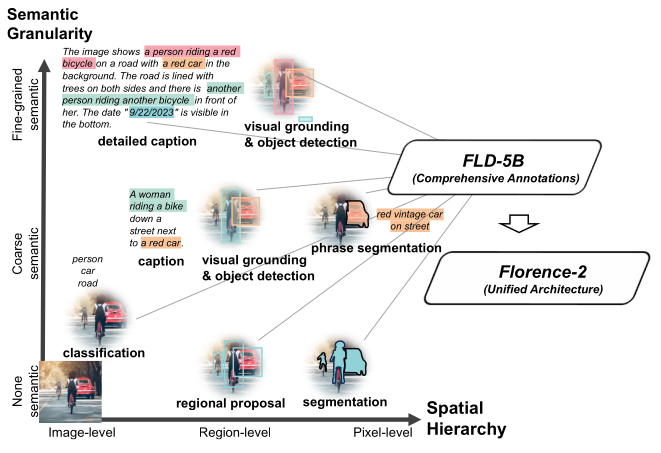
To build a unified vision foundation model suitable for various applications, the authors propose an innovative pre-training strategy that overcomes single-task limitations and integrates both textual and visual semantics. Their approach incorporates a diverse set of annotations, effectively capturing visual understanding nuances and bridging the gap between vision and language understanding. This strategy aims to capture multiple levels of granularity, from global semantics to local details, and comprehend spatial relationships between objects and entities in their semantic context.
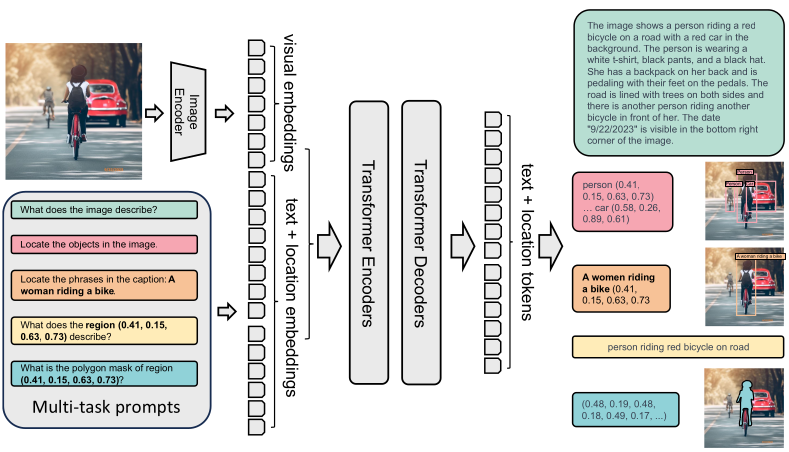
Florence-2 consists of an image encoder and standard multi-modality encoder-decoder. Florence-2 employs a sequence-to-sequence learning paradigm, integrating several tasks under a common language modeling objective. The model takes images coupled with task-prompt as task instructions, and generates the desirable results in text forms. Note how input image data is enriched with additional prompt info, and then encoded (see picture below).
Florence-2 data engine consists of three essential phases:
The final dataset FLD-5B consists of over 5B annotations containing 126M images, 500M text annotations, 1.3B region-text annotations, and 3.6B text-phrase-region annotations.
Data is constructed by gathering a diverse collection of images from various sources. There are three key tasks that act as primary sources for image corpus: image classification, object detection, and image captioning. Five distinct datasets originating from the aforementioned tasks: ImageNet-22k, Object 365, Open Images, Conceptual Captions, and LAION. This combination results in a dataset of 126 million images in total.
The primary goal of the data annotation process is to create comprehensive annotations that facilitate effective multitask learning. This process is divided into three main categories: text, region-text pairs, and text-phrase-region triplets.
The annotation workflow consists of three essential phases:
This comprehensive approach ensures high-quality annotations across an extensive dataset of 126 million images, facilitating robust multitask learning and enhancing the overall annotation process. The data annotation process is depicted below.
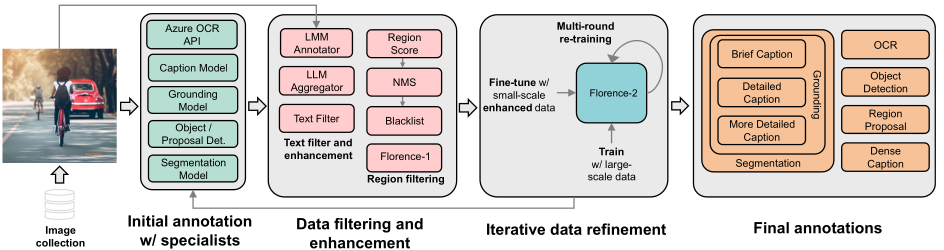
This section elaborates on the variations in the annotation procedures for different types of data within the general workflow introduced earlier.
Text annotations categorize images into three granularities: brief, detailed, and more detailed.
Region-text pairs offer descriptive annotations for semantic regions in images, including both visual objects and text regions. Each region is represented by a bounding box and can be annotated with varying granularities.
Text-Phrase-Region Triplets. These triplets consist of descriptive text, noun phrases related to image objects, and their corresponding region annotations.
This structured approach enhances the richness and accuracy of image annotations across various categories.
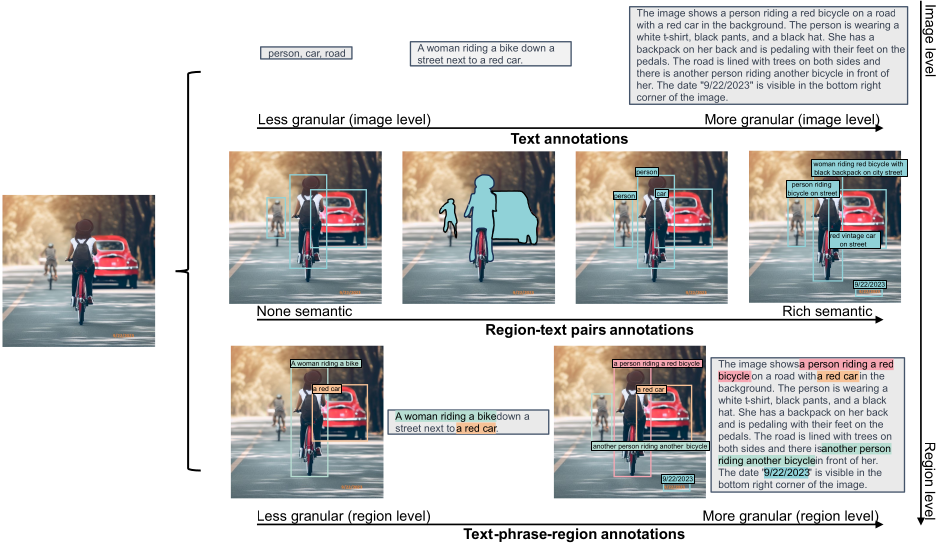
In the picture above, an illustrative example of an image and its corresponding annotations in FLD-5B dataset. Each image in FLD-5B is annotated with text, region-text pairs, and text-phrase-region triplets by Florence data engine, which covers multiple spatial hierarchies, brief-to-detailed progressive granularity, and a wide semantics spectrum, enabling more comprehensive visual understanding from diverse perspectives.
To run the following code, you need a GPU supporting CUDA. Alternatively, you can run it on Google Colab or a similar hosted service.
# Install basic libraries
%pip install transformers pillow timm flash_attn
# Importing modules
from transformers import AutoProcessor, AutoModelForCausalLM
from PIL import Image
import requests
import copy
%matplotlib inline
# Setting the model
model_id = 'microsoft/Florence-2-large'
model = AutoModelForCausalLM.from_pretrained(
    model_id,
    trust_remote_code=True).eval()
processor = AutoProcessor.from_pretrained(
    model_id,
    trust_remote_code=True)
# Function generating text from prompt
def run_example(task_prompt, text_input=None):
    if text_input is None:
        prompt = task_prompt
    else:
        prompt = task_prompt + text_input
    inputs = processor(
        text=prompt,
        images=image,
        return_tensors="pt")
    generated_ids = model.generate(
        input_ids=inputs["input_ids"],
        pixel_values=inputs["pixel_values"],
        max_new_tokens=1024,
        early_stopping=False,
        do_sample=False,
        num_beams=3,
        )
    generated_text = processor.batch_decode(
        generated_ids,
        skip_special_tokens=False)[0]
    parsed_answer = processor.post_process_generation(
        generated_text,
        task=task_prompt,
        image_size=(image.width, image.height)
    )

    return parsed_answer
url = "https://huggingface.co/datasets/huggingface/documentation-images/resolve/main/transformers/tasks/car.jpg?download=true"
image = Image.open(requests.get(url, stream=True).raw)
image

task_prompt = ''
run_example(task_prompt)
{'<CAPTION>': 'A green car parked in front of a yellow building.'}
task_prompt = ''
run_example(task_prompt)
{'<DETAILED_CAPTION>': 'The image shows a green Volkswagen Beetle parked in front of a yellow building with two brown doors. The sky is a mix of blue and white, and there are a few green trees in the background.'}
task_prompt = ''
run_example(task_prompt)
{'<MORE_DETAILED_CAPTION>': 'The image shows a vintage Volkswagen Beetle car parked on a cobblestone street in front of a yellow building with two wooden doors. The car is painted in a bright turquoise color and has a white stripe running along the side. It has two doors on either side of the car, one on top of the other, and a small window on the front. The building appears to be old and dilapidated, with peeling paint and crumbling walls. The sky is blue and there are trees in the background.'}
The output for object detection is textual, indicating various boxes and the respective labels.
# Object detection
task_prompt = ''
results = run_example(task_prompt)
print(results)
{'<OD>': {'bboxes': [[34.23999786376953, 160.0800018310547, 597.4400024414062, 371.7599792480469], [456.0, 97.68000030517578, 580.1599731445312, 261.8399963378906], [450.8800048828125, 276.7200012207031, 554.5599975585938, 370.79998779296875], [95.68000030517578, 280.55999755859375, 198.72000122070312, 371.2799987792969]], 'labels': ['car', 'door', 'wheel', 'wheel']}}
You can get a visual output showing boxes and labels using the following function.
# Function drawing boxes and labels on image
import matplotlib.pyplot as plt
import matplotlib.patches as patches
def plot_bbox(image, data):
   # Create a figure and axes
    fig, ax = plt.subplots()

    # Display the image
    ax.imshow(image)

    # Plot each bounding box
    for bbox, label in zip(data['bboxes'], data['labels']):
        # Unpack the bounding box coordinates
        x1, y1, x2, y2 = bbox
        # Create a Rectangle patch
        rect = patches.Rectangle(
            (x1, y1),
            x2-x1,
            y2-y1,
            linewidth=1,
            edgecolor='r',
            facecolor='none')
        # Add the rectangle to the Axes
        ax.add_patch(rect)
        # Annotate the label
        plt.text(x1, y1, label, color='white',
            fontsize=8,
            bbox=dict(facecolor='red', alpha=0.5))

    # Remove the axis ticks and labels
    ax.axis('off')

    # Show the plot
    plt.show()
plot_bbox(image, results[''])

There really is much more to Florence-2’s capabilities; however, we will stop here for brevity.
Original Florence-2 article
Hugging Face “Florence-2-large” page

Microsoft Phi-3 is a family of small language and multi-modal models whose overall performance, as measured by both academic benchmarks and internal testing, rivals that of models such as Mixtral 8x7B and GPT-3.5. Language models are available in short- and long-context lengths (4K and 128K).
Microsoft researchers have always paid laudable attention to training techniques that take into account the careful selection of high-quality and more informative data combined with synthetic data produced with the aim of “instructing” or providing hacks to improve the performance of small models.
Phi-3 models are Transformer-based models trained using a selection of “textbook quality” data from the web together with synthetically generated textbooks and exercises with GPT-3.5.
Training data of consists of heavily filtered publicly available web data with high educational level from various open internet sources, as well as synthetic LLM-generated data. For example, suppose to compare coding files from training data: a high educational level code is code that is well formatted, easy to read and containing descriptions of what the code is for.
Pre-training is performed in two disjoint and sequential phases. The first phase comprises mostly of web sources aimed at teaching the model general knowledge and language understanding. The second phase merges even more heavily filtered web data (a subset used in the first phase) with some synthetic data whose purpose is to teach the model logical reasoning and various niche skills.
Researchers have attempted to calibrate the training data to bring it closer to the data optimal regime for small models, trying to retain those web pages that could potentially improve the “reasoning ability” of the model. For example, the result of a game in premier league in a particular day might be good training data for frontier models, but it is rather superfluous when focusing on reasoning capabilities of small sized models.
Phi-3 models range from 3.8 billion parameters (phi-3-mini, small enough to be deployed on a phone!) to 7 and 14 billion parameters (phi-3-small and phi-3-medium respectively). It is observed that some benchmarks improve much less from 7B to 14B than they do from 3.8B to 7B. This could likely indicate that data mixture needs further work to be in the “data optimal regime” for 14B parameters model. Later we will introduce a coding hands-on example using phi-3-vision, a 4.2 billion parameter model based on phi-3-mini with strong reasoning capabilities for image and text prompts.
The post-training process of phi-3-mini included two main stages: supervised finetuning (SFT) and direct preference optimization (DPO).
Overall, this post-training process enhanced the model’s capabilities in math, coding, reasoning, robustness, and safety, transforming it into an efficient and safe AI assistant for user interactions.
The phi-3-mini model is a Transformer decoder architecture with default context length 4K – there is also a long context version that extends the context length to 128K, called phi-3-mini-128K – and it is built upon a similar block structure as Llama-2. It uses the same tokenizer with vocabulary size of 320641, meaning that all packages developed for Llama-2 family of models can be directly adapted to phi-3-mini. The model uses 3072 hidden dimension, 32 heads and 32 layers. The model was trained using bfloat16 for a total of 3.3T tokens.
To leverage the better multilingual tokenization, phi-3-small model (7B parameters) uses the tiktoken tokenizer with a vocabulary size of 1003522 and default context length 8192. The decoder architecture meets the standards of a 7B model class, having 32 heads, 32 layers and a hidden size of 4096. The model
Below, a list of different Phi-3 models benchmarks:
Phi-3-Vision-128K-Instruct is a lightweight, state-of-the-art open multimodal model (4.2B parameters) designed to process an image and a textual prompt as inputs, and subsequently generate textual outputs. The model is composed of an image encoder (CLIP ViT-L/14) and a transformer decoder (phi-3-mini-128K-instruct). The visual tokens, once extracted by the image encoder, are then combined with text tokens in an interleaved way (no particular order for image and text tokens).
In this section we will explore Phi-3-Vision model using a Jupyter notebook and Hugging Face Transformers library. The notebook needs Cuda Toolkit support because it uses Flash Attention – if you don’t have such a GPU, you could try phi-3-mini-128K model instead.
Let’s begin with installing and importing libraries.
%pip uninstall -y transformers && pip install git+https://github.com/huggingface/transformers

%pip install accelerate
%pip install flash-attn
from PIL import Image
import requests
from transformers import AutoModelForCausalLM
from transformers import AutoProcessor
Set the model.
model_id = "microsoft/Phi-3-vision-128k-instruct"

model = AutoModelForCausalLM.from_pretrained(
    model_id,
    device_map="cuda",
    trust_remote_code=True,
    torch_dtype="auto")

processor = AutoProcessor.from_pretrained(
    model_id,
    trust_remote_code=True)
Provide messages, including the request “Provide insightful questions to spark discussion”.
messages = [
    {"role": "user", "content": "\nWhat is shown in this image?"},
    {"role": "assistant", "content": "The chart displays the percentage of respondents who agree with various statements about their preparedness for meetings. It shows five categories: 'Having clear and pre-defined goals for meetings', 'Knowing where to find the information I need for a meeting', 'Understanding my exact role and responsibilities when I'm invited', 'Having tools to manage admin tasks like note-taking or summarization', and 'Having more focus time to sufficiently prepare for meetings'. Each category has an associated bar indicating the level of agreement, measured on a scale from 0% to 100%."},
    {"role": "user", "content": "Provide insightful questions to spark discussion."}
]
Select the input image.
url = "https://assets-c4akfrf5b4d3f4b7.z01.azurefd.net/assets/2024/04/BMDataViz_661fb89f3845e.png"

image = Image.open(requests.get(url, stream=True).raw)

Prepare the prompt and preprocess the input data (text and image) converting it into a format that can be fed into the model for further processing or inference.
prompt = processor.tokenizer.apply_chat_template(
    messages,
    tokenize=False,
    add_generation_prompt=True)

inputs = processor(
    prompt,
    [image],
    return_tensors="pt").to("cuda:0")
The following cell sets up the configuration parameters for a text generation process by creating a dictionary with specific settings for the maximum number of tokens to generate, the temperature (randomness) of the output, and whether to use sampling or not (in this case the model will not sample from the probability distribution but will instead choose the token with the highest probability at each step) .
generation_args = {
    "max_new_tokens": 500,
    "temperature": 0.0,
    "do_sample": False,
}
The generate method generates the new text based on the input and the learned patterns from the training data. The output it produces is generate_ids, which is a list or tensor containing the token IDs representing the generated text.
generate_ids = model.generate(
    **inputs,
    eos_token_id=processor.tokenizer.eos_token_id,
    **generation_args)
In the folowing cell, the purpose of the first line is to remove the input token IDs from the generated output. The second line decodes the remaining generated token IDs into human-readable text.
generate_ids = generate_ids[:, inputs['input_ids'].shape[1]:]
response = processor.batch_decode(
    generate_ids,
    skip_special_tokens=True,
    clean_up_tokenization_spaces=False)[0]

print(response)
Here is the response.
1. What are the most significant barriers to meeting preparedness according to the respondents?
2. How does the level of agreement with each statement correlate with the respondents' overall satisfaction with their meetings?
3. Are there any notable differences in agreement levels between different demographics or job roles?
4. What strategies have been most effective in improving meeting preparedness based on the respondents' feedback?
5. How does the perceived importance of each statement vary across different industries or company sizes?
Phi-3 article (link)
Phi-3 available on MS Azure (link)
Understanding BigBird’s Block Sparse Attention (link)
Jupyter notebook on Phi-3-Vision (link)

Moondream is a lightweight and fast transformer-based model that can be used for a variety of computer vision tasks. “moondream2” is a 1.86B parameter model. In essence, the model is a Vision Transformer (ViT) together with a language model that is capable of generating human-like text based on the input visual information. This allows the model to perform tasks such as image captioning, visual question answering, and multimodal reasoning. Our aim is to explore the Moondream model in the simplest way.
Although possible, there is no real need to clone the Moondream GitHub repository, instead there are two quick choices:
pip and PyTorch and run the following cells.There is a third option, that is, testing directly the model from this demo page without following the content of this notebook.
We can leverage the Hugging Face transformers library to build powerful natural language processing models. The transformers library provides a wide range of pre-trained models for various NLP tasks, such as text classification, named entity recognition, and language generation. einops library is useful to transform tensors into the desired shape for the model.
!pip install transformers einops
The model is updated regularly, so it is recommended pinning the model version to a specific release.
from transformers import AutoModelForCausalLM, AutoTokenizer
from PIL import Image

model_id = "vikhyatk/moondream2"
revision = "2024-05-08"

model = AutoModelForCausalLM.from_pretrained(
    model_id, trust_remote_code=True, revision=revision
)
Enabling Flash Attention by appropriately setting the parameters: this is shown in the cell below.
# Uncomment the following to enable Flash Attention on the text model

# model = AutoModelForCausalLM.from_pretrained(
#     model_id, trust_remote_code=True, revision=revision,
#     torch_dtype=torch.float16, attn_implementation="flash_attention_2"
# ).to("cuda")
Loading the tokenizer for the specified model and revision.
tokenizer = AutoTokenizer.from_pretrained(model_id, revision=revision)
The following cell is to enable URL image retrieval. However, we can also use paths to files as described later. Click on the link to see the image fed to the model.
# This is for opening images from URLs
import requests
from io import BytesIO

response = requests.get("https://raw.githubusercontent.com/vikhyat/moondream/main/assets/demo-2.jpg")
The following cell creates a PIL Image object from an image file or an image URL. Uncomment to make a choice.
# image = Image.open('') # image from file
image = Image.open(BytesIO(response.content)) # image from URL
Now we encode the input image using the model’s image encoding function, then print the answer to the question.
enc_image = model.encode_image(image)
print(model.answer_question(enc_image, "Describe this image.", tokenizer))
Batch inference is also supported.
# Uncomment below to use

# answers = moondream.batch_answer(
#     images=[Image.open(''), Image.open('')],
#     prompts=["Describe this image.", "Are there people in this image?"],
#     tokenizer=tokenizer,
# )
The following are taken verbatim from the repo page.
Same article on Substack (link)
Jupyter Notebook here
Moondream GitHub repository
Moondream Live Demo
Hugging Face page
Vision Transformer (ViT)

JetMoE is a recent Large Language Model (LLM) that supposedly outperforms LLaMA2-7B from Meta AI and was trained for 2 weeks using 96×H100 GPU cluster, spending only ~$80,000…
But how much does it cost to train a LLM?
A first oddity is that the JetMoE article does not explicitly mention any training costs (except its own) for comparison with other models. Also, according to this page, Llama2-7B model requires less than $85,000 to train – so, if that were the case, what would be the big economic benefit of JetMoE? For example, where did the JetMoE staff get the amount of training costs for Llama2-7B and why didn’t they publish this data for direct comparison?
Anyway, the JetMoE article reports training costs as GPU hours (exactly, Nvidia H100 GPU hours). JetMoE training costs 30,000 H100 GPU Hours. A Microsoft “optimized version of the Llama 2 model” shows the table below expressed in A100 GPU Hours (the overall performance of the H100 is better than the previous generation A100)…

Meta’s largest LLaMA model, as of march 2023, used 2,048 Nvidia A100 GPUs to train on 1.4 trillion tokens (750 words is about 1,000 tokens), taking about 21 days: the cost was over $2.4 million. Analysts and technologists estimate that the critical process of training a large language model such as OpenAI’s GPT-3 could cost more than $4 million. You can find these numbers here.
GPT-4 training approximately costs over $100 million (here).
This is taken directly from the JetMoE’s page.
The JetMoE architecture is illustrated in the following figure.

JetMoE architecture takes advantage of sparse activation on both the attention and feed-forward layers, significantly reducing training and inference costs.
Let x be the input vector, consider a learnable matrix Wr that controls the routing. Let s be the routing output:
s = Wr x .
The Sparse Mixture of Experts (SMoE) output y is represented by a relation of the type
y = g1 · f1(x) + g2 · f2(x) + · · · + gn · fn(x) .
It’s just a weighted combination of n experts (these are normally 2-layer MLPs or, in case of Mixture of Attention, constructs of the type illustrated below) represented by the functions fi with i = 1, 2, . . . , n with the various “weights” gi as functions that select the top k logits (taking their softmax) from s, setting the rest to 0.
In essence, s is a vector whose larger components have a greater influence on the above combination defining output y. The usefulness of this approach lies in the fact that if gi = 0 for several indices i, then all the corresponding fi(x) will not be evaluated, thus reducing computation cost during training and inference. The mechanism of a single attention expert is illustrated in the following figure.

Matrices Wk and Wv are shared across experts to improve the training and inference efficiency, instead matrices Wq and Wo in orange vary from one expert to the other. ae is obtained applying standard multi-head attention with RoPE to k, v and qe .
A very concise and quick PyTorch test Jupyter notebook for JetMoE can be found here (warning: you’ll need a lot of GPU memory). Alternatively, you can test the model directly using the Online Demo on Lepton AI (link).
JetMoE article
H100 vs A100 performance comparison
Microsoft Llama-2-Onnx model details (link)
Article on training costs here
GPT-4 over $100 million training (here)
JetMoE’s page
Video – Rotary Positional Embedding (RoPE)
JetMoE Jupyter notebook
Online Demo on Lepton AI (link)
Also available on Substack


 m0nads