


We are continuously improving the Visual Studio update experience so that it’s as easy and effortless as possible. Many of you take advantage of the side-by-side support for Visual Studio and have multiple versions of Visual Studio installed simultaneously. In 17.3 Preview 1, we’ve made it easier to update all of your side-by-side versions of Visual Studio with a single click of the new “Update all” button on the installer. So, you can quickly kick off the updates, go for a cup of tea, and when you return, all of your installations will have been updated with the latest goodness that Visual Studio has to offer.
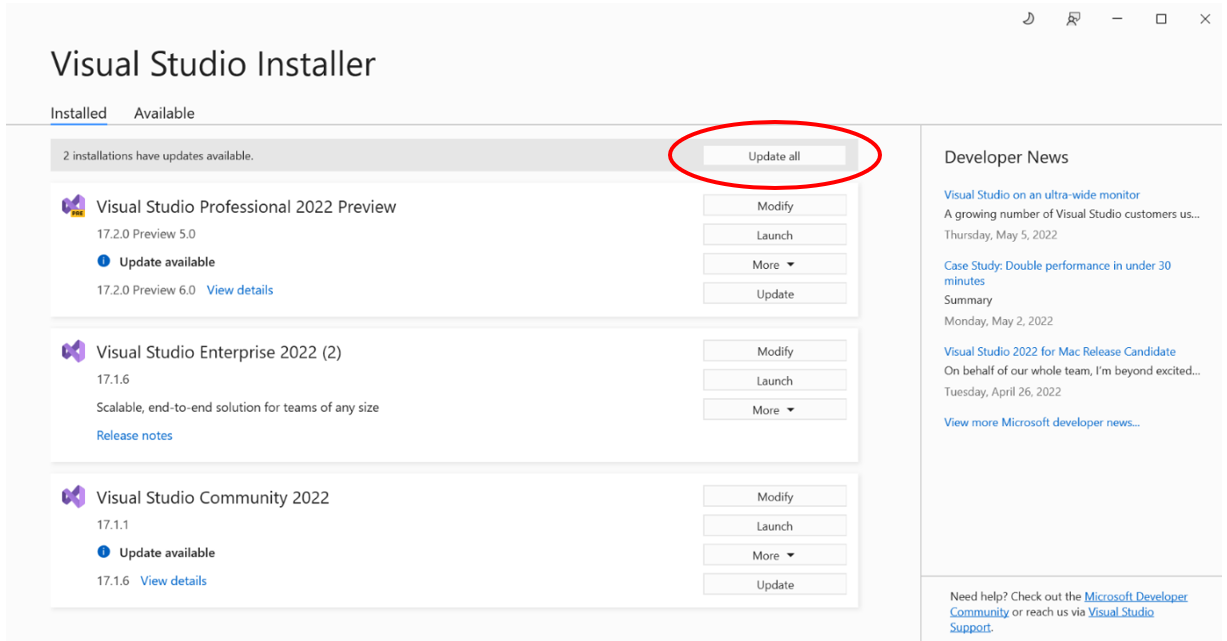
The feature can be found in the Visual Studio Installer, just above the list of installed Visual Studio instances. It’ll only be visible if more than one instance of Visual Studio is available – so don’t worry if you don’t see it!
Once you’ve started an Update all, you will have the option to cancel the ongoing operation by pressing the “Pause” button. If any warnings are encountered during the update of one instance of Visual Studio the installer will continue to the next instance. However, if an error is encountered the update all process will stop and can’t be resumed until the error is fixed.
If you encounter an issue in installing Visual Studio you can provide feedback using the built-in feedback tool. Learn more about the feedback tool on our Report a problem with Visual Studio – Visual Studio (Windows) | Microsoft Docs
This command is also available programmatically for those who like to manage updates through scripts or command line.
updateAll
To learn more about updating and installing Visual Studio from the command line take a look at: Use command-line parameters to install Visual Studio | Microsoft Docs
Let us know your thoughts!
We would love to get your feedback on the “Update all” feature so please give it a try and let us know what you think. You can share any feedback via Developer Community to help us make Visual Studio better for you!


Tried the “Update All” yesterday. It failed. I was able to update individually, though.
Does MS actually do QA testing anymore?
IMHO, as a longtime VS user (going back to VB 1.0), the productivity and quality aspects of the tools keeps going downhill and getting further behind.
Updating to 17.2.0 seems to take forever. The comment “Checking for updates” … has now been active for more than 5 minutes.
I have continously updated vs to all prior versions without any problem.
So, there seems to be a problem updating VS to 17.2.0
I give up for now.
Same behaviour here..
“Checking for updates” seems to take forever 🙁
yes correct…still “Checking for updates” until when…
Apologies — we are aware and working to mitigate the issue (see feedback ticket linked at the header of this post now)
Still no communication from Microsoft about this issue.
Apologies Patrick — we are aware and working to mitigate the issue (see feedback ticket linked at the header of this post now)
Finally.
What took you soooooo long?
Now add VS Code there as well and I am happy
Hi,
Thanks for a much awaited feature. I’m having trouble though as the Update All button is hung behind a “Checking for updates” wait box, which also happens to inhibit individual updates in the traditional way. All three updates are shown in the main window though (VS2019, VS2022 and VS2022 Preview, all Community).
Might be because your servers are overloaded with countless numbers of people hitting them at the same time; I’ll try again later.
Certainly not my connection as the browser is quite responsive.
Same problem. I can see the update is already there, but “Checking for updates” message is blocking me from updating. I’m waiting for an hour now…
Apologies — we are aware and working to mitigate the issue (see feedback ticket linked at the header of this post now)
this comment has been deleted.
+1
Likewise. Something is badly wrong. Have raised a bug on this at Microsoft.
Me too, same, wheels spinning on : Check for updates…
The same.
Same. Finally went through, but took a while.
Thank you for this long awaited feature 🙂