What is robots.txt? | How a robots.txt file works
A robots.txt file lists a website's preferences for bot behavior. It tells bots which webpages they should and should not access. Robots.txt files are most relevant for web crawlers.
Learning Objectives
After reading this article you will be able to:
- Learn what a robots.txt file is
- Understand how bots interact with a robots.txt file
- Explore the protocols used in a robots.txt file, including the Robots Exclusion Protocol and Sitemaps
Related Content
Want to keep learning?
Subscribe to theNET, Cloudflare's monthly recap of the Internet's most popular insights!
Copy article link
Defend against bot attacks like credential stuffing and content scraping with Cloudflare
What is robots.txt?
A robots.txt file is a set of guidelines for bots. This file is included in the source files of most websites. Robots.txt files are intended for managing the activities of bots like web crawlers, although not all bots will follow the instructions.
Think of a robots.txt file as being like a "Code of Conduct" sign posted on the wall at a gym, a bar, or a community center: The sign itself has no power to enforce the listed rules, but "good" patrons will follow the rules, while "bad" ones are likely to break them and get themselves banned.
A bot is an automated computer program that interacts with websites and applications. One type of bot is called a web crawler bot. These bots "crawl" webpages and index the content so that it can show up in search engine results. A robots.txt file helps manage the activities of these web crawlers so that they don't overtax the web server hosting the website, or index pages that aren't meant for public view. A robots.txt file can also help manage the activities of AI crawler bots, which can sometimes place far more of a demand on web servers than traditional web crawler bots.
How does a robots.txt file work?
A robots.txt file is just a text file with no HTML markup code (hence the .txt extension). The robots.txt file is hosted on the web server just like any other file on the website. In fact, the robots.txt file for any given website can typically be viewed by typing the full URL for the homepage and then adding /robots.txt, like https://www.cloudflare.com/robots.txt. The file isn't linked to anywhere else on the site, so users aren't likely to stumble upon it, but most web crawler bots will look for this file first before crawling the rest of the site.
While a robots.txt file provides instructions for bots, it can't actually enforce the instructions. Some bots, such as web crawler or news feed bots, may attempt to visit the robots.txt file first before viewing any other pages on a domain, and may follow the instructions. Other bots will either ignore the robots.txt file or will process it in order to find the webpages that are forbidden.
A web crawler bot that complies with robots.txt will follow the most specific set of instructions in the robots.txt file. If there are contradictory commands in the file, the bot will follow the more granular command.
One important thing to note is that all subdomains need their own robots.txt file. For instance, while www.cloudflare.com has its own file, all the Cloudflare subdomains (blog.cloudflare.com, community.cloudflare.com, etc.) need their own as well.
What protocols are used in a robots.txt file?
In networking, a protocol is a format for providing instructions or commands. Robots.txt files use a couple of different protocols. The main protocol is called the Robots Exclusion Protocol. This is a way to tell bots which webpages and resources to avoid. Instructions formatted for this protocol are included in the robots.txt file.
The other protocol used for robots.txt files is the Sitemaps protocol. This can be considered a robots inclusion protocol. Sitemaps show a web crawler which pages they can crawl. This helps ensure that a crawler bot won't miss any important pages.
Example of a robots.txt file
Here's an old version of the robots.txt file for www.cloudflare.com:
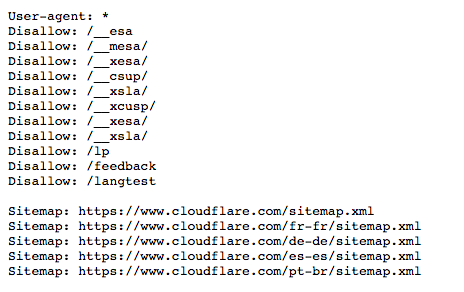
Below we break down what this all means.
What is a user agent? What does 'User-agent: *' mean?
Any person or program active on the Internet will have a "user agent," or an assigned name. For human users, this includes information like the browser type and the operating system version but no personal information; it helps websites show content that's compatible with the user's system. For bots, the user agent (theoretically) helps website administrators know what kind of bots are crawling the site.
In a robots.txt file, website administrators are able to provide specific instructions for specific bots by writing different instructions for bot user agents. For instance, if an administrator wants a certain page to show up in Google search results but not Bing searches, they could include two sets of commands in the robots.txt file: one set preceded by "User-agent: Bingbot" and one set preceded by "User-agent: Googlebot".
In the example above, Cloudflare included "User-agent: *" in the robots.txt file. The asterisk represents a "wild card" user agent, and it means the instructions apply to every bot, not any specific bot.
Common search engine bot user agent names include:
Google:
- Googlebot
- Googlebot-Image (for images)
- Googlebot-News (for news)
- Googlebot-Video (for video)
Bing
- Bingbot
- MSNBot-Media (for images and video)
Baidu
- Baiduspider
How do 'Disallow' commands work in a robots.txt file?
The Disallow command is the most common in the robots exclusion protocol. It tells bots not to access the webpage or set of webpages that come after the command. Disallowed pages aren't necessarily "hidden" — they just are not useful for the average Google or Bing user, so they aren't shown to them. Most of the time, a user on the website can still navigate to these pages if they know where to find them.
The Disallow command can be used in a number of ways, several of which are displayed in the example above.
Block one file (in other words, one particular webpage)
As an example, if Cloudflare wished to block bots from crawling our "What is a bot?" article, such a command would be written as follows:
Disallow: /learning/bots/what-is-a-bot/After the "disallow" command, the part of the URL of the webpage that comes after the homepage – in this case, "www.cloudflare.com" – is included. With this command in place, bots that comply with robots.txt instructions won't access https://www.cloudflare.com/learning/bots/what-is-a-bot/, and the page therefore probably will not show up in traditional search engine results.
Block one directory
Sometimes it's more efficient to block several pages at once, instead of listing them all individually. If they are all in the same section of the website, a robots.txt file can just block the directory that contains them.
An example from above is:
Disallow: /__mesa/This means that all pages contained within the __mesa directory shouldn't be crawled.
Allow full access
Such a command would look as follows:
Disallow:This tells bots that they can browse the entire website, because nothing is disallowed.
Hide the entire website from bots
Disallow: /The "/" here represents the "root" in a website's hierarchy, or the page that all the other pages branch out from, so it includes the homepage and all the pages linked from it. With this command, search engine bots may not crawl the website at all.
What other commands are part of the Robots Exclusion Protocol?
Allow: Just as one might expect, the "Allow" command tells bots they are allowed to access a certain webpage or directory. This command indicates the website's preference to allow bots to reach one particular webpage, while disallowing the rest of the webpages in the file. Not all search engines recognize this command.
Crawl-delay: The crawl delay command is meant to stop search engine spider bots from overtaxing a server. It allows administrators to specify how long the bot should wait between each request, in milliseconds. Here's an example of a Crawl-delay command to wait 8 milliseconds:
Crawl-delay: 8Google does not recognize this command, although other search engines often do. For Google, administrators can change crawl frequency for their website in Google Search Console.
What is the Sitemaps protocol? Why is it included in robots.txt?
The Sitemaps protocol helps bots know what to include in their crawling of a website.
A sitemap is an XML file that looks like this:
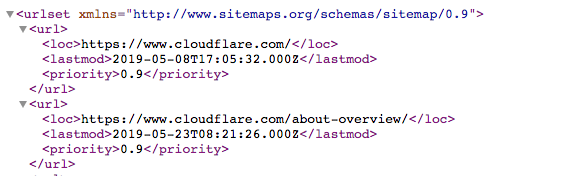
It's a machine-readable list of all the pages on a website. Via the Sitemaps protocol, links to these sitemaps can be included in the robots.txt file. The format is: "Sitemaps:" followed by the web address of the XML file. You can see several examples in the Cloudflare robots.txt file above.
While the Sitemaps protocol helps ensure that web spider bots don't miss anything as they crawl a website, the bots will still follow their typical crawling process. Sitemaps don't force crawler bots to prioritize webpages differently.
How does robots.txt relate to bot management?
Managing bots is essential for keeping a website or application up and running, because even good bot activity can overtax an origin server, slowing down or taking down a web property. A well-constructed robots.txt file keeps a website optimized for SEO and keeps well-behaved bot activity under control. A robots.txt file will not do much for managing malicious bot traffic.
Despite the importance of robots.txt, in 2025 Cloudflare found that only 37% of its top 10,000 websites even had a robots.txt file. This means a large percentage, perhaps a majority, of websites are not using this tool. To help these websites, especially those that may not want their original content used for AI training, Cloudflare offers "managed robots.txt." This is a service that creates or updates the robots.txt file on a website's behalf with their desired settings. Learn more about managed robots.txt.
Robots.txt Easter eggs
Occasionally a robots.txt file will contain Easter eggs – humorous messages that the developers included because they know these files are rarely seen by users. For example, the YouTube robots.txt file reads, "Created in the distant future (the year 2000) after the robotic uprising of the mid 90's which wiped out all humans." The Cloudflare robots.txt file asks, "Dear robot, be nice."
#    .__________________________.
#    | .___________________. |==|
#    | | ................. | |  |
#    | | ::[ Dear robot ]: | |  |
#    | | ::::[ be nice ]:: | |  |
#    | | ::::::::::::::::: | |  |
#    | | ::::::::::::::::: | |  |
#    | | ::::::::::::::::: | |  |
#    | | ::::::::::::::::: | | ,|
#    | !___________________! |(c|
#    !_______________________!__!
#   /                            \
#  /  [][][][][][][][][][][][][]  \
# /  [][][][][][][][][][][][][][]  \
#(  [][][][][____________][][][][]  )
# \ ------------------------------ /
#  \______________________________/
Google also has a "humans.txt" file at: https://www.google.com/humans.txt
FAQs
What is a robots.txt file?
A robots.txt file is a list of a website's preferences for bot behavior located in a website's source files. It provides guidance to good bots, like search engine web crawlers, on which parts of a website they are allowed to access and which they should avoid, helping to manage traffic and control indexing. It can also list rules for AI crawlers.
What is a web crawler?
A web crawler is an automated bot that visits and indexes webpages for search engines, helping users find content through search results.
What is the Robots Exclusion Protocol?
The Robots Exclusion Protocol is the format for instructions in a robots.txt file. The protocol tells web crawlers which webpages or resources they should not access or crawl on a website.
What does 'User-agent' mean in a robots.txt file?
"User-agent" specifies which bot or group of bots a set of instructions applies to in a robots.txt file. "User-agent: *" means the rule applies to all bots.
What is the Disallow command in robots.txt?
The Disallow command tells bots not to crawl specific pages or directories on a website. For example, "Disallow: /private/" tells bots not to access the "private" directory.
What is the Sitemaps protocol in robots.txt?
The Sitemaps protocol allows website owners to include links to their sitemap XML files in robots.txt, helping bots discover which pages should be crawled.
What’s the difference between good bots and bad bots?
Good bots are more likely to follow robots.txt instructions; they also perform helpful services. Search engine web crawlers, for instance, typically honor robots.txt rules as they index content for search. Bad bots often ignore robots.txt and may scrape content, attack websites, or send excessive requests that drive up costs for the website.
What does the Crawl-delay command do in robots.txt?
The Crawl-delay command tells bots how long to wait between requests to avoid overloading a server. Not all bots respect this command: Googlebot, for instance, does not, although Google allows website administrators to set a similar rule through Google Search Console.
How does robots.txt impact SEO optimization?
A well-constructed robots.txt file can improve SEO by telling search engine crawler bots which pages to index, which should help prevent non-essential or duplicate content from being indexed. Additionally, robots.txt can help web crawlers find all the pages they should index via Sitemaps.
