 Liquid Web
 If you’re just starting your business website, you might have come across two popular types of hosting: virtual private server (VPS) hosting and shared hosting.
A managed Virtual Private Server give you access to a private hosting environment, while shared hosting accommodates other clients.
The right type of hosting for your business will depend on your unique requirements. Below, we share the key differences between VPS server vs shared hosting to help you zero in on a solution.
Key points
- A virtual private server (VPS) is isolated virtually and has access to dedicated CPU, memory, storage, and other resources.
- Shared hosting accommodates multiple tenants in a single server, dividing the available processors, memory, and other server resources between them.
- VPS and shared hosting differ mainly in their performance, reliability, flexibility, security, scalability, and cost.
- While a shared plan is cheaper, a VPS offers better performance and more security and flexibility.
- You can explore your hosting options with a reliable service provider, such as Liquid Web.
- Virtual private server vs shared hosting
- VPS server vs shared hosting: Key differences
- Factors to consider when choosing between VPS and shared hosting
- How to choose a reliable hosting provider
- Final thoughts: VPS server vs shared hosting
Virtual private server vs shared hosting
The main difference between a virtual private server and a shared hosting server is that a VPS is used by a single client or tenant, while shared hosting accommodates multiple tenants.
A VPS is like a private computer hosted on a larger virtual space called the parent server. While the physical server hosts multiple clients, everyone gets access to their own dedicated resources, such as memory, storage, and processing power.
As the machine is virtual, you can’t get access to a dedicated physical server. However, you can still install your own operating system or configure the server according to your requirements, just like you would on a physical computer.
Shared hosting, on the other hand, shares the server’s resources among multiple tenants. You can configure some specifics, like installing business applications. But, in general, your configuration and modification capabilities are limited.
Shared hosting is like sharing an apartment with other tenants. While there is some access to private areas, most of the space is shared and configured to meet every tenant’s requirements.
VPS server vs shared hosting: Key differences
The fundamental difference between VPS and shared hosting is how the server space is divvied up. This can impact your website in various ways, including performance, security, and scalability.
Performance
The performance of your website determines how fast and seamlessly the website loads. It also impacts your user experience, conversions, and revenue. In fact, your conversion rate will climb around 17% for every second faster your website loads.
Since VPS hosting has dedicated resources, you don’t have to deal with “noisy neighbors” reducing your website’s performance. Also, since these servers allow custom configurations, you can invest in powerful processing units or additional RAM to ensure your website works seamlessly.
In contrast, shared hosting comes with predetermined CPU and memory configurations. And because multiple neighbors share resources, if one loads a heavy website or sees unusually high traffic, they’ll use more server resources and become a “noisy neighbor.”
The unpredictability and imbalance in resources of shared hosting can hurt your website, leading to:
- Decreased speed
- Improper loading
- Poor performance
If you’re hosting large web apps or require robust performance, a VPS might be a better choice than a shared plan.
For example, CrazyEngineers saw a 330% database speed increase when they moved from a shared server environment to cloud VPS and dedicated server hosting from Liquid Web.

Reliability
For your website to perform well on the business side, the reliability of your hosting is crucial. An unreliable server can lead to frequent downtimes, leading to loss of business and revenue. Nearly 54% of organizations say their most recent downtime cost them over $100,000.
Generally, VPS servers have good reliability. As there’s no threat from neighbors, a VPS can maintain a high uptime. Many VPS service providers promise high availability, above 99.9%.
Service providers also offer priority support to organizations that use VPS hosting. Even if an issue causes downtime, there’s a failover plan and immediate assistance available to ensure minimal outage.
Shared hosting, on the other hand, is more prone to downtime due to shared resources. If there’s a server overload due to multiple clients competing for large amounts of resources, the entire server might fail, causing an outage.
Troubleshooting shared servers is also difficult since any change in server configuration affects other clients.
Businesses that don’t need 24/7 website uptime can use shared servers. However, if website uptime is crucial, it’s best to choose VPS.
Flexibility
The flexibility of your hosting solution determines the level of control you have over the hardware and software setup.
A VPS gives you a greater degree of control over how you can set the hosting. You can choose the:
- Operating system
- IP address
- RAM
- Processors
- Other hardware and software configurations
With root access, you get admin-level control that allows you to modify server settings at any time, even after the website has launched. However, you need some technical knowledge and skills to configure VPS servers on your own.
Compared to VPS, shared hosting has limited flexibility. Since multiple clients are on the same server, there’s less control over the physical configurations. While you can choose the desired storage and memory from prebuilt packages, customizing a package isn’t possible.
Security
In 2023, 6.06 billion malware attacks were recorded worldwide. Such security breaches result in massive data losses, affecting brand reputation and revenue.
If you want to keep your business and customer data safe, website security should be a top priority when choosing between VPS and shared hosting.
VPS servers are isolated, which contributes to their security. Even if your VPS has vulnerabilities, it’s contained in a private virtual environment with no neighbors to exploit them.
If there’s a security lapse, such as with large distributed denial-of-service (DDoS) attacks, you can access additional resources to move your data quickly since there’s a limited number of users sharing the physical server space.
You also can use your root access to set up additional security features tailored to your requirements, such as:
- Multi-factor authentication (MFA)
- Firewalls
- Encryption
You also get more control over how and where you save backups for disaster recovery.
However, clients in shared hosting are more vulnerable, as they share the disk space with multiple neighbors. If one of the websites on the server has a security lapse, it can impact your website, too.
Shared servers also can be more prone to certain security threats, such as DDoS attacks, due to the higher number of available target tenants.
In addition, if you share an IP address with a malicious website, firewalls and email providers could block the IP. This can lead to:
- Your messages going straight to the spam folder.
- Customers being unable to access your website.
- Your business’s reputation dropping because customers can’t contact you online.
Moreover, there’s limited flexibility when setting up custom security features. The security of your website, and that of other neighbors, depends on the shared hosting provider. There are also fewer backup, restore, and disaster recovery options.
Scalability
If you’re a new or growing business, website scalability is a crucial factor to consider when choosing a hosting solution.
With a VPS, the parent server hosts limited clients. When you want to scale, the service provider can easily allocate the required amount of resources from the same parent server.
If you want to scale further, the service provider might also have higher-tiered servers available, which give access to more resources.
However, a shared server usually accommodates a larger number of clients, resulting in a limited availability of resources. While scaling a shared plan is still possible, it’s not as quick or flexible as with VPS hosting.
If you want to scale up from a shared hosting server, opting for a VPS hosting plan might be a better choice.
Cost
The cost of hosting a website on a VPS is higher than on a shared server but lower than some other options, like dedicated servers and private cloud hosting.
VPS hosting offers dedicated resources, which means a single tenant pays for the entire virtual environment. In addition, VPS plans are usually accompanied by features like additional security or priority support.
Shared servers, on the other hand, are more cost effective as multiple tenants pay for the same hosting environment. However, they also include fewer customizations and configurations.
Factors to consider when choosing between VPS and shared hosting
Both VPS servers and shared hosting have their own benefits. However, the right type of hosting depends on your business requirements.
After understanding the key differences, here are the factors you should consider when choosing between VPS vs shared hosting:
Website type and size
Shared hosting is good for small websites, such as single-page sites, landing pages, or brand portfolios with limited media. These websites have smaller processor and memory requirements and can load quickly even in shared environments.
However, if your website is large, with multiple pages and large media files, a VPS might be a better choice. VPS plans have access to more powerful processors and plenty of RAM, which helps load websites quickly, even if they are bulky.
Traffic
If your website has little or predictable traffic, shared hosting might be sufficient to ensure seamless performance. But spikes in a shared hosting environment may cause website outages and also affect the performance of other tenants due to resource hogging.
If your website sees large amounts of traffic or frequent fluctuations, it’s better to invest in a VPS hosting plan. The dedicated resources can handle higher amounts of traffic, even when there are sudden spikes.
Customization requirements
If you have a startup or small business website that’s just starting out, you may not need extensive customization options. Shared servers are suitable in this case, as they come with preset configurations and limited flexibility.
However, if you have a larger ecommerce website that handles a lot of traffic, customization features come in handy. You should opt for a VPS plan that offers root access to personalize your hardware and software configurations.
Security requirements
All websites require security features to protect the data they host. However, websites that host sensitive customer data or have payment features require additional security layers.
With VPS hosting, you can configure security features, ensuring client and business data is protected. If your website only hosts public information, shared hosting solutions might be sufficient.
Budget
Shared hosting is more economical than VPS hosting. If you’ve got a limited budget and don’t have extensive performance or customization requirements, shared hosting might be a good choice.
Although VPS hosting involves higher upfront expenses, its security and reliability can save your business in the long run.
How to choose a reliable hosting provider
No matter what type of web hosting you choose, it’s important to pick a reliable provider. Your hosting provider plays a crucial role in ensuring the security, performance, and uptime of your website.
Here are some tips for choosing a reliable hosting provider for your website:
Consider the hosting plans
First, check if the plans’ specifications — such as the bandwidth, storage space, and CPUs — meet your business requirements.
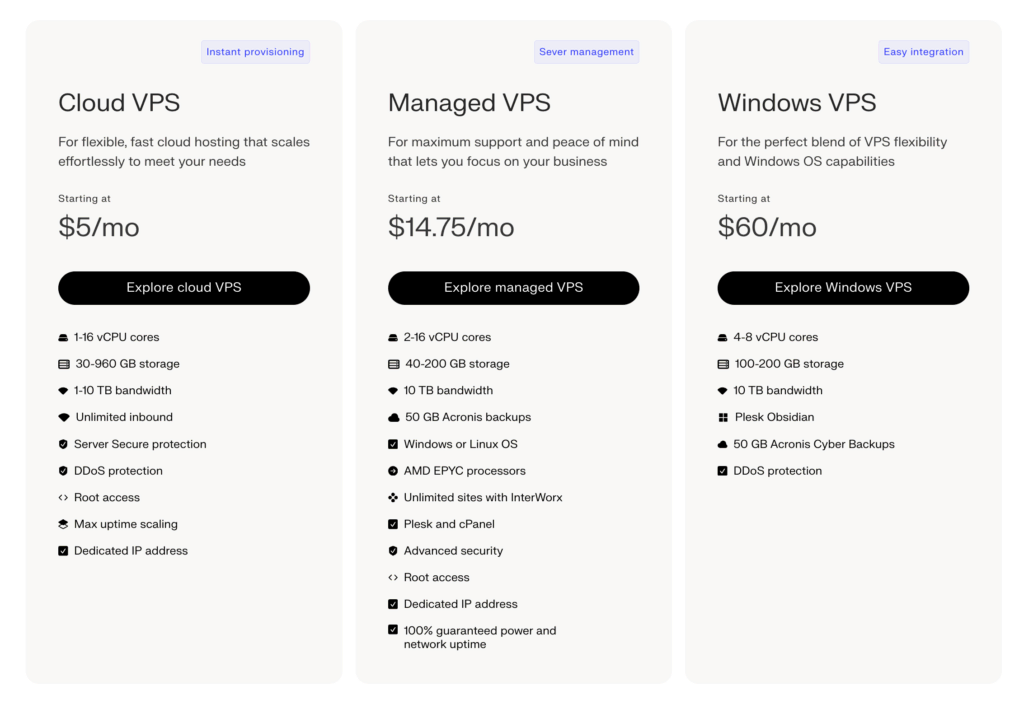
If you’re going for VPS hosting, look for features like root access, control panels, and dashboards that allow you to configure the performance and settings. Check if these features are included in their plans or are charged separately.
If you’re choosing a shared hosting plan, confirm that the operating system and other configurations fit your needs.
Prioritize the features you need the most and choose a plan that accommodates your top requirements and budget.
Check reviews and testimonials
Every web hosting provider promises high availability, fast load times, and reliable performance. You can check the credibility of these claims by understanding the experiences of other businesses who’ve availed of their services.
Look for case studies of clients from similar industries who’ve chosen the same hosting solution as you. Check for any specific issues, such as server uptime or loading speed, that they’ve mentioned.
Go through review sites like TrustPilot or community forums like Reddit to read user experiences. Additionally, you can ask for recommendations from your business network.

Security features
Check if the hosting company offers any additional security features apart from the basics, like SSL certificates and firewalls, especially when opting for a shared hosting environment.
Liquid Web offers DDoS protection and Server Secure with its VPS plans. Other security features you can look for are malware scanning, two-factor authentication (2FA), and backups.
Customer support
Even with high-end features, you’ll require support from the service provider during onboarding, scaling, or downtime. Choose a hosting company like Liquid Web that offers round-the-clock customer support to solve client issues immediately.
Also, check if the service provider has a detailed knowledge base that you can use to resolve minor issues by yourself.
Final thoughts: VPS server vs shared hosting
Both VPS and shared hosting can be suitable for businesses, depending on their requirements. While shared hosting is more economical, a VPS offers additional security, customizability, and reliability and is better in almost every aspect.
If you’re considering new web hosting solutions or looking to switch providers, you’ll be better off with a reliable provider like Liquid Web.
Liquid Web offers some of the best unmanaged and managed VPS hosting plans with a range of bandwidth, storage capacity, and CPU cores. With our advanced security features and dedicated IP addresses, you get 100% uptime and availability within your budget.
Ready to choose a trusted web hosting solution for your website? Explore Liquid Web’s VPS hosting services.
