◦ Optimized configs
◦ Industry-leading support
What is a GPU?
Graphics processing units (GPUs) play an integral role in computing today. As artificial intelligence (AI) and machine learning applications become more ubiquitous, the need for dedicated GPU hardware continues to grow.
Let’s explore what exactly a GPU is, how it works, what industries it is revolutionizing, and more.
What is a GPU and what does it do?
A GPU, or graphics processing unit, is a specialized processor designed to handle complex visual and mathematical tasks—especially the kind that happen all at once. You’ll find one in nearly every modern computer, whether it’s helping you watch Netflix, play video games, edit photos, or even train an AI model.
While GPUs were originally built for rendering 3D graphics, today they power everything from movie production to medical imaging and machine learning. If you’ve ever wondered how your computer handles high-resolution visuals or why AI tools like ChatGPT are so fast, the answer usually involves a GPU.
At its core, a GPU is a chip that can rapidly perform lots of simple calculations in parallel. That means it’s really good at doing thousands (or millions) of similar operations at the same time.
Originally, this power was used to draw graphics on screen, like rendering 3D scenes in games or visual effects in movies. But because so many other tasks also benefit from parallel processing, GPUs are now essential for:
- Video editing and transcoding
- Image recognition
- Scientific simulations
- Deep learning and AI inference
- 3D modeling and CAD design
A GPU doesn’t replace your CPU (central processing unit); instead, it complements it by taking on specific kinds of work that a CPU would be slower or less efficient at.
How GPUs work: specialized hardware for parallel processing
To understand how a GPU works, it helps to compare it to the CPU.
A CPU is like a master planner: it handles everything from running your operating system to managing input/output and multitasking. But it typically has just a few powerful cores (like 4, 8, or 16), optimized for complex, sequential logic.
A GPU, on the other hand, might have thousands of smaller cores. These are designed to execute the same instruction across many pieces of data at once—a model known as SIMD (single instruction, multiple data).
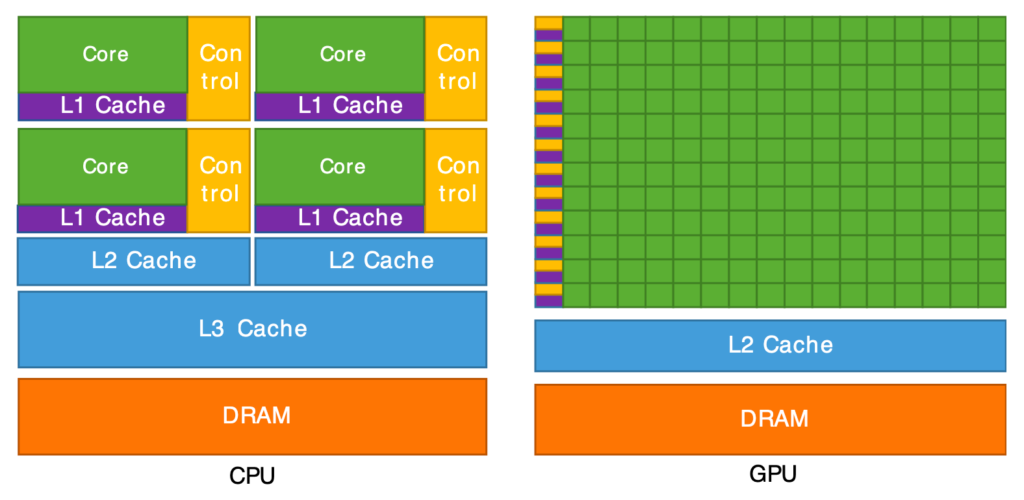
This is what makes GPUs so powerful for tasks like:
- Rendering every pixel in a video frame
- Running matrix multiplications in deep learning
- Simulating thousands of particles in a physics engine
Put simply: CPUs are great for doing a few things quickly; GPUs are great for doing many things at once.
What GPUs are used for today (beyond gaming)
Although gaming is still a major GPU use case, modern GPUs do much more than handle graphics. Here are some of the most common areas where GPUs play a crucial role:
- AI and machine learning: Training neural networks involves massive matrix math, which GPUs can handle efficiently. Inference (running AI models) also benefits from GPU acceleration.
- Scientific research: Simulating climate models, molecular interactions, or astrophysical data often requires GPU-powered high-performance computing (HPC).
- Video production: GPUs are used to accelerate rendering, color grading, encoding, and real-time previews in tools like Adobe Premiere or DaVinci Resolve.
- Finance and trading: Quantitative analysts use GPUs to run Monte Carlo simulations, option pricing models, and other data-heavy calculations.
- Medical imaging: GPUs can process MRI and CT scans more efficiently, enabling faster diagnostics and 3D reconstruction.
- Cryptocurrency mining: GPUs are used to solve cryptographic problems for proof-of-work coins like Ethereum (now legacy) or other GPU-friendly altcoins.
In short, any task that can be parallelized benefits from a GPU, even if it has nothing to do with graphics.
The graphics card (or video card) is the complete hardware component that includes the GPU, memory (VRAM), cooling system, power regulation components, and other circuitry needed to make the GPU function.
Ready to get started? Liquid Web’s GPU hosting services are built to meet the growing demand for environments that can handle high-performance computing (HPC) tasks.
Rendering and graphics: where GPUs started
The GPU was born out of the need to handle real-time rendering of 3D environments, particularly in video games.
- Late 1980s: Companies started incorporating 2D graphics accelerators into their computers to offload some of the graphics processing from the CPU. This improved performance for tasks like rendering windows, text, and simple shapes.
- Early 1990s: SVGA (Super Video Graphics Array) cards improved resolution and color depth, setting the stage for more complex graphics. The gaming industry drove demand for 3D graphics.
- 1999: NVIDIA entered the market with the first card marketed as a GPU. It was a significant leap in performance for 3D rendering.
- Mid-2000s: Researchers recognized that GPUs’ parallel processing capabilities could be applied to non-graphics tasks. This led to the development of GPGPU (General-Purpose Computing on GPUs), which allowed GPUs to accelerate scientific and engineering computations.
- 2006: NVIDIA introduced CUDA (Compute Unified Device Architecture)—a programming framework that made it easier to use GPUs for general-purpose computing. This innovation accelerated their adoption in areas like machine learning, scientific simulations, and data processing.
Integrated vs discrete GPUs
There are two main types of GPUs in consumer systems:
Integrated GPUs
- Built into the CPU chip itself
- Share system RAM instead of having their own VRAM
- Ideal for basic tasks like video playback, web browsing, and light gaming
- Found in most laptops and budget desktops
Discrete GPUs
- Separate chips installed on their own cards (graphics cards)
- Have dedicated VRAM and more processing power
- Used in gaming PCs, workstations, and GPU servers
- Better for demanding workloads like 3D rendering, AI, and simulation
Here’s a quick comparison:
| Feature | Integrated GPU | Discrete GPU |
|---|---|---|
| Location | Built into CPU | Separate card |
| Performance | Lower | Higher |
| VRAM | Shared with system RAM | Dedicated |
| Power efficiency | High | Lower |
| Best for | Office, web, light apps | Gaming, AI, heavy workloads |
What is a graphics card?
A graphics card is the complete hardware unit that contains a discrete GPU, along with everything it needs to function.
Most graphics cards include:
- The GPU chip itself
- VRAM (video RAM), often 4GB to 48GB or more
- Cooling system with fans or liquid cooling
- Power connectors and circuitry
- Display output ports (HDMI, DisplayPort)
So while the GPU is the brain doing the work, the graphics card is the body that connects it to your system. People often use the terms interchangeably, but technically, the card is the whole unit while the GPU is the chip.
GPU vs CPU: key differences
Understanding how GPUs and CPUs differ can help you choose the right hardware or hosting solution.
| Feature | CPU | GPU |
|---|---|---|
| Core count | Few (2–16) | Many (hundreds or thousands) |
| Task type | Sequential, general-purpose | Parallel, data-intensive |
| Performance focus | Low latency, task switching | High throughput, bulk processing |
| Ideal for | OS control, logic, app code | Graphics, AI, simulations |
| Flexibility | Very high | Moderate, specialized |
In many systems, both CPU and GPU work together. Your CPU manages tasks and sends visual or parallelizable workloads to the GPU for faster execution.
GPU acceleration in cloud computing
GPUs aren’t just for desktops. Today, many cloud platforms offer GPU acceleration via virtual machines or dedicated GPU servers. Common use cases include:
- AI training and inference at scale
- Rendering and encoding pipelines
- Running game engines in the cloud
- Scientific simulations that run for days or weeks
Hosting providers offer GPU-powered instances with NVIDIA A100, H100, or L40S hardware. These are ideal when you need:
- More GPU power than your local system can handle
- To parallelize across multiple GPUs
- On-demand scalability without buying hardware
Choosing the right GPU: what to look for
If you’re buying or renting a GPU (or GPU server), here are the main specs to evaluate:
- Use case: Gaming, AI, rendering, modeling, or compute?
- VRAM size: More VRAM is better for high-resolution, multi-GPU, or large models
- GPU architecture: NVIDIA (CUDA/Tensor cores) vs AMD (OpenCL, ROCm)
- Cooling and power draw: Important for desktops or rack-mounted servers
For enterprise workloads, many users now opt to rent a dedicated GPU server rather than build in-house. It’s easier to scale and avoids upfront costs.
How GPU servers are changing modern computing
As workloads become more demanding, many businesses and developers are moving to GPU server hosting.
- AI training and inference
- Real-time rendering for VFX and game engines
- Video encoding and streaming at scale
- Scientific computing and simulations
Benefits of renting a GPU server:
- No hardware setup or maintenance
- Scale up to multi-GPU configurations
- Connect over the cloud or VPN
- Access enterprise-grade GPUs not found in consumer devices
If you’re serious about performance, a hosted GPU server is often faster and more cost-effective than upgrading your desktop rig.
FAQ
Getting started with a GPU
Ready to get started? Liquid Web is known for providing high-performance hosting solutions backed by superior customer service. The new GPU hosting solution continues this tradition by delivering fast, secure, and scalable services for businesses that cannot afford downtime or delays.
Getting started with a GPU
Ready to get started? Liquid Web is known for providing high-performance hosting solutions backed by superior customer service. The new GPU hosting solution continues this tradition by delivering fast, secure, and scalable services for businesses that cannot afford downtime or delays.
Additional resources
GPUs vs CPUs →
Learn about how they relate to AI and web hosting
CPU Cores vs Threads →
Make informed decisions about maximizing performance
What Is High Performance Cloud Computing →
Everything you need to know about HPC

Luke Cavanagh, Strategic Support & Accelerant at Liquid Web, is one of the company’s most seasoned subject matter experts, focusing on web hosting, digital marketing, and ecommerce. He is dedicated to educating readers on the latest trends and advancements in technology and digital infrastructure.
