Deployer for Git
Deploy from Git to WordPress

Deploy your WordPress themes and plugins instantly.
This plugin makes it easy without FTP and zipping files.

Just connect your repo and you are ready to go.

Supports:
GitHub Bitbucket GitLab Gitea
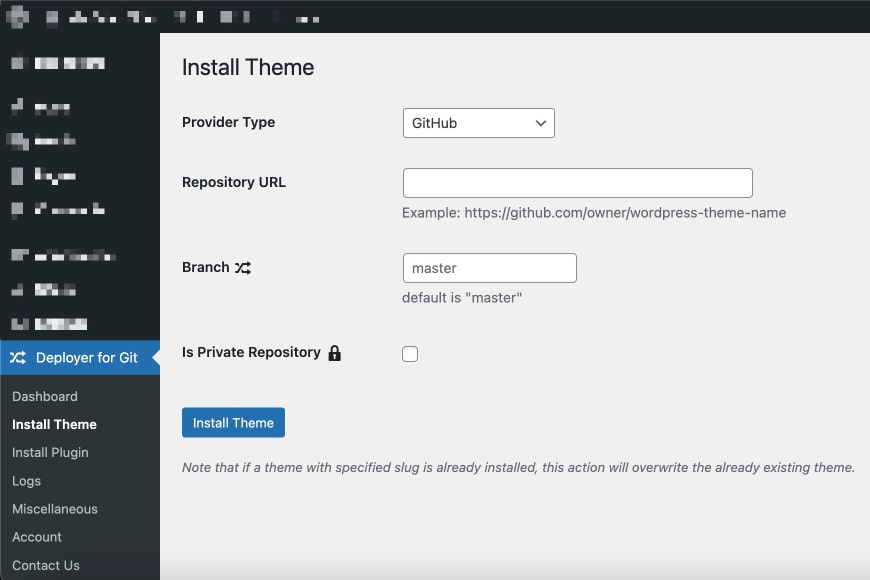
Deployer for Git plugin screenshot

GitHub-based plugin installation tutorial
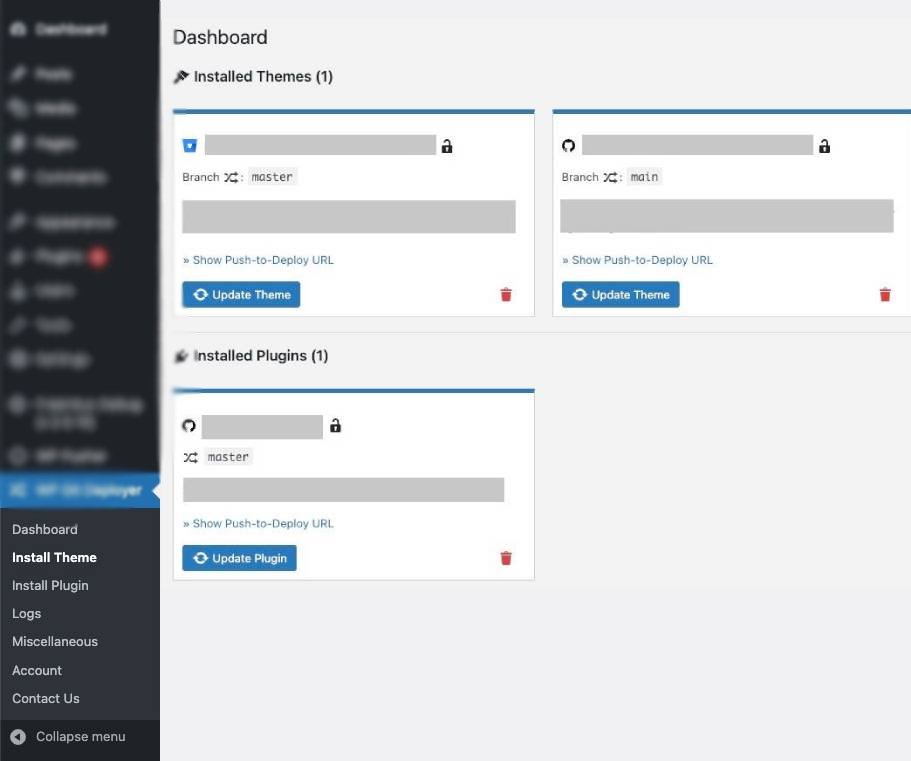
Plugin features

Git Providers

Plugin supports Bitbucket, GitHub, Gitea, and GitLab repositories.

One-click install

Provides one-click package installation. Plus, you don't need to add any extra code to your plugin/theme.

Logging

The plugin logs every action, so you have everything under control.

Cache flush

The feature will help you to clear cache after each deploy.

Seamless WordPress management with the power of Git

Connect the Git Repo to your WordPress instance

The Deployer for Git plugin simplifies updating themes and plugins located in Git repositories.

As developers, we know how frustrating manual updates and version mismatches can be when managing WordPress sites.
Deployer for Git eliminates those pain points - enabling seamless, real-time updates directly from your Git repositories.
The result: a more efficient workflow, fewer errors, and a website that stays functional, secure, and always up to date with your repo branch.

Download Now
Deployer for Git plugin settings

How it looks

FAQ

No. Deployer for Git does not require Git to be installed on the server.

Yes, as long as your server runs WordPress, the plugin will work fine.

The plugin supports Bitbucket, GitHub, Gitea, and GitLab repositories.

Yes, it's possible. Plugin supports WP Rocket, WP-Optimize, W3 Total Cache, LiteSpeed Cache, WP Super Cache, WP Fastest Cache and Autoptimize.

By automating the deployment process. Once set up, the plugin automatically updates your WordPress instance after each commit of the desired branch to your Git repository, eliminating the need for manual file transfers via FTP.

Yes, the plugin can be used for multiple websites. Each website will require its own setup to connect to the respective Git repository.

The PRO version is required if you plan to use the plugin with private repositories.

Yes, it does.

The plugin is designed to safely update your website with the latest changes from your Git repository. However, as with any deployment tool, it's always recommended to have regular backups of your site.

Pricing

Free

$0 forever
  • Unlimited sites
  • Public repositories
  • Remote theme/plugin installation
  • Push-to-Deploy
  • Flush cache after update automatically
Download Free

Available at WordPress.org

Pro

$16.99 per year
  • All Free features
  • Private repository support
Buy Now

We provide 14-day free trial and a 30-day no questions asked, money back guarantee. All prices are in USD.