-
-
-
-
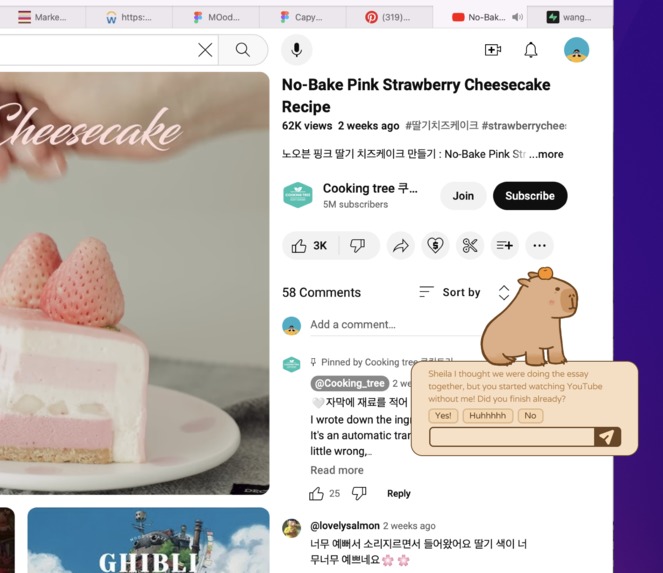
monitor
-
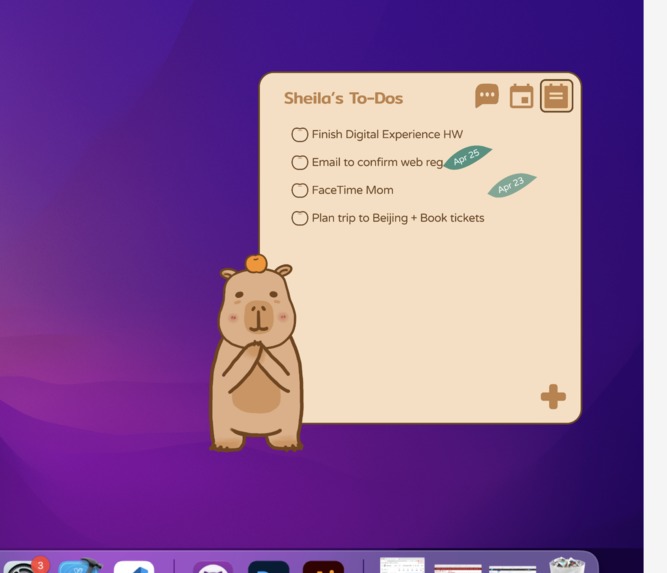
to-do list
-
play with saucelab


Inspiration
It’s a familiar scenario for many of us: we set out to accomplish one task, only to find ourselves lost in the endless entertainment the internet offers, from one fun app to another. It seems like we’re always playing catch-up, struggling to regain control. That's exactly why we developed Capyble. It started from conversations among friends who were looking for a gentle push to help us stay focused—much like a reminder from our parents to stick to our homework. Capyble acts as that friend who knows just how easily we get distracted and helps steer us back to what’s important, ensuring we make the most of our time and focus on our true priorities.
What does it do
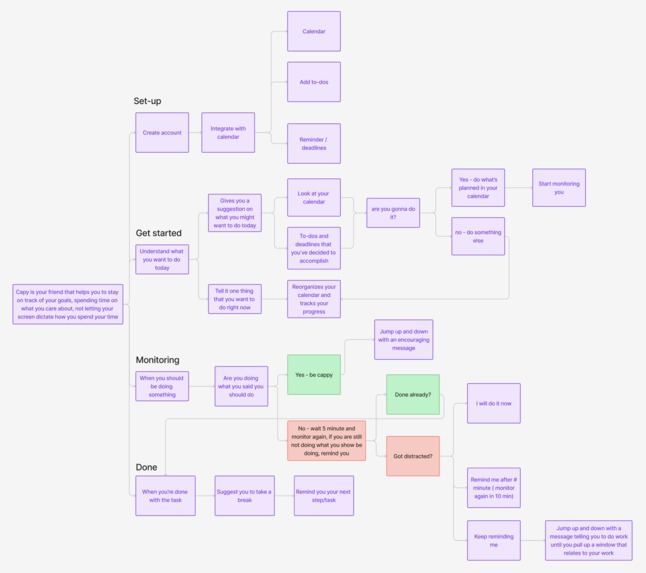
Capy acts as your on-screen companion, keeping your schedule and to-do list in mind. Ready to work? Capy engages in a chat with you, asking what's on your agenda and offers suggestions tailored to your habits. While you're working, Capy checks in every 5-10 minutes. If it senses you're off-task—like you're watching YouTube instead of doing your computer science homework that's due tomorrow—it gently reminds you to refocus, thanks to Gemini Vision Pro technology. If Capy's reminder seems out of place—say, you're just choosing some music to work to—you can correct it, and it'll learn from your response. And if you need to revisit an unfinished task, Capy is there to help you find another spot on your calendar shortly.
Interaction:
Feel free to click and drag Capy around the screen to your heart's content, and you can even fling it off-screen — but watch out, it might just bounce back! This bit of fun is made possible through the use of Flask and React in our design.
Chatbox:
Users can chat with Capy, which assists with daily planning by referring to your calendar and to-do list. This feature is powered by sophisticated prompt-engineered Open AI API and Google Calendar API.
Monitoring:
Do you remember those moments when you wished your mom was right beside you, gently nudging you to focus on your studies? When you are in the 'focus mode', Capy would step in this role. During an active event, Capy initially pauses, then proceeds to capture a screenshot, storing it in a local file. Subsequently, it conducts periodic checks on your activity, employing gemini to verify alignment with the designated event summary.
How we built it
Capyble lives in a. WxPython Window we use to render Capy as a sprite, as well as a Electron Desktop App that hosts React components. Information and retrieval is managed by Flask endpoints we built for LLM completions, coordinate passing, event flags, and more, as well as Supabase for scaffolding table-based data such as itemized to-do lists. We leverage Gemini Vision Pro to intelligently evaluate what the user is doing for our focus feature, and other LLMs to build personalities and interact with the user across the span of a greater context.
Challenges we ran into
Two large challenges presented themselves. The first was, that as we had to run multiple app-style frameworks in parallel, we had to run multiple python scripts. This, alongside a react app that fed to an electron app, meant that sending information was a challenge. While we were ultimately able to wrangle everything together with http requests, it was still an unwieldy project and deployment experience.
Since our team consisted of hackathon beginners as well, we faced problems with our Github, to the point where we decided to completely migrate the codebase in order to escape an increasing convoluted git tree. Merge conflicts were long and tiresome, as for many of us this was our first time using git in a fast paced setting with others.
Accomplishments that we're proud of
We were all able to expose ourselves to all sorts of technology during this hackathon, and embraced it with vigor. One of our teammates, who "knew nothing about front-end" at the start of the hackathon, was building React components and calling endpoints like a pro after the 36 hours. As we learned about the technologies we needed to achieve our vision, we decided to brave the challenges and commit ourselves to rapidly learning in order to productively build.
What we learned
We gained a lot of knowledge in working with different types of tools. Additionally, we were able to familiarize ourselves with the collaborative nature of coding projects. We learned about how many unique skills, from UI/UX to deep understanding of frameworks and machine learning were necessary to build a truly complete product. We learned how many hours you can stay up when you care about what you're working on.
What's next for Capyble
Who doesn't appreciate a charming capybara on their desktop, especially one that's incredibly adorable? Looking ahead, we plan to enhance the capybara's design to increase its cuteness and streamline interactions for a more delightful user experience. After all, it's hard to resist an endearing feature that truly gets you.
Additionally, we aim to make the backend large language model (LLM) more customizable and secure. We hope to reduce compute costs by caching and vectorizing user data, which additionally helps encrypt it, and play around with using smaller, specialized LLMs for tasks such as image recognition or constraint-based tasks such as schedule planning.


Log in or sign up for Devpost to join the conversation.