-
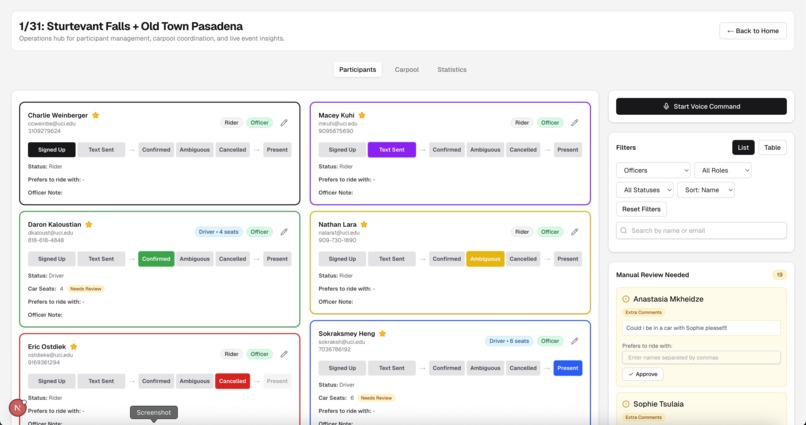
View all event participants and easily update status/info for each person!
-
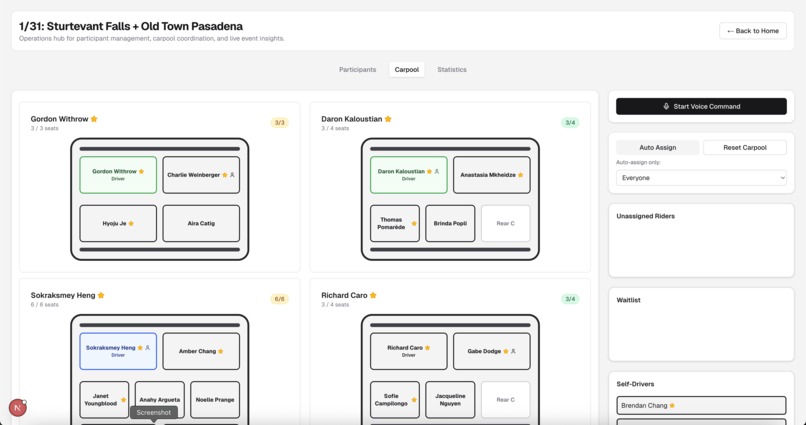
View carpool assignments and automatically organize cars!
-
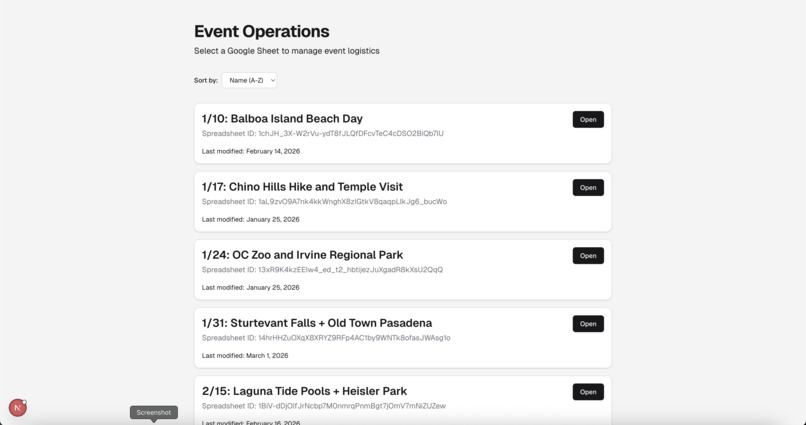
View all events (connected to Google Sheets)!
-
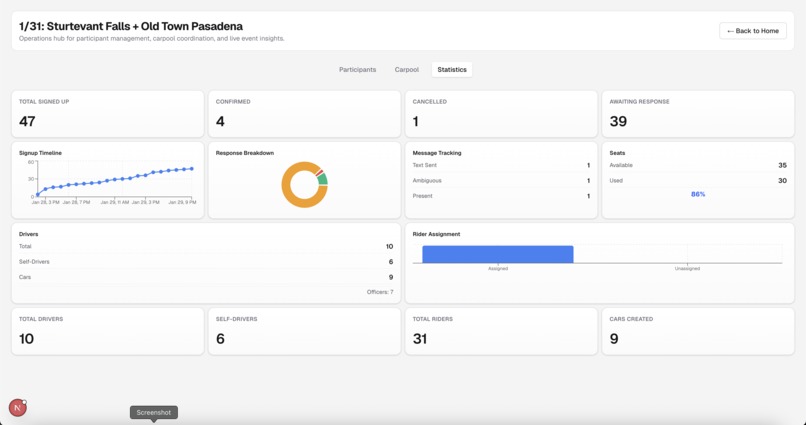
View statistics about each event!


🚗 Sheet Happens
Mission Control for Event Logistics & Carpool Coordination
An intelligent event operations dashboard that transforms chaotic event signup management into a streamlined, real-time coordination experience. Built during IrvineHacks 2026.
Inspiration
I face a painful problem when organizing events: manually managing tens of event participants and organizing them into a carpool that everyone is happy with is tedious, error-prone, and wastes time. I wanted to build a command center where event organizers could:
- See all participants and drivers at a glance
- Drag-and-drop riders into car seats in seconds
- Use voice commands ("Alex in John's car") for instant reassignment
- Get AI suggestions for optimal assignments
- Sync data directly from Google Sheets
The result: 20+ minutes of manual work condensed into seconds with safety constraints intact.
What It Does
A full-stack web app that combines real-time carpool visualization, drag-and-drop assignment, voice control, and AI insights into one dashboard.
Key Features
🗺️ Real-Time Carpool Dashboard
- Visual car layouts with drag-and-drop seat assignment
- Auto-enforced capacity constraints
- Self-driver tracking and waitlist management
- One-click auto-assignment for unassigned riders
🎤 Voice Command Control
- Natural language commands ("Move Alex to John's car", "Alex is confirmed")
- AI-powered parsing with intent recognition
- Instant execution and full audit trail
👥 Participant Management
- Real-time status tracking with role-based filtering
- Preferred ride partners, notes, and preferences
📊 Dashboard & Insights
- Live event statistics and AI-generated insights
- Approval workflows for capacity review and notes
📋 Google Sheets Integration
- Import and real-time sync directly from sheets
- Single source of truth for participant data
🔍 Filtering & Search
- Filter by role, officer status, and event status
- Search by name/email with multi-column sorting
How I Built It
Tech Stack
- Frontend: React + Next.js, TypeScript
- Styling: Tailwind CSS, shadcn/ui
- Database: SQLite, Drizzle ORM
- APIs: Google Sheets API, Web Speech API
Relevant Flows
Voice Command Pipeline
Capture → Transcribe → Parse (AI intent extraction) → Execute (database update) → Log & Broadcast to clients
Real-Time Data Flow
Google Sheets/database → EventStore → components subscribe → drag-and-drop API updates → broadcast to all clients
Challenges I Ran Into
| Challenge | Why It Mattered | Solution |
|---|---|---|
| Solo project | Teammates didn't get off the waitlist, so I had to handle all frontend, backend, and design alone | Focused on core features, iterated ruthlessly, leveraged existing libraries to maximize impact |
| Balance features with practicality | Users are used to Google Sheets, may find using this app confusing or not necessary | Made sure to keep the user in mind at all times. Sure, this feature is cool, but is it actually useful/better than existing alternatives? |
| Voice command accuracy | Misheard commands could assign riders to wrong cars | Built fuzzy matching, disambiguation prompts, and command preview before execution |
Accomplishments That I'm Proud Of
- Complete Full-Stack Solution – Built frontend, backend, database, and integrations from scratch in a hackathon timeline
- Voice-Driven UI – Implemented AI-powered natural language parsing that understands complex carpool commands with fuzzy matching
- Drag-and-Drop System – Integrated
@dnd-kitwith custom constraints for intuitive seat assignment - Google Sheets Sync – Bidirectional integration with smart debouncing to handle API rate limits gracefully
- Solo Delivery – Delivered polished MVP as solo builder despite late start and teammates not attending
What I Learned
1. Real-Time State Sync
Syncing across components without race conditions required: single source of truth, optimistic UI updates with rollback, and event-driven broadcasting. Building this architecture upfront prevented major refactors later.
2. Voice Command Ambiguity
Natural language is messy. "Move Alex to John" has multiple interpretations (which John? which Alex?). I built a resolution engine with fuzzy matching, disambiguation prompts, and learning from corrections. This taught me that UX for AI features requires graceful fallbacks.
3. Prioritization Under Pressure
With a late start and solo timeline, ruthless feature prioritization was essential. Focusing on the core MVP (carpool dashboard + voice commands) allowed shipping something polished rather than several unfinished features.
What's Next for Sheet Happens
- AI custom comments parsing: Use AI to automate the parsing of unstructured comments into the correct structured data fields for each user
- SMS Notifications: Twilio integration to send confirmation texts and to notify participants of car assignments
- Mobile App: React Native/PWA companion for real-time mobile operations
Built With
- drizzle
- googlesheetsapi
- next.js
- react
- shadcn/ui
- sqlite
- tailwindcss
- typescript
- webspeechapi



Log in or sign up for Devpost to join the conversation.