

What You Can Build
Generate Presentations
Turn text, notes, or documents into complete slide decks with AI-powered design
Add & Edit Slides
Programmatically add new slides to existing presentations
Export Anywhere
Get shareable links, PDFs, or PowerPoint files
Extract Content
Get structured content and layout information from slides
How It Works
Get Your API Key
Sign up at app.getalai.com and generate an API key from your account settings.
Submit Your Content
POST to
/generations with your text content. You’ll receive a generation_id immediately.Quick Example
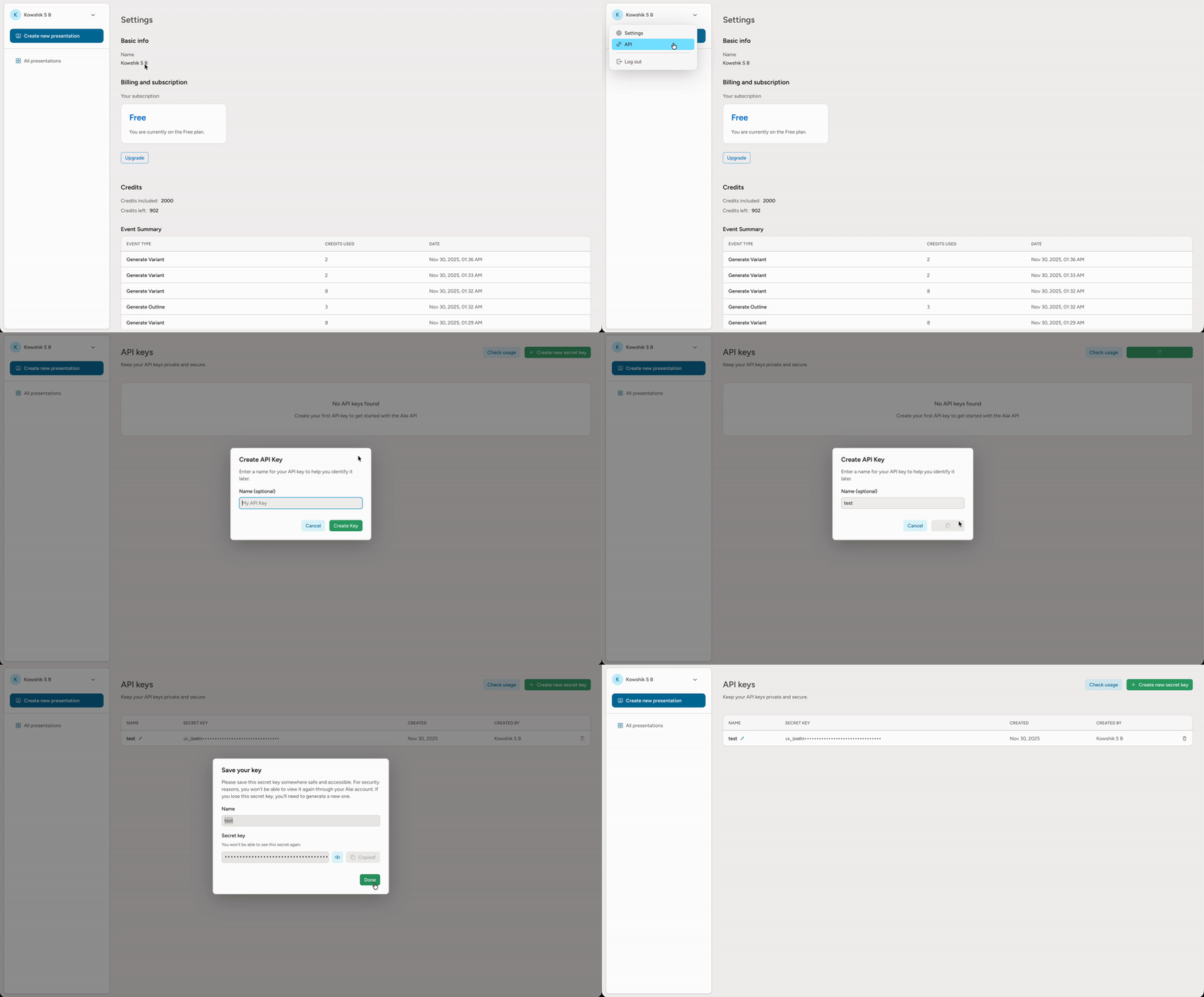
Get Your API Key
- Sign up at app.getalai.com
- Click on your name in the left sidebar
- Select “API” from the dropdown menu
- Click “Add new API key” to generate your key
- Copy and securely store your API key
Authentication
All requests require a Bearer token in theAuthorization header:
Available Endpoints
Async Operations
These endpoints return ageneration_id. Poll GET /generations/{id} until complete.
| Endpoint | Method | Description |
|---|---|---|
/generations | POST | Generate a presentation from text |
/presentations/{id}/slides | POST | Add a slide to a presentation |
/presentations/{id}/exports | POST | Export to PDF, PPT, or shareable link |
/presentations/{id}/transcripts | POST | Extract slide content and layout |
Synchronous Operations
These endpoints return results immediately.| Endpoint | Method | Description |
|---|---|---|
/ping | GET | Verify your API key |
/themes | GET | List theme IDs and names available to your account |
/generations/{id} | GET | Check generation status |
/upload-images | POST | Upload images for presentations |
/presentations/{id}/slides/{slide_id} | DELETE | Delete a slide |
/presentations/{id} | DELETE | Delete a presentation |
Generation Status
When polling, you’ll see one of these status values:| Status | Description |
|---|---|
pending | Queued, not yet started |
in_progress | Currently processing |
completed | Finished successfully |
failed | Error occurred (check error field) |
Available Themes
UseGET /themes to discover the theme IDs and display names available to the authenticated user, including system themes and any user themes you can access.
Theme selection now primarily uses theme_id values returned by that endpoint. Legacy theme display names are still accepted for backward compatibility, but they are deprecated.
See the Get Themes reference for the response format and example usage.
Rate Limits
- Max 5 concurrent generations per user
- Recommended polling interval: 5 seconds
Credits
API generations consume the same credits as the Alai app. To check your balance or purchase more credits:- Go to Settings in your Alai account
- Or contact founders@getalai.com for enterprise plans
Error Handling
| Code | Description |
|---|---|
200 | Success |
400 | Bad Request - Invalid parameters |
401 | Unauthorized - Invalid or missing API key |
402 | Payment Required - Insufficient credits |
404 | Not Found - Resource doesn’t exist |
422 | Validation Error - Check request body |
429 | Rate limit exceeded |
500 | Internal Server Error |
Next Steps
Examples & Use Cases
Complete Python examples with a helper client class
Generate Presentation
Full API reference for presentation generation
MCP Integration
Connect MCP clients like Claude and Cursor to Alai
