<?xml version="1.0" encoding="utf-8"?><feed xmlns="http://www.w3.org/2005/Atom" ><generator uri="https://jekyllrb.com/" version="3.10.0">Jekyll</generator><link href="https://erikej.github.io/feed.xml" rel="self" type="application/atom+xml" /><link href="https://erikej.github.io/" rel="alternate" type="text/html" /><updated>2026-04-13T06:16:04+00:00</updated><id>https://erikej.github.io/feed.xml</id><title type="html">ErikEJ’s blog</title><subtitle>.NET Data Access and more</subtitle><author><name>ErikEJ</name></author><entry><title type="html">New Visual Rule Manager: Configure SQL Code Analysis Without Editing XML</title><link href="https://erikej.github.io/dacfx/dotnet/sqlserver/ssms/visualstudio/2026/04/13/sqlprojects-rule-manager.html" rel="alternate" type="text/html" title="New Visual Rule Manager: Configure SQL Code Analysis Without Editing XML" /><published>2026-04-13T17:28:49+00:00</published><updated>2026-04-13T17:28:49+00:00</updated><id>https://erikej.github.io/dacfx/dotnet/sqlserver/ssms/visualstudio/2026/04/13/sqlprojects-rule-manager</id><content type="html" xml:base="https://erikej.github.io/dacfx/dotnet/sqlserver/ssms/visualstudio/2026/04/13/sqlprojects-rule-manager.html"><![CDATA[<p>Configuring SQL static code analysis rules just got easier. The latest release of SQL Database Project Power Tools includes a visual <strong>Rule Manager</strong> — a settings dialog that lets you enable, disable, and configure rule severity without manually editing your SQL Database project file.</p>
<p>If you've used the new <a href="https://devblogs.microsoft.com/azure-sql/sql-code-analysis-in-vs-code-configure-rules-without-editing-your-project-file/">Code Analysis Settings dialog in VS Code</a>, this brings an even better experience to Visual Studio and SQL Server Management Studio (SSMS).</p>
<h2 id="why-this-matters">Why This Matters</h2>
<p>SQL code analysis has been part of the SSDT workflow for years. Before deploying schema changes, you can run static analysis rules against your project to catch potential issues — things like missing primary keys, deprecated syntax, or performance anti-patterns.</p>
<p>But configuring which rules to disable or set warning levels has always meant manually editing XML in your project file:</p>
<div class="language-xml highlighter-rouge"><div class="highlight"><pre class="highlight"><code><span class="nt">&lt;PropertyGroup&gt;</span>
  <span class="nt">&lt;RunSqlCodeAnalysis&gt;</span>True<span class="nt">&lt;/RunSqlCodeAnalysis&gt;</span>
  <span class="nt">&lt;SqlCodeAnalysisRules&gt;</span>-SqlServer.Rules.SRD0004;+!SqlServer.Rules.SRN0005<span class="nt">&lt;/SqlCodeAnalysisRules&gt;</span>
<span class="nt">&lt;/PropertyGroup&gt;</span>
</code></pre></div></div>
<p>Not terrible, but not exactly intuitive either. You need to know the rule IDs, the syntax for enabling/disabling, and how to set severity levels. For teams with many rules to configure, this quickly becomes error-prone.</p>
<h2 id="the-visual-rule-manager">The Visual Rule Manager</h2>
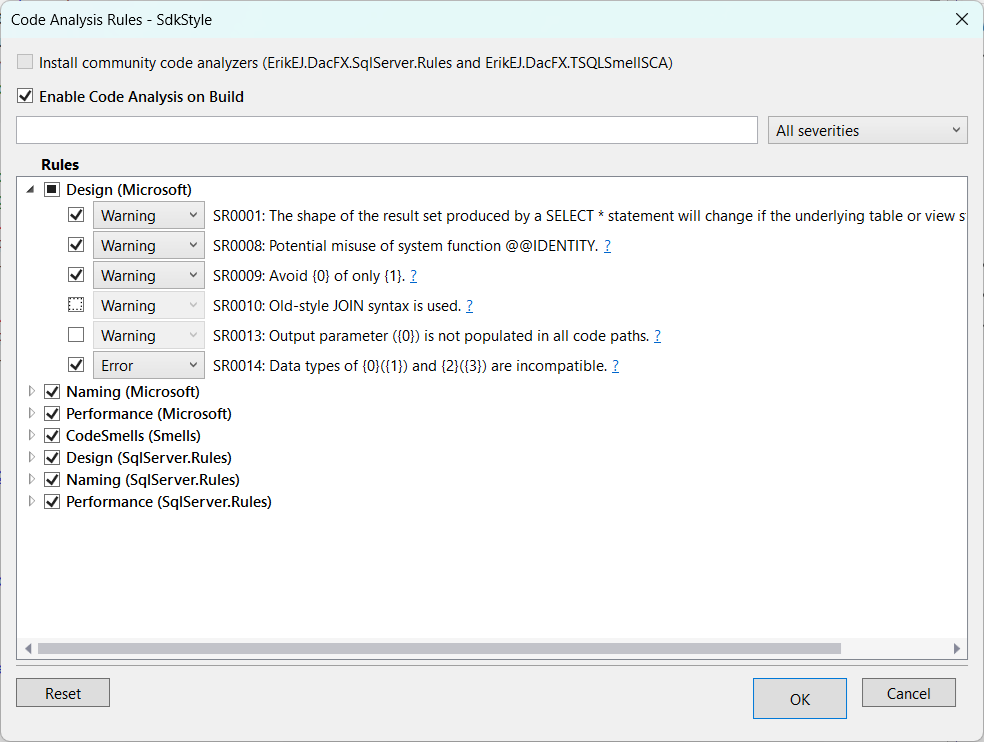
<p>The new Rule Manager dialog changes this completely.</p>
<p><img src="https://raw.githubusercontent.com/ErikEJ/SQLProjectPowerTools/main/img/rulemanager.png" alt="Rule Manager" /></p>
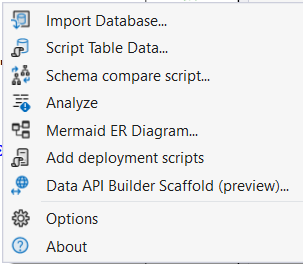
<p>To open it: right-click your SQL database project in Solution Explorer → <strong>SQL Project Power Tools</strong> → <strong>Manage code analysis rules</strong>.</p>
<p>From the dialog you can:</p>
<ul>
<li><strong>Enable or disable code analysis on build</strong> — a checkbox at the top controls whether analysis runs as part of your build</li>
<li><strong>Install community analyzers</strong> - If these packages, that add more than 130 additional rules, are not present, add them to the project.</li>
<li><strong>Search for rules</strong> — find rules by ID, description, or category using the search box</li>
<li><strong>Link to detailed documentation</strong> - use the <code>?</code> link to better understand the rules, with examples and more</li>
<li><strong>Filter by severity</strong> — quickly see which rules are configured as errors vs. warnings</li>
<li><strong>Enable or disable individual rules</strong> — toggle rules with checkboxes</li>
<li><strong>Change rule severity</strong> — set individual rules to Warning or Error using a drop-down</li>
<li><strong>Manage rules by category</strong> — enable or disable entire categories at once using the group checkbox</li>
<li><strong>Reset to defaults</strong> — revert all settings with a single button click</li>
</ul>
<p>Select <strong>OK</strong> to save your changes to the project file, or <strong>Cancel</strong> to discard.</p>
<h2 id="what-is-sql-database-project-power-tools">What is SQL Database Project Power Tools?</h2>
<p>If you're not familiar with the extension, SQL Database Project Power Tools is a free, open-source Visual Studio (and SSMS) extension that enhances your experience when working with SQL Server database projects. Key features include:</p>
<ul>
<li><strong>Templates</strong> - for Visual Studio, project and item templates to get you started quickly.</li>
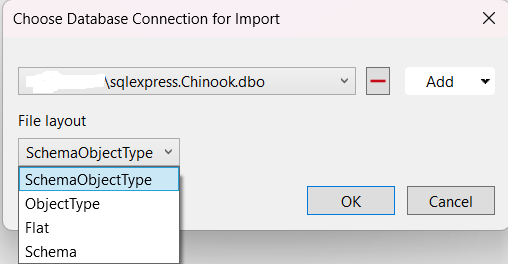
<li><strong>Database Import</strong> — Import an existing database schema into your project, automatically generating all necessary SQL scripts organized by object type</li>
<li><strong>Visual Schema Compare</strong> — Compare your project with a database to see what needs to be deployed, or compare a database with your project to update your files</li>
<li><strong>Static Code Analysis</strong> — Find potential issues before deployment using 150+ rules covering design, naming, performance, and security</li>
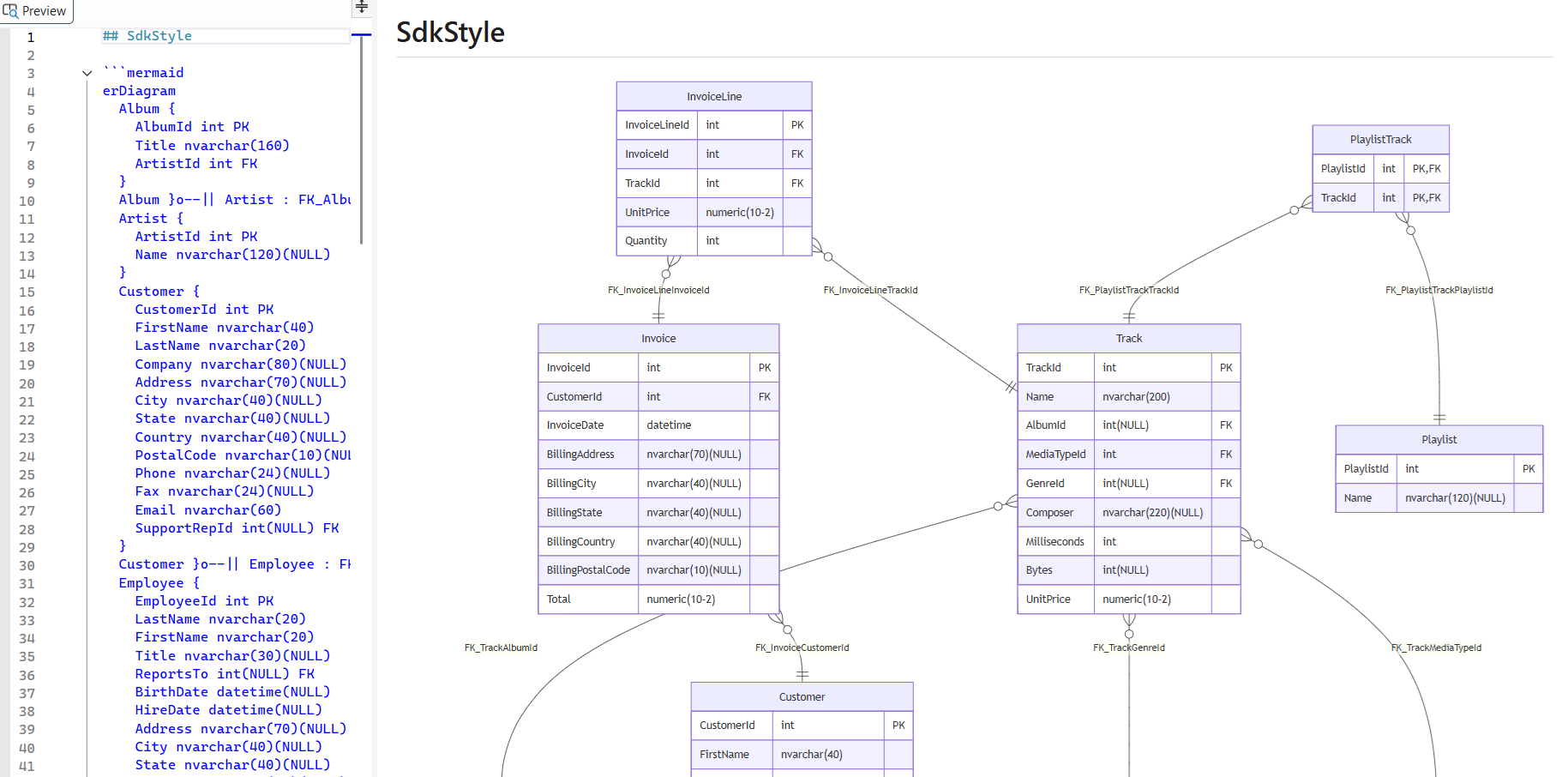
<li><strong>E/R Diagrams</strong> — Generate Mermaid diagrams showing relationships between your tables, perfect for documentation</li>
<li><strong>Table Data Scripting</strong> — Generate INSERT statements for seed data</li>
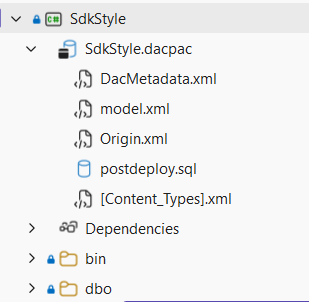
<li><strong>dacpac Explorer</strong> — Browse the contents of your built .dacpac files directly in Solution Explorer</li>
</ul>
<p><img src="https://raw.githubusercontent.com/ErikEJ/SQLProjectPowerTools/main/img/menu.png" alt="Power Tools Menu" /></p>
<h2 id="getting-started">Getting Started</h2>
<ol>
<li>
<p><strong>Install the extension in Visual Studio</strong>: In Visual Studio, go to Extensions → Manage Extensions, search for &quot;SQL Database Project Power Tools&quot;, and click Install. Or download from the <a href="https://marketplace.visualstudio.com/items?itemName=ErikEJ.SQLProjectPowerTools">Visual Studio Marketplace</a>.</p>
</li>
<li>
<p><strong>Install the extension in SSMS</strong>: Download from the <a href="https://www.vsixgallery.com/extension/SqlProjectsPowerTools.SSMS.D7DABDC8-FE46-4DA4-BED8-2EAF1A2A578D">Open VSIX Gallery</a>. Once downloaded, double click to install.</p>
</li>
<li>
<p><strong>Open the Rule Manager</strong>: Right-click your SQL database project → SQL Project Power Tools → Manage Code Analysis Rules.</p>
</li>
<li>
<p><strong>Configure your rules</strong>: Enable the rules that matter to your team, set appropriate severity levels, and save.</p>
</li>
</ol>
<p>The Rule Manager works with SDK-style SQL database projects using the <a href="https://github.com/rr-wfm/MSBuild.Sdk.SqlProj">MSBuild.Sdk.SqlProj</a> community SDK or the Microsoft <a href="Microsoft.Build.Sql">https://learn.microsoft.com/sql/tools/sql-database-projects/get-started?view=sql-server-ver17&amp;pivots=sq1-visual-studio-sdk</a> SDK.</p>
<h2 id="also-available-in-ssms">Also Available in SSMS</h2>
<p>The Rule Manager is also available in SQL Server Management Studio 22+ through the <a href="https://www.vsixgallery.com/extension/SqlProjectsPowerTools.SSMS.D7DABDC8-FE46-4DA4-BED8-2EAF1A2A578D">SSMS version of the extension</a>. If you're taking advantage of the new <a href="https://techcommunity.microsoft.com/blog/azuresqlblog/database-devops-preview-in-ssms-22-4-1/4503858">Database DevOps Preview</a> features in SSMS, you can configure your code analysis rules without leaving your favorite tool.</p>
<h2 id="summary">Summary</h2>
<p>The visual Rule Manager removes the friction from configuring SQL code analysis. No more memorizing rule IDs or editing XML by hand. Just open the dialog, check the boxes, and save.</p>
<p>Combined with the schema compare, database import, and E/R diagram features, SQL Database Project Power Tools makes working with SQL database projects more productive — whether you're in Visual Studio or SSMS.</p>
<p><a href="https://marketplace.visualstudio.com/items?itemName=ErikEJ.SQLProjectPowerTools">Download SQL Database Project Power Tools</a> | <a href="https://github.com/ErikEJ/SqlProjectPowerTools">View on GitHub</a></p>]]></content><author><name>ErikEJ</name></author><category term="dacfx" /><category term="dotnet" /><category term="sqlserver" /><category term="ssms" /><category term="visualstudio" /><summary type="html"><![CDATA[Configuring SQL static code analysis rules just got easier. The latest release of SQL Database Project Power Tools includes a visual Rule Manager — a settings dialog that lets you enable, disable, and configure rule severity without manually editing your SQL Database project file.]]></summary><media:thumbnail xmlns:media="http://search.yahoo.com/mrss/" url="https://raw.githubusercontent.com/ErikEJ/SQLProjectPowerTools/main/img/rulemanager.png" /><media:content medium="image" url="https://raw.githubusercontent.com/ErikEJ/SQLProjectPowerTools/main/img/rulemanager.png" xmlns:media="http://search.yahoo.com/mrss/" /></entry><entry><title type="html">Publish SQL Database Projects as Container Images with MSBuild.Sdk.SqlProj</title><link href="https://erikej.github.io/sqlclient/dotnet/dacfx/2026/04/09/dacfx-container-publish.html" rel="alternate" type="text/html" title="Publish SQL Database Projects as Container Images with MSBuild.Sdk.SqlProj" /><published>2026-04-09T17:28:49+00:00</published><updated>2026-04-09T17:28:49+00:00</updated><id>https://erikej.github.io/sqlclient/dotnet/dacfx/2026/04/09/dacfx-container-publish</id><content type="html" xml:base="https://erikej.github.io/sqlclient/dotnet/dacfx/2026/04/09/dacfx-container-publish.html"><![CDATA[<p>Database deployments have traditionally been one of the trickier parts of a CI/CD pipeline. You need the right tools installed, the right permissions configured, and the right SQL Server instance reachable—all at deploy time. <strong>MSBuild.Sdk.SqlProj</strong> simplifies this by letting you manage your SQL Server schema as code and build a <code>.dacpac</code> file just like any other .NET project. Starting with version 4.0.0, it goes one step further by letting you package the <code>.dacpac</code> and the deployment tool into a self-contained container image that can be run anywhere containers can run.</p>
<p>This post covers the general advantages of using MSBuild.Sdk.SqlProj and then dives into the container publishing workflow.</p>
<p><img src="https://erikej.github.io/assets/preloaded_database.png" alt="" /></p>
<h2 id="what-is-msbuildsdksqlproj">What is MSBuild.Sdk.SqlProj?</h2>
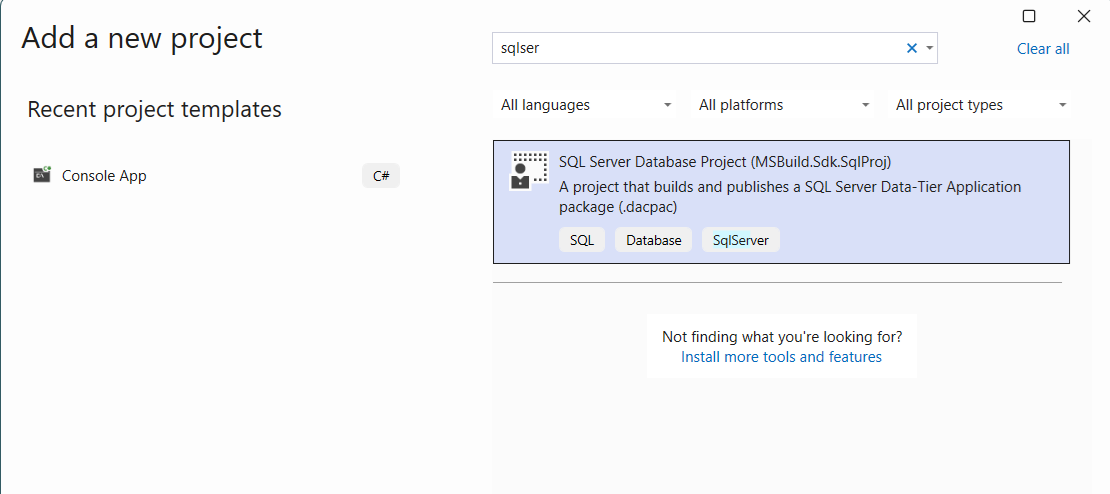
<p>MSBuild.Sdk.SqlProj is an MSBuild SDK that produces a SQL Server Data-Tier Application package (<code>.dacpac</code>) from a set of SQL scripts. It provides much of the same functionality as the classic SQL Server Data Tools (SSDT) <code>.sqlproj</code> project format, but is built on top of SDK-style projects that were first introduced in Visual Studio 2017—the same project style used by modern .NET libraries and applications.</p>
<p>You can get started with a single command:</p>
<div class="language-bash highlighter-rouge"><div class="highlight"><pre class="highlight"><code>dotnet new <span class="nb">install </span>MSBuild.Sdk.SqlProj.Templates
dotnet new sqlproj
dotnet build
</code></pre></div></div>
<p>The result is a <code>.dacpac</code> file in your <code>bin/Debug/net8.0</code> folder, ready to be deployed with <a href="https://docs.microsoft.com/en-us/sql/tools/sqlpackage/sqlpackage">SqlPackage</a>.</p>
<h2 id="general-advantages-of-msbuildsdksqlproj">General Advantages of MSBuild.Sdk.SqlProj</h2>
<h3 id="works-with-the-standard-net-toolchain">Works with the Standard .NET Toolchain</h3>
<p>Because MSBuild.Sdk.SqlProj projects are SDK-style projects, they work seamlessly with the standard .NET toolchain:</p>
<ul>
<li><strong><code>dotnet build</code></strong> compiles your SQL scripts and produces a <code>.dacpac</code>.</li>
<li><strong><code>dotnet pack</code></strong> wraps the <code>.dacpac</code> in a NuGet package so it can be shared and referenced by other database projects.</li>
<li><strong><code>dotnet publish</code></strong> deploys the database or publishes a container image (see below).</li>
</ul>
<p>No special tooling, no Visual Studio requirement, and no Windows-only build agents needed.</p>
<h3 id="cross-platform-support">Cross-Platform Support</h3>
<p>Unlike the classic <code>.sqlproj</code> format, which has historically been tied to Windows and Visual Studio, MSBuild.Sdk.SqlProj runs on any platform that supports .NET SDK: Windows, macOS, and Linux. This means you can build and test your database schema on a Mac laptop and deploy from a Linux-based CI agent without any changes to the project file.</p>
<h3 id="version-control-friendly">Version Control Friendly</h3>
<p>All of your database schema lives in plain <code>.sql</code> files alongside your application code. Changes are tracked in Git with the same pull-request workflow you use for application code—complete with code review, branch policies, and history.</p>
<h3 id="nuget-package-references">NuGet Package References</h3>
<p>MSBuild.Sdk.SqlProj supports referencing other <code>.dacpac</code> files through NuGet package references. This makes it straightforward to share common database objects (such as reference data tables, shared schemas, or system database definitions) across multiple database projects in the same way that class libraries are shared across .NET projects.</p>
<div class="language-xml highlighter-rouge"><div class="highlight"><pre class="highlight"><code><span class="nt">&lt;ItemGroup&gt;</span>
    <span class="nt">&lt;PackageReference</span> <span class="na">Include=</span><span class="s">"MySharedDatabasePackage"</span> <span class="na">Version=</span><span class="s">"1.0.0"</span> <span class="nt">/&gt;</span>
<span class="nt">&lt;/ItemGroup&gt;</span>
</code></pre></div></div>
<h3 id="built-in-code-analysis">Built-in Code Analysis</h3>
<p>The SDK integrates with <a href="https://github.com/microsoft/DacFx">DacFX</a> rules and supports community rule packages such as <a href="https://www.nuget.org/packages/ErikEJ.DacFX.SqlServer.Rules">ErikEJ.DacFX.SqlServer.Rules</a> and <a href="https://www.nuget.org/packages/ErikEJ.DacFX.TSQLSmellSCA">ErikEJ.DacFX.TSQLSmellSCA</a>. Warnings and errors surface in the standard MSBuild output or in your IDE, and you can configure which warnings to suppress or treat as errors—just like you would for C# compiler warnings.</p>
<h3 id="visual-studio-and-vs-code-support">Visual Studio and VS Code Support</h3>
<p>Projects can be opened and edited in Visual Studio. For teams that still want the visual schema designer experience, you can keep a companion <code>.sqlproj</code> project alongside your SDK-style project. The <a href="https://marketplace.visualstudio.com/items?itemName=ErikEJ.SqlProjectPowerTools">SQL Project Power Tools</a> extension enhances the experience further with project and item templates, visual schema compare, import of existing databases, E/R diagrams, and static analysis reporting.</p>
<h3 id="net-aspire-integration">.NET Aspire Integration</h3>
<p>MSBuild.Sdk.SqlProj integrates with <a href="https://learn.microsoft.com/en-us/dotnet/aspire/">.NET Aspire</a> via the <a href="https://www.nuget.org/packages/CommunityToolkit.Aspire.Hosting.SqlDatabaseProjects">CommunityToolkit.Aspire.Hosting.SqlDatabaseProjects</a> package, which lets you publish SQL database projects as part of your .NET Aspire AppHost projects.</p>
<hr />
<h2 id="publishing-as-a-container-image">Publishing as a Container Image</h2>
<p>Starting with MSBuild.Sdk.SqlProj version 4.0.0, you can publish your database project as a runnable container image using <code>dotnet publish /t:PublishContainer</code>. The image bundles both <a href="https://learn.microsoft.com/en-us/sql/tools/sqlpackage/sqlpackage">SqlPackage</a> and your <code>.dacpac</code> file(s), so everything needed to deploy the schema is self-contained inside the image.</p>
<h3 id="why-use-a-container-image-for-database-deployment">Why Use a Container Image for Database Deployment?</h3>
<p>Container-based database deployment solves several common problems:</p>
<ul>
<li><strong>Reproducibility:</strong> The exact same SqlPackage version and <code>.dacpac</code> are used in every environment—dev, test, staging, and production.</li>
<li><strong>No tool installation:</strong> The deployment pipeline does not need SqlPackage or the .NET SDK installed. Only a container runtime (Docker, Kubernetes, etc.) is required.</li>
<li><strong>Portability:</strong> The image can be pushed to any container registry and pulled from any environment that can run containers, making it ideal for Kubernetes-based deployments and GitOps workflows.</li>
<li><strong>Immutability:</strong> Each release of your database schema produces a new, tagged container image. You can roll back to a previous image the same way you roll back an application image.</li>
</ul>
<h3 id="building-and-publishing-the-container-image">Building and Publishing the Container Image</h3>
<p>To publish your database project as a container image, run:</p>
<div class="language-bash highlighter-rouge"><div class="highlight"><pre class="highlight"><code>dotnet publish /t:PublishContainer
</code></pre></div></div>
<p>By default, the image is tagged with the name of your project. You can customize the repository name and tag using properties on the command line:</p>
<div class="language-bash highlighter-rouge"><div class="highlight"><pre class="highlight"><code>dotnet publish /t:PublishContainer /p:ContainerRepository<span class="o">=</span>my-database-image /p:ContainerImageTag<span class="o">=</span>v1.0.0
</code></pre></div></div>
<p>Or set them in your project file:</p>
<div class="language-xml highlighter-rouge"><div class="highlight"><pre class="highlight"><code><span class="nt">&lt;Project</span> <span class="na">Sdk=</span><span class="s">"MSBuild.Sdk.SqlProj/4.0.0"</span><span class="nt">&gt;</span>
  <span class="nt">&lt;PropertyGroup&gt;</span>
    <span class="nt">&lt;ContainerRepository&gt;</span>my-database-image<span class="nt">&lt;/ContainerRepository&gt;</span>
    <span class="nt">&lt;ContainerImageTag&gt;</span>v1.0.0<span class="nt">&lt;/ContainerImageTag&gt;</span>
  <span class="nt">&lt;/PropertyGroup&gt;</span>
<span class="nt">&lt;/Project&gt;</span>
</code></pre></div></div>
<blockquote>
<p><strong>Note:</strong> By default, the published container will contain the latest version of SqlPackage available at the time of publishing. To pin a specific version, set the <code>SqlPackageDownloadUrl</code> property to the download URL for the Linux .NET 8 version from the <a href="https://learn.microsoft.com/en-us/sql/tools/sqlpackage/release-notes-sqlpackage">SqlPackage release notes</a>. For example:</p>
</blockquote>
<blockquote>
<div class="language-xml highlighter-rouge"><div class="highlight"><pre class="highlight"><code><span class="nt">&lt;SqlPackageDownloadUrl&gt;</span>https://go.microsoft.com/fwlink/?linkid=2338525<span class="nt">&lt;/SqlPackageDownloadUrl&gt;</span>
</code></pre></div></div>
</blockquote>
<blockquote>
<p><strong>Important:</strong> Since SqlPackage currently only supports x64 architecture, the container image is also x64. Only Linux-based containers are supported at this time.</p>
</blockquote>
<h3 id="running-the-container-image">Running the Container Image</h3>
<p>Once the image is built and pushed to a registry, deploy your database by running the image and providing a connection string:</p>
<div class="language-bash highlighter-rouge"><div class="highlight"><pre class="highlight"><code>docker run <span class="nt">--rm</span> my-database-image:v1.0.0 /TargetConnectionString<span class="o">=</span><span class="s2">"&lt;your-connection-string&gt;"</span>
</code></pre></div></div>
<p>The container is preconfigured to call SqlPackage with <code>/Action:Publish</code> and <code>/SourceFile:&lt;your-dacpac-file&gt;.dacpac</code>. Any additional SqlPackage parameters—such as <code>/p:BlockOnPossibleDataLoss=True</code> or <code>/Variables:MyVar=value</code>—can be appended to the <code>docker run</code> command. For a full list of available parameters, see the <a href="https://learn.microsoft.com/en-us/sql/tools/sqlpackage/sqlpackage">SqlPackage documentation</a>.</p>
<h3 id="example-cicd-workflow">Example CI/CD Workflow</h3>
<p>A typical pipeline using the container publishing approach looks like this:</p>
<ol>
<li>
<p><strong>Build and test</strong> – <code>dotnet build</code> validates the schema and runs code analysis.</p>
</li>
<li>
<p><strong>Publish image</strong> – <code>dotnet publish /t:PublishContainer /p:ContainerRepository=myregistry.azurecr.io/my-database /p:ContainerImageTag=$(BuildNumber)</code> builds and pushes the image to a container registry.</p>
</li>
<li>
<p><strong>Deploy</strong> – A release job runs the container image against the target SQL Server instance:</p>
<div class="language-bash highlighter-rouge"><div class="highlight"><pre class="highlight"><code>docker run <span class="nt">--rm</span> myregistry.azurecr.io/my-database:<span class="si">$(</span>BuildNumber<span class="si">)</span> <span class="se">\</span>
  /TargetConnectionString<span class="o">=</span><span class="s2">"</span><span class="si">$(</span>ConnectionString<span class="si">)</span><span class="s2">"</span>
</code></pre></div></div>
</li>
</ol>
<p>This pattern works with any CI/CD platform that supports Docker, including GitHub Actions, Azure Pipelines, GitLab CI, and Jenkins.</p>
<h2 id="getting-started">Getting Started</h2>
<p>To try container publishing yourself:</p>
<ol>
<li>
<p>Install the SDK templates:</p>
<div class="language-bash highlighter-rouge"><div class="highlight"><pre class="highlight"><code>dotnet new <span class="nb">install </span>MSBuild.Sdk.SqlProj.Templates
</code></pre></div></div>
</li>
<li>
<p>Create a new project:</p>
<div class="language-bash highlighter-rouge"><div class="highlight"><pre class="highlight"><code>dotnet new sqlproj <span class="nt">-n</span> MyDatabase
<span class="nb">cd </span>MyDatabase
</code></pre></div></div>
</li>
<li>
<p>Add your SQL schema files and build:</p>
<div class="language-bash highlighter-rouge"><div class="highlight"><pre class="highlight"><code>dotnet build
</code></pre></div></div>
</li>
<li>
<p>Publish as a container image:</p>
<div class="language-bash highlighter-rouge"><div class="highlight"><pre class="highlight"><code>dotnet publish /t:PublishContainer
</code></pre></div></div>
</li>
</ol>
<p>For more details on all available features, see the <a href="https://github.com/rr-wfm/MSBuild.Sdk.SqlProj/blob/master/README.md">MSBuild.Sdk.SqlProj README</a>.</p>]]></content><author><name>ErikEJ</name></author><category term="sqlclient" /><category term="dotnet" /><category term="dacfx" /><summary type="html"><![CDATA[Database deployments have traditionally been one of the trickier parts of a CI/CD pipeline. You need the right tools installed, the right permissions configured, and the right SQL Server instance reachable—all at deploy time. MSBuild.Sdk.SqlProj simplifies this by letting you manage your SQL Server schema as code and build a .dacpac file just like any other .NET project. Starting with version 4.0.0, it goes one step further by letting you package the .dacpac and the deployment tool into a self-contained container image that can be run anywhere containers can run.]]></summary><media:thumbnail xmlns:media="http://search.yahoo.com/mrss/" url="https://raw.githubusercontent.com/ErikEJ/erikej.github.io/master/assets/preloaded_database.png" /><media:content medium="image" url="https://raw.githubusercontent.com/ErikEJ/erikej.github.io/master/assets/preloaded_database.png" xmlns:media="http://search.yahoo.com/mrss/" /></entry><entry><title type="html">Supercharge Database DevOps in SSMS with SQL Database Project Power Tools</title><link href="https://erikej.github.io/sqlserver/ssms/dacfx/2026/03/24/sql-database-project-power-tools-ssms.html" rel="alternate" type="text/html" title="Supercharge Database DevOps in SSMS with SQL Database Project Power Tools" /><published>2026-03-24T11:00:00+00:00</published><updated>2026-03-24T11:00:00+00:00</updated><id>https://erikej.github.io/sqlserver/ssms/dacfx/2026/03/24/sql-database-project-power-tools-ssms</id><content type="html" xml:base="https://erikej.github.io/sqlserver/ssms/dacfx/2026/03/24/sql-database-project-power-tools-ssms.html"><![CDATA[<p>Microsoft recently announced an exciting new feature in SQL Server Management Studio 22.4.1: <a href="https://techcommunity.microsoft.com/blog/azuresqlblog/database-devops-preview-in-ssms-22-4-1/4503858">Database DevOps Preview</a>. This brings SQL Database Projects directly into SSMS, enabling DBAs and database developers to adopt modern database DevOps practices without leaving their favorite tool.</p>
<p>To complement this awesome new capability, I've created <strong>SQL Database Project Power Tools for SSMS</strong> - a free extension that adds powerful features to enhance your SQL Database Projects workflow in SSMS.</p>
<h2 id="what-does-the-extension-add">What Does the Extension Add?</h2>
<p>The extension provides several productivity features that aren't available out of the box:</p>
<h3 id="import-database">🗄️ Import Database</h3>
<p>Quickly import the schema and database settings from an existing database into your SQL Database Project. This is perfect for getting started with Database DevOps on existing databases.</p>
<h3 id="schema-compare">🔄 Schema Compare</h3>
<p>Visually compare your database project with a live database. You can review differences side-by-side and apply changes either to the database or back to your project - giving you full control over schema synchronization.</p>
<h3 id="static-code-analysis">📊 Static Code Analysis</h3>
<p>Run comprehensive static code analysis on your database project and get a detailed report of potential issues, best practices violations, and optimization opportunities in your T-SQL code.</p>
<h3 id="mermaid-er-diagrams">📐 Mermaid E/R Diagrams</h3>
<p>Generate Entity/Relationship diagrams of selected tables from your database project in Mermaid format. These diagrams can be embedded directly in your markdown documentation, making it easy to keep your documentation in sync with your schema.</p>
<h3 id="dacpac-solution-explorer-node">📦 .dacpac Solution Explorer Node</h3>
<p>Browse the contents of your compiled .dacpac file directly in Solution Explorer. This gives you visibility into exactly what's packaged in your deployment artifact.</p>
<h3 id="script-table-data">📝 Script Table Data</h3>
<p>Generate INSERT statements for table data using the popular <a href="https://github.com/readyroll/generate-sql-merge">generate-sql-merge</a> approach. Perfect for seeding reference data or creating test datasets.</p>
<h2 id="get-started">Get Started</h2>
<ol>
<li>Make sure you have <a href="https://learn.microsoft.com/sql/ssms/download-sql-server-management-studio-ssms">SSMS 22.4.1 or later</a> with the Database DevOps preview enabled</li>
<li>Download and install the extension from the <a href="https://www.vsixgallery.com/extension/SqlProjectsPowerTools.SSMS.D7DABDC8-FE46-4DA4-BED8-2EAF1A2A578D">VSIX Gallery</a></li>
<li>Open or create a SQL Database Project in SSMS</li>
<li>Right-click on your project to access the new features</li>
</ol>
<h2 id="open-source">Open Source</h2>
<p>The extension is open source and available on <a href="https://github.com/ErikEJ/SqlProjectPowerTools">GitHub</a>. Contributions, feedback, and feature requests are welcome!</p>
<h2 id="conclusion">Conclusion</h2>
<p>The Database DevOps preview in SSMS 22.4.1 is a game-changer for SQL Server developers and DBAs who want to adopt modern DevOps practices. SQL Database Project Power Tools for SSMS extends this foundation with practical features that make your daily workflow more productive.</p>
<p>Give it a try and let me know what you think!</p>]]></content><author><name>ErikEJ</name></author><category term="sqlserver" /><category term="ssms" /><category term="dacfx" /><summary type="html"><![CDATA[Microsoft recently announced an exciting new feature in SQL Server Management Studio 22.4.1: Database DevOps Preview. This brings SQL Database Projects directly into SSMS, enabling DBAs and database developers to adopt modern database DevOps practices without leaving their favorite tool.]]></summary></entry><entry><title type="html">Fixing SQL Server 2025 LocalDB in Visual Studio 2026: Enabling REGEXP and VECTOR Support</title><link href="https://erikej.github.io/sqlserver/localdb/2026/03/13/localdb-sqlserver-2025.html" rel="alternate" type="text/html" title="Fixing SQL Server 2025 LocalDB in Visual Studio 2026: Enabling REGEXP and VECTOR Support" /><published>2026-03-13T17:28:49+00:00</published><updated>2026-03-13T17:28:49+00:00</updated><id>https://erikej.github.io/sqlserver/localdb/2026/03/13/localdb-sqlserver-2025</id><content type="html" xml:base="https://erikej.github.io/sqlserver/localdb/2026/03/13/localdb-sqlserver-2025.html"><![CDATA[<p>If you're a developer using SQL Server LocalDB with Visual Studio 2026 and you've tried to use the exciting new <code>REGEXP_*</code> functions or the <code>VECTOR</code> data type, you may have encountered a frustrating crash. Here's what's happening and how to fix it.</p>
<h2 id="the-problem">The Problem</h2>
<p>SQL Server 2025 introduced powerful new features including:</p>
<ul>
<li><strong>REGEXP functions</strong> (<code>REGEXP_LIKE</code>, <code>REGEXP_REPLACE</code>, <code>REGEXP_SUBSTR</code>, etc.)</li>
<li><strong>VECTOR data type</strong> for AI/ML vector embeddings</li>
</ul>
<p>However, the initial LocalDB installer shipped with missing DLLs (<code>RegExpr.dll</code> and <code>vectorffi.dll</code>), causing <code>sqlservr.exe</code> to crash when these features are used.</p>
<h3 id="symptoms">Symptoms</h3>
<p>When you execute a query like:</p>
<div class="language-sql highlighter-rouge"><div class="highlight"><pre class="highlight"><code><span class="k">SELECT</span> <span class="n">REGEXP_REPLACE</span><span class="p">(</span><span class="s1">'the cat sat on the mat'</span><span class="p">,</span> <span class="s1">'cat'</span><span class="p">,</span> <span class="s1">'dog'</span><span class="p">)</span>
</code></pre></div></div>
<p>You'll see an error like:</p>
<div class="language-text highlighter-rouge"><div class="highlight"><pre class="highlight"><code>Named Pipes Provider: The pipe has been ended.
Communication link failure
</code></pre></div></div>
<p>And in your LocalDB error log (<code>%USERPROFILE%\AppData\Local\Microsoft\Microsoft SQL Server Local DB\Instances\MSSQLLocalDb\error.log</code>):</p>
<div class="language-text highlighter-rouge"><div class="highlight"><pre class="highlight"><code>Exception Code = c06d007e EXCEPTION_MOD_NOT_FOUND
Delay load failure occurred for module 'RegExpr.dll'
</code></pre></div></div>
<h2 id="the-solution">The Solution</h2>
<p>Microsoft fixed this issue in <strong>Cumulative Update 3 (CU3)</strong> for SQL Server 2025. The fix includes an updated <code>SQLLOCALDB.MSI</code> with the missing DLLs.</p>
<h3 id="step-by-step-instructions">Step-by-Step Instructions</h3>
<h4 id="download-cu3">1. Download CU3</h4>
<p>Download the SQL Server 2025 Cumulative Update 3 from Microsoft:</p>
<p>👉 <a href="https://learn.microsoft.com/en-us/troubleshoot/sql/releases/sqlserver-2025/cumulativeupdate3">SQL Server 2025 CU3 Download</a></p>
<p>The installer is approximately <strong>400 MB</strong>.</p>
<h4 id="run-the-cu3-installer">2. Run the CU3 Installer</h4>
<p>Run the downloaded installer. It will extract files to a temporary directory on one of your drives (e.g., <code>C:\&lt;GUID&gt;\...</code>).</p>
<blockquote>
<p>⚠️ <strong>Important:</strong> Don't close the installer yet! The temp folder will be deleted when the installer exits.</p>
</blockquote>
<h4 id="locate-the-updated-localdb-msi">3. Locate the Updated LocalDB MSI</h4>
<p>Navigate to the extracted folder and find the LocalDB installer:</p>
<div class="language-text highlighter-rouge"><div class="highlight"><pre class="highlight"><code>C:\&lt;GUID&gt;\1033_ENU_LP\x64\Setup\x64\SQLLOCALDB.MSI
</code></pre></div></div>
<p>The <code>&lt;GUID&gt;</code> will be a unique identifier like <code>{A1B2C3D4-E5F6-...}</code>.</p>
<blockquote>
<p>💡 <strong>Tip:</strong> Copy <code>SQLLOCALDB.MSI</code> (~65 MB) to a permanent location before proceeding. This allows you to share it with teammates or reinstall later.</p>
</blockquote>
<h4 id="install-the-updated-localdb">4. Install the Updated LocalDB</h4>
<p>Open PowerShell as Administrator and run:</p>
<div class="language-powershell highlighter-rouge"><div class="highlight"><pre class="highlight"><code><span class="n">msiexec</span><span class="w"> </span><span class="nx">/i</span><span class="w"> </span><span class="s2">"C:\&lt;GUID&gt;\1033_ENU_LP\x64\Setup\x64\SQLLOCALDB.MSI"</span><span class="w">
</span></code></pre></div></div>
<p>Or if you copied it:</p>
<div class="language-powershell highlighter-rouge"><div class="highlight"><pre class="highlight"><code><span class="n">msiexec</span><span class="w"> </span><span class="nx">/i</span><span class="w"> </span><span class="s2">"C:\Tools\SQLLOCALDB.MSI"</span><span class="w">
</span></code></pre></div></div>
<h4 id="recreate-your-localdb-instance-optional">5. Recreate Your LocalDB Instance (optional)</h4>
<p>The updated binaries are installed, but your existing instance may need to be recreated to use them.</p>
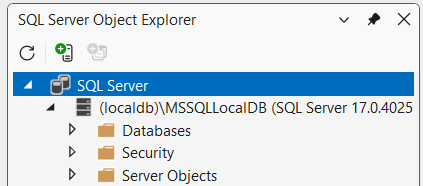
<p>First check the active version after stopping all Visual Studio instances:</p>
<div class="language-powershell highlighter-rouge"><div class="highlight"><pre class="highlight"><code><span class="n">SqlLocalDB</span><span class="w"> </span><span class="nx">info</span><span class="w"> </span><span class="nx">MSSQLLocalDB</span><span class="w">
</span></code></pre></div></div>
<p>If the version number is below <code>17.0.4025</code>, recreate the instance:</p>
<div class="language-powershell highlighter-rouge"><div class="highlight"><pre class="highlight"><code><span class="c"># Stop the instance</span><span class="w">
</span><span class="n">SqlLocalDB</span><span class="w"> </span><span class="nx">stop</span><span class="w"> </span><span class="nx">MSSQLLocalDB</span><span class="w">

</span><span class="c"># Delete the instance (your databases are preserved!)</span><span class="w">
</span><span class="n">SqlLocalDB</span><span class="w"> </span><span class="nx">delete</span><span class="w"> </span><span class="nx">MSSQLLocalDB</span><span class="w">

</span><span class="c"># Create a new instance with the updated version</span><span class="w">
</span><span class="n">SqlLocalDB</span><span class="w"> </span><span class="nx">create</span><span class="w"> </span><span class="nx">MSSQLLocalDB</span><span class="w">

</span><span class="c"># Start the instance</span><span class="w">
</span><span class="n">SqlLocalDB</span><span class="w"> </span><span class="nx">start</span><span class="w"> </span><span class="nx">MSSQLLocalDB</span><span class="w">
</span></code></pre></div></div>
<blockquote>
<p>📁 <strong>Note:</strong> Deleting an instance does <strong>not</strong> delete your databases. They remain in this folder
<code>%USERPROFILE%\AppData\Local\Microsoft\Microsoft SQL Server Local DB\Instances\</code>
and can be attached later.</p>
</blockquote>
<h4 id="verify-the-fix">6. Verify the Fix</h4>
<p>Connect to your LocalDB instance and test the new features:</p>
<div class="language-sql highlighter-rouge"><div class="highlight"><pre class="highlight"><code><span class="c1">-- Test REGEXP functions</span>
<span class="k">SELECT</span> <span class="n">REGEXP_REPLACE</span><span class="p">(</span><span class="s1">'Hello World'</span><span class="p">,</span> <span class="s1">'World'</span><span class="p">,</span> <span class="s1">'Visual Studio'</span><span class="p">);</span>
<span class="c1">-- Returns: Hello Visual Studio</span>

<span class="c1">-- Test VECTOR type</span>
<span class="k">CREATE</span> <span class="k">TABLE</span> <span class="o">#</span><span class="n">VectorTest</span> <span class="p">(</span>
    <span class="n">Id</span> <span class="nb">INT</span> <span class="k">PRIMARY</span> <span class="k">KEY</span><span class="p">,</span>
    <span class="n">Embedding</span> <span class="n">VECTOR</span><span class="p">(</span><span class="mi">3</span><span class="p">)</span>
<span class="p">);</span>

<span class="k">INSERT</span> <span class="k">INTO</span> <span class="o">#</span><span class="n">VectorTest</span> <span class="k">VALUES</span> <span class="p">(</span><span class="mi">1</span><span class="p">,</span> <span class="s1">'[0.1, 0.2, 0.3]'</span><span class="p">);</span>
<span class="k">SELECT</span> <span class="o">*</span> <span class="k">FROM</span> <span class="o">#</span><span class="n">VectorTest</span><span class="p">;</span>

<span class="k">DROP</span> <span class="k">TABLE</span> <span class="o">#</span><span class="n">VectorTest</span><span class="p">;</span>
</code></pre></div></div>
<h2 id="for-team-leads-sharing-the-fix">For Team Leads: Sharing the Fix</h2>
<p>If you have a development team, you can:</p>
<ol>
<li>Copy the <code>SQLLOCALDB.MSI</code> to a shared network location</li>
<li>Create a simple script for your team:</li>
</ol>
<div class="language-powershell highlighter-rouge"><div class="highlight"><pre class="highlight"><code><span class="c"># update-localdb.ps1</span><span class="w">
</span><span class="kr">param</span><span class="p">(</span><span class="w">
    </span><span class="p">[</span><span class="n">string</span><span class="p">]</span><span class="nv">$MsiPath</span><span class="w"> </span><span class="o">=</span><span class="w"> </span><span class="s2">"\\server\share\SQLLOCALDB.MSI"</span><span class="w">
</span><span class="p">)</span><span class="w">

</span><span class="n">Write-Host</span><span class="w"> </span><span class="s2">"Installing updated LocalDB..."</span><span class="w"> </span><span class="nt">-ForegroundColor</span><span class="w"> </span><span class="nx">Cyan</span><span class="w">
</span><span class="n">msiexec</span><span class="w"> </span><span class="nx">/i</span><span class="w"> </span><span class="nv">$MsiPath</span><span class="w"> </span><span class="nx">/quiet</span><span class="w"> </span><span class="nx">/norestart</span><span class="w">

</span><span class="n">Write-Host</span><span class="w"> </span><span class="s2">"Recreating LocalDB instance..."</span><span class="w"> </span><span class="nt">-ForegroundColor</span><span class="w"> </span><span class="nx">Cyan</span><span class="w">
</span><span class="n">SqlLocalDB</span><span class="w"> </span><span class="nx">stop</span><span class="w"> </span><span class="nx">MSSQLLocalDB</span><span class="w"> </span><span class="nx">2</span><span class="err">&gt;</span><span class="bp">$null</span><span class="w">
</span><span class="n">SqlLocalDB</span><span class="w"> </span><span class="nx">delete</span><span class="w"> </span><span class="nx">MSSQLLocalDB</span><span class="w"> </span><span class="nx">2</span><span class="err">&gt;</span><span class="bp">$null</span><span class="w">
</span><span class="n">SqlLocalDB</span><span class="w"> </span><span class="nx">create</span><span class="w"> </span><span class="nx">MSSQLLocalDB</span><span class="w">
</span><span class="n">SqlLocalDB</span><span class="w"> </span><span class="nx">start</span><span class="w"> </span><span class="nx">MSSQLLocalDB</span><span class="w">

</span><span class="n">Write-Host</span><span class="w"> </span><span class="s2">"Done! Testing REGEXP support..."</span><span class="w"> </span><span class="nt">-ForegroundColor</span><span class="w"> </span><span class="nx">Green</span><span class="w">
</span><span class="n">sqlcmd</span><span class="w"> </span><span class="nt">-W</span><span class="w"> </span><span class="nt">-S</span><span class="w"> </span><span class="s2">"(localdb)\MSSQLLocalDB"</span><span class="w"> </span><span class="nt">-Q</span><span class="w"> </span><span class="s2">"SELECT REGEXP_REPLACE('Success', 'Success', 'It works!')"</span><span class="w">
</span></code></pre></div></div>
<h2 id="troubleshooting">Troubleshooting</h2>
<h3 id="quotthe-instance-is-in-usequot">&quot;The instance is in use&quot;</h3>
<p>If you get an error that the instance is in use:</p>
<ol>
<li>Close Visual Studio and any applications using LocalDB</li>
<li>Close SQL Server Management Studio and/or Azure Data Studio and/or VS Code</li>
<li>Run: <code>SqlLocalDB stop MSSQLLocalDB -k</code> (the <code>-k</code> flag kills connections)</li>
</ol>
<h3 id="wrong-version-after-update">Wrong version after update</h3>
<p>Verify your version with:</p>
<div class="language-powershell highlighter-rouge"><div class="highlight"><pre class="highlight"><code><span class="n">SqlLocalDB</span><span class="w"> </span><span class="nx">info</span><span class="w"> </span><span class="nx">MSSQLLocalDB</span><span class="w">
</span></code></pre></div></div>
<p>You should see version <code>17.4.4025.3</code> or higher.</p>
<p><img src="https://erikej.github.io/assets/localdb.png" alt="" /></p>
<h3 id="still-crashing">Still crashing?</h3>
<p>Ensure you're using the MSI from CU3 or later, not the original RTM installer from Microsoft's download page (which may still be outdated).</p>
<h2 id="references">References</h2>
<ul>
<li><a href="https://learn.microsoft.com/en-us/answers/questions/5653612/sql-server-2025-localdb-installation-is-missing-co">Microsoft Q&amp;A: SQL Server 2025 LocalDB missing components</a></li>
<li><a href="https://learn.microsoft.com/en-us/troubleshoot/sql/releases/sqlserver-2025/cumulativeupdate3">SQL Server 2025 CU3 Release Notes</a></li>
<li><a href="https://feedback.azure.com/d365community/idea/95d03baf-9f03-f111-bb46-7c1e52be2cc8">Azure Feedback: LocalDB missing DLLs</a></li>
</ul>
<hr />]]></content><author><name>ErikEJ</name></author><category term="sqlserver" /><category term="localdb" /><summary type="html"><![CDATA[If you're a developer using SQL Server LocalDB with Visual Studio 2026 and you've tried to use the exciting new REGEXP_* functions or the VECTOR data type, you may have encountered a frustrating crash. Here's what's happening and how to fix it.]]></summary><media:thumbnail xmlns:media="http://search.yahoo.com/mrss/" url="https://raw.githubusercontent.com/ErikEJ/erikej.github.io/master/assets/localdb.png" /><media:content medium="image" url="https://raw.githubusercontent.com/ErikEJ/erikej.github.io/master/assets/localdb.png" xmlns:media="http://search.yahoo.com/mrss/" /></entry><entry><title type="html">Microsoft.Data.SqlClient 7.0 Preview: Finally, Azure.Identity is Optional! 🎉</title><link href="https://erikej.github.io/sqlclient/dotnet/2026/03/06/dotnet-sqlClient-7.html" rel="alternate" type="text/html" title="Microsoft.Data.SqlClient 7.0 Preview: Finally, Azure.Identity is Optional! 🎉" /><published>2026-03-06T17:28:49+00:00</published><updated>2026-03-06T17:28:49+00:00</updated><id>https://erikej.github.io/sqlclient/dotnet/2026/03/06/dotnet-sqlClient-7</id><content type="html" xml:base="https://erikej.github.io/sqlclient/dotnet/2026/03/06/dotnet-sqlClient-7.html"><![CDATA[<p><strong>The most upvoted feature request in SqlClient history is here.</strong></p>
<p>If you've ever wondered why your simple console app connecting to a local SQL Server suddenly pulls in 10+ Azure-related dependencies, you're not alone. <a href="https://github.com/dotnet/SqlClient/issues/1108">Issue #1108</a> has been the most voted feature request in the SqlClient GitHub repository since 2021, and with <strong>SqlClient 7.0</strong>, the team has finally addressed it with a brand new <strong>extension-based architecture</strong>.</p>
<h2 id="the-problem">The Problem</h2>
<p>Until now, <code>Microsoft.Data.SqlClient</code> has had a hard dependency on <code>Azure.Identity</code> and related Azure packages. This meant that even if you were only connecting to a local SQL Server instance with Windows Authentication or SQL Authentication, your project would include:</p>
<ul>
<li><code>Azure.Identity</code></li>
<li><code>Azure.Core</code></li>
<li><code>Microsoft.Identity.Client</code></li>
<li><code>Microsoft.Identity.Client.Extensions.Msal</code></li>
<li>And more transitive dependencies...</li>
</ul>
<p>This resulted in:</p>
<ul>
<li><strong>Constant updates of vulnerable packages</strong> - even if you don't use Azure features</li>
<li><strong>Bloated deployment packages</strong> - especially painful for containerized applications</li>
<li><strong>Longer build times</strong> - more packages to restore and analyze</li>
</ul>
<h2 id="the-new-extension-based-architecture">The New Extension-Based Architecture</h2>
<p>SqlClient 7.0 introduces a modular extension system that separates core SQL Server connectivity from Azure-specific functionality. Here's the new package structure:</p>
<h3 id="core-packages">Core Packages</h3>
<table>
<thead>
<tr>
<th>Package</th>
<th>Description</th>
</tr>
</thead>
<tbody>
<tr>
<td><code>Microsoft.Data.SqlClient</code> (7.0.0)</td>
<td>Core SQL Server connectivity - <strong>no Azure dependencies!</strong></td>
</tr>
<tr>
<td><code>Microsoft.Data.SqlClient.Extensions.Abstractions</code> (1.0.0)</td>
<td>Interfaces and base classes for extensions</td>
</tr>
</tbody>
</table>
<h3 id="optional-extension-packages">Optional Extension Packages</h3>
<table>
<thead>
<tr>
<th>Package</th>
<th>Description</th>
</tr>
</thead>
<tbody>
<tr>
<td><code>Microsoft.Data.SqlClient.Extensions.Azure</code> (1.0.0)</td>
<td>Azure AD/Entra ID authentication support</td>
</tr>
</tbody>
</table>
<h2 id="how-it-works">How It Works</h2>
<h3 id="scenario-1-local-sql-server-no-azure">Scenario 1: Local SQL Server (No Azure)</h3>
<p>If you're connecting to a local SQL Server or using SQL Authentication, you only need the core package:</p>
<div class="language-xml highlighter-rouge"><div class="highlight"><pre class="highlight"><code><span class="nt">&lt;PackageReference</span> <span class="na">Include=</span><span class="s">"Microsoft.Data.SqlClient"</span> <span class="na">Version=</span><span class="s">"7.0.0"</span> <span class="nt">/&gt;</span>
</code></pre></div></div>
<div class="language-csharp highlighter-rouge"><div class="highlight"><pre class="highlight"><code><span class="k">using</span> <span class="nn">Microsoft.Data.SqlClient</span><span class="p">;</span>

<span class="kt">var</span> <span class="n">connectionString</span> <span class="p">=</span> <span class="s">"Server=(localdb)\\mssqllocaldb;Database=MyDb;Integrated Security=true"</span><span class="p">;</span>
<span class="k">using</span> <span class="nn">var</span> <span class="n">connection</span> <span class="p">=</span> <span class="k">new</span> <span class="nf">SqlConnection</span><span class="p">(</span><span class="n">connectionString</span><span class="p">);</span>
<span class="n">connection</span><span class="p">.</span><span class="nf">Open</span><span class="p">();</span>
<span class="c1">// That's it! No Azure dependencies pulled in.</span>
</code></pre></div></div>
<h3 id="scenario-2-azure-sql-with-entra-id-authentication">Scenario 2: Azure SQL with Entra ID Authentication</h3>
<p>When you need Entra ID authentication, simply add the Azure extension:</p>
<div class="language-xml highlighter-rouge"><div class="highlight"><pre class="highlight"><code><span class="nt">&lt;PackageReference</span> <span class="na">Include=</span><span class="s">"Microsoft.Data.SqlClient"</span> <span class="na">Version=</span><span class="s">"7.0.0"</span> <span class="nt">/&gt;</span>
<span class="nt">&lt;PackageReference</span> <span class="na">Include=</span><span class="s">"Microsoft.Data.SqlClient.Extensions.Azure"</span> <span class="na">Version=</span><span class="s">"1.0.0"</span> <span class="nt">/&gt;</span>
</code></pre></div></div>
<div class="language-csharp highlighter-rouge"><div class="highlight"><pre class="highlight"><code><span class="k">using</span> <span class="nn">Microsoft.Data.SqlClient</span><span class="p">;</span>

<span class="kt">var</span> <span class="n">connectionString</span> <span class="p">=</span> <span class="s">@"Server=tcp:myserver.database.windows.net,1433;
    Initial Catalog=MyDatabase;
    Encrypt=True;
    Authentication=Active Directory Interactive;"</span><span class="p">;</span>

<span class="k">using</span> <span class="nn">var</span> <span class="n">connection</span> <span class="p">=</span> <span class="k">new</span> <span class="nf">SqlConnection</span><span class="p">(</span><span class="n">connectionString</span><span class="p">);</span>
<span class="n">connection</span><span class="p">.</span><span class="nf">Open</span><span class="p">();</span>
<span class="c1">// Azure extension automatically registers its authentication providers</span>
</code></pre></div></div>
<h2 id="improved-error-messages">Improved Error Messages</h2>
<p>One of the pain points addressed is the confusing error message when Azure authentication was attempted without the proper setup. In SqlClient 7.0, if you try to use Azure AD authentication without the extension installed, you'll get a clear, actionable error:</p>
<p><strong>Before (SqlClient 6.x and earlier):</strong></p>
<blockquote>
<p>&quot;Cannot find an authentication provider for 'ActiveDirectoryInteractive'.&quot;</p>
</blockquote>
<p><strong>After (SqlClient 7.0):</strong></p>
<blockquote>
<p>&quot;No authentication provider is registered for 'ActiveDirectoryInteractive'. Install the 'Microsoft.Data.SqlClient.Extensions.Azure' package.&quot;</p>
</blockquote>
<h2 id="breaking-changes">Breaking Changes</h2>
<p>This is a <strong>major version bump</strong> (7.0) because it includes breaking changes:</p>
<ol>
<li><strong>Azure.Identity is no longer a dependency</strong> of the core package</li>
<li><strong>Entra ID authentication methods require the extension package</strong> to be installed</li>
</ol>
<h3 id="migration-guide">Migration Guide</h3>
<p><strong>If you DON'T use Azure AD authentication:</strong></p>
<ul>
<li>Simply update to SqlClient 7.0</li>
<li>Enjoy a lighter dependency footprint!</li>
</ul>
<p><strong>If you DO use Azure AD authentication:</strong></p>
<div class="language-xml highlighter-rouge"><div class="highlight"><pre class="highlight"><code><span class="c">&lt;!-- Before --&gt;</span>
<span class="nt">&lt;PackageReference</span> <span class="na">Include=</span><span class="s">"Microsoft.Data.SqlClient"</span> <span class="na">Version=</span><span class="s">"6.0.0"</span> <span class="nt">/&gt;</span>

<span class="c">&lt;!-- After --&gt;</span>
<span class="nt">&lt;PackageReference</span> <span class="na">Include=</span><span class="s">"Microsoft.Data.SqlClient"</span> <span class="na">Version=</span><span class="s">"7.0.0"</span> <span class="nt">/&gt;</span>
<span class="nt">&lt;PackageReference</span> <span class="na">Include=</span><span class="s">"Microsoft.Data.SqlClient.Extensions.Azure"</span> <span class="na">Version=</span><span class="s">"1.0.0"</span> <span class="nt">/&gt;</span>
</code></pre></div></div>
<h2 id="real-world-impact">Real-World Impact</h2>
<p>Let's look at the dependency reduction for a simple console app:</p>
<p><strong>Before (SqlClient 6.x):</strong></p>
<div class="language-text highlighter-rouge"><div class="highlight"><pre class="highlight"><code>Microsoft.Data.SqlClient 6.0.0
├── Azure.Identity 1.13.0
│   ├── Azure.Core 1.42.0
│   │   └── ... (many more)
│   ├── Microsoft.Identity.Client 4.67.0
│   ├── Microsoft.Identity.Client.Extensions.Msal 4.67.0
│   └── ... (45+ total packages)
└── Microsoft.IdentityModel.* packages
</code></pre></div></div>
<p><strong>After (SqlClient 7.0 without Azure extension):</strong></p>
<div class="language-text highlighter-rouge"><div class="highlight"><pre class="highlight"><code>Microsoft.Data.SqlClient 7.0.0
├── Microsoft.Data.SqlClient.Extensions.Abstractions 1.0.0
├── Microsoft.IdentityModel.* packages (still there for now!)
└── System.* packages (already in runtime)
</code></pre></div></div>
<p>The following files are no longer included:</p>
<p>Azure.Core.dll
Azure.Identity.dll
Microsoft.Bcl.AsyncInterfaces.dll
Microsoft.Data.SqlClient.Extensions.Azure.dll
Microsoft.Identity.Client.dll
Microsoft.Identity.Client.Extensions.Msal.dll
System.ClientModel.dll
System.Memory.Data.dll</p>
<p>For containerized deployments, this can mean <strong>reductions in image size</strong> and <strong>faster cold starts</strong>.</p>
<h2 id="try-it-today">Try It Today</h2>
<p>SqlClient 7.0 preview is available now on NuGet:</p>
<div class="language-bash highlighter-rouge"><div class="highlight"><pre class="highlight"><code>dotnet add package Microsoft.Data.SqlClient <span class="nt">--version</span> 7.0.0-preview4.26064.3
dotnet add package Microsoft.Data.SqlClient.Extensions.Azure <span class="nt">--version</span> 1.0.0-preview1.26064.3
</code></pre></div></div>
<h2 id="feedback-welcome">Feedback Welcome</h2>
<p>This design has been shaped by community feedback over years of discussion. The SqlClient team wants to hear from you:</p>
<ul>
<li><strong>Original Issue:</strong> <a href="https://github.com/dotnet/SqlClient/issues/1108">#1108 - Split Azure dependent functionality in a separate NuGet Package</a></li>
<li><strong>Design Discussion:</strong> <a href="https://github.com/dotnet/SqlClient/discussions/3579">#3579 - MDS Azure Extension Design</a></li>
</ul>
<hr />
<p><em>This is the kind of developer experience improvement that makes a real difference in day-to-day work. Thanks to everyone who voted, commented, and contributed to making this happen!</em></p>]]></content><author><name>ErikEJ</name></author><category term="sqlclient" /><category term="dotnet" /><summary type="html"><![CDATA[The most upvoted feature request in SqlClient history is here.]]></summary></entry><entry><title type="html">8 New T-SQL Analysis Rules to Catch Bugs Before They Reach Production</title><link href="https://erikej.github.io/dacfx/dotnet/2026/03/04/dacxf-new-rules.html" rel="alternate" type="text/html" title="8 New T-SQL Analysis Rules to Catch Bugs Before They Reach Production" /><published>2026-03-04T17:28:49+00:00</published><updated>2026-03-04T17:28:49+00:00</updated><id>https://erikej.github.io/dacfx/dotnet/2026/03/04/dacxf-new-rules</id><content type="html" xml:base="https://erikej.github.io/dacfx/dotnet/2026/03/04/dacxf-new-rules.html"><![CDATA[<p>Static analysis catches an entire class of bugs and anti patterns during the build process, long before code ever runs in production. The SqlServer.Rules library has just grown with 8 new rules — 7 design rules and 1 performance rule — each targeting a real category of mistake found in T-SQL stored procedures, functions, and views.</p>
<p>A huge thanks to community contributor <a href="https://github.com/didranoqx">didranoqx</a> for a great contribution!</p>
<p>This post walks through every new rule, shows what problematic code looks like, explains why it matters, and describes the many ways you can integrate the rule set into your workflow.</p>
<hr />
<h2 id="the-new-rules-at-a-glance">The New Rules at a Glance</h2>
<table>
<thead>
<tr>
<th>Rule ID</th>
<th>Category</th>
<th>Friendly Name</th>
<th>What It Detects</th>
</tr>
</thead>
<tbody>
<tr>
<td><a href="docs/Design/SRD0071.md">SRD0071</a></td>
<td>Design</td>
<td>CASE without ELSE</td>
<td><code>CASE</code> expression with no <code>ELSE</code> clause</td>
</tr>
<tr>
<td><a href="docs/Design/SRD0072.md">SRD0072</a></td>
<td>Design</td>
<td>Variable self-assignment</td>
<td><code>SET @x = @x</code> — a no-op assignment</td>
</tr>
<tr>
<td><a href="docs/Design/SRD0073.md">SRD0073</a></td>
<td>Design</td>
<td>Repeated NOT operator</td>
<td><code>NOT NOT condition</code> — a double negation</td>
</tr>
<tr>
<td><a href="docs/Design/SRD0074.md">SRD0074</a></td>
<td>Design</td>
<td>Weak hashing algorithm</td>
<td><code>HASHBYTES</code> with MD2, MD4, MD5, SHA, or SHA1</td>
</tr>
<tr>
<td><a href="docs/Design/SRD0075.md">SRD0075</a></td>
<td>Design</td>
<td>Hard-coded credentials</td>
<td>String literals assigned to <code>@password</code>, <code>@pwd</code>, <code>@secret</code>, or <code>@apikey</code> variables</td>
</tr>
<tr>
<td><a href="docs/Design/SRD0076.md">SRD0076</a></td>
<td>Design</td>
<td>Identical expressions on both sides</td>
<td><code>WHERE col = col</code> or <code>IF @x = @x</code></td>
</tr>
<tr>
<td><a href="docs/Design/SRD0077.md">SRD0077</a></td>
<td>Design</td>
<td>FETCH variable count mismatch</td>
<td><code>FETCH INTO</code> variable count ≠ cursor <code>SELECT</code> column count</td>
</tr>
<tr>
<td><a href="docs/Performance/SRP0025.md">SRP0025</a></td>
<td>Performance</td>
<td>SELECT * in EXISTS</td>
<td><code>EXISTS (SELECT * …)</code> instead of <code>EXISTS (SELECT 1 …)</code></td>
</tr>
</tbody>
</table>
<hr />
<h2 id="deep-dive-each-new-rule">Deep Dive: Each New Rule</h2>
<h3 id="srd0071--case-without-else">SRD0071 — CASE without ELSE</h3>
<p>A <code>CASE</code> expression without an <code>ELSE</code> clause silently returns <code>NULL</code> when no <code>WHEN</code> branch matches. This often surprises developers who expect a default value.</p>
<div class="language-sql highlighter-rouge"><div class="highlight"><pre class="highlight"><code><span class="c1">-- ❌ Triggers SRD0071</span>
<span class="k">DECLARE</span> <span class="o">@</span><span class="n">status</span> <span class="nb">INT</span> <span class="o">=</span> <span class="mi">3</span><span class="p">;</span>
<span class="k">DECLARE</span> <span class="o">@</span><span class="n">label</span> <span class="n">NVARCHAR</span><span class="p">(</span><span class="mi">50</span><span class="p">);</span>

<span class="k">SET</span> <span class="o">@</span><span class="n">label</span> <span class="o">=</span> <span class="k">CASE</span> <span class="o">@</span><span class="n">status</span>
    <span class="k">WHEN</span> <span class="mi">1</span> <span class="k">THEN</span> <span class="s1">'Active'</span>
    <span class="k">WHEN</span> <span class="mi">2</span> <span class="k">THEN</span> <span class="s1">'Inactive'</span>
<span class="k">END</span><span class="p">;</span>
<span class="c1">-- @label is NULL when @status = 3, with no warning</span>

<span class="c1">-- ✅ Fixed</span>
<span class="k">SET</span> <span class="o">@</span><span class="n">label</span> <span class="o">=</span> <span class="k">CASE</span> <span class="o">@</span><span class="n">status</span>
    <span class="k">WHEN</span> <span class="mi">1</span> <span class="k">THEN</span> <span class="s1">'Active'</span>
    <span class="k">WHEN</span> <span class="mi">2</span> <span class="k">THEN</span> <span class="s1">'Inactive'</span>
    <span class="k">ELSE</span> <span class="s1">'Unknown'</span>
<span class="k">END</span><span class="p">;</span>
</code></pre></div></div>
<p>Add an explicit <code>ELSE</code> clause — even <code>ELSE NULL</code> — to make the intent unmistakable.</p>
<hr />
<h3 id="srd0072--variable-self-assignment">SRD0072 — Variable Self-Assignment</h3>
<p>Assigning a variable to itself (<code>SET @x = @x</code>) is a no-op. It compiles and runs without error, but does nothing. It almost always indicates a copy-paste mistake where the wrong variable was used on the right-hand side.</p>
<div class="language-sql highlighter-rouge"><div class="highlight"><pre class="highlight"><code><span class="c1">-- ❌ Triggers SRD0072</span>
<span class="k">DECLARE</span> <span class="o">@</span><span class="n">customerId</span> <span class="nb">INT</span> <span class="o">=</span> <span class="mi">42</span><span class="p">;</span>
<span class="k">DECLARE</span> <span class="o">@</span><span class="n">orderId</span> <span class="nb">INT</span><span class="p">;</span>
<span class="k">SET</span> <span class="o">@</span><span class="n">orderId</span> <span class="o">=</span> <span class="o">@</span><span class="n">orderId</span><span class="p">;</span>   <span class="c1">-- copy-paste error, likely meant @customerId</span>

<span class="c1">-- ✅ Fixed</span>
<span class="k">SET</span> <span class="o">@</span><span class="n">orderId</span> <span class="o">=</span> <span class="o">@</span><span class="n">customerId</span><span class="p">;</span>
</code></pre></div></div>
<p>Note: the rule only fires for pure self-assignment — <code>SET @x = @x + 1</code> is <strong>not</strong> flagged.</p>
<hr />
<h3 id="srd0073--repeated-not-operator">SRD0073 — Repeated NOT Operator</h3>
<p>A double negation (<code>NOT NOT condition</code>) is logically equivalent to the original condition and is almost certainly either a typo or a logic error. SQL Server accepts the syntax without complaint.</p>
<div class="language-sql highlighter-rouge"><div class="highlight"><pre class="highlight"><code><span class="c1">-- ❌ Triggers SRD0073</span>
<span class="n">IF</span> <span class="k">NOT</span> <span class="k">NOT</span> <span class="o">@</span><span class="n">isActive</span> <span class="o">=</span> <span class="mi">1</span>
<span class="k">BEGIN</span>
    <span class="n">PRINT</span> <span class="s1">'Active'</span><span class="p">;</span>
<span class="k">END</span><span class="p">;</span>

<span class="c1">-- ✅ Fixed — negate once</span>
<span class="n">IF</span> <span class="k">NOT</span> <span class="o">@</span><span class="n">isActive</span> <span class="o">=</span> <span class="mi">1</span>
<span class="k">BEGIN</span>
    <span class="n">PRINT</span> <span class="s1">'Not active'</span><span class="p">;</span>
<span class="k">END</span><span class="p">;</span>

<span class="c1">-- ✅ Or remove both NOTs if no negation is intended</span>
<span class="n">IF</span> <span class="o">@</span><span class="n">isActive</span> <span class="o">=</span> <span class="mi">1</span>
<span class="k">BEGIN</span>
    <span class="n">PRINT</span> <span class="s1">'Active'</span><span class="p">;</span>
<span class="k">END</span><span class="p">;</span>
</code></pre></div></div>
<hr />
<h3 id="srd0074--weak-hashing-algorithm">SRD0074 — Weak Hashing Algorithm</h3>
<p><code>HASHBYTES</code> with <code>MD2</code>, <code>MD4</code>, <code>MD5</code>, <code>SHA</code>, or <code>SHA1</code> uses algorithms that are considered cryptographically broken and vulnerable to collision attacks. Use <code>SHA2_256</code> or <code>SHA2_512</code> for any security-sensitive hashing.</p>
<div class="language-sql highlighter-rouge"><div class="highlight"><pre class="highlight"><code><span class="c1">-- ❌ Triggers SRD0074</span>
<span class="k">DECLARE</span> <span class="o">@</span><span class="n">hash</span> <span class="nb">VARBINARY</span><span class="p">(</span><span class="mi">8000</span><span class="p">);</span>
<span class="k">SET</span> <span class="o">@</span><span class="n">hash</span> <span class="o">=</span> <span class="n">HASHBYTES</span><span class="p">(</span><span class="s1">'MD5'</span><span class="p">,</span> <span class="s1">'sensitive data'</span><span class="p">);</span>
<span class="k">SET</span> <span class="o">@</span><span class="n">hash</span> <span class="o">=</span> <span class="n">HASHBYTES</span><span class="p">(</span><span class="s1">'SHA1'</span><span class="p">,</span> <span class="s1">'sensitive data'</span><span class="p">);</span>

<span class="c1">-- ✅ Fixed</span>
<span class="k">SET</span> <span class="o">@</span><span class="n">hash</span> <span class="o">=</span> <span class="n">HASHBYTES</span><span class="p">(</span><span class="s1">'SHA2_256'</span><span class="p">,</span> <span class="s1">'sensitive data'</span><span class="p">);</span>
<span class="c1">-- or for higher security</span>
<span class="k">SET</span> <span class="o">@</span><span class="n">hash</span> <span class="o">=</span> <span class="n">HASHBYTES</span><span class="p">(</span><span class="s1">'SHA2_512'</span><span class="p">,</span> <span class="s1">'sensitive data'</span><span class="p">);</span>
</code></pre></div></div>
<p>This rule applies wherever <code>HASHBYTES</code> is used in a procedure, function, or view.</p>
<hr />
<h3 id="srd0075--hard-coded-credentials">SRD0075 — Hard-Coded Credentials</h3>
<p>Embedding passwords, API keys, and other secrets as string literals in T-SQL is a security risk. Anyone with access to the source repository, deployment scripts, or database system tables can read them.</p>
<div class="language-sql highlighter-rouge"><div class="highlight"><pre class="highlight"><code><span class="c1">-- ❌ Triggers SRD0075</span>
<span class="k">DECLARE</span> <span class="o">@</span><span class="n">Password</span> <span class="n">NVARCHAR</span><span class="p">(</span><span class="mi">100</span><span class="p">)</span> <span class="o">=</span> <span class="s1">'MySecret123'</span><span class="p">;</span>
<span class="k">DECLARE</span> <span class="o">@</span><span class="n">ApiKey</span> <span class="n">NVARCHAR</span><span class="p">(</span><span class="mi">100</span><span class="p">);</span>
<span class="k">SET</span> <span class="o">@</span><span class="n">ApiKey</span> <span class="o">=</span> <span class="s1">'sk-1234567890abcdef'</span><span class="p">;</span>

<span class="c1">-- ✅ Fixed — retrieve at runtime from a secure store</span>
<span class="k">DECLARE</span> <span class="o">@</span><span class="n">Password</span> <span class="n">NVARCHAR</span><span class="p">(</span><span class="mi">100</span><span class="p">);</span>
<span class="k">EXEC</span> <span class="n">dbo</span><span class="p">.</span><span class="n">GetSecret</span> <span class="o">@</span><span class="n">Name</span> <span class="o">=</span> <span class="s1">'AppPassword'</span><span class="p">,</span> <span class="o">@</span><span class="n">Value</span> <span class="o">=</span> <span class="o">@</span><span class="n">Password</span> <span class="k">OUTPUT</span><span class="p">;</span>
</code></pre></div></div>
<p>The rule matches variable and parameter names that contain <code>password</code>, <code>pwd</code>, <code>secret</code>, or <code>apikey</code> (case-insensitive) and flags them when a string literal is assigned.</p>
<hr />
<h3 id="srd0076--identical-expressions-on-both-sides">SRD0076 — Identical Expressions on Both Sides</h3>
<p>A comparison where both sides are the same expression (e.g., <code>WHERE col = col</code>) is almost always a bug. It evaluates to either always <code>TRUE</code> or always <code>FALSE</code> (depending on the operator and NULLability), making the <code>WHERE</code> clause meaningless or the <code>IF</code> branch dead code.</p>
<div class="language-sql highlighter-rouge"><div class="highlight"><pre class="highlight"><code><span class="c1">-- ❌ Triggers SRD0076</span>
<span class="k">DECLARE</span> <span class="o">@</span><span class="n">x</span> <span class="nb">INT</span> <span class="o">=</span> <span class="mi">5</span><span class="p">;</span>

<span class="n">IF</span> <span class="o">@</span><span class="n">x</span> <span class="o">=</span> <span class="o">@</span><span class="n">x</span>              <span class="c1">-- always TRUE</span>
    <span class="n">PRINT</span> <span class="s1">'Always true'</span><span class="p">;</span>

<span class="n">IF</span> <span class="o">@</span><span class="n">x</span> <span class="o">&lt;&gt;</span> <span class="o">@</span><span class="n">x</span>             <span class="c1">-- always FALSE (or UNKNOWN if @x IS NULL)</span>
    <span class="n">PRINT</span> <span class="s1">'Never reached'</span><span class="p">;</span>

<span class="c1">-- ✅ Fixed — compare to the intended right-hand value</span>
<span class="n">IF</span> <span class="o">@</span><span class="n">x</span> <span class="o">=</span> <span class="o">@</span><span class="n">threshold</span>
    <span class="n">PRINT</span> <span class="s1">'Threshold reached'</span><span class="p">;</span>

<span class="c1">-- ✅ To test for NOT NULL, use the correct idiom</span>
<span class="n">IF</span> <span class="o">@</span><span class="n">x</span> <span class="k">IS</span> <span class="k">NOT</span> <span class="k">NULL</span>
    <span class="n">PRINT</span> <span class="s1">'Has a value'</span><span class="p">;</span>
</code></pre></div></div>
<hr />
<h3 id="srd0077--fetch-variable-count-mismatch">SRD0077 — FETCH Variable Count Mismatch</h3>
<p>When the number of variables in a <code>FETCH … INTO</code> statement does not match the number of columns in the corresponding cursor's <code>SELECT</code> list, SQL Server raises a runtime error (<code>Msg 16924</code>). This rule surfaces the mismatch at build time.</p>
<div class="language-sql highlighter-rouge"><div class="highlight"><pre class="highlight"><code><span class="c1">-- ❌ Triggers SRD0077 — cursor selects 2 columns, FETCH provides 3 variables</span>
<span class="k">DECLARE</span> <span class="o">@</span><span class="n">id</span> <span class="nb">INT</span><span class="p">,</span> <span class="o">@</span><span class="n">name</span> <span class="n">NVARCHAR</span><span class="p">(</span><span class="mi">100</span><span class="p">),</span> <span class="o">@</span><span class="n">extra</span> <span class="nb">INT</span><span class="p">;</span>

<span class="k">DECLARE</span> <span class="n">cur</span> <span class="k">CURSOR</span> <span class="k">FOR</span>
    <span class="k">SELECT</span> <span class="p">[</span><span class="n">object_id</span><span class="p">],</span> <span class="p">[</span><span class="n">name</span><span class="p">]</span> <span class="k">FROM</span> <span class="p">[</span><span class="n">sys</span><span class="p">].[</span><span class="n">objects</span><span class="p">];</span>

<span class="k">OPEN</span> <span class="n">cur</span><span class="p">;</span>
<span class="k">FETCH</span> <span class="k">NEXT</span> <span class="k">FROM</span> <span class="n">cur</span> <span class="k">INTO</span> <span class="o">@</span><span class="n">id</span><span class="p">,</span> <span class="o">@</span><span class="n">name</span><span class="p">,</span> <span class="o">@</span><span class="n">extra</span><span class="p">;</span>   <span class="c1">-- runtime error: variable count mismatch</span>
<span class="k">CLOSE</span> <span class="n">cur</span><span class="p">;</span>
<span class="k">DEALLOCATE</span> <span class="n">cur</span><span class="p">;</span>

<span class="c1">-- ✅ Fixed</span>
<span class="k">DECLARE</span> <span class="o">@</span><span class="n">id</span> <span class="nb">INT</span><span class="p">,</span> <span class="o">@</span><span class="n">name</span> <span class="n">NVARCHAR</span><span class="p">(</span><span class="mi">100</span><span class="p">);</span>

<span class="k">DECLARE</span> <span class="n">cur</span> <span class="k">CURSOR</span> <span class="k">FOR</span>
    <span class="k">SELECT</span> <span class="p">[</span><span class="n">object_id</span><span class="p">],</span> <span class="p">[</span><span class="n">name</span><span class="p">]</span> <span class="k">FROM</span> <span class="p">[</span><span class="n">sys</span><span class="p">].[</span><span class="n">objects</span><span class="p">];</span>

<span class="k">OPEN</span> <span class="n">cur</span><span class="p">;</span>
<span class="k">FETCH</span> <span class="k">NEXT</span> <span class="k">FROM</span> <span class="n">cur</span> <span class="k">INTO</span> <span class="o">@</span><span class="n">id</span><span class="p">,</span> <span class="o">@</span><span class="n">name</span><span class="p">;</span>
<span class="k">CLOSE</span> <span class="n">cur</span><span class="p">;</span>
<span class="k">DEALLOCATE</span> <span class="n">cur</span><span class="p">;</span>
</code></pre></div></div>
<hr />
<h3 id="srp0025--select--in-exists">SRP0025 — SELECT * in EXISTS</h3>
<p>Using <code>SELECT *</code> inside an <code>EXISTS</code> subquery sends an unnecessary signal to the reader: &quot;I care about which columns are returned.&quot; The optimizer typically handles it, but <code>SELECT 1</code> is the established best practice and makes the intent explicit.</p>
<div class="language-sql highlighter-rouge"><div class="highlight"><pre class="highlight"><code><span class="c1">-- ❌ Triggers SRP0025</span>
<span class="n">IF</span> <span class="k">EXISTS</span> <span class="p">(</span><span class="k">SELECT</span> <span class="o">*</span> <span class="k">FROM</span> <span class="p">[</span><span class="n">sys</span><span class="p">].[</span><span class="n">objects</span><span class="p">]</span> <span class="k">WHERE</span> <span class="p">[</span><span class="n">name</span><span class="p">]</span> <span class="o">=</span> <span class="s1">'MyProc'</span><span class="p">)</span>
<span class="k">BEGIN</span>
    <span class="n">PRINT</span> <span class="s1">'Found'</span><span class="p">;</span>
<span class="k">END</span><span class="p">;</span>

<span class="c1">-- ✅ Fixed</span>
<span class="n">IF</span> <span class="k">EXISTS</span> <span class="p">(</span><span class="k">SELECT</span> <span class="mi">1</span> <span class="k">FROM</span> <span class="p">[</span><span class="n">sys</span><span class="p">].[</span><span class="n">objects</span><span class="p">]</span> <span class="k">WHERE</span> <span class="p">[</span><span class="n">name</span><span class="p">]</span> <span class="o">=</span> <span class="s1">'MyProc'</span><span class="p">)</span>
<span class="k">BEGIN</span>
    <span class="n">PRINT</span> <span class="s1">'Found'</span><span class="p">;</span>
<span class="k">END</span><span class="p">;</span>
</code></pre></div></div>
<hr />
<h2 id="how-to-use-the-full-rule-set">How to Use the Full Rule Set</h2>
<p>SqlServer.Rules ships in several forms. Choose the integration that fits your workflow.</p>
<h3 id="nuget-package--checks-at-build-time">1. NuGet Package — Checks at Build Time</h3>
<p>Add the rules as a NuGet dependency to any modern SQL Database project based on <a href="https://github.com/rr-wfm/MSBuild.Sdk.SqlProj">MSBuild.Sdk.SqlProj</a> or <a href="https://github.com/microsoft/DacFx">Microsoft.Build.Sql</a>. Rules run automatically during <code>dotnet build</code> and surface violations as warnings in the build output and IDE error list.</p>
<div class="language-sh highlighter-rouge"><div class="highlight"><pre class="highlight"><code>dotnet add package ErikEJ.DacFX.SqlServer.Rules
</code></pre></div></div>
<p>A second package adds the complementary TSQL Smells rule set:</p>
<div class="language-sh highlighter-rouge"><div class="highlight"><pre class="highlight"><code>dotnet add package ErikEJ.DacFX.TSQLSmellSCA
</code></pre></div></div>
<p>Read more about enabling and configuring rules in the <a href="https://github.com/rr-wfm/MSBuild.Sdk.SqlProj?tab=readme-ov-file#static-code-analysis">MSBuild.Sdk.SqlProj static code analysis guide</a>.</p>
<blockquote>
<p>It is also possible to use the rules with classic .sqlproj based projects in Visual Studio, but it must be done locally and manually.</p>
</blockquote>
<h3 id="cli-tool--analyze-scripts-and-databases-from-the-terminal">2. CLI Tool — Analyze Scripts and Databases from the Terminal</h3>
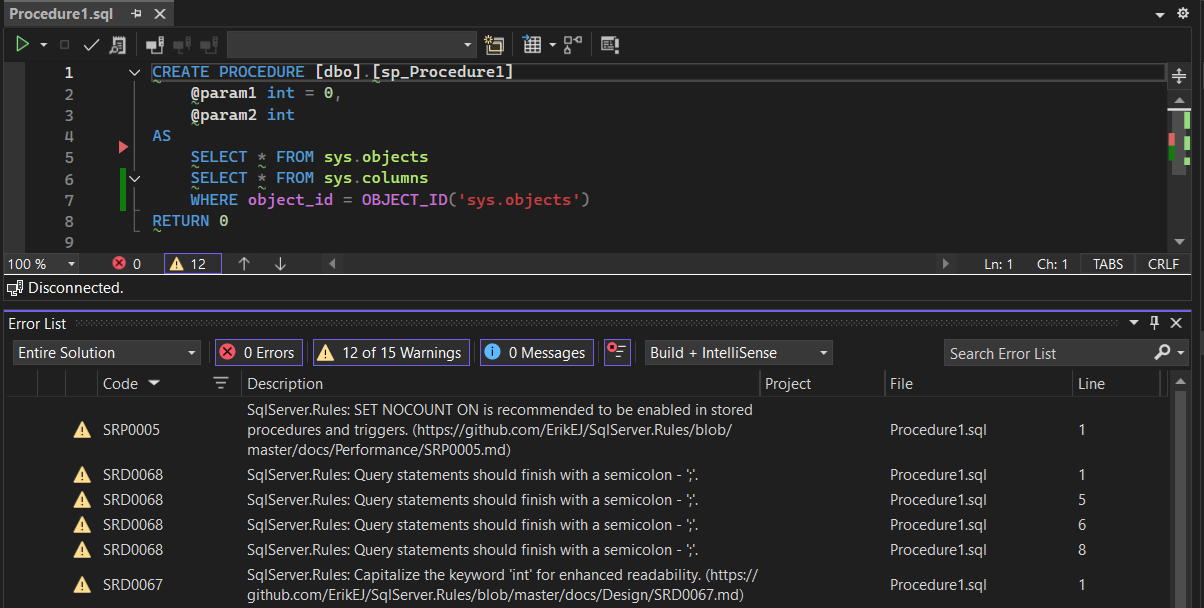
<p>The <strong>T-SQL Analyzer CLI</strong> is a .NET global tool that can analyze individual <code>.sql</code> files, entire folders, <code>.dacpac</code> files, <code>.zip</code> archives, and live databases.</p>
<div class="language-sh highlighter-rouge"><div class="highlight"><pre class="highlight"><code>dotnet tool <span class="nb">install</span> <span class="nt">--global</span> ErikEJ.DacFX.TSQLAnalyzer.Cli
</code></pre></div></div>
<p><strong>Common usage examples:</strong></p>
<div class="language-sh highlighter-rouge"><div class="highlight"><pre class="highlight"><code><span class="c"># Analyze all .sql files in the current folder</span>
tsqlanalyze

<span class="c"># Analyze a single stored procedure</span>
tsqlanalyze <span class="nt">-i</span> C:<span class="se">\s</span>cripts<span class="se">\u</span>sp_CreateOrder.sql

<span class="c"># Analyze a folder</span>
tsqlanalyze <span class="nt">-i</span> <span class="s2">"C:</span><span class="se">\d</span><span class="s2">atabase scripts"</span>

<span class="c"># Analyze a dacpac and export results to JSON</span>
tsqlanalyze <span class="nt">-i</span> C:<span class="se">\d</span>eploy<span class="se">\M</span>yDatabase.dacpac <span class="nt">-o</span> results.json

<span class="c"># Analyze a live database</span>
tsqlanalyze <span class="nt">-c</span> <span class="s2">"Data Source=.</span><span class="se">\S</span><span class="s2">QLEXPRESS;Initial Catalog=MyDb;Integrated Security=True;Encrypt=false"</span>

<span class="c"># Exclude a specific rule</span>
tsqlanalyze <span class="nt">-i</span> C:<span class="se">\s</span>cripts <span class="nt">-r</span> Rules:-SqlServer.Rules.SRD0004
</code></pre></div></div>
<h3 id="visual-studio-extension--inline-warnings-in-the-ide">3. Visual Studio Extension — Inline Warnings in the IDE</h3>
<p>The <strong>T-SQL Analyzer</strong> Visual Studio extension brings the same rule set directly into the IDE. Install it from the <a href="https://marketplace.visualstudio.com/items?itemName=ErikEJ.TSqlAnalyzer">Visual Studio Marketplace</a> and violations appear in the <strong>Error List</strong> window as you work.</p>
<h3 id="mcp-server--github-copilot-chat-integration">4. MCP Server — GitHub Copilot Chat Integration</h3>
<p>The CLI tool doubles as an <a href="https://modelcontextprotocol.io/">MCP (Model Context Protocol) server</a>, letting GitHub Copilot analyze your SQL scripts on demand inside VS Code or Visual Studio.</p>
<table>
<thead>
<tr>
<th>Client</th>
<th>One-click Installation</th>
</tr>
</thead>
<tbody>
<tr>
<td><strong>VS Code</strong></td>
<td><a href="https://vscode.dev/redirect/mcp/install?name=tsqlanalyzer&amp;config=%7B%22name%22%3A%22tsqlanalyzer%22%2C%22command%22%3A%22dnx%22%2C%22args%22%3A%5B%22ErikEJ.DacFX.TSQLAnalyzer.Cli%22%2C%22--yes%22%2C%22--%22%2C%22-mcp%22%5D%7D"><img src="https://img.shields.io/badge/VS_Code-Install_TSQLAnalyzer-0098FF?style=flat-square&amp;logoColor=white" alt="Install in VS Code" /></a></td>
</tr>
<tr>
<td><strong>Visual Studio</strong></td>
<td><a href="https://vs-open.link/mcp-install?%7B%22name%22%3A%22tsqlanalyzer%22%2C%22type%22%3A%22stdio%22%2C%22command%22%3A%22dnx%22%2C%22args%22%3A%5B%22ErikEJ.DacFX.TSQLAnalyzer.Cli%22%2C%22--yes%22%2C%22--%22%2C%22-mcp%22%5D%7D"><img src="https://img.shields.io/badge/Visual_Studio-Install_TSQLAnalyzer-C16FDE?logo=visualstudio&amp;logoColor=white" alt="Install in Visual Studio" /></a></td>
</tr>
</tbody>
</table>
<p>Once configured and enabled, open GitHub Copilot Chat and ask:</p>
<blockquote>
<p><em>&quot;Analyze my stored procedure for T-SQL issues.&quot;</em></p>
</blockquote>
<p>Copilot will invoke the MCP server and return a list of rule violations with line numbers and descriptions.</p>
<h3 id="suppressing-rules-when-needed">5. Suppressing Rules When Needed</h3>
<p>Every new rule is <em>ignorable</em>. If you have a legitimate reason to keep a particular pattern, suppress the rule in-line without disabling it project-wide:</p>
<p>Read more in the <a href="docs/ignoring_rules.md">ignoring rules guide</a>.</p>
<hr />
<h2 id="summary">Summary</h2>
<p>The eight new rules span two common areas of T-SQL quality:</p>
<ul>
<li><strong>Correctness bugs</strong> that are syntactically valid but logically wrong (SRD0071, SRD0072, SRD0073, SRD0076, SRD0077)</li>
<li><strong>Security concerns</strong> that are easy to miss in code review (SRD0074, SRD0075)</li>
<li><strong>Code clarity</strong> best practice with a performance hint (SRP0025)</li>
</ul>
<p>Combined with the existing 130+ rules in SqlServer.Rules and the TSQL Smells library, these additions make it harder for subtle T-SQL mistakes to slip through unnoticed. Whether you prefer build-time analysis via NuGet, a one-off CLI scan, IDE integration through the Visual Studio extension, or conversational analysis via GitHub Copilot and the MCP server, there is an integration point that fits your workflow.</p>
<p>For the full rule reference see the <a href="docs/readme.md">documentation</a>.</p>]]></content><author><name>ErikEJ</name></author><category term="dacfx" /><category term="dotnet" /><summary type="html"><![CDATA[Static analysis catches an entire class of bugs and anti patterns during the build process, long before code ever runs in production. The SqlServer.Rules library has just grown with 8 new rules — 7 design rules and 1 performance rule — each targeting a real category of mistake found in T-SQL stored procedures, functions, and views.]]></summary></entry><entry><title type="html">Getting Started with SQL Database Project Power Tools</title><link href="https://erikej.github.io/dotnet/dacfx/sqlserver/visualstudio/2026/01/29/sqlproj-power-tools-guide.html" rel="alternate" type="text/html" title="Getting Started with SQL Database Project Power Tools" /><published>2026-01-29T17:28:49+00:00</published><updated>2026-01-29T17:28:49+00:00</updated><id>https://erikej.github.io/dotnet/dacfx/sqlserver/visualstudio/2026/01/29/sqlproj-power-tools-guide</id><content type="html" xml:base="https://erikej.github.io/dotnet/dacfx/sqlserver/visualstudio/2026/01/29/sqlproj-power-tools-guide.html"><![CDATA[<p>SQL Database Project Power Tools is a free Visual Studio extension that makes working with SQL database projects easier and more productive. This guide will help you get started with the key features.</p>
<h2 id="what-is-sql-database-project-power-tools">What is SQL Database Project Power Tools?</h2>
<p>SQL Database Project Power Tools enhances your Visual Studio experience when working with SQL Server database projects. It provides a collection of useful tools for importing databases, comparing schemas, analyzing code, creating diagrams, and more.</p>
<h2 id="installation">Installation</h2>
<p>You can install the extension in two ways:</p>
<ol>
<li>
<p><strong>From Visual Studio</strong>: Open Visual Studio, go to Extensions &gt; Manage Extensions, search for &quot;SQL Database Project Power Tools&quot;, and click Install.</p>
</li>
<li>
<p><strong>From the Visual Studio Marketplace</strong>: Download and install from the <a href="https://marketplace.visualstudio.com/items?itemName=ErikEJ.SQLProjectPowerTools">Visual Studio Marketplace</a>.</p>
</li>
</ol>
<p>After installation, restart Visual Studio to activate the extension.</p>
<h2 id="creating-a-new-sql-database-project">Creating a New SQL Database Project</h2>
<p>SQL Database Project Power Tools adds project templates to make it easy to create new database projects.</p>
<p><img src="https://raw.githubusercontent.com/ErikEJ/SQLProjectPowerTools/main/img/newproject.png" alt="New Project Templates" /></p>
<ol>
<li>In Visual Studio, select <strong>File &gt; New &gt; Project</strong></li>
<li>Search for &quot;SQL&quot; in the project templates</li>
<li>Choose the <strong>SQL Server Database Project</strong> template</li>
<li>Name your project and choose a location</li>
<li>Click <strong>Create</strong></li>
</ol>
<p>You can also add new items to your project using the enhanced item templates:</p>
<p><img src="https://raw.githubusercontent.com/ErikEJ/SQLProjectPowerTools/main/img/newitem.png" alt="New Item Templates" /></p>
<h2 id="importing-a-database">Importing a Database</h2>
<p>One of the most useful features is the ability to import an existing database schema into your project. This saves you time by automatically generating all the necessary SQL scripts.</p>
<p><img src="https://raw.githubusercontent.com/ErikEJ/SQLProjectPowerTools/main/img/import.png" alt="Import Database" /></p>
<p>To import a database:</p>
<ol>
<li>Right-click on your SQL database project in Solution Explorer</li>
<li>Select <strong>SQL Project Power Tools &gt; Import database</strong></li>
<li>Enter your database connection details</li>
<li>Choose the file layout for the imported objects</li>
<li>Click <strong>Import</strong></li>
</ol>
<p>The tool will create all the necessary files in your project, organized by object type.</p>
<h2 id="comparing-schemas">Comparing Schemas</h2>
<p>The schema compare feature helps you keep your database project in sync with your live databases. You can compare in both directions:</p>
<ul>
<li>Compare your project with a database to see what needs to be deployed</li>
<li>Compare a database with your project to update your project files</li>
</ul>
<p>To use schema compare:</p>
<ol>
<li>Right-click on your SQL database project in Solution Explorer</li>
<li>Select <strong>SQL Project Power Tools &gt; Schema compare</strong></li>
<li>Choose your comparison source database and target (project or database)</li>
<li>Review the differences in the generated script</li>
<li>Apply the changes as needed</li>
</ol>
<p>This is especially useful when working in teams or managing multiple environments.</p>
<h2 id="analyzing-your-code">Analyzing Your Code</h2>
<p>Static code analysis helps you find potential issues in your database code before deployment. The analyze feature checks your SQL scripts against best practices and common pitfalls.</p>
<p>To analyze your project:</p>
<ol>
<li>Right-click on your SQL database project in Solution Explorer</li>
<li>Select <strong>SQL Project Power Tools &gt; Analyze</strong></li>
<li>Review the analysis report</li>
<li>Address any issues found and improve your code quality</li>
</ol>
<p>The analysis includes checks for design issues, naming conventions, performance concerns, and more. Consider adding this step to your regular development workflow.</p>
<h2 id="creating-entityrelationship-diagrams">Creating Entity/Relationship Diagrams</h2>
<p>Visualizing your database structure is easy with the E/R diagram feature. This creates a Mermaid diagram showing the relationships between your tables.</p>
<p><img src="https://raw.githubusercontent.com/ErikEJ/SQLProjectPowerTools/main/img/erdiagram.png" alt="E/R Diagram" /></p>
<p>To create a diagram:</p>
<ol>
<li>Right-click on your SQL database project in Solution Explorer</li>
<li>Select <strong>SQL Project Power Tools &gt; Create Mermaid E/R diagram</strong></li>
<li>Choose which tables to include</li>
<li>The tool generates a Mermaid markdown diagram</li>
<li>View the diagram in Visual Studio or use it for documentation</li>
</ol>
<p>These diagrams are perfect for documentation and help team members understand the database structure.</p>
<h2 id="viewing-dacpac-files">Viewing .dacpac Files</h2>
<p>The extension adds a Solution Explorer node for the output of your project (a .dacpac file), making it easy to explore their contents.</p>
<p><img src="https://raw.githubusercontent.com/ErikEJ/SQLProjectPowerTools/main/img/SolutionExplorer.png" alt="Solution Explorer node" /></p>
<p>To view a .dacpac file:</p>
<ol>
<li>Build your project</li>
<li>Expand the project in Solution Explorer</li>
<li>Browse through the xml files and postdeploy / predeploy scripts contained in the package</li>
</ol>
<p>This is helpful when troubleshooting post and predeployment script issues.</p>
<h2 id="scripting-table-data">Scripting Table Data</h2>
<p>When you need to include seed data in your database project, the Script Table Data feature generates INSERT statements for you.</p>
<p>To script table data:</p>
<ol>
<li>Select <strong>SQL Project Power Tools &gt; Script Table Data</strong></li>
<li>Choose your data source and pick the table to script</li>
<li>The tool generates INSERT statements for the table data</li>
<li>The tool adds the generated script to your project in the <code>Post-Deployment</code> folder</li>
</ol>
<p>This is based on the popular <a href="https://github.com/dnlnln/generate-sql-merge">generate-sql-merge</a> script.</p>
<h2 id="accessing-the-tools">Accessing the Tools</h2>
<p>All SQL Database Project Power Tools features are accessible from the context menu in Solution Explorer:</p>
<p><img src="https://raw.githubusercontent.com/ErikEJ/SQLProjectPowerTools/main/img/menu.png" alt="Power Tools Menu" /></p>
<p>Simply right-click on your SQL database project and look for the <strong>SQL Project Power Tools</strong> menu option.</p>
<h2 id="power-pack-extension">Power Pack Extension</h2>
<p>For even more features, consider installing the <a href="https://marketplace.visualstudio.com/items?itemName=ErikEJ.SqlProjectPowerPack">SQL Project Power Pack</a>, which includes:</p>
<ul>
<li><strong>T-SQL Analyzer</strong>: Real-time code analysis with over 140 rules</li>
<li><strong>SQL Formatter</strong>: Automatic code formatting with .editorconfig support</li>
</ul>
<h2 id="tips-for-success">Tips for Success</h2>
<ul>
<li><strong>Start with Import</strong>: If you have an existing database, use the import feature to get started quickly</li>
<li><strong>Regular Schema Compares</strong>: Keep your project and database in sync by comparing regularly</li>
<li><strong>Use Analysis</strong>: Run the analyzer before deploying to catch issues early, or integrate static code analysis into your CI/CD pipeline</li>
<li><strong>Document with Diagrams</strong>: Create E/R diagrams to help your team understand the database structure</li>
<li><strong>Version Control</strong>: Keep your database project in source control to track changes over time</li>
</ul>
<h2 id="getting-help">Getting Help</h2>
<p>If you need help or want to learn more:</p>
<ul>
<li>Review the SDK <a href="https://github.com/rr-wfm/MSBuild.Sdk.SqlProj/blob/master/README.md">user guide</a> for advanced topics</li>
<li>Report issues or request features on <a href="https://github.com/ErikEJ/SqlProjectPowerTools">GitHub</a></li>
<li>Rate the extension on the <a href="https://marketplace.visualstudio.com/items?itemName=ErikEJ.SQLProjectPowerTools">Visual Studio Marketplace</a></li>
</ul>
<h2 id="next-steps">Next Steps</h2>
<p>Now that you're familiar with the basics:</p>
<ol>
<li>Create or import a database project</li>
<li>Explore the various features</li>
<li>Set up your development workflow</li>
<li>Share your feedback to help improve the tool</li>
</ol>
<p>Happy database development!</p>]]></content><author><name>ErikEJ</name></author><category term="dotnet" /><category term="dacfx" /><category term="sqlserver" /><category term="visualstudio" /><summary type="html"><![CDATA[SQL Database Project Power Tools is a free Visual Studio extension that makes working with SQL database projects easier and more productive. This guide will help you get started with the key features.]]></summary><media:thumbnail xmlns:media="http://search.yahoo.com/mrss/" url="https://raw.githubusercontent.com/ErikEJ/SQLProjectPowerTools/main/img/menu.png" /><media:content medium="image" url="https://raw.githubusercontent.com/ErikEJ/SQLProjectPowerTools/main/img/menu.png" xmlns:media="http://search.yahoo.com/mrss/" /></entry><entry><title type="html">Reduce SQL Database Project deployment time from minutes to single digit seconds with DacDeploySkip</title><link href="https://erikej.github.io/dacfx/performance/2025/10/22/dacfx-performance.html" rel="alternate" type="text/html" title="Reduce SQL Database Project deployment time from minutes to single digit seconds with DacDeploySkip" /><published>2025-10-22T17:28:49+00:00</published><updated>2025-10-22T17:28:49+00:00</updated><id>https://erikej.github.io/dacfx/performance/2025/10/22/dacfx-performance</id><content type="html" xml:base="https://erikej.github.io/dacfx/performance/2025/10/22/dacfx-performance.html"><![CDATA[<p>Using SQL Database Projects for deployment of schema changes with a .dacpac file to SQL Server and Azure SQL Database is a great, free solution, supported by many tools, like SQL Server Data Tools (SSDT) in Visual Studio, and the SQL Database Projects/mssql extensions in VS Code and backed by community extensions like my <a href="https://marketplace.visualstudio.com/items?itemName=ErikEJ.SqlProjectPowerTools">SQL Database Projects Power Tools</a> and my <a href="https://github.com/ErikEJ/SqlServer.Rules">static T-SQL code analysis tools</a>.</p>
<p>But if you use them in continuous deployment with multiple databases with large and complex schemas, deployment time soon becomes an annoyance, taking minutes to do nothing (as in a high percentage of runs there are no schema changes).</p>
<h2 id="introducing-dacdeployskip">Introducing DacDeploySkip</h2>
<p>To solve that problem, while enabling you to continue to benefit from continuous deployment, I have created a tool to determine if a deployment of a specific .dacpac file is required based on metadata present in the target database.</p>
<p>This can reduce your .dacpac deployment times significantly in scenarios where you deploy the same .dacpac multiple times, e.g. in CI/CD pipelines. Some of my early adopters report deployment times going down from 150 seconds to 7 seconds.</p>
<h2 id="getting-started">Getting started</h2>
<p>The tool runs on any system with the .NET 8 or .NET 10 runtime installed.</p>
<h3 id="installing-the-tool">Installing the tool</h3>
<div class="language-bash highlighter-rouge"><div class="highlight"><pre class="highlight"><code>dotnet tool <span class="nb">install</span> <span class="nt">-g</span> ErikEJ.DacFX.DacDeploySkip
</code></pre></div></div>
<h3 id="basic-usage">Basic usage</h3>
<div class="language-bash highlighter-rouge"><div class="highlight"><pre class="highlight"><code>dacdeployskip check <span class="s2">"&lt;path to .dacpac&gt;"</span> <span class="s2">"SQL Server connection string"</span> 
</code></pre></div></div>
<p>This command returns 0 if the .dacpac has already been deployed, otherwise 1.</p>
<div class="language-bash highlighter-rouge"><div class="highlight"><pre class="highlight"><code>dacdeployskip mark <span class="s2">"&lt;path to .dacpac&gt;"</span> <span class="s2">"SQL Server connection string"</span>
</code></pre></div></div>
<p>This command will add metadata to the target database to register the .dacpac as deployed.</p>
<p>You can use the optional <code>-namekey</code> parameter to use the name of the .dacpac file instead of the full path to the .dacpac as key.</p>
<div class="language-bash highlighter-rouge"><div class="highlight"><pre class="highlight"><code>dacdeployskip mark <span class="s2">"&lt;path to .dacpac&gt;"</span> <span class="s2">"SQL Server connection string"</span> <span class="nt">-namekey</span>
</code></pre></div></div>
<h3 id="sample-usage-in-azure-devops-pipeline">Sample usage in Azure DevOps pipeline</h3>
<p>Notice the use of the additional parameter <code>/p:DropExtendedPropertiesNotInSource=False</code> to avoid dropping the metadata added by this tool.</p>
<p>If you use a publish profile, you can add the same parameter there.</p>
<div class="language-xml highlighter-rouge"><div class="highlight"><pre class="highlight"><code><span class="nt">&lt;DropExtendedPropertiesNotInSource&gt;</span>False<span class="nt">&lt;/DropExtendedPropertiesNotInSource&gt;</span>
</code></pre></div></div>
<div class="language-yaml highlighter-rouge"><div class="highlight"><pre class="highlight"><code><span class="na">trigger</span><span class="pi">:</span>
<span class="pi">-</span> <span class="s">main</span>

<span class="na">pool</span><span class="pi">:</span>
  <span class="na">name</span><span class="pi">:</span> <span class="s">selfhosted</span>

<span class="na">variables</span><span class="pi">:</span>
  <span class="na">buildConfiguration</span><span class="pi">:</span> <span class="s1">'</span><span class="s">Release'</span>
  <span class="na">connectionString</span><span class="pi">:</span> <span class="s1">'</span><span class="s">Data</span><span class="nv"> </span><span class="s">Source=(localdb)\mssqllocaldb;Initial</span><span class="nv"> </span><span class="s">Catalog=TestBed;Integrated</span><span class="nv"> </span><span class="s">Security=true;Encrypt=false'</span>
  <span class="na">dacpacPath</span><span class="pi">:</span> <span class="s1">'</span><span class="s">$(Build.SourcesDirectory)\Database\bin\Release\net8.0\Database.dacpac'</span>

<span class="na">steps</span><span class="pi">:</span>

  <span class="pi">-</span> <span class="na">script</span><span class="pi">:</span> <span class="s">dotnet tool install -g Microsoft.SqlPackage</span>
    <span class="na">displayName</span><span class="pi">:</span> <span class="s">Install latest sqlpackage CLI</span>

  <span class="pi">-</span> <span class="na">script</span><span class="pi">:</span> <span class="s">dotnet tool install -g ErikEJ.DacFX.DacDeploySkip</span>
    <span class="na">displayName</span><span class="pi">:</span> <span class="s">Install latest dacdeployskip CLI</span>

  <span class="pi">-</span> <span class="na">script</span><span class="pi">:</span> <span class="s">dotnet build --configuration $(buildConfiguration)</span>
    <span class="na">displayName</span><span class="pi">:</span> <span class="s1">'</span><span class="s">dotnet</span><span class="nv"> </span><span class="s">build</span><span class="nv"> </span><span class="s">$(buildConfiguration)'</span>

  <span class="pi">-</span> <span class="na">powershell</span><span class="pi">:</span> <span class="pi">|</span>
      <span class="s">dacdeployskip check "$(dacpacPath)" "$(connectionString)"</span>
      <span class="s">if (!$?)</span>
      <span class="s">{</span>
         <span class="s">sqlpackage /Action:Publish /SourceFile:"$(dacpacPath)" /TargetConnectionString:"$(connectionString)" /p:DropExtendedPropertiesNotInSource=False</span>
         <span class="s">dacdeployskip mark "$(dacpacPath)" "$(connectionString)"</span>
      <span class="s">}</span>
    <span class="na">displayName</span><span class="pi">:</span> <span class="s">deploy dacpac if needed only</span>

</code></pre></div></div>
<p>You can also use the tool to set a condition in your pipeline based on whether a deployment is needed or not. This can be useful if you use a task like <code>SqlAzureDacpacDeployment</code> or <code>SqlDacpacDeploymentOnMachineGroup</code>.</p>
<div class="language-yaml highlighter-rouge"><div class="highlight"><pre class="highlight"><code><span class="pi">-</span> <span class="na">powershell</span><span class="pi">:</span> <span class="pi">|</span>
    <span class="s">dacdeployskip check "$(dacpacPath)" "$(ConnectionString)"</span>
    <span class="s">if (!$?)</span>
    <span class="s">{</span>
      <span class="s">Write-Host "##vso[task.setvariable variable=DeployDacPac;]$true"  </span>
    <span class="s">}</span>
    <span class="s">else</span>
    <span class="s">{</span>
      <span class="s">Write-Host "##vso[task.setvariable variable=DeployDacPac;]$false"  </span>
    <span class="s">}</span>
  <span class="na">displayName</span><span class="pi">:</span> <span class="s">check if dacpac deployment is needed</span>
</code></pre></div></div>
<p>Then use the condition on subsequent tasks:</p>
<div class="language-yaml highlighter-rouge"><div class="highlight"><pre class="highlight"><code> <span class="na">condition</span><span class="pi">:</span> <span class="s">and(succeeded(), eq(variables['DeployDacPac'], </span><span class="no">true</span><span class="s">))</span>
</code></pre></div></div>
<p>If you have any questions or other feedback relating to this tool, please provide <a href="https://github.com/ErikEJ/DacDeploySkip/issues">feedback via GiHub</a>.</p>]]></content><author><name>ErikEJ</name></author><category term="dacfx" /><category term="performance" /><summary type="html"><![CDATA[Using SQL Database Projects for deployment of schema changes with a .dacpac file to SQL Server and Azure SQL Database is a great, free solution, supported by many tools, like SQL Server Data Tools (SSDT) in Visual Studio, and the SQL Database Projects/mssql extensions in VS Code and backed by community extensions like my SQL Database Projects Power Tools and my static T-SQL code analysis tools.]]></summary></entry><entry><title type="html">Get a 180% speed increase on large async reads with Microsoft.Data.SqlClient (and EF Core) - here is how to turn it on!</title><link href="https://erikej.github.io/sqlclient/dotnet/performance/2025/10/20/sqlclient-performance.html" rel="alternate" type="text/html" title="Get a 180% speed increase on large async reads with Microsoft.Data.SqlClient (and EF Core) - here is how to turn it on!" /><published>2025-10-20T17:28:49+00:00</published><updated>2025-10-20T17:28:49+00:00</updated><id>https://erikej.github.io/sqlclient/dotnet/performance/2025/10/20/sqlclient-performance</id><content type="html" xml:base="https://erikej.github.io/sqlclient/dotnet/performance/2025/10/20/sqlclient-performance.html"><![CDATA[<p><strong>tl;dr</strong> - Enable a new feature in the latest .NET SqlClient driver with a couple of switches to get a 180% increase in speed when reading large binary and text data using async methods.</p>
<h2 id="background">Background</h2>
<p>One of the highest voted issues for Microsoft.Data.SqlClient, the ADO.NET provider for SQL Server and Azure SQL, is <a href="https://github.com/dotnet/SqlClient/issues/593">Reading large data (binary, text) asynchronously is extremely slow</a>.</p>
<p>Community contributor <a href="https://github.com/Wraith2">Wraith2</a> started work on fixing this more than 5 years ago, and the fix is now finally - after many attempts <a href="https://techcommunity.microsoft.com/blog/sqlserver/released-general-availability-of-microsoft-data-sqlclient-6-1/4453101">even failed ones</a> - available in Microsoft.Data.SqlClient 7.0 preview 2.</p>
<p>After the failed attempt in version 6.1.0, the community stepped up and helped <a href="https://github.com/Wraith2">Wraith2</a> iron out any remaining bugs.</p>
<h2 id="number-wang">Number wang</h2>
<p>180% speed increase - how is that even possible? Well, if you currently use an older version of the driver, which is the common pattern for most applications, you will see that increase. <a href="https://github.com/dotnet/SqlClient/issues/593#issuecomment-3416080053">My benchmark for simply turning the switch on</a> shows a 90% increase, but let's compare with the driver version <a href="https://www.nuget.org/packages/Microsoft.EntityFrameworkCore.SqlServer/9.0.10#dependencies-body-tab">currently used by EF Core 9</a>, which is 5.1.6.</p>
<table>
<thead>
<tr>
<th>Method</th>
<th align="right">Mean</th>
<th align="right">Error</th>
<th align="right">StdDev</th>
<th align="right">Gen0</th>
<th align="right">Gen1</th>
<th align="right">Gen2</th>
<th align="right">Allocated</th>
</tr>
</thead>
<tbody>
<tr>
<td>Async</td>
<td align="right">1,713.09 ms</td>
<td align="right">33.639 ms</td>
<td align="right">29.820 ms</td>
<td align="right">2000.0000</td>
<td align="right">1000.0000</td>
<td align="right">30.67 MB</td>
</tr>
<tr>
<td>Sync</td>
<td align="right">33.72 ms</td>
<td align="right">0.539 ms</td>
<td align="right">0.530 ms</td>
<td align="right">875.0000</td>
<td align="right">20 MB</td>
</tr>
</tbody>
</table>
<p>So that is from 1.7 seconds to 0.06 seconds!</p>
<h2 id="enabling-the-fix">Enabling the fix</h2>
<p>To enable the fix, make the following changes to your application:</p>
<p>Add an explict (or updated) reference to the latest driver version:</p>
<div class="language-xml highlighter-rouge"><div class="highlight"><pre class="highlight"><code><span class="nt">&lt;PackageReference</span> <span class="na">Include=</span><span class="s">"Microsoft.Data.SqlClient"</span> <span class="na">Version=</span><span class="s">"7.0.0-preview2.25289.6"</span> <span class="nt">/&gt;</span>
</code></pre></div></div>
<p>Then at the start of your app, for example on the first lines in <code>Program.cs</code> add these two switches:</p>
<div class="language-c# highlighter-rouge"><div class="highlight"><pre class="highlight"><code><span class="n">AppContext</span><span class="p">.</span><span class="nf">SetSwitch</span><span class="p">(</span><span class="s">"Switch.Microsoft.Data.SqlClient.UseCompatibilityAsyncBehaviour"</span><span class="p">,</span> <span class="k">false</span><span class="p">);</span> 
<span class="n">AppContext</span><span class="p">.</span><span class="nf">SetSwitch</span><span class="p">(</span><span class="s">"Switch.Microsoft.Data.SqlClient.UseCompatibilityProcessSni"</span><span class="p">,</span> <span class="k">false</span><span class="p">);</span>
</code></pre></div></div>
<p>This will allow you to get the benefits of this bug fix.</p>
<p>If you encounter any issue with this, please create <a href="https://github.com/dotnet/SqlClient/issues">an issue here</a>.</p>]]></content><author><name>ErikEJ</name></author><category term="sqlclient" /><category term="dotnet" /><category term="performance" /><summary type="html"><![CDATA[tl;dr - Enable a new feature in the latest .NET SqlClient driver with a couple of switches to get a 180% increase in speed when reading large binary and text data using async methods.]]></summary></entry><entry><title type="html">Introducing ‘SQL Project Power Tools’ - create, import, diagram and analyze SQL database projects in Visual Studio</title><link href="https://erikej.github.io/dotnet/dacfx/sqlserver/visualstudio/2025/09/30/sqlproj-power-tools-visualstudio.html" rel="alternate" type="text/html" title="Introducing ‘SQL Project Power Tools’ - create, import, diagram and analyze SQL database projects in Visual Studio" /><published>2025-09-30T17:28:49+00:00</published><updated>2025-09-30T17:28:49+00:00</updated><id>https://erikej.github.io/dotnet/dacfx/sqlserver/visualstudio/2025/09/30/sqlproj-power-tools-visualstudio</id><content type="html" xml:base="https://erikej.github.io/dotnet/dacfx/sqlserver/visualstudio/2025/09/30/sqlproj-power-tools-visualstudio.html"><![CDATA[<p>In this blog post I will introduce you to a new free and open source Visual Studio extension <a href="https://marketplace.visualstudio.com/items?itemName=ErikEJ.SqlProjectPowerTools">SQL Project Power Tools</a>, that I maintain.</p>
<p>It is a collection of tools that help improve the developer experience when working with SQL Database Projects in Visual Studio 2026 and 2022, when using our community .dacpac <a href="https://github.com/rr-wfm/MSBuild.Sdk.SqlProj">build SDK</a> based projects, but also for &quot;classic&quot; Database Projects (.sqlproj).</p>
<blockquote>
<p>The only cross platform and modern project type available for Visual Studio 2026 is <a href="https://github.com/rr-wfm/MSBuild.Sdk.SqlProj">MsBuild.Sdk.SqlProj</a>, as the Microsoft provided <a href="https://github.com/microsoft/DacFx/tree/main/src/Microsoft.Build.Sql">Microsoft.Build.Sql</a>, also called the &quot;SDK style&quot; project type is not supported in Visual Studio 2026.</p>
</blockquote>
<p><img src="https://raw.githubusercontent.com/ErikEJ/SQLProjectPowerTools/main/img/menu.png" alt="menu" /></p>
<h2 id="get-the-extension">Get the extension</h2>
<p>In Visual Studio, you can install the extension from the Tools, Manage Extensions page. You can also download from <a href="https://marketplace.visualstudio.com/items?itemName=ErikEJ.SqlProjectPowerTools">Visual Studio MarketPlace</a></p>
<h2 id="create-a-new-project">Create a new project</h2>
<p>Select File - New - Project to create a new project using the MsBuild.Sdk.Sqlproj SDK.</p>
<p><img src="https://raw.githubusercontent.com/ErikEJ/SQLProjectPowerTools/main/img/newproject.png" alt="new project" /></p>
<h2 id="add-items">Add items</h2>
<p>From the project context menu, select Add, New Item, and pick one of the templates to get started from scratch.</p>
<p><img src="https://raw.githubusercontent.com/ErikEJ/SQLProjectPowerTools/main/img/newitem.png" alt="new item" /></p>
<h2 id="import-an-existing-database">Import an existing database</h2>
<p>Often you already have an existing database that you want to put under source control and manage using standard development practices. To do that, use the <code>Import...</code> menu item available from the project context menu.</p>
<p>Create a connection to the database using the built-in SQL Server database connection dialog and choose the layout of the imported files.</p>
<table>
<thead>
<tr>
<th>Name</th>
<th>Description</th>
</tr>
</thead>
<tbody>
<tr>
<td>Flat</td>
<td>Specifies .sql files for all database objects will be output to a single directory.</td>
</tr>
<tr>
<td>ObjectType</td>
<td>Specifies .sql files will be output into folders grouped by the database object type.</td>
</tr>
<tr>
<td>Schema</td>
<td>Specifies .sql files will be output into folders grouped by the database schema names.</td>
</tr>
<tr>
<td>SchemaObjectType</td>
<td>Specifies .sql files will be output into folders grouped by the database schema name and the database object type.</td>
</tr>
</tbody>
</table>
<p><img src="https://raw.githubusercontent.com/ErikEJ/SQLProjectPowerTools/main/img/import.png" alt="import" /></p>
<p>Click OK, wait for the import to complete, and all existing database objects are now available in your database project as CREATE scripts.</p>
<h2 id="edit-scripts">Edit scripts</h2>
<p>I have also published <a href="https://marketplace.visualstudio.com/items?itemName=ErikEJ.SqlProjectPowerPack">SQL Database Project Power Pack</a>, which adds two other useful extensions to your Visual Studio installation.</p>
<p><a href="https://marketplace.visualstudio.com/items?itemName=MadsKristensen.SqlFormatter">SQL Formatter</a> helps you standardize the formatting of your SQL scripts with a Format Document command and support for many options in an .editorconfig file or via Tools/Options.</p>
<h2 id="build-and-analyze">Build and analyze</h2>
<p>Once you have completed all your scripts, run Build from the project context menu. This will create the .dacpac file for you. It will also validate the syntax of your scripts with static code analysis using 140+ code analysis rules.</p>
<p>The Power Pack also includes the <a href="https://marketplace.visualstudio.com/items?itemName=ErikEJ.TSqlAnalyzer">T-SQL Analyzer</a> extension, that provides live code analysis based on the same 140+ rules but with live feedback in the Error List during editing.</p>
<p><img src="https://raw.githubusercontent.com/ErikEJ/SqlServer.Rules/master/tools/SqlAnalyzerVsix/Images/editor.png" alt="import" /></p>
<h2 id="reference-other-databases-set-server-properties-and-other-advanced-topics">Reference other databases, set server properties and other advanced topics</h2>
<p>Have a look at our extensive <a href="https://github.com/rr-wfm/MSBuild.Sdk.SqlProj/blob/master/README.md">user guide</a> for more information on topics like</p>
<ul>
<li>references to user and system database</li>
<li>set server properties</li>
<li>pre- and post-deployment scripts</li>
<li>sqlcmd variables</li>
<li>static code analysis customization</li>
<li>and much more</li>
</ul>
<h2 id="create-an-er-diagram">Create an E/R diagram</h2>
<p>To document and better understand your database schema, you can create an Entity-Relation diagram with the <code>Mermaid ER Diagram...</code> menu option.</p>
<p>You will get a dialog to pick the tables that you want to include in the diagram, and a Mermaid diagram will be opened, visualizing the tables and foreign key relationships between them.</p>
<p><img src="https://raw.githubusercontent.com/ErikEJ/SQLProjectPowerTools/main/img/erdiagram.png" alt="er diagram" /></p>
<h2 id="unpack-a-dacpac">Unpack a .dacpac</h2>
<p>The <code>Unpack</code> menu item will script out the contents of your database project to a single .sql file to a folder in your project.</p>
<h2 id="next-steps">Next steps</h2>
<p>I have planned other features and will consider these based on feedback. Potential new features could include: Import database settings, format during import, Data API Builder scaffold, and maybe something you suggest?</p>
<p>I hope you will find the tools useful, and if you have any feedback, issues or suggestions, please contact me via <a href="https://github.com/ErikEJ/SqlProjectPowerTools/issues">GitHub</a>.</p>]]></content><author><name>ErikEJ</name></author><category term="dotnet" /><category term="dacfx" /><category term="sqlserver" /><category term="visualstudio" /><summary type="html"><![CDATA[In this blog post I will introduce you to a new free and open source Visual Studio extension SQL Project Power Tools, that I maintain.]]></summary><media:thumbnail xmlns:media="http://search.yahoo.com/mrss/" url="https://raw.githubusercontent.com/ErikEJ/SQLProjectPowerTools/main/img/menu.png" /><media:content medium="image" url="https://raw.githubusercontent.com/ErikEJ/SQLProjectPowerTools/main/img/menu.png" xmlns:media="http://search.yahoo.com/mrss/" /></entry></feed>