

توضیحات
افزونه Hreflang Manager روشی آسان و قابل اعتماد برای پیاده سازی hreflang در وردپرس در اختیار شما قرار می دهد.
For more information on the technical use of hreflang, please consider reading the official Google documentation.
نسخه حرفه ای
The Pro version of this plugin is available on our website with additional features, including the synchronization of hreflang data across all sites in a network, an integrated Hreflang Checker for detecting implementation issues, a Locale Selector to display available alternate versions, support for adding hreflang information in XML sitemaps, up to 100 alternate versions per connection, tools for importing hreflang data from spreadsheets, and more.
امکانات
- از اجرای hreflang وب سایت های مختلف یا سایت های فرعی یک شبکه وردپرس پشتیبانی می کند
- Supports all the languages defined with ISO 639-1
- پشتیبانی از تمام اسکریپت های تعریف شده با ISO 15924
- پشتیبانی از تمام کشورهای تعریف شده با ISO 3166-1 alpha-2
- حداکثر 10 نسخه جایگزین صفحه در هر اتصال
- Includes a tag inspector to verify the correct implementation in the front-end
- Allows configuring hreflang from the post editor or from a centralized menu
- امکان انتخاب زبان ها، اسکریپت ها و کشورها پیش فرض
- به طور خودکار داده های hreflang پست های حذف شده را حذف می کند
Getting Started
To begin working with the plugin, you may find the following Knowledge Base article helpful:
Once your configuration is complete, you can confirm that your hreflang implementation works as expected with the following guide:
For more advanced configuration, examples, and troubleshooting, visit the Plugin Knowledge Base.
عکسهای صفحه

منوی اتصالات 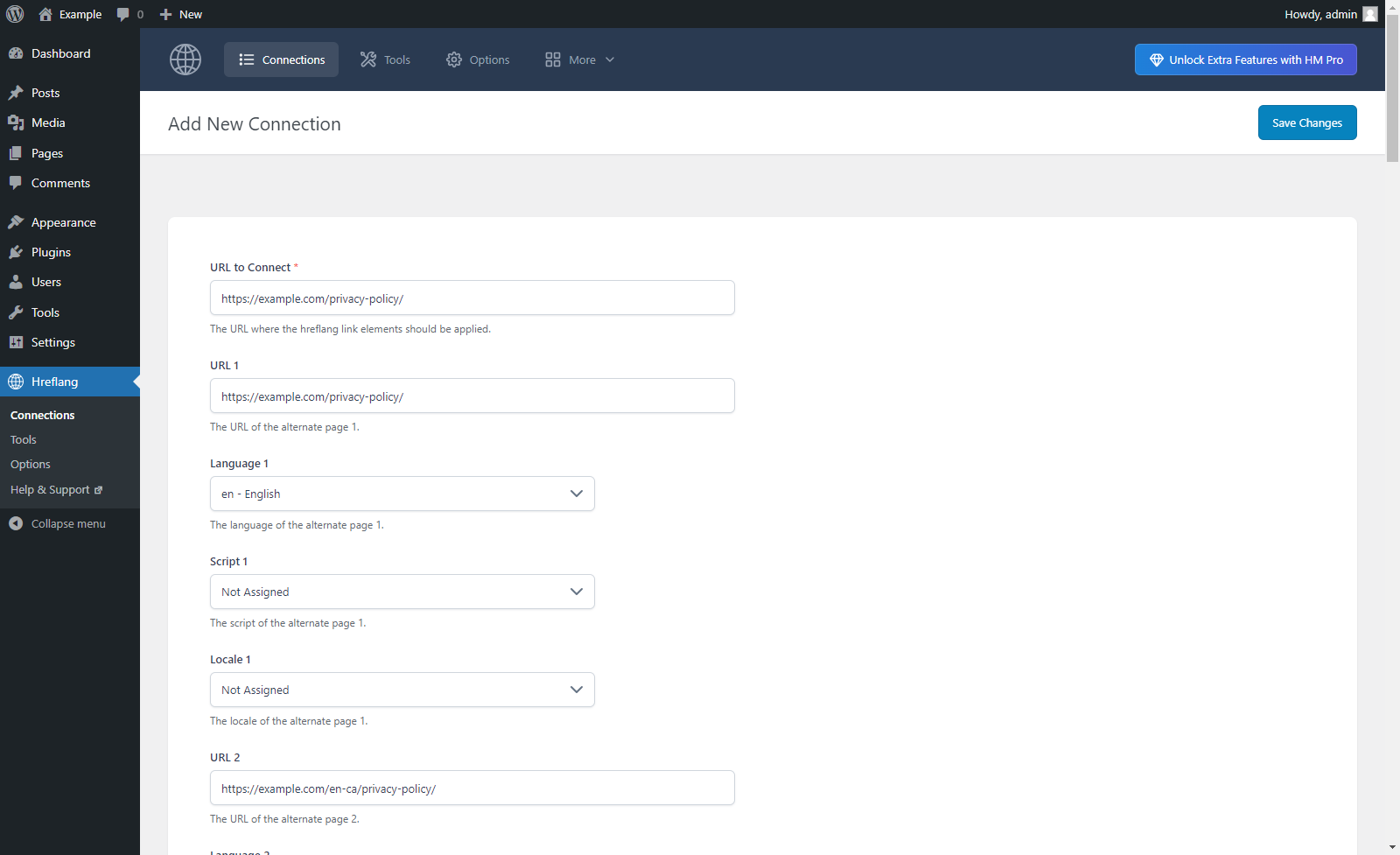
Hreflang implementation of a single URL 
منوی گزینه ها در برگه “عمومی” 
منوی گزینه ها در تب “پیش فرض”


نصب
- Upload the plugin files to the
/wp-content/plugins/hreflang-manager-lite/directory, or install the plugin through the WordPress Plugins screen directly. - Activate the plugin through the Plugins screen in WordPress.
1. Add hreflang data
Go to Hreflang Connections and start adding hreflang data.
Alternatively, you can create connections directly from the post editor using the Hreflang Manager panel. This panel is available in both the Block Editor and the Classic Editor. If you don’t see it, enable it from the editor options.
2. Verify your implementation
To verify your hreflang implementation, you can use the built-in Tag Inspector.
Go to Hreflang Options and enable the Tag Inspector option. Then visit your site pages on the front end. When hreflang data is present, the Tag Inspector will be displayed over the page. The Tag Inspector is visible only to logged-in users with appropriate permissions and is not shown to visitors.
For detailed guidance and advanced configuration, visit the official Knowledge Base.
نقد و بررسیها


توسعه دهندگان و همکاران
“Hreflang Manager – Hreflang Implementation for International SEO” نرم افزار متن باز است. افراد زیر در این افزونه مشارکت کردهاند.
مشارکت کنندگان
“Hreflang Manager – Hreflang Implementation for International SEO” به 2 زبان ترجمه شده است. با تشکر از مترجمین برای همکاری و کمکهایشان.
ترجمه “Hreflang Manager – Hreflang Implementation for International SEO” به زبان شما.
علاقه مند به توسعه هستید؟
Browse the code, check out the SVN repository, or subscribe to the development log by RSS.
گزارش تغییرات
1.17
Mar 26, 2026
- The Pro version upgrade banner previously displayed at the bottom of all plugin menu pages is now shown only in the Options menu.
- Added a notices manager class used to display documentation resources and a link to rate the plugin. A related action hook has also been introduced to allow notices to be rendered in a specific area of the plugin UI.
1.16
March 1, 2026
- The style of the post editor meta box has been updated for improved consistency with the native classic editor interface. In addition, the Select2 library is no longer used for select elements, as these have been replaced with native HTML select fields.
- Additional minor functional improvements to the post editor meta box.
1.15
February 16, 2026
- Updated Pro Version feature labels in the admin toolbar.
1.14
February 16, 2026
- Added new interfaces for adding and managing hreflang data in both the Block Editor (via a dedicated sidebar) and the Classic or non-standard editors (via a dedicated meta box).
1.13
October 16, 2025
- The Log feature has been renamed to Tag Inspector, featuring an improved interface.
1.12
April 16, 2025
- Fixed PHP notice caused by early use of translation functions.
1.11
November 29, 2024
- Resolved CSS style issue.
- The load_plugin_textdomain() function now runs with the correct hook.
1.10
June 14, 2024
- In the “Connections” menu the URLs max length is now properly set to 2083 characters.
- The PHP trim() function has been added to the “Connections” menu to remove any leading or trailing white spaces from the entered URLs.
1.09
May 23, 2024
- Major back-end UI update.
- Refactoring.
1.08
April 7, 2024
- Fixed a bug (started with WordPress version 6.5) that prevented the creation of the plugin database tables and the initialization of the plugin database options during the plugin activation.
1.07
October 25, 2023
- Nonce fields have been added to the “Connections” menus.
- General refactoring. The phpcs “WordPress-Core” ruleset has been partially applied to the plugin code.
1.06
8 فوریه 2023
- گزینه “صفحات جایگزین خودکار” اضافه شده است.
- پیوندهای پاورقی به تمام منوهای افزونه اضافه شده است.
- Minor backend improvements.
1.05
31 ژوئیه 2022
- دامنه متن برای مطابقت با اسلاگ افزونه تغییر کرده است.
- تغییرات اضافه شد.
- All the dismissible notices are now generated in the “Connections” menu.
- Updated the description of the features in the “Pro Version” menu.
- The “Export to Pro” menu has been added.
- Minor backend improvements.
1.04
11 فوریه 2022
- کد ISO 3166-1 آلفا-2 صحیح اکنون برای لبنان استفاده می شود.
1.03
30 دسامبر 2021
- Minor backend improvements.
1.01
17 مارس 2021
- Minor backend improvements.
- رفع نقص.
1.00
17 مارس 2021
- انتشار اولیه.
