<?xml version="1.0" encoding="utf-8"?><feed xmlns="http://www.w3.org/2005/Atom" ><generator uri="https://jekyllrb.com/" version="3.10.0">Jekyll</generator><link href="https://ferrolho.github.io/feed.xml" rel="self" type="application/atom+xml" /><link href="https://ferrolho.github.io/" rel="alternate" type="text/html" /><updated>2025-10-18T06:01:00+01:00</updated><id>https://ferrolho.github.io/feed.xml</id><title type="html">Henrique Ferrolho</title><subtitle>Robotics Technical Lead, PhD</subtitle><author><name>Henrique Ferrolho</name><email>henrique.ferrolho@gmail.com</email></author><entry><title type="html">Magisk</title><link href="https://ferrolho.github.io/android/magisk/" rel="alternate" type="text/html" title="Magisk" /><published>2023-10-15T16:00:00+01:00</published><updated>2023-10-15T16:00:00+01:00</updated><id>https://ferrolho.github.io/android/magisk</id><content type="html" xml:base="https://ferrolho.github.io/android/magisk/"><![CDATA[<h2 id="redmi-note-12-pro-ruby">Redmi Note 12 Pro (ruby)</h2>

<h3 id="updating-the-rom-version">Updating the ROM version</h3>

<p>Reboot into fastboot mode</p>
<div class="language-plaintext highlighter-rouge"><div class="highlight"><pre class="highlight"><code>adb reboot bootloader
</code></pre></div></div>

<p>To flash a new update, make sure you are in FASTBOOT mode, not in FASTBOOTD — notice the ‘D’ at the end.</p>

<p>Then, flash with</p>
<div class="language-plaintext highlighter-rouge"><div class="highlight"><pre class="highlight"><code>./flash_all_except_storage.sh
</code></pre></div></div>

<h3 id="updating-the-boot-image-for-magisk">Updating the boot image for Magisk</h3>

<p>Download this:
https://github.com/tobyxdd/android-ota-payload-extractor</p>

<blockquote>
  <p>[!NOTE]
If your Mac computer uses Apple silicon, download the <code class="language-plaintext highlighter-rouge">android-ota-extractor-v1.1-darwin-arm64.tar.gz</code>.</p>
</blockquote>

<p>Download the recovery ROM from https://miuirom.org/phones/redmi-note-12-pro#EEA.</p>

<p>The boot image can be directly extracted from the ROM’s ZIP with:</p>
<div class="language-plaintext highlighter-rouge"><div class="highlight"><pre class="highlight"><code>./android-ota-extractor miui_RUBYEEAGlobal_OS1.0.3.0.UMOEUXM_bd54bd38dc_14.0.zip boot
</code></pre></div></div>

<blockquote>
  <p>[!NOTE]
If on a macOS, you may need to right-click the executable, select <code class="language-plaintext highlighter-rouge">Open</code>, and then the <code class="language-plaintext highlighter-rouge">Open</code> button.</p>
</blockquote>

<p>Alternatively, unzip the ROM’s ZIP and extract the <code class="language-plaintext highlighter-rouge">boot.img</code> from the <code class="language-plaintext highlighter-rouge">payload.bin</code> with:</p>
<div class="language-plaintext highlighter-rouge"><div class="highlight"><pre class="highlight"><code>unzip miui_RUBYEEAGlobal_OS1.0.4.0.UMOEUXM_686c61a682_14.0.zip -d miui_RUBYEEAGlobal_OS1.0.4.0.UMOEUXM_686c61a682_14.0
</code></pre></div></div>

<p>To extract only the <code class="language-plaintext highlighter-rouge">boot.img</code> from the <em>Recovery ROM’s</em> <code class="language-plaintext highlighter-rouge">payload.bin</code>, run</p>
<div class="language-plaintext highlighter-rouge"><div class="highlight"><pre class="highlight"><code>./android-ota-extractor ~/miui/payload.bin boot
</code></pre></div></div>

<p>Push it to your Downloads folder:</p>
<div class="language-plaintext highlighter-rouge"><div class="highlight"><pre class="highlight"><code>adb push ./boot.img /sdcard/Download/
</code></pre></div></div>

<p>Now, using your phone:</p>
<ol>
  <li>Open the Magisk app</li>
  <li>Press Install (the 1st one, not the 2nd one)</li>
  <li>Check the ‘Select and Patch a File’</li>
  <li>Choose the <code class="language-plaintext highlighter-rouge">boot.img</code> in your Downloads folder</li>
  <li>Press ‘Let’s Go’ and wait for the patching to finish</li>
</ol>

<p>Now, back to your laptop, pull the modified <code class="language-plaintext highlighter-rouge">boot.img</code> with</p>
<div class="language-plaintext highlighter-rouge"><div class="highlight"><pre class="highlight"><code>adb pull /sdcard/Download/magisk_patched-27006_EvbvP.img
</code></pre></div></div>

<p>Reboot into fastboot mode</p>
<div class="language-plaintext highlighter-rouge"><div class="highlight"><pre class="highlight"><code>adb reboot bootloader
</code></pre></div></div>

<p>Flash the patched <code class="language-plaintext highlighter-rouge">boot.img</code> with</p>
<div class="language-plaintext highlighter-rouge"><div class="highlight"><pre class="highlight"><code>fastboot flash boot magisk_patched-27006_EvbvP.img
</code></pre></div></div>

<p>Finally, reboot with</p>
<div class="language-plaintext highlighter-rouge"><div class="highlight"><pre class="highlight"><code>fastboot reboot
</code></pre></div></div>

<p>And that should be all!</p>

<h3 id="upgrading-from-miui-to-hyperos">Upgrading from MIUI to HyperOS</h3>

<p>HyperOS – Rename Trick 2.0
https://techmukul.net/update-hyperos-now-using-rename-trick-2-0-in-xiaomi-devices/</p>

<h2 id="redmi-note-5-pro-whyred">Redmi Note 5 Pro (whyred)</h2>

<p>“[ROM][13][UNOFFICIAL] Pixel Experience Plus for Xiaomi Redmi Note 5 Pro [Whyred][2024-02-04]”
https://xdaforums.com/t/rom-13-unofficial-pixel-experience-plus-for-xiaomi-redmi-note-5-pro-whyred-2024-02-04.4583589/</p>

<p>Reboot into the bootloader:</p>
<div class="language-plaintext highlighter-rouge"><div class="highlight"><pre class="highlight"><code>adb reboot bootloader
</code></pre></div></div>

<p>Flash pixel experience recovery:</p>
<div class="language-plaintext highlighter-rouge"><div class="highlight"><pre class="highlight"><code>fastboot flash recovery PixelExperience_Plus_whyred-13.0-20240204-0825-UNOFFICIAL.img
</code></pre></div></div>

<p>Reboot to the Recovery menu:</p>
<div class="language-plaintext highlighter-rouge"><div class="highlight"><pre class="highlight"><code>fastboot reboot recovery
</code></pre></div></div>

<p>Wipe the data, cache, and system through the recovery menu.</p>

<p>Install the Pixel Experience ROM by navigating to ‘Apply Update’ &gt; ‘Apply from ADB’, and then:</p>
<div class="language-plaintext highlighter-rouge"><div class="highlight"><pre class="highlight"><code>adb sideload PixelExperience_Plus_whyred-13.0-20240204-0825-UNOFFICIAL.zip
</code></pre></div></div>]]></content><author><name>Henrique Ferrolho</name><email>henrique.ferrolho@gmail.com</email></author><category term="Android" /><category term="android" /><summary type="html"><![CDATA[Notes on how to install and use Magisk with MIUI on Xiaomi and Redmi phones.]]></summary></entry><entry><title type="html">Stabilizing a Video Subject in Kdenlive</title><link href="https://ferrolho.github.io/kdenlive/stabilizing-a-video-subject-in-kdenlive/" rel="alternate" type="text/html" title="Stabilizing a Video Subject in Kdenlive" /><published>2020-08-09T23:00:00+01:00</published><updated>2020-08-09T23:00:00+01:00</updated><id>https://ferrolho.github.io/kdenlive/stabilizing-a-video-subject-in-kdenlive</id><content type="html" xml:base="https://ferrolho.github.io/kdenlive/stabilizing-a-video-subject-in-kdenlive/"><![CDATA[<style>
    .tooltip {
        position: relative;
        display: inline-block;
    }

    .tooltip .tooltiptext {
        visibility: hidden;
        width: 140px;
        background-color: #555;
        color: #fff;
        text-align: center;
        border-radius: 6px;
        padding: 5px;
        position: absolute;
        z-index: 1;
        bottom: 150%;
        left: 50%;
        margin-left: -75px;
        opacity: 0;
        transition: opacity 0.3s;
    }

    .tooltip .tooltiptext::after {
        content: "";
        position: absolute;
        top: 100%;
        left: 50%;
        margin-left: -5px;
        border-width: 5px;
        border-style: solid;
        border-color: #555 transparent transparent transparent;
    }

    .tooltip:hover .tooltiptext {
        visibility: visible;
        opacity: 1;
    }

    kbd {
        background-color: #eee;
        border-radius: 3px;
        border: 1px solid #b4b4b4;
        box-shadow: 0 1px 1px rgba(0, 0, 0, .2), 0 2px 0 0 rgba(255, 255, 255, .7) inset;
        color: #333;
        display: inline-block;
        font-size: .85em;
        font-weight: 700;
        line-height: 1;
        padding: 2px 4px;
        white-space: nowrap;
    }
</style>

<div class="panel warning-panel">
  <div class="panel-header">
    <i class="fas fa-exclamation-triangle panel-icon"></i>
    <strong>Update - Feb 25, 2024</strong>
  </div>
  <div class="panel-message">
    This blog post is useless for newer versions of Kdenlive.<br />
    Please check the <a href="https://docs.kdenlive.org/en/effects_and_compositions/video_effects/alpha_mask_keying/motion_tracker.html">Motion Tracker</a> effect for more information.
  </div>
</div>

<h1 id="introduction">Introduction</h1>

<p>In this post I want to show you how to stabilize a video subject (person, object, etc.) with <a href="https://kdenlive.org/en/">Kdenlive</a>.</p>

<p>When I was trying to learn how to do this, I could only find tutorials on how to use <code class="language-plaintext highlighter-rouge">vidstab</code>. However, that was not what I was looking for, because <code class="language-plaintext highlighter-rouge">vidstab</code> tries to stabilize the whole frame, and it can introduce distortions in some areas.</p>

<p>The video below shows three different clips: the original footage (left), the stabilized clip obtained with <code class="language-plaintext highlighter-rouge">vidstab</code> (middle), and the stabilized subject using my approach (right).</p>

<video width="100%" src="https://ferrolho.github.io/videos/kdenlive/teaser_c.mp4" autoplay="" loop="" muted="">Your browser does not support the video tag.</video>
<p>*The original clip used in this demonstration is <a href="https://ferrolho.github.io/videos/kdenlive/test_clip_c.mp4">available here</a>.</p>

<p>We can see that <code class="language-plaintext highlighter-rouge">vidstab</code> is able to stabilize some parts of the clip; notice how the car in the background is less shaky. But, in my opinion, the best clip is the one on the right, where the subject is stable and positioned at the center of the clip.</p>

<h1 id="tracking-the-subject">Tracking the Subject</h1>

<p>The first thing we need to do is to get the position of our subject at every frame of the clip. For that, Kdenlive has a neat effect called “Auto Mask”. Let’s go ahead and add that to our clip. (The clip should have been placed in the timeline by now.)</p>

<p><video width="100%" src="https://ferrolho.github.io/videos/kdenlive/auto_mask.mp4" autoplay="" loop="" muted="">Your browser does not support the video tag.</video></p>

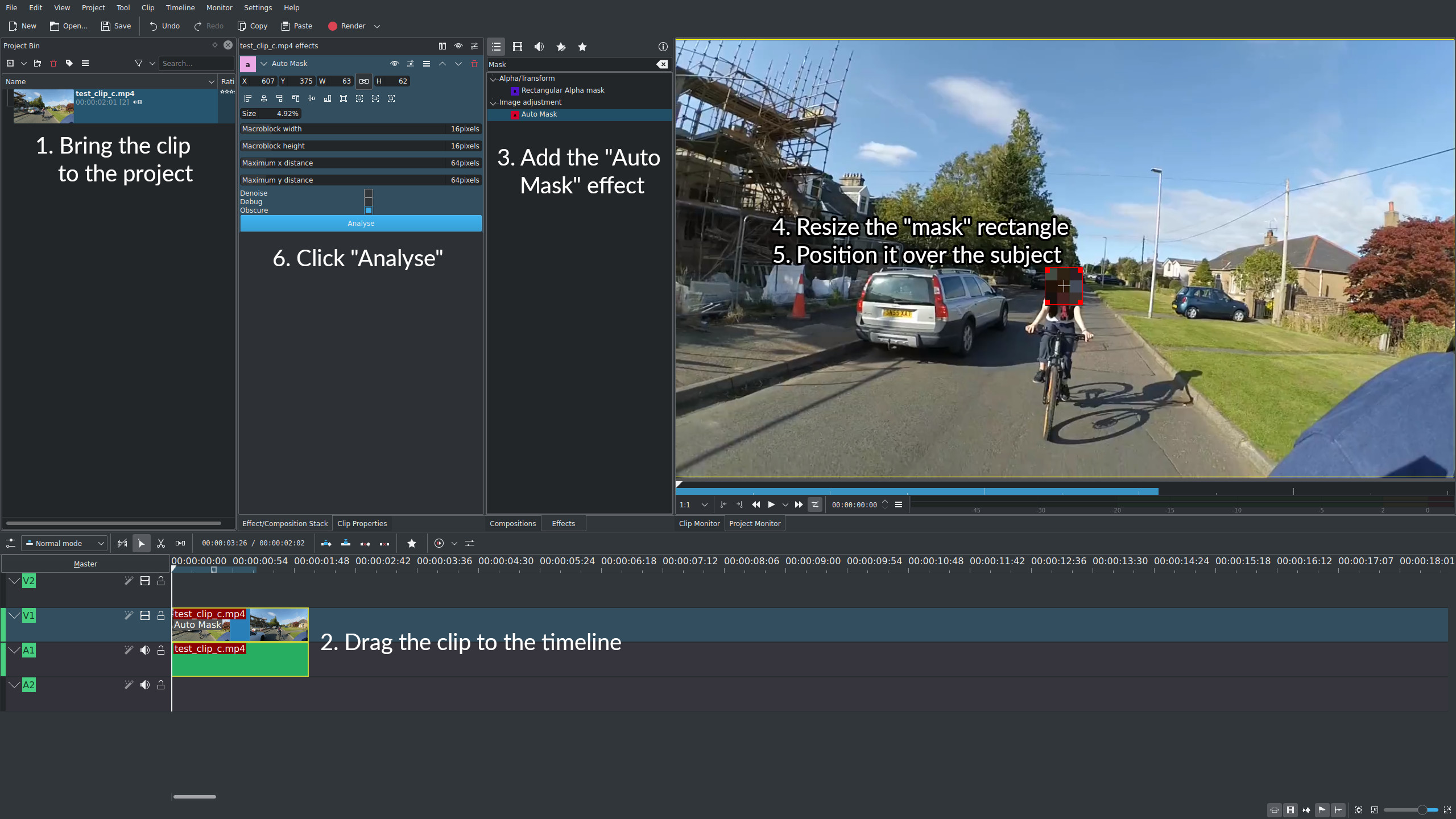
<p>After adding the “Auto Mask”, a blurred rectangle should have appeared in the preview area; we are going to resize it and reposition it to roughly match the size and location of a feature point in your subject. In our case, the subject is a person, so we are going to resize the box to be slightly bigger than their face.</p>

<p>Finally, making sure the timeline cursor is positioned at <em>the first frame of the clip</em>, we are going to press the “Analyse” button in the options of the “Auto Mask” effect. This will scan each frame of the clip to track the face of our subject. Once the process finishes, a <u>Tracking data</u> link should appear in the “Auto Mask” effect. Click that link. The data has now been copied into our clipboard.</p>

<p>The image below summarises the steps required so far.</p>

<p><img src="https://ferrolho.github.io/videos/kdenlive/auto_mask_steps.jpg" alt="&quot;auto mask&quot; steps" /></p>

<h1 id="processing-the-tracking-data">Processing the Tracking Data</h1>

<p>Now that we have the tracking data in our clipboard, we are going to invert it. This will allow us to later use it as a <em>correction</em> for the position of each frame. To make things easier, I have automated this part of the process with a bit of JavaScript. So go ahead and follow the steps below.</p>

<p>1. Specify the frame size of your project.</p>

<div style="margin-bottom: 15px;">
    Width: <input type="text" value="1920" id="myInput_w" />
    Height: <input type="text" value="1080" id="myInput_h" />
</div>

<p>2. Specify an offset to adjust the position of the subject in the frame. (Negative values are allowed.)</p>

<div style="margin-bottom: 15px;">
    Horizontal offset: <input type="text" value="0" id="myInput_xoffset" />
    Vertical offset: <input type="text" value="0" id="myInput_yoffset" />
</div>

<p>3. Paste the <i>tracking data</i> of the "Auto Mask" effect below, then click on the button.</p>

<div style="margin-bottom: 15px;">
    <textarea rows="5" cols="80" placeholder="Paste your data here..." id="myInput" style="max-width: 100%;"></textarea>
    <div class="tooltip">
        <button onclick="myFunction()" onmouseout="outFunc()">
            <span class="tooltiptext" id="myTooltip">Copy to clipboard</span>Process and copy to clipboard
        </button>
    </div>
</div>

<p>4. The <b>new</b> <i>tracking data</i> is now living in your clipboard. Try to paste the text with <kbd>Ctrl</kbd> + <kbd>V</kbd> in a different window to see the result.</p>

<h1 id="stabilising-the-clip">Stabilising the Clip</h1>

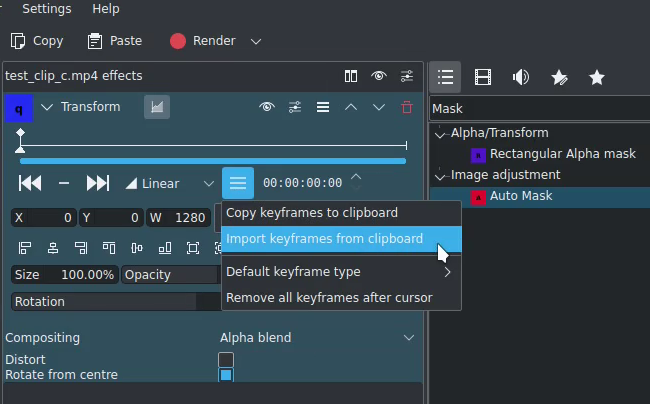
<p>Let’s go back to Kdenlive. We can now delete or hide the “Auto Mask” effect. Afterwards, we need to add a “Transform” effect, and use its options to import the keyframe correction data from our clipboard.</p>

<div style="text-align: center;">
    <p><img src="https://ferrolho.github.io/videos/kdenlive/transform_import.png" alt="Transform import" /></p>
    <p>A small window should pop-up. We need to select "Position" from the dropdown, and then click OK.</p>
    <p><video style="max-width: 100%;" src="https://ferrolho.github.io/videos/kdenlive/import_position.mp4" autoplay="" loop="" muted="">Your browser does not support the video tag.</video></p>
</div>

<p>And that is mostly it! If we playback the timeline, the clip should now be stabilised and focused on our subject. The only issue is that the frame is moving around, and we can see the black background of the project. A very easy workaround for this is to add a composition to our clip, and increase the zoom a bit, e.g., to 140%.</p>

<h1 id="the-end">The End</h1>

<p>This is the end of the post. Thank you for getting this far! Feel free to leave a comment below.</p>

<script src="https://ferrolho.github.io/assets/js/kdenlive/clipboard.js"></script>]]></content><author><name>Henrique Ferrolho</name><email>henrique.ferrolho@gmail.com</email></author><category term="Kdenlive" /><category term="video editing" /></entry><entry><title type="html">Solving a Geometry Quiz with JuMP</title><link href="https://ferrolho.github.io/optimization/julia/solving-a-geometry-quiz-with-jump/" rel="alternate" type="text/html" title="Solving a Geometry Quiz with JuMP" /><published>2020-07-27T17:00:00+01:00</published><updated>2020-07-27T17:00:00+01:00</updated><id>https://ferrolho.github.io/optimization/julia/solving-a-geometry-quiz-with-jump</id><content type="html" xml:base="https://ferrolho.github.io/optimization/julia/solving-a-geometry-quiz-with-jump/"><![CDATA[<h1 id="introduction">Introduction</h1>

<p>In this post I want to show you how easy and fun it is to model a little geometry quiz using <a href="https://julialang.org/">Julia</a>.</p>

<p>My goal is to give you a quick glance at the basic syntax needed to formulate and solve the problem.</p>

<blockquote>
  <p>Target audience: beginners in numerical optimisation or newcomers to the Julia ecosystem.</p>
</blockquote>

<h1 id="the-problem">The Problem</h1>

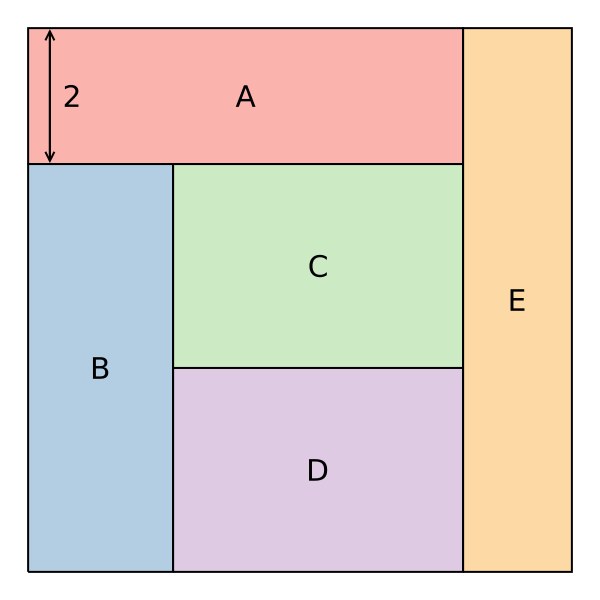
<p>Consider the shapes shown in Figure 1 and the following constraints:</p>
<ul>
  <li>All rectangles (<strong>A</strong>, <strong>B</strong>, <strong>C</strong>, <strong>D</strong>, and <strong>E</strong>) have the same area;</li>
  <li>Their geometric layout makes up a <em>square</em>; and</li>
  <li>The height of rectangle <strong>A</strong> is 2.</li>
</ul>

<p>What is the area of the square?</p>

<blockquote>
  <p>You can try to solve this quiz on your own first, using a pen and a piece of paper.</p>
</blockquote>

<figure>
  <img src="https://ferrolho.github.io/images/julia/square_quiz.svg" alt="quiz image" />
  <figcaption><strong>Figure 1.</strong> <em>Layout of the rectangles.</em></figcaption>
</figure>

<h1 id="the-solution">The Solution</h1>

<p>There are many ways to reach the solution for this problem. The way I solved it was by realising that rectangles <strong>C</strong> and <strong>D</strong> are <em>exactly</em> the same. Why? We know all rectangles have the same area, and we also know that <strong>C</strong> and <strong>D</strong> share an edge. So, surely, they have the same <em>height</em>! That means that the height of <strong>B</strong> is two times the height of <strong>C</strong> or <strong>D</strong>. After knowing that, it is possible to solve for the height of <strong>B</strong>.</p>

<h1 id="constrained-optimisation">Constrained Optimisation</h1>

<p>Now I want to show you how you could reach the solution by formulating a <em>constrained optimisation</em> problem. I am going to use <a href="https://jump.dev/JuMP.jl/stable/">JuMP</a>, a language for modeling mathematical optimisation problems.</p>

<p>First, we import <code class="language-plaintext highlighter-rouge">JuMP</code> and <code class="language-plaintext highlighter-rouge">Ipopt</code>. <code class="language-plaintext highlighter-rouge">Ipopt</code> is a free solver for these kind of problems:</p>
<div class="language-julia highlighter-rouge"><div class="highlight"><pre class="highlight"><code><span class="k">using</span> <span class="n">JuMP</span>
<span class="k">using</span> <span class="n">Ipopt</span>
</code></pre></div></div>

<p>Afterwards, we create a new model and declare the problem variables (the height and the width of each rectangle):</p>
<div class="language-julia highlighter-rouge"><div class="highlight"><pre class="highlight"><code><span class="n">model</span> <span class="o">=</span> <span class="n">Model</span><span class="x">(</span><span class="n">Ipopt</span><span class="o">.</span><span class="n">Optimizer</span><span class="x">)</span>

<span class="nd">@variables</span><span class="x">(</span><span class="n">model</span><span class="x">,</span> <span class="k">begin</span>
    <span class="mi">0</span> <span class="o">&lt;=</span> <span class="n">Ah</span> <span class="x">;</span> <span class="mi">0</span> <span class="o">&lt;=</span> <span class="n">Bh</span> <span class="x">;</span> <span class="mi">0</span> <span class="o">&lt;=</span> <span class="n">Ch</span> <span class="x">;</span> <span class="mi">0</span> <span class="o">&lt;=</span> <span class="n">Dh</span> <span class="x">;</span> <span class="mi">0</span> <span class="o">&lt;=</span> <span class="n">Eh</span>
    <span class="mi">0</span> <span class="o">&lt;=</span> <span class="n">Aw</span> <span class="x">;</span> <span class="mi">0</span> <span class="o">&lt;=</span> <span class="n">Bw</span> <span class="x">;</span> <span class="mi">0</span> <span class="o">&lt;=</span> <span class="n">Cw</span> <span class="x">;</span> <span class="mi">0</span> <span class="o">&lt;=</span> <span class="n">Dw</span> <span class="x">;</span> <span class="mi">0</span> <span class="o">&lt;=</span> <span class="n">Ew</span>
<span class="k">end</span><span class="x">)</span>
</code></pre></div></div>

<p>Then, we give an initial guess for those values, and fix the value of the height of <strong>A</strong>:</p>
<div class="language-julia highlighter-rouge"><div class="highlight"><pre class="highlight"><code><span class="c"># Specifying an initial guess</span>
<span class="n">set_start_value</span><span class="o">.</span><span class="x">([</span><span class="n">Ah</span> <span class="n">Bh</span> <span class="n">Ch</span> <span class="n">Dh</span> <span class="n">Eh</span>
                  <span class="n">Aw</span> <span class="n">Bw</span> <span class="n">Cw</span> <span class="n">Dw</span> <span class="n">Ew</span><span class="x">],</span> <span class="mi">2</span><span class="x">)</span>

<span class="n">fix</span><span class="x">(</span><span class="n">Ah</span><span class="x">,</span> <span class="mi">2</span><span class="x">,</span> <span class="n">force</span><span class="o">=</span><span class="nb">true</span><span class="x">)</span>  <span class="c"># Given in the problem</span>
</code></pre></div></div>

<p>Now, using the <code class="language-plaintext highlighter-rouge">@constraint</code> macro, we define the problem constraints:</p>
<div class="language-julia highlighter-rouge"><div class="highlight"><pre class="highlight"><code><span class="c"># Areas relationship: A = B = C = D = E</span>
<span class="nd">@constraint</span><span class="x">(</span><span class="n">model</span><span class="x">,</span> <span class="n">Ah</span> <span class="o">*</span> <span class="n">Aw</span> <span class="o">==</span> <span class="n">Bh</span> <span class="o">*</span> <span class="n">Bw</span><span class="x">)</span>
<span class="nd">@constraint</span><span class="x">(</span><span class="n">model</span><span class="x">,</span> <span class="n">Bh</span> <span class="o">*</span> <span class="n">Bw</span> <span class="o">==</span> <span class="n">Ch</span> <span class="o">*</span> <span class="n">Cw</span><span class="x">)</span>
<span class="nd">@constraint</span><span class="x">(</span><span class="n">model</span><span class="x">,</span> <span class="n">Ch</span> <span class="o">*</span> <span class="n">Cw</span> <span class="o">==</span> <span class="n">Dh</span> <span class="o">*</span> <span class="n">Dw</span><span class="x">)</span>
<span class="nd">@constraint</span><span class="x">(</span><span class="n">model</span><span class="x">,</span> <span class="n">Dh</span> <span class="o">*</span> <span class="n">Dw</span> <span class="o">==</span> <span class="n">Eh</span> <span class="o">*</span> <span class="n">Ew</span><span class="x">)</span>

<span class="c"># Total area relationship</span>
<span class="nd">@constraint</span><span class="x">(</span><span class="n">model</span><span class="x">,</span> <span class="mi">5</span> <span class="o">*</span> <span class="n">Ah</span> <span class="o">*</span> <span class="n">Aw</span> <span class="o">==</span> <span class="n">Eh</span> <span class="o">*</span> <span class="n">Eh</span><span class="x">)</span>

<span class="c"># Width relationships</span>
<span class="nd">@constraint</span><span class="x">(</span><span class="n">model</span><span class="x">,</span> <span class="n">Cw</span> <span class="o">==</span> <span class="n">Dw</span><span class="x">)</span>
<span class="nd">@constraint</span><span class="x">(</span><span class="n">model</span><span class="x">,</span> <span class="n">Aw</span> <span class="o">==</span> <span class="n">Bw</span> <span class="o">+</span> <span class="n">Cw</span><span class="x">)</span>

<span class="c"># Height relationships</span>
<span class="nd">@constraint</span><span class="x">(</span><span class="n">model</span><span class="x">,</span> <span class="n">Bh</span> <span class="o">==</span> <span class="n">Ch</span> <span class="o">+</span> <span class="n">Dh</span><span class="x">)</span>
<span class="nd">@constraint</span><span class="x">(</span><span class="n">model</span><span class="x">,</span> <span class="n">Eh</span> <span class="o">==</span> <span class="n">Ah</span> <span class="o">+</span> <span class="n">Bh</span><span class="x">)</span>
</code></pre></div></div>

<p>Notice that, in the constraints defined above, I never told the solver that <code class="language-plaintext highlighter-rouge">Ch = Bh / 2</code>. I don’t have to! All of the constraints I declared are very straightforward, and directly observed from Figure 1—and that should be sufficient for the solver to figure everything out. How cool is that?!</p>

<p>Finally, we just need to call</p>
<div class="language-julia highlighter-rouge"><div class="highlight"><pre class="highlight"><code><span class="n">optimize!</span><span class="x">(</span><span class="n">model</span><span class="x">)</span>
</code></pre></div></div>

<p>Once the solver is done, you can print the answer to the quiz and the values found for every edge with:</p>
<div class="language-julia highlighter-rouge"><div class="highlight"><pre class="highlight"><code><span class="n">area</span> <span class="o">=</span> <span class="n">round</span><span class="x">(</span><span class="n">value</span><span class="x">(</span><span class="n">Eh</span> <span class="o">*</span> <span class="n">Eh</span><span class="x">),</span> <span class="n">digits</span><span class="o">=</span><span class="mi">3</span><span class="x">)</span>

<span class="n">println</span><span class="x">(</span><span class="s">"Total area of the square is </span><span class="si">$(area)</span><span class="s">."</span><span class="x">)</span>

<span class="n">round</span><span class="o">.</span><span class="x">(</span><span class="n">value</span><span class="o">.</span><span class="x">([</span><span class="n">Ah</span> <span class="n">Bh</span> <span class="n">Ch</span> <span class="n">Dh</span> <span class="n">Eh</span>
               <span class="n">Aw</span> <span class="n">Bw</span> <span class="n">Cw</span> <span class="n">Dw</span> <span class="n">Ew</span><span class="x">]),</span> <span class="n">digits</span><span class="o">=</span><span class="mi">3</span><span class="x">)</span> <span class="o">|&gt;</span> <span class="n">display</span>
</code></pre></div></div>

<p>Which should output the following:</p>
<div class="language-plaintext highlighter-rouge"><div class="highlight"><pre class="highlight"><code>Total area of the square is 64.0.

2×5 Array{Float64,2}:
 2.0  6.0    3.0    3.0    8.0
 6.4  2.133  4.267  4.267  1.6
</code></pre></div></div>

<h1 id="plotting-the-results">Plotting the Results</h1>

<p>After having solved the problem, we can use the values to plot Figure 1 (the image shown on the top of this page) with the code below and using <a href="https://docs.juliaplots.org/latest/">Plots.jl</a>.</p>
<div class="language-julia highlighter-rouge"><div class="highlight"><pre class="highlight"><code><span class="k">using</span> <span class="n">Plots</span>

<span class="n">rectangle</span><span class="x">(</span><span class="n">x</span><span class="x">,</span> <span class="n">y</span><span class="x">,</span> <span class="n">w</span><span class="x">,</span> <span class="n">h</span><span class="x">)</span> <span class="o">=</span> <span class="n">Shape</span><span class="x">(</span><span class="n">x</span> <span class="o">.+</span> <span class="x">[</span><span class="mi">0</span><span class="x">,</span><span class="n">w</span><span class="x">,</span><span class="n">w</span><span class="x">,</span><span class="mi">0</span><span class="x">],</span> <span class="n">y</span> <span class="o">.+</span> <span class="x">[</span><span class="mi">0</span><span class="x">,</span><span class="mi">0</span><span class="x">,</span><span class="n">h</span><span class="x">,</span><span class="n">h</span><span class="x">])</span>

<span class="n">plot</span><span class="x">(</span><span class="n">axis</span><span class="o">=</span><span class="nb">false</span><span class="x">,</span> <span class="n">ticks</span><span class="o">=</span><span class="nb">false</span><span class="x">,</span> <span class="n">legend</span><span class="o">=</span><span class="nb">nothing</span><span class="x">,</span>
     <span class="n">aspect_ratio</span><span class="o">=:</span><span class="n">equal</span><span class="x">,</span> <span class="n">size</span><span class="o">=</span><span class="x">(</span><span class="mi">600</span><span class="x">,</span> <span class="mi">600</span><span class="x">),</span>
     <span class="n">background_color</span><span class="o">=:</span><span class="n">transparent</span><span class="x">,</span>
     <span class="n">foreground_color</span><span class="o">=:</span><span class="n">black</span><span class="x">,</span>
     <span class="n">palette</span><span class="o">=:</span><span class="n">Pastel1</span><span class="x">)</span>

<span class="n">plot!</span><span class="x">(</span><span class="n">rectangle</span><span class="x">(</span>        <span class="mi">0</span><span class="x">,</span> <span class="n">value</span><span class="x">(</span><span class="n">Bh</span><span class="x">),</span> <span class="n">value</span><span class="x">(</span><span class="n">Aw</span><span class="x">),</span> <span class="n">value</span><span class="x">(</span><span class="n">Ah</span><span class="x">)),</span> <span class="n">linewidth</span><span class="o">=</span><span class="mi">2</span><span class="x">)</span>
<span class="n">plot!</span><span class="x">(</span><span class="n">rectangle</span><span class="x">(</span>        <span class="mi">0</span><span class="x">,</span>         <span class="mi">0</span><span class="x">,</span> <span class="n">value</span><span class="x">(</span><span class="n">Bw</span><span class="x">),</span> <span class="n">value</span><span class="x">(</span><span class="n">Bh</span><span class="x">)),</span> <span class="n">linewidth</span><span class="o">=</span><span class="mi">2</span><span class="x">)</span>
<span class="n">plot!</span><span class="x">(</span><span class="n">rectangle</span><span class="x">(</span><span class="n">value</span><span class="x">(</span><span class="n">Bw</span><span class="x">),</span> <span class="n">value</span><span class="x">(</span><span class="n">Dh</span><span class="x">),</span> <span class="n">value</span><span class="x">(</span><span class="n">Cw</span><span class="x">),</span> <span class="n">value</span><span class="x">(</span><span class="n">Ch</span><span class="x">)),</span> <span class="n">linewidth</span><span class="o">=</span><span class="mi">2</span><span class="x">)</span>
<span class="n">plot!</span><span class="x">(</span><span class="n">rectangle</span><span class="x">(</span><span class="n">value</span><span class="x">(</span><span class="n">Bw</span><span class="x">),</span>         <span class="mi">0</span><span class="x">,</span> <span class="n">value</span><span class="x">(</span><span class="n">Dw</span><span class="x">),</span> <span class="n">value</span><span class="x">(</span><span class="n">Dh</span><span class="x">)),</span> <span class="n">linewidth</span><span class="o">=</span><span class="mi">2</span><span class="x">)</span>
<span class="n">plot!</span><span class="x">(</span><span class="n">rectangle</span><span class="x">(</span><span class="n">value</span><span class="x">(</span><span class="n">Aw</span><span class="x">),</span>         <span class="mi">0</span><span class="x">,</span> <span class="n">value</span><span class="x">(</span><span class="n">Ew</span><span class="x">),</span> <span class="n">value</span><span class="x">(</span><span class="n">Eh</span><span class="x">)),</span> <span class="n">linewidth</span><span class="o">=</span><span class="mi">2</span><span class="x">)</span>

<span class="n">font_size</span> <span class="o">=</span> <span class="mi">20</span>
<span class="n">annotate!</span><span class="x">(</span>            <span class="n">value</span><span class="x">(</span><span class="n">Aw</span><span class="x">)</span> <span class="o">/</span> <span class="mi">2</span><span class="x">,</span> <span class="n">value</span><span class="x">(</span><span class="n">Bh</span><span class="x">)</span> <span class="o">+</span> <span class="n">value</span><span class="x">(</span><span class="n">Ah</span><span class="x">)</span> <span class="o">/</span> <span class="mi">2</span><span class="x">,</span> <span class="n">text</span><span class="x">(</span><span class="s">"A"</span><span class="x">,</span> <span class="n">font_size</span><span class="x">))</span>
<span class="n">annotate!</span><span class="x">(</span>            <span class="n">value</span><span class="x">(</span><span class="n">Bw</span><span class="x">)</span> <span class="o">/</span> <span class="mi">2</span><span class="x">,</span>             <span class="n">value</span><span class="x">(</span><span class="n">Bh</span><span class="x">)</span> <span class="o">/</span> <span class="mi">2</span><span class="x">,</span> <span class="n">text</span><span class="x">(</span><span class="s">"B"</span><span class="x">,</span> <span class="n">font_size</span><span class="x">))</span>
<span class="n">annotate!</span><span class="x">(</span><span class="n">value</span><span class="x">(</span><span class="n">Bw</span><span class="x">)</span> <span class="o">+</span> <span class="n">value</span><span class="x">(</span><span class="n">Cw</span><span class="x">)</span> <span class="o">/</span> <span class="mi">2</span><span class="x">,</span> <span class="n">value</span><span class="x">(</span><span class="n">Dh</span><span class="x">)</span> <span class="o">+</span> <span class="n">value</span><span class="x">(</span><span class="n">Ch</span><span class="x">)</span> <span class="o">/</span> <span class="mi">2</span><span class="x">,</span> <span class="n">text</span><span class="x">(</span><span class="s">"C"</span><span class="x">,</span> <span class="n">font_size</span><span class="x">))</span>
<span class="n">annotate!</span><span class="x">(</span><span class="n">value</span><span class="x">(</span><span class="n">Bw</span><span class="x">)</span> <span class="o">+</span> <span class="n">value</span><span class="x">(</span><span class="n">Dw</span><span class="x">)</span> <span class="o">/</span> <span class="mi">2</span><span class="x">,</span>             <span class="n">value</span><span class="x">(</span><span class="n">Dh</span><span class="x">)</span> <span class="o">/</span> <span class="mi">2</span><span class="x">,</span> <span class="n">text</span><span class="x">(</span><span class="s">"D"</span><span class="x">,</span> <span class="n">font_size</span><span class="x">))</span>
<span class="n">annotate!</span><span class="x">(</span><span class="n">value</span><span class="x">(</span><span class="n">Aw</span><span class="x">)</span> <span class="o">+</span> <span class="n">value</span><span class="x">(</span><span class="n">Ew</span><span class="x">)</span> <span class="o">/</span> <span class="mi">2</span><span class="x">,</span>             <span class="n">value</span><span class="x">(</span><span class="n">Eh</span><span class="x">)</span> <span class="o">/</span> <span class="mi">2</span><span class="x">,</span> <span class="n">text</span><span class="x">(</span><span class="s">"E"</span><span class="x">,</span> <span class="n">font_size</span><span class="x">))</span>

<span class="n">annotate!</span><span class="x">(</span><span class="mf">0.10</span> <span class="o">*</span> <span class="n">value</span><span class="x">(</span><span class="n">Aw</span><span class="x">),</span> <span class="n">value</span><span class="x">(</span><span class="n">Bh</span><span class="x">)</span> <span class="o">+</span> <span class="n">value</span><span class="x">(</span><span class="n">Ah</span><span class="x">)</span> <span class="o">/</span> <span class="mi">2</span><span class="x">,</span> <span class="n">text</span><span class="x">(</span><span class="s">"2"</span><span class="x">,</span> <span class="n">font_size</span><span class="x">))</span>
<span class="n">quiver!</span><span class="x">([</span><span class="mf">0.05</span> <span class="o">*</span> <span class="n">value</span><span class="x">(</span><span class="n">Aw</span><span class="x">)],</span> <span class="x">[</span><span class="n">value</span><span class="x">(</span><span class="n">Bh</span><span class="x">)</span> <span class="o">+</span> <span class="n">value</span><span class="x">(</span><span class="n">Ah</span><span class="x">)</span> <span class="o">/</span> <span class="mi">2</span><span class="x">],</span> <span class="n">quiver</span><span class="o">=</span><span class="x">([</span><span class="mi">0</span><span class="x">],</span> <span class="x">[</span> <span class="n">value</span><span class="x">(</span><span class="n">Ah</span><span class="x">)</span> <span class="o">/</span> <span class="mf">2.1</span><span class="x">]),</span> <span class="n">color</span><span class="o">=:</span><span class="n">black</span><span class="x">,</span> <span class="n">linewidth</span><span class="o">=</span><span class="mi">2</span><span class="x">)</span>
<span class="n">quiver!</span><span class="x">([</span><span class="mf">0.05</span> <span class="o">*</span> <span class="n">value</span><span class="x">(</span><span class="n">Aw</span><span class="x">)],</span> <span class="x">[</span><span class="n">value</span><span class="x">(</span><span class="n">Bh</span><span class="x">)</span> <span class="o">+</span> <span class="n">value</span><span class="x">(</span><span class="n">Ah</span><span class="x">)</span> <span class="o">/</span> <span class="mi">2</span><span class="x">],</span> <span class="n">quiver</span><span class="o">=</span><span class="x">([</span><span class="mi">0</span><span class="x">],</span> <span class="x">[</span><span class="o">-</span><span class="n">value</span><span class="x">(</span><span class="n">Ah</span><span class="x">)</span> <span class="o">/</span> <span class="mf">2.1</span><span class="x">]),</span> <span class="n">color</span><span class="o">=:</span><span class="n">black</span><span class="x">,</span> <span class="n">linewidth</span><span class="o">=</span><span class="mi">2</span><span class="x">)</span>

<span class="n">savefig</span><span class="x">(</span><span class="s">"./square_quiz.svg"</span><span class="x">)</span>
</code></pre></div></div>

<h1 id="the-end">The End</h1>

<p>This is the end of the post. Thank you for getting this far! Feel free to leave a comment below.</p>]]></content><author><name>Henrique Ferrolho</name><email>henrique.ferrolho@gmail.com</email></author><category term="Optimization" /><category term="Julia" /></entry><entry><title type="html">Space Shuttle Reentry Trajectory</title><link href="https://ferrolho.github.io/optimal%20control/trajectory%20optimization/space-shuttle-reentry-trajectory/" rel="alternate" type="text/html" title="Space Shuttle Reentry Trajectory" /><published>2020-05-25T22:00:00+01:00</published><updated>2020-05-25T22:00:00+01:00</updated><id>https://ferrolho.github.io/optimal%20control/trajectory%20optimization/space-shuttle-reentry-trajectory</id><content type="html" xml:base="https://ferrolho.github.io/optimal%20control/trajectory%20optimization/space-shuttle-reentry-trajectory/"><![CDATA[<p>This blog post contains an interactive version of the plots shown in my video <em>“Calculating the Space Shuttle Reentry Trajectory.”</em>
The video is embedded below:</p>

<style>
    .embed-container {
        position: relative;
        padding-bottom: 56.25%;
        height: 0;
        overflow: hidden;
        max-width: 100%;
        margin-bottom: 15px;
    }

    .embed-container iframe,
    .embed-container object,
    .embed-container embed {
        position: absolute;
        top: 0;
        left: 0;
        width: 100%;
        height: 100%;
    }
</style>

<div class="embed-container">
    <iframe width="560" height="315" src="https://www.youtube.com/embed/fBY_yHkyU3A" frameborder="0" allow="accelerometer; autoplay; encrypted-media; gyroscope; picture-in-picture" allowfullscreen=""></iframe>
</div>

<p>I used a <a href="https://jupyter.org/">Jupyter</a> notebook to solve the reentry optimization problem with <a href="https://julialang.org/">Julia</a> and <a href="https://www.artelys.com/solvers/knitro/">Knitro</a>.
If you are interested in trying to run this on your own machine, you can find the notebook in this <a href="https://github.com/ferrolho/space-shuttle-reentry-trajectory">GitHub repository</a>.</p>

<p>The plots included below show information about the space shuttle as it reenters Earth’s atmosphere, from an altitude of <code class="language-plaintext highlighter-rouge">79,248 m (260,000 ft)</code> to <code class="language-plaintext highlighter-rouge">24,384 m (80,000 ft)</code>, and from a speed of <code class="language-plaintext highlighter-rouge">28,090 km/h (17,454 mph)</code> to <code class="language-plaintext highlighter-rouge">2,743 km/h (1,704 mph)</code>.</p>

<figure>
  <div id="space-shuttle-reentry-trajectory/plot_1" align="center"></div>
  <figcaption><strong>Figure 1.</strong> <em>Shuttle reentry—state variables.</em></figcaption>
</figure>

<figure>
  <div id="space-shuttle-reentry-trajectory/plot_2" align="center"></div>
  <figcaption><strong>Figure 2.</strong> <em>Shuttle reentry—control variables.</em></figcaption>
</figure>

<figure>
  <div id="space-shuttle-reentry-trajectory/plot_3" align="center"></div>
  <figcaption><strong>Figure 3.</strong> <em>Shuttle reentry—position trajectory.</em></figcaption>
</figure>

<p>I also wanted to prepare a 3D animation to scale of the shuttle executing this trajectory using <a href="https://threejs.org/">three.js</a>, but my free time is over. I’ll keep that idea on the back of my mind.</p>

<p>Hopefully this was entertaining to you. Thank you for dropping by!</p>

<p>This is the end of the post.</p>

<!-- Latest compiled and minified plotly.js JavaScript -->
<script src="https://cdn.plot.ly/plotly-latest.min.js"></script>

<script src="https://ferrolho.github.io/assets/js/space-shuttle-reentry-trajectory/plot_1.js"></script>

<script src="https://ferrolho.github.io/assets/js/space-shuttle-reentry-trajectory/plot_2.js"></script>

<script src="https://ferrolho.github.io/assets/js/space-shuttle-reentry-trajectory/plot_3.js"></script>]]></content><author><name>Henrique Ferrolho</name><email>henrique.ferrolho@gmail.com</email></author><category term="optimal control" /><category term="trajectory optimization" /></entry><entry><title type="html">How to Install Julia 1.8 on Ubuntu</title><link href="https://ferrolho.github.io/julia/linux/ubuntu/how-to-install-julia-on-ubuntu/" rel="alternate" type="text/html" title="How to Install Julia 1.8 on Ubuntu" /><published>2019-01-26T18:24:00+00:00</published><updated>2019-01-26T18:24:00+00:00</updated><id>https://ferrolho.github.io/julia/linux/ubuntu/how-to-install-julia-on-ubuntu</id><content type="html" xml:base="https://ferrolho.github.io/julia/linux/ubuntu/how-to-install-julia-on-ubuntu/"><![CDATA[<link rel="stylesheet" href="/assets/css/custom/code_before.css" />

<h1 id="introduction">Introduction</h1>

<p><em>“<a href="https://julialang.org/">Julia</a> is a high-level, high-performance, dynamic programming language. While it is a general purpose language and can be used to write any application, many of its features are well-suited for high-performance numerical analysis and computational science.”</em> — from <a href="https://en.wikipedia.org/wiki/Julia_(programming_language)">Wikipedia: Julia (programming language)</a>.</p>

<p>In this guide, I’ll show you how to get started with Julia on Ubuntu 16.04 (or above).</p>

<h1 id="installation">Installation</h1>

<p>Open a new terminal and go to your Downloads folder:</p>
<div class="language-plaintext highlighter-rouge"><div class="highlight"><pre class="highlight"><code>cd ~/Downloads
</code></pre></div></div>

<p>Use <code class="language-plaintext highlighter-rouge">wget</code> to retrieve the latest compressed <a href="https://julialang.org/downloads/">Julia Linux Binaries</a>:</p>
<div class="language-plaintext highlighter-rouge"><div class="highlight"><pre class="highlight"><code>wget https://julialang-s3.julialang.org/bin/linux/x64/1.8/julia-1.8.3-linux-x86_64.tar.gz
</code></pre></div></div>

<p>Extract the <code class="language-plaintext highlighter-rouge">.tar.gz</code>:</p>
<div class="language-plaintext highlighter-rouge"><div class="highlight"><pre class="highlight"><code>tar -xvzf julia-1.8.3-linux-x86_64.tar.gz
</code></pre></div></div>

<p>Copy the extracted folder to <a href="https://askubuntu.com/a/34922/292615"><code class="language-plaintext highlighter-rouge">/opt</code></a>:</p>
<div class="language-plaintext highlighter-rouge"><div class="highlight"><pre class="highlight"><code>sudo cp -r julia-1.8.3 /opt/
</code></pre></div></div>

<p>Finally, create a symbolic link to <code class="language-plaintext highlighter-rouge">julia</code> inside the <code class="language-plaintext highlighter-rouge">/usr/local/bin</code> folder:</p>
<div class="language-plaintext highlighter-rouge"><div class="highlight"><pre class="highlight"><code>sudo ln -s /opt/julia-1.8.3/bin/julia /usr/local/bin/julia
</code></pre></div></div>

<h1 id="conclusion">Conclusion</h1>

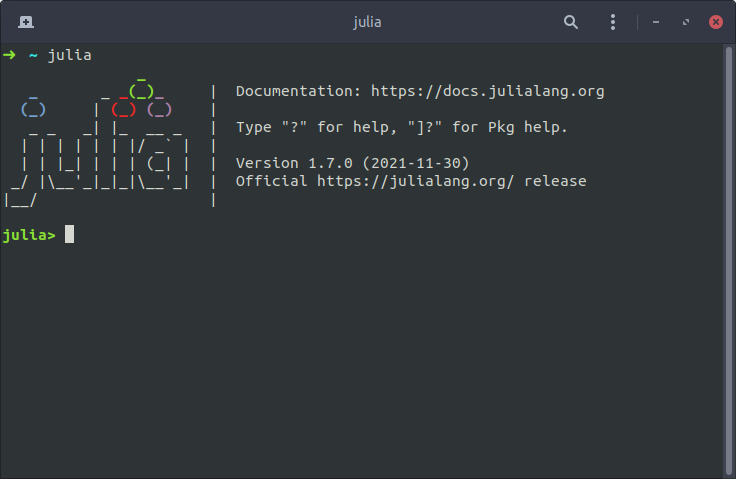
<p>Finally, you can test your installation by re-opening a terminal and typing:</p>
<div class="language-plaintext highlighter-rouge"><div class="highlight"><pre class="highlight"><code>julia
</code></pre></div></div>

<div style="text-align: center;"><img class="mac-style-drop-shadow" style="width: 80%;" src="https://ferrolho.github.io/images/julia/julia-repl.png" alt="Julia REPL" /></div>

<h1 id="whats-next">What’s next?</h1>

<p>If you are here, chances are that you are just starting to learn Julia. I hope you enjoy the programming language as much as I have enjoyed it in the last couple of months.</p>

<p>If you are going to be using Julia in the context of <em>optimization</em>, check out this simple example: <a href="/optimization/julia/solving-a-geometry-quiz-with-jump/">Solving a Geometry Quiz with JuMP</a>. As a more complex example, you can use Julia to optimize the <a href="/optimal%20control/trajectory%20optimization/space-shuttle-reentry-trajectory/">Space Shuttle Reentry Trajectory</a>. Finally, for a real-world application of Julia, check out <a href="https://ferrolho.github.io/research/publications/ferrolho2020optimizing/">my research</a> in robotics.</p>

<style>
    .embed-container {
        position: relative;
        padding-bottom: 56.25%;
        height: 0;
        overflow: hidden;
        max-width: 100%;
        margin-bottom: 15px;
    }

    .embed-container iframe,
    .embed-container object,
    .embed-container embed {
        position: absolute;
        top: 0;
        left: 0;
        width: 100%;
        height: 100%;
    }
</style>

<div class="embed-container">
    <iframe width="560" height="315" src="https://www.youtube.com/embed/pV4s7hzUgjc" frameborder="0" allow="accelerometer; autoplay; encrypted-media; gyroscope; picture-in-picture" allowfullscreen=""></iframe>
</div>]]></content><author><name>Henrique Ferrolho</name><email>henrique.ferrolho@gmail.com</email></author><category term="Julia" /><category term="Linux" /><category term="Ubuntu" /></entry><entry><title type="html">Building a Self-Balancing Robot</title><link href="https://ferrolho.github.io/robotics/building-a-self-balancing-robot/" rel="alternate" type="text/html" title="Building a Self-Balancing Robot" /><published>2018-04-22T16:33:00+01:00</published><updated>2018-04-22T16:33:00+01:00</updated><id>https://ferrolho.github.io/robotics/building-a-self-balancing-robot</id><content type="html" xml:base="https://ferrolho.github.io/robotics/building-a-self-balancing-robot/"><![CDATA[<p><strong>Foreword.</strong> I had been wanting to build a small robotics project on my own free time for a while.
I figured that putting together a self-balancing robot would be a good first try.</p>

<p>Since my background is <em>Software Engineering</em> I did not want to push my first attempt too much, especially because my understanding of Electronics Engineering is <em>very limited</em>…
Therefore, I decided to play it safe and look for an already existing kit of some sort.</p>

<p>Turns out that even though I got a kit, I still had to do some minor tweaking. It would have taken me much longer to get everything to work by trial and error on my own — as in, a lot more fried boards — and for that reason I am very grateful for the help of my friends and colleagues <em><a href="https://www.linkedin.com/in/fran%C3%A7ois-heremans-863692a1/">François Heremans</a></em> and <em><a href="http://www.wolfgangmerkt.com/">Wolfgang Merkt</a></em>.</p>

<h3 id="contents">Contents</h3>

<ol>
  <li><a href="#the-balanbot-kit">The Balanbot Kit</a></li>
  <li><a href="#powering-the-robot">Powering the Robot</a></li>
  <li><a href="#building-the-robot">Building the Robot</a></li>
  <li><a href="#fixing-the-robot">Fixing the Robot</a></li>
  <li><a href="#individual-components">Individual Components</a></li>
</ol>

<h3 id="the-balanbot-kit">The Balanbot Kit</h3>

<p>I started by watching some videos on <a href="https://www.youtube.com/watch?v=0xegrfraf4k">YouTube</a> of people that had already built their own prototypes.
I ended up finding a seemingly-robust self-balancing robot called <a href="http://makerstudio.cc/index.php?main_page=product_info&amp;cPath=2&amp;products_id=370">Balanbot</a> created by a small Chinese company called <a href="http://makerstudio.cc/">Maker Studio</a>.
Here is their <a href="https://www.youtube.com/watch?v=kU47ZJcg330">promotional video</a>.</p>

<p>I made up my mind and ordered the kit from their website for <em>$149.00</em>.
I placed my order on <em>March 29</em> and the parcel arrived safe and sound on <em>April 16</em>, which is more than reasonable for a standard shipment from China to the UK.</p>

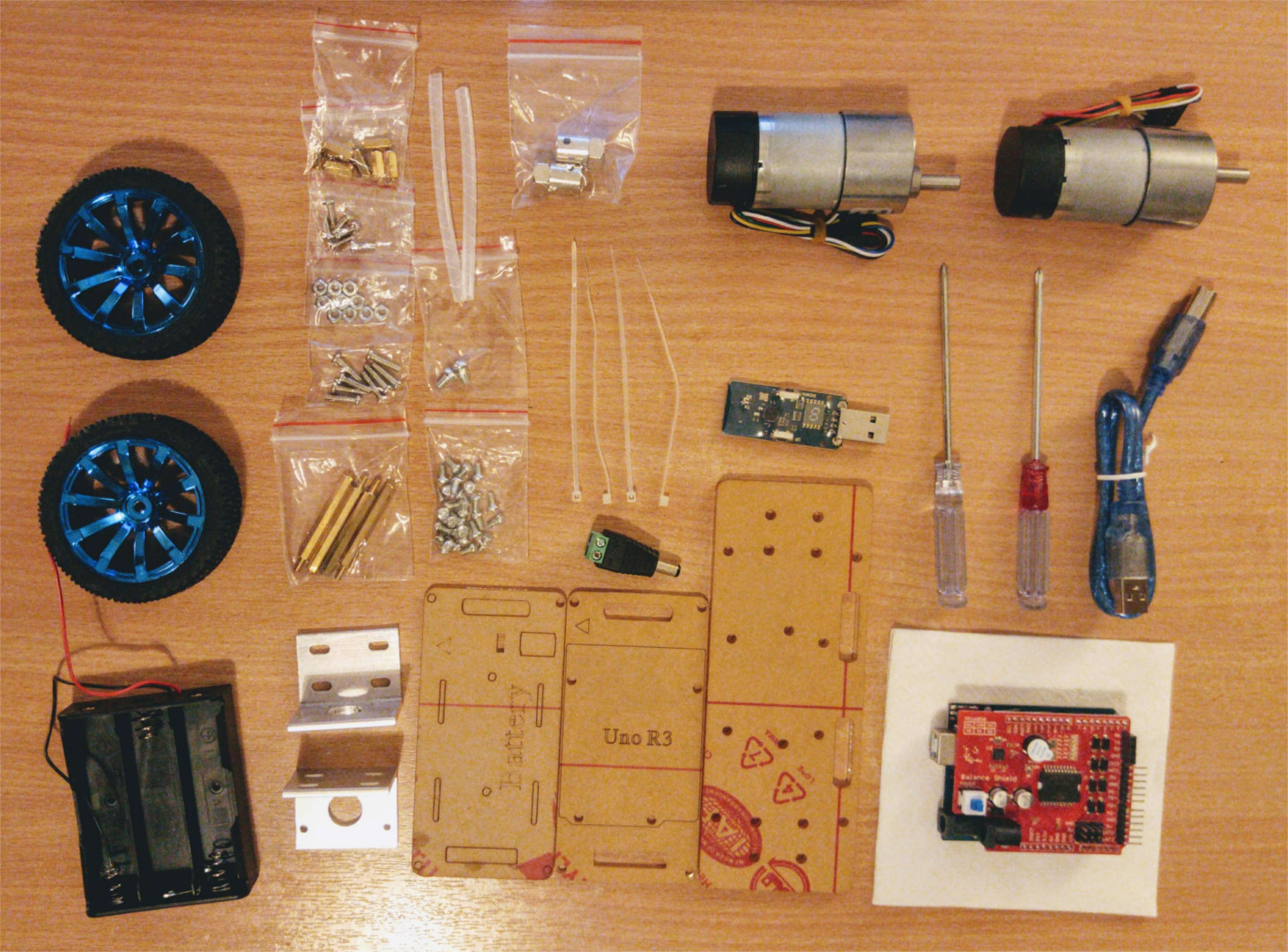
<figure>
  <img src="https://ferrolho.github.io/images/balanbot/kit-contents.jpg" alt="The contents of the kit" />
  <figcaption><strong>Figure 1.</strong> The contents of the Balanbot kit.</figcaption>
</figure>

<p>The package contained everything required to build the robot and even brought some extra parts — which is very thoughtful given that there is nothing more annoying than buying a kit and getting stuck because a bolt has gone missing.</p>

<p>I was quite happy with the shipped <a href="http://makerstudio.cc/index.php?main_page=product_info&amp;cPath=6&amp;products_id=373">FlyBlue + FlyDongle</a>: a BLE wireless Arduino-compatible board, which allows for wireless sketch uploads.
The way it works is very simple: power the Arduino, plug the <em>FlyDongle</em> to the computer, and <em>voila</em>: the connection is established.</p>

<p>I do have some minor <em>“complaints”</em>, however:</p>

<ul>
  <li>
    <p>One of the copper spacers was a bit damaged on one of its ends, making it impossible to drive the matching screw through it — and from all the extra parts shipped, copper spacers were not amongst them;</p>
  </li>
  <li>
    <p>The <em>Balance Shield</em> power button cap was missing;</p>
  </li>
  <li>
    <p>The online product page is quite deceiving and had me assuming the robot would come with a LiPo battery — after all, every picture and promotional video of the robot features it drawing power from a LiPo battery.</p>
  </li>
</ul>

<p>The package did feature a battery case for <a href="https://www.amazon.co.uk/dp/B01HWNJXGY/ref=twister_B01NBXI4NQ?_encoding=UTF8&amp;psc=1">3x 18650 batteries</a> — which can be bought from Samsung on Amazon for <em>£16.99</em>.
I would expect that, for the kit’s <em>$149.00</em> price tag, the batteries would have been included, though…</p>

<h3 id="powering-the-robot">Powering the Robot</h3>

<p>As a workaround for the missing batteries, I headed over to <a href="https://hobbyking.com/">HobbyKing</a> and ordered
a <a href="https://hobbyking.com/en_us/zippy-compact-2200mah-3s-25c-lipo-pack.html">3-cell Zippy 2200mAh battery</a>,
a <a href="https://hobbyking.com/en_us/turnigy-e3-compact-2s-3s-lipo-charger-100-240v-uk-plug.html">Turnigy LiPo battery charger</a>,
a <a href="https://hobbyking.com/en_us/hobbykingtm-lipo-voltage-checker-2s-8s.html">voltage checker</a>, and
some <a href="https://hobbyking.com/en_us/nylon-xt60-connectors-male-female-5-pairs-genuine.html">XT60 connectors</a>.</p>

<p>The HobbyKing parcel arrived in less than <em>48-hours</em> since I ensured I was getting the items from the UK warehouse.</p>

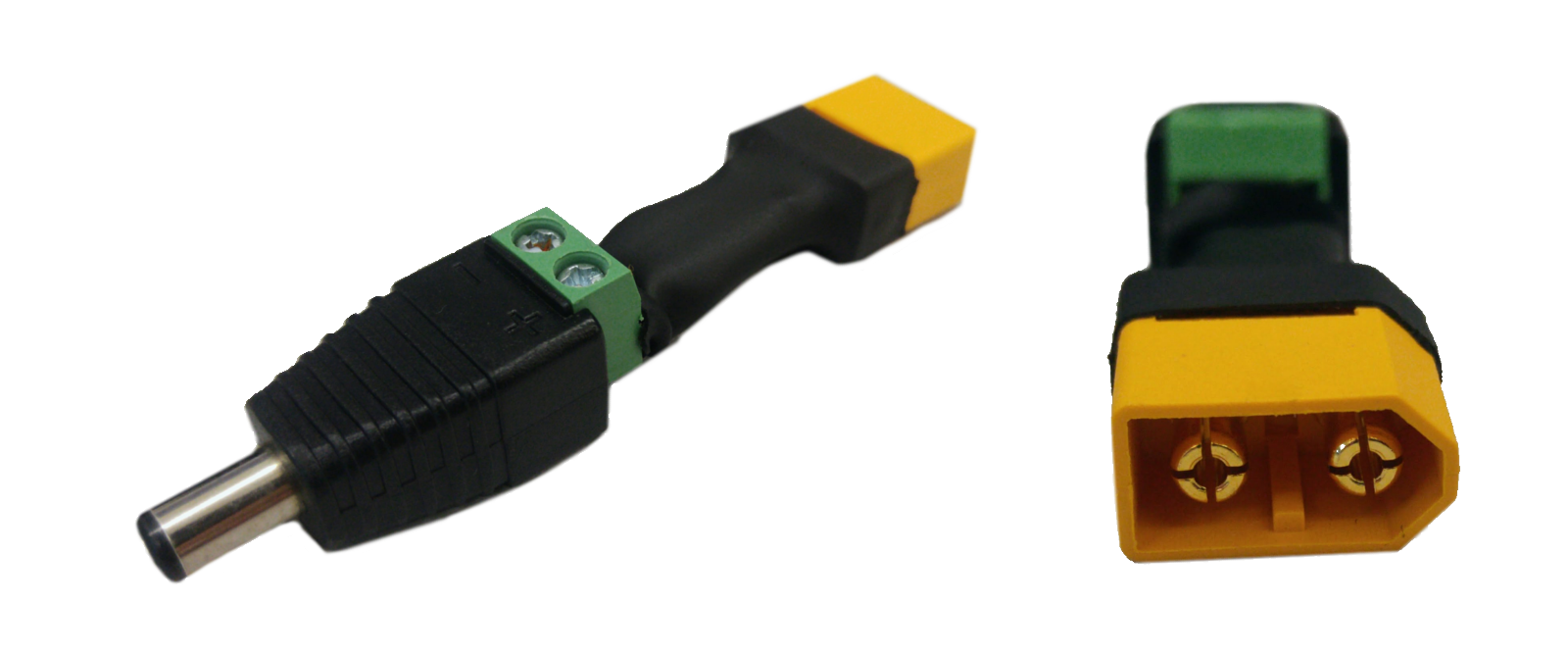
<p>My next course of action was to make an adapter in order to connect the battery to the board.
I used my very rudimentary soldering skills to solder the DC connector shipped with the kit to some wires, which in turn I soldered to one of the male XT60 connectors I got from HobbyKing.
Finally, I applied a heat shrink tube over the adapter.</p>

<figure>
  <img src="https://ferrolho.github.io/images/balanbot/battery-adapter.png" alt="My custom-made battery adapter" />
  <figcaption><strong>Figure 2.</strong> My custom-made adapter, XT60 male to DC connector.</figcaption>
</figure>

<h3 id="building-the-robot">Building the Robot</h3>

<p>At this point I had all the key ingredients ready and I could finally start to build the robot.
The instructions to build it are not very easy to find, but <a href="http://makerstudio.cc/products/Balanbot/v1.1/Balanbot%20Assembly%20Instructions.pdf">here</a> they are.</p>

<p>Rather than screwing the battery case shipped with the kit, I used the zip ties to secure my LiPo battery in place.</p>

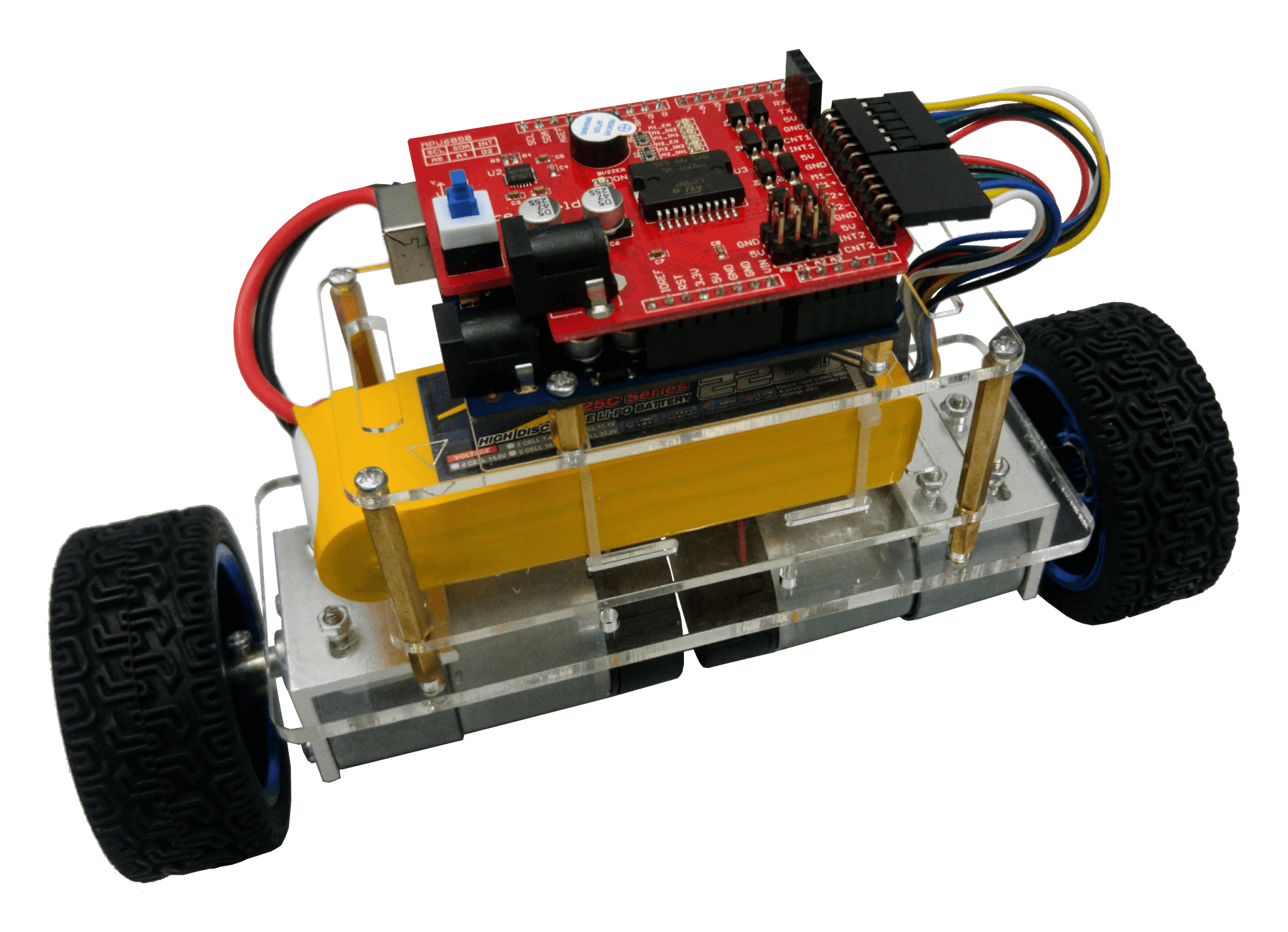
<figure>
  <img src="https://ferrolho.github.io/images/balanbot/balanbot.png" alt="My Balanbot" />
  <figcaption><strong>Figure 3.</strong> My own Balanbot after assembly.</figcaption>
</figure>

<p>After having finished assembling the robot, I fired up <a href="https://www.arduino.cc/en/Guide/Linux">Arduino IDE</a> and deployed the code supplied by the Balanbot makers (available <a href="http://makerstudio.cc/products/Balanbot/v1.1/Balanbot_v1_1.zip">here</a>).
It was a “success”. Well… at least for 20 seconds!
Turns out the robot stopped working right after those glorifying seconds of self-balancing.</p>

<p>I think I actually fried the <a href="https://en.wikipedia.org/wiki/ATmega328">ATmega328P</a> of the FlyBlue board — the Arduino-compatible board shipped in the Balanbot kit.
I might have supplied a higher voltage to the board than it could handle. <em>My bad…</em></p>

<p>I ended up buying <a href="https://www.banggood.com/Wholesale-Arduino-Compatible-R3-UNO-ATmega16U2-AVR-USB-Board-p-68537.html?cur_warehouse=UK">yet another Arduino UNO R3</a>.</p>

<h3 id="fixing-the-robot">Fixing the Robot</h3>

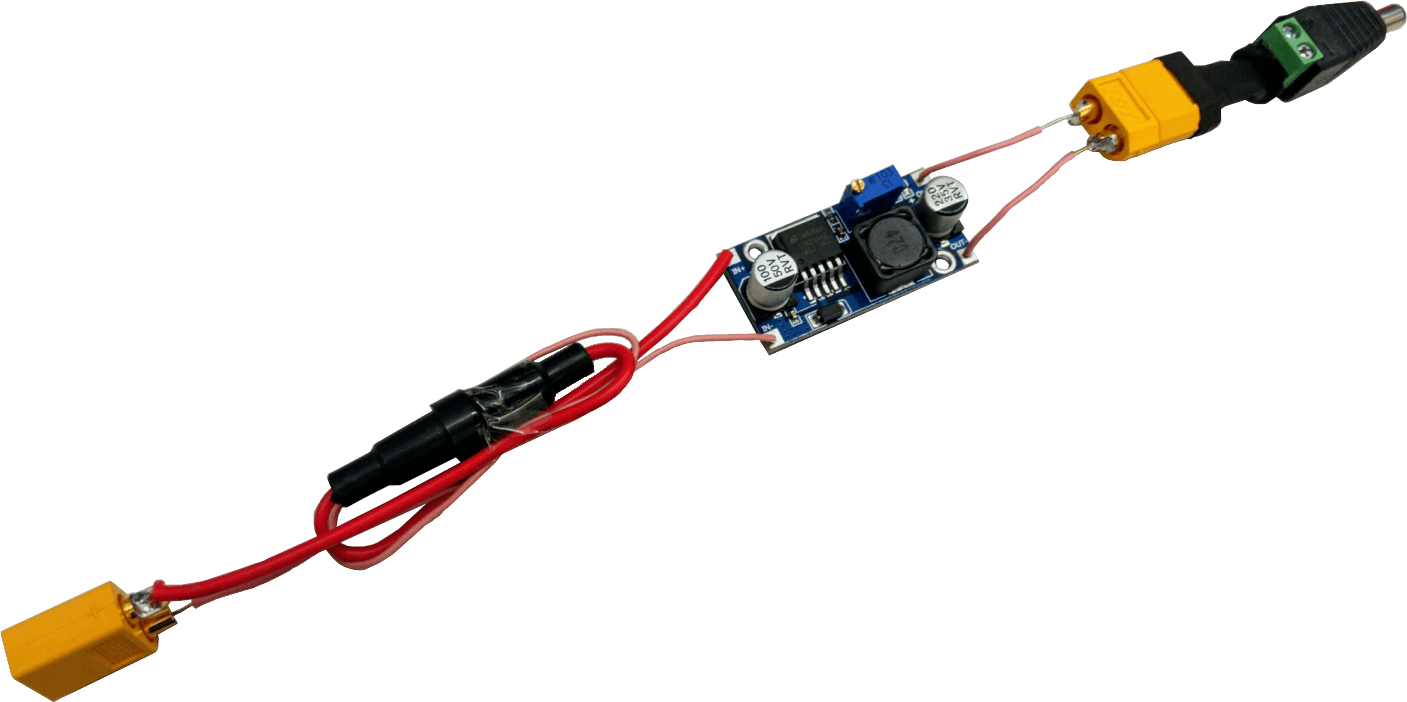
<p>Clearly, there was a problem on my power supply, which burnt my previous Arduino board.
In order to not repeat the same unfortunate situation, I had to make a more robust adapter to connect the battery to the Arduino board.
The input voltage of the new board was between <code class="language-plaintext highlighter-rouge">5V ~ 9V</code>.</p>

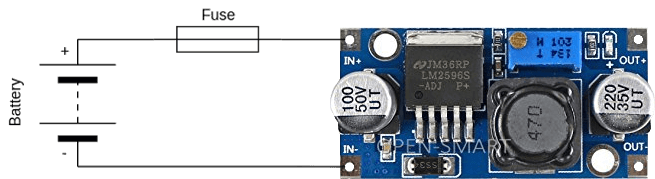
<p>As such, I ended up modifying the battery adapter according to the diagram shown in <em>Figure 4</em>:</p>
<ul>
  <li>I added a <a href="https://en.wikipedia.org/wiki/Buck_converter">buck converter</a> to reduce the voltage coming from the battery to <code class="language-plaintext highlighter-rouge">8.5V</code>;</li>
  <li>I also added a fuse to protect the electronics from any current spike.</li>
</ul>

<p>The final result of the adapter is shown in <em>Figure 5</em>.</p>

<figure>
  <img src="https://ferrolho.github.io/images/balanbot/adapter-v2-diagram.png" alt="Adapter diagram v2" />
  <figcaption><strong>Figure 4.</strong> Diagram of the 2nd version of the adapter.</figcaption>
</figure>

<figure>
  <img src="https://ferrolho.github.io/images/balanbot/adapter-v2.png" alt="Adapter v2" />
  <figcaption><strong>Figure 5.</strong> The 2nd version of the adapter.</figcaption>
</figure>

<p>With these last tweaks I got the robot to operate once again and I have not had any further issues with it so far.</p>

<h3 id="individual-components">Individual Components</h3>

<p>To end this blog post, I have put together a list of the individual components required to build the robot.
The items are listed from <em>lowest</em> to <em>highest</em> price.
As expected, the total price of the robot is actually less than the cost of the Balanbot kit.</p>

<p>I did not include structural elements of the robot (such as acrylic boards, screws, bolts) because I assume it will be easy for you to get a hold of those.
And maybe you even have some of the items I listed lying around somewhere!</p>

<table>
  <thead>
    <tr>
      <th style="text-align: right">Price (£)</th>
      <th style="text-align: left">Item</th>
    </tr>
  </thead>
  <tbody>
    <tr>
      <td style="text-align: right">0.99</td>
      <td style="text-align: left"><a href="https://www.ebay.co.uk/itm/321881759727">12V DC Male Connector</a></td>
    </tr>
    <tr>
      <td style="text-align: right">1.69</td>
      <td style="text-align: left"><a href="https://www.ebay.co.uk/itm/262404465765">5pcs In Line 5x20mm Glass Fuse Holder</a></td>
    </tr>
    <tr>
      <td style="text-align: right">1.95</td>
      <td style="text-align: left"><a href="https://www.ebay.co.uk/itm/263022838841">LM2596 DC-DC Buck Converter</a></td>
    </tr>
    <tr>
      <td style="text-align: right">2.23</td>
      <td style="text-align: left"><a href="https://hobbyking.com/en_us/hobbykingtm-lipo-voltage-checker-2s-8s.html">LiPo Voltage Checker</a></td>
    </tr>
    <tr>
      <td style="text-align: right">2.30</td>
      <td style="text-align: left"><a href="https://www.ebay.co.uk/itm/122942657013">100pcs 5x20mm Glass Fuses Kit</a></td>
    </tr>
    <tr>
      <td style="text-align: right">3.01</td>
      <td style="text-align: left"><a href="https://hobbyking.com/en_us/nylon-xt60-connectors-male-female-5-pairs-genuine.html">XT60 Male/Female Connectors</a></td>
    </tr>
    <tr>
      <td style="text-align: right">6.09</td>
      <td style="text-align: left"><a href="https://www.banggood.com/Wholesale-Arduino-Compatible-R3-UNO-ATmega16U2-AVR-USB-Board-p-68537.html">Arduino UNO R3</a></td>
    </tr>
    <tr>
      <td style="text-align: right">9.33</td>
      <td style="text-align: left"><a href="https://hobbyking.com/en_us/zippy-compact-2200mah-3s-25c-lipo-pack.html">3-Cell Zippy 2200mAh Battery</a></td>
    </tr>
    <tr>
      <td style="text-align: right">10.12</td>
      <td style="text-align: left"><a href="https://hobbyking.com/en_us/turnigy-e3-compact-2s-3s-lipo-charger-100-240v-uk-plug.html">Turnigy LiPo Battery Charger</a></td>
    </tr>
    <tr>
      <td style="text-align: right">11.79</td>
      <td style="text-align: left"><a href="https://www.ebay.co.uk/itm/122584392066">Balance Motor Driver Shield</a></td>
    </tr>
    <tr>
      <td style="text-align: right">15.29</td>
      <td style="text-align: left"><a href="https://www.ebay.co.uk/itm/192432619100">2x DC Gear Motors and Wheels</a></td>
    </tr>
    <tr>
      <td style="text-align: right"><strong>64.79</strong></td>
      <td style="text-align: left"><strong>Total</strong></td>
    </tr>
  </tbody>
</table>

<blockquote>
  <p><strong>Disclaimer:</strong>
The prices in the table above might have changed since the publishing of this post.</p>
</blockquote>]]></content><author><name>Henrique Ferrolho</name><email>henrique.ferrolho@gmail.com</email></author><category term="Robotics" /></entry><entry><title type="html">Hello, World!</title><link href="https://ferrolho.github.io/general/hello-world/" rel="alternate" type="text/html" title="Hello, World!" /><published>2018-04-01T00:00:00+01:00</published><updated>2018-04-01T00:00:00+01:00</updated><id>https://ferrolho.github.io/general/hello-world</id><content type="html" xml:base="https://ferrolho.github.io/general/hello-world/"><![CDATA[<p><a href="https://en.wikipedia.org/wiki/%22Hello,_World!%22_program">Hello, World!</a></p>

<p>I will keep this short and simple.</p>

<p>I used to have a <em>somewhat-technical</em> blog hosted at <a href="https://difusal.blogspot.co.uk/">https://difusal.blogspot.co.uk/</a>.</p>

<p>I have decided to revive my lost blogging activity here — since I prefer <a href="https://pages.github.com/">GitHub Pages</a> — and now.</p>]]></content><author><name>Henrique Ferrolho</name><email>henrique.ferrolho@gmail.com</email></author><category term="General" /></entry><entry><title type="html">Blog Post number 4</title><link href="https://ferrolho.github.io/posts/2012/08/blog-post-4/" rel="alternate" type="text/html" title="Blog Post number 4" /><published>2015-08-14T00:00:00+01:00</published><updated>2015-08-14T00:00:00+01:00</updated><id>https://ferrolho.github.io/posts/2012/08/blog-post-4</id><content type="html" xml:base="https://ferrolho.github.io/posts/2012/08/blog-post-4/"><![CDATA[<p>This is a sample blog post. Lorem ipsum I can’t remember the rest of lorem ipsum and don’t have an internet connection right now. Testing testing testing this blog post. Blog posts are cool.</p>

<h1 id="headings-are-cool">Headings are cool</h1>

<h1 id="you-can-have-many-headings">You can have many headings</h1>

<h2 id="arent-headings-cool">Aren’t headings cool?</h2>]]></content><author><name>Henrique Ferrolho</name><email>henrique.ferrolho@gmail.com</email></author><category term="cool posts" /><category term="category1" /><category term="category2" /><summary type="html"><![CDATA[This is a sample blog post. Lorem ipsum I can’t remember the rest of lorem ipsum and don’t have an internet connection right now. Testing testing testing this blog post. Blog posts are cool.]]></summary></entry><entry><title type="html">Blog Post number 3</title><link href="https://ferrolho.github.io/posts/2014/08/blog-post-3/" rel="alternate" type="text/html" title="Blog Post number 3" /><published>2014-08-14T00:00:00+01:00</published><updated>2014-08-14T00:00:00+01:00</updated><id>https://ferrolho.github.io/posts/2014/08/blog-post-3</id><content type="html" xml:base="https://ferrolho.github.io/posts/2014/08/blog-post-3/"><![CDATA[<p>This is a sample blog post. Lorem ipsum I can’t remember the rest of lorem ipsum and don’t have an internet connection right now. Testing testing testing this blog post. Blog posts are cool.</p>

<h1 id="headings-are-cool">Headings are cool</h1>

<h1 id="you-can-have-many-headings">You can have many headings</h1>

<h2 id="arent-headings-cool">Aren’t headings cool?</h2>]]></content><author><name>Henrique Ferrolho</name><email>henrique.ferrolho@gmail.com</email></author><category term="cool posts" /><category term="category1" /><category term="category2" /><summary type="html"><![CDATA[This is a sample blog post. Lorem ipsum I can’t remember the rest of lorem ipsum and don’t have an internet connection right now. Testing testing testing this blog post. Blog posts are cool.]]></summary></entry><entry><title type="html">Blog Post number 2</title><link href="https://ferrolho.github.io/posts/2013/08/blog-post-2/" rel="alternate" type="text/html" title="Blog Post number 2" /><published>2013-08-14T00:00:00+01:00</published><updated>2013-08-14T00:00:00+01:00</updated><id>https://ferrolho.github.io/posts/2013/08/blog-post-2</id><content type="html" xml:base="https://ferrolho.github.io/posts/2013/08/blog-post-2/"><![CDATA[<p>This is a sample blog post. Lorem ipsum I can’t remember the rest of lorem ipsum and don’t have an internet connection right now. Testing testing testing this blog post. Blog posts are cool.</p>

<h1 id="headings-are-cool">Headings are cool</h1>

<h1 id="you-can-have-many-headings">You can have many headings</h1>

<h2 id="arent-headings-cool">Aren’t headings cool?</h2>]]></content><author><name>Henrique Ferrolho</name><email>henrique.ferrolho@gmail.com</email></author><category term="cool posts" /><category term="category1" /><category term="category2" /><summary type="html"><![CDATA[This is a sample blog post. Lorem ipsum I can’t remember the rest of lorem ipsum and don’t have an internet connection right now. Testing testing testing this blog post. Blog posts are cool.]]></summary></entry></feed>