| Manufacturer | 3M |
|---|---|
| Brand | 3M |
| Item Weight | 10.55 pounds |
| Product Dimensions | 12.7 x 28 x 170.17 inches |
| Item model number | AKT90LE |
| Is Discontinued By Manufacturer | No |
| Color | Black |
| Shape | L-Shape |
| Material Type | Wood |
| Total Recycled Content Percentage | 70 |
| Number of Items | 1 |
| Size | 23-Inch |
| Ink Color | Black |
| Manufacturer Part Number | AKT90LE |
Customers who viewed this item also viewed
Add to your order
-
Coverage for accidental damage including drops, spills, and broken parts, as well as breakdowns (plans vary) -
24/7 support when you need it -
Quick, easy, and frustration-free claims
- No Additional Cost: You pay nothing for repairs – parts, labor, and shipping included.
- Coverage: Plan starts on the date of purchase. Malfunctions covered after the manufacturer's warranty. Power surges covered from day one. Real experts are available 24/7 to help with set-up, connectivity issues, troubleshooting and much more.
- Easy Claims Process: File a claim anytime online or by phone. Most claims approved within minutes. If we can’t repair it, we’ll send you an Amazon e-gift card for the purchase price of your covered product or replace it.
- Product Eligibility: Plan must be purchased with a product or within 30 days of the product purchase. Pre-existing conditions are not covered.
- Terms & Details: More information about this protection plan is available within the “Product guides and documents” section. Simply click “User Guide” for more info. Terms & Conditions will be available in Your Orders on Amazon. Asurion will also email your plan confirmation with Terms & Conditions to the address associated with your Amazon account within 24 hours of purchase.
- No Additional Cost: You pay nothing for repairs – parts, labor, and shipping included.
- Coverage: Plan starts on the date of purchase. Malfunctions covered after the manufacturer's warranty. Power surges covered from day one. Real experts are available 24/7 to help with set-up, connectivity issues, troubleshooting and much more.
- Easy Claims Process: File a claim anytime online or by phone. Most claims approved within minutes. If we can’t repair it, we’ll send you an Amazon e-gift card for the purchase price of your covered product or replace it.
- Product Eligibility: Plan must be purchased with a product or within 30 days of the product purchase. Pre-existing conditions are not covered.
- Terms & Details: More information about this protection plan is available within the “Product guides and documents” section. Simply click “User Guide” for more info. Terms & Conditions will be available in Your Orders on Amazon. Asurion will also email your plan confirmation with Terms & Conditions to the address associated with your Amazon account within 24 hours of purchase.
- BEST VALUE: Protect all your eligible Amazon purchases including: tech, tools, appliances, furniture and more. All for one low monthly price.
- ONE SIMPLE PROTECTION PLAN: Covers malfunctions and failures for eligible Amazon purchases, plus drops or spills for portable items. Protection begins immediately for eligible purchases from the past 90 days, plus all eligible future purchases (products used commercially are excluded).
- CYBERSECURITY INCLUDED: Trusted digital security that keeps your devices and data safer. Includes scam detection for emails and texts ($89.99 in annual savings).
- QUICK AND EASY CLAIMS: File in minutes at Asurion.com/amazon for fast repair or reimbursement - up to the purchase price.
- NO HIDDEN FEES. CANCEL ANYTIME. You’re covered for up to $5,000 in total claims per 12-month period. Your plan renews monthly until canceled (coupons applied at checkout do not renew monthly).
Add to your order
-
Coverage for accidental damage including drops, spills, and broken parts, as well as breakdowns (plans vary) -
24/7 support when you need it -
Quick, easy, and frustration-free claims
Product Protection by Asurion, LLC
- No Additional Cost: You pay nothing for repairs – parts, labor, and shipping included.
- Coverage: Plan starts on the date of purchase. Malfunctions covered after the manufacturer's warranty. Power surges covered from day one. Real experts are available 24/7 to help with set-up, connectivity issues, troubleshooting and much more.
- Easy Claims Process: File a claim anytime online or by phone. Most claims approved within minutes. If we can’t repair it, we’ll send you an Amazon e-gift card for the purchase price of your covered product or replace it.
- Product Eligibility: Plan must be purchased with a product or within 30 days of the product purchase. Pre-existing conditions are not covered.
- Terms & Details: More information about this protection plan is available within the “Product guides and documents” section. Simply click “User Guide” for more info. Terms & Conditions will be available in Your Orders on Amazon. Asurion will also email your plan confirmation with Terms & Conditions to the address associated with your Amazon account within 24 hours of purchase.
Product Protection by Asurion, LLC
- No Additional Cost: You pay nothing for repairs – parts, labor, and shipping included.
- Coverage: Plan starts on the date of purchase. Malfunctions covered after the manufacturer's warranty. Power surges covered from day one. Real experts are available 24/7 to help with set-up, connectivity issues, troubleshooting and much more.
- Easy Claims Process: File a claim anytime online or by phone. Most claims approved within minutes. If we can’t repair it, we’ll send you an Amazon e-gift card for the purchase price of your covered product or replace it.
- Product Eligibility: Plan must be purchased with a product or within 30 days of the product purchase. Pre-existing conditions are not covered.
- Terms & Details: More information about this protection plan is available within the “Product guides and documents” section. Simply click “User Guide” for more info. Terms & Conditions will be available in Your Orders on Amazon. Asurion will also email your plan confirmation with Terms & Conditions to the address associated with your Amazon account within 24 hours of purchase.
Product Protection by Asurion, LLC
- BEST VALUE: Protect all your eligible Amazon purchases including: tech, tools, appliances, furniture and more. All for one low monthly price.
- ONE SIMPLE PROTECTION PLAN: Covers malfunctions and failures for eligible Amazon purchases, plus drops or spills for portable items. Protection begins immediately for eligible purchases from the past 90 days, plus all eligible future purchases (products used commercially are excluded).
- CYBERSECURITY INCLUDED: Trusted digital security that keeps your devices and data safer. Includes scam detection for emails and texts ($89.99 in annual savings).
- QUICK AND EASY CLAIMS: File in minutes at Asurion.com/amazon for fast repair or reimbursement - up to the purchase price.
- NO HIDDEN FEES. CANCEL ANYTIME. You’re covered for up to $5,000 in total claims per 12-month period. Your plan renews monthly until canceled (coupons applied at checkout do not renew monthly).
Product Protection by Asurion, LLC
- No Additional Cost: You pay nothing for repairs – parts, labor, and shipping included.
- Coverage: Plan starts on the date of purchase. Malfunctions covered after the manufacturer's warranty. Power surges covered from day one. Real experts are available 24/7 to help with set-up, connectivity issues, troubleshooting and much more.
- Easy Claims Process: File a claim anytime online or by phone. Most claims approved within minutes. If we can’t repair it, we’ll send you an Amazon e-gift card for the purchase price of your covered product or replace it.
- Product Eligibility: Plan must be purchased with a product or within 30 days of the product purchase. Pre-existing conditions are not covered.
- Terms & Details: More information about this protection plan is available within the “Product guides and documents” section. Simply click “User Guide” for more info. Terms & Conditions will be available in Your Orders on Amazon. Asurion will also email your plan confirmation with Terms & Conditions to the address associated with your Amazon account within 24 hours of purchase.
Buy New
$255.43$255.43
You will be contacted by carrier to arrange a specific date.
FREE scheduled delivery May 5 - 6
Advertisement
Advertisement
Ships from: Office Depot LLC Sold by: Office Depot LLC
Used - Like New
$169.05$169.05
FREE delivery Tuesday, May 5
Advertisement
Advertisement
Ships from: Amazon Sold by: Amazon Resale
Return this item for free
We offer easy, convenient returns with at least one free return option: no shipping charges. All returns must comply with our returns policy.
Learn more about free returns.- Go to your orders and start the return
- Select your preferred free shipping option
- Drop off and leave!
Sorry, there was a problem.
There was an error retrieving your Wish Lists. Please try again.Sorry, there was a problem.
List unavailable.3M Keyboard Tray, Adjustable Height and Tilt, Includes Wrist Rest and Mouse Pad, Swivels Side to Side, Stores Under Desk, 23 in Track, Black (AKT90LE)
Learn more
Learn more
Return this item for free
We offer easy, convenient returns with at least one free return option: no shipping charges. All returns must comply with our returns policy.
Learn more about free returns.- Go to your orders and start the return
- Select your preferred free shipping option
- Drop off and leave!
Purchase options and add-ons
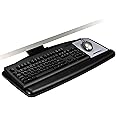
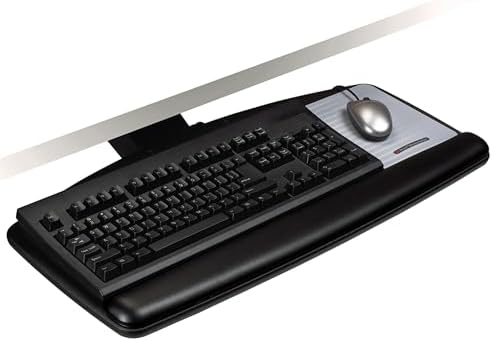
- Just lift platform to adjust height plus 4.5 /-6 from mounting surface and tilt plus 10 /-15 to get to comfortable working position
- Sturdy all-in-one wood platform minimizes bounce while typing and mousing
- Includes easy to clean leatherette covered gel wrist rest with Precise Mouse Pad that positions right or left
- Platform swivels left and right 360 and stows completely under the desk when not is use
- Lifetime warranty on keyboard arm, five years on keyboard platform, and one year on gel wrist rests
Frequently bought together

More from frequently bought brands
From the manufacturer
Product Description
3M Adjustable Keyboard Trays help place your keyboard and mouse at proper level to increase comfort and productivity. AKT90LE has an easy adjust arm – just tilt platform, adjust and release to lock in place. Adjusts height to 4 inch above mounting surface and 6 inch below mounting surface. Tilt is adjusted by dialing tilt knob to desired angle. Standard all-in-one platform with wooden construction minimizes bouncing. Includes all-in-one leatherette gel wrist rest and Precise Mouse Pad that can be placed on right or left of keyboard.
From the Manufacturer
The 3M Easy-Adjust Keyboard Tray offers a customizable solution for maximum flexibility and comfort at your workstation. Mounted under your desk to save space, this keyboard tray provides a sturdy keyboard surface on which you can work with ease. The Easy-Adjust Keyboard Tray works with corner and straight workstations and allows you to adjust the tilt and height of your keyboard position to achieve optimal ergonomic benefits. The included all-in-one Standard Platform offers a Precise mousing surface with battery saving design, a wrist rest with 3M Gel Technology and an all-wood construction that minimizes instability as you type.
3M Easy Adjust Keyboard Tray (AKT90LE)
Create a Customized Workstation
An ergonomic workstation offers the benefit of improved circulation and the reduction of repetitive stress injuries. With the Easy-Adjust Keyboard Tray, you'll have the flexibility to customize your workstation for a more ergonomic work area. With a 23 inch track length, the Easy-Adjust Keyboard Tray is suitable for corner desks or straight desks.
A Wide Range of Easy Adjustability
By adjusting the height of the keyboard without changing the tilt angle, and vice versa, you'll enjoy optimal ergonomic benefits.
Standard All-in-One Platform
The Standard Platform's wooden construction reduces the amount of 'bounciness' as you work. By minimizing this instability, you'll increase workplace productivity and reduce injury caused by poor ergonomics. The Easy-Adjust Keyboard Tray also features a Precise mousing surface that can be placed on the left or right side of your keyboard.
What's in the Box
- KP100LE Standard Platform
- AKT90LE Easy-Adjust arm
- Hardware
- Instructions
Includes Precise mousing surface with battery saving design
Lever-free lift and lock adjustment for height
Tilt adjusts with knob. Includes Height and Tilt Indicators.
Lever-free lift and lock adjustment for height. Tilt adjusts with knob
AKT170LE
|
AKT90LE
|
AKT70LE
|
AKT60LE and AKT65LE
|
|
|---|---|---|---|---|
|
Add to Cart
|
Add to Cart
|
|||
| Customer Reviews |
3.9 out of 5 stars 92
|
4.2 out of 5 stars 255
|
4.2 out of 5 stars 56
|
— |
| Price | $340.99$340.99 | $255.43$255.43 | — no data | — no data |
| Adjustable Arm Type | Sit/Stand Easy Adjust | Easy Adjust | Lever Adjust | Knob Adjust |
| Standard Platform | ✓ | ✓ | ✓ | ✓ |
| Track Length | 23" | 23" | 21.75" | 17" |
| Tilt Range Forward/Backward | +10⁰/-15⁰ | +10⁰/-15⁰ | +10⁰/-15⁰ | +15⁰/-15⁰ |
| Height Above Mounting Surface | 10" | 4" | 0.5" | 1.25" |
| Depth Below Mounting Surface | 4" | 6" | 5.5" | 4.5" |
| Height Indicator | ✓ | ✓ | no data | no data |
| Tilt Indicator | ✓ | ✓ | no data | no data |
Product information
Technical Details
Additional Information
| ASIN | B001B0BBTW |
|---|---|
| Customer Reviews |
4.2 out of 5 stars |
| Best Sellers Rank |
|
| Date First Available | August 26, 2008 |
Warranty & Support
Feedback
Product Description
Product Description
3M Adjustable Keyboard Trays help place your keyboard and mouse at proper level to increase comfort and productivity. AKT90LE has an easy adjust arm just tilt platform, adjust and release to lock in place. Adjusts height to 2" above mounting surface and 5.5" below mounting surface. Tilt is adjusted by dialing tilt knob to desired angle. Standard all in one platform with wooden construction minimizes bouncing. Includes all in one leatherette gel wrist rest with antimicrobial product protection and Precise Mouse Pad that can be placed on right or left of keyboard. Lifetime warranty on arm, five years on platform, and one year on gel wrist rests. Contains 70% preconsumer recycled content. Black.
From the Manufacturer
The 3M Easy-Adjust Keyboard Tray offers a customizable solution for maximum flexibility and comfort at your workstation. Mounted under your desk to save space, this keyboard tray provides a sturdy keyboard surface on which you can work with ease. The Easy-Adjust Keyboard Tray works with corner and straight workstations and allows you to adjust the tilt and height of your keyboard position to achieve optimal ergonomic benefits. The included all-in-one Standard Platform offers a Precise mousing surface and an all-wood construction minimizes instability as you type. The 3M Easy-Adjust Keyboard Tray is backed by a five-year warranty.
Create a Customized WorkstationAn ergonomic workstation offers the benefit of improved circulation and the reduction of repetitive stress injuries. With the Easy-Adjust Keyboard Tray, you'll have the flexibility to customize your workstation for a more ergonomic work area. With a 23-inch track length, the Easy-Adjust Keyboard Tray is suitable for corner desks or straight desks with a minimum 23-1/4-inch mounting depth.A Wide Range of Easy Adjustability
By adjusting the height of the keyboard without changing the tilt angle, and vice versa, you'll enjoy optimal ergonomic benefits. The Easy-Adjust Keyboard Tray can easily be raised up to 2 inches above and 5-1/2 inches below the mounting surface. With a forward tilt of 10 degrees and a backward tilt of -15 degrees, the Easy-Adjust Keyboard Tray allows you to keep your wrists in a neutral position.
To adjust the trayÆs position, tilt the platform, adjust, and then release to lock in the height. The tilt is adjusted by dialing the tilt knob to desired angle. The arm includes height and tilt read-outs, which allow you to fine-tune the position.
Standard All-in-One Platform
The Standard Platform's wooden construction reduces the amount of "bounciness" as you work. By minimizing this instability, you'll increase workplace productivity and reduce injury caused by poor ergonomics. The Easy-Adjust Keyboard Tray also features a Precise mousing surface that can be placed on the left or right side of your keyboard. The platform is made with 70% postconsumer recycled content by volume.
What's in the Box
KP100LE Standard Platform, AKT90LE Easy-Adjust arm, hardware, and assembly instructions.
Safety and product resources
Safety documents
What's in the box
Top Brand: 3M
Related products with free delivery on eligible orders
Customer reviews
Customer Reviews, including Product Star Ratings help customers to learn more about the product and decide whether it is the right product for them.
To calculate the overall star rating and percentage breakdown by star, we don’t use a simple average. Instead, our system considers things like how recent a review is and if the reviewer bought the item on Amazon. It also analyzed reviews to verify trustworthiness.
Learn more how customers reviews work on AmazonCustomers say
Generated from the text of customer reviewsSelect to learn more
Reviews with images
Holy smokes Batman, This thing is cool!
Top reviews from the United States
There was a problem filtering reviews. Please reload the page.
- Reviewed in the United States on August 31, 2015Style: Swivel AdjustPattern: TrayVerified PurchaseLets start with shipping. Ordered through prime and it arrived two days later as promised. Noted the weight of the box and knew right away this thing was heavy duty. Unboxed with no complaint on packaging. Reviewed the enclosed instructions and mounting template, realizing that they were not as detailed as I would like (more on this later). Played with the mechanisms and track, this is truly heavy duty material and craftsmanship.
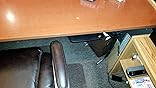
After reading all reviews before ordering, I read several reviews about how far it stuck out if you recessed the track a 1/2" back as it says in mounting instruction. I was cautious about the mounting. I wanted the front of the keyboard tray as close to flush with the front of the desk as possible. I took the mounting template and recessed it 4" back trying to avoid protrusion. after drilling my pilot holes and removing the template, I inserted the screws as directed in the instructions. Now it was time to mount the track. Here's where you can learn from my mistake. I recessed the track too far back making it impossible to mount on the screws that I just installed (DOH!). Word to the wise, use the track as your template. I wound up putting the track as far back as it would go (see picture) which left 2.5" from the front of the track to the front edge of the desk. this wound up being almost perfect. It only protrudes about a 1/4" (see picture). I can also speak to something I heard a lot of reviews complaining about, the track stop installation. I found this to be very straight forward and simple. The entire arm and tray move right or left so you can get it out of the way for this step and for moving it out of the way of your chair (more on this later, see picture). This made installation of the track stop very simple.
After completing the Installation, it was time to take this thing for a spin. I pulled it out the tray and fooled with the pitch of the tray itself. This is done by twisting a large knob and was fairly easy to do. The pitch is shown with a needle style gauge and made adjustment easy to see. next I lifted the tray vertically to get it into a comfortable position over the arms of my office chair (see picture). I was impressed with how easily it lifted into position. I wound up with it right above the arms of the chair, feeling like I was sitting in an adult high chair. it took a minute to get the keyboard into the proper position. If you set the keyboard into the space allotted between the left edge and the smallish provided mouse pad it offsets it a little too much for comfortable typing and I have a very small keyboard. I would be concerned with a large keyboard in regards to placement and comfort. The mouse pad provided ease of movement and performed very well with my cordless mouse. the wrist pad is comfortable and a great addition to alleviate pain from long term keyboard and mouse usage. I sit at my desk 8-10 hours a day.
Here's where you can learn from my frustrations again. Time to slide the keyboard back under the desk from its elevated position. You cant push it down to get it out of the way. I read the instructions and I'm either blind ( I hear the phrase "if it were a snake it would have jumped out and bit you" all the time) or this step was not in the instructions. to get it to lower, you need to lift up on the front edge of the keyboard tray while guiding the assembly down. this is actually a very fluid movement once you know this trick. it slid in with minimal effort.
This is the part about the entire assembly moving left or right that i mentioned earlier. In the fully closed position, I cant push the chair under the desk far enough to "belly up" to the desk. the arms on the chair hit the tray. By swinging it all the way over, it allows you the room to slide under the desk for writing or close up tasks. Very neat feature. I would have been unhappy with this product if it didn't do this.
I've had a lot of different keyboard trays in the past and have never been happy. I was hesitant to spend this kind of money, but it was well worth it. it is very well built, very stable and has adjustability that will meet just about any position that I could need to use it comfortably. Very happy and would purchase it again
5.0 out of 5 starsLets start with shipping. Ordered through prime and it arrived two days later as promised. Noted the weight of the box and knew right away this thing was heavy duty. Unboxed with no complaint on packaging. Reviewed the enclosed instructions and mounting template, realizing that they were not as detailed as I would like (more on this later). Played with the mechanisms and track, this is truly heavy duty material and craftsmanship.Holy smokes Batman, This thing is cool!
Reviewed in the United States on August 31, 2015
After reading all reviews before ordering, I read several reviews about how far it stuck out if you recessed the track a 1/2" back as it says in mounting instruction. I was cautious about the mounting. I wanted the front of the keyboard tray as close to flush with the front of the desk as possible. I took the mounting template and recessed it 4" back trying to avoid protrusion. after drilling my pilot holes and removing the template, I inserted the screws as directed in the instructions. Now it was time to mount the track. Here's where you can learn from my mistake. I recessed the track too far back making it impossible to mount on the screws that I just installed (DOH!). Word to the wise, use the track as your template. I wound up putting the track as far back as it would go (see picture) which left 2.5" from the front of the track to the front edge of the desk. this wound up being almost perfect. It only protrudes about a 1/4" (see picture). I can also speak to something I heard a lot of reviews complaining about, the track stop installation. I found this to be very straight forward and simple. The entire arm and tray move right or left so you can get it out of the way for this step and for moving it out of the way of your chair (more on this later, see picture). This made installation of the track stop very simple.
After completing the Installation, it was time to take this thing for a spin. I pulled it out the tray and fooled with the pitch of the tray itself. This is done by twisting a large knob and was fairly easy to do. The pitch is shown with a needle style gauge and made adjustment easy to see. next I lifted the tray vertically to get it into a comfortable position over the arms of my office chair (see picture). I was impressed with how easily it lifted into position. I wound up with it right above the arms of the chair, feeling like I was sitting in an adult high chair. it took a minute to get the keyboard into the proper position. If you set the keyboard into the space allotted between the left edge and the smallish provided mouse pad it offsets it a little too much for comfortable typing and I have a very small keyboard. I would be concerned with a large keyboard in regards to placement and comfort. The mouse pad provided ease of movement and performed very well with my cordless mouse. the wrist pad is comfortable and a great addition to alleviate pain from long term keyboard and mouse usage. I sit at my desk 8-10 hours a day.
Here's where you can learn from my frustrations again. Time to slide the keyboard back under the desk from its elevated position. You cant push it down to get it out of the way. I read the instructions and I'm either blind ( I hear the phrase "if it were a snake it would have jumped out and bit you" all the time) or this step was not in the instructions. to get it to lower, you need to lift up on the front edge of the keyboard tray while guiding the assembly down. this is actually a very fluid movement once you know this trick. it slid in with minimal effort.
This is the part about the entire assembly moving left or right that i mentioned earlier. In the fully closed position, I cant push the chair under the desk far enough to "belly up" to the desk. the arms on the chair hit the tray. By swinging it all the way over, it allows you the room to slide under the desk for writing or close up tasks. Very neat feature. I would have been unhappy with this product if it didn't do this.
I've had a lot of different keyboard trays in the past and have never been happy. I was hesitant to spend this kind of money, but it was well worth it. it is very well built, very stable and has adjustability that will meet just about any position that I could need to use it comfortably. Very happy and would purchase it again
Images in this review
- Reviewed in the United States on May 20, 2013Style: Swivel AdjustPattern: TrayVerified PurchaseI just installed my new keyboard drawer and I love it but there are a few lessons learned to share.
First the good. It adjusts just as it is described. My mouse now feels like it is gliding over glass. I can lower my keyboard to a more comfortable location than my prior drawer that was built in with my desk and the new gel wrist pad is awesome. Now that I have it in place and working, it is near perfect.
There were a couple of challenges putting this together. One was a simple mistake that would be easy to avoid with better installation instructions and markings on the product. I installed the gel pad and mouse pad on the bottom of the tray and didn't know until I went to bolt the tray to the arm. Thankfully, the adhesives were easy to pull apart and reapply on the right side. A nice improvement would be a sticker or marking on which side to install the gel pad. All I need is a "install pad on other side" sticker on the bottom of the tray and I would have saved about 15 minutes and some panic while I thought about how to peel off and restick the gel pack and mouse pad.
The other issue I ran into is not a 3M problem. The underside of my desk was not flat and I had to run down to the home improvement store and get some 3/4 inch lumber to glue and secure to the bottom of my desk. This gave me a flat surface to drill and mount the rail. I spent total of $2.48 on boards and nails. I already had wood glue and a sander I used to prep the bottom of the desk to glue the boards on which I installed the rail.
When I unpacked the equipment, I had to pull the bracket out of the rail and it is spring loaded. At first I was concerned something was wrong but when it was all installed it worked perfectly. Also, there is grease in the rail that comes out with the bracket. Make sure you keep the packing material and use it to hold the bracket and keep the grease off your clothes, carpet and furniture.
This specific model has a deep (long) rail. The instructions included had a template to set the rail 1/2 inch back and at the very end of the instructions it says to set it back an inch if the long rail is being installed. Ug!. I pulled it off redrilled and moved my rail back.
An interesting thing I discovered is I don't like my keyboard perfectly centered. I moved my keyboard tray a little to the right to get the keys on the keyboard centered in front of me. That is, my rail is not mounted perfectly in the center of the desk, I moved it about 1/2 inch off center. (updated 1 week later: I am completely used to the keyboard location now, I've relocated the monitor as well to a position that is more congruous with the new keyboard tray. Overall, this is a big improvement over what I was using).
Why this isn't perfect: I'm still figuring out how to work with swivel (This is no longer an issue). This tray will swivel left or right but to maintain a perpendicular position to the tray, you need to move with it. I swivel my tray a bit to the right to center the keyboard in from of me but that means I also have to move my chair a little and now my screen is not where it should be for a proper ergonomic setup. If the tray also swiveled at the point it attached to the bracket/arm then this is a non-issue. I would be able to position this keyboard anywhere I want. I don't know that I would pay a whole lot more for an extra swivel point. I am happy to move may screen a little.
One more thing you might to need to be ready for: Putting the keyboard at correct level may mean you cannot push your chair in. Where I like my keyboard now prevents me from pushing in my chair This is one more thing I wasn't thinking about this but I much prefer an ergonomic keyboard tray than tucking in my chair at the end of the day (update: no bothering but I can gently lift the tray such that the chair arm fits under the tray. I am find that moving the tray up and down is easy and natural that moving it up and down has become second nature, I really like this feature).
Update: I've noticed that the tray will tilt slightly once in a while, the mouse will drift down and I see the pointer moving down the screen. Barely an issue. This is easily and quickly adjusted with the tilt adjustment knob
Top reviews from other countries
Nash RReviewed in Canada on October 24, 20205.0 out of 5 stars good, sturdy, stable
Style: Swivel AdjustPattern: TrayVerified Purchasesturdy materials, no sway, no squeak, no give... stays where it's supposed to. been using it for 6 months now and it`s been rock solid, supporting wrists quite well. recommended.
Tony WongReviewed in Canada on June 28, 20194.0 out of 5 stars Great quality, not easy to install
Style: Swivel AdjustPattern: TrayVerified PurchaseQuality is good and highly functional. But honestly it is not too easy to install. The instruction is minimal and I end up having have to watch a YouTube tutorial while assembling the keyboard. Definitely a two man job unless you are a super strong seasoned contractor.
DavidReviewed in Canada on December 4, 20175.0 out of 5 stars Very happy with 3M Adjustable Keyboard Tray
Style: Swivel AdjustPattern: TrayVerified PurchaseI am familiar with 3M products and I already knew this keyboard tray would meet my needs. It arrived intact (no missing parts or damage) and was easy to install. The keyboard works exactly to the specifications and is very comfortable to use. There is no movement or bouncing as I move from keyboard to mouse and the tray remains firm as I type. Very happy and content with this awesome product. Love the proper use of heavy duty metal parts where it counts. Love it!!!
Frederic B.Reviewed in Canada on March 17, 20231.0 out of 5 stars missing parts - no refund yet
Style: Swivel AdjustPattern: TrayVerified PurchaseIt was missing a lot of parts, impossible to install it. I returned the item over 3 weeks ago and still no refund.
ShantiReviewed in Canada on February 2, 20215.0 out of 5 stars Very happy with 3M Keyboard Tray
Style: Swivel AdjustPattern: TrayVerified PurchaseThe keyboard works exactly as specified, and it’s very comfortable to use. Before purchasing this keyboard tray I was getting a sore shoulder typing with the keyboard on top of my desk. Now that problem has disappeared.
I’m very happy with this keyboard tray. It’s easy to move around and adjust. I love that it can be moved under the table to get out of the way when it’s not being used. The keyboard tray also allows me to easily adjust the height of the tray into a comfortable position no matter how I sit. I would definitely recommend this keyboard.
Product summary presents key product information
Keyboard shortcut
shift
+
alt
+
opt
+
D
Product Summary: 3M Keyboard Tray, Adjustable Height and Tilt, Includes Wrist Rest and Mouse Pad, Swivels Side to Side, Stores Under Desk, 23 in Track, Black (AKT90LE)
From 3M
Price
One-time purchase: $255.43 11% Savings
List Price: $285.75
About this Item
- Just lift platform to adjust height plus 4.5 /-6 from mounting surface and tilt plus 10 /-15 to get to comfortable working position
- Sturdy all-in-one wood platform minimizes bounce while typing and mousing
- Includes easy to clean leatherette covered gel wrist rest with Precise Mouse Pad that positions right or left
- Platform swivels left and right 360 and stows completely under the desk when not is use
- Lifetime warranty on keyboard arm, five years on keyboard platform, and one year on gel wrist rests
Product Description
To adjust the trayÆs position, tilt the platform, adjust, and then release to lock in the height. The tilt is adjusted by dialing the tilt knob to desired angle. The arm includes height and tilt read-outs, which allow you to fine-tune the position.
Standard All-in-One Platform The Standard Platform's wooden construction reduces the amount of "bounciness" as you work. By minimizing this instability, you'll increase workplace productivity and reduce injury caused by poor ergonomics. The Easy-Adjust Keyboard Tray also features a Precise mousing surface that can be placed on the left or right side of your keyboard. The platform is made with 70% postconsumer recycled content by volume.
What's in the Box KP100LE Standard Platform, AKT90LE Easy-Adjust arm, hardware, and assembly instructions.
Product Guidance & Documents
Feedback
Did you find this product summary feature useful?