<feed xmlns="http://www.w3.org/2005/Atom">
  <title>The 9elements Blog</title>
  <subtitle>Our company's top wizards, stuntmen, and industry experts offer their best advice, how-tos, and insights - all in the name of shockingly good code &amp; design.</subtitle>
  <link href="https://9elements.com/blog/rss.xml" rel="self" />
  <link href="https://9elements.com/blog/" />
  <updated>2025-11-09T00:00:00.000Z</updated>
  <id>https://9elements.com/blog/</id>
  <logo>https://9elements.com/assets/images/meta/icon-180.png</logo>
  <author>
    <name>9elements</name>
    <email>contact@9elements.com</email>
  </author><entry>
      <author>
        <name>Nils Binder</name>
        <uri>https://9elements.com/blog/author/nils-binder</uri>
      </author>

      <title>Building a multi stage timetable with modern CSS using grid, subgrid, round(), and mod().</title>
      <link href="https://9elements.com/blog/building-a-multi-stage-timetable-with-modern-css-using-grid-subgrid-round-and-mod/" />
      <updated>2025-11-09T00:00:00.000Z</updated>
      <id></id>
      <summary>Timetables are one of those components that look simple but contain a surprising amount of layout logic. For a project in 2026 I needed a version that supports multiple stages, adapts to the tallest session, and stays aligned across the entire...</summary>
      <content type="html">
        <![CDATA[<img class="blog-article__image" alt="" src="https://www.datocms-assets.com/138996/1762762438-timetable.png?fit=crop&fp-x=0.5&fp-y=0.5&w=2000&h=694" eleventy:widths="2000,1680,840" eleventy:formats="webp,jpeg,svg" sizes="(min-width: 30em) 2000px, 100vw" loading="lazy" decoding="async"/><p>Timetables are one of those components that look simple but contain a surprising amount of layout logic. For a project in 2026 I needed a version that supports multiple stages, adapts to the tallest session, and stays aligned across the entire timeline — all built in CSS.</p><p>Since the post is fairly long, here’s a brief overview of what’s coming:</p><ol><li><p><a href="#part-i-building-the-grid-and-placing-the-sessions"><strong>Building the grid and placing the sessions</strong></a> — using subgrid, mod(), and round() to map times to grid lines.</p></li><li><p><a href="#part-ii-adding-sticky-hour-indicators"><strong>Adding hour indicators</strong></a> — adding visual markers and handling horizontal overflow.</p></li><li><p><a href="#part-iii-sticky-session-headlines-with-scroll-driven-animations"><strong>Sticky session headlines with scroll-driven animations</strong></a> — making the stage headers follow the scroll position.</p></li></ol><p>Before diving in, here is the final result. This is what we’re building.</p><p class="codepen" data-height="300" data-theme-id="46015" data-default-tab="result" data-slug-hash="vEGEawe" data-pen-title="Timetable | 03b" data-preview="true" data-editable="true" data-user="enbee81" style="height: 300px; box-sizing: border-box; display: flex; align-items: center; justify-content: center; border: 2px solid; margin: 1em 0; padding: 1em;">
      <span>See the Pen <a href="https://codepen.io/enbee81/pen/vEGEawe">
  Timetable | 03b</a> by Nils Binder (<a href="https://codepen.io/enbee81">@enbee81</a>)
  on <a href="https://codepen.io">CodePen</a>.</span>
      </p>
      <script async src="https://public.codepenassets.com/embed/index.js"></script><hr><h2 id="part-i-building-the-grid-and-placing-the-sessions">Part I: Building the grid and placing the sessions </h2><h3 id="setting-up-the-basic-html">Setting up the basic HTML</h3><p>One of my main goals was to write clear, readable markup that defines each stage and its sessions. I also wanted a simple and intuitive way to assign a start and end time to every session. Here’s the base structure I ended up with:</p><pre class="language-html"><span class="code-language">html</span><code class="language-html"><span class="token tag"><span class="token tag"><span class="token punctuation">&lt;</span>div</span> <span class="token attr-name">class</span><span class="token attr-value"><span class="token punctuation attr-equals">=</span><span class="token punctuation">"</span>timetable<span class="token punctuation">"</span></span><span class="token punctuation">></span></span>
  <span class="token tag"><span class="token tag"><span class="token punctuation">&lt;</span>div</span> <span class="token attr-name">class</span><span class="token attr-value"><span class="token punctuation attr-equals">=</span><span class="token punctuation">"</span>timetable--body<span class="token punctuation">"</span></span><span class="token punctuation">></span></span>
    <span class="token tag"><span class="token tag"><span class="token punctuation">&lt;</span>div</span> <span class="token attr-name">class</span><span class="token attr-value"><span class="token punctuation attr-equals">=</span><span class="token punctuation">"</span>stage<span class="token punctuation">"</span></span> <span class="token special-attr"><span class="token attr-name">style</span><span class="token attr-value"><span class="token punctuation attr-equals">=</span><span class="token punctuation">"</span><span class="token value css language-css"><span class="token property">--column</span><span class="token punctuation">:</span> 2<span class="token punctuation">;</span></span><span class="token punctuation">"</span></span></span><span class="token punctuation">></span></span>
      <span class="token tag"><span class="token tag"><span class="token punctuation">&lt;</span>h2</span> <span class="token attr-name">class</span><span class="token attr-value"><span class="token punctuation attr-equals">=</span><span class="token punctuation">"</span>stage-headline<span class="token punctuation">"</span></span><span class="token punctuation">></span></span>Main Stage<span class="token tag"><span class="token tag"><span class="token punctuation">&lt;/</span>h2</span><span class="token punctuation">></span></span>
      <span class="token tag"><span class="token tag"><span class="token punctuation">&lt;</span>ol</span> <span class="token attr-name">class</span><span class="token attr-value"><span class="token punctuation attr-equals">=</span><span class="token punctuation">"</span>session-list<span class="token punctuation">"</span></span> <span class="token attr-name">role</span><span class="token attr-value"><span class="token punctuation attr-equals">=</span><span class="token punctuation">"</span>list<span class="token punctuation">"</span></span><span class="token punctuation">></span></span>
        <span class="token tag"><span class="token tag"><span class="token punctuation">&lt;</span>li</span> <span class="token attr-name">class</span><span class="token attr-value"><span class="token punctuation attr-equals">=</span><span class="token punctuation">"</span>session<span class="token punctuation">"</span></span><span class="token punctuation">></span></span>
          <span class="token comment">&lt;!-- Any content for your session card goes here --></span>
        <span class="token tag"><span class="token tag"><span class="token punctuation">&lt;/</span>li</span><span class="token punctuation">></span></span>
        
        <span class="token comment">&lt;!-- Add more sessions below --></span>
      <span class="token tag"><span class="token tag"><span class="token punctuation">&lt;/</span>ol</span><span class="token punctuation">></span></span>
    <span class="token tag"><span class="token tag"><span class="token punctuation">&lt;/</span>div</span><span class="token punctuation">></span></span>
    
    <span class="token tag"><span class="token tag"><span class="token punctuation">&lt;</span>div</span> <span class="token attr-name">class</span><span class="token attr-value"><span class="token punctuation attr-equals">=</span><span class="token punctuation">"</span>stage<span class="token punctuation">"</span></span> <span class="token special-attr"><span class="token attr-name">style</span><span class="token attr-value"><span class="token punctuation attr-equals">=</span><span class="token punctuation">"</span><span class="token value css language-css"><span class="token property">--column</span><span class="token punctuation">:</span> 3<span class="token punctuation">;</span></span><span class="token punctuation">"</span></span></span><span class="token punctuation">></span></span>
      <span class="token comment">&lt;!-- Second stage --></span>
    <span class="token tag"><span class="token tag"><span class="token punctuation">&lt;/</span>div</span><span class="token punctuation">></span></span>
  <span class="token tag"><span class="token tag"><span class="token punctuation">&lt;/</span>div</span><span class="token punctuation">></span></span>
<span class="token tag"><span class="token tag"><span class="token punctuation">&lt;/</span>div</span><span class="token punctuation">></span></span></code></pre><p>Let's break it down. We have a wrapper for the entire timetable, and a second wrapper for its body. The <code>.timetable--body</code> element isn’t strictly necessary yet, but will become useful later. Each stage gets its own container, marked with a headline and an ordered list holding all sessions for that stage.</p><p class="blog-box"><strong>Note:</strong> You may have noticed the inline styles that define which column each stage belongs to. This will be used later when placing the stages on the grid. I could have done this with pure CSS, but since the layout is already fairly complex, I decided it’s clearer and easier to understand when kept directly in the markup.</p>
<p>To assign time slots to each session, we can use custom properties directly on the <code>&lt;li&gt;</code> elements as inline styles:</p><pre class="language-html"><span class="code-language">html</span><code class="language-html"><span class="token tag"><span class="token tag"><span class="token punctuation">&lt;</span>li</span> <span class="token attr-name">class</span><span class="token attr-value"><span class="token punctuation attr-equals">=</span><span class="token punctuation">"</span>session<span class="token punctuation">"</span></span> <span class="token special-attr"><span class="token attr-name">style</span><span class="token attr-value"><span class="token punctuation attr-equals">=</span><span class="token punctuation">"</span><span class="token value css language-css"><span class="token property">--start</span><span class="token punctuation">:</span> 900<span class="token punctuation">;</span> <span class="token property">--end</span><span class="token punctuation">:</span> 945<span class="token punctuation">;</span></span><span class="token punctuation">"</span></span></span><span class="token punctuation">></span></span> 
  <span class="token comment">&lt;!-- Represents 9:00 - 9:45 --></span>
<span class="token tag"><span class="token tag"><span class="token punctuation">&lt;/</span>li</span><span class="token punctuation">></span></span>
<span class="token tag"><span class="token tag"><span class="token punctuation">&lt;</span>li</span> <span class="token attr-name">class</span><span class="token attr-value"><span class="token punctuation attr-equals">=</span><span class="token punctuation">"</span>session<span class="token punctuation">"</span></span> <span class="token special-attr"><span class="token attr-name">style</span><span class="token attr-value"><span class="token punctuation attr-equals">=</span><span class="token punctuation">"</span><span class="token value css language-css"><span class="token property">--start</span><span class="token punctuation">:</span> 1015<span class="token punctuation">;</span> <span class="token property">--end</span><span class="token punctuation">:</span> 1120<span class="token punctuation">;</span></span><span class="token punctuation">"</span></span></span><span class="token punctuation">></span></span>
  <span class="token comment">&lt;!-- Represents 10:15 - 11:20 --></span>
<span class="token tag"><span class="token tag"><span class="token punctuation">&lt;/</span>li</span><span class="token punctuation">></span></span>
<span class="token tag"><span class="token tag"><span class="token punctuation">&lt;</span>li</span> <span class="token attr-name">class</span><span class="token attr-value"><span class="token punctuation attr-equals">=</span><span class="token punctuation">"</span>session<span class="token punctuation">"</span></span> <span class="token special-attr"><span class="token attr-name">style</span><span class="token attr-value"><span class="token punctuation attr-equals">=</span><span class="token punctuation">"</span><span class="token value css language-css"><span class="token property">--start</span><span class="token punctuation">:</span> 1400<span class="token punctuation">;</span> <span class="token property">--end</span><span class="token punctuation">:</span> 1500<span class="token punctuation">;</span></span><span class="token punctuation">"</span></span></span><span class="token punctuation">></span></span>
  <span class="token comment">&lt;!-- Represents 14:00 - 15:00 --></span>
  <span class="token comment">&lt;!-- am/pm 2pm - 3pm --></span>
<span class="token tag"><span class="token tag"><span class="token punctuation">&lt;/</span>li</span><span class="token punctuation">></span></span></code></pre><p class="blog-box"><strong>Note:</strong> I’m European, so I’ll be using the 24-hour clock. Even if you prefer AM/PM, the <code>--start</code> and <code>--end</code> values need to stay in 24-hour format behind the scenes—otherwise the math gets messy.</p>
<h3 id="setting-up-base-css">Setting up base CSS</h3><h4 id="basic-variables">Basic variables</h4><p>Now let's look at the CSS. For a component like this, I like to define a few useful variables up front:</p><pre class="language-css"><span class="code-language">css</span><code class="language-css"><span class="token selector">.timetable</span> <span class="token punctuation">{</span>
  <span class="token property">--zebra-color-one</span><span class="token punctuation">:</span> #224<span class="token punctuation">;</span>
  <span class="token property">--zebra-color-two</span><span class="token punctuation">:</span> #003<span class="token punctuation">;</span>
  
  <span class="token property">--time-unit-height</span><span class="token punctuation">:</span> 0.5rem<span class="token punctuation">;</span>
  <span class="token property">--stages</span><span class="token punctuation">:</span> 2<span class="token punctuation">;</span>
  <span class="token property">--stage-gap</span><span class="token punctuation">:</span> 1.5rem<span class="token punctuation">;</span>
  <span class="token property">--stage-width</span><span class="token punctuation">:</span> <span class="token function">min</span><span class="token punctuation">(</span>100vw - 3rem<span class="token punctuation">,</span> 22rem<span class="token punctuation">)</span><span class="token punctuation">;</span>
  
  <span class="token property">--start-time</span><span class="token punctuation">:</span> 9<span class="token punctuation">;</span>
  <span class="token property">--end-time</span><span class="token punctuation">:</span> 18<span class="token punctuation">;</span>
  <span class="token property">--event-duration</span><span class="token punctuation">:</span> <span class="token function">calc</span><span class="token punctuation">(</span><span class="token function">var</span><span class="token punctuation">(</span>--end-time<span class="token punctuation">)</span> - <span class="token function">var</span><span class="token punctuation">(</span>--start-time<span class="token punctuation">)</span> + 1<span class="token punctuation">)</span><span class="token punctuation">;</span>
<span class="token punctuation">}</span></code></pre><p>There’s already quite a bit going on here, so let’s break it down step by step.</p><p>We start simple: two color variables that we’ll reuse later.</p><p>Next is <code>--time-unit-height</code>, which is where things get more interesting. My timetable supports sessions that can start at 5-minute increments. That means one hour contains 12 possible slots. <code>--time-unit-height</code> defines the minimal visual height of one of those 5-minute units.</p><p>Increasing it makes every hour taller and gives more room for precise alignment, but it also means you’ll see more blank space during breaks or empty hours (like a long lunch slot).</p><p>Then we have <code>--stages</code>. I’m assuming you already know how many stages your event uses, and since this affects layout calculations, we store that as a variable.</p><p>Along with the number of stages, we define a gap between them (<code>--stage-gap</code>) and a consistent <code>--stage-width</code>. In this example, each stage should ideally be 22rem wide, but if that doesn’t fit, the layout will shrink to 100vw - 3rem.</p><p>We also store the <code>--start-time</code> and <code>--end-time</code>. Using both values, we calculate <code>--event-duration</code>, which gives us the total number of hours in our timeline. I’m adding one extra hour here purely for visual spacing — not for math accuracy, but for layout aesthetics.</p><p class="blog-box"><strong>Note:</strong> Most likely, you’ll be pulling your timetable data from an external source. When generating the HTML, you might not have access to the CSS files at build time. In that case, you can inject the number of stages, along with the start and end time, as inline styles on the .timetable element instead.</p>
<h4 id="grid-definitions">Grid definitions</h4><p>Now we can use the variables we defined earlier to build the grid for our timetable:</p><pre class="language-css"><span class="code-language">css</span><code class="language-css"><span class="token selector">.timetable</span> <span class="token punctuation">{</span>
  <span class="token comment">/* ... */</span>
  <span class="token property">--rows</span><span class="token punctuation">:</span> auto <span class="token function">repeat</span><span class="token punctuation">(</span><span class="token function">calc</span><span class="token punctuation">(</span><span class="token function">var</span><span class="token punctuation">(</span>--event-duration<span class="token punctuation">)</span> * 12<span class="token punctuation">)</span><span class="token punctuation">,</span> <span class="token function">minmax</span><span class="token punctuation">(</span><span class="token function">var</span><span class="token punctuation">(</span>--time-unit-height<span class="token punctuation">)</span><span class="token punctuation">,</span> auto<span class="token punctuation">)</span><span class="token punctuation">)</span><span class="token punctuation">;</span>
  <span class="token property">--columns</span><span class="token punctuation">:</span> 1rem <span class="token function">repeat</span><span class="token punctuation">(</span><span class="token function">var</span><span class="token punctuation">(</span>--stages<span class="token punctuation">)</span><span class="token punctuation">,</span> <span class="token function">minmax</span><span class="token punctuation">(</span><span class="token function">var</span><span class="token punctuation">(</span>--stage-width<span class="token punctuation">)</span><span class="token punctuation">,</span> 1fr<span class="token punctuation">)</span><span class="token punctuation">)</span> 1rem<span class="token punctuation">;</span>
<span class="token punctuation">}</span></code></pre><p><strong>Rows:</strong> We start with an auto-width row at the top — this is where the stage headlines will appear. Below that, we add 12 rows for every hour (<code>var(--event-duration) * 12</code>), because we’re using 5-minute increments.</p><p>Each of those rows uses <code>minmax(var(--time-unit-height), auto)</code>, which means:</p><ul><li><p>It has a minimum height defined by <code>--time-unit-height</code></p></li><li><p>but can grow if the session content needs more space</p></li></ul><p><strong>Columns:</strong> For the columns, we create one column per stage using <code>repeat(var(--stages), ...)</code>. Each stage column has a minimum width defined by <code>--stage-width</code>, but can expand up to 1fr if there is extra room. For purely visual reasons, I also added a 1rem column at the beginning and the end. Later, we’ll place the hour indicators inside these outer columns.</p><h4 id="making-use-of-grid-and-subgrid">Making use of grid and subgrid</h4><p>To make sure every hour automatically grows to match the tallest session on any stage, all stages need to rely on the same underlying grid structure. We apply this to the <code>.timetable--body</code> element using the variables we defined earlier for columns, rows, and gaps.</p><p>Each stage then reuses that grid by setting <code>grid-template-rows: subgrid</code>.</p><p>A common mistake here is forgetting that a stage must span <em>all</em> rows before it can inherit them. To fix that, we set <code>grid-row: 1 / -1,</code> which makes each stage stretch from the top to the bottom of the timetable.</p><p>It doesn’t stop there: each session list also needs to use the same grid defined on <code>.timetable--body</code>. Because the session list sits right after the stage headline, it starts on the second row and continues all the way to the bottom (<code>grid-row: 2 / -1</code>).</p><pre class="language-css"><span class="code-language">css</span><code class="language-css"><span class="token selector">.timetable--body</span> <span class="token punctuation">{</span>
  <span class="token property">display</span><span class="token punctuation">:</span> grid<span class="token punctuation">;</span>
  <span class="token property">gap</span><span class="token punctuation">:</span> 0 <span class="token function">var</span><span class="token punctuation">(</span>--stage-gap<span class="token punctuation">)</span><span class="token punctuation">;</span>
  <span class="token property">grid-template-rows</span><span class="token punctuation">:</span> <span class="token function">var</span><span class="token punctuation">(</span>--rows<span class="token punctuation">)</span><span class="token punctuation">;</span>
  <span class="token property">grid-template-columns</span><span class="token punctuation">:</span> <span class="token function">var</span><span class="token punctuation">(</span>--columns<span class="token punctuation">)</span><span class="token punctuation">;</span>
<span class="token punctuation">}</span>

<span class="token selector">.stage</span> <span class="token punctuation">{</span>
  <span class="token property">display</span><span class="token punctuation">:</span> grid<span class="token punctuation">;</span>
  <span class="token property">grid-column</span><span class="token punctuation">:</span> <span class="token function">var</span><span class="token punctuation">(</span>--column<span class="token punctuation">)</span><span class="token punctuation">;</span>
  <span class="token property">grid-row</span><span class="token punctuation">:</span> 1 / -1<span class="token punctuation">;</span>
  <span class="token property">grid-template-rows</span><span class="token punctuation">:</span> subgrid<span class="token punctuation">;</span>
<span class="token punctuation">}</span>

<span class="token selector">.session-list</span> <span class="token punctuation">{</span>
  <span class="token property">list-style-type</span><span class="token punctuation">:</span> none<span class="token punctuation">;</span>
  <span class="token property">grid-row</span><span class="token punctuation">:</span> 2 / -1<span class="token punctuation">;</span>
  <span class="token property">grid-column</span><span class="token punctuation">:</span> 1<span class="token punctuation">;</span>
  <span class="token property">display</span><span class="token punctuation">:</span> grid<span class="token punctuation">;</span>
  <span class="token property">grid-template-rows</span><span class="token punctuation">:</span> subgrid<span class="token punctuation">;</span>
<span class="token punctuation">}</span>  </code></pre><figure><img
      src="https://www.datocms-assets.com/138996/1762849874-grid-visual.png"
      data-size="xl"
      alt="Diagram showing the grid layout of the timetable. The outer timetable body contains 12 rows per hour. Inside it, each stage spans all rows using subgrid, and each session list also spans all rows and inherits the grid from the timetable."
      eleventy:formats="webp,svg"
      eleventy:widths="320, 680, 1400, 1920, 2560"
      sizes="(min-width: 100em) 80vw, 100vw"><figcaption>The timetable--body defines all rows, each stage spans the full height using subgrid, and every session-list inherits the same row structure.</figcaption></figure><p>A little adjustment is missing here for smaller screen sizes. We want to be able to scroll though the timetable horizontally, so we add two lines of CSS to our <code>.timeline--body</code>:</p><pre class="language-css"><span class="code-language">css</span><code class="language-css"><span class="token selector">.timeline--body</span> <span class="token punctuation">{</span>
  <span class="token property">max-width</span><span class="token punctuation">:</span> 100%<span class="token punctuation">;</span>
  <span class="token property">overflow-x</span><span class="token punctuation">:</span> auto<span class="token punctuation">;</span>
  
  <span class="token comment">/* ... */</span>
<span class="token punctuation">}</span></code></pre><h3 id="placing-the-sessions-onto-the-grid-using-round-and-mod">Placing the sessions onto the grid using round() and mod()</h3><p>Now comes the trickiest part of the whole setup. To place each session in the correct position on the grid, we need to convert the time (stored as a number like 1045) into minutes. Remember, every session stores its start and end time as inline custom properties:</p><pre class="language-html"><span class="code-language">html</span><code class="language-html"><span class="token tag"><span class="token tag"><span class="token punctuation">&lt;</span>li</span> <span class="token attr-name">class</span><span class="token attr-value"><span class="token punctuation attr-equals">=</span><span class="token punctuation">"</span>session<span class="token punctuation">"</span></span> <span class="token special-attr"><span class="token attr-name">style</span><span class="token attr-value"><span class="token punctuation attr-equals">=</span><span class="token punctuation">"</span><span class="token value css language-css"><span class="token property">--start</span><span class="token punctuation">:</span> 1045<span class="token punctuation">;</span> <span class="token property">--end</span><span class="token punctuation">:</span> 1120<span class="token punctuation">;</span></span><span class="token punctuation">"</span></span></span><span class="token punctuation">></span></span></code></pre><h4 id="lessstronggreaterstep-1-convert-hours-to-minuteslessstronggreater"><strong>Step 1: Convert hours to minutes</strong></h4><ul><li><p>First, we extract the hour portion of the number. We divide by 100: 1045 / 100 = 10.45</p></li><li><p>Now we only want the full hours, so we round the number down: round(down, 10.45, 1) = 10</p></li><li><p>Then we multiply that by 60 to get the number of minutes:</p></li></ul><pre class="language-css"><span class="code-language">css</span><code class="language-css"><span class="token selector">.session</span> <span class="token punctuation">{</span>
  <span class="token property">--start-hours-to-minutes</span><span class="token punctuation">:</span> <span class="token function">calc</span><span class="token punctuation">(</span><span class="token function">round</span><span class="token punctuation">(</span>down<span class="token punctuation">,</span> <span class="token function">var</span><span class="token punctuation">(</span>--start<span class="token punctuation">)</span> / 100<span class="token punctuation">,</span> 1<span class="token punctuation">)</span> * 60<span class="token punctuation">)</span><span class="token punctuation">;</span>
<span class="token punctuation">}</span></code></pre><h4 id="lessstronggreaterstep-2-extract-the-remaining-minuteslessstronggreater"><strong>Step 2: Extract the remaining minutes</strong></h4><p>We still need the minutes portion (45 in 1045).</p><p>To do that, we use <code>mod()</code>, which returns the remainder of a division.</p><p>By taking <code>mod(var(--start), 100)</code>, we get the last two digits of the number:</p><pre class="language-css"><span class="code-language">css</span><code class="language-css"><span class="token selector">.session</span> <span class="token punctuation">{</span>
  <span class="token property">--start-minutes</span><span class="token punctuation">:</span> <span class="token function">mod</span><span class="token punctuation">(</span><span class="token function">var</span><span class="token punctuation">(</span>--start<span class="token punctuation">)</span><span class="token punctuation">,</span> 100<span class="token punctuation">)</span><span class="token punctuation">;</span>
<span class="token punctuation">}</span></code></pre><h4 id="lessstronggreaterstep-3-remove-minutes-before-the-timetable-startslessstronggreater"><strong>Step 3: Remove minutes before the timetable starts</strong></h4><p>Next, we need to subtract all the minutes that happened before the timetable begins. For example, if the event starts at 09:00, we don’t want to count the minutes from midnight to 09:00.</p><p>We calculate those minutes like this:</p><pre class="language-css"><span class="code-language">css</span><code class="language-css"><span class="token selector">.session</span> <span class="token punctuation">{</span>
  <span class="token property">--timetable-offset</span><span class="token punctuation">:</span> <span class="token function">calc</span><span class="token punctuation">(</span><span class="token function">var</span><span class="token punctuation">(</span>--start-time<span class="token punctuation">)</span> * 60<span class="token punctuation">)</span><span class="token punctuation">;</span>
<span class="token punctuation">}</span></code></pre><h4 id="step-4-converting-minutes-to-grid-lines">Step 4: Converting minutes to grid lines</h4><p>Now we have everything we need to place a session on the grid.</p><p>We combine the minutes from the hour portion and the minute remainder (<code>--start-hours-to-minutes</code> + <code>--start-minutes</code>), then subtract the offset (<code>--timetable-offset</code>) so we only count the minutes within the visible timetable.</p><p>Since each grid row represents a 5-minute interval, we divide the result by 5.</p><p>CSS grid lines start at 1, so we add + 1 to shift the result by one line — otherwise, the first session would end up at line 0.</p><pre class="language-css"><span class="code-language">css</span><code class="language-css"><span class="token selector">.session</span> <span class="token punctuation">{</span>
  <span class="token property">grid-row-start</span><span class="token punctuation">:</span> <span class="token function">calc</span><span class="token punctuation">(</span>
    <span class="token punctuation">(</span><span class="token function">var</span><span class="token punctuation">(</span>--start-hours-to-minutes<span class="token punctuation">)</span> + <span class="token function">var</span><span class="token punctuation">(</span>--start-minutes<span class="token punctuation">)</span> - <span class="token function">var</span><span class="token punctuation">(</span>--timetable-offset<span class="token punctuation">)</span><span class="token punctuation">)</span> / 5 + 1
  <span class="token punctuation">)</span><span class="token punctuation">;</span>
<span class="token punctuation">}</span></code></pre><p>We need the same calculation for the end time, so the session knows where to stop. Putting it all together:</p><pre class="language-css"><span class="code-language">css</span><code class="language-css"><span class="token selector">.session</span> <span class="token punctuation">{</span>
  <span class="token property">--timetable-offset</span><span class="token punctuation">:</span> <span class="token function">calc</span><span class="token punctuation">(</span><span class="token function">var</span><span class="token punctuation">(</span>--start-time<span class="token punctuation">)</span> * 60<span class="token punctuation">)</span><span class="token punctuation">;</span>
  
  <span class="token property">--start-hours-to-minutes</span><span class="token punctuation">:</span> <span class="token function">calc</span><span class="token punctuation">(</span><span class="token function">round</span><span class="token punctuation">(</span>down<span class="token punctuation">,</span> <span class="token function">var</span><span class="token punctuation">(</span>--start<span class="token punctuation">)</span> / 100<span class="token punctuation">,</span> 1<span class="token punctuation">)</span> * 60<span class="token punctuation">)</span><span class="token punctuation">;</span>
  <span class="token property">--start-minutes</span><span class="token punctuation">:</span> <span class="token function">mod</span><span class="token punctuation">(</span><span class="token function">var</span><span class="token punctuation">(</span>--start<span class="token punctuation">)</span><span class="token punctuation">,</span> 100<span class="token punctuation">)</span><span class="token punctuation">;</span>
  <span class="token property">--end-hours-to-minutes</span><span class="token punctuation">:</span> <span class="token function">calc</span><span class="token punctuation">(</span><span class="token function">round</span><span class="token punctuation">(</span>down<span class="token punctuation">,</span> <span class="token function">var</span><span class="token punctuation">(</span>--end<span class="token punctuation">)</span> / 100<span class="token punctuation">,</span> 1<span class="token punctuation">)</span> * 60<span class="token punctuation">)</span><span class="token punctuation">;</span>
  <span class="token property">--end-minutes</span><span class="token punctuation">:</span> <span class="token function">mod</span><span class="token punctuation">(</span><span class="token function">var</span><span class="token punctuation">(</span>--end<span class="token punctuation">)</span><span class="token punctuation">,</span> 100<span class="token punctuation">)</span><span class="token punctuation">;</span>
  
  <span class="token property">grid-row-start</span><span class="token punctuation">:</span> <span class="token function">calc</span><span class="token punctuation">(</span>
    <span class="token punctuation">(</span><span class="token function">var</span><span class="token punctuation">(</span>--start-hours-to-minutes<span class="token punctuation">)</span> + <span class="token function">var</span><span class="token punctuation">(</span>--start-minutes<span class="token punctuation">)</span> - <span class="token function">var</span><span class="token punctuation">(</span>--timetable-offset<span class="token punctuation">)</span><span class="token punctuation">)</span> / 5 + 1
  <span class="token punctuation">)</span><span class="token punctuation">;</span>
  <span class="token property">grid-row-end</span><span class="token punctuation">:</span> <span class="token function">calc</span><span class="token punctuation">(</span>
    <span class="token punctuation">(</span><span class="token function">var</span><span class="token punctuation">(</span>--end-hours-to-minutes<span class="token punctuation">)</span> + <span class="token function">var</span><span class="token punctuation">(</span>--end-minutes<span class="token punctuation">)</span> - <span class="token function">var</span><span class="token punctuation">(</span>--timetable-offset<span class="token punctuation">)</span><span class="token punctuation">)</span> / 5 + 1
  <span class="token punctuation">)</span><span class="token punctuation">;</span>
<span class="token punctuation">}</span></code></pre><p>With this in place, we already get a timetable that adapts its height to the content. Notice how the slot between 10:00 and 11:00 becomes much taller than the empty hour around noon during the lunch break.</p><p class="codepen" data-height="300" data-theme-id="46015" data-default-tab="result" data-slug-hash="raxXeKN" data-pen-title="Timetable | 01" data-preview="true" data-editable="true" data-user="enbee81" style="height: 300px; box-sizing: border-box; display: flex; align-items: center; justify-content: center; border: 2px solid; margin: 1em 0; padding: 1em;">
      <span>See the Pen <a href="https://codepen.io/enbee81/pen/raxXeKN">
  Timetable | 01</a> by Nils Binder (<a href="https://codepen.io/enbee81">@enbee81</a>)
  on <a href="https://codepen.io">CodePen</a>.</span>
      </p>
      <script async src="https://public.codepenassets.com/embed/index.js"></script><p class="blog-box"><strong>Note:</strong> There’s also some extra styling for the session cards and the stage headlines. That’s not really part of this tutorial, so you can style those however you like.</p>
<hr><h2 id="part-ii-adding-sticky-hour-indicators">Part II: Adding sticky hour indicators</h2><h3 id="step-1-adding-hour-indicators-to-the-html-and-placing-them-on-the-grid">Step 1: Adding hour indicators to the HTML and placing them on the grid</h3><p>Although all sessions are already aligned correctly, it’s still hard to see when they start. To make this easier, we can add hour indicators that mark the beginning of each hour.</p><p>CSS grid does not provide a way to style a single grid row directly, the way we can with table rows in HTML. So we need to add our own elements to the markup. In this case, the hour markers are placed as the first child of <code>.timetable--body</code>, before the first stage:</p><pre class="language-html"><span class="code-language">html</span><code class="language-html"><span class="token tag"><span class="token tag"><span class="token punctuation">&lt;</span>div</span> <span class="token attr-name">class</span><span class="token attr-value"><span class="token punctuation attr-equals">=</span><span class="token punctuation">"</span>hours<span class="token punctuation">"</span></span> <span class="token attr-name">aria-hidden</span><span class="token attr-value"><span class="token punctuation attr-equals">=</span><span class="token punctuation">"</span>true<span class="token punctuation">"</span></span><span class="token punctuation">></span></span>
  <span class="token tag"><span class="token tag"><span class="token punctuation">&lt;</span>div</span><span class="token punctuation">></span></span>
    <span class="token tag"><span class="token tag"><span class="token punctuation">&lt;</span>time</span> <span class="token attr-name">datetime</span><span class="token attr-value"><span class="token punctuation attr-equals">=</span><span class="token punctuation">"</span>09:00<span class="token punctuation">"</span></span><span class="token punctuation">></span></span>09:00<span class="token tag"><span class="token tag"><span class="token punctuation">&lt;/</span>time</span><span class="token punctuation">></span></span>
  <span class="token tag"><span class="token tag"><span class="token punctuation">&lt;/</span>div</span><span class="token punctuation">></span></span>
  <span class="token tag"><span class="token tag"><span class="token punctuation">&lt;</span>div</span><span class="token punctuation">></span></span>
    <span class="token tag"><span class="token tag"><span class="token punctuation">&lt;</span>time</span> <span class="token attr-name">datetime</span><span class="token attr-value"><span class="token punctuation attr-equals">=</span><span class="token punctuation">"</span>10:00<span class="token punctuation">"</span></span><span class="token punctuation">></span></span>10:00<span class="token tag"><span class="token tag"><span class="token punctuation">&lt;/</span>time</span><span class="token punctuation">></span></span>
  <span class="token tag"><span class="token tag"><span class="token punctuation">&lt;/</span>div</span><span class="token punctuation">></span></span>
  <span class="token tag"><span class="token tag"><span class="token punctuation">&lt;</span>div</span><span class="token punctuation">></span></span>
    <span class="token tag"><span class="token tag"><span class="token punctuation">&lt;</span>time</span> <span class="token attr-name">datetime</span><span class="token attr-value"><span class="token punctuation attr-equals">=</span><span class="token punctuation">"</span>11:00<span class="token punctuation">"</span></span><span class="token punctuation">></span></span>11:00<span class="token tag"><span class="token tag"><span class="token punctuation">&lt;/</span>time</span><span class="token punctuation">></span></span>
  <span class="token tag"><span class="token tag"><span class="token punctuation">&lt;/</span>div</span><span class="token punctuation">></span></span>
  <span class="token comment">&lt;!-- ... --></span>
<span class="token tag"><span class="token tag"><span class="token punctuation">&lt;/</span>div</span><span class="token punctuation">></span></span></code></pre><p>We also need a small update to the CSS. Remember the first “empty” column we added in the column definition? Now we turn it into a defined width column that will contain the hour indicators. We add a new variable and use it in the grid definition:</p><pre class="language-css"><span class="code-language">css</span><code class="language-css"><span class="token selector">.timetable</span> <span class="token punctuation">{</span>
  <span class="token comment">/* ... */</span>
  <span class="token property">--th-width</span><span class="token punctuation">:</span> 3.5rem<span class="token punctuation">;</span>
  <span class="token property">--columns</span><span class="token punctuation">:</span> <span class="token function">var</span><span class="token punctuation">(</span>--th-width<span class="token punctuation">)</span> <span class="token function">repeat</span><span class="token punctuation">(</span><span class="token function">var</span><span class="token punctuation">(</span>--stages<span class="token punctuation">)</span><span class="token punctuation">,</span> <span class="token function">minmax</span><span class="token punctuation">(</span><span class="token function">var</span><span class="token punctuation">(</span>--stage-width<span class="token punctuation">)</span><span class="token punctuation">,</span> 1fr<span class="token punctuation">)</span><span class="token punctuation">)</span> 1rem<span class="token punctuation">;</span>
<span class="token punctuation">}</span></code></pre><p>Next, we need to place the hour indicators on the grid and make sure they use the same row and column setup as the rest of the timetable. Each direct child of <code>.hours</code> should span 12 rows, which represents exactly one hour in our layout.</p><p>This is also where the two zebra colors from the beginning come into play. By alternating the background on every second child, we get a subtle zebra pattern that makes it much easier to see where each hour begins and ends.</p><pre class="language-css"><span class="code-language">css</span><code class="language-css"><span class="token selector">.hours</span> <span class="token punctuation">{</span>
  <span class="token property">--background</span><span class="token punctuation">:</span> <span class="token function">var</span><span class="token punctuation">(</span>--zebra-color-one<span class="token punctuation">)</span><span class="token punctuation">;</span>
  <span class="token property">display</span><span class="token punctuation">:</span> grid<span class="token punctuation">;</span>
  <span class="token property">grid-row</span><span class="token punctuation">:</span> 2 / -1<span class="token punctuation">;</span>
  <span class="token property">grid-column</span><span class="token punctuation">:</span> 1 / -1<span class="token punctuation">;</span>
  <span class="token property">grid-template-rows</span><span class="token punctuation">:</span> subgrid<span class="token punctuation">;</span>
  
  <span class="token selector">> div</span> <span class="token punctuation">{</span>
    <span class="token property">grid-row-end</span><span class="token punctuation">:</span> span 12<span class="token punctuation">;</span>
    <span class="token property">background</span><span class="token punctuation">:</span> <span class="token function">var</span><span class="token punctuation">(</span>--background<span class="token punctuation">)</span><span class="token punctuation">;</span>
    
    <span class="token selector">&amp;:nth-child(odd)</span> <span class="token punctuation">{</span>
      <span class="token property">--background</span><span class="token punctuation">:</span> <span class="token function">var</span><span class="token punctuation">(</span>--zebra-color-two<span class="token punctuation">)</span><span class="token punctuation">;</span>
    <span class="token punctuation">}</span>
  <span class="token punctuation">}</span>
<span class="token punctuation">}</span></code></pre><p>With this in place, the timeline becomes much easier to read.</p><p class="codepen" data-height="300" data-theme-id="46015" data-default-tab="result" data-slug-hash="qEbeQLx" data-pen-title="Timetable | 02a" data-preview="true" data-editable="true" data-user="enbee81" style="height: 300px; box-sizing: border-box; display: flex; align-items: center; justify-content: center; border: 2px solid; margin: 1em 0; padding: 1em;">
      <span>See the Pen <a href="https://codepen.io/enbee81/pen/qEbeQLx">
  Timetable | 02a</a> by Nils Binder (<a href="https://codepen.io/enbee81">@enbee81</a>)
  on <a href="https://codepen.io">CodePen</a>.</span>
      </p>
      <script async src="https://public.codepenassets.com/embed/index.js"></script><h3 id="step-2-making-the-hour-indicators-sticky">Step 2: Making the hour indicators sticky</h3><p>You may have noticed that the last example includes a third stage. On smaller screens this creates horizontal overflow, and because we set <code>overflow-x: auto</code> on <code>.timetable--body</code>, users can scroll sideways to reveal all stages.</p><p>However, when scrolling horizontally, the hour indicators disappear off the screen. To fix this, we keep each &lt;div&gt; as it is (because it controls the zebra stripes), but make the &lt;time&gt; elements themselves sticky:</p><pre class="language-css"><span class="code-language">css</span><code class="language-css"><span class="token selector">.timetable</span> <span class="token punctuation">{</span>
  <span class="token comment">/* ... */</span>
  <span class="token property">--th-width</span><span class="token punctuation">:</span> 3.5rem<span class="token punctuation">;</span>
  <span class="token property">--stage-width</span><span class="token punctuation">:</span> <span class="token function">min</span><span class="token punctuation">(</span>100vw - <span class="token function">var</span><span class="token punctuation">(</span>--th-width<span class="token punctuation">)</span> - 3rem<span class="token punctuation">,</span> 22rem<span class="token punctuation">)</span><span class="token punctuation">;</span>
<span class="token punctuation">}</span>

<span class="token selector">.hours</span> <span class="token punctuation">{</span>
  <span class="token selector">time</span> <span class="token punctuation">{</span>
    <span class="token property">display</span><span class="token punctuation">:</span> block<span class="token punctuation">;</span>
    <span class="token property">position</span><span class="token punctuation">:</span> sticky<span class="token punctuation">;</span>
    <span class="token property">inset-inline-start</span><span class="token punctuation">:</span> 0<span class="token punctuation">;</span>
    <span class="token property">width</span><span class="token punctuation">:</span> <span class="token function">var</span><span class="token punctuation">(</span>--th-width<span class="token punctuation">)</span><span class="token punctuation">;</span>
    <span class="token property">height</span><span class="token punctuation">:</span> 100%<span class="token punctuation">;</span>
    <span class="token property">background</span><span class="token punctuation">:</span> <span class="token function">rgb</span><span class="token punctuation">(</span>from <span class="token function">var</span><span class="token punctuation">(</span>--background<span class="token punctuation">)</span> r g b / 0.95<span class="token punctuation">)</span><span class="token punctuation">;</span>
    <span class="token property">z-index</span><span class="token punctuation">:</span> 2<span class="token punctuation">;</span>
  <span class="token punctuation">}</span>
 <span class="token punctuation">}</span> </code></pre><p><strong>Here's what is happening here:</strong></p><ul><li><p>Since the hour indicators stay visible on the left, we subtract their width from the maximum width of each stage. That’s handled in the <code>--stage-width </code>variable on <code>.timetable</code>.</p></li><li><p>&lt;time&gt; elements are inline by default, so we set display: block</p></li><li><p><code>position: sticky</code> with <code>inset-inline-start: 0</code> keeps them visible on the left when scrolling</p></li><li><p>the width matches the first column, and the height covers the full hour</p></li><li><p>we reuse the zebra background, but make it slightly transparent</p></li><li><p>and finally, because the hour indicators are the first elements inside <code>.timetable--body</code>, a z-index ensures they stay in front of the sessions</p></li></ul><p class="codepen" data-height="300" data-theme-id="46015" data-default-tab="result" data-slug-hash="VYeoqMO" data-pen-title="Timetable | 02b" data-preview="true" data-editable="true" data-user="enbee81" style="height: 300px; box-sizing: border-box; display: flex; align-items: center; justify-content: center; border: 2px solid; margin: 1em 0; padding: 1em;">
      <span>See the Pen <a href="https://codepen.io/enbee81/pen/VYeoqMO">
  Timetable | 02b</a> by Nils Binder (<a href="https://codepen.io/enbee81">@enbee81</a>)
  on <a href="https://codepen.io">CodePen</a>.</span>
      </p>
      <script async src="https://public.codepenassets.com/embed/index.js"></script><h3 id="step-3-let-each-stage-snap-while-scrolling">Step 3: Let each stage snap while scrolling</h3><p>We already have horizontal overflow in place. Now it would be nice if each stage snapped into position so it rests neatly next to the hour indicators when scrolling. This only takes a few lines of CSS:</p><pre class="language-css"><span class="code-language">css</span><code class="language-css"><span class="token selector">.timetable--body</span> <span class="token punctuation">{</span>
  <span class="token comment">/* ... */</span>
  <span class="token property">scroll-snap-type</span><span class="token punctuation">:</span> x mandatory<span class="token punctuation">;</span>
<span class="token punctuation">}</span>

<span class="token selector">.stage</span> <span class="token punctuation">{</span>
  <span class="token comment">/* ... */</span>
  <span class="token property">scroll-snap-align</span><span class="token punctuation">:</span> start<span class="token punctuation">;</span>
  <span class="token property">scroll-margin-inline-start</span><span class="token punctuation">:</span> <span class="token function">calc</span><span class="token punctuation">(</span><span class="token function">var</span><span class="token punctuation">(</span>--th-width<span class="token punctuation">)</span> + 0.5rem<span class="token punctuation">)</span><span class="token punctuation">;</span>
<span class="token punctuation">}</span></code></pre><p class="codepen" data-height="300" data-theme-id="46015" data-default-tab="result" data-slug-hash="raeaMwW" data-pen-title="Timetable | 02b" data-preview="true" data-editable="true" data-user="enbee81" style="height: 300px; box-sizing: border-box; display: flex; align-items: center; justify-content: center; border: 2px solid; margin: 1em 0; padding: 1em;">
      <span>See the Pen <a href="https://codepen.io/enbee81/pen/raeaMwW">
  Timetable | 02b</a> by Nils Binder (<a href="https://codepen.io/enbee81">@enbee81</a>)
  on <a href="https://codepen.io">CodePen</a>.</span>
      </p>
      <script async src="https://public.codepenassets.com/embed/index.js"></script><hr><h2 id="part-iii-sticky-session-headlines-with-scroll-driven-animations">Part III: Sticky session headlines with scroll driven animations</h2><p>This part is a bit hacky. I want the section headlines to be sticky, similar to the hour labels. But the timetable scrolls on the inline axis, and <code>position: sticky</code> only works within the element’s own scrolling container. When you scroll vertically (the block axis), the page (html) is the scroller, so you can’t pin something to the top if it lives inside a different scrolling context.</p><p>One workaround is to constrain the height of the timetable body so it becomes the vertical scroller as well. Then you’d scroll the timetable in both directions, and the headlines could stick to the top. In practice, though, a large two-axis scroll region can feel awkward — it’s not always obvious which container is scrolling. But see for yourself:</p><p class="codepen" data-height="300" data-theme-id="46015" data-default-tab="result" data-slug-hash="VYaLXRm" data-pen-title="Timetable | 02c" data-preview="true" data-editable="true" data-user="enbee81" style="height: 300px; box-sizing: border-box; display: flex; align-items: center; justify-content: center; border: 2px solid; margin: 1em 0; padding: 1em;">
      <span>See the Pen <a href="https://codepen.io/enbee81/pen/VYaLXRm">
  Timetable | 02c</a> by Nils Binder (<a href="https://codepen.io/enbee81">@enbee81</a>)
  on <a href="https://codepen.io">CodePen</a>.</span>
      </p>
      <script async src="https://public.codepenassets.com/embed/index.js"></script><h3 id="scroll-driven-animations-to-the-rescue">Scroll driven animations to the rescue</h3><p>One way to solve this is to add a set of “fake” headlines before the actual timetable body. Since they’re duplicates of the real headlines, we mark them with <code>aria-hidden="true" </code>so they’re ignored by screen readers.</p><pre class="language-html"><span class="code-language">html</span><code class="language-html"><span class="token tag"><span class="token tag"><span class="token punctuation">&lt;</span>div</span> <span class="token attr-name">class</span><span class="token attr-value"><span class="token punctuation attr-equals">=</span><span class="token punctuation">"</span>timetable<span class="token punctuation">"</span></span><span class="token punctuation">></span></span>
  <span class="token tag"><span class="token tag"><span class="token punctuation">&lt;</span>div</span> <span class="token attr-name">class</span><span class="token attr-value"><span class="token punctuation attr-equals">=</span><span class="token punctuation">"</span>timetable--head<span class="token punctuation">"</span></span> <span class="token attr-name">aria-hidden</span><span class="token attr-value"><span class="token punctuation attr-equals">=</span><span class="token punctuation">"</span>true<span class="token punctuation">"</span></span><span class="token punctuation">></span></span>
    <span class="token tag"><span class="token tag"><span class="token punctuation">&lt;</span>div</span> <span class="token attr-name">class</span><span class="token attr-value"><span class="token punctuation attr-equals">=</span><span class="token punctuation">"</span>timetable--inner-head<span class="token punctuation">"</span></span><span class="token punctuation">></span></span>
      <span class="token tag"><span class="token tag"><span class="token punctuation">&lt;</span>div</span> <span class="token attr-name">class</span><span class="token attr-value"><span class="token punctuation attr-equals">=</span><span class="token punctuation">"</span>stage-headline<span class="token punctuation">"</span></span><span class="token punctuation">></span></span>Main Stage<span class="token tag"><span class="token tag"><span class="token punctuation">&lt;/</span>div</span><span class="token punctuation">></span></span>
      <span class="token tag"><span class="token tag"><span class="token punctuation">&lt;</span>div</span> <span class="token attr-name">class</span><span class="token attr-value"><span class="token punctuation attr-equals">=</span><span class="token punctuation">"</span>stage-headline<span class="token punctuation">"</span></span><span class="token punctuation">></span></span>Masterclasses<span class="token tag"><span class="token tag"><span class="token punctuation">&lt;/</span>div</span><span class="token punctuation">></span></span>
      <span class="token tag"><span class="token tag"><span class="token punctuation">&lt;</span>div</span> <span class="token attr-name">class</span><span class="token attr-value"><span class="token punctuation attr-equals">=</span><span class="token punctuation">"</span>stage-headline<span class="token punctuation">"</span></span><span class="token punctuation">></span></span>Startup Stage<span class="token tag"><span class="token tag"><span class="token punctuation">&lt;/</span>div</span><span class="token punctuation">></span></span>
    <span class="token tag"><span class="token tag"><span class="token punctuation">&lt;/</span>div</span><span class="token punctuation">></span></span>
  <span class="token tag"><span class="token tag"><span class="token punctuation">&lt;/</span>div</span><span class="token punctuation">></span></span>
  
  <span class="token tag"><span class="token tag"><span class="token punctuation">&lt;</span>div</span> <span class="token attr-name">class</span><span class="token attr-value"><span class="token punctuation attr-equals">=</span><span class="token punctuation">"</span>timetable--body<span class="token punctuation">"</span></span><span class="token punctuation">></span></span>
    /* ... */
  <span class="token tag"><span class="token tag"><span class="token punctuation">&lt;/</span>div</span><span class="token punctuation">></span></span>
<span class="token tag"><span class="token tag"><span class="token punctuation">&lt;/</span>div</span><span class="token punctuation">></span></span></code></pre><p>The entire <code>.timetable--head</code> sits <em>before</em> <code>.timetable--body</code>, which is the scrolling element. Because its parent scroller is still the root (html) element, these headlines can stick to the top of the page.</p><p>Let's add a bit of CSS to style them:</p><pre class="language-css"><span class="code-language">css</span><code class="language-css"><span class="token selector">.timetable--head</span> <span class="token punctuation">{</span>
  <span class="token property">display</span><span class="token punctuation">:</span> none<span class="token punctuation">;</span>
  <span class="token property">position</span><span class="token punctuation">:</span> sticky<span class="token punctuation">;</span>
  <span class="token property">pointer-events</span><span class="token punctuation">:</span> none<span class="token punctuation">;</span>
  <span class="token property">top</span><span class="token punctuation">:</span> 0<span class="token punctuation">;</span>
  <span class="token property">z-index</span><span class="token punctuation">:</span> 5<span class="token punctuation">;</span>
  
  <span class="token atrule"><span class="token rule">@supports</span> <span class="token punctuation">(</span><span class="token property">animation-timeline</span><span class="token punctuation">:</span> --scroll-x<span class="token punctuation">)</span></span> <span class="token punctuation">{</span>
    <span class="token property">display</span><span class="token punctuation">:</span> block<span class="token punctuation">;</span>
  <span class="token punctuation">}</span>
<span class="token punctuation">}</span>

<span class="token selector">.timetable--inner-head</span> <span class="token punctuation">{</span>
  <span class="token property">display</span><span class="token punctuation">:</span> grid<span class="token punctuation">;</span>
  <span class="token property">gap</span><span class="token punctuation">:</span> 0 <span class="token function">var</span><span class="token punctuation">(</span>--stage-gap<span class="token punctuation">)</span><span class="token punctuation">;</span>
  <span class="token property">grid-template-columns</span><span class="token punctuation">:</span> <span class="token function">var</span><span class="token punctuation">(</span>--columns<span class="token punctuation">)</span><span class="token punctuation">;</span>
  
  <span class="token property">background</span><span class="token punctuation">:</span> <span class="token function">var</span><span class="token punctuation">(</span>--zebra-color-one<span class="token punctuation">)</span><span class="token punctuation">;</span>
  <span class="token property">color</span><span class="token punctuation">:</span> #fff<span class="token punctuation">;</span>
  <span class="token property">position</span><span class="token punctuation">:</span> absolute<span class="token punctuation">;</span>
  <span class="token property">inset-inline-start</span><span class="token punctuation">:</span> 0<span class="token punctuation">;</span>
  <span class="token property">inset-block-start</span><span class="token punctuation">:</span> 0<span class="token punctuation">;</span>
  <span class="token property">min-width</span><span class="token punctuation">:</span> 100%<span class="token punctuation">;</span>
  <span class="token property">box-shadow</span><span class="token punctuation">:</span> 0 1px 0 <span class="token function">rgb</span><span class="token punctuation">(</span>255 255 255 / 0.2<span class="token punctuation">)</span><span class="token punctuation">;</span>
  
  <span class="token selector">> :first-child</span> <span class="token punctuation">{</span>
    <span class="token property">grid-column</span><span class="token punctuation">:</span> 2<span class="token punctuation">;</span>
  <span class="token punctuation">}</span>
<span class="token punctuation">}</span></code></pre><p>For the <code>.timetable--head</code>, you can see that it’s hidden by default. The whole setup relies on <code>animation-timeline</code>, which isn’t supported in all browsers, so we only show the element when support is detected. We also set pointer-events: none because this is just a visual placeholder that mimics the real headline section and shouldn’t block any interaction.</p><p>The <code>.timetable--head</code> itself uses <code>position: sticky</code> so it stays fixed at the top of the page while scrolling.</p><p>In the <code>.timetable--inner-head</code>, we repeat the grid definitions from <code>.timetable--body</code>. Because the values are stored in variables, we can just reuse them here. While we used subgrid in the body to share the grid structure, the head exists in its own context, so it needs its own grid definition here.</p><p class="codepen" data-height="300" data-theme-id="46015" data-default-tab="result" data-slug-hash="XJdJBxW" data-pen-title="Timetable | 03a" data-preview="true" data-editable="true" data-user="enbee81" style="height: 300px; box-sizing: border-box; display: flex; align-items: center; justify-content: center; border: 2px solid; margin: 1em 0; padding: 1em;">
      <span>See the Pen <a href="https://codepen.io/enbee81/pen/XJdJBxW">
  Timetable | 03a</a> by Nils Binder (<a href="https://codepen.io/enbee81">@enbee81</a>)
  on <a href="https://codepen.io">CodePen</a>.</span>
      </p>
      <script async src="https://public.codepenassets.com/embed/index.js"></script><p>Now the headlines are sticky, but on smaller screens they still don’t move along the inline axis, because they’re not part of the scrolling container. This is where scroll-driven animations come in.</p><p><strong>The idea is:</strong></p><ul><li><p>we create a named scroll timeline on <code>.timetable--body</code>, so other elements can react to its scroll position</p></li><li><p>because <code>.timetable--head</code> is not a child of <code>.timetable--body</code>, we extend the timeline’s scope on the surrounding <code>.timetable</code> container using timeline-scope</p></li><li><p>with that in place, we animate <code>.timetable--inner-head</code> so its horizontal position follows the scroll progress of <code>.timetable--body</code></p></li></ul><p><strong>Here’s the CSS for that:</strong></p><pre class="language-css"><span class="code-language">css</span><code class="language-css"><span class="token selector">.timetable</span> <span class="token punctuation">{</span>
  <span class="token comment">/* ... */</span>
  
  <span class="token comment">/* Allow descendants to use the named scroll timeline */</span>
  <span class="token property">timeline-scope</span><span class="token punctuation">:</span> --scroll-x<span class="token punctuation">;</span>
<span class="token punctuation">}</span>

<span class="token selector">.timetable--inner-head</span> <span class="token punctuation">{</span>
  <span class="token comment">/* ... */</span>
  
  <span class="token comment">/* Apply the animation */</span>
  <span class="token property">animation</span><span class="token punctuation">:</span> slide linear both<span class="token punctuation">;</span>
  <span class="token comment">/* Use the named animation timeline */</span>
  <span class="token property">animation-timeline</span><span class="token punctuation">:</span> --scroll-x<span class="token punctuation">;</span>
<span class="token punctuation">}</span>

<span class="token comment">/* Scroll-driven animation:
   - starts with the left edge aligned to the container’s left
   - ends with the right edge aligned to the container’s right */</span>
<span class="token atrule"><span class="token rule">@keyframes</span> slide</span> <span class="token punctuation">{</span>
  <span class="token selector">from</span> <span class="token punctuation">{</span>
    <span class="token property">inset-inline-start</span><span class="token punctuation">:</span> 0<span class="token punctuation">;</span>
    <span class="token property">transform</span><span class="token punctuation">:</span> <span class="token function">translateX</span><span class="token punctuation">(</span>0<span class="token punctuation">)</span><span class="token punctuation">;</span>
  <span class="token punctuation">}</span>
  <span class="token selector">to</span> <span class="token punctuation">{</span>
    <span class="token property">inset-inline-start</span><span class="token punctuation">:</span> 100%<span class="token punctuation">;</span>
    <span class="token property">transform</span><span class="token punctuation">:</span> <span class="token function">translateX</span><span class="token punctuation">(</span>-100%<span class="token punctuation">)</span><span class="token punctuation">;</span>
  <span class="token punctuation">}</span>
<span class="token punctuation">}</span>

<span class="token selector">.timeline--body</span> <span class="token punctuation">{</span>
  <span class="token comment">/* ... */</span>
  
  <span class="token comment">/* Create a named scroll timeline on the inline axis */</span>
  <span class="token property">scroll-timeline-name</span><span class="token punctuation">:</span> --scroll-x<span class="token punctuation">;</span>
  <span class="token property">scroll-timeline-axis</span><span class="token punctuation">:</span> inline<span class="token punctuation">;</span>
<span class="token punctuation">}</span></code></pre><p>And that’s it 🎉 — all pieces in place. Here’s the final result:</p><p class="codepen" data-height="300" data-theme-id="46015" data-default-tab="result" data-slug-hash="vEGEawe" data-pen-title="Timetable | 03b" data-preview="true" data-editable="true" data-user="enbee81" style="height: 300px; box-sizing: border-box; display: flex; align-items: center; justify-content: center; border: 2px solid; margin: 1em 0; padding: 1em;">
      <span>See the Pen <a href="https://codepen.io/enbee81/pen/vEGEawe">
  Timetable | 03b</a> by Nils Binder (<a href="https://codepen.io/enbee81">@enbee81</a>)
  on <a href="https://codepen.io">CodePen</a>.</span>
      </p>
      <script async src="https://public.codepenassets.com/embed/index.js"></script><hr><h2 id="final-notes">Final notes</h2><p>The functions <code>round()</code> and <code>mod()</code> became part of the CSS Baseline in 2024, and at the time of writing they’re supported by roughly 86% of browsers according to <a href="https://caniuse.com/wf-round-mod-rem">caniuse</a>. For older browsers I’ve added a small JavaScript fallback that calculates the session positions and applies the grid placement inline, so the timetable still works even without full CSS support.</p><p>That’s all for this component. I hope the breakdown of the structure, the positioning logic, and the scroll-driven parts is useful if you ever need to build something similar. If you use this for your own timetable, I’d be curious to see the result.</p>]]>
      </content>

    </entry><entry>
      <author>
        <name>Nils Binder</name>
        <uri>https://9elements.com/blog/author/nils-binder</uri>
      </author>

      <title>When Skill Became Obsolete: Art, Code, and the End of the Amateur</title>
      <link href="https://9elements.com/blog/when-skill-became-obsolete-art-code-and-the-end-of-the-amateur/" />
      <updated>2025-04-27T00:00:00.000Z</updated>
      <id></id>
      <summary>That which withers in the age of mechanical reproduction is the aura of the work of art.Walter Benjamin, 1936IntroductionHistorically, the term “amateur” referred to a non-professional lover of the arts, someone who pursued artistic activities out of...</summary>
      <content type="html">
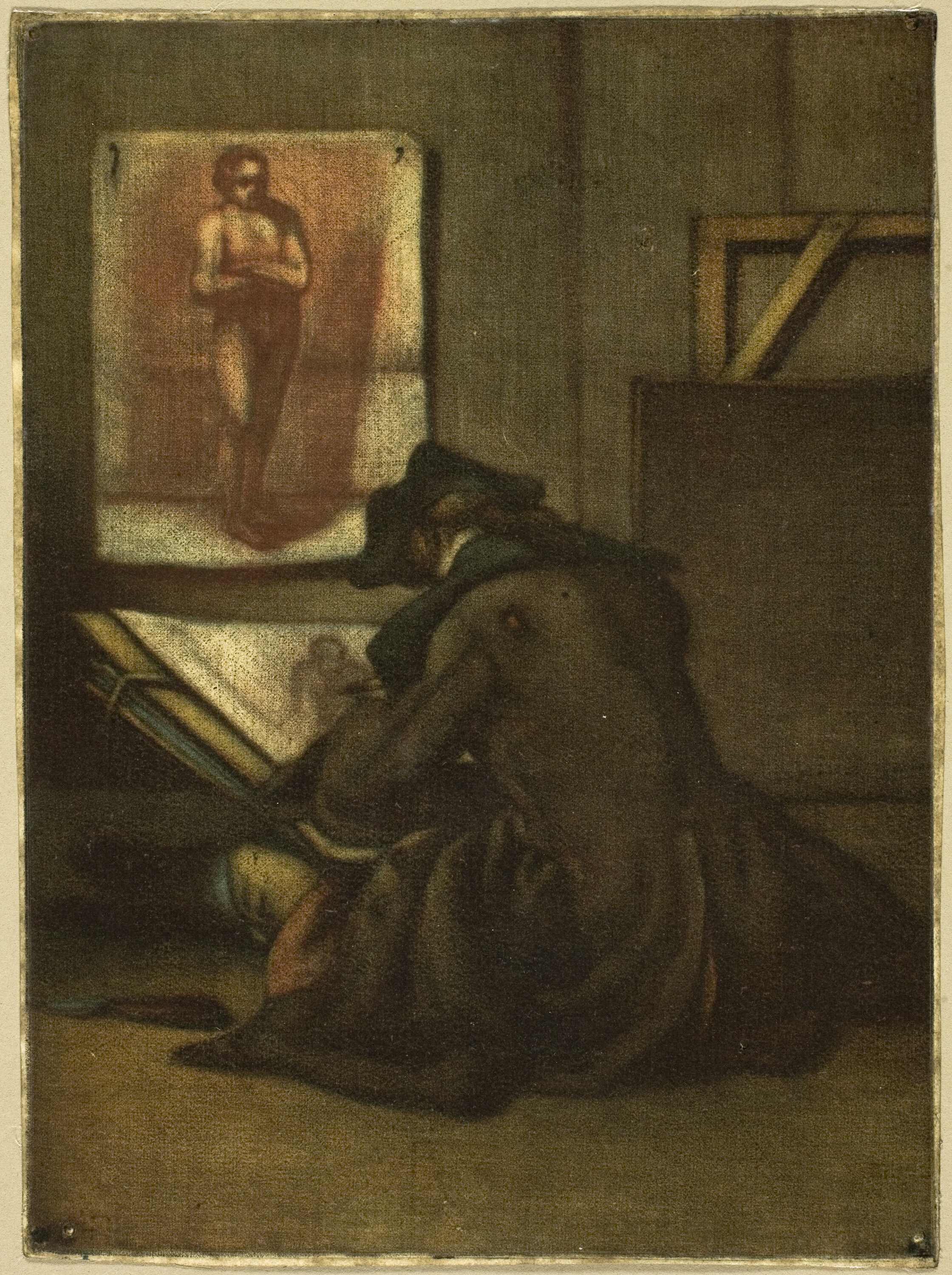
        <![CDATA[<img class="blog-article__image" alt="" src="https://www.datocms-assets.com/138996/1749562414-amateur.png?fit=crop&fp-x=0.5&fp-y=0.5&w=2000&h=694" eleventy:widths="2000,1680,840" eleventy:formats="webp,jpeg,svg" sizes="(min-width: 30em) 2000px, 100vw" loading="lazy" decoding="async"/><figure><blockquote><p>That which withers in the age of mechanical reproduction is the aura of the work of art.</p></blockquote><figcaption>Walter Benjamin, 1936</figcaption></figure><h2 id="introduction">Introduction</h2><p>Historically, the term “amateur” referred to a non-professional lover of the arts, someone who pursued artistic activities out of passion rather than for economic gain. In an era when the boundaries between professional artists and cultivated laypersons were still fluid, amateurs could participate meaningfully in the cultural sphere and earn recognition for their work (Goethe & Schiller 1799).</p><p>This fragile balance began to shift in the nineteenth century, when the invention of photography and the emergence of modernism redefined the role of painting and displaced traditional craftsmanship in favor of conceptual innovation (Benjamin 1936).</p><p>Today, a parallel transformation is unfolding in software development: the automation of programming by large language models (LLMs) is once again moving value away from technical mastery toward creativity, abstraction, and design.</p><h2 id="the-amateur-in-classical-art">The Amateur in Classical Art</h2><p>In the eighteenth and early nineteenth centuries, the amateur was regarded as a respected connoisseur and lover of the arts. Derived from the Latin <em>amator</em> (lover), the term “amateur” referred to individuals who engaged in artistic pursuits out of passion rather than professional ambition or economic necessity. At a time when the division between professional artists and cultivated amateurs was less rigid than today, amateurs could gain serious recognition for their contributions to cultural life (Goethe & Schiller 1799).</p><figure><img
      src="https://www.datocms-assets.com/138996/1749546494-the-young-draughtsman-1993.jpg"
      data-size="content_width"
      alt="A young artist sits on the floor sketching from a study of a nude figure pinned to the wall. The artist wears a dark coat and hat, hunched over a large sketchpad. The setting is a dimly lit, simple studio space with a rough texture to the walls."
      eleventy:formats="webp,svg"
      eleventy:widths="320, 788, 1576"
      sizes="(min-width: 60em) 788px, 100vw"><figcaption>Jean-Baptiste-Simeon Chardin - The Young Draughtsman | This image reflects the Enlightenment ideal of the amateur as a dedicated practitioner of technical skill, where diligent training and personal cultivation were seen as essential to artistic achievement.</figcaption></figure><p>Technical skill was the primary criterion for evaluating artistic work during this period. Craftsmanship was seen as tangible proof of both the artist’s seriousness and the quality of their work. Particularly in fields such as portrait painting, landscape painting, and music, the precision of execution, composition, and mastery of material were essential to artistic value. This emphasis on technical proficiency enabled amateurs to be acknowledged, provided they demonstrated a high level of skill (Rebentisch 2017, p. 26ff.).</p><p>Moreover, even within the sphere of professional art, the production process was often collaborative. In many prominent workshops, especially during the Dutch Golden Age, masters such as Rembrandt or Rubens supervised large studios where assistants and pupils contributed to the production of artworks. Often, the master would create the compositional sketch or focal figures, while background elements and secondary details were executed by apprentices. As a result, the boundaries between individual authorship and collective creation were frequently blurred, and attributions remain uncertain to this day. This early form of division of labor in the arts reveals a tension between the singular “artistic genius” and the collaborative production process.</p><figure><img
      src="https://www.datocms-assets.com/138996/1746526559-el-jardin-del-amor-rubens.avif"
      data-size="l"
      alt="A richly dressed group of figures in a lush garden, surrounded by fountains, trees, and Baroque architecture."
      eleventy:formats="webp,svg"
      eleventy:widths="320, 680, 1400, 1920"
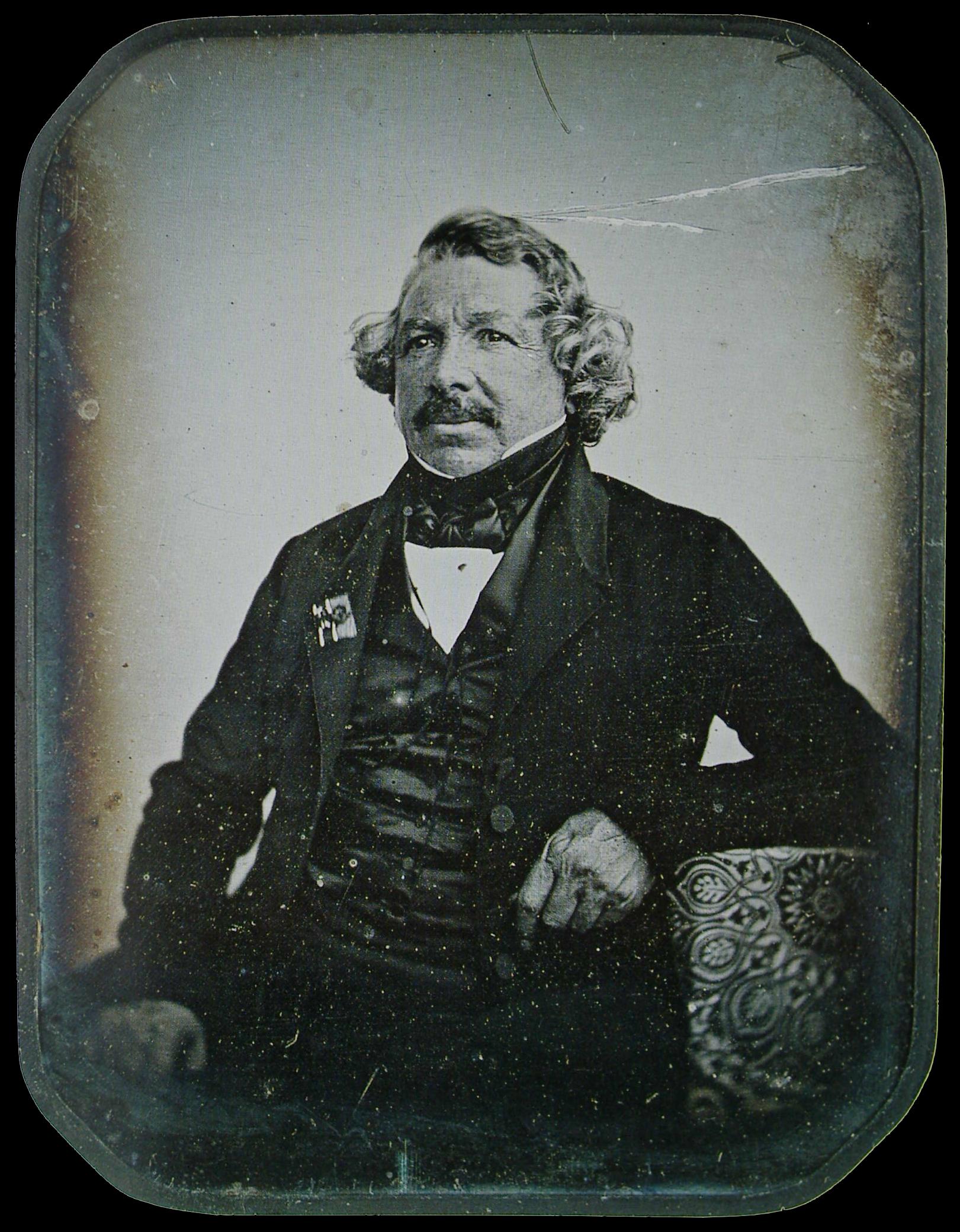
      sizes="(min-width: 80em) 70vw, 100vw"><figcaption>Peter Paul Rubens, “The Garden of Love” (c. 1633–1635). In Rubens’s workshop, assistants contributed to architectural and background elements while Rubens focused on the primary figures, exemplifying standard collaborative practices.</figcaption></figure><p>From a social perspective, amateur artistry fulfilled a dual function. On the one hand, it served to demonstrate education and cultivated leisure, particularly within the rising bourgeoisie. Artistic practice became an expression of comprehensive personal development, as formulated by thinkers such as Wilhelm von Humboldt. On the other hand, amateurs played an important role in disseminating artistic practices beyond professional circles: private musical performances, drawing salons, and the publication of poetry collections by non-professionals contributed significantly to the formation of a broader cultural public (Bourdieu 1992).</p><p>Only with the increasing professionalization of the art world in the course of the nineteenth century—and the institutionalization of specialized training programs—did the separation between the professional artist and the amateur become more pronounced. In the classical art world of the eighteenth century, however, the amateur remained a recognized figure, judged primarily by the standard of technical mastery rather than by innovation or theoretical discourse.</p><h2 id="the-invention-of-photography-and-its-consequences">The Invention of Photography and Its Consequences</h2><p>The invention of photography in the early nineteenth century marked a profound turning point in the history of the visual arts. With the ability to create precise representations of reality through technical means, painting lost its central role as the primary medium for realistic depiction. Portrait painting in particular, which had served important social functions in both aristocratic and bourgeois contexts, found itself facing technological competition that was faster, more affordable, and more objective (Benjamin 1936).</p><figure><img
      src="https://www.datocms-assets.com/138996/1745747256-jean-babtiste-sabarier-blot-daguerre-1844.jpeg"
      data-size="content_width"
      alt="A black-and-white portrait of an older man seated, wearing a dark jacket and cravat, looking slightly to the side. The image shows the soft, slightly blurred texture typical of early daguerreotypes."
      eleventy:formats="webp,svg"
      eleventy:widths="320, 788, 1576"
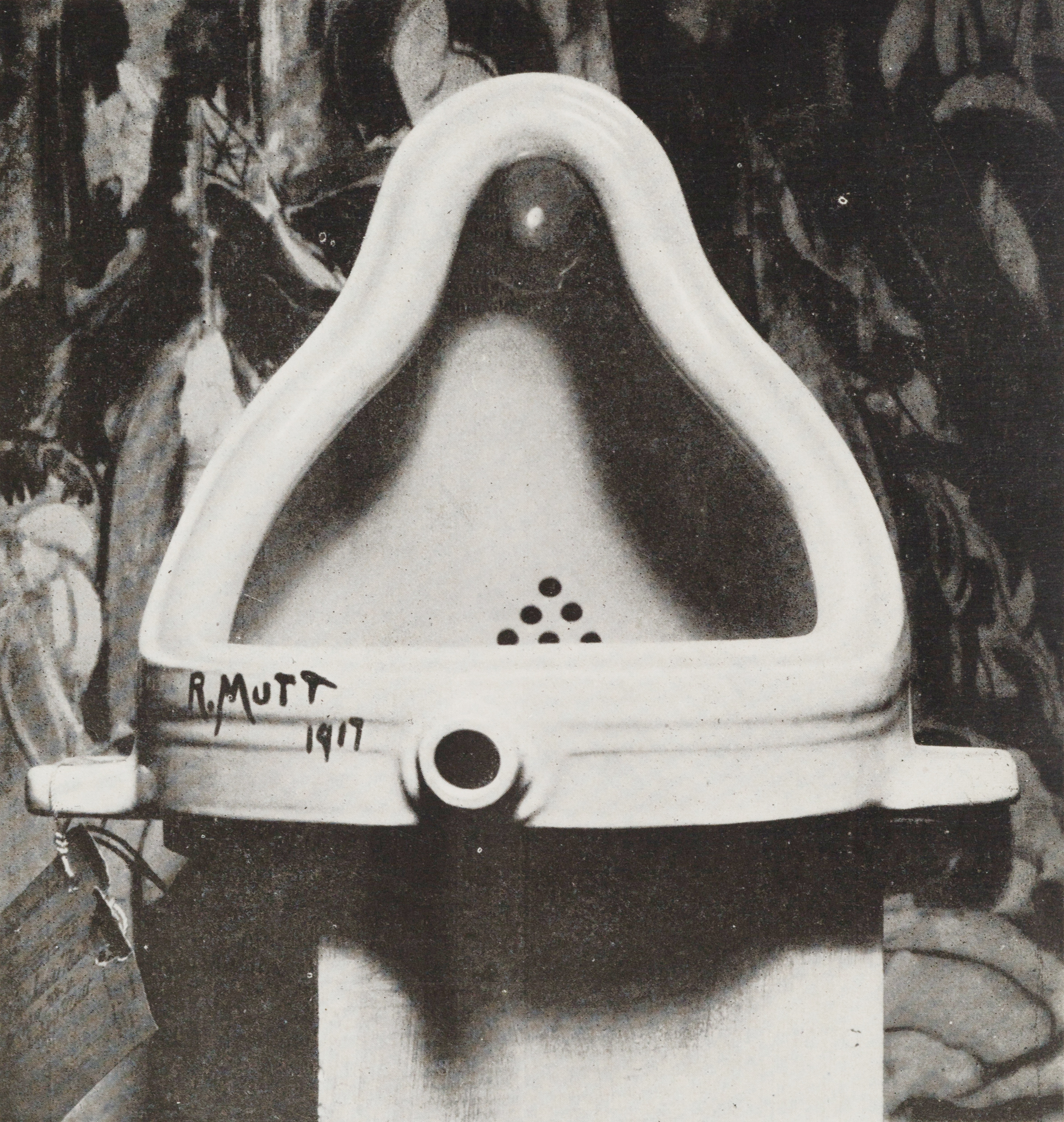
      sizes="(min-width: 60em) 788px, 100vw"><figcaption>Louis-Jacques-Mandé Daguerre (1844), photographed by Jean-Baptiste Sabatier-Blot. An early photographic portrait marking the beginning of the technological revolution in image-making. </figcaption></figure><p>This new competition forced painting to redefine its role. Rather than continuing to serve primarily as a medium for faithful reproduction, artists began to explore subjective perceptions, emotional atmospheres, and experimental forms of representation. Movements such as Impressionism, Expressionism, and later Abstract Art emerged as direct responses to these challenges. Consequently, technical mastery—control of perspective, anatomy, and light—gradually gave way to conceptual considerations and personal expression.</p><figure><blockquote><p>Artistic work is no longer judged solely by the mastery of a medium, but by its capacity to articulate a critical stance within a conceptual framework.</p></blockquote><figcaption>Juliane Rebentisch, 2017</figcaption></figure><p>Painting survived this crisis by emancipating itself from its traditional mimetic functions and establishing new values: innovation, authenticity, and subjectivity. Thus, artistic evaluation shifted from the mastery of established techniques to the originality of ideas and the distinctiveness of individual style.</p><figure><img
      src="https://www.datocms-assets.com/138996/1745746554-duchamp-fountaine.jpg"
      data-size="content_width"
      alt="A porcelain urinal positioned upright, photographed in black and white."
      eleventy:formats="webp,svg"
      eleventy:widths="320, 788, 1576"
      sizes="(min-width: 60em) 788px, 100vw"><figcaption>Marcel Duchamp, “Fountain” (1917), photograph by Alfred Stieglitz (1917). “Fountain” marked a radical shift away from traditional craftsmanship, asserting that the artistic idea, rather than manual skill, defines a work of art.</figcaption></figure><p>The transformation of painting in response to technological innovation illustrates a broader dynamic: when a technical function can be automated or reproduced more efficiently by new media, the focus of human creative work tends to shift toward areas where intuition, conceptual thinking, and innovation cannot easily be mechanized. This historical development provides an important framework for understanding contemporary shifts in other fields, particularly the impact of automation on programming and software development.</p><h2 id="parallels-to-programming">Parallels to Programming</h2><p>The historical trajectory observed in the visual arts—where technological innovation displaced traditional craftsmanship and redirected human creativity toward conceptual domains—finds a striking parallel in the contemporary field of software development. For much of its history, programming has been regarded primarily as a craft: a discipline requiring meticulous technical skill, mastery of complex systems, and a deep understanding of abstract logic. The programmer was seen as a kind of artisan, comparable to the classical painter or composer, whose expertise was rooted in extensive, often arduous, training and practice.</p><p>However, as in the case of the arts, programming has always contained an element of division of labor. In large-scale software projects, it became increasingly common to distinguish between developers responsible for the detailed implementation of code and software architects who conceived the overarching system design. While the architects formulated high-level solutions and conceptual frameworks, developers executed the technical realization, similar to how apprentices in a painter’s workshop contributed to the realization of a master’s vision.</p><h3 id="from-craft-to-concept-the-changing-role-of-the-programmer">From Craft to Concept: The Changing Role of the Programmer</h3><p>Recent advances in artificial intelligence, particularly the rise of large language models (LLMs), are now disrupting this traditional model. Tasks that once demanded considerable technical effort—such as writing boilerplate code, debugging, or even generating complex algorithmic solutions—can now be performed, or at least significantly accelerated, by AI systems. The routine, repetitive aspects of programming are thus increasingly subject to automation, much like realistic portraiture was once superseded by the camera.</p><p>This development is transforming the role of the human programmer. Mere technical execution is no longer sufficient to secure a professional identity. Instead, greater emphasis is placed on skills that machines cannot easily replicate: the ability to formulate meaningful problems, design robust and flexible architectures, and devise creative, context-sensitive solutions. In this emerging landscape, the programmer must increasingly act as a conceptual thinker, strategist, and innovator—rather than merely as a craftsman.</p><blockquote><p>Mere technical execution is no longer sufficient to secure a professional identity.</p></blockquote><p>The social consequences of this shift mirror those observed in the historical transformation of the art world. Just as technical proficiency alone ceased to guarantee artistic recognition in the modern era, technical coding skills alone may soon no longer guarantee professional success. Instead, recognition and value will increasingly depend on an individual’s capacity for abstraction, critical thinking, and creative synthesis.</p><p>For decades, programmers have enjoyed an elevated social status. They have been celebrated as the architects of the digital future, commanding high salaries and cultivating a professional identity marked by exclusivity and self-confidence. Yet with the rise of artificial intelligence capable of automating significant portions of coding work, this self-image is undergoing a dramatic destabilization.</p><p>Whereas previous waves of digitalization primarily affected external fields—such as retail, logistics, or administrative work—today it is the very agents of digitalization who find their own roles threatened. Programmers, once the initiators of disruption, are now themselves subject to it. This inversion marks a profound psychological shift: professions once believed to be immune to automation must now confront their own obsolescence. </p><h2 id="conclusion">Conclusion</h2><p>The trajectory from the disappearance of the amateur in classical art to the current transformations in programming reveals a striking historical continuity: technological innovation repeatedly displaces traditional craftsmanship, forcing human creativity to migrate into conceptual and strategic domains.</p><p>In the arts, the invention of photography precipitated a crisis of representation that ultimately redefined artistic value, shifting emphasis from technical execution to originality, expression, and theoretical engagement. Similarly, in software development today, the rise of artificial intelligence is automating many routine programming tasks and challenging the established identity of programmers as technical artisans. The human contribution is increasingly concentrated on areas that demand abstraction, critical thinking, and creative problem-solving.</p><p>This shift is not merely technical or economic but profoundly social and psychological. The destabilization of traditional professional identities—particularly among programmers who once stood at the forefront of digital disruption—illustrates the broader societal implications of automation. As expertise is redefined and new hierarchies emerge, individuals and institutions alike must rethink the nature of work, creativity, and human agency in an increasingly automated environment.</p><h2 id="resource-list">Resource List</h2><p>Benjamin, Walter. “The Work of Art in the Age of Mechanical Reproduction.” 1936. In <em>Illuminations</em>, edited by Hannah Arendt and translated by Harry Zohn, 217–251. New York: Schocken Books, 1968.</p><p>Bourdieu, Pierre. <em>The Rules of Art: Genesis and Structure of the Literary Field.</em> Translated by Susan Emanuel. Stanford, CA: Stanford University Press, 1996. (Original French edition 1992).</p><p>Goethe, Johann Wolfgang von, and Friedrich Schiller. <em>Correspondence, 1794–1805.</em> Edited by Karl Heinemann. Berlin: Aufbau Verlag, 1980. (Letters dated 1799 cited in text).</p><p>Rebentisch, Juliane. <em>Theorien der Gegenwartskunst zur Einführung.</em> 2nd revised ed. Hamburg: Junius, 2017.</p><h3 id="photos">Photos</h3><p><a href="https://www.artic.edu/artworks/124661/the-young-draughtsman">Jean-Baptiste-Simeon Chardin, "The Young Draughtsman</a>"</p><p><a href="https://commons.wikimedia.org/wiki/File:El_Jard%C3%ADn_del_Amor_(Rubens).jpg">Peter Paul Rubens, “The Garden of Love”</a></p><p><a href="https://de.m.wikipedia.org/wiki/Datei:Jean-Babtiste_Sabarier-Blot_L.J.M.Daguerre.1844.JPG">Louis-Jacques-Mandé Daguerre (1844), photographed by Jean-Baptiste Sabatier-Blot</a></p><p><a href="https://de.wikipedia.org/wiki/Datei:Marcel_Duchamp,_1917,_Fountain,_photograph_by_Alfred_Stieglitz.jpg">Marcel Duchamp, “Fountain”, photograph by Alfred Stieglitz</a></p>]]>
      </content>

    </entry><entry>
      <author>
        <name>Philipp Doll</name>
        <uri>https://9elements.com/blog/author/philipp-doll</uri>
      </author>

      <title>AI clothes swaps with Flux Redux &amp; Flux Fill</title>
      <link href="https://9elements.com/blog/ai-clothes-swaps-with-flux-redux-and-flux-fill/" />
      <updated>2025-03-18T00:00:00.000Z</updated>
      <id></id>
      <summary>We have all seen amazing artistic or realistic images generated by AI. However, one main challenge for AI image generation is to find use cases that solve problems or boost process performance. One such use case is changing a Model&#39;s clothes to your...</summary>
      <content type="html">
        <![CDATA[<img class="blog-article__image" alt="" src="https://www.datocms-assets.com/138996/1746526554-output.avif?fit=crop&fp-x=0.5&fp-y=0.5&w=2000&h=666" eleventy:widths="2000,1680,840" eleventy:formats="webp,jpeg,svg" sizes="(min-width: 30em) 2000px, 100vw" loading="lazy" decoding="async"/><p>We have all seen amazing artistic or realistic images generated by AI. However, one main challenge for AI image generation is to find use cases that solve problems or boost process performance. One such use case is changing a Model's clothes to your desire while keeping the overall image intact. This can be a massive benefit for the fashion industry and e-commerce domain. This post will describe the general idea behind the setup used for clothes replacement and some challenges and possible fixes.</p><h2 id="use-cases">Use Cases</h2><p>This blog post focused on replacing or swapping clothes from Person A to Person B. Using a <strong>ComfyUI</strong> workflow like this, it is also possible to replace a Person's clothes with a “Product Shot” of a clothing piece.</p><ul><li><p><strong>Virtual Try-On</strong>: One of the main problems of online shopping is the lack of ability to try on clothes to see if the color or fitting would suit you. AI clothes replacement can mitigate this, leading to better customer experience and reduced returns. Additionally, it could be extended with personal AI fashion assistants to provide feedback or search for similar clothing pieces.</p></li><li><p><strong>Fashion Campaigns</strong>: Booking models, locations, and photographs for a campaign can be expensive and time-consuming, especially for smaller brands. For viral or trending campaigns, it is vital to be fast; with clothes replacements, it is possible to recreate viral Memes or trends with your fashion. In the early stages of a campaign concept, it can help to test different ideas in a more realistic setting.</p></li><li><p><strong>Storytelling/Education</strong>: Clothe replacements can be used as digital installations to show historical wardrobes for educational purposes. It can also be used in storytelling scenarios, especially in addition to consistent character techniques to create fitting images for your story.</p></li></ul><h2 id="setupworkflow">Setup/Workflow</h2><p>This workflow aims to replace the clothes from an Image of Person A and Place the selected clothes on Person B. We want to specify which clothes to replace and if we will replace the whole outfit or just certain parts, e.g., the pants or the top. To achieve this, we have to work with image segmentation tools to find the parts of the image that represent clothes. The workflow uses the fashion segmentation custom node from <a href="https://github.com/1038lab/ComfyUI-RMBG/tree/main">https://github.com/1038lab/ComfyUI-RMBG/tree/main</a>. Before we start the segmentation process, we remove the background from the original image of  Person A to optimize the quality of the result. For this segmentation, it is better to have a higher segmentation offset so that we don’t have holes or missing parts in the image since it is used for the style reference in the <a href="https://blackforestlabs.ai/flux-1-tools/">FLUX.1 Redux</a> model. Here are some examples of different segmentations for different selections:</p><figure><img
      src="https://www.datocms-assets.com/138996/1742300118-comfyui_00057.png"
      data-size="content_width"
      alt=""
      eleventy:formats="webp,svg"
      eleventy:widths="320, 788, 1576"
      sizes="(min-width: 60em) 788px, 100vw"><figcaption>Fashion segmentation suit/full</figcaption></figure><figure><img
      src="https://www.datocms-assets.com/138996/1742300165-comfyui_00059.png"
      data-size="content_width"
      alt=""
      eleventy:formats="webp,svg"
      eleventy:widths="320, 788, 1576"
      sizes="(min-width: 60em) 788px, 100vw"><figcaption>Fashion segmentation top</figcaption></figure><figure><img
      src="https://www.datocms-assets.com/138996/1742300208-comfyui_00061.png"
      data-size="content_width"
      alt=""
      eleventy:formats="webp,svg"
      eleventy:widths="320, 788, 1576"
      sizes="(min-width: 60em) 788px, 100vw"><figcaption>Fashion segmentation top + pants</figcaption></figure><p>For Person B, we must create a mask for the parts/clothes where the replacement should happen. This is done by using image segmentation to generate a mask of the segmented parts of the image. This time, we use the clothes segmentation from <a href="https://github.com/1038lab/ComfyUI-RMBG/tree/main">https://github.com/1038lab/ComfyUI-RMBG/tree/main</a> since it allows us to specify body parts and regions more freely. In this case, we also want to use a more narrow mask and a bit of blur for the mask because this mask will be used for the <a href="https://blackforestlabs.ai/flux-1-tools/">Flux.1 Fill</a> model to be inpainted. The blur helps smooth edges, leading to a better output quality. Following are some examples of masks created by fashion segmentation, which allow us to also mask body parts like arms/legs that are not covered by clothes.</p><figure><img
      src="https://www.datocms-assets.com/138996/1742300595-comfyui_00083.png"
      data-size="content_width"
      alt=""
      eleventy:formats="webp,svg"
      eleventy:widths="320, 788, 1576"
      sizes="(min-width: 60em) 788px, 100vw"><figcaption>Clothe segmentation mask for Flux.1 Fill model, with legs</figcaption></figure><figure><img
      src="https://www.datocms-assets.com/138996/1742300642-comfyui_00092.png"
      data-size="content_width"
      alt=""
      eleventy:formats="webp,svg"
      eleventy:widths="320, 788, 1576"
      sizes="(min-width: 60em) 788px, 100vw"><figcaption>Clothe segmentation mask for Flux.1 Fill model, with arms</figcaption></figure><p>The segmented clothes from Person A are then used as the style reference for the flux redux model. The Flux.1 Fill model then inpaints the masked Part of Person B with a style referenced from the Flux.1 Redux model. This approach allows us to replace only the clothes and keep the rest of the Image of Person B intact. We enhance the output quality using the inpaint crop and inpaint stitch approach using this custom node: <a href="https://github.com/lquesada/ComfyUI-Inpaint-CropAndStitch">https://github.com/lquesada/ComfyUI-Inpaint-CropAndStitch</a>. This means we crop the image to fit the generated mask, which allows for more details in the inpaint process, and then stitch the altered part back into the original image so that the rest stays the same.</p><h2 id="examples-and-challenges">Examples and Challenges</h2><p>In the following section, I will provide some examples of what is possible with this workflow and some inside information on the challenges and adjustments that can be made to enhance the quality of the outputs.</p><p><strong>Pattern:</strong></p><p>This can be a challenging task for AI image generation because, with patterns, we need to follow the style reference very closely; small changes in the pattern can lead to a different look. Humans are good at detecting if a pattern is matching. Even if we can see directly where the changes are, something is off. This would be bad for our use cases. So, the pattern needs to be followed very strictly. To boost performance, use the FluxFill model with <em>weight_dtype: fp8_e4m3fn. </em>It also helps if the style-referenced image is high resolution so many details can be detected and preserved.</p><figure><img
      src="https://www.datocms-assets.com/138996/1746526554-00001-2.avif"
      data-size="content_width"
      alt=""
      eleventy:formats="webp,svg"
      eleventy:widths="320, 788, 1576"
      sizes="(min-width: 60em) 788px, 100vw"><figcaption>Pattern Dress replacement start image</figcaption></figure><figure><img
      src="https://www.datocms-assets.com/138996/1742300806-comfyui_00108.png"
      data-size="content_width"
      alt=""
      eleventy:formats="webp,svg"
      eleventy:widths="320, 788, 1576"
      sizes="(min-width: 60em) 788px, 100vw"><figcaption>Pattern Dress replacement result image</figcaption></figure><figure><img
      src="https://www.datocms-assets.com/138996/1746526554-00001-3.avif"
      data-size="content_width"
      alt=""
      eleventy:formats="webp,svg"
      eleventy:widths="320, 788, 1576"
      sizes="(min-width: 60em) 788px, 100vw"><figcaption>Pattern top replacement start image</figcaption></figure><figure><img
      src="https://www.datocms-assets.com/138996/1742300825-comfyui_00111.png"
      data-size="content_width"
      alt=""
      eleventy:formats="webp,svg"
      eleventy:widths="320, 788, 1576"
      sizes="(min-width: 60em) 788px, 100vw"><figcaption>Pattern top replacement result image</figcaption></figure><p><strong>Fonts/Text:</strong></p><p>It was a massive problem for AI image generation to generate text and apply certain font styles to images for a long time. Fashion pieces use text, so for our use cases, it is possible to also inpaint with text and the correct font. This is possible with the Flux.1 Fill model. However, this can still be challenging, and some text is not fully applied at the first attempt. This can be fixed with more capable models in the future.</p><figure><img
      src="https://www.datocms-assets.com/138996/1746526554-00001-4.avif"
      data-size="content_width"
      alt=""
      eleventy:formats="webp,svg"
      eleventy:widths="320, 788, 1576"
      sizes="(min-width: 60em) 788px, 100vw"><figcaption>Font/Text only top replacement start image</figcaption></figure><figure><img
      src="https://www.datocms-assets.com/138996/1742301065-comfyui_00117-1.png"
      data-size="content_width"
      alt=""
      eleventy:formats="webp,svg"
      eleventy:widths="320, 788, 1576"
      sizes="(min-width: 60em) 788px, 100vw"><figcaption>Font/Text only top replacement result image</figcaption></figure><figure><img
      src="https://www.datocms-assets.com/138996/1746526554-00001-5.avif"
      data-size="content_width"
      alt=""
      eleventy:formats="webp,svg"
      eleventy:widths="320, 788, 1576"
      sizes="(min-width: 60em) 788px, 100vw"><figcaption>Font/Text full replacement start image</figcaption></figure><figure><img
      src="https://www.datocms-assets.com/138996/1742301139-comfyui_00138.png"
      data-size="content_width"
      alt=""
      eleventy:formats="webp,svg"
      eleventy:widths="320, 788, 1576"
      sizes="(min-width: 60em) 788px, 100vw"><figcaption>Font/Text full replacement result image</figcaption></figure><p><strong>Body Types:</strong></p><p>A Big challenge is different body types, which can be very tricky for the replacement. If you need to apply the correct body type, it can be helpful to adjust the mask sizes of your Person A image, but this can lead to a drop in the quality of the replacement itself. Here, it is best to adjust this to your needs. Or have base images with similar body type features. </p><figure><img
      src="https://www.datocms-assets.com/138996/1742301170-00001-8.png"
      data-size="content_width"
      alt=""
      eleventy:formats="webp,svg"
      eleventy:widths="320, 788, 1576"
      sizes="(min-width: 60em) 788px, 100vw"><figcaption>Body type clothe replacement start image</figcaption></figure><figure><img
      src="https://www.datocms-assets.com/138996/1742301207-comfyui_00189.png"
      data-size="content_width"
      alt=""
      eleventy:formats="webp,svg"
      eleventy:widths="320, 788, 1576"
      sizes="(min-width: 60em) 788px, 100vw"><figcaption>Body type clothe replacement result image</figcaption></figure><p><strong>Pose/Position:</strong></p><p>We aim to preserve as much of the original image as possible and keep the overall body position intact. This is very important for many use cases, e.g., replacing clothes for a campaign shooting. The crop-and-stitch approach used in this workflow further enhances the fact that we only change the relevant aspects of the image and try to avoid or minimize other changes to the original image.</p><figure><img
      src="https://www.datocms-assets.com/138996/1746526554-00001-6.avif"
      data-size="content_width"
      alt=""
      eleventy:formats="webp,svg"
      eleventy:widths="320, 788, 1576"
      sizes="(min-width: 60em) 788px, 100vw"><figcaption>Body Postion full clothe replacement start image</figcaption></figure><figure><img
      src="https://www.datocms-assets.com/138996/1742301274-comfyui_00153.png"
      data-size="content_width"
      alt=""
      eleventy:formats="webp,svg"
      eleventy:widths="320, 788, 1576"
      sizes="(min-width: 60em) 788px, 100vw"><figcaption>Body Postion full clothe replacement result image</figcaption></figure><figure><img
      src="https://www.datocms-assets.com/138996/1746526554-00001-7.avif"
      data-size="content_width"
      alt=""
      eleventy:formats="webp,svg"
      eleventy:widths="320, 788, 1576"
      sizes="(min-width: 60em) 788px, 100vw"><figcaption>Body Postion only top clothe replacement start image</figcaption></figure><figure><img
      src="https://www.datocms-assets.com/138996/1742301315-comfyui_00180.png"
      data-size="content_width"
      alt=""
      eleventy:formats="webp,svg"
      eleventy:widths="320, 788, 1576"
      sizes="(min-width: 60em) 788px, 100vw"><figcaption>Body Postion only top clothe replacement result image</figcaption></figure><h3 id="conclusion">Conclusion</h3><p>FluxRedux + FluxFill are powerful models/tools that allow us to get impressive results using this ComfyUI workflow. These results can be used for the described use cases, boosting productivity and creativity. There are a lot of fine-tuning capabilities with the mask sizes and providing decent input images. Even more capable models will fix some problems/challenges; human adjustments to the workflow can correct others.<br><br>If you have any questions or even an interesting project, feel free to ping us <a href="https://9elements.com/contact/">https://9elements.com/contact/</a></p>]]>
      </content>

    </entry><entry>
      <author>
        <name>Mathias Schäfer</name>
        <uri>https://9elements.com/blog/author/mathias-schaefer</uri>
      </author>

      <title>Visualizing global health data on data.who.int</title>
      <link href="https://9elements.com/blog/visualizing-global-health-data-on-data-who-int/" />
      <updated>2025-01-10T00:00:00.000Z</updated>
      <id></id>
      <summary>For the past three years, 9elements has worked collaboratively with UK agency Kore, helping the World Health Organization (WHO) to visualize global public health data on data.who.int, WHO’s central data hub.Open health data plays a key role for...</summary>
      <content type="html">
        <![CDATA[<img class="blog-article__image" alt="Visualization of healthy life expectancy at birth in years. World map with country shapes colored in different shades of blue according to the life expectancy. India is highlighted with 58.1 years in 2021." src="https://www.datocms-assets.com/138996/1736496216-hale.png?fit=crop&fp-x=0.25&fp-y=0.61&w=2000&h=1199" eleventy:widths="2000,1680,840" eleventy:formats="webp,jpeg,svg" sizes="(min-width: 30em) 2000px, 100vw" loading="lazy" decoding="async"/><p>For the past three years, 9elements has worked collaboratively with UK agency <a href="https://www.kore.uk.com">Kore</a>, helping the World Health Organization (WHO) to visualize global public health data on <a href="https://data.who.int"><strong>data.who.int</strong></a>, WHO’s central data hub.</p><p>Open health data plays a key role for guiding public health decisions and informing the general public. The data needs to be presented and visualized well so health professionals, scientists, policymakers and citizens can access, understand and use it.</p><p>The <a href="https://data.who.int">WHO Data portal</a>, launched in May 2023, is a joint effort of public health professionals, data scientists, visualization experts, UX designers, accessibility specialists and software developers.</p><p>Under the project leadership of Kore, 9elements developed a central piece of data.who.int, the <strong>tailor-made data visualization framework</strong>. This work needs to meet the highest quality standards. The WHO principles require the content to be accessible to everyone, everywhere in the world.</p><figure><img
      src="https://www.datocms-assets.com/138996/1736504623-ntd-interventions.png"
      data-size="content_width"
      alt="World map with circles for each country visualizing the number of people requiring interventions against Neglected Tropical Diseases. The circle radius represents the number. India is in focus. It has the largest circle with 837 million people. Circles are colored according to country's membership to one of the six WHO regions."
      eleventy:formats="webp,svg"
      eleventy:widths="320, 788, 1576"
      sizes="(min-width: 60em) 788px, 100vw"><figcaption>Map visualizing the number of people requiring interventions against Neglected Tropical Diseases</figcaption></figure><h2 id="data-design-language">Data Design Language</h2><p>Our work is based on the <a href="https://apps.who.int/gho/data/design-language/">WHO Data Design Language</a>, produced by Kore and conceived by a diverse team led by the world-renowned data visualization designer <a href="https://truth-and-beauty.net/">Moritz Stefaner</a>. The core design values are:</p><ul><li><p><strong>Clear</strong>: Data presentations are tailored to information needs, understandable and approachable.</p></li><li><p><strong>Open</strong>: Data presentations are accessible by following the Web Content Accessibility Guidelines (WCAG). They are international, available in the six official WHO languages.</p></li><li><p><strong>Robust</strong>: Using solid and lean technologies, the data is presented in a variety of channels and sizes. The presentations have alternative access modes, adapt to user preferences and reading situations.</p></li><li><p><strong>Transparent</strong>: The data presentations reveal uncertainty, precision, provenance and coverage of the data.</p></li></ul><h2 id="comparing-countries-on-powerful-dashboards">Comparing countries on powerful dashboards</h2><p>The data visualization framework features several pages:</p><p><a href="https://data.who.int/indicators">Indicator pages</a> like <a href="https://data.who.int/indicators/i/C64284D">Healthy life expectancy at birth (HALE)</a> allow to compare countries and regions and break down the data by sex and age group, for example.</p><p><a href="https://data.who.int/countries">Country pages</a> like <a href="https://data.who.int/countries/180">the Democratic Republic of the Congo</a> give an overview of the public health in one country by showing key health statistics like demographics, life expectancy and causes of death.</p><figure><img
      src="https://www.datocms-assets.com/138996/1736352365-congo.png"
      data-size="content_width"
      alt="Country overview for the Democratic Republic of Congo. An ensemble of facts and charts visualizing economic and demographic facts about the country. Population stats are visible, with health data sections below."
      eleventy:formats="webp,svg"
      eleventy:widths="320, 788, 1576"
      sizes="(min-width: 60em) 788px, 100vw"><figcaption>Country overview for the Democratic Republic of Congo</figcaption></figure><p>The <a href="https://data.who.int/dashboards/covid19/cases">COVID-19 dashboard</a> tracks cases, deaths, vaccinations and <a href="https://data.who.int/dashboards/covid19/circulation?n=o">current variant circulation</a>.</p><figure><img
      src="https://www.datocms-assets.com/138996/1736352860-screenshot-2024-06-07-at-10-41-48.png"
      data-size="content_width"
      alt="Interactive widget visualizing the number of COVID-19 cases reported to WHO in the last 28 days. World map with circles on the left. A total number with change on the right, as well as a table comparing countries. 134782 cases were reported in the 28 days before 19 May 2024."
      eleventy:formats="webp,svg"
      eleventy:widths="320, 788, 1576"
      sizes="(min-width: 60em) 788px, 100vw"><figcaption>COVID-19 overview visualizing the number of cases reported to the WHO</figcaption></figure><p>The <a href="https://data.who.int/dashboards/global-progress/triple-billion">Triple Billion progress dashboard</a> tracks the world’s progress towards improving the lives of people through access to universal health coverage, protection from health emergencies and through better health and well-being.</p><figure><img
      src="https://www.datocms-assets.com/138996/1736353176-screenshot-2024-06-07-at-11-03-51.png"
      data-size="content_width"
      alt="Chart visualizing the Triple Billion indicators contributions for Healthier populations, Universal health coverage and Health emergencies protection. A circle for each indicator represents its positive or negative contribution. Clean Household Fuels is selected with a positive impact on 593 million lives in 2025. The span reaches from minus 200 million to 600 million."
      eleventy:formats="webp,svg"
      eleventy:widths="320, 788, 1576"
      sizes="(min-width: 60em) 788px, 100vw"><figcaption>Triple Billion indicator contributions</figcaption></figure><h2 id="tailor-made-data-visualization-framework">Tailor-made data visualization framework</h2><p>While there are several mature data visualization kits, there was no solution that met WHO’s strict requirements and integrated well with their data infrastructure.</p><p>We developed a tailor-made, light-weight data visualization framework for public health data on a world scale. To deliver data experiences with the highest quality, it implements the clear vision and guidelines of the Data Design Language.</p><p>The visualization framework is both extensible and flexible. It produces interactive data experiences in the browser, but also text, static HTML and SVG and pixel-based images. The goal is to serve the most robust data presentation suitable for the medium, the reading context and the client capabilities.</p><figure><img
      src="https://www.datocms-assets.com/138996/1736505193-tuberculosis-incidence.png"
      data-size="content_width"
      alt="Table comparing the Tuberculosis incidence in cases per 100000 population across countries. For each country, a column chart shows the trend from 2000 to 2022. Lesotho has the highest incidence in 2022."
      eleventy:formats="webp,svg"
      eleventy:widths="320, 788, 1576"
      sizes="(min-width: 60em) 788px, 100vw"><figcaption>Comparing Tuberculosis incidence over time</figcaption></figure><p>The framework connects the WHO databases to combine data with metadata, translations, and formatting rules to present the data in a meaningful way and to put it into perspective.</p><p>Individual facts, tables and charts are combined into interactive widgets to make complex datasets accessible. These widgets compare the data across time, geographical and political entities, like countries and regions, as well as categories, like sex and age group.</p><figure><img
      src="https://www.datocms-assets.com/138996/1736353739-screenshot-2024-06-07-at-10-50-02.png"
      data-size="content_width"
      alt="Visualization showing the probability of dying between age 30 and 70 from any of cardiovascular diseases, cancer, diabetes, or chronic respiratory diseases. A line chart compares Total, Male and Female from 2000 to 2019. World and Male is selected. The number is 21% for 2019. The trend is falling. A table compares countries, showing the three lowest and highest countries, with World highlighted in the middle."
      eleventy:formats="webp,svg"
      eleventy:widths="320, 788, 1576"
      sizes="(min-width: 60em) 788px, 100vw"><figcaption>Indicator explorer for premature mortality from non-communicable diseases</figcaption></figure><p>We built a <strong>chart creator</strong> where WHO content editors can explore the data and be guided to help them build a suitable visualization. For data curators, we have built a powerful data explorer for more than 2,000 indicators.</p><p>Under the hood, the visualization framework is implemented in portable JavaScript code that runs in the browser, in Node.js, and in cloud functions. The individual charts and widgets are implemented in D3 and Svelte, a well-established duo that produces lean HTML, CSS, SVG and fast JavaScript.</p><h2 id="building-your-next-data-visualizations">Building your next data visualizations</h2><p>At 9elements, we have been visualizing data for our clients for more than 10 years. In 2013, we developed <a href="https://9elements.com/blog/ged-viz-an-html5-data-visualization-tool/">GED VIZ</a> for the Bertelsmann Foundation, visualizing global economic relations. From 2014 on, we developed the front-end and the chart rendering of the <a href="https://9elements.com/blog/new-project-oecd-data-portal/">OECD Data Portal</a>. In 2015, we contributed to the <a href="https://9elements.com/blog/project-launched-wef-inclusive-growth-report-2015/">World Economic Forum Inclusive Growth Report</a>.</p><p>Let us discuss how we can help you to explore, present and visualize the data of your organization or business! <a href="https://9elements.com/contact/">Contact us</a>.</p><h2 id="credits">Credits</h2><p>This project was developed for <a href="https://www.kore.uk.com/">Kore</a>, an agency for positive public impact through strategy, design and information architecture, based in the UK. With thanks to their wider team, below, on this work for WHO.</p><p>Data visualization, product design, UX/UI, cartography and accessibility: <a href="https://www.alicethudt.de/">Alice Thudt</a>, <a href="https://christianlaesser.com/">Christian Laesser</a>, Fred Wheeler, <a href="https://www.maartenlambrechts.com/">Maarten Lambrechts,</a> Matt Hollidge, <a href="https://truth-and-beauty.net/">Moritz Stefaner</a>, <a href="https://illisible.net/philippe-riviere">Philippe Rivière</a>, <a href="https://fossheim.io/">Sarah Fossheim</a> and Yaseed Chaumoo.</p><p>Thanks to all WHO staff involved with the project.</p><h2 id="learn-more">Learn more</h2><ul><li><p><a href="https://data.who.int">WHO Data – data.who.int</a></p></li><li><p><a href="https://apps.who.int/gho/data/design-language/">WHO Data Design Language documentation</a></p></li><li><p><a href="https://truth-and-beauty.net/projects/who">Overview on the WHO Data Design Language</a></p></li></ul>]]>
      </content>

    </entry><entry>
      <author>
        <name>Philipp Doll</name>
        <uri>https://9elements.com/blog/author/philipp-doll</uri>
      </author>

      <title>Fine Tuning Flux.1-dev Model</title>
      <link href="https://9elements.com/blog/fine-tuning-flux-1-dev-model/" />
      <updated>2025-01-08T00:00:00.000Z</updated>
      <id></id>
      <summary>Fine Tuning Flux.1-dev ModelLet’s take a look at how to fine-tune a Flux.1-dev model. Flux.1 is an impressive image generation model from https://blackforestlabs.ai/ that has instantly become one of the most prominent image generation models. One...</summary>
      <content type="html">
        <![CDATA[<img class="blog-article__image" alt="" src="https://www.datocms-assets.com/138996/1746526555-output-2.avif?fit=crop&fp-x=0.5&fp-y=0.5&w=2000&h=666" eleventy:widths="2000,1680,840" eleventy:formats="webp,jpeg,svg" sizes="(min-width: 30em) 2000px, 100vw" loading="lazy" decoding="async"/><h2 id="fine-tuning-flux1-dev-model">Fine Tuning Flux.1-dev Model</h2><p>Let’s take a look at how to fine-tune a <a href="https://huggingface.co/black-forest-labs/FLUX.1-dev"><strong>Flux.1-dev</strong></a> model. Flux.1 is an impressive image generation model from <a href="https://blackforestlabs.ai/">https://blackforestlabs.ai/ </a>that has instantly become one of the most prominent image generation models. One significant benefit is that it can be fine-tuned with just a few images.</p><p>This post will provide a basic guide to the steps needed to fine-tune a model. But first, let me introduce you to Oscar.</p><figure><img
      src="https://www.datocms-assets.com/138996/1735824791-avatar-02.png"
      data-size="content_width"
      alt=""
      eleventy:formats="webp,svg"
      eleventy:widths="320, 788, 1576"
      sizes="(min-width: 60em) 788px, 100vw"><figcaption>Oscar: Mascot for the Open Source Firmware Conference (OSFC)</figcaption></figure><h3 id="dataset-preparation">Dataset preparation</h3><p>For fine-tuning, you need a set of images to use for training. In this case, we aim to leverage Flux's powerful generalization capabilities and train it to generate images of Oscar in various styles and scenarios. For our training, we used 11 images of Oscar. You can view the dataset <a href="https://huggingface.co/9elements/OSCAR_OSFC_FINE_TUNE/tree/main">here</a>.</p><p>We are training a LoRa for character creation, so we select images for our dataset based on the following guidelines:</p><ol><li><p><strong>Consistent Iconic Features</strong>:<br>Ensure all images include consistent, iconic features. In our case, this could be Oscar's "color" or "raccoon look." In other instances, iconic features might include eye color, clothing, hairstyle, or hair color.</p></li><li><p><strong>Variants in Poses and Expressions</strong>:<br>Include images with diverse poses and expressions, camera angles, and body positions. You may incorporate various art styles, but do not alter the iconic features defined in point one.</p></li><li><p><strong>Maximize Output with Few Images</strong>:<br>Before adding an image to your dataset, consider its unique benefits. Does it add variety or enhance the dataset while preserving the iconic features?</p></li><li><p><strong>Avoid Group Shots</strong>:<br>Exclude images where the character is part of a group with other characters, as these can dilute the focus on the main subject.</p></li><li><p><strong>General Image Quality</strong>:<br>Use high-quality images. Prefer lossless formats like PNGs and avoid pixelated or blurry images. Higher-resolution images are preferred as they allow for more accurate feature extraction.</p></li></ol><p>The next step in preparing the dataset is to create <strong>labels or captions</strong> for the images. For the training process, we require the following structure:</p><pre class="language-plaintext"><span class="code-language">plaintext</span><code class="language-plaintext">-- images
---- image_1.png
---- image_1.txt
---- image_2.png
---- image_2.txt
....</code></pre><p>The quality of labels can significantly influence the results of fine-tuning. However, labeling each image manually can be a tedious task. In our case, we used <a href="https://github.com/MNeMoNiCuZ/florence2-caption-batch">florence2</a> to generate the initial labels for our dataset. In our case, we just used the generated captions since the results were decent enough, but here are some key points to consider when reviewing and refining your labels:</p><ul><li><p><strong>Describe Iconic Features</strong>: Ensure that the iconic features relevant to your fine-tuning are clearly described in the label.</p></li><li><p><strong>Remove Unnecessary Details</strong>: Omit irrelevant details about the background or style that do not contribute to the fine-tuning objective. This helps focus the process on the relevant task.</p></li><li><p><strong>General Style Description</strong>: Include a description of the general style of the image in one place, such as "photorealistic", "anime", or "cartoon style".</p></li><li><p><strong>Camera Angle and Position</strong>: Describe the camera angle and character position to provide more context for the model.</p></li><li><p><strong>Trigger Word Usage</strong>: If you use a trigger word for your LoRa, ensure it is present in the label. For example, in our case, the iconic features are always linked to the trigger word <em>OSCAR_OSFC</em> in the labels.</p></li></ul><figure><img
      src="https://www.datocms-assets.com/138996/1735826222-oscar_usa.png"
      data-size="content_width"
      alt=""
      eleventy:formats="webp,svg"
      eleventy:widths="320, 788, 1576"
      sizes="(min-width: 60em) 788px, 100vw"><figcaption>a digital drawing in a vibrant, cartoonish style, it features a cute, anthropomorphic cat with large, round eyes and a small, black nose, the cat's fur is predominantly blue with pink inner ears, and it has two small, striped stripes on its back, it is wearing large, black-rimmed glasses, giving it a playful and endearing appearance, in the foreground, there is a small white circle with a red and white pattern, possibly a symbol or a symbol, holding a flag with a white pole, the flag is american flag, with red and blue horizontal stripes and white stars, the background is completely black, making the cat and flag stand out prominently, the overall color palette is bright and cheerful, with the flag and cat drawing the viewer's attention, the drawing is clean and polished, with a clean lines and vibrant colors, typical of modern digital art, the image conveys a sense of freedom and joy, with no additional objects or people present, emphasizing the character and flag</figcaption></figure><h3 id="model-training">Model training</h3><p>We used one <strong>L40S GPU</strong> on <a href="https://runpod.io/">RunPod.io</a> to generate our labels and execute the training process. You can find more information about running a RunPod instance <a href="https://blog.runpod.io/how-to-run-flux-image-generator-with-comfyui-2/">here</a>.</p><p>The training process was conducted using the <a href="https://github.com/ostris/ai-toolkit/">ai-toolkit</a>. Before running a training session with the AI Toolkit, install all necessary dependencies.</p><pre class="language-bash"><span class="code-language">bash</span><code class="language-bash"><span class="token function">git</span> clone https://github.com/ostris/ai-toolkit.git
<span class="token builtin class-name">cd</span> ai-toolkit
<span class="token function">git</span> submodule update <span class="token parameter variable">--init</span> <span class="token parameter variable">--recursive</span>
python3 <span class="token parameter variable">-m</span> venv venv
<span class="token builtin class-name">source</span> venv/bin/activate
pip3 <span class="token function">install</span> torch
pip3 <span class="token function">install</span> <span class="token parameter variable">-r</span> requirements.txt</code></pre><p>To access the Flux.1-dev model, you need to log in to <a href="https://huggingface.co/"><strong>Hugging Face</strong></a>. This can be done using the <code>huggingface-cli</code>.</p><p>Follow these steps:</p><ol><li><p>Create a token in your Hugging Face account settings.</p></li><li><p>Use the token to log in to Hugging Face by running the following command in your terminal:</p></li></ol><p><code>huggingface-cli login</code></p><p>Navigate to the <em>/config/example</em> directory and open the <em>train_lora_flux_24gb.yaml </em>file.</p><p>Adjust this configuration file to suit your specific needs. Below is the configuration used to train the <strong>OSCAR_OSFC</strong> LoRa:</p><pre class="language-yaml"><span class="code-language">yaml</span><code class="language-yaml"><span class="token punctuation">---</span>
<span class="token key atrule">job</span><span class="token punctuation">:</span> extension
<span class="token key atrule">config</span><span class="token punctuation">:</span>
  <span class="token comment"># this name will be the folder and filename name</span>
  <span class="token key atrule">name</span><span class="token punctuation">:</span> <span class="token string">"oscar_new_v1"</span>
  <span class="token key atrule">process</span><span class="token punctuation">:</span>
    <span class="token punctuation">-</span> <span class="token key atrule">type</span><span class="token punctuation">:</span> <span class="token string">'sd_trainer'</span>
      <span class="token comment"># root folder to save training sessions/samples/weights</span>
      <span class="token key atrule">training_folder</span><span class="token punctuation">:</span> <span class="token string">"output"</span>
      <span class="token comment"># uncomment to see performance stats in the terminal every N steps</span>
      <span class="token key atrule">performance_log_every</span><span class="token punctuation">:</span> <span class="token number">1000</span>
      <span class="token key atrule">device</span><span class="token punctuation">:</span> cuda<span class="token punctuation">:</span><span class="token number">0</span>
      <span class="token comment"># if a trigger word is specified, it will be added to captions of training data if it does not already exist</span>
      <span class="token comment"># alternatively, in your captions you can add [trigger] and it will be replaced with the trigger word</span>
      <span class="token key atrule">trigger_word</span><span class="token punctuation">:</span> <span class="token string">"OSC4R_0SFC"</span>
      <span class="token key atrule">network</span><span class="token punctuation">:</span>
        <span class="token key atrule">type</span><span class="token punctuation">:</span> <span class="token string">"lora"</span>
        <span class="token key atrule">linear</span><span class="token punctuation">:</span> <span class="token number">32</span>
        <span class="token key atrule">linear_alpha</span><span class="token punctuation">:</span> <span class="token number">32</span>
      <span class="token key atrule">save</span><span class="token punctuation">:</span>
        <span class="token key atrule">dtype</span><span class="token punctuation">:</span> float16 <span class="token comment"># precision to save</span>
        <span class="token key atrule">save_every</span><span class="token punctuation">:</span> <span class="token number">250</span> <span class="token comment"># save every this many steps</span>
        <span class="token key atrule">max_step_saves_to_keep</span><span class="token punctuation">:</span> <span class="token number">12</span> <span class="token comment"># how many intermittent saves to keep</span>
        <span class="token key atrule">push_to_hub</span><span class="token punctuation">:</span> <span class="token boolean important">false</span> <span class="token comment">#change this to True to push your trained model to Hugging Face.</span>
        <span class="token comment"># You can either set up a HF_TOKEN env variable or you'll be prompted to log-in         </span>
<span class="token comment">#       hf_repo_id: your-username/your-model-slug</span>
<span class="token comment">#       hf_private: true #whether the repo is private or public</span>
      <span class="token key atrule">datasets</span><span class="token punctuation">:</span>
        <span class="token comment"># datasets are a folder of images. captions need to be txt files with the same name as the image</span>
        <span class="token comment"># for instance image2.jpg and image2.txt. Only jpg, jpeg, and png are supported currently</span>
        <span class="token comment"># images will automatically be resized and bucketed into the resolution specified</span>
        <span class="token comment"># on windows, escape back slashes with another backslash so</span>
        <span class="token comment"># "C:\\path\\to\\images\\folder"</span>
        <span class="token punctuation">-</span> <span class="token key atrule">folder_path</span><span class="token punctuation">:</span> <span class="token string">"./images"</span>
          <span class="token key atrule">caption_ext</span><span class="token punctuation">:</span> <span class="token string">"txt"</span>
          <span class="token key atrule">caption_dropout_rate</span><span class="token punctuation">:</span> <span class="token number">0.02</span>  <span class="token comment"># will drop out the caption 5% of time</span>
          <span class="token key atrule">shuffle_tokens</span><span class="token punctuation">:</span> <span class="token boolean important">false</span>  <span class="token comment"># shuffle caption order, split by commas</span>
          <span class="token key atrule">cache_latents_to_disk</span><span class="token punctuation">:</span> <span class="token boolean important">true</span>  <span class="token comment"># leave this true unless you know what you're doing</span>
          <span class="token key atrule">resolution</span><span class="token punctuation">:</span> <span class="token punctuation">[</span> <span class="token number">512</span><span class="token punctuation">,</span> <span class="token number">768</span><span class="token punctuation">,</span> <span class="token number">1024</span> <span class="token punctuation">]</span>  <span class="token comment"># flux enjoys multiple resolutions</span>
      <span class="token key atrule">train</span><span class="token punctuation">:</span>
        <span class="token key atrule">batch_size</span><span class="token punctuation">:</span> <span class="token number">1</span>
        <span class="token key atrule">steps</span><span class="token punctuation">:</span> <span class="token number">3000</span>  <span class="token comment"># total number of steps to train 500 - 4000 is a good range</span>
        <span class="token key atrule">gradient_accumulation_steps</span><span class="token punctuation">:</span> <span class="token number">1</span>
        <span class="token key atrule">train_unet</span><span class="token punctuation">:</span> <span class="token boolean important">true</span>
        <span class="token key atrule">train_text_encoder</span><span class="token punctuation">:</span> <span class="token boolean important">false</span>  <span class="token comment"># probably won't work with flux</span>
        <span class="token key atrule">gradient_checkpointing</span><span class="token punctuation">:</span> <span class="token boolean important">true</span>  <span class="token comment"># need the on unless you have a ton of vram</span>
        <span class="token key atrule">noise_scheduler</span><span class="token punctuation">:</span> <span class="token string">"flowmatch"</span> <span class="token comment"># for training only</span>
        <span class="token key atrule">optimizer</span><span class="token punctuation">:</span> <span class="token string">"adamw8bit"</span>
        <span class="token key atrule">lr</span><span class="token punctuation">:</span> <span class="token number">1e-4</span>
        <span class="token comment"># uncomment this to skip the pre training sample</span>
<span class="token comment">#        skip_first_sample: true</span>
        <span class="token comment"># uncomment to completely disable sampling</span>
<span class="token comment">#        disable_sampling: true</span>
        <span class="token comment"># uncomment to use new vell curved weighting. Experimental but may produce better results</span>
<span class="token comment">#        linear_timesteps: true</span>

        <span class="token comment"># ema will smooth out learning, but could slow it down. Recommended to leave on.</span>
        <span class="token key atrule">ema_config</span><span class="token punctuation">:</span>
          <span class="token key atrule">use_ema</span><span class="token punctuation">:</span> <span class="token boolean important">true</span>
          <span class="token key atrule">ema_decay</span><span class="token punctuation">:</span> <span class="token number">0.99</span>

        <span class="token comment"># will probably need this if gpu supports it for flux, other dtypes may not work correctly</span>
        <span class="token key atrule">dtype</span><span class="token punctuation">:</span> bf16
      <span class="token key atrule">model</span><span class="token punctuation">:</span>
        <span class="token comment"># huggingface model name or path</span>
        <span class="token key atrule">name_or_path</span><span class="token punctuation">:</span> <span class="token string">"black-forest-labs/FLUX.1-dev"</span>
        <span class="token key atrule">is_flux</span><span class="token punctuation">:</span> <span class="token boolean important">true</span>
        <span class="token key atrule">quantize</span><span class="token punctuation">:</span> <span class="token boolean important">true</span>  <span class="token comment"># run 8bit mixed precision</span>
<span class="token comment">#        low_vram: true  # uncomment this if the GPU is connected to your monitors. It will use less vram to quantize, but is slower.</span>
      <span class="token key atrule">sample</span><span class="token punctuation">:</span>
        <span class="token key atrule">sampler</span><span class="token punctuation">:</span> <span class="token string">"flowmatch"</span> <span class="token comment"># must match train.noise_scheduler</span>
        <span class="token key atrule">sample_every</span><span class="token punctuation">:</span> <span class="token number">250</span> <span class="token comment"># sample every this many steps</span>
        <span class="token key atrule">width</span><span class="token punctuation">:</span> <span class="token number">1024</span>
        <span class="token key atrule">height</span><span class="token punctuation">:</span> <span class="token number">1024</span>
        <span class="token key atrule">prompts</span><span class="token punctuation">:</span>
          <span class="token comment"># you can add [trigger] to the prompts here and it will be replaced with the trigger word</span>
<span class="token comment">#          - "[trigger] holding a sign that says 'I LOVE PROMPTS!'"\</span>
          <span class="token punctuation">-</span> <span class="token string">"[trigger] holding a sign that says 'I LOVE PROMPTS!'"</span>
          <span class="token punctuation">-</span> <span class="token string">"[trigger] playing chess at the park, bomb going off in the background"</span>
          <span class="token punctuation">-</span> <span class="token string">"[trigger] holding a coffee cup, in a beanie, sitting at a cafe"</span>
          <span class="token punctuation">-</span> <span class="token string">"[trigger] building a log cabin in the snow covered mountains"</span>
          <span class="token punctuation">-</span> <span class="token string">"[trigger] playing the guitar, on stage, singing a song, laser lights, punk rocker"</span>
          <span class="token punctuation">-</span> <span class="token string">"hipster [trigger] with a beard, building a chair, in a wood shop"</span>
          <span class="token punctuation">-</span> <span class="token string">"[trigger], in a post apocalyptic world, with a shotgun, in a leather jacket, in a desert, with a motorcycle"</span>
          <span class="token punctuation">-</span> <span class="token string">"[trigger] scateboarding across a buisy city"</span>
          <span class="token punctuation">-</span> <span class="token string">"[trigger] as a wizzard in an dungeons and dragons setting"</span>
        <span class="token key atrule">neg</span><span class="token punctuation">:</span> <span class="token string">""</span>  <span class="token comment"># not used on flux</span>
        <span class="token key atrule">seed</span><span class="token punctuation">:</span> <span class="token number">42</span>
        <span class="token key atrule">walk_seed</span><span class="token punctuation">:</span> <span class="token boolean important">true</span>
        <span class="token key atrule">guidance_scale</span><span class="token punctuation">:</span> <span class="token number">4</span>
        <span class="token key atrule">sample_steps</span><span class="token punctuation">:</span> <span class="token number">20</span>
<span class="token comment"># you can add any additional meta info here. [name] is replaced with config name at top</span>
<span class="token key atrule">meta</span><span class="token punctuation">:</span>
  <span class="token key atrule">name</span><span class="token punctuation">:</span> <span class="token string">"[name]"</span>
  <span class="token key atrule">version</span><span class="token punctuation">:</span> <span class="token string">'1.0'</span>
</code></pre><p>Here are the options we adjusted compared to the default example file:</p><ol><li><p><strong><code>trigger_word: OSCAR_OSFC</code></strong><br>This helps the Flux.1 model retains its generalization capabilities while allowing us to trigger the LoRa specifically for the desired aspects when creating new OSCAR images.</p></li><li><p><strong><code>folder_path</code></strong><br>Adjust this to the path where your images and labels are stored.</p></li><li><p><strong><code>steps: 3000</code></strong><br>We increased the training steps to 3000 to create a slightly overfitted model, which works well for our specific case.</p></li><li><p><strong><code>prompts</code></strong><br>Customize these to fit your needs. It's a good practice to include a variety of scenarios with different camera angles and styles in the prompts.</p></li></ol><h3 id="running-the-training-process">Running the training process</h3><p>Once the configuration is finalized, run the training process with the following command:</p><p><code>python3 run.py config/examples/train_lora_flux_24gb.yaml</code></p><p>The full training process on 1  <strong>L40S GPU </strong>took around 1:45min. We specified that the model should save progress every 250 steps. These saved models can be accessed and used in a <strong>ComfyUI workflow</strong> to test and apply your trained model.</p><h3 id="examples-of-the-training-process">Examples of the training process</h3><p>The following examples were generated using the same configuration:</p><ul><li><p><strong>Left Image</strong>: Generated using the LoRa after 250 steps.</p></li><li><p><strong>Middle Image</strong>: Generated after 1500 steps.</p></li><li><p><strong>Right Image</strong>: Generated with the fully trained model.</p></li></ul><p>As you can see, our training resulted in a fine-tuned model capable of generating Oscar images across different scenarios and artistic styles. Additionally, the slightly overfitted model ensures a consistent generation of Oscar images, as demonstrated with the wizard example.</p><div class="gallery"><img src="https://www.datocms-assets.com/138996/1735829283-oscarserver250.png" alt="Gallery Image" eleventy:widths="320, 640" sizes="(min-width: 80em) 400px, 90vw" class="gallery__image"><img src="https://www.datocms-assets.com/138996/1735829283-oscarserver1500.png" alt="Gallery Image" eleventy:widths="320, 640" sizes="(min-width: 80em) 400px, 90vw" class="gallery__image"><img src="https://www.datocms-assets.com/138996/1735822985-oscarserverflames.png" alt="Gallery Image" eleventy:widths="320, 640" sizes="(min-width: 80em) 400px, 90vw" class="gallery__image"></div><div class="gallery"><img src="https://www.datocms-assets.com/138996/1735829283-oscarwizzard250.png" alt="Gallery Image" eleventy:widths="320, 640" sizes="(min-width: 80em) 400px, 90vw" class="gallery__image"><img src="https://www.datocms-assets.com/138996/1735829283-oscarwizzard1500.png" alt="Gallery Image" eleventy:widths="320, 640" sizes="(min-width: 80em) 400px, 90vw" class="gallery__image"><img src="https://www.datocms-assets.com/138996/1735829283-oscarwizzard.png" alt="Gallery Image" eleventy:widths="320, 640" sizes="(min-width: 80em) 400px, 90vw" class="gallery__image"></div><div class="gallery"><img src="https://www.datocms-assets.com/138996/1735829283-oscargraffity250.png" alt="Gallery Image" eleventy:widths="320, 640" sizes="(min-width: 80em) 400px, 90vw" class="gallery__image"><img src="https://www.datocms-assets.com/138996/1735829283-oscargraffity1500.png" alt="Gallery Image" eleventy:widths="320, 640" sizes="(min-width: 80em) 400px, 90vw" class="gallery__image"><img src="https://www.datocms-assets.com/138996/1735829283-oscargraffity.png" alt="Gallery Image" eleventy:widths="320, 640" sizes="(min-width: 80em) 400px, 90vw" class="gallery__image"></div><h3 id="conclusion-and-use-cases">Conclusion and Use Cases</h3><p>It’s truly remarkable that with just a few images, we can train a model tailored to our specific task while retaining the powerful abilities of the base model to generate stunning images. Even with a limited or suboptimal dataset, achieving good results is possible. Moreover, there are plenty of opportunities to refine the configurations or labels to improve the fine-tuning process further.</p><p>Fine-tuning a LoRa is an excellent way to bring consistency to AI-generated images. Here are some additional use cases where fine-tuning shines:</p><ol><li><p><strong>Fashion Product Photos</strong><br>LoRas trained on your products, such as a new T-shirt collection, can generate images of AI-generated models wearing your products. This eliminates the need to hire models, book a studio, or secure outdoor locations for photoshoots, saving both time and resources.</p></li><li><p><strong>Guided Creativity</strong><br>Fine-tuning enables the use of AI’s powerful image-generation capabilities to visualize ideas while maintaining consistent styles or characteristics. This guided creativity ensures that all images adhere to a cohesive artistic vision or thematic identity.</p></li><li><p><strong>Safety</strong><br>Fine-tuned models offer stricter guidelines and are less likely to generate hallucinations or outputs that stray from the desired purpose. This ensures that the generated content is accurate and aligned with approved use cases, reducing the risk of harmful or inappropriate outputs. This makes fine-tuned models safer and more reliable for sensitive or professional applications.</p></li></ol><p></p><p>If you have any questions or even an interesting project, feel free to ping us <a href="https://9elements.com/contact/">https://9elements.com/contact/</a></p>]]>
      </content>

    </entry><entry>
      <author>
        <name>Daniel Hoelzgen</name>
        <uri>https://9elements.com/blog/author/daniel-hoelzgen</uri>
      </author>

      <title>Robust Session Storage in Phoenix Live View Sessions</title>
      <link href="https://9elements.com/blog/robust-session-storage-in-phoenix-live-view-sessions/" />
      <updated>2024-11-27T00:00:00.000Z</updated>
      <id></id>
      <summary>For an internal project called ‘ControlManiac’, which helps us with all the boring numbers juggling in our software studio, I had to add a global filter to the navigation bar, which lets me select the division I want to filter the data for on...</summary>
      <content type="html">
        <![CDATA[<img class="blog-article__image" alt="Illustration of a cute robot handling multiple charts floating in the air" src="https://www.datocms-assets.com/138996/1753708462-robust-session-storage-blog-post-1.webp?fit=crop&fp-x=0.5&fp-y=0.5&w=1680&h=960" eleventy:widths="2000,1680,840" eleventy:formats="webp,jpeg,svg" sizes="(min-width: 30em) 2000px, 100vw" loading="lazy" decoding="async"/><p>For an internal project called ‘ControlManiac’, which helps us with all the boring numbers juggling in our software studio, I had to add a global filter to the navigation bar, which lets me select the division I want to filter the data for on whatever view I am currently on.</p><p>Since we often switch views while using this app, it should keep its selection. It should also keep it upon reloading or revisiting the page and upon deployment of a new version.</p><p>This is what it looks like; it is the toggle element on the right:</p><img
      src="https://www.datocms-assets.com/138996/1733752694-cm-shot-navbar.png"
      data-size="xl"
      alt="Header section with a switch on the right that lets you switch between the values 'All, Engineering, Web & Visual'"
      eleventy:formats="webp,svg"
      eleventy:widths="320, 680, 1400, 1920, 2560"
      sizes="(min-width: 100em) 80vw, 100vw"><p>The Home, Projects, and Costs navigation options are all separate live views, within the same <code>live_session</code>.</p><p>I thought there would be a quite easy solution, but it turned out that all common approaches had their downsides:</p><ul><li><p>Keeping it in the <code>assigns</code> only is not an option, since this is cleared upon changing the current live view.</p></li><li><p>Storing it in a session cookie would ensure it survives a full page reload but brings two problems: First, the session information is not reloaded upon changing the live views within the same <code>live_session</code>, because this is done entirely via web sockets. Thus, we would get the initial value the session head at the time of the first HTTP request. This brings me to the second problem: I neither can update the session since there is no HTTP request upon live navigation, and the session cookie cannot be updated via web socket.</p></li><li><p>Storing it in an ETS table solves the problem of switching live views within the same <code>live_session</code>, but of course, it would not survive an app restart, as is the case upon deployment of a new version.</p></li></ul><p>I could, of course, pursue the session approach and just make sure to add a parameter every time I switch between the main live views, but this does feel very odd.</p><p>I eventually decided to go with a classic cookie-based session combined with an additional layer stored in an ETS table.</p><h2 id="preparing-the-pipeline">Preparing the pipeline</h2><p>To be able to load data via plug and <code>on_mount</code>, we first implement a module <code>ControlManiacWeb.DivisionSelector</code> and added it to the pipline:</p><pre class="language-elixir"><span class="code-language">elixir</span><code class="language-elixir"><span class="token keyword">defmodule</span> <span class="token module class-name">ControlManiacWeb</span><span class="token punctuation">.</span><span class="token module class-name">Router</span> <span class="token keyword">do</span>
  <span class="token keyword">use</span> <span class="token module class-name">ControlManiacWeb</span><span class="token punctuation">,</span> <span class="token atom symbol">:router</span>

  pipeline <span class="token atom symbol">:browser</span> <span class="token keyword">do</span>
    <span class="token operator">...</span>
    plug <span class="token atom symbol">:fetch_current_division</span>
  <span class="token keyword">end</span>

  <span class="token operator">...</span>

  scope <span class="token string">"/"</span><span class="token punctuation">,</span> <span class="token module class-name">ControlManiacWeb</span> <span class="token keyword">do</span>
    pipe_through <span class="token punctuation">[</span><span class="token operator">...</span><span class="token punctuation">]</span>

    live_session <span class="token atom symbol">:require_authenticated_user</span><span class="token punctuation">,</span>
      <span class="token attr-name">on_mount:</span> <span class="token punctuation">[</span>
        <span class="token operator">...</span><span class="token punctuation">,</span>
        <span class="token punctuation">{</span><span class="token module class-name">ControlManiacWeb</span><span class="token punctuation">.</span><span class="token module class-name">DivisionSelector</span><span class="token punctuation">,</span> <span class="token atom symbol">:mount_current_division</span><span class="token punctuation">}</span>
      <span class="token punctuation">]</span> <span class="token keyword">do</span>
      <span class="token operator">...</span>
    <span class="token keyword">end</span>
  <span class="token keyword">end</span>

  <span class="token operator">...</span></code></pre><p>The basic idea for these two functions is as follows:</p><ul><li><p><code>fetch_current_division</code> pug is added to the pipeline. Its task is to fetch the current division from cache or session and add it to <code>conn.assigns</code>.</p></li><li><p><code>mount_current_division</code> is used for the live views. Its task is to load the current division from cache and add it to <code>socket.assigns</code>.</p></li></ul><h2 id="storing-settings-in-the-ets-table">Storing settings in the ETS table</h2><p>Before we come to the implementation of these functions, lets have a look at how we implement the cache using an ETS table.</p><pre class="language-elixir"><span class="code-language">elixir</span><code class="language-elixir"><span class="token keyword">defmodule</span> <span class="token module class-name">ControlManiac</span><span class="token punctuation">.</span><span class="token module class-name">SettingsCache</span> <span class="token keyword">do</span>
  <span class="token keyword">use</span> <span class="token module class-name">GenServer</span>

  <span class="token attribute variable">@name</span> __MODULE__
  <span class="token attribute variable">@tab</span> <span class="token atom symbol">:settings_cache</span>
  <span class="token attribute variable">@ttl</span> <span class="token number">60</span> <span class="token operator">*</span> <span class="token number">60</span> <span class="token operator">*</span> <span class="token number">24</span> <span class="token operator">*</span> <span class="token number">31</span>

  <span class="token comment"># Client</span>

  <span class="token keyword">def</span> <span class="token function">start_link</span><span class="token punctuation">(</span>_<span class="token punctuation">)</span><span class="token punctuation">,</span> <span class="token attr-name">do:</span> <span class="token module class-name">GenServer</span><span class="token punctuation">.</span><span class="token function">start_link</span><span class="token punctuation">(</span>__MODULE__<span class="token punctuation">,</span> <span class="token punctuation">[</span><span class="token punctuation">]</span><span class="token punctuation">,</span> <span class="token attr-name">name:</span> <span class="token attribute variable">@name</span><span class="token punctuation">)</span>

  <span class="token keyword">def</span> <span class="token function">insert</span><span class="token punctuation">(</span>key<span class="token punctuation">,</span> value<span class="token punctuation">)</span> <span class="token keyword">do</span>
    expiration <span class="token operator">=</span> <span class="token atom symbol">:os</span><span class="token punctuation">.</span><span class="token function">system_time</span><span class="token punctuation">(</span><span class="token atom symbol">:seconds</span><span class="token punctuation">)</span> <span class="token operator">+</span> <span class="token attribute variable">@ttl</span>
    <span class="token atom symbol">:ets</span><span class="token punctuation">.</span><span class="token function">insert</span><span class="token punctuation">(</span><span class="token attribute variable">@tab</span><span class="token punctuation">,</span> <span class="token punctuation">{</span>key<span class="token punctuation">,</span> value<span class="token punctuation">,</span> expiration<span class="token punctuation">}</span><span class="token punctuation">)</span>
  <span class="token keyword">end</span>

  <span class="token keyword">def</span> <span class="token function">get</span><span class="token punctuation">(</span>key<span class="token punctuation">,</span> default <span class="token operator">\\</span> <span class="token boolean">nil</span><span class="token punctuation">)</span> <span class="token keyword">do</span>
    lookup <span class="token operator">=</span>
      <span class="token keyword">case</span> <span class="token atom symbol">:ets</span><span class="token punctuation">.</span><span class="token function">lookup</span><span class="token punctuation">(</span><span class="token attribute variable">@tab</span><span class="token punctuation">,</span> key<span class="token punctuation">)</span> <span class="token keyword">do</span>
        <span class="token punctuation">[</span><span class="token punctuation">{</span>_<span class="token punctuation">,</span> value<span class="token punctuation">,</span> _<span class="token punctuation">}</span> <span class="token operator">|</span> _<span class="token punctuation">]</span> <span class="token operator">-></span> value
        <span class="token punctuation">[</span><span class="token punctuation">]</span> <span class="token operator">-></span> default
      <span class="token keyword">end</span>

    lookup
  <span class="token keyword">end</span>

  <span class="token comment"># Server</span>

  <span class="token keyword">def</span> <span class="token function">init</span><span class="token punctuation">(</span>_<span class="token punctuation">)</span> <span class="token keyword">do</span>
    <span class="token atom symbol">:ets</span><span class="token punctuation">.</span><span class="token function">new</span><span class="token punctuation">(</span>
      <span class="token attribute variable">@tab</span><span class="token punctuation">,</span>
      <span class="token punctuation">[</span><span class="token atom symbol">:set</span><span class="token punctuation">,</span> <span class="token atom symbol">:named_table</span><span class="token punctuation">,</span> <span class="token atom symbol">:public</span><span class="token punctuation">,</span> <span class="token attr-name">read_concurrency:</span> <span class="token boolean">true</span><span class="token punctuation">,</span> <span class="token attr-name">write_concurrency:</span> <span class="token boolean">true</span><span class="token punctuation">]</span>
    <span class="token punctuation">)</span>

    <span class="token punctuation">{</span><span class="token atom symbol">:ok</span><span class="token punctuation">,</span> <span class="token punctuation">[</span><span class="token punctuation">]</span><span class="token punctuation">}</span>
  <span class="token keyword">end</span>

<span class="token keyword">end</span></code></pre><p>What this module does is quite simple. It gets up the table within a <code>GenServer</code>, to ensure it exists when the application starts. It then offers functions to insert and get entries, which directly write into the ETS table to avoid the <code>GenServer</code> becoming a bottleneck.</p><h2 id="retrieving-data">Retrieving data</h2><p>We now can use our SettingsCache together with normal sessions to implement the desired behavior for the pipeline. Please note that this implementation assumes we have a user present for whom we can store the data, and that we want to store the data on a per-user basis.</p><pre class="language-elixir"><span class="code-language">elixir</span><code class="language-elixir"><span class="token keyword">defmodule</span> <span class="token module class-name">ControlManiacWeb</span><span class="token punctuation">.</span><span class="token module class-name">DivisionSelector</span> <span class="token keyword">do</span>
  <span class="token keyword">import</span> <span class="token module class-name">Plug</span><span class="token punctuation">.</span><span class="token module class-name">Conn</span>

  <span class="token keyword">alias</span> <span class="token module class-name">ControlManiac</span><span class="token punctuation">.</span><span class="token module class-name">Accounts</span><span class="token punctuation">.</span><span class="token module class-name">User</span>
  <span class="token keyword">alias</span> <span class="token module class-name">ControlManiac</span><span class="token punctuation">.</span><span class="token module class-name">SettingsCache</span>

  <span class="token attribute variable">@default_division</span> <span class="token operator">-</span><span class="token number">1</span>
  <span class="token attribute variable">@session_division_key</span> <span class="token string">"current_division_id"</span>
  <span class="token attribute variable">@cache_division_key</span> <span class="token atom symbol">:division_cache</span>

  <span class="token keyword">def</span> <span class="token function">fetch_current_division</span><span class="token punctuation">(</span>conn<span class="token punctuation">,</span> _opts<span class="token punctuation">)</span> <span class="token keyword">do</span>
    current_user <span class="token operator">=</span> conn<span class="token punctuation">.</span>assigns<span class="token punctuation">[</span><span class="token atom symbol">:current_user</span><span class="token punctuation">]</span>

    <span class="token function">assign</span><span class="token punctuation">(</span>
      conn<span class="token punctuation">,</span>
      <span class="token atom symbol">:current_division</span><span class="token punctuation">,</span>
      <span class="token function">get_division_from_cache</span><span class="token punctuation">(</span>current_user<span class="token punctuation">)</span> <span class="token operator">||</span>
        <span class="token function">get_division_from_session</span><span class="token punctuation">(</span>conn<span class="token punctuation">,</span> current_user<span class="token punctuation">)</span> <span class="token operator">||</span>
        <span class="token attribute variable">@default_division</span>
    <span class="token punctuation">)</span>
  <span class="token keyword">end</span>

  <span class="token keyword">defp</span> <span class="token function">get_division_from_cache</span><span class="token punctuation">(</span><span class="token boolean">nil</span><span class="token punctuation">)</span><span class="token punctuation">,</span> <span class="token attr-name">do:</span> <span class="token boolean">nil</span>

  <span class="token keyword">defp</span> <span class="token function">get_division_from_cache</span><span class="token punctuation">(</span><span class="token punctuation">%</span><span class="token module class-name">User</span><span class="token punctuation">{</span><span class="token attr-name">id:</span> user_id<span class="token punctuation">}</span><span class="token punctuation">)</span> <span class="token keyword">do</span>
    <span class="token module class-name">SettingsCache</span><span class="token punctuation">.</span><span class="token function">get</span><span class="token punctuation">(</span><span class="token punctuation">{</span><span class="token attribute variable">@cache_division_key</span><span class="token punctuation">,</span> user_id<span class="token punctuation">}</span><span class="token punctuation">,</span> <span class="token boolean">nil</span><span class="token punctuation">)</span>
  <span class="token keyword">end</span>

  <span class="token keyword">defp</span> <span class="token function">get_division_from_session</span><span class="token punctuation">(</span>conn<span class="token punctuation">)</span> <span class="token keyword">do</span>
    <span class="token function">get_session</span><span class="token punctuation">(</span>conn<span class="token punctuation">,</span> <span class="token attribute variable">@session_division_key</span><span class="token punctuation">)</span>
  <span class="token keyword">end</span>

  <span class="token operator">...</span>

<span class="token keyword">end</span></code></pre><p>This code first attempts to get the current division from the cache. If this is not successful, it tries to get it from the session, reverting to a default value (which is hard-coded to <code>-1</code> / ‘All’) if this fails, too.</p><h2 id="handling-data-for-live-views">Handling data for live views</h2><p>So here comes the implementation of the <code>on_mount/4</code> function used for live views:</p><pre class="language-elixir"><span class="code-language">elixir</span><code class="language-elixir"><span class="token keyword">def</span> <span class="token function">on_mount</span><span class="token punctuation">(</span><span class="token atom symbol">:mount_current_division</span><span class="token punctuation">,</span> _params<span class="token punctuation">,</span> session<span class="token punctuation">,</span> socket<span class="token punctuation">)</span> <span class="token keyword">do</span>
  division_id <span class="token operator">=</span>
    <span class="token function">get_division_from_cache</span><span class="token punctuation">(</span>socket<span class="token punctuation">.</span>assigns<span class="token punctuation">[</span><span class="token atom symbol">:current_user</span><span class="token punctuation">]</span><span class="token punctuation">)</span> <span class="token operator">||</span>
      <span class="token function">get_division_from_session_map</span><span class="token punctuation">(</span>session<span class="token punctuation">)</span> <span class="token operator">||</span>
      <span class="token attribute variable">@default_division</span>

  <span class="token punctuation">{</span>
    <span class="token atom symbol">:cont</span><span class="token punctuation">,</span>
    <span class="token module class-name">Phoenix</span><span class="token punctuation">.</span><span class="token module class-name">Component</span><span class="token punctuation">.</span><span class="token function">assign</span><span class="token punctuation">(</span>
      socket<span class="token punctuation">,</span>
      <span class="token atom symbol">:current_division</span><span class="token punctuation">,</span>
      division_id
    <span class="token punctuation">)</span>
  <span class="token punctuation">}</span>
<span class="token keyword">end</span></code></pre><p>As you might notice, there again is a fallback to the session map with <code>get_division_from_session_map/1</code>, although I mentioned at the beginning that this will include old values from the first http request, and not the value the user selected last. So why do we do that?</p><p>We do this to handle a specific edge case: In case the server restarts and the socket connection is initiated again, we lost our cache. Upon reconnecting the socket there is no run through the plug pipeline (so, no <code>fetch_current_division/2</code> invoked), but since reconnection is done via XHR request, we get updated session info. This is especially useful after deployments: When the system reconnects, we get the correct value from the session.</p><p>We need the fallback to session info anyway because of this edge case, so we can also use it as a fallback for the first requests, where the ETS table cache might not be warm although a division is set in the session. This way, we don’t have to make sure the cache is up to date in <code>fetch_current_division/2:</code> We use the value from the initial session, and as soon as the user changes the division, the ETS table cache entry is created and the fallback will never be reached.</p><p>Since in <code>on_mount/4</code> we get the information stored in the session as a map, the function to retrieve it is slightly different:</p><pre class="language-elixir"><span class="code-language">elixir</span><code class="language-elixir"><span class="token keyword">defp</span> <span class="token function">get_division_from_session_map</span><span class="token punctuation">(</span>session<span class="token punctuation">)</span> <span class="token keyword">do</span>
  <span class="token keyword">if</span> division_id <span class="token operator">=</span> <span class="token module class-name">Map</span><span class="token punctuation">.</span><span class="token function">get</span><span class="token punctuation">(</span>session<span class="token punctuation">,</span> <span class="token attribute variable">@session_division_key</span><span class="token punctuation">)</span> <span class="token keyword">do</span>
    <span class="token module class-name">String</span><span class="token punctuation">.</span><span class="token function">to_integer</span><span class="token punctuation">(</span>division_id<span class="token punctuation">)</span>
  <span class="token keyword">else</span>
    <span class="token boolean">nil</span>
  <span class="token keyword">end</span>
<span class="token keyword">end</span></code></pre><h2 id="storing-data-in-session-despite-using-sockets">Storing data in session despite using sockets</h2><p>So how do we make sure to store the most recent value in the session, given that by navigating only within a single <code>live_session</code>, we won’t have HTTP requests?</p><p>We do so by triggering a JS hook, which then performs an XHR request to store the actual data, an idea I copied from <a href="https://fullstackphoenix.com/tutorials/set-session-values-from-liveview">FullstackPhoenix</a>.</p><p>We first implement a controller with the sole purpose of adding data to the session, given it is within a list of allowed keys:</p><pre class="language-elixir"><span class="code-language">elixir</span><code class="language-elixir"><span class="token keyword">defmodule</span> <span class="token module class-name">ControlManiacWeb</span><span class="token punctuation">.</span><span class="token module class-name">StoreSessionController</span> <span class="token keyword">do</span>
  <span class="token keyword">use</span> <span class="token module class-name">ControlManiacWeb</span><span class="token punctuation">,</span> <span class="token atom symbol">:controller</span>

  <span class="token attribute variable">@allowed_keys</span> <span class="token string">~w(current_division_id)</span>

  <span class="token keyword">def</span> <span class="token function">create</span><span class="token punctuation">(</span>conn<span class="token punctuation">,</span> params<span class="token punctuation">)</span> <span class="token keyword">do</span>
    updated_conn <span class="token operator">=</span>
      <span class="token module class-name">Enum</span><span class="token punctuation">.</span><span class="token function">reduce</span><span class="token punctuation">(</span>params<span class="token punctuation">,</span> conn<span class="token punctuation">,</span> <span class="token keyword">fn</span> <span class="token punctuation">{</span>key<span class="token punctuation">,</span> value<span class="token punctuation">}</span><span class="token punctuation">,</span> acc_conn <span class="token operator">-></span>
        <span class="token keyword">if</span> key <span class="token operator">in</span> <span class="token attribute variable">@allowed_keys</span> <span class="token keyword">do</span>
          <span class="token function">put_session</span><span class="token punctuation">(</span>acc_conn<span class="token punctuation">,</span> <span class="token module class-name">String</span><span class="token punctuation">.</span><span class="token function">to_atom</span><span class="token punctuation">(</span>key<span class="token punctuation">)</span><span class="token punctuation">,</span> value<span class="token punctuation">)</span>
        <span class="token keyword">else</span>
          acc_conn
        <span class="token keyword">end</span>
      <span class="token keyword">end</span><span class="token punctuation">)</span>

    <span class="token function">send_resp</span><span class="token punctuation">(</span>updated_conn<span class="token punctuation">,</span> <span class="token number">200</span><span class="token punctuation">,</span> <span class="token string">""</span><span class="token punctuation">)</span>
  <span class="token keyword">end</span>
<span class="token keyword">end</span></code></pre><p>In order to have something we can hook the JS to we add a div to the root layout:</p><pre class="language-html"><span class="code-language">html</span><code class="language-html"><span class="token tag"><span class="token tag"><span class="token punctuation">&lt;</span>div</span> <span class="token attr-name">id</span><span class="token attr-value"><span class="token punctuation attr-equals">=</span><span class="token punctuation">"</span>store-session<span class="token punctuation">"</span></span> <span class="token attr-name">phx-hook</span><span class="token attr-value"><span class="token punctuation attr-equals">=</span><span class="token punctuation">"</span>StoreSession<span class="token punctuation">"</span></span><span class="token punctuation">></span></span><span class="token tag"><span class="token tag"><span class="token punctuation">&lt;/</span>div</span><span class="token punctuation">></span></span></code></pre><p>We can now attach a JS handler to the <code>phx-hook</code> in order to trigger the actual request.</p><pre class="language-javascript"><span class="code-language">javascript</span><code class="language-javascript"><span class="token comment">// store_session.js</span>

<span class="token keyword">export</span> <span class="token keyword">const</span> StoreSession <span class="token operator">=</span> <span class="token punctuation">{</span>
  <span class="token function">mounted</span><span class="token punctuation">(</span><span class="token punctuation">)</span> <span class="token punctuation">{</span>
    <span class="token keyword">const</span> token <span class="token operator">=</span> document<span class="token punctuation">.</span><span class="token function">querySelector</span><span class="token punctuation">(</span><span class="token string">'meta[name="csrf-token"]'</span><span class="token punctuation">)</span><span class="token punctuation">.</span><span class="token function">getAttribute</span><span class="token punctuation">(</span><span class="token string">'content'</span><span class="token punctuation">)</span>

    <span class="token keyword">this</span><span class="token punctuation">.</span><span class="token function">handleEvent</span><span class="token punctuation">(</span><span class="token string">'store_session'</span><span class="token punctuation">,</span> <span class="token parameter">data</span> <span class="token operator">=></span> <span class="token punctuation">{</span>
      <span class="token function">fetch</span><span class="token punctuation">(</span><span class="token string">'/store_session'</span><span class="token punctuation">,</span> <span class="token punctuation">{</span>
        <span class="token literal-property property">method</span><span class="token operator">:</span> <span class="token string">'POST'</span><span class="token punctuation">,</span>
        <span class="token literal-property property">headers</span><span class="token operator">:</span> <span class="token punctuation">{</span>
          <span class="token string-property property">'Content-Type'</span><span class="token operator">:</span> <span class="token string">'application/json'</span><span class="token punctuation">,</span>
          <span class="token string-property property">'X-CSRF-Token'</span><span class="token operator">:</span> token
        <span class="token punctuation">}</span><span class="token punctuation">,</span>
        <span class="token literal-property property">body</span><span class="token operator">:</span> <span class="token constant">JSON</span><span class="token punctuation">.</span><span class="token function">stringify</span><span class="token punctuation">(</span>data<span class="token punctuation">)</span>
      <span class="token punctuation">}</span><span class="token punctuation">)</span>
    <span class="token punctuation">}</span><span class="token punctuation">)</span>
  <span class="token punctuation">}</span>
<span class="token punctuation">}</span>

<span class="token comment">// And don't forger to register the hook in app.js</span>

<span class="token keyword">import</span> <span class="token punctuation">{</span> StoreSession <span class="token punctuation">}</span> <span class="token keyword">from</span> <span class="token string">"./store_session"</span>

<span class="token keyword">let</span> liveSocket <span class="token operator">=</span> <span class="token keyword">new</span> <span class="token class-name">LiveSocket</span><span class="token punctuation">(</span><span class="token string">"/live"</span><span class="token punctuation">,</span> Socket<span class="token punctuation">,</span> <span class="token punctuation">{</span>
  <span class="token operator">...</span>
  <span class="token literal-property property">hooks</span><span class="token operator">:</span> <span class="token punctuation">{</span>
    <span class="token literal-property property">StoreSession</span><span class="token operator">:</span> StoreSession
  <span class="token punctuation">}</span>
<span class="token punctuation">}</span><span class="token punctuation">)</span></code></pre><p>At last, we have to make sure this hook is triggered upon selecting another division. For this, we have to do two things: Tell the <code>DivisionSelector</code> module we implemented in the beginning to store the updated version to the cache, and triggering the hook to store it in the session.</p><pre class="language-elixir"><span class="code-language">elixir</span><code class="language-elixir"><span class="token keyword">def</span> <span class="token function">handle_event</span><span class="token punctuation">(</span><span class="token string">"switch-division"</span><span class="token punctuation">,</span> <span class="token punctuation">%</span><span class="token punctuation">{</span><span class="token string">"id"</span> <span class="token operator">=></span> id<span class="token punctuation">}</span><span class="token punctuation">,</span> socket<span class="token punctuation">)</span> <span class="token keyword">do</span>
	<span class="token module class-name">DivisionSelector</span><span class="token punctuation">.</span><span class="token function">update_division</span><span class="token punctuation">(</span>
    socket<span class="token punctuation">.</span>assigns<span class="token punctuation">.</span>current_user<span class="token punctuation">,</span>
    <span class="token module class-name">String</span><span class="token punctuation">.</span><span class="token function">to_integer</span><span class="token punctuation">(</span>id<span class="token punctuation">)</span>
  <span class="token punctuation">)</span>

  socket <span class="token operator">=</span>
    socket
    <span class="token operator">|></span> <span class="token function">push_event</span><span class="token punctuation">(</span><span class="token string">"store_session"</span><span class="token punctuation">,</span> <span class="token module class-name">DivisionSelector</span><span class="token punctuation">.</span><span class="token function">map_for_session</span><span class="token punctuation">(</span>id<span class="token punctuation">)</span><span class="token punctuation">)</span>
    <span class="token operator">|></span> <span class="token function">assign</span><span class="token punctuation">(</span><span class="token atom symbol">:current_division</span><span class="token punctuation">,</span> id<span class="token punctuation">)</span>

  <span class="token punctuation">{</span><span class="token atom symbol">:noreply</span><span class="token punctuation">,</span> socket<span class="token punctuation">}</span>
<span class="token keyword">end</span></code></pre><p>To make it work, we add the following two functions to the <code>DivisionSelector</code>:</p><pre class="language-elixir"><span class="code-language">elixir</span><code class="language-elixir"><span class="token keyword">def</span> <span class="token function">update_division</span><span class="token punctuation">(</span><span class="token punctuation">%</span><span class="token module class-name">User</span><span class="token punctuation">{</span><span class="token attr-name">id:</span> user_id<span class="token punctuation">}</span> <span class="token operator">=</span> user<span class="token punctuation">,</span> division_id<span class="token punctuation">)</span> <span class="token keyword">do</span>
  <span class="token module class-name">SettingsCache</span><span class="token punctuation">.</span><span class="token function">insert</span><span class="token punctuation">(</span><span class="token punctuation">{</span><span class="token attribute variable">@cache_division_key</span><span class="token punctuation">,</span> user_id<span class="token punctuation">}</span><span class="token punctuation">,</span> division_id<span class="token punctuation">)</span>
<span class="token keyword">end</span>

<span class="token keyword">def</span> <span class="token function">map_for_session</span><span class="token punctuation">(</span>id<span class="token punctuation">)</span> <span class="token keyword">do</span>
  <span class="token punctuation">%</span><span class="token punctuation">{</span><span class="token attribute variable">@session_division_key</span> <span class="token operator">=></span> id<span class="token punctuation">}</span>
<span class="token keyword">end</span></code></pre><p>Note we added <code>map_for_session/1</code> for consistency, to ensure the keys used to store data in cache and session are defined in one single place.</p><p>In the real application, we also used <code>Phoenix.PubSub</code> to notify current views about the division change, which might be a topic for another blog post some time.</p><h2 id="conclusion">Conclusion</h2><p>Given that this is what I thought to be a very simple problem, I was quite surprised that I was not able to find an easier solution. But, on the other hand, handling global state is hard, no matter the framework, and at least within Elixir Phoenix, we are able to implement a solution in a very explicit and controllable way.</p>]]>
      </content>

    </entry><entry>
      <author>
        <name>Nils Binder</name>
        <uri>https://9elements.com/blog/author/nils-binder</uri>
      </author>

      <title>Building the Perfect Logo Strip</title>
      <link href="https://9elements.com/blog/building-the-perfect-logo-strip/" />
      <updated>2024-09-23T00:00:00.000Z</updated>
      <id></id>
      <summary>We&#39;ve all been there: you&#39;re working on a website and need to display a row of logos—clients, partners, sponsors—you name it. However, logos come in all shapes and sizes, and making them look good together can be quite challenging. How do you get...</summary>
      <content type="html">
        <![CDATA[<img class="blog-article__image" alt="Four logos in a row. Above the headline says: Building the perfect logo strip" src="https://www.datocms-assets.com/138996/1732619581-dj2b8g8ghwwyjhsq6zwvy-2432x844-2432w-fill-center.avif?fit=crop&fp-x=0.5&fp-y=0.5&w=2000&h=694" eleventy:widths="2000,1680,840" eleventy:formats="webp,jpeg,svg" sizes="(min-width: 30em) 2000px, 100vw" loading="lazy" decoding="async"/><p>We've all been there: you're working on a website and need to display a row of logos—clients, partners, sponsors—you name it. However, logos come in all shapes and sizes, and making them look good together can be quite challenging. How do you get them to play nice and look visually appealing without spending hours tweaking each one?</p><p>This challenge becomes even trickier when you don't know in advance which logos will be in your logo row.</p><h2 id="the-common-approach-same-height-for-all">The Common Approach: Same Height for All</h2><p>The most straightforward solution is to set all logos to the same height. Let's see how that looks.</p><p class="codepen" data-height="300" data-theme-id="46015" data-default-tab="result" data-slug-hash="KKjOqvy" data-pen-title="Logo Strip | 01" data-preview="true" data-editable="true" data-user="enbee81" style="height: 300px; box-sizing: border-box; display: flex; align-items: center; justify-content: center; border: 2px solid; margin: 1em 0; padding: 1em;">
  <span>See the Pen <a href="https://codepen.io/enbee81/pen/KKjOqvy">
  Logo Strip | 01</a> by Nils Binder (<a href="https://codepen.io/enbee81">@enbee81</a>)
  on <a href="https://codepen.io">CodePen</a>.</span>
</p>
<script async src="https://cpwebassets.codepen.io/assets/embed/ei.js"></script><p class="blog-box"><strong>Note:</strong> All the logos are wrapped in an additional div (<strong>.logo</strong>). This is because we want a plain block element without intrinsic sizing, which images with width and height attributes typically have. By setting the height on the outer div and giving the image a height of 100% and width of auto, we ensure consistent sizing across all logos.</p>
<p>While this approach is easy to implement, it doesn't always yield a visually balanced logo strip. Wide logos might appear too big.</p><h2 id="adjust-heights-based-on-aspect-ratio">Adjust Heights Based on Aspect Ratio</h2><p>To create a more harmonious logo strip, we can adjust the height of each logo based on its aspect ratio. If a logo is significantly wider than it is tall (aspect ratio greater than one), we'll reduce its height accordingly. The wider the logo, the smaller its allowed height. This way, all logos maintain a visual balance.</p><p>To achieve this, we need to know the original width and height of each logo. This shouldn't be a problem when working with a CMS, as you can usually access the image dimensions easily. And if you're creating the images yourself, it's even easier.</p><h3 id="setting-up-the-html">Setting Up the HTML:</h3><p>On each of the <code>.logo</code> divs, we'll set two custom properties: <code>--width</code> and <code>--height</code>. Be sure to use <strong>unitless values</strong> here because in CSS calculations, you cannot remove a unit once it's there. 🙂</p><pre class="language-html"><span class="code-language">html</span><code class="language-html"><span class="token tag"><span class="token tag"><span class="token punctuation">&lt;</span>div</span> <span class="token attr-name">class</span><span class="token attr-value"><span class="token punctuation attr-equals">=</span><span class="token punctuation">"</span>logo-row<span class="token punctuation">"</span></span><span class="token punctuation">></span></span>
  <span class="token tag"><span class="token tag"><span class="token punctuation">&lt;</span>div</span> <span class="token attr-name">class</span><span class="token attr-value"><span class="token punctuation attr-equals">=</span><span class="token punctuation">"</span>logo<span class="token punctuation">"</span></span> <span class="token special-attr"><span class="token attr-name">style</span><span class="token attr-value"><span class="token punctuation attr-equals">=</span><span class="token punctuation">"</span><span class="token value css language-css"><span class="token property">--width</span><span class="token punctuation">:</span>49<span class="token punctuation">;</span> <span class="token property">--height</span><span class="token punctuation">:</span> 48<span class="token punctuation">;</span></span><span class="token punctuation">"</span></span></span><span class="token punctuation">></span></span>
    <span class="token tag"><span class="token tag"><span class="token punctuation">&lt;</span>img</span> <span class="token attr-name">src</span><span class="token attr-value"><span class="token punctuation attr-equals">=</span><span class="token punctuation">"</span>first-logo.svg<span class="token punctuation">"</span></span> <span class="token attr-name">alt</span><span class="token attr-value"><span class="token punctuation attr-equals">=</span><span class="token punctuation">"</span><span class="token punctuation">"</span></span> <span class="token punctuation">/></span></span>
  <span class="token tag"><span class="token tag"><span class="token punctuation">&lt;/</span>div</span><span class="token punctuation">></span></span>
  <span class="token tag"><span class="token tag"><span class="token punctuation">&lt;</span>div</span> <span class="token attr-name">class</span><span class="token attr-value"><span class="token punctuation attr-equals">=</span><span class="token punctuation">"</span>logo<span class="token punctuation">"</span></span> <span class="token special-attr"><span class="token attr-name">style</span><span class="token attr-value"><span class="token punctuation attr-equals">=</span><span class="token punctuation">"</span><span class="token value css language-css"><span class="token property">--width</span><span class="token punctuation">:</span>228<span class="token punctuation">;</span> <span class="token property">--height</span><span class="token punctuation">:</span> 48<span class="token punctuation">;</span></span><span class="token punctuation">"</span></span></span><span class="token punctuation">></span></span>
    <span class="token tag"><span class="token tag"><span class="token punctuation">&lt;</span>img</span> <span class="token attr-name">src</span><span class="token attr-value"><span class="token punctuation attr-equals">=</span><span class="token punctuation">"</span>second-logo.svg<span class="token punctuation">"</span></span> <span class="token attr-name">alt</span><span class="token attr-value"><span class="token punctuation attr-equals">=</span><span class="token punctuation">"</span><span class="token punctuation">"</span></span> <span class="token punctuation">/></span></span>
  <span class="token tag"><span class="token tag"><span class="token punctuation">&lt;/</span>div</span><span class="token punctuation">></span></span>
  ...more logos...
<span class="token tag"><span class="token tag"><span class="token punctuation">&lt;/</span>div</span><span class="token punctuation">></span></span></code></pre><h3 id="the-css-magic">The CSS Magic:</h3><pre class="language-css"><span class="code-language">css</span><code class="language-css"><span class="token selector">.logo-row</span> <span class="token punctuation">{</span>
  <span class="token property">--base-height</span><span class="token punctuation">:</span> 3rem<span class="token punctuation">;</span>
  <span class="token property">--scale-factor-horizontal</span><span class="token punctuation">:</span> 0.1<span class="token punctuation">;</span>

  <span class="token property">display</span><span class="token punctuation">:</span> flex<span class="token punctuation">;</span>
  <span class="token property">justify-content</span><span class="token punctuation">:</span> center<span class="token punctuation">;</span>
  <span class="token property">align-items</span><span class="token punctuation">:</span> center<span class="token punctuation">;</span>
  <span class="token property">flex-wrap</span><span class="token punctuation">:</span> wrap<span class="token punctuation">;</span>
  <span class="token property">gap</span><span class="token punctuation">:</span> 3rem 2rem<span class="token punctuation">;</span>
<span class="token punctuation">}</span>

<span class="token selector">.logo</span> <span class="token punctuation">{</span>
  <span class="token property">--base-ratio</span><span class="token punctuation">:</span> <span class="token function">calc</span><span class="token punctuation">(</span><span class="token function">var</span><span class="token punctuation">(</span>--width<span class="token punctuation">)</span> / <span class="token function">var</span><span class="token punctuation">(</span>--height<span class="token punctuation">)</span><span class="token punctuation">)</span><span class="token punctuation">;</span>
  <span class="token property">aspect-ratio</span><span class="token punctuation">:</span> <span class="token function">var</span><span class="token punctuation">(</span>--base-ratio<span class="token punctuation">)</span><span class="token punctuation">;</span>

  <span class="token property">--factor-horizontal</span><span class="token punctuation">:</span> <span class="token function">min</span><span class="token punctuation">(</span>
    <span class="token function">var</span><span class="token punctuation">(</span>--scale-factor-horizontal<span class="token punctuation">)</span> * -1 * <span class="token function">var</span><span class="token punctuation">(</span>--base-ratio<span class="token punctuation">)</span> + <span class="token function">var</span><span class="token punctuation">(</span>--scale-factor-horizontal<span class="token punctuation">)</span> + 1<span class="token punctuation">,</span>
    1
  <span class="token punctuation">)</span><span class="token punctuation">;</span>
  <span class="token property">height</span><span class="token punctuation">:</span> <span class="token function">max</span><span class="token punctuation">(</span>
    <span class="token function">var</span><span class="token punctuation">(</span>--base-height<span class="token punctuation">)</span> / 2<span class="token punctuation">,</span>
    <span class="token function">var</span><span class="token punctuation">(</span>--base-height<span class="token punctuation">)</span> * <span class="token function">var</span><span class="token punctuation">(</span>--factor-horizontal<span class="token punctuation">)</span>
  <span class="token punctuation">)</span><span class="token punctuation">;</span>

  <span class="token selector">&amp; img</span> <span class="token punctuation">{</span>
    <span class="token property">width</span><span class="token punctuation">:</span> 100%<span class="token punctuation">;</span>
    <span class="token property">height</span><span class="token punctuation">:</span> auto<span class="token punctuation">;</span>
  <span class="token punctuation">}</span>
<span class="token punctuation">}</span></code></pre><p>There is a lot going on here. Let's break it down step by step.</p><h3 id="1-setting-base-variables">1. Setting Base Variables</h3><p>We set <code>--base-height</code> and <code>--scale-factor-horizontal</code> on the <code>.logo-row</code>. These variables will be used in our calculations for each logo.</p><pre class="language-css"><span class="code-language">css</span><code class="language-css"><span class="token selector">.logo-row</span> <span class="token punctuation">{</span>
  <span class="token property">--base-height</span><span class="token punctuation">:</span> 3rem<span class="token punctuation">;</span>
  <span class="token property">--scale-factor-horizontal</span><span class="token punctuation">:</span> 0.1<span class="token punctuation">;</span>
  <span class="token comment">/* ... */</span>
<span class="token punctuation">}</span></code></pre><h3 id="2-calculating-aspect-ratio">2. Calculating Aspect Ratio</h3><p>For each <code>.logo</code>, we calculate its aspect ratio and store it in <code>--base-ratio</code>.</p><pre class="language-css"><span class="code-language">css</span><code class="language-css"><span class="token selector">.logo</span> <span class="token punctuation">{</span>
  <span class="token property">--base-ratio</span><span class="token punctuation">:</span> <span class="token function">calc</span><span class="token punctuation">(</span><span class="token function">var</span><span class="token punctuation">(</span>--width<span class="token punctuation">)</span> / <span class="token function">var</span><span class="token punctuation">(</span>--height<span class="token punctuation">)</span><span class="token punctuation">)</span><span class="token punctuation">;</span>
  <span class="token property">aspect-ratio</span><span class="token punctuation">:</span> <span class="token function">var</span><span class="token punctuation">(</span>--base-ratio<span class="token punctuation">)</span><span class="token punctuation">;</span>
  <span class="token comment">/* ... */</span>
<span class="token punctuation">}</span></code></pre><h3 id="3-calculating-the-scaling-factor">3. Calculating the Scaling Factor</h3><p>Now comes the juicy part! We need to calculate a scaling factor that adjusts the height of each logo based on its aspect ratio. This ensures that wider logos are scaled down proportionally, maintaining visual harmony across the logo strip.</p><p><strong>The Formula</strong><br>We use linear interpolation to compute the scaling factor, which returns <code>1</code> when the aspect ratio is <code>1</code>. Here's the formula:</p><pre class="language-css"><span class="code-language">css</span><code class="language-css"><span class="token property">--factor-horizontal</span><span class="token punctuation">:</span> <span class="token function">min</span><span class="token punctuation">(</span>
  <span class="token punctuation">(</span>-1 * <span class="token function">var</span><span class="token punctuation">(</span>--scale-factor-horizontal<span class="token punctuation">)</span> * <span class="token function">var</span><span class="token punctuation">(</span>--base-ratio<span class="token punctuation">)</span><span class="token punctuation">)</span> + 
  <span class="token function">var</span><span class="token punctuation">(</span>--scale-factor-horizontal<span class="token punctuation">)</span> + 1<span class="token punctuation">,</span>
  1
<span class="token punctuation">)</span><span class="token punctuation">;</span></code></pre><p>Since we know the value of the <code>--scale-factor-horizontal</code> variable, we can insert it here to simplify:</p><pre class="language-css"><span class="code-language">css</span><code class="language-css"><span class="token property">--factor-horizontal</span><span class="token punctuation">:</span> <span class="token function">min</span><span class="token punctuation">(</span>
  <span class="token punctuation">(</span>-0.1 * <span class="token function">var</span><span class="token punctuation">(</span>--base-ratio<span class="token punctuation">)</span><span class="token punctuation">)</span> + 1.1<span class="token punctuation">,</span>
  1
<span class="token punctuation">)</span><span class="token punctuation">;</span></code></pre><p><strong>Let's Plug in Some Numbers</strong></p><ul><li><p><strong>Aspect Ratio of 1:</strong> (-0.1 * 1) + 1.1 = 1</p></li><li><p><strong>Aspect Ratio of 2:</strong> (-0.1 * 2) + 1.1 = 0.9</p></li><li><p><strong>Aspect Ratio of 3:</strong> (-0.1 * 3) + 1.1 = 0.8</p></li></ul><p>This means a logo with an aspect ratio of 2:1 will have 90% the height of a logo with a 1:1 aspect ratio.</p><h3 id="4-adjusting-the-height">4. Adjusting the Height</h3><p>We set the height of each logo by multiplying the base height by the calculated scaling factor. To ensure that even the widest logos don't become too small, we also use a <code>max</code> function to prevent the height from dropping <strong>below half</strong> of the base height.</p><pre class="language-css"><span class="code-language">css</span><code class="language-css"><span class="token property">height</span><span class="token punctuation">:</span> <span class="token function">max</span><span class="token punctuation">(</span>
  <span class="token function">var</span><span class="token punctuation">(</span>--base-height<span class="token punctuation">)</span> / 2<span class="token punctuation">,</span>
  <span class="token function">var</span><span class="token punctuation">(</span>--base-height<span class="token punctuation">)</span> * <span class="token function">var</span><span class="token punctuation">(</span>--factor-horizontal<span class="token punctuation">)</span>
<span class="token punctuation">)</span><span class="token punctuation">;</span></code></pre><p class="codepen" data-height="300" data-theme-id="46015" data-default-tab="result" data-slug-hash="eYwqREK" data-pen-title="Logo Strip | 02" data-preview="true" data-editable="true" data-user="enbee81" style="height: 300px; box-sizing: border-box; display: flex; align-items: center; justify-content: center; border: 2px solid; margin: 1em 0; padding: 1em;">
  <span>See the Pen <a href="https://codepen.io/enbee81/pen/eYwqREK">
  Logo Strip | 02</a> by Nils Binder (<a href="https://codepen.io/enbee81">@enbee81</a>)
  on <a href="https://codepen.io">CodePen</a>.</span>
</p>
<script async src="https://cpwebassets.codepen.io/assets/embed/ei.js"></script><h2 id="adding-adjustments-for-portrait-logos">Adding Adjustments for Portrait Logos</h2><p>So far, we've been dealing with logos that are square or wider—that is, logos with an aspect ratio of 1 or greater. But occasionally, you might need to include a portrait-oriented logo that's taller than it is wide, with an aspect ratio less than 1.</p><p>The challenge with portrait logos is that their aspect ratios are between 0 and 1 while landscape logos have a ratio that is between 1 and infinity. Therefore the interpolation method we used for wider logos doesn't make a noticeable difference here, and scaling them using the same factor doesn't adjust their size enough.</p><p>To solve this, we'll introduce a new resize factor specifically for portrait logos, called <code>--factor-vertical</code>.</p><p>For the final height-calculation, instead of using a max function to prevent logos from becoming too small, we'll switch to a clamp function. This lets us set both minimum and maximum height limits, ensuring that portrait logos don't become too big and overshadow the rest.</p><p>Here's the final version of our logo adjustment technique. You can experiment with the two scaling values and adjust the base height of the logos to see how it affects the overall appearance of the logo strip. If you have ideas on how to further refine this solution or insights you'd like to share, I'd love to hear from you! Feel free to reach out and share your suggestions.</p><p class="codepen" data-height="300" data-theme-id="46015" data-default-tab="result" data-slug-hash="RwzXVRY" data-pen-title="Logo Strip | final" data-preview="true" data-editable="true" data-user="enbee81" style="height: 300px; box-sizing: border-box; display: flex; align-items: center; justify-content: center; border: 2px solid; margin: 1em 0; padding: 1em;">
  <span>See the Pen <a href="https://codepen.io/enbee81/pen/RwzXVRY">
  Logo Strip | final</a> by Nils Binder (<a href="https://codepen.io/enbee81">@enbee81</a>)
  on <a href="https://codepen.io">CodePen</a>.</span>
</p>
<script async src="https://cpwebassets.codepen.io/assets/embed/ei.js"></script><h2 id="update-sept-25-scaling-logos-to-equal-area">UPDATE Sept. 25: Scaling Logos to Equal Area</h2><p>I want to give a big shoutout to <a href="https://kizu.dev/">Roman</a> for suggesting an alternative solution to our logo sizing challenge. His method aims to scale all logos so that they occupy the same area as a square logo would. In other words, the product of the width and height (the area) of each logo becomes consistent across all logos.</p><h3 id="how-it-works">How it Works</h3><ul><li><p><strong>Calculating the Square's Area</strong>: First, we take the base height and multiply it by itself to get the area of a square logo with that height.</p></li><li><p><strong>Finding the Scale Factor</strong>: Next, we determine the scale factor by dividing the square's area by the area of each logo (its width multiplied by its height). Since we're scaling both dimensions uniformly, we take the square root of that ratio.</p></li><li><p><strong>Scaling the Logo</strong>: We then multiply the height of each logo by this scale factor. This adjusts the logo's size so that it occupies the same area as the square logo.</p></li></ul><p>The beauty of this approach is that it works seamlessly for both portrait and landscape logos, ensuring a consistent visual presence across the logo strip.</p><img
      src="https://www.datocms-assets.com/138996/1733754881-formular-1440x472.png"
      data-size="content_width"
      alt="Mathematical formula for the scale factor calculation: The scale factor equals the square root of the quotient where the numerator is base height squared (base-height × base-height) and the denominator is the product of logo width and logo height."
      eleventy:formats="webp,svg"
      eleventy:widths="320, 788, 1576"
      sizes="(min-width: 60em) 788px, 100vw"><h3 id="adjusting-the-visual-impact">Adjusting the Visual Impact</h3><p>While Roman's solution is mathematically sound, I found that making all logos occupy exactly the same area can sometimes lead to visual inconsistencies, especially when logos have extreme aspect ratios. To address this, I introduced a <strong>strength variable</strong> that allows us to control how strongly the scaling is applied.</p><ul><li><p><strong>Calculating the Scaled Height</strong>: First, we compute the scaled height using the scale factor from Roman's method.</p></li><li><p><strong>Applying the Strength Factor</strong>: Then, we interpolate between the base height and the scaled height using the strength variable. When the strength is set to <code>1</code>, we get the full effect of the scaling. When it's set to <code>0</code>, all logos use the base height without any scaling. Values in between allow for fine-tuning the visual balance to suit your specific needs.</p></li></ul><h3 id="a-caveat-dealing-with-units-in-css-calculations">A Caveat: Dealing with Units in CSS Calculations</h3><p>One challenge with this method is that to calculate the scale factor accurately, we need unitless values. However, CSS variables often carry units, which can complicate calculations that require pure numbers.</p><p>To overcome this, we need to convert the base height into a unitless pixel value. This can be achieved using a clever CSS trick involving trigonometric functions, specifically <code>atan2</code> and <code>tan</code>. By using these functions, we can isolate the numerical value from the unit, allowing us to perform the necessary calculations without units interfering.</p><p>If you want to learn more about this, you can have a look at my blog post "<a href="https://9elements.com/blog/speed-vs-duration-a-use-case-for-mixed-unit-division/">Speed vs. Duration – A Use Case for Mixed Unit Division</a>" where I delve into this topic in more detail.</p><p class="codepen" data-height="300" data-theme-id="46015" data-default-tab="result" data-slug-hash="gOVOZyR" data-pen-title="Logo Strip | refork" data-preview="true" data-editable="true" data-user="enbee81" style="height: 300px; box-sizing: border-box; display: flex; align-items: center; justify-content: center; border: 2px solid; margin: 1em 0; padding: 1em;">
  <span>See the Pen <a href="https://codepen.io/enbee81/pen/gOVOZyR">
  Logo Strip | refork</a> by Nils Binder (<a href="https://codepen.io/enbee81">@enbee81</a>)
  on <a href="https://codepen.io">CodePen</a>.</span>
</p>
<script async src="https://cpwebassets.codepen.io/assets/embed/ei.js"></script><h2 id="logos-used-in-this-post">Logos Used in This Post</h2><p>In case you're curious about the logos featured in our examples, here's where they come from:</p><ul><li><p>9elements Logo – <a href="https://9elements.com/">9elements.com</a></p></li><li><p>img.ly Logo – <a href="https://img.ly/">img.ly</a></p></li><li><p>CSS Café Meetup Logo – <a href="https://css.cafe/">css.cafe</a></p></li><li><p>Das Ruhrgebiet Magazin Logo – <a href="https://dasruhrgebiet.de/">dasruhrgebiet.de</a></p></li><li><p>9elements Suggestion for CSS 4/5 Logo - <a href="https://github.com/CSS-Next/css-next/issues/105">new CSS logo discussion</a></p></li><li><p>Beloved CSS Owl Selector Logo</p></li><li><p>10xD Logo – <a href="https://10xd.de/">10xd.de</a></p></li></ul><p>By the way, if you’re on the hunt for a shiny new logo, all of these were crafted by the talented team at <strong>9elements</strong>. Just saying! 😉</p>]]>
      </content>

    </entry><entry>
      <author>
        <name>Mathias Schäfer</name>
        <uri>https://9elements.com/blog/author/mathias-schaefer</uri>
      </author>

      <title>Responsive bar charts in HTML and CSS</title>
      <link href="https://9elements.com/blog/responsive-bar-charts-in-html-and-css/" />
      <updated>2024-07-04T00:00:00.000Z</updated>
      <id></id>
      <summary>Building flexible data visualizations for international sitesFor our international clients, we have created dynamic charts and data visualizations for the web. Charts typically render shapes like lines and paths, rectangles and circles. They contain...</summary>
      <content type="html">
        <![CDATA[<img class="blog-article__image" alt="Horizontal bar chart showing multiple bars with percentages next to them" src="https://www.datocms-assets.com/138996/1733756989-image-3458x1498.png?fit=crop&fp-x=0.5&fp-y=0.5&w=2000&h=866" eleventy:widths="2000,1680,840" eleventy:formats="webp,jpeg,svg" sizes="(min-width: 30em) 2000px, 100vw" loading="lazy" decoding="async"/><p><strong>Building flexible data visualizations for international sites</strong></p><p>For our international clients, we have created dynamic charts and data visualizations for the web. Charts typically render shapes like lines and paths, rectangles and circles. They contain text for titles, axis labels, numerical values and legends.</p><p>SVG is the good fit for this purpose. It embeds directly into HTML and pairs well with CSS. However, for dynamic data visualizations on the web, SVG poses a challenge.</p><h2 id="responsive-charts-and-the-problems-of-svg">Responsive charts and the problems of SVG</h2><p>The websites we build feature responsive layouts and fluid typography. We employ CSS Flexbox and Grid together with media and container queries to fit in the content. There is not one single fixed presentation, but many possible presentations depending on the content and the reading environment.</p><p>In contrast, SVG does not have layout techniques like Flexbox, Grid or even <a href="https://developer.mozilla.org/en-US/docs/Web/CSS/CSS_flow_layout">Normal Flow</a>. In SVG, all shapes are absolutely positioned. Text does not wrap automatically. The shapes and text need to be laid out manually by the code that generates the SVG.</p><p>SVG does scale continuously, as the name says – but for charts on the web, we usually do not want that. A small chart should not look like a downscaled big chart. Text would become unreadable, shapes would become tiny pixel mush – even with techniques that <a href="https://developer.mozilla.org/en-US/docs/Web/SVG/Attribute/vector-effect#non-scaling-stroke">prevent the scaling of some graphical features</a>.</p><p>For charts on the web, we want quantitative and qualitative responsive scaling. A small and a large chart should be designed and laid out differently. A small chart should focus on clear, distinguishable marks that represent the data. A large chart should take advantage of the screen estate to show more items and details as well as provide context.</p><p>For example, a line chart with multiple lines may switch to small multiples on smaller viewports or containers.</p><img
      src="https://www.datocms-assets.com/138996/1733772357-screenshot-jul-3-2024-2.png"
      data-size="xl"
      alt="Line chart with six lines representing six world regions (Western Pacific, Europe, Americas, South-East Asia, Eastern Mediterranean, Africa). Lines are colored differently and sometimes overlap."
      eleventy:formats="webp,svg"
      eleventy:widths="320, 680, 1400, 1920, 2560"
      sizes="(min-width: 100em) 80vw, 100vw"><img
      src="https://www.datocms-assets.com/138996/1733772424-screenshot-july-3-2024.png"
      data-size="content_width"
      alt="Two-column grid of six small line charts, one line chart for each world region. All lines are colored blue. The y axes are aligned so the lines are comparable."
      eleventy:formats="webp,svg"
      eleventy:widths="320, 788, 1576"
      sizes="(min-width: 60em) 788px, 100vw"><p>We have typically implemented this responsiveness with client-side JavaScript logic. JavaScript is able to read the container size and measure text in order to compute all shape coordinates and sizes. This often involves decollision with <a href="https://d3js.org/d3-force">force simulations</a>.</p><p>This approach has severe disadvantages. The cycle of forcing the browser to compute the style, reading sizes and setting positions leads to <a href="https://web.dev/articles/avoid-large-complex-layouts-and-layout-thrashing">layout thrashing</a> and slows down the chart rendering.</p><p>When the container size changes, for example due to a browser resize or orientation change, the JavaScript needs to compute all SVG positions and sizes from scratch. Assuming this takes 50-100ms per chart, a page with 20 charts freezes the browser for 1-2 seconds.</p><h2 id="html-css-and-svg-hybrid">HTML, CSS and SVG hybrid</h2><p>Horizontal bar charts are simple yet effective, intuitive and accessible visualizations. They are versatile regarding the bar design, labeling, value placement and axes. And they can be highly flexible regarding the container size.</p><p>We have a pretty solid implementation of a responsive bar chart. In narrow containers, the row label is shown on top of the bar. In wide containers, it is shown next to the bar.</p><img
      src="https://www.datocms-assets.com/138996/1733772173-existing-bar-chart-narrow.png"
      data-size="content_width"
      alt="Horizontal bar chart for three countries. The country names are placed on top of the bars. The vertical x axis lines span the whole height. Next to each bar, there is a label with the value for the country."
      eleventy:formats="webp,svg"
      eleventy:widths="320, 788, 1576"
      sizes="(min-width: 60em) 788px, 100vw"><img
      src="https://www.datocms-assets.com/138996/1733772109-existing-bar-chart-wide.png"
      data-size="xl"
      alt="Horizontal bar chart for three countries. Country names are placed in a column on the left. Bars and x axis ticks are placed in a column on the right. Next to each bar, there is a label with the value for the country."
      eleventy:formats="webp,svg"
      eleventy:widths="320, 680, 1400, 1920, 2560"
      sizes="(min-width: 100em) 80vw, 100vw"><p>This chart is a hybrid of HTML, CSS and SVG. We wanted to use essential CSS layout methods like Flexbox instead of re-implementing layout algorithms in JavaScript. However, the synchronization with the SVG parts is still slow, complex client-side JavaScript code.</p><h2 id="lessstronggreaterbar-chart-in-plain-html-and-csslessstronggreater"><strong>Bar chart in plain HTML & CSS</strong></h2><p>We were wondering: Can we achieve this with HTML and CSS alone, preferably without SVG and with less JavaScript logic? We fiddled around, but never finished this idea.</p><p>Then we saw the <a href="https://2023.stateofjs.com/en-US/features/#syntax_features">beautiful responsive bar charts of State of JS</a>, made with HTML & CSS only. On narrow viewports, they use a two-column grid:</p><img
      src="https://www.datocms-assets.com/138996/1733772250-screenshot-jul-3-2024-1.png"
      data-size="content_width"
      alt="Bar chart from 'State of JS' showing how many people have used a certain JavaScript features. X axis values on the top, lines spanning the whole chart. Three rows, one for each JavaScript feature. Feature label and number of users on top of the bar."
      eleventy:formats="webp,svg"
      eleventy:widths="320, 788, 1576"
      sizes="(min-width: 60em) 788px, 100vw"><p>On wide viewports, this is a three-column grid with subgrids that inherit the column setup:</p><img
      src="https://www.datocms-assets.com/138996/1733772215-screenshot-jul-3-2024.png"
      data-size="xl"
      alt="Bar chart from 'State of JS' showing usage percentage of JavaScript features. X axis values on the top and bottom, lines spanning the whole height. Left column contains feature name, middle column the bar, right column the absolute user number."
      eleventy:formats="webp,svg"
      eleventy:widths="320, 680, 1400, 1920, 2560"
      sizes="(min-width: 100em) 80vw, 100vw"><p>These well-made charts encouraged us to try to migrate our bar charts to HTML & CSS.</p><h2 id="lessstronggreatergrid-setuplessstronggreater"><strong>Grid setup</strong></h2><p>For a start, we <a href="https://codepen.io/molily/pen/gOJVQgB?editors=1100">rebuild the basic structure</a>:</p><p class="codepen" data-height="300" data-theme-id="46015" data-default-tab="result" data-slug-hash="gOJVQgB" data-pen-title="Responsive bar chart with ticks" data-preview="true" data-editable="true" data-user="molily" style="height: 300px; box-sizing: border-box; display: flex; align-items: center; justify-content: center; border: 2px solid; margin: 1em 0; padding: 1em;">
  <span>See the Pen <a href="https://codepen.io/molily/pen/gOJVQgB">
  Responsive bar chart with ticks</a> by molily (<a href="https://codepen.io/molily">@molily</a>)
  on <a href="https://codepen.io">CodePen</a>.</span>
</p>
<script async src="https://cpwebassets.codepen.io/assets/embed/ei.js"></script><p>In the narrow version, the each row (<code>li</code> element) is a two-column grid:</p><pre class="language-css"><span class="code-language">css</span><code class="language-css"><span class="token property">display</span><span class="token punctuation">:</span> grid<span class="token punctuation">;</span>
<span class="token property">grid-template-columns</span><span class="token punctuation">:</span> <span class="token function">minmax</span><span class="token punctuation">(</span>0<span class="token punctuation">,</span> 1fr<span class="token punctuation">)</span> min-content<span class="token punctuation">;</span>
<span class="token property">grid-template-areas</span><span class="token punctuation">:</span>
  <span class="token string">"dimension value"</span>
  <span class="token string">"bar bar"</span><span class="token punctuation">;</span>
<span class="token property">position</span><span class="token punctuation">:</span> relative<span class="token punctuation">;</span></code></pre><p>In the wide version, the wrapper (<code>ol</code> element) is a three-column grid:</p><pre class="language-css"><span class="code-language">css</span><code class="language-css"><span class="token property">cssdisplay</span><span class="token punctuation">:</span> grid<span class="token punctuation">;</span>
<span class="token property">grid-template-areas</span><span class="token punctuation">:</span> <span class="token string">"dimension bar value"</span><span class="token punctuation">;</span>
<span class="token property">grid-template-columns</span><span class="token punctuation">:</span> <span class="token function">fit-content</span><span class="token punctuation">(</span>10rem<span class="token punctuation">)</span> 1fr min-content<span class="token punctuation">;</span></code></pre><p>The row (<code>li</code>) is a subgrid that spans all columns:</p><pre class="language-css"><span class="code-language">css</span><code class="language-css"><span class="token property">cssdisplay</span><span class="token punctuation">:</span> grid<span class="token punctuation">;</span>
<span class="token property">grid-template-columns</span><span class="token punctuation">:</span> subgrid<span class="token punctuation">;</span>
<span class="token property">grid-template-areas</span><span class="token punctuation">:</span> none<span class="token punctuation">;</span>
<span class="token property">grid-column</span><span class="token punctuation">:</span> 1 / -1<span class="token punctuation">;</span></code></pre><h2 id="lessstronggreaterreal-world-requirementslessstronggreater"><strong>Real-world requirements</strong></h2><p>Our real bar chart, however, is much more complex and has the following requirements:</p><ul><li><p><strong>Internationalization with bidirectional text</strong>: We're building charts for sites in six languages and two text directions: Left-to-right (LTR, like English and Russian) and right-to-left (RTL, like Arabic and Hebrew).</p></li><li><p><strong>Positive and negative values</strong>. Bars grow to both sides.</p></li><li><p><strong>Row labels</strong> may have an arbitrary length and should wrap and align nicely.</p></li><li><p><strong>Value labels</strong> should be positioned at the end of the bars, not inside them or in a separate column.</p></li><li><p><strong>Do not repeat the axis tick lines</strong> for each row if it's avoidable.</p></li></ul><p>This is the solution we came up with:</p><p><a href="https://codepen.io/molily/pen/JjqgxVR?editors=1100"><strong>Responsive bar chart in HTML & CSS</strong></a></p><p><em>This is version 2 which implements essential feedback from </em><a href="https://vesa.piittinen.name/"><em>Vesa Piitinen</em></a><em>.</em></p><p class="codepen" data-height="300" data-theme-id="46015" data-default-tab="result" data-slug-hash="JjqgxVR" data-pen-title="Bar chart V2" data-preview="true" data-editable="true" data-user="molily" style="height: 300px; box-sizing: border-box; display: flex; align-items: center; justify-content: center; border: 2px solid; margin: 1em 0; padding: 1em;">
  <span>See the Pen <a href="https://codepen.io/molily/pen/JjqgxVR">
  Bar chart V2</a> by molily (<a href="https://codepen.io/molily">@molily</a>)
  on <a href="https://codepen.io">CodePen</a>.</span>
</p>
<script async src="https://cpwebassets.codepen.io/assets/embed/ei.js"></script><p>Let's dive into the implementation.</p><h3 id="lessstronggreaterresponsive-grid-setuplessstronggreater"><strong>Responsive grid setup</strong></h3><p>The HTML structure looks like this:</p><pre class="language-html"><span class="code-language">html</span><code class="language-html"><span class="token tag"><span class="token tag"><span class="token punctuation">&lt;</span>div</span> <span class="token attr-name">class</span><span class="token attr-value"><span class="token punctuation attr-equals">=</span><span class="token punctuation">"</span>bar-chart<span class="token punctuation">"</span></span><span class="token punctuation">></span></span>
  <span class="token tag"><span class="token tag"><span class="token punctuation">&lt;</span>div</span> <span class="token attr-name">class</span><span class="token attr-value"><span class="token punctuation attr-equals">=</span><span class="token punctuation">"</span>ticks<span class="token punctuation">"</span></span> <span class="token attr-name">aria-hidden</span><span class="token attr-value"><span class="token punctuation attr-equals">=</span><span class="token punctuation">"</span>true<span class="token punctuation">"</span></span><span class="token punctuation">></span></span>
    <span class="token tag"><span class="token tag"><span class="token punctuation">&lt;</span>div</span> <span class="token attr-name">class</span><span class="token attr-value"><span class="token punctuation attr-equals">=</span><span class="token punctuation">"</span>tick<span class="token punctuation">"</span></span> <span class="token special-attr"><span class="token attr-name">style</span><span class="token attr-value"><span class="token punctuation attr-equals">=</span><span class="token punctuation">"</span><span class="token value css language-css"><span class="token selector">inset-inline-start:</span> <span class="token punctuation">{</span>percent<span class="token punctuation">}</span>%</span><span class="token punctuation">"</span></span></span><span class="token punctuation">></span></span>{tick value}<span class="token tag"><span class="token tag"><span class="token punctuation">&lt;/</span>div</span><span class="token punctuation">></span></span>
    <span class="token comment">&lt;!-- … more ticks … --></span>
  <span class="token tag"><span class="token tag"><span class="token punctuation">&lt;/</span>div</span><span class="token punctuation">></span></span>
  <span class="token tag"><span class="token tag"><span class="token punctuation">&lt;</span>ol</span><span class="token punctuation">></span></span>
    <span class="token tag"><span class="token tag"><span class="token punctuation">&lt;</span>li</span><span class="token punctuation">></span></span>
      <span class="token tag"><span class="token tag"><span class="token punctuation">&lt;</span>div</span> <span class="token attr-name">class</span><span class="token attr-value"><span class="token punctuation attr-equals">=</span><span class="token punctuation">"</span>dimension<span class="token punctuation">"</span></span><span class="token punctuation">></span></span>
        <span class="token tag"><span class="token tag"><span class="token punctuation">&lt;</span>span</span> <span class="token attr-name">class</span><span class="token attr-value"><span class="token punctuation attr-equals">=</span><span class="token punctuation">"</span>dimension-label<span class="token punctuation">"</span></span><span class="token punctuation">></span></span>{dimension label}<span class="token tag"><span class="token tag"><span class="token punctuation">&lt;/</span>span</span><span class="token punctuation">></span></span>
      <span class="token tag"><span class="token tag"><span class="token punctuation">&lt;/</span>div</span><span class="token punctuation">></span></span>
      <span class="token tag"><span class="token tag"><span class="token punctuation">&lt;</span>div</span> <span class="token attr-name">class</span><span class="token attr-value"><span class="token punctuation attr-equals">=</span><span class="token punctuation">"</span>bar<span class="token punctuation">"</span></span> <span class="token special-attr"><span class="token attr-name">style</span><span class="token attr-value"><span class="token punctuation attr-equals">=</span><span class="token punctuation">"</span><span class="token value css language-css"><span class="token selector">margin-inline-start:</span> <span class="token punctuation">{</span>bar start<span class="token punctuation">}</span>%<span class="token punctuation">;</span> <span class="token selector">width:</span> <span class="token punctuation">{</span>bar width<span class="token punctuation">}</span>%</span><span class="token punctuation">"</span></span></span><span class="token punctuation">></span></span>
        <span class="token tag"><span class="token tag"><span class="token punctuation">&lt;</span>span</span> <span class="token attr-name">class</span><span class="token attr-value"><span class="token punctuation attr-equals">=</span><span class="token punctuation">"</span>bar-label<span class="token punctuation">"</span></span><span class="token punctuation">></span></span>{ bar label }<span class="token tag"><span class="token tag"><span class="token punctuation">&lt;/</span>span</span><span class="token punctuation">></span></span>
      <span class="token tag"><span class="token tag"><span class="token punctuation">&lt;/</span>div</span><span class="token punctuation">></span></span>
      <span class="token tag"><span class="token tag"><span class="token punctuation">&lt;</span>div</span> <span class="token attr-name">class</span><span class="token attr-value"><span class="token punctuation attr-equals">=</span><span class="token punctuation">"</span>value<span class="token punctuation">"</span></span> <span class="token attr-name">aria-hidden</span><span class="token attr-value"><span class="token punctuation attr-equals">=</span><span class="token punctuation">"</span>true<span class="token punctuation">"</span></span><span class="token punctuation">></span></span>{ bar label again }<span class="token tag"><span class="token tag"><span class="token punctuation">&lt;/</span>div</span><span class="token punctuation">></span></span>
    <span class="token tag"><span class="token tag"><span class="token punctuation">&lt;/</span>li</span><span class="token punctuation">></span></span>
    <span class="token comment">&lt;!-- Bars with negative values require a class is-negative: --></span>
    <span class="token tag"><span class="token tag"><span class="token punctuation">&lt;</span>li</span> <span class="token attr-name">class</span><span class="token attr-value"><span class="token punctuation attr-equals">=</span><span class="token punctuation">"</span>is-negative<span class="token punctuation">"</span></span><span class="token punctuation">></span></span>
      <span class="token tag"><span class="token tag"><span class="token punctuation">&lt;</span>div</span> <span class="token attr-name">class</span><span class="token attr-value"><span class="token punctuation attr-equals">=</span><span class="token punctuation">"</span>dimension<span class="token punctuation">"</span></span><span class="token punctuation">></span></span>
        <span class="token tag"><span class="token tag"><span class="token punctuation">&lt;</span>span</span> <span class="token attr-name">class</span><span class="token attr-value"><span class="token punctuation attr-equals">=</span><span class="token punctuation">"</span>dimension-label<span class="token punctuation">"</span></span><span class="token punctuation">></span></span>{dimension label}<span class="token tag"><span class="token tag"><span class="token punctuation">&lt;/</span>span</span><span class="token punctuation">></span></span>
      <span class="token tag"><span class="token tag"><span class="token punctuation">&lt;/</span>div</span><span class="token punctuation">></span></span>
      <span class="token comment">&lt;!-- And the value need to placed before the bar: --></span>
      <span class="token tag"><span class="token tag"><span class="token punctuation">&lt;</span>div</span> <span class="token attr-name">class</span><span class="token attr-value"><span class="token punctuation attr-equals">=</span><span class="token punctuation">"</span>value<span class="token punctuation">"</span></span> <span class="token attr-name">aria-hidden</span><span class="token attr-value"><span class="token punctuation attr-equals">=</span><span class="token punctuation">"</span>true<span class="token punctuation">"</span></span><span class="token punctuation">></span></span>{bar label again}<span class="token tag"><span class="token tag"><span class="token punctuation">&lt;/</span>div</span><span class="token punctuation">></span></span>
      <span class="token tag"><span class="token tag"><span class="token punctuation">&lt;</span>div</span> <span class="token attr-name">class</span><span class="token attr-value"><span class="token punctuation attr-equals">=</span><span class="token punctuation">"</span>bar<span class="token punctuation">"</span></span> <span class="token special-attr"><span class="token attr-name">style</span><span class="token attr-value"><span class="token punctuation attr-equals">=</span><span class="token punctuation">"</span><span class="token value css language-css"><span class="token selector">margin-inline-start:</span> <span class="token punctuation">{</span>bar start<span class="token punctuation">}</span>%<span class="token punctuation">;</span> <span class="token selector">width:</span> <span class="token punctuation">{</span>bar width<span class="token punctuation">}</span>%</span><span class="token punctuation">"</span></span></span><span class="token punctuation">></span></span>
        <span class="token tag"><span class="token tag"><span class="token punctuation">&lt;</span>span</span> <span class="token attr-name">class</span><span class="token attr-value"><span class="token punctuation attr-equals">=</span><span class="token punctuation">"</span>bar-label<span class="token punctuation">"</span></span><span class="token punctuation">></span></span>{bar label}<span class="token tag"><span class="token tag"><span class="token punctuation">&lt;/</span>span</span><span class="token punctuation">></span></span>
      <span class="token tag"><span class="token tag"><span class="token punctuation">&lt;/</span>div</span><span class="token punctuation">></span></span>
    <span class="token tag"><span class="token tag"><span class="token punctuation">&lt;/</span>li</span><span class="token punctuation">></span></span>
    <span class="token comment">&lt;!-- … more li elements … --></span>
  <span class="token tag"><span class="token tag"><span class="token punctuation">&lt;/</span>ol</span><span class="token punctuation">></span></span>
<span class="token tag"><span class="token tag"><span class="token punctuation">&lt;/</span>div</span><span class="token punctuation">></span></span></code></pre><p>In the narrow version, the <code>.bar-chart</code> wrapper is a three-column grid:</p><pre class="language-css"><span class="code-language">css</span><code class="language-css"><span class="token property">display</span><span class="token punctuation">:</span> grid<span class="token punctuation">;</span>
<span class="token property">grid-template-columns</span><span class="token punctuation">:</span> min-content 1fr min-content<span class="token punctuation">;</span>
<span class="token property">grid-template-areas</span><span class="token punctuation">:</span>
  <span class="token string">"dimension dimension dimension"</span>
  <span class="token string">"valuePaddingStart bar valuePaddingEnd"</span><span class="token punctuation">;</span></code></pre><p>The <code>ol</code> element and <code>li</code> elements are subgrids:</p><pre class="language-css"><span class="code-language">css</span><code class="language-css"><span class="token property">display</span><span class="token punctuation">:</span> grid<span class="token punctuation">;</span>
<span class="token property">grid-column</span><span class="token punctuation">:</span> 1 / -1<span class="token punctuation">;</span>
<span class="token property">grid-template-columns</span><span class="token punctuation">:</span> subgrid<span class="token punctuation">;</span></code></pre><p>In the wide version, the wrapper becomes a four-column grid:</p><pre class="language-css"><span class="code-language">css</span><code class="language-css"><span class="token property">grid-template-areas</span><span class="token punctuation">:</span> <span class="token string">"dimension valuePaddingStart bar valuePaddingEnd"</span><span class="token punctuation">;</span>
<span class="token property">grid-template-columns</span><span class="token punctuation">:</span> <span class="token function">fit-content</span><span class="token punctuation">(</span>10rem<span class="token punctuation">)</span> min-content 1fr min-content<span class="token punctuation">;</span></code></pre><p>Each row remains a subgrid.</p><h2 id="lessstronggreaterbidirectional-textlessstronggreater"><strong>Bidirectional text</strong></h2><p>Internationalization is where HTML and CSS shine compared to SVG.</p><p>Our JavaScript code that generates SVG charts is full of <code>if (isLTR) {…} else {…}</code> conditionals. In SVG, the origin of the coordinate system is always top left. X coordinates need to be calculated using those LTR/RTL switches.</p><p>In HTML and CSS, we can simply use <a href="https://developer.mozilla.org/en-US/docs/Web/CSS/CSS_logical_properties_and_values">logical properties</a> like <code>inset-inline-start/-end</code>, <code>margin-inline-start/-end</code> as well as <code>padding-inline-start/-end</code> to solve most left-to-right vs. right-to-left differences. When laying out the boxes in CSS, we can work with the text direction.</p><p>For example, each bar is a Flexbox container with the value label nested inside. Then the label is positioned next to the bar: For positive values, we add a box with <code>::before</code> plus <code>content: ''</code> with a <code>padding-inline-start</code> of 100%. For negative values, we add a box with <code>::after</code> plus <code>content: ''</code> with a <code>padding-inline-end: 100%</code>. These boxes push the label out of the bar so it sits right next to it.</p><p>We still need to handle positive and negative values differently, but by using Flexbox, logical properties and the current text direction, we don't need to handle left-to-right and right-to-left differently.</p><p>The bar labels are <em>also</em> rendered into the columns named <code>valuePaddingStart</code> and <code>valuePaddingEnd</code>. These invisible placeholders ensure the columns have the correct width to accommodate the value labels. So the labels appear twice in the DOM. The placeholders have <code>aria-hidden="true"</code> and <code>visibility: hidden</code> though.</p><h2 id="lessstronggreatertick-lines-spanning-the-full-heightlessstronggreater"><strong>Tick lines spanning the full height</strong></h2><p>Our goal to put the axis tick lines in the DOM only once instead of repeating them for each row complicates the grid. The challenge is to constrain the tick lines in the bar column horizontally, but let them span the whole grid vertically.</p><p>This is possible with <code>grid-row: 1 / -1</code> given the grid has <strong>explicit rows</strong>. It does not work with an arbitrary number of implicitly-created rows.</p><p>So we defined an outer grid that <strong>has two fixed rows</strong>. The ticks are then positioned in the first row, spanning two rows.</p><pre class="language-css"><span class="code-language">css</span><code class="language-css"><span class="token selector">.ticks</span> <span class="token punctuation">{</span>
  <span class="token property">grid-column</span><span class="token punctuation">:</span> bar<span class="token punctuation">;</span>
  <span class="token property">grid-row</span><span class="token punctuation">:</span> 1 / span 2<span class="token punctuation">;</span>
<span class="token punctuation">}</span></code></pre><p>The list of bars is then positioned in the second row and spans all columns of the parent grid. It creates a subgrid that inherits the grid configuration from the parent grid.</p><pre class="language-css"><span class="code-language">css</span><code class="language-css"><span class="token selector">ol</span> <span class="token punctuation">{</span>
  <span class="token property">display</span><span class="token punctuation">:</span> grid<span class="token punctuation">;</span>
  <span class="token property">grid-row</span><span class="token punctuation">:</span> 2<span class="token punctuation">;</span>
  <span class="token property">grid-column</span><span class="token punctuation">:</span> 1 / -1<span class="token punctuation">;</span>
  <span class="token property">grid-template-columns</span><span class="token punctuation">:</span> subgrid<span class="token punctuation">;</span>
<span class="token punctuation">}</span></code></pre><p>The subgrid may then create an arbitrary number of implicit rows. It remains nested in the second row of the outer grid.</p><p><a href="https://codepen.io/molily/pen/wvbVNbY?editors=1100">Minimal example on CodePen</a>:</p><p class="codepen" data-height="300" data-theme-id="46015" data-default-tab="result" data-slug-hash="wvbVNbY" data-pen-title="Grid: Span whole grid" data-preview="true" data-editable="true" data-user="molily" style="height: 300px; box-sizing: border-box; display: flex; align-items: center; justify-content: center; border: 2px solid; margin: 1em 0; padding: 1em;">
  <span>See the Pen <a href="https://codepen.io/molily/pen/wvbVNbY">
  Grid: Span whole grid</a> by molily (<a href="https://codepen.io/molily">@molily</a>)
  on <a href="https://codepen.io">CodePen</a>.</span>
</p>
<script async src="https://cpwebassets.codepen.io/assets/embed/ei.js"></script><h2 id="lessstronggreateraccessibility-considerationslessstronggreater"><strong>Accessibility considerations</strong></h2><p>Accessibility of data visualizations is a top priority for us and our clients. In our SVG charts and HTML / SVG hybrids, we have assigned ARIA roles and accessible labels so graphical shapes have proper semantics and textual representation. In the accessibility tree, these charts appear either as lists (like <code>ul</code> or <code>ol</code> elements) or tables (like the <code>table</code> element) so users can read and navigate the chart in a familiar way.</p><p>While we have made SVG charts accessible, it is simpler and more robust to use semantic HTML directly. The shown HTML and CSS bar chart uses plain <code>ol</code> and <code>li</code> elements with built-in ARIA roles. Screen readers and other assistive tools read out the labels and values.</p><p>Edge with JAWS on Windows:</p><video controls data-source="dato-video">
    <source src="https://www.datocms-assets.com/138996/1733844228-jaws-edge.mp4" type="video/mp4">Reading the bar chart with JAWS and Edge. Navigating through the labels and values by keyboard.<a href="https://www.datocms-assets.com/138996/1733844228-jaws-edge.mp4">jaws-edge.mp4</a>
  </video><p>Chrome with VoiceOver on MacOS:</p><video controls data-source="dato-video">
    <source src="https://www.datocms-assets.com/138996/1733844261-voiceover-chrome.mp4" type="video/mp4">Reading the bar chart with VoiceOver and Chrome. Navigating through the labels and values by keyboard.<a href="https://www.datocms-assets.com/138996/1733844261-voiceover-chrome.mp4">voiceover-chrome.mp4</a>
  </video><h2 id="lessstronggreaterrecaplessstronggreater"><strong>Recap</strong></h2><p>Today's websites feature responsive layout and fluid typography. Data visualizations should adapt these design techniques.</p><p>While responsive and accessible SVGs are possible, they require manual client-side JavaScript logic. HTML and CSS allow us to create charts using declarative layouts and bidirectional positioning without computing positions and preventing overlap manually.</p><p>We've demonstrated this for a bar chart. We've also created HTML, CSS and SVG hybrids where each technology does what it is good at.</p><h2 id="building-your-next-data-visualizations">Building your next data visualizations</h2><p>At 9elements, we have been visualizing data for our clients for more than 10 years. In 2013, we developed <a href="https://9elements.com/blog/ged-viz-an-html5-data-visualization-tool/">GED VIZ</a> for the Bertelsmann Foundation, visualizing global economic relations. From 2014 on, we developed the front-end and the chart rendering of the <a href="https://9elements.com/blog/new-project-oecd-data-portal/">OECD Data Portal</a>. In 2015, we contributed to the <a href="https://9elements.com/blog/project-launched-wef-inclusive-growth-report-2015/">World Economic Forum Inclusive Growth Report</a>. The bar charts described in this article are part of a long-term work for an international organization in the public health sector.</p><p>Let us discuss how we can help you to explore, present and visualize the data of your organization or business! <a href="https://9elements.com/contact/">Contact us</a>.</p><h2 id="acknowledgements">Acknowledgements</h2><p>Thanks to my colleagues <a href="https://9elements.com/blog/author/nils-binder/">Nils Binder</a>, <a href="https://9elements.com/blog/author/julian-laubstein/">Julian Laubstein</a> and Matthias von Schmettow for this collaboration.</p><p>Thanks to <a href="https://vesa.piittinen.name/">Vesa Piittinen</a> for substantial feedback and many valuable ideas on how to improve and simplify the HTML and CSS. Please have a look at <a href="https://codepen.io/Merri/pen/RwzwbdV">Vesa's version of the bar chart</a> which demonstrates more clever optimizations.</p><p>Thanks to the data visualization designers <a href="https://www.alicethudt.de/">Alice Thudt</a>, <a href="https://christianlaesser.com/">Christian Laesser</a> and <a href="https://truth-and-beauty.net/">Moritz Stefaner</a> for their stellar work on the <a href="https://truth-and-beauty.net/projects/who">Data Design Language</a>. Thanks to <a href="https://fossheim.io/">Sarah Fossheim</a> for their accessibility reviews and insights.</p><p>Thanks to the <a href="https://www.devographics.com/">Devographics</a> team behind the “State of HTML/CSS/JS“ surveys for the inspiration.</p><p>Thanks to our client for the opportunity to work on ambitious data visualizations.</p>]]>
      </content>

    </entry><entry>
      <author>
        <name>Nils Binder</name>
        <uri>https://9elements.com/blog/author/nils-binder</uri>
      </author>

      <title>Speed vs. Duration - A use case for mixed unit division</title>
      <link href="https://9elements.com/blog/speed-vs-duration-a-use-case-for-mixed-unit-division/" />
      <updated>2024-06-27T00:00:00.000Z</updated>
      <id></id>
      <summary>Animating elements in CSS can be challenging, especially when you want to ensure smooth transitions across different screen sizes. One issue that I stumble upon quite often is the inability to divide two length values in CSS. For example, calc(100vw...</summary>
      <content type="html">
        <![CDATA[<img class="blog-article__image" alt="A colored circle and an outlined circle. An arrow connecting both circles. Above the headline is repeated &quot;Duration vs. Speed - A use case for mixed unit division&quot;" src="https://www.datocms-assets.com/138996/1733773748-duration-vs-speed.png?fit=crop&fp-x=0.5&fp-y=0.5&w=2000&h=680" eleventy:widths="2000,1680,840" eleventy:formats="webp,jpeg,svg" sizes="(min-width: 30em) 2000px, 100vw" loading="lazy" decoding="async"/><p>Animating elements in CSS can be challenging, especially when you want to ensure smooth transitions across different screen sizes. One issue that I stumble upon quite often is the inability to divide two length values in CSS. For example, <code>calc(100vw / 1px)</code> isn't valid. While we can adjust length values based on the viewport width, such as using <code>clamp(1rem, 0.818rem + 0.91vw, 1.5rem)</code> for font sizes, this approach doesn't work for other value types like <code>&lt;angle&gt;</code> or <code>&lt;time&gt;</code> because they do not accept length values. If you want to use other unit types that depend on the viewport width, you need to strip away the unit and have it as a <code>&lt;number&gt;</code> type.</p><p>Until recently, I thought we needed JavaScript to get the viewport width as a unitless number. But then I watched <a href="https://mastodon.social/@matthiasott">Matthias Ott</a>'s fantastic <a href="https://www.youtube.com/watch?v=su6WA0kUUJE">talk</a> at this year’s CSS Day conference. He mentioned a <a href="https://dev.to/janeori/css-type-casting-to-numeric-tanatan2-scalars-582j">post</a> by <a href="https://dev.to/janeori">Jane Ori</a>, where she explains a clever technique. She combines <code>atan2()</code> with <code>tan()</code> to get a <code>&lt;number&gt;</code> value for the viewport width. Although <code>atan2</code> can be buggy, as she explains, it works well enough for a quick demo to show where these values could be useful.</p><p class="blog-box"><strong>Note:</strong> I highly recommend reading <a href="https://dev.to/janeori/css-type-casting-to-numeric-tanatan2-scalars-582j">Jane&#39;s article</a> for a deeper understanding. But for now, don&#39;t worry too much about the math involved. The key takeaway is that <code>tan(atan2(y, x))</code> will give us the value of <code>x/y</code> without any units. We&#39;ll use this to obtain the viewport width in pixels but as a <number> type instead of a <length> type. I will get back to this in a minute, and we will go through it step by step.</p>
<h2 id="the-duration-dilemma">The duration dilemma</h2><p>When you animate elements with CSS, you usually set a fixed duration for the animation. This works well if you know the exact distance the element will move. However, if you don't know the distance the speed of the element changes. For example, if you want to animate an element from the left side of the screen to the right, the duration remains constant, but the element's speed varies depending on the viewport width. On small screens, the element moves much slower than on larger screens.</p><p class="codepen" data-height="300" data-theme-id="46015" data-default-tab="result" data-slug-hash="ExzOvwo" data-pen-title="duration vs. speed | 01" data-preview="true" data-editable="true" data-user="enbee81" style="height: 300px; box-sizing: border-box; display: flex; align-items: center; justify-content: center; border: 2px solid; margin: 1em 0; padding: 1em;">
  <span>See the Pen <a href="https://codepen.io/enbee81/pen/ExzOvwo">
  duration vs. speed | 01</a> by Nils Binder (<a href="https://codepen.io/enbee81">@enbee81</a>)
  on <a href="https://codepen.io">CodePen</a>.</span>
</p>
<script async src="https://cpwebassets.codepen.io/assets/embed/ei.js"></script><h2 id="duration-based-on-screen-size">Duration based on screen-size</h2><p>Sure, you could adapt the duration using media queries to make it look nicer. But this requires creating many steps, causing the animation to jump from one duration to another. It feels like adaptive design limited to specific screen sizes. It would be much easier if we could tie the duration directly to the viewport width.</p><h3 id="lets-do-this-with-the-technique-described-by-jane-ori">Let’s do this with the technique described by Jane Ori:</h3><p>First, we need to register a property with a <code>&lt;length&gt;</code> syntax. We'll call it <code>--100vw</code> since it will be set to 100vw. This step might seem unnecessary because we're essentially storing the value 100vw in a variable named <code>--100vw</code>. However, it is necessary due to the current implementation quirks when <code>atan2</code> is used with two different length units.</p><pre class="language-css"><span class="code-language">css</span><code class="language-css"><span class="token atrule"><span class="token rule">@property</span> --100vw</span> <span class="token punctuation">{</span>
  <span class="token property">syntax</span><span class="token punctuation">:</span> <span class="token string">"&lt;length>"</span><span class="token punctuation">;</span>
  <span class="token property">initial-value</span><span class="token punctuation">:</span> 0px<span class="token punctuation">;</span>
  <span class="token property">inherits</span><span class="token punctuation">:</span> true<span class="token punctuation">;</span>
<span class="token punctuation">}</span></code></pre><p>With this in place, we can define three custom properties in the root:</p><ol><li><p>set the <code>--100vw</code> to 100vw,</p></li><li><p>use the tangent and arctangent combination to calculate the unitless pixel width</p></li><li><p>calculate the duration based on the px-width</p></li></ol><pre class="language-css"><span class="code-language">css</span><code class="language-css"><span class="token selector">:root</span> <span class="token punctuation">{</span>
  <span class="token property">--100vw</span><span class="token punctuation">:</span> 100vw<span class="token punctuation">;</span>
  <span class="token property">--px-width</span><span class="token punctuation">:</span> <span class="token function">tan</span><span class="token punctuation">(</span><span class="token function">atan2</span><span class="token punctuation">(</span><span class="token function">var</span><span class="token punctuation">(</span>--100vw<span class="token punctuation">)</span><span class="token punctuation">,</span> 1px<span class="token punctuation">)</span><span class="token punctuation">)</span><span class="token punctuation">;</span>
  <span class="token property">--duration</span><span class="token punctuation">:</span> <span class="token function">calc</span><span class="token punctuation">(</span><span class="token function">var</span><span class="token punctuation">(</span>--px-width<span class="token punctuation">)</span> / 1000 * 2s<span class="token punctuation">)</span><span class="token punctuation">;</span>
<span class="token punctuation">}</span></code></pre><p>In this example, <code>--px-width</code> is divided by 1000 and then multiplied by 2s. For a screen width of 1000px, this results in a duration of 2s. On a screen width of 500px, it results in a duration of 1s.</p><p class="codepen" data-height="300" data-theme-id="46015" data-default-tab="result" data-slug-hash="yLWQzvE" data-pen-title="duration vs. speed | 02" data-preview="true" data-editable="true" data-user="enbee81" style="height: 300px; box-sizing: border-box; display: flex; align-items: center; justify-content: center; border: 2px solid; margin: 1em 0; padding: 1em;">
  <span>See the Pen <a href="https://codepen.io/enbee81/pen/yLWQzvE">
  duration vs. speed | 02</a> by Nils Binder (<a href="https://codepen.io/enbee81">@enbee81</a>)
  on <a href="https://codepen.io">CodePen</a>.</span>
</p>
<script async src="https://cpwebassets.codepen.io/assets/embed/ei.js"></script><p>You can see that instead of defining the <strong>duration</strong>, we now define the <strong>speed</strong> of the object. This ensures the animation speed is consistent across screen sizes. On larger screens, it takes a bit longer for the circle to move from one side to the other compared to smaller screens.</p><h2 id="advanced-example">Advanced example</h2><p>Here's another example where the unitless width is used in another animation, and the result is used in a <code>sin()</code> function to create a bird flying in a wavy line across the screen. You can also play with the duration and the wave frequency:</p><p class="codepen" data-height="300" data-theme-id="46015" data-default-tab="result" data-slug-hash="xxNzJem" data-pen-title="Bird with controlled speed" data-preview="true" data-editable="true" data-user="enbee81" style="height: 300px; box-sizing: border-box; display: flex; align-items: center; justify-content: center; border: 2px solid; margin: 1em 0; padding: 1em;">
  <span>See the Pen <a href="https://codepen.io/enbee81/pen/xxNzJem">
  Bird with controlled speed</a> by Nils Binder (<a href="https://codepen.io/enbee81">@enbee81</a>)
  on <a href="https://codepen.io">CodePen</a>.</span>
</p>
<script async src="https://cpwebassets.codepen.io/assets/embed/ei.js"></script><h2 id="is-this-a-hack-should-i-use-this-in-production">Is this a hack? Should I use this in production?</h2><p>When complex CSS is involved, it's easy to label it as a hack. However, I believe that a true CSS hack implies exploiting quirks or inconsistencies in how different browsers render CSS. The techniques used in this post utilize CSS that functions as intended, so I wouldn't classify them as hacks.</p><p>As for using these techniques in production, be aware that registered custom properties are not yet supported in Firefox at the time of writing. Support is expected in the next version (128), so consider using this approach as a progressive enhancement.</p><p>I'm also very interested in seeing other use cases, so please tag me or 9elements if you experiment with similar techniques.</p>]]>
      </content>

    </entry><entry>
      <author>
        <name>Nils Binder</name>
        <uri>https://9elements.com/blog/author/nils-binder</uri>
      </author>

      <title>Building a Rock Solid Auto Grid</title>
      <link href="https://9elements.com/blog/building-a-rock-solid-auto-grid/" />
      <updated>2024-03-18T00:00:00.000Z</updated>
      <id></id>
      <summary>In this article, I&#39;m sharing a customizable CSS auto-grid layout. It&#39;s a grid component that allows for adjustments in minimum column widths, horizontal and vertical gaps, and even the maximum number of columns to fit various design needs.Since CSS...</summary>
      <content type="html">
        <![CDATA[<img class="blog-article__image" alt="Three rectangles aligned in a grid. The first two are colored while the third one only shows an outline. Above the title of the post is repeated: Rock Solid Auto-Grid" src="https://www.datocms-assets.com/138996/1733773890-rock-solid-auto-grid.png?fit=crop&fp-x=0.5&fp-y=0.5&w=2000&h=694" eleventy:widths="2000,1680,840" eleventy:formats="webp,jpeg,svg" sizes="(min-width: 30em) 2000px, 100vw" loading="lazy" decoding="async"/><p>In this article, I'm sharing a customizable CSS auto-grid layout. It's a grid component that allows for adjustments in minimum column widths, horizontal and vertical gaps, and even the maximum number of columns to fit various design needs.</p><p>Since CSS Grid Layout became supported by all major browsers back in late 2017, it has opened up a lot of possibilities for designing web layouts. However, I've noticed that many new developers still find it challenging to grasp. I totally get it; it took me a while to get the hang of using new concepts like <code>repeat()</code>, <code>minmax()</code>, and <code>fr</code> myself. So, I thought it would be helpful to share a simple auto-grid component that we frequently use in our web development projects at 9elements.</p><p>The HTML setup for this is pretty straightforward. We start with a div that has the class <code>auto-grid</code> and attach a list of items to it. Our demo items don't contain any content, so we'll add a background color and a fixed height to them. This way, you'll be able to see them.</p><p class="codepen" data-height="300" data-theme-id="46015" data-default-tab="result" data-slug-hash="dyLpLmX" data-pen-title="auto-grid 01" data-preview="true" data-editable="true" data-user="enbee81" style="height: 300px; box-sizing: border-box; display: flex; align-items: center; justify-content: center; border: 2px solid; margin: 1em 0; padding: 1em;">
  <span>See the Pen <a href="https://codepen.io/enbee81/pen/dyLpLmX">
  auto-grid 01</a> by Nils Binder (<a href="https://codepen.io/enbee81">@enbee81</a>)
  on <a href="https://codepen.io">CodePen</a>.</span>
</p>
<script async src="https://cpwebassets.codepen.io/assets/embed/ei.js"></script><p>Now let’s start setting up our grid:</p><pre class="language-css"><span class="code-language">css</span><code class="language-css"><span class="token selector">.auto-grid</span> <span class="token punctuation">{</span>
	<span class="token property">display</span><span class="token punctuation">:</span> grid<span class="token punctuation">;</span>
	<span class="token property">grid-template-columns</span><span class="token punctuation">:</span> 1fr 1fr 1fr<span class="token punctuation">;</span>
	<span class="token property">gap</span><span class="token punctuation">:</span> 1rem<span class="token punctuation">;</span>
<span class="token punctuation">}</span></code></pre><p>By setting <code>display: grid;</code>, we're telling the container to act as a grid. Then, we're defining our columns. With <code>grid-template-columns: 1fr 1fr 1fr;</code>, we're creating three columns of equal width. The <strong><code>fr</code></strong> unit stands for "fraction" and represents a share of the available space. And we add a gap of 1rem, that makes it a lot easier to see the columns.</p><p>No one enjoys writing the same code over and over again. Luckily, CSS Grid offers a handy shortcut. Instead of listing <code>1fr</code> three times, you can use <code>repeat(3, 1fr)</code>. This way, if you ever need to change the number of columns, you can simply adjust the number in the <code>repeat</code> function.</p><h2 id="get-started-with-auto-fit">Get started with auto-fit</h2><p>Up until now, our focus was on the number of columns, without considering their width. To specify a fixed width, we can replace the <code>fr</code> unit with a fixed measurement. Furthermore, instead of defining a set number of columns, we can use the <code>auto-fit</code> keyword. This allows us to create as many columns as can fit within the parent container, adjusting dynamically to the available space.</p><pre class="language-css"><span class="code-language">css</span><code class="language-css"><span class="token selector">.auto-grid</span> <span class="token punctuation">{</span>
	<span class="token property">display</span><span class="token punctuation">:</span> grid<span class="token punctuation">;</span>
	<span class="token property">grid-template-columns</span><span class="token punctuation">:</span> <span class="token function">repeat</span><span class="token punctuation">(</span>auto-fit<span class="token punctuation">,</span> 10rem<span class="token punctuation">)</span><span class="token punctuation">;</span>
	<span class="token property">gap</span><span class="token punctuation">:</span> 1rem<span class="token punctuation">;</span>
<span class="token punctuation">}</span></code></pre><p class="codepen" data-height="300" data-theme-id="46015" data-default-tab="result" data-slug-hash="MWRjMxQ" data-pen-title="auto-grid 02" data-preview="true" data-editable="true" data-user="enbee81" style="height: 300px; box-sizing: border-box; display: flex; align-items: center; justify-content: center; border: 2px solid; margin: 1em 0; padding: 1em;">
  <span>See the Pen <a href="https://codepen.io/enbee81/pen/MWRjMxQ">
  auto-grid 02</a> by Nils Binder (<a href="https://codepen.io/enbee81">@enbee81</a>)
  on <a href="https://codepen.io">CodePen</a>.</span>
</p>
<script async src="https://cpwebassets.codepen.io/assets/embed/ei.js"></script><p>This approach works well, but often, you might not want your grid items fixed at exactly 10rem. Instead, you'd prefer a minimum size of 10rem, with the ability for items to expand if additional space is available. This can be achieved by combining a fixed size with the flexible <code>fr</code> unit inside a <code>minmax()</code> function, which is specifically designed for grid template declarations. We set the minimum width to 10rem and allow the columns to grow with the available space, up to a maximum of 1fr.</p><pre class="language-css"><span class="code-language">css</span><code class="language-css"><span class="token selector">.auto-grid</span> <span class="token punctuation">{</span>
	<span class="token property">display</span><span class="token punctuation">:</span> grid<span class="token punctuation">;</span>
	<span class="token property">grid-template-columns</span><span class="token punctuation">:</span> <span class="token function">repeat</span><span class="token punctuation">(</span>auto-fit<span class="token punctuation">,</span> <span class="token function">minmax</span><span class="token punctuation">(</span>10rem<span class="token punctuation">,</span> 1fr<span class="token punctuation">)</span><span class="token punctuation">)</span><span class="token punctuation">;</span>
	<span class="token property">gap</span><span class="token punctuation">:</span> 1rem<span class="token punctuation">;</span>
<span class="token punctuation">}</span></code></pre><p class="codepen" data-height="300" data-theme-id="46015" data-default-tab="result" data-slug-hash="ZEZpgBq" data-pen-title="auto-grid 03" data-preview="true" data-editable="true" data-user="enbee81" style="height: 300px; box-sizing: border-box; display: flex; align-items: center; justify-content: center; border: 2px solid; margin: 1em 0; padding: 1em;">
  <span>See the Pen <a href="https://codepen.io/enbee81/pen/ZEZpgBq">
  auto-grid 03</a> by Nils Binder (<a href="https://codepen.io/enbee81">@enbee81</a>)
  on <a href="https://codepen.io">CodePen</a>.</span>
</p>
<script async src="https://cpwebassets.codepen.io/assets/embed/ei.js"></script><p>There's an important aspect we haven't yet covered: what happens if the grid container is smaller than the columns' minimum width. Typically, this would cause an overflow, which is seldom desirable in a layout. To avoid such overflow, we need to ensure that the minimum size specified in the <code>minmax</code> function does not exceed the container's width. This is where the <code>min()</code> function comes in handy. Unlike <code>minmax</code>, <code>min()</code> can be used outside grid template declarations. It compares a set of values and selects the smallest. For instance, <code>min(10rem, 100%)</code> will choose 10rem as long as the container's width exceeds 10rem. When the container's width is less than 10rem, 100% becomes the chosen value, preventing overflow. In our grid setup, this adjustment would look like:</p><pre class="language-css"><span class="code-language">css</span><code class="language-css"><span class="token selector">.auto-grid</span> <span class="token punctuation">{</span>
	<span class="token property">display</span><span class="token punctuation">:</span> grid<span class="token punctuation">;</span>
	<span class="token property">grid-template-columns</span><span class="token punctuation">:</span> <span class="token function">repeat</span><span class="token punctuation">(</span>auto-fit<span class="token punctuation">,</span> <span class="token function">minmax</span><span class="token punctuation">(</span><span class="token function">min</span><span class="token punctuation">(</span>10rem<span class="token punctuation">,</span> 100%<span class="token punctuation">)</span><span class="token punctuation">,</span> 1fr<span class="token punctuation">)</span><span class="token punctuation">)</span><span class="token punctuation">;</span>
	<span class="token property">gap</span><span class="token punctuation">:</span> 1rem<span class="token punctuation">;</span>
<span class="token punctuation">}</span></code></pre><p class="codepen" data-height="300" data-theme-id="46015" data-default-tab="result" data-slug-hash="rNbMEbr" data-pen-title="auto-grid 04" data-preview="true" data-editable="true" data-user="enbee81" style="height: 300px; box-sizing: border-box; display: flex; align-items: center; justify-content: center; border: 2px solid; margin: 1em 0; padding: 1em;">
  <span>See the Pen <a href="https://codepen.io/enbee81/pen/rNbMEbr">
  auto-grid 04</a> by Nils Binder (<a href="https://codepen.io/enbee81">@enbee81</a>)
  on <a href="https://codepen.io">CodePen</a>.</span>
</p>
<script async src="https://cpwebassets.codepen.io/assets/embed/ei.js"></script><h2 id="making-things-customizable-with-custom-properties">Making things customizable with custom properties</h2><p>To make our auto-grid component more versatile, we'll introduce CSS custom properties (variables). This will allow us to accommodate different use cases more effectively. Since we're about to make the column width declaration more complex (no worries, it'll be clear), our first step is to move the calculation into a variable. This way, we can easily reuse it in our grid template declaration. We'll also create a variable for the minimum column width, with a default value of 10rem. Here's how it looks:</p><pre class="language-css"><span class="code-language">css</span><code class="language-css"><span class="token selector">.auto-grid</span> <span class="token punctuation">{</span>
	<span class="token comment">/* Variable for column width calculation */</span>
	<span class="token property">--column-width</span><span class="token punctuation">:</span> <span class="token function">min</span><span class="token punctuation">(</span><span class="token function">var</span><span class="token punctuation">(</span>--auto-grid-min-size<span class="token punctuation">,</span> 10rem<span class="token punctuation">)</span><span class="token punctuation">,</span> 100%<span class="token punctuation">)</span>

	<span class="token property">display</span><span class="token punctuation">:</span> grid<span class="token punctuation">;</span>
	<span class="token comment">/* Apply the calculated column width */</span>
	<span class="token property">grid-template-columns</span><span class="token punctuation">:</span> <span class="token function">repeat</span><span class="token punctuation">(</span>auto-fit<span class="token punctuation">,</span> <span class="token function">minmax</span><span class="token punctuation">(</span><span class="token function">var</span><span class="token punctuation">(</span>--column-width<span class="token punctuation">)</span><span class="token punctuation">,</span> 1fr<span class="token punctuation">)</span><span class="token punctuation">)</span><span class="token punctuation">;</span>
	<span class="token property">gap</span><span class="token punctuation">:</span> 1rem<span class="token punctuation">;</span>
<span class="token punctuation">}</span></code></pre><p>To make our grid's spacing even more customizable, we'll introduce variables for the <code>gap</code> property too. This is where we get to play with some variable fallback magic. The <code>gap</code> property can take two values: one for the vertical gap between rows and another for the horizontal gap between columns. When only one value is given, it applies equally to both vertical and horizontal gaps. We'll define two variables: <code>--auto-grid-gap</code> for the general gap and <code>--auto-grid-gap-vertical</code> for the optional vertical gap. The neat trick here is to use chained fallbacks for the vertical gap, allowing it to default to the general gap value, and then to <code>1rem</code> if neither is defined. Here’s how we implement this:</p><pre class="language-css"><span class="code-language">css</span><code class="language-css"><span class="token selector">.auto-grid</span> <span class="token punctuation">{</span>
	<span class="token comment">/* Variable for column width calculation */</span>
	<span class="token property">--column-width</span><span class="token punctuation">:</span> <span class="token function">min</span><span class="token punctuation">(</span><span class="token function">var</span><span class="token punctuation">(</span>--auto-grid-min-size<span class="token punctuation">,</span> 10rem<span class="token punctuation">)</span><span class="token punctuation">,</span> 100%<span class="token punctuation">)</span><span class="token punctuation">;</span>

	<span class="token property">display</span><span class="token punctuation">:</span> grid<span class="token punctuation">;</span>
	<span class="token comment">/* Apply the calculated column width */</span>
	<span class="token property">grid-template-columns</span><span class="token punctuation">:</span> <span class="token function">repeat</span><span class="token punctuation">(</span>auto-fit<span class="token punctuation">,</span> <span class="token function">minmax</span><span class="token punctuation">(</span><span class="token function">var</span><span class="token punctuation">(</span>--column-width<span class="token punctuation">)</span><span class="token punctuation">,</span> 1fr<span class="token punctuation">)</span><span class="token punctuation">)</span><span class="token punctuation">;</span>

	<span class="token comment">/* gap with fallback */</span>
	<span class="token property">gap</span><span class="token punctuation">:</span> 
		<span class="token function">var</span><span class="token punctuation">(</span>--auto-grid-gap-vertical<span class="token punctuation">,</span> <span class="token function">var</span><span class="token punctuation">(</span>--auto-grid-gap<span class="token punctuation">,</span> 1rem<span class="token punctuation">)</span><span class="token punctuation">)</span>
    <span class="token function">var</span><span class="token punctuation">(</span>--auto-grid-gap<span class="token punctuation">,</span> 1rem<span class="token punctuation">)</span><span class="token punctuation">;</span>
<span class="token punctuation">}</span></code></pre><p class="codepen" data-height="300" data-theme-id="46015" data-default-tab="result" data-slug-hash="JjVRQqz" data-pen-title="auto-grid 05" data-preview="true" data-editable="true" data-user="enbee81" style="height: 300px; box-sizing: border-box; display: flex; align-items: center; justify-content: center; border: 2px solid; margin: 1em 0; padding: 1em;">
  <span>See the Pen <a href="https://codepen.io/enbee81/pen/JjVRQqz">
  auto-grid 05</a> by Nils Binder (<a href="https://codepen.io/enbee81">@enbee81</a>)
  on <a href="https://codepen.io">CodePen</a>.</span>
</p>
<script async src="https://cpwebassets.codepen.io/assets/embed/ei.js"></script><p>Our auto-grid component is now versatile enough to accommodate about 90% of layout scenarios. It's designed to maximize the use of available space by dynamically adjusting the number of columns within a single row, ensuring a clean, overflow-free display even on smaller screens or within constrained containers. What makes this particularly satisfying is the ability to easily customize and reuse the component across your project, simply by tweaking the custom properties.</p><h2 id="adding-a-max-column-count">Adding a max-column-count</h2><p>Sometimes I'm asked, "Can we set a limit to the number of columns? I don't want an endless sea of them." The answer is a resounding yes—we can definitely put a cap on column counts. However, a word of caution: as we venture into this territory, be prepared. The CSS gets a bit trickier from here on out.</p><p>Let's say we aim for a max of four columns. With four columns, we're kind of aiming for each to take about 25% of the width. But, there's a catch—the gaps. They take up some space too, so it's more like 25ish %, not exactly to the dot, unless you set your gaps to zero.</p><p>Now, what happens if we tweak the numbers? If we go down to three columns, each one gets a bit more room, about 33% of the space. But if we add an extra, making it five, then each column has to slim down to fit, getting around 20% each.</p><img
      src="https://www.datocms-assets.com/138996/1733774291-columns-widths.png"
      data-size="content_width"
      alt="Three rows of equal colums. In the first row there are 5 column. Each column is labelled with ~20%. The second row has 4 columns labelled ~25% and the final row only three columns labelled with ~33%."
      eleventy:formats="webp,svg"
      eleventy:widths="320, 788, 1576"
      sizes="(min-width: 60em) 788px, 100vw"><p>Next, we need a trick to cap our column widths at about 25%. We're okay with column widths stretching beyond that, say to 33%, but anything less, like 20%, just doesn't cut it. That's where the CSS <code>max()</code> function comes into play. We've seen <code>min()</code> in action, picking the smallest value. Well,<strong> </strong><code>max()</code> is its counterpart, always grabbing the largest value from what we give it.</p><p>Let's tweak our <code>--columns-width</code> variable in our CSS. We're going to envelop it with a <code>max()</code> function.</p><pre class="language-css"><span class="code-language">css</span><code class="language-css"><span class="token property">--column-width</span><span class="token punctuation">:</span> <span class="token function">max</span><span class="token punctuation">(</span>
	25%<span class="token punctuation">,</span> <span class="token comment">/* This is the 25ish %. We'll look at this in a second */</span>
	<span class="token function">min</span><span class="token punctuation">(</span><span class="token function">var</span><span class="token punctuation">(</span>--auto-grid-min-size<span class="token punctuation">,</span> 10rem<span class="token punctuation">)</span><span class="token punctuation">,</span> 100%<span class="token punctuation">)</span>
<span class="token punctuation">)</span><span class="token punctuation">;</span></code></pre><p>This way, if there's space for a fifth column, and each column's width might drop to around 20%, our setup ensures that the columns don't shrink beyond 25% because our <code>max()</code> function prioritizes the larger value, keeping our columns nicely sized.</p><h2 id="mind-the-gap">Mind the gap</h2><p>To address the gap issue, we can't use a flat 25% because it doesn't account for gaps. Instead, we adjust the desired column width by subtracting the gap width from 25%. This approximation isn't perfect—it subtracts the total gap from the width as if there were gaps for all four columns, not just the three in-between. However, this discrepancy doesn't impact the layout due to the <code>minmax</code> function with <code>1fr</code>, allowing columns to expand into available space.</p><p>For clarity, we'll separate the calculation of the maximum column width into its own variable:</p><pre class="language-css"><span class="code-language">css</span><code class="language-css"><span class="token property">--max-column-width</span><span class="token punctuation">:</span> 100% / 4 - <span class="token function">var</span><span class="token punctuation">(</span>--auto-grid-gap<span class="token punctuation">,</span> 1rem<span class="token punctuation">)</span><span class="token punctuation">;</span>

<span class="token property">--column-width</span><span class="token punctuation">:</span> <span class="token function">max</span><span class="token punctuation">(</span>
	<span class="token function">var</span><span class="token punctuation">(</span>--max-column-width<span class="token punctuation">)</span><span class="token punctuation">,</span>
	<span class="token function">min</span><span class="token punctuation">(</span><span class="token function">var</span><span class="token punctuation">(</span>--auto-grid-min-size<span class="token punctuation">,</span> 10rem<span class="token punctuation">)</span><span class="token punctuation">,</span> 100%<span class="token punctuation">)</span>
<span class="token punctuation">)</span><span class="token punctuation">;</span></code></pre><p>And voila, now the auto-grid will never show more than 4 columns, and will nicely reduce the column-count when the surrounding container get’s smaller.</p><h3 id="to-infinity-and-beyond">To infinity and beyond</h3><p>In our quest to make the max-column-count flexible, we introduce a variable called <code>--auto-grid-max-columns</code>. For those moments when no specific count is provided, our aim is an endless expanse of columns, limited only by the available space. Rather than resorting to an arbitrarily high number like 999 to simulate this effect, CSS allows us to elegantly use the <code>infinity</code> constant within <code>calc()</code> operations. This makes <code>infinity</code> a much cleaner and semantically accurate choice, as dividing by <code>infinity</code> effectively sets the value to 0, perfectly suiting our scenario for an unlimited number of columns. In practice, it looks like this in CSS:</p><pre class="language-css"><span class="code-language">css</span><code class="language-css"><span class="token property">--max-column-width</span><span class="token punctuation">:</span> 100% / <span class="token function">var</span><span class="token punctuation">(</span>--auto-grid-max-columns<span class="token punctuation">,</span> infinity<span class="token punctuation">)</span> - <span class="token function">var</span><span class="token punctuation">(</span>--auto-grid-gap<span class="token punctuation">,</span> 1rem<span class="token punctuation">)</span><span class="token punctuation">;</span>

<span class="token property">--column-width</span><span class="token punctuation">:</span> <span class="token function">max</span><span class="token punctuation">(</span>
	<span class="token function">var</span><span class="token punctuation">(</span>--max-column-width<span class="token punctuation">)</span><span class="token punctuation">,</span>
	<span class="token function">min</span><span class="token punctuation">(</span><span class="token function">var</span><span class="token punctuation">(</span>--auto-grid-min-size<span class="token punctuation">,</span> 10rem<span class="token punctuation">)</span><span class="token punctuation">,</span> 100%<span class="token punctuation">)</span>
<span class="token punctuation">)</span><span class="token punctuation">;</span></code></pre><p>Finally – here you can see everything combined in action.</p><p class="codepen" data-height="300" data-theme-id="46015" data-default-tab="result" data-slug-hash="oNOzJXN" data-pen-title="final auto-grid" data-preview="true" data-editable="true" data-user="enbee81" style="height: 300px; box-sizing: border-box; display: flex; align-items: center; justify-content: center; border: 2px solid; margin: 1em 0; padding: 1em;">
  <span>See the Pen <a href="https://codepen.io/enbee81/pen/oNOzJXN">
  final auto-grid</a> by Nils Binder (<a href="https://codepen.io/enbee81">@enbee81</a>)
  on <a href="https://codepen.io">CodePen</a>.</span>
</p>
<script async src="https://cpwebassets.codepen.io/assets/embed/ei.js"></script><h2 id="wrapping-up">Wrapping up</h2><p>I hope this guide has made CSS Grid and creating reusable components a bit clearer. What's really cool about this is you don’t have to know everything about it to use it. This means in a big team, anyone can take this component, tweak the settings, and it'll work for their needs. It's all about making things easier and more flexible for everyone involved.</p>]]>
      </content>

    </entry><entry>
      <author>
        <name>Philipp Doll</name>
        <uri>https://9elements.com/blog/author/philipp-doll</uri>
      </author>

      <title>Hosting a ComfyUI Workflow via API</title>
      <link href="https://9elements.com/blog/hosting-a-comfyui-workflow-via-api/" />
      <updated>2024-02-13T00:00:00.000Z</updated>
      <id></id>
      <summary>MotivationThis article focuses on leveraging ComfyUI beyond its basic workflow capabilities. You have created a fantastic Workflow and want to share it with the world or build an application around it. By hosting your projects and utilizing this...</summary>
      <content type="html">
        <![CDATA[<img class="blog-article__image" alt="A futuristic robot facing multiple computer screens with neon blue lights in a high-tech control room." src="https://www.datocms-assets.com/138996/1734103747-3xwoi9awy00alo9mdhpnct-2432x836-2432w-fill-center.avif?fit=crop&fp-x=0.5&fp-y=0.5&w=2000&h=687" eleventy:widths="2000,1680,840" eleventy:formats="webp,jpeg,svg" sizes="(min-width: 30em) 2000px, 100vw" loading="lazy" decoding="async"/><h2 id="motivation">Motivation</h2><p>This article focuses on leveraging ComfyUI beyond its basic workflow capabilities. You have created a fantastic Workflow and want to share it with the world or build an application around it. By hosting your projects and utilizing this WebSocket API concept, you can dynamically process user input to create an incredible style transfer or stunning photo effect.</p><h2 id="introduction">Introduction</h2><p>This blog post describes the basic structure of a WebSocket API that communicates with ComfyUI. Generating images through ComfyUI typically takes several seconds, and depending on the complexity of the workflow, this time can increase. We utilize a WebSocket connection to track progress and allow us to give real-time feedback to the user. Using these endpoints without a WebSocket connection is possible, but this will cost you the benefits of real-time updates.</p><p>Code for a basic WebSocket API structure can be found here: <a href="https://github.com/9elements/comfyui-api/blob/main/basic_api.py">Basic WebSocket API</a>.</p><h3 id="utilized-comfyui-endpoints">Utilized ComfyUI endpoints</h3><p>ComfyUI already has predefined endpoints <a href="https://github.com/comfyanonymous/ComfyUI/blob/master/server.py">ComfyUI endpoints</a>, which we can target. Furthermore, ComfyUI also offers a WebSocket interface. For the API described later in this blog post, we do not need to modify this file, as it already provides everything we need.</p><ul><li><p><code>@routes.get('/ws')</code> ⇒ Returns the WebSocket object, sends status and executing messages</p></li><li><p><code>@routes.post("/prompt")</code> ⇒ Queues prompt to workflow, returns prompt_id or error</p></li><li><p><code>@routes.get("/history/{prompt_id}")</code> ⇒ Returns the queue or output for the given prompt_id</p></li><li><p><code>@routes.get("/view")</code> ⇒ Returns an Image given a filename, subfolder, and type ("input", "output", "temp")</p></li><li><p><code>@routes.post("/upload/image")</code>⇒ Uploads an image to ComfyUI, given image_data and type ("input", "output", "temp")</p></li></ul><h2 id="api-setup">API Setup</h2><p>To achieve this, we first create a connection to the WebSocket path of ComfyUI within the API. This is done through the <code>"/ws"</code>route. We can auto-generate the client_id with an uuid for our basic API use case. And as <code>server_address,</code> we use our locally running ComfyUI.</p><pre class="language-python"><span class="code-language">python</span><code class="language-python"><span class="token keyword">def</span> <span class="token function">open_websocket_connection</span><span class="token punctuation">(</span><span class="token punctuation">)</span><span class="token punctuation">:</span>
  server_address<span class="token operator">=</span><span class="token string">'127.0.0.1:8188'</span>
  client_id<span class="token operator">=</span><span class="token builtin">str</span><span class="token punctuation">(</span>uuid<span class="token punctuation">.</span>uuid4<span class="token punctuation">(</span><span class="token punctuation">)</span><span class="token punctuation">)</span>
  ws <span class="token operator">=</span> websocket<span class="token punctuation">.</span>WebSocket<span class="token punctuation">(</span><span class="token punctuation">)</span>
  ws<span class="token punctuation">.</span>connect<span class="token punctuation">(</span><span class="token string">"ws://{}/ws?clientId={}"</span><span class="token punctuation">.</span><span class="token builtin">format</span><span class="token punctuation">(</span>server_address<span class="token punctuation">,</span> client_id<span class="token punctuation">)</span><span class="token punctuation">)</span>
  <span class="token keyword">return</span> ws<span class="token punctuation">,</span> server_address<span class="token punctuation">,</span> client_id</code></pre><h2 id="api-endpoints">API endpoints</h2><h3 id="queue-prompt">Queue Prompt</h3><p>Sends a prompt to a ComfyUI to place it into the workflow queue via the <code>"/prompt"</code> endpoint given by ComfyUI. The parameters are the <code>prompt</code>, which is the whole workflow JSON; <code>client_id,</code> which we generated; and the <code>server_address</code> of the running ComfyUI instance</p><pre class="language-python"><span class="code-language">python</span><code class="language-python"><span class="token keyword">def</span> <span class="token function">queue_prompt</span><span class="token punctuation">(</span>prompt<span class="token punctuation">,</span> client_id<span class="token punctuation">,</span> server_address<span class="token punctuation">)</span><span class="token punctuation">:</span>
  p <span class="token operator">=</span> <span class="token punctuation">{</span><span class="token string">"prompt"</span><span class="token punctuation">:</span> prompt<span class="token punctuation">,</span> <span class="token string">"client_id"</span><span class="token punctuation">:</span> client_id<span class="token punctuation">}</span>
  headers <span class="token operator">=</span> <span class="token punctuation">{</span><span class="token string">'Content-Type'</span><span class="token punctuation">:</span> <span class="token string">'application/json'</span><span class="token punctuation">}</span>
  data <span class="token operator">=</span> json<span class="token punctuation">.</span>dumps<span class="token punctuation">(</span>p<span class="token punctuation">)</span><span class="token punctuation">.</span>encode<span class="token punctuation">(</span><span class="token string">'utf-8'</span><span class="token punctuation">)</span>
  req <span class="token operator">=</span>  urllib<span class="token punctuation">.</span>request<span class="token punctuation">.</span>Request<span class="token punctuation">(</span><span class="token string">"http://{}/prompt"</span><span class="token punctuation">.</span><span class="token builtin">format</span><span class="token punctuation">(</span>server_address<span class="token punctuation">)</span><span class="token punctuation">,</span> data<span class="token operator">=</span>data<span class="token punctuation">,</span> headers<span class="token operator">=</span>headers<span class="token punctuation">)</span>
  <span class="token keyword">return</span> json<span class="token punctuation">.</span>loads<span class="token punctuation">(</span>urllib<span class="token punctuation">.</span>request<span class="token punctuation">.</span>urlopen<span class="token punctuation">(</span>req<span class="token punctuation">)</span><span class="token punctuation">.</span>read<span class="token punctuation">(</span><span class="token punctuation">)</span><span class="token punctuation">)</span></code></pre><h3 id="get-history">Get History</h3><p>Fetches the history to a given prompt ID from ComfyUI via the <code>"/history/{prompt_id}" e</code>ndpoint. As parameters, it receives the ID of a prompt and the <code>server_address</code> of the running ComfyUI Server. ComfyUI returns a JSON with relevant Output data, e.g., the Images with filename and directory, which we can then use to fetch those images.</p><pre class="language-python"><span class="code-language">python</span><code class="language-python"><span class="token keyword">def</span> <span class="token function">get_history</span><span class="token punctuation">(</span>prompt_id<span class="token punctuation">,</span> server_address<span class="token punctuation">)</span><span class="token punctuation">:</span>
  <span class="token keyword">with</span> urllib<span class="token punctuation">.</span>request<span class="token punctuation">.</span>urlopen<span class="token punctuation">(</span><span class="token string">"http://{}/history/{}"</span><span class="token punctuation">.</span><span class="token builtin">format</span><span class="token punctuation">(</span>server_address<span class="token punctuation">,</span> prompt_id<span class="token punctuation">)</span><span class="token punctuation">)</span> <span class="token keyword">as</span> response<span class="token punctuation">:</span>
      <span class="token keyword">return</span> json<span class="token punctuation">.</span>loads<span class="token punctuation">(</span>response<span class="token punctuation">.</span>read<span class="token punctuation">(</span><span class="token punctuation">)</span><span class="token punctuation">)</span></code></pre><h3 id="get-image">Get Image</h3><p>Retrieves an image from ComfyUI based on path, filename, and type from ComfyUI via the <code>"/view"</code> endpoint. ComfyUI returns the raw image data.</p><pre class="language-python"><span class="code-language">python</span><code class="language-python"><span class="token keyword">def</span> <span class="token function">get_image</span><span class="token punctuation">(</span>filename<span class="token punctuation">,</span> subfolder<span class="token punctuation">,</span> folder_type<span class="token punctuation">,</span> server_address<span class="token punctuation">)</span><span class="token punctuation">:</span>
  data <span class="token operator">=</span> <span class="token punctuation">{</span><span class="token string">"filename"</span><span class="token punctuation">:</span> filename<span class="token punctuation">,</span> <span class="token string">"subfolder"</span><span class="token punctuation">:</span> subfolder<span class="token punctuation">,</span> <span class="token string">"type"</span><span class="token punctuation">:</span> folder_type<span class="token punctuation">}</span>
  url_values <span class="token operator">=</span> urllib<span class="token punctuation">.</span>parse<span class="token punctuation">.</span>urlencode<span class="token punctuation">(</span>data<span class="token punctuation">)</span>
  <span class="token keyword">with</span> urllib<span class="token punctuation">.</span>request<span class="token punctuation">.</span>urlopen<span class="token punctuation">(</span><span class="token string">"http://{}/view?{}"</span><span class="token punctuation">.</span><span class="token builtin">format</span><span class="token punctuation">(</span>server_address<span class="token punctuation">,</span> url_values<span class="token punctuation">)</span><span class="token punctuation">)</span> <span class="token keyword">as</span> response<span class="token punctuation">:</span>
      <span class="token keyword">return</span> response<span class="token punctuation">.</span>read<span class="token punctuation">(</span><span class="token punctuation">)</span></code></pre><h3 id="upload-image">Upload Image</h3><p>Uploads an image to ComfyUI using <code>multipart/form-data</code> encoding via the <code>"/upload/image"</code> endpoint. This function opens an image file from the specified path and uploads it to ComfyUI. As params, we specify the <code>input_path</code>, which is the path to the image file we want to upload, the <code>name</code>, which will be the filename of the uploaded image and <code>server_address</code> for running ComfyUI. As optional params, we can define if we want to Upload the image into a different directory ("output", "temp") and if we want to overwrite an existing image for that path and filename. The image is uploaded as <code>'image/png'</code>.</p><pre class="language-python"><span class="code-language">python</span><code class="language-python"><span class="token keyword">def</span> <span class="token function">upload_image</span><span class="token punctuation">(</span>input_path<span class="token punctuation">,</span> name<span class="token punctuation">,</span> server_address<span class="token punctuation">,</span> image_type<span class="token operator">=</span><span class="token string">"input"</span><span class="token punctuation">,</span> overwrite<span class="token operator">=</span><span class="token boolean">False</span><span class="token punctuation">)</span><span class="token punctuation">:</span>
  <span class="token keyword">with</span> <span class="token builtin">open</span><span class="token punctuation">(</span>input_path<span class="token punctuation">,</span> <span class="token string">'rb'</span><span class="token punctuation">)</span> <span class="token keyword">as</span> <span class="token builtin">file</span><span class="token punctuation">:</span>
    multipart_data <span class="token operator">=</span> MultipartEncoder<span class="token punctuation">(</span>
      fields<span class="token operator">=</span> <span class="token punctuation">{</span>
        <span class="token string">'image'</span><span class="token punctuation">:</span> <span class="token punctuation">(</span>name<span class="token punctuation">,</span> <span class="token builtin">file</span><span class="token punctuation">,</span> <span class="token string">'image/png'</span><span class="token punctuation">)</span><span class="token punctuation">,</span>
        <span class="token string">'type'</span><span class="token punctuation">:</span> image_type<span class="token punctuation">,</span>
        <span class="token string">'overwrite'</span><span class="token punctuation">:</span> <span class="token builtin">str</span><span class="token punctuation">(</span>overwrite<span class="token punctuation">)</span><span class="token punctuation">.</span>lower<span class="token punctuation">(</span><span class="token punctuation">)</span>
      <span class="token punctuation">}</span>
    <span class="token punctuation">)</span>

    data <span class="token operator">=</span> multipart_data
    headers <span class="token operator">=</span> <span class="token punctuation">{</span> <span class="token string">'Content-Type'</span><span class="token punctuation">:</span> multipart_data<span class="token punctuation">.</span>content_type <span class="token punctuation">}</span>
    request <span class="token operator">=</span> urllib<span class="token punctuation">.</span>request<span class="token punctuation">.</span>Request<span class="token punctuation">(</span><span class="token string">"http://{}/upload/image"</span><span class="token punctuation">.</span><span class="token builtin">format</span><span class="token punctuation">(</span>server_address<span class="token punctuation">)</span><span class="token punctuation">,</span> data<span class="token operator">=</span>data<span class="token punctuation">,</span> headers<span class="token operator">=</span>headers<span class="token punctuation">)</span>
    <span class="token keyword">with</span> urllib<span class="token punctuation">.</span>request<span class="token punctuation">.</span>urlopen<span class="token punctuation">(</span>request<span class="token punctuation">)</span> <span class="token keyword">as</span> response<span class="token punctuation">:</span>
      <span class="token keyword">return</span> response<span class="token punctuation">.</span>read<span class="token punctuation">(</span><span class="token punctuation">)</span></code></pre><h3 id="api-workflow">API Workflow</h3><p>To use ComfyUI workflow via the API, save the Workflow with the Save (API Format). If you don't have this button, you must enable the "Dev mode Options" by clicking the Settings button on the top right (gear icon). Check the setting option "Enable Dev Mode options". After that, the Button Save (API Format) should appear.</p><img
      src="https://www.datocms-assets.com/138996/1734104255-dlf5xi6rmrwaqspj5dsa0-352w-embedded.avif"
      data-size="s"
      alt="Screenshot of ComfyUI, showing the buttons: Queue Prompt, Save, Save (API Format), Load, Refresh, Clipspace, Clear, Load Default, Manager, Share"
      eleventy:formats="webp,svg"
      eleventy:widths="320, 480"
      sizes="(min-width: 40em) 50vw, 100vw"><h2 id="basic-prompt-to-image-generation">Basic prompt to image generation</h2><p>As a first step, we have to load our workflow JSON. In my case I have an folder at the root level of my API where i keep my Workflows.</p><pre class="language-python"><span class="code-language">python</span><code class="language-python"><span class="token keyword">def</span> <span class="token function">load_workflow</span><span class="token punctuation">(</span>workflow_path<span class="token punctuation">)</span><span class="token punctuation">:</span>
  <span class="token keyword">try</span><span class="token punctuation">:</span>
      <span class="token keyword">with</span> <span class="token builtin">open</span><span class="token punctuation">(</span>workflow_path<span class="token punctuation">,</span> <span class="token string">'r'</span><span class="token punctuation">)</span> <span class="token keyword">as</span> <span class="token builtin">file</span><span class="token punctuation">:</span>
          workflow <span class="token operator">=</span> json<span class="token punctuation">.</span>load<span class="token punctuation">(</span><span class="token builtin">file</span><span class="token punctuation">)</span>
          <span class="token keyword">return</span> json<span class="token punctuation">.</span>dumps<span class="token punctuation">(</span>workflow<span class="token punctuation">)</span>
  <span class="token keyword">except</span> FileNotFoundError<span class="token punctuation">:</span>
      <span class="token keyword">print</span><span class="token punctuation">(</span><span class="token string-interpolation"><span class="token string">f"The file </span><span class="token interpolation"><span class="token punctuation">{</span>workflow_path<span class="token punctuation">}</span></span><span class="token string"> was not found."</span></span><span class="token punctuation">)</span>
      <span class="token keyword">return</span> <span class="token boolean">None</span>
  <span class="token keyword">except</span> json<span class="token punctuation">.</span>JSONDecodeError<span class="token punctuation">:</span>
      <span class="token keyword">print</span><span class="token punctuation">(</span><span class="token string-interpolation"><span class="token string">f"The file </span><span class="token interpolation"><span class="token punctuation">{</span>workflow_path<span class="token punctuation">}</span></span><span class="token string"> contains invalid JSON."</span></span><span class="token punctuation">)</span>
      <span class="token keyword">return</span> <span class="token boolean">None</span></code></pre><h3 id="manipulating-workflow">Manipulating workflow</h3><p>The goal is to reuse a defined workflow over and over but also be able to change the positive and negative prompts to generate different images. The technique can also be used to change other aspects of the workflow according to your needs, like the "cfg" or "steps". You need to find the relevant nodes in your workflow and adjust the values. One important aspect is that the seed has to be regenerated every time since ComfyUI will not generate a new Image if the seed hasn't changed.</p><pre class="language-python"><span class="code-language">python</span><code class="language-python"><span class="token keyword">def</span> <span class="token function">prompt_to_image</span><span class="token punctuation">(</span>workflow<span class="token punctuation">,</span> positve_prompt<span class="token punctuation">,</span> negative_prompt<span class="token operator">=</span><span class="token string">''</span><span class="token punctuation">,</span> save_previews<span class="token operator">=</span><span class="token boolean">False</span><span class="token punctuation">)</span><span class="token punctuation">:</span>
  prompt <span class="token operator">=</span> json<span class="token punctuation">.</span>loads<span class="token punctuation">(</span>workflow<span class="token punctuation">)</span>
  id_to_class_type <span class="token operator">=</span> <span class="token punctuation">{</span><span class="token builtin">id</span><span class="token punctuation">:</span> details<span class="token punctuation">[</span><span class="token string">'class_type'</span><span class="token punctuation">]</span> <span class="token keyword">for</span> <span class="token builtin">id</span><span class="token punctuation">,</span> details <span class="token keyword">in</span> prompt<span class="token punctuation">.</span>items<span class="token punctuation">(</span><span class="token punctuation">)</span><span class="token punctuation">}</span>
  k_sampler <span class="token operator">=</span> <span class="token punctuation">[</span>key <span class="token keyword">for</span> key<span class="token punctuation">,</span> value <span class="token keyword">in</span> id_to_class_type<span class="token punctuation">.</span>items<span class="token punctuation">(</span><span class="token punctuation">)</span> <span class="token keyword">if</span> value <span class="token operator">==</span> <span class="token string">'KSampler'</span><span class="token punctuation">]</span><span class="token punctuation">[</span><span class="token number">0</span><span class="token punctuation">]</span>
  prompt<span class="token punctuation">.</span>get<span class="token punctuation">(</span>k_sampler<span class="token punctuation">)</span><span class="token punctuation">[</span><span class="token string">'inputs'</span><span class="token punctuation">]</span><span class="token punctuation">[</span><span class="token string">'seed'</span><span class="token punctuation">]</span> <span class="token operator">=</span> random<span class="token punctuation">.</span>randint<span class="token punctuation">(</span><span class="token number">10</span><span class="token operator">**</span><span class="token number">14</span><span class="token punctuation">,</span> <span class="token number">10</span><span class="token operator">**</span><span class="token number">15</span> <span class="token operator">-</span> <span class="token number">1</span><span class="token punctuation">)</span>
  postive_input_id <span class="token operator">=</span> prompt<span class="token punctuation">.</span>get<span class="token punctuation">(</span>k_sampler<span class="token punctuation">)</span><span class="token punctuation">[</span><span class="token string">'inputs'</span><span class="token punctuation">]</span><span class="token punctuation">[</span><span class="token string">'positive'</span><span class="token punctuation">]</span><span class="token punctuation">[</span><span class="token number">0</span><span class="token punctuation">]</span>
  prompt<span class="token punctuation">.</span>get<span class="token punctuation">(</span>postive_input_id<span class="token punctuation">)</span><span class="token punctuation">[</span><span class="token string">'inputs'</span><span class="token punctuation">]</span><span class="token punctuation">[</span><span class="token string">'text'</span><span class="token punctuation">]</span> <span class="token operator">=</span> positve_prompt

  <span class="token keyword">if</span> negative_prompt <span class="token operator">!=</span> <span class="token string">''</span><span class="token punctuation">:</span>
    negative_input_id <span class="token operator">=</span> prompt<span class="token punctuation">.</span>get<span class="token punctuation">(</span>k_sampler<span class="token punctuation">)</span><span class="token punctuation">[</span><span class="token string">'inputs'</span><span class="token punctuation">]</span><span class="token punctuation">[</span><span class="token string">'negative'</span><span class="token punctuation">]</span><span class="token punctuation">[</span><span class="token number">0</span><span class="token punctuation">]</span>
    prompt<span class="token punctuation">.</span>get<span class="token punctuation">(</span>negative_input_id<span class="token punctuation">)</span><span class="token punctuation">[</span><span class="token string">'inputs'</span><span class="token punctuation">]</span><span class="token punctuation">[</span><span class="token string">'text'</span><span class="token punctuation">]</span> <span class="token operator">=</span> negative_prompt

  generate_image_by_prompt<span class="token punctuation">(</span>prompt<span class="token punctuation">,</span> <span class="token string">'./output/'</span><span class="token punctuation">,</span> save_previews<span class="token punctuation">)</span></code></pre><h3 id="calling-the-api">Calling the API</h3><pre class="language-python"><span class="code-language">python</span><code class="language-python"><span class="token keyword">def</span> <span class="token function">generate_image_by_prompt</span><span class="token punctuation">(</span>prompt<span class="token punctuation">,</span> output_path<span class="token punctuation">,</span> save_previews<span class="token operator">=</span><span class="token boolean">False</span><span class="token punctuation">)</span><span class="token punctuation">:</span>
  <span class="token keyword">try</span><span class="token punctuation">:</span>
    ws<span class="token punctuation">,</span> server_address<span class="token punctuation">,</span> client_id <span class="token operator">=</span> open_websocket_connection<span class="token punctuation">(</span><span class="token punctuation">)</span>
    prompt_id <span class="token operator">=</span> queue_prompt<span class="token punctuation">(</span>prompt<span class="token punctuation">,</span> client_id<span class="token punctuation">,</span> server_address<span class="token punctuation">)</span><span class="token punctuation">[</span><span class="token string">'prompt_id'</span><span class="token punctuation">]</span>
    track_progress<span class="token punctuation">(</span>prompt<span class="token punctuation">,</span> ws<span class="token punctuation">,</span> prompt_id<span class="token punctuation">)</span>
    images <span class="token operator">=</span> get_images<span class="token punctuation">(</span>prompt_id<span class="token punctuation">,</span> server_address<span class="token punctuation">,</span> save_previews<span class="token punctuation">)</span>
    save_image<span class="token punctuation">(</span>images<span class="token punctuation">,</span> output_path<span class="token punctuation">,</span> save_previews<span class="token punctuation">)</span>
  <span class="token keyword">finally</span><span class="token punctuation">:</span>
    ws<span class="token punctuation">.</span>close<span class="token punctuation">(</span><span class="token punctuation">)</span></code></pre><ol><li><p>Establish a WebSocket connection to ComfyUI</p></li><li><p>Queue the prompt via API call</p></li><li><p>Tracking the progress of our prompt by using the WebSocket connection</p></li><li><p>Fetch the generated images for our prompt</p></li><li><p>Save the Images locally</p></li></ol><h3 id="tracking-progress">Tracking progress</h3><p>The WebSocket connection enables us to track the progress of the workflow. We want to know which node we are currently on and how many nodes there are in a workflow to have an update and understanding of the progress. We also want to track the progress of the K-Sampler in detail since this is the node, which takes most of the time to finish, and we want to know at what step the K-Sampler currently is and how many steps in general there are.<br></p><pre class="language-python"><span class="code-language">python</span><code class="language-python"><span class="token keyword">def</span> <span class="token function">track_progress</span><span class="token punctuation">(</span>prompt<span class="token punctuation">,</span> ws<span class="token punctuation">,</span> prompt_id<span class="token punctuation">)</span><span class="token punctuation">:</span>
  node_ids <span class="token operator">=</span> <span class="token builtin">list</span><span class="token punctuation">(</span>prompt<span class="token punctuation">.</span>keys<span class="token punctuation">(</span><span class="token punctuation">)</span><span class="token punctuation">)</span>
  finished_nodes <span class="token operator">=</span> <span class="token punctuation">[</span><span class="token punctuation">]</span>

  <span class="token keyword">while</span> <span class="token boolean">True</span><span class="token punctuation">:</span>
      out <span class="token operator">=</span> ws<span class="token punctuation">.</span>recv<span class="token punctuation">(</span><span class="token punctuation">)</span>
      <span class="token keyword">if</span> <span class="token builtin">isinstance</span><span class="token punctuation">(</span>out<span class="token punctuation">,</span> <span class="token builtin">str</span><span class="token punctuation">)</span><span class="token punctuation">:</span>
          message <span class="token operator">=</span> json<span class="token punctuation">.</span>loads<span class="token punctuation">(</span>out<span class="token punctuation">)</span>
          <span class="token keyword">if</span> message<span class="token punctuation">[</span><span class="token string">'type'</span><span class="token punctuation">]</span> <span class="token operator">==</span> <span class="token string">'progress'</span><span class="token punctuation">:</span>
              data <span class="token operator">=</span> message<span class="token punctuation">[</span><span class="token string">'data'</span><span class="token punctuation">]</span>
              current_step <span class="token operator">=</span> data<span class="token punctuation">[</span><span class="token string">'value'</span><span class="token punctuation">]</span>
              <span class="token keyword">print</span><span class="token punctuation">(</span><span class="token string">'In K-Sampler -> Step: '</span><span class="token punctuation">,</span> current_step<span class="token punctuation">,</span> <span class="token string">' of: '</span><span class="token punctuation">,</span> data<span class="token punctuation">[</span><span class="token string">'max'</span><span class="token punctuation">]</span><span class="token punctuation">)</span>
          <span class="token keyword">if</span> message<span class="token punctuation">[</span><span class="token string">'type'</span><span class="token punctuation">]</span> <span class="token operator">==</span> <span class="token string">'execution_cached'</span><span class="token punctuation">:</span>
              data <span class="token operator">=</span> message<span class="token punctuation">[</span><span class="token string">'data'</span><span class="token punctuation">]</span>
              <span class="token keyword">for</span> itm <span class="token keyword">in</span> data<span class="token punctuation">[</span><span class="token string">'nodes'</span><span class="token punctuation">]</span><span class="token punctuation">:</span>
                  <span class="token keyword">if</span> itm <span class="token keyword">not</span> <span class="token keyword">in</span> finished_nodes<span class="token punctuation">:</span>
                      finished_nodes<span class="token punctuation">.</span>append<span class="token punctuation">(</span>itm<span class="token punctuation">)</span>
                      <span class="token keyword">print</span><span class="token punctuation">(</span><span class="token string">'Progess: '</span><span class="token punctuation">,</span> <span class="token builtin">len</span><span class="token punctuation">(</span>finished_nodes<span class="token punctuation">)</span><span class="token punctuation">,</span> <span class="token string">'/'</span><span class="token punctuation">,</span> <span class="token builtin">len</span><span class="token punctuation">(</span>node_ids<span class="token punctuation">)</span><span class="token punctuation">,</span> <span class="token string">' Tasks done'</span><span class="token punctuation">)</span>
          <span class="token keyword">if</span> message<span class="token punctuation">[</span><span class="token string">'type'</span><span class="token punctuation">]</span> <span class="token operator">==</span> <span class="token string">'executing'</span><span class="token punctuation">:</span>
              data <span class="token operator">=</span> message<span class="token punctuation">[</span><span class="token string">'data'</span><span class="token punctuation">]</span>
              <span class="token keyword">if</span> data<span class="token punctuation">[</span><span class="token string">'node'</span><span class="token punctuation">]</span> <span class="token keyword">not</span> <span class="token keyword">in</span> finished_nodes<span class="token punctuation">:</span>
                  finished_nodes<span class="token punctuation">.</span>append<span class="token punctuation">(</span>data<span class="token punctuation">[</span><span class="token string">'node'</span><span class="token punctuation">]</span><span class="token punctuation">)</span>
                  <span class="token keyword">print</span><span class="token punctuation">(</span><span class="token string">'Progess: '</span><span class="token punctuation">,</span> <span class="token builtin">len</span><span class="token punctuation">(</span>finished_nodes<span class="token punctuation">)</span><span class="token punctuation">,</span> <span class="token string">'/'</span><span class="token punctuation">,</span> <span class="token builtin">len</span><span class="token punctuation">(</span>node_ids<span class="token punctuation">)</span><span class="token punctuation">,</span> <span class="token string">' Tasks done'</span><span class="token punctuation">)</span>

              <span class="token keyword">if</span> data<span class="token punctuation">[</span><span class="token string">'node'</span><span class="token punctuation">]</span> <span class="token keyword">is</span> <span class="token boolean">None</span> <span class="token keyword">and</span> data<span class="token punctuation">[</span><span class="token string">'prompt_id'</span><span class="token punctuation">]</span> <span class="token operator">==</span> prompt_id<span class="token punctuation">:</span>
                  <span class="token keyword">break</span> <span class="token comment">#Execution is done</span>
      <span class="token keyword">else</span><span class="token punctuation">:</span>
          <span class="token keyword">continue</span>
  <span class="token keyword">return</span></code></pre><h3 id="handling-images">Handling images</h3><p>We fetch and save the images by first fetching the history for a given prompt ID. After that, we search for relevant Images in the output that the history endpoint provides us. Images from "Save Image" nodes are listed in "output". Preview Images are listed as "temp". We can specify if we want to save the previews as well. In the last step, we save the images locally in our specified output directory.</p><pre class="language-python"><span class="code-language">python</span><code class="language-python"><span class="token keyword">def</span> <span class="token function">get_images</span><span class="token punctuation">(</span>prompt_id<span class="token punctuation">,</span> server_address<span class="token punctuation">,</span> allow_preview <span class="token operator">=</span> <span class="token boolean">False</span><span class="token punctuation">)</span><span class="token punctuation">:</span>
  output_images <span class="token operator">=</span> <span class="token punctuation">[</span><span class="token punctuation">]</span>

  history <span class="token operator">=</span> get_history<span class="token punctuation">(</span>prompt_id<span class="token punctuation">,</span> server_address<span class="token punctuation">)</span><span class="token punctuation">[</span>prompt_id<span class="token punctuation">]</span>
  <span class="token keyword">for</span> node_id <span class="token keyword">in</span> history<span class="token punctuation">[</span><span class="token string">'outputs'</span><span class="token punctuation">]</span><span class="token punctuation">:</span>
      node_output <span class="token operator">=</span> history<span class="token punctuation">[</span><span class="token string">'outputs'</span><span class="token punctuation">]</span><span class="token punctuation">[</span>node_id<span class="token punctuation">]</span>
      output_data <span class="token operator">=</span> <span class="token punctuation">{</span><span class="token punctuation">}</span>
      <span class="token keyword">if</span> <span class="token string">'images'</span> <span class="token keyword">in</span> node_output<span class="token punctuation">:</span>
          <span class="token keyword">for</span> image <span class="token keyword">in</span> node_output<span class="token punctuation">[</span><span class="token string">'images'</span><span class="token punctuation">]</span><span class="token punctuation">:</span>
              <span class="token keyword">if</span> allow_preview <span class="token keyword">and</span> image<span class="token punctuation">[</span><span class="token string">'type'</span><span class="token punctuation">]</span> <span class="token operator">==</span> <span class="token string">'temp'</span><span class="token punctuation">:</span>
                  preview_data <span class="token operator">=</span> get_image<span class="token punctuation">(</span>image<span class="token punctuation">[</span><span class="token string">'filename'</span><span class="token punctuation">]</span><span class="token punctuation">,</span> image<span class="token punctuation">[</span><span class="token string">'subfolder'</span><span class="token punctuation">]</span><span class="token punctuation">,</span> image<span class="token punctuation">[</span><span class="token string">'type'</span><span class="token punctuation">]</span><span class="token punctuation">,</span> server_address<span class="token punctuation">)</span>
                  output_data<span class="token punctuation">[</span><span class="token string">'image_data'</span><span class="token punctuation">]</span> <span class="token operator">=</span> preview_data
              <span class="token keyword">if</span> image<span class="token punctuation">[</span><span class="token string">'type'</span><span class="token punctuation">]</span> <span class="token operator">==</span> <span class="token string">'output'</span><span class="token punctuation">:</span>
                  image_data <span class="token operator">=</span> get_image<span class="token punctuation">(</span>image<span class="token punctuation">[</span><span class="token string">'filename'</span><span class="token punctuation">]</span><span class="token punctuation">,</span> image<span class="token punctuation">[</span><span class="token string">'subfolder'</span><span class="token punctuation">]</span><span class="token punctuation">,</span> image<span class="token punctuation">[</span><span class="token string">'type'</span><span class="token punctuation">]</span><span class="token punctuation">,</span> server_address<span class="token punctuation">)</span>
                  output_data<span class="token punctuation">[</span><span class="token string">'image_data'</span><span class="token punctuation">]</span> <span class="token operator">=</span> image_data
      output_data<span class="token punctuation">[</span><span class="token string">'file_name'</span><span class="token punctuation">]</span> <span class="token operator">=</span> image<span class="token punctuation">[</span><span class="token string">'filename'</span><span class="token punctuation">]</span>
      output_data<span class="token punctuation">[</span><span class="token string">'type'</span><span class="token punctuation">]</span> <span class="token operator">=</span> image<span class="token punctuation">[</span><span class="token string">'type'</span><span class="token punctuation">]</span>
      output_images<span class="token punctuation">.</span>append<span class="token punctuation">(</span>output_data<span class="token punctuation">)</span>

  <span class="token keyword">return</span> output_images

<span class="token keyword">def</span> <span class="token function">save_image</span><span class="token punctuation">(</span>images<span class="token punctuation">,</span> output_path<span class="token punctuation">,</span> save_previews<span class="token punctuation">)</span><span class="token punctuation">:</span>
  <span class="token keyword">for</span> itm <span class="token keyword">in</span> images<span class="token punctuation">:</span>
      directory <span class="token operator">=</span> os<span class="token punctuation">.</span>path<span class="token punctuation">.</span>join<span class="token punctuation">(</span>output_path<span class="token punctuation">,</span> <span class="token string">'temp/'</span><span class="token punctuation">)</span> <span class="token keyword">if</span> itm<span class="token punctuation">[</span><span class="token string">'type'</span><span class="token punctuation">]</span> <span class="token operator">==</span> <span class="token string">'temp'</span> <span class="token keyword">and</span> save_previews <span class="token keyword">else</span> output_path
      os<span class="token punctuation">.</span>makedirs<span class="token punctuation">(</span>directory<span class="token punctuation">,</span> exist_ok<span class="token operator">=</span><span class="token boolean">True</span><span class="token punctuation">)</span>
      <span class="token keyword">try</span><span class="token punctuation">:</span>
          image <span class="token operator">=</span> Image<span class="token punctuation">.</span><span class="token builtin">open</span><span class="token punctuation">(</span>io<span class="token punctuation">.</span>BytesIO<span class="token punctuation">(</span>itm<span class="token punctuation">[</span><span class="token string">'image_data'</span><span class="token punctuation">]</span><span class="token punctuation">)</span><span class="token punctuation">)</span>
          image<span class="token punctuation">.</span>save<span class="token punctuation">(</span>os<span class="token punctuation">.</span>path<span class="token punctuation">.</span>join<span class="token punctuation">(</span>directory<span class="token punctuation">,</span> itm<span class="token punctuation">[</span><span class="token string">'file_name'</span><span class="token punctuation">]</span><span class="token punctuation">)</span><span class="token punctuation">)</span>
      <span class="token keyword">except</span> Exception <span class="token keyword">as</span> e<span class="token punctuation">:</span>
          <span class="token keyword">print</span><span class="token punctuation">(</span><span class="token string-interpolation"><span class="token string">f"Failed to save image </span><span class="token interpolation"><span class="token punctuation">{</span>itm<span class="token punctuation">[</span><span class="token string">'file_name'</span><span class="token punctuation">]</span><span class="token punctuation">}</span></span><span class="token string">: </span><span class="token interpolation"><span class="token punctuation">{</span>e<span class="token punctuation">}</span></span><span class="token string">"</span></span><span class="token punctuation">)</span>  </code></pre><h3 id="example">Example</h3><img
      src="https://www.datocms-assets.com/138996/1734336968-yzsyrbgso7jpncoycmi6s-704w-embedded.avif"
      data-size="content_width"
      alt="ComfyUI Prompt to Image"
      eleventy:formats="webp,svg"
      eleventy:widths="320, 788, 1576"
      sizes="(min-width: 60em) 788px, 100vw"><p>Workflow used for this example: <a href="https://github.com/9elements/comfyui-api/blob/main/workflows/base_workflow.json">Basic prompt-to-image workflow</a></p><ul><li><p>model: sdXL_v10VAEFix.safetensors</p></li><li><p>sampler_name: dpmpp_3m_sde</p></li><li><p>scheduler: karras</p></li><li><p>steps: 22</p></li><li><p>cfg: 6.2</p></li><li><p>positive prompt changed by API to: Woman in a red dress standing in middle of a crowded place, skyscrapers in the background, cinematic, neon colors, realistic look</p></li></ul><p></p><h2 id="basic-image-to-image-generation">Basic Image to Image generation</h2><p>First you have to build a basic image to image workflow in ComfyUI, with an Load Image and VEA Encode like this:</p><img
      src="https://www.datocms-assets.com/138996/1734337063-1mpkj1r0hdl1atigarakef-704w-embedded.avif"
      data-size="content_width"
      alt="Screenshot of ComfyUI Basic Image to Image"
      eleventy:formats="webp,svg"
      eleventy:widths="320, 788, 1576"
      sizes="(min-width: 60em) 788px, 100vw"><h3 id="manipulating-workflow">Manipulating workflow</h3><p>For the most part, we manipulate the workflow in the same way as we did in the prompt-to-image workflow, but we also want to be able to change the input image we use. Therefore, we need to modify the name of the image in the image loader and upload the image before queueing the prompt.</p><pre class="language-python"><span class="code-language">python</span><code class="language-python"><span class="token keyword">def</span> <span class="token function">prompt_image_to_image</span><span class="token punctuation">(</span>workflow<span class="token punctuation">,</span> input_path<span class="token punctuation">,</span> positve_prompt<span class="token punctuation">,</span> negative_prompt<span class="token operator">=</span><span class="token string">''</span><span class="token punctuation">,</span> save_previews<span class="token operator">=</span><span class="token boolean">False</span><span class="token punctuation">)</span><span class="token punctuation">:</span>
  prompt <span class="token operator">=</span> json<span class="token punctuation">.</span>loads<span class="token punctuation">(</span>workflow<span class="token punctuation">)</span>
  id_to_class_type <span class="token operator">=</span> <span class="token punctuation">{</span><span class="token builtin">id</span><span class="token punctuation">:</span> details<span class="token punctuation">[</span><span class="token string">'class_type'</span><span class="token punctuation">]</span> <span class="token keyword">for</span> <span class="token builtin">id</span><span class="token punctuation">,</span> details <span class="token keyword">in</span> prompt<span class="token punctuation">.</span>items<span class="token punctuation">(</span><span class="token punctuation">)</span><span class="token punctuation">}</span>
  k_sampler <span class="token operator">=</span> <span class="token punctuation">[</span>key <span class="token keyword">for</span> key<span class="token punctuation">,</span> value <span class="token keyword">in</span> id_to_class_type<span class="token punctuation">.</span>items<span class="token punctuation">(</span><span class="token punctuation">)</span> <span class="token keyword">if</span> value <span class="token operator">==</span> <span class="token string">'KSampler'</span><span class="token punctuation">]</span><span class="token punctuation">[</span><span class="token number">0</span><span class="token punctuation">]</span>
  prompt<span class="token punctuation">.</span>get<span class="token punctuation">(</span>k_sampler<span class="token punctuation">)</span><span class="token punctuation">[</span><span class="token string">'inputs'</span><span class="token punctuation">]</span><span class="token punctuation">[</span><span class="token string">'seed'</span><span class="token punctuation">]</span> <span class="token operator">=</span> random<span class="token punctuation">.</span>randint<span class="token punctuation">(</span><span class="token number">10</span><span class="token operator">**</span><span class="token number">14</span><span class="token punctuation">,</span> <span class="token number">10</span><span class="token operator">**</span><span class="token number">15</span> <span class="token operator">-</span> <span class="token number">1</span><span class="token punctuation">)</span>
  postive_input_id <span class="token operator">=</span> prompt<span class="token punctuation">.</span>get<span class="token punctuation">(</span>k_sampler<span class="token punctuation">)</span><span class="token punctuation">[</span><span class="token string">'inputs'</span><span class="token punctuation">]</span><span class="token punctuation">[</span><span class="token string">'positive'</span><span class="token punctuation">]</span><span class="token punctuation">[</span><span class="token number">0</span><span class="token punctuation">]</span>
  prompt<span class="token punctuation">.</span>get<span class="token punctuation">(</span>postive_input_id<span class="token punctuation">)</span><span class="token punctuation">[</span><span class="token string">'inputs'</span><span class="token punctuation">]</span><span class="token punctuation">[</span><span class="token string">'text'</span><span class="token punctuation">]</span> <span class="token operator">=</span> positve_prompt

  <span class="token keyword">if</span> negative_prompt <span class="token operator">!=</span> <span class="token string">''</span><span class="token punctuation">:</span>
    negative_input_id <span class="token operator">=</span> prompt<span class="token punctuation">.</span>get<span class="token punctuation">(</span>k_sampler<span class="token punctuation">)</span><span class="token punctuation">[</span><span class="token string">'inputs'</span><span class="token punctuation">]</span><span class="token punctuation">[</span><span class="token string">'negative'</span><span class="token punctuation">]</span><span class="token punctuation">[</span><span class="token number">0</span><span class="token punctuation">]</span>
    prompt<span class="token punctuation">.</span>get<span class="token punctuation">(</span>negative_input_id<span class="token punctuation">)</span><span class="token punctuation">[</span><span class="token string">'inputs'</span><span class="token punctuation">]</span><span class="token punctuation">[</span><span class="token string">'text'</span><span class="token punctuation">]</span> <span class="token operator">=</span> negative_prompt

  image_loader <span class="token operator">=</span> <span class="token punctuation">[</span>key <span class="token keyword">for</span> key<span class="token punctuation">,</span> value <span class="token keyword">in</span> id_to_class_type<span class="token punctuation">.</span>items<span class="token punctuation">(</span><span class="token punctuation">)</span> <span class="token keyword">if</span> value <span class="token operator">==</span> <span class="token string">'LoadImage'</span><span class="token punctuation">]</span><span class="token punctuation">[</span><span class="token number">0</span><span class="token punctuation">]</span>
  filename <span class="token operator">=</span> input_path<span class="token punctuation">.</span>split<span class="token punctuation">(</span><span class="token string">'/'</span><span class="token punctuation">)</span><span class="token punctuation">[</span><span class="token operator">-</span><span class="token number">1</span><span class="token punctuation">]</span>
  prompt<span class="token punctuation">.</span>get<span class="token punctuation">(</span>image_loader<span class="token punctuation">)</span><span class="token punctuation">[</span><span class="token string">'inputs'</span><span class="token punctuation">]</span><span class="token punctuation">[</span><span class="token string">'image'</span><span class="token punctuation">]</span> <span class="token operator">=</span> filename

  generate_image_by_prompt_and_image<span class="token punctuation">(</span>prompt<span class="token punctuation">,</span> <span class="token string">'./output/'</span><span class="token punctuation">,</span> input_path<span class="token punctuation">,</span> filename<span class="token punctuation">,</span> save_previews<span class="token punctuation">)</span></code></pre><h3 id="calling-the-api">Calling the API</h3><pre class="language-python"><span class="code-language">python</span><code class="language-python"><span class="token keyword">def</span> <span class="token function">generate_image_by_prompt_and_image</span><span class="token punctuation">(</span>prompt<span class="token punctuation">,</span> output_path<span class="token punctuation">,</span> input_path<span class="token punctuation">,</span> filename<span class="token punctuation">,</span> save_previews<span class="token operator">=</span><span class="token boolean">False</span><span class="token punctuation">)</span><span class="token punctuation">:</span>
  <span class="token keyword">try</span><span class="token punctuation">:</span>
    ws<span class="token punctuation">,</span> server_address<span class="token punctuation">,</span> client_id <span class="token operator">=</span> open_websocket_connection<span class="token punctuation">(</span><span class="token punctuation">)</span>
    upload_image<span class="token punctuation">(</span>input_path<span class="token punctuation">,</span> filename<span class="token punctuation">,</span> server_address<span class="token punctuation">)</span>
    prompt_id <span class="token operator">=</span> queue_prompt<span class="token punctuation">(</span>prompt<span class="token punctuation">,</span> client_id<span class="token punctuation">,</span> server_address<span class="token punctuation">)</span><span class="token punctuation">[</span><span class="token string">'prompt_id'</span><span class="token punctuation">]</span>
    track_progress<span class="token punctuation">(</span>prompt<span class="token punctuation">,</span> ws<span class="token punctuation">,</span> prompt_id<span class="token punctuation">)</span>
    images <span class="token operator">=</span> get_images<span class="token punctuation">(</span>prompt_id<span class="token punctuation">,</span> server_address<span class="token punctuation">,</span> save_previews<span class="token punctuation">)</span>
    save_image<span class="token punctuation">(</span>images<span class="token punctuation">,</span> output_path<span class="token punctuation">,</span> save_previews<span class="token punctuation">)</span>
  <span class="token keyword">finally</span><span class="token punctuation">:</span>
    ws<span class="token punctuation">.</span>close<span class="token punctuation">(</span><span class="token punctuation">)</span></code></pre><ol><li><p>Establish a WebSocket connection to ComfyUI</p></li><li><p>Upload input image to ComfyUI</p></li><li><p>Queue the prompt via API call</p></li><li><p>Tracking the progress of our prompt by using the WebSocket connection</p></li><li><p>Fetch the generated images for our prompt</p></li><li><p>Save the Images locally</p></li></ol><h3 id="example">Example</h3><p>Lets make some subtle changes to the image of the first Example. Change the color of the dress but keep the overall composition of the image.</p><img
      src="https://www.datocms-assets.com/138996/1734337151-1njbeszzngbstmrlhge7fj-704w-embedded.avif"
      data-size="content_width"
      alt="ComfyUI Prompt to Image"
      eleventy:formats="webp,svg"
      eleventy:widths="320, 788, 1576"
      sizes="(min-width: 60em) 788px, 100vw"><p>Workflow used for this example: <a href="https://github.com/9elements/comfyui-api/blob/main/workflows/basic_image_to_image.json">Basic image-to-image workflow</a></p><ul><li><p>model: sdXL_v10VAEFix.safetensors</p></li><li><p>sampler_name: dpmpp_3m_sde</p></li><li><p>scheduler: karras</p></li><li><p>steps: 22</p></li><li><p>cfg: 8</p></li><li><p>diffusion: 0.6</p></li><li><p>positive prompt changed by API to: Woman in a white dress standing in middle of a crowded place, skyscrapers in the background, cinematic, monotone colors, dark, dystopian</p></li></ul><p></p><h2 id="outcome">Outcome</h2><p>As you can see hosting your ComfyUI workflow and putting it behind an API is a straightforward task. Devil is in details e.g. when you want to work with custom nodes and models but everything is doable.</p><p>If you have any questions or even an interesting project feel free to ping us <a href="https://9elements.com/contact/">https://9elements.com/contact/</a></p><p></p><p></p>]]>
      </content>

    </entry><entry>
      <author>
        <name>Julian Laubstein</name>
        <uri>https://9elements.com/blog/author/julian-laubstein</uri>
      </author>

      <title>Stress testing Svelte until your browser breaks down crying</title>
      <link href="https://9elements.com/blog/stress-testing-svelte-until-your-browser-breaks-down-crying/" />
      <updated>2024-01-29T00:00:00.000Z</updated>
      <id></id>
      <summary>Svelte is one of the best bets on technology we have ever made. It’sfast, easy to learn and very ergonomic to use. It gives our teams aquick way to build responsive web apps that can handle a ton of data andcomplex interactions. Together with d3, it...</summary>
      <content type="html">
        <![CDATA[<img class="blog-article__image" alt="Meme of the author as a salesman at someone's door, saying &quot;Excuse me sir, do you have a moment to talk about our lord and savior Svelte?&quot;" src="https://www.datocms-assets.com/138996/1734338155-7qmjsmfjh3domoc3zhltte-2432x843-2432w-fill-center.avif?fit=crop&fp-x=0.5&fp-y=0.5&w=2000&h=693" eleventy:widths="2000,1680,840" eleventy:formats="webp,jpeg,svg" sizes="(min-width: 30em) 2000px, 100vw" loading="lazy" decoding="async"/><p>Svelte is one of the best bets on technology we have ever made. It’s<br>fast, easy to learn and very ergonomic to use. It gives our teams a<br>quick way to build responsive web apps that can handle a ton of data and<br>complex interactions. Together with <a href="https://d3js.org/">d3</a>, it has become one of our go-to frameworks for data visualization. The new beta version of Svelte 5 already looks super interesting. Among<br>the more recent and drastic changes is the introduction of <a href="https://svelte.dev/blog/runes">runes</a>, which claims to make your Svelte apps faster and more maintainable, among other things. Since a lot of our projects could benefit from those promises, we wanted to see if the hype was warranted.</p><p>In all of our examples, we'll basically be working with the following type. It's a very simple object with a <code>time</code> and a <code>value</code> field:</p><pre class="language-javascript"><span class="code-language">javascript</span><code class="language-javascript">type DataPoint <span class="token operator">=</span> <span class="token punctuation">{</span> <span class="token literal-property property">time</span><span class="token operator">:</span> Date<span class="token punctuation">,</span> <span class="token literal-property property">value</span><span class="token operator">:</span> number <span class="token punctuation">}</span></code></pre><h2 id="the-svelte-4-component">The Svelte 4 component</h2><p>As an example, we’re building a line chart with the time on the x-axis and the values on the y-axis. The initial component to render a basic chart looks like this:</p><pre class="language-html"><span class="code-language">html</span><code class="language-html"><span class="token tag"><span class="token tag"><span class="token punctuation">&lt;</span>script</span><span class="token punctuation">></span></span><span class="token script"><span class="token language-javascript">
	<span class="token keyword">import</span> <span class="token punctuation">{</span> extent<span class="token punctuation">,</span> max <span class="token punctuation">}</span> <span class="token keyword">from</span> <span class="token string">'d3-array'</span><span class="token punctuation">;</span>
	<span class="token keyword">import</span> <span class="token punctuation">{</span> scaleLinear<span class="token punctuation">,</span> scaleUtc <span class="token punctuation">}</span> <span class="token keyword">from</span> <span class="token string">'d3-scale'</span><span class="token punctuation">;</span>
	<span class="token keyword">import</span> <span class="token punctuation">{</span> line <span class="token punctuation">}</span> <span class="token keyword">from</span> <span class="token string">'d3-shape'</span><span class="token punctuation">;</span>

	<span class="token comment">/** @type {{time: Date, value: number}[]}} */</span>
	<span class="token keyword">export</span> <span class="token keyword">let</span> dataPoints<span class="token punctuation">;</span>
	<span class="token keyword">export</span> <span class="token keyword">let</span> now <span class="token operator">=</span> <span class="token keyword">new</span> <span class="token class-name">Date</span><span class="token punctuation">(</span><span class="token punctuation">)</span><span class="token punctuation">;</span>
	<span class="token keyword">export</span> <span class="token keyword">let</span> mainChartWidth <span class="token operator">=</span> <span class="token number">800</span><span class="token punctuation">;</span>
	<span class="token keyword">export</span> <span class="token keyword">let</span> mainChartHeight <span class="token operator">=</span> <span class="token number">100</span><span class="token punctuation">;</span>

	<span class="token comment">// Calculate the limits of our input data</span>
	<span class="token literal-property property">$</span><span class="token operator">:</span> maxValue <span class="token operator">=</span> <span class="token function">max</span><span class="token punctuation">(</span>dataPoints<span class="token punctuation">,</span> <span class="token punctuation">(</span><span class="token parameter">point</span><span class="token punctuation">)</span> <span class="token operator">=></span> point<span class="token punctuation">.</span>value<span class="token punctuation">)</span><span class="token punctuation">;</span>
	<span class="token literal-property property">$</span><span class="token operator">:</span> <span class="token punctuation">[</span>minTime<span class="token punctuation">,</span> maxTime<span class="token punctuation">]</span> <span class="token operator">=</span> <span class="token function">extent</span><span class="token punctuation">(</span>dataPoints<span class="token punctuation">,</span> <span class="token punctuation">(</span><span class="token parameter">point</span><span class="token punctuation">)</span> <span class="token operator">=></span> point<span class="token punctuation">.</span>time<span class="token punctuation">)</span><span class="token punctuation">;</span>

	<span class="token comment">// Use the limits to create x and y scales</span>
	<span class="token literal-property property">$</span><span class="token operator">:</span> x <span class="token operator">=</span> <span class="token function">scaleUtc</span><span class="token punctuation">(</span><span class="token punctuation">)</span>
		<span class="token punctuation">.</span><span class="token function">domain</span><span class="token punctuation">(</span><span class="token punctuation">[</span>minTime <span class="token operator">??</span> now<span class="token punctuation">,</span> maxTime <span class="token operator">??</span> now<span class="token punctuation">]</span><span class="token punctuation">)</span>
		<span class="token punctuation">.</span><span class="token function">range</span><span class="token punctuation">(</span><span class="token punctuation">[</span><span class="token number">0</span><span class="token punctuation">,</span> mainChartWidth<span class="token punctuation">]</span><span class="token punctuation">)</span><span class="token punctuation">;</span>

	<span class="token literal-property property">$</span><span class="token operator">:</span> y <span class="token operator">=</span> <span class="token function">scaleLinear</span><span class="token punctuation">(</span><span class="token punctuation">)</span>
		<span class="token punctuation">.</span><span class="token function">domain</span><span class="token punctuation">(</span><span class="token punctuation">[</span><span class="token number">0</span><span class="token punctuation">,</span> maxValue <span class="token operator">??</span> <span class="token number">0</span><span class="token punctuation">]</span><span class="token punctuation">)</span>
		<span class="token punctuation">.</span><span class="token function">range</span><span class="token punctuation">(</span><span class="token punctuation">[</span>mainChartHeight<span class="token punctuation">,</span> <span class="token number">0</span><span class="token punctuation">]</span><span class="token punctuation">)</span><span class="token punctuation">;</span>

	<span class="token comment">// Use the scales to create a generator</span>
	<span class="token comment">/** @type {import("d3-shape").Line&lt;{time: Date, value: number}>} */</span>
	<span class="token literal-property property">$</span><span class="token operator">:</span> lineGenerator <span class="token operator">=</span> <span class="token function">line</span><span class="token punctuation">(</span>
		<span class="token punctuation">(</span><span class="token parameter">point</span><span class="token punctuation">)</span> <span class="token operator">=></span> <span class="token function">x</span><span class="token punctuation">(</span>point<span class="token punctuation">.</span>time<span class="token punctuation">)</span><span class="token punctuation">,</span>
		<span class="token punctuation">(</span><span class="token parameter">point</span><span class="token punctuation">)</span> <span class="token operator">=></span> <span class="token function">y</span><span class="token punctuation">(</span>point<span class="token punctuation">.</span>value<span class="token punctuation">)</span>
	<span class="token punctuation">)</span><span class="token punctuation">;</span>

	<span class="token comment">// Use the generator to create the path commands for our chart</span>
	<span class="token literal-property property">$</span><span class="token operator">:</span> d <span class="token operator">=</span> <span class="token function">lineGenerator</span><span class="token punctuation">(</span>dataPoints<span class="token punctuation">)</span><span class="token punctuation">;</span>
</span></span><span class="token tag"><span class="token tag"><span class="token punctuation">&lt;/</span>script</span><span class="token punctuation">></span></span>

<span class="token tag"><span class="token tag"><span class="token punctuation">&lt;</span>svg</span>
	<span class="token attr-name">width</span><span class="token attr-value"><span class="token punctuation attr-equals">=</span>{mainChartWidth}</span>
	<span class="token attr-name">height</span><span class="token attr-value"><span class="token punctuation attr-equals">=</span>{mainChartHeight}</span>
	<span class="token attr-name">viewBox</span><span class="token attr-value"><span class="token punctuation attr-equals">=</span><span class="token punctuation">"</span>0 0 {mainChartWidth} {mainChartHeight}<span class="token punctuation">"</span></span>
<span class="token punctuation">></span></span>
	<span class="token tag"><span class="token tag"><span class="token punctuation">&lt;</span>path</span> <span class="token attr-name">{d}</span> <span class="token punctuation">/></span></span>
<span class="token tag"><span class="token tag"><span class="token punctuation">&lt;/</span>svg</span><span class="token punctuation">></span></span>

<span class="token tag"><span class="token tag"><span class="token punctuation">&lt;</span>style</span><span class="token punctuation">></span></span><span class="token style"><span class="token language-css">
	<span class="token selector">svg</span> <span class="token punctuation">{</span>
		<span class="token property">stroke</span><span class="token punctuation">:</span> black<span class="token punctuation">;</span>
		<span class="token property">stroke-width</span><span class="token punctuation">:</span> 0.1em<span class="token punctuation">;</span>
		<span class="token property">fill</span><span class="token punctuation">:</span> none<span class="token punctuation">;</span>
		<span class="token property">stroke-linejoin</span><span class="token punctuation">:</span> round<span class="token punctuation">;</span>
		<span class="token property">stroke-linecap</span><span class="token punctuation">:</span> round<span class="token punctuation">;</span>
	<span class="token punctuation">}</span>
</span></span><span class="token tag"><span class="token tag"><span class="token punctuation">&lt;/</span>style</span><span class="token punctuation">></span></span></code></pre><p>This component looks like a very familiar, Svelte component for rendering a simple chart. Nothing much to see here.</p><h2 id="sidenote-quick-introduction-to-runes">Sidenote: Quick introduction to runes</h2><p>Runes, and the <code>$state</code> rune specifically, are the new way to declare reactivity within and outside Svelte components. In Svelte 4 a simple counter state variable would look like this:</p><pre class="language-html"><span class="code-language">html</span><code class="language-html"><span class="token tag"><span class="token tag"><span class="token punctuation">&lt;</span>script</span><span class="token punctuation">></span></span><span class="token script"><span class="token language-javascript">
	<span class="token keyword">let</span> count <span class="token operator">=</span> <span class="token number">0</span><span class="token punctuation">;</span>

	<span class="token keyword">function</span> <span class="token function">increment</span><span class="token punctuation">(</span><span class="token punctuation">)</span> <span class="token punctuation">{</span>
		count <span class="token operator">+=</span> <span class="token number">1</span><span class="token punctuation">;</span>
	<span class="token punctuation">}</span>
</span></span><span class="token tag"><span class="token tag"><span class="token punctuation">&lt;/</span>script</span><span class="token punctuation">></span></span></code></pre><p>Rewriting the example using <em>runes</em> it looks like this:</p><pre class="language-html"><span class="code-language">html</span><code class="language-html"><span class="token tag"><span class="token tag"><span class="token punctuation">&lt;</span>script</span><span class="token punctuation">></span></span><span class="token script"><span class="token language-javascript">
	<span class="token keyword">let</span> count <span class="token operator">=</span> <span class="token function">$state</span><span class="token punctuation">(</span><span class="token number">0</span><span class="token punctuation">)</span><span class="token punctuation">;</span>

	<span class="token keyword">function</span> <span class="token function">increment</span><span class="token punctuation">(</span><span class="token punctuation">)</span> <span class="token punctuation">{</span>
		count <span class="token operator">+=</span> <span class="token number">1</span><span class="token punctuation">;</span>
	<span class="token punctuation">}</span>
</span></span><span class="token tag"><span class="token tag"><span class="token punctuation">&lt;/</span>script</span><span class="token punctuation">></span></span></code></pre><p>It might look like a small change, but behind it lies a fundamental shift in the way Svelte updates its reactive variables. The <code>$state</code> rune turns our state into a signal which allows Svelte to track changes on a granular level and update the DOM in a performant way.</p><h2 id="the-svelte-5-beta-component">The Svelte 5 (beta) component</h2><p>Let’s try this again with Svelte 5. The fifth version of the framework allows us to use reactive state outside the Svelte component context. All we have to do is create a <code>\*.svelte.js</code> file, and we can use all the required runes. This gives us the opportunity to model our reactive data using classes. So we start by modeling our <code>DataPoint</code> in a new file called <code>./datapoint.svelte.js</code>:</p><pre class="language-javascript"><span class="code-language">javascript</span><code class="language-javascript"><span class="token keyword">export</span> <span class="token keyword">class</span> <span class="token class-name">DataPoint</span> <span class="token punctuation">{</span>
  <span class="token comment">/** @type {Date} */</span>
  time <span class="token operator">=</span> <span class="token function">$state</span><span class="token punctuation">(</span><span class="token keyword">new</span> <span class="token class-name">Date</span><span class="token punctuation">(</span><span class="token punctuation">)</span><span class="token punctuation">)</span><span class="token punctuation">;</span>

  <span class="token comment">/** @type {number} */</span>
  value <span class="token operator">=</span> <span class="token function">$state</span><span class="token punctuation">(</span><span class="token number">0</span><span class="token punctuation">)</span><span class="token punctuation">;</span>

  <span class="token comment">/**
   * @param {Date} time
   * @param {number} value
   */</span>
  <span class="token function">constructor</span><span class="token punctuation">(</span><span class="token parameter">time<span class="token punctuation">,</span> value</span><span class="token punctuation">)</span> <span class="token punctuation">{</span>
    <span class="token keyword">this</span><span class="token punctuation">.</span>time <span class="token operator">=</span> time<span class="token punctuation">;</span>
    <span class="token keyword">this</span><span class="token punctuation">.</span>value <span class="token operator">=</span> value<span class="token punctuation">;</span>
  <span class="token punctuation">}</span>
<span class="token punctuation">}</span></code></pre><h3 id="dollarstate">$state</h3><p>This newly defined type has the same structure as our original one, but with the difference that it’s using the newly introduced <code>$state</code> rune. These so-called state fields will desugar to simple getters and setters that access the signals created behind the scenes:</p><pre class="language-javascript"><span class="code-language">javascript</span><code class="language-javascript"><span class="token keyword">export</span> <span class="token keyword">class</span> <span class="token class-name">DataPoint</span> <span class="token punctuation">{</span>
  #time <span class="token operator">=</span> $<span class="token punctuation">.</span><span class="token function">source</span><span class="token punctuation">(</span>$<span class="token punctuation">.</span><span class="token function">proxy</span><span class="token punctuation">(</span><span class="token keyword">new</span> <span class="token class-name">Date</span><span class="token punctuation">(</span><span class="token punctuation">)</span><span class="token punctuation">)</span><span class="token punctuation">)</span><span class="token punctuation">;</span>

  <span class="token keyword">get</span> <span class="token function">time</span><span class="token punctuation">(</span><span class="token punctuation">)</span> <span class="token punctuation">{</span>
    <span class="token keyword">return</span> $<span class="token punctuation">.</span><span class="token function">get</span><span class="token punctuation">(</span><span class="token keyword">this</span><span class="token punctuation">.</span>#time<span class="token punctuation">)</span><span class="token punctuation">;</span>
  <span class="token punctuation">}</span>

  <span class="token keyword">set</span> <span class="token function">time</span><span class="token punctuation">(</span><span class="token parameter">value</span><span class="token punctuation">)</span> <span class="token punctuation">{</span>
    $<span class="token punctuation">.</span><span class="token function">set</span><span class="token punctuation">(</span><span class="token keyword">this</span><span class="token punctuation">.</span>#time<span class="token punctuation">,</span> $<span class="token punctuation">.</span><span class="token function">proxy</span><span class="token punctuation">(</span>value<span class="token punctuation">)</span><span class="token punctuation">)</span><span class="token punctuation">;</span>
  <span class="token punctuation">}</span>

  #value <span class="token operator">=</span> $<span class="token punctuation">.</span><span class="token function">source</span><span class="token punctuation">(</span><span class="token number">0</span><span class="token punctuation">)</span><span class="token punctuation">;</span>

  <span class="token keyword">get</span> <span class="token function">value</span><span class="token punctuation">(</span><span class="token punctuation">)</span> <span class="token punctuation">{</span>
    <span class="token keyword">return</span> $<span class="token punctuation">.</span><span class="token function">get</span><span class="token punctuation">(</span><span class="token keyword">this</span><span class="token punctuation">.</span>#value<span class="token punctuation">)</span><span class="token punctuation">;</span>
  <span class="token punctuation">}</span>

  <span class="token keyword">set</span> <span class="token function">value</span><span class="token punctuation">(</span><span class="token parameter">value</span><span class="token punctuation">)</span> <span class="token punctuation">{</span>
    $<span class="token punctuation">.</span><span class="token function">set</span><span class="token punctuation">(</span><span class="token keyword">this</span><span class="token punctuation">.</span>#value<span class="token punctuation">,</span> $<span class="token punctuation">.</span><span class="token function">proxy</span><span class="token punctuation">(</span>value<span class="token punctuation">)</span><span class="token punctuation">)</span><span class="token punctuation">;</span>
  <span class="token punctuation">}</span>

  <span class="token comment">/**
   * @param {Date} time
   * @param {number} value
   */</span>
  <span class="token function">constructor</span><span class="token punctuation">(</span><span class="token parameter">time<span class="token punctuation">,</span> value</span><span class="token punctuation">)</span> <span class="token punctuation">{</span>
    <span class="token keyword">this</span><span class="token punctuation">.</span>#time<span class="token punctuation">.</span>v <span class="token operator">=</span> $<span class="token punctuation">.</span><span class="token function">proxy</span><span class="token punctuation">(</span>time<span class="token punctuation">)</span><span class="token punctuation">;</span>
    <span class="token keyword">this</span><span class="token punctuation">.</span>#value<span class="token punctuation">.</span>v <span class="token operator">=</span> $<span class="token punctuation">.</span><span class="token function">proxy</span><span class="token punctuation">(</span>value<span class="token punctuation">)</span><span class="token punctuation">;</span>
  <span class="token punctuation">}</span>
<span class="token punctuation">}</span></code></pre><p>This makes our <code>DataPoint</code> class behave like a regular class, but Svelte adds fine-grained reactivity behind the scenes that is fully within our control. We control which fields are reactive and which aren’t. Our new Svelte 5 component looks very similar but has small differences:</p><pre class="language-html"><span class="code-language">html</span><code class="language-html"><span class="token tag"><span class="token tag"><span class="token punctuation">&lt;</span>script</span><span class="token punctuation">></span></span><span class="token script"><span class="token language-javascript">
	<span class="token keyword">import</span> <span class="token punctuation">{</span> extent<span class="token punctuation">,</span> max <span class="token punctuation">}</span> <span class="token keyword">from</span> <span class="token string">'d3-array'</span><span class="token punctuation">;</span>
	<span class="token keyword">import</span> <span class="token punctuation">{</span> DataPoint <span class="token punctuation">}</span> <span class="token keyword">from</span> <span class="token string">'./datapoint.svelte.js'</span><span class="token punctuation">;</span>
	<span class="token keyword">import</span> <span class="token punctuation">{</span> scaleLinear<span class="token punctuation">,</span> scaleUtc <span class="token punctuation">}</span> <span class="token keyword">from</span> <span class="token string">'d3-scale'</span><span class="token punctuation">;</span>
	<span class="token keyword">import</span> <span class="token punctuation">{</span> line <span class="token punctuation">}</span> <span class="token keyword">from</span> <span class="token string">'d3-shape'</span><span class="token punctuation">;</span>

	<span class="token comment">/**
	 * @type {{
	 * 	dataPoints: DataPoint[]
	 * 	mainChartWidth?: number
	 *	mainChartHeight?: number
	 *	now?: Date
	 * }}
	 */</span>
	<span class="token keyword">const</span> <span class="token punctuation">{</span> dataPoints<span class="token punctuation">,</span> mainChartWidth <span class="token operator">=</span> <span class="token number">800</span><span class="token punctuation">,</span> mainChartHeight <span class="token operator">=</span> <span class="token number">100</span><span class="token punctuation">,</span> now <span class="token operator">=</span> <span class="token keyword">new</span> <span class="token class-name">Date</span><span class="token punctuation">(</span><span class="token punctuation">)</span> <span class="token punctuation">}</span> <span class="token operator">=</span> <span class="token function">$props</span><span class="token punctuation">(</span><span class="token punctuation">)</span><span class="token punctuation">;</span>

	<span class="token comment">// Calculate the limits of our input data</span>
	<span class="token keyword">const</span> maxValue <span class="token operator">=</span> <span class="token function">$derived</span><span class="token punctuation">(</span><span class="token function">max</span><span class="token punctuation">(</span>dataPoints<span class="token punctuation">,</span> <span class="token punctuation">(</span><span class="token parameter">point</span><span class="token punctuation">)</span> <span class="token operator">=></span> point<span class="token punctuation">.</span>value<span class="token punctuation">)</span><span class="token punctuation">)</span><span class="token punctuation">;</span>
	<span class="token keyword">const</span> <span class="token punctuation">[</span>minTime<span class="token punctuation">,</span> maxTime<span class="token punctuation">]</span> <span class="token operator">=</span> <span class="token function">$derived</span><span class="token punctuation">(</span><span class="token function">extent</span><span class="token punctuation">(</span>dataPoints<span class="token punctuation">,</span> <span class="token punctuation">(</span><span class="token parameter">point</span><span class="token punctuation">)</span> <span class="token operator">=></span> point<span class="token punctuation">.</span>time<span class="token punctuation">)</span><span class="token punctuation">)</span><span class="token punctuation">;</span>

	<span class="token comment">// Use the limits to create x and y scales</span>
	<span class="token keyword">const</span> x <span class="token operator">=</span> <span class="token function">$derived</span><span class="token punctuation">(</span>
		<span class="token function">scaleUtc</span><span class="token punctuation">(</span><span class="token punctuation">)</span>
			<span class="token punctuation">.</span><span class="token function">domain</span><span class="token punctuation">(</span><span class="token punctuation">[</span>minTime <span class="token operator">??</span> now<span class="token punctuation">,</span> maxTime <span class="token operator">??</span> now<span class="token punctuation">]</span><span class="token punctuation">)</span>
			<span class="token punctuation">.</span><span class="token function">range</span><span class="token punctuation">(</span><span class="token punctuation">[</span><span class="token number">0</span><span class="token punctuation">,</span> mainChartWidth<span class="token punctuation">]</span><span class="token punctuation">)</span>
	<span class="token punctuation">)</span><span class="token punctuation">;</span>

	<span class="token keyword">const</span> y <span class="token operator">=</span> <span class="token function">$derived</span><span class="token punctuation">(</span>
		<span class="token function">scaleLinear</span><span class="token punctuation">(</span><span class="token punctuation">)</span>
			<span class="token punctuation">.</span><span class="token function">domain</span><span class="token punctuation">(</span><span class="token punctuation">[</span><span class="token number">0</span><span class="token punctuation">,</span> maxValue <span class="token operator">??</span> <span class="token number">0</span><span class="token punctuation">]</span><span class="token punctuation">)</span>
			<span class="token punctuation">.</span><span class="token function">range</span><span class="token punctuation">(</span><span class="token punctuation">[</span>mainChartHeight<span class="token punctuation">,</span> <span class="token number">0</span><span class="token punctuation">]</span><span class="token punctuation">)</span>
	<span class="token punctuation">)</span><span class="token punctuation">;</span>

	<span class="token comment">// Use the scales to create a generator</span>
	<span class="token comment">/** @type {import("d3-shape").Line&lt;DataPoint>} */</span>
	<span class="token keyword">const</span> lineGenerator <span class="token operator">=</span> <span class="token function">$derived</span><span class="token punctuation">(</span>
		<span class="token function">line</span><span class="token punctuation">(</span>
			<span class="token punctuation">(</span><span class="token parameter">point</span><span class="token punctuation">)</span> <span class="token operator">=></span> <span class="token function">x</span><span class="token punctuation">(</span>point<span class="token punctuation">.</span>time<span class="token punctuation">)</span><span class="token punctuation">,</span>
			<span class="token punctuation">(</span><span class="token parameter">point</span><span class="token punctuation">)</span> <span class="token operator">=></span> <span class="token function">y</span><span class="token punctuation">(</span>point<span class="token punctuation">.</span>value<span class="token punctuation">)</span>
		<span class="token punctuation">)</span>
	<span class="token punctuation">)</span><span class="token punctuation">;</span>

	<span class="token comment">// Use the generator to create the path commands for our chart</span>
	<span class="token keyword">const</span> d <span class="token operator">=</span> <span class="token function">$derived</span><span class="token punctuation">(</span><span class="token function">lineGenerator</span><span class="token punctuation">(</span>dataPoints<span class="token punctuation">)</span><span class="token punctuation">)</span><span class="token punctuation">;</span>
</span></span><span class="token tag"><span class="token tag"><span class="token punctuation">&lt;/</span>script</span><span class="token punctuation">></span></span>

<span class="token tag"><span class="token tag"><span class="token punctuation">&lt;</span>svg</span>
	<span class="token attr-name">width</span><span class="token attr-value"><span class="token punctuation attr-equals">=</span>{mainChartWidth}</span>
	<span class="token attr-name">height</span><span class="token attr-value"><span class="token punctuation attr-equals">=</span>{mainChartHeight}</span>
	<span class="token attr-name">viewBox</span><span class="token attr-value"><span class="token punctuation attr-equals">=</span><span class="token punctuation">"</span>0 0 {mainChartWidth} {mainChartHeight}<span class="token punctuation">"</span></span>
<span class="token punctuation">></span></span>
	<span class="token tag"><span class="token tag"><span class="token punctuation">&lt;</span>path</span> <span class="token attr-name">{d}</span> <span class="token punctuation">/></span></span>
<span class="token tag"><span class="token tag"><span class="token punctuation">&lt;/</span>svg</span><span class="token punctuation">></span></span>

<span class="token tag"><span class="token tag"><span class="token punctuation">&lt;</span>style</span><span class="token punctuation">></span></span><span class="token style"><span class="token language-css">
	<span class="token selector">svg</span> <span class="token punctuation">{</span>
		<span class="token property">stroke</span><span class="token punctuation">:</span> black<span class="token punctuation">;</span>
		<span class="token property">stroke-width</span><span class="token punctuation">:</span> 2px<span class="token punctuation">;</span>
		<span class="token property">fill</span><span class="token punctuation">:</span> none<span class="token punctuation">;</span>
		<span class="token property">stroke-linejoin</span><span class="token punctuation">:</span> round<span class="token punctuation">;</span>
		<span class="token property">stroke-linecap</span><span class="token punctuation">:</span> round<span class="token punctuation">;</span>
	<span class="token punctuation">}</span>
</span></span><span class="token tag"><span class="token tag"><span class="token punctuation">&lt;/</span>style</span><span class="token punctuation">></span></span></code></pre><h3 id="dollarprops">$props</h3><p>Reading the component code from top to bottom, the first thing that pops into view is the new <code>$props</code> rune. Our <code>export let</code> statements are gone and have been replaced by a simple destructuring:</p><pre class="language-javascript"><span class="code-language">javascript</span><code class="language-javascript"><span class="token keyword">const</span> <span class="token punctuation">{</span>
  dataPoints<span class="token punctuation">,</span>
  mainChartWidth <span class="token operator">=</span> <span class="token number">800</span><span class="token punctuation">,</span>
  mainChartHeight <span class="token operator">=</span> <span class="token number">100</span><span class="token punctuation">,</span>
  now <span class="token operator">=</span> <span class="token keyword">new</span> <span class="token class-name">Date</span><span class="token punctuation">(</span><span class="token punctuation">)</span><span class="token punctuation">,</span>
<span class="token punctuation">}</span> <span class="token operator">=</span> <span class="token function">$props</span><span class="token punctuation">(</span><span class="token punctuation">)</span><span class="token punctuation">;</span></code></pre><p>In contrast to the old style of using <code>export let</code> this allows us to fully type our component props in more ways than was previously possible.</p><h3 id="dollarderived">$derived</h3><p>Another thing we see, almost immediately, is the absence of <code>$:</code> reactive statements. They have been replaced by the <code>$derived</code> rune. The new rune works similar to the old reactive statements, with the main difference being, that the dependencies of the derived value don’t have to be visible to the compiler. That means that these two examples function the same way:</p><pre class="language-javascript"><span class="code-language">javascript</span><code class="language-javascript"><span class="token keyword">const</span> counter <span class="token operator">=</span> <span class="token function">$state</span><span class="token punctuation">(</span><span class="token number">0</span><span class="token punctuation">)</span><span class="token punctuation">;</span>

<span class="token keyword">const</span> doubled <span class="token operator">=</span> <span class="token function">$derived</span><span class="token punctuation">(</span>counter <span class="token operator">*</span> <span class="token number">2</span><span class="token punctuation">)</span><span class="token punctuation">;</span></code></pre><pre class="language-javascript"><span class="code-language">javascript</span><code class="language-javascript"><span class="token keyword">const</span> counter <span class="token operator">=</span> <span class="token function">$state</span><span class="token punctuation">(</span><span class="token number">0</span><span class="token punctuation">)</span><span class="token punctuation">;</span>

<span class="token keyword">function</span> <span class="token function">double</span><span class="token punctuation">(</span><span class="token punctuation">)</span> <span class="token punctuation">{</span>
  <span class="token keyword">return</span> counter <span class="token operator">*</span> <span class="token number">2</span><span class="token punctuation">;</span>
<span class="token punctuation">}</span>

<span class="token keyword">const</span> doubled <span class="token operator">=</span> <span class="token function">$derived</span><span class="token punctuation">(</span><span class="token function">double</span><span class="token punctuation">(</span><span class="token punctuation">)</span><span class="token punctuation">)</span><span class="token punctuation">;</span></code></pre><p>This is because Svelte 5 tracks dependencies at runtime instead of tracking them at compile time. Combined with the existence of <code>\*.svelte.js</code> files, this means that we can refactor out reactive code into different files. We are no longer restricted to keeping reactive code in <code>.svelte</code> files.</p><h2 id="the-stress-test">The stress test</h2><p>Go to <a href="https://stress-testing-svelte.vercel.app/">https://stress-testing-svelte.vercel.app/</a> to try the examples for yourself. You can find the <a href="https://github.com/9elements/stress-testing-svelte">sources on GitHub</a>. To stress test our examples and to get a feel for the improvements, we created a site that renders a variable number of charts with 1000 data points each. The number of charts is controllable by the user and can be adjusted in 10 point steps. We also added a button that “simulates” the mutation of the data points as fast as possible using <code>requestAnimationFrame</code>.</p><h2 id="the-result">The result</h2><p>The problem with the <em>Svelte 4</em> component arise as soon, as too many instances of this chart are active on the current page (e.g. 100). At that point, the example dies <em>spectacularly</em> with the infamous <code>ERR_SVELTE_TOO_MANY_UPDATES</code> error. This is not an error per se, by the way. Svelte tries to shield you from having recursions in your reactive statements, which is absolutely desirable. But we don’t have any recursion in our line chart, and 100 charts with 1000 data points for each chart isn’t that contrived.</p><p>Meanwhile, the <em>Svelte 5</em> example, while getting slower, continues to work.</p><h2 id="conclusion">Conclusion</h2><p>As requirements and expectations for data visualization evolve and get more complex, Svelte continues to keep up with the times while keeping its promise of speed and simplicity. The latest iteration of the framework has shown us this in particular. It will most likely accompany us for a long time.</p><p></p><p></p><p></p><p></p><p></p><p></p>]]>
      </content>

    </entry><entry>
      <author>
        <name>Nils Binder</name>
        <uri>https://9elements.com/blog/author/nils-binder</uri>
      </author>

      <title>Blending AI and Artistry: A Journey in Digital Creation for a Fictional Movie Poster</title>
      <link href="https://9elements.com/blog/blending-ai-and-artistry-a-journey-in-digital-creation-for-a-fictional-movie-poster/" />
      <updated>2023-12-08T00:00:00.000Z</updated>
      <id></id>
      <summary>There are many AI tools for image generation, and it seems like a new one is added every day. The results are often very impressive, yet they can also feel quite random. I wanted to try what I could achieve by setting a clear goal and striving to...</summary>
      <content type="html">
        <![CDATA[<img class="blog-article__image" alt="AI generated image of a figure depicting Triton holding his trident, long hair flowing in the underwater landscape. At the center bottom of the image we see 5 app icons: Midjourney, openAI, Magnific AI, Photoshop and Figma." src="https://www.datocms-assets.com/138996/1734338471-2h9lkhxfb6m1vc9aw2hniz-2432x844-2432w-fill-center.avif?fit=crop&fp-x=0.5&fp-y=0.5&w=2000&h=694" eleventy:widths="2000,1680,840" eleventy:formats="webp,jpeg,svg" sizes="(min-width: 30em) 2000px, 100vw" loading="lazy" decoding="async"/><p>There are many AI tools for image generation, and it seems like a new one is added every day. The results are often very impressive, yet they can also feel quite random. I wanted to try what I could achieve by setting a clear goal and striving to reach it.</p><p>My idea: a movie poster for a fictional sequel to Disney's live-action adaptation of The Little Mermaid. The main character should be a blend of King Triton and the sea witch Ursula.</p><p>I initially tried with <a href="https://www.midjourney.com/">Midjourney</a>. The images are impressively "real," but I couldn't manage to create a hybrid human-octopus character with a human upper body and an octopus lower body.</p><img
      src="https://www.datocms-assets.com/138996/1734338732-4gai3nuzqgxspggotfhoaw-1408w-embedded.avif"
      data-size="content_width"
      alt="Two examples of impressive hybrid creatures in a moody, cinematic blue light, created with Midjourney."
      eleventy:formats="webp,svg"
      eleventy:widths="320, 788, 1576"
      sizes="(min-width: 60em) 788px, 100vw"><p>So, I turned to DALL-E by <a href="https://openai.com/">OpenAI</a>. Here, it was much easier to create images that were closer to what I wanted. However, the results are much more artificial, resembling the graphics of video games.</p><img
      src="https://www.datocms-assets.com/138996/1734338849-76vkz19rpqj7yhquihz20j-1408w-embedded.avif"
      data-size="content_width"
      alt="Three images of meermen with tentacles, all holding a trident and being surrounded by coral and fish, created with DALL-E."
      eleventy:formats="webp,svg"
      eleventy:widths="320, 788, 1576"
      sizes="(min-width: 60em) 788px, 100vw"><p>After seeing these images, I thought we might not be there yet, or at least my skills weren't sufficient to create a photo-realistic image with the desired content. A few days later, my social media timeline was flooded with posts about <a href="https://magnific.ai/">Magnific AI</a>; an upscaling tool that enlarges AI-based images while adding details. So, I revisited my merman creations to see if I could enhance the already created images. And I must say, the result was mind-blowing for me. Not only were the original images doubled in size from 1024px in width to 2048px, but amazing details were also added, making the image immediately appear much more realistic (as realistic as one can get with a merman with tentacles. 😅).</p><img
      src="https://www.datocms-assets.com/138996/1734338948-5mmllqudadkkqphyy8evqu-1408w-embedded.avif"
      data-size="xl"
      alt="Upscaled meerman image using Magnific AI. The tentacles look much more realistic than before, and he appears to be in very lively water (yes, while being underwater)."
      eleventy:formats="webp,svg"
      eleventy:widths="320, 680, 1400, 1920, 2560"
      sizes="(min-width: 100em) 80vw, 100vw"><p>My enthusiasm was reignited. Although I found the result very impressive, a closer look revealed some flaws:</p><ul><li><p>He appears to be both under water and in the water.</p></li><li><p>The tentacles seem to emerge from nowhere and don't appear to be connected to a body.</p></li><li><p>An eye is growing on his left upper arm.</p></li><li><p>...</p></li></ul><p>From there, I began working with Photoshop. I first cropped the lower part of the image, and then had the entire image expanded. While Photoshop's in-painting options have not been convincing to me, the outpainting features sometimes yield very impressive results. This allowed me to extend the tentacles downward and give the entire scene more space on all sides.</p><p>After enlarging the image twice, I was working with a resolution of over 4000px in both width and height. Unfortunately, the background generated with Photoshop was always somewhat blurry. So, I used DALL-E and Magnific AI again to create a sunken underwater city. I was quite impressed with the result.</p><img
      src="https://www.datocms-assets.com/138996/1734339068-3iz8gfelo3afxncf7i9c12-1408w-embedded.avif"
      data-size="xl"
      alt="Temple-like structures underwater, representing the sunken city of Atlantis. The lighting is high in contrast and contains a turquoise glow. Fish are swimming all throughout the structures."
      eleventy:formats="webp,svg"
      eleventy:widths="320, 680, 1400, 1920, 2560"
      sizes="(min-width: 100em) 80vw, 100vw"><p>I then rather amateurishly incorporated part of this image into my existing one. With more time and talent, one could certainly have created a good montage using classic Photoshop skills. However, I used my basic montage, halved its size, and then enlarged it again with Magnific AI.</p><img
      src="https://www.datocms-assets.com/138996/1734339275-7ehbp6lhcj0mf7pxlfaux7-2816w-embedded.avif"
      data-size="xl"
      alt="Meerman photo integrated into the sunken city of Atlantis, using Photoshop."
      eleventy:formats="webp,svg"
      eleventy:widths="320, 680, 1400, 1920, 2560"
      sizes="(min-width: 100em) 80vw, 100vw"><p>From this point, it was a mix of classic Photoshop retouching processes and AI-supported modifications. I smoothed out irregularities, adjusted skin tones, and added more details to the background. Finally, the movie title was missing, which I created in Figma and then integrated into the existing file.</p><img
      src="https://www.datocms-assets.com/138996/1734339354-4pdew8iwzfycditvgwliet-2816w-embedded.avif"
      data-size="xl"
      alt="Final version of the tentacled merman holding his trident, in Atlantis. There is a fake movie logo and title. The movie is made by 'Donkey' animation studio's, representing the 'Disney' logo. The title is 'The Forbidden Heir'."
      eleventy:formats="webp,svg"
      eleventy:widths="320, 680, 1400, 1920, 2560"
      sizes="(min-width: 100em) 80vw, 100vw"><img
      src="https://www.datocms-assets.com/138996/1734339526-1erucngztdr4wzuywnh0qe-2816w-embedded.avif"
      data-size="xl"
      alt="Mockup of the fake movie poster 'The Forbidden Heir' at bus stop"
      eleventy:formats="webp,svg"
      eleventy:widths="320, 680, 1400, 1920, 2560"
      sizes="(min-width: 100em) 80vw, 100vw"><img
      src="https://www.datocms-assets.com/138996/1734339573-64no6jvgchbqncasciijyn-1408w-embedded.avif"
      data-size="xl"
      alt="Detail of the fake movie poster focussing on the face of the main character"
      eleventy:formats="webp,svg"
      eleventy:widths="320, 680, 1400, 1920, 2560"
      sizes="(min-width: 100em) 80vw, 100vw"><p>In conclusion, I can say that I am very satisfied with the result. I couldn't have created such a poster without AI support. However, it's important to note that a lot of work went into this as well. The necessary effort will surely decrease significantly in the future, but it's very important to understand the strengths and weaknesses of the tools we currently have at our disposal.</p>]]>
      </content>

    </entry><entry>
      <author>
        <name>Tobias Hönel</name>
        <uri>https://9elements.com/blog/author/tobias-hoenel</uri>
      </author>

      <title>9elements x DISROOPTIVE x AI: Revolutionizing Workflow Efficiency</title>
      <link href="https://9elements.com/blog/9elements-x-disrooptive-x-ai-revolutionizing-workflow-efficiency/" />
      <updated>2023-11-18T00:00:00.000Z</updated>
      <id></id>
      <summary>Innovating a company from within is a complicated task. You need to identify painpoints in your current processes, you need to create benchmarks so that you can validate changes and you need to have hypotheses to get a gut feeling which are the most...</summary>
      <content type="html">
        <![CDATA[<img class="blog-article__image" alt="AI generated image depicting a figure in the center that's human on the left side and a futuristic robot on the right side. Where the figure is split, so is the background, in light and dark squares. Underneath the figure, there's a visualisation of an office workspace where people are looking at data visualisation. Behind the figure, there are frames that look like windows on a computer screen, saying 'before' and 'after', showing traditional web frames and flashy, colorful web frames." src="https://www.datocms-assets.com/138996/1734339872-13w1geypvssrn6pdpcwsws-2432x1389-2432w-fill-center.avif?fit=crop&fp-x=0.5&fp-y=0.5&w=2000&h=1142" eleventy:widths="2000,1680,840" eleventy:formats="webp,jpeg,svg" sizes="(min-width: 30em) 2000px, 100vw" loading="lazy" decoding="async"/><p>Innovating a company from within is a complicated task. You need to identify painpoints in your current processes, you need to create benchmarks so that you can validate changes and you need to have hypotheses to get a gut feeling which are the most important things to work on and to prioritize.</p><p>This is why we helped to build the DISROOPTIVEs web application. We digitalized the process in all of its facets and help you to document and keep track of your goals.</p><p>DISROOPTIVEs web application is focussing on finding innovative solutions for their customers in a multi-step process which involves gathering data from various regions of the world (wide web) to do exactly that: identify painpoints, benchmark companies and how they improved, create hypotheses for the customer solutions and many more. The application itself featured a sophisticated realtime multi-user environment and every step of the way also needed user-input.</p><h2 id="the-next-frontier">The next Frontier</h2><p>With the rise of ChatGPT (and LLMs in general) our client had the plan to raise the bar even further. The way LLMs are able to reason about tasks has increased fantastically and we can just recommend every company to investigate every digitalized process to figure out if it can be fundamentally improved.</p><p>For DISROOPTIVE we had the following goals:</p><ol><li><p>Let the LLM figure out the painpoints about your processes just from providing the project briefing / mission statement.</p></li><li><p>Make suggestions about possible benchmarks.</p></li><li><p>Derive customized hypotheses automatically.</p></li></ol><p>Though a LLM won't replace your chief digitalization officer you'll be surprised about the answers. With some little prompt engineering we managed to create unconventional thoughts but more important the LLM helped us not to forget the basics.</p><p>The client had dabbled with ChatGPT before, so he knew already that the model is in principal capable of providing desired output for each of the steps mentioned above. It was only a question of how the solution would look and feel like.</p><h2 id="the-first-painpoints">The first Painpoints</h2><p>I'm making this sound bad, but like stated above the first goal actually was to have painpoints generated only being given the initial project briefing. So we grabbed an OpenAI API key, placed a button in the frontend and hooked it up to have the backend feeding the prompt to OpenAI's GPT model. Since our data model was already existent we knew what properties the answer should contain, and since we wanted multiple painpoints in a single go, we asked exactly that.</p><h2 id="ask-and-you-shall-be-given">Ask and you shall be given</h2><p>Following the initial problem description the prompt contained "Answer in valid JSON format like this: <code>[{ key: 'string', values: [string, string, string]},{ key: 'string', value: [string, ...], ..." }</code> ".  Checking the API responses showed that the answer was structured in the requested way so we could easily built on top of that and create some database records that get attached to the project. The first step of the way was already complete. It was only a rather raw implementation at first but it worked like a charm. Well most of the time...</p><h2 id="i-said-json-damnit">I said JSON, damnit!</h2><p>Turns out that, from time to time and rather rarely, the answer wasn't JSON. Sometimes just a string, sometimes just an array of strings. Explicitly reminding the model of the RFC8259 JSON format somewhat fixed the issue but ever since the release of GPT-4 Turbo and its introduction to response_format AKA "JSON-Mode", this problem hasn't surfaced anymore. So everything looked promising, we had a functioning prompt for generating painpoints grouped thematically which lead to database records that enriched an in app project based only on the information provided by the project briefing. Great! We went on to build a little dashboard section where the prompts and number of requested objects could be edited by the admin, leaving only the system prompts regarding the desired response structure hardcoded as the system relied on it.</p><h2 id="uh-that-leaves-a-benchmark">Uh, that leaves a benchmark</h2><p>The next step involved the generation of benchmarks. Benchmarks against other companies were originally rather research intensive. 'What companies are there, what they do and where they excel at and how this could be useful to the current problem at hand'. And this time, instead of just transforming a given text into rather short and precise painpoints, GPT was prompted to provide knowledge on said question.</p><h2 id="ask-for-more-and-you-shall-be-given-more-way-more">Ask for more and you shall be given more, way more</h2><p>This time the prompt got more sophisticated as was the underlying data model but the basic principle of "Answer in valid JSON, put everything in an array" remained. Checking the first response revealed all the information necessary to create bechmarks in the database. Great again! But this time, we noticed an significant increase in response time. Triggering the process in the frontend, to having the benchmarks show up started to take minutes. The response time for the painpoints was laughably low. but it involved only a couple of words or sentences at best per item. Benchmarks can feature multiple paragraphs, this is on a completely other level in terms of output. Once the response was processed and stored in the database the result looked great, but from the user perspective it kind of felt odd, to wait so long for a response, while in contrast ChatGPT starts to answer immediately.</p><h2 id="gently-down-the-stream">Gently down the stream</h2><p>Being reminded by ChatGPTs streamed responses in the browser, we started to look into streaming the API response aswell. Upon sending the request, we saw an immediate response starting with "[", then "{" and it only took a couple of seconds until the first "}" had been streamed back to us. Ofcourse the stream continued, presenting the next objects, each starting and ending with the curly brackets. The next time we ran this, the code was modified to check for a pair of opening and closing curly brackets, cut out everything between them, parsing it as JSON and creating the record. All while the streaming continued in the background and the next pair of curly brackets is identified and processed. The result? Instead of waiting a couple of minutes for the complete response with a number of benchmarks, we manged to deliver benchmarks in a couple of seconds to the user and while he's busy checking out the first update the next one is nearly done being processed aswell, leading to a much smoother experience.</p><h2 id="visual-communication">Visual communication</h2><p>The last and final step involved the combination of the previous outputs into a new one, so we built another endpoint that took the recipie and ingredients, prompted GPT and processed the response on the fly, this time assisted by Dall-E to create some visual representation of the result. And while Dall-E 2 failed to amaze, Dall-E 3 is a huge leap forward in quality, rivaling Midjourney and the likes but already providing an API.</p><h2 id="the-impact">The Impact</h2><p>Seeing GPT-4 and now GPT-4 Turbo at work is just incredible. And DISROOPTIVE's use case seems exceptionally suited for AI assistance, removing the grunt work and allowing the users to focus on making strategic decisions, revolutionizing the workflow.</p><p>Are you interested in what DISROOPTIVE is doing? Do you have a project that could benefit from AI integration? Or do you want to build something from the ground up? We'd love to hear from you! Get in touch with us! </p>]]>
      </content>

    </entry><entry>
      <author>
        <name>Philipp Doll</name>
        <uri>https://9elements.com/blog/author/philipp-doll</uri>
      </author>

      <title>AI Glossary</title>
      <link href="https://9elements.com/blog/ai-glossary/" />
      <updated>2023-11-07T00:00:00.000Z</updated>
      <id></id>
      <summary>IntroThis Blog post aims to provide a basic overview of the concepts and buzzwords in the AI realm. This is not a technical deep dive or a blog post that explores nuances of different concepts. This blog post introduces each concept or term with a...</summary>
      <content type="html">
        <![CDATA[<img class="blog-article__image" alt="AI generate image of a knitted astronaut sitting in a typical gamer boy's bedroom, working on his Macbook. Behind him are five large monitors and a few more laptops. There are also more, small, knitted plushies scattered around the desk." src="https://www.datocms-assets.com/138996/1734340333-w1wxabdxh2aaw0l0nzyr0-2432x843-2432w-fill-center.avif?fit=crop&fp-x=0.5&fp-y=0.5&w=2000&h=693" eleventy:widths="2000,1680,840" eleventy:formats="webp,jpeg,svg" sizes="(min-width: 30em) 2000px, 100vw" loading="lazy" decoding="async"/><h2 id="intro">Intro</h2><p>This Blog post aims to provide a basic overview of the concepts and buzzwords in the AI realm. This is not a technical deep dive or a blog post that explores nuances of different concepts. This blog post introduces each concept or term with a definition or description, followed by examples or additional context. Lastly, links to further resources are provided for those interested in delving deeper.</p><p>Firstly, I would like to provide additional information on the three overarching concepts of the blog post. These concepts are <a href="https://9elements.com/blog/ai-glossary/#AI-(Artificial-Intelligence)">AI (Artificial Intelligence)</a>, <a href="https://9elements.com/blog/ai-glossary/#ML-(Machine-Learning)">ML (Machine Learning)</a>, and generative AI. The following Venn diagram shows the relationship between these concepts. AI and ML are often used interchangeably, but ML is a subset of AI. So, not everything we call AI is based on ML, but everything based on ML can be called AI. The topic of generative AI mainly uses machine learning concepts, but there are examples of generative AI that are not based on ML.</p><img
      src="https://www.datocms-assets.com/138996/1734340477-5j3pi1wxygawm2qnbwpsy0-704w-embedded.avif"
      data-size="content_width"
      alt="Venn diagram, showing the overlap between the circles of ML and Generative AI. Around these circles, there's one big circle that represents AI."
      eleventy:formats="webp,svg"
      eleventy:widths="320, 788, 1576"
      sizes="(min-width: 60em) 788px, 100vw"><h2 id="ai-artificial-intelligence">AI (Artificial Intelligence)</h2><p><strong>AI</strong> describes solving tasks or problems by computers/machines, which require a form of human-like intelligence.</p><p>Examples:</p><ul><li><p><a href="https://9elements.com/blog/ai-glossary/#NLP-(Natural-Language-Processing)">Natural language processing</a></p></li><li><p><a href="https://9elements.com/blog/ai-glossary/#NLG-(Natural-Language-Generation)">Natural language generation</a></p></li><li><p><a href="https://9elements.com/blog/ai-glossary/#Sentiment-Analysis">Sentiment Analysis</a></p></li><li><p>Image recognition</p></li><li><p>Chess Engines</p></li></ul><p>Further definition:</p><ul><li><p><a href="https://www.merriam-webster.com/dictionary/artificial%20intelligence">https://www.merriam-webster.com/dictionary/artificial intelligence</a></p></li><li><p><a href="https://www.ibm.com/topics/artificial-intelligence">https://www.ibm.com/topics/artificial-intelligence</a></p></li></ul><hr><h2 id="ml-machine-learning">ML (Machine Learning)</h2><p><strong>ML</strong> is a subfield of AI that describes the development of solutions for tasks or problems by computers/machines using data and algorithms without a programmer explicitly specifying the solution path through program code.</p><p>Use cases include:</p><ul><li><p>Natural language generation</p></li><li><p>Image recognition</p></li><li><p>Autonomous driving</p></li></ul><p>Further definition:</p><ul><li><p><a href="https://www.merriam-webster.com/dictionary/machine">https://www.merriam-webster.com/dictionary/machine</a> learning</p></li><li><p><a href="https://www.ibm.com/topics/machine-learning">https://www.ibm.com/topics/machine-learning</a></p></li></ul><hr><h2 id="nn-neural-network">NN (Neural Network)</h2><p><strong>Neural Networks</strong> are a computer architecture that is inspired by the human brain. Neural Networks are a core principle of machine learning. They consist of interconnected nodes (neurons). Neural networks typically consist of an input layer, one or more hidden layers, and an output layer. Neural networks process inputs using a variety of mathematical operations and subsequently produce an output.</p><img
      src="https://www.datocms-assets.com/138996/1734340597-6opfygxp5zy65qzmopzfyd-704w-embedded.avif"
      data-size="content_width"
      alt="Diagram illustrating the network architecture, showcasing how the input layer, hidden layer and output layer are connected."
      eleventy:formats="webp,svg"
      eleventy:widths="320, 788, 1576"
      sizes="(min-width: 60em) 788px, 100vw"><p>Further definition:</p><ul><li><p><a href="https://www.britannica.com/technology/neural-network">https://www.britannica.com/technology/neural-network</a></p></li><li><p><a href="https://www.merriam-webster.com/dictionary/neural%20network">https://www.merriam-webster.com/dictionary/neural%20network</a></p></li></ul><hr><h2 id="dl-deep-learning">DL (Deep Learning)</h2><p><strong>DL</strong> is a machine learning subfield based on neural networks with multiple input, hidden and output layers. Various transformations and feature extractions can be performed in the different layers to recognize more complex patterns.</p><p>Use cases include:</p><ul><li><p>Natural language processing</p></li><li><p>Image recognition</p></li><li><p>Recommender systems</p></li></ul><p>Further definition:</p><ul><li><p><a href="https://www.ibm.com/topics/deep-learning">https://www.ibm.com/topics/deep-learning</a></p></li><li><p><a href="https://www.ibm.com/blog/ai-vs-machine-learning-vs-deep-learning-vs-neural-networks/">https://www.ibm.com/blog/ai-vs-machine-learning-vs-deep-learning-vs-neural-networks/</a></p></li></ul><hr><h2 id="model">Model</h2><p><strong>A model</strong> in the context of neural networks refers to the structure of the layers, activation functions, and nodes with associated weights and biases. The model is created and optimized through machine learning by learning from input data and recognizing patterns. The goal of a model is to provide predictions based on input data.</p><p>Well-known models include:</p><ul><li><p><a href="https://9elements.com/blog/ai-glossary/#GPT-(Generative-Pre-trained-Transformer)">GPT (Large Language Model)</a></p></li><li><p>AlexNet (Computer Vision Model)</p></li><li><p>AlphaZero (Chess Engine based on Machine Learning)</p></li></ul><p>Example: I want to make statements based on pictures as input, determining whether the image contains an astronaut or an alien. An abstract model could look like this. We divide the properties of astronauts and aliens into "all" and "some". When the model receives the first image, it guesses because it has no prior data. Let's say it guessed “astronaut”. The Model now thinks all astronauts in the world will look like this. So, every property of the image is put in the “all” category. The model gets a different picture and will most likely say alien, even if it is an astronaut, because the new image will not check everything in the “all” properties. The model then updates itself and puts properties shared by both astronauts in “all” and the rest in “some”. This process will repeat for the whole training dataset so that the Model can adjust what are “all” and what are “some” properties for astronauts and aliens.</p><p>Additional information:</p><ul><li><p><a href="https://www.databricks.com/glossary/machine-learning-models">https://www.databricks.com/glossary/machine-learning-models</a></p></li></ul><hr><h2 id="weights-activation-function-and-biases">Weights, Activation function, and Biases</h2><p><strong>Weights</strong> are numeric values representing the strength of connections between nodes in a neural network. They determine the extent to which the output of one node influences the subsequent node.</p><p><strong>Activation functions</strong> are Non-Linear Functions that calculate the output value of a neuron. Based on the output value, the neuron will be activated or not. For the calculation, an activation function sums all inputs and weights connected to the neuron and adds a bias.</p><p><strong>Biases</strong> are numeric values independent of the previous layer. Each node has its bias value and can control the activation of that node by shifting the activation function right or left. This enables more flexibility for the neural network.</p><img
      src="https://www.datocms-assets.com/138996/1734340770-4cvokvf62lpmjhz9xokwcm-704w-embedded.avif"
      data-size="content_width"
      alt="A diagram illustrating various types of input and output methods"
      eleventy:formats="webp,svg"
      eleventy:widths="320, 788, 1576"
      sizes="(min-width: 60em) 788px, 100vw"><img
      src="https://www.datocms-assets.com/138996/1734340785-7h2r7bdfyrn7wllujagtjj-704w-embedded.avif"
      data-size="content_width"
      alt="Mathematical graphs, showing the ReLU function and the Sigmoid function."
      eleventy:formats="webp,svg"
      eleventy:widths="320, 788, 1576"
      sizes="(min-width: 60em) 788px, 100vw"><p>Additional information:</p><ul><li><p><a href="https://machine-learning.paperspace.com/wiki/weights-and-biases">https://machine-learning.paperspace.com/wiki/weights-and-biases</a></p></li><li><p><a href="https://www.ijeast.com/papers/310-316,Tesma412,IJEAST.pdf">https://www.ijeast.com/papers/310-316,Tesma412,IJEAST.pdf</a></p></li></ul><hr><h2 id="model-parameter">Model Parameter</h2><p><strong>Model Parameters</strong> are a model's internal values learned from the input data during training. In neural networks, parameters include weights and biases. These parameters are optimized to enable the neural network to make accurate predictions about the input data.</p><p>Additional information:</p><ul><li><p><a href="https://machinelearningmastery.com/difference-between-a-parameter-and-a-hyperparameter/">https://machinelearningmastery.com/difference-between-a-parameter-and-a-hyperparameter/</a></p></li></ul><h2 id="traininglearning">Training/Learning</h2><p><strong>Training/Learning</strong> describes the iterative process in which data is passed to a neural network. After each iteration, the learnable parameters of the neural network are adjusted to achieve an optimal solution for the given problem.</p><p>For training models, a dataset is required. There are different strategies for using this data for training. However, using different data for training and validating the model is essential.</p><p>Additional information:</p><ul><li><p><a href="https://www.telusinternational.com/insights/ai-data/article/how-to-train-ai">https://www.telusinternational.com/insights/ai-data/article/how-to-train-ai</a></p></li></ul><hr><h2 id="hyperparameter">Hyperparameter</h2><p><strong>Hyperparameters</strong> are values provided to the model from the outside to make adjustments that can influence the learning process and its performance, among other things. The optimal settings for a model are usually determined through systematic tuning of the parameters or experimentation.</p><p>The learning rate is one Hyperparameter that can be set; it can specify how much the weights between the neural network nodes are adjusted after each iteration.</p><p>Additional information:</p><ul><li><p><a href="https://machinelearningmastery.com/difference-between-a-parameter-and-a-hyperparameter/">https://machinelearningmastery.com/difference-between-a-parameter-and-a-hyperparameter/</a></p></li></ul><hr><h2 id="agi-artificial-general-intelligence">AGI (Artificial General Intelligence)</h2><p><strong>AGI</strong> is also referred to as strong AI. An AGI can independently learn new problem-solving strategies that are not explicitly included in its original model or training data, and it can handle various tasks in different contexts.</p><p>So far, all the AI systems we have developed are not AGI. There are different assessments regarding when and whether it will be possible to create an AGI.</p><p>Further definition:</p><ul><li><p><a href="https://www.techopedia.com/definition/31618/artificial-general-intelligence-agi">https://www.techopedia.com/definition/31618/artificial-general-intelligence-agi</a></p></li></ul><hr><h2 id="narrowweak-ai">Narrow/Weak AI</h2><p><strong>Narrow/Weak AI</strong> refers to systems designed to perform specific tasks. These systems rely on their training data and underlying model and cannot independently learn new skills or solve problems beyond their original scope.</p><p>For example, an AI like AlphaZero excels at chess better than any human player and does not know how to play Go or Tic-Tac-Toe. There are systems, such as in a self-driving car, where multiple weak AI's work together. However, each AI system is only responsible for its specific domain.</p><p>Further definition:</p><ul><li><p><a href="https://www.techopedia.com/definition/32874/narrow-artificial-intelligence-narrow-ai">https://www.techopedia.com/definition/32874/narrow-artificial-intelligence-narrow-ai</a></p></li></ul><hr><h2 id="big-data">Big Data</h2><p><strong>Big Data</strong> refers to large amounts of data, typically internet, mobile, health, or traffic. These data sets often exceed the storage capacity of standard databases and require specialized solutions. This data is used as the basis for data preprocessing to train models.</p><p>Further definition:</p><ul><li><p><a href="https://dictionary.cambridge.org/de/worterbuch/englisch/big-data">https://dictionary.cambridge.org/de/worterbuch/englisch/big-data</a></p></li></ul><hr><h2 id="bias">Bias</h2><p><strong>Note: This concept of Bias has nothing to do with the biases in the scope of the nodes in a neural network!</strong></p><p><strong>Bias</strong> describes the process by which the outputs of AI systems can be based on certain assumptions or prejudices. Various factors can contribute to the emergence of bias in an AI system, such as the training data, the model used, and the evaluation of the outputs. Bias can distort the results of an AI system and lead to unequal treatment of specific individuals or groups.</p><p>For example, if you feed an AI system with pilot data and then ask it to define the characteristics of a good pilot, it will likely describe a white male person because these characteristics apply to many pilots. However, humans know these are different from the criteria we seek when describing a pilot.</p><p>Additional information:</p><ul><li><p><a href="https://brie.berkeley.edu/sites/default/files/brie_wp_2018-3.pdf">https://brie.berkeley.edu/sites/default/files/brie_wp_2018-3.pdf</a></p></li><li><p><a href="https://hbr.org/2019/10/what-do-we-do-about-the-biases-in-ai">https://hbr.org/2019/10/what-do-we-do-about-the-biases-in-ai</a></p></li></ul><hr><h2 id="alignment">Alignment</h2><p><strong>Alignment</strong> describes the process of evaluating the outputs of an AI according to predefined values, usually ethical or social values. This feedback can be used to ensure that the model operates within this value framework.</p><p><a href="https://9elements.com/blog/ai-glossary/#OpenAI">OpenAI</a> has employed many individuals in precarious working conditions in the so-called Global South for the alignment of <a href="https://9elements.com/blog/ai-glossary/#GPT-(Generative-Pre-trained-Transformer)">ChatGPT</a>, who evaluate outputs and prompts based on the following values defined by OpenAI:</p><ul><li><p>Truthfulness</p></li><li><p>Harmlessness</p></li><li><p>Helpfulness</p></li></ul><p>An example of the negative consequences that can occur with AI systems when they lack alignment is demonstrated by Microsoft's chatbot Tay. Within a few hours, the chatbot became radicalized and had to be shut down after 16 hours.</p><p>Additional Information:</p><ul><li><p><a href="https://www.nytimes.com/2016/03/25/technology/microsoft-created-a-twitter-bot-to-learn-from-users-it-quickly-became-a-racist-jerk.html">https://www.nytimes.com/2016/03/25/technology/microsoft-created-a-twitter-bot-to-learn-from-users-it-quickly-became-a-racist-jerk.html</a></p></li><li><p><a href="https://cdn.openai.com/papers/Training_language_models_to_follow_instructions_with_human_feedback.pdf">https://cdn.openai.com/papers/Training_language_models...</a></p></li></ul><hr><h2 id="reinforcement-learning">Reinforcement Learning</h2><p><strong>Reinforcement Learning</strong> describes a form of model training where the model can decide how to fulfill a task. The model receives rewards or punishments at specific time points or after actions. The goal of the model is to obtain the highest possible rewards.</p><img
      src="https://www.datocms-assets.com/138996/1734341034-2hczqqadnv0pukgedwk8yr-704w-embedded.avif"
      data-size="content_width"
      alt="The agent gives actions to the environment, which in return gives rewards and observation."
      eleventy:formats="webp,svg"
      eleventy:widths="320, 788, 1576"
      sizes="(min-width: 60em) 788px, 100vw"><p>Use cases include:</p><ul><li><p>Self-driving cars</p></li><li><p>Gaming</p></li><li><p>Resource management</p></li></ul><p>Additional Information:</p><ul><li><p><a href="https://developer.ibm.com/learningpaths/get-started-automated-ai-for-decision-making-api/what-is-automated-ai-for-decision-making/">https://developer.ibm.com/learningpaths/get-started-automated-ai-for-decision-making-api/what-is-automated-ai-for-decision-making/</a></p></li></ul><hr><h2 id="supervised-learning">Supervised Learning</h2><p><strong>Supervised Learning</strong> describes a form of model training where datasets consisting of pairs of input and corresponding output data are used. Based on the input, the model makes a prediction and then compares it to the output data.</p><img
      src="https://www.datocms-assets.com/138996/1734341194-1osweglpvwtkedsc83hasv-704w-embedded.avif"
      data-size="content_width"
      alt="Illustration depicting the training process of a neural network, showcasing data input, processing, and output stages."
      eleventy:formats="webp,svg"
      eleventy:widths="320, 788, 1576"
      sizes="(min-width: 60em) 788px, 100vw"><p>Use cases include:</p><ul><li><p>Classification problems</p></li><li><p>Regression problems</p></li><li><p>Anomaly detection</p></li></ul><p>Additional information:</p><ul><li><p><a href="https://www.ibm.com/topics/supervised-learning">https://www.ibm.com/topics/supervised-learning</a></p></li><li><p><a href="https://www.researchgate.net/publication/229031588_Supervised_Learning">https://www.researchgate.net/publication/229031588_Supervised_Learning</a></p></li></ul><hr><h2 id="unsupervised-learning">Unsupervised Learning</h2><p>Unsupervised Learning describes a form of model training where no predefined goals for the results are set. The aim is to find patterns, structures, or relationships based on the given input data.</p><img
      src="https://www.datocms-assets.com/138996/1734341312-7tuar4qgb4bizswcysiomc-704w-embedded.avif"
      data-size="content_width"
      alt="Diagram illustrating the steps to utilize an algorithm for problem-solving effectively."
      eleventy:formats="webp,svg"
      eleventy:widths="320, 788, 1576"
      sizes="(min-width: 60em) 788px, 100vw"><p>Use cases include:</p><ul><li><p>Clustering problems</p></li><li><p>Anomaly detection</p></li><li><p>Recommender systems</p></li></ul><p>Additional information:</p><ul><li><p><a href="https://www.ibm.com/topics/unsupervised-learning">https://www.ibm.com/topics/unsupervised-learning</a></p></li></ul><hr><h2 id="overfitting">Overfitting</h2><p><strong>Overfitting</strong> is a problem that can occur during training when the model becomes too closely adapted to the training data, losing the ability to make accurate predictions for new data.</p><p>For example, let's say we want a model that can determine if there is an astronaut in the input image. We train the model with 10,000 images and find that after training, the model can almost accurately predict whether there is an astronaut with nearly 100% accuracy. However, when we use our validation dataset, the model only achieves an accuracy rate of 55%. Essentially, the model is guessing whether it is an astronaut or not. The model has likely failed to learn to recognize what an astronaut is but instead has memorized the training data.</p><p>Additional information:</p><ul><li><p><a href="https://elitedatascience.com/overfitting-in-machine-learning">https://elitedatascience.com/overfitting-in-machine-learning</a></p></li><li><p><a href="https://www.ibm.com/topics/overfitting">https://www.ibm.com/topics/overfitting</a></p></li></ul><hr><h2 id="fine-tuning">Fine Tuning</h2><p><strong>Fine Tuning</strong>, often referred to as transfer learning, describes adapting a pre-trained model to improve its performance in a specialized subset of the problem or to solve a new task closely related to the original one. This eliminates the need to completely retrain a model.</p><p>OpenAI's GPT model can be used as a text recognition and generation base model. Based on this model, additional datasets, such as internal product descriptions, can be added, and the GPT model can be fine-tuned to deliver better results for the new datasets.</p><p>Additional information:</p><ul><li><p><a href="https://platform.openai.com/docs/guides/fine-tuning">https://platform.openai.com/docs/guides/fine-tuning</a></p></li></ul><hr><h2 id="prompt-prompt-engineering">Prompt / Prompt Engineering</h2><p><strong>Prompt</strong> is the user input, usually a few words or a sentence, that describes what a generative AI should produce.</p><p><strong>Prompt Engineering</strong> involves optimizing prompts, i.e., determining which prompts effectively achieve the desired results. Important aspects include providing context to the prompt and experimenting with different prompts.</p><p>Additional information:</p><ul><li><p><a href="https://dev.to/github/prompt-engineering-for-ai-what-is-prompt-engineering-and-how-to-get-good-results-from-ai-engines-5ch6">https://dev.to/github/prompt-engineering-for-ai-what-is-prompt-engineering-and-how-to-get-good-results-from-ai-engines-5ch6</a></p></li></ul><hr><h2 id="generative-ai">Generative AI</h2><p>Generative AI describes AI systems that generate various outputs using user inputs (prompts). Use cases include text, code, image, video, or music generators.</p><p>Well-known generative AI systems include:</p><ul><li><p>ChatGPT (Text)</p></li><li><p>Midjourney, Stable Diffusion, DALL-E (Image)</p></li><li><p>Murf, Lovo, Whisper (Voice)</p></li></ul><p>Additional information:</p><ul><li><p><a href="https://arxiv.org/pdf/2301.04655.pdf">https://arxiv.org/pdf/2301.04655.pdf</a></p></li></ul><hr><h2 id="clustering">Clustering</h2><p><strong>Clustering</strong> is a problem in the AI context where one searches for relationships or patterns in large datasets that overarching clusters can describe. Unsupervised learning is commonly used for this type of problem.</p><p>In this process, algorithms calculate the similarity between data points and create a network of data points where the similarity is represented by distance. This allows for the identification of groupings (clusters). A popular algorithm to detect clusters is the K-Means Algorithm.</p><img
      src="https://www.datocms-assets.com/138996/1734341384-4qa1jyz6nmk00b9szm1uoy-704w-embedded.gif"
      data-size="content_width"
      alt="Moving image showing the K-Means Algorithm."
      eleventy:formats="webp,svg"
      eleventy:widths="320, 788, 1576"
      sizes="(min-width: 60em) 788px, 100vw"><p>Additional Information:</p><ul><li><p><a href="https://www.geeksforgeeks.org/clustering-in-machine-learning/">https://www.geeksforgeeks.org/clustering-in-machine-learning/</a></p></li></ul><p>Image reference:</p><p><a href="https://commons.wikimedia.org/wiki/File:K-means_convergence.gif">https://commons.wikimedia.org/wiki/File:K-means_convergence.gif</a></p><hr><h2 id="classification">Classification</h2><p><strong>Classification</strong> is a problem in AI where the input is mapped to an output value from a set of defined output values. The outputs can be discrete classes such as "Yes/No," "Categories," or "Labels." Supervised learning is commonly used for this type of problem.</p><p>The example given in the model section is a typical example of a classification problem. Pictures that can be mapped into distinct classes.</p><p>Additional information:</p><ul><li><p><a href="https://www.geeksforgeeks.org/regression-classification-supervised-machine-learning/?ref=gcse">https://www.geeksforgeeks.org/regression-classification-supervised-machine-learning/?ref=gcse</a></p></li></ul><hr><h2 id="regression">Regression</h2><p><strong>Regression</strong> is a type of problem in the AI context where the output values are continuous and numerical. The goal is to make predictions in the form of numerical output values based on the input. Supervised learning is commonly used for this type of problem.</p><p>An example of regression is predicting house prices based on square meters, number of rooms, and the city. A model trained on this dataset should be able to predict the price for a new data point given the input of square meters, number of rooms, and the city.</p><img
      src="https://www.datocms-assets.com/138996/1734341461-2h7ftoeqnvvghkkrvg7wzu-704w-embedded.avif"
      data-size="content_width"
      alt="A table showing the size, rooms, city and price of multiple houses in the Ruhr area."
      eleventy:formats="webp,svg"
      eleventy:widths="320, 788, 1576"
      sizes="(min-width: 60em) 788px, 100vw"><p>Additional information:</p><ul><li><p><a href="https://www.geeksforgeeks.org/regression-classification-supervised-machine-learning/?ref=gcse">https://www.geeksforgeeks.org/regression-classification-supervised-machine-learning/?ref=gcse</a></p></li></ul><hr><h2 id="sentiment-analysis">Sentiment Analysis</h2><p>Sentiment Analysis describes identifying a text's sentiment, attitude, or evaluation.</p><p>Use cases include:</p><ul><li><p>Market research</p></li><li><p>Monitoring social media</p></li><li><p>Political analysis</p></li></ul><p>Additional information:</p><ul><li><p><a href="https://www.sciencedirect.com/science/article/pii/S187705091630463X">https://www.sciencedirect.com/science/article/pii/S187705091630463X</a></p></li></ul><hr><h2 id="hallucination">Hallucination</h2><p><strong>Hallucination</strong> is a process in which a generative AI produces an output unsupported by the training data or contradicts known facts.</p><p>Other terms for the concept of hallucination are:</p><ul><li><p>confabulation</p></li><li><p>delusion</p></li><li><p>Some even call it: bullshitting.</p></li></ul><p>There are different reasons why an output can be described as a hallucination:</p><ul><li><p>Data quality of the training data: There are attacks on LLMs where you poison the training data with wrong information</p></li><li><p>Lack of context, e.g., there are two Persons with the same name relevant to the given prompt, and the model mixes up data from the two persons.</p></li></ul><p>Additional information:</p><ul><li><p><a href="https://www.nytimes.com/2023/05/01/business/ai-chatbots-hallucination.html">https://www.nytimes.com/2023/05/01/business/ai-chatbots-hallucination.html</a></p></li></ul><hr><h2 id="language-models-large-language-models">Language Models / Large Language Models</h2><p><strong>Language models</strong> calculate the distribution and probabilities of a word or word sequences based on the previous context or the previous sequence. They enable computers/machines to process and generate natural language.</p><p><strong>Large language models</strong> are a particular class of language models with a huge number of parameters and are trained on a large amount of data. Large language models can, therefore, recognize more complex language patterns and capture larger contexts.</p><p>Well-known models include:</p><ul><li><p>GPT</p></li><li><p>N-Gram Model</p></li><li><p>LTST Model (Long Term Short Term)</p></li><li><p>LaMDA</p></li><li><p>Llama</p></li></ul><p>Additional information:</p><ul><li><p><a href="https://www.techopedia.com/definition/34948/large-language-model-llm">https://www.techopedia.com/definition/34948/large-language-model-llm</a></p></li></ul><hr><h2 id="transformer">Transformer</h2><p><strong>Transformers</strong> are a computer architecture used in neural networks to transfer one sequence of characters to another. Transformers are used in computer systems for natural language processing.</p><p>Transferring one sequence of characters to another is the classical approach in language translation. A simple look-up table cannot be used in translation because words in different languages often have multiple meanings, and sentence structures vary between languages.</p><img
      src="https://www.datocms-assets.com/138996/1734341551-28b1mjscofkkohxs6ov11i-704w-embedded.avif"
      data-size="content_width"
      alt="A diagram illustrating the various stages involved in a computer's processing system and data flow."
      eleventy:formats="webp,svg"
      eleventy:widths="320, 788, 1576"
      sizes="(min-width: 60em) 788px, 100vw"><p>Additional Information:</p><ul><li><p><a href="https://deepai.org/machine-learning-glossary-and-terms/transformer-neural-network">https://deepai.org/machine-learning-glossary-and-terms/transformer-neural-network</a></p></li><li><p><a href="https://arxiv.org/abs/1706.03762">https://arxiv.org/abs/1706.03762</a></p></li></ul><p>Image reference:</p><p><a href="https://arxiv.org/abs/1706.03762">https://arxiv.org/abs/1706.03762</a> Figure 1: The Transformer - model architecture.</p><hr><h2 id="gpt-generative-pre-trained-transformer">GPT (Generative Pre-trained Transformer)</h2><p><strong>GPT</strong> is the most well-known language model used by the ChatGPT application developed by OpenAI. It can process prompts and generate text as output. The generated text includes both natural language and computer code.</p><p>Additional information:</p><ul><li><p><a href="https://openai.com/chatgpt">https://openai.com/chatgpt</a></p></li></ul><hr><h2 id="token">Token</h2><p><strong>Tokens</strong> are representations of strings of characters (words or subwords) used to convert natural language into a machine/computer-understandable system.</p><p>The tokenization used by OpenAI for words and punctuation in the English language yields the following:</p><ul><li><p>1 token ~= 4 chars in English</p></li><li><p>1 token ~= ¾ words</p></li><li><p>100 tokens ~= 75 words</p></li></ul><img
      src="https://www.datocms-assets.com/138996/1734341617-6epyndrspvhmaeq3ebt47f-704w-embedded.avif"
      data-size="content_width"
      alt="ChatGPT tokenizer which shows some punctuation marks, a sentence saying 'Some words are encoded as one token. Supercalifragilisticexpialidocius is not.' It also shows an array of numbers."
      eleventy:formats="webp,svg"
      eleventy:widths="320, 788, 1576"
      sizes="(min-width: 60em) 788px, 100vw"><p>Additional information:</p><ul><li><p><a href="https://help.openai.com/en/articles/4936856-what-are-tokens-and-how-to-count-them">https://help.openai.com/en/articles/4936856-what-are-tokens-and-how-to-count-them</a></p></li></ul><hr><h2 id="nlp-natural-language-processing">NLP (Natural Language Processing)</h2><p><strong>NLP</strong> (Natural Language Processing) is a branch of AI development that focuses on enabling machines/computers to process natural/human language.</p><p>Use cases of NLP include:</p><ul><li><p>Speech recognition</p></li><li><p>Translation</p></li><li><p>Sentiment analysis</p></li></ul><p>Additional information:</p><ul><li><p><a href="https://www.ibm.com/de-de/topics/natural-language-processing">https://www.ibm.com/de-de/topics/natural-language-processing</a></p></li></ul><hr><h2 id="nlg-natural-language-generation">NLG (Natural Language Generation)</h2><p><strong>NLP </strong>is a branch of AI development that focuses on enabling machines/computers to generate natural/human language and thus communicate.</p><p>Areas of NLG (Natural Language Generation) include:</p><ul><li><p>Chatbots</p></li><li><p>Voice assistants</p></li><li><p>Content generation</p></li></ul><p>Additional information:</p><ul><li><p><a href="https://www.jair.org/index.php/jair/article/view/11173/26378">https://www.jair.org/index.php/jair/article/view/11173/26378</a></p></li></ul><hr><h2 id="openai">OpenAI</h2><p><strong>OpenAI</strong> is a company based in the USA that is engaged in developing and researching AI systems. The stated goal of OpenAI is to create AGI (Artificial General Intelligence). Well-known products from OpenAI include ChatGPT and DALL-E.</p><p>Additional information:</p><ul><li><p><a href="https://openai.com/">https://openai.com/</a></p></li><li><p><a href="https://www.washingtonpost.com/technology/2023/02/06/what-is-openai-chatgpt/">https://www.washingtonpost.com/technology/2023/02/06/what-is-openai-chatgpt/</a></p></li></ul>]]>
      </content>

    </entry><entry>
      <author>
        <name>Daniel Hoelzgen</name>
        <uri>https://9elements.com/blog/author/daniel-hoelzgen</uri>
      </author>

      <title>Enhancing video search &amp; discovery in a Rails application by using Whisper and ChatGPT</title>
      <link href="https://9elements.com/blog/enhancing-video-search-and-discovery-in-a-rails-application-by-using-whisper-and-chatgpt/" />
      <updated>2023-11-01T00:00:00.000Z</updated>
      <id></id>
      <summary>Building a reliable search for a web application is hard. Building it for a video-based platform is even harder. For Medmile, a German platform offering bite-sized video courses for doctors, we relied on descriptions created by the lecturers who...</summary>
      <content type="html">
        <![CDATA[<img class="blog-article__image" alt="A silver colored robot with blue glowing eyes and heart, working with an electrical pencil on a holographic tablet. Behind him there are futuristic depictions of screens showing braind with different levels of activity." src="https://www.datocms-assets.com/138996/1734341780-1nppuw2bue0yyi44ssfs7v-2432x1389-2432w-fill-center.avif?fit=crop&fp-x=0.5&fp-y=0.5&w=2000&h=1142" eleventy:widths="2000,1680,840" eleventy:formats="webp,jpeg,svg" sizes="(min-width: 30em) 2000px, 100vw" loading="lazy" decoding="async"/><p>Building a reliable search for a web application is hard. Building it for a video-based platform is even harder. For <a href="https://medmile.de/">Medmile</a>, a German platform offering bite-sized video courses for doctors, we relied on descriptions created by the lecturers who recorded the courses to power search and discovery.</p><p>The problem: The lectures were focused on top-notch video content and not on writing extensive descriptions. Thus, the real content, the information we needed for the search engine to offer meaningful results, was ‘hidden’ in the course itself, in the audio track, to be precise.</p><h2 id="whisper-and-gpt-to-the-rescue">Whisper and GPT to the rescue.</h2><p>The general idea is simple: We transcribe the videos using Whisper, use GPT to generate summaries of its content, and calculate embeddings we can use for search and discovery.</p><p>Let’s have a look at the process:</p><img
      src="https://www.datocms-assets.com/138996/1734342038-7ejoxiodthian65yxudqjr-1408w-embedded.avif"
      data-size="full_width"
      alt="Visualisation of the summarization process."
      eleventy:formats="webp,svg"
      eleventy:widths="320, 680, 1400, 1920, 2560, 3840"
      sizes="100vw"><h2 id="transcribing-the-video">Transcribing the video</h2><p>To transcribe the video, we first have to extract the audio track. Since we cannot transcribe the whole track at once, we split it into parts, creating chunks reliably small enough to be processed by <a href="https://platform.openai.com/docs/guides/speech-to-text">OpenAI’s Whisper API</a>.</p><p>Generating these chunks can easily be done with FFmpeg, in this case, used in a custom video processor hooked into ActiveStorage:</p><pre class="language-ruby"><span class="code-language">ruby</span><code class="language-ruby"><span class="token keyword">def</span> <span class="token method-definition"><span class="token function">process</span></span>
  filename <span class="token operator">=</span> blob<span class="token punctuation">.</span>filename
  new_filename <span class="token operator">=</span> ActiveStorage<span class="token double-colon punctuation">::</span><span class="token class-name">Filename</span><span class="token punctuation">.</span><span class="token keyword">new</span><span class="token punctuation">(</span><span class="token string-literal"><span class="token string">"</span><span class="token interpolation"><span class="token delimiter punctuation">#{</span><span class="token content">filename<span class="token punctuation">.</span>base</span><span class="token delimiter punctuation">}</span></span><span class="token string">.flac"</span></span><span class="token punctuation">)</span>

  tempfile_pattern <span class="token operator">=</span> <span class="token string-literal"><span class="token string">"</span><span class="token interpolation"><span class="token delimiter punctuation">#{</span><span class="token content"><span class="token builtin">Dir</span><span class="token punctuation">.</span>tmpdir</span><span class="token delimiter punctuation">}</span></span><span class="token string">/</span><span class="token interpolation"><span class="token delimiter punctuation">#{</span><span class="token content">new_filename<span class="token punctuation">.</span>base</span><span class="token delimiter punctuation">}</span></span><span class="token string">-%02d</span><span class="token interpolation"><span class="token delimiter punctuation">#{</span><span class="token content">new_filename<span class="token punctuation">.</span>extension_with_delimiter</span><span class="token delimiter punctuation">}</span></span><span class="token string">"</span></span>

  blob<span class="token punctuation">.</span>open tmpdir<span class="token operator">:</span> <span class="token builtin">Dir</span><span class="token punctuation">.</span>tmpdir <span class="token keyword">do</span> <span class="token operator">|</span>file<span class="token operator">|</span>
    system<span class="token punctuation">(</span>
      <span class="token keyword">self</span><span class="token punctuation">.</span><span class="token keyword">class</span><span class="token punctuation">.</span>ffmpeg_path<span class="token punctuation">,</span> <span class="token string-literal"><span class="token string">"-y"</span></span><span class="token punctuation">,</span>
      <span class="token string-literal"><span class="token string">"-i"</span></span><span class="token punctuation">,</span> file<span class="token punctuation">.</span>path<span class="token punctuation">,</span>
      <span class="token string-literal"><span class="token string">"-vn"</span></span><span class="token punctuation">,</span>
      <span class="token string-literal"><span class="token string">"-f"</span></span><span class="token punctuation">,</span> <span class="token string-literal"><span class="token string">"segment"</span></span><span class="token punctuation">,</span>
      <span class="token string-literal"><span class="token string">"-segment_time"</span></span><span class="token punctuation">,</span> <span class="token string-literal"><span class="token string">"200"</span></span><span class="token punctuation">,</span>
      <span class="token string-literal"><span class="token string">"-acodec"</span></span><span class="token punctuation">,</span> <span class="token string-literal"><span class="token string">"flac"</span></span><span class="token punctuation">,</span>
      tempfile_pattern<span class="token punctuation">,</span>
      <span class="token symbol">exception</span><span class="token operator">:</span> <span class="token boolean">true</span>
    <span class="token punctuation">)</span>
  <span class="token keyword">end</span>

  <span class="token comment"># ...</span>
<span class="token keyword">end</span></code></pre><p>These chunks can then be sent to Whisper using the Ruby OpenAI Gem.</p><pre class="language-ruby"><span class="code-language">ruby</span><code class="language-ruby"><span class="token keyword">def</span> <span class="token method-definition"><span class="token function">client</span></span>
  <span class="token variable">@client</span> <span class="token operator">||=</span> OpenAI<span class="token double-colon punctuation">::</span><span class="token class-name">Client</span><span class="token punctuation">.</span><span class="token keyword">new</span>
<span class="token keyword">end</span>

<span class="token keyword">def</span> <span class="token method-definition"><span class="token function">transcribe</span></span><span class="token punctuation">(</span>tempfile<span class="token punctuation">)</span>
  response <span class="token operator">=</span> client<span class="token punctuation">.</span>audio<span class="token punctuation">.</span>transcribe<span class="token punctuation">(</span>
    <span class="token symbol">parameters</span><span class="token operator">:</span> <span class="token punctuation">{</span>
      <span class="token symbol">model</span><span class="token operator">:</span> <span class="token string-literal"><span class="token string">"whisper-1"</span></span><span class="token punctuation">,</span>
      <span class="token symbol">file</span><span class="token operator">:</span> tempfile
    <span class="token punctuation">}</span><span class="token punctuation">)</span>

  response<span class="token punctuation">[</span><span class="token string-literal"><span class="token string">'text'</span></span><span class="token punctuation">]</span> <span class="token keyword">or</span> <span class="token keyword">raise</span> <span class="token string-literal"><span class="token string">"No text in transcription response..."</span></span>
<span class="token keyword">end</span></code></pre><p>Instead of just combining these chunks as raw text, we use GPT to generate summaries, both to make sure to stay within OpenAI’s limits but also to generate descriptions that could eventually be shown to the user as a more extensive description of the video. To allow implementation of our search functionality, we calculate the embeddings on the video summary and store it with the video, using <a href="https://github.com/topics/neighbor">Neighbor</a>, a gem providing nearest neighbor search for Rails and Postgres.</p><pre class="language-ruby"><span class="code-language">ruby</span><code class="language-ruby"><span class="token keyword">def</span> <span class="token method-definition"><span class="token function">generate_summary</span></span><span class="token punctuation">(</span>text<span class="token punctuation">)</span>
  response <span class="token operator">=</span> client<span class="token punctuation">.</span>chat<span class="token punctuation">(</span>
    <span class="token symbol">parameters</span><span class="token operator">:</span> <span class="token punctuation">{</span>
        <span class="token symbol">model</span><span class="token operator">:</span> <span class="token string-literal"><span class="token string">"gpt-3.5-turbo"</span></span><span class="token punctuation">,</span>
        <span class="token symbol">messages</span><span class="token operator">:</span> <span class="token punctuation">[</span><span class="token punctuation">{</span> <span class="token symbol">role</span><span class="token operator">:</span> <span class="token string-literal"><span class="token string">"user"</span></span><span class="token punctuation">,</span> <span class="token symbol">content</span><span class="token operator">:</span> <span class="token string-literal"><span class="token string">"Please summarize in maximum 850 characters:\\n</span><span class="token interpolation"><span class="token delimiter punctuation">#{</span><span class="token content">text</span><span class="token delimiter punctuation">}</span></span><span class="token string">\\n\\nSummary:"</span></span><span class="token punctuation">}</span><span class="token punctuation">]</span><span class="token punctuation">,</span>
        <span class="token symbol">temperature</span><span class="token operator">:</span> <span class="token number">0.3</span><span class="token punctuation">,</span>
    <span class="token punctuation">}</span><span class="token punctuation">)</span>

   response<span class="token punctuation">.</span>dig<span class="token punctuation">(</span><span class="token string-literal"><span class="token string">"choices"</span></span><span class="token punctuation">,</span> <span class="token number">0</span><span class="token punctuation">,</span> <span class="token string-literal"><span class="token string">"message"</span></span><span class="token punctuation">,</span> <span class="token string-literal"><span class="token string">"content"</span></span><span class="token punctuation">)</span> <span class="token keyword">or</span> <span class="token keyword">raise</span> <span class="token string-literal"><span class="token string">"No text in API response: </span><span class="token interpolation"><span class="token delimiter punctuation">#{</span><span class="token content">response</span><span class="token delimiter punctuation">}</span></span><span class="token string">"</span></span>
<span class="token keyword">end</span>

<span class="token keyword">def</span> <span class="token method-definition"><span class="token function">calculate_embeddings</span></span><span class="token punctuation">(</span>text<span class="token punctuation">)</span>
  response <span class="token operator">=</span> client<span class="token punctuation">.</span>embeddings<span class="token punctuation">(</span>
    <span class="token symbol">parameters</span><span class="token operator">:</span> <span class="token punctuation">{</span>
      <span class="token symbol">model</span><span class="token operator">:</span> <span class="token string-literal"><span class="token string">"text-embedding-ada-002"</span></span><span class="token punctuation">,</span>
      <span class="token symbol">input</span><span class="token operator">:</span> text
    <span class="token punctuation">}</span>
  <span class="token punctuation">)</span>

  response<span class="token punctuation">.</span>dig<span class="token punctuation">(</span><span class="token string-literal"><span class="token string">"data"</span></span><span class="token punctuation">,</span> <span class="token number">0</span><span class="token punctuation">,</span> <span class="token string-literal"><span class="token string">"embedding"</span></span><span class="token punctuation">)</span> <span class="token keyword">or</span> <span class="token keyword">raise</span> <span class="token string-literal"><span class="token string">"No embedding in API response: </span><span class="token interpolation"><span class="token delimiter punctuation">#{</span><span class="token content">response</span><span class="token delimiter punctuation">}</span></span><span class="token string">"</span></span>
<span class="token keyword">end</span>

<span class="token keyword">def</span> <span class="token method-definition"><span class="token function">summarize</span></span><span class="token punctuation">(</span>video<span class="token punctuation">)</span>
  summaries <span class="token operator">=</span> <span class="token punctuation">[</span><span class="token punctuation">]</span>

  summaries <span class="token operator">=</span> video<span class="token punctuation">.</span>raw_transcriptions<span class="token punctuation">.</span>map <span class="token keyword">do</span> <span class="token operator">|</span>transcription<span class="token operator">|</span>
    generate_summary<span class="token punctuation">(</span>transcription<span class="token punctuation">)</span>
  <span class="token keyword">end</span>

  video<span class="token punctuation">.</span>gpt_summary <span class="token operator">=</span> generate_summary<span class="token punctuation">(</span>summaries<span class="token punctuation">.</span>join<span class="token punctuation">(</span><span class="token string-literal"><span class="token string">" "</span></span><span class="token punctuation">)</span><span class="token punctuation">)</span>
  video<span class="token punctuation">.</span>gpt_summary_embedding <span class="token operator">=</span> calculate_embeddings<span class="token punctuation">(</span>video<span class="token punctuation">.</span>gpt_summary<span class="token punctuation">)</span>
<span class="token keyword">end</span></code></pre><h2 id="storing-vectors">Storing vectors</h2><p>The Neighbor readme on Github offers a good explanation of how to use the gem, but for the sake of completeness, here are the few lines you need to store vectors:<br></p><pre class="language-ruby"><span class="code-language">ruby</span><code class="language-ruby"><span class="token keyword">class</span> <span class="token class-name">AddEmbeddingsToCoursesAndVideos</span> <span class="token operator">&lt;</span> ActiveRecord<span class="token double-colon punctuation">::</span>Migration<span class="token punctuation">[</span><span class="token number">7.0</span><span class="token punctuation">]</span>
  <span class="token keyword">def</span> <span class="token method-definition"><span class="token function">change</span></span>
    enable_extension <span class="token string-literal"><span class="token string">"vector"</span></span>   
    add_column <span class="token symbol">:videos</span><span class="token punctuation">,</span> <span class="token symbol">:gpt_summary_embedding</span><span class="token punctuation">,</span> <span class="token symbol">:vector</span><span class="token punctuation">,</span> <span class="token symbol">limit</span><span class="token operator">:</span> <span class="token number">1536</span>
  <span class="token keyword">end</span>
<span class="token keyword">end</span>

<span class="token keyword">class</span> <span class="token class-name">Video</span> <span class="token operator">&lt;</span> ApplicationRecord
  has_neighbors <span class="token symbol">:gpt_summary_embedding</span><span class="token punctuation">,</span> <span class="token symbol">normalize</span><span class="token operator">:</span> <span class="token boolean">true</span>
  <span class="token keyword">self</span><span class="token punctuation">.</span>filter_attributes <span class="token operator">+=</span> <span class="token punctuation">[</span> <span class="token symbol">:gpt_summary_embedding</span> <span class="token punctuation">]</span>

  <span class="token comment"># ...</span>
<span class="token keyword">end</span></code></pre><p>With Euclidean distance, we would not need normalized vectors, but since we are still experimenting, we decided it wouldn’t hurt to add that flag.</p><h2 id="using-calculated-embeddings-for-search">Using calculated embeddings for search</h2><p>To perform a search based on a user query, we calculate the embeddings on the query using the same methods used for calculating embeddings on the video summaries. Then, we use these embeddings to look for the nearest neighbors within a set distance.</p><img
      src="https://www.datocms-assets.com/138996/1734342875-18wqg3ih34rt7zk468ttg1-2816w-embedded.avif"
      data-size="full_width"
      alt="A flow diagram about the AI search query process."
      eleventy:formats="webp,svg"
      eleventy:widths="320, 680, 1400, 1920, 2560, 3840"
      sizes="100vw"><p>Thanks to Neighbor, this is done quite easily (at least in this simplified example):</p><pre class="language-ruby"><span class="code-language">ruby</span><code class="language-ruby"><span class="token constant">MAX_DISTANCE</span> <span class="token operator">=</span> <span class="token number">0.55</span>

embeddings <span class="token operator">=</span> generate_summary<span class="token punctuation">(</span>query<span class="token punctuation">)</span>

<span class="token variable">@ai_results</span> <span class="token operator">=</span> 
  Video<span class="token punctuation">.</span>nearest_neighbors<span class="token punctuation">(</span><span class="token symbol">:gpt_summary_embedding</span><span class="token punctuation">,</span> embeddings<span class="token punctuation">,</span> <span class="token symbol">distance</span><span class="token operator">:</span> <span class="token string-literal"><span class="token string">"euclidean"</span></span><span class="token punctuation">)</span>
    <span class="token punctuation">.</span>limit<span class="token punctuation">(</span><span class="token number">10</span><span class="token punctuation">)</span>
    <span class="token punctuation">.</span>to_a
    <span class="token punctuation">.</span>select <span class="token punctuation">{</span> <span class="token operator">|</span>result<span class="token operator">|</span> result<span class="token punctuation">.</span>neighbor_distance <span class="token operator">&lt;</span> <span class="token constant">MAX_DISTANCE</span> <span class="token punctuation">}</span></code></pre><p>The results are already ordered by distance to the query, so in theory, the best match should also be the first in the list. As usual, when it comes to AI, you have to experiment with real data and real queries to fine-tune things like maximum distance, as well as play with the queries used to generate the summaries.</p><h2 id="conclusion">Conclusion</h2><p>We just released this function for registered users. Being in beta does not replace the ‘classic’ search function but rather provides an enhancement, displayed in an additional section when results seem to be good (a.k.a. close) enough, clearly marked as ‘AI results’.</p><p>First real user feedback is overwhelmingly positive, and we’ll continue working on enhancing the search function itself and using the generated video summaries to provide helpful support for lecturers in the form of AI-generated suggestions when it comes to writing video descriptions.</p><hr><p>Do you have a project that would benefit from utilizing AI to support users and lead them to the right content? Don’t hesitate to <a href="https://9elements.com/contact/">get in touch with us</a>.</p>]]>
      </content>

    </entry><entry>
      <author>
        <name>Mathias Schäfer</name>
        <uri>https://9elements.com/blog/author/mathias-schaefer</uri>
      </author>

      <title>A JavaScript Testing Journey</title>
      <link href="https://9elements.com/blog/a-javascript-testing-journey/" />
      <updated>2023-09-29T00:00:00.000Z</updated>
      <id></id>
      <summary>Automated testing controversiesIn software development, there are few topics as controversial as test automation.The first controversy revolves around the fundamental value of automated tests. What can automated testing achieve and contribute to...</summary>
      <content type="html">
        <![CDATA[<img class="blog-article__image" alt="Long exposure photo of a rocket shooting into the night sky, forming a glowing arc over the horizon" src="https://www.datocms-assets.com/138996/1769695619-pexels-spacex-586041.jpg?fit=crop&fp-x=0.66&fp-y=0.13&w=2000&h=1333" eleventy:widths="2000,1680,840" eleventy:formats="webp,jpeg,svg" sizes="(min-width: 30em) 2000px, 100vw" loading="lazy" decoding="async"/><h2 id="automated-testing-controversies">Automated testing controversies</h2><p>In software development, there are few topics <strong>as controversial as test automation</strong>.</p><p>The first controversy revolves around the <strong>fundamental value of automated tests</strong>. What can automated testing achieve and contribute to correct, bug-free software that works for the user? What does a valuable test look like?</p><p>The second debate is about <strong>whether the effort of testing is worth it</strong> – for the end user, for the business, the development team. Testing takes time, costs money and requires infrastructure.</p><p>Testing is a <strong>skill that developers need to learn</strong> in addition to countless other skills. Many developers, even seasoned ones, are beginners when it comes to automated testing. They often feel unproductive, blocked and frustrated when they have to write tests.</p><p>The third argument deals with the <strong>practical implementation of tests</strong>. How should we test a particular feature? Which tools and frameworks should we use? What makes a reliable test? And last but not least, what color should the bike shed in the garden be painted?</p><p>While I follow these discussions with some ironic distance, I do not want to dismiss them. We need to discuss these important questions again and again, especially with beginners. <strong>I sympathize with everyone who struggles writing tests.</strong> And I admire those who teach testing with respect and an open mind.</p><h2 id="what-do-i-know-about-testing-anyway">What do I know about testing anyway?</h2><p>In my professional work, I have delved deeply into automated testing of websites and web applications. I have published the online books <a href="https://molily.de/robust-javascript/">Robust JavaScript</a> and <a href="https://testing-angular.com/">Testing Angular</a> in which I tried to share my experience.</p><p>You would think I have a solid opinion on the subject. I sure know <em>something</em> about testing. But I have reached a Socratic point where <strong>I know that I know nothing certain about testing</strong>.</p><p>In a recent client project, we wrote and maintained a large code base with an extensive test suite. That <strong>changed my mind</strong> in several ways I would like to describe here.</p><h2 id="giving-automated-testing-a-central-role">Giving automated testing a central role</h2><p>For our client, we developed a <strong>data visualization framework</strong> written in HTML, SVG, CSS and JavaScript. The data experiences are rendered both on the server and the client. The visualized data is mostly pulled from HTTP APIs.</p><p>Automated testing played a <strong>central role in the project</strong>. We pursued the following goals:</p><ul><li><p>Tests should give us <strong>strong confidence</strong> that all bits and pieces work as designed and continue to work after a change.</p></li><li><p>Tests should <strong>cover the complex logic</strong> that transforms and visualizes different kinds of data. It’s almost impossible for manual testing to cover these cases.</p></li><li><p>Tests should cover <strong>accessibility features</strong> that are not immediately obvious for users without assistive technologies.</p></li><li><p>Tests should be <strong>easy and straight-forward to write</strong>. They should <strong>run fast and reliably</strong>.</p></li></ul><p>The <strong>initial testing setup</strong> was:</p><ul><li><p><strong>Unit tests</strong> of plain JavaScript functions and UI components</p></li><li><p><strong>Integration tests</strong> of public HTML/JavaScript APIs and Node.js HTTP services</p></li><li><p><strong>End-to-end tests</strong> running against full web pages</p></li><li><p><strong>Static code analysis</strong> with linters, static types and accessibility checkers</p></li></ul><p>We wanted build and test all parts on every change on a <strong>continuous integration server</strong> to give our developers quick feedback. We have successfully used <strong>GitHub Actions</strong> for this purpose. After some optimization, the builds, checks and tests take 15-20 minutes to run.</p><h2 id="unit-and-integration-tests">Unit and integration tests</h2><p>We started using the <a href="https://jestjs.io/">Jest test runner</a> for tests of plain JavaScript code, Node.js services as well as Svelte and Preact components. Jest is the de facto standard for testing JavaScript code. It was originally developed at Facebook alongside React and later React Native and released in 2014.</p><h3 id="testing-ui-components-with-jsdom">Testing UI components with jsdom</h3><p>While Jest runs under Node.js, it emulates browser JavaScript APIs with <a href="https://github.com/jsdom/jsdom">jsdom</a>. This enables web developers to test their client-side JavaScript code – for example, Svelte components – in a pure Node environment. Such tests run faster than spinning up a fully-fledged web browser.</p><p>Rendering UI components with jsdom makes sense for testing on the <strong>abstraction level of the DOM framework</strong>, Svelte or Preact in our case. We trust them to perform the proper DOM updates. We trust jsdom to implement the DOM correctly. So we test against the resulting HTML tree. But we need to keep in mind that other browser APIs might or might not be properly emulated by jsdom.</p><p>Since jsdom merely emulates JavaScript running in the browser, there a numerous large and small differences. Most importantly, the generated HTML and CSS is never rendered. Elements do not have a size, a visibility or other computed styles. Therefore, features that revolve around visual rendering need to be tested in real browsers.</p><h3 id="testing-ui-components-by-simulating-user-interaction">Testing UI components by simulating user interaction</h3><p>Based on my experience with automated testing of user interfaces on the web, I support this statement:</p><blockquote><p>The more your tests resemble the way your software is used, the more confidence they can give you. – <a href="https://twitter.com/kentcdodds/status/977018512689455106">Kent C. Dodds</a></p></blockquote><p>This is the motto of the <a href="https://testing-library.com/">Testing Library</a>, which is a whole family of libraries for testing HTML DOM and JavaScript frameworks that render HTML.</p><p>The Testing Libraries provide handy utilities for testing components in React, Angular, Svelte, Preact etc. But what makes them special is the underlying <strong>testing methodology</strong>.</p><p>The Testing Libraries promote high-level tests that do not test implementation details. The tests should interact with the <strong>HTML document as it is presented to the user</strong>: Text, buttons, links, form fields, elements with certain ARIA roles. Tests should deal with these HTML elements rather than component instances. Quite like end-to-end tests which by nature know nothing about JavaScript frameworks and component organization.</p><p>Consequently, <a href="https://testing-library.com/docs/queries/about#priority">the Testing Library recommends finding elements</a> by text content, accessible name, form field label or ARIA role. This way, testing focuses on what matters to the user while promoting semantic markup and good accessibility practices.</p><p>In the client project, <strong>accessibility was a core requirement</strong>. So the Testing Library proved to be particularly beneficial: If the test finds and clicks a button with a certain accessible name, it also guarantees that the button is indeed a <code>button</code> element with this very label. And not a meaningless <code>div</code> that happens to have a click handler.</p><h3 id="switching-from-jest-to-vitest">Switching from Jest to Vitest</h3><p>In the last years, Facebook (Meta) pulled out of the maintenance of Jest, <a href="https://engineering.fb.com/2022/05/11/open-source/jest-openjs-foundation/">transferred the legal ownership to the OpenJS foundation</a> and started a community funding. Despite being one of the pillars of the JavaScript ecosystem, Jest has become a <a href="https://www.explainxkcd.com/wiki/index.php/2347:_Dependency">project a few volunteers are thanklessly maintaining in their free time</a>.</p><p>Our biggest issue with Jest was the <strong>lack of proper ECMAScript modules (ESM) support</strong>. More and more packages are published as ESM only and code transformers output ESM only. It became harder and harder to test our growing code base with Jest. We did not succeed to get the tests running with <a href="https://jestjs.io/docs/ecmascript-modules">Jest’s experimental ESM support.</a></p><p>Another issue was <strong>code parity</strong> between production and tests. For the development and production build, we used <a href="https://vitejs.dev/">Vite</a>, which has excellent ESM support. For Jest, we had to use a <strong>different build pipeline</strong> with different code transformers. So the tested code slightly differed from the production code.</p><p>We started evaluating <a href="https://vitest.dev/"><strong>Vitest</strong></a> as an alternative to Jest. Since we were using Vite, the Vitest test runner would tightly integrate with the existing build pipeline. Vitest offers almost the same APIs as Jest and supports jsdom as well.</p><p>While the Jest ecosystem did not make the progress we wished for, Vitest grew into a viable alternative to Jest. <strong>We evaluated Vitest three times</strong> over the course of one year. The first and second attempt, we ran into bugs and incompatibilities. Luckily, the Vitest team addressed them quickly while improving the stability and performance. The third attempt, we were finally able to migrate our tests from Jest to Vitest.</p><p>In the larger ecosystem, <a href="https://npmtrends.com/jest-vs-vitest">Jest is still nine times more popular than Vitest</a>, but Vitest is gaining users quickly.</p><h2 id="end-to-end-tests">End-to-end tests</h2><p>For end-to-end (E2E) tests, we used <a href="https://www.cypress.io/">Cypress</a> and <a href="https://playwright.dev/">Playwright</a> right from the start. Both are “second generation” end-to-end testing frameworks that orchestrate Chromium, Firefox and WebKit browsers.</p><p>Our in-depth tests are written for Cypress and run on Chromium. Additional high-level tests are written for Playwright and run in Firefox. Why that?</p><p>Using the Vite build tool and <a href="https://github.com/vitejs/vite/tree/main/packages/plugin-legacy">@vitejs/plugin-legacy</a>, we produce <strong>two builds</strong>:</p><ul><li><p>A <strong>modern build</strong> that requires ECMAScript Module (ESM) support. In particular, <code>&lt;script type="module"&gt;</code> plus <a href="https://developer.mozilla.org/en-US/docs/Web/JavaScript/Reference/Operators/import">dynamic imports</a> plus <a href="https://developer.mozilla.org/en-US/docs/Web/JavaScript/Reference/Operators/import.meta">import.meta</a>.</p></li><li><p>A <strong>legacy build</strong> for browsers without ESM support. This mostly targets old Chrome and Safari versions. A significant number of people have mobile devices that cannot be updated.</p></li></ul><p>Because of these two builds, we used using two end-to-end testing frameworks: <strong>Cypress tested the modern build</strong> with Chrome. <strong>Playwright tested the legacy build</strong> with Firefox.</p><p>Firefox supports ESM since version 60 (May 2018). When the feature was still in beta, the config option <code>dom.moduleScripts.enabled</code> switched it on. When the feature became stable, the option was enabled per default and allowed to switch it off. This is what we did to <strong>mimic an old browser without ESM support</strong>.</p><p>You might wonder, why not use Cypress for testing the legacy build as well? After all, Cypress does allow running tests in Firefox and does allow passing launch options. But the Cypress in-browser test runner itself is written in JavaScript using ESM syntax! Disabling ESM support would paralyse the test runner.</p><h3 id="when-your-testing-trick-suddenly-stops-working">When your testing trick suddenly stops working</h3><p>With version 117, <a href="https://bugzilla.mozilla.org/show_bug.cgi?id=1844493">Firefox removed the feature flag for ECMAScript Modules</a>. That makes sense since ESM is an essential web feature today.</p><p>Unfortunately, this change <strong>made our dual setup with Cypress and Playwright obsolete</strong>. The tests still pass on Playwright with Firefox 117, but they test the modern build, not the legacy build.</p><p>We are still figuring out how to test the legacy build without much cost and effort. For now, we have pinned the Playwright version at 1.37, so it launches Firefox 115. This is possible because Playwright versions and browser versions are hard-wired.</p><p>Despite these hiccups, <strong>Cypress and Playwright are both excellent tools</strong> that served us well. Tests for Cypress and Playwright are easy to write and execute reliably. End-to-end testing as a whole improved significantly thanks to these projects.</p><p>Recently, Cypress and Playwright gained the experimental ability to <strong>test JavaScript UI components</strong>. They became a “one-stop shop” for UI testing in real browsers. We have not compared this approach to the existing Vitest-based tests in this project, but we will definitely do so in the future.</p><h2 id="static-checks-with-typescript-and-linters">Static checks with TypeScript and linters</h2><p>In his influential articles on testing JavaScript, Kent C. Dodds extends the familiar Testing Pyramid so it becomes a <a href="https://kentcdodds.com/blog/the-testing-trophy-and-testing-classifications">Testing Trophy</a>: <strong>Static code checks</strong> form the foundation. Unit, integration and end-to-end tests rest on this foundation.</p><p>These checks are especially important for JavaScript, a dynamically-typed language with many pitfalls. <strong>Static analysis</strong> preserves API contracts, checks for code slips that may lead to runtime errors and enforces coding guidelines for robustness, performance and accessibility.</p><p>For us, <strong>TypeScript</strong> has proven to be an indispensable tool for software design, for implementation and for maintaining code correctness. Our project’s modular and flexible architecture is held together by <strong>type contracts</strong>: Configuration objects, function signatures, component props and data objects. These rules are codified in TypeScript types and enforced by the TypeScript type checker.</p><p>Many developers understand TypeScript as a new language with new syntax on top of JavaScript. This is true if you write <code>.ts</code> files instead of <code>.js</code> files. In our recent project, <strong>we wrote only a few .ts files</strong> with type declarations. The implementation itself used plain JavaScript with <a href="https://www.typescriptlang.org/docs/handbook/jsdoc-supported-types.html">type annotations in JSDoc</a>. This way, we got strict type checks without the need to compile TypeScript to JavaScript code.</p><p>For static code analysis, TypeScript, ESLint, <a href="https://github.com/sveltejs/language-tools/blob/master/packages/svelte-check/README.md">svelte-check</a> as well as <a href="https://github.com/dequelabs/axe-core">axe-core</a> are powerful, reliable and mature. They form the basis of automated testing. While we went all-in with static types in the latest project, you can decide <strong>which level of strictness</strong> you want with these tools.</p><h2 id="pragmatic-testing-insights">Pragmatic testing insights</h2><p>This project <strong>challenged my beliefs about software testing</strong> in a good way. Here are my main insights:</p><ul><li><p>Testing fundamentally means <strong>struggling with tools</strong> – for better and for worse. Improving the software, improving the tests and improving the tools go hand in hand.</p></li><li><p>Tools determine your testing practice and also <strong>shape</strong> <strong>how you reason about testing conceptually</strong>. It is also well-known that testing shapes and improves your design decisions as well as the code implementation. In the best case, this leads to an upwards spiral of doing, learning and understanding.</p></li><li><p>The <strong>tooling landscape</strong> <strong>progresses quickly</strong>, especially for testing UI components implemented JavaScript. You cannot stick with one setup over the course of years. We had to find a way to keep up with these changes and benefit from them.</p></li><li><p>Testing is trying out, going back and forth. Throwing out your plans, <strong>making pragmatic decisions</strong>.</p></li></ul><h2 id="credits">Credits</h2><p>Thanks to my 9elements teammates Daniel Hölzgen, Julian Laubstein, Leif Rothbrust, Matthias von Schmettow and Philipp Doll who contributed to this project.</p><hr><h2 id="work-with-us">Work with us!</h2><p>Thanks for reading this article! If you are planning an ambitious web project and need a <strong>strong design and development partner</strong>, 9elements is the right agency for you.</p><p><a href="https://9elements.com/contact"><strong>We are open for business so please get in touch with us.</strong></a></p>]]>
      </content>

    </entry><entry>
      <author>
        <name>Daniel Hoelzgen</name>
        <uri>https://9elements.com/blog/author/daniel-hoelzgen</uri>
      </author>

      <title>Using symbolic logic for mitigating nondeterministic behavior and hallucinations of LLMs</title>
      <link href="https://9elements.com/blog/using-symbolic-logic-for-mitigating-nondeterministic-behavior-and-hallucinations-of-llms/" />
      <updated>2023-09-06T00:00:00.000Z</updated>
      <id></id>
      <summary>If you want an automated system to follow a given set of rules reliably, no matter how complex they are, symbolic logic is the perfect fit for the job. In particular, default logic is well suited when translating experts’ knowledge into...</summary>
      <content type="html">
        <![CDATA[<img class="blog-article__image" alt="A glowing, futuristic brain-like structure floats in the center of a dark background, blending organic and mechanical elements with vibrant red and electric blue tones. Surrounding it are digital grids, floating data symbols, and glowing numbers &quot;1931,&quot; creating a high-tech, cyberpunk aesthetic. The edges feature scattered circuitry and glowing particles, resembling a digital network or interface." src="https://www.datocms-assets.com/138996/1734343771-gpmanykc7t6mrgft2vlpu-2432x1368-2432w-fill-center.avif?fit=crop&fp-x=0.5&fp-y=0.5&w=2000&h=1125" eleventy:widths="2000,1680,840" eleventy:formats="webp,jpeg,svg" sizes="(min-width: 30em) 2000px, 100vw" loading="lazy" decoding="async"/><p>If you want an automated system to follow a given set of rules reliably, no matter how complex they are, symbolic logic is the perfect fit for the job. In particular, default logic is well suited when translating experts’ knowledge into machine-readable definitions since it closely relates to how humans describe real-world rules. Unfortunately, these systems are not well suited to be used by humans, especially when not trained to use logical programs.</p><p>This is where LLMs come in: They (kind of) understand what the user means, no matter if they could use the exact correct terms or descriptions. On the other hand, LLMs have problems reliably following rules, especially if these become more complex, and are prone to hallucinations, especially during more extended conversations.</p><p>To mitigate the downside of both approaches, we started experimenting with combining them, letting each approach shine where it is best.</p><h2 id="a-chatbot-for-professional-caretakers">A chatbot for professional caretakers</h2><p>The scenario is the professional caretaker situation in a hospital, where the system is located in an (audio) chatbot, sitting at each patient’s bed. Proper documentation in this scenario represents a considerable challenge due to usually being done after the actual work on the patient, with little to no time. In addition, a lot of background knowledge in the medical field and about the concrete case is needed to decide on the next steps sensibly and to notice possible critical derived problems.</p><p>The bot should listen to what is said during the work, update its current beliefs of the patient’s status, and use its medical background knowledge to derive additional information to generate warnings for situations a professional caretaker might overlook.</p><img
      src="https://www.datocms-assets.com/138996/1734344039-1heftlspzsdqqfxp2d4ahx-704w-embedded.avif"
      data-size="content_width"
      alt="Screenshot of Caretaker Chatbot Conversation. (Right): We just got the patient moved to our house. She is stable, temperature about 37 degrees. Patient had a surgery three days ago. (Left): The patient's file has been updated with the following information. Temperature: 37, Stability: stable, Background information: surgery. (R): Situation is getting worse, patient is unstable now. (L): The patient's condition has been updated to 'unstable'. (R): Patient experiencing severe pain, temperature went up to 41 degrees. (L, message now in a dark pink color, also showing a warning): The patient's pain level has been updated to 5 and their temperature has been updated to 41."
      eleventy:formats="webp,svg"
      eleventy:widths="320, 788, 1576"
      sizes="(min-width: 60em) 788px, 100vw"><p>In this scenario, we have a patient who had surgery three days ago. The patient is well, but then her temperature is rising. While this might be okay in other situations, after surgery, it might indicate complications due to the surgery or the anesthetics used.</p><p>This warning should be reliably derived from the given input, so this part is what is done in a logical program, not the LLM itself.</p><h2 id="generic-approach">Generic approach</h2><img
      src="https://www.datocms-assets.com/138996/1734344597-2is9qtrvwv0opz0qyclxi9-2816w-embedded.avif"
      data-size="full_width"
      alt="Visalization of Approach to combine LLMs with Symbolic Logic"
      eleventy:formats="webp,svg"
      eleventy:widths="320, 680, 1400, 1920, 2560, 3840"
      sizes="100vw"><p>The overall system has three tasks when reacting to a message from a user:</p><ol><li><p>Generate a written response representing what the system understood, as direct feedback to the user, as an additional and immediate validation if everything went right.</p></li><li><p>Generate a written warning in addition to the text response when its derived knowledge contains a new problem that might require the user's attention.</p></li><li><p>Provide a representation of the updated, derived knowledge state, i.e., used to update tables and charts.</p></li></ol><p>To achieve this, we combine LLMs, in this example via the <a href="https://openai.com/">OpenAI</a> API using a gpt-3.5-turbo model, with logical programs, in this example, by using the <a href="https://www.dlvsystem.it/dlvsite/dlv/">answer set solver DLV</a>.</p><h3 id="predicate-extraction">Predicate extraction</h3><p>To extract logic predicates from a written or spoken user message, we instruct GPT to extract logic predicates, allowing only a very limited set of predicates.</p><pre class="language-prolog"><span class="code-language">prolog</span><code class="language-prolog">I want you to extract logical predicates from user input<span class="token operator">.</span>
Only extract predicates<span class="token punctuation">,</span> do <span class="token operator">not</span> write anything else<span class="token punctuation">,</span> no explanation<span class="token punctuation">,</span> no excuse<span class="token operator">.</span>

Use only the limited alphabet<span class="token punctuation">,</span> nothing else<span class="token punctuation">,</span> do <span class="token operator">not</span> extend the alphabet<span class="token operator">:</span>

START
<span class="token function">data</span><span class="token punctuation">(</span>temperature<span class="token punctuation">,</span> TEMP<span class="token punctuation">)</span><span class="token operator">.</span> with TEMP integer between <span class="token number">30</span> and <span class="token number">45</span>
<span class="token function">data</span><span class="token punctuation">(</span>painLevel<span class="token punctuation">,</span> LEVEL<span class="token punctuation">)</span><span class="token operator">.</span> with LEVEL integer between <span class="token number">0</span> <span class="token punctuation">(</span>no pain<span class="token punctuation">)</span> and <span class="token number">5</span> <span class="token punctuation">(</span>severe pain<span class="token punctuation">)</span>
<span class="token function">condition</span><span class="token punctuation">(</span>stability<span class="token punctuation">,</span> STABILITY<span class="token punctuation">)</span><span class="token operator">.</span> with STABILITY in <span class="token punctuation">[</span>stable<span class="token punctuation">,</span> unstable<span class="token punctuation">]</span>
<span class="token function">condition</span><span class="token punctuation">(</span>backgroundInfo<span class="token punctuation">,</span> INFO<span class="token punctuation">)</span><span class="token operator">.</span> with INFO <span class="token punctuation">[</span>surgery<span class="token punctuation">,</span> operation<span class="token punctuation">,</span> procedure<span class="token punctuation">,</span> allergic<span class="token punctuation">]</span>

<span class="token punctuation">[</span><span class="token operator">...</span><span class="token punctuation">]</span>

END

This <span class="token operator">is</span> the text to extract predicates from<span class="token operator">:</span>

START
#<span class="token punctuation">{</span>message<span class="token punctuation">}</span>
END</code></pre><p>For the first message in the above example, the answer from GPT might look as follows:</p><pre class="language-prolog"><span class="code-language">prolog</span><code class="language-prolog"><span class="token function">data</span><span class="token punctuation">(</span>temperature<span class="token punctuation">,</span> <span class="token number">37</span><span class="token punctuation">)</span>
<span class="token function">condition</span><span class="token punctuation">(</span>stability<span class="token punctuation">,</span> stable<span class="token punctuation">)</span>
<span class="token function">condition</span><span class="token punctuation">(</span>backgroundInfo<span class="token punctuation">,</span> surgery<span class="token punctuation">)</span></code></pre><p>In order to be able to keep track of the patient and react to changes over time, we need to add an explicit representation of time to the predicates. We do this by adding a timestamp to all predicates received from the LLM, and adding the timestamp itself to the agent’s beliefs.</p><pre class="language-prolog"><span class="code-language">prolog</span><code class="language-prolog"><span class="token function">timeStamp</span><span class="token punctuation">(</span><span class="token number">1</span><span class="token punctuation">)</span><span class="token operator">.</span>
<span class="token function">data</span><span class="token punctuation">(</span>temperature<span class="token punctuation">,</span> <span class="token number">37</span><span class="token punctuation">,</span> <span class="token number">1</span><span class="token punctuation">)</span><span class="token operator">.</span>
<span class="token function">condition</span><span class="token punctuation">(</span>stability<span class="token punctuation">,</span> stable<span class="token punctuation">,</span> <span class="token number">1</span><span class="token punctuation">)</span><span class="token operator">.</span>
<span class="token function">condition</span><span class="token punctuation">(</span>backgroundInfo<span class="token punctuation">,</span> surgery<span class="token punctuation">,</span> <span class="token number">1</span><span class="token punctuation">)</span><span class="token operator">.</span></code></pre><p>These transformed predicates are then added to the beliefs of the agent.</p><h3 id="deriving-knowledge">Deriving knowledge</h3><p>To derive new knowledge based on the agent’s current beliefs and background knowledge, we use an answer set solver, in this case DLV. First, we give the agent an understanding of time and how to derive current values.</p><pre class="language-prolog"><span class="code-language">prolog</span><code class="language-prolog"><span class="token function">newerTimestamp</span><span class="token punctuation">(</span>T<span class="token punctuation">)</span> <span class="token operator">:-</span> <span class="token function">timeStamp</span><span class="token punctuation">(</span>T<span class="token punctuation">)</span><span class="token punctuation">,</span> <span class="token function">timeStamp</span><span class="token punctuation">(</span>T2<span class="token punctuation">)</span><span class="token punctuation">,</span> T <span class="token operator">&lt;</span> T2<span class="token operator">.</span>
<span class="token function">currentTimeStamp</span><span class="token punctuation">(</span>T<span class="token punctuation">)</span> <span class="token operator">:-</span> <span class="token function">timeStamp</span><span class="token punctuation">(</span>T<span class="token punctuation">)</span><span class="token punctuation">,</span> <span class="token operator">not</span> <span class="token function">newerTimestamp</span><span class="token punctuation">(</span>T<span class="token punctuation">)</span><span class="token operator">.</span>

<span class="token function">newerData</span><span class="token punctuation">(</span>TYPE<span class="token punctuation">,</span> T<span class="token punctuation">)</span> <span class="token operator">:-</span> <span class="token function">data</span><span class="token punctuation">(</span>TYPE<span class="token punctuation">,</span> _<span class="token punctuation">,</span> T<span class="token punctuation">)</span><span class="token punctuation">,</span> <span class="token function">data</span><span class="token punctuation">(</span>TYPE<span class="token punctuation">,</span> _<span class="token punctuation">,</span> T2<span class="token punctuation">)</span> <span class="token punctuation">,</span> T <span class="token operator">&lt;</span> T2<span class="token operator">.</span>
<span class="token function">dataBetween</span><span class="token punctuation">(</span>TYPE<span class="token punctuation">,</span> T1<span class="token punctuation">,</span> T2<span class="token punctuation">)</span> <span class="token operator">:-</span> <span class="token function">data</span><span class="token punctuation">(</span>TYPE<span class="token punctuation">,</span> _<span class="token punctuation">,</span> T1<span class="token punctuation">)</span><span class="token punctuation">,</span> <span class="token function">data</span><span class="token punctuation">(</span>TYPE<span class="token punctuation">,</span> _<span class="token punctuation">,</span> T2<span class="token punctuation">)</span><span class="token punctuation">,</span> <span class="token function">data</span><span class="token punctuation">(</span>TYPE<span class="token punctuation">,</span> _<span class="token punctuation">,</span> T3<span class="token punctuation">)</span><span class="token punctuation">,</span> T1 <span class="token operator">></span> T3<span class="token punctuation">,</span> T3 <span class="token operator">></span> T2<span class="token operator">.</span>
<span class="token function">currentData</span><span class="token punctuation">(</span>TYPE<span class="token punctuation">,</span> VALUE<span class="token punctuation">)</span> <span class="token operator">:-</span> <span class="token function">data</span><span class="token punctuation">(</span>TYPE<span class="token punctuation">,</span> VALUE<span class="token punctuation">,</span> T<span class="token punctuation">)</span><span class="token punctuation">,</span> <span class="token operator">not</span> <span class="token function">newerData</span><span class="token punctuation">(</span>TYPE<span class="token punctuation">,</span> T<span class="token punctuation">)</span><span class="token operator">.</span>

<span class="token punctuation">[</span><span class="token operator">...</span><span class="token punctuation">]</span></code></pre><p>We now can use this knowledge to derive information about possible problems, in this example related to rising temperature after a surgery, due to the possible use of anesthetics.</p><pre class="language-prolog"><span class="code-language">prolog</span><code class="language-prolog">anesthetics <span class="token operator">:-</span> <span class="token function">backgroundInfo</span><span class="token punctuation">(</span>surgery<span class="token punctuation">)</span><span class="token operator">.</span>
anesthetics <span class="token operator">:-</span> <span class="token function">backgroundInfo</span><span class="token punctuation">(</span>operation<span class="token punctuation">)</span><span class="token operator">.</span>

<span class="token punctuation">[</span><span class="token operator">...</span><span class="token punctuation">]</span>

<span class="token function">currentProblem</span><span class="token punctuation">(</span>T1<span class="token punctuation">,</span> risingTemperatureAfterOperation<span class="token punctuation">)</span> <span class="token operator">:-</span> <span class="token function">data</span><span class="token punctuation">(</span>temperature<span class="token punctuation">,</span> X1<span class="token punctuation">,</span> T1<span class="token punctuation">)</span><span class="token punctuation">,</span> <span class="token function">data</span><span class="token punctuation">(</span>temperature<span class="token punctuation">,</span> X2<span class="token punctuation">,</span> T2<span class="token punctuation">)</span><span class="token punctuation">,</span> anesthetics<span class="token punctuation">,</span> X1 <span class="token operator">></span> X2<span class="token punctuation">,</span> T1 <span class="token operator">></span> T2<span class="token punctuation">,</span> <span class="token operator">not</span> <span class="token function">dataBetween</span><span class="token punctuation">(</span>temperature<span class="token punctuation">,</span> T1<span class="token punctuation">,</span> T2<span class="token punctuation">)</span><span class="token punctuation">,</span> <span class="token operator">not</span> <span class="token function">newerData</span><span class="token punctuation">(</span>temperature<span class="token punctuation">,</span> T1<span class="token punctuation">)</span><span class="token operator">.</span></code></pre><p>Note that in this case, we derive the information about possible problems from the use of anesthetics. In a real live, more complex scenario, there might be a lot of other reasons that may have caused the administration of anesthetics, which might trigger the same warning. This derived knowledge is called the epistemic state of the agent.</p><h3 id="fighting-hallucinations">Fighting hallucinations</h3><p>In addition to deterministically applying rules, we aimed to fight hallucinations in possibly long running conversations with the agent. To achieve this, we do not provide the conversation history in the API call but extract all current beliefs regarding data from the agent’s epistemic state and add it to the prompt, leaving out background information and derived problems. In the above example, we would fill in the current part:</p><pre class="language-prolog"><span class="code-language">prolog</span><code class="language-prolog">You can use the following background information<span class="token operator">:</span>

START
<span class="token function">data</span><span class="token punctuation">(</span>temperature<span class="token punctuation">,</span><span class="token number">37</span><span class="token punctuation">)</span>
<span class="token function">condition</span><span class="token punctuation">(</span>stability<span class="token punctuation">,</span>stable<span class="token punctuation">)</span>
END</code></pre><h3 id="generating-output">Generating output</h3><p>In the last step, we generate the agent’s output.</p><p>For generating the written response in the conversation, we ask the LLM to generate a brief confirmation on the predicates it detected, feeding it it’s previous response.</p><pre class="language-prolog"><span class="code-language">prolog</span><code class="language-prolog">Confirm briefly and short the updates to a patient's file based on the following logic predicates<span class="token operator">:</span>

<span class="token function">data</span><span class="token punctuation">(</span>temperature<span class="token punctuation">,</span> <span class="token number">37</span><span class="token punctuation">)</span>
<span class="token function">condition</span><span class="token punctuation">(</span>stability<span class="token punctuation">,</span> stable<span class="token punctuation">)</span>
<span class="token function">condition</span><span class="token punctuation">(</span>backgroundInfo<span class="token punctuation">,</span> surgery<span class="token punctuation">)</span></code></pre><p>We extract all data points, background information, and derived problems from the agent’s epistemic state to provide the actual data. It can be used to fill tables, charts, or journals of the professional caretaker.</p><p>In case a problem is detected, we use the LLM to generate a written warning in addition to the ‘raw’ predicate in the data output:</p><pre class="language-prolog"><span class="code-language">prolog</span><code class="language-prolog">Act as a warning system for professional caretakers<span class="token operator">.</span> Generate a concise warning explanation for the following problem<span class="token operator">:</span>

<span class="token function">currentProblem</span><span class="token punctuation">(</span>risingTemperatureAfterOperation<span class="token punctuation">)</span></code></pre><h2 id="conclusion">Conclusion</h2><p>While it is possible to mitigate the downsides of both approaches to some extent, this work only features as a proof of concept and still leaves a lot of work to be done.</p><p>Although the answer set solver works reliably, it depends on the correct transformation of user input to predicates. While this worked surprisingly well with GPT and Bard in our tests, both systems did not reliably stick to the limited alphabet. We tried to mitigate this problem by explaining to the LLM how to deal with uncertain transformations to keep the derived data clean and allow the system to display what part was not understood, allowing the user to react and refine the input.</p><p>In addition, for generating reliable problem descriptions, the LLM should be fine-tuned or provided with expert knowledge with a lang-chain approach to ensure the generated warnings make sense.</p><p>However, this represents an exciting approach that we will continue to pursue in our internal research and projects that rely on reliable rule adherence.</p><p>Do you have a project that would benefit from a better interface that still reliably fits within the processes? Don't hesitate to <a href="https://9elements.com/contact/">get in touch with us</a>.</p><hr><p>Many thanks to <a href="https://twitter.com/supremebeing09">Nils Binder</a> for styling the example application and to <a href="https://www.linkedin.com/in/tina-hoelzgen/">Tina Hoelzgen</a> for her professional input on the topic of caretaking.</p><p></p><p></p>]]>
      </content>

    </entry><entry>
      <author>
        <name>Kai-Uwe Hella</name>
        <uri>https://9elements.com/blog/author/kai-uwe-hella</uri>
      </author>

      <title>variables2css – Writing a Figma plugin</title>
      <link href="https://9elements.com/blog/variables2css-writing-a-figma-plugin/" />
      <updated>2023-08-24T00:00:00.000Z</updated>
      <id></id>
      <summary>As developers, we often find ourselves faced with the task of translating design elements like colors, font sizes, and spacing into our code. Alternatively, as designers, we need to summarize and provide this information to the developers. At 9e,...</summary>
      <content type="html">
        <![CDATA[<img class="blog-article__image" alt="A cool-toned purple background, with the text 'variables2css' in turquoise letters." src="https://www.datocms-assets.com/138996/1734344684-3qldc8uzaofat703j7xzyo-2432x826-2432w-fill-center.avif?fit=crop&fp-x=0.5&fp-y=0.5&w=2000&h=679" eleventy:widths="2000,1680,840" eleventy:formats="webp,jpeg,svg" sizes="(min-width: 30em) 2000px, 100vw" loading="lazy" decoding="async"/><p>As developers, we often find ourselves faced with the task of translating design elements like colors, font sizes, and spacing into our code. Alternatively, as designers, we need to summarize and provide this information to the developers. At 9e, this has frequently proven to be quite labor-intensive. Due to this, we sought a more efficient approach for the long term.</p><p>The introduction of Figma variables has provided us with precisely this opportunity, as these variables are essentially identical to the ones subsequently created in our CSS file. If we could extract them from Figma, it would significantly reduce our workload. I was enthusiastic about this initial idea, and it's exactly what I wanted to explore further.</p><h2 id="lets-begin-the-figma-plugin-adventure">Let's Begin: The Figma Plugin Adventure</h2><p>At the beginning I was not sure what exactly the tool should look like. So first I searched for an existing tool that provides the function of exporting variables for CSS. I found only one plugin that exports variables as JSON only. This gave me my first idea to create a website where users can upload a JSON file and generate variables based on that data.</p><p>However, the concept of a website where you upload a JSON file generated by a Figma plugin just to obtain its CSS code seemed like a significant detour to me. Additionally, this approach would create a dependency on that specific plugin, necessitating constant checks for potential changes or lack of support.</p><p>So I decided to explore the possibility of creating a Figma plugin. The challenge now was to figure out where to start.</p><p>After a quick search, I stumbled upon an introductory <a href="https://youtu.be/4G9RHt2OyuY">tutorial from Figma</a> that provided a solid initial insight into the world of Figma plugins. Figma also offers excellent <a href="https://www.figma.com/developers/api">documentation</a> for its plugin API.</p><h2 id="figma-api">Figma API</h2><p>After setting up my codebase using the tutorial, I was ready to start. But first, I needed a clear MVP (Minimum Viable Product). The MVP was essential for identifying the functions to prioritize.</p><p>For my MVP, users would select their variable collections in Figma, convert these to CSS variables, and then copy the generated code.</p><p>This approach helped me estimate the necessary features and understand my requirements from the Figma API. My main goal was to access the collections and individual variables via the API. Thankfully, the API provided several methods to retrieve this information:</p><h3 id="collections-and-variables">Collections & Variables</h3><p>I am able to obtain an enumeration of all the collections present in the document or</p><pre class="language-javascript"><span class="code-language">javascript</span><code class="language-javascript"><span class="token comment">// getLocalVariableCollections</span>
<span class="token keyword">const</span> localCollections <span class="token operator">=</span> figma<span class="token punctuation">.</span>variables<span class="token punctuation">.</span><span class="token function">getLocalVariableCollections</span><span class="token punctuation">(</span><span class="token punctuation">)</span><span class="token punctuation">;</span></code></pre><p>search specifically for a collection by its ID. However, I only receive the ID from the <code>getLocalVariableCollections()</code> function. Therefore, I required both of these functions.</p><pre class="language-javascript"><span class="code-language">javascript</span><code class="language-javascript"><span class="token comment">// getVariableCollectionById</span>
<span class="token keyword">const</span> collection <span class="token operator">=</span> figma<span class="token punctuation">.</span>variables<span class="token punctuation">.</span><span class="token function">getVariableCollectionById</span><span class="token punctuation">(</span><span class="token string">'VariableCollectionId'</span><span class="token punctuation">)</span><span class="token punctuation">;</span></code></pre><p>What you receive from the API in both cases is a Collection-Object, which appears like this.</p><pre class="language-javascript"><span class="code-language">javascript</span><code class="language-javascript"><span class="token keyword">const</span> variableCollection <span class="token operator">=</span> <span class="token punctuation">{</span>
    <span class="token literal-property property">id</span><span class="token operator">:</span> <span class="token string">"VariableCollectionId:1:4"</span><span class="token punctuation">,</span>
    <span class="token literal-property property">defaultModeId</span><span class="token operator">:</span> <span class="token string">"1:0"</span><span class="token punctuation">,</span>
    <span class="token literal-property property">hiddenFromPublishing</span><span class="token operator">:</span> <span class="token boolean">false</span><span class="token punctuation">,</span>
    <span class="token literal-property property">key</span><span class="token operator">:</span> <span class="token string">"245b6e0ea91efcd1b77173cd1fbdeb6b6a04936f"</span><span class="token punctuation">,</span>
    <span class="token literal-property property">modes</span><span class="token operator">:</span> <span class="token punctuation">[</span>
        <span class="token punctuation">{</span> <span class="token literal-property property">name</span><span class="token operator">:</span> <span class="token string">'Mode 1'</span><span class="token punctuation">,</span> <span class="token literal-property property">modeId</span><span class="token operator">:</span> <span class="token string">'1:0'</span> <span class="token punctuation">}</span>
    <span class="token punctuation">]</span><span class="token punctuation">,</span>
    <span class="token literal-property property">name</span><span class="token operator">:</span> <span class="token string">"Primitives"</span><span class="token punctuation">,</span>
    <span class="token literal-property property">remote</span><span class="token operator">:</span> <span class="token boolean">false</span><span class="token punctuation">,</span>
    <span class="token literal-property property">variableIds</span><span class="token operator">:</span> <span class="token punctuation">[</span>
        <span class="token comment">/* ... List of variable IDs ... */</span>
    <span class="token punctuation">]</span>
<span class="token punctuation">}</span><span class="token punctuation">;</span></code></pre><p>This provides information not only about the modes present in the individual collections but also about the variables associated with each collection, as specified in the <code>variableIds</code>.</p><p>In the second step, I searched for the variables associated with the respective collection using the <code>variableIds</code> obtained from that collection. For this purpose, the Figma API provides a dedicated function. Additionally, I have included below an example of the object returned by the API.</p><pre class="language-javascript"><span class="code-language">javascript</span><code class="language-javascript"><span class="token comment">//getVariableById</span>
<span class="token keyword">const</span> variable <span class="token operator">=</span> figma<span class="token punctuation">.</span>variables<span class="token punctuation">.</span><span class="token function">getVariableById</span><span class="token punctuation">(</span>variableId<span class="token punctuation">)</span><span class="token punctuation">;</span></code></pre><pre class="language-javascript"><span class="code-language">javascript</span><code class="language-javascript"><span class="token keyword">const</span> variable <span class="token operator">=</span> <span class="token punctuation">{</span>
    <span class="token literal-property property">id</span><span class="token operator">:</span> <span class="token string">"VariableID:10:337"</span><span class="token punctuation">,</span>
    <span class="token literal-property property">description</span><span class="token operator">:</span> <span class="token comment">/* ... */</span><span class="token punctuation">,</span>
    <span class="token literal-property property">hiddenFromPublishing</span><span class="token operator">:</span> <span class="token boolean">false</span><span class="token punctuation">,</span>
    <span class="token literal-property property">key</span><span class="token operator">:</span> <span class="token string">"b638043cd1accac7941f530d286d1c1954b12289"</span><span class="token punctuation">,</span>
    <span class="token literal-property property">name</span><span class="token operator">:</span> <span class="token string">"color/Gray/750-60%"</span><span class="token punctuation">,</span>
    <span class="token literal-property property">remote</span><span class="token operator">:</span> <span class="token boolean">false</span><span class="token punctuation">,</span>
    <span class="token literal-property property">resolvedType</span><span class="token operator">:</span> <span class="token string">"COLOR"</span><span class="token punctuation">,</span>
    <span class="token literal-property property">scopes</span><span class="token operator">:</span> <span class="token punctuation">[</span>
        <span class="token comment">/* ... List of scopes ... */</span>
    <span class="token punctuation">]</span><span class="token punctuation">,</span>
    <span class="token literal-property property">valuesByMode</span><span class="token operator">:</span> <span class="token punctuation">{</span>
        <span class="token string-property property">"1:0"</span><span class="token operator">:</span> <span class="token punctuation">{</span> <span class="token literal-property property">r</span><span class="token operator">:</span> <span class="token number">0.7450980544090271</span><span class="token punctuation">,</span> <span class="token literal-property property">g</span><span class="token operator">:</span> <span class="token number">0.7450980544090271</span><span class="token punctuation">,</span> <span class="token literal-property property">b</span><span class="token operator">:</span> <span class="token number">0.7450980544090271</span><span class="token punctuation">,</span> <span class="token literal-property property">a</span><span class="token operator">:</span> <span class="token number">0.6000000238418579</span> <span class="token punctuation">}</span>
    <span class="token punctuation">}</span><span class="token punctuation">,</span>
    <span class="token literal-property property">variableCollectionId</span><span class="token operator">:</span> <span class="token string">"VariableCollectionId:1:4"</span>
<span class="token punctuation">}</span><span class="token punctuation">;</span></code></pre><p>Exactly as I was writing these lines of the blog article, I noticed a minor error in the assignment of variables to their respective modes. The correct approach is to assign the variables based on the <code>ModeId</code> from the collection with the Id found in <code>valuesByMode</code>. However, a different solution had been applied previously. This goes to show that a solid understanding of the API is invaluable.</p><p>Once I had established this structure for my plugin, my foundational framework was ready, and I could finally begin.</p><p>By the way, with this function, you can also directly retrieve all variables. Personally, I didn't require this functionality, but I included it for the sake of completeness.</p><pre class="language-javascript"><span class="code-language">javascript</span><code class="language-javascript"><span class="token comment">//getLocalVariables</span>
<span class="token keyword">const</span> localVariables <span class="token operator">=</span> figma<span class="token punctuation">.</span>variables<span class="token punctuation">.</span><span class="token function">getLocalVariables</span><span class="token punctuation">(</span><span class="token string">'STRING'</span><span class="token punctuation">)</span><span class="token punctuation">;</span> <span class="token comment">// filters local variables by the 'STRING' type</span></code></pre><h3 id="my-new-friend-in-development">My new friend in development</h3><p>After successfully outputting the variables, my next step was to convert the RGBA data from the object into hex and RGB formats, as well as to specify all pixel (px) values in rems (rem), given its contemporary relevance. Additionally, I aimed to alphabetically sort the output variables. However, for instances where certain variables were very similar and had a numeric value like '0rem–3.125rem', I intended to sort them by size as well, to get something like this:</p><pre class="language-css"><span class="code-language">css</span><code class="language-css"><span class="token selector">:root</span> <span class="token punctuation">{</span>
  <span class="token property">--spacing-0</span><span class="token punctuation">:</span> 0rem<span class="token punctuation">;</span>
  <span class="token property">--spacing-2xs</span><span class="token punctuation">:</span> 0.125rem<span class="token punctuation">;</span>
  <span class="token property">--spacing-xs</span><span class="token punctuation">:</span> 0.3125rem<span class="token punctuation">;</span>
  <span class="token property">--spacing-s</span><span class="token punctuation">:</span> 0.625rem<span class="token punctuation">;</span>
  <span class="token property">--spacing-m</span><span class="token punctuation">:</span> 0.9375rem<span class="token punctuation">;</span>
  <span class="token property">--spacing-l</span><span class="token punctuation">:</span> 1.25rem<span class="token punctuation">;</span>
  <span class="token property">--spacing-xl</span><span class="token punctuation">:</span> 1.5625rem<span class="token punctuation">;</span>
  <span class="token property">--spacing-2xl</span><span class="token punctuation">:</span> 1.875rem<span class="token punctuation">;</span>
  <span class="token property">--spacing-3xl</span><span class="token punctuation">:</span> 2.5rem<span class="token punctuation">;</span>
  <span class="token property">--spacing-4xl</span><span class="token punctuation">:</span> 3.125rem<span class="token punctuation">;</span>
<span class="token punctuation">}</span></code></pre><p>Developing this sorting mechanism manually would have been a hefty task for me. While this type of sorting algorithm might be a breeze for some, it posed quite the challenge for me. I'm grateful to ChatGPT for generating the subsequent code, saving me from diving too deep into those complexities.</p><pre class="language-javascript"><span class="code-language">javascript</span><code class="language-javascript"><span class="token comment">// This function sorts an array of objects based on a complex name attribute.</span>
<span class="token keyword">function</span> <span class="token function">sortObjectsByAttributeNew</span><span class="token punctuation">(</span><span class="token parameter">objects</span><span class="token punctuation">)</span> <span class="token punctuation">{</span>
  <span class="token comment">// Sort the objects by splitting their names into parts and comparing them.</span>
  <span class="token keyword">const</span> sortedByName <span class="token operator">=</span> objects<span class="token punctuation">.</span><span class="token function">sort</span><span class="token punctuation">(</span><span class="token punctuation">(</span><span class="token parameter">a<span class="token punctuation">,</span> b</span><span class="token punctuation">)</span> <span class="token operator">=></span> <span class="token punctuation">{</span>
    <span class="token keyword">const</span> aParts <span class="token operator">=</span> a<span class="token punctuation">.</span>name<span class="token punctuation">.</span><span class="token function">split</span><span class="token punctuation">(</span><span class="token string">"/"</span><span class="token punctuation">)</span><span class="token punctuation">;</span>
    <span class="token keyword">const</span> bParts <span class="token operator">=</span> b<span class="token punctuation">.</span>name<span class="token punctuation">.</span><span class="token function">split</span><span class="token punctuation">(</span><span class="token string">"/"</span><span class="token punctuation">)</span><span class="token punctuation">;</span>

    <span class="token comment">// Get the main names by excluding the last part (value) of the name.</span>
    <span class="token keyword">const</span> aMainName <span class="token operator">=</span> aParts<span class="token punctuation">.</span><span class="token function">slice</span><span class="token punctuation">(</span><span class="token number">0</span><span class="token punctuation">,</span> <span class="token operator">-</span><span class="token number">1</span><span class="token punctuation">)</span><span class="token punctuation">.</span><span class="token function">join</span><span class="token punctuation">(</span><span class="token string">"/"</span><span class="token punctuation">)</span><span class="token punctuation">;</span>
    <span class="token keyword">const</span> bMainName <span class="token operator">=</span> bParts<span class="token punctuation">.</span><span class="token function">slice</span><span class="token punctuation">(</span><span class="token number">0</span><span class="token punctuation">,</span> <span class="token operator">-</span><span class="token number">1</span><span class="token punctuation">)</span><span class="token punctuation">.</span><span class="token function">join</span><span class="token punctuation">(</span><span class="token string">"/"</span><span class="token punctuation">)</span><span class="token punctuation">;</span>

    <span class="token comment">// Compare the main names, using locale-based comparison.</span>
    <span class="token keyword">if</span> <span class="token punctuation">(</span>aMainName <span class="token operator">!==</span> bMainName<span class="token punctuation">)</span> <span class="token punctuation">{</span>
      <span class="token keyword">return</span> aMainName<span class="token punctuation">.</span><span class="token function">localeCompare</span><span class="token punctuation">(</span>bMainName<span class="token punctuation">)</span><span class="token punctuation">;</span>
    <span class="token punctuation">}</span> <span class="token keyword">else</span> <span class="token punctuation">{</span>
      <span class="token comment">// If main names are the same, compare the last part (value) of the names.</span>
      <span class="token keyword">const</span> aValue <span class="token operator">=</span> aParts<span class="token punctuation">[</span>aParts<span class="token punctuation">.</span>length <span class="token operator">-</span> <span class="token number">1</span><span class="token punctuation">]</span><span class="token punctuation">;</span>
      <span class="token keyword">const</span> bValue <span class="token operator">=</span> bParts<span class="token punctuation">[</span>bParts<span class="token punctuation">.</span>length <span class="token operator">-</span> <span class="token number">1</span><span class="token punctuation">]</span><span class="token punctuation">;</span>
      <span class="token keyword">const</span> nameComparison <span class="token operator">=</span> aValue<span class="token punctuation">.</span><span class="token function">localeCompare</span><span class="token punctuation">(</span>bValue<span class="token punctuation">)</span><span class="token punctuation">;</span>
      <span class="token keyword">if</span> <span class="token punctuation">(</span>nameComparison <span class="token operator">!==</span> <span class="token number">0</span><span class="token punctuation">)</span> <span class="token punctuation">{</span>
        <span class="token keyword">return</span> nameComparison<span class="token punctuation">;</span>
      <span class="token punctuation">}</span> <span class="token keyword">else</span> <span class="token punctuation">{</span>
        <span class="token comment">// If last parts of names are also the same, compare values directly.</span>
        <span class="token keyword">return</span> a<span class="token punctuation">.</span>value<span class="token punctuation">.</span><span class="token function">localeCompare</span><span class="token punctuation">(</span>b<span class="token punctuation">.</span>value<span class="token punctuation">)</span><span class="token punctuation">;</span>
      <span class="token punctuation">}</span>
    <span class="token punctuation">}</span>
  <span class="token punctuation">}</span><span class="token punctuation">)</span><span class="token punctuation">;</span>

  <span class="token comment">// Group the sorted objects by their main names.</span>
  <span class="token keyword">const</span> groupedByName <span class="token operator">=</span> <span class="token punctuation">{</span><span class="token punctuation">}</span><span class="token punctuation">;</span>
  sortedByName<span class="token punctuation">.</span><span class="token function">forEach</span><span class="token punctuation">(</span><span class="token punctuation">(</span><span class="token parameter">obj</span><span class="token punctuation">)</span> <span class="token operator">=></span> <span class="token punctuation">{</span>
    <span class="token keyword">const</span> mainName <span class="token operator">=</span> obj<span class="token punctuation">.</span>name<span class="token punctuation">.</span><span class="token function">split</span><span class="token punctuation">(</span><span class="token string">"/"</span><span class="token punctuation">)</span><span class="token punctuation">.</span><span class="token function">slice</span><span class="token punctuation">(</span><span class="token number">0</span><span class="token punctuation">,</span> <span class="token operator">-</span><span class="token number">1</span><span class="token punctuation">)</span><span class="token punctuation">.</span><span class="token function">join</span><span class="token punctuation">(</span><span class="token string">"/"</span><span class="token punctuation">)</span><span class="token punctuation">;</span>
    <span class="token keyword">if</span> <span class="token punctuation">(</span><span class="token operator">!</span>groupedByName<span class="token punctuation">[</span>mainName<span class="token punctuation">]</span><span class="token punctuation">)</span> <span class="token punctuation">{</span>
      groupedByName<span class="token punctuation">[</span>mainName<span class="token punctuation">]</span> <span class="token operator">=</span> <span class="token punctuation">[</span><span class="token punctuation">]</span><span class="token punctuation">;</span>
    <span class="token punctuation">}</span>
    groupedByName<span class="token punctuation">[</span>mainName<span class="token punctuation">]</span><span class="token punctuation">.</span><span class="token function">push</span><span class="token punctuation">(</span>obj<span class="token punctuation">)</span><span class="token punctuation">;</span>
  <span class="token punctuation">}</span><span class="token punctuation">)</span><span class="token punctuation">;</span>

  <span class="token comment">// Sort and concatenate the grouped objects, producing the final sorted array.</span>
  <span class="token keyword">const</span> sortedNumberObjects <span class="token operator">=</span> <span class="token punctuation">[</span><span class="token punctuation">]</span><span class="token punctuation">;</span>
  <span class="token keyword">for</span> <span class="token punctuation">(</span><span class="token keyword">const</span> mainName <span class="token keyword">in</span> groupedByName<span class="token punctuation">)</span> <span class="token punctuation">{</span>
    <span class="token keyword">const</span> groupedObjs <span class="token operator">=</span> groupedByName<span class="token punctuation">[</span>mainName<span class="token punctuation">]</span><span class="token punctuation">;</span>
    <span class="token keyword">const</span> sortedObjs <span class="token operator">=</span> <span class="token function">sortNumberObjectsByValue</span><span class="token punctuation">(</span>groupedObjs<span class="token punctuation">)</span><span class="token punctuation">;</span>
    sortedNumberObjects<span class="token punctuation">.</span><span class="token function">push</span><span class="token punctuation">(</span><span class="token operator">...</span>sortedObjs<span class="token punctuation">)</span><span class="token punctuation">;</span>
  <span class="token punctuation">}</span>

  <span class="token comment">// Return the fully sorted array of objects.</span>
  <span class="token keyword">return</span> sortedNumberObjects<span class="token punctuation">;</span>
<span class="token punctuation">}</span></code></pre><p>I should mention that this code underwent a complete overhaul during a refactoring process, and this is also where ChatGPT played a role in assisting me.</p><h3 id="creating-a-basic-ui">Creating a Basic UI</h3><p>After providing the necessary information, I started creating a very simple user interface. Initially, it included only a selection option for the variable collection, a field for displaying the output code, and a button. At the beginning, it is advisable to set a rough height and width for the UI. Additionally, there is an option to enable theme colors (light/dark mode) at this point in the code. Yay! It's these small details that bring me a lot of pleasure.</p><pre class="language-javascript"><span class="code-language">javascript</span><code class="language-javascript">figma<span class="token punctuation">.</span><span class="token function">showUI</span><span class="token punctuation">(</span>__html__<span class="token punctuation">,</span> <span class="token punctuation">{</span> <span class="token literal-property property">themeColors</span><span class="token operator">:</span> <span class="token boolean">true</span><span class="token punctuation">,</span> <span class="token literal-property property">width</span><span class="token operator">:</span> <span class="token number">400</span><span class="token punctuation">,</span> <span class="token literal-property property">height</span><span class="token operator">:</span> <span class="token number">660</span> <span class="token punctuation">}</span><span class="token punctuation">)</span><span class="token punctuation">;</span></code></pre><p>If you have theme colors enabled, you can now use the <code>.figma-light</code>or <code>.figma-dark</code> classes on the <code>&lt;body&gt;</code> element to apply your own theme-specific colors:</p><pre class="language-css"><span class="code-language">css</span><code class="language-css"><span class="token selector">.figma-light body</span> <span class="token punctuation">{</span>
  <span class="token property">--color</span><span class="token punctuation">:</span> #4f3cec<span class="token punctuation">;</span>
  <span class="token property">--color-bg</span><span class="token punctuation">:</span> #f1f5fb<span class="token punctuation">;</span>
	...
<span class="token punctuation">}</span>

<span class="token selector">.figma-dark body</span> <span class="token punctuation">{</span>
	<span class="token property">--color</span><span class="token punctuation">:</span> #f1f5fb<span class="token punctuation">;</span>
  <span class="token property">--color-bg</span><span class="token punctuation">:</span> #4f3cec<span class="token punctuation">;</span>
  ...
<span class="token punctuation">}</span></code></pre><p>But let's return to the logic. I had to tackle the communication between the UI and the plugin code, comprehending how to transmit information from the UI to the plugin code and vice versa. However, the API also offers very comprehensible functions in this regard:</p><p><strong>Sending a message from the UI to the plugin code</strong></p><pre class="language-html"><span class="code-language">html</span><code class="language-html">// To send a message from the UI to the plugin code, write the following in your HTML:
<span class="token tag"><span class="token tag"><span class="token punctuation">&lt;</span>script</span><span class="token punctuation">></span></span><span class="token script"><span class="token language-javascript">
<span class="token operator">...</span>
parent<span class="token punctuation">.</span><span class="token function">postMessage</span><span class="token punctuation">(</span><span class="token punctuation">{</span> <span class="token literal-property property">pluginMessage</span><span class="token operator">:</span> <span class="token string">'anything here'</span> <span class="token punctuation">}</span><span class="token punctuation">,</span> <span class="token string">'*'</span><span class="token punctuation">)</span>
<span class="token operator">...</span>
</span></span><span class="token tag"><span class="token tag"><span class="token punctuation">&lt;/</span>script</span><span class="token punctuation">></span></span></code></pre><pre class="language-javascript"><span class="code-language">javascript</span><code class="language-javascript"><span class="token comment">// To receive the message in the plugin code, write:</span>
figma<span class="token punctuation">.</span>ui<span class="token punctuation">.</span><span class="token function-variable function">onmessage</span> <span class="token operator">=</span> <span class="token punctuation">(</span><span class="token parameter">message</span><span class="token punctuation">)</span> <span class="token operator">=></span> <span class="token punctuation">{</span>
  console<span class="token punctuation">.</span><span class="token function">log</span><span class="token punctuation">(</span><span class="token string">"got this from the UI"</span><span class="token punctuation">,</span> message<span class="token punctuation">)</span>
<span class="token punctuation">}</span></code></pre><p><strong>Sending a message from the plugin code to the UI</strong></p><pre class="language-javascript"><span class="code-language">javascript</span><code class="language-javascript"><span class="token comment">// To send a message from the plugin code to the UI, write:</span>
figma<span class="token punctuation">.</span>ui<span class="token punctuation">.</span><span class="token function">postMessage</span><span class="token punctuation">(</span><span class="token number">42</span><span class="token punctuation">)</span></code></pre><pre class="language-html"><span class="code-language">html</span><code class="language-html">// To receive that message in the UI, write the following in your HTML:
<span class="token tag"><span class="token tag"><span class="token punctuation">&lt;</span>script</span><span class="token punctuation">></span></span><span class="token script"><span class="token language-javascript">
<span class="token operator">...</span>
<span class="token function-variable function">onmessage</span> <span class="token operator">=</span> <span class="token punctuation">(</span><span class="token parameter">event</span><span class="token punctuation">)</span> <span class="token operator">=></span> <span class="token punctuation">{</span>
  console<span class="token punctuation">.</span><span class="token function">log</span><span class="token punctuation">(</span><span class="token string">"got this from the plugin code"</span><span class="token punctuation">,</span> event<span class="token punctuation">.</span>data<span class="token punctuation">.</span>pluginMessage<span class="token punctuation">)</span>
<span class="token punctuation">}</span>
<span class="token operator">...</span>
</span></span><span class="token tag"><span class="token tag"><span class="token punctuation">&lt;/</span>script</span><span class="token punctuation">></span></span></code></pre><p>Once I had my plugin code connected to my new UI and vice versa, I made final tweaks to the design and my MVP was ready for release.</p><h2 id="first-time-publishing">First-time Publishing</h2><p>So now, nothing stood in the way of the release except for finding a good name. Well, after countless seconds of deep contemplation, behold: 'variables2css'! It's as if the name practically assembled itself in a moment of naming genius – describes the function and also has a nice, fancy touch.</p><p>I was "happy." I published <a href="https://www.figma.com/community/plugin/1261234393153346915/variables2css">my first Figma plugin</a>.</p><h2 id="finding-inspiration-in-competition">Finding Inspiration in Competition</h2><p>On the same day I noticed that some others had implemented something similar, which discouraged me a bit at first. However, I decided to look at them as potential examples and they actually gave me new motivation to continue improving my plugin and adding new features. So, don't be discouraged if someone else has a similar idea. Instead, take the opportunity to compare, learn from it, and enhance your product based on the new insights you gain.</p><p>For example, I found that making the plugin available in development mode allows users to use it without needing an account, but this comes with some limitations. You can only inspect information from the document and cannot interact with it.</p><pre class="language-javascript"><span class="code-language">javascript</span><code class="language-javascript"><span class="token comment">// manifest.json</span>
<span class="token string-property property">"capabilities"</span><span class="token operator">:</span> <span class="token punctuation">[</span><span class="token string">"inspect"</span><span class="token punctuation">]</span><span class="token punctuation">,</span>
<span class="token string-property property">"editorType"</span><span class="token operator">:</span> <span class="token punctuation">[</span><span class="token string">"figma"</span><span class="token punctuation">,</span> <span class="token string">"dev"</span><span class="token punctuation">]</span><span class="token punctuation">,</span></code></pre><p>These two lines of code in the manifest.json elevated my plugin to a new level. Now, you can grant developer access to the file as a designer, and they can utilize the plugin in dev mode to generate the code.</p><p>After that, I was even “satisfied” with my plugin, but, as you know, you're never completely content and finished with your own projects. So, more and more features have been added: new color conversions, improved UX, and additional output languages like JavaScript based on Styled Components or Sass. And it still feels like it's not finished; there will be new ideas, and if there aren't any, the code will be refactored, and so on. I'm looking forward to it!</p><p>I highly recommend diving into creating your own Figma plugin; it's been a delightful journey for me and continues to be an excellent learning experience.</p><p>This blog post was translated with the assistance of DeepL and ChatGPT.</p>]]>
      </content>

    </entry><entry>
      <author>
        <name>Nils Binder</name>
        <uri>https://9elements.com/blog/author/nils-binder</uri>
      </author>

      <title>From Hacks to Elegance: Transforming a Card Component with Modern CSS Wizardry</title>
      <link href="https://9elements.com/blog/from-hacks-to-elegance-transforming-a-card-component-with-modern-css-wizardry/" />
      <updated>2023-07-07T00:00:00.000Z</updated>
      <id></id>
      <summary>A few years ago, I had to build a card component that looked a little different than the usual cards you find on most websites. It turned out that this card led to one of my biggest estimation errors because I completely underestimated how...</summary>
      <content type="html">
        <![CDATA[<img class="blog-article__image" alt="n abstract UI design concept with a dark blue background and a gradient pink-to-blue rectangular element on the right. A smaller dark card with white scribbles, resembling placeholder text, and a checkbox is centered on the design, surrounded by magenta grid lines indicating alignment and spacing." src="https://www.datocms-assets.com/138996/1733848216-title-2000x680.png?fit=crop&fp-x=0.5&fp-y=0.5&w=2000&h=680" eleventy:widths="2000,1680,840" eleventy:formats="webp,jpeg,svg" sizes="(min-width: 30em) 2000px, 100vw" loading="lazy" decoding="async"/><p>A few years ago, I had to build a card component that looked a little different than the usual cards you find on most websites. It turned out that this card led to one of my biggest estimation errors because I completely underestimated how problematic it would be to implement the layout. Now a few years later, we got the chance to refactor the code, and I took another look at the component to see if I could find a more elegant solution with modern CSS.</p><img
      src="https://www.datocms-assets.com/138996/1733903017-01.avif"
      data-size="content_width"
      alt="Abstract UI design with gradient elements and grid lines for layout."
      eleventy:formats="webp,svg"
      eleventy:widths="320, 788, 1576"
      sizes="(min-width: 60em) 788px, 100vw"><p>Now, let me explain what makes this card so unique. The main challenge lies in handling the image. As you may have guessed, the card displays app mockups inside a phone frame. But here's the twist: the image isn't confined within the card's boundaries. Depending on the amount of text, it can extend beyond the upper border of the card. Another requirement is that the image's height can vary or be absent entirely. So, the card should work seamlessly even without the image.</p><h2 id="failed-attempts">Failed Attempts</h2><h3 id="lessstronggreaterthe-absolute-positioning-dilemmalessstronggreater"><strong>The Absolute Positioning Dilemma</strong></h3><p>One approach was to position the image using <code>position: absolute</code>. In doing so, we would need to ensure that there is always sufficient space for it by setting appropriate padding. However, a problem arises with this method: the image can easily overlap the previous DOM elements since the image is removed from the normal flow and does not take up space.</p><img
      src="https://www.datocms-assets.com/138996/1733903080-02.avif"
      data-size="content_width"
      alt="An illustration with a white background featuring two sets of overlapping cards. In each set, a rectangular card with placeholder text is partially obscured by a second card with a gradient transitioning from pink to blue. The overlapping issue is highlighted, as the second card hides parts of the text card beneath it. A smiley emoji draws attention to this problem, with checkboxes on the top right corners of the gradient cards."
      eleventy:formats="webp,svg"
      eleventy:widths="320, 788, 1576"
      sizes="(min-width: 60em) 788px, 100vw"><h3 id="three-column-grid">Three column Grid</h3><p>I also experimented with a three-column grid layout. This arrangement works well when the image is larger than the content. However, as soon as the content becomes lengthier, a noticeable issue arises. You realize that the box behind the phone is not a cohesive element but two separate elements that merely pretend to be connected. Additionally, complications arise when you need a gradient background instead of a solid color. In such cases, you need a single element that spans the entire card to achieve the desired effect.</p><img
      src="https://www.datocms-assets.com/138996/1733903311-03.avif"
      data-size="content_width"
      alt="An illustration showing a card layout issue, where a gradient card transitioning from pink to blue is smaller than its surrounding container, creating a visible gap around it. The problem is emphasized with a frustrated smiley emoji placed above the gradient card, and a checkbox is present in the top right corner of the container."
      eleventy:formats="webp,svg"
      eleventy:widths="320, 788, 1576"
      sizes="(min-width: 60em) 788px, 100vw"><h3 id="the-winning-approach-a-flexbox-twist">The Winning Approach: A Flexbox-Twist</h3><p>In the end, what proved successful for me was placing the elements beside each other within a flex container. By combining a negative margin with an equal amount of padding on the text element, I made it stretch behind the image. Although this approach works, it still feels somewhat like a workaround, and calculating the necessary margin and padding values can become quite tricky. You need good documentation so it doesn’t look like magic numbers.</p><img
      src="https://www.datocms-assets.com/138996/1733903411-04.avif"
      data-size="content_width"
      alt="An illustration demonstrating layout adjustments using negative margins and padding. A gradient card transitioning from pink to blue is positioned inside a container. Arrows labeled ‘negative margin’ and ‘padding’ highlight how spacing is managed. The card includes a checkbox in the top right corner, and placeholder text is shown in a neighboring card to the left."
      eleventy:formats="webp,svg"
      eleventy:widths="320, 788, 1576"
      sizes="(min-width: 60em) 788px, 100vw"><p>It's important to note that this was a few years ago when features like custom properties, cascade layers, and subgrid were not yet available. So now, let's explore how we can build the same functionality using some exciting new CSS features that have emerged in the past two years.</p><h2 id="my-2023-approach">My 2023 Approach</h2><h3 id="basic-markup">Basic Markup</h3><p>Let's start with the markup structure for the card, which we'll refer to as phone-card:</p><pre class="language-html"><span class="code-language">html</span><code class="language-html"><span class="token tag"><span class="token tag"><span class="token punctuation">&lt;</span>article</span> <span class="token attr-name">class</span><span class="token attr-value"><span class="token punctuation attr-equals">=</span><span class="token punctuation">"</span>phone-card<span class="token punctuation">"</span></span><span class="token punctuation">></span></span>
	<span class="token tag"><span class="token tag"><span class="token punctuation">&lt;</span>div</span> <span class="token attr-name">class</span><span class="token attr-value"><span class="token punctuation attr-equals">=</span><span class="token punctuation">"</span>phone-card__visual<span class="token punctuation">"</span></span><span class="token punctuation">></span></span>
		<span class="token tag"><span class="token tag"><span class="token punctuation">&lt;</span>div</span> <span class="token attr-name">class</span><span class="token attr-value"><span class="token punctuation attr-equals">=</span><span class="token punctuation">"</span>phone-mockup<span class="token punctuation">"</span></span><span class="token punctuation">></span></span><span class="token tag"><span class="token tag"><span class="token punctuation">&lt;</span>img</span> <span class="token attr-name">src</span><span class="token attr-value"><span class="token punctuation attr-equals">=</span><span class="token punctuation">"</span>https://placehold.co/220x360<span class="token punctuation">"</span></span> <span class="token attr-name">alt</span><span class="token attr-value"><span class="token punctuation attr-equals">=</span><span class="token punctuation">"</span><span class="token punctuation">"</span></span><span class="token punctuation">></span></span><span class="token tag"><span class="token tag"><span class="token punctuation">&lt;/</span>div</span><span class="token punctuation">></span></span>
	<span class="token tag"><span class="token tag"><span class="token punctuation">&lt;/</span>div</span><span class="token punctuation">></span></span>
	<span class="token tag"><span class="token tag"><span class="token punctuation">&lt;</span>div</span> <span class="token attr-name">class</span><span class="token attr-value"><span class="token punctuation attr-equals">=</span><span class="token punctuation">"</span>phone-card__body<span class="token punctuation">"</span></span><span class="token punctuation">></span></span>
		<span class="token tag"><span class="token tag"><span class="token punctuation">&lt;</span>div</span> <span class="token attr-name">class</span><span class="token attr-value"><span class="token punctuation attr-equals">=</span><span class="token punctuation">"</span>phone-card__copy<span class="token punctuation">"</span></span><span class="token punctuation">></span></span>
			<span class="token tag"><span class="token tag"><span class="token punctuation">&lt;</span>h2</span><span class="token punctuation">></span></span>Some text goes here<span class="token tag"><span class="token tag"><span class="token punctuation">&lt;/</span>h2</span><span class="token punctuation">></span></span>
			<span class="token tag"><span class="token tag"><span class="token punctuation">&lt;</span>p</span><span class="token punctuation">></span></span>Lorem ipsum ...<span class="token tag"><span class="token tag"><span class="token punctuation">&lt;/</span>p</span><span class="token punctuation">></span></span>
		<span class="token tag"><span class="token tag"><span class="token punctuation">&lt;/</span>div</span><span class="token punctuation">></span></span>
		<span class="token tag"><span class="token tag"><span class="token punctuation">&lt;</span>div</span> <span class="token attr-name">class</span><span class="token attr-value"><span class="token punctuation attr-equals">=</span><span class="token punctuation">"</span>phone-card__action<span class="token punctuation">"</span></span><span class="token punctuation">></span></span>
			<span class="token tag"><span class="token tag"><span class="token punctuation">&lt;</span>label</span> <span class="token attr-name">for</span><span class="token attr-value"><span class="token punctuation attr-equals">=</span><span class="token punctuation">"</span>myCheckbox01<span class="token punctuation">"</span></span> <span class="token attr-name">aria-label</span><span class="token attr-value"><span class="token punctuation attr-equals">=</span><span class="token punctuation">"</span>Select box 01<span class="token punctuation">"</span></span><span class="token punctuation">></span></span>
				<span class="token tag"><span class="token tag"><span class="token punctuation">&lt;</span>input</span> <span class="token attr-name">type</span><span class="token attr-value"><span class="token punctuation attr-equals">=</span><span class="token punctuation">"</span>checkbox<span class="token punctuation">"</span></span> <span class="token attr-name">class</span><span class="token attr-value"><span class="token punctuation attr-equals">=</span><span class="token punctuation">"</span>custom-check<span class="token punctuation">"</span></span> <span class="token attr-name">id</span><span class="token attr-value"><span class="token punctuation attr-equals">=</span><span class="token punctuation">"</span>myCheckbox01<span class="token punctuation">"</span></span><span class="token punctuation">></span></span>
			<span class="token tag"><span class="token tag"><span class="token punctuation">&lt;/</span>label</span><span class="token punctuation">></span></span>
		<span class="token tag"><span class="token tag"><span class="token punctuation">&lt;/</span>div</span><span class="token punctuation">></span></span>
	<span class="token tag"><span class="token tag"><span class="token punctuation">&lt;/</span>div</span><span class="token punctuation">></span></span>
<span class="token tag"><span class="token tag"><span class="token punctuation">&lt;/</span>article</span><span class="token punctuation">></span></span></code></pre><p>My goal is to utilize this component primarily as a layout component, enabling me to insert different components into the designated layout slots. In this case, we have two slots: one for the visual and another for the body content. Within the body section, we find two additional slots named 'copy' and 'action.' Consequently, the entire card consists of three distinct parts: the visual, copy, and action.</p><p>I still use the BEM (Block-Element-Modifier) naming convention for my class names. This way, you can easily see, that <code>phone-card__visual</code> belongs to the phone-card itself, while <code>phone-mockup</code> is an independent component.</p><h3 id="organizing-with-css-cascade-layers">Organizing with CSS Cascade Layers</h3><p>CSS Cascade Layers provide a fantastic solution for organizing CSS code while avoiding the complexities of specificity. When I'm diving into new experiments, I frequently turn to CodePen as my go-to platform. Until recently, I often relied on one of the predefined reset options like normalize or reset. However, I didn't always find them completely satisfying. On the other hand, I choose not to include my own reset styles at the top of my CSS because, more often than not, there isn't anything interesting happening in that section.</p><p>With layers, I can place my reset styles at the bottom of the code without worrying about conflicts, thanks to the layer order I define at the top using <code>@layer reset, components, utilities;</code>. This means that even styles not assigned to a specific layer will still have higher specificity than anything defined in the reset layer regardless of their position in the code.</p><p>I also included a utilities layer with two utilities: a basic <a href="https://smolcss.dev/#smol-container">max-width wrapper</a> and a sr-only class for hiding text from view while ensuring accessibility to screen readers.</p><p class="codepen" data-height="300" data-theme-id="46015" data-default-tab="result" data-slug-hash="VwVWmVB" data-pen-title="phone-card 01 - Markup + CSS Reset" data-preview="true" data-editable="true" data-user="enbee81" style="height: 300px; box-sizing: border-box; display: flex; align-items: center; justify-content: center; border: 2px solid; margin: 1em 0; padding: 1em;">
  <span>See the Pen <a href="https://codepen.io/enbee81/pen/VwVWmVB">
  phone-card 01 - Markup + CSS Reset</a> by Nils Binder (<a href="https://codepen.io/enbee81">@enbee81</a>)
  on <a href="https://codepen.io">CodePen</a>.</span>
</p>
<script async src="https://cpwebassets.codepen.io/assets/embed/ei.js"></script><p>If you want to dive deeper into how the cascade works I recommend this <a href="https://www.css.cafe/css-understanding-the-cascade/">talk</a> by <a href="https://www.bram.us/">Bramus van Damme</a>. To fully harness the potential of CSS layers, you may need to adjust your CSS writing approach. <a href="https://www.matuzo.at/">Manuel Matuzović</a> has written an insightful <a href="https://www.matuzo.at/blog/2023/cascade-layers-are-useless/">post</a> with valuable insights and recommendations on this topic.</p><p class="blog-box"><strong>Note:</strong> Cascade Layers is the only new feature in this post that doesn&#39;t have a graceful fallback. If you choose to use layers, it&#39;s important to ensure that your users are have access to browsers that support this feature. Also, keep in mind that some older smartphones may not be capable of receiving updates, which means users may be stuck with older browser versions.</p>
<h3 id="grid-setup-and-custom-properties">Grid Setup and Custom Properties</h3><p>Now that our style reset is in place, we can start styling the component. For the basic mobile layout, we utilize a two-row grid. The visual element is centered in the first row, while the second row is dedicated to the body content. To position the children within the body section, we use a two column grid.</p><pre class="language-css"><span class="code-language">css</span><code class="language-css"><span class="token atrule"><span class="token rule">@layer</span> components</span> <span class="token punctuation">{</span>
  <span class="token selector">.phone-card</span> <span class="token punctuation">{</span>
    <span class="token property">display</span><span class="token punctuation">:</span> grid<span class="token punctuation">;</span>
    <span class="token property">grid-template-rows</span><span class="token punctuation">:</span> auto auto<span class="token punctuation">;</span>

    <span class="token selector">&amp;__visual</span> <span class="token punctuation">{</span>
      <span class="token property">justify-self</span><span class="token punctuation">:</span> center<span class="token punctuation">;</span>
    <span class="token punctuation">}</span>

    <span class="token selector">&amp;__body</span> <span class="token punctuation">{</span>
      <span class="token property">display</span><span class="token punctuation">:</span> grid<span class="token punctuation">;</span>
      <span class="token property">grid-template-columns</span><span class="token punctuation">:</span> auto auto<span class="token punctuation">;</span>     
    <span class="token punctuation">}</span>
  <span class="token punctuation">}</span>
<span class="token punctuation">}</span></code></pre><p>To ensure reusability, I use variables to style the background, padding, and border-radius of the body in this component. A common convention that has emerged is to prefix internal variables with an underscore, while variables accessible to users omit this prefix. This approach has another great advantage: you only need to define a fallback value once, saving you from repeating it every time you use the variable. If you want to learn more about this, I highly recommend watching Lea Verou's talk on '<a href="https://www.youtube.com/watch?v=ZuZizqDF4q8">CSS Variable Secrets</a>'.</p><pre class="language-css"><span class="code-language">css</span><code class="language-css"><span class="token atrule"><span class="token rule">@layer</span> components</span> <span class="token punctuation">{</span>
  <span class="token selector">.phone-card</span> <span class="token punctuation">{</span>
    <span class="token comment">/* --phone-card-padding can be used to modify the padding. */</span>
    <span class="token comment">/* If it is not set, the fallback value (1.5rem) will be used instead */</span>
    <span class="token property">--_phone-card-padding</span><span class="token punctuation">:</span> <span class="token function">var</span><span class="token punctuation">(</span>--phone-card-padding<span class="token punctuation">,</span> 1.5rem<span class="token punctuation">)</span><span class="token punctuation">;</span>
    <span class="token property">--_phone-card-radius</span><span class="token punctuation">:</span> <span class="token function">var</span><span class="token punctuation">(</span>--phone-card-radius<span class="token punctuation">,</span> 1rem<span class="token punctuation">)</span><span class="token punctuation">;</span>
    <span class="token property">--_phone-card-background</span><span class="token punctuation">:</span> <span class="token function">var</span><span class="token punctuation">(</span>--phone-card-background<span class="token punctuation">,</span> <span class="token function">rgb</span><span class="token punctuation">(</span>0 0 0 / 0.1<span class="token punctuation">)</span><span class="token punctuation">)</span><span class="token punctuation">;</span>

    <span class="token property">display</span><span class="token punctuation">:</span> grid<span class="token punctuation">;</span>
    <span class="token property">grid-template-rows</span><span class="token punctuation">:</span> auto auto<span class="token punctuation">;</span>

    <span class="token selector">&amp;__visual</span> <span class="token punctuation">{</span>
      <span class="token property">justify-self</span><span class="token punctuation">:</span> center<span class="token punctuation">;</span>
    <span class="token punctuation">}</span>

    <span class="token selector">&amp;__body</span> <span class="token punctuation">{</span>
      <span class="token property">display</span><span class="token punctuation">:</span> grid<span class="token punctuation">;</span>
      <span class="token property">grid-template-columns</span><span class="token punctuation">:</span> auto auto<span class="token punctuation">;</span>
      <span class="token comment">/* No fallback value is needed here, because it is already set at the top */</span>
      <span class="token property">gap</span><span class="token punctuation">:</span> 0 <span class="token function">var</span><span class="token punctuation">(</span>--_phone-card-padding<span class="token punctuation">)</span><span class="token punctuation">;</span>
      <span class="token property">padding</span><span class="token punctuation">:</span> <span class="token function">var</span><span class="token punctuation">(</span>--_phone-card-padding<span class="token punctuation">)</span><span class="token punctuation">;</span>
      <span class="token property">background</span><span class="token punctuation">:</span> <span class="token function">var</span><span class="token punctuation">(</span>--_phone-card-background<span class="token punctuation">)</span><span class="token punctuation">;</span>
      <span class="token property">border-radius</span><span class="token punctuation">:</span> <span class="token function">var</span><span class="token punctuation">(</span>--_phone-card-radius<span class="token punctuation">)</span><span class="token punctuation">;</span>      
    <span class="token punctuation">}</span>
  <span class="token punctuation">}</span>
<span class="token punctuation">}</span></code></pre><p class="codepen" data-height="300" data-theme-id="46015" data-default-tab="result" data-slug-hash="wvQeYWY" data-pen-title="phone-card 02 - Grid setup &amp;amp; body styling" data-preview="true" data-editable="true" data-user="enbee81" style="height: 300px; box-sizing: border-box; display: flex; align-items: center; justify-content: center; border: 2px solid; margin: 1em 0; padding: 1em;">
  <span>See the Pen <a href="https://codepen.io/enbee81/pen/wvQeYWY">
  phone-card 02 - Grid setup &amp; body styling</a> by Nils Binder (<a href="https://codepen.io/enbee81">@enbee81</a>)
  on <a href="https://codepen.io">CodePen</a>.</span>
</p>
<script async src="https://cpwebassets.codepen.io/assets/embed/ei.js"></script><h3 id="responsive-view-with-container-queries">Responsive View with Container Queries</h3><p>The component will be used in different contexts, and I won't always have prior knowledge of the container's width. Therefore, container queries offer a great solution for altering the layout when sufficient space is available. It's important to note that container queries don't allow direct attribute changes to the container itself. Because of that, we often need to wrap the component inside an additional DOM element. In this case, a simple <code>&lt;div&gt;</code> will suffice, but it could also be an <code>&lt;li&gt;</code> if you're working with a list of articles.</p><pre class="language-html"><span class="code-language">html</span><code class="language-html"><span class="token tag"><span class="token tag"><span class="token punctuation">&lt;</span>div</span> <span class="token attr-name">class</span><span class="token attr-value"><span class="token punctuation attr-equals">=</span><span class="token punctuation">"</span>phone-card-container<span class="token punctuation">"</span></span><span class="token punctuation">></span></span>
  <span class="token tag"><span class="token tag"><span class="token punctuation">&lt;</span>article</span> <span class="token attr-name">class</span><span class="token attr-value"><span class="token punctuation attr-equals">=</span><span class="token punctuation">"</span>phone-card<span class="token punctuation">"</span></span><span class="token punctuation">></span></span>
    <span class="token tag"><span class="token tag"><span class="token punctuation">&lt;</span>div</span> <span class="token attr-name">class</span><span class="token attr-value"><span class="token punctuation attr-equals">=</span><span class="token punctuation">"</span>phone-card__visual<span class="token punctuation">"</span></span><span class="token punctuation">></span></span>
      ...
    <span class="token tag"><span class="token tag"><span class="token punctuation">&lt;/</span>div</span><span class="token punctuation">></span></span>
    <span class="token tag"><span class="token tag"><span class="token punctuation">&lt;</span>div</span> <span class="token attr-name">class</span><span class="token attr-value"><span class="token punctuation attr-equals">=</span><span class="token punctuation">"</span>phone-card__body<span class="token punctuation">"</span></span><span class="token punctuation">></span></span>
      ...
    <span class="token tag"><span class="token tag"><span class="token punctuation">&lt;/</span>div</span><span class="token punctuation">></span></span>
  <span class="token tag"><span class="token tag"><span class="token punctuation">&lt;/</span>article</span><span class="token punctuation">></span></span>
<span class="token tag"><span class="token tag"><span class="token punctuation">&lt;/</span>div</span><span class="token punctuation">></span></span></code></pre><p>In our CSS we need to define the container by specifying an optional container name and a container type. In our case, we'll use the name <code>phone-card</code> and set the container type as <code>inline-size</code>. By doing this, the container's intrinsic sizing is removed, allowing us to query its width (referred to as the inline size). For more in-depth insights on this topic, I recommend watching <a href="https://www.miriamsuzanne.com/">Miriam Suzanne</a>'s talk titled '<a href="https://www.youtube.com/watch?v=1VhCXu-gNAc">Intrinsic CSS with Container Queries & Units</a>'.</p><pre class="language-css"><span class="code-language">css</span><code class="language-css"><span class="token atrule"><span class="token rule">@layer</span> components</span> <span class="token punctuation">{</span>
  <span class="token selector">.phone-card-container</span> <span class="token punctuation">{</span>
    <span class="token property">container</span><span class="token punctuation">:</span> phone-card / inline-size<span class="token punctuation">;</span>
  <span class="token punctuation">}</span>
<span class="token punctuation">}</span></code></pre><p>With the container set up, we can now focus on adjusting the layout for larger widths. Since achieving an image placement 'inside' the box can be challenging, we'll start with a simpler approach and gradually enhance it. Initially, we'll switch from a two-row to a two-column layout, placing the visual element in the second column. This repositioning ensures that the visual element is no longer on top of the body but aligned next to it. To ensure everything lines up at the bottom, we'll add <code>align-items: end</code> to the styling.</p><pre class="language-css"><span class="code-language">css</span><code class="language-css"><span class="token selector">.phone-card</span> <span class="token punctuation">{</span>
  ...

  <span class="token atrule"><span class="token rule">@container</span> phone-card <span class="token punctuation">(</span>width > 42rem<span class="token punctuation">)</span></span> <span class="token punctuation">{</span>
    <span class="token property">grid-template-rows</span><span class="token punctuation">:</span> auto<span class="token punctuation">;</span>
    <span class="token property">grid-template-columns</span><span class="token punctuation">:</span> auto auto<span class="token punctuation">;</span>
    <span class="token property">align-items</span><span class="token punctuation">:</span> end<span class="token punctuation">;</span>
    <span class="token property">gap</span><span class="token punctuation">:</span> 0 <span class="token function">var</span><span class="token punctuation">(</span>--_phone-card-padding<span class="token punctuation">)</span><span class="token punctuation">;</span>

    <span class="token selector">&amp;__visual</span> <span class="token punctuation">{</span>
      <span class="token property">grid-column</span><span class="token punctuation">:</span> 2<span class="token punctuation">;</span>
			<span class="token property">grid-row</span><span class="token punctuation">:</span> 1<span class="token punctuation">;</span>
    <span class="token punctuation">}</span>

    <span class="token selector">&amp;__body</span> <span class="token punctuation">{</span>
      <span class="token property">grid-row</span><span class="token punctuation">:</span> 1<span class="token punctuation">;</span>
    <span class="token punctuation">}</span>
  <span class="token punctuation">}</span>
<span class="token punctuation">}</span></code></pre><img
      src="https://www.datocms-assets.com/138996/1733903479-05.avif"
      data-size="content_width"
      alt="An illustration comparing two card layout variations. On the left, a gradient card transitioning from pink to blue is centered above a text card with placeholder text and a checkbox. On the right, the gradient card is aligned to the right of the text card, showing an alternate horizontal layout. Both designs feature dashed outlines around the cards for clarity."
      eleventy:formats="webp,svg"
      eleventy:widths="320, 788, 1576"
      sizes="(min-width: 60em) 788px, 100vw"><p class="codepen" data-height="300" data-theme-id="46015" data-default-tab="result" data-slug-hash="ZEmywvb" data-pen-title="phone-card 03 - Container Query" data-preview="true" data-editable="true" data-user="enbee81" style="height: 300px; box-sizing: border-box; display: flex; align-items: center; justify-content: center; border: 2px solid; margin: 1em 0; padding: 1em;">
  <span>See the Pen <a href="https://codepen.io/enbee81/pen/ZEmywvb">
  phone-card 03 - Container Query</a> by Nils Binder (<a href="https://codepen.io/enbee81">@enbee81</a>)
  on <a href="https://codepen.io">CodePen</a>.</span>
</p>
<script async src="https://cpwebassets.codepen.io/assets/embed/ei.js"></script><h3 id="say-hello-to-subgrid">Say hello to subgrid</h3><p>So far, we have a simple layout consisting of a text box positioned next to an image. Now, let's explore how we can effectively position the image between the checkbox and the text. This is where subgrid comes into play. Subgrid, which has been available in Firefox since Version 71 and recently arrived in Safari (Version 16.0), will soon be accessible in Chrome (117) as well. By utilizing subgrid, we gain access to the parent element's grid template definitions. This allows us to place the children of the <code>phone-card__body</code> into the grid columns defined on the <code>phone-card</code> itself.</p><p>As this feature is relatively new, we'll use a feature query to check for subgrid availability. It looks like this: <code>@supports (grid-template-columns: subgrid) { ... }</code>. Once we’re sure that subgrid is supported, we can modify the <code>grid-template-columns</code> attribute of the<code>phone-card__body</code>. Instead of using <code>auto auto</code>, we'll use <code>subgrid</code> as the value. Now we can stretch the body across three columns, placing the action in the third column, while the visual remains in the second column. The <code>phone-card__copy</code> automatically places itself in the first column.</p><pre class="language-css"><span class="code-language">css</span><code class="language-css"><span class="token selector">.phone-card</span> <span class="token punctuation">{</span>
  ...

  <span class="token atrule"><span class="token rule">@container</span> phone-card <span class="token punctuation">(</span>width > 42rem<span class="token punctuation">)</span></span> <span class="token punctuation">{</span>
    ...
    <span class="token atrule"><span class="token rule">@supports</span> <span class="token punctuation">(</span><span class="token property">grid-template-columns</span><span class="token punctuation">:</span> subgrid<span class="token punctuation">)</span></span> <span class="token punctuation">{</span>
      <span class="token selector">&amp;__body</span> <span class="token punctuation">{</span>
        <span class="token property">grid-template-columns</span><span class="token punctuation">:</span> subgrid<span class="token punctuation">;</span>
        <span class="token property">grid-column</span><span class="token punctuation">:</span> 1 / 4<span class="token punctuation">;</span>
      <span class="token punctuation">}</span>

      <span class="token selector">&amp;__visual</span> <span class="token punctuation">{</span>
        <span class="token property">z-index</span><span class="token punctuation">:</span> 2<span class="token punctuation">;</span>
      <span class="token punctuation">}</span>

      <span class="token selector">&amp;__action</span> <span class="token punctuation">{</span>
        <span class="token property">grid-column</span><span class="token punctuation">:</span> 3<span class="token punctuation">;</span>
      <span class="token punctuation">}</span>
    <span class="token punctuation">}</span>
  <span class="token punctuation">}</span>
<span class="token punctuation">}</span></code></pre><p>You may notice that the visual element is slightly bumped up on the z-index. This is because it appears earlier in the DOM; otherwise, the visual would appear behind the body.</p><p class="codepen" data-height="300" data-theme-id="46015" data-default-tab="result" data-slug-hash="ExOvboQ" data-pen-title="phone-card 04 - Subgrid" data-preview="true" data-editable="true" data-user="enbee81" style="height: 300px; box-sizing: border-box; display: flex; align-items: center; justify-content: center; border: 2px solid; margin: 1em 0; padding: 1em;">
  <span>See the Pen <a href="https://codepen.io/enbee81/pen/ExOvboQ">
  phone-card 04 - Subgrid</a> by Nils Binder (<a href="https://codepen.io/enbee81">@enbee81</a>)
  on <a href="https://codepen.io">CodePen</a>.</span>
</p>
<script async src="https://cpwebassets.codepen.io/assets/embed/ei.js"></script><h3 id="mind-the-gap-conditional-styling">Mind the gap - conditional styling</h3><p>We're almost there, just one more thing to address. Going back to the beginning, you might recall that one of the requirements for this component is that the image should be optional. If you try deleting the visual element in our current version, you'll notice that it still looks quite good. However, there's one thing to keep in mind. Since we make the body span over three columns in the grid, even without the visual occupying the second column, there will be a gap created. In fact, there will be two gaps due to the presence of three columns in the grid.</p><img
      src="https://www.datocms-assets.com/138996/1733903528-06.avif"
      data-size="content_width"
      alt="An illustration of a card layout with placeholder text and a checkbox in the top-right corner. Blue vertical lines with numbered markers (1 through 4) highlight the spacing and alignment guidelines, showing the structure of the layout. Dashed outlines frame the card for clarity."
      eleventy:formats="webp,svg"
      eleventy:widths="320, 788, 1576"
      sizes="(min-width: 60em) 788px, 100vw"><p>To be honest, in most cases, I wouldn't be too concerned about it. Even without the visual element, I would typically set a max-width for the copy, so whether there's one gap or two wouldn't make much of a difference. However, if you wish to eliminate the gap, one approach would be to utilize the <code>:has</code> selector. By checking if the visual element is NOT present, we can adjust our CSS accordingly. While we're at it, we can also implement a min-height for the body when the visual element is present:</p><pre class="language-css"><span class="code-language">css</span><code class="language-css"><span class="token selector">.phone-card</span> <span class="token punctuation">{</span>
  ...

  <span class="token atrule"><span class="token rule">@container</span> phone-card <span class="token punctuation">(</span>width > 42rem<span class="token punctuation">)</span></span> <span class="token punctuation">{</span>
    <span class="token selector">...

    &amp;:has(.phone-card__visual)</span> <span class="token punctuation">{</span>
      <span class="token selector">.phone-card__body</span> <span class="token punctuation">{</span>
        <span class="token property">min-height</span><span class="token punctuation">:</span> 19rem<span class="token punctuation">;</span>
      <span class="token punctuation">}</span>
    <span class="token punctuation">}</span>
    <span class="token atrule"><span class="token rule">@supports</span> <span class="token punctuation">(</span><span class="token property">grid-template-columns</span><span class="token punctuation">:</span> subgrid<span class="token punctuation">)</span></span> <span class="token punctuation">{</span>
      <span class="token selector">...			

      &amp;:not(:has(.phone-card__visual))</span> <span class="token punctuation">{</span>
        <span class="token selector">.phone-card__body</span> <span class="token punctuation">{</span>
          <span class="token property">grid-column</span><span class="token punctuation">:</span> 1 / 3<span class="token punctuation">;</span>  
        <span class="token punctuation">}</span>

        <span class="token selector">.phone-card__action</span> <span class="token punctuation">{</span>
          <span class="token property">grid-column</span><span class="token punctuation">:</span> 2<span class="token punctuation">;</span>
        <span class="token punctuation">}</span>
      <span class="token punctuation">}</span>
    <span class="token punctuation">}</span>
  <span class="token punctuation">}</span>
<span class="token punctuation">}</span></code></pre><p class="codepen" data-height="300" data-theme-id="46015" data-default-tab="result" data-slug-hash="abQyEvP" data-pen-title="phone-card 05 - conditional styling" data-preview="true" data-editable="true" data-user="enbee81" style="height: 300px; box-sizing: border-box; display: flex; align-items: center; justify-content: center; border: 2px solid; margin: 1em 0; padding: 1em;">
  <span>See the Pen <a href="https://codepen.io/enbee81/pen/abQyEvP">
  phone-card 05 - conditional styling</a> by Nils Binder (<a href="https://codepen.io/enbee81">@enbee81</a>)
  on <a href="https://codepen.io">CodePen</a>.</span>
</p>
<script async src="https://cpwebassets.codepen.io/assets/embed/ei.js"></script><p class="blog-box"><strong>Note:</strong> Currently (as of July 2023), Safari is the only browser that fully supports all the features used to build this component. Firefox doesn&#39;t support the :has selector, and subgrid is not yet supported in Chrome. However, even without these features, the card still maintains a visually pleasing appearance. The best part is that we don&#39;t have to make any changes to the code. As soon as browsers support these new features, the layout will be further enhanced automatically.</p>
<h3 id="polished-version">Polished version</h3><p>You might already have guessed, that the real design wasn’t just gray boxes on white background. To give you an idea on how this component could look I made a version that is a bit more polished. This includes:</p><ul><li><p>Phone-mockup around the image</p></li><li><p>Gradient background for the body element</p></li><li><p>Added the four little dots at the bottom</p></li><li><p>Minimal styling for the checkbox</p></li><li><p>…</p></li></ul><p class="codepen" data-height="300" data-theme-id="46015" data-default-tab="result" data-slug-hash="qBQjPqm" data-pen-title="phone-card final" data-preview="true" data-editable="true" data-user="enbee81" style="height: 300px; box-sizing: border-box; display: flex; align-items: center; justify-content: center; border: 2px solid; margin: 1em 0; padding: 1em;">
  <span>See the Pen <a href="https://codepen.io/enbee81/pen/qBQjPqm">
  phone-card final</a> by Nils Binder (<a href="https://codepen.io/enbee81">@enbee81</a>)
  on <a href="https://codepen.io">CodePen</a>.</span>
</p>
<script async src="https://cpwebassets.codepen.io/assets/embed/ei.js"></script><h3 id="conclusion">Conclusion</h3><p>To wrap it up, what seemed like a straightforward card component turned out to be a real puzzle to solve. Looks can be deceiving, and even seemingly simple designs can hide complex challenges.</p><p>However, amidst the obstacles, we discovered the sheer power of modern CSS features. By embracing techniques like CSS Cascade Layers, container queries, custom properties, and subgrid, we were able to unlock a whole new world of possibilities. These tools allow us to create more elegant and responsive solutions for our card component.</p><p>By combining progressive enhancement principles with the cutting-edge features available today, we can push the boundaries of web design and deliver exceptional user experiences. So, let's keep exploring, experimenting, and harnessing the full potential of CSS innovation to create stunning components and layouts that leave a lasting impact on our users.</p>]]>
      </content>

    </entry><entry>
      <author>
        <name>Nils Binder</name>
        <uri>https://9elements.com/blog/author/nils-binder</uri>
      </author>

      <title>My Thoughts on CSS Day 2023</title>
      <link href="https://9elements.com/blog/my-thoughts-on-css-day-2023/" />
      <updated>2023-06-18T00:00:00.000Z</updated>
      <id></id>
      <summary>Last week, I had the incredible opportunity to attend my first CSS Day in Amsterdam. It was an exceptional experience that left me brimming with newfound knowledge. While I felt confident about certain topics, such as the has-selector and container...</summary>
      <content type="html">
        <![CDATA[<img class="blog-article__image" alt="The CSS Day logo, in a blue, purple and pink gradient." src="https://www.datocms-assets.com/138996/1734347128-2ri35a7wuqdagiyucgeubq-2432x843-2432w-fill-center.avif?fit=crop&fp-x=0.5&fp-y=0.5&w=2000&h=693" eleventy:widths="2000,1680,840" eleventy:formats="webp,jpeg,svg" sizes="(min-width: 30em) 2000px, 100vw" loading="lazy" decoding="async"/><p>Last week, I had the incredible opportunity to attend my first <a href="https://cssday.nl/2023">CSS Day</a> in Amsterdam. It was an exceptional experience that left me brimming with newfound knowledge. While I felt confident about certain topics, such as the has-selector and container queries, the conference delved into fascinating depths. One notable talk, delivered by <a href="https://hiddedevries.nl/">Hidde de Vries</a>, explored the intricacies of dialogs and popovers—a subject I had only caught glimpses of on my social media timeline.</p><p>In addition to the insightful talks, I had the pleasure of engaging with many like-minded individuals. The atmosphere was electrifying, surrounded by an audience where discussing CSS concepts like the parent selector, logical properties, or intrinsic sizing required little explanation. It was a unique experience, unlike anything I had encountered before, to converse about these topics with fellow enthusiasts freely.</p><p>However, like many others, I couldn't help but feel that this special event also highlights some of the challenges faced by the CSS community. As Una pointed out, this conference is the sole CSS-focused event amidst a sea of JavaScript conferences. While we struggle to keep pace with the ever-expanding array of possibilities that CSS has bestowed upon us in the past two years, it becomes even more challenging for those without a primary focus on CSS. Not everyone has the strength, time, or simply the interest to complete a <a href="https://www.matuzo.at/blog/2022/100-days-of-more-or-less-modern-css/">100 Days Of More Or Less Modern CSS</a> challenge as <a href="https://www.matuzo.at/blog/">Manuel</a> did.</p><p>Another observation that struck me during the conference is that creative CSS appears confined to platforms like CodePen or personal websites. Being able to unleash one's creativity with CSS often becomes a side-project reserved for after-work hours. At the same time, the daily grind involves repetitive tasks like building the same card component over and over again. This realization saddens me, but I also empathize with the reasons behind it. In my opinion, as developers commence their coding journey, there is already an overwhelming amount to learn. Alongside vanilla JavaScript and potentially a framework utilized by their company, they must also familiarize themselves with tools like Git, Node.js, and possibly TypeScript, among others. Mastering these aspects is undoubtedly challenging and leaves little time to dedicate to refining their HTML and CSS skills. Consequently, many developers may rely on a framework like Tailwind, accepting the inherent limitations imposed by their chosen framework.</p><p>On the flip side, if you come from a design background and choose to specialize solely in HTML and CSS, there is a significant possibility that you may not have the opportunity to contribute to certain projects due to a lack of familiarity with the necessary tools and technologies.</p><p>Promoting closer collaboration between JS developers and CSS developers is crucial. It is important for both parties to feel comfortable and not be ashamed to admit that they may not possess deep knowledge in both JS development and CSS. By fostering environments that facilitate effective collaboration between JS and CSS developers, we can bridge the gap and leverage the strengths of each discipline.</p>]]>
      </content>

    </entry><entry>
      <author>
        <name>Nils Binder</name>
        <uri>https://9elements.com/blog/author/nils-binder</uri>
      </author>

      <title>Building a combined CSS-aspect-ratio-grid</title>
      <link href="https://9elements.com/blog/building-a-combined-css-aspect-ratio-grid/" />
      <updated>2022-04-21T00:00:00.000Z</updated>
      <id></id>
      <summary>Recently I was faced with the following problem: I had to build a layout that consists of several rows. In each row are two images with a fixed aspect ratio. The two images should have the same height and fill the entire row. The images&#39; aspect...</summary>
      <content type="html">
        <![CDATA[<img class="blog-article__image" alt="A grid showing two squares, one with a 4:3 aspect ratio and one with a 2:3 aspect ratio." src="https://www.datocms-assets.com/138996/1734347218-2vfkpqabupcanltuivus9d-2432x843-2432w-fill-center.avif?fit=crop&fp-x=0.5&fp-y=0.5&w=2000&h=694" eleventy:widths="2000,1680,840" eleventy:formats="webp,jpeg,svg" sizes="(min-width: 30em) 2000px, 100vw" loading="lazy" decoding="async"/><p>Recently I was faced with the following problem: I had to build a layout that consists of several rows. In each row are two <strong>i</strong>mages with a fixed aspect ratio. The two images should have the same height and fill the entire row. The images' aspect ratios vary from 16:9 to 3:4, so there are landscape images and portrait and square images.</p><img
      src="https://www.datocms-assets.com/138996/1734347301-kczfcr4qsaplu9fw4xkqs-643w-embedded.svg"
      data-size="content_width"
      alt="Grid showing areas with different aspect ratios all perfectly aligned"
      eleventy:formats="webp,svg"
      eleventy:widths="320, 788, 1576"
      sizes="(min-width: 60em) 788px, 100vw"><p>Since Safari started to support <a href="https://developer.mozilla.org/en-US/docs/Web/CSS/aspect-ratio">CSS-aspect-ratio</a> at the end of 2021, it is possible to display a single image with a fixed aspect ratio – so there is no need to use a padding hack anymore. However, this does not help if you have several elements next to each other that should have a fixed combined width and all the same height. So we need another solution.</p><p>Let us start by building the markup required for this kind of layout: We need two divs for our example. One should have an aspect ratio of 4:3, and the other is a portrait with an aspect ratio of 2:3.</p><pre class="language-html"><span class="code-language">html</span><code class="language-html"><span class="token tag"><span class="token tag"><span class="token punctuation">&lt;</span>div</span> <span class="token attr-name">class</span><span class="token attr-value"><span class="token punctuation attr-equals">=</span><span class="token punctuation">"</span>row<span class="token punctuation">"</span></span><span class="token punctuation">></span></span>
  <span class="token tag"><span class="token tag"><span class="token punctuation">&lt;</span>div</span> <span class="token attr-name">class</span><span class="token attr-value"><span class="token punctuation attr-equals">=</span><span class="token punctuation">"</span>item<span class="token punctuation">"</span></span> <span class="token special-attr"><span class="token attr-name">style</span><span class="token attr-value"><span class="token punctuation attr-equals">=</span><span class="token punctuation">"</span><span class="token value css language-css"><span class="token property">--ratio</span><span class="token punctuation">:</span> 4 / 3<span class="token punctuation">;</span></span><span class="token punctuation">"</span></span></span><span class="token punctuation">></span></span>4:3<span class="token tag"><span class="token tag"><span class="token punctuation">&lt;/</span>div</span><span class="token punctuation">></span></span>
  <span class="token tag"><span class="token tag"><span class="token punctuation">&lt;</span>div</span> <span class="token attr-name">class</span><span class="token attr-value"><span class="token punctuation attr-equals">=</span><span class="token punctuation">"</span>item<span class="token punctuation">"</span></span> <span class="token special-attr"><span class="token attr-name">style</span><span class="token attr-value"><span class="token punctuation attr-equals">=</span><span class="token punctuation">"</span><span class="token value css language-css"><span class="token property">--ratio</span><span class="token punctuation">:</span> 2 / 3<span class="token punctuation">;</span></span><span class="token punctuation">"</span></span></span><span class="token punctuation">></span></span>2:3<span class="token tag"><span class="token tag"><span class="token punctuation">&lt;/</span>div</span><span class="token punctuation">></span></span>
<span class="token tag"><span class="token tag"><span class="token punctuation">&lt;/</span>div</span><span class="token punctuation">></span></span></code></pre><p class="codepen" data-height="300" data-default-tab="html,result" data-slug-hash="BaJOrEz" data-pen-title="combined aspect-ratio 01" data-user="enbee81" style="height: 300px; box-sizing: border-box; display: flex; align-items: center; justify-content: center; border: 2px solid; margin: 1em 0; padding: 1em;">
  <span>See the Pen <a href="https://codepen.io/enbee81/pen/BaJOrEz">
  combined aspect-ratio 01</a> by Nils Binder (<a href="https://codepen.io/enbee81">@enbee81</a>)
  on <a href="https://codepen.io">CodePen</a>.</span>
</p>
<script async src="https://cpwebassets.codepen.io/assets/embed/ei.js"></script><p>We set a custom property here via inline style to store the desired ratio. To apply this to the item, we then can use the variable like this: <code>aspect-ratio: var(--ratio);</code></p><p>As you can see, both elements have the same width but have different heights. You may think setting the height to 100% would help here, but it will not change anything because there is no height set for the row. So 100% of nothing is – well, nothing.</p><h2 id="solution-1-define-an-aspect-ratio-for-the-row">Solution #1: Define an aspect ratio for the row</h2><p>For the first approach, you need to know the aspect ratio of the enclosing rectangle. In our example, both fractions' denominators (the second/lower part of the fraction) are identical. Therefore, it is relatively easy to get the aspect ratio of the combined rectangle by adding both fractions. 4/3 + 2/3 = 6/3.</p><img
      src="https://www.datocms-assets.com/138996/1734347400-agvfh2oyjkhf6fhkvthta-704w-embedded.avif"
      data-size="content_width"
      alt="A 6x3 grid where every cell is a square. A 4x3 area is filled in pink and a 2x3 area filled with cyan."
      eleventy:formats="webp,svg"
      eleventy:widths="320, 788, 1576"
      sizes="(min-width: 60em) 788px, 100vw"><p>Knowing this, we can set the aspect ratio on the row element. Then for the items, we don't specify a width and set the height to 100%. So the item's height is defined by the row's height. The item's width is calculated based on its aspect-ratio value:</p><pre class="language-css"><span class="code-language">css</span><code class="language-css"><span class="token selector">.row</span> <span class="token punctuation">{</span>
  <span class="token property">aspect-ratio</span><span class="token punctuation">:</span> 6/3<span class="token punctuation">;</span>
  <span class="token property">display</span><span class="token punctuation">:</span> flex<span class="token punctuation">;</span>
<span class="token punctuation">}</span>

<span class="token selector">.item</span> <span class="token punctuation">{</span>
  <span class="token property">aspect-ratio</span><span class="token punctuation">:</span> <span class="token function">var</span><span class="token punctuation">(</span>--ratio<span class="token punctuation">)</span><span class="token punctuation">;</span>
  <span class="token property">height</span><span class="token punctuation">:</span> 100%<span class="token punctuation">;</span>
<span class="token punctuation">}</span></code></pre><p class="codepen" data-height="300" data-default-tab="html,result" data-slug-hash="abEaGPb" data-pen-title="combined aspect-ratio 02" data-user="enbee81" style="height: 300px; box-sizing: border-box; display: flex; align-items: center; justify-content: center; border: 2px solid; margin: 1em 0; padding: 1em;">
  <span>See the Pen <a href="https://codepen.io/enbee81/pen/abEaGPb">
  combined aspect-ratio 02</a> by Nils Binder (<a href="https://codepen.io/enbee81">@enbee81</a>)
  on <a href="https://codepen.io">CodePen</a>.</span>
</p>
<script async src="https://cpwebassets.codepen.io/assets/embed/ei.js"></script><p>In this example, it is pretty easy to combine the two fractions. But what if one image has a ratio of 16:9 and the other one is 3:2? To calculate the sum of the two fractions, we have to find the lowest common denominator and then add the numerators of the two fractions.</p><figure><img
      src="https://www.datocms-assets.com/138996/1734347472-6stfykpfeo7pd5fco6rhso-704w-embedded.avif"
      data-size="content_width"
      alt="fraction, addition"
      eleventy:formats="webp,svg"
      eleventy:widths="320, 788, 1576"
      sizes="(min-width: 60em) 788px, 100vw"><figcaption>16/9 + 3/2 = 32/18 + 27/18 = 59/18</figcaption></figure><p>Luckily, you don't have to do the math on your own. Instead, you can hand it over to CSS and put the two fractions inside a calc function:<br><code>aspect-ratio: calc((16 / 9) + (3 / 2))</code></p><p>This approach also works just fine if you use the image's actual dimensions. So you could have something like this: <code>aspect-ratio: calc((800 / 450) + (600 / 400))</code></p><h3 id="known-caveats">Known caveats</h3><ul><li><p>You have to set the aspect ratio on the item itself, as well as on the enclosing container</p></li><li><p>If you want to add a third element, you have to alter the calculation for the container</p></li><li><p>Adding a gap between the items will break the layout.</p></li></ul><p>At first, I was pretty happy with the solution. But having to know the number of items and their aspect ratios on the container level really got me frustrated while working with it. So I wanted to find another solution where the container does nothing more but provide a flex environment and set the needed gap property.</p><h2 id="solution-2-flex-grow-magic">Solution #2: Flex-Grow-Magic</h2><p>Flexbox is the key to this solution here. Instead of setting the width or height of the items, we can tell them how much they are allowed to grow. To be honest, I don't know if I ever used a flex-grow value other than 0, 1, or 999 before. But for this scenario here, flex-grow is precisely what we need.</p><p>Let's have a look at our initial example again:</p><img
      src="https://www.datocms-assets.com/138996/1734347400-agvfh2oyjkhf6fhkvthta-704w-embedded.avif"
      data-size="content_width"
      alt="A 6x3 grid where every cell is a square. A 4x3 area is filled in pink and a 2x3 area filled with cyan."
      eleventy:formats="webp,svg"
      eleventy:widths="320, 788, 1576"
      sizes="(min-width: 60em) 788px, 100vw"><p>Here you can see that on the horizontal axis, there are six units in<br>total. Four are taken up by the first item and two by the second one.<br>Now, if we use these numbers as our flex-grow values, we get exactly<br>what we want:</p><pre class="language-css"><span class="code-language">css</span><code class="language-css"><span class="token selector">.row</span> <span class="token punctuation">{</span>
	<span class="token property">display</span><span class="token punctuation">:</span> flex<span class="token punctuation">;</span>
	<span class="token property">gap</span><span class="token punctuation">:</span> 1rem<span class="token punctuation">;</span>
<span class="token punctuation">}</span>

<span class="token selector">.item</span> <span class="token punctuation">{</span>
	<span class="token property">flex-basis</span><span class="token punctuation">:</span> 0<span class="token punctuation">;</span>
	<span class="token property">aspect-ratio</span><span class="token punctuation">:</span> <span class="token function">var</span><span class="token punctuation">(</span>--ratio<span class="token punctuation">)</span><span class="token punctuation">;</span>
<span class="token punctuation">}</span>

<span class="token selector">.item:first-child</span> <span class="token punctuation">{</span>
	<span class="token property">flex-grow</span><span class="token punctuation">:</span> 4<span class="token punctuation">;</span>
<span class="token punctuation">}</span>

<span class="token selector">.item:last-child</span> <span class="token punctuation">{</span>
	<span class="token property">flex-grow</span><span class="token punctuation">:</span> 2<span class="token punctuation">;</span>
<span class="token punctuation">}</span></code></pre><p class="codepen" data-height="300" data-default-tab="html,result" data-slug-hash="jOYdvZW" data-pen-title="combined aspect-ratio 03a" data-user="enbee81" style="height: 300px; box-sizing: border-box; display: flex; align-items: center; justify-content: center; border: 2px solid; margin: 1em 0; padding: 1em;">
  <span>See the Pen <a href="https://codepen.io/enbee81/pen/jOYdvZW">
  combined aspect-ratio 03a</a> by Nils Binder (<a href="https://codepen.io/enbee81">@enbee81</a>)
  on <a href="https://codepen.io">CodePen</a>.</span>
</p>
<script async src="https://cpwebassets.codepen.io/assets/embed/ei.js"></script><p>To understand why this works, you need to know how flex-grow works: We have a flex-grow value of 4 on one side and one of 2 on the other. Now, whenever 6 units of empty space need to be distributed, 4 go to the first element and 2 to the second. This only works if you set the flex-basis to zero. So that all the available space is distributed according to the flex-grow values. Otherwise, the item's content would define the basis. The good thing here is that you can use any gap value on the parent container. Flex-grow looks at the available space after the gaps are substracted from the total width.</p><p>As seen in the first solution, this gets a little trickier when the fractions don't have the same denominators. So let's see how this looks when we use the calculated decimal values instead. For 4/3, we get 1.333… and 2/3 results in 0.666…</p><img
      src="https://www.datocms-assets.com/138996/1734347578-uphlosik8oxhilf7ngfke-704w-embedded.avif"
      data-size="content_width"
      alt="a 2/1 grid where one rectangle is 1.333... and the other is 0.666..."
      eleventy:formats="webp,svg"
      eleventy:widths="320, 788, 1576"
      sizes="(min-width: 60em) 788px, 100vw"><p>We now have two units on the horizontal axis, with the first item occupying 1.333 parts and the second one taking the remaining 0.666. Using these numbers as flex-grow values, we get the same result as in the previous example when we used 4 and 2.</p><p>Knowing this, all we have to do to get everything working the way we want is to set the same value for <code>aspect-ratio</code> and <code>flex-grow</code>. The only difference is that <code>aspect-ratio</code> accepts a fraction, whereas <code>flex-grow</code> needs a decimal value. So we have to calculate the decimal value like this: <code>flex-grow: calc(var(--ratio));</code></p><p>Here you can see the minimal code needed to get this thing working:</p><pre class="language-css"><span class="code-language">css</span><code class="language-css"><span class="token selector">.row</span> <span class="token punctuation">{</span>
	<span class="token property">display</span><span class="token punctuation">:</span> flex<span class="token punctuation">;</span>
	<span class="token property">gap</span><span class="token punctuation">:</span> 1rem<span class="token punctuation">;</span>
<span class="token punctuation">}</span>

<span class="token selector">.item</span> <span class="token punctuation">{</span>
	<span class="token property">flex-basis</span><span class="token punctuation">:</span> 0<span class="token punctuation">;</span>
	<span class="token property">flex-grow</span><span class="token punctuation">:</span> <span class="token function">calc</span><span class="token punctuation">(</span><span class="token function">var</span><span class="token punctuation">(</span>--ratio<span class="token punctuation">)</span><span class="token punctuation">)</span><span class="token punctuation">;</span>
	<span class="token property">aspect-ratio</span><span class="token punctuation">:</span> <span class="token function">var</span><span class="token punctuation">(</span>--ratio<span class="token punctuation">)</span><span class="token punctuation">;</span>
<span class="token punctuation">}</span></code></pre><p>It does not matter how many items you have. Here you have one example having the two items we've seen all along and another one with three items and different ratio values.</p><p class="codepen" data-height="300" data-default-tab="html,result" data-slug-hash="OJzoQZa" data-pen-title="combined aspect-ratio 03b" data-user="enbee81" style="height: 300px; box-sizing: border-box; display: flex; align-items: center; justify-content: center; border: 2px solid; margin: 1em 0; padding: 1em;">
  <span>See the Pen <a href="https://codepen.io/enbee81/pen/OJzoQZa">
  combined aspect-ratio 03b</a> by Nils Binder (<a href="https://codepen.io/enbee81">@enbee81</a>)
  on <a href="https://codepen.io">CodePen</a>.</span>
</p>
<script async src="https://cpwebassets.codepen.io/assets/embed/ei.js"></script><h2 id="adding-some-images">Adding some images</h2><p>Now that all the containers are ready, all we need is some images. Since images behave a little unexpected sometimes, I suggest you put them in the given div containers and style them like this:</p><pre class="language-css"><span class="code-language">css</span><code class="language-css"><span class="token selector">.item img</span> <span class="token punctuation">{</span>
	<span class="token property">display</span><span class="token punctuation">:</span> block<span class="token punctuation">;</span>
	<span class="token property">width</span><span class="token punctuation">:</span> 100%<span class="token punctuation">;</span>
	<span class="token property">height</span><span class="token punctuation">:</span> auto<span class="token punctuation">;</span>
<span class="token punctuation">}</span></code></pre><p>For the final example, I added a little bit of <a href="https://heydonworks.com/article/the-flexbox-holy-albatross-reincarnated/">Holy Albatross</a> magic. The albatross uses a modifier that switches the flex-basis value from zero to a very high number at a given breakpoint. With this added, you get a stacked layout on small screens and have a nice even row of images on larger screens.</p><p class="codepen" data-height="300" data-default-tab="html,result" data-slug-hash="ExoGzqx" data-pen-title="combined aspect-ratio with albatross" data-user="enbee81" style="height: 300px; box-sizing: border-box; display: flex; align-items: center; justify-content: center; border: 2px solid; margin: 1em 0; padding: 1em;">
  <span>See the Pen <a href="https://codepen.io/enbee81/pen/ExoGzqx">
  combined aspect-ratio with albatross</a> by Nils Binder (<a href="https://codepen.io/enbee81">@enbee81</a>)
  on <a href="https://codepen.io">CodePen</a>.</span>
</p>
<script async src="https://cpwebassets.codepen.io/assets/embed/ei.js"></script>]]>
      </content>

    </entry><entry>
      <author>
        <name>Joshua Schmitz</name>
        <uri>https://9elements.com/blog/author/joshua-schmitz</uri>
      </author>

      <title>More productive through less bullshit</title>
      <link href="https://9elements.com/blog/more-productive-through-less-bullshit/" />
      <updated>2021-06-07T00:00:00.000Z</updated>
      <id></id>
      <summary>Corporate growth kills individuality – or at least it tries to. We found, at least for us, an approach to combat the slow death of our company culture while growing from a living-room-like office with a few team members to a global player with over...</summary>
      <content type="html">
        <![CDATA[<img class="blog-article__image" alt="A group of men sitting at a long table with their laptops, some full of stickers. The picture depicts a situation that looks like the last supper, or more likely: 'the last coding session'." src="https://www.datocms-assets.com/138996/1734347992-1ostld58cezfhzouergis7-2432x809-2432w-fill-center.avif?fit=crop&fp-x=0.5&fp-y=0.5&w=2000&h=665" eleventy:widths="2000,1680,840" eleventy:formats="webp,jpeg,svg" sizes="(min-width: 30em) 2000px, 100vw" loading="lazy" decoding="async"/><p>Corporate growth kills individuality – or at least it tries to. We found, at least for us, an approach to combat the slow death of our company culture while growing from a living-room-like office with a few team members to a global player with over 80 employees and the founding of several start-ups.</p><blockquote><p>When a company grows, the culture won't <strong>just</strong> come along. You have to make sure to guide it in the right direction.</p></blockquote><h2 id="managing-yourself">Managing yourself</h2><p>9elements always has been proud of its unique approach of working together. Since its establishment in 1999 the company has grown rapidly while still maintaining approachability and the very distinct surprise of clients: "We pictured your working environment vastly different."</p><iframe title="vimeo-player" src="https://player.vimeo.com/video/23696206?h=09cd4247f1" width="640" height="360" frameborder="0"    allowfullscreen></iframe><p>Coming out of this phase, where a few dudes decided to work together the way they wanted to – with no pressure from above and no overmanagement bullshit - simply due to the lack of good alternatives, 9elements never really had a classic management structure. Sitting all together in a two room office, everyone knew about everything, so most tasks were done by whoever felt responsible for it.</p><p>But growing over the next few years, hiring more and more people, it became clear that this wouldn't work indefinitely. New people coming to the company didn't feel as in charge as the older crew members. There were no clear responsibilities set up for new employees to understand the work flow. We needed a solution, while still not disturbing the individual way of working and especially without hierarchies – the reason why 9elements was founded in the first place, to combat the old types of company structure.</p><h2 id="holocracy-or-not">Holocracy (or not?)</h2><p>One of our team members then took it onto himself to learn more about holocracy and breaking up hierarchy system in companies. As we already didn't really had a traditional chain of command there wasn't that much to destroy rather than to build up this new type of 'management'.</p><p>The (simplified) basics of our approach to holocracy is the principle: Roles instead of Positions. Employees should get real responsibilities, not just tasks.</p><blockquote><p>If you have to tell your employees <strong>how</strong> they have to do their job, either you or they're doing something wrong.</p></blockquote><p>But it's still very important to give them valuable support! We don't just leave them up to their work until it's finished, we encourage them – if they want to – to discuss their actions with one another and to get the opinion of others.</p><p>Coming out of a very strict culture of strong criticism, most of us firstly had to learn how to give feedback. It's totally okay if something goes wrong – it happens to the best of us, but it's not okay to not learn from your mistakes and to repeat them.</p><p>More on holocracy: <a href="https://www.holacracy.org/">https://www.holacracy.org</a></p><h2 id="the-exhausting-transition">The exhausting transition</h2><p>Knowing about these new 'rules', it was apparent that this switch to this type of management won't be easy. While people have done tasks, because they felt responsible for it at that moment, now there's someone else whose role it is to do that exact same thing – sometimes not the way some crew members would like it to be done. We knew it'd take several months for everyone to get used to this.</p><blockquote><p>Adjust the structures to the company, not the other way around.</p></blockquote><p>But that's only a part of the holocracy model. We by far didn't incorporate every single detail of it into our company structure and only used the things which fit best to us. You could argue we don't really do holocracy, but some weird subversion of it – we'd say to that: "So what? It works."</p><iframe width="560" height="315" src="https://www.youtube.com/embed/R4-U9OJTGBY?si=UZ4kxXNi2WIUbIks" title="YouTube video player" frameborder="0" allow="accelerometer; autoplay; clipboard-write; encrypted-media; gyroscope; picture-in-picture; web-share" referrerpolicy="strict-origin-when-cross-origin" allowfullscreen></iframe><h2 id="remote-work">Remote Work</h2><p>One important thing, though – because someone else does it, and it works, doesn't mean it's for everyone. Here's an example:</p><p>Our spin-off company <a href="https://img.ly/">img.ly</a>, who develops ready to use photo and video editing software development kits, has gone fully remote over the last few months. With several team members already working from different countries, it has been the next logical step for expanding their workforce and using the resources where they are needed.</p><p>But for 9elements itself, especially while working with clients and developing new products, this "remote first" approach wouldn't work at all – especially after experiencing the 'forced' remote period through the pandemic. We're deeply connected to our company culture inside our offices, the regular meetings with people which generated so many great ideas we wouldn't have found otherwise. Many companies have experienced the shift of regular 9 to 5 / 40 hour weeks inside the office to a more open approach with partial home office. While we've always allowed our crew to stay a day at home if needed, we still believe our strength as a company comes through our on site culture, where you're able to have light conversations or vastly deep discussions about interesting topics – often resulting in new ideas.</p><figure><img
      src="https://www.datocms-assets.com/138996/1734348333-2c8yqllkeljud7ywisibao-704w-embedded.avif"
      data-size="content_width"
      alt="Lots of people that work at 9elements having a nice barbecue at the rooftop terrace in Bochum. The sun is shining and gives off a nice warm natural light."
      eleventy:formats="webp,svg"
      eleventy:widths="320, 788, 1576"
      sizes="(min-width: 60em) 788px, 100vw"><figcaption>This is the rooftop area of our office in the inner City of Bochum. The casual conversations while or after work often led to cool projects or new ideas – like our Ethereum project in 2015, which completely paid for this rooftop. https://9elements.com/blog/the-100-ether-rooftop/</figcaption></figure><h2 id="other-tools-we-used">Other tools we used</h2><h3 id="flexible-working-hours">Flexible working hours</h3><p>As a technological agency with many developers we've always known that people have their own 'ideal' working hours, and we don't want to force them into a typical 9 to 5 week.</p><p><strong>But</strong>, there's also a limit to this flexibility: If you work with a colleague on a project, who wants to be home with his children in the late afternoon, you shouldn't be working from 18 until 2 in the morning for yourself. We usually note: "When you work should be determined with common sense."</p><p>The same goes for illnesses. Sometimes you just need to lay down for a few hours, and you'll be better. Unlike the usual German tradition of consulting your doctor for every single hour of sick leave, we encourage and trust our crew members to determine by themselves, if they're too sick to work and leave it at that. Only if there are longer periods of downtime we follow the usual procedure of sick leave notices from the doctor.</p><h3 id="transparency">Transparency</h3><p>From the years, where everyone knew what was going on, because the whole team sat in one small office and couldn't not hear what others were talking about to today employing over 80 people, we always believed in transparency.</p><blockquote><p>Decisions with common sense need information and transparency</p></blockquote><p>From basic information about who is working on which project to the budgets these projects require is everything readily available for everyone. In quarterly meetings we discuss these topics as well as how much money we as a company have made, as well as how much we had to spend.</p><p>Especially in this pandemic, as we've also been hit by canceled projects and less earnings, we openly talked in meetings with the whole team about the current financial status of the company. In our eyes, everyone should know if there's something to worry about to be able to plan accordingly.</p><p>The same goes for the political position of 9elements. We want everyone to be able to openly discuss or give their concerns about questionable projects or customers. For example: As we've been <a href="https://9elements.com/blog/ethereum-2-0/">working with crypto for quite a few years</a>, we were curious about the next big thing everyone in the space spoke about - NFTs. But many of our employees presented their environmental concerns, as <a href="https://earth.org/nfts-environmental-impact/">the sustainability of this tech is strongly argued</a>.</p><p>There's one <strong>big</strong> exception for us in terms of transparency though: The salary. While transparency is important, we and many others before us had many long discussions, if it makes sense to blatantly tell everyone, what everyone else is earning (or even let them decide how much they earn)? Experience and psychology told us: probably no. 50 Percent of employees earn less than the average <em>(obviously) </em>and knowing you might be on the low end worsens the work ethic subconsciously.</p><h3 id="work-life-blending">Work-Life-Blending</h3><p>Our goal is it to incorporate the work life into our lives. Being at work makes up such a huge part of everyone's daily life, that it should (ideally) be seen as something complementary. We don't want anyone to feel annoyed about getting into to work, we want our employees to enjoy their time in the office even after the official working hours are over. Our office is a place where many people would meet even if they wouldn't have to work that day.</p><blockquote><p>If I accept that an employee works until late at night, even though he started early in the morning, I also have to accept him sitting on the rooftop of our offices drinking a beer at noon on another day.</p></blockquote><p>This flexibility in work and free time has allowed us to work with many clients overseas and to adjust to their working hours, while still enabling our crew to get their proper amount of leisure and work-free time for themselves.</p><h3 id="enabling-parenthood">Enabling Parenthood</h3><p>One topic which slowly creeped up on us over the last few years was the desire to have children and associated worries about the future for some of our crew members. Not accounting for their concerns and not setting measures to support them could lead to many people leaving the company. (But more importantly it would lead to an unhappy environment for everyone.)</p><blockquote><p>Help us to be a company, where you can have children without worries</p></blockquote><p>In a very open approach we directly try to talk to our employees, what they would need to be able to combine their work with parenthood. We incorporated a special sick day you can claim, if your child is ill, we openly welcome partner and their children into the office and we try to plan parental leave together with our employees so it'll work out for everyone.</p><h2 id="so-what-can-you-gain-from-this">So... What can you gain from this?</h2><p>Well, we don't want tell you how you have to run your company/what company you should apply to. However, we'd like to show what's possible.<br>There are alternatives to the norm, and they do work. Truthfully, we had our ups and downs adapting to this way of working, but – at least for us – this still ongoing journey seems to be worth it.</p><p>There goes so much more into this, than a few paragraphs can explain. This way of working together will be an everlasting and constantly changing journey. <a href="https://9elements.com/blog/quit-your-fucking-job-why-we-need-to-rethink-german-company-culture/">(We already started a few years ago.)</a> But we'll still hold strong to our principles.</p><p>We will still focus on keeping the management activities where they are really needed and not to annoy our employees with any bullshit, just letting them do their job. But we also learned that 'true holocracy' doesn't work for us. An open approach helped our growth as well as open discussions and transparency helped to address problems before they became unfixable.</p><p>If you want to see yourself, how this trust-based company culture looks like, you are very welcome to visit us in our office in lovely Bochum, Germany.</p><p>And, what a coincidence: We are hiring! ;)</p>]]>
      </content>

    </entry><entry>
      <author>
        <name>Mathias Schäfer</name>
        <uri>https://9elements.com/blog/author/mathias-schaefer</uri>
      </author>

      <title>Testing Angular applications</title>
      <link href="https://9elements.com/blog/testing-angular-applications/" />
      <updated>2021-05-05T00:00:00.000Z</updated>
      <id></id>
      <summary>IntroductionAutomated software testing is a controversial topic in the programming community. Some developers are avid proponents of testing and test-driven development. Some developers recognize the value of automated testing but consider the effort...</summary>
      <content type="html">
        <![CDATA[<img class="blog-article__image" alt="The red angular logo on top of a purple background." src="https://www.datocms-assets.com/138996/1734348580-7uw2warbbu6qzd1kpdajsx-2432x1216-2432w-fill-center.avif?fit=crop&fp-x=0.5&fp-y=0.5&w=2000&h=1000" eleventy:widths="2000,1680,840" eleventy:formats="webp,jpeg,svg" sizes="(min-width: 30em) 2000px, 100vw" loading="lazy" decoding="async"/><h2 id="introduction">Introduction</h2><p>Automated software testing is a controversial topic in the programming community. Some developers are avid proponents of testing and test-driven development. Some developers recognize the value of automated testing but consider the effort to be greater than the benefit.</p><p>I believe most developers want to write tests on a regular basis but struggle when they try to. Getting started can be hard and frustrating. The topic is inherently complicated and has a steep learning curve. The good news is that writing tests gets easier and easier with more practise.</p><p>Despite all efforts, testing is still inaccessible and arcane. To address this problem, I have published a <a href="https://testing-angular.com/">free online book on testing Angular web applications</a>. While it focuses on Angular, several chapters apply to all types of JavaScript-driven web applications.</p><img
      src="https://www.datocms-assets.com/138996/1734348666-3i7wmbkmry5tdsjecrfxgn-352w-embedded.avif"
      data-size="s"
      alt="Cover from the book testing angular applications from mathias schäfer"
      eleventy:formats="webp,svg"
      eleventy:widths="320, 480"
      sizes="(min-width: 40em) 50vw, 100vw"><p>The book discusses the pros and cons of different tools and techniques. In this short article though, I present an <strong>opinionated approach to Angular component testing</strong>. Every part of the article is linked to a book chapter so you can go further into a certain matter.</p><h2 id="testing-principles">Testing principles</h2><p>Before we dive into the coding, we need to answer some fundamental questions: Why do we test and which role plays Angular?</p><p>Automated testing means writing code that tests the implementation code. It helps shipping a robust product that works under diverse conditions.</p><p>While automated testing takes some effort, it is more efficient than manual testing in which a human checks the software by hand. Testing eventually saves time and money since it prevents bugs before they cause real damage to your business.</p><p>An automated test documents a software feature. At the same time, the test is an executable proof that the software works according to the requirements. When the test passes, this particular test setup did not reveal any bugs.</p><p>A valuable test gives you confidence that the software works for the user. If a feature is broken, a valuable test finds the bug and fails. I recommend to follow a principle popularized by <a href="https://kentcdodds.com/">Kent C. Dodds</a> and the <a href="https://testing-library.com/docs/guiding-principles">DOM testing library</a>:</p><blockquote><p>“The more your tests resemble the way your software is used, the more confidence they can give you.”</p></blockquote><p>This means in our tests, we try to mimic the user’s behavior as closely as possible.</p><ul><li><p><a href="https://testing-angular.com/testing-principles/#testing-principles">Chapter: Testing principles</a></p></li></ul><h2 id="the-angular-testing-setup">The Angular testing setup</h2><p>Luckily, Angular’s architecture is built with testability in mind. When you create a new project with Angular CLI, two essential testing tools are installed automatically:</p><ul><li><p><strong>Jasmine</strong>, the testing library. Jasmine structures individual tests into specifications (“specs”) and suites. It allows you to perform expectations.</p></li><li><p><strong>Karma</strong>, the test runner. Karma starts different browsers to run the Jasmine tests. The browsers report the results back.</p></li></ul><p>To run the unit and integration tests, Angular CLI provides a shell command:</p><pre class="language-bash"><span class="code-language">bash</span><code class="language-bash">ng <span class="token builtin class-name">test</span></code></pre><p><br>This compiles and serves the test bundle, then launches a browser to run the Jasmine tests at <a href="http://localhost:9876/">http://localhost:9876</a>. We can see the output both in the browser and on the shell.</p><img
      src="https://www.datocms-assets.com/138996/1734348738-6j1epq5jekyxj5quenqj0f-704w-embedded.avif"
      data-size="content_width"
      alt="Screenshot of a web browser showing karma jasmine application with the completed testing"
      eleventy:formats="webp,svg"
      eleventy:widths="320, 788, 1576"
      sizes="(min-width: 60em) 788px, 100vw"><ul><li><p><a href="https://testing-angular.com/angular-testing-principles/#angular-testing-principles">Chapter: Angular testing principles</a></p></li></ul><h2 id="testing-components-with-built-in-tools">Testing components with built-in tools</h2><p>Every Angular CLI application starts with an <code>AppComponent</code>, located at <code>src/app/app.component.ts</code>:</p><pre class="language-javascript"><span class="code-language">javascript</span><code class="language-javascript"><span class="token keyword">import</span> <span class="token punctuation">{</span> Component <span class="token punctuation">}</span> <span class="token keyword">from</span> <span class="token string">'@angular/core'</span><span class="token punctuation">;</span>

@<span class="token function">Component</span><span class="token punctuation">(</span><span class="token punctuation">{</span>
  <span class="token literal-property property">selector</span><span class="token operator">:</span> <span class="token string">'app-root'</span><span class="token punctuation">,</span>
  <span class="token literal-property property">templateUrl</span><span class="token operator">:</span> <span class="token string">'./app.component.html'</span><span class="token punctuation">,</span>
<span class="token punctuation">}</span><span class="token punctuation">)</span>
<span class="token keyword">export</span> <span class="token keyword">class</span> <span class="token class-name">AppComponent</span> <span class="token punctuation">{</span><span class="token punctuation">}</span></code></pre><p>For simplicity, let’s assume the template, <code>app.component.html</code>, reads:</p><pre class="language-bash"><span class="code-language">bash</span><code class="language-bash">Hello World<span class="token operator">!</span></code></pre><p>The corresponding test, located in <code>src/app/app.component.spec.ts</code>, looks like this:</p><pre class="language-javascript"><span class="code-language">javascript</span><code class="language-javascript"><span class="token keyword">import</span> <span class="token punctuation">{</span> TestBed <span class="token punctuation">}</span> <span class="token keyword">from</span> <span class="token string">'@angular/core/testing'</span><span class="token punctuation">;</span>
<span class="token keyword">import</span> <span class="token punctuation">{</span> AppComponent <span class="token punctuation">}</span> <span class="token keyword">from</span> <span class="token string">'./app.component'</span><span class="token punctuation">;</span>

<span class="token function">describe</span><span class="token punctuation">(</span><span class="token string">'AppComponent'</span><span class="token punctuation">,</span> <span class="token punctuation">(</span><span class="token punctuation">)</span> <span class="token operator">=></span> <span class="token punctuation">{</span>
  <span class="token function">beforeEach</span><span class="token punctuation">(</span><span class="token keyword">async</span> <span class="token punctuation">(</span><span class="token punctuation">)</span> <span class="token operator">=></span> <span class="token punctuation">{</span>
    <span class="token keyword">await</span> TestBed<span class="token punctuation">.</span><span class="token function">configureTestingModule</span><span class="token punctuation">(</span><span class="token punctuation">{</span>
      <span class="token literal-property property">declarations</span><span class="token operator">:</span> <span class="token punctuation">[</span>
      	AppComponent
      <span class="token punctuation">]</span><span class="token punctuation">,</span>
    <span class="token punctuation">}</span><span class="token punctuation">)</span><span class="token punctuation">.</span><span class="token function">compileComponents</span><span class="token punctuation">(</span><span class="token punctuation">)</span><span class="token punctuation">;</span>
  <span class="token punctuation">}</span><span class="token punctuation">)</span><span class="token punctuation">;</span>

  <span class="token function">it</span><span class="token punctuation">(</span><span class="token string">'says hello to the world'</span><span class="token punctuation">,</span> <span class="token punctuation">(</span><span class="token punctuation">)</span> <span class="token operator">=></span> <span class="token punctuation">{</span>
    <span class="token keyword">const</span> fixture <span class="token operator">=</span> TestBed<span class="token punctuation">.</span><span class="token function">createComponent</span><span class="token punctuation">(</span>AppComponent<span class="token punctuation">)</span><span class="token punctuation">;</span>
    fixture<span class="token punctuation">.</span><span class="token function">detectChanges</span><span class="token punctuation">(</span><span class="token punctuation">)</span><span class="token punctuation">;</span>

    <span class="token function">expect</span><span class="token punctuation">(</span>fixture<span class="token punctuation">.</span>debugElement<span class="token punctuation">.</span>nativeElement<span class="token punctuation">.</span>textContent<span class="token punctuation">)</span>
      <span class="token punctuation">.</span><span class="token function">toContain</span><span class="token punctuation">(</span><span class="token string">'Hello world!'</span><span class="token punctuation">)</span><span class="token punctuation">;</span>
  <span class="token punctuation">}</span><span class="token punctuation">)</span><span class="token punctuation">;</span>
<span class="token punctuation">}</span><span class="token punctuation">)</span><span class="token punctuation">;</span></code></pre><p>Let us dissect this example. The code declares a Jasmine <strong>test suite</strong> with <code>describe('…', () =&gt; {…})</code>. The suite describes the behavior of <code>AppComponent</code>, the component under test.</p><p>The suite contains one <strong>spec</strong> (short for specification) declared with <code>it('…', () =&gt; {…})</code>. The spec describes one particular feature or logical case.</p><p>In a <code>beforeEach</code> block, we run setup code before each spec:</p><pre class="language-javascript"><span class="code-language">javascript</span><code class="language-javascript"><span class="token function">beforeEach</span><span class="token punctuation">(</span><span class="token keyword">async</span> <span class="token punctuation">(</span><span class="token punctuation">)</span> <span class="token operator">=></span> <span class="token punctuation">{</span>
  <span class="token keyword">await</span> TestBed<span class="token punctuation">.</span><span class="token function">configureTestingModule</span><span class="token punctuation">(</span><span class="token punctuation">{</span>
    <span class="token literal-property property">declarations</span><span class="token operator">:</span> <span class="token punctuation">[</span>
    	AppComponent
    <span class="token punctuation">]</span><span class="token punctuation">,</span>
  <span class="token punctuation">}</span><span class="token punctuation">)</span><span class="token punctuation">.</span><span class="token function">compileComponents</span><span class="token punctuation">(</span><span class="token punctuation">)</span><span class="token punctuation">;</span>
<span class="token punctuation">}</span><span class="token punctuation">)</span><span class="token punctuation">;</span></code></pre><p>Angular provides the <strong><code>TestBed</code></strong>, a sandbox for testing all application parts. It comes with a testing module that works similar to a normal application module declared with <code>@NgModule</code>.</p><p>First, we configure the testing module. The <code>configureTestingModule</code> method takes a module definition, similar to what <code>@NgModule</code> expects. We need to declare the component, service, pipe, directive etc. under test here, and potentially its dependencies. In the code above, we simply declare the <code>AppComponent</code>.</p><p>Second, we call <code>compileComponents</code>. This instructs Angular to compile the component’s template into JavaScript code.</p><p>The test suite contains one spec (<code>it</code> block):</p><pre class="language-javascript"><span class="code-language">javascript</span><code class="language-javascript"><span class="token function">it</span><span class="token punctuation">(</span><span class="token string">'says hello to the world'</span><span class="token punctuation">,</span> <span class="token punctuation">(</span><span class="token punctuation">)</span> <span class="token operator">=></span> <span class="token punctuation">{</span>
  <span class="token keyword">const</span> fixture <span class="token operator">=</span> TestBed<span class="token punctuation">.</span><span class="token function">createComponent</span><span class="token punctuation">(</span>AppComponent<span class="token punctuation">)</span><span class="token punctuation">;</span>
  fixture<span class="token punctuation">.</span><span class="token function">detectChanges</span><span class="token punctuation">(</span><span class="token punctuation">)</span><span class="token punctuation">;</span>

  <span class="token function">expect</span><span class="token punctuation">(</span>fixture<span class="token punctuation">.</span>debugElement<span class="token punctuation">.</span>nativeElement<span class="token punctuation">.</span>textContent<span class="token punctuation">)</span>
    <span class="token punctuation">.</span><span class="token function">toContain</span><span class="token punctuation">(</span><span class="token string">'Hello world!'</span><span class="token punctuation">)</span><span class="token punctuation">;</span>
<span class="token punctuation">}</span><span class="token punctuation">)</span><span class="token punctuation">;</span></code></pre><p>The command <code>TestBed.createComponent(AppComponent)</code> creates a component instance and renders the template into the DOM.</p><p><code>createComponent</code> returns a <code>ComponentFixture</code>. This is a wrapper object around the component that allows us to perform several checks and queries.</p><p>You might be familiar with Angular’s automatic change detection. Angular goes great lengths to detect changes in the component, to render the template and to update the DOM automatically.</p><p>In the testing environment however, there is <strong>no automatic change detection</strong> per default. Instead, you have to call <code>fixture.detectChanges()</code> manually.</p><p>This is tedious, but ultimately a good thing since it gives you more control over the rendering. Angular allows to <a href="https://angular.io/guide/testing-components-scenarios#automatic-change-detection">enable automatic change detection</a> but this works only in certain cases. I recommend to call <code>detectChanges</code> manually.</p><p>Last but not least, the spec contains one expectation:</p><pre class="language-javascript"><span class="code-language">javascript</span><code class="language-javascript"><span class="token function">expect</span><span class="token punctuation">(</span>fixture<span class="token punctuation">.</span>debugElement<span class="token punctuation">.</span>nativeElement<span class="token punctuation">.</span>textContent<span class="token punctuation">)</span>
  <span class="token punctuation">.</span><span class="token function">toContain</span><span class="token punctuation">(</span><span class="token string">'Hello world!'</span><span class="token punctuation">)</span><span class="token punctuation">;</span></code></pre><p><strong>Expectations</strong> look like an English sentence: “Expect the given value to be/equal/have some other value”. The expectation starts with <code>expect(someValue)</code> and ends with a matcher. The most important matchers are <code>.toBe(…)</code>, <code>.toEqual(…)</code> and <code>.toContain(…)</code>.</p><p>The expectation checks whether the component renders the text “Hello world!”. Let us further dissect the chain <code>fixture.debugElement.nativeElement.textContent</code>:</p><ul><li><p><code>fixture</code> – The component fixture, a wrapper around the component instance.</p></li><li><p><code>debugElement</code> – The topmost <code>DebugElement</code>, Angular’s wrapper around the DOM element rendered by the component.</p></li><li><p><code>nativeElement</code> – The underlying DOM element itself.</p></li><li><p><code>textContent</code> – The property that returns the element’s text content as a string.</p></li></ul><p>The spec we wrote does not do much, but it’s already a viable and useful test. It renders a component and checks the output in the DOM. Most component tests have a similar structure.</p><img
      src="https://www.datocms-assets.com/138996/1734348812-7mxx4zlat0gmtxpxa5uovu-704w-embedded.avif"
      data-size="content_width"
      alt="Screenshot of a web browser showing karma jasmine with test completed"
      eleventy:formats="webp,svg"
      eleventy:widths="320, 788, 1576"
      sizes="(min-width: 60em) 788px, 100vw"><ul><li><p><a href="https://testing-angular.com/test-suites-with-jasmine/#test-suites-with-jasmine">Chapter: Test suites with Jasmine</a> <a href="https://testing-angular.com/testing-components/#testing-components">Chapter: Testing components</a></p></li></ul><h2 id="testing-components-with-spectator">Testing components with Spectator</h2><p>Unfortunately, writing tests this way is very tedious. Configuring the <code>TestBed</code> requires much boilerplate code for simple scenarios. The <code>ComponentFixture</code> and <code>DebugElement</code> abstractions turn out to be “leaky”. They force you to descend to the raw DOM level for common tasks, like checking an element’s text content.</p><p>There are two ways to fix this:</p><ol><li><p>Establish your own testing conventions and write your own <strong>testing helpers</strong></p></li><li><p>Use a well-proven <strong>testing library </strong>with baked-in testing conventions.</p></li></ol><p>In the book, I explore both possibilities in depth. In this article, I recommend to use <a href="https://github.com/ngneat/spectator"><strong>Spectator</strong></a>, an excellent testing library for Angular.</p><p>Spectator provides a unified API that is quick to grasp and easier to use. Spectator makes component testing a breeze. The library’s goal is to ease typical Angular testing tasks, especially when testing components. These tasks include:</p><ul><li><p>Finding elements in the DOM</p></li><li><p>Simulating input</p></li><li><p>Clicking on elements like buttons, links etc.</p></li><li><p>Typing text into text fields</p></li><li><p>Set other form field values (radio buttons, select fields etc.)</p></li><li><p>Dispatching other DOM events</p></li><li><p>Setting <code>input</code> values and listening to <code>output</code> values</p></li></ul><p>We’re going to test a slightly more complex component with Spectator, the <strong><code>CounterComponent</code></strong>.</p><p>The <code>CounterComponent</code> displays a count, which is a number. It has a button that allows the user to increment the count. The component class:</p><pre class="language-javascript"><span class="code-language">javascript</span><code class="language-javascript"><span class="token keyword">import</span> <span class="token punctuation">{</span> Component <span class="token punctuation">}</span> <span class="token keyword">from</span> <span class="token string">'@angular/core'</span><span class="token punctuation">;</span>

@<span class="token function">Component</span><span class="token punctuation">(</span><span class="token punctuation">{</span>
  <span class="token literal-property property">selector</span><span class="token operator">:</span> <span class="token string">'app-counter'</span><span class="token punctuation">,</span>
  <span class="token literal-property property">templateUrl</span><span class="token operator">:</span> <span class="token string">'./counter.component.html'</span><span class="token punctuation">,</span>
  <span class="token literal-property property">styleUrls</span><span class="token operator">:</span> <span class="token punctuation">[</span><span class="token string">'./counter.component.css'</span><span class="token punctuation">]</span><span class="token punctuation">,</span>
<span class="token punctuation">}</span><span class="token punctuation">)</span>
<span class="token keyword">export</span> <span class="token keyword">class</span> <span class="token class-name">CounterComponent</span> <span class="token punctuation">{</span>
  <span class="token keyword">public</span> count <span class="token operator">=</span> <span class="token number">0</span><span class="token punctuation">;</span>

  <span class="token keyword">public</span> <span class="token function">increment</span><span class="token punctuation">(</span><span class="token punctuation">)</span><span class="token operator">:</span> <span class="token keyword">void</span> <span class="token punctuation">{</span>
    <span class="token keyword">this</span><span class="token punctuation">.</span>count<span class="token operator">++</span><span class="token punctuation">;</span>
  <span class="token punctuation">}</span>
<span class="token punctuation">}</span></code></pre><p>The component template:</p><pre class="language-css"><span class="code-language">css</span><code class="language-css"><span class="token selector">&lt;p>
  &lt;strong></span><span class="token punctuation">{</span><span class="token punctuation">{</span> count <span class="token punctuation">}</span><span class="token punctuation">}</span>&lt;/strong>
&lt;/p>

&lt;p>
  &lt;button <span class="token punctuation">(</span>click<span class="token punctuation">)</span>=<span class="token string">"increment()"</span>>+&lt;/button>
&lt;/p></code></pre><p>Let us set up the test with Spectator.</p><pre class="language-javascript"><span class="code-language">javascript</span><code class="language-javascript"><span class="token keyword">import</span> <span class="token punctuation">{</span> byTestId<span class="token punctuation">,</span> createComponentFactory<span class="token punctuation">,</span> Spectator <span class="token punctuation">}</span> <span class="token keyword">from</span> <span class="token string">'@ngneat/spectator'</span><span class="token punctuation">;</span>

<span class="token keyword">import</span> <span class="token punctuation">{</span> CounterComponent <span class="token punctuation">}</span> <span class="token keyword">from</span> <span class="token string">'./counter.component'</span><span class="token punctuation">;</span>

<span class="token function">describe</span><span class="token punctuation">(</span><span class="token string">'CounterComponent'</span><span class="token punctuation">,</span> <span class="token punctuation">(</span><span class="token punctuation">)</span> <span class="token operator">=></span> <span class="token punctuation">{</span>
  <span class="token keyword">let</span> <span class="token literal-property property">spectator</span><span class="token operator">:</span> Spectator<span class="token operator">&lt;</span>CounterComponent<span class="token operator">></span><span class="token punctuation">;</span>

  <span class="token keyword">const</span> createComponent <span class="token operator">=</span> <span class="token function">createComponentFactory</span><span class="token punctuation">(</span><span class="token punctuation">{</span>
    <span class="token literal-property property">component</span><span class="token operator">:</span> CounterComponent<span class="token punctuation">,</span>
  <span class="token punctuation">}</span><span class="token punctuation">)</span><span class="token punctuation">;</span>

  <span class="token function">beforeEach</span><span class="token punctuation">(</span><span class="token punctuation">(</span><span class="token punctuation">)</span> <span class="token operator">=></span> <span class="token punctuation">{</span>
    spectator <span class="token operator">=</span> <span class="token function">createComponent</span><span class="token punctuation">(</span><span class="token punctuation">)</span><span class="token punctuation">;</span>
  <span class="token punctuation">}</span><span class="token punctuation">)</span><span class="token punctuation">;</span>

  <span class="token comment">/* … */</span>
<span class="token punctuation">}</span><span class="token punctuation">)</span><span class="token punctuation">;</span></code></pre><p>Instead of using Angular’s <code>TestBed</code> directly, we call Spectator’s <code>createComponentFactory</code> in the <code>describe</code> block. This function does the heavy lifting for us. Under the hood, it adds a <code>beforeEach</code> block that configures the testing module, just like we did manually.</p><p><code>createComponentFactory</code> returns another function, <code>createComponent</code>. We call this function in a <code>beforeEach</code> block to instantiate and render the component. Spectator automatically runs the change detection, so we don’t have to call <code>detectChanges</code> at this point.</p><p>Now it’s time for Spectator’s unified testing API: <strong>The </strong><strong><code>Spectator</code></strong><strong> object!</strong> It provides several useful properties and shorthand methods we will get to know in a minute.</p><p>Before writing the test, let us contemplate <strong>what needs to be tested and how we approach the test</strong>.</p><h3 id="it-increments-the-count">It increments the count:</h3><p>1. Find the <code>strong</code> element. Read its text content. Expect that it reads “0”.<br>2. Find the <code>button</code> element. Simulate a click on it.<br>3. Find the <code>strong</code> element. Read its text content. Expect that it reads “1”.</p><p>The question here is: How do we <strong>find the elements</strong>? If you’re familiar with the DOM, <code>querySelector</code> might come to your mind.</p><p>That’s a good start, but which selector do we use? How about <code>strong</code> and <code>button</code>? But what if there are several <code>strong</code> and <code>button</code> elements?</p><p>While there are several valid solutions, I recommend to use dedicated <strong>test ids</strong> in most cases. The elements get a data attribute <code>data-testid="…"</code> with an arbitrary name. These test ids are safe, bear no additional meaning and do not clash with existing HTML ids or classes. Browsers simply ignore them.</p><pre class="language-html"><span class="code-language">html</span><code class="language-html"><span class="token tag"><span class="token tag"><span class="token punctuation">&lt;</span>p</span><span class="token punctuation">></span></span>
  <span class="token tag"><span class="token tag"><span class="token punctuation">&lt;</span>strong</span> <span class="token attr-name">data-testid</span><span class="token attr-value"><span class="token punctuation attr-equals">=</span><span class="token punctuation">"</span>count<span class="token punctuation">"</span></span><span class="token punctuation">></span></span>{{ count }}<span class="token tag"><span class="token tag"><span class="token punctuation">&lt;/</span>strong</span><span class="token punctuation">></span></span>
<span class="token tag"><span class="token tag"><span class="token punctuation">&lt;/</span>p</span><span class="token punctuation">></span></span>

<span class="token tag"><span class="token tag"><span class="token punctuation">&lt;</span>p</span><span class="token punctuation">></span></span>
  <span class="token tag"><span class="token tag"><span class="token punctuation">&lt;</span>button</span> <span class="token attr-name">(click)</span><span class="token attr-value"><span class="token punctuation attr-equals">=</span><span class="token punctuation">"</span>increment()<span class="token punctuation">"</span></span> <span class="token attr-name">data-testid</span><span class="token attr-value"><span class="token punctuation attr-equals">=</span><span class="token punctuation">"</span>increment-button<span class="token punctuation">"</span></span><span class="token punctuation">></span></span>+<span class="token tag"><span class="token tag"><span class="token punctuation">&lt;/</span>button</span><span class="token punctuation">></span></span>
<span class="token tag"><span class="token tag"><span class="token punctuation">&lt;/</span>p</span><span class="token punctuation">></span></span></code></pre><p>We can now find the elements using Spectator:</p><pre class="language-javascript"><span class="code-language">javascript</span><code class="language-javascript">spectator<span class="token punctuation">.</span><span class="token function">query</span><span class="token punctuation">(</span><span class="token function">byTestId</span><span class="token punctuation">(</span><span class="token string">'count'</span><span class="token punctuation">)</span><span class="token punctuation">)</span>
spectator<span class="token punctuation">.</span><span class="token function">query</span><span class="token punctuation">(</span><span class="token function">byTestId</span><span class="token punctuation">(</span><span class="token string">'increment-button'</span><span class="token punctuation">)</span><span class="token punctuation">)</span></code></pre><p><code>byTestId('…')</code> creates a DOM selector for the given test id. The <code>query</code> method directly returns a DOM element.</p><p>Now that we got hold of the element, we create an <strong>expectation </strong>to ensure<strong> </strong>that the initial count is 0.</p><p>We could read the element content with <code>element.textContent</code>, but Spectator offers a more elegant and more readable way. Spectator adds several <strong>Jasmine matchers</strong>, among them <code>toHaveText</code>. This lets us write:</p><pre class="language-javascript"><span class="code-language">javascript</span><code class="language-javascript"><span class="token function">it</span><span class="token punctuation">(</span><span class="token string">'increments the count'</span><span class="token punctuation">,</span> <span class="token punctuation">(</span><span class="token punctuation">)</span> <span class="token operator">=></span> <span class="token punctuation">{</span>
  <span class="token function">expect</span><span class="token punctuation">(</span>spectator<span class="token punctuation">.</span><span class="token function">query</span><span class="token punctuation">(</span><span class="token function">byTestId</span><span class="token punctuation">(</span><span class="token string">'count'</span><span class="token punctuation">)</span><span class="token punctuation">)</span><span class="token punctuation">)</span><span class="token punctuation">.</span><span class="token function">toHaveText</span><span class="token punctuation">(</span><span class="token string">'0'</span><span class="token punctuation">)</span><span class="token punctuation">;</span>
  <span class="token comment">/* … */</span>
<span class="token punctuation">}</span><span class="token punctuation">)</span><span class="token punctuation">;</span></code></pre><p>Next, we <strong>click</strong> on the increment button using the handy method <code>spectator.click</code>. Again, we identify the element by its test id.</p><pre class="language-javascript"><span class="code-language">javascript</span><code class="language-javascript">spectator<span class="token punctuation">.</span><span class="token function">click</span><span class="token punctuation">(</span><span class="token function">byTestId</span><span class="token punctuation">(</span><span class="token string">'increment-button'</span><span class="token punctuation">)</span><span class="token punctuation">)</span><span class="token punctuation">;</span></code></pre><p>Finally, we expect that the count has changed from 0 to 1:</p><pre class="language-javascript"><span class="code-language">javascript</span><code class="language-javascript"><span class="token function">it</span><span class="token punctuation">(</span><span class="token string">'increments the count'</span><span class="token punctuation">,</span> <span class="token punctuation">(</span><span class="token punctuation">)</span> <span class="token operator">=></span> <span class="token punctuation">{</span>
  <span class="token function">expect</span><span class="token punctuation">(</span>spectator<span class="token punctuation">.</span><span class="token function">query</span><span class="token punctuation">(</span><span class="token function">byTestId</span><span class="token punctuation">(</span><span class="token string">'count'</span><span class="token punctuation">)</span><span class="token punctuation">)</span><span class="token punctuation">)</span><span class="token punctuation">.</span><span class="token function">toHaveText</span><span class="token punctuation">(</span><span class="token string">'0'</span><span class="token punctuation">)</span><span class="token punctuation">;</span>
  spectator<span class="token punctuation">.</span><span class="token function">click</span><span class="token punctuation">(</span><span class="token function">byTestId</span><span class="token punctuation">(</span><span class="token string">'increment-button'</span><span class="token punctuation">)</span><span class="token punctuation">)</span><span class="token punctuation">;</span>
  <span class="token function">expect</span><span class="token punctuation">(</span>spectator<span class="token punctuation">.</span><span class="token function">query</span><span class="token punctuation">(</span><span class="token function">byTestId</span><span class="token punctuation">(</span><span class="token string">'count'</span><span class="token punctuation">)</span><span class="token punctuation">)</span><span class="token punctuation">)</span><span class="token punctuation">.</span><span class="token function">toHaveText</span><span class="token punctuation">(</span><span class="token string">'1'</span><span class="token punctuation">)</span><span class="token punctuation">;</span>
<span class="token punctuation">}</span><span class="token punctuation">)</span><span class="token punctuation">;</span></code></pre><p>We have successfully tested our <code>CounterComponent</code>. While the component is rather simple, most component tests use the same workflow.</p><img
      src="https://www.datocms-assets.com/138996/1734348884-3jnn6uz7uhioxad9tvqunm-704w-embedded.avif"
      data-size="content_width"
      alt="Screenshot from a web browser showing Karma Jasmine with the test completed"
      eleventy:formats="webp,svg"
      eleventy:widths="320, 788, 1576"
      sizes="(min-width: 60em) 788px, 100vw"><ul><li><p><a href="https://testing-angular.com/testing-components-with-spectator/#testing-components-with-spectator">Chapter: Testing components with Spectator</a></p></li></ul><h3 id="testing-complex-components">Testing complex components</h3><p>This was just a brief introduction to Spectator. The library really shines when testing complex components with Inputs, Outputs, dependencies and children.</p><p>An essential Angular feature that simplifies testing is <strong>Dependency Injection</strong>. A component is loosely coupled with its dependencies, like a service, directive or a child component. In our test, we have two options:</p><ul><li><p>Test the component together with its original dependencies. This is an <strong>integration test</strong>.</p></li><li><p>Isolate the component from its dependencies. Replace the dependencies with fakes (often called mocks). This is a <strong>unit test</strong>.</p></li></ul><p>Both approaches are valid and have pros and cons. They complement each other.</p><p>Creating fake dependencies manually is cumbersome, error-prone and unsafe. The fake needs to behave deterministically and needs to be in sync with the original. If it does not, the test will produce wrong results.</p><p>For creating fakes, I recommend another great library, <a href="https://github.com/ike18t/ng-mocks"><strong>ng-mocks</strong></a>. It works hand in hand with Spectator. With <code>ng-mocks</code>, testing complex components is easy. When declaring a dependency, you wrap it with ng-mocks. The library creates a fake that resembles the original and cannot get out of sync.</p><ul><li><p><a href="https://testing-angular.com/testing-components-with-children/#testing-components-with-children">Chapter: Testing components with children</a></p></li><li><p><a href="https://testing-angular.com/testing-components-depending-on-services/#testing-components-depending-on-services">Chapter: Testing components that depend on services</a></p></li></ul><h3 id="recommendations">Recommendations</h3><p>In this article, we briefly touched on testing principles and component testing. Angular applications have several more parts that need testing, like services, pipes as well as attribute and structural directives. Each of them has its own chapter in the book.</p><p>I’d like to close with a few <strong>high-level recommendations</strong> that represent the golden thread that runs through the book.</p><ul><li><p>Write <strong>realistic tests </strong>that mimic how your users interact with the app.</p></li><li><p>Learn to write <strong>readable tests </strong>that find bugs, give confidence and are cost-effective.</p></li><li><p>Set up <strong>testing conventions </strong>for your team and your project. Cast them into code.</p></li><li><p>Understand the built-in <strong>testing tools </strong>and also use robust testing tools like Spectator and ng-mocks.</p></li><li><p>Use different types of tests that complement each other. For end-to-end tests, <strong>ditch Protractor in favor of Cypress</strong>.</p></li><li><p>Most importantly, <strong>don’t let anything or anybody discourage you. </strong>Testing is not a competition, but a way to improve your code, your coding skills and your application. A robust application lets you sleep better.</p></li></ul><p>If you’d like to learn more, you can read the whole book for free:</p><ul><li><p><a href="https://testing-angular.com/"><strong>Testing Angular – A Guide to Robust Angular Applications</strong></a></p></li><li><p><a href="https://testing-angular.com/assets/testing-angular.epub"><strong>Download the book as EPUB (1.8 MB)</strong></a></p></li></ul><h2 id="acknowledgements">Acknowledgements</h2><p>Thanks to our clients and my colleagues at 9elements for the opportunity to work on first-class Angular applications. Thanks to Melina Jacob for designing the book cover and Nils Binder for several design contributions.</p>]]>
      </content>

    </entry><entry>
      <author>
        <name>Mathias Schäfer</name>
        <uri>https://9elements.com/blog/author/mathias-schaefer</uri>
      </author>

      <title>Maintaining JavaScript applications in the long term</title>
      <link href="https://9elements.com/blog/maintaining-javascript-applications-in-the-long-term/" />
      <updated>2021-01-11T00:00:00.000Z</updated>
      <id></id>
      <summary>In 2019, I wrote an article on maintaining large JavaScript applications. As a follow-up, I’d like to describe a client project we are maintaining since 2014.The OECD Data PortalStart page of the Data PortalThe Organisation for Economic Co-operation...</summary>
      <content type="html">
        <![CDATA[<img class="blog-article__image" alt="An illustration of a factory machine where feathers, carrots and cheese are the input. Out of the machine come cute rabbits with mouse-like curly tails and wings." src="https://www.datocms-assets.com/138996/1734349118-2r4g2tcgdhhf91gfyi4ace-2432x1019-2432w-fill-center.avif?fit=crop&fp-x=0.5&fp-y=0.5&w=2000&h=837" eleventy:widths="2000,1680,840" eleventy:formats="webp,jpeg,svg" sizes="(min-width: 30em) 2000px, 100vw" loading="lazy" decoding="async"/><p>In 2019, I wrote an article on <a href="https://9elements.com/blog/maintaining-large-javascript-projects/">maintaining large JavaScript applications</a>. As a follow-up, I’d like to describe a client project we are maintaining since 2014.</p><h2 id="the-oecd-data-portal">The OECD Data Portal</h2><figure><img
      src="https://www.datocms-assets.com/138996/1734349244-3pffqm6mqzbpaofqbwzlq3-704w-embedded.avif"
      data-size="content_width"
      alt="Screenshot of the Data Portal website, showing a colorful bar chart."
      eleventy:formats="webp,svg"
      eleventy:widths="320, 788, 1576"
      sizes="(min-width: 60em) 788px, 100vw"><figcaption>Start page of the Data Portal</figcaption></figure><p>The Organisation for Economic Co-operation and Development (OECD) is an intergovernmental body that collects data and publishes studies on behalf of its member states. The fields of work, amongst others, include economy, environmental issues, well-being or education.</p><p>The <a href="https://data.oecd.org/"><strong>OECD Data Portal</strong></a> is the central hub for statistical data. It helps researchers, journalists and policymakers to find meaningful data and to visualize it quickly with different charts. It connects with the <a href="https://www.oecd-ilibrary.org/">OECD iLibrary</a>, hosting the publications, and <a href="https://stats.oecd.org/">OECD.Stat</a>, storing the full data.</p><p>The OECD is funded by its member states, so eventually by taxpayers like you and me. Using cost-effective, sustainable technologies was one of the requirements so the code can be maintained in the long term.</p><p>The Data Portal is a joint work by OECD staff as well as external developers and designers. The initial design and prototyping came from <a href="https://truth-and-beauty.net/">Moritz Stefaner</a> and <a href="https://raureif.net/">Raureif</a>. 9elements developed the production front-end code and still maintains it.</p><h2 id="complex-javascript-codebase">Complex JavaScript codebase</h2><p>The most complex part of the front-end is the JavaScript charting engine. It features ten main chart types with numerous configuration options. Using powerful interfaces, users can query the database and create charts for embedding or sharing.</p><iframe src="https://data.oecd.org/chart/6dhb" width="100%" height="500" style="border:0;max-width:42rem;margin:auto" mozallowfullscreen="true" webkitallowfullscreen="true" allowfullscreen="true"><a href="https://data.oecd.org/chart/6dhb" target="_blank">OECD Chart: Composite leading indicator (CLI), Amplitude adjusted, Long-term average = 100, Monthly, Nov 2019 – Nov 2020</a></iframe><p>We started working on the Data Portal in 2014. Since then, there was no “big rewrite”, only new features, gradual improvements and refactoring. Recently, for the <a href="https://www.oecd.org/economic-outlook/">OECD Economic Outlook in December 2020</a>, we added several features, including four new chart types. Also we refactored the codebase significantly.</p><p>In this article I’m going to describe how we maintained the code for so long and how we improved the code step by step. Also I will point out things that did not work well.</p><h2 id="boring-mainstream-technology">Boring mainstream technology</h2><p>When the project started in 2014, we chose plain HTML, XSLT templates, Sass for stylesheets and CoffeeScript as compile-to-JavaScript language. As JavaScript libraries, we chose jQuery, D3, D3.chart as well as Backbone.</p><p>Back in 2014, these technologies were the safest, most compatible available. Only CoffeeScript was kind of a venture. We chose CoffeeScript because it made us more productive and helped us to write reliable code. But we were aware that it poses a liability.</p><p>From 2015 on, 9elements has been using React for most JavaScript web applications. We considered to migrate the Data Portal chart engine to React, but we could not find the right moment. And in the end, it was probably a good decision to stick with the original stack.</p><p>From today, the described JavaScript stack might seem outdated. But in fact the codebase stood the test of time. One reason is that the technologies we chose have aged well.</p><h2 id="the-ravages-of-time">The ravages of time</h2><p>While plenty of JavaScript libraries appeared and vanished, jQuery remains the most popular JavaScript library. It is robust, well-maintained and widely deployed. According to the <a href="https://almanac.httparchive.org/en/2020/javascript#libraries">Web Almanac 2020</a>, jQuery is used on 83% of all web sites. (For comparison, React was detected on 4% of all web sites.)</p><p>Without doubt, jQuery has lost its dominance for non-trivial DOM scripting tasks. As mentioned, we would choose React or Preact for a project like the Data Portal today.</p><p>The second library, <a href="https://d3js.org/">D3</a>, remains the industry standard when it comes to data visualization in the browser. It exists since 2010 and is still leading. While several major releases changed the structure and the API significantly, it is still an outstanding work of engineering.</p><p>The <a href="https://backbonejs.org/">Backbone</a> library is not as popular, but has other qualities. Backbone is a relatively simple library. You can read the source code in one morning and could re-implement the core parts yourself in one afternoon. Backbone is still maintained, but more importantly it is feature-complete.</p><p>From today’s perspective, only CoffeeScript poses a significant technical debt. CoffeeScript was developed because of blatant deficits in ECMAScript 5. Later, many ideas from CoffeeScript were incorporated into the ECMAScript 6 (2015) and ECMAScript 7 (2016) standards. Since then, there is no compelling reason to use CoffeeScript any longer.</p><p>We picked CoffeeScript in 2014 because its philosophy is “it’s just JavaScript”. In contrast to other languages that compile to JavaScript, CoffeeScript is a straight-forward abstraction. CoffeeScript code compiles to clean JavaScript code without surprises.</p><p>Today, most companies have migrated their CoffeeScript codebases to modern JavaScript. That’s what we did as well.</p><h2 id="from-coffeescript-to-typescript">From CoffeeScript to TypeScript</h2><p>Using the <a href="https://github.com/decaffeinate/decaffeinate">decaffeinate</a> tool, we converted the CoffeeScript code to ECMAScript 6 (2015). We still wanted to support the same browsers, so we now use the Babel compiler to produce backwards-compatible ECMAScript 5.</p><p>All in all, this migration went smoothly. But we did not want to stop there.</p><p>In new projects, 9elements is using TypeScript. In my opinion, TypeScript is best thing that happened in the JavaScript world in the last couple of years. As I mentioned in my previous article, <a href="https://9elements.com/blog/maintaining-large-javascript-projects/#avoid-creating-untyped-objects">TypeScript forces you to think about your types</a> and name them properly.</p><p>For the Data Portal, we wanted to have the development benefits of TypeScript without converting the codebase to fully typed TypeScript.</p><p>TypeScript is a superset of JavaScript. The compiler understands .js files pretty well. So we gradually added type annotations with a 20-year-old technology: <a href="https://www.typescriptlang.org/docs/handbook/jsdoc-supported-types.html">JSDOC</a>. In addition, we wrote few typings in .ts files in order to reference them in the JSDOC annotations.</p><p>This way, the developing experience in Visual Studio Code improved greatly with little effort. While there is no strict type checking, code editing feels as good as in an average TypeScript project.</p><p>By combining a rather boring but rock-solid technology with the latest TypeScript compiler, we could add new features and refactor the code safely and easily.</p><h2 id="documentation-and-code-comments">Documentation and code comments</h2><p>On the surface, coding is a conversation between you and the computer: You tell the computer what it should do.</p><p>But more importantly, coding is a conversation between you and the reader of the code. It is a well-known fact that code is written once but read again and again. First and foremost, the reader is your future self.</p><p>The Data Portal codebase contains many comments and almost all proved valuable during the last six years. Obviously, code should be structured to help human readers understanding it. But I do not believe in “self-descriptive” or “self-documenting” code.</p><p>Before we switched to JSDOC, we had human-readable type annotations, documented function parameters and return values. Also we documented the main data types, complex nested object structures.</p><p>These human-readable comments proved to be really helpful six years later. We translated them into machine-readable JSDOC and type declarations for the TypeScript compiler.</p><h2 id="things-will-break-have-a-test-suite">Things will break – have a test suite</h2><p>The project has only a few automated unit tests, but more than 50 test pages that demonstrate all Data Portal pages, components, data query interfaces, chart types and chart configuration options. They test against live or staging data, but also against fabricated data.</p><p>These test pages serve the same purpose as automated tests: If we fix a bug, we add the scenario to the corresponding test page first. If we develop a new feature, we create a comprehensive test page simultaneously.</p><figure><img
      src="https://www.datocms-assets.com/138996/1734349895-6za5juv4vqeezcvg2za2pz-1408w-embedded.avif"
      data-size="content_width"
      alt="Five columns with the same kinds of charts in there, showing what the charts look like on larger and smaller screens. On the smaller screens, there are a lot less details in the charts."
      eleventy:formats="webp,svg"
      eleventy:widths="320, 788, 1576"
      sizes="(min-width: 60em) 788px, 100vw"><figcaption>Test page for the line chart responsiveness</figcaption></figure><p>Before a release, we check all test pages manually and compare them to the last release – both visually and functionally. This is time-consuming, but it lets us find regressions quickly.</p><p>I don’t think an automated test suite would serve us better. It is almost impossible to test interactive data visualizations in the browser in an automated way. Visual regression testing is a valuable tool in general, but would produce too many false positives in our case.</p><h2 id="backward-and-forward-compatibility">Backward and forward compatibility</h2><p>In 2014, the Data Portal had to work with Internet Explorer 9. Today, Internet Explorer has no importance when you develop a dynamic, in-browser charting engine.</p><p>We decided to keep the compatibility with old browsers. The Data Portal is an international platform, so users visit from all over the world. They do not have the latest hardware and newest browsers.</p><figure><img
      src="https://www.datocms-assets.com/138996/1734350001-3mqpfw6pjmznwia1do5m1i-704w-embedded.avif"
      data-size="content_width"
      alt="A screenshot of a page about Gross domestic product. There's a bar chart that shows growth."
      eleventy:formats="webp,svg"
      eleventy:widths="320, 788, 1576"
      sizes="(min-width: 60em) 788px, 100vw"><figcaption>The Data Portal in Internet Explorer 9</figcaption></figure><p>We accomplished to maintain the browser support baseline by using boring standard technologies. We do use several modern web features. But we apply <a href="https://en.wikipedia.org/wiki/Progressive_enhancement">Progressive Enhancement</a> to activate them only if the browser supports them. Also we use Babel and polyfills to make the modern JavaScript features work in old browsers.</p><h2 id="your-abstractions-will-bite-you">Your abstractions will bite you</h2><p>The technology stack was not the limit we faced in this project over the years. It was rather the abstractions we created our own that got in our way.</p><p>We divided the user interface into views and created a base class similar to Backbone.View. (Today, all big JavaScript libraries use the term “component” instead of “view” for parts of the UI.) For holding the data and the state, we used Backbone.Model. This worked quite well, but we should have stuck to our own best practices.</p><p>The idea of Backbone’s model-view separation is to have the model as the single source of truth. The DOM should merely reflect the model data. All changes should originate from the model. Modern frameworks like React, Vue and Angular enforce the convention that the UI is “a function of the state”, meaning the UI is derived from the state deterministically.</p><p>We violated this principle and sometimes made the DOM the source of truth. This led to confusion with code that treated the model as authoritative.</p><h2 id="object-oriented-charts">Object-oriented charts</h2><p>For the charts, we chose yet another approach. We created chart classes not based on the view class described above.</p><p>D3 itself is functional. A chart is typically created and updated with a huge <code>render</code> function that calls other functions. The chart data is the input for this large function. More state is held in specific objects.</p><p>This makes D3 tremendously expressive and flexible. But D3 code is hard to read since there are little conventions on the structure of a chart.</p><p>Folks at Bocoup, Irene Ros and Mike Pennisi, invented d3.chart, a small library on top of D3 that introduced class-based OOP. Its main goal was to structure and reuse charting code. These charts are made of layers. A layer renders and updates a specific part of the DOM using D3. Charts can have other charts attached.</p><p>A general rule of OOP is “favor composition over inheritance”. Unfortunately, we used a weird mix of composition <em>and</em> inheritance to mix chart behavior.</p><p>We should have used functions or simple classes instead of complex class hierarchies. People still wrap D3 in class-based OOP today, but no class-based solution has prevailed against D3’s functional structure.</p><h2 id="summary">Summary</h2><p>Since we designed the Data Portal front-end architecture in 2014, powerful patterns for JavaScript-driven web interfaces have emerged.</p><p>Instead of rendering string-based HTML templates and updating the DOM manually, UI components are declarative nowadays. You simply update the state and the framework updates the DOM accordingly. This unidirectional data flow eliminates a whole class of bugs.</p><p>The technologies we picked in 2014 either stood the test of time or offered a clear migration path. You could say we were lucky, but together with the client, we also chose long-lasting technologies deliberately.</p><p>At 9elements, we take pride in using cutting-edge technologies. This includes assessing experimental front-end technologies that probably are not maintained any longer in three to four years from now. Unfortunately, many open source JavaScript projects are technically groundbreaking yet prove to be unsustainable.</p><p>For each client project, we seek the right balance between well-established, zero-risk technologies as well as innovative technologies that help us to deliver an outstanding product in time.</p><p><a href="https://9elements.com/contact"><strong>We're open for business so feel free to contact us for your next project.</strong></a></p><h2 id="acknowledgments">Acknowledgments</h2><img
      src="https://www.datocms-assets.com/138996/1734349118-2r4g2tcgdhhf91gfyi4ace-2432x1019-2432w-fill-center.avif"
      data-size="content_width"
      alt="An illustration of a factory machine where feathers, carrots and cheese are the input. Out of the machine come cute rabbits with mouse-like curly tails and wings."
      eleventy:formats="webp,svg"
      eleventy:widths="320, 788, 1576"
      sizes="(min-width: 60em) 788px, 100vw"><p>Thanks to Susanne Nähler, designer at 9elements, for creating the teaser illustration.</p><p>Thanks to the kind folks at OECD for the great collaboration over the course of the last six years.</p>]]>
      </content>

    </entry><entry>
      <author>
        <name>Nils Binder</name>
        <uri>https://9elements.com/blog/author/nils-binder</uri>
      </author>

      <title>The Devil&#39;s Albatross</title>
      <link href="https://9elements.com/blog/the-devils-albatross/" />
      <updated>2021-01-04T00:00:00.000Z</updated>
      <id></id>
      <summary>An algorithmic layout techniqueI&#39;m fascinated with the concept of algorithmic layouts and got so used to building whole websites without using any media-query, that I sometimes forget they exist. (You got no idea what an algorithmic layout is? Long...</summary>
      <content type="html">
        <![CDATA[<img class="blog-article__image" alt="Illustration of an albatross viewed from underneath with its wings spread, on its left side there is a logo container and on its right side there's some content. Another illustration shows this same content, but in a smaller box. This time, the logo is on top, then the albatross, and then the other content." src="https://www.datocms-assets.com/138996/1734352918-1gpxdmbqr7j9cjxhq6wimi-2432x843-2432w-fill-center.avif?fit=crop&fp-x=0.5&fp-y=0.5&w=2000&h=693" eleventy:widths="2000,1680,840" eleventy:formats="webp,jpeg,svg" sizes="(min-width: 30em) 2000px, 100vw" loading="lazy" decoding="async"/><h2 id="an-algorithmic-layout-technique">An algorithmic layout technique</h2><p>I'm fascinated with the concept of algorithmic layouts and got so used to building whole websites without using any media-query, that I sometimes forget they exist. (You got no idea what an algorithmic layout is? Long story short: It's a component that uses some clever CSS hacks to mimic the behavior of container queries. If you want to learn more about it, I highly recommend the work of <a href="https://twitter.com/heydonworks">Heydon Pickering</a>. And you should be prepared – his name will pop up quite often during this little post.)</p><p>I've built many simple websites that contain only a handful of sub-pages. And I found that there was one particular design element that appeared on nearly every single one of them. I'm talking about the header section with a logo placed in the upper left corner and the navigation in the upper right corner. I wanted to build this component without having to use a media-query.</p><img
      src="https://www.datocms-assets.com/138996/1734353052-w1pbdop5dh5ivtu9mh8ld-352w-embedded.avif"
      data-size="s"
      alt="Wireframe showing a logo in the top left, nav items in the top right corner. Main content below."
      eleventy:formats="webp,svg"
      eleventy:widths="320, 480"
      sizes="(min-width: 40em) 50vw, 100vw"><p>Building this looks simple at first. You can use flexbox and then justify the content so that both elements are pushed to the corners (<code>justify-content: space-between</code>  does the trick here).</p><p>But what happens on smaller screens? (I would advise not to use a burger menu for simple websites. If there are only five sub-pages, it would be quite sad to hide the links from the user's view.) Let's stack both elements on top of each other. When adding <code>flex-wrap: wrap</code> to the parent element, the navigation jumps under the logo whenever there is not enough space for both of them.</p><img
      src="https://www.datocms-assets.com/138996/1734353089-lvnxvun7iqzs40wdpg3gp-330w-embedded.avif"
      data-size="content_width"
      alt="Wireframe showing the responsive version, a logo in the top left corner, nav items below. Main content below."
      eleventy:formats="webp,svg"
      eleventy:widths="320, 788, 1576"
      sizes="(min-width: 60em) 788px, 100vw"><p>Sometimes this may be all you need to do. But what if you want to have everything centered once it wraps into two lines? Here it gets a little tricky. Probably the easiest way to center block elements is to set margin-left and margin-right to <code>auto</code>. This looks nice on smaller screens, but returning to the adjacent layout, we see that each element is centered in its own half of the container, which looks odd.</p><img
      src="https://www.datocms-assets.com/138996/1734353123-2rtuohxytyraoie26xydxv-704w-embedded.avif"
      data-size="content_width"
      alt="Wireframe showing the mobile and desktop version with the navigation set to margin-inline: auto"
      eleventy:formats="webp,svg"
      eleventy:widths="320, 788, 1576"
      sizes="(min-width: 60em) 788px, 100vw"><h2 id="introducing-the-devils-albatross">Introducing the Devil's Albatross</h2><p>What we need is the Devil's Albatross. Why is it named like that? I'm glad you asked. First, the albatross is an absurdly large bird with a wingspan of up to 3.5 m (11.5 ft) – and you will soon see that <em>something absurdly large</em> is precisely what we need. And you remember that I pointed you to Mr. Pickering before? Well, he came up with an ingenious layout technique and called it <a href="https://heydonworks.com/article/the-flexbox-holy-albatross-reincarnated/">The Flexbox Holy Albatross</a>.</p><p>Fine, but what about the Devil part? Well, there is another layout technique called Flexbox-999 Hack. And again, Heydon Pickering plays a key role here. In his Video Series <a href="https://www.youtube.com/watch?v=qOUtkN6M52M">Making Future Interfaces</a>, he uses a value of 666 instead of 999 because '<em>he is a satanist.</em>'</p><p>When we combine both techniques, we get a satanic bird and that's why I called the whole thing 'Devil's Albatross'.</p><h3 id="what-exactly-does-this-bird-do">What exactly does this bird do?</h3><p>So we have a fancy name, but what does this bird do? Think of the albatross as an element that sits between the logo and the navigation. Since it is an absurdly large bird, it takes up a lot of space and pushes the other elements to the edges.</p><img
      src="https://www.datocms-assets.com/138996/1734353182-5aalan7avbm7o1emubtzhb-352w-embedded.avif"
      data-size="s"
      alt="A bird's outline added between the logo and the navigation, representing the responsive space"
      eleventy:formats="webp,svg"
      eleventy:widths="320, 480"
      sizes="(min-width: 40em) 50vw, 100vw"><p>If you force the bird to get smaller and smaller, eventually, it won't be able to take it anymore and will first get angry and then grow so much that it takes up as much space as it possibly can. As the adjacent elements are in the way, it wraps to a new line and fills it.</p><img
      src="https://www.datocms-assets.com/138996/1734353222-3zv7wvftst7ltcsxlelsri-247w-embedded.avif"
      data-size="content_width"
      alt="Responsive (mobile) view with the bird below the logo"
      eleventy:formats="webp,svg"
      eleventy:widths="320, 788, 1576"
      sizes="(min-width: 60em) 788px, 100vw"><h3 id="now-lets-build-this-with-css">Now let's build this with CSS</h3><p>Before we can work some CSS-Magic, we need our HTML structure. Inside of a container there are three elements. A <code>&lt;div&gt;</code> containing the logo-image, then the albatross itself and finally a <code>&lt;nav&gt;</code>-element for the navigation.</p><pre class="language-html"><span class="code-language">html</span><code class="language-html"><span class="token tag"><span class="token tag"><span class="token punctuation">&lt;</span>div</span> <span class="token attr-name">class</span><span class="token attr-value"><span class="token punctuation attr-equals">=</span><span class="token punctuation">"</span>container<span class="token punctuation">"</span></span><span class="token punctuation">></span></span>
  <span class="token tag"><span class="token tag"><span class="token punctuation">&lt;</span>div</span> <span class="token attr-name">class</span><span class="token attr-value"><span class="token punctuation attr-equals">=</span><span class="token punctuation">"</span>logo<span class="token punctuation">"</span></span><span class="token punctuation">></span></span>
    <span class="token tag"><span class="token tag"><span class="token punctuation">&lt;</span>svg</span> <span class="token attr-name">viewBox</span><span class="token attr-value"><span class="token punctuation attr-equals">=</span><span class="token punctuation">"</span>0 0 232 40<span class="token punctuation">"</span></span> <span class="token attr-name">width</span><span class="token attr-value"><span class="token punctuation attr-equals">=</span><span class="token punctuation">"</span>232<span class="token punctuation">"</span></span><span class="token punctuation">></span></span>
      <span class="token tag"><span class="token tag"><span class="token punctuation">&lt;</span>path</span> <span class="token attr-name">d</span><span class="token attr-value"><span class="token punctuation attr-equals">=</span><span class="token punctuation">"</span>M10.8 39V18.8L17.2 33H23l6.4-14.2V39h10.5V.7H28.4l-8.3 18-8.3-18H.3V39h10.5zm55.5 0V26.3L79.5.7H68.1l-7 16.5L54 .7H42.9l13 25.5V39h10.5zm44 0v-9.2H92.9V.7H82.4V39h27.9zm20.5.3a18.9 18.9 0 0014-5.9 19.7 19.7 0 005.5-13.4A19.5 19.5 0 00145 6.5a18.4 18.4 0 00-14-6.1 19.2 19.2 0 00-14 5.9 19.4 19.4 0 00-.3 27 18.4 18.4 0 0014 6zm0-9.3a8.2 8.2 0 01-6.6-3.1c-.7-1-1.2-2-1.6-3.3a13 13 0 010-7.4c.3-1.2.9-2.3 1.6-3.3a8 8 0 016.6-3.1c1.5 0 2.8.3 3.9.8 1 .6 2 1.3 2.7 2.2.8 1 1.3 2 1.7 3.2a13 13 0 01-1.6 10.8A8 8 0 01131 30zm40.6 9.3c3.5 0 6.7-1.2 9.4-3.5V39h8.7V18.6h-15.8V26h6.7c-2.4 2.6-5 3.8-8.1 3.8a8 8 0 01-6.4-2.8c-.8-.8-1.4-1.9-1.8-3.1-.5-1.2-.7-2.6-.7-4.1 0-1.5.2-2.9.7-4a10 10 0 011.8-3.3 7.8 7.8 0 016.2-2.9c1.6 0 3.2.5 4.7 1.4 1.5 1 2.7 2.1 3.4 3.7l7.9-6c-.7-1.3-1.6-2.5-2.7-3.5a17.3 17.3 0 00-8-4.3 21.3 21.3 0 00-12.8.9 18.7 18.7 0 00-12 17.6c.1 3.1.6 6 1.6 8.4 1 2.4 2.4 4.5 4.1 6.2a17 17 0 006 3.8c2.2 1 4.6 1.4 7 1.4zm40.6 0a18.9 18.9 0 0014-5.9 19.7 19.7 0 005.5-13.4 19.5 19.5 0 00-5.3-13.5 18.4 18.4 0 00-14-6.1 19.2 19.2 0 00-14 5.9 19.4 19.4 0 00-.3 27 18.4 18.4 0 0014 6zm0-9.3a8.2 8.2 0 01-6.6-3.1c-.7-1-1.2-2-1.6-3.3a13 13 0 010-7.4c.3-1.2.9-2.3 1.6-3.3a8 8 0 016.6-3.1c1.5 0 2.8.3 3.9.8 1 .6 2 1.3 2.7 2.2.8 1 1.3 2 1.7 3.2a13 13 0 01-1.5 10.8A8 8 0 01212 30z<span class="token punctuation">"</span></span> <span class="token attr-name">fill</span><span class="token attr-value"><span class="token punctuation attr-equals">=</span><span class="token punctuation">"</span>#F09<span class="token punctuation">"</span></span> <span class="token attr-name">fill-rule</span><span class="token attr-value"><span class="token punctuation attr-equals">=</span><span class="token punctuation">"</span>nonzero<span class="token punctuation">"</span></span><span class="token punctuation">/></span></span>
    <span class="token tag"><span class="token tag"><span class="token punctuation">&lt;/</span>svg</span><span class="token punctuation">></span></span>
  <span class="token tag"><span class="token tag"><span class="token punctuation">&lt;/</span>div</span><span class="token punctuation">></span></span>

  <span class="token tag"><span class="token tag"><span class="token punctuation">&lt;</span>div</span> <span class="token attr-name">class</span><span class="token attr-value"><span class="token punctuation attr-equals">=</span><span class="token punctuation">"</span>devils-albatross<span class="token punctuation">"</span></span><span class="token punctuation">></span></span><span class="token tag"><span class="token tag"><span class="token punctuation">&lt;/</span>div</span><span class="token punctuation">></span></span>

  <span class="token tag"><span class="token tag"><span class="token punctuation">&lt;</span>nav</span><span class="token punctuation">></span></span>
    <span class="token tag"><span class="token tag"><span class="token punctuation">&lt;</span>ul</span><span class="token punctuation">></span></span>
      <span class="token tag"><span class="token tag"><span class="token punctuation">&lt;</span>li</span><span class="token punctuation">></span></span>Partners<span class="token tag"><span class="token tag"><span class="token punctuation">&lt;/</span>li</span><span class="token punctuation">></span></span>
      <span class="token tag"><span class="token tag"><span class="token punctuation">&lt;</span>li</span><span class="token punctuation">></span></span>About<span class="token tag"><span class="token tag"><span class="token punctuation">&lt;/</span>li</span><span class="token punctuation">></span></span>
      <span class="token tag"><span class="token tag"><span class="token punctuation">&lt;</span>li</span><span class="token punctuation">></span></span>Source<span class="token tag"><span class="token tag"><span class="token punctuation">&lt;/</span>li</span><span class="token punctuation">></span></span>
      <span class="token tag"><span class="token tag"><span class="token punctuation">&lt;</span>li</span><span class="token punctuation">></span></span>Contact<span class="token tag"><span class="token tag"><span class="token punctuation">&lt;/</span>li</span><span class="token punctuation">></span></span>
    <span class="token tag"><span class="token tag"><span class="token punctuation">&lt;/</span>ul</span><span class="token punctuation">></span></span>
  <span class="token tag"><span class="token tag"><span class="token punctuation">&lt;/</span>nav</span><span class="token punctuation">></span></span>
<span class="token tag"><span class="token tag"><span class="token punctuation">&lt;/</span>div</span><span class="token punctuation">></span></span></code></pre><p>It gets much more interesting, when we take a look at the CSS part.</p><pre class="language-css"><span class="code-language">css</span><code class="language-css"><span class="token selector">.container</span> <span class="token punctuation">{</span>
  <span class="token property">display</span><span class="token punctuation">:</span> flex<span class="token punctuation">;</span>
  <span class="token property">flex-wrap</span><span class="token punctuation">:</span> wrap<span class="token punctuation">;</span>

  <span class="token comment">/* This centers the two elements vertically 
  when they are adjacent to each other. */</span>
  <span class="token property">align-items</span><span class="token punctuation">:</span> center<span class="token punctuation">;</span>
<span class="token punctuation">}</span>

<span class="token comment">/* Target all direct child elements and allow them to grow */</span>
<span class="token selector">.container > *</span> <span class="token punctuation">{</span>
  <span class="token property">flex-grow</span><span class="token punctuation">:</span> 1<span class="token punctuation">;</span>
<span class="token punctuation">}</span>

<span class="token selector">.devils-albatross</span> <span class="token punctuation">{</span>
  <span class="token property">flex-grow</span><span class="token punctuation">:</span> 666<span class="token punctuation">;</span>

  <span class="token comment">/* Substract 100% from a chosen threshold */</span>
  <span class="token property">flex-basis</span><span class="token punctuation">:</span> <span class="token function">calc</span><span class="token punctuation">(</span><span class="token punctuation">(</span>38rem - 100%<span class="token punctuation">)</span> * 666<span class="token punctuation">)</span><span class="token punctuation">;</span>
<span class="token punctuation">}</span></code></pre><p>We need to give the container a display value of <code>flex</code> and allow the elements to wrap by using <code>flex-wrap: wrap</code>. Because we want our child elements to always fill the whole available space, we add a <code>flex-grow: 1</code> to all children of our container.</p><p>Finally, the Albatross itself: First, it has a <code>flex-grow</code> value that is quite large. When all elements are aligned next to each other, it will take up all the available space. Remember, its enormous wingspan.</p><p>For the <code>flex-basis</code>, we do a little calculation. You might want to sit down for this one: The container's width (<code>100%</code>) gets subtracted from a chosen threshold (in this case, I choose <code>38rem</code>) – the result is then multiplied by 666. As long as the container is wider than the threshold, this results in a large negative value. When using a negative value as <code>flex-basis</code>, it is treated as if it was <code>0</code>. – As soon as <code>100%</code> is smaller than the threshold, the calculation's result will be very high. This high value forces the element into the next line since it now has a very high basis.</p><p>When the Albatross jumps to a new line, the logo and navigation can finally <em>breathe</em> and grow to the container's full width (remember all children have a <code>flex-grow: 1</code> applied), making it possible to center their children horizontally. Here it is up to you, what you use. Could be anything from a simple <code>text-align: center</code> to another flex container that has <code>justify-content: center</code> applied.</p><h3 id="lets-exorcise-the-devil-and-use-a-pseudo-element-instead">Let's exorcise the devil and use a pseudo element instead.</h3><p>Using an empty <code>&lt;div&gt;</code> for the Devil's Albatross doesn't feel perfect to me. After all, the Devil doesn't exist, so it should not be visible, right? Instead of having a dedicated DOM element, we can use a pseudo-element instead and apply the needed CSS-rules. But how do we push a before-element to the middle of the row? Well, we don't. Instead, we change the order for the <code>:first-child</code> (the logo) and drag it to the row's start.</p><pre class="language-css"><span class="code-language">css</span><code class="language-css"><span class="token selector">.container</span> <span class="token punctuation">{</span>
  <span class="token property">display</span><span class="token punctuation">:</span> flex<span class="token punctuation">;</span>
  <span class="token property">flex-wrap</span><span class="token punctuation">:</span> wrap<span class="token punctuation">;</span>
  <span class="token property">align-items</span><span class="token punctuation">:</span> center<span class="token punctuation">;</span>
<span class="token punctuation">}</span>

<span class="token comment">/* This is where the Albatross Magic is happening now */</span>
<span class="token selector">.container:before</span> <span class="token punctuation">{</span>
  <span class="token property">content</span><span class="token punctuation">:</span> <span class="token string">""</span><span class="token punctuation">;</span>
  <span class="token property">flex-grow</span><span class="token punctuation">:</span> 666<span class="token punctuation">;</span>
  <span class="token property">flex-basis</span><span class="token punctuation">:</span> <span class="token function">calc</span><span class="token punctuation">(</span><span class="token punctuation">(</span>38rem - 100%<span class="token punctuation">)</span> * 666<span class="token punctuation">)</span><span class="token punctuation">;</span>
<span class="token punctuation">}</span>

<span class="token selector">.container > *</span> <span class="token punctuation">{</span>
  <span class="token property">flex-grow</span><span class="token punctuation">:</span> 1<span class="token punctuation">;</span>
<span class="token punctuation">}</span>

<span class="token comment">/* Drag the first child to the beginning, so that the pseudo 
element moves to the center */</span>
<span class="token selector">.container > *:first-child</span> <span class="token punctuation">{</span>
  <span class="token property">order</span><span class="token punctuation">:</span> -1<span class="token punctuation">;</span>
<span class="token punctuation">}</span></code></pre><h3 id="individually-adjust-threshold-and-margin">Individually adjust threshold and margin</h3><p>CSS variables make it possible to customize the threshold and vertical spacing between the two elements. As long as the gap property is not yet supported in Safari, we have to use margins for the gap, which are then subtracted from the outer container using a negative margin.</p><p><a href="https://codepen.io/enbee81/pen/qBbdarL?editors=1100">Here is a working demo of the full version</a>. I have chosen <code>centerflex</code> as the utility-class-name for the container here. I think writing "devils-albatross" every time could be a bit confusing. If you have ideas for a better name, feel free to write me.</p><p class="codepen" data-height="300" data-default-tab="html,result" data-slug-hash="qBbdarL" data-pen-title="flex 666 albatross aka devil's albatross" data-user="enbee81" style="height: 300px; box-sizing: border-box; display: flex; align-items: center; justify-content: center; border: 2px solid; margin: 1em 0; padding: 1em;">
  <span>See the Pen <a href="https://codepen.io/enbee81/pen/qBbdarL">
  flex 666 albatross aka devil's albatross</a> by Nils Binder (<a href="https://codepen.io/enbee81">@enbee81</a>)
  on <a href="https://codepen.io">CodePen</a>.</span>
</p>
<script async src="https://cpwebassets.codepen.io/assets/embed/ei.js"></script><h2 id="further-reading">Further Reading</h2><ul><li><p><a href="https://every-layout.dev/"><strong>Every Layout</strong></a> by Heydon Pickering and Andy Bell shows you a lot of algorithmic Layout examples</p></li><li><p><a href="https://www.youtube.com/playlist?list=PL2sukhHU1gzbJgEodn1haQ2HtfA_rdoge"><strong>Making Future Interfaces Playlist</strong></a> by Heydon Pickering on YouTube</p></li><li><p><a href="https://www.freecodecamp.org/news/the-fab-four-technique-to-create-responsive-emails-without-media-queries-baf11fdfa848/"><strong>The Fab Four technique</strong></a> by Rémi Parmentier</p></li><li><p><a href="https://www.youtube.com/watch?v=jBwBACbRuGY"><strong>Everything You Know About Web Design Just Changed</strong></a> Talk by Jen Simmons where she explains her concept of intrinsic layouts</p></li></ul>]]>
      </content>

    </entry><entry>
      <author>
        <name>Sebastian Deutsch</name>
        <uri>https://9elements.com/blog/author/sebastian-deutsch</uri>
      </author>

      <title>Telegram Service for Ethereum 2.0 Staking</title>
      <link href="https://9elements.com/blog/telegram-service-for-ethereum-2-0-staking/" />
      <updated>2020-11-30T00:00:00.000Z</updated>
      <id></id>
      <summary>On the 1st of December, the first phase of the Ethereum 2.0 transition from Proof of Work to Proof of Stake will start - and we&#39;re happy to be part of the genesis. We  followed this guide to set up a lighthouse client (we love Rust) developed...</summary>
      <content type="html">
        <![CDATA[<img class="blog-article__image" alt="A golden coin that says 'ethereum'." src="https://www.datocms-assets.com/138996/1734353378-4dgwoxucd4s3hsz3sjtfwq-2432x844-2432w-fill-center.avif?fit=crop&fp-x=0.5&fp-y=0.5&w=2000&h=694" eleventy:widths="2000,1680,840" eleventy:formats="webp,jpeg,svg" sizes="(min-width: 30em) 2000px, 100vw" loading="lazy" decoding="async"/><p>On the 1st of December, the first phase of the Ethereum 2.0 transition from Proof of Work to Proof of Stake will start - and we're happy to be <a href="https://mainnet.beaconcha.in/validator/0xab8030de172d505f205bbbcf47a4e0e836c2ecb2e061e6c82904dd5634450d468a62e9ade924b84866734596ee451e92">part of the genesis</a>. We  followed <a href="https://someresat.medium.com/guide-to-staking-on-ethereum-2-0-ubuntu-pyrmont-lighthouse-a634d3b87393">this guide</a> to set up a lighthouse client (we love Rust) developed by <a href="https://sigmaprime.io/">Sigma Prime</a>. But we have the feeling that we're too busy to monitor a <a href="https://grafana.com/">Grafana</a> Dashboard all the time (especially when shit hits the fan). So we've decided to add some nice Telegram messaging if something fails:</p><h2 id="setting-up-a-telegram-bot">Setting up a Telegram Bot</h2><p>The Telegram Bot notifies us when some of the services (Geth, Beacon Chain, Validator Client) cannot be started. The first thing you have to do is use <a href="https://telegram.me/BotFather">@BotFather</a> to create a new bot and give it the "/newbot" command. Provide the bot with a sounding name, and you'll get a message with an access token for the HTTP API.</p><p>After that, send the bot a message in your Telegram client and then use the following command to get the chat id.</p><pre class="language-bash"><span class="code-language">bash</span><code class="language-bash">$ <span class="token function">curl</span> <span class="token string">"https://api.telegram.org/bot0123456789:BBDKSJhdsjkHDSJKHDkDHSUU/getUpdates"</span></code></pre><p>You'll receive a JSON with a chat id. Note it down somewhere.</p><p>The next step is to create an easy telegram script on your server:</p><pre class="language-bash"><span class="code-language">bash</span><code class="language-bash">$ <span class="token function">nano</span> /usr/local/bin/telegram</code></pre><p>paste the following code:</p><pre class="language-bash"><span class="code-language">bash</span><code class="language-bash"><span class="token shebang important">#!/bin/bash</span>
<span class="token builtin class-name">source</span> /etc/telegram/key

<span class="token assign-left variable">URL</span><span class="token operator">=</span><span class="token string">"https://api.telegram.org/bot<span class="token variable">$TELEGRAM_KEY</span>/sendMessage"</span>
<span class="token function">curl</span> <span class="token parameter variable">-s</span> <span class="token parameter variable">-d</span> <span class="token string">"chat_id=<span class="token variable">$CHAT_ID</span>&amp;disable_web_page_preview=1&amp;text=<span class="token variable">$1</span>"</span> <span class="token variable">$URL</span> <span class="token operator">></span> /dev/null</code></pre><p>make it executable by using:</p><pre class="language-bash"><span class="code-language">bash</span><code class="language-bash">$ <span class="token function">chmod</span> <span class="token number">644</span> /usr/local/bin/telegram</code></pre><p>Next step adding the telegram configuration file:</p><pre class="language-bash"><span class="code-language">bash</span><code class="language-bash">$ <span class="token function">nano</span> /etc/telegram/key</code></pre><p>Paste your bot credentials:</p><pre class="language-bash"><span class="code-language">bash</span><code class="language-bash"><span class="token builtin class-name">export</span> <span class="token assign-left variable">TELEGRAM_KEY</span><span class="token operator">=</span><span class="token string">"0123456789:BBDKSJhdsjkHDSJKHDkDHSUU"</span>
<span class="token builtin class-name">export</span> <span class="token assign-left variable">CHAT_ID</span><span class="token operator">=</span><span class="token number">1234567890</span></code></pre><p>Save the file and then you can try to send a message to your chat from the shell:</p><pre class="language-bash"><span class="code-language">bash</span><code class="language-bash">$ telegram <span class="token string">"Ohai it's me - your servers"</span></code></pre><h2 id="setting-up-an-unit-status-reporter">Setting up an unit status reporter</h2><p>Setup a <code>systemd</code> unit status reporter by adding the following file:</p><pre class="language-bash"><span class="code-language">bash</span><code class="language-bash">$ <span class="token function">nano</span> /usr/local/bin/unit-status-telegram</code></pre><p>with this code:</p><pre class="language-bash"><span class="code-language">bash</span><code class="language-bash"><span class="token shebang important">#!/bin/bash</span>

<span class="token assign-left variable">UNIT</span><span class="token operator">=</span><span class="token variable">$1</span>

<span class="token assign-left variable">UNITSTATUS</span><span class="token operator">=</span><span class="token variable"><span class="token variable">$(</span>systemctl status $UNIT<span class="token variable">)</span></span>
<span class="token assign-left variable">ALERT</span><span class="token operator">=</span><span class="token variable"><span class="token variable">$(</span><span class="token builtin class-name">echo</span> <span class="token parameter variable">-e</span> <span class="token string">"<span class="token entity" title="\u26A0">\u26A0</span>"</span><span class="token variable">)</span></span>

telegram <span class="token string">"<span class="token variable">$ALERT</span> Unit failed <span class="token variable">$UNIT</span> <span class="token variable">$ALERT</span>
Status:
<span class="token variable">$UNITSTATUS</span>"</span></code></pre><p>Make it executable and try it out:</p><pre class="language-bash"><span class="code-language">bash</span><code class="language-bash">$ <span class="token function">chmod</span> <span class="token number">644</span> /usr/local/bin/unit-status-telegram
$ unit-status-telegram
$ <span class="token comment"># or</span>
$ unit-status-telegram geth</code></pre><p>it should send you a <code>systemctl</code> status message for the corresponding service.</p><h2 id="wrestling-systemd">Wrestling systemd</h2><p>First, we need to create a service for sending the telegram message. Open the file:</p><pre class="language-bash"><span class="code-language">bash</span><code class="language-bash">$ <span class="token function">nano</span> /etc/systemd/system/unit-status-telegram@.service</code></pre><p>and "create" the service:</p><pre class="language-bash"><span class="code-language">bash</span><code class="language-bash"><span class="token punctuation">[</span>Unit<span class="token punctuation">]</span>
<span class="token assign-left variable">Description</span><span class="token operator">=</span>Unit Status Telegram Service
<span class="token assign-left variable">After</span><span class="token operator">=</span>network.target

<span class="token punctuation">[</span>Service<span class="token punctuation">]</span>
<span class="token assign-left variable">Type</span><span class="token operator">=</span>simple
<span class="token assign-left variable">ExecStart</span><span class="token operator">=</span>/usr/local/bin/unit-status-telegram %i</code></pre><p>Please note that this service does not have to be enabled or started since it's triggered <code>OnFailure</code> from other services.</p><p>Next we adapt these services to report on failure. We do it for geth:</p><pre class="language-bash"><span class="code-language">bash</span><code class="language-bash"><span class="token punctuation">[</span>Unit<span class="token punctuation">]</span>
<span class="token assign-left variable">Description</span><span class="token operator">=</span>Ethereum go client
<span class="token assign-left variable">After</span><span class="token operator">=</span>network.target
<span class="token assign-left variable">Wants</span><span class="token operator">=</span>network.target
<span class="token assign-left variable">OnFailure</span><span class="token operator">=</span>unit-status-telegram@geth.service
<span class="token assign-left variable">StartLimitBurst</span><span class="token operator">=</span><span class="token number">5</span>
<span class="token assign-left variable">StartLimitIntervalSec</span><span class="token operator">=</span><span class="token number">33</span>
<span class="token punctuation">[</span>Service<span class="token punctuation">]</span>
<span class="token assign-left variable">User</span><span class="token operator">=</span>goeth
<span class="token assign-left variable">Group</span><span class="token operator">=</span>goeth
<span class="token assign-left variable">Type</span><span class="token operator">=</span>simple
<span class="token assign-left variable">Restart</span><span class="token operator">=</span>always
<span class="token assign-left variable">RestartSec</span><span class="token operator">=</span><span class="token number">5</span>
<span class="token assign-left variable">ExecStart</span><span class="token operator">=</span>geth <span class="token parameter variable">--http</span> <span class="token parameter variable">--cache</span> <span class="token number">4096</span> <span class="token parameter variable">--datadir</span> /var/lib/goethereum
<span class="token punctuation">[</span>Install<span class="token punctuation">]</span>
<span class="token assign-left variable">WantedBy</span><span class="token operator">=</span>default.target</code></pre><p>For the lighthouse beacon chain:</p><pre class="language-bash"><span class="code-language">bash</span><code class="language-bash"><span class="token punctuation">[</span>Unit<span class="token punctuation">]</span>
<span class="token assign-left variable">Description</span><span class="token operator">=</span>Lighthouse Beacon Node
<span class="token assign-left variable">Wants</span><span class="token operator">=</span>network-online.target
<span class="token assign-left variable">After</span><span class="token operator">=</span>network-online.target
<span class="token assign-left variable">OnFailure</span><span class="token operator">=</span>unit-status-telegram@lighthousebeacon.service
<span class="token assign-left variable">StartLimitBurst</span><span class="token operator">=</span><span class="token number">5</span>
<span class="token assign-left variable">StartLimitIntervalSec</span><span class="token operator">=</span><span class="token number">33</span>
<span class="token punctuation">[</span>Service<span class="token punctuation">]</span>
<span class="token assign-left variable">Type</span><span class="token operator">=</span>simple
<span class="token assign-left variable">User</span><span class="token operator">=</span>lighthousebeacon
<span class="token assign-left variable">Group</span><span class="token operator">=</span>lighthousebeacon
<span class="token assign-left variable">Restart</span><span class="token operator">=</span>always
<span class="token assign-left variable">RestartSec</span><span class="token operator">=</span><span class="token number">5</span>
<span class="token assign-left variable">ExecStart</span><span class="token operator">=</span>/usr/local/bin/lighthouse bn <span class="token parameter variable">--network</span> mainnet <span class="token parameter variable">--staking</span> <span class="token parameter variable">--metrics</span> <span class="token parameter variable">--datadir</span> /var/lib/lighthouse --eth1-endpoint http://127.0.0.1:8545
<span class="token punctuation">[</span>Install<span class="token punctuation">]</span>
<span class="token assign-left variable">WantedBy</span><span class="token operator">=</span>multi-user.target</code></pre><p>and for the validator client:</p><pre class="language-bash"><span class="code-language">bash</span><code class="language-bash"><span class="token punctuation">[</span>Unit<span class="token punctuation">]</span>
<span class="token assign-left variable">Description</span><span class="token operator">=</span>Lighthouse Validator
<span class="token assign-left variable">Wants</span><span class="token operator">=</span>network-online.target
<span class="token assign-left variable">After</span><span class="token operator">=</span>network-online.target
<span class="token assign-left variable">OnFailure</span><span class="token operator">=</span>unit-status-telegram@lighthousevalidator.service
<span class="token assign-left variable">StartLimitBurst</span><span class="token operator">=</span><span class="token number">5</span>
<span class="token assign-left variable">StartLimitIntervalSec</span><span class="token operator">=</span><span class="token number">33</span>
<span class="token punctuation">[</span>Service<span class="token punctuation">]</span>
<span class="token assign-left variable">Type</span><span class="token operator">=</span>simple
<span class="token assign-left variable">User</span><span class="token operator">=</span>lighthousevalidator
<span class="token assign-left variable">Group</span><span class="token operator">=</span>lighthousevalidator
<span class="token assign-left variable">Restart</span><span class="token operator">=</span>always
<span class="token assign-left variable">RestartSec</span><span class="token operator">=</span><span class="token number">5</span>
<span class="token assign-left variable">ExecStart</span><span class="token operator">=</span>/usr/local/bin/lighthouse vc <span class="token parameter variable">--network</span> mainnet <span class="token parameter variable">--datadir</span> /var/lib/lighthouse <span class="token parameter variable">--graffiti</span> <span class="token string">"https://eth2.9elements.com"</span>
<span class="token punctuation">[</span>Install<span class="token punctuation">]</span>
<span class="token assign-left variable">WantedBy</span><span class="token operator">=</span>multi-user.target</code></pre><p>The lines that has been changed from the original tutorial are: <code>StartLimitBurst</code>, <code>StartLimitIntervalSec</code> and <code>OnFailure</code>.</p><p>Note that we added a <code>StartLimitBurst</code> since <code>OnFailure</code> only works if there is a limit. Last but not least reload the <code>systemd</code>:</p><pre class="language-bash"><span class="code-language">bash</span><code class="language-bash">$ systemctl daemon-reload</code></pre><p>You can try if everything works by changing the geth data-dir to something random like <code>/varrrrr/lib/goethereum</code> and restart geth. You should receive a Telegram message with an error after 33 seconds (obviously the data-dir can't be read).</p><p>I hope you liked the tutorial! If you need a helping hand with Ethereum Solidity development or web application development, then <a href="https://9elements.com/contact">ping us</a>. For future updates, please <a href="https://twitter.com/9elements">follow us on Twitter</a>.</p><p>Photo by <a href="https://unsplash.com/photos/0bO235Rhqec">Nick Chong</a>.</p>]]>
      </content>

    </entry><entry>
      <author>
        <name>Sebastian Deutsch</name>
        <uri>https://9elements.com/blog/author/sebastian-deutsch</uri>
      </author>

      <title>Developing on Windows with WSL2</title>
      <link href="https://9elements.com/blog/developing-on-windows-with-wsl2/" />
      <updated>2020-08-18T00:00:00.000Z</updated>
      <id></id>
      <summary>Last week the keyboard of my MacBook Pro broke. One key just stopped working, and I have lived over months with double keystrokes. It was time to bring it to the Apple store and get it fixed. The dude in the Genius Bar told me it would take 10-14...</summary>
      <content type="html">
        <![CDATA[<img class="blog-article__image" alt="A picture of a computer screen with VSCode opened on a ruby file. On top of this window, there's a smaller window with 'localhost:3000' as url. The website says 'Yay! You're on Rails!' with the ruby on rails logo above it." src="https://www.datocms-assets.com/138996/1734353524-4jfkpkimeiieouduxkhlfg-2432x844-2432w-fill-center.avif?fit=crop&fp-x=0.5&fp-y=0.5&w=2000&h=694" eleventy:widths="2000,1680,840" eleventy:formats="webp,jpeg,svg" sizes="(min-width: 30em) 2000px, 100vw" loading="lazy" decoding="async"/><p>Last week the keyboard of my MacBook Pro broke. One key just stopped working, and I have lived over months with double keystrokes. It was time to bring it to the Apple store and get it fixed. The dude in the Genius Bar told me it would take 10-14 days. Since a new build of Windows with WSL2 (Windows Subsystem for Linux) just got out, I took the chances (and mainly I got nudged by <a href="https://www.linkedin.com/in/jacob-dawid-759743146/">Jacob Dawid</a> who is also trying out WSL2) and tried out a whole new developer experience: Doing Web Development in Windows! And by Web Development I mean fullstack Web Development, that means:</p><ul><li><p>Ruby on Rails for the backend (alternatively we use Elixir / Phoenix or Springboot)</p></li><li><p>React for the Frontend (using Webpack with Typescript)</p></li></ul><p>Since the beginning of dawn, web development on Windows was a very painful experience. Especially developing with Ruby on Rails was quite a hell. Most of the dependencies didn't work out of the box, and there were strange heisenbugs all over the place. It got a bit better when Node.js took the world by storm, and Microsoft invested in getting it Node.js working on its platform. But running a huge Jest suite took about ten times longer than running under Linux or OSX. Then Microsoft introduced something intriguing...</p><h2 id="meet-windows-subsystem-for-linux-wsl">Meet Windows Subsystem For Linux (WSL)</h2><p>WSL was introduced as a compatibility layer for running Linux binary executables natively on Windows. It promised to run a full fledged Linux like Ubuntu side by side with the same kernel. The first iteration of WSL was designed for no hardware emulation / virtualization... and it really sucked. Installing Rails was an even bigger shit than installing it on Windows natively, and when you got it working you failed by installing a decent database like PostgreSQL. With WSL2, they changed strategy by opting for virtualization through a highly optimized subset of Hyper-V features.</p><h2 id="getting-wsl2-up-and-running">Getting WSL2 up & running</h2><p>For installing WSL2, I mainly followed a <a href="https://www.hanselman.com/blog/RubyOnRailsOnWindowsIsNotJustPossibleItsFabulousUsingWSL2AndVSCode.aspx">tutorial by Scott Hanselmann</a>. The process was not 100% straight forward since it was a bit back and forth getting the latest "Microsoft Insider Build", then <a href="https://github.com/microsoft/WSL/issues/5014">updating the Kernel</a> and finally migrating the virtual machines from WSL1 to WSL2.</p><p><strong>Protip: If you're unsure which version of WSL you're running then run this command:</strong></p><pre class="language-bash"><span class="code-language">bash</span><code class="language-bash">PS C:<span class="token punctuation">\</span>Users<span class="token punctuation">\</span>sebas<span class="token operator">></span> wsl <span class="token parameter variable">--list</span> <span class="token parameter variable">-v</span>
  NAME            STATE           VERSION
* Ubuntu-20.04    Running         <span class="token number">2</span></code></pre><h2 id="installing-rails-and-friends">Installing Rails & Friends</h2><p>Installing Rails and Postgres was a breeze. Since it's not a quirky emulation syscall hack, installing everything felt like installing it with Ubuntu. The biggest difference: You'll need to start all the services manually:</p><pre class="language-bash"><span class="code-language">bash</span><code class="language-bash"><span class="token function">sudo</span> <span class="token function">service</span> start postgres</code></pre><p>When you launch the rails server and use your Chrome on Windows it just feels great. The next thing was where to put your Rails project. Initially I opted for /mnt/c/, which is the C:\ harddrive from Windows mounted in Linux. Since I wanted to use Visual Studio code from Windows. This is where the great feeling ended abruptly. Cloning a repository yielded strange errors, and even <a href="https://github.com/microsoft/WSL/issues/4253">the suggestions from this GitHub issue</a> didn't help that much. I got it working by adding a wsl.conf in /etc:</p><pre class="language-bash"><span class="code-language">bash</span><code class="language-bash"><span class="token punctuation">[</span>automount<span class="token punctuation">]</span>
options <span class="token operator">=</span> <span class="token string">"metadata"</span></code></pre><p>But running a simple migration took 2 minutes, and the filesystem access was <a href="https://github.com/microsoft/WSL/issues/4197">terribly slow</a>. How slow? Look at Kai Salmens measurements:</p><iframe id="twitter-widget-0" scrolling="no" frameborder="0" allowtransparency="true" allowfullscreen="true" class="" style="position:static;visibility:visible;width:550px;height:485px;display:block;flex-grow:1" title="Twitter Tweet" src="https://platform.twitter.com/embed/Tweet.html?creatorScreenName=sippndipp&amp;dnt=false&amp;embedId=twitter-widget-0&amp;features=eyJ0ZndfdGltZWxpbmVfbGlzdCI6eyJidWNrZXQiOlsibGlua3RyLmVlIiwidHIuZWUiLCJ0ZXJyYS5jb20uYnIiLCJ3d3cubGlua3RyLmVlIiwid3d3LnRyLmVlIiwid3d3LnRlcnJhLmNvbS5iciJdLCJ2ZXJzaW9uIjpudWxsfSwidGZ3X2ZvbGxvd2VyX2NvdW50X3N1bnNldCI6eyJidWNrZXQiOnRydWUsInZlcnNpb24iOm51bGx9LCJ0ZndfaG9yaXpvbl90aW1lbGluZV8xMjAzNCI6eyJidWNrZXQiOiJ0cmVhdG1lbnQiLCJ2ZXJzaW9uIjpudWxsfSwidGZ3X3R3ZWV0X2VkaXRfYmFja2VuZCI6eyJidWNrZXQiOiJvbiIsInZlcnNpb24iOm51bGx9LCJ0ZndfcmVmc3JjX3Nlc3Npb24iOnsiYnVja2V0Ijoib24iLCJ2ZXJzaW9uIjpudWxsfSwidGZ3X3Nob3dfYnVzaW5lc3NfdmVyaWZpZWRfYmFkZ2UiOnsiYnVja2V0Ijoib24iLCJ2ZXJzaW9uIjpudWxsfSwidGZ3X2NoaW5fcGlsbHNfMTQ3NDEiOnsiYnVja2V0IjoiY29sb3JfaWNvbnMiLCJ2ZXJzaW9uIjpudWxsfSwidGZ3X3R3ZWV0X3Jlc3VsdF9taWdyYXRpb25fMTM5NzkiOnsiYnVja2V0IjoidHdlZXRfcmVzdWx0IiwidmVyc2lvbiI6bnVsbH0sInRmd19taXhlZF9tZWRpYV8xNTg5NyI6eyJidWNrZXQiOiJ0cmVhdG1lbnQiLCJ2ZXJzaW9uIjpudWxsfSwidGZ3X3NlbnNpdGl2ZV9tZWRpYV9pbnRlcnN0aXRpYWxfMTM5NjMiOnsiYnVja2V0IjoiaW50ZXJzdGl0aWFsIiwidmVyc2lvbiI6bnVsbH0sInRmd19leHBlcmltZW50c19jb29raWVfZXhwaXJhdGlvbiI6eyJidWNrZXQiOjEyMDk2MDAsInZlcnNpb24iOm51bGx9LCJ0ZndfZHVwbGljYXRlX3NjcmliZXNfdG9fc2V0dGluZ3MiOnsiYnVja2V0Ijoib24iLCJ2ZXJzaW9uIjpudWxsfSwidGZ3X3ZpZGVvX2hsc19keW5hbWljX21hbmlmZXN0c18xNTA4MiI6eyJidWNrZXQiOiJ0cnVlX2JpdHJhdGUiLCJ2ZXJzaW9uIjpudWxsfSwidGZ3X3Nob3dfYmx1ZV92ZXJpZmllZF9iYWRnZSI6eyJidWNrZXQiOiJvbiIsInZlcnNpb24iOm51bGx9LCJ0ZndfbGVnYWN5X3RpbWVsaW5lX3N1bnNldCI6eyJidWNrZXQiOnRydWUsInZlcnNpb24iOm51bGx9LCJ0Zndfc2hvd19nb3ZfdmVyaWZpZWRfYmFkZ2UiOnsiYnVja2V0Ijoib24iLCJ2ZXJzaW9uIjpudWxsfSwidGZ3X3Nob3dfYnVzaW5lc3NfYWZmaWxpYXRlX2JhZGdlIjp7ImJ1Y2tldCI6Im9uIiwidmVyc2lvbiI6bnVsbH0sInRmd190d2VldF9lZGl0X2Zyb250ZW5kIjp7ImJ1Y2tldCI6Im9uIiwidmVyc2lvbiI6bnVsbH19&amp;frame=false&amp;hideCard=false&amp;hideThread=false&amp;id=1296169776310562824&amp;lang=en&amp;origin=https%3A%2F%2F9elements.com%2Fblog%2Fdeveloping-a-week-on-windows-with-wsl2%2F&amp;sessionId=864c7232cbb0196fbc8f5688f5ae0fa3cc74b8ec&amp;siteScreenName=9elements&amp;theme=light&amp;widgetsVersion=2b959255e8896%3A1673658205745&amp;width=550px" data-tweet-id="1296169776310562824"></iframe><p>Then a friend pointed me to the Microsoft Certified Solution:</p><p>Put the project in your Linux home directory (bam migrations took 2 seconds) and edit the source through a Visual Studio Extension called <a href="https://code.visualstudio.com/docs/remote/wsl">Remote Development</a>.</p><p>From then on, the development / feedback loop was ok. Copying files outside Visual Studio is quirky, but you can do it.</p><h2 id="tools-that-make-me-happy">Tools that make me happy</h2><p>I've installed the following tools to enhance my development workflow - most of them are universal to all operating systems, but I share them nonetheless:</p><ul><li><p><a href="https://hainproject.github.io/hain/">Hain</a> - as a quick launcher for Applications (think of it Alfred for Windows)</p></li><li><p><a href="https://github.com/microsoft/terminal/">Windows Terminal</a> - A fairly new Terminal Application (compared to <a href="https://conemu.github.io/">ConEmu</a>) from Microsoft. It's missing a Quake Style Hotkey (it will <a href="https://github.com/microsoft/terminal/issues/653">come in somewhen</a> in late 2020 / early 2021). It's also missing the possibility to zoom in the Font via a hotkey - fun fact: for zooming out there, is a hotkey, and you can zoom using your mousewheel so ¯\_(ツ)_/¯?! I've installed some <a href="https://github.com/powerline/fonts">Powerline</a> Fonts and configured the terminal with this config:</p></li></ul><pre class="language-bash"><span class="code-language">bash</span><code class="language-bash"><span class="token string">"defaults"</span><span class="token builtin class-name">:</span> <span class="token punctuation">{</span>
  // Put settings here that you want to apply to all profiles.
  <span class="token string">"fontFace"</span><span class="token builtin class-name">:</span> <span class="token string">"Cascadia Code PL"</span>,
  <span class="token string">"fontSize"</span><span class="token builtin class-name">:</span> <span class="token number">12</span>
<span class="token punctuation">}</span></code></pre><ul><li><p><a href="https://github.com/justjanne/powerline-go">powerline-go</a> - A superfast Powerline port written in go. For this one, I'm currently working on a <a href="https://github.com/sebastiandeutsch/powerline-go">fork</a> that supports rendering a segment that displays the current Ruby version using rbenv. For the setup, I've followed this <a href="https://docs.microsoft.com/de-de/windows/terminal/tutorials/powerline-setup">tutorial</a>.</p></li><li><p><a href="https://fishshell.com/">fish</a> - a modern shell that doesn't leave you in the 80s. This is my config.fish:</p></li></ul><pre class="language-bash"><span class="code-language">bash</span><code class="language-bash"><span class="token comment"># ssh</span>
<span class="token keyword">if</span> <span class="token builtin class-name">test</span> <span class="token parameter variable">-z</span> <span class="token punctuation">(</span>pgrep ssh-agent<span class="token punctuation">)</span>
  <span class="token builtin class-name">eval</span> <span class="token punctuation">(</span>ssh-agent -c<span class="token punctuation">)</span>
  <span class="token builtin class-name">set</span> <span class="token parameter variable">-Ux</span> <span class="token environment constant">SSH_AUTH_SOCK</span> <span class="token environment constant">$SSH_AUTH_SOCK</span>
  <span class="token builtin class-name">set</span> <span class="token parameter variable">-Ux</span> SSH_AGENT_PID <span class="token variable">$SSH_AGENT_PID</span>
  <span class="token builtin class-name">set</span> <span class="token parameter variable">-Ux</span> <span class="token environment constant">SSH_AUTH_SOCK</span> <span class="token environment constant">$SSH_AUTH_SOCK</span>
end

<span class="token comment"># go</span>
<span class="token builtin class-name">set</span> <span class="token parameter variable">-xg</span> GOPATH <span class="token environment constant">$HOME</span>/development/go

<span class="token comment"># rbenv</span>
<span class="token builtin class-name">set</span> <span class="token environment constant">PATH</span> <span class="token environment constant">$HOME</span>/.rbenv/bin <span class="token environment constant">$PATH</span>
<span class="token builtin class-name">set</span> <span class="token environment constant">PATH</span> <span class="token environment constant">$HOME</span>/.rbenv/shims <span class="token environment constant">$PATH</span>
<span class="token builtin class-name">set</span> <span class="token environment constant">PATH</span> <span class="token variable">$GOPATH</span>/bin <span class="token environment constant">$PATH</span>
rbenv rehash <span class="token operator">></span>/dev/null ^<span class="token file-descriptor important">&amp;1</span>

<span class="token comment"># useful aliases</span>
<span class="token builtin class-name">alias</span> be <span class="token string">"bundle exec"</span>
<span class="token builtin class-name">alias</span> ll <span class="token string">"ls -laoh"</span>
<span class="token builtin class-name">alias</span> rc <span class="token string">"bundle exec rails c"</span>
<span class="token builtin class-name">alias</span> rs <span class="token string">"bundle exec rails s"</span>
<span class="token builtin class-name">alias</span> server <span class="token string">"python -c 'import SimpleHTTPServer;SimpleHTTPServer.test()'"</span></code></pre><ul><li><p><a href="https://github.com/Schniz/fnm">fnm</a> - Node version manager</p></li><li><p><a href="https://github.com/rbenv/rbenv">rbenv</a> - Ruby version manager</p></li><li><p><a href="https://docs.conda.io/en/latest/">conda</a> - Python version manager</p></li><li><p>git - Git is usually not worth mentioning, but since most Windows based git clients can't access WSLs file system, you'll work with either Visual Studios git integration or the command line. For the latter I'm providing an excerpt from my .gitconfig:</p></li></ul><pre class="language-bash"><span class="code-language">bash</span><code class="language-bash"><span class="token punctuation">[</span>alias<span class="token punctuation">]</span>
        ci <span class="token operator">=</span> commit
        co <span class="token operator">=</span> checkout
        st <span class="token operator">=</span> status
        br <span class="token operator">=</span> branch
        lg <span class="token operator">=</span> log <span class="token parameter variable">--color</span> <span class="token parameter variable">--graph</span> <span class="token parameter variable">--pretty</span><span class="token operator">=</span>format:<span class="token string">'%Cred%h%Creset -%C(yellow)%d%Creset %s %Cgreen(%cr) %C(bold blue)%Creset'</span> --abbrev-commit
        stash-all <span class="token operator">=</span> stash save --include-untracked
        undo <span class="token operator">=</span> reset <span class="token parameter variable">--soft</span> HEAD^
        prune <span class="token operator">=</span> fetch <span class="token parameter variable">--prune</span>
        graph <span class="token operator">=</span> log <span class="token parameter variable">--graph</span> <span class="token parameter variable">--all</span> <span class="token string">'--pretty=format:%Cred%h%Creset %ad | [%C(bold blue)%an%Creset] %Cgreen%d%Creset %s'</span> <span class="token parameter variable">--date</span><span class="token operator">=</span>iso
<span class="token punctuation">[</span>branch<span class="token punctuation">]</span>
        autosetuprebase <span class="token operator">=</span> always
<span class="token punctuation">[</span>core<span class="token punctuation">]</span>
        excludesfile <span class="token operator">=</span> ~/.gitignore
        quotepath <span class="token operator">=</span> off
        precomposeunicode <span class="token operator">=</span> <span class="token boolean">true</span>
<span class="token punctuation">[</span>push<span class="token punctuation">]</span>
        default <span class="token operator">=</span> simple
<span class="token punctuation">[</span>rebase<span class="token punctuation">]</span>
        autosquash <span class="token operator">=</span> <span class="token boolean">true</span>
<span class="token punctuation">[</span>merge<span class="token punctuation">]</span>
        ff <span class="token operator">=</span> <span class="token boolean">false</span>
        tool <span class="token operator">=</span> code</code></pre><h2 id="daily-work">Daily work</h2><p>When you get used to the keyboard layout and know how to avoid some weird accessibility features that pop up on certain keyboard combinations, the developing experience is quite smooth. Windows feels a bit faster than OSX but also less polished. In a multi-monitor setup I had really bizarre resolution bugs with some apps like this one:</p><figure><img
      src="https://www.datocms-assets.com/138996/1734353758-33ytbjsmgmbthhchzm6k6g-1408w-embedded.avif"
      data-size="content_width"
      alt="A picture of two windows on a screen. The left window has large controls in the topbar, the right one has controls that are about a fourth the size of the left one."
      eleventy:formats="webp,svg"
      eleventy:widths="320, 788, 1576"
      sizes="(min-width: 60em) 788px, 100vw"><figcaption>Look at that close button! Please decide on a resolution. KTHXBAI!</figcaption></figure><p>But as I said: Visual Studio works at its best. WSL2 is Linux - so you're running a Linux and a Windows is a quite appealing Operating System. Especially  after work when you want to play a game and just double click the icon, and it runs at 60FPS with decent settings. Which brings me to the next topic:</p><h2 id="machine-learning">Machine Learning</h2><p>Since my Notebook has a decent NVIDIA graphic card, I was interested in trying out the machine learning possibilities of WSL2. I followed this <a href="https://www.michaelphi.com/first-impression-of-cuda-on-wsl2-for-deep-learning-training/">tutorial</a> by Michael Phi and installed the complete CUDA, Docker, Tensorflow GPU swag... and it just worked out the box. For so much beta software I've downloaded I was expecting more hurdles. GPU accelerated machine learning on OSX is a pain in the ass. With WSL2, everything is working and it was blazing fast. For the future, this might be a game-changer since I believe that machine learning will get into every facet of software development.</p><h2 id="summary">Summary</h2><p>Will I switch to Windows/WSL2 for development? No! Many things are too quirky in Windowsland (e.g. there is no decent equivalence of TimeMachine for Windows). Will I consider it, when Apple fucks its developer ecosystem with its custom ARM chips? Yes! But there's a point that is much more interesting. In the past, when young students came to 9elements, they always wanted to develop on Windows (they knew it from school and university), but since we've had bad experiences with it, we only allowed OSX and Linux. These times are over! From now on, it's OK to develop on Windows using WSL2, and if Microsoft keeps its direction with Open Source Tools, I promise them a bright future.</p><p>I would love to get some feedback on this article, so you should <a href="https://twitter.com/sippndipp">follow</a> me on Twitter and start the discussion. If you have additional tools that are cool but not mentioned in this post, please let me know.</p><h3 id="lessstronggreatershameless-pluglessstronggreater"><strong>Shameless plug:</strong></h3><ul><li><p>If you want to build something awesome? <a href="https://9elements.com/contact">We're open for business</a>.</p></li><li><p>If you're interested in a Team Lead development position. <a href="https://9elements.com/career/full-stack-lead-web-developer-project-manager">Ping us</a>.</p></li></ul>]]>
      </content>

    </entry><entry>
      <author>
        <name>Nils Binder</name>
        <uri>https://9elements.com/blog/author/nils-binder</uri>
      </author>

      <title>Gradient angles in CSS, Figma &amp; Sketch</title>
      <link href="https://9elements.com/blog/gradient-angles-in-css-figma-and-sketch/" />
      <updated>2020-08-10T00:00:00.000Z</updated>
      <id></id>
      <summary>Do you know the feeling when a subject never lets you go? In the last years, I have worked with different graphics programs and have written many lines of CSS. Even though it is now easy to copy CSS code for gradients directly from e.g. Figma, I...</summary>
      <content type="html">
        <![CDATA[<img class="blog-article__image" alt="A rectangle with a hotpink, dark blue and turquoise gradient. There are multiple solid and dashed lines set to help understand the angle that this gradient is at." src="https://www.datocms-assets.com/138996/1734353872-5q6l2f6o0aqessxz14riuf-2432x843-2432w-fill-center.avif?fit=crop&fp-x=0.5&fp-y=0.5&w=2000&h=694" eleventy:widths="2000,1680,840" eleventy:formats="webp,jpeg,svg" sizes="(min-width: 30em) 2000px, 100vw" loading="lazy" decoding="async"/><p>Do you know the feeling when a subject never lets you go? In the last years, I have worked with different graphics programs and have written many lines of CSS. Even though it is now easy to copy CSS code for gradients directly from e.g. Figma, I always had the feeling that gradients in graphics programs behave somewhat differently than gradients created with CSS. Especially the angle of a gradient sometimes seemed more like a random product to me. In the end, copying the CSS code often leads to subtle, but intolerable differences in the design.</p><p>It becomes even more confusing when you look at how a gradient behaves when the element is resized (At least for me it was confusing). So I've been digging very deep to find out what's really going on when I assign an angle to a gradient in CSS, Figma, or Sketch. If you are also interested in this, well ... keep on reading. But let me warn you. There's gonna be some trigonometry involved.</p><h2 id="i-gradients-in-css">I. Gradients in CSS</h2><h3 id="basic-syntax">Basic Syntax</h3><p>Gradients have existed in CSS for over ten years. In the beginning it was very challenging to implement them because every browser used its own syntax. Nowadays, this is fortunately much easier. For a simple gradient, it is sufficient to specify some colors. Not even the position of the colors is necessary.</p><p><code>linear-gradient(#f09, #3023AE, #0ff)</code></p><img
      src="https://www.datocms-assets.com/138996/1736178889-css-gradient-angle-01.png"
      data-size="s"
      alt="linear gradient from the top turquoise across the middle blue to the bottom pink."
      eleventy:formats="webp,svg"
      eleventy:widths="320, 480"
      sizes="(min-width: 40em) 50vw, 100vw"><p>If only colors are specified, the gradient runs from top to bottom. This can be changed, for example, by putting <code>to top right</code> as the direction in front of the color values:</p><p><code>linear-gradient(to top right, #f09, #3023AE, #0ff)</code></p><img
      src="https://www.datocms-assets.com/138996/1736178871-css-gradient-angle-02.png"
      data-size="s"
      alt="the same gradient from bottom left to top right."
      eleventy:formats="webp,svg"
      eleventy:widths="320, 480"
      sizes="(min-width: 40em) 50vw, 100vw"><p>Now the gradient runs from the lower-left corner of the element to the upper right corner. The angle of the gradient is determined by the size of the element. For a square, this results in an angle of precisely 45 degrees. If the aspect ratio of the element changes, the gradient's angle is adjusted to the angle of the diagonal. For example, an aspect ratio of 2:1 results in an angle of approximately 26.5 degrees.</p><figure><img
      src="https://www.datocms-assets.com/138996/1736178847-css-gradient-angle-03.png"
      data-size="content_width"
      alt="the same gradient, with the angle calculation on the bottom: a = arctan(1/2) = 26.5 degrees."
      eleventy:formats="webp,svg"
      eleventy:widths="320, 788, 1576"
      sizes="(min-width: 60em) 788px, 100vw"><figcaption>You can see that the axis that runs along the middle color stop is positioned exactly on the diagonal opposite to the one defined in CSS (bottom-left to top-right). We will have a closer look at this in the next part.</figcaption></figure><p>Since the angle here depends on the width of the element, you should be careful when defining a gradient for a button, for example. Different widths can easily result in a non-homogeneous look. Especially if you want the gradient to be parallel to some other line in your design.</p><img
      src="https://www.datocms-assets.com/138996/1734354325-5mnilc7vuz3gyiuzspd2fg-352w-embedded.avif"
      data-size="content_width"
      alt="Buttons saying 'Ok' and 'Accept license agreement', with the gradient as a background."
      eleventy:formats="webp,svg"
      eleventy:widths="320, 788, 1576"
      sizes="(min-width: 60em) 788px, 100vw"><h3 id="specification-of-exact-angles">Specification of exact angles</h3><p>In addition to the direction from a side or a corner, it is also possible to specify an exact angle. This happens at the same place where we indicated the direction before:</p><p><code>linear-gradient(36deg, #f09, #3023AE, #0ff)</code></p><p>What happens now can best be described as follows:</p><blockquote><p>Draw a gradient at an angle of 36 degrees, but make sure that all the colors indicated are visible.</p></blockquote><p>I try to explain step by step what this means: First, we draw a vertical axis and rotate it by 36 degrees. Let's call this one the gradient-axis.</p><img
      src="https://www.datocms-assets.com/138996/1736178826-css-gradient-angle-04.png"
      data-size="content_width"
      alt="drawing of the gradient-axis with 36 degrees"
      eleventy:formats="webp,svg"
      eleventy:widths="320, 788, 1576"
      sizes="(min-width: 60em) 788px, 100vw"><p>Next, we draw the diagonal of the rectangle closest to the <em>gradient-axis.</em> In our case, this is the diagonal line from the bottom left to the top right. On this diagonal, we place the given color points – Pink at 0%, purple at 50%, and cyan at 100%.</p><img
      src="https://www.datocms-assets.com/138996/1736178804-css-gradient-angle-05.png"
      data-size="content_width"
      alt="the same gradient-axis, but with an extra diagonal line with the pink and cyan color points."
      eleventy:formats="webp,svg"
      eleventy:widths="320, 788, 1576"
      sizes="(min-width: 60em) 788px, 100vw"><p>We're almost there now. Only three lines are missing, which run through the given color points and are orthogonal to the <em>gradient-axis</em>. I will refer to them as <em>color-stop-axes</em> (Watch out: The lines are <strong>not</strong> orthogonal to the rectangle's diagonal!)</p><p>At the intersection of the two outer color-stop-axes with the <em>gradient-axis</em> are now the gradient's start- and end-points.</p><img
      src="https://www.datocms-assets.com/138996/1736178760-css-gradient-angle-06.png"
      data-size="content_width"
      alt="the same axis with extra colored lines."
      eleventy:formats="webp,svg"
      eleventy:widths="320, 788, 1576"
      sizes="(min-width: 60em) 788px, 100vw"><p>Finally, the gradient can be painted. And we can see that it runs exactly at the specified angle, and yet a small part of the colors defined at 0 and 100 can be seen on the outer edges.</p><img
      src="https://www.datocms-assets.com/138996/1736178736-css-gradient-angle-07.png"
      data-size="content_width"
      alt="the gradient-axis frame, but this time it's filled in with the gradient."
      eleventy:formats="webp,svg"
      eleventy:widths="320, 788, 1576"
      sizes="(min-width: 60em) 788px, 100vw"><p>If you are a fan of geometry, you may have seen that the diagonal, the <em>gradient-axis,</em> and the outer <em>color-stop-axis</em> form a right-angled triangle. Applying the <a href="https://en.wikipedia.org/wiki/Thales%27s_theorem">theorem of Thales</a>, we can draw a circle around this triangle. And if we repeat the whole procedure at the remaining three corners, we get a figure that reminds a little bit of a flower. When the gradient is rotated, its endpoints run along the outer line of this flower shape. Pretty cool, right??</p><img
      src="https://www.datocms-assets.com/138996/1734355093-6escpffwvrdo6ovftlrlw-1440w-embedded.svg"
      data-size="xl"
      alt=""
      eleventy:formats="webp,svg"
      eleventy:widths="320, 680, 1400, 1920, 2560"
      sizes="(min-width: 100em) 80vw, 100vw"><p>Now let's look at the buttons again. First the version from above and for comparison, the same buttons with a fixed angle. It’s only a subtle difference, but in the end, it’s<strong> </strong>often the little things that matter.</p><img
      src="https://www.datocms-assets.com/138996/1734355128-5rdooypaqog8lqnevg89xl-352w-embedded.avif"
      data-size="content_width"
      alt=""
      eleventy:formats="webp,svg"
      eleventy:widths="320, 788, 1576"
      sizes="(min-width: 60em) 788px, 100vw"><h3 id="interactive-example">Interactive example</h3><p>OK, that was all very mathematical. And you probably also wondered why you need trigonometry when you just want to insert a gradient. To visualize this a bit better, I created an interactive demo on <a href="https://codepen.io/enbee81/full/zYrXVGo">CodePen</a>.</p><p class="codepen" data-height="300" data-default-tab="html,result" data-slug-hash="zYrXVGo" data-pen-title="Gradient angles in CSS" data-user="enbee81" style="height: 300px; box-sizing: border-box; display: flex; align-items: center; justify-content: center; border: 2px solid; margin: 1em 0; padding: 1em;">
  <span>See the Pen <a href="https://codepen.io/enbee81/pen/zYrXVGo">
  Gradient angles in CSS</a> by Nils Binder (<a href="https://codepen.io/enbee81">@enbee81</a>)
  on <a href="https://codepen.io">CodePen</a>.</span>
</p>
<script async src="https://cpwebassets.codepen.io/assets/embed/ei.js"></script><h2 id="ii-gradients-in-sketch">II. Gradients in Sketch</h2><p>Now, what does it look like when we try to recreate the same process in Sketch? First of all, you have to deal with the fact that it is not possible to specify an exact angle for a gradient in Sketch. So let's start with a square and drag a gradient from one corner to the other. This way we know for sure that it has an angle of 45 degrees. Fortunately, smart alignment works here, so it's pretty easy to hit the exact corner.</p><p>The result is a gradient that can be recreated with CSS in two ways. Either via <code>to top right</code> or via <code>45deg</code>.</p><img
      src="https://www.datocms-assets.com/138996/1734355193-6viqah4lmu2lwgpwmunkgm-352w-embedded.avif"
      data-size="l"
      alt=""
      eleventy:formats="webp,svg"
      eleventy:widths="320, 680, 1400, 1920"
      sizes="(min-width: 80em) 70vw, 100vw"><p>Now it gets very interesting when we stretch the square to three times its width and compare the result with the respective CSS declarations:</p><img
      src="https://www.datocms-assets.com/138996/1734355213-2y2awzzcnscwvtam4npsxl-352w-embedded.avif"
      data-size="l"
      alt=""
      eleventy:formats="webp,svg"
      eleventy:widths="320, 680, 1400, 1920"
      sizes="(min-width: 80em) 70vw, 100vw"><p>I don’t want to bore you<strong> </strong>too much with math.<br>The important thing here is that <strong>neither of the two CSS options behave as they do in Sketch</strong>. The gradient in Sketch has an angle of about 71.5 degrees (If you're genuinely interested: this is the arc tangent of 3/1 ). In the <code>to-top-right</code> version, the angle is about 18.5 degrees (that is 90 - 71.5 or arc tangent of 1/3).</p><p>In Sketch, the <em>gradient-axis </em>stays on the diagonal, whereas in CSS, the <em>gradient-axis </em>is adjusted so that the <em>color-stop-axes</em> are parallel to the opposing diagonal.</p><p>Finally, in the <code>45deg</code> version, we have an angle of (surprise) 45 degrees. If you wanted to reproduce this gradient in Sketch, you need to place the gradient's endpoints at the intersections of <em>gradient-axis</em> and <em>color-stop-axis</em>. This only works as long as you do not resize the object again.</p><h2 id="iii-gradients-in-figma">III. Gradients in Figma</h2><p>Finally, let’s have a look<strong> </strong>at how things look like in Figma. Again, we start with a square and draw a gradient from one corner to the other.</p><img
      src="https://www.datocms-assets.com/138996/1736178692-compare-figma.png"
      data-size="l"
      alt=""
      eleventy:formats="webp,svg"
      eleventy:widths="320, 680, 1400, 1920"
      sizes="(min-width: 80em) 70vw, 100vw"><p>And also in this case we enlarge the square to three times its width to be able to compare the result with the two CSS versions.</p><img
      src="https://www.datocms-assets.com/138996/1734355272-5plujev7nulel5ypjxrbiw-352w-embedded.avif"
      data-size="l"
      alt=""
      eleventy:formats="webp,svg"
      eleventy:widths="320, 680, 1400, 1920"
      sizes="(min-width: 80em) 70vw, 100vw"><p>In fact, it looks like Figma behaves exactly like the <code>to top right</code> CSS version. At least that's what it looks like in the current example. Unfortunately this is not always true. Figma takes the created gradient as if it was a pixel graphic and distorts it. Thus the angle of the gradient also changes. This becomes clear if we start with a 3:1 rectangle, fill it with a gradient and then reduce it to a square.</p><img
      src="https://www.datocms-assets.com/138996/1736178648-figma-gradient-resize.png"
      data-size="l"
      alt=""
      eleventy:formats="webp,svg"
      eleventy:widths="320, 680, 1400, 1920"
      sizes="(min-width: 80em) 70vw, 100vw"><p>The changed angle is shown in Figma by a small dot that can easily be overlooked. If you want to change this angle, you have to move this point while holding down the option-key. Unfortunately I don't know why the distance can be changed as well.</p><img
      src="https://www.datocms-assets.com/138996/1736178613-change-gradient-angle-figma.png"
      data-size="content_width"
      alt=""
      eleventy:formats="webp,svg"
      eleventy:widths="320, 788, 1576"
      sizes="(min-width: 60em) 788px, 100vw"><h2 id="iv-conclusion">IV. Conclusion</h2><p>We can see that it is almost impossible to reproduce the behavior of CSS with Figma or Sketch (At least with gradients whose angle is not a multiple of 90). The only thing that can be recreated in Figma is a gradient from one corner to the other. But again, you have to make sure that you first create a square, fill it with the gradient and then distort the square to the desired size.</p><p>So next time before you blindly copy the given CSS properties into your code, better check if the result really looks like you imagined it. And while you're at it, take a look at the color stops as well and check if they are positioned correctly or if you can do without the percentage values completely.</p>]]>
      </content>

    </entry><entry>
      <author>
        <name>Sebastian Deutsch</name>
        <uri>https://9elements.com/blog/author/sebastian-deutsch</uri>
      </author>

      <title>GPT-3 might be the iPhone moment for AI</title>
      <link href="https://9elements.com/blog/gpt-3-might-be-the-iphone-moment-for-ai/" />
      <updated>2020-07-22T00:00:00.000Z</updated>
      <id></id>
      <summary>GPT-3 is a transformer neural net topology that can be used for natural language processing (NLP) tasks. It is an unsupervised learning approach with the core idea that if you feed the net enough text, it eventually will be able to find patterns. It...</summary>
      <content type="html">
        <![CDATA[<img class="blog-article__image" alt="" src="https://www.datocms-assets.com/138996/1734356026-1qykeetk2lxufaqbsjpatr-2432x1824-1216w-fill-center.avif?fit=crop&fp-x=0.5&fp-y=0.5&w=840&h=630" eleventy:widths="2000,1680,840" eleventy:formats="webp,jpeg,svg" sizes="(min-width: 30em) 2000px, 100vw" loading="lazy" decoding="async"/><p>GPT-3 is a transformer neural net topology that can be used for natural language processing (NLP) tasks. It is an unsupervised learning approach with the core idea that if you feed the net enough text, it eventually will be able to find patterns. It is developed by special research company <a href="http://openai.com/">OpenAI</a> that is backed by Silicon Valley's who is who. OpenAI has been working and publishing on language models for artificial intelligence for quite a while.  Its predecessor GPT-2 was already quite impressive (running on 1.5 billion parameters) but GPT-3 (running on 175 billion parameters) is knocking the socks off. If you wan't to dive into what parameters are Jesse Vig has written a <a href="https://towardsdatascience.com/openai-gpt-2-understanding-language-generation-through-visualization-8252f683b2f8">post</a> that explains it nicely.</p><p>The texts that it generates are almost indistinguishable from what an original author would have written and its internal architecture of understanding is quite astonishing. If you feed it some input it can predict the rest of the text. In this tweet it was given the first half of a blog post on "How to run an effective board meeting" and GPT-3 wrote a 3-step process on how to recruit board members. Check it out:</p><iframe id="twitter-widget-0" scrolling="no" frameborder="0" allowtransparency="true" allowfullscreen="true" class="" style="position:static;visibility:visible;width:300px;height:601px;display:block;flex-grow:1" title="Twitter Tweet" src="https://platform.twitter.com/embed/Tweet.html?creatorScreenName=sippndipp&amp;dnt=false&amp;embedId=twitter-widget-0&amp;features=eyJ0ZndfdGltZWxpbmVfbGlzdCI6eyJidWNrZXQiOlsibGlua3RyLmVlIiwidHIuZWUiLCJ0ZXJyYS5jb20uYnIiLCJ3d3cubGlua3RyLmVlIiwid3d3LnRyLmVlIiwid3d3LnRlcnJhLmNvbS5iciJdLCJ2ZXJzaW9uIjpudWxsfSwidGZ3X2ZvbGxvd2VyX2NvdW50X3N1bnNldCI6eyJidWNrZXQiOnRydWUsInZlcnNpb24iOm51bGx9LCJ0ZndfaG9yaXpvbl90aW1lbGluZV8xMjAzNCI6eyJidWNrZXQiOiJ0cmVhdG1lbnQiLCJ2ZXJzaW9uIjpudWxsfSwidGZ3X3R3ZWV0X2VkaXRfYmFja2VuZCI6eyJidWNrZXQiOiJvbiIsInZlcnNpb24iOm51bGx9LCJ0ZndfcmVmc3JjX3Nlc3Npb24iOnsiYnVja2V0Ijoib24iLCJ2ZXJzaW9uIjpudWxsfSwidGZ3X3Nob3dfYnVzaW5lc3NfdmVyaWZpZWRfYmFkZ2UiOnsiYnVja2V0Ijoib24iLCJ2ZXJzaW9uIjpudWxsfSwidGZ3X2NoaW5fcGlsbHNfMTQ3NDEiOnsiYnVja2V0IjoiY29sb3JfaWNvbnMiLCJ2ZXJzaW9uIjpudWxsfSwidGZ3X3R3ZWV0X3Jlc3VsdF9taWdyYXRpb25fMTM5NzkiOnsiYnVja2V0IjoidHdlZXRfcmVzdWx0IiwidmVyc2lvbiI6bnVsbH0sInRmd19taXhlZF9tZWRpYV8xNTg5NyI6eyJidWNrZXQiOiJ0cmVhdG1lbnQiLCJ2ZXJzaW9uIjpudWxsfSwidGZ3X3NlbnNpdGl2ZV9tZWRpYV9pbnRlcnN0aXRpYWxfMTM5NjMiOnsiYnVja2V0IjoiaW50ZXJzdGl0aWFsIiwidmVyc2lvbiI6bnVsbH0sInRmd19leHBlcmltZW50c19jb29raWVfZXhwaXJhdGlvbiI6eyJidWNrZXQiOjEyMDk2MDAsInZlcnNpb24iOm51bGx9LCJ0ZndfZHVwbGljYXRlX3NjcmliZXNfdG9fc2V0dGluZ3MiOnsiYnVja2V0Ijoib24iLCJ2ZXJzaW9uIjpudWxsfSwidGZ3X3ZpZGVvX2hsc19keW5hbWljX21hbmlmZXN0c18xNTA4MiI6eyJidWNrZXQiOiJ0cnVlX2JpdHJhdGUiLCJ2ZXJzaW9uIjpudWxsfSwidGZ3X3Nob3dfYmx1ZV92ZXJpZmllZF9iYWRnZSI6eyJidWNrZXQiOiJvbiIsInZlcnNpb24iOm51bGx9LCJ0ZndfbGVnYWN5X3RpbWVsaW5lX3N1bnNldCI6eyJidWNrZXQiOnRydWUsInZlcnNpb24iOm51bGx9LCJ0Zndfc2hvd19nb3ZfdmVyaWZpZWRfYmFkZ2UiOnsiYnVja2V0Ijoib24iLCJ2ZXJzaW9uIjpudWxsfSwidGZ3X3Nob3dfYnVzaW5lc3NfYWZmaWxpYXRlX2JhZGdlIjp7ImJ1Y2tldCI6Im9uIiwidmVyc2lvbiI6bnVsbH0sInRmd190d2VldF9lZGl0X2Zyb250ZW5kIjp7ImJ1Y2tldCI6Im9uIiwidmVyc2lvbiI6bnVsbH19&amp;frame=false&amp;hideCard=false&amp;hideThread=false&amp;id=1283927560435326976&amp;lang=en&amp;origin=https%3A%2F%2F9elements.com%2Fblog%2Fgpt-3%2F&amp;sessionId=59054ca14ea7173383b9d518fc55634b37b629f4&amp;siteScreenName=9elements&amp;theme=light&amp;widgetsVersion=2b959255e8896%3A1673658205745&amp;width=550px" data-tweet-id="1283927560435326976"></iframe><p>People are starting to tinker with GPT-3 and creating really interesting experiments. In this tweet someone is creating Layouts right from specification:</p><iframe id="twitter-widget-1" scrolling="no" frameborder="0" allowtransparency="true" allowfullscreen="true" class="" style="position:static;visibility:visible;width:432px;height:692px;display:block;flex-grow:1" title="Twitter Tweet" src="https://platform.twitter.com/embed/Tweet.html?creatorScreenName=sippndipp&amp;dnt=false&amp;embedId=twitter-widget-1&amp;features=eyJ0ZndfdGltZWxpbmVfbGlzdCI6eyJidWNrZXQiOlsibGlua3RyLmVlIiwidHIuZWUiLCJ0ZXJyYS5jb20uYnIiLCJ3d3cubGlua3RyLmVlIiwid3d3LnRyLmVlIiwid3d3LnRlcnJhLmNvbS5iciJdLCJ2ZXJzaW9uIjpudWxsfSwidGZ3X2ZvbGxvd2VyX2NvdW50X3N1bnNldCI6eyJidWNrZXQiOnRydWUsInZlcnNpb24iOm51bGx9LCJ0ZndfaG9yaXpvbl90aW1lbGluZV8xMjAzNCI6eyJidWNrZXQiOiJ0cmVhdG1lbnQiLCJ2ZXJzaW9uIjpudWxsfSwidGZ3X3R3ZWV0X2VkaXRfYmFja2VuZCI6eyJidWNrZXQiOiJvbiIsInZlcnNpb24iOm51bGx9LCJ0ZndfcmVmc3JjX3Nlc3Npb24iOnsiYnVja2V0Ijoib24iLCJ2ZXJzaW9uIjpudWxsfSwidGZ3X3Nob3dfYnVzaW5lc3NfdmVyaWZpZWRfYmFkZ2UiOnsiYnVja2V0Ijoib24iLCJ2ZXJzaW9uIjpudWxsfSwidGZ3X2NoaW5fcGlsbHNfMTQ3NDEiOnsiYnVja2V0IjoiY29sb3JfaWNvbnMiLCJ2ZXJzaW9uIjpudWxsfSwidGZ3X3R3ZWV0X3Jlc3VsdF9taWdyYXRpb25fMTM5NzkiOnsiYnVja2V0IjoidHdlZXRfcmVzdWx0IiwidmVyc2lvbiI6bnVsbH0sInRmd19taXhlZF9tZWRpYV8xNTg5NyI6eyJidWNrZXQiOiJ0cmVhdG1lbnQiLCJ2ZXJzaW9uIjpudWxsfSwidGZ3X3NlbnNpdGl2ZV9tZWRpYV9pbnRlcnN0aXRpYWxfMTM5NjMiOnsiYnVja2V0IjoiaW50ZXJzdGl0aWFsIiwidmVyc2lvbiI6bnVsbH0sInRmd19leHBlcmltZW50c19jb29raWVfZXhwaXJhdGlvbiI6eyJidWNrZXQiOjEyMDk2MDAsInZlcnNpb24iOm51bGx9LCJ0ZndfZHVwbGljYXRlX3NjcmliZXNfdG9fc2V0dGluZ3MiOnsiYnVja2V0Ijoib24iLCJ2ZXJzaW9uIjpudWxsfSwidGZ3X3ZpZGVvX2hsc19keW5hbWljX21hbmlmZXN0c18xNTA4MiI6eyJidWNrZXQiOiJ0cnVlX2JpdHJhdGUiLCJ2ZXJzaW9uIjpudWxsfSwidGZ3X3Nob3dfYmx1ZV92ZXJpZmllZF9iYWRnZSI6eyJidWNrZXQiOiJvbiIsInZlcnNpb24iOm51bGx9LCJ0ZndfbGVnYWN5X3RpbWVsaW5lX3N1bnNldCI6eyJidWNrZXQiOnRydWUsInZlcnNpb24iOm51bGx9LCJ0Zndfc2hvd19nb3ZfdmVyaWZpZWRfYmFkZ2UiOnsiYnVja2V0Ijoib24iLCJ2ZXJzaW9uIjpudWxsfSwidGZ3X3Nob3dfYnVzaW5lc3NfYWZmaWxpYXRlX2JhZGdlIjp7ImJ1Y2tldCI6Im9uIiwidmVyc2lvbiI6bnVsbH0sInRmd190d2VldF9lZGl0X2Zyb250ZW5kIjp7ImJ1Y2tldCI6Im9uIiwidmVyc2lvbiI6bnVsbH19&amp;frame=false&amp;hideCard=false&amp;hideThread=false&amp;id=1282676454690451457&amp;lang=en&amp;origin=https%3A%2F%2F9elements.com%2Fblog%2Fgpt-3%2F&amp;sessionId=59054ca14ea7173383b9d518fc55634b37b629f4&amp;siteScreenName=9elements&amp;theme=light&amp;widgetsVersion=2b959255e8896%3A1673658205745&amp;width=550px" data-tweet-id="1282676454690451457"></iframe><p>He refined it by creating React components from specification:</p><iframe id="twitter-widget-2" scrolling="no" frameborder="0" allowtransparency="true" allowfullscreen="true" class="" style="position:static;visibility:visible;width:550px;height:619px;display:block;flex-grow:1" title="Twitter Tweet" src="https://platform.twitter.com/embed/Tweet.html?creatorScreenName=sippndipp&amp;dnt=false&amp;embedId=twitter-widget-2&amp;features=eyJ0ZndfdGltZWxpbmVfbGlzdCI6eyJidWNrZXQiOlsibGlua3RyLmVlIiwidHIuZWUiLCJ0ZXJyYS5jb20uYnIiLCJ3d3cubGlua3RyLmVlIiwid3d3LnRyLmVlIiwid3d3LnRlcnJhLmNvbS5iciJdLCJ2ZXJzaW9uIjpudWxsfSwidGZ3X2ZvbGxvd2VyX2NvdW50X3N1bnNldCI6eyJidWNrZXQiOnRydWUsInZlcnNpb24iOm51bGx9LCJ0ZndfaG9yaXpvbl90aW1lbGluZV8xMjAzNCI6eyJidWNrZXQiOiJ0cmVhdG1lbnQiLCJ2ZXJzaW9uIjpudWxsfSwidGZ3X3R3ZWV0X2VkaXRfYmFja2VuZCI6eyJidWNrZXQiOiJvbiIsInZlcnNpb24iOm51bGx9LCJ0ZndfcmVmc3JjX3Nlc3Npb24iOnsiYnVja2V0Ijoib24iLCJ2ZXJzaW9uIjpudWxsfSwidGZ3X3Nob3dfYnVzaW5lc3NfdmVyaWZpZWRfYmFkZ2UiOnsiYnVja2V0Ijoib24iLCJ2ZXJzaW9uIjpudWxsfSwidGZ3X2NoaW5fcGlsbHNfMTQ3NDEiOnsiYnVja2V0IjoiY29sb3JfaWNvbnMiLCJ2ZXJzaW9uIjpudWxsfSwidGZ3X3R3ZWV0X3Jlc3VsdF9taWdyYXRpb25fMTM5NzkiOnsiYnVja2V0IjoidHdlZXRfcmVzdWx0IiwidmVyc2lvbiI6bnVsbH0sInRmd19taXhlZF9tZWRpYV8xNTg5NyI6eyJidWNrZXQiOiJ0cmVhdG1lbnQiLCJ2ZXJzaW9uIjpudWxsfSwidGZ3X3NlbnNpdGl2ZV9tZWRpYV9pbnRlcnN0aXRpYWxfMTM5NjMiOnsiYnVja2V0IjoiaW50ZXJzdGl0aWFsIiwidmVyc2lvbiI6bnVsbH0sInRmd19leHBlcmltZW50c19jb29raWVfZXhwaXJhdGlvbiI6eyJidWNrZXQiOjEyMDk2MDAsInZlcnNpb24iOm51bGx9LCJ0ZndfZHVwbGljYXRlX3NjcmliZXNfdG9fc2V0dGluZ3MiOnsiYnVja2V0Ijoib24iLCJ2ZXJzaW9uIjpudWxsfSwidGZ3X3ZpZGVvX2hsc19keW5hbWljX21hbmlmZXN0c18xNTA4MiI6eyJidWNrZXQiOiJ0cnVlX2JpdHJhdGUiLCJ2ZXJzaW9uIjpudWxsfSwidGZ3X3Nob3dfYmx1ZV92ZXJpZmllZF9iYWRnZSI6eyJidWNrZXQiOiJvbiIsInZlcnNpb24iOm51bGx9LCJ0ZndfbGVnYWN5X3RpbWVsaW5lX3N1bnNldCI6eyJidWNrZXQiOnRydWUsInZlcnNpb24iOm51bGx9LCJ0Zndfc2hvd19nb3ZfdmVyaWZpZWRfYmFkZ2UiOnsiYnVja2V0Ijoib24iLCJ2ZXJzaW9uIjpudWxsfSwidGZ3X3Nob3dfYnVzaW5lc3NfYWZmaWxpYXRlX2JhZGdlIjp7ImJ1Y2tldCI6Im9uIiwidmVyc2lvbiI6bnVsbH0sInRmd190d2VldF9lZGl0X2Zyb250ZW5kIjp7ImJ1Y2tldCI6Im9uIiwidmVyc2lvbiI6bnVsbH19&amp;frame=false&amp;hideCard=false&amp;hideThread=false&amp;id=1284095222939451393&amp;lang=en&amp;origin=https%3A%2F%2F9elements.com%2Fblog%2Fgpt-3%2F&amp;sessionId=59054ca14ea7173383b9d518fc55634b37b629f4&amp;siteScreenName=9elements&amp;theme=light&amp;widgetsVersion=2b959255e8896%3A1673658205745&amp;width=550px" data-tweet-id="1284095222939451393"></iframe><p>Another guy was creating a Figma plugin to create layouts from a specification:</p><iframe id="twitter-widget-3" scrolling="no" frameborder="0" allowtransparency="true" allowfullscreen="true" class="" style="position:static;visibility:visible;width:550px;height:705px;display:block;flex-grow:1" title="Twitter Tweet" src="https://platform.twitter.com/embed/Tweet.html?creatorScreenName=sippndipp&amp;dnt=false&amp;embedId=twitter-widget-3&amp;features=eyJ0ZndfdGltZWxpbmVfbGlzdCI6eyJidWNrZXQiOlsibGlua3RyLmVlIiwidHIuZWUiLCJ0ZXJyYS5jb20uYnIiLCJ3d3cubGlua3RyLmVlIiwid3d3LnRyLmVlIiwid3d3LnRlcnJhLmNvbS5iciJdLCJ2ZXJzaW9uIjpudWxsfSwidGZ3X2ZvbGxvd2VyX2NvdW50X3N1bnNldCI6eyJidWNrZXQiOnRydWUsInZlcnNpb24iOm51bGx9LCJ0ZndfaG9yaXpvbl90aW1lbGluZV8xMjAzNCI6eyJidWNrZXQiOiJ0cmVhdG1lbnQiLCJ2ZXJzaW9uIjpudWxsfSwidGZ3X3R3ZWV0X2VkaXRfYmFja2VuZCI6eyJidWNrZXQiOiJvbiIsInZlcnNpb24iOm51bGx9LCJ0ZndfcmVmc3JjX3Nlc3Npb24iOnsiYnVja2V0Ijoib24iLCJ2ZXJzaW9uIjpudWxsfSwidGZ3X3Nob3dfYnVzaW5lc3NfdmVyaWZpZWRfYmFkZ2UiOnsiYnVja2V0Ijoib24iLCJ2ZXJzaW9uIjpudWxsfSwidGZ3X2NoaW5fcGlsbHNfMTQ3NDEiOnsiYnVja2V0IjoiY29sb3JfaWNvbnMiLCJ2ZXJzaW9uIjpudWxsfSwidGZ3X3R3ZWV0X3Jlc3VsdF9taWdyYXRpb25fMTM5NzkiOnsiYnVja2V0IjoidHdlZXRfcmVzdWx0IiwidmVyc2lvbiI6bnVsbH0sInRmd19taXhlZF9tZWRpYV8xNTg5NyI6eyJidWNrZXQiOiJ0cmVhdG1lbnQiLCJ2ZXJzaW9uIjpudWxsfSwidGZ3X3NlbnNpdGl2ZV9tZWRpYV9pbnRlcnN0aXRpYWxfMTM5NjMiOnsiYnVja2V0IjoiaW50ZXJzdGl0aWFsIiwidmVyc2lvbiI6bnVsbH0sInRmd19leHBlcmltZW50c19jb29raWVfZXhwaXJhdGlvbiI6eyJidWNrZXQiOjEyMDk2MDAsInZlcnNpb24iOm51bGx9LCJ0ZndfZHVwbGljYXRlX3NjcmliZXNfdG9fc2V0dGluZ3MiOnsiYnVja2V0Ijoib24iLCJ2ZXJzaW9uIjpudWxsfSwidGZ3X3ZpZGVvX2hsc19keW5hbWljX21hbmlmZXN0c18xNTA4MiI6eyJidWNrZXQiOiJ0cnVlX2JpdHJhdGUiLCJ2ZXJzaW9uIjpudWxsfSwidGZ3X3Nob3dfYmx1ZV92ZXJpZmllZF9iYWRnZSI6eyJidWNrZXQiOiJvbiIsInZlcnNpb24iOm51bGx9LCJ0ZndfbGVnYWN5X3RpbWVsaW5lX3N1bnNldCI6eyJidWNrZXQiOnRydWUsInZlcnNpb24iOm51bGx9LCJ0Zndfc2hvd19nb3ZfdmVyaWZpZWRfYmFkZ2UiOnsiYnVja2V0Ijoib24iLCJ2ZXJzaW9uIjpudWxsfSwidGZ3X3Nob3dfYnVzaW5lc3NfYWZmaWxpYXRlX2JhZGdlIjp7ImJ1Y2tldCI6Im9uIiwidmVyc2lvbiI6bnVsbH0sInRmd190d2VldF9lZGl0X2Zyb250ZW5kIjp7ImJ1Y2tldCI6Im9uIiwidmVyc2lvbiI6bnVsbH19&amp;frame=false&amp;hideCard=false&amp;hideThread=false&amp;id=1284511080715362304&amp;lang=en&amp;origin=https%3A%2F%2F9elements.com%2Fblog%2Fgpt-3%2F&amp;sessionId=59054ca14ea7173383b9d518fc55634b37b629f4&amp;siteScreenName=9elements&amp;theme=light&amp;widgetsVersion=2b959255e8896%3A1673658205745&amp;width=550px" data-tweet-id="1284511080715362304"></iframe><p>But how reliable does it work? Kevin Lacker has written a nice post "<a href="http://lacker.io/ai/2020/07/06/giving-gpt-3-a-turing-test.html">Giving GPT-3 a Turing Test</a>" where he's checking out the rough edges. Max Woolf has also written a post "<a href="https://minimaxir.com/2020/07/gpt3-expectations/">Tempering Expectations for GPT-3 and OpenAI’s API</a>" where he is diving into limitations - especially noting that GPT-3 is not a public model but it's locked up behind a proprietary API.</p><p>Some might argue since the paper was published you can replicate the training of an equivalent model - but as Lambda has <a href="https://lambdalabs.com/blog/demystifying-gpt-3/">pointed out</a> it is not that easy. To be specific: It would cost 355 years and $4,600,000 to train GPT-3 on the lowest-priced GPU cloud on the market. OpenAI actually build a <a href="https://news.developer.nvidia.com/openai-presents-gpt-3-a-175-billion-parameters-language-model/">super computer</a> with 285,000 CPU cores, 10,000 GPUs and 400 gigabits per second of network connectivity to make it work (I think that's the engineering secret sauce that you would need to replicate GPT-3 and it's a shame that Europe doesn't have any research facility that's even trying to replicate what has been achieved at OpenAI).</p><hr><h2 id="what-can-i-do-with-gpt-3">What can I do with GPT-3?</h2><p>Beside the examples that has been listed above, think about content tasks like:</p><ul><li><p>Text Summarisation</p></li><li><p>Rephrasing Content</p></li><li><p>Unique Content Creation</p></li></ul><p>All these tasks are pretty manual tasks that could be half or fully automated in the near future (bye-bye <a href="https://news.ycombinator.com/item?id=23886268">unique content for SEO</a>). But GPT-3 is not only for linguists - since it's eaten the internet for learning it's capable of understanding programming languages too. So other use cases could be:</p><ul><li><p>Create Entity Relationship models from written use cases</p></li><li><p>Context sensitive auto complete, where an IDE could detect your intent and then suggest the boilerplate for you</p></li></ul><p>GPT-3 is still locked behind a closed API. But soon it will be available for the public (for fun and profit). So what would you build with GPT-3?</p><hr><p><a href="https://9elements.com/contact"><strong>We're open for business so feel free to contact us for your next project.</strong></a></p><p>Photo by <a href="https://unsplash.com/photos/z4H9MYmWIMA">Franki Chimaki</a></p><p></p><p></p><p></p><p></p>]]>
      </content>

    </entry><entry>
      <author>
        <name>Julian Laubstein</name>
        <uri>https://9elements.com/blog/author/julian-laubstein</uri>
      </author>

      <title>What We Learned From Going 100% Remote As A Digital Agency</title>
      <link href="https://9elements.com/blog/what-we-learned-from-going-100-remote-as-a-digital-agency/" />
      <updated>2020-05-05T00:00:00.000Z</updated>
      <id></id>
      <summary>&quot;So, how&#39;s the remote working thing going for you?&quot;Right about now I get this question a lot, not only from other team members, but from friends and family struggling with working from home the first time and dealing with all the changes that go...</summary>
      <content type="html">
        <![CDATA[<img class="blog-article__image" alt="" src="https://www.datocms-assets.com/138996/1734356518-5umgoybzecs1ftua9mglx6-2432x1245-1216w-fill-center.avif?fit=crop&fp-x=0.5&fp-y=0.5&w=840&h=430" eleventy:widths="2000,1680,840" eleventy:formats="webp,jpeg,svg" sizes="(min-width: 30em) 2000px, 100vw" loading="lazy" decoding="async"/><blockquote><p>"So, how's the remote working thing going for you?"</p></blockquote><p>Right about now I get this question a lot, not only from other team members, but from friends and family struggling with working from home the first time and dealing with all the changes that go together with this situation. Since I've worked remotely for quite some time before Corona happened, and most people write about logistical and technical problems or the troubles that business owners have, I'd like to talk about the company culture part from the perspective of an employee.</p><p>It's fair to say that we weren't big on remote working a few years back. Being mostly software developers and web designers, we basically had the opportunity to work from anywhere with just our laptops all along. However, for a long time this was mostly discouraged. The single most important reason for this was simple and I can see the appeal there: We are a tight knit group of people who will hang out after hours a lot so that working late would shift gradually into partying on more days of the week than not. Working remotely wouldn't really fit into this concept because constantly hanging out with your friends via webcam isn't the greatest for most people.</p><p>As the company grew and we suddenly had students on board studying in another town, some of us having children and needing more time at home, and even me proposing that I'd need to work from Sweden for quite some time due to personal reasons (my girlfriend moved there), that was when the demand for remote work became bigger and more obvious.</p><p>That this way of working was an afterthought became quite obvious at that point, because most of us weren't used to it. For example, asynchronous working is a skill we had to learn and still have to improve, where remote doesn't mean that you're available by email and Slack 12 hours a day. The need for messaging and writing things down in detail increases but it's really important to time-box these activities. Maybe check your messages at predefined times in your working day, maybe around conference calls, where focus is low anyways. There's nothing more unproductive than getting pulled away from focused work by constant notification bombardments.</p><p>But that's only one example and I'd like to dive more into company culture now. With the ability removed to hang out in day to day life and having to cancel a lot of meetups and talks because of social distancing, it's a challenge to keep the spirits up and people connected. It doesn't matter how much of an introvert you are, real social interaction is an essential part of us and with a big part of that removed by not being able to see and hear people (even subconsciously) at the office all the time, it can get lonely in your home really fast, especially if you live alone anyways.</p><figure><img
      src="https://www.datocms-assets.com/138996/1734356626-1kwexli0b1zmlbqbv4jfli-704w-embedded.avif"
      data-size="content_width"
      alt="A screenshot of a Slack conversation. Marvin: 'Pretty amazing, that 67 people joined.' Alexander: 'That was my largest telco ever.' Daniel sent a screenshot of 25 people with their cameras on, on the zoom call."
      eleventy:formats="webp,svg"
      eleventy:widths="320, 788, 1576"
      sizes="(min-width: 60em) 788px, 100vw"><figcaption>Zoom Call recap in Slack</figcaption></figure><p>So naturally we thought about <strong>ways to keep connected</strong> and some of these may work for you and some don't, but let's just have a look at what helped us these last days:</p><ul><li><p>We've introduced some new <a href="https://slack.com/intl/de-de/"><strong>Slack</strong></a><strong> channels</strong>, especially a 'check-in-and-out' channel. The idea here is to give people a place to talk about what they have planned for or have done that day. There's no one keeping track there but it's more of a chance for us to have these updates about others' projects which would normally happen when we randomly meet in our kitchen and social space. To say the truth, I've never been informed better about the state of the other projects in the agency.</p></li><li><p>We've set up a <strong>discord server</strong>, to hang out in breaks and after hours, just to talk, game together or share some funny pictures and news. In no time, there have formed some new groups of people who play games like Don't Starve Together and Apex Legends in the evening.</p></li><li><p>Needless to say, we've <strong>moved all our calls and meetings </strong>to <a href="https://hangouts.google.com/">Google Hangouts</a>, Slack video chat as well as <a href="http://zoom.us/">Zoom.us</a> for large presentations. The special thing here is that we don't only do super business-related stuff in some of these calls, but also have some in which we just talk and brainstorm ideas to make the best out of the current situation. This includes ideas not just for us but for the community as a whole. Our largest video call as of yet had over 60 colleagues participating for an hour, packed with ideas and people super interested in moving forward in these difficult times.</p></li><li><p>Also, we've introduced some <strong>games in Slack</strong>, especially one where a picture of a home office setup from one of us is posted in the morning and then everybody can guess who the owner is. The solution will follow in the evening and it's been a great success since it has started.</p></li><li><p>On top of these bigger team activities, we're doing <strong>remote coffee 1on1 meetings </strong>where a bot is choosing pairings of two each week and they'll decide a time and place to do a video call and just get to know each other better.</p></li></ul><p>There's a lot more going on and these have been only insights of the first weeks of working in de facto lockdown, but for now things are working out quite well.</p><figure><img
      src="https://www.datocms-assets.com/138996/1734356737-5ntqa0hf6hr6nve1hma6om-1408w-embedded.avif"
      data-size="xl"
      alt="A screenshot from Slack. Melina sent a picture of a home office, with the text: 'As yesterday seemed to be too easy for you, let's start round 3 of our little game, little Sherlocks'"
      eleventy:formats="webp,svg"
      eleventy:widths="320, 680, 1400, 1920, 2560"
      sizes="(min-width: 100em) 80vw, 100vw"><figcaption>Home Office guessing game</figcaption></figure><p>So, what happens next? For us, that's up to the amount of new Corona virus cases in Germany and how the authorities will react to it. A possibility could be that we'll move to a model like in China where everything is still super strict, but business is picking up again. Or maybe we'll be in tight lockdown for a few months. But whatever is happening these next weeks, I think we are mostly prepared for it. It took us a time getting used to the circumstances (and seriously, most of us would like it to be over very quick), but now we have the means to stay connected, healthy and even productive for the time being.<em>Stay tuned for the second part, where I'll take a glimpse into the future of remote work and education.</em></p><h3 id="did-we-spark-your-interest-we-currently-have-some-opportunities-open-so-lessa-hrefhttps9elementscomcontactgreaterget-in-touch-with-uslessagreater">Did we spark your interest? We currently have some opportunities open so <a href="https://9elements.com/contact">get in touch with us</a>!</h3><p></p>]]>
      </content>

    </entry><entry>
      <author>
        <name>Nils Binder</name>
        <uri>https://9elements.com/blog/author/nils-binder</uri>
      </author>

      <title>Create Diagonal Layouts Like It&#39;s 2020</title>
      <link href="https://9elements.com/blog/create-diagonal-layouts-like-its-2020/" />
      <updated>2020-02-19T00:00:00.000Z</updated>
      <id></id>
      <summary>TL/DR: Diagonal layouts are great. You can build them easily with CSS. Take a look at this CodePen to see how it works.Layouts with diagonal sections are quite popular for several years now. It is not the new hot stuff, and you will probably not find...</summary>
      <content type="html">
        <![CDATA[<img class="blog-article__image" alt="" src="https://www.datocms-assets.com/138996/1734356831-2lrgfhx1hatjxno90c0mqu-2432x843-1216w-fill-center.avif?fit=crop&fp-x=0.5&fp-y=0.5&w=840&h=291" eleventy:widths="2000,1680,840" eleventy:formats="webp,jpeg,svg" sizes="(min-width: 30em) 2000px, 100vw" loading="lazy" decoding="async"/><blockquote><p>TL/DR: Diagonal layouts are great. You can build them easily with CSS. Take a look at this <a href="https://codepen.io/enbee81/full/yLyrmyg">CodePen</a> to see how it works.</p></blockquote><p>Layouts with diagonal sections are quite popular for several years now. It is not <em>the new hot stuff</em>, and you will probably not find it in the articles titled "Design trends for 2020". But I think it is here to stay. It is one tool designers can use to bring some dynamic to all the rectangular boxes with boring 90-degree angles.</p><p>Because of this, it is essential for <a href="https://bradfrost.com/blog/post/frontend-design/">frontend designers</a> to know how to implement these designs with CSS. So if you want to learn how to do this, you've come to the right place.</p><p>As so often, there is nothing like a holy grail. There are many ways to build these kind of layouts. And with many, I mean three. At least three that I know of:</p><ol><li><p>Use an SVG in the form of a triangle. This technique is nicely described by Erik Kennedy on <a href="https://css-tricks.com/creating-non-rectangular-headers/">CSS-Tricks</a>.</p></li><li><p>Hide part of your section using CSS-Clip-Path. Read <a href="https://codyhouse.co/blog/post/css-diagonal-containers">Diagonal Containers in CSS</a> by Sebastiano Guerriero or <a href="https://kilianvalkhof.com/2017/design/sloped-edges-with-consistent-angle-in-css/">Sloped edges with consistent angle in CSS </a>by Kilian Valkhof.</p></li><li><p>Using CSS-Transforms.</p></li></ol><p>You may already have guessed, which of the given options I'm going to use. Right, the third one :-)</p><h2 id="so-lets-start">So let's start</h2><h3 id="i-basic-markup">I. Basic Markup</h3><p>First, we will set up our HTML Markup. It basically consists of two containers.</p><pre class="language-html"><span class="code-language">html</span><code class="language-html"><span class="token tag"><span class="token tag"><span class="token punctuation">&lt;</span>div</span> <span class="token attr-name">class</span><span class="token attr-value"><span class="token punctuation attr-equals">=</span><span class="token punctuation">"</span>diagonal-box<span class="token punctuation">"</span></span><span class="token punctuation">></span></span>
	<span class="token tag"><span class="token tag"><span class="token punctuation">&lt;</span>div</span> <span class="token attr-name">class</span><span class="token attr-value"><span class="token punctuation attr-equals">=</span><span class="token punctuation">"</span>content<span class="token punctuation">"</span></span><span class="token punctuation">></span></span> ... <span class="token tag"><span class="token tag"><span class="token punctuation">&lt;/</span>div</span><span class="token punctuation">></span></span>
<span class="token tag"><span class="token tag"><span class="token punctuation">&lt;/</span>div</span><span class="token punctuation">></span></span></code></pre><p>The outer div is our full-width section, whereas the inner one will hold the actual content. Typically you will have a max-width for the inner div and give it a horizontal margin of auto to center it. For now, the outer container gets nothing more than a nice little gradient as background-image.</p><pre class="language-css"><span class="code-language">css</span><code class="language-css"><span class="token selector">.diagonal-box</span> <span class="token punctuation">{</span>
	<span class="token property">background-image</span><span class="token punctuation">:</span> <span class="token function">linear-gradient</span><span class="token punctuation">(</span>45deg<span class="token punctuation">,</span> #6303B1<span class="token punctuation">,</span> #ff0099<span class="token punctuation">)</span><span class="token punctuation">;</span>
<span class="token punctuation">}</span> 
<span class="token selector">.content</span> <span class="token punctuation">{</span> 	
	<span class="token property">max-width</span><span class="token punctuation">:</span> 50em<span class="token punctuation">;</span>
    <span class="token property">margin</span><span class="token punctuation">:</span> 0 auto<span class="token punctuation">;</span> 
<span class="token punctuation">}</span></code></pre><img
      src="https://www.datocms-assets.com/138996/1734357764-1fhqxr3ohe45cduf8fr1ow-704w-embedded.avif"
      data-size="content_width"
      alt=""
      eleventy:formats="webp,svg"
      eleventy:widths="320, 788, 1576"
      sizes="(min-width: 60em) 788px, 100vw"><h3 id="ii-do-the-transform">II. Do the transform</h3><p>The first idea for creating the diagonals could be to rotate the whole container. The problem here is that after rotating the 100%-width-box, you have to increase the width above 100% so that it still covers the entire viewport. The amount of how much you have to increase the width grows with the height of the section.</p><img
      src="https://www.datocms-assets.com/138996/1734357798-36orhs4rphikncvfwuzjix-704w-embedded.avif"
      data-size="content_width"
      alt=""
      eleventy:formats="webp,svg"
      eleventy:widths="320, 788, 1576"
      sizes="(min-width: 60em) 788px, 100vw"><p>So instead of rotating it, we will use the lesser known skew-transformation. More precisely, we will use SkewY to skew the section along the Y-Axis.</p><pre class="language-css"><span class="code-language">css</span><code class="language-css"><span class="token selector">.diagonal-box</span> <span class="token punctuation">{</span>
  <span class="token property">background-image</span><span class="token punctuation">:</span> <span class="token function">linear-gradient</span><span class="token punctuation">(</span>45deg<span class="token punctuation">,</span> #6303B1<span class="token punctuation">,</span> #ff0099<span class="token punctuation">)</span><span class="token punctuation">;</span>
  <span class="token property">transform</span><span class="token punctuation">:</span> <span class="token function">skewY</span><span class="token punctuation">(</span>-11deg<span class="token punctuation">)</span><span class="token punctuation">;</span>
<span class="token punctuation">}</span></code></pre><img
      src="https://www.datocms-assets.com/138996/1734357846-1fcqv8o8i34wzyhbzmez6l-704w-embedded.avif"
      data-size="content_width"
      alt=""
      eleventy:formats="webp,svg"
      eleventy:widths="320, 788, 1576"
      sizes="(min-width: 60em) 788px, 100vw"><h3 id="iii-inner-and-outer-transformation">III. Inner and outer transformation</h3><p>You may have noticed that now the whole section is transformed, and with it also the content-div living in it. Even though this effect can be quite lovely, sometimes you don't want the content to inherit the given transformation. To reset everything back to normal, you have to reverse the transition:</p><pre class="language-css"><span class="code-language">css</span><code class="language-css"><span class="token selector">.diagonal-box</span> <span class="token punctuation">{</span>
	<span class="token property">background-image</span><span class="token punctuation">:</span> <span class="token function">linear-gradient</span><span class="token punctuation">(</span>45deg<span class="token punctuation">,</span> #654ea3<span class="token punctuation">,</span> #eaafc8<span class="token punctuation">)</span><span class="token punctuation">;</span>
	<span class="token property">transform</span><span class="token punctuation">:</span> <span class="token function">skewY</span><span class="token punctuation">(</span>-11deg<span class="token punctuation">)</span><span class="token punctuation">;</span>
<span class="token punctuation">}</span>

<span class="token selector">.content</span> <span class="token punctuation">{</span>
	<span class="token property">max-width</span><span class="token punctuation">:</span> 50em<span class="token punctuation">;</span>
	<span class="token property">margin</span><span class="token punctuation">:</span> 0 auto<span class="token punctuation">;</span>
	<span class="token property">transform</span><span class="token punctuation">:</span> <span class="token function">skewY</span><span class="token punctuation">(</span>11deg<span class="token punctuation">)</span><span class="token punctuation">;</span>
<span class="token punctuation">}</span></code></pre><img
      src="https://www.datocms-assets.com/138996/1734357921-37exr4e7xwsdxjnzcal0yk-704w-embedded.avif"
      data-size="content_width"
      alt=""
      eleventy:formats="webp,svg"
      eleventy:widths="320, 788, 1576"
      sizes="(min-width: 60em) 788px, 100vw"><h3 id="iv-use-a-pseudo-element">IV. Use a Pseudo-Element</h3><p>If you want to have some other transitions on the inner element (i.e., some fade-in animation), you always have to think about adding the re-transform first. Other transformations will be stacked on top of the first one. This can get a little bit daunting. Thankfully there is a solution to the problem: Instead of transforming the whole container, you can add a pseudo-element to it with the same dimensions and then skew this. Our Code will look like this:</p><pre class="language-css"><span class="code-language">css</span><code class="language-css"><span class="token selector">.diagonal-box</span> <span class="token punctuation">{</span>
 	<span class="token property">position</span><span class="token punctuation">:</span> relative<span class="token punctuation">;</span>
<span class="token punctuation">}</span>

<span class="token selector">.diagonal-box:before</span> <span class="token punctuation">{</span>
	<span class="token property">position</span><span class="token punctuation">:</span> absolute<span class="token punctuation">;</span>
    <span class="token property">top</span><span class="token punctuation">:</span> 0<span class="token punctuation">;</span>
    <span class="token property">right</span><span class="token punctuation">:</span> 0<span class="token punctuation">;</span>
    <span class="token property">left</span><span class="token punctuation">:</span> 0<span class="token punctuation">;</span>
    <span class="token property">bottom</span><span class="token punctuation">:</span> 0<span class="token punctuation">;</span>
    <span class="token property">background-image</span><span class="token punctuation">:</span> <span class="token function">linear-gradient</span><span class="token punctuation">(</span>45deg<span class="token punctuation">,</span> #654ea3<span class="token punctuation">,</span> #eaafc8<span class="token punctuation">)</span><span class="token punctuation">;</span> 	
    <span class="token property">transform</span><span class="token punctuation">:</span> <span class="token function">skewY</span><span class="token punctuation">(</span>-11deg<span class="token punctuation">)</span><span class="token punctuation">;</span>
<span class="token punctuation">}</span>

<span class="token selector">.content</span> <span class="token punctuation">{</span>
	<span class="token property">max-width</span><span class="token punctuation">:</span> 50em<span class="token punctuation">;</span>
    <span class="token property">margin</span><span class="token punctuation">:</span> 0 auto<span class="token punctuation">;</span>
    <span class="token property">position</span><span class="token punctuation">:</span> relative<span class="token punctuation">;</span>
<span class="token punctuation">}</span></code></pre><p>Now all the magic happens in the before-element. Because it is positioned using position-absolute, you need to add two position-relative values. The first one to the outer container, so all its children can be positioned relative to its borders. And the other one to the inner container, so it stays on top of the before-element.</p><img
      src="https://www.datocms-assets.com/138996/1734357949-1uhugfhiporrrnf2quincz-704w-embedded.avif"
      data-size="content_width"
      alt=""
      eleventy:formats="webp,svg"
      eleventy:widths="320, 788, 1576"
      sizes="(min-width: 60em) 788px, 100vw"><h3 id="v-place-your-content-without-fear">V. Place your content without fear.</h3><p>You may have noticed that now the content is not entirely enclosed by the surrounding container. If you want to place something in the container without being scared that it will cross the diagonal lines, you need a little padding. One way to find the right amount of padding that works for you is to use some trial and error method. Or you dig very deep in your knowledge of trigonometry and calculate the exact height:</p><img
      src="https://www.datocms-assets.com/138996/1734357970-2cmhxeshwx4ebnxb3diew3-704w-embedded.avif"
      data-size="content_width"
      alt=""
      eleventy:formats="webp,svg"
      eleventy:widths="320, 788, 1576"
      sizes="(min-width: 60em) 788px, 100vw"><p>When you look at the illustration, you can see that we already know the width of <strong>a</strong>, as it is our container-width. Then <strong>α</strong> is the same angle we used to skew our element (11deg). And we know that everything forms a right-angled triangle. With this information we can calculate <strong>x</strong> using this formula:</p><p><strong>x = tan(α) * a / 2</strong></p><img
      src="https://www.datocms-assets.com/138996/1734357991-3iuzihottmlgtchxg2rtzb-704w-embedded.avif"
      data-size="content_width"
      alt=""
      eleventy:formats="webp,svg"
      eleventy:widths="320, 788, 1576"
      sizes="(min-width: 60em) 788px, 100vw"><p>Sadly we can not use this with CSS calculations as the tangent function is not supported. It is not a huge problem though. Most of the time, the angle will stay the same, so you can calculate it once and then store it. Still, there is one point where you have to be careful: Most of you will use degrees as unit when you do the transformation: <code>skewY(-11deg)</code>. If you do so, you also have to use <strong>Deg</strong> and not <strong>Rad</strong> when you calculate tangent. The standard <a href="https://www.google.com/search?q=calculator">google calculator</a> uses <strong>Rad</strong> as default.</p><h3 id="update-2023-using-tan-in-css">Update 2023: Using tan() in CSS</h3><p>Since the publication of this article in 2020, there have been some<br>updates in CSS that allow us to use the tangent function. This means<br>that we can now calculate diagonal layouts in CSS without the need for<br>complex workarounds. The tan() function takes an angle as an<br>argument and returns the tangent of that angle. To learn more about<br>using the tan() function in CSS, check out the documentation on <a href="https://developer.mozilla.org/en-US/docs/Web/CSS/tan">Mozilla<br>Developer Network</a>. You can also view an updated <a href="https://codepen.io/enbee81/pen/MWPwMMJ?editors=0100">CodePen demo</a> that<br>showcases the use of tan() in CSS.</p><h3 id="vi-fun-with-custom-properties">VI. Fun with Custom-Properties</h3><p>The numbers you get from the tan-calculation don't look that nice. In this example tan(11°) / 2 results in 0.09719. Fortunately, we can use Custom Properties and make our code a lot easier to read:</p><pre class="language-css"><span class="code-language">css</span><code class="language-css"><span class="token selector">:root</span> <span class="token punctuation">{</span>
	<span class="token property">--magic-number</span><span class="token punctuation">:</span> 0.09719<span class="token punctuation">;</span> <span class="token comment">/* tan(11°)/2 */</span>
	<span class="token property">--content-width</span><span class="token punctuation">:</span> 100vw<span class="token punctuation">;</span>
	<span class="token property">--skew-padding</span><span class="token punctuation">:</span> <span class="token function">calc</span><span class="token punctuation">(</span><span class="token function">var</span><span class="token punctuation">(</span>--content-width<span class="token punctuation">)</span> * <span class="token function">var</span><span class="token punctuation">(</span>--magic-number<span class="token punctuation">)</span><span class="token punctuation">)</span><span class="token punctuation">;</span>
<span class="token punctuation">}</span>

<span class="token atrule"><span class="token rule">@media</span> screen <span class="token keyword">and</span> <span class="token punctuation">(</span><span class="token property">min-width</span><span class="token punctuation">:</span> 42em<span class="token punctuation">)</span></span> <span class="token punctuation">{</span>
	<span class="token selector">:root</span> <span class="token punctuation">{</span>
		<span class="token property">--content-width</span><span class="token punctuation">:</span> 42em<span class="token punctuation">;</span>
	<span class="token punctuation">}</span>
<span class="token punctuation">}</span></code></pre><p>Let's see what's happening here. First, we calculate our magic number and store it in a variable. Then we also store the content-width. Finally, we calculate the required padding by multiplying the previous two variables and also save the value in a variable. Because CSS-Variables are live-updated, we can change the <code>--content-width</code>, and the <code>--skew-padding</code> will adjust accordingly.</p><p>Now that you have the distance stored in a variable, you can use it anywhere in your project. For example, you could arrange some boxes so that they are aligned with the diagonals. Depending on the number of boxes, you need to use some calculations. Like:<br><code>transform: translateY(calc(var(--skew-padding) / 2));</code></p><img
      src="https://www.datocms-assets.com/138996/1734357991-3iuzihottmlgtchxg2rtzb-704w-embedded.avif"
      data-size="content_width"
      alt=""
      eleventy:formats="webp,svg"
      eleventy:widths="320, 788, 1576"
      sizes="(min-width: 60em) 788px, 100vw"><h2 id="have-fun-playing-around">Have fun playing around</h2><p>Here you can see a working example. The values for the magic number are updated using JavaScript, the rest is pure CSS.</p><p class="codepen" data-height="300" data-default-tab="html,result" data-slug-hash="yLyrmyg" data-pen-title="Diagonal Layouts in 2020" data-user="enbee81" style="height: 300px; box-sizing: border-box; display: flex; align-items: center; justify-content: center; border: 2px solid; margin: 1em 0; padding: 1em;">
  <span>See the Pen <a href="https://codepen.io/enbee81/pen/yLyrmyg">
  Diagonal Layouts in 2020</a> by Nils Binder (<a href="https://codepen.io/enbee81">@enbee81</a>)
  on <a href="https://codepen.io">CodePen</a>.</span>
</p>
<script async src="https://cpwebassets.codepen.io/assets/embed/ei.js"></script><p>And if you need a helping hand with complex layouts or your digital projects - <a href="https://9elements.com/contact">leave us a message</a> we're open for business.</p>]]>
      </content>

    </entry><entry>
      <author>
        <name>Sebastian Deutsch</name>
        <uri>https://9elements.com/blog/author/sebastian-deutsch</uri>
      </author>

      <title>Ethereum 2.0</title>
      <link href="https://9elements.com/blog/ethereum-2-0/" />
      <updated>2020-02-14T00:00:00.000Z</updated>
      <id></id>
      <summary>We have always been big fans of Ethereum, and we&#39;ve been on the lucky side to have invested into this idea early on. When the second big bubble of crypto was about to pop,  disillusionment and doubts lured behind the corner:Tweet by Vitalik Buterin,...</summary>
      <content type="html">
        <![CDATA[<img class="blog-article__image" alt="A silver coin with 'ethereum' written on it, surrounded by vibrant, warm colors." src="https://www.datocms-assets.com/138996/1734358103-7bczt1sjqyqezzlizsuoqu-2432x1620-1216w-fill-center.avif?fit=crop&fp-x=0.5&fp-y=0.5&w=840&h=559" eleventy:widths="2000,1680,840" eleventy:formats="webp,jpeg,svg" sizes="(min-width: 30em) 2000px, 100vw" loading="lazy" decoding="async"/><p>We have always been big fans of Ethereum, and we've been on the <a href="https://9elements.com/blog/the-100-ether-rooftop/">lucky side</a> to have invested into this idea early on. When the second big bubble of crypto was about to pop,  disillusionment and doubts lured behind the corner:</p><figure><img
      src="https://www.datocms-assets.com/138996/1734358175-5i8g99ho9du1gkbkgwgkzj-704w-embedded.avif"
      data-size="content_width"
      alt="'So total cryptocoin market cap just hit $0.5T today. But have we *earned* it? How many unbanked people have we banked?"
      eleventy:formats="webp,svg"
      eleventy:widths="320, 788, 1576"
      sizes="(min-width: 60em) 788px, 100vw"><figcaption>Tweet by Vitalik Buterin, Cofounder of Ethereum</figcaption></figure><p>The technology that was supposed to help people was slowly turning against them. With its high volatility, Ethereum didn't catch up on replacing money. At the same time, there were technological problems: The main consensus algorithm for Ethereum is still Proof of Work, a mathematical riddle that protects the network from malicious players but it's also almost eating up the same electricity as the country <a href="https://digiconomist.net/ethereum-energy-consumption">Bolivia</a> — in times of climate change, this is a <em>really</em> bad thing. So after the Party came a long hangover. Compared to its price, the ideas of Ethereum, its pitch and promises haven't really changed. Among other, the steadfastness of the Ethereum Leadership, something rarely seen in the crypto-sphere, has helped to slowly unlock its potential.</p><h3 id="hello-defi">Hello DeFi</h3><p>To counter the volatility problem, stablecoins were introduced - one of the more important innovations that happened in the cryptosphere in a while. While some of the first stablecoin experiments are dead by now, in late 2017 the first real game-changer entered the arena: <a href="https://makerdao.com/">MakerDAO</a>. MakerDAO is a decentralized autonomous organization within the Ethereum blockchain. Their mission is to create a stablecoin (<a href="https://coinmarketcap.com/de/currencies/multi-collateral-dai/">DAI</a>) which is pegged to the dollar. In the beginning, people were sceptical that such a system could work, but it actually survived a few crashes, proving itself robust enough. Also, despite the sheer amount of lines of code of the underlying smart contracts, there has been <a href="https://www.reddit.com/r/MakerDAO/comments/ble9j1/notice_critical_update_to_governance_voting/">almost</a> no security incident so far. MakerDAO became the frontrunner for a new paradigm: <em>decentralized finance</em> or short DeFi .</p><p>In the beginning of 2019, MakerDAO really took off when developers started to use the DAI to build applications.</p><ul><li><p><a href="https://compound.finance/">compound.finance</a> is a platform to earn interest by lending out your crypto assets.</p></li><li><p><a href="https://nexusmutual.io/">Nexus Mutual</a> is an insurance against smart contract failures.</p></li><li><p>With <a href="https://centrifuge.io/technology/tinlake/">Tinlake Centrifuge</a> you can turn non fungible assets into loans.</p></li></ul><p>To picture the state of adoption: as the time of writing, over a <a href="https://defipulse.com/">billion dollar</a> has been circulating in DeFi products.</p><h3 id="scale-ethereum">Scale Ethereum</h3><p>Having real-world apps now using Ethereum on a day to day basis is also helping to evolve the underlying technology. To fix the scalability problem, great improvements have been rolled out in the Istanbul hard fork at the end of 2019:</p><ul><li><p>Create interoperability with Zcash.</p></li><li><p>Facilitate cheaper and more performant layer-2 scaling and privacy solutions via zk-SNARKS/zk-STARKS.</p></li><li><p>Align gas costs of EVM opcodes with their computational costs (resource consumption) and make the network more resilient against denial-of-service attacks.</p></li><li><p>Allow more creative functions for smart contracts.</p></li></ul><p>To fix the electricity and scalability problem, Ethereum will eventually switch from the Proof of Work consensus algorithm to Proof of Stake, where the network stakes direct economical value to protect it from malicious players. If all goes well, this will happen somewhen in 2020.</p><h3 id="we-need-more-gas">We need more gas</h3><p>Onboarding new users to DeFi has been a quite painful experience. In the beginning you'll have to go through a know your customer (KYC) process to exchange fiat money to get some DAI but when you have them you'll also need some Ether to pay for the gas (the fuel that runs a smart contract). There are wallets like <a href="https://www.argent.xyz/">argent</a> who are <a href="https://twitter.com/sippndipp/status/1227005309643841536">subsidizing</a> the transaction costs for you so you don't have to worry about the gas. There have been significant efforts of the community to ease that pain, and one of the best efforts is the <a href="https://gsn.openzeppelin.com/">Gas Station Network</a>, where a relay can cover the costs for the gas needed. The <a href="https://medium.com/mosendo/gasless-by-mosendo-3030f5e99099">mosendo</a> wallet went even one step further and found a mechanism to pay gas using DAI (by introducing a permit function in the ERC20 contract).</p><h3 id="a-thriving-developer-ecosystem">A thriving developer ecosystem</h3><p>Despite being the largest smart contract blockchain, Ethereum shines on having the largest developer ecosystem as well. It's roughly 4x bigger and more active than its direct competitors like <a href="https://eos.io/">EOS</a>, which unfortunately has a sub par user experience, or <a href="https://tezos.com/">Tezos</a>, which from a academical standpoint is quite interesting but simply not having the same steam like Ethereum.</p><p>It also fun to build things with Ethereum since the developer ecosystem is quite mature. <a href="https://openzeppelin.com/contracts/">OpenZeppelin</a> is an open source collection of solidity smart contracts  ranging from simple authentication to a fully fledged ERC20 token. With <a href="https://www.trufflesuite.com/">Truffle</a> you can easily kickstart your dApp using JavaScript (or event TypeScript) - if you want 100% test driven development. If you want to take a sneak peak how the big guys are doing it. Many dApps are open source like <a href="https://github.com/makerdao">MakerDAO</a> itself or <a href="https://github.com/Uniswap">Uniswap</a> (a decentralised exchange).</p><p>We believe that all these factors will result in a new breed of Ethereum apps:</p><h3 id="transactions-costs-converge-to-zero">Transactions costs converge to zero</h3><p>With a stronger network and technical innovation happen in multiple layers of the blockchain the transaction costs will converge to zero. Since each transaction could carry a payload you can rebuild things like notary or decentralised IoT data warehouses.</p><h3 id="streaming-m0ney">Streaming m0ney</h3><figure><img
      src="https://www.datocms-assets.com/138996/1734358246-3o9rmdwy2qn5arpmug2hg-352w-embedded.gif"
      data-size="s"
      alt="Screenshot of Oasis.app where the savings are rapidly increasing."
      eleventy:formats="webp,svg"
      eleventy:widths="320, 480"
      sizes="(min-width: 40em) 50vw, 100vw"><figcaption>earning realtime interest in an Oasis account</figcaption></figure><p>Payments cycles are inventions from a time where the costs of managing transactions have been high. Going full automation with smart contracts and eliminating all the middleman a lot of applications can be done differently. Imagine sending money to underdeveloped regions. If you send too much, people might abuse it and spend chunks on different things than agreed on. If you send it in too little chunks, then remittance fees will eat up the pie. Just pay what's needed today, e.g. pay electricity as it's consumed. Streaming money will allow us to pay based on real demand. <a href="https://www.sablier.finance/">Sablier Finance</a> or <a href="https://oasis.app/">Oasis</a> are already doing such things.</p><h3 id="realtime-finance">Realtime Finance</h3><p>Realtime finance will give us greater insights into market mechanisms. Why having central banks controlling base interest rates when smart contracts and decentralised networks can do that in an automated manner. That might sound like a dystopian future where people are not needed anymore, but we believe that these things can happily coexist. MakerDAO e.g. has a great human driven <a href="https://vote.makerdao.com/">governance process</a> where the risk parameters are controlled by the community. Think of a country that has fully digitalised his currency so all transactional data can be analysed at all times.</p><h3 id="its-exiting-times-ahead">It's exiting times ahead!</h3><p>So start building your business on Ethereum today. And if you need a helping hand no matter if it's Solidity, Truffle, or React — leave us a note using the following form:</p><p>Disclaimer: This posts is not mentioned as financial advice. As time of writing Ether has rallied hard and it probably won't last forever so don't join the bandwagon because you're speculating on higher prices. At 9elements we do own some Ether, DAI and also some MKR tokens but rather out of technical curiosity rather than an investment.</p><p>Ethereum Photo by <a href="https://unsplash.com/photos/hiFghSs4keM">clifford photography</a></p><p></p><p></p><p></p><p></p><p></p><p></p><p></p>]]>
      </content>

    </entry><entry>
      <author>
        <name>Thomas Stratmann</name>
        <uri>https://9elements.com/blog/author/thomas-stratmann</uri>
      </author>

      <title>Volatile downloads with Elixir and Phoenix</title>
      <link href="https://9elements.com/blog/volatile-downloads-with-elixir-and-phoenix/" />
      <updated>2019-07-10T00:00:00.000Z</updated>
      <id></id>
      <summary>At some point, almost every product served by a web application needs a reporting functionality for its admins. This may be a page showing a graph and a table, or a spreadsheet download. Admins can usually select a date range, and possibly provide...</summary>
      <content type="html">
        <![CDATA[<img class="blog-article__image" alt="A laptop showing a dashboard with a lot of data visualisation on it." src="https://www.datocms-assets.com/138996/1734358318-1jagswk6oaedz4dy0u9b8e-2432x843-1216w-fill-center.avif?fit=crop&fp-x=0.5&fp-y=0.5&w=840&h=291" eleventy:widths="2000,1680,840" eleventy:formats="webp,jpeg,svg" sizes="(min-width: 30em) 2000px, 100vw" loading="lazy" decoding="async"/><p>At some point, almost every product served by a web application needs a reporting functionality for its admins. This may be a page showing a graph and a table, or a spreadsheet download. Admins can usually select a date range, and possibly provide more parameters for filtering, sorting, and aggregation.</p><p>Admins get a better insight and can pass on the data to other layers of the business. Everybody is happy!</p><p>Until … the page rendering or download starts becoming slow and occasionally fails to complete. By now, the feature is integrated into business workflows to a degree that failing to produce data for longer than a weekend becomes a major problem. Admins start learning about 504 Gateway Timeout, the project’s infrastructure, and heckling developers with good ideas:</p><blockquote><p>“Can’t we just upload yesterday’s report onto S3?”</p></blockquote><p>We ran into this problem while we were working heavily on a different part of the application and we needed a quick and cheap fix.</p><p>This blog post demonstrates a solution which is easy to set up. It exclusively uses standard language tools of Elixir. At the end, I will compare it to implementations in traditional languages.</p><h2 id="lessstronggreaterbuilding-blocks-of-a-solutionlessstronggreater"><strong>Building blocks of a solution</strong></h2><p>We need jobs that handle the background calculation in preparation of a report, including storing the data. These jobs need to be discoverable, so we can notify an admin that his/her download for the sales report for the previous two days is still in the making. When the calculation is finished, the results need to be stored. Stored results must be discoverable, so a click on the report button will eventually serve the results. To avoid a high bill or running into resource limits, we also want result retention.</p><p>Usual approaches to the problem will also include job persistence and restart. This means that if a job is interrupted by a reboot or a redeploy, it will be restarted and not get lost.</p><h3 id="lessstronggreaterlife-without-persistence-not-as-sad-as-it-soundslessstronggreater"><strong>Life without persistence (not as sad as it sounds)</strong></h3><p>We decided that job persistence and restarts were not needed in our situation. Also, reports are short-lived, so we can live with them vanishing during a deploy.</p><p>With these requirements out of the way, it becomes possible to implement the whole feature without any persistence. Reports would be short-lived in RAM and served directly from there.</p><p>Elixir, or the Erlang platform in general, is significantly different from what most developers are used to. Data is never shared between execution threads, instead, different execution units, called processes, operate on data in isolation. So we need to set up these processes first. The platform encourages building a “supervision tree”, where dedicated processes take care of child processes when they die unexpectedly.</p><h3 id="building-a-process-tree">Building a process tree</h3><p>These are the processes we need:</p><ul><li><p>a top-level supervisor for the subsystem</p></li><li><p>a dynamic supervisor, supervising all the job processes</p></li><li><p>the jobs themselves</p></li></ul><p>Why do we need two supervisors instead of just one for supervising the jobs? Later on, we will introduce another process which is not a job. It will be supervised by the top-level supervisor of the subsystem. Therefore, two supervisiors will be required.</p><p>Here’s the complete code for starting the supervision tree and launching jobs under it, with a few placeholders to be filled later on:</p><pre class="language-javascript"><span class="code-language">javascript</span><code class="language-javascript">defmodule MyApp<span class="token punctuation">.</span>Jobs <span class="token keyword">do</span>
  # Placeholder <span class="token keyword">for</span> code which appears <span class="token keyword">in</span> the next iteration<span class="token punctuation">,</span> see below<span class="token punctuation">.</span>
  @job_supervisor __MODULE__<span class="token punctuation">.</span>JobSupervisor

  def <span class="token function">child_spec</span><span class="token punctuation">(</span>_<span class="token punctuation">)</span> <span class="token keyword">do</span>
    children <span class="token operator">=</span> <span class="token punctuation">[</span>
      # Placeholder
      <span class="token punctuation">{</span>DynamicSupervisor<span class="token punctuation">,</span> <span class="token literal-property property">strategy</span><span class="token operator">:</span> <span class="token operator">:</span>one_for_one<span class="token punctuation">,</span> <span class="token literal-property property">name</span><span class="token operator">:</span> @job_supervisor<span class="token punctuation">}</span>
    <span class="token punctuation">]</span>

    <span class="token operator">%</span><span class="token punctuation">{</span>
      <span class="token literal-property property">id</span><span class="token operator">:</span> __MODULE__<span class="token punctuation">.</span>Supervisor<span class="token punctuation">,</span>
      <span class="token literal-property property">start</span><span class="token operator">:</span> <span class="token punctuation">{</span>Supervisor<span class="token punctuation">,</span> <span class="token operator">:</span>start_link<span class="token punctuation">,</span> <span class="token punctuation">[</span>children<span class="token punctuation">,</span> <span class="token punctuation">[</span>strategy<span class="token operator">:</span> <span class="token operator">:</span>one_for_all<span class="token punctuation">,</span> <span class="token literal-property property">name</span><span class="token operator">:</span> __MODULE__<span class="token punctuation">.</span>Sup<span class="token punctuation">]</span><span class="token punctuation">]</span><span class="token punctuation">}</span>
    <span class="token punctuation">}</span>
    end

  def <span class="token function">spawn_job</span><span class="token punctuation">(</span>realm<span class="token punctuation">,</span> payload<span class="token punctuation">,</span> fun<span class="token punctuation">)</span> <span class="token keyword">do</span>
    # Placeholder
    #
    #
    #
    #
    #
        <span class="token function">spawn_new_job</span><span class="token punctuation">(</span>realm<span class="token punctuation">,</span> payload<span class="token punctuation">,</span> fun<span class="token punctuation">)</span>
    # Placeholder
  end

  defp <span class="token function">spawn_new_job</span><span class="token punctuation">(</span>realm<span class="token punctuation">,</span> payload<span class="token punctuation">,</span> calculation<span class="token punctuation">)</span> <span class="token keyword">do</span>
    #

    job_fun <span class="token operator">=</span> fn <span class="token operator">-</span><span class="token operator">></span>
      # Placeholder

      # <span class="token punctuation">(</span><span class="token keyword">in</span> the next iteration<span class="token punctuation">,</span> see below<span class="token punctuation">,</span> <span class="token keyword">this</span> line will be replaced<span class="token operator">:</span><span class="token punctuation">)</span>
      calculation<span class="token punctuation">.</span><span class="token punctuation">(</span>payload<span class="token punctuation">)</span>
      # Placeholder
      #
      #

      # Placeholder
    end

    <span class="token punctuation">{</span><span class="token operator">:</span>ok<span class="token punctuation">,</span> _<span class="token punctuation">}</span> <span class="token operator">=</span> DynamicSupervisor<span class="token punctuation">.</span><span class="token function">start_child</span><span class="token punctuation">(</span>@job_supervisor<span class="token punctuation">,</span> <span class="token punctuation">{</span>__MODULE__<span class="token punctuation">.</span>Job<span class="token punctuation">,</span> job_fun<span class="token punctuation">}</span><span class="token punctuation">)</span>

    <span class="token operator">:</span>started
  end

# Placeholder
  #
  #

  # Placeholder

  defmodule Job <span class="token keyword">do</span>
    def <span class="token function">child_spec</span><span class="token punctuation">(</span>fun<span class="token punctuation">)</span> <span class="token keyword">do</span>
      <span class="token operator">%</span><span class="token punctuation">{</span><span class="token literal-property property">id</span><span class="token operator">:</span> __MODULE__<span class="token punctuation">,</span> <span class="token literal-property property">start</span><span class="token operator">:</span> <span class="token punctuation">{</span>__MODULE__<span class="token punctuation">,</span> <span class="token operator">:</span>start_link<span class="token punctuation">,</span> <span class="token punctuation">[</span>fun<span class="token punctuation">]</span><span class="token punctuation">}</span><span class="token punctuation">,</span> <span class="token literal-property property">restart</span><span class="token operator">:</span> <span class="token operator">:</span>transient<span class="token punctuation">}</span>
    end

    def <span class="token function">start_link</span><span class="token punctuation">(</span>fun<span class="token punctuation">)</span> <span class="token keyword">do</span>
      <span class="token punctuation">{</span><span class="token operator">:</span>ok<span class="token punctuation">,</span> <span class="token function">spawn_link</span><span class="token punctuation">(</span>fun<span class="token punctuation">)</span><span class="token punctuation">}</span>
    end
  end
end</code></pre><p>Now, we are ready to side-load work in a way which outlasts a single web request:</p><pre class="language-javascript"><span class="code-language">javascript</span><code class="language-javascript">MyApp<span class="token punctuation">.</span>Jobs<span class="token punctuation">.</span>spawn
  <span class="token operator">:</span>sales_report<span class="token punctuation">,</span>
  <span class="token punctuation">[</span>date_range<span class="token operator">:</span> <span class="token operator">...</span><span class="token punctuation">]</span><span class="token punctuation">,</span>
  <span class="token operator">&amp;</span>calculate_sales_report_for_options<span class="token operator">/</span><span class="token number">1</span>
<span class="token punctuation">)</span></code></pre><h3 id="lessstronggreateradding-the-missing-featureslessstronggreater"><strong>Adding the missing features</strong></h3><p>In this section, we update the code above to do everything else we need. All those “placeholder” lines will now be filled.</p><p>We need to know which jobs are being run in a process. This is a perfect use-case for Elixir’s built-in <code>Registry</code>: it keeps track of processes registered under an arbitrary key and it allows for storage of additional metadata per process.</p><p>Our top-level supervisor will get a <code>Registry</code> child process for this purpose. This registry maps a descriptive key to the corresponding job process and in addition, we will use it to store each job’s result, making it easy to retrieve the results.</p><p>However, it is important to know that registry entries are evicted once a registered process exits! We side-step this issue by making an important decision: A job process will not only calculate the data, it manages the lifetime of that data as well. By adding a final <code>:timer.sleep(..)</code> to the job process after storing the result as metadata in the registry, the lifetime of the data is tied to that of the job. Even better, the registry process will automatically clean up afterwards.</p><p>Here are the changes needed for starting the registry:</p><pre class="language-javascript"><span class="code-language">javascript</span><code class="language-javascript"># Code replacing lines <span class="token number">1.</span><span class="token number">.2</span>

defmodule MyApp<span class="token punctuation">.</span>Jobs <span class="token keyword">do</span>
  @registry __MODULE__<span class="token punctuation">.</span>Registry</code></pre><pre class="language-javascript"><span class="code-language">javascript</span><code class="language-javascript"># Code replacing lines <span class="token number">6.</span><span class="token number">.9</span>

    children <span class="token operator">=</span> <span class="token punctuation">[</span>
      Registry<span class="token punctuation">.</span><span class="token function">child_spec</span><span class="token punctuation">(</span>keys<span class="token operator">:</span> <span class="token operator">:</span>unique<span class="token punctuation">,</span> <span class="token literal-property property">name</span><span class="token operator">:</span> @registry<span class="token punctuation">)</span><span class="token punctuation">,</span>
      <span class="token punctuation">{</span>DynamicSupervisor<span class="token punctuation">,</span> <span class="token literal-property property">strategy</span><span class="token operator">:</span> <span class="token operator">:</span>one_for_one<span class="token punctuation">,</span> <span class="token literal-property property">name</span><span class="token operator">:</span> @job_supervisor<span class="token punctuation">}</span>
    <span class="token punctuation">]</span></code></pre><p>Here is a screenshot from Erlang’s <code>observer</code> tool, showing the relevant part of the supervision tree. Note that the process names all start with “Elixir.”, because this is what Elixir module names look like from the Erlang side.</p><img
      src="https://www.datocms-assets.com/138996/1734358395-5ezckx2nq761rgrpy3rs1i-704w-embedded.avif"
      data-size="content_width"
      alt="Elixir.MyApp.Jobs.Sup -> Elixir.MyApp.Jobs.JobSupervisor, Elixir.MyApp.Jobs.Registry -> Elixir.MyApp.Jobs.Registry.PIDPartition0"
      eleventy:formats="webp,svg"
      eleventy:widths="320, 788, 1576"
      sizes="(min-width: 60em) 788px, 100vw"><p>Process registration stores a processes’ PID together with a key and a value. An obvious choice for a job key would be a tuple like <code>{realm, job_options}</code>. The stored value, which can be changed later on, should give us information about the state of the job and eventually hold the data.</p><p>Before spawning a new job, we check the registry. In case a job has been found, we return its value instead of <code>:started</code>.</p><pre class="language-javascript"><span class="code-language">javascript</span><code class="language-javascript"># Code replacing lines <span class="token number">17.</span><span class="token number">.26</span>

  def <span class="token function">spawn_job</span><span class="token punctuation">(</span>realm<span class="token punctuation">,</span> payload<span class="token punctuation">,</span> fun<span class="token punctuation">)</span> <span class="token keyword">do</span>
    Registry<span class="token punctuation">.</span><span class="token function">lookup</span><span class="token punctuation">(</span>@registry<span class="token punctuation">,</span> <span class="token function">registry_key</span><span class="token punctuation">(</span>realm<span class="token punctuation">,</span> payload<span class="token punctuation">)</span><span class="token punctuation">)</span>
    <span class="token operator">|</span><span class="token operator">></span> <span class="token keyword">case</span> <span class="token keyword">do</span>
      <span class="token punctuation">[</span><span class="token punctuation">{</span>_pid<span class="token punctuation">,</span> value<span class="token punctuation">}</span><span class="token punctuation">]</span> <span class="token operator">-</span><span class="token operator">></span>
        value

      <span class="token punctuation">[</span><span class="token punctuation">]</span> <span class="token operator">-</span><span class="token operator">></span>
        <span class="token function">spawn_new_job</span><span class="token punctuation">(</span>realm<span class="token punctuation">,</span> payload<span class="token punctuation">,</span> fun<span class="token punctuation">)</span>
    end
  end</code></pre><p>Remember the anonymous function <code>job_fun</code> which is run inside the job process. The first thing it now does is register the current process, with the value <code>:running</code>. Another immediate call to <code>spawn_job</code> would return this value. Once the job has calculated its result, it uses <code>Registry.update_value</code> to store it. A subsequent call to <code>spawn</code> would then return the map <code>%{result: result}</code>. Finally, the <code>job_fun</code> function waits the (hard-coded) retention time.</p><pre class="language-javascript"><span class="code-language">javascript</span><code class="language-javascript"># Code replacing lines <span class="token number">28.</span><span class="token number">.41</span>

 defp <span class="token function">spawn_new_job</span><span class="token punctuation">(</span>realm<span class="token punctuation">,</span> payload<span class="token punctuation">,</span> calculation<span class="token punctuation">)</span> <span class="token keyword">do</span>
    registry_key <span class="token operator">=</span> <span class="token function">registry_key</span><span class="token punctuation">(</span>realm<span class="token punctuation">,</span> payload<span class="token punctuation">)</span>

    job_fun <span class="token operator">=</span> fn <span class="token operator">-</span><span class="token operator">></span>
      Registry<span class="token punctuation">.</span><span class="token function">register</span><span class="token punctuation">(</span>@registry<span class="token punctuation">,</span> registry_key<span class="token punctuation">,</span> <span class="token operator">:</span>running<span class="token punctuation">)</span>

      <span class="token function">run_calculation_and_pass_value</span><span class="token punctuation">(</span>calculation<span class="token punctuation">,</span> payload<span class="token punctuation">,</span> fn result <span class="token operator">-</span><span class="token operator">></span>
        registry_value <span class="token operator">=</span> <span class="token operator">%</span><span class="token punctuation">{</span><span class="token literal-property property">result</span><span class="token operator">:</span> result<span class="token punctuation">}</span>

        <span class="token punctuation">{</span>_<span class="token punctuation">,</span> _<span class="token punctuation">}</span> <span class="token operator">=</span> Registry<span class="token punctuation">.</span><span class="token function">update_value</span><span class="token punctuation">(</span>@registry<span class="token punctuation">,</span> registry_key<span class="token punctuation">,</span> fn _ <span class="token operator">-</span><span class="token operator">></span> registry_value end<span class="token punctuation">)</span>
      end<span class="token punctuation">)</span>

      <span class="token operator">:</span>timer<span class="token punctuation">.</span><span class="token function">sleep</span><span class="token punctuation">(</span><span class="token operator">:</span>timer<span class="token punctuation">.</span><span class="token function">minutes</span><span class="token punctuation">(</span><span class="token number">10</span><span class="token punctuation">)</span><span class="token punctuation">)</span>
 end</code></pre><p>The following function helps to ensure that the job result value does not leak into the job_fun function above. Otherwise, it might not be considered for garbage collection (however, the compiler might already deal with this properly).</p><pre class="language-javascript"><span class="code-language">javascript</span><code class="language-javascript"># Code replacing lines <span class="token number">48.</span><span class="token number">.50</span>

def <span class="token function">run_calculation_and_pass_value</span><span class="token punctuation">(</span>calculation<span class="token punctuation">,</span> payload<span class="token punctuation">,</span> pass<span class="token punctuation">)</span> <span class="token keyword">do</span>
    payload <span class="token operator">|</span><span class="token operator">></span> calculation<span class="token punctuation">.</span><span class="token punctuation">(</span><span class="token punctuation">)</span> <span class="token operator">|</span><span class="token operator">></span> pass<span class="token punctuation">.</span><span class="token punctuation">(</span><span class="token punctuation">)</span>
end</code></pre><p>We have also extracted a function for calculating the registry key.</p><pre class="language-javascript"><span class="code-language">javascript</span><code class="language-javascript"># Code replacing line <span class="token number">52</span>

def <span class="token function">registry_key</span><span class="token punctuation">(</span>realm<span class="token punctuation">,</span> payload<span class="token punctuation">)</span><span class="token punctuation">,</span> <span class="token keyword">do</span><span class="token operator">:</span> <span class="token punctuation">{</span>realm<span class="token punctuation">,</span> payload<span class="token punctuation">}</span></code></pre><h3 id="analysis-of-our-solution">Analysis of our solution</h3><p>These are the components of our solution:</p><ul><li><p>Process tree setup</p></li><li><p>Retrieving a job result or spawning of job process</p></li><li><p>Registration and storage of results inside a job process</p></li><li><p>Calculating the data</p></li><li><p>Sleeping for the duration</p></li></ul><p>I do not think that our approach can be substantially simplified.</p><ul><li><p>The Erlang architecture forces us to push the side-loaded work into separate processes, which we need a supervisor for.</p></li><li><p>We could keep track of job processes inside what’s called an ETS table, and monitor processes for termination in order to clean up after them. Or use Registry, which does all of that for us.</p></li><li><p>(In-memory) persistance of job results and data retention are just two lines of code.</p></li></ul><h2 id="lessstronggreatercomparisonlessstronggreater"><strong>Comparison</strong></h2><p>At the top of this post, I suggested that we might be able to estimate and compare the complexity of this solution against a classical approach. For the scope of this post I’d like to compare with a language that offers explicitly-managed threads and uses mutable data structures not protected by type system mechanisms.</p><p>Comparing merely lines of code is not interesting. Developers can get used to common boilerplate in a language. Much more interesting, albeit not measurable and highly subjective, is the mental weight a developer needs to lift in order to build and maintain a solution. Particularly the kind of mental burden that is not visible inside the code itself.</p><h3 id="lessstronggreaterconfidence-in-our-elixir-solutionlessstronggreater"><strong>Confidence in our Elixir solution</strong></h3><p>Did you notice there is a race condition when two admins request the same report in the same second? Some time can elapse between checking for a running job process and spawning one. If a second process for the same job is spawned, it tries to register under the same key and will crash. The unlucky admin will see an error page. The other job will simply carry on. Yet, I am not bothered in the slightest by this rare possibility.</p><p>While the solution above is not entirely bug-free, I expect it to be resilient and free of lock-ups and memory leaks. Should a process or even our whole subtree of processes crash, users might not even notice that, and there will never be a degradation of other services. The reports feature itself recovers immediately. There cannot be any memory leak (provided Elixir’s <code>Registry</code> does not leak memory).</p><h3 id="lessstronggreatermental-weight-of-the-elixir-solutionlessstronggreater"><strong>Mental weight of the Elixir solution</strong></h3><p>On the Erlang platform, everything is so different! You cannot get away with not learning the concepts beyond some point. That means we carry some mental weight around.</p><p>Reading and understanding a process tree setup is not easy. Spawning a child under a dynamic supervisor is not something people would do every day. Understanding how arguments are passed from the supervisor call to the <code>child_spec</code> function to <code>start_link</code> is difficult, and the idiosyncratic tuples and maps involved are off-putting. The registry is not just a simple key-value-store, so its parameters and response tuples must be understood.</p><p>Most importantly, one must understand why this solution works. This blog post hopefully helps with that.</p><p>On the other hand, did you notice there is no error handling or defensive coding in the Elixir solution at all? The Erlang platform has us covered: errors are confined to the processes they occur in, required processes are restarted automatically. Memory is automatically reclaimed and cannot leak because it was never shared in the first place.</p><h3 id="lessstronggreaterconfidence-and-mental-weight-of-a-classical-solutionlessstronggreater"><strong>Confidence and mental weight of a classical solution</strong></h3><p>Assume somebody implements a very naive solution, spawning threads which register in a global data structure. It will “just work”, until something bad happens. Let’s have a look at what could go wrong:</p><p>When a job calculation fails, this will bring down the thread. This probably leaks memory. Even worse, it might not be possible to restart the job because the system considers it running. We could use exception handling to correct for this or continuously monitor all registered processes. This handling would need to clean up all registration data of the failing process or data that cannot be associated to a running thread.</p><p>If the registration data structure is not atomic (or access to it not wrapped accordingly), all kinds of things can happen, from duplicate job threads to corruption, taking the entire application down. For the most part, interaction with this data must be serialized by using locking.</p><p>We are dealing with invisible necessities of the programming model here. It takes a sufficiently experienced programmer to recognize them and to concentrate on doing the right thing in certain places. Otherwise, a naive solution would have bugs that are subtle, notoriously hard to reproduce, and hard to locate.</p><h2 id="lessstronggreaterconclusionlessstronggreater"><strong>Conclusion</strong></h2><p>Elixir is rather different, but we could solve our problem with relatively little effort. The paradigm is really solid, and many problems have already been solved in the stack underneath our code. We were able to quickly introduce a technique that is relatively simple and well understood.</p><p><br>Learned something? Share this article with others or<br>feel free to check out<a href="https://9elements.com/projects"> our projects</a>.</p><p></p>]]>
      </content>

    </entry><entry>
      <author>
        <name>Nils Binder</name>
        <uri>https://9elements.com/blog/author/nils-binder</uri>
      </author>

      <title>Sizing Blocks or Areas using CSS Custom-Properties</title>
      <link href="https://9elements.com/blog/sizing-blocks-or-areas-using-css-custom-properties/" />
      <updated>2019-06-17T00:00:00.000Z</updated>
      <id></id>
      <summary>One of the many challenges when it comes to writing CSS is choosing the right unit. Over the years there has been a lot of controversies whether to use px, em or rem to size text. So I thought, why not add some custom properties to this mixture and...</summary>
      <content type="html">
        <![CDATA[<img class="blog-article__image" alt="" src="https://www.datocms-assets.com/138996/1734358531-4qev3949yszslhja0dssjz-2432x843-1216w-fill-center.avif?fit=crop&fp-x=0.5&fp-y=0.5&w=840&h=291" eleventy:widths="2000,1680,840" eleventy:formats="webp,jpeg,svg" sizes="(min-width: 30em) 2000px, 100vw" loading="lazy" decoding="async"/><p>One of the many challenges when it comes to writing CSS is choosing the right unit. Over the years there has been a lot of controversies whether to use <code>px</code>, <code>em</code> or <code>rem</code> to size text. So I thought, why not add some custom properties to this mixture and see where it leads us. To not overcomplicate things and quickly get to the point, I will first describe my current approach when it comes to handling font-sizes. In part two, I will sprinkle in some custom properties.</p><h2 id="lessstronggreaterpart-i-my-current-approach-without-custom-propertieslessstronggreater"><strong>Part I: My Current Approach (without custom properties)</strong></h2><p><strong>TL/DR:</strong> Percentages at the Root, rem for Components, em for everything else (yes everything!).</p><p>My current approach is very similar to the ones described by <a href="https://css-tricks.com/rem-global-em-local/">Robin Rendle</a>, <a href="https://css-tricks.com/rems-ems/">Chris Coyer</a>, and <a href="http://clagnut.com/blog/2384/">Richard Rutter</a>. I strongly prefer relative units over pixels. So in my CSS-Files, you will find something like this mostly all of the time:</p><pre class="language-css"><span class="code-language">css</span><code class="language-css"><span class="token selector">html</span> <span class="token punctuation">{</span>
  <span class="token property">font-size</span><span class="token punctuation">:</span> 100%<span class="token punctuation">;</span>
<span class="token punctuation">}</span>
<span class="token selector">.headline</span> <span class="token punctuation">{</span>
  <span class="token property">font-size</span><span class="token punctuation">:</span> 2em<span class="token punctuation">;</span>
<span class="token punctuation">}</span></code></pre><p><strong>A little reminder:</strong> 1em is relative to the font size of the element. 1rem refers to the root font size (HTML) which is mostly set to 16px as a default. In fact, I’d love to hear if there is a browser these days that does not use 16px as the default font-size.</p><p>I have to admit, I try to define nearly everything with <code>em</code>, whether it is font-size, margin, padding, width, height or even things like box-shadow. The main reason is, I don’t want to end up with something like this:</p><img
      src="https://www.datocms-assets.com/138996/1734358574-69i1psaka3hoqd3s8maj9d-704w-embedded.avif"
      data-size="content_width"
      alt="The text 'CSS is awesome' in a box, with the word 'awesome' overflowing. Woops."
      eleventy:formats="webp,svg"
      eleventy:widths="320, 788, 1576"
      sizes="(min-width: 60em) 788px, 100vw"><p>I know, working solely with <code>em</code> can get a little messy, as everything is calculated using the font-size of its parent element as its basis. And once you are like three levels deep, you tend not to know what precisely that basis is.</p><h3 id="lessstronggreaterreset-at-the-toplessstronggreater"><strong>Reset at the top</strong></h3><p>To make things a little easier I do a reset, whenever I start building a new block. (If you are more of a React developer, simply think of components instead of blocks, or maybe module is the right word for you? 😀) I set the font size to <code>1rem</code> so it uses the root font-size as its basis and ignores whatever font-size was set on the parent. From there I go on using <code>em</code>. My CSS (in fact its SCSS, that’s what I’m used to writing) looks something like this:</p><pre class="language-css"><span class="code-language">css</span><code class="language-css"><span class="token selector">.teaser</span> <span class="token punctuation">{</span>
  <span class="token property">font-size</span><span class="token punctuation">:</span> 1rem<span class="token punctuation">;</span>   // this is where the reset is happening.
  <span class="token property">margin</span><span class="token punctuation">:</span> 0 0 1.5em<span class="token punctuation">;</span> // from here on use em again
  ...
<span class="token punctuation">}</span>
<span class="token selector">.teaser__headline</span> <span class="token punctuation">{</span>
  <span class="token property">font-size</span><span class="token punctuation">:</span> 2em<span class="token punctuation">;</span>
  ...
<span class="token punctuation">}</span>
<span class="token selector">.teaser__body</span> <span class="token punctuation">{</span>
  <span class="token property">font-size</span><span class="token punctuation">:</span> 0.875em<span class="token punctuation">;</span>
  ...
<span class="token punctuation">}</span></code></pre><p>I know working with <code>em</code> and <code>rem</code> instead of px is still a little uncomfortable for some people. To make it easier, you can rely on <code>calc</code> and write something like: <code>font-size: calc(32em / 16)</code>, or you can use one of the many SASS mixins to make the calculations for you.</p><p><strong>Why should I do that?</strong></p><p>Getting rid of all your pixel-declarations has significant advantages:</p><ol><li><p><strong>Modify the size of your component</strong><br>You can resize your component by adding a modifier that changes the font size on the block level ( e.g., <code>font-size: 0.875rem</code>). In the Codepen below there are two modifier-classes applied (<code>teaser--small</code>& <code>teaser--tiny</code>) that change the font-size and you can see that the whole teaser scales down.</p></li><li><p><strong>Resize the whole website</strong><br>But you don’t have to stop here. What I like most about all this and also used in nearly all of the projects I’ve been working on lately, is that you can scale your whole website by merely changing the font-size of the HTML element. Let’s say you want to optimize your website for large screens. Just add a media query, blow up your font size to 125% and watch your website scale up. Wooooooow.</p></li></ol><pre class="language-css"><span class="code-language">css</span><code class="language-css"><span class="token atrule"><span class="token rule">@media</span> screen <span class="token keyword">and</span> <span class="token punctuation">(</span><span class="token property">min-width</span><span class="token punctuation">:</span> 75em<span class="token punctuation">)</span></span> <span class="token punctuation">{</span>
  <span class="token selector">html</span> <span class="token punctuation">{</span>
    <span class="token property">font-size</span><span class="token punctuation">:</span> 125%<span class="token punctuation">;</span>
  <span class="token punctuation">}</span>
<span class="token punctuation">}</span></code></pre><p class="codepen" data-height="300" data-default-tab="html,result" data-slug-hash="dazEWr" data-pen-title="rem-em-sizing" data-user="enbee81" style="height: 300px; box-sizing: border-box; display: flex; align-items: center; justify-content: center; border: 2px solid; margin: 1em 0; padding: 1em;">
  <span>See the Pen <a href="https://codepen.io/enbee81/pen/dazEWr">
  rem-em-sizing</a> by Nils Binder (<a href="https://codepen.io/enbee81">@enbee81</a>)
  on <a href="https://codepen.io">CodePen</a>.</span>
</p>
<script async src="https://cpwebassets.codepen.io/assets/embed/ei.js"></script><p>See both features in action. Teasers with modifier classes and dynamically change the font size of the HTML element.</p><p>If you want to see this in action, have a look at one of these Websites and resize your browser to something wider than 1440px.</p><p><a href="https://tev.de/">TEV - More than an investor. Your partner.</a><br><a href="https://ruhrjs.de/">RuhrJS Conference 2019</a></p><h3 id="lessstronggreaterchallenges-with-nested-blockslessstronggreater"><strong>Challenges with nested Blocks</strong></h3><p>Because there is a reset at the beginning of every block, things get a little complicated, when you have nested blocks. You can apply a modifier (e.g., <code>font-size: 1.25rem</code>) to a parent block, but the font-size is reduced to <code>1rem</code> within the nested block, so it appears smaller in relation to the parent. If you want to change the child-blocks as well, you’d have to apply modifiers to every child 😞. As a solution to this problem, you can use a custom property instead of solely relying on <code>rem</code>. Let’s see how this works.</p><h2 id="lessstronggreaterpart-ii-add-a-custom-propertylessstronggreater"><strong>Part II: Add a Custom Property</strong></h2><p>Instead of doing a reset by setting font-size to <code>1rem</code>, you can also use a custom property. Our CSS will change to this:</p><pre class="language-css"><span class="code-language">css</span><code class="language-css"><span class="token selector">:root</span> <span class="token punctuation">{</span>
  <span class="token property">--fs</span><span class="token punctuation">:</span> 1rem<span class="token punctuation">;</span>
<span class="token punctuation">}</span>
<span class="token selector">html</span> <span class="token punctuation">{</span>
  <span class="token property">font-size</span><span class="token punctuation">:</span> 100%<span class="token punctuation">;</span>
<span class="token punctuation">}</span>
<span class="token selector">.teaser</span> <span class="token punctuation">{</span>
  <span class="token property">font-size</span><span class="token punctuation">:</span> <span class="token function">var</span><span class="token punctuation">(</span>--fs<span class="token punctuation">)</span><span class="token punctuation">;</span>
  .
  .
<span class="token punctuation">}</span>
<span class="token selector">.button</span> <span class="token punctuation">{</span>
  <span class="token property">font-size</span><span class="token punctuation">:</span> <span class="token function">var</span><span class="token punctuation">(</span>--fs<span class="token punctuation">)</span><span class="token punctuation">;</span>
  .
  .
<span class="token punctuation">}</span></code></pre><p>Not much has changed so far. The custom property <code>--fs</code> is used as a variable (like a variable known from preprocessors like Sass), and its value is placed as a reset-value for font-size on the block level. It gets really interesting, once you change the value of the custom property. Let’s say we use a modifier class and increase the font-size:</p><pre class="language-css"><span class="code-language">css</span><code class="language-css"><span class="token selector">.teaser--small</span> <span class="token punctuation">{</span>
  <span class="token property">--fs</span><span class="token punctuation">:</span> 1.25rem<span class="token punctuation">;</span>
<span class="token punctuation">}</span></code></pre><p>Because the variable’s value cascades down, also nested blocks are affected by it, and the whole component including its sub-components scale up evenly.</p><p>It is also possible, to change the size of whole areas (e.g. Content, Footer, Sidebar) at different viewport sizes. Maybe for a blog layout where you want a bigger content to achieve better readability, but want your header and footer to stay as they were. And still, you have the possibility to change the root font-size and the whole page will scale up or down but maintain the ratio between different areas.</p><figure><img
      src="https://www.datocms-assets.com/138996/1734358696-6a6ue5kb8f3af5iuyrfohj-704w-embedded.avif"
      data-size="content_width"
      alt=""
      eleventy:formats="webp,svg"
      eleventy:widths="320, 788, 1576"
      sizes="(min-width: 60em) 788px, 100vw"><figcaption>Use different base font sizes for various areas on your page</figcaption></figure><h2 id="lessstronggreaterhave-fun-trying-it-outlessstronggreater"><strong>Have fun trying it out.</strong></h2><p>I created a <a href="https://codepen.io/enbee81/full/GeBVam"><strong>Codepen</strong></a> where you can play around with the root font-size and also resize two areas (content and sidebar) by adjusting a custom property.</p><h2 id="lessstronggreaterfinal-wordslessstronggreater"><strong>Final words</strong></h2><p>With the rise of new CSS Layouting methods like Flexbox and CSS-Grid, we finally have the tools to create art directed layouts, that don’t have to look like the standard bootstrap layouts we saw quite a lot over the last years. Still, it is a huge challenge to build appealing layouts for all the different screen sizes. I hope the ability to dynamically resize individual areas can be another building block in creating innovative and exciting web experiences.</p><hr><h3 id="lessstronggreaterfurther-reading-on-custom-propertieslessstronggreater"><strong>Further Reading on Custom Properties</strong></h3><p>Mike Riethmuller: <a href="https://www.smashingmagazine.com/2017/04/start-using-css-custom-properties/">It’s Time To Start Using CSS Custom Properties</a><br>Serg Hospodarets: <a href="https://www.smashingmagazine.com/2018/05/css-custom-properties-strategy-guide/">A Strategy Guide To CSS Custom Properties</a><br>Robin Rendle: <a href="https://css-tricks.com/using-custom-properties-modify-components/">Using Custom Properties to Modify Components</a></p><h3 id="lessstronggreaterfurther-readion-on-relative-sizinglessstronggreater"><strong>Further Readion on relative Sizing</strong></h3><p>Andy Bell: <a href="https://andy-bell.design/wrote/relative-sizing-with-em-units/">Relative sizing with EM units</a><br>Robin Rendle: <a href="https://css-tricks.com/rem-global-em-local/">Use rem for Global Sizing; Use em for Local Sizing</a><br>Richard Rutter: <a href="http://clagnut.com/blog/2384/">Use rems for global sizing, use ems for local sizing</a></p>]]>
      </content>

    </entry><entry>
      <author>
        <name>Thomas Stratmann</name>
        <uri>https://9elements.com/blog/author/thomas-stratmann</uri>
      </author>

      <title>Track-switching in a large Elixir web application</title>
      <link href="https://9elements.com/blog/track-switching-in-a-large-elixir-web-application/" />
      <updated>2019-02-20T00:00:00.000Z</updated>
      <id></id>
      <summary>We used a feature toggle to gradually re-build parts of the business logic of our app. We were then able to switch to the new logic, and seamlessly roll back to the old logic in case of unforeseen problems. We had to come up with two interesting...</summary>
      <content type="html">
        <![CDATA[<img class="blog-article__image" alt="Two railroads and a railroad switch." src="https://www.datocms-assets.com/138996/1734358842-50lu00ceyypqt3mhjor0fm-2432x843-1216w-fill-center.avif?fit=crop&fp-x=0.5&fp-y=0.5&w=840&h=291" eleventy:widths="2000,1680,840" eleventy:formats="webp,jpeg,svg" sizes="(min-width: 30em) 2000px, 100vw" loading="lazy" decoding="async"/><p>We used a feature toggle to gradually re-build parts of the business logic of our app. We were then able to switch to the new logic, and seamlessly roll back to the old logic in case of unforeseen problems. We had to come up with two interesting hacks to be able to test both code paths asynchronously.</p><p>In this post, I will tell the story about a large code migration behind a feature toggle, and show the necessary steps for implementing it. Besides, it covers the process dictionary and how the SQL sandboxing works to make asynchronous end-to-end tests possible.</p><p>We have a large Elixir application running in production that we needed to change drastically. Parts of the decision logic, parts of the  database schema, and several queries needed to be modified or even re-written. It would take us several weeks of development time, during which we still had to do minor tweaks and fixes to the live application. Developing the new logic in a separate branch over such a long time seemed like a dangerous option. Also, we did not want to deploy the new code late at night, incurring a longer downtime, only to find an unforeseen problem with the new code that required us to roll back…</p><p>Instead, we decided to develop the new logic step by step, in parallel with maintenance work of the live application. We would continually and frequently deploy all of the code – including the dormant new logic. Using a feature toggle, we would be able to dynamically switch the running application to using the new code paths, once they were ready. In case of an unforeseen problem, we could flick the switch back to the old code, fix and redeploy, then try again. Our tests should exercise both the old and the new business logic.</p><h2 id="the-purpose-of-our-feature-toggle">The purpose of our feature toggle</h2><p>If feature toggles are a new concept for you, take the time to read <a href="https://www.martinfowler.com/articles/feature-toggles.html">what Martin Fowler has to say about them</a>. In what follows, I will borrow some of his vocabulary.</p><p>Feature toggles differ drastically in longevity and dynamism. Ours was intended to introduce a single large code change at runtime, so it was meant to be short-lived, and dynamic for the entire application at once – as opposed to dynamic per-request dynamic. In other words, the feature toggle required no input from requests.</p><p>It is worthwhile to point out that the toggle served two purposes: Besides being able to switch between the old and the new logic at runtime, we needed to be able to test both old and new logic code paths in parallel. Further on, we will see that full-stack asynchronous tests forced us to handle the toggling per-request. With some understanding of the platform and the testing environment we were able to keep the interface of the feature toggle unchanged.</p><h2 id="a-simple-toggle-router-and-storage-for-the-toggle">A simple toggle router, and storage for the toggle</h2><p>In this section, I sketch the decision code behind the toggle. There is already enough going on that it makes sense to extract this logic, rather than duplicating it at every feature branching point. Fowler uses the term <em>toggle router</em>: a device to “decouple a toggling decision point from the logic behind that decision.”</p><p>We already had a “switchboard” module in place, where we centralized all environment-specific decisions for our application. It was a natural place to hold the logic. Here I start with an empty module for the sake of clarity.</p><p>Our toggle shall be a simple function in a module:</p><pre class="language-elixir"><span class="code-language">elixir</span><code class="language-elixir"><span class="token keyword">defmodule</span> <span class="token module class-name">MyApplication</span><span class="token punctuation">.</span><span class="token module class-name">Switchboard</span>
    <span class="token keyword">def</span> use_new_logic? <span class="token keyword">do</span>
        <span class="token boolean">false</span>
    <span class="token keyword">end</span>
<span class="token keyword">end</span></code></pre><p>We would typically call <code>use_new_logic?</code> from a controller. There is no input from the request required, making this as simple as possible.</p><p>The state of our toggle is application-wide and must survive deployments. In order for a new app instance booting up to pick it up, we need to persist the value of the toggle. We used Redis to store the value, but anything is fine really as long as it can be polled. We do not want to make a request to the backing store every time we need to check the toggle value, so we need some caching.</p><p>Let’s implement that, without going into details about the backing store:</p><pre class="language-elixir"><span class="code-language">elixir</span><code class="language-elixir"><span class="token keyword">defmodule</span> <span class="token module class-name">MyApplication</span><span class="token punctuation">.</span><span class="token module class-name">Switchboard</span>
  <span class="token keyword">def</span> use_new_logic? <span class="token keyword">do</span>
    <span class="token keyword">case</span> <span class="token module class-name">Application</span><span class="token punctuation">.</span><span class="token function">get_env</span><span class="token punctuation">(</span><span class="token atom symbol">:my_application</span><span class="token punctuation">,</span> <span class="token atom symbol">:use_new_logic</span>?<span class="token punctuation">)</span> <span class="token keyword">do</span>
      <span class="token boolean">nil</span> <span class="token operator">-></span>
        value <span class="token operator">=</span> <span class="token function">get_value_from_redis</span><span class="token punctuation">(</span><span class="token punctuation">)</span> <span class="token operator">||</span> <span class="token boolean">false</span>
        <span class="token module class-name">Application</span><span class="token punctuation">.</span><span class="token function">put_env</span><span class="token punctuation">(</span><span class="token atom symbol">:my_application</span><span class="token punctuation">,</span> <span class="token atom symbol">:use_new_logic</span>?<span class="token punctuation">,</span> value<span class="token punctuation">)</span>

        value

      value <span class="token operator">-></span> value
    <span class="token keyword">end</span>
  <span class="token keyword">end</span>

  <span class="token keyword">def</span> <span class="token function">use_new_logic!</span><span class="token punctuation">(</span>value<span class="token punctuation">)</span> <span class="token keyword">do</span>
    <span class="token function">put_value_in_redis</span><span class="token punctuation">(</span>value<span class="token punctuation">)</span>
    <span class="token module class-name">Application</span><span class="token punctuation">.</span><span class="token function">put_env</span><span class="token punctuation">(</span><span class="token atom symbol">:my_application</span><span class="token punctuation">,</span> <span class="token atom symbol">:use_new_logic</span>?<span class="token punctuation">,</span> value<span class="token punctuation">)</span>
  <span class="token keyword">end</span>
<span class="token keyword">end</span></code></pre><p>When storing shared data in memory on the Erlang VM, ETS tables are usually the way to go. Above, we (mis-)use the application environment for caching. It is backed by ETS anyway, has a much simpler interface, minimal performance overhead, and it saves us from setting up an ETS table in the first place.</p><p>I’m also providing the code for changing the toggle value above.</p><p>This implementation works fine assuming we have only one instance running at any time. In the case of horizontal scaling, our application develops split-brain syndrome: The instance where <code>use_new_logic!</code> was called will use the new value, but other instances will continue to use their cached value until they are cycled out. To fix that, we need to extract</p><pre class="language-elixir"><span class="code-language">elixir</span><code class="language-elixir">value <span class="token operator">=</span> <span class="token function">get_value_from_redis</span><span class="token punctuation">(</span><span class="token punctuation">)</span>
<span class="token module class-name">Application</span><span class="token punctuation">.</span><span class="token function">put_env</span><span class="token punctuation">(</span><span class="token atom symbol">:my_application</span><span class="token punctuation">,</span> <span class="token atom symbol">:use_new_logic</span>?<span class="token punctuation">,</span> value<span class="token punctuation">)</span></code></pre><p>into a process wrapping these lines in an endless loop, sleeping for a couple of seconds during each round. Our app still was only under mild load and had multiple instances running only during times of deployment, so we gladly skipped this step.</p><h2 id="testing-with-a-feature-toggle">Testing with a feature toggle</h2><p>We want to be able to test both new-world and old-world code in the same codebase. Some of the code exercised by our tests would have to call the feature toggle. This leads to an interesting problem: The implementation given above relies on shared state, held by the cache and in the backing store – but tests requiring different values for the toggle should be able to run in parallel. Let’s investigate this a bit:</p><p>Code exercised from a unit test should not need to call the toggle function. Such code is intended to be called from higher levels that would use the toggle, if needed. (This depends a bit on your application architecture and how you break up your units, but it probably holds true in a web application, where it can be expected that the feature toggle is only called from a controller.)</p><ul><li><p>Request and end-to-end tests might execute code that would run through the toggle router. In their case, we either need to give up test parallelism, or change the toggle code to enable different tests having different opinions on the toggle value.</p></li></ul><p>So, we need to find mechanisms for passing the desired toggle value from some tests down to the implementation.</p><h3 id="passing-the-toggle-value-down-in-a-request-test">Passing the toggle value down in a request test</h3><p>A request test (in Phoenix parlance, an endpoint test using <a href="https://hexdocs.pm/phoenix/Phoenix.ConnTest.html">ConnTest</a>) builds a special <code>Plug.Conn</code> struct for each request, sends it into the Phoenix application stack (the application endpoint), receives it back and asserts against it. You can think of <code>ConnTest</code> as a lightweight utility to short-circuit the web server that is normally preparing and passing down the Conn.</p><p>We could simply pass the desired toggle state from the test piggy-back with the conn, using <a href="https://hexdocs.pm/plug/Plug.Conn.html#put_private/3">put_private/3</a>. This approach would be in line with the general attitude toward explicitness in the Elixir world. This value of explicitness is <em>very</em> pleasant to work with – it makes data flow more obvious, code more search- and readable and also easier to understand and to debug. We decided to take a short-cut for these reasons:</p><ul><li><p>both the feature toggle and the required testing modifications had a limited lifetime, they were meant to be thrown away after switching to the new code for good.</p></li><li><p>very few people were required to understand the code for switching to the new code logic.</p></li><li><p>our request test setup was inconsistent, so the approach of modifying the conn would not be that simple.</p></li></ul><p>In a request test, both the test code and the controller code execute in the same Erlang process. You can verify this by putting <code>IO.inspect(self())</code> into both and seeing the same PID twice in the output. This allows us to use a less-well-known feature of Erlang to pass the per-test toggle value on: the process dictionary.</p><p>The process dictionary works as a key-value store and implements hidden state within a process. It is a strangeling in the architecture, and passing data through it is usually frowned upon. Using data side-loaded in the process dictionary is the opposite of handling it explicitly. In rare occasions, it can be a really helpful technique.</p><p>Here’s how we can use it for our purposes:</p><pre class="language-elixir"><span class="code-language">elixir</span><code class="language-elixir"><span class="token comment"># In the test setup:</span>
<span class="token module class-name">Process</span><span class="token punctuation">.</span><span class="token function">put</span><span class="token punctuation">(</span><span class="token atom symbol">:test_use_new_logic</span>?<span class="token punctuation">,</span> <span class="token boolean">true</span><span class="token punctuation">)</span>

<span class="token comment"># New switchboard code:</span>
<span class="token keyword">defmodule</span> <span class="token module class-name">MyApplication</span><span class="token punctuation">.</span><span class="token module class-name">Switchboard</span>
  <span class="token keyword">def</span> use_new_logic? <span class="token keyword">do</span>
    <span class="token keyword">case</span> <span class="token module class-name">Process</span><span class="token punctuation">.</span><span class="token function">get</span><span class="token punctuation">(</span><span class="token atom symbol">:test_use_new_logic</span>?<span class="token punctuation">)</span> <span class="token keyword">do</span>
      <span class="token boolean">nil</span> <span class="token operator">-></span>
        <span class="token comment"># old switchboard code here (persistence and cache)</span>

      test_value <span class="token operator">-></span> test_value
    <span class="token keyword">end</span>
  <span class="token keyword">end</span>

  <span class="token operator">...</span>
<span class="token keyword">end</span></code></pre><p>There are quite a number of tests that need this kind of setup, so I want to make the test setup simpler (and simpler to remove). We can use <code>ExUnit</code>’s <a href="https://hexdocs.pm/ex_unit/ExUnit.Case.html#module-tags">tagging mechanism</a> for this. Tests can be tagged with metadata individually or in bulk like this:</p><pre class="language-elixir"><span class="code-language">elixir</span><code class="language-elixir"><span class="token keyword">defmodule</span> <span class="token module class-name">SomeTest</span> <span class="token keyword">do</span>
  <span class="token keyword">use</span> <span class="token module class-name">ExUnit</span><span class="token punctuation">.</span><span class="token module class-name">Case</span>

  <span class="token attribute variable">@moduletag</span> <span class="token attr-name">tag1:</span> value1 <span class="token comment"># for all tests in the module</span>

  <span class="token attribute variable">@tag</span> <span class="token attr-name">tag2:</span> value2 <span class="token comment"># only for this test</span>
  test <span class="token string">"something"</span> <span class="token keyword">do</span>
    <span class="token operator">...</span>
  <span class="token keyword">end</span>
<span class="token keyword">end</span></code></pre><p>The idea is to tag tests that require setup for stubbing the toggle value, and implement the stubbing inside a setup block. The tags of a test are available to each setup block.</p><p>To avoid repeating the setup block as well, we extract it like this:</p><pre class="language-elixir"><span class="code-language">elixir</span><code class="language-elixir"><span class="token keyword">defmodule</span> <span class="token module class-name">FeatureToggleTest</span> <span class="token keyword">do</span>
  <span class="token keyword">defmacro</span> <span class="token function">__using__</span><span class="token punctuation">(</span>_<span class="token punctuation">)</span> <span class="token keyword">do</span>
    setup tags <span class="token keyword">do</span>
      <span class="token module class-name">Process</span><span class="token punctuation">.</span><span class="token function">put</span><span class="token punctuation">(</span><span class="token atom symbol">:test_use_new_logic</span>?<span class="token punctuation">,</span> tags<span class="token punctuation">.</span>use_new_code?<span class="token punctuation">)</span>
    <span class="token keyword">end</span>
  <span class="token keyword">end</span>
<span class="token keyword">end</span></code></pre><p>and use this shared setup in our request tests like this:</p><pre class="language-elixir"><span class="code-language">elixir</span><code class="language-elixir"><span class="token keyword">defmodule</span> <span class="token module class-name">SomeRequestTest</span> <span class="token keyword">do</span>
  <span class="token keyword">use</span> <span class="token module class-name">MyApplication</span><span class="token punctuation">.</span><span class="token module class-name">ConnTest</span>
  <span class="token keyword">use</span> <span class="token module class-name">FeatureToggleTest</span>

  <span class="token attribute variable">@tag</span> <span class="token attr-name">use_new_code?:</span> <span class="token boolean">true</span>
  test <span class="token string">"something"</span> <span class="token keyword">do</span>
    <span class="token operator">...</span>
  <span class="token keyword">end</span>
<span class="token keyword">end</span></code></pre><p>If we forget to setup the stubbing for a request test, the implementation will still run through the persistence and cache code in the feature toggle. We can simply raise an exception up there to find and then properly tag all such tests.</p><p>Note that each test runs in its own process, so no cleanup of the process dictionary is necessary.</p><h3 id="passing-the-toggle-value-from-a-full-stack-test">Passing the toggle value from a full-stack test</h3><p>Keeping the toggle value in a process’ state won’t help us much when writing full-stack tests using a browser to interact with our site.</p><p>Requests to our web application are typically initiated by an action inside the browser, like clicking a link, as instructed by the test. So an integration test passes information to the browser, running in a different operating system process, which then issues a web request. The request is then handled in an Erlang process different from the one running the test.</p><p>We need a mechanism for communicating from the test process to the process handling the request.</p><h3 id="the-sql-sandbox-already-does-this">The SQL Sandbox already does this!</h3><p>Ecto and Phoenix allow us to run end-to-end tests in parallel, to the effect that the rendered page content reflects the state of the database as set up by a test. This window into the database content is state <em>shared between the test and the controller</em> servicing the request – across process boundaries!</p><p>Indeed, the Phoenix/Ecto stack has already solved a problem similar to ours. I give a brief overview of the stack and the data flow involved:</p><ul><li><p>each test process checks out a connection from the <a href="https://hexdocs.pm/ecto_sql/Ecto.Adapters.SQL.Sandbox.html">SQL Sandbox</a> and claims ownership. All database interaction through this connection happens inside a transaction, and all database effects are invisible outside of it.</p></li><li><p>the test configures the framework responsible for controlling the browser session (Hound or Wallaby) with <a href="https://hexdocs.pm/phoenix_ecto/Phoenix.Ecto.SQL.Sandbox.html#metadata_for/2">metadata</a> – containing the test’s PID</p></li><li><p>when the web request is processed, this metadata is used to grant the process handling the request allowance to the connection owned by the test process</p></li><li><p>any queries in the web request will subsequently use the same database connection, and act inside the same transaction as the test code.</p></li></ul><p>For the curious, the cross-process mechanism works by adding a payload to the <code>user-agent</code> header, to be parsed <a href="https://github.com/phoenixframework/phoenix_ecto/blob/v4.0.0/lib/phoenix_ecto/sql/sandbox.ex#L171">in the code starting here</a>.</p><p>Although <code>Phoenix.Ecto.SQL.Sandbox</code> has SQL in its name, we can use it for our purposes as well.</p><h3 id="step-1-adding-metadata-in-the-feature-case">Step 1: Adding metadata in the Feature Case</h3><p>There is a test case template for feature tests (these execute the application code end-to-end), a file named similar to <code>test/support/feature_case.ex</code>, that roughly looks like this:</p><pre class="language-elixir"><span class="code-language">elixir</span><code class="language-elixir"><span class="token keyword">defmodule</span> <span class="token module class-name">MyApplication</span><span class="token punctuation">.</span><span class="token module class-name">FeatureCase</span> <span class="token keyword">do</span>
  <span class="token keyword">use</span> <span class="token module class-name">ExUnit</span><span class="token punctuation">.</span><span class="token module class-name">CaseTemplate</span>

  using <span class="token keyword">do</span>
    <span class="token keyword">quote</span> <span class="token keyword">do</span>
      <span class="token operator">...</span> <span class="token comment"># aliases and imports</span>
    <span class="token keyword">end</span>
  <span class="token keyword">end</span>

  setup tags <span class="token keyword">do</span>
    <span class="token atom symbol">:ok</span> <span class="token operator">=</span> <span class="token module class-name">Ecto</span><span class="token punctuation">.</span><span class="token module class-name">Adapters</span><span class="token punctuation">.</span><span class="token module class-name">SQL</span><span class="token punctuation">.</span><span class="token module class-name">Sandbox</span><span class="token punctuation">.</span><span class="token function">checkout</span><span class="token punctuation">(</span><span class="token module class-name">YourApp</span><span class="token punctuation">.</span><span class="token module class-name">Repo</span><span class="token punctuation">)</span>

    <span class="token keyword">unless</span> tags<span class="token punctuation">[</span><span class="token atom symbol">:async</span><span class="token punctuation">]</span> <span class="token keyword">do</span>
      <span class="token module class-name">Ecto</span><span class="token punctuation">.</span><span class="token module class-name">Adapters</span><span class="token punctuation">.</span><span class="token module class-name">SQL</span><span class="token punctuation">.</span><span class="token module class-name">Sandbox</span><span class="token punctuation">.</span><span class="token function">mode</span><span class="token punctuation">(</span><span class="token module class-name">YourApp</span><span class="token punctuation">.</span><span class="token module class-name">Repo</span><span class="token punctuation">,</span> <span class="token punctuation">{</span><span class="token atom symbol">:shared</span><span class="token punctuation">,</span> <span class="token function">self</span><span class="token punctuation">(</span><span class="token punctuation">)</span><span class="token punctuation">}</span><span class="token punctuation">)</span>
    <span class="token keyword">end</span>

    metadata <span class="token operator">=</span> <span class="token module class-name">Phoenix</span><span class="token punctuation">.</span><span class="token module class-name">Ecto</span><span class="token punctuation">.</span><span class="token module class-name">SQL</span><span class="token punctuation">.</span><span class="token module class-name">Sandbox</span><span class="token punctuation">.</span><span class="token function">metadata_for</span><span class="token punctuation">(</span><span class="token module class-name">YourApp</span><span class="token punctuation">.</span><span class="token module class-name">Repo</span><span class="token punctuation">,</span> <span class="token function">self</span><span class="token punctuation">(</span><span class="token punctuation">)</span><span class="token punctuation">)</span>
    <span class="token comment"># Wallaby specific, but looks almost the same when using Hound</span>
    <span class="token punctuation">{</span><span class="token atom symbol">:ok</span><span class="token punctuation">,</span> session<span class="token punctuation">}</span> <span class="token operator">=</span> <span class="token module class-name">Wallaby</span><span class="token punctuation">.</span><span class="token function">start_session</span><span class="token punctuation">(</span><span class="token attr-name">metadata:</span> metadata<span class="token punctuation">)</span>
    <span class="token punctuation">{</span><span class="token atom symbol">:ok</span><span class="token punctuation">,</span> <span class="token attr-name">session:</span> session<span class="token punctuation">}</span>
  <span class="token keyword">end</span>
<span class="token keyword">end</span></code></pre><p>The last paragraph of this code computes the necessary metadata for the Ecto SQL sandbox mechanism and passes it on to the end-to-end testing framework (Wallaby in our case). We add one line to amend the test framework metadata with information from the test metadata <code>tags</code>:</p><pre class="language-elixir"><span class="code-language">elixir</span><code class="language-elixir">metadata <span class="token operator">=</span> <span class="token module class-name">Map</span><span class="token punctuation">.</span><span class="token function">put</span><span class="token punctuation">(</span>metadata<span class="token punctuation">,</span> <span class="token atom symbol">:use_new_code</span>?<span class="token punctuation">,</span> tags<span class="token punctuation">.</span>use_new_code?<span class="token punctuation">)</span></code></pre><h3 id="step-2-mark-tests-to-use-old-or-new-code">Step 2: Mark tests to use old or new code</h3><p>The setup in step 1 takes exactly the same test tags as we used above for request tests. We tag all end-to-end tests that require our mechanism in the same way as we did for request tests.</p><p>If we forget to tag an end-to-end test, we get an immediate failure because the above setup code is executed, and <code>tags.use_new_code?</code> requires the <code>:use_new_code?</code> key to be present in the metadata map <code>tags</code>.</p><h3 id="step-3-extract-the-metadata-and-pass-the-flag-on-to-the-toggle-router">Step 3: Extract the metadata and pass the flag on to the toggle router</h3><p>As part of the standard setup for asynchronous end-to-end tests, a plug in the application endpoint is used to extract the metadata and pass it on to Ecto’s SQL sandbox. We do a similar thing right next to it:</p><pre class="language-elixir"><span class="code-language">elixir</span><code class="language-elixir"><span class="token keyword">defmodule</span> <span class="token module class-name">MyApp</span><span class="token punctuation">.</span><span class="token module class-name">Endpoint</span> <span class="token keyword">do</span>
  <span class="token keyword">use</span> <span class="token module class-name">Phoenix</span><span class="token punctuation">.</span><span class="token module class-name">Endpoint</span><span class="token punctuation">,</span> <span class="token attr-name">otp_app:</span> <span class="token atom symbol">:my_app</span>

  <span class="token keyword">if</span> <span class="token module class-name">Application</span><span class="token punctuation">.</span><span class="token function">get_env</span><span class="token punctuation">(</span><span class="token atom symbol">:my_app</span><span class="token punctuation">,</span> <span class="token atom symbol">:sql_sandbox</span><span class="token punctuation">)</span> <span class="token keyword">do</span>
    plug <span class="token module class-name">Phoenix</span><span class="token punctuation">.</span><span class="token module class-name">Ecto</span><span class="token punctuation">.</span><span class="token module class-name">SQL</span><span class="token punctuation">.</span><span class="token module class-name">Sandbox</span>
    plug <span class="token atom symbol">:extract_feature_toggle</span> <span class="token comment"># &lt;-- ours!</span>
  <span class="token keyword">end</span>

  <span class="token keyword">def</span> <span class="token function">extract_feature_toggle</span><span class="token punctuation">(</span>conn<span class="token punctuation">,</span> _<span class="token punctuation">)</span> <span class="token keyword">do</span>
    conn
    <span class="token operator">|></span> <span class="token function">get_req_header</span><span class="token punctuation">(</span><span class="token string">"user-agent"</span><span class="token punctuation">)</span>
    <span class="token operator">|></span> <span class="token module class-name">List</span><span class="token punctuation">.</span>first
    <span class="token operator">|></span> <span class="token module class-name">Phoenix</span><span class="token punctuation">.</span><span class="token module class-name">Ecto</span><span class="token punctuation">.</span><span class="token module class-name">SQL</span><span class="token punctuation">.</span><span class="token module class-name">Sandbox</span><span class="token punctuation">.</span>decode_metadata
    <span class="token operator">|></span> <span class="token keyword">case</span> <span class="token keyword">do</span>
      <span class="token punctuation">%</span><span class="token punctuation">{</span><span class="token attr-name">use_new_code?:</span> flag<span class="token punctuation">}</span> <span class="token operator">-></span>
        <span class="token module class-name">Process</span><span class="token punctuation">.</span><span class="token function">put</span><span class="token punctuation">(</span><span class="token atom symbol">:test_use_new_logic</span>?<span class="token punctuation">,</span> flag<span class="token punctuation">)</span>
      _ <span class="token operator">-></span>
        <span class="token comment"># No metadata was passed. Happens when hit by request test,</span>
        <span class="token comment"># not end-to-end test. Do nothing.</span>
        <span class="token atom symbol">:ok</span>
    <span class="token keyword">end</span>

    conn
  <span class="token keyword">end</span>

  <span class="token operator">...</span>
<span class="token keyword">end</span></code></pre><p>In the setup for end-to-end tests, we instructed the browser testing framework to add the value for our feature toggle as metadata to all requests. The <code>extract_feature_toggle</code> function plug tries to extract this value.</p><p>If present, it writes it to the process dictionary. We have already written our toggle function to accept the toggle value from there because our request tests use that mechanism.</p><p>PLEASE NOTE that the <code>if Application.get_env(:my_app, :sql_sandbox)</code> conditional around our function plug is REALLY important here! We must <strong>never</strong> use <code>Phoenix.Ecto.SQL.Sandbox</code> in production code, since it eventually calls <code>:erlang.binary_to_term()</code> to deserialize the payload. An attacker could craft requests with a prepared <code>user-agent</code> header to make this call generate Erlang atoms, which are never garbage collected, until resources are exhausted and our app crashes.</p><h2 id="conclusions-and-final-thoughts">Conclusions and final thoughts</h2><p>Having both old-world and new-world code side-by-side during the transition had some effect on the application code in various places. Obviously, we need a database schema that can service both worlds. The same holds for our database factory. A couple more places were affected after all, and a good amount of careful planning was strictly required for our approach.</p><p>We are glad we took this route, however. When we changed the feature toggle to using the new code in production, we quickly realized a mistake and went back. This meant no downtime, no stress for us, and only a minimal delay needed for fixing the issue and re-deploying.</p><p>A few hours later we decided that the new code worked as desired. What followed was a couple of days of removing the old implementation and what had become obsolete, starting with the old-world tests, and eventually dropping columns in the database. All the testing specific modifications shown above were deliberately minimal and easy to find, hence easy to remove.</p><p>It looks like we used the frameworks in a way they were not really intended for. While the mechanism for <em>passing</em> metadata to an in-browser test run is documented, the work required for getting it back out is not immediately obvious. <code>Phoenix.Ecto.SQL.Sandbox</code> exposes <a href="https://github.com/phoenixframework/phoenix_ecto/blob/v4.0.0/lib/phoenix_ecto/sql/sandbox.ex#L171"><code>decode_metadata</code></a> publicly, but not <a href="https://github.com/phoenixframework/phoenix_ecto/blob/v4.0.0/lib/phoenix_ecto/sql/sandbox.ex#L139"><code>extract_metadata</code></a>, which we had to replicate.</p><p>It speaks to the ecosystem and community that the necessary steps quickly became clear when looking at the code and trying a few things out. My general impression is that the abstractions around the popular frameworks written in Elixir are mostly paper-thin, and the result is low volume of implementation code that is easy to understand.</p><hr><p><strong>With several years of experience in building and maintaining Elixir applications, we can help you build applications that can change as your business does. </strong><a href="https://9elements.com/contact"><strong>Get in touch!</strong></a></p>]]>
      </content>

    </entry><entry>
      <author>
        <name>Nils Binder</name>
        <uri>https://9elements.com/blog/author/nils-binder</uri>
      </author>

      <title>CSS Border-Radius Can Do That?</title>
      <link href="https://9elements.com/blog/css-border-radius-can-do-that/" />
      <updated>2018-10-19T00:00:00.000Z</updated>
      <id></id>
      <summary>How to create very cool effects with a rarely used feature.TL/DR: When you use eight values specifying border-radius in CSS, you can create organic looking shapes. WOW. No time to read it all ?— we made a visual tool for you. Find it...</summary>
      <content type="html">
        <![CDATA[<img class="blog-article__image" alt="five differently shaped organic blobs, made with CSS." src="https://www.datocms-assets.com/138996/1734423383-2e8mcskastwt5uwjzjiqxq-2432x843-1216w-fill-center.avif?fit=crop&fp-x=0.5&fp-y=0.5&w=840&h=291" eleventy:widths="2000,1680,840" eleventy:formats="webp,jpeg,svg" sizes="(min-width: 30em) 2000px, 100vw" loading="lazy" decoding="async"/><h3 id="how-to-create-very-cool-effects-with-a-rarely-used-feature">How to create very cool effects with a rarely used feature.</h3><p><strong>TL/DR</strong>: When you use eight values specifying border-radius in CSS, you can create organic looking shapes. WOW. No time to read it all ?— we made a visual tool for you. <a href="https://9elements.github.io/fancy-border-radius/">Find it here.</a></p><h2 id="introduction">Introduction</h2><p>During this year’s <a href="https://frontendconf.ch/">Frontend Conference Zurich</a> <a href="https://medium.com/@rachelandrew">Rachel Andrew</a> talked about <a href="https://vimeo.com/287981360"><strong>Unlocking the Power of CSS Grid Layout</strong></a>. At the end of her talk, she mentioned something about an old CSS property that got stuck in my head:</p><blockquote><p>“The Image is set round just by using the well-supported border-radius. Don’t forget that old CSS still exists and is useful. You don’t need to use something fancy for every effect.” — Rachel Andrew</p></blockquote><p>Shortly after I heard this talk, I thought that you certainly could create more than just circles and started to dig deeper into what can be done using border-radius.</p><hr><h2 id="mastering-border-radius">Mastering border-radius</h2><h3 id="single-value">Single value</h3><p>Let’s start with the basics. Hope this will not bore you. You are probably familiar with CSS, and you also know border-radius. It is around for some years now, mostly used with a single value like this: <code>border-radius: 1em</code> and was maybe one of the most discussed/loved CSS3 features back in 2010 when <a href="http://css3please.com/">css3please.com</a> was your best friend.</p><p>Whenever you only use a single value, all corners are rounded by this value:</p><img
      src="https://www.datocms-assets.com/138996/1734423634-1a4ipqhltdcmjluykq1nmu-704w-embedded.avif"
      data-size="content_width"
      alt="a square with corners that are 30% rounded."
      eleventy:formats="webp,svg"
      eleventy:widths="320, 788, 1576"
      sizes="(min-width: 60em) 788px, 100vw"><p>As you can see in the example above, next to fixed length values like <code>px</code>, <code>rem</code> or <code>em</code> you can also use percentages. Those are mostly used to create a circle by setting border-radius to 50%. The percentage value is based on the width and height of the given element. So when you use it on a rectangle, you will no longer have symmetrical corners. Here’s an example showing the difference between <code>border-radius: 110px</code> and  <code>border-radius: 30%</code> applied to a rectangle.</p><figure><img
      src="https://www.datocms-assets.com/138996/1734423774-3jclr6oidoys8vdnhn3xzl-704w-embedded.avif"
      data-size="content_width"
      alt="a rectangle that has equally rounded corners of 110px. another rectangle that has unsymmetrial corners of 30%."
      eleventy:formats="webp,svg"
      eleventy:widths="320, 788, 1576"
      sizes="(min-width: 60em) 788px, 100vw"><figcaption>Notice that the corners on the right side are not symmetrical and keep that in mind. We’ll come back to this later</figcaption></figure><h3 id="four-different-values">Four different values</h3><p>When you use more than one value, you start setting values for each corner, beginning in the top left corner and then moving clockwise. Again you can also use percentages, and you could also mix percentages with fixed-length values.</p><img
      src="https://www.datocms-assets.com/138996/1734424133-1wuntmjpt2fsx8qspfvbyl-704w-embedded.avif"
      data-size="content_width"
      alt=""
      eleventy:formats="webp,svg"
      eleventy:widths="320, 788, 1576"
      sizes="(min-width: 60em) 788px, 100vw"><h3 id="eight-values-separated-by-a-slash-this-is-where-it-gets-interesting">Eight values separated by a slash (this is where it gets interesting)</h3><p>I think most of you have already done everything I explained above. Now we get to the exciting part. What happens, if you separate values with a slash and specify up to eight values? Let’s see, what the spec says about that:</p><p>“If values are given before and after the slash, then the values before the slash set the horizontal radius and the values after the slash set the vertical radius. If there is no slash, then the values set both radii equally.” <a href="https://www.w3.org/TR/css-backgrounds-3/#border-radius">W3C</a></p><p>So, values before the slash are responsible for horizontal distances whereas values after the slash define the vertical lengths. But what does that mean? Remember percentage values on rectangular shapes? We had different absolute values for vertical and horizontal distances and asymmetrically rounded corners, and that is precisely what you get when you use the <em>slash syntax</em>.</p><p>So when you compare <code>border-radius: 4em 8em</code> to <code>border-radius: 4em / 8em</code> the results are quite different.</p><figure><img
      src="https://www.datocms-assets.com/138996/1734424190-70fojubvkulpsrelbzva8q-704w-embedded.avif"
      data-size="content_width"
      alt=""
      eleventy:formats="webp,svg"
      eleventy:widths="320, 788, 1576"
      sizes="(min-width: 60em) 788px, 100vw"><figcaption>The symmetrical corners on the left form quarter of a circle, whereas the asymmetrical corners on the right are part of an ellipsis.</figcaption></figure><p>The shapes that you get with this look a little odd, to be honest. But remember the circles you create with <code>border-radius: 50%</code>. You get a circle because both values defining one side add up to 100% (50% + 50% = 100%) and there is no straight line left, that reminds you of the original square. If you apply the same logic to the full eight value border-radius syntax, you can create a shape that looks a little like a plectrum or an organic cell:</p><img
      src="https://www.datocms-assets.com/138996/1734424217-u3x6xau34qfnlyy1raoen-704w-embedded.avif"
      data-size="content_width"
      alt=""
      eleventy:formats="webp,svg"
      eleventy:widths="320, 788, 1576"
      sizes="(min-width: 60em) 788px, 100vw"><figure><img
      src="https://www.datocms-assets.com/138996/1734424250-4nxtv2inssarsxrztkoq3i-352w-embedded.avif"
      data-size="s"
      alt=""
      eleventy:formats="webp,svg"
      eleventy:widths="320, 480"
      sizes="(min-width: 40em) 50vw, 100vw"><figcaption>In the end it is four overlapping ellipses that build the final shape. Easy ha!</figcaption></figure><h3 id="dont-panic-we-made-a-visual-generator-for-you">Don’t panic… we made a visual generator for you</h3><p>It took me some time to get used to this syntax. Somehow it is not that intuitive. To make things a little easier for you, we built a little tool, that helps you create your very own organic shape.</p><p><a href="https://9elements.github.io/fancy-border-radius/"><strong>FANCY BORDER RADIUS</strong></a></p><hr><h2 id="dont-cross-the-streams">Do(n’t) Cross The Streams</h2><p>Now that you know about the 8 values in total, you might feel a little sad, because our border-radius-tool doesn’t give you the option to set each value separately…Sit tight, here is the <a href="https://9elements.github.io/fancy-border-radius/full-control.html#10.10.10.10-90.90.90.90-."><strong>8-POINT-FULL-CONTROL</strong></a> version.</p><p>If you’re old enough, you might remember this <a href="https://www.youtube.com/watch?v=jyaLZHiJJnE">quote</a> from the 1984s <a href="https://www.imdb.com/title/tt0087332/?ref_=nv_sr_2">Ghostbusters</a> movie:</p><p>“Don’t Cross The Streams.” — “Why?” — “It would be bad.”</p><p>There is something similar going on here: If you cross the handles on one side, the shape behaves…let’s say unpredictably. But <a href="https://9elements.github.io/fancy-border-radius/full-control.html#65.57.51.47-73.49.58.52-.">see for yourself</a>, after all, it’s not going to end up in total protonic reversal or something, but don’t say, that I didn’t warn you.</p><p><strong>PS.</strong>: Many Thanks to <a href="https://medium.com/@simurai">simurai</a>. Back in 2010, he created some <a href="http://simurai.com/archive/buttons/">CSS3 BonBon Buttons</a>. Even though they look a little outdated, it is the only place I ever encountered and learned about the slash syntax.</p><hr><h2 id="see-this-cool-feature-in-action">See this cool feature in action.</h2><figure><img
      src="https://www.datocms-assets.com/138996/1734424300-4ph5xcl6cjaqmvapbytrtg-704w-embedded.avif"
      data-size="content_width"
      alt="Different screenshots of the organic border-radius shapes being used in different websites."
      eleventy:formats="webp,svg"
      eleventy:widths="320, 788, 1576"
      sizes="(min-width: 60em) 788px, 100vw"><figcaption>Photos by gratisography.com</figcaption></figure><p class="codepen" data-height="300" data-default-tab="html,result" data-slug-hash="LBMKqV" data-pen-title="border-radius" data-user="enbee81" style="height: 300px; box-sizing: border-box; display: flex; align-items: center; justify-content: center; border: 2px solid; margin: 1em 0; padding: 1em;">
  <span>See the Pen <a href="https://codepen.io/enbee81/pen/LBMKqV">
  border-radius</a> by Nils Binder (<a href="https://codepen.io/enbee81">@enbee81</a>)
  on <a href="https://codepen.io">CodePen</a>.</span>
</p>
<script async src="https://cpwebassets.codepen.io/assets/embed/ei.js"></script>]]>
      </content>

    </entry><entry>
      <author>
        <name>Thomas Stratmann</name>
        <uri>https://9elements.com/blog/author/thomas-stratmann</uri>
      </author>

      <title>Maintainable test setup with scenario pipelines</title>
      <link href="https://9elements.com/blog/maintainable-test-setup-with-scenario-pipelines/" />
      <updated>2018-10-04T00:00:00.000Z</updated>
      <id></id>
      <summary>Shared test setup operating at the application level or below always made my test code hard to maintain. I stopped using test framework mechanics for this, in favor of concise repetitious setup pipelines at the start of each test.Abandoning a bad...</summary>
      <content type="html">
        <![CDATA[<p>Shared test setup operating at the application level or below always made my test code hard to maintain. I stopped using test framework mechanics for this, in favor of concise repetitious setup pipelines at the start of each test.</p><p>Abandoning a bad habit hardly ever works in a subtractive fashion: few people manage to stop smoking from one day to the next, just by sheer force of will. It is much easier to overwrite bad behaviour with a new, pleasurable, convenient one.</p><p>I have been unable to stop a bad testing habit, until I discovered a new approach of doing things that <strong>just clicked</strong>. But first, let me give you some background.</p><h2 id="common-test-framework-mechanics">Common test framework mechanics</h2><p>I learned testing using the RSpec test framework, when working on Ruby on Rails applications. It allowed me to write beautiful assertions and, most importantly, to organize and group my tests in flexible ways. Grouping or scoping tests is good for two things:</p><ul><li><p>tests that share a common theme can be kept together for clarity</p></li><li><p>tests can share setup code, avoiding duplication</p></li></ul><p>The same holds true in Elixir’s built-in testing framework, ExUnit. It is different in many respects, for example, it does not provide assertion statements as sophisticated as RSpec. For the scope of this post, most differences between ExUnit and RSpec do not matter.</p><p>Here is a skeleton of tests in ExUnit, demonstrating scoping and setup:</p><pre class="language-elixir"><span class="code-language">elixir</span><code class="language-elixir"><span class="token keyword">defmodule</span> <span class="token module class-name">MyTest</span> <span class="token keyword">do</span>
  <span class="token keyword">use</span> <span class="token module class-name">ExUnit</span><span class="token punctuation">.</span><span class="token module class-name">Case</span><span class="token punctuation">,</span> <span class="token attr-name">async:</span> <span class="token boolean">true</span>

  setup <span class="token keyword">do</span>
    <span class="token comment"># This setup code is always executed. It is run first</span>
    <span class="token operator">...</span>
    <span class="token atom symbol">:ok</span>
  <span class="token keyword">end</span>

  describe <span class="token string">"the first scope"</span> <span class="token keyword">do</span>
    setup <span class="token keyword">do</span>
      <span class="token comment"># This setup code is executed for tests within this `describe` block</span>
      <span class="token operator">...</span>
      <span class="token atom symbol">:ok</span>
    <span class="token keyword">end</span>

    test <span class="token string">"first test in first scope"</span> <span class="token keyword">do</span>
      <span class="token operator">...</span>
    <span class="token keyword">end</span>

    test <span class="token string">"second test in first scope"</span> <span class="token keyword">do</span>
      <span class="token operator">...</span>
    <span class="token keyword">end</span>
  <span class="token keyword">end</span>

  describe <span class="token string">"the second scope"</span> <span class="token keyword">do</span>
    setup <span class="token keyword">do</span>
      <span class="token operator">...</span>
      <span class="token atom symbol">:ok</span>
    <span class="token keyword">end</span>

    test <span class="token string">"first test in second scope"</span> <span class="token keyword">do</span>
      <span class="token operator">...</span>
    <span class="token keyword">end</span>

    <span class="token operator">...</span>
  <span class="token keyword">end</span>

  test <span class="token string">"an unscoped test"</span> <span class="token keyword">do</span>
    <span class="token operator">...</span>
  <span class="token keyword">end</span>
<span class="token keyword">end</span></code></pre><p>There is a bit more to this, but I will get into this later.</p><h2 id="the-dangers-of-relying-on-what-the-testing-framework-offers">The dangers of relying on what the testing framework offers</h2><p>Scroll up and have another look at the list of reasons to use test scoping. Notice something? <strong>The feature of test scoping mixes two concerns,</strong> notably one targeted at the human (logical grouping of tests related by a concept), and one, more technically oriented, targeted at the necessity of coupling tests that need to share a setup.</p><p>I do not want to enter the DRY vs. some-level-of-repetition-is-ok debate here. Having a means of grouping tests that need to change for the same reason and collapsing the location of the change to one point (the shared setup) is certainly a good thing. I want to point out that mixing these two concerns with the same feature is problematic, for the same reasons as multiple levels of scoping tests is a bad idea, as expained <a href="https://elixirforum.com/t/how-to-describe-many-contexts-in-exunit-without-a-hierarchy/1551/3">here</a> by José Valim, the creator of Elixir. ExUnit’s nesting restriction, the topic of that post, helps to reduce setup complexity.</p><p>I want to demonstrate that this might not be enough, due to the fact that we want the two things mentioned above from our test scoping. Time for a contrived example: Users can up-vote blog posts, but each user can up-vote a post only once:</p><pre class="language-elixir"><span class="code-language">elixir</span><code class="language-elixir">describe <span class="token string">"upvoting of a blog post"</span> <span class="token keyword">do</span>
  setup <span class="token keyword">do</span>
    <span class="token comment"># set up the blog post and a user</span>
  <span class="token keyword">end</span>

  test <span class="token string">"a user can up-vote a blog post"</span> <span class="token keyword">do</span>
    <span class="token comment"># invoke the upvoting, assert vote count</span>
  <span class="token keyword">end</span>

  test <span class="token string">"an additional upvoting by the same user has no effect"</span> <span class="token keyword">do</span>
    <span class="token comment"># invoke upvoting twice, assert vote count stays the same around the second voting</span>
  <span class="token keyword">end</span>
<span class="token keyword">end</span></code></pre><p>Now we add an additional requirement: Posts can be <em>locked</em>, in which case a user cannot upvote it:</p><pre class="language-elixir"><span class="code-language">elixir</span><code class="language-elixir"><span class="token operator">...</span>

  test <span class="token string">"a user cannot up-vote a locked post"</span> <span class="token keyword">do</span>
    <span class="token comment"># * make sure the post is locked</span>
    <span class="token comment"># * invoke upvoting, assert vote count is untouched</span>
  <span class="token keyword">end</span></code></pre><p>Here we have a problem: the setup has already happened, so we have a post that is <em>not</em> locked (because otherwise the other tests would break).</p><h2 id="possible-attempts-at-a-solution">Possible attempts at a solution</h2><h3 id="allow-for-modification-of-set-up-data-in-that-one-test">Allow for modification of set-up data in that one test</h3><p>In the example above, we could change the <code>locked</code> flag in the database for the one test affected.This introduces new problems:</p><ul><li><p>we handle setup in separate places, once “officially” in the setup block and once within the test block, when “fixing up” the post</p></li><li><p>a cursory scanning of the test file might give the impression that all tests within the describe block deal with unlocked posts, which is wrong.</p></li></ul><p>Also, this strategy only works for simple cases and quickly gets messy. Imagine deleting a number of rows from the database the setup block has just inserted…</p><h3 id="move-the-new-test-out-of-the-describe-block">Move the new test out of the describe block</h3><p>That means we let the technical necessity for shared setup win over the necessity of logical grouping by feature. We would need to re-phrase the description of the first setup block, because is has become too general. I can’t count the number of times I forgot to do so when the problem scope of such a block had changed… In effect, the test scopes lied to me and led me to making errors further down the road.</p><h3 id="nest-the-new-test-in-another-describe-level">Nest the new test in another describe level</h3><p>This is like the previous solution, just that the messy in-place update of the post can happen inside a setup block (misusing the word “setup”).</p><p>Also, the setup mechanics and the problem scope of that block have diverged slightly, which is easy to miss when adding another test in the future. This is the ugliest solution, and as mentioned in the discussion, ExUnit does not support this by design.</p><h3 id="always-have-two-levels-of-scoping">Always have two levels of scoping</h3><p>The intention is to separate logical grouping (occuring at the top level) from technical separation of setup (at the next level).</p><p>Go try to enforce this convention in a team, I bet it won’t fly. Lazy people (like me) will skip this step when the technical necessity is not there yet, because “it’s easy to refactor later”. Somebody will need to add a test with a varying setup at some later time and figure out all the “solutions” in this post…</p><p>Again, note that nesting of <code>describe</code> is not possible in ExUnit.</p><h3 id="varying-setup-by-using-test-framework-tricks">Varying setup by using test framework tricks</h3><p>We could make use of the information architecture of our testing framework to switch between setup variants in the setup block. Without going into details here, both RSpec and ExUnit support this by adding metadata (RSpec) or tags (ExUnit) to individual tests and groups, which the setup can query. This solution is technically the most complicated, hard to read and reason about, and difficult to get rid of. I would use this only as a last resort, and only as a temporary stepping stone when I really need to refactor my testing code toward a more sane structure (from bad via ugly to good).</p><p>Side note: using this feature is sometimes hard to avoid when the setup happens far away from the test code, for example when doing a very broad and general configurational setup at the framework level that requires occasional differentiation.</p><h3 id="move-setup-into-tests-the-most-stupid-approach">Move setup into tests – the most stupid approach!</h3><p>Finally, we could try to get rid of setup blocks for (application or unit level) setup altogether by handling setup inside each test. This approach comes with two challenges:</p><ul><li><p>How do I keep setup repetition at a minimum to avoid having to touch many places when things inevitably need to change?</p></li><li><p>And how do I cope with the fact that I now have setup code and test code in the test blocks? As a reader of test code, I do not want to search for the place where the setup ends and the real testing begins, I want a clear delineation of the two.</p></li></ul><h3 id="back-to-square-one-moving-from-stupid-to-inspired">Back to square one, moving from stupid to inspired</h3><p>This was my landscape of options until a while ago. Nothing really worked and stuck. My bad testing habits crept back into my day-to-day work out of habit and familiarity. But in retrospect, I had almost all components for a clean solution layed out before me, I just needed to re-assemble them with a twist. By focusing on the problem of setup dependencies, we are almost naturally pushed into a direction that solves these problems altogether. We do not need to compromise on legibility nor on maintainability of our tests.</p><p>Start from the last attempt, the unconventional solution of avoiding the <code>setup</code> block provided by the testing framework.</p><h3 id="avoiding-the-repetition-extract">Avoiding the repetition: Extract.</h3><p>The most pressing problem with this simple approach is probably all the setup repetition throughout the tests. Avoiding repetition and keeping setup commonalities localized has an obvious solution. How do you deal with this situation in your normal code? You extract for re-use and abstraction. In tests we can do the same: extract our setup sub-steps into small to-the-point functions, defined privately at the bottom of the file.</p><p>At first it could look like this:</p><pre class="language-elixir"><span class="code-language">elixir</span><code class="language-elixir">test <span class="token string">"a user can up-vote a blog post"</span> <span class="token keyword">do</span>
    post <span class="token operator">=</span> <span class="token function">insert_post</span><span class="token punctuation">(</span><span class="token punctuation">)</span>
    user <span class="token operator">=</span> <span class="token function">insert_user</span><span class="token punctuation">(</span><span class="token punctuation">)</span>

    <span class="token module class-name">Blog</span><span class="token punctuation">.</span><span class="token module class-name">Votes</span><span class="token punctuation">.</span><span class="token function">upvote_post_for_user</span><span class="token punctuation">(</span>post<span class="token punctuation">,</span> user<span class="token punctuation">)</span>

    assert <span class="token function">reload</span><span class="token punctuation">(</span>post<span class="token punctuation">)</span><span class="token punctuation">.</span>votes <span class="token operator">==</span> <span class="token number">1</span>
  <span class="token keyword">end</span></code></pre><p>The setup ends after the last call to an <code>insert_</code> function. It is delineated from the actual test code with a blank line, which is almost nice. For the <code>test "a user cannot up-vote a locked post"</code> we can concisely call <code>insert_post(locked: true)</code> if our setup function supports that.</p><p>Sidenote: In this simple example we might as well just use factories. Attribute this to the fact that this demo code needs to be really simple, and imagine that <code>insert_post</code> and <code>insert_user</code> need to set up additional things which do not belong into an application-wide factory. You should strive for extracting setup steps that are meaningful in your domain, and not merely talk about the database table they touch.</p><p>Now imagine that some setup steps depend on previous setup results in a non-trivial way, and that we also might need to pass test-specific attributes. Perhaps a setup step requires multiple things to be passed in that have been set up in previous steps. Things become messier, our clear delineation between setup and test code is quickly diluted and our test code no longer focuses on what it should, namely executing our domain and asserting.</p><h3 id="dealing-with-setup-dependencies-pipeline">Dealing with setup dependencies: Pipeline.</h3><p>Setting up for a test in interdependent steps is a problem of state transformation! We start from “nothing has been set up”, going through various partially set-up states, and think about the whole process as a series of transformations, until we reach a system state of “everything is set up as needed”. In Elixir, these are the steps to take:</p><ol><li><p>Rewrite the setup functions to take a simple Elixir map, dubbed <code>scenario</code>, and modify it</p></li><li><p>Let the setup functions pick data from previous steps out of the map</p></li><li><p>Place the result of the setup step inside the scenario, for further steps or the test itself to pick it up</p></li><li><p>Destructure data that is needed out of the final scenario before the proper test code</p></li></ol><p>Here is the <strong>final form</strong> of the test itself:</p><pre class="language-elixir"><span class="code-language">elixir</span><code class="language-elixir">test <span class="token string">"contrived example"</span> <span class="token keyword">do</span>
    <span class="token punctuation">%</span><span class="token punctuation">{</span>
      <span class="token attr-name">user:</span> <span class="token punctuation">%</span><span class="token punctuation">{</span><span class="token attr-name">id:</span> user_id<span class="token punctuation">}</span><span class="token punctuation">,</span>
      <span class="token attr-name">post:</span> <span class="token punctuation">%</span><span class="token punctuation">{</span><span class="token attr-name">comments:</span> <span class="token punctuation">[</span><span class="token punctuation">%</span><span class="token punctuation">{</span><span class="token attr-name">id:</span> comment_id<span class="token punctuation">}</span><span class="token punctuation">]</span><span class="token punctuation">}</span>
    <span class="token punctuation">}</span> <span class="token operator">=</span>
      <span class="token function">setup_user</span><span class="token punctuation">(</span><span class="token punctuation">)</span>
      <span class="token operator">|></span> setup_post
      <span class="token operator">|></span> <span class="token function">setup_comment</span><span class="token punctuation">(</span><span class="token attr-name">moderated:</span> <span class="token boolean">true</span><span class="token punctuation">)</span>

    <span class="token comment"># proper test code, using user_id and comment_id</span>
  <span class="token keyword">end</span></code></pre><p>And here are the setup functions needed to make this happen:</p><pre class="language-elixir"><span class="code-language">elixir</span><code class="language-elixir"><span class="token keyword">defp</span> <span class="token function">setup_user</span><span class="token punctuation">(</span>scenario <span class="token operator">\\</span> <span class="token punctuation">%</span><span class="token punctuation">{</span><span class="token punctuation">}</span><span class="token punctuation">)</span> <span class="token keyword">do</span>
    user <span class="token operator">=</span> <span class="token function">insert</span><span class="token punctuation">(</span><span class="token atom symbol">:user</span><span class="token punctuation">)</span>

    <span class="token module class-name">Map</span><span class="token punctuation">.</span><span class="token function">put</span><span class="token punctuation">(</span>scenario<span class="token punctuation">,</span> <span class="token atom symbol">:user</span><span class="token punctuation">,</span> user<span class="token punctuation">)</span>
  <span class="token keyword">end</span>

  <span class="token keyword">defp</span> <span class="token function">setup_post</span><span class="token punctuation">(</span>scenario<span class="token punctuation">)</span> <span class="token keyword">do</span>
    <span class="token comment"># Picks `user` out of the scenario</span>
    post <span class="token operator">=</span> <span class="token function">insert</span><span class="token punctuation">(</span><span class="token atom symbol">:post</span><span class="token punctuation">,</span> <span class="token attr-name">owner:</span> scenario<span class="token punctuation">.</span>user<span class="token punctuation">)</span>

    <span class="token module class-name">Map</span><span class="token punctuation">.</span><span class="token function">put</span><span class="token punctuation">(</span>scenario<span class="token punctuation">,</span> <span class="token atom symbol">:post</span><span class="token punctuation">,</span> post<span class="token punctuation">)</span>
  <span class="token keyword">end</span>

  <span class="token keyword">defp</span> <span class="token function">setup_comment</span><span class="token punctuation">(</span>scenario<span class="token punctuation">,</span> attributes <span class="token operator">\\</span> <span class="token punctuation">[</span><span class="token punctuation">]</span><span class="token punctuation">)</span> <span class="token keyword">do</span>
    <span class="token comment"># Picks `post` out of the scenario</span>
    comment <span class="token operator">=</span> <span class="token function">insert</span><span class="token punctuation">(</span><span class="token atom symbol">:comment</span><span class="token punctuation">,</span> attributes <span class="token operator">++</span> <span class="token punctuation">[</span><span class="token attr-name">post:</span> scenario<span class="token punctuation">.</span>post<span class="token punctuation">]</span><span class="token punctuation">)</span>

    <span class="token module class-name">Map</span><span class="token punctuation">.</span><span class="token function">put</span><span class="token punctuation">(</span>scenario<span class="token punctuation">,</span> <span class="token atom symbol">:comment</span><span class="token punctuation">,</span> comment<span class="token punctuation">)</span>
  <span class="token keyword">end</span></code></pre><p>The tests now strictly follow this general<em> pattern</em>:</p><pre class="language-elixir"><span class="code-language">elixir</span><code class="language-elixir">test <span class="token string">"general pattern"</span> <span class="token keyword">do</span>
    <span class="token punctuation">%</span><span class="token punctuation">{</span>
      <span class="token comment"># destructure needed data out of the scenario</span>
    <span class="token punctuation">}</span> <span class="token operator">=</span>
      <span class="token operator">...</span> <span class="token comment"># setup pipeline</span>

    <span class="token comment"># proper test code, using data destructured out of the scenario</span>
  <span class="token keyword">end</span></code></pre><p>The execution order is of course 1) setup 2) destructuring 3) proper test, while notationally, the order is 2, 1, 3. This is unusual at first, but I quickly got used to this quirk. I try not to overburden my setup functions with responsibility, instead now I have the freedom to swap out a setup step with a different function if needed.</p><p>Things get a little more complicated when setting up lists of items. Often, this can be accomplished by maintaining a scenario structure like this:</p><pre class="language-elixir"><span class="code-language">elixir</span><code class="language-elixir"><span class="token punctuation">%</span><span class="token punctuation">{</span>
  <span class="token attr-name">last_comment:</span> the_last_comment_inserted<span class="token punctuation">,</span>
  <span class="token attr-name">comments:</span> comments_in_insertion_order <span class="token comment"># if necessary</span>
<span class="token punctuation">}</span></code></pre><p>In <em>very rare</em> cases, a setup step needs to be told which part of the scenario data it should use as input. This is possible by passing a keys array as accepted by <a href="https://hexdocs.pm/elixir/Kernel.html#get_in/2"><code>get_in</code></a>. But since this is a super-rare exception, you could arguably prefer to break with the mandate of a single setup pipeline in this case.</p><h3 id="conclusion">Conclusion</h3><p>I have written a decent amount of tests in this way now, and they have survived substantial change to the application code without causing any headache. Try it for yourself, and shed bad habits!</p><hr><p><strong>Interested in building a product with background processing, high connectivity or at scale? </strong><a href="https://9elements.com/contact"><strong>Get in touch</strong></a><strong> and find out whether Elixir might be a good fit for your problem.</strong></p>]]>
      </content>

    </entry><entry>
      <author>
        <name>Christian Kienast</name>
        <uri>https://9elements.com/blog/author/christian-kienast</uri>
      </author>

      <title>Top 13 Websites to Learn How to Code in 2019</title>
      <link href="https://9elements.com/blog/top-13-websites-to-learn-how-to-code-in-2019/" />
      <updated>2018-09-11T00:00:00.000Z</updated>
      <id></id>
      <summary>Don’t worry, I´ve got you covered. This article is about the best sites (mostly free) that teach you how to code. I have been a professional coder for several years now and I make my living with it, but guess what? I started of with some of these...</summary>
      <content type="html">
        <![CDATA[<img class="blog-article__image" alt="" src="https://www.datocms-assets.com/138996/1734424513-54rhvyb8gk8vdp2l2ip58l-2432x931-2432w-fill-center.avif?fit=crop&fp-x=0.5&fp-y=0.5&w=2000&h=765" eleventy:widths="2000,1680,840" eleventy:formats="webp,jpeg,svg" sizes="(min-width: 30em) 2000px, 100vw" loading="lazy" decoding="async"/><p>Don’t worry, I´ve got you covered. This article is about the best sites (mostly free) that teach you how to code. I have been a professional coder for several years now and I make my living with it, but guess what? I started of with some of these sites.</p><p>This article is divided in 3 parts:</p><ul><li><p>The first one is about sites that teach you with enormous tutorials.</p></li><li><p>The second one is about university grade courses which cover basics but also more advanced topics very in depth.</p></li><li><p>The last one is more about improving your skills, if you got the basics. Some of them are even on a competitive level.</p></li></ul><h2 id="1-starting-off">1. Starting off</h2><img
      src="https://www.datocms-assets.com/138996/1734424780-yunaacmfypfewaalsyrby-704w-embedded.avif"
      data-size="content_width"
      alt=""
      eleventy:formats="webp,svg"
      eleventy:widths="320, 788, 1576"
      sizes="(min-width: 60em) 788px, 100vw"><p><a href="https://www.theodinproject.com/">The Odin Project</a></p><p>One of the best sites to start is, in my opinion: The Odin Project. The Odin Project is a full stack curriculum, that takes your hand and guides you through everything an aspiring web developer needs to know. They cover everything from frontend techniques with HTML, CSS and Javascript, versioning with Git, to backend techniques with databases, Ruby, and Ruby on Rails. You get a portfolio to prove your work and there’s a great community behind it, that you can connect with.</p><hr><img
      src="https://www.datocms-assets.com/138996/1734424828-28dhzn4m7w9rfy9hpqymdo-704w-embedded.avif"
      data-size="content_width"
      alt=""
      eleventy:formats="webp,svg"
      eleventy:widths="320, 788, 1576"
      sizes="(min-width: 60em) 788px, 100vw"><p><a href="https://www.freecodecamp.org/">Free Code Camp</a></p><p>Free Code Camp is also a great site. It’s basically a huge open source community that provides hundreds (well, thousands) of coding challenges, projects, certificates, and connections for aspiring coders. As it’s not a boot camp, you learn at your own pace. It’s all free, and by using it you can even get connected to other up-and-coming coders in your city. Worth mentioning: It’s completely focused on Javascript. Yes, even the backend with node.</p><hr><img
      src="https://www.datocms-assets.com/138996/1734424992-1dyjiuq4wem9fn7aytg8ye-704w-embedded.avif"
      data-size="content_width"
      alt=""
      eleventy:formats="webp,svg"
      eleventy:widths="320, 788, 1576"
      sizes="(min-width: 60em) 788px, 100vw"><p><a href="https://www.railstutorial.org/book">Railstutorial.org</a></p><p>Next up is a book written by Michael Hartl. You can buy the hard cover version, or get it online for free. His book is a very good walkthrough of Ruby on Rails and its ecosystem. It guides you through creating a twitter-like app with a lot of real world cases. For example: Modeling users, signing up, logging in, updating, showing and deleting users, resetting password and so on. Basically everything a full fledged web application needs.</p><hr><img
      src="https://www.datocms-assets.com/138996/1734425012-628fmfbfisejgwl7h0zp1h-704w-embedded.avif"
      data-size="content_width"
      alt=""
      eleventy:formats="webp,svg"
      eleventy:widths="320, 788, 1576"
      sizes="(min-width: 60em) 788px, 100vw"><p><a href="https://www.codecademy.com/catalog/subject/all">Codecademy</a></p><p>At Codecademy you can learn nearly everything: Data Science, Computer Science, and Web Development. You even learn how to use the terminal on Unix operating systems. They have a lot of free courses, but not everything is free. For example, they also offer ‘Intensive Courses’ which take several weeks and cost a few hundred dollars. Keep that in mind.</p><p></p><h2 id="2-university-grade-learning">2. University grade learning</h2><img
      src="https://www.datocms-assets.com/138996/1734425037-7ew2qyn8poax1l7tng3prz-704w-embedded.avif"
      data-size="content_width"
      alt=""
      eleventy:formats="webp,svg"
      eleventy:widths="320, 788, 1576"
      sizes="(min-width: 60em) 788px, 100vw"><p><a href="https://www.edx.org/">edX</a></p><p>edX is an open source higher learning community that works together with well known universities, like Harvard or the MIT. There is a wide variety of courses with literally everything about Computer Science. Unlike traditional colleges, they let you take the courses at your own pace. Note that while the courses are free, you have to pay if you want a verified certificate (the prices vary, but are mostly around $50-$90). If you are brave enough, you can even take the unique MicroMaster program, consisting of a series of graduate-level courses. Impress your future employers!</p><hr><img
      src="https://www.datocms-assets.com/138996/1734425060-4f86mkgrnvhup1gx3xcthd-704w-embedded.avif"
      data-size="content_width"
      alt=""
      eleventy:formats="webp,svg"
      eleventy:widths="320, 788, 1576"
      sizes="(min-width: 60em) 788px, 100vw"><p><a href="https://ocw.mit.edu/index.htm">MIT OpenCoursware</a></p><p>As the name indicates, this is the free online version of the well known Massachusetts Institute of Technology. They offer everything you can actually learn at the MIT itself. Computer Science can be found here. Keep in mind, that this material is tough and needs a lot of discipline. Just like real university courses.</p><hr><img
      src="https://www.datocms-assets.com/138996/1734425081-2m0gyxncvtono3b6gfuspx-704w-embedded.avif"
      data-size="content_width"
      alt=""
      eleventy:formats="webp,svg"
      eleventy:widths="320, 788, 1576"
      sizes="(min-width: 60em) 788px, 100vw"><p><a href="https://hackpledge.org/">hack.pledge()</a></p><p>hack.pledge() is a movement for programmers world wide. The goal is to connect people to mentor each other. You can simply book 1 hour of somebody’s time and learn from each other. You can get as much free mentoring as you like, but as it’s based on an honor system, be careful not to abuse it! And if you feel certain enough, you can also mentor people yourself.</p><p></p><h2 id="3-coding-challenges-katas">3. Coding Challenges (Katas)</h2><p>In this category, there are just minor differences. Their goal is to give you tasks to improve your coding skills. Some of them only give you challenges (also called Katas) and some of them offer some kind of gamification or competition. At the end it’s all similar: Pick a language that you feel confident with and start breaking your mind.</p><img
      src="https://www.datocms-assets.com/138996/1734425110-6zio6ykpcyxkxwmobn0fa3-704w-embedded.avif"
      data-size="content_width"
      alt=""
      eleventy:formats="webp,svg"
      eleventy:widths="320, 788, 1576"
      sizes="(min-width: 60em) 788px, 100vw"><p><a href="https://www.hackerrank.com/">HackerRank</a></p><p>HackerRank has some interesting features. The platform offers direct hiring options for example. Also you can do challenges like 30 Days of Code or prepare for an interview. In addition, their challenges are ranked by difficulty and include an average success rate.</p><hr><p><a href="https://www.coderbyte.com/">CoderByte</a></p><p>CoderByte is a site where you can solve algebraic challenges. Like reversing strings or calculating factorials. You get points for speed and correct cases. There is also a ladder for every challenge and you can even view other people’s solutions</p><hr><p><a href="https://projecteuler.net/">Project Euler</a></p><p>Project Euler is mainly an archive of mathematical problems. Every Kata has a counter on how often it was solved, you can use that to determine how complicated a particular problem is. After registration, you can also track your progress and Katas show a calculated difficulty. Good finger exercise.</p><hr><p><a href="https://www.codechef.com/">CodeChef</a></p><p>CodeChef is the first one that has real competition. You can compete in hackathons and challenges in a fixed time frame. But you can also just practice here with exercises sorted by difficulty. They even offer problems from other universities with no actual solution submitted.</p><hr><p><a href="https://www.codewars.com/">CodeWars</a></p><p>CodeWars is one of the sites that include gamification. For every solved problem, you get points and can rank up. They have user created Katas in different languages. Challenges are sorted in categories, so you can pick what you like.</p><hr><p><a href="https://www.codingame.com/start">CodinGame</a></p><p>CodinGame is a really awesome site, as they take a different approach. You don’t just code, your code affects a game that they design for every challenge, like moving a character on screen. The site also offers competition and lots of gamification aspects with contests and leaderboards. For example: Clash of Code, which is a 5 minute hack challenge with 8 participants.</p><h2 id="4-conclusion">4. Conclusion</h2><p>There are a lot of sites that will teach you coding from the ground up and all of them do a great job, but in the end it is your mindset that matters. Find a way to learn effectively and that suits your preferences best. Some like doing video guides, some prefer a giant tome that covers one thing, and some like online guides.</p><p>It doesn’t really matter how you do it, it does matter that you do it. Programming is a huge topic and you have to keep learning every day.</p><hr><p>Learned something? Feel free to visit <a href="https://9elements.com/">our site</a> and see what we are up to.</p><p></p><p></p><p></p><p></p><p></p><p></p><p></p>]]>
      </content>

    </entry><entry>
      <author>
        <name>Eray Basar</name>
        <uri>https://9elements.com/blog/author/eray-basar</uri>
      </author>

      <title>The 100 Ether Rooftop</title>
      <link href="https://9elements.com/blog/the-100-ether-rooftop/" />
      <updated>2018-08-07T00:00:00.000Z</updated>
      <id></id>
      <summary>Our story begins in July 2015, when the Ethereum project released the genesis block, the very first block of the ether blockchain. Some people in our team followed the idea of Ethereum for some time already, and it didn’t take long until the...</summary>
      <content type="html">
        <![CDATA[<img class="blog-article__image" alt="a helicopter view of a big, wooden rooftop in the Bochum Bermuda triangle." src="https://www.datocms-assets.com/138996/1734425267-1mzgs6lllpstn6auzgmujv-2432x1369-2432w-fill-center.avif?fit=crop&fp-x=0.5&fp-y=0.5&w=2000&h=1125" eleventy:widths="2000,1680,840" eleventy:formats="webp,jpeg,svg" sizes="(min-width: 30em) 2000px, 100vw" loading="lazy" decoding="async"/><p>Our story begins in July 2015, when the Ethereum project released the genesis block, the very first block of the ether blockchain. Some people in our team followed the idea of Ethereum for some time already, and it didn’t take long until the excitement spread like wildfire through our office, kicking of heated discussions of how this technology and its underlying concept will change things.</p><p>The excitement turned into momexntum. We attended the very first Ethereum Developer Conference, started implementing contracts to test out code and concept and connected with many people from the blockchain community. All that happened while Cryptoland was still sour from the bitcoin lemonade.</p><hr><p>In early 2016 finally, in a spontaneous act, we decided to rent cheap office spaces in a location in the middle of nowhere, buy some server rigs and graphic cards and start a little ether mining operation. Our CFO was a bit baffled, especially as this was more of an out-of-the-blue and hey-we-don’t-expect-any-profits plan. It was other factors driving our decision:</p><ul><li><p>We had people in our team that had vast expertise in how to setup and operate mining servers.</p></li><li><p>Our home, the Ruhrvalley, has a history in the coal mining business. Over 50 years ago, millions of people worked in the mining business, essentially spurring Germany’s wealth and growth. With the demise of the mining industry, the whole region fell into substantial structural problems. <strong>In a sense, we loved the compelling irony of a tech company in the heart of the Ruhrvalley to go back into the mining business.</strong></p></li><li><p>Most importantly, we felt that this sort of commitment helped us engage with the technology and community on the long run. We believe that not every investment needs to have a direct yield. Fostering knowledge and curiosity can be an end to themselves.</p></li></ul><figure><img
      src="https://www.datocms-assets.com/138996/1734425347-7acqckbn1tffa7y65e2u7q-352w-embedded.gif"
      data-size="s"
      alt=""
      eleventy:formats="webp,svg"
      eleventy:widths="320, 480"
      sizes="(min-width: 40em) 50vw, 100vw"><figcaption>Our mining rigs in action</figcaption></figure><p>Back in our head office, we used one of our TVs to display the amount of ether mined to keep everyone in the loop. In fact, it helped keeping the conversations and awareness going around the Ethereum project.</p><p>Then, in the wake of the 2017 cryptohype wave, things started to change which was good in the beginning. Again, our CFO was baffled, but this time because our investment turned cash flow positive, at a pace nobody ever anticipated. That was, when the ether climbed up to 20, then 30 then 50 then 70 euros.</p><figure><img
      src="https://www.datocms-assets.com/138996/1734425409-alflo3coyzu9jd9v2phjp-352w-embedded.avif"
      data-size="s"
      alt="TV Screen that says 'we have mined 468.13 so far. this is 13136.31 euros! 1 Eth = 28.06 euros."
      eleventy:formats="webp,svg"
      eleventy:widths="320, 480"
      sizes="(min-width: 40em) 50vw, 100vw"><figcaption>TV screen at our 9elements HQ</figcaption></figure><p>Now, with a continuously rising ether price, things became weird. Conversation started to change; suddenly everyone knew everything about cryptocurrencies, why it should be trillion dollar business and why we should totally buy into some shady sounding crypto ICOs. Rumors, blind speculations and the typical greedy yabadaba came along with the hypetrain.</p><p>And obviously, it also affected us. The ether price became a dominant conversation topic. We shifted away from being passionate techheads and became investors and speculators. The very reason why we were interested in Ethereum in the first place was slowly pushed into the background. Eventually, realizing that this all had an undesired effect on us, we started backing down from our operations, shutting down our servers, leaving the office in nomansland and turning off the TV screen. At the height of the crypotmania, coincidentally, we decided to cash out most of our mined Ether.</p><p>Even though this was undoubtedly a very lucky moment for us, and it couldn’t have gone better economically, the side-effects of the hype made us aware of what is far more important to us: People and ideas. Don’t get me wrong, profit is a fine thing, but making a living from shuffling capital from one stock to another or betting on the next currency to rise or fall is not who we are. <strong>We care about innovation and we care about our innovators</strong>. So, while our investment used to take up a lot of room in our heads and sucked up ideas and creativity, we felt it was time, that its profits should be used to create the rooms where curiosity and ideas can thrive.</p><p>Two weeks ago, 9elements opened up a 120 sqm rooftop terrace, a project entirely financed out of our mining operation. Since then, it has already become an immensely popular work and chill-out space for the team. Moreover, we’ve hosted multiple meet-ups and barbecues and there will be many more to come. It seems like we found a way to make our journey into crypto mining much more tangible for everyone. Ultimately this will be a space, where people come together to share ideas or simply enjoy working under the open sky.</p><p>Stay tuned for the next events, and come visit us!</p><img
      src="https://www.datocms-assets.com/138996/1734425491-7azzwgtqzuaulhmlhcwipq-352w-embedded.gif"
      data-size="s"
      alt=""
      eleventy:formats="webp,svg"
      eleventy:widths="320, 480"
      sizes="(min-width: 40em) 50vw, 100vw"><p></p><p></p><p></p>]]>
      </content>

    </entry><entry>
      <author>
        <name>Nils Binder</name>
        <uri>https://9elements.com/blog/author/nils-binder</uri>
      </author>

      <title>Creating an animated SVG Neon light effect</title>
      <link href="https://9elements.com/blog/creating-an-animated-svg-neon-light-effect/" />
      <updated>2018-07-25T00:00:00.000Z</updated>
      <id></id>
      <summary>We at 9elements organize an annual JavaScript conference called RuhrJS. The key visual shows a shaft tower and the conference name executed with a neon light effect. The main page features the full visual with flickering lights. This effect is...</summary>
      <content type="html">
        <![CDATA[<img class="blog-article__image" alt="Illustration with a classic theatrical light sign that says 'tickets'." src="https://www.datocms-assets.com/138996/1734425789-34i3f96ttuidfg84nyxcxb-2432x830-2432w-fill-center.avif?fit=crop&fp-x=0.5&fp-y=0.5&w=2000&h=682" eleventy:widths="2000,1680,840" eleventy:formats="webp,jpeg,svg" sizes="(min-width: 30em) 2000px, 100vw" loading="lazy" decoding="async"/><p></p><p>We at <a href="https://9elements.com/">9elements</a> organize an annual JavaScript conference called <a href="https://www.ruhrjs.de/">RuhrJS</a>. The key visual shows a shaft tower and the conference name executed with a neon light effect. The main page features the full visual with flickering lights. This effect is created by using a video loop in the background. Our visual designer (<a href="http://www.tommi-gutscher.de/">Tommi Gutscher</a>) also created some lovely images for all the sections on the website. So when the website was built, our frontend developer asked me to export some transparent .png files for her, so she can insert them in the header region.</p><p>I took a look at the files and saw that a lot of blur and shadow effects were used to create the neon light effect. To export a transparent file my first attempt was the good old:<br><strong>cmd+shift+c</strong> copy merged<br><strong>cmd+n</strong> create new file<br><strong>cmd+v</strong> paste from clipboard<br><strong>cmd+option+shift+s</strong> export for web<br>(pretty old school I know).</p><figure><img
      src="https://www.datocms-assets.com/138996/1734425969-60xsict8ptrmzbpapcu5if-352w-embedded.avif"
      data-size="s"
      alt="a white and gray checkered background with the words 'schedule & location' written down in an elegant font."
      eleventy:formats="webp,svg"
      eleventy:widths="320, 480"
      sizes="(min-width: 40em) 50vw, 100vw"><figcaption>When exported as transparent png, filesize is about 80KB</figcaption></figure><p>The resulting image was about 80KB large and not crisp on my high-resolution MacBook. Also, 80KB are a hell lot of bytes, especially when you’re at the conference and want to look up the schedule on a poor data plan. Somehow while doing all this, I had a strange feeling. It all felt like being thrown back about ten years.</p><h2 id="switching-to-svg">Switching to SVG</h2><p>A little frustrated I had another look at the project folder and found an Illustrator file with some very nice and clean vector paths for all the various header images. This was when I thought that maybe SVG would yield a better result. And maybe it also wouldn’t have to be static.</p><figure><img
      src="https://www.datocms-assets.com/138996/1734426107-3wabrxtd4onckaszbsw3mr-704w-embedded.avif"
      data-size="content_width"
      alt="five illustrations with the following text: 'speakers', 'sponsors', 'tickets', 'schedule & location', 'code of conduct'."
      eleventy:formats="webp,svg"
      eleventy:widths="320, 788, 1576"
      sizes="(min-width: 60em) 788px, 100vw"><figcaption>The original Vector Illustrations done for the Header images.</figcaption></figure><p>I don’t want to keep you on tenterhooks. The final result is about 10KB in file size, crisp on every resolution and on top of that, it’s also animated. To me, this seems much better and up do date.</p><p><strong>Final Result</strong><br>If you want to see the results just visit some of the sub-pages:</p><ul><li><p><a href="https://ruhrjs.de/tickets">RuhrJS--Tickets</a></p></li><li><p><a href="https://ruhrjs.de/speakers">RuhrJS--Speakers</a></p></li><li><p><a href="https://ruhrjs.de/schedule">RuhrJS--Schedule & Location</a></p></li><li><p><a href="https://ruhrjs.de/sponsors">RuhrJS--Sponsors</a></p></li></ul><h2 id="step-by-step-walktrough">Step by step walktrough</h2><p>I will take you through every step of building an animated neon sign with glow filters for yourself. You should have some basic knowledge of SVG, CSS, and Sketch. The first part is done in Illustrator and Sketch, so if you’re more of a <strong>frontend developer</strong>, just grab my demo files and start with part two.</p><p>If you’re a <strong>graphic designer</strong> and afraid of code (psssst… don’t be), it may still be interesting for you to at least read part one, because you will learn some things, your developer is going to love you for.</p><p><a href="http://static.9elements.com/medium/animated-neon-svg.zip"><strong>DOWNLOAD PROJECT FILES</strong> (ZIP 1,7 MB)</a></p><h2 id="part-one-graphic-design">Part one: Graphic Design</h2><h3 id="lessstronggreater11-from-illustrator-to-sketchlessstronggreater"><strong>1.1 From Illustrator to Sketch</strong></h3><p>I never really got comfortable with Illustrator, so my first step here will be to copy the paths from Illustrator to Sketch. So select the group you need and hit <strong>cmd + c</strong>, then switch to Sketch and press <strong>cmd + v</strong>. I don’t know when this started, but lately, when you copy from Illustrator to Sketch, it automatically creates a new Artboard. So what you see should look somewhat like this:</p><img
      src="https://www.datocms-assets.com/138996/1734426210-3l2eetvtwty0rvtqsphplf-704w-embedded.avif"
      data-size="content_width"
      alt=""
      eleventy:formats="webp,svg"
      eleventy:widths="320, 788, 1576"
      sizes="(min-width: 60em) 788px, 100vw"><h3 id="lessstronggreater12-deleting-unused-clipping-maskslessstronggreater"><strong>1.2 Deleting unused clipping masks</strong></h3><p>When you look at the layer panel, you see some groups with a layer named clip and another layer inside. The clip-rectangle has the exact same width and height as the layer above it and is set to Use as Mask. This happens quite often when you copy and paste paths from Illustrator to Sketch. Since both layers have the same dimensions, there is no actual masking happening so you can simply delete the clip elements and the groups. After that, your layer list will look a bit more clean:</p><img
      src="https://www.datocms-assets.com/138996/1734426241-2x2g7spsdz4h63imurgnh1-704w-embedded.avif"
      data-size="content_width"
      alt=""
      eleventy:formats="webp,svg"
      eleventy:widths="320, 788, 1576"
      sizes="(min-width: 60em) 788px, 100vw"><h3 id="lessstronggreater13-name-and-combine-your-layerslessstronggreater"><strong>1.3 Name and combine your layers</strong></h3><p>When you export an Artboard as SVG, the layer names get converted to id names inside the SVG. Since we want to animate some paths, it is better to know which path represents which character(s). Right now all layers are named “Fill XX” which doesn’t help much. So let’s give all of them a name, that describes their content and also change the order.</p><img
      src="https://www.datocms-assets.com/138996/1734426254-1kssvxlvxyjxaglk1kl9pb-275w-embedded.avif"
      data-size="s"
      alt=""
      eleventy:formats="webp,svg"
      eleventy:widths="320, 480"
      sizes="(min-width: 40em) 50vw, 100vw"><p>Now it’s time to think about the final image and you have to decide which elements will be animated. I chose to only animate the capital letters and the Ampersand. The other elements don’t necessarily have to be a single layer and can be combined to one shape. Again, this makes it easier when we export the file as SVG. In this example, I combined <strong>o</strong>, <strong>cation</strong>, <strong>i-dot</strong>, and <strong>n</strong> so that I have a single layer that can be named <strong>ocation</strong>. My preferred way to do the combining is by simply dragging one layer onto another.</p><img
      src="https://www.datocms-assets.com/138996/1734426273-6dg4z92bot345jhtyqhqyc-272w-embedded.gif"
      data-size="s"
      alt=""
      eleventy:formats="webp,svg"
      eleventy:widths="320, 480"
      sizes="(min-width: 40em) 50vw, 100vw"><p>Finally, you have a very organized and neatly named layer list, that impatiently waits for some glow effects. Mine looks like this. I could have gone further and also combine <strong>chedule</strong> and <strong>ocation</strong> into a single layer, but I kept them for better readability.</p><img
      src="https://www.datocms-assets.com/138996/1734426293-7y9ms5zj516rztsehb9nyc-275w-embedded.avif"
      data-size="content_width"
      alt=""
      eleventy:formats="webp,svg"
      eleventy:widths="320, 788, 1576"
      sizes="(min-width: 60em) 788px, 100vw"><h3 id="lessstronggreater14-adding-some-glowlessstronggreater"><strong>1.4 Adding some glow</strong></h3><p>So far our image is a little flat. I added five shadows in total to get the desired glow effect. Three white shadows for the main glow, a black shadow to add a more depth and finally a turquoise one to cool everything down a little. After applying the shadows, we have to expand the Artboard so that everything is visible. Luckily there is the Resize to Fit option in Sketch, so the Artboard gets just the perfect size.</p><img
      src="https://www.datocms-assets.com/138996/1734426312-4wf0phhdcpo1puim2n0ofj-352w-embedded.avif"
      data-size="s"
      alt=""
      eleventy:formats="webp,svg"
      eleventy:widths="320, 480"
      sizes="(min-width: 40em) 50vw, 100vw"><img
      src="https://www.datocms-assets.com/138996/1734426326-1dwr3oxgmbcfv8koimqgjw-704w-embedded.avif"
      data-size="content_width"
      alt=""
      eleventy:formats="webp,svg"
      eleventy:widths="320, 788, 1576"
      sizes="(min-width: 60em) 788px, 100vw"><p>Resize the Artboard to make sure, that the whole shadow is visible.<br>I used a dark background to better see the effect in place, but make sure you don’t export it.</p><p>Now everything is ready to be exported as SVG. Select the Artboard, hit make exportable, choose SVG and click on export.</p><p>Hip hip hurray…part one is done. Now it’s time to leave Sketch and open your preferred text-editor.  </p><h2 id="part-two-frontend-development">Part Two: Frontend Development</h2><h3 id="lessstronggreater21-understanding-the-main-svg-structurelessstronggreater"><strong>2.1 Understanding the main SVG structure</strong></h3><p>Now that we have our SVG, we have to optimize the exported code. The main structure looks like this:</p><pre class="language-svg"><span class="code-language">svg</span><code class="language-svg"><span class="token prolog">&lt;?xml version="1.0" encoding="UTF-8"?></span>
<span class="token tag"><span class="token tag"><span class="token punctuation">&lt;</span>svg</span> <span class="token attr-name">width</span><span class="token attr-value"><span class="token punctuation attr-equals">=</span><span class="token punctuation">"</span>327px<span class="token punctuation">"</span></span> <span class="token attr-name">height</span><span class="token attr-value"><span class="token punctuation attr-equals">=</span><span class="token punctuation">"</span>178px<span class="token punctuation">"</span></span> <span class="token attr-name">viewBox</span><span class="token attr-value"><span class="token punctuation attr-equals">=</span><span class="token punctuation">"</span>0 0 327 178<span class="token punctuation">"</span></span> <span class="token attr-name">version</span><span class="token attr-value"><span class="token punctuation attr-equals">=</span><span class="token punctuation">"</span>1.1<span class="token punctuation">"</span></span> <span class="token attr-name">xmlns</span><span class="token attr-value"><span class="token punctuation attr-equals">=</span><span class="token punctuation">"</span>http://www.w3.org/2000/svg<span class="token punctuation">"</span></span> <span class="token attr-name"><span class="token namespace">xmlns:</span>xlink</span><span class="token attr-value"><span class="token punctuation attr-equals">=</span><span class="token punctuation">"</span>http://www.w3.org/1999/xlink<span class="token punctuation">"</span></span><span class="token punctuation">></span></span>
    <span class="token comment">&lt;!-- Generator: Sketch 50.2 (55047) - http://www.bohemiancoding.com/sketch --></span>
    <span class="token tag"><span class="token tag"><span class="token punctuation">&lt;</span>title</span><span class="token punctuation">></span></span>schedule-location<span class="token tag"><span class="token tag"><span class="token punctuation">&lt;/</span>title</span><span class="token punctuation">></span></span>
    <span class="token tag"><span class="token tag"><span class="token punctuation">&lt;</span>desc</span><span class="token punctuation">></span></span>Created with Sketch.<span class="token tag"><span class="token tag"><span class="token punctuation">&lt;/</span>desc</span><span class="token punctuation">></span></span>
    <span class="token tag"><span class="token tag"><span class="token punctuation">&lt;</span>defs</span><span class="token punctuation">></span></span>
        <span class="token tag"><span class="token tag"><span class="token punctuation">&lt;</span>path</span> <span class="token attr-name">d</span><span class="token attr-value"><span class="token punctuation attr-equals">=</span><span class="token punctuation">"</span>...<span class="token punctuation">"</span></span> <span class="token attr-name">id</span><span class="token attr-value"><span class="token punctuation attr-equals">=</span><span class="token punctuation">"</span>path-1<span class="token punctuation">"</span></span><span class="token punctuation">></span></span><span class="token tag"><span class="token tag"><span class="token punctuation">&lt;/</span>path</span><span class="token punctuation">></span></span>
        <span class="token tag"><span class="token tag"><span class="token punctuation">&lt;</span>filter</span> <span class="token attr-name">...</span> <span class="token attr-name">id</span><span class="token attr-value"><span class="token punctuation attr-equals">=</span><span class="token punctuation">"</span>filter-2<span class="token punctuation">"</span></span><span class="token punctuation">></span></span>
          ...
        <span class="token tag"><span class="token tag"><span class="token punctuation">&lt;/</span>filter</span><span class="token punctuation">></span></span>
        <span class="token tag"><span class="token tag"><span class="token punctuation">&lt;</span>path</span> <span class="token attr-name">d</span><span class="token attr-value"><span class="token punctuation attr-equals">=</span><span class="token punctuation">"</span>...<span class="token punctuation">"</span></span> <span class="token attr-name">id</span><span class="token attr-value"><span class="token punctuation attr-equals">=</span><span class="token punctuation">"</span>path-3<span class="token punctuation">"</span></span><span class="token punctuation">></span></span><span class="token tag"><span class="token tag"><span class="token punctuation">&lt;/</span>path</span><span class="token punctuation">></span></span>
        <span class="token tag"><span class="token tag"><span class="token punctuation">&lt;</span>filter</span> <span class="token attr-name">...</span> <span class="token attr-name">id</span><span class="token attr-value"><span class="token punctuation attr-equals">=</span><span class="token punctuation">"</span>filter-4<span class="token punctuation">"</span></span><span class="token punctuation">></span></span>
          ...
        <span class="token tag"><span class="token tag"><span class="token punctuation">&lt;/</span>filter</span><span class="token punctuation">></span></span>
        <span class="token tag"><span class="token tag"><span class="token punctuation">&lt;</span>path</span> <span class="token attr-name">d</span><span class="token attr-value"><span class="token punctuation attr-equals">=</span><span class="token punctuation">"</span>...<span class="token punctuation">"</span></span> <span class="token attr-name">id</span><span class="token attr-value"><span class="token punctuation attr-equals">=</span><span class="token punctuation">"</span>path-5<span class="token punctuation">"</span></span><span class="token punctuation">></span></span><span class="token tag"><span class="token tag"><span class="token punctuation">&lt;/</span>path</span><span class="token punctuation">></span></span>
        <span class="token tag"><span class="token tag"><span class="token punctuation">&lt;</span>filter</span> <span class="token attr-name">...</span> <span class="token attr-name">id</span><span class="token attr-value"><span class="token punctuation attr-equals">=</span><span class="token punctuation">"</span>filter-6<span class="token punctuation">"</span></span><span class="token punctuation">></span></span>
          ...
        <span class="token tag"><span class="token tag"><span class="token punctuation">&lt;/</span>filter</span><span class="token punctuation">></span></span>
        <span class="token tag"><span class="token tag"><span class="token punctuation">&lt;</span>path</span> <span class="token attr-name">d</span><span class="token attr-value"><span class="token punctuation attr-equals">=</span><span class="token punctuation">"</span>...<span class="token punctuation">"</span></span> <span class="token attr-name">id</span><span class="token attr-value"><span class="token punctuation attr-equals">=</span><span class="token punctuation">"</span>path-7<span class="token punctuation">"</span></span><span class="token punctuation">></span></span><span class="token tag"><span class="token tag"><span class="token punctuation">&lt;/</span>path</span><span class="token punctuation">></span></span>
        <span class="token tag"><span class="token tag"><span class="token punctuation">&lt;</span>filter</span> <span class="token attr-name">...</span> <span class="token attr-name">id</span><span class="token attr-value"><span class="token punctuation attr-equals">=</span><span class="token punctuation">"</span>filter-8<span class="token punctuation">"</span></span><span class="token punctuation">></span></span>
          ...
        <span class="token tag"><span class="token tag"><span class="token punctuation">&lt;/</span>filter</span><span class="token punctuation">></span></span>
        <span class="token tag"><span class="token tag"><span class="token punctuation">&lt;</span>path</span> <span class="token attr-name">d</span><span class="token attr-value"><span class="token punctuation attr-equals">=</span><span class="token punctuation">"</span>...<span class="token punctuation">"</span></span> <span class="token attr-name">id</span><span class="token attr-value"><span class="token punctuation attr-equals">=</span><span class="token punctuation">"</span>path-9<span class="token punctuation">"</span></span><span class="token punctuation">></span></span><span class="token tag"><span class="token tag"><span class="token punctuation">&lt;/</span>path</span><span class="token punctuation">></span></span>
        <span class="token tag"><span class="token tag"><span class="token punctuation">&lt;</span>filter</span> <span class="token attr-name">...</span> <span class="token attr-name">id</span><span class="token attr-value"><span class="token punctuation attr-equals">=</span><span class="token punctuation">"</span>filter-10<span class="token punctuation">"</span></span><span class="token punctuation">></span></span>
          ...
        <span class="token tag"><span class="token tag"><span class="token punctuation">&lt;/</span>filter</span><span class="token punctuation">></span></span>
    <span class="token tag"><span class="token tag"><span class="token punctuation">&lt;/</span>defs</span><span class="token punctuation">></span></span>
    <span class="token tag"><span class="token tag"><span class="token punctuation">&lt;</span>g</span> <span class="token attr-name">id</span><span class="token attr-value"><span class="token punctuation attr-equals">=</span><span class="token punctuation">"</span>schedule-location<span class="token punctuation">"</span></span> <span class="token attr-name">stroke</span><span class="token attr-value"><span class="token punctuation attr-equals">=</span><span class="token punctuation">"</span>none<span class="token punctuation">"</span></span> <span class="token attr-name">stroke-width</span><span class="token attr-value"><span class="token punctuation attr-equals">=</span><span class="token punctuation">"</span>1<span class="token punctuation">"</span></span> <span class="token attr-name">fill</span><span class="token attr-value"><span class="token punctuation attr-equals">=</span><span class="token punctuation">"</span>none<span class="token punctuation">"</span></span> <span class="token attr-name">fill-rule</span><span class="token attr-value"><span class="token punctuation attr-equals">=</span><span class="token punctuation">"</span>evenodd<span class="token punctuation">"</span></span><span class="token punctuation">></span></span>
        <span class="token tag"><span class="token tag"><span class="token punctuation">&lt;</span>g</span> <span class="token attr-name">id</span><span class="token attr-value"><span class="token punctuation attr-equals">=</span><span class="token punctuation">"</span>ocation<span class="token punctuation">"</span></span><span class="token punctuation">></span></span>
            <span class="token tag"><span class="token tag"><span class="token punctuation">&lt;</span>use</span> <span class="token attr-name">fill</span><span class="token attr-value"><span class="token punctuation attr-equals">=</span><span class="token punctuation">"</span>black<span class="token punctuation">"</span></span> <span class="token attr-name">fill-opacity</span><span class="token attr-value"><span class="token punctuation attr-equals">=</span><span class="token punctuation">"</span>1<span class="token punctuation">"</span></span> <span class="token attr-name">filter</span><span class="token attr-value"><span class="token punctuation attr-equals">=</span><span class="token punctuation">"</span>url(#filter-2)<span class="token punctuation">"</span></span> <span class="token attr-name"><span class="token namespace">xlink:</span>href</span><span class="token attr-value"><span class="token punctuation attr-equals">=</span><span class="token punctuation">"</span>#path-1<span class="token punctuation">"</span></span><span class="token punctuation">></span></span><span class="token tag"><span class="token tag"><span class="token punctuation">&lt;/</span>use</span><span class="token punctuation">></span></span>
            <span class="token tag"><span class="token tag"><span class="token punctuation">&lt;</span>use</span> <span class="token attr-name">fill</span><span class="token attr-value"><span class="token punctuation attr-equals">=</span><span class="token punctuation">"</span>#FFFFFF<span class="token punctuation">"</span></span> <span class="token attr-name">fill-rule</span><span class="token attr-value"><span class="token punctuation attr-equals">=</span><span class="token punctuation">"</span>evenodd<span class="token punctuation">"</span></span> <span class="token attr-name"><span class="token namespace">xlink:</span>href</span><span class="token attr-value"><span class="token punctuation attr-equals">=</span><span class="token punctuation">"</span>#path-1<span class="token punctuation">"</span></span><span class="token punctuation">></span></span><span class="token tag"><span class="token tag"><span class="token punctuation">&lt;/</span>use</span><span class="token punctuation">></span></span>
        <span class="token tag"><span class="token tag"><span class="token punctuation">&lt;/</span>g</span><span class="token punctuation">></span></span>
        <span class="token tag"><span class="token tag"><span class="token punctuation">&lt;</span>g</span> <span class="token attr-name">id</span><span class="token attr-value"><span class="token punctuation attr-equals">=</span><span class="token punctuation">"</span>L<span class="token punctuation">"</span></span><span class="token punctuation">></span></span>
            <span class="token tag"><span class="token tag"><span class="token punctuation">&lt;</span>use</span> <span class="token attr-name">fill</span><span class="token attr-value"><span class="token punctuation attr-equals">=</span><span class="token punctuation">"</span>black<span class="token punctuation">"</span></span> <span class="token attr-name">fill-opacity</span><span class="token attr-value"><span class="token punctuation attr-equals">=</span><span class="token punctuation">"</span>1<span class="token punctuation">"</span></span> <span class="token attr-name">filter</span><span class="token attr-value"><span class="token punctuation attr-equals">=</span><span class="token punctuation">"</span>url(#filter-4)<span class="token punctuation">"</span></span> <span class="token attr-name"><span class="token namespace">xlink:</span>href</span><span class="token attr-value"><span class="token punctuation attr-equals">=</span><span class="token punctuation">"</span>#path-3<span class="token punctuation">"</span></span><span class="token punctuation">></span></span><span class="token tag"><span class="token tag"><span class="token punctuation">&lt;/</span>use</span><span class="token punctuation">></span></span>
            <span class="token tag"><span class="token tag"><span class="token punctuation">&lt;</span>use</span> <span class="token attr-name">fill</span><span class="token attr-value"><span class="token punctuation attr-equals">=</span><span class="token punctuation">"</span>#FFFFFF<span class="token punctuation">"</span></span> <span class="token attr-name">fill-rule</span><span class="token attr-value"><span class="token punctuation attr-equals">=</span><span class="token punctuation">"</span>evenodd<span class="token punctuation">"</span></span> <span class="token attr-name"><span class="token namespace">xlink:</span>href</span><span class="token attr-value"><span class="token punctuation attr-equals">=</span><span class="token punctuation">"</span>#path-3<span class="token punctuation">"</span></span><span class="token punctuation">></span></span><span class="token tag"><span class="token tag"><span class="token punctuation">&lt;/</span>use</span><span class="token punctuation">></span></span>
        <span class="token tag"><span class="token tag"><span class="token punctuation">&lt;/</span>g</span><span class="token punctuation">></span></span>
        <span class="token tag"><span class="token tag"><span class="token punctuation">&lt;</span>g</span> <span class="token attr-name">id</span><span class="token attr-value"><span class="token punctuation attr-equals">=</span><span class="token punctuation">"</span>et<span class="token punctuation">"</span></span><span class="token punctuation">></span></span>
            <span class="token tag"><span class="token tag"><span class="token punctuation">&lt;</span>use</span> <span class="token attr-name">fill</span><span class="token attr-value"><span class="token punctuation attr-equals">=</span><span class="token punctuation">"</span>black<span class="token punctuation">"</span></span> <span class="token attr-name">fill-opacity</span><span class="token attr-value"><span class="token punctuation attr-equals">=</span><span class="token punctuation">"</span>1<span class="token punctuation">"</span></span> <span class="token attr-name">filter</span><span class="token attr-value"><span class="token punctuation attr-equals">=</span><span class="token punctuation">"</span>url(#filter-6)<span class="token punctuation">"</span></span> <span class="token attr-name"><span class="token namespace">xlink:</span>href</span><span class="token attr-value"><span class="token punctuation attr-equals">=</span><span class="token punctuation">"</span>#path-5<span class="token punctuation">"</span></span><span class="token punctuation">></span></span><span class="token tag"><span class="token tag"><span class="token punctuation">&lt;/</span>use</span><span class="token punctuation">></span></span>
            <span class="token tag"><span class="token tag"><span class="token punctuation">&lt;</span>use</span> <span class="token attr-name">fill</span><span class="token attr-value"><span class="token punctuation attr-equals">=</span><span class="token punctuation">"</span>#FFFFFF<span class="token punctuation">"</span></span> <span class="token attr-name">fill-rule</span><span class="token attr-value"><span class="token punctuation attr-equals">=</span><span class="token punctuation">"</span>evenodd<span class="token punctuation">"</span></span> <span class="token attr-name"><span class="token namespace">xlink:</span>href</span><span class="token attr-value"><span class="token punctuation attr-equals">=</span><span class="token punctuation">"</span>#path-5<span class="token punctuation">"</span></span><span class="token punctuation">></span></span><span class="token tag"><span class="token tag"><span class="token punctuation">&lt;/</span>use</span><span class="token punctuation">></span></span>
        <span class="token tag"><span class="token tag"><span class="token punctuation">&lt;/</span>g</span><span class="token punctuation">></span></span>
        <span class="token tag"><span class="token tag"><span class="token punctuation">&lt;</span>g</span> <span class="token attr-name">id</span><span class="token attr-value"><span class="token punctuation attr-equals">=</span><span class="token punctuation">"</span>chedule<span class="token punctuation">"</span></span><span class="token punctuation">></span></span>
            <span class="token tag"><span class="token tag"><span class="token punctuation">&lt;</span>use</span> <span class="token attr-name">fill</span><span class="token attr-value"><span class="token punctuation attr-equals">=</span><span class="token punctuation">"</span>black<span class="token punctuation">"</span></span> <span class="token attr-name">fill-opacity</span><span class="token attr-value"><span class="token punctuation attr-equals">=</span><span class="token punctuation">"</span>1<span class="token punctuation">"</span></span> <span class="token attr-name">filter</span><span class="token attr-value"><span class="token punctuation attr-equals">=</span><span class="token punctuation">"</span>url(#filter-8)<span class="token punctuation">"</span></span> <span class="token attr-name"><span class="token namespace">xlink:</span>href</span><span class="token attr-value"><span class="token punctuation attr-equals">=</span><span class="token punctuation">"</span>#path-7<span class="token punctuation">"</span></span><span class="token punctuation">></span></span><span class="token tag"><span class="token tag"><span class="token punctuation">&lt;/</span>use</span><span class="token punctuation">></span></span>
            <span class="token tag"><span class="token tag"><span class="token punctuation">&lt;</span>use</span> <span class="token attr-name">fill</span><span class="token attr-value"><span class="token punctuation attr-equals">=</span><span class="token punctuation">"</span>#FFFFFF<span class="token punctuation">"</span></span> <span class="token attr-name">fill-rule</span><span class="token attr-value"><span class="token punctuation attr-equals">=</span><span class="token punctuation">"</span>evenodd<span class="token punctuation">"</span></span> <span class="token attr-name"><span class="token namespace">xlink:</span>href</span><span class="token attr-value"><span class="token punctuation attr-equals">=</span><span class="token punctuation">"</span>#path-7<span class="token punctuation">"</span></span><span class="token punctuation">></span></span><span class="token tag"><span class="token tag"><span class="token punctuation">&lt;/</span>use</span><span class="token punctuation">></span></span>
        <span class="token tag"><span class="token tag"><span class="token punctuation">&lt;/</span>g</span><span class="token punctuation">></span></span>
        <span class="token tag"><span class="token tag"><span class="token punctuation">&lt;</span>g</span> <span class="token attr-name">id</span><span class="token attr-value"><span class="token punctuation attr-equals">=</span><span class="token punctuation">"</span>S<span class="token punctuation">"</span></span><span class="token punctuation">></span></span>
            <span class="token tag"><span class="token tag"><span class="token punctuation">&lt;</span>use</span> <span class="token attr-name">fill</span><span class="token attr-value"><span class="token punctuation attr-equals">=</span><span class="token punctuation">"</span>black<span class="token punctuation">"</span></span> <span class="token attr-name">fill-opacity</span><span class="token attr-value"><span class="token punctuation attr-equals">=</span><span class="token punctuation">"</span>1<span class="token punctuation">"</span></span> <span class="token attr-name">filter</span><span class="token attr-value"><span class="token punctuation attr-equals">=</span><span class="token punctuation">"</span>url(#filter-10)<span class="token punctuation">"</span></span> <span class="token attr-name"><span class="token namespace">xlink:</span>href</span><span class="token attr-value"><span class="token punctuation attr-equals">=</span><span class="token punctuation">"</span>#path-9<span class="token punctuation">"</span></span><span class="token punctuation">></span></span><span class="token tag"><span class="token tag"><span class="token punctuation">&lt;/</span>use</span><span class="token punctuation">></span></span>
            <span class="token tag"><span class="token tag"><span class="token punctuation">&lt;</span>use</span> <span class="token attr-name">fill</span><span class="token attr-value"><span class="token punctuation attr-equals">=</span><span class="token punctuation">"</span>#FFFFFF<span class="token punctuation">"</span></span> <span class="token attr-name">fill-rule</span><span class="token attr-value"><span class="token punctuation attr-equals">=</span><span class="token punctuation">"</span>evenodd<span class="token punctuation">"</span></span> <span class="token attr-name"><span class="token namespace">xlink:</span>href</span><span class="token attr-value"><span class="token punctuation attr-equals">=</span><span class="token punctuation">"</span>#path-9<span class="token punctuation">"</span></span><span class="token punctuation">></span></span><span class="token tag"><span class="token tag"><span class="token punctuation">&lt;/</span>use</span><span class="token punctuation">></span></span>
        <span class="token tag"><span class="token tag"><span class="token punctuation">&lt;/</span>g</span><span class="token punctuation">></span></span>
    <span class="token tag"><span class="token tag"><span class="token punctuation">&lt;/</span>g</span><span class="token punctuation">></span></span>
<span class="token tag"><span class="token tag"><span class="token punctuation">&lt;/</span>svg</span><span class="token punctuation">></span></span></code></pre><p>So what is going on here? When you take a look at the <code>&lt;defs&gt;</code> area, you’ll see that there is a repeating pattern with a <code>&lt;path&gt;</code> and a <code>&lt;filter&gt;</code> element. Further down you’ll find another repeating pattern that contains a group <code>(&lt;g&gt;)</code> with two <code>&lt;use&gt;</code> Tags inside.</p><p>The elements inside the <code>&lt;defs&gt;</code> tag will not be rendered on the SVG-canvas. Paths and filters are defined in this section, so that they can be referenced from within the <code>&lt;use&gt;</code> tags.</p><p>In every <code>&lt;g&gt;</code> the same path is linked in both <code>&lt;use&gt;</code> tags (<code>xlink:href="#path-1"</code>). The first one is responsible for the glow. It is filled black and gets a filter attribute that links to a <code>&lt;filter&gt;</code> already specified in the <code>&lt;defs&gt;</code> section (<code>filter="url(#filter-2)"</code>). The second one is placed on top without any filter, but filled in white (<code>fill="#FFFFFF"</code>). Without it, you’d only see the blur but not the actual form. Maybe this sounds a little confusing, but I think when you look at the simplified code above, you will understand what is going on.</p><h3 id="lessstronggreater22-getting-comfortable-with-the-filterslessstronggreater"><strong>2.2 Getting comfortable with the filters</strong></h3><p>Let’s take a closer look at one of the <code>&lt;filter&gt;</code> tags. Again, you can identify some elements that form some kind of repeating pattern:</p><pre class="language-html"><span class="code-language">html</span><code class="language-html"><span class="token tag"><span class="token tag"><span class="token punctuation">&lt;</span>filter</span> <span class="token attr-name">x</span><span class="token attr-value"><span class="token punctuation attr-equals">=</span><span class="token punctuation">"</span>-56.9%<span class="token punctuation">"</span></span> <span class="token attr-name">y</span><span class="token attr-value"><span class="token punctuation attr-equals">=</span><span class="token punctuation">"</span>-145.1%<span class="token punctuation">"</span></span> <span class="token attr-name">width</span><span class="token attr-value"><span class="token punctuation attr-equals">=</span><span class="token punctuation">"</span>217.1%<span class="token punctuation">"</span></span> <span class="token attr-name">height</span><span class="token attr-value"><span class="token punctuation attr-equals">=</span><span class="token punctuation">"</span>421.1%<span class="token punctuation">"</span></span> <span class="token attr-name">filterUnits</span><span class="token attr-value"><span class="token punctuation attr-equals">=</span><span class="token punctuation">"</span>objectBoundingBox<span class="token punctuation">"</span></span> <span class="token attr-name">id</span><span class="token attr-value"><span class="token punctuation attr-equals">=</span><span class="token punctuation">"</span>filter-2<span class="token punctuation">"</span></span><span class="token punctuation">></span></span>
    <span class="token tag"><span class="token tag"><span class="token punctuation">&lt;</span>feOffset</span> <span class="token attr-name">dx</span><span class="token attr-value"><span class="token punctuation attr-equals">=</span><span class="token punctuation">"</span>0<span class="token punctuation">"</span></span> <span class="token attr-name">dy</span><span class="token attr-value"><span class="token punctuation attr-equals">=</span><span class="token punctuation">"</span>0<span class="token punctuation">"</span></span> <span class="token attr-name">in</span><span class="token attr-value"><span class="token punctuation attr-equals">=</span><span class="token punctuation">"</span>SourceAlpha<span class="token punctuation">"</span></span> <span class="token attr-name">result</span><span class="token attr-value"><span class="token punctuation attr-equals">=</span><span class="token punctuation">"</span>shadowOffsetOuter1<span class="token punctuation">"</span></span><span class="token punctuation">></span></span><span class="token tag"><span class="token tag"><span class="token punctuation">&lt;/</span>feOffset</span><span class="token punctuation">></span></span>
    <span class="token tag"><span class="token tag"><span class="token punctuation">&lt;</span>feGaussianBlur</span> <span class="token attr-name">stdDeviation</span><span class="token attr-value"><span class="token punctuation attr-equals">=</span><span class="token punctuation">"</span>5<span class="token punctuation">"</span></span> <span class="token attr-name">in</span><span class="token attr-value"><span class="token punctuation attr-equals">=</span><span class="token punctuation">"</span>shadowOffsetOuter1<span class="token punctuation">"</span></span> <span class="token attr-name">result</span><span class="token attr-value"><span class="token punctuation attr-equals">=</span><span class="token punctuation">"</span>shadowBlurOuter1<span class="token punctuation">"</span></span><span class="token punctuation">></span></span><span class="token tag"><span class="token tag"><span class="token punctuation">&lt;/</span>feGaussianBlur</span><span class="token punctuation">></span></span>
    <span class="token tag"><span class="token tag"><span class="token punctuation">&lt;</span>feColorMatrix</span> <span class="token attr-name">values</span><span class="token attr-value"><span class="token punctuation attr-equals">=</span><span class="token punctuation">"</span>0 0 0 0 1   0 0 0 0 1   0 0 0 0 1  0 0 0 1 0<span class="token punctuation">"</span></span> <span class="token attr-name">type</span><span class="token attr-value"><span class="token punctuation attr-equals">=</span><span class="token punctuation">"</span>matrix<span class="token punctuation">"</span></span> <span class="token attr-name">in</span><span class="token attr-value"><span class="token punctuation attr-equals">=</span><span class="token punctuation">"</span>shadowBlurOuter1<span class="token punctuation">"</span></span> <span class="token attr-name">result</span><span class="token attr-value"><span class="token punctuation attr-equals">=</span><span class="token punctuation">"</span>shadowMatrixOuter1<span class="token punctuation">"</span></span><span class="token punctuation">></span></span><span class="token tag"><span class="token tag"><span class="token punctuation">&lt;/</span>feColorMatrix</span><span class="token punctuation">></span></span>
    <span class="token tag"><span class="token tag"><span class="token punctuation">&lt;</span>feOffset</span> <span class="token attr-name">dx</span><span class="token attr-value"><span class="token punctuation attr-equals">=</span><span class="token punctuation">"</span>0<span class="token punctuation">"</span></span> <span class="token attr-name">dy</span><span class="token attr-value"><span class="token punctuation attr-equals">=</span><span class="token punctuation">"</span>1<span class="token punctuation">"</span></span> <span class="token attr-name">in</span><span class="token attr-value"><span class="token punctuation attr-equals">=</span><span class="token punctuation">"</span>SourceAlpha<span class="token punctuation">"</span></span> <span class="token attr-name">result</span><span class="token attr-value"><span class="token punctuation attr-equals">=</span><span class="token punctuation">"</span>shadowOffsetOuter2<span class="token punctuation">"</span></span><span class="token punctuation">></span></span><span class="token tag"><span class="token tag"><span class="token punctuation">&lt;/</span>feOffset</span><span class="token punctuation">></span></span>
    <span class="token tag"><span class="token tag"><span class="token punctuation">&lt;</span>feGaussianBlur</span> <span class="token attr-name">stdDeviation</span><span class="token attr-value"><span class="token punctuation attr-equals">=</span><span class="token punctuation">"</span>7<span class="token punctuation">"</span></span> <span class="token attr-name">in</span><span class="token attr-value"><span class="token punctuation attr-equals">=</span><span class="token punctuation">"</span>shadowOffsetOuter2<span class="token punctuation">"</span></span> <span class="token attr-name">result</span><span class="token attr-value"><span class="token punctuation attr-equals">=</span><span class="token punctuation">"</span>shadowBlurOuter2<span class="token punctuation">"</span></span><span class="token punctuation">></span></span><span class="token tag"><span class="token tag"><span class="token punctuation">&lt;/</span>feGaussianBlur</span><span class="token punctuation">></span></span>
    <span class="token tag"><span class="token tag"><span class="token punctuation">&lt;</span>feColorMatrix</span> <span class="token attr-name">values</span><span class="token attr-value"><span class="token punctuation attr-equals">=</span><span class="token punctuation">"</span>0 0 0 0 1   0 0 0 0 1   0 0 0 0 1  0 0 0 0.9 0<span class="token punctuation">"</span></span> <span class="token attr-name">type</span><span class="token attr-value"><span class="token punctuation attr-equals">=</span><span class="token punctuation">"</span>matrix<span class="token punctuation">"</span></span> <span class="token attr-name">in</span><span class="token attr-value"><span class="token punctuation attr-equals">=</span><span class="token punctuation">"</span>shadowBlurOuter2<span class="token punctuation">"</span></span> <span class="token attr-name">result</span><span class="token attr-value"><span class="token punctuation attr-equals">=</span><span class="token punctuation">"</span>shadowMatrixOuter2<span class="token punctuation">"</span></span><span class="token punctuation">></span></span><span class="token tag"><span class="token tag"><span class="token punctuation">&lt;/</span>feColorMatrix</span><span class="token punctuation">></span></span>
    <span class="token tag"><span class="token tag"><span class="token punctuation">&lt;</span>feOffset</span> <span class="token attr-name">dx</span><span class="token attr-value"><span class="token punctuation attr-equals">=</span><span class="token punctuation">"</span>0<span class="token punctuation">"</span></span> <span class="token attr-name">dy</span><span class="token attr-value"><span class="token punctuation attr-equals">=</span><span class="token punctuation">"</span>2<span class="token punctuation">"</span></span> <span class="token attr-name">in</span><span class="token attr-value"><span class="token punctuation attr-equals">=</span><span class="token punctuation">"</span>SourceAlpha<span class="token punctuation">"</span></span> <span class="token attr-name">result</span><span class="token attr-value"><span class="token punctuation attr-equals">=</span><span class="token punctuation">"</span>shadowOffsetOuter3<span class="token punctuation">"</span></span><span class="token punctuation">></span></span><span class="token tag"><span class="token tag"><span class="token punctuation">&lt;/</span>feOffset</span><span class="token punctuation">></span></span>
    <span class="token tag"><span class="token tag"><span class="token punctuation">&lt;</span>feGaussianBlur</span> <span class="token attr-name">stdDeviation</span><span class="token attr-value"><span class="token punctuation attr-equals">=</span><span class="token punctuation">"</span>10<span class="token punctuation">"</span></span> <span class="token attr-name">in</span><span class="token attr-value"><span class="token punctuation attr-equals">=</span><span class="token punctuation">"</span>shadowOffsetOuter3<span class="token punctuation">"</span></span> <span class="token attr-name">result</span><span class="token attr-value"><span class="token punctuation attr-equals">=</span><span class="token punctuation">"</span>shadowBlurOuter3<span class="token punctuation">"</span></span><span class="token punctuation">></span></span><span class="token tag"><span class="token tag"><span class="token punctuation">&lt;/</span>feGaussianBlur</span><span class="token punctuation">></span></span>
    <span class="token tag"><span class="token tag"><span class="token punctuation">&lt;</span>feColorMatrix</span> <span class="token attr-name">values</span><span class="token attr-value"><span class="token punctuation attr-equals">=</span><span class="token punctuation">"</span>0 0 0 0 1   0 0 0 0 1   0 0 0 0 1  0 0 0 0.8 0<span class="token punctuation">"</span></span> <span class="token attr-name">type</span><span class="token attr-value"><span class="token punctuation attr-equals">=</span><span class="token punctuation">"</span>matrix<span class="token punctuation">"</span></span> <span class="token attr-name">in</span><span class="token attr-value"><span class="token punctuation attr-equals">=</span><span class="token punctuation">"</span>shadowBlurOuter3<span class="token punctuation">"</span></span> <span class="token attr-name">result</span><span class="token attr-value"><span class="token punctuation attr-equals">=</span><span class="token punctuation">"</span>shadowMatrixOuter3<span class="token punctuation">"</span></span><span class="token punctuation">></span></span><span class="token tag"><span class="token tag"><span class="token punctuation">&lt;/</span>feColorMatrix</span><span class="token punctuation">></span></span>
    <span class="token tag"><span class="token tag"><span class="token punctuation">&lt;</span>feOffset</span> <span class="token attr-name">dx</span><span class="token attr-value"><span class="token punctuation attr-equals">=</span><span class="token punctuation">"</span>2<span class="token punctuation">"</span></span> <span class="token attr-name">dy</span><span class="token attr-value"><span class="token punctuation attr-equals">=</span><span class="token punctuation">"</span>2<span class="token punctuation">"</span></span> <span class="token attr-name">in</span><span class="token attr-value"><span class="token punctuation attr-equals">=</span><span class="token punctuation">"</span>SourceAlpha<span class="token punctuation">"</span></span> <span class="token attr-name">result</span><span class="token attr-value"><span class="token punctuation attr-equals">=</span><span class="token punctuation">"</span>shadowOffsetOuter4<span class="token punctuation">"</span></span><span class="token punctuation">></span></span><span class="token tag"><span class="token tag"><span class="token punctuation">&lt;/</span>feOffset</span><span class="token punctuation">></span></span>
    <span class="token tag"><span class="token tag"><span class="token punctuation">&lt;</span>feGaussianBlur</span> <span class="token attr-name">stdDeviation</span><span class="token attr-value"><span class="token punctuation attr-equals">=</span><span class="token punctuation">"</span>1<span class="token punctuation">"</span></span> <span class="token attr-name">in</span><span class="token attr-value"><span class="token punctuation attr-equals">=</span><span class="token punctuation">"</span>shadowOffsetOuter4<span class="token punctuation">"</span></span> <span class="token attr-name">result</span><span class="token attr-value"><span class="token punctuation attr-equals">=</span><span class="token punctuation">"</span>shadowBlurOuter4<span class="token punctuation">"</span></span><span class="token punctuation">></span></span><span class="token tag"><span class="token tag"><span class="token punctuation">&lt;/</span>feGaussianBlur</span><span class="token punctuation">></span></span>
    <span class="token tag"><span class="token tag"><span class="token punctuation">&lt;</span>feColorMatrix</span> <span class="token attr-name">values</span><span class="token attr-value"><span class="token punctuation attr-equals">=</span><span class="token punctuation">"</span>0 0 0 0 0   0 0 0 0 0   0 0 0 0 0  0 0 0 0.69678442 0<span class="token punctuation">"</span></span> <span class="token attr-name">type</span><span class="token attr-value"><span class="token punctuation attr-equals">=</span><span class="token punctuation">"</span>matrix<span class="token punctuation">"</span></span> <span class="token attr-name">in</span><span class="token attr-value"><span class="token punctuation attr-equals">=</span><span class="token punctuation">"</span>shadowBlurOuter4<span class="token punctuation">"</span></span> <span class="token attr-name">result</span><span class="token attr-value"><span class="token punctuation attr-equals">=</span><span class="token punctuation">"</span>shadowMatrixOuter4<span class="token punctuation">"</span></span><span class="token punctuation">></span></span><span class="token tag"><span class="token tag"><span class="token punctuation">&lt;/</span>feColorMatrix</span><span class="token punctuation">></span></span>
    <span class="token tag"><span class="token tag"><span class="token punctuation">&lt;</span>feOffset</span> <span class="token attr-name">dx</span><span class="token attr-value"><span class="token punctuation attr-equals">=</span><span class="token punctuation">"</span>0<span class="token punctuation">"</span></span> <span class="token attr-name">dy</span><span class="token attr-value"><span class="token punctuation attr-equals">=</span><span class="token punctuation">"</span>2<span class="token punctuation">"</span></span> <span class="token attr-name">in</span><span class="token attr-value"><span class="token punctuation attr-equals">=</span><span class="token punctuation">"</span>SourceAlpha<span class="token punctuation">"</span></span> <span class="token attr-name">result</span><span class="token attr-value"><span class="token punctuation attr-equals">=</span><span class="token punctuation">"</span>shadowOffsetOuter5<span class="token punctuation">"</span></span><span class="token punctuation">></span></span><span class="token tag"><span class="token tag"><span class="token punctuation">&lt;/</span>feOffset</span><span class="token punctuation">></span></span>
    <span class="token tag"><span class="token tag"><span class="token punctuation">&lt;</span>feGaussianBlur</span> <span class="token attr-name">stdDeviation</span><span class="token attr-value"><span class="token punctuation attr-equals">=</span><span class="token punctuation">"</span>8<span class="token punctuation">"</span></span> <span class="token attr-name">in</span><span class="token attr-value"><span class="token punctuation attr-equals">=</span><span class="token punctuation">"</span>shadowOffsetOuter5<span class="token punctuation">"</span></span> <span class="token attr-name">result</span><span class="token attr-value"><span class="token punctuation attr-equals">=</span><span class="token punctuation">"</span>shadowBlurOuter5<span class="token punctuation">"</span></span><span class="token punctuation">></span></span><span class="token tag"><span class="token tag"><span class="token punctuation">&lt;/</span>feGaussianBlur</span><span class="token punctuation">></span></span>
    <span class="token tag"><span class="token tag"><span class="token punctuation">&lt;</span>feColorMatrix</span> <span class="token attr-name">values</span><span class="token attr-value"><span class="token punctuation attr-equals">=</span><span class="token punctuation">"</span>0 0 0 0 0.314369351   0 0 0 0 0.8883757   0 0 0 0 0.759899616  0 0 0 0.649371603 0<span class="token punctuation">"</span></span> <span class="token attr-name">type</span><span class="token attr-value"><span class="token punctuation attr-equals">=</span><span class="token punctuation">"</span>matrix<span class="token punctuation">"</span></span> <span class="token attr-name">in</span><span class="token attr-value"><span class="token punctuation attr-equals">=</span><span class="token punctuation">"</span>shadowBlurOuter5<span class="token punctuation">"</span></span> <span class="token attr-name">result</span><span class="token attr-value"><span class="token punctuation attr-equals">=</span><span class="token punctuation">"</span>shadowMatrixOuter5<span class="token punctuation">"</span></span><span class="token punctuation">></span></span><span class="token tag"><span class="token tag"><span class="token punctuation">&lt;/</span>feColorMatrix</span><span class="token punctuation">></span></span>
    <span class="token tag"><span class="token tag"><span class="token punctuation">&lt;</span>feMerge</span><span class="token punctuation">></span></span>
        <span class="token tag"><span class="token tag"><span class="token punctuation">&lt;</span>feMergeNode</span> <span class="token attr-name">in</span><span class="token attr-value"><span class="token punctuation attr-equals">=</span><span class="token punctuation">"</span>shadowMatrixOuter1<span class="token punctuation">"</span></span><span class="token punctuation">></span></span><span class="token tag"><span class="token tag"><span class="token punctuation">&lt;/</span>feMergeNode</span><span class="token punctuation">></span></span>
        <span class="token tag"><span class="token tag"><span class="token punctuation">&lt;</span>feMergeNode</span> <span class="token attr-name">in</span><span class="token attr-value"><span class="token punctuation attr-equals">=</span><span class="token punctuation">"</span>shadowMatrixOuter2<span class="token punctuation">"</span></span><span class="token punctuation">></span></span><span class="token tag"><span class="token tag"><span class="token punctuation">&lt;/</span>feMergeNode</span><span class="token punctuation">></span></span>
        <span class="token tag"><span class="token tag"><span class="token punctuation">&lt;</span>feMergeNode</span> <span class="token attr-name">in</span><span class="token attr-value"><span class="token punctuation attr-equals">=</span><span class="token punctuation">"</span>shadowMatrixOuter3<span class="token punctuation">"</span></span><span class="token punctuation">></span></span><span class="token tag"><span class="token tag"><span class="token punctuation">&lt;/</span>feMergeNode</span><span class="token punctuation">></span></span>
        <span class="token tag"><span class="token tag"><span class="token punctuation">&lt;</span>feMergeNode</span> <span class="token attr-name">in</span><span class="token attr-value"><span class="token punctuation attr-equals">=</span><span class="token punctuation">"</span>shadowMatrixOuter4<span class="token punctuation">"</span></span><span class="token punctuation">></span></span><span class="token tag"><span class="token tag"><span class="token punctuation">&lt;/</span>feMergeNode</span><span class="token punctuation">></span></span>
        <span class="token tag"><span class="token tag"><span class="token punctuation">&lt;</span>feMergeNode</span> <span class="token attr-name">in</span><span class="token attr-value"><span class="token punctuation attr-equals">=</span><span class="token punctuation">"</span>shadowMatrixOuter5<span class="token punctuation">"</span></span><span class="token punctuation">></span></span><span class="token tag"><span class="token tag"><span class="token punctuation">&lt;/</span>feMergeNode</span><span class="token punctuation">></span></span>
    <span class="token tag"><span class="token tag"><span class="token punctuation">&lt;/</span>feMerge</span><span class="token punctuation">></span></span>
<span class="token tag"><span class="token tag"><span class="token punctuation">&lt;/</span>filter</span><span class="token punctuation">></span></span></code></pre><p>Every shadow we applied in Sketch is built with three SVG filters that are combined. First there is the offset <code>&lt;feOffset&gt;</code>, then the result gets blurred <code>&lt;feGaussianBlur&gt;</code> and finally the blurred result is given a color via <code>&lt;feColorMatrix&gt;</code>. In the end, the four shadows are merged — this happens in the <code>&lt;feMerge&gt;</code> section. If you are not completely happy with the final glow effect, you can try editing the shadows directly inside the SVG instead of going back to Sketch. The <code>stdDeviation</code> attribute, for example, handles the blur amount while <code>dx</code> and <code>dy</code> are responsible for the x and y offset. You can also try to change the values inside the ColorMatrix, but this one is not really self-explanatory 😅.</p><h3 id="lessstronggreater23-optimizing-your-svglessstronggreater"><strong>2.3 Optimizing your SVG</strong></h3><p>Now that we understood how the SVG is structured, we can do some optimizations. The biggest one here is reducing the number of filters. Since we defined the same shadow for all paths in Sketch, one would assume, that you also only need one filter in the SVG. Sadly Sketch is not smart enough to do that, so we have to do it manually.</p><p>When you compare the defined filters, you’ll see, that they are 99% the same. So let’s try and see, what happens when we use the same filter on all <code>&lt;use&gt;</code> tags. Like this:</p><pre class="language-html"><span class="code-language">html</span><code class="language-html"><span class="token tag"><span class="token tag"><span class="token punctuation">&lt;</span>g</span> <span class="token attr-name">id</span><span class="token attr-value"><span class="token punctuation attr-equals">=</span><span class="token punctuation">"</span>schedule-location<span class="token punctuation">"</span></span> <span class="token attr-name">stroke</span><span class="token attr-value"><span class="token punctuation attr-equals">=</span><span class="token punctuation">"</span>none<span class="token punctuation">"</span></span> <span class="token attr-name">stroke-width</span><span class="token attr-value"><span class="token punctuation attr-equals">=</span><span class="token punctuation">"</span>1<span class="token punctuation">"</span></span> <span class="token attr-name">fill</span><span class="token attr-value"><span class="token punctuation attr-equals">=</span><span class="token punctuation">"</span>none<span class="token punctuation">"</span></span> <span class="token attr-name">fill-rule</span><span class="token attr-value"><span class="token punctuation attr-equals">=</span><span class="token punctuation">"</span>evenodd<span class="token punctuation">"</span></span><span class="token punctuation">></span></span>
    <span class="token tag"><span class="token tag"><span class="token punctuation">&lt;</span>g</span> <span class="token attr-name">id</span><span class="token attr-value"><span class="token punctuation attr-equals">=</span><span class="token punctuation">"</span>ocation<span class="token punctuation">"</span></span><span class="token punctuation">></span></span>
        <span class="token tag"><span class="token tag"><span class="token punctuation">&lt;</span>use</span> <span class="token attr-name">fill</span><span class="token attr-value"><span class="token punctuation attr-equals">=</span><span class="token punctuation">"</span>black<span class="token punctuation">"</span></span> <span class="token attr-name">fill-opacity</span><span class="token attr-value"><span class="token punctuation attr-equals">=</span><span class="token punctuation">"</span>1<span class="token punctuation">"</span></span> <span class="token attr-name">filter</span><span class="token attr-value"><span class="token punctuation attr-equals">=</span><span class="token punctuation">"</span>url(#filter-2)<span class="token punctuation">"</span></span> <span class="token attr-name"><span class="token namespace">xlink:</span>href</span><span class="token attr-value"><span class="token punctuation attr-equals">=</span><span class="token punctuation">"</span>#path-1<span class="token punctuation">"</span></span><span class="token punctuation">></span></span><span class="token tag"><span class="token tag"><span class="token punctuation">&lt;/</span>use</span><span class="token punctuation">></span></span>
        <span class="token tag"><span class="token tag"><span class="token punctuation">&lt;</span>use</span> <span class="token attr-name">fill</span><span class="token attr-value"><span class="token punctuation attr-equals">=</span><span class="token punctuation">"</span>#FFFFFF<span class="token punctuation">"</span></span> <span class="token attr-name">fill-rule</span><span class="token attr-value"><span class="token punctuation attr-equals">=</span><span class="token punctuation">"</span>evenodd<span class="token punctuation">"</span></span> <span class="token attr-name"><span class="token namespace">xlink:</span>href</span><span class="token attr-value"><span class="token punctuation attr-equals">=</span><span class="token punctuation">"</span>#path-1<span class="token punctuation">"</span></span><span class="token punctuation">></span></span><span class="token tag"><span class="token tag"><span class="token punctuation">&lt;/</span>use</span><span class="token punctuation">></span></span>
    <span class="token tag"><span class="token tag"><span class="token punctuation">&lt;/</span>g</span><span class="token punctuation">></span></span>
    <span class="token tag"><span class="token tag"><span class="token punctuation">&lt;</span>g</span> <span class="token attr-name">id</span><span class="token attr-value"><span class="token punctuation attr-equals">=</span><span class="token punctuation">"</span>L<span class="token punctuation">"</span></span><span class="token punctuation">></span></span>
        <span class="token tag"><span class="token tag"><span class="token punctuation">&lt;</span>use</span> <span class="token attr-name">fill</span><span class="token attr-value"><span class="token punctuation attr-equals">=</span><span class="token punctuation">"</span>black<span class="token punctuation">"</span></span> <span class="token attr-name">fill-opacity</span><span class="token attr-value"><span class="token punctuation attr-equals">=</span><span class="token punctuation">"</span>1<span class="token punctuation">"</span></span> <span class="token attr-name">filter</span><span class="token attr-value"><span class="token punctuation attr-equals">=</span><span class="token punctuation">"</span>url(#filter-2)<span class="token punctuation">"</span></span> <span class="token attr-name"><span class="token namespace">xlink:</span>href</span><span class="token attr-value"><span class="token punctuation attr-equals">=</span><span class="token punctuation">"</span>#path-3<span class="token punctuation">"</span></span><span class="token punctuation">></span></span><span class="token tag"><span class="token tag"><span class="token punctuation">&lt;/</span>use</span><span class="token punctuation">></span></span>
        <span class="token tag"><span class="token tag"><span class="token punctuation">&lt;</span>use</span> <span class="token attr-name">fill</span><span class="token attr-value"><span class="token punctuation attr-equals">=</span><span class="token punctuation">"</span>#FFFFFF<span class="token punctuation">"</span></span> <span class="token attr-name">fill-rule</span><span class="token attr-value"><span class="token punctuation attr-equals">=</span><span class="token punctuation">"</span>evenodd<span class="token punctuation">"</span></span> <span class="token attr-name"><span class="token namespace">xlink:</span>href</span><span class="token attr-value"><span class="token punctuation attr-equals">=</span><span class="token punctuation">"</span>#path-3<span class="token punctuation">"</span></span><span class="token punctuation">></span></span><span class="token tag"><span class="token tag"><span class="token punctuation">&lt;/</span>use</span><span class="token punctuation">></span></span>
    <span class="token tag"><span class="token tag"><span class="token punctuation">&lt;/</span>g</span><span class="token punctuation">></span></span>
    <span class="token tag"><span class="token tag"><span class="token punctuation">&lt;</span>g</span> <span class="token attr-name">id</span><span class="token attr-value"><span class="token punctuation attr-equals">=</span><span class="token punctuation">"</span>et<span class="token punctuation">"</span></span><span class="token punctuation">></span></span>
        <span class="token tag"><span class="token tag"><span class="token punctuation">&lt;</span>use</span> <span class="token attr-name">fill</span><span class="token attr-value"><span class="token punctuation attr-equals">=</span><span class="token punctuation">"</span>black<span class="token punctuation">"</span></span> <span class="token attr-name">fill-opacity</span><span class="token attr-value"><span class="token punctuation attr-equals">=</span><span class="token punctuation">"</span>1<span class="token punctuation">"</span></span> <span class="token attr-name">filter</span><span class="token attr-value"><span class="token punctuation attr-equals">=</span><span class="token punctuation">"</span>url(#filter-2)<span class="token punctuation">"</span></span> <span class="token attr-name"><span class="token namespace">xlink:</span>href</span><span class="token attr-value"><span class="token punctuation attr-equals">=</span><span class="token punctuation">"</span>#path-5<span class="token punctuation">"</span></span><span class="token punctuation">></span></span><span class="token tag"><span class="token tag"><span class="token punctuation">&lt;/</span>use</span><span class="token punctuation">></span></span>
        <span class="token tag"><span class="token tag"><span class="token punctuation">&lt;</span>use</span> <span class="token attr-name">fill</span><span class="token attr-value"><span class="token punctuation attr-equals">=</span><span class="token punctuation">"</span>#FFFFFF<span class="token punctuation">"</span></span> <span class="token attr-name">fill-rule</span><span class="token attr-value"><span class="token punctuation attr-equals">=</span><span class="token punctuation">"</span>evenodd<span class="token punctuation">"</span></span> <span class="token attr-name"><span class="token namespace">xlink:</span>href</span><span class="token attr-value"><span class="token punctuation attr-equals">=</span><span class="token punctuation">"</span>#path-5<span class="token punctuation">"</span></span><span class="token punctuation">></span></span><span class="token tag"><span class="token tag"><span class="token punctuation">&lt;/</span>use</span><span class="token punctuation">></span></span>
    <span class="token tag"><span class="token tag"><span class="token punctuation">&lt;/</span>g</span><span class="token punctuation">></span></span>
    <span class="token tag"><span class="token tag"><span class="token punctuation">&lt;</span>g</span> <span class="token attr-name">id</span><span class="token attr-value"><span class="token punctuation attr-equals">=</span><span class="token punctuation">"</span>chedule<span class="token punctuation">"</span></span><span class="token punctuation">></span></span>
        <span class="token tag"><span class="token tag"><span class="token punctuation">&lt;</span>use</span> <span class="token attr-name">fill</span><span class="token attr-value"><span class="token punctuation attr-equals">=</span><span class="token punctuation">"</span>black<span class="token punctuation">"</span></span> <span class="token attr-name">fill-opacity</span><span class="token attr-value"><span class="token punctuation attr-equals">=</span><span class="token punctuation">"</span>1<span class="token punctuation">"</span></span> <span class="token attr-name">filter</span><span class="token attr-value"><span class="token punctuation attr-equals">=</span><span class="token punctuation">"</span>url(#filter-2)<span class="token punctuation">"</span></span> <span class="token attr-name"><span class="token namespace">xlink:</span>href</span><span class="token attr-value"><span class="token punctuation attr-equals">=</span><span class="token punctuation">"</span>#path-7<span class="token punctuation">"</span></span><span class="token punctuation">></span></span><span class="token tag"><span class="token tag"><span class="token punctuation">&lt;/</span>use</span><span class="token punctuation">></span></span>
        <span class="token tag"><span class="token tag"><span class="token punctuation">&lt;</span>use</span> <span class="token attr-name">fill</span><span class="token attr-value"><span class="token punctuation attr-equals">=</span><span class="token punctuation">"</span>#FFFFFF<span class="token punctuation">"</span></span> <span class="token attr-name">fill-rule</span><span class="token attr-value"><span class="token punctuation attr-equals">=</span><span class="token punctuation">"</span>evenodd<span class="token punctuation">"</span></span> <span class="token attr-name"><span class="token namespace">xlink:</span>href</span><span class="token attr-value"><span class="token punctuation attr-equals">=</span><span class="token punctuation">"</span>#path-7<span class="token punctuation">"</span></span><span class="token punctuation">></span></span><span class="token tag"><span class="token tag"><span class="token punctuation">&lt;/</span>use</span><span class="token punctuation">></span></span>
    <span class="token tag"><span class="token tag"><span class="token punctuation">&lt;/</span>g</span><span class="token punctuation">></span></span>
    <span class="token tag"><span class="token tag"><span class="token punctuation">&lt;</span>g</span> <span class="token attr-name">id</span><span class="token attr-value"><span class="token punctuation attr-equals">=</span><span class="token punctuation">"</span>S<span class="token punctuation">"</span></span><span class="token punctuation">></span></span>
        <span class="token tag"><span class="token tag"><span class="token punctuation">&lt;</span>use</span> <span class="token attr-name">fill</span><span class="token attr-value"><span class="token punctuation attr-equals">=</span><span class="token punctuation">"</span>black<span class="token punctuation">"</span></span> <span class="token attr-name">fill-opacity</span><span class="token attr-value"><span class="token punctuation attr-equals">=</span><span class="token punctuation">"</span>1<span class="token punctuation">"</span></span> <span class="token attr-name">filter</span><span class="token attr-value"><span class="token punctuation attr-equals">=</span><span class="token punctuation">"</span>url(#filter-2)<span class="token punctuation">"</span></span> <span class="token attr-name"><span class="token namespace">xlink:</span>href</span><span class="token attr-value"><span class="token punctuation attr-equals">=</span><span class="token punctuation">"</span>#path-9<span class="token punctuation">"</span></span><span class="token punctuation">></span></span><span class="token tag"><span class="token tag"><span class="token punctuation">&lt;/</span>use</span><span class="token punctuation">></span></span>
        <span class="token tag"><span class="token tag"><span class="token punctuation">&lt;</span>use</span> <span class="token attr-name">fill</span><span class="token attr-value"><span class="token punctuation attr-equals">=</span><span class="token punctuation">"</span>#FFFFFF<span class="token punctuation">"</span></span> <span class="token attr-name">fill-rule</span><span class="token attr-value"><span class="token punctuation attr-equals">=</span><span class="token punctuation">"</span>evenodd<span class="token punctuation">"</span></span> <span class="token attr-name"><span class="token namespace">xlink:</span>href</span><span class="token attr-value"><span class="token punctuation attr-equals">=</span><span class="token punctuation">"</span>#path-9<span class="token punctuation">"</span></span><span class="token punctuation">></span></span><span class="token tag"><span class="token tag"><span class="token punctuation">&lt;/</span>use</span><span class="token punctuation">></span></span>
    <span class="token tag"><span class="token tag"><span class="token punctuation">&lt;/</span>g</span><span class="token punctuation">></span></span>
<span class="token tag"><span class="token tag"><span class="token punctuation">&lt;/</span>g</span><span class="token punctuation">></span></span></code></pre><p>The image still looks the same, with the same filter applied to all paths. And this is exactly what we want.</p><p>Now all the other filters that are not used anymore can be deleted. And the <code>&lt;defs&gt;</code> section will look nicely structured:</p><pre class="language-html"><span class="code-language">html</span><code class="language-html"><span class="token tag"><span class="token tag"><span class="token punctuation">&lt;</span>defs</span><span class="token punctuation">></span></span>
  <span class="token tag"><span class="token tag"><span class="token punctuation">&lt;</span>filter</span> <span class="token attr-name">...</span><span class="token punctuation">></span></span>
  <span class="token tag"><span class="token tag"><span class="token punctuation">&lt;</span>path</span> <span class="token attr-name">...</span><span class="token punctuation">></span></span>
  <span class="token tag"><span class="token tag"><span class="token punctuation">&lt;</span>path</span> <span class="token attr-name">...</span><span class="token punctuation">></span></span>
  <span class="token tag"><span class="token tag"><span class="token punctuation">&lt;</span>path</span> <span class="token attr-name">...</span><span class="token punctuation">></span></span>
  <span class="token tag"><span class="token tag"><span class="token punctuation">&lt;</span>path</span> <span class="token attr-name">...</span><span class="token punctuation">></span></span>
  <span class="token tag"><span class="token tag"><span class="token punctuation">&lt;</span>path</span> <span class="token attr-name">...</span><span class="token punctuation">></span></span>
<span class="token tag"><span class="token tag"><span class="token punctuation">&lt;/</span>defs</span><span class="token punctuation">></span></span></code></pre><p>One final word on filters: When you export filters from Sketch, the <code>width</code>, <code>height</code>, <code>x</code> and <code>y</code> attributes of the filter get some values that don’t really make sense to me. First of all, we can change the <code>filterUnits</code> value from <strong>objectBoundingBox</strong> to <strong>userSpaceOnUse</strong>. The filter coordinates are now calculated from the top left of the whole SVG and not from the object that uses the filter. Now we can set the <code>width</code> and <code>height</code> to 100% and the starting <code>x</code> and <code>y</code> attributes to zero.</p><pre class="language-html"><span class="code-language">html</span><code class="language-html"><span class="token tag"><span class="token tag"><span class="token punctuation">&lt;</span>filter</span> <span class="token attr-name">id</span><span class="token attr-value"><span class="token punctuation attr-equals">=</span><span class="token punctuation">"</span>glow<span class="token punctuation">"</span></span> <span class="token attr-name">width</span><span class="token attr-value"><span class="token punctuation attr-equals">=</span><span class="token punctuation">"</span>100%<span class="token punctuation">"</span></span> <span class="token attr-name">height</span><span class="token attr-value"><span class="token punctuation attr-equals">=</span><span class="token punctuation">"</span>100%<span class="token punctuation">"</span></span> <span class="token attr-name">x</span><span class="token attr-value"><span class="token punctuation attr-equals">=</span><span class="token punctuation">"</span>0<span class="token punctuation">"</span></span> <span class="token attr-name">y</span><span class="token attr-value"><span class="token punctuation attr-equals">=</span><span class="token punctuation">"</span>0<span class="token punctuation">"</span></span> <span class="token attr-name">filterUnits</span><span class="token attr-value"><span class="token punctuation attr-equals">=</span><span class="token punctuation">"</span>userSpaceOnUse<span class="token punctuation">"</span></span><span class="token punctuation">></span></span></code></pre><p>In the end, I named the filter “glow” instead of “filter-2” to make it a bit more readable. You could also rename the paths, but having the IDs in the groups was enough for me. The only thing I did was correcting the numbers of the paths so that you have nice ascending numbers.</p><p>Of course, you can (and should) use something like <a href="https://jakearchibald.github.io/svgomg/">SVGOMG</a> to further reduce file size. But be careful and don’t use the Clean IDs option. This will rename all your IDs to single character names and then it will be very hard to read. With accessibility in mind I’d also recommend to leave the <code>&lt;title&gt;</code> in place and write something meaningful in there.</p><p>Here you can see the final code of the static SVG:</p><pre class="language-svg"><span class="code-language">svg</span><code class="language-svg"><span class="token tag"><span class="token tag"><span class="token punctuation">&lt;</span>svg</span> <span class="token attr-name">xmlns</span><span class="token attr-value"><span class="token punctuation attr-equals">=</span><span class="token punctuation">"</span>http://www.w3.org/2000/svg<span class="token punctuation">"</span></span> <span class="token attr-name"><span class="token namespace">xmlns:</span>xlink</span><span class="token attr-value"><span class="token punctuation attr-equals">=</span><span class="token punctuation">"</span>http://www.w3.org/1999/xlink<span class="token punctuation">"</span></span> <span class="token attr-name">viewBox</span><span class="token attr-value"><span class="token punctuation attr-equals">=</span><span class="token punctuation">"</span>0 0 327 178<span class="token punctuation">"</span></span> <span class="token special-attr"><span class="token attr-name">style</span><span class="token attr-value"><span class="token punctuation attr-equals">=</span><span class="token punctuation">"</span><span class="token value css language-css"><span class="token property">background</span><span class="token punctuation">:</span>#004</span><span class="token punctuation">"</span></span></span><span class="token punctuation">></span></span>
  <span class="token tag"><span class="token tag"><span class="token punctuation">&lt;</span>title</span><span class="token punctuation">></span></span>Schedule <span class="token entity named-entity" title="&amp;">&amp;amp;</span> Location<span class="token tag"><span class="token tag"><span class="token punctuation">&lt;/</span>title</span><span class="token punctuation">></span></span>
  <span class="token tag"><span class="token tag"><span class="token punctuation">&lt;</span>defs</span><span class="token punctuation">></span></span>
    <span class="token tag"><span class="token tag"><span class="token punctuation">&lt;</span>filter</span> <span class="token attr-name">id</span><span class="token attr-value"><span class="token punctuation attr-equals">=</span><span class="token punctuation">"</span>glow<span class="token punctuation">"</span></span> <span class="token attr-name">width</span><span class="token attr-value"><span class="token punctuation attr-equals">=</span><span class="token punctuation">"</span>100%<span class="token punctuation">"</span></span> <span class="token attr-name">height</span><span class="token attr-value"><span class="token punctuation attr-equals">=</span><span class="token punctuation">"</span>100%<span class="token punctuation">"</span></span> <span class="token attr-name">x</span><span class="token attr-value"><span class="token punctuation attr-equals">=</span><span class="token punctuation">"</span>0<span class="token punctuation">"</span></span> <span class="token attr-name">y</span><span class="token attr-value"><span class="token punctuation attr-equals">=</span><span class="token punctuation">"</span>0<span class="token punctuation">"</span></span> <span class="token attr-name">filterUnits</span><span class="token attr-value"><span class="token punctuation attr-equals">=</span><span class="token punctuation">"</span>userSpaceOnUse<span class="token punctuation">"</span></span><span class="token punctuation">></span></span>
      <span class="token tag"><span class="token tag"><span class="token punctuation">&lt;</span>feOffset</span> <span class="token attr-name">in</span><span class="token attr-value"><span class="token punctuation attr-equals">=</span><span class="token punctuation">"</span>SourceAlpha<span class="token punctuation">"</span></span> <span class="token attr-name">result</span><span class="token attr-value"><span class="token punctuation attr-equals">=</span><span class="token punctuation">"</span>shadowOffsetOuter1<span class="token punctuation">"</span></span><span class="token punctuation">/></span></span>
      <span class="token tag"><span class="token tag"><span class="token punctuation">&lt;</span>feGaussianBlur</span> <span class="token attr-name">in</span><span class="token attr-value"><span class="token punctuation attr-equals">=</span><span class="token punctuation">"</span>shadowOffsetOuter1<span class="token punctuation">"</span></span> <span class="token attr-name">result</span><span class="token attr-value"><span class="token punctuation attr-equals">=</span><span class="token punctuation">"</span>shadowBlurOuter1<span class="token punctuation">"</span></span> <span class="token attr-name">stdDeviation</span><span class="token attr-value"><span class="token punctuation attr-equals">=</span><span class="token punctuation">"</span>5<span class="token punctuation">"</span></span><span class="token punctuation">/></span></span>
      <span class="token tag"><span class="token tag"><span class="token punctuation">&lt;</span>feColorMatrix</span> <span class="token attr-name">in</span><span class="token attr-value"><span class="token punctuation attr-equals">=</span><span class="token punctuation">"</span>shadowBlurOuter1<span class="token punctuation">"</span></span> <span class="token attr-name">result</span><span class="token attr-value"><span class="token punctuation attr-equals">=</span><span class="token punctuation">"</span>shadowMatrixOuter1<span class="token punctuation">"</span></span> <span class="token attr-name">values</span><span class="token attr-value"><span class="token punctuation attr-equals">=</span><span class="token punctuation">"</span>0 0 0 0 1 0 0 0 0 1 0 0 0 0 1 0 0 0 1 0<span class="token punctuation">"</span></span><span class="token punctuation">/></span></span>
      <span class="token tag"><span class="token tag"><span class="token punctuation">&lt;</span>feOffset</span> <span class="token attr-name">dy</span><span class="token attr-value"><span class="token punctuation attr-equals">=</span><span class="token punctuation">"</span>1<span class="token punctuation">"</span></span> <span class="token attr-name">in</span><span class="token attr-value"><span class="token punctuation attr-equals">=</span><span class="token punctuation">"</span>SourceAlpha<span class="token punctuation">"</span></span> <span class="token attr-name">result</span><span class="token attr-value"><span class="token punctuation attr-equals">=</span><span class="token punctuation">"</span>shadowOffsetOuter2<span class="token punctuation">"</span></span><span class="token punctuation">/></span></span>
      <span class="token tag"><span class="token tag"><span class="token punctuation">&lt;</span>feGaussianBlur</span> <span class="token attr-name">in</span><span class="token attr-value"><span class="token punctuation attr-equals">=</span><span class="token punctuation">"</span>shadowOffsetOuter2<span class="token punctuation">"</span></span> <span class="token attr-name">result</span><span class="token attr-value"><span class="token punctuation attr-equals">=</span><span class="token punctuation">"</span>shadowBlurOuter2<span class="token punctuation">"</span></span> <span class="token attr-name">stdDeviation</span><span class="token attr-value"><span class="token punctuation attr-equals">=</span><span class="token punctuation">"</span>7<span class="token punctuation">"</span></span><span class="token punctuation">/></span></span>
      <span class="token tag"><span class="token tag"><span class="token punctuation">&lt;</span>feColorMatrix</span> <span class="token attr-name">in</span><span class="token attr-value"><span class="token punctuation attr-equals">=</span><span class="token punctuation">"</span>shadowBlurOuter2<span class="token punctuation">"</span></span> <span class="token attr-name">result</span><span class="token attr-value"><span class="token punctuation attr-equals">=</span><span class="token punctuation">"</span>shadowMatrixOuter2<span class="token punctuation">"</span></span> <span class="token attr-name">values</span><span class="token attr-value"><span class="token punctuation attr-equals">=</span><span class="token punctuation">"</span>0 0 0 0 1 0 0 0 0 1 0 0 0 0 1 0 0 0 0.9 0<span class="token punctuation">"</span></span><span class="token punctuation">/></span></span>
      <span class="token tag"><span class="token tag"><span class="token punctuation">&lt;</span>feOffset</span> <span class="token attr-name">dy</span><span class="token attr-value"><span class="token punctuation attr-equals">=</span><span class="token punctuation">"</span>2<span class="token punctuation">"</span></span> <span class="token attr-name">in</span><span class="token attr-value"><span class="token punctuation attr-equals">=</span><span class="token punctuation">"</span>SourceAlpha<span class="token punctuation">"</span></span> <span class="token attr-name">result</span><span class="token attr-value"><span class="token punctuation attr-equals">=</span><span class="token punctuation">"</span>shadowOffsetOuter3<span class="token punctuation">"</span></span><span class="token punctuation">/></span></span>
      <span class="token tag"><span class="token tag"><span class="token punctuation">&lt;</span>feGaussianBlur</span> <span class="token attr-name">in</span><span class="token attr-value"><span class="token punctuation attr-equals">=</span><span class="token punctuation">"</span>shadowOffsetOuter3<span class="token punctuation">"</span></span> <span class="token attr-name">result</span><span class="token attr-value"><span class="token punctuation attr-equals">=</span><span class="token punctuation">"</span>shadowBlurOuter3<span class="token punctuation">"</span></span> <span class="token attr-name">stdDeviation</span><span class="token attr-value"><span class="token punctuation attr-equals">=</span><span class="token punctuation">"</span>10<span class="token punctuation">"</span></span><span class="token punctuation">/></span></span>
      <span class="token tag"><span class="token tag"><span class="token punctuation">&lt;</span>feColorMatrix</span> <span class="token attr-name">in</span><span class="token attr-value"><span class="token punctuation attr-equals">=</span><span class="token punctuation">"</span>shadowBlurOuter3<span class="token punctuation">"</span></span> <span class="token attr-name">result</span><span class="token attr-value"><span class="token punctuation attr-equals">=</span><span class="token punctuation">"</span>shadowMatrixOuter3<span class="token punctuation">"</span></span> <span class="token attr-name">values</span><span class="token attr-value"><span class="token punctuation attr-equals">=</span><span class="token punctuation">"</span>0 0 0 0 1 0 0 0 0 1 0 0 0 0 1 0 0 0 0.8 0<span class="token punctuation">"</span></span><span class="token punctuation">/></span></span>
      <span class="token tag"><span class="token tag"><span class="token punctuation">&lt;</span>feOffset</span> <span class="token attr-name">dx</span><span class="token attr-value"><span class="token punctuation attr-equals">=</span><span class="token punctuation">"</span>2<span class="token punctuation">"</span></span> <span class="token attr-name">dy</span><span class="token attr-value"><span class="token punctuation attr-equals">=</span><span class="token punctuation">"</span>2<span class="token punctuation">"</span></span> <span class="token attr-name">in</span><span class="token attr-value"><span class="token punctuation attr-equals">=</span><span class="token punctuation">"</span>SourceAlpha<span class="token punctuation">"</span></span> <span class="token attr-name">result</span><span class="token attr-value"><span class="token punctuation attr-equals">=</span><span class="token punctuation">"</span>shadowOffsetOuter4<span class="token punctuation">"</span></span><span class="token punctuation">/></span></span>
      <span class="token tag"><span class="token tag"><span class="token punctuation">&lt;</span>feGaussianBlur</span> <span class="token attr-name">in</span><span class="token attr-value"><span class="token punctuation attr-equals">=</span><span class="token punctuation">"</span>shadowOffsetOuter4<span class="token punctuation">"</span></span> <span class="token attr-name">result</span><span class="token attr-value"><span class="token punctuation attr-equals">=</span><span class="token punctuation">"</span>shadowBlurOuter4<span class="token punctuation">"</span></span> <span class="token attr-name">stdDeviation</span><span class="token attr-value"><span class="token punctuation attr-equals">=</span><span class="token punctuation">"</span>1<span class="token punctuation">"</span></span><span class="token punctuation">/></span></span>
      <span class="token tag"><span class="token tag"><span class="token punctuation">&lt;</span>feColorMatrix</span> <span class="token attr-name">in</span><span class="token attr-value"><span class="token punctuation attr-equals">=</span><span class="token punctuation">"</span>shadowBlurOuter4<span class="token punctuation">"</span></span> <span class="token attr-name">result</span><span class="token attr-value"><span class="token punctuation attr-equals">=</span><span class="token punctuation">"</span>shadowMatrixOuter4<span class="token punctuation">"</span></span> <span class="token attr-name">values</span><span class="token attr-value"><span class="token punctuation attr-equals">=</span><span class="token punctuation">"</span>0 0 0 0 0 0 0 0 0 0 0 0 0 0 0 0 0 0 0.69678442 0<span class="token punctuation">"</span></span><span class="token punctuation">/></span></span>
      <span class="token tag"><span class="token tag"><span class="token punctuation">&lt;</span>feOffset</span> <span class="token attr-name">dy</span><span class="token attr-value"><span class="token punctuation attr-equals">=</span><span class="token punctuation">"</span>2<span class="token punctuation">"</span></span> <span class="token attr-name">in</span><span class="token attr-value"><span class="token punctuation attr-equals">=</span><span class="token punctuation">"</span>SourceAlpha<span class="token punctuation">"</span></span> <span class="token attr-name">result</span><span class="token attr-value"><span class="token punctuation attr-equals">=</span><span class="token punctuation">"</span>shadowOffsetOuter5<span class="token punctuation">"</span></span><span class="token punctuation">/></span></span>
      <span class="token tag"><span class="token tag"><span class="token punctuation">&lt;</span>feGaussianBlur</span> <span class="token attr-name">in</span><span class="token attr-value"><span class="token punctuation attr-equals">=</span><span class="token punctuation">"</span>shadowOffsetOuter5<span class="token punctuation">"</span></span> <span class="token attr-name">result</span><span class="token attr-value"><span class="token punctuation attr-equals">=</span><span class="token punctuation">"</span>shadowBlurOuter5<span class="token punctuation">"</span></span> <span class="token attr-name">stdDeviation</span><span class="token attr-value"><span class="token punctuation attr-equals">=</span><span class="token punctuation">"</span>8<span class="token punctuation">"</span></span><span class="token punctuation">/></span></span>
      <span class="token tag"><span class="token tag"><span class="token punctuation">&lt;</span>feColorMatrix</span> <span class="token attr-name">in</span><span class="token attr-value"><span class="token punctuation attr-equals">=</span><span class="token punctuation">"</span>shadowBlurOuter5<span class="token punctuation">"</span></span> <span class="token attr-name">result</span><span class="token attr-value"><span class="token punctuation attr-equals">=</span><span class="token punctuation">"</span>shadowMatrixOuter5<span class="token punctuation">"</span></span> <span class="token attr-name">values</span><span class="token attr-value"><span class="token punctuation attr-equals">=</span><span class="token punctuation">"</span>0 0 0 0 0.314369351 0 0 0 0 0.8883757 0 0 0 0 0.759899616 0 0 0 0.649371603 0<span class="token punctuation">"</span></span><span class="token punctuation">/></span></span>
      <span class="token tag"><span class="token tag"><span class="token punctuation">&lt;</span>feMerge</span><span class="token punctuation">></span></span>
        <span class="token tag"><span class="token tag"><span class="token punctuation">&lt;</span>feMergeNode</span> <span class="token attr-name">in</span><span class="token attr-value"><span class="token punctuation attr-equals">=</span><span class="token punctuation">"</span>shadowMatrixOuter1<span class="token punctuation">"</span></span><span class="token punctuation">/></span></span>
        <span class="token tag"><span class="token tag"><span class="token punctuation">&lt;</span>feMergeNode</span> <span class="token attr-name">in</span><span class="token attr-value"><span class="token punctuation attr-equals">=</span><span class="token punctuation">"</span>shadowMatrixOuter2<span class="token punctuation">"</span></span><span class="token punctuation">/></span></span>
        <span class="token tag"><span class="token tag"><span class="token punctuation">&lt;</span>feMergeNode</span> <span class="token attr-name">in</span><span class="token attr-value"><span class="token punctuation attr-equals">=</span><span class="token punctuation">"</span>shadowMatrixOuter3<span class="token punctuation">"</span></span><span class="token punctuation">/></span></span>
        <span class="token tag"><span class="token tag"><span class="token punctuation">&lt;</span>feMergeNode</span> <span class="token attr-name">in</span><span class="token attr-value"><span class="token punctuation attr-equals">=</span><span class="token punctuation">"</span>shadowMatrixOuter4<span class="token punctuation">"</span></span><span class="token punctuation">/></span></span>
        <span class="token tag"><span class="token tag"><span class="token punctuation">&lt;</span>feMergeNode</span> <span class="token attr-name">in</span><span class="token attr-value"><span class="token punctuation attr-equals">=</span><span class="token punctuation">"</span>shadowMatrixOuter5<span class="token punctuation">"</span></span><span class="token punctuation">/></span></span>
      <span class="token tag"><span class="token tag"><span class="token punctuation">&lt;/</span>feMerge</span><span class="token punctuation">></span></span>
    <span class="token tag"><span class="token tag"><span class="token punctuation">&lt;/</span>filter</span><span class="token punctuation">></span></span>

    <span class="token tag"><span class="token tag"><span class="token punctuation">&lt;</span>path</span> <span class="token attr-name">id</span><span class="token attr-value"><span class="token punctuation attr-equals">=</span><span class="token punctuation">"</span>path-1<span class="token punctuation">"</span></span> <span class="token attr-name">d</span><span class="token attr-value"><span class="token punctuation attr-equals">=</span><span class="token punctuation">"</span>M271.2 118.7c-2 .3-3.3-.4-3.3-2.1 0-.7.3-1.8.8-3l5.1-11.7c.8-2 3-6.9 6.7-7.4 2-.3 3.3.4 3.3 2.2 0 .6-.2 1.7-.7 2.9l-5.2 11.7c-.8 2-3 7-6.7 7.4zm-38.1-.5c-1 2-3.1 6-6.3 6.4-2 .3-3.4-.4-3.4-2.2 0-.6.3-1.7.8-2.9l5.2-11.7c.8-2 3-7 6.7-7.4 2-.3 3.3.4 3.3 2.1 0 .8-.3 1.7-.8 3l-5.5 12.7zm52-18l-5.4 12c-.9 2.3-3.6 7.9-8.5 8.5-2.7.4-4.7-.4-5.3-2.5-1.5 2-3.6 3.7-6 4-2.6.4-4.4-.4-5-2.5-1.4 2-3.5 3.6-5.8 4-3 .3-5-.4-5.5-2.6-1.6 2-3.6 3.8-6 4-2.7.4-4.5-.4-5-2.6-1.4 2-3.3 3.8-5.8 4.1-3 .4-5-.6-5.4-3a14.4 14.4 0 0 1-8.5 4.9c-6 .8-9.8-2.6-6.2-10.7l4-8.7c.9-2.2 3.5-7.8 8.2-8.4 4.1-.6 5.8 2.1 4.1 6.2l-.6 1.7c-.8 2-3.1 1.8-2.4 0l.7-1.7c.7-1.8 1.4-4.7-1.8-4.2-3.6.4-5.6 5.4-6.4 7.3l-3.7 8.4c-2.5 5.5-.7 8.7 4 8 4.8-.6 8.2-5.1 9.4-7.5l5.3-12c1-2.3 3.7-7.9 8.6-8.5 2.2-.3 4 .4 4.7 2l.7-1.7c.6-1.4 2.7-1 2 .6l-8 18.7a9.2 9.2 0 0 0-.8 3c0 1.8 1 2.4 3 2.2 3.9-.6 6-5.7 6.6-7.1l7.5-17.4-2 .2c-1.5.2-1-1.9.6-2l2.3-.4 3.5-8c.6-1.5 2.7-1 2 .5l-3 7.2 3.6-.5c1.4-.2.7 2-.7 2.1l-4 .6-7.8 18.2a9.2 9.2 0 0 0-.8 3c0 1.7 1.4 2.3 3.6 2 4-.5 6-5.7 6.7-7v-.1l8-18.7c.6-1.5 2.7-1 2 .6l-8 18.7a9.1 9.1 0 0 0-.8 3c0 1.7 1 2.3 3 2.1 4-.5 6-5.7 6.6-7.1L272 101c.9-2.2 3.6-7.9 8.5-8.5 3.3-.4 5.5.8 5.5 3.9 0 1.1-.3 2.3-1 3.8zM267.8 90c-1.2.1-1.8-.7-1.6-1.8.2-1 1.2-2.1 2.2-2.3 1.1-.1 2 .7 1.7 1.8a3 3 0 0 1-2.3 2.3zM200 105c2-.2 3.4.5 3.4 2.2 0 .7-.3 1.8-.8 3l-5.2 11.7c-.8 2-3 6.9-6.7 7.4-2 .2-3.3-.4-3.3-2.2 0-.6.3-1.7.8-2.9l5.1-11.8c.8-1.9 3-6.8 6.7-7.3m-8.5 6.4c1-2.2 3.6-7.8 8.5-8.4 3.3-.5 5.5.7 5.5 3.8 0 1.2-.3 2.4-1 3.8l-5.3 12.1c-.9 2.2-3.6 7.8-8.5 8.5-3.3.4-5.5-.8-5.5-3.9 0-1.1.3-2.3 1-3.8l5.3-12zm116.5-4c.6-1.2 2.3-.8 1.8.5-1 2.8-4.1 8-8.5 8.6-3.1.4-5-.7-5-3.8 0-1.2.2-2.4.9-3.9l5.2-12c.5-1.1.8-2.3.8-3 0-1.6-1.4-2.5-3.3-2-3.2.6-5.3 4.2-6.3 6.2L288 111c-1 2.4-4.2 8-8.8 8.6-1.5.2-1.4-1.8 0-2 3.6-.4 5.6-4.7 6.7-7.1l8.1-18.8c.5-1.3 2.4-1 2.1.3 1.1-1 2.3-1.8 3.7-2 3.3-.7 5.5.7 5.5 3.8 0 1.2-.3 2.3-1 3.8l-5.2 12a9.2 9.2 0 0 0-.8 3c0 1.7 1 2.4 3 2.1 4-.5 6-5.8 6.6-7.1z<span class="token punctuation">"</span></span><span class="token punctuation">/></span></span>
    <span class="token tag"><span class="token tag"><span class="token punctuation">&lt;</span>path</span> <span class="token attr-name">id</span><span class="token attr-value"><span class="token punctuation attr-equals">=</span><span class="token punctuation">"</span>path-2<span class="token punctuation">"</span></span> <span class="token attr-name">d</span><span class="token attr-value"><span class="token punctuation attr-equals">=</span><span class="token punctuation">"</span>M140.1 143.6c-6.2.9-12.5-.9-12.5-5 0-3.6 3.7-6.3 9.7-7.1 6.4-.9 12.2 2 18.1 6.2a34.2 34.2 0 0 1-15.3 6m5.2-19.8c-8.8-3-12.8-11.5-8.7-21a27.3 27.3 0 0 1 33.1-14.5c3.7 1.4 8 3.7 10.6 7l-4.4 10.2-5 12-1.4 2.8a30 30 0 0 1-24.2 3.5m36.3-26.5l.8 1.8c.2.6.5.7.9.7.5 0 1.1-.7 1-1.2V98c-.4-1-.9-2.2-1.5-3 2.7-5.8 5.6-10.5 8.5-11 1.8-.1 2.6 1.2 2.6 4-.1 9.2-9.3 22.7-21.4 30.6l.3-.6 5-12 3.8-8.6m28.3 36.2c-1-.5-2.4.8-1 1.7 1.6 1.2 2.9 2.7 2.6 5.9-.7 5.2-6 11.4-15 12.6-15.6 2-26.7-8.4-37.5-16.3 4.4-3.7 8.4-8.7 11.9-15.4 14.1-8 25-23.5 25.1-34.3 0-4-1.4-6.3-4.4-6-4 .6-7.3 5.4-10.2 11.4a25.4 25.4 0 0 0-10.5-6.8 29.8 29.8 0 0 0-36.2 16c-4.6 10.5-.4 20.4 9.5 23.6 7.9 2.7 16.1 1.3 23.6-2.2a44 44 0 0 1-10.5 12.5c-6.4-4.6-12.8-8-20-7-5.4.7-12 4-12 9.6 0 5.5 6.8 8 14.8 6.9 5.7-.7 11.6-2.8 17-6.9l1.8 1.4c10.3 7.8 21.2 17.8 37.5 15.7 10.6-1.4 16.5-8.8 17.2-14.8.3-3.4-.9-6.2-3.7-7.6<span class="token punctuation">"</span></span><span class="token punctuation">/></span></span>
    <span class="token tag"><span class="token tag"><span class="token punctuation">&lt;</span>path</span> <span class="token attr-name">id</span><span class="token attr-value"><span class="token punctuation attr-equals">=</span><span class="token punctuation">"</span>path-3<span class="token punctuation">"</span></span> <span class="token attr-name">d</span><span class="token attr-value"><span class="token punctuation attr-equals">=</span><span class="token punctuation">"</span>M210.7 66.2c0 7.8 6.3 16 20.5 14.3 13.6-1.8 21-13.6 21-20.3 0-2.1-.6-3.8-1.5-5.3 2 .8 4.2 1.4 6.7 1 5-.6 8.2-5.1 8.2-8.7 0-2-.7-3.5-2.5-4.4-1.3-.6-2.6 1.5-1.1 2 1 .6 1.5 1.5 1.5 2.7 0 2.5-2.3 5.8-6 6.3-4 .5-7.8-1.9-12-2.8-1.2-.4-2.5-.5-4.2-.4h-.4c-3 .5-6.3 2.6-8 5.7-1.2 2 .6 2.6 1.6 1.3a8.6 8.6 0 0 1 6.4-4.8h3.3c5.4 1 5.7 6.5 5.7 7.7 0 6-6.8 16.3-18.7 17.9-12.4 1.5-18.5-5.4-18.5-12.5 0-7.4 7.1-15.1 15.2-16.5h.7c.8-.2 1.1-.8 1.1-1.3s-.3-1-1.1-.8h-.5c-6.7.7-9.8-3.5-9.8-7.3 0-6.7 6.3-12.6 14.6-13.7C241 25.3 246 30 246 35c0 3.8-2.8 7.5-7.2 8.1-3.4.4-6.5-1.3-6.5-4.5 0-1 .4-1.7.8-2.4 1-1.1-.6-2-1.7-.9-.9 1.2-1 2.1-1 3.4 0 4.6 3.4 7 8.4 6.4 5.6-.7 9.1-5.6 9.1-10.5 0-5.7-6-11.3-15.1-10.1-9.4 1.2-16.7 8.2-16.7 15.8 0 3.6 2.3 7.5 6.7 8.8-7 3.3-12.2 10.6-12.2 17.2<span class="token punctuation">"</span></span><span class="token punctuation">/></span></span>
    <span class="token tag"><span class="token tag"><span class="token punctuation">&lt;</span>path</span> <span class="token attr-name">id</span><span class="token attr-value"><span class="token punctuation attr-equals">=</span><span class="token punctuation">"</span>path-4<span class="token punctuation">"</span></span> <span class="token attr-name">d</span><span class="token attr-value"><span class="token punctuation attr-equals">=</span><span class="token punctuation">"</span>M131.8 46.4c.8-2 3-6.9 6.7-7.4 2-.2 3.3.4 3.3 2.2 0 .7-.3 1.7-.8 2.9l-5.2 12-.3.7c-1 2.1-3.1 6-6.4 6.4-1.9.3-3.3-.4-3.3-2.1 0-.7.3-1.8.8-3l5.2-11.7zm-17 2.2c.9-1.9 2.9-6.8 6.5-7.3 3.2-.4 2.5 2.4 1.8 4.2-1.7 4.3-3.7 6.6-7 7-1 .2-2.3-.1-2.7-.4l1.5-3.5zm71.9-9.5c.8-1.9 2.8-6.8 6.4-7.3 3.2-.4 2.5 2.4 1.8 4.2-1.7 4.3-3.7 6.6-7 7-1 .2-2.3-.1-2.7-.5l1.5-3.4zM129 65.2c2.6-.3 4.5-2.1 5.9-4 .5 2.1 2.3 3 5 2.6 2.4-.3 4.5-2 6-4 .5 2 2.5 2.9 5.3 2.5 2.5-.3 4.4-2.2 5.8-4 .5 2 2.3 3 5 2.6 2.4-.3 4.4-2 6-4 .4 2 2.2 2.9 4.9 2.5 2.8-.4 5.2-2.8 6.7-5.2.9 2.8 3.6 3.9 7.3 3.4 5-.7 9.5-5 11.2-9 .6-1.4-1.2-1.7-1.8-.6-1.2 2.4-4.6 7-9.4 7.5-4.7.7-6.5-2.5-4-8l1.2-3c.9.7 2.3 1 3.7.8 4.2-.6 7-3.4 9.3-9.2 1.6-4.1 0-6.9-4.1-6.3-4.8.6-7.4 6.2-8.3 8.4l-3.9 8.7a18 18 0 0 0-1 3.2c-.1 0-.2 0-.2.2-.6 1.3-2.7 6.6-6.7 7.1-1.9.3-3-.4-3-2.1 0-.7.3-1.8.8-3l15.5-35.8c.7-1.6-1.4-2-2-.6l-15.5 35.8c-.6 1.4-2.7 6.6-6.7 7.1-1.8.3-3-.4-3-2 0-.7.4-1.8.9-3l8-18.8c.7-1.6-1.4-2-2-.6l-8 18.7-.4.8c-1 2-3.1 6-6.3 6.4-2 .2-3.4-.4-3.4-2.2 0-.6.3-1.7.8-2.9l8.2-18.7c.6-1.6-1.5-2-2-.6l-8.2 18.7c-.6 1.5-2.7 6.7-6.7 7.2-1.9.2-3-.4-3-2.2 0-.6.4-1.7.9-3l15.4-35.8c.7-1.6-1.4-2-2-.6L143.2 39c-.7-1.6-2.5-2.3-4.7-2-4.9.6-7.6 6.3-8.6 8.5l-5.3 12c-1.2 2.4-4.6 7-9.3 7.6-4.8.6-6.6-2.6-4.2-8l1.3-3c1 .6 2.4.9 3.7.7 4.3-.6 7-3.4 9.3-9.2 1.6-4.1 0-6.9-4.1-6.3-4.8.6-7.3 6.2-8.3 8.4l-3.9 8.7a18 18 0 0 0-1 3.2l-.2.2c-.6 1.3-2.7 6.6-6.7 7.1-1.9.3-3-.4-3-2.1 0-.7.4-1.8.9-3l5.2-12c.7-1.4 1-2.6 1-3.8 0-3-2.3-4.3-5.5-3.9-1.3.2-2.5 1-3.7 2l7.3-16.6c.8-1.7-1.5-2-2-.6L85.9 62.7c-1.2 2.3-4.6 6.9-9.4 7.5-4.7.6-6.5-2.5-4-8l3.7-8.4c.8-2 2.8-6.9 6.4-7.4 3.1-.4 2.5 2.4 1.8 4.2l-.8 1.7c-.7 1.8 1.6 2.1 2.4 0l.7-1.6c1.6-4.1 0-6.8-4.1-6.3-4.8.6-7.4 6.2-8.3 8.4l-3.9 8.8c-3.6 8 0 11.4 6.1 10.6 5-.7 9.5-5 11.2-9l5.5-12.6c1-2 3.4-6 6.6-6.5 2-.2 3.3.5 3.3 2.2 0 .6-.3 1.8-.8 3l-5.3 12c-.6 1.4-.9 2.6-.9 3.8 0 3 2 4.3 5.1 3.8 2.9-.3 5.2-2.7 6.8-5.1.8 2.7 3.6 3.8 7.3 3.3 3.2-.5 6.3-2.4 8.5-4.9.4 2.5 2.4 3.4 5.3 3z<span class="token punctuation">"</span></span><span class="token punctuation">/></span></span>
    <span class="token tag"><span class="token tag"><span class="token punctuation">&lt;</span>path</span> <span class="token attr-name">id</span><span class="token attr-value"><span class="token punctuation attr-equals">=</span><span class="token punctuation">"</span>path-5<span class="token punctuation">"</span></span> <span class="token attr-name">d</span><span class="token attr-value"><span class="token punctuation attr-equals">=</span><span class="token punctuation">"</span>M70.4 25.6c3.7-.5 6.6 1.6 6.6 5 0 2-1.6 5-4.7 5.6-1.6.2-1.6 2.2 0 2 4.4-.7 6.9-5 6.9-8 0-5.2-4.7-7.2-8.9-6.6-5 .6-11.8 5.8-11.8 13.6 0 7.4 4.5 13.5 4.5 20.5 0 13.4-11.5 22.6-21.7 24-10 1.2-19.1-4.5-19.1-14.8 0-9.4 6.7-18.6 17.2-20C48 45.8 52 49.7 52 55.3c0 2-.8 4.1-2.5 5.9-1.4 1.5.2 2.5 1.5 1.3 2-2.2 3.2-5 3.2-7.5 0-6.6-4.8-11.6-14.6-10.3A23 23 0 0 0 20 67.2c0 11.5 9.6 18.1 21.3 16.6 11.2-1.5 23.8-11.5 23.8-26.4 0-8-4.4-13.3-4.4-20.5 0-6.4 5.5-10.8 9.7-11.3<span class="token punctuation">"</span></span><span class="token punctuation">/></span></span>

  <span class="token tag"><span class="token tag"><span class="token punctuation">&lt;/</span>defs</span><span class="token punctuation">></span></span>
  <span class="token tag"><span class="token tag"><span class="token punctuation">&lt;</span>g</span> <span class="token attr-name">id</span><span class="token attr-value"><span class="token punctuation attr-equals">=</span><span class="token punctuation">"</span>schedule-location<span class="token punctuation">"</span></span> <span class="token attr-name">fill</span><span class="token attr-value"><span class="token punctuation attr-equals">=</span><span class="token punctuation">"</span>none<span class="token punctuation">"</span></span> <span class="token attr-name">fill-rule</span><span class="token attr-value"><span class="token punctuation attr-equals">=</span><span class="token punctuation">"</span>evenodd<span class="token punctuation">"</span></span><span class="token punctuation">></span></span>
    <span class="token tag"><span class="token tag"><span class="token punctuation">&lt;</span>g</span> <span class="token attr-name">id</span><span class="token attr-value"><span class="token punctuation attr-equals">=</span><span class="token punctuation">"</span>ocation<span class="token punctuation">"</span></span><span class="token punctuation">></span></span>
      <span class="token tag"><span class="token tag"><span class="token punctuation">&lt;</span>use</span> <span class="token attr-name">fill</span><span class="token attr-value"><span class="token punctuation attr-equals">=</span><span class="token punctuation">"</span>#000<span class="token punctuation">"</span></span> <span class="token attr-name">filter</span><span class="token attr-value"><span class="token punctuation attr-equals">=</span><span class="token punctuation">"</span>url(#glow)<span class="token punctuation">"</span></span> <span class="token attr-name"><span class="token namespace">xlink:</span>href</span><span class="token attr-value"><span class="token punctuation attr-equals">=</span><span class="token punctuation">"</span>#path-1<span class="token punctuation">"</span></span><span class="token punctuation">/></span></span>
      <span class="token tag"><span class="token tag"><span class="token punctuation">&lt;</span>use</span> <span class="token attr-name">fill</span><span class="token attr-value"><span class="token punctuation attr-equals">=</span><span class="token punctuation">"</span>#FFF<span class="token punctuation">"</span></span> <span class="token attr-name"><span class="token namespace">xlink:</span>href</span><span class="token attr-value"><span class="token punctuation attr-equals">=</span><span class="token punctuation">"</span>#path-1<span class="token punctuation">"</span></span><span class="token punctuation">/></span></span>
    <span class="token tag"><span class="token tag"><span class="token punctuation">&lt;/</span>g</span><span class="token punctuation">></span></span>
    <span class="token tag"><span class="token tag"><span class="token punctuation">&lt;</span>g</span> <span class="token attr-name">id</span><span class="token attr-value"><span class="token punctuation attr-equals">=</span><span class="token punctuation">"</span>L<span class="token punctuation">"</span></span><span class="token punctuation">></span></span>
      <span class="token tag"><span class="token tag"><span class="token punctuation">&lt;</span>use</span> <span class="token attr-name">fill</span><span class="token attr-value"><span class="token punctuation attr-equals">=</span><span class="token punctuation">"</span>#000<span class="token punctuation">"</span></span> <span class="token attr-name">filter</span><span class="token attr-value"><span class="token punctuation attr-equals">=</span><span class="token punctuation">"</span>url(#glow)<span class="token punctuation">"</span></span> <span class="token attr-name"><span class="token namespace">xlink:</span>href</span><span class="token attr-value"><span class="token punctuation attr-equals">=</span><span class="token punctuation">"</span>#path-2<span class="token punctuation">"</span></span><span class="token punctuation">/></span></span>
      <span class="token tag"><span class="token tag"><span class="token punctuation">&lt;</span>use</span> <span class="token attr-name">fill</span><span class="token attr-value"><span class="token punctuation attr-equals">=</span><span class="token punctuation">"</span>#FFF<span class="token punctuation">"</span></span> <span class="token attr-name"><span class="token namespace">xlink:</span>href</span><span class="token attr-value"><span class="token punctuation attr-equals">=</span><span class="token punctuation">"</span>#path-2<span class="token punctuation">"</span></span><span class="token punctuation">/></span></span>
    <span class="token tag"><span class="token tag"><span class="token punctuation">&lt;/</span>g</span><span class="token punctuation">></span></span>
    <span class="token tag"><span class="token tag"><span class="token punctuation">&lt;</span>g</span> <span class="token attr-name">id</span><span class="token attr-value"><span class="token punctuation attr-equals">=</span><span class="token punctuation">"</span>et<span class="token punctuation">"</span></span><span class="token punctuation">></span></span>
      <span class="token tag"><span class="token tag"><span class="token punctuation">&lt;</span>use</span> <span class="token attr-name">fill</span><span class="token attr-value"><span class="token punctuation attr-equals">=</span><span class="token punctuation">"</span>#000<span class="token punctuation">"</span></span> <span class="token attr-name">filter</span><span class="token attr-value"><span class="token punctuation attr-equals">=</span><span class="token punctuation">"</span>url(#glow)<span class="token punctuation">"</span></span> <span class="token attr-name"><span class="token namespace">xlink:</span>href</span><span class="token attr-value"><span class="token punctuation attr-equals">=</span><span class="token punctuation">"</span>#path-3<span class="token punctuation">"</span></span><span class="token punctuation">/></span></span>
      <span class="token tag"><span class="token tag"><span class="token punctuation">&lt;</span>use</span> <span class="token attr-name">fill</span><span class="token attr-value"><span class="token punctuation attr-equals">=</span><span class="token punctuation">"</span>#FFF<span class="token punctuation">"</span></span> <span class="token attr-name"><span class="token namespace">xlink:</span>href</span><span class="token attr-value"><span class="token punctuation attr-equals">=</span><span class="token punctuation">"</span>#path-3<span class="token punctuation">"</span></span><span class="token punctuation">/></span></span>
    <span class="token tag"><span class="token tag"><span class="token punctuation">&lt;/</span>g</span><span class="token punctuation">></span></span>
    <span class="token tag"><span class="token tag"><span class="token punctuation">&lt;</span>g</span> <span class="token attr-name">id</span><span class="token attr-value"><span class="token punctuation attr-equals">=</span><span class="token punctuation">"</span>chedule<span class="token punctuation">"</span></span><span class="token punctuation">></span></span>
      <span class="token tag"><span class="token tag"><span class="token punctuation">&lt;</span>use</span> <span class="token attr-name">fill</span><span class="token attr-value"><span class="token punctuation attr-equals">=</span><span class="token punctuation">"</span>#000<span class="token punctuation">"</span></span> <span class="token attr-name">filter</span><span class="token attr-value"><span class="token punctuation attr-equals">=</span><span class="token punctuation">"</span>url(#glow)<span class="token punctuation">"</span></span> <span class="token attr-name"><span class="token namespace">xlink:</span>href</span><span class="token attr-value"><span class="token punctuation attr-equals">=</span><span class="token punctuation">"</span>#path-4<span class="token punctuation">"</span></span><span class="token punctuation">/></span></span>
      <span class="token tag"><span class="token tag"><span class="token punctuation">&lt;</span>use</span> <span class="token attr-name">fill</span><span class="token attr-value"><span class="token punctuation attr-equals">=</span><span class="token punctuation">"</span>#FFF<span class="token punctuation">"</span></span> <span class="token attr-name"><span class="token namespace">xlink:</span>href</span><span class="token attr-value"><span class="token punctuation attr-equals">=</span><span class="token punctuation">"</span>#path-4<span class="token punctuation">"</span></span><span class="token punctuation">/></span></span>
    <span class="token tag"><span class="token tag"><span class="token punctuation">&lt;/</span>g</span><span class="token punctuation">></span></span>
    <span class="token tag"><span class="token tag"><span class="token punctuation">&lt;</span>g</span> <span class="token attr-name">id</span><span class="token attr-value"><span class="token punctuation attr-equals">=</span><span class="token punctuation">"</span>S<span class="token punctuation">"</span></span><span class="token punctuation">></span></span>
      <span class="token tag"><span class="token tag"><span class="token punctuation">&lt;</span>use</span> <span class="token attr-name">fill</span><span class="token attr-value"><span class="token punctuation attr-equals">=</span><span class="token punctuation">"</span>#000<span class="token punctuation">"</span></span> <span class="token attr-name">filter</span><span class="token attr-value"><span class="token punctuation attr-equals">=</span><span class="token punctuation">"</span>url(#glow)<span class="token punctuation">"</span></span> <span class="token attr-name"><span class="token namespace">xlink:</span>href</span><span class="token attr-value"><span class="token punctuation attr-equals">=</span><span class="token punctuation">"</span>#path-5<span class="token punctuation">"</span></span><span class="token punctuation">/></span></span>
      <span class="token tag"><span class="token tag"><span class="token punctuation">&lt;</span>use</span> <span class="token attr-name">fill</span><span class="token attr-value"><span class="token punctuation attr-equals">=</span><span class="token punctuation">"</span>#FFF<span class="token punctuation">"</span></span> <span class="token attr-name"><span class="token namespace">xlink:</span>href</span><span class="token attr-value"><span class="token punctuation attr-equals">=</span><span class="token punctuation">"</span>#path-5<span class="token punctuation">"</span></span><span class="token punctuation">/></span></span>
    <span class="token tag"><span class="token tag"><span class="token punctuation">&lt;/</span>g</span><span class="token punctuation">></span></span>
  <span class="token tag"><span class="token tag"><span class="token punctuation">&lt;/</span>g</span><span class="token punctuation">></span></span>
<span class="token tag"><span class="token tag"><span class="token punctuation">&lt;/</span>svg</span><span class="token punctuation">></span></span></code></pre><h3 id="lessstronggreater24-adding-animationlessstronggreater"><strong>2.4 Adding animation</strong></h3><p>We’ll use CSS to animate parts of the image. If you’re planning to insert the final image via <code>&lt;img&gt;</code> you have to write your CSS directly inside the SVG file. If you want to have the styles inside your general CSS file, you need to inline the SVG, because otherwise you don’t have access to its paths.</p><p>The keyframe animation is quite simple. All you have to do is switch the opacity from something like 0.4 to 1. We want to create the effect of an old neon sign, that flickers from time to time. To achieve this, simply insert a lot of steps from 0% to 10% and then a pause to 100%:</p><pre class="language-css"><span class="code-language">css</span><code class="language-css"><span class="token atrule"><span class="token rule">@keyframes</span> flicker</span> <span class="token punctuation">{</span>
  <span class="token selector">0%</span>    <span class="token punctuation">{</span> <span class="token property">opacity</span><span class="token punctuation">:</span> 1<span class="token punctuation">;</span>   <span class="token punctuation">}</span>
  <span class="token selector">3%</span>    <span class="token punctuation">{</span> <span class="token property">opacity</span><span class="token punctuation">:</span> 0.4<span class="token punctuation">;</span> <span class="token punctuation">}</span>
  <span class="token selector">6%</span>    <span class="token punctuation">{</span> <span class="token property">opacity</span><span class="token punctuation">:</span> 1<span class="token punctuation">;</span>   <span class="token punctuation">}</span>
  <span class="token selector">7%</span>    <span class="token punctuation">{</span> <span class="token property">opacity</span><span class="token punctuation">:</span> 0.4<span class="token punctuation">;</span> <span class="token punctuation">}</span>
  <span class="token selector">8%</span>    <span class="token punctuation">{</span> <span class="token property">opacity</span><span class="token punctuation">:</span> 1<span class="token punctuation">;</span>   <span class="token punctuation">}</span>
  <span class="token selector">9%</span>    <span class="token punctuation">{</span> <span class="token property">opacity</span><span class="token punctuation">:</span> 0.4<span class="token punctuation">;</span> <span class="token punctuation">}</span>
  <span class="token selector">10%</span>   <span class="token punctuation">{</span> <span class="token property">opacity</span><span class="token punctuation">:</span> 1<span class="token punctuation">;</span>   <span class="token punctuation">}</span>
  <span class="token selector">100%</span>  <span class="token punctuation">{</span> <span class="token property">opacity</span><span class="token punctuation">:</span> 1<span class="token punctuation">;</span>   <span class="token punctuation">}</span>
<span class="token punctuation">}</span></code></pre><p>Once this is defined, you can use it on every element you want to animate. Let’s say we want to use the defined flicker animation, and we want it to have a duration of 6 seconds. The whole animation should be played in an infinite loop and in order to mimic a flickering neon light, we don’t want to ease between the steps, but “jump” directly from one state to the next. Sounds complicated, but it is actually just one line of CSS:</p><pre class="language-css"><span class="code-language">css</span><code class="language-css"><span class="token selector">#L</span> <span class="token punctuation">{</span>
  <span class="token property">animation</span><span class="token punctuation">:</span> flicker 6s infinite step-end<span class="token punctuation">;</span>
<span class="token punctuation">}</span></code></pre><p>For the & I chose a duration of 5 seconds and added a delay of 2 seconds. With the two different duration timings, the whole animation looks a little more random and natural.</p><pre class="language-css"><span class="code-language">css</span><code class="language-css"><span class="token selector">#et</span> <span class="token punctuation">{</span>
  <span class="token property">animation</span><span class="token punctuation">:</span> flicker 5s infinite 2s step-end<span class="token punctuation">;</span>
<span class="token punctuation">}</span></code></pre><p>Well and that’s it. Our animated neon sign SVG is ready. Here you can see the full code.</p><p class="codepen" data-height="300" data-default-tab="html,result" data-slug-hash="QxJOad" data-pen-title="animated neon light svg" data-user="enbee81" style="height: 300px; box-sizing: border-box; display: flex; align-items: center; justify-content: center; border: 2px solid; margin: 1em 0; padding: 1em;">
  <span>See the Pen <a href="https://codepen.io/enbee81/pen/QxJOad">
  animated neon light svg</a> by Nils Binder (<a href="https://codepen.io/enbee81">@enbee81</a>)
  on <a href="https://codepen.io">CodePen</a>.</span>
</p>
<script async src="https://cpwebassets.codepen.io/assets/embed/ei.js"></script><p>Over to you: I hope this tutorial has been useful and I’d certainly love to see some of your results.<br><br>If you’ve enjoyed this piece and would like to see more, you might want to check out our <a href="https://9elements.com/">Website</a> or follow us on <a href="https://twitter.com/9elements">Twitter</a>.</p>]]>
      </content>

    </entry><entry>
      <author>
        <name>Julian Laubstein</name>
        <uri>https://9elements.com/blog/author/julian-laubstein</uri>
      </author>

      <title>On the Future of Web Development</title>
      <link href="https://9elements.com/blog/on-the-future-of-web-development/" />
      <updated>2018-07-11T00:00:00.000Z</updated>
      <id></id>
      <summary>Rust is a strongly typed, low-level programming language built for safety, speed, and concurrency from the ground up. It is mostly developed by Mozilla and has been battle tested by over a hundred companies including Dropbox and the game...</summary>
      <content type="html">
        <![CDATA[<img class="blog-article__image" alt="" src="https://www.datocms-assets.com/138996/1734426456-2vdg7huez6bjzojhweqabf-2432x829-2432w-fill-center.avif?fit=crop&fp-x=0.5&fp-y=0.5&w=2000&h=681" eleventy:widths="2000,1680,840" eleventy:formats="webp,jpeg,svg" sizes="(min-width: 30em) 2000px, 100vw" loading="lazy" decoding="async"/><p>Rust is a strongly typed, low-level programming language built for safety, speed, and concurrency from the ground up. It is mostly developed by <em>Mozilla</em> and has been battle tested by <a href="https://www.rust-lang.org/en-US/friends.html">over a hundred companies</a> including <em>Dropbox</em> and the game studio <a href="https://www.rust-lang.org/pdfs/Rust-Chucklefish-Whitepaper.pdf"><em>Chucklefish</em></a>. Mozilla’s new <em>Quantum</em> browser engine is in huge parts written in Rust and embedded in <em>Firefox</em> which is already used by millions of users every day. In this post, I would like to show JavaScript developers the advantages of working with Rust.</p><p><em>“It wasn’t always so clear, but the Rust programming language is fundamentally about empowerment: no matter what kind of code you are writing now, Rust empowers you to reach farther, to program with confidence in a wider variety of domains than you did before.”  </em><br><em>- The Rust programming language</em></p><h2 id="feel-the-empowerment">Feel the Empowerment</h2><p>Although Rust is considered a low-level programming language, it doesn’t always feel that way. While most people connect strongly-typed languages with a lot of type annotations and much more verbose code, with Rust, you can relax and let the compiler’s <em>type inference</em> handle most of the work. Sometimes this makes Rust feel like a dynamically typed language.</p><pre class="language-rust"><span class="code-language">rust</span><code class="language-rust"><span class="token keyword">fn</span> <span class="token function-definition function">main</span><span class="token punctuation">(</span><span class="token punctuation">)</span> <span class="token punctuation">{</span>
  <span class="token function">print_whatever</span><span class="token punctuation">(</span><span class="token string">"hello"</span><span class="token punctuation">)</span><span class="token punctuation">;</span>
  <span class="token function">print_whatever</span><span class="token punctuation">(</span><span class="token number">134123</span><span class="token punctuation">)</span><span class="token punctuation">;</span>
  <span class="token function">print_whatever</span><span class="token punctuation">(</span><span class="token boolean">true</span><span class="token punctuation">)</span><span class="token punctuation">;</span>
<span class="token punctuation">}</span>

<span class="token keyword">fn</span> <span class="token function-definition function">print_whatever</span><span class="token operator">&lt;</span><span class="token class-name">T</span><span class="token punctuation">:</span> <span class="token class-name">ToString</span><span class="token operator">></span><span class="token punctuation">(</span>input<span class="token punctuation">:</span> <span class="token class-name">T</span><span class="token punctuation">)</span> <span class="token punctuation">{</span>
  <span class="token keyword">let</span> input<span class="token punctuation">:</span> <span class="token class-name">String</span> <span class="token operator">=</span> input<span class="token punctuation">.</span><span class="token function">to_string</span><span class="token punctuation">(</span><span class="token punctuation">)</span><span class="token punctuation">;</span>

  <span class="token macro property">println!</span><span class="token punctuation">(</span><span class="token string">"{}"</span><span class="token punctuation">,</span> input<span class="token punctuation">)</span><span class="token punctuation">;</span>
<span class="token punctuation">}</span></code></pre><p>A method that is using a Trait for a type to make the interface more usable</p><p>Its <em>trait</em> system helps building abstractions over complex types that come at no runtime cost. A trait is a kind of <em>interface</em> with associated methods, types, and constants.</p><pre class="language-rust"><span class="code-language">rust</span><code class="language-rust"><span class="token comment">//! An example for the definition and implementation of traits</span>

<span class="token comment">/// This is a basic trait. It defines a constant and a method to be</span>
<span class="token comment">/// implemented by the concrete type</span>
<span class="token keyword">trait</span> <span class="token type-definition class-name">Eat</span> <span class="token punctuation">{</span>
  <span class="token keyword">const</span> <span class="token constant">NAME</span><span class="token punctuation">:</span> <span class="token operator">&amp;</span><span class="token lifetime-annotation symbol">'static</span> <span class="token keyword">str</span><span class="token punctuation">;</span>

  <span class="token keyword">fn</span> <span class="token function-definition function">eat</span><span class="token punctuation">(</span><span class="token operator">&amp;</span><span class="token keyword">self</span><span class="token punctuation">)</span> <span class="token punctuation">-></span> <span class="token keyword">u32</span><span class="token punctuation">;</span>
<span class="token punctuation">}</span>

<span class="token comment">/// This is a struct. Who doesn't love bacon :)</span>
<span class="token keyword">struct</span> <span class="token type-definition class-name">Bacon</span> <span class="token punctuation">{</span>
  calories<span class="token punctuation">:</span> <span class="token keyword">u32</span>
<span class="token punctuation">}</span>

<span class="token keyword">impl</span> <span class="token class-name">Bacon</span> <span class="token punctuation">{</span>
  <span class="token keyword">pub</span> <span class="token keyword">fn</span> <span class="token function-definition function">new</span><span class="token punctuation">(</span><span class="token punctuation">)</span> <span class="token punctuation">-></span> <span class="token class-name">Bacon</span> <span class="token punctuation">{</span>
    <span class="token class-name">Bacon</span> <span class="token punctuation">{</span>
      calories<span class="token punctuation">:</span> <span class="token number">9001</span>
    <span class="token punctuation">}</span>
  <span class="token punctuation">}</span>
<span class="token punctuation">}</span>

<span class="token comment">// Here we implement the Eat trait for our Bacon struct</span>
<span class="token keyword">impl</span> <span class="token class-name">Eat</span> <span class="token keyword">for</span> <span class="token class-name">Bacon</span> <span class="token punctuation">{</span>
  <span class="token keyword">const</span> <span class="token constant">NAME</span><span class="token punctuation">:</span> <span class="token operator">&amp;</span><span class="token lifetime-annotation symbol">'static</span> <span class="token keyword">str</span> <span class="token operator">=</span> <span class="token string">"bacon"</span><span class="token punctuation">;</span>

  <span class="token keyword">fn</span> <span class="token function-definition function">eat</span><span class="token punctuation">(</span><span class="token operator">&amp;</span><span class="token keyword">self</span><span class="token punctuation">)</span> <span class="token punctuation">-></span> <span class="token keyword">u32</span> <span class="token punctuation">{</span>
    <span class="token keyword">self</span><span class="token punctuation">.</span>calories
  <span class="token punctuation">}</span>
<span class="token punctuation">}</span>

<span class="token comment">/// This function takes an argument of "something that implements the Eat trait".</span>
<span class="token comment">/// Then it prints the name and the calories of the argument</span>
<span class="token keyword">fn</span> <span class="token function-definition function">consume</span><span class="token operator">&lt;</span><span class="token class-name">T</span><span class="token punctuation">:</span> <span class="token class-name">Eat</span><span class="token operator">></span><span class="token punctuation">(</span>food<span class="token punctuation">:</span> <span class="token class-name">T</span><span class="token punctuation">)</span> <span class="token punctuation">{</span>
  <span class="token keyword">let</span> name <span class="token operator">=</span> <span class="token class-name">T</span><span class="token punctuation">::</span><span class="token constant">NAME</span><span class="token punctuation">;</span>
  <span class="token keyword">let</span> calories <span class="token operator">=</span> food<span class="token punctuation">.</span><span class="token function">eat</span><span class="token punctuation">(</span><span class="token punctuation">)</span><span class="token punctuation">;</span>

  <span class="token macro property">println!</span><span class="token punctuation">(</span><span class="token string">"Consumed {} and got {} calories in total"</span><span class="token punctuation">,</span> name<span class="token punctuation">,</span> calories<span class="token punctuation">)</span><span class="token punctuation">;</span>
<span class="token punctuation">}</span>

<span class="token keyword">fn</span> <span class="token function-definition function">main</span><span class="token punctuation">(</span><span class="token punctuation">)</span> <span class="token punctuation">{</span>
  <span class="token comment">// Now we just create some bacon...</span>
  <span class="token keyword">let</span> bacon <span class="token operator">=</span> <span class="token class-name">Bacon</span><span class="token punctuation">::</span><span class="token function">new</span><span class="token punctuation">(</span><span class="token punctuation">)</span><span class="token punctuation">;</span>

  <span class="token comment">// ... and consume it :)</span>
  <span class="token function">consume</span><span class="token punctuation">(</span>bacon<span class="token punctuation">)</span><span class="token punctuation">;</span>
<span class="token punctuation">}</span></code></pre><p>For even more language magic there are macros. Rust’s macro system allows for slick DSLs while keeping the safety and speed of the language. For example, the method to print a line is a macro rather than a method. There is also a macro that makes it very easy to build a Vector of any kind:</p><pre class="language-rust"><span class="code-language">rust</span><code class="language-rust"><span class="token keyword">fn</span> <span class="token function-definition function">main</span><span class="token punctuation">(</span><span class="token punctuation">)</span> <span class="token punctuation">{</span>
  <span class="token keyword">let</span> buf <span class="token operator">=</span> <span class="token macro property">vec!</span><span class="token punctuation">[</span>
    <span class="token string">"I"</span><span class="token punctuation">,</span>
    <span class="token string">"love"</span><span class="token punctuation">,</span>
    <span class="token string">"Rust"</span><span class="token punctuation">,</span>
    <span class="token string">"so"</span><span class="token punctuation">,</span>
    <span class="token string">"much"</span>
  <span class="token punctuation">]</span><span class="token punctuation">;</span>

  <span class="token keyword">let</span> sentence<span class="token punctuation">:</span> <span class="token class-name">String</span> <span class="token operator">=</span> buf<span class="token punctuation">.</span><span class="token function">join</span><span class="token punctuation">(</span><span class="token string">" "</span><span class="token punctuation">)</span><span class="token punctuation">;</span>
<span class="token punctuation">}</span></code></pre><p><em>Why should this be of interest for JavaScript developers?</em></p><p><strong>Fewer runtime errors.</strong> Since Rust’s language model is rigorous, the compiler is able to detect most of the possible runtime errors. This may slow you down at first, but, after a while, it’ll make you as productive as you’ve never been before. In JavaScript, especially when you build large scale applications, you will write a lot of code that ensures type safety or does other sanity checks (often through unit tests). In Rust, most of these checks are intrinsic to the language.</p><p><strong>WebAssembly support.</strong> The Rust team is currently working hard on a neat way to bring <em>WebAssembly</em> and Rust closer together. This includes a generator for bindings as well as a toolkit for publishing Rust crates on npm. For JavaScript developers that means that running Rust in the browser will be a fairly simple process in the future.</p><p><strong>Webpack does it.</strong> <em>Webpack 4</em> landed the initial support for <em>WebAssembly</em> and so emerged a loader for using Rust files as native <em>ECMAScript modules</em>. This combination of technologies helps to speed up your existing code. Thus, integrating Rust into existing JavaScript projects works seamlessly if you are using <em>Webpack</em> already.</p><p><strong>There is a standard library.</strong> The project <a href="https://github.com/koute/stdweb"><em>stdweb</em></a> tries very hard and mostly succeeds in being the go-to standard library for client-side Rust on the Web. It makes it possible to call existing JavaScript libraries and makes JavaScript a first-class-citizen in Rust. Using cargo-web, an extension to cargo, it is a charm to write client-side WebApps in Rust. So, for JavaScript developers there are almost no elements missing for writing frontend applications.</p><p><strong>Meet Yew.</strong> <a href="https://github.com/DenisKolodin/yew"><em>Yew</em></a> is a modern Rust framework inspired by <a href="http://elm-lang.org/"><em>Elm</em></a> and <a href="https://reactjs.org/"><em>ReactJS</em></a>. It lets you write powerful frontend web apps in Rust that run on WebAsssembly. It also provides a macro for writing components in a JSX-like syntax. This is also a great example for Rust’s powerful macro system.</p><pre class="language-rust"><span class="code-language">rust</span><code class="language-rust"><span class="token macro property">html!</span> <span class="token punctuation">{</span>
  <span class="token operator">&lt;</span>section class<span class="token operator">=</span><span class="token string">"todoapp"</span><span class="token punctuation">,</span><span class="token operator">></span>
      <span class="token operator">&lt;</span>header class<span class="token operator">=</span><span class="token string">"header"</span><span class="token punctuation">,</span><span class="token operator">></span>
          <span class="token operator">&lt;</span>h1<span class="token operator">></span><span class="token punctuation">{</span> <span class="token string">"todos"</span> <span class="token punctuation">}</span><span class="token operator">&lt;</span><span class="token operator">/</span>h1<span class="token operator">></span>
          <span class="token punctuation">{</span> <span class="token function">view_input</span><span class="token punctuation">(</span><span class="token operator">&amp;</span>model<span class="token punctuation">)</span> <span class="token punctuation">}</span>
      <span class="token operator">&lt;</span><span class="token operator">/</span>header<span class="token operator">></span>
      <span class="token operator">&lt;</span>section class<span class="token operator">=</span><span class="token string">"main"</span><span class="token punctuation">,</span><span class="token operator">></span>
          <span class="token operator">&lt;</span>input class<span class="token operator">=</span><span class="token string">"toggle-all"</span><span class="token punctuation">,</span>
                 <span class="token keyword">type</span><span class="token operator">=</span><span class="token string">"checkbox"</span><span class="token punctuation">,</span>
                 checked<span class="token operator">=</span>model<span class="token punctuation">.</span><span class="token function">is_all_completed</span><span class="token punctuation">(</span><span class="token punctuation">)</span><span class="token punctuation">,</span>
                 onclick<span class="token operator">=</span><span class="token closure-params"><span class="token closure-punctuation punctuation">|</span>_<span class="token closure-punctuation punctuation">|</span></span> <span class="token class-name">Msg</span><span class="token punctuation">::</span><span class="token class-name">ToggleAll</span><span class="token punctuation">,</span> <span class="token operator">/</span><span class="token operator">></span>
          <span class="token punctuation">{</span> <span class="token function">view_entries</span><span class="token punctuation">(</span><span class="token operator">&amp;</span>model<span class="token punctuation">)</span> <span class="token punctuation">}</span>
      <span class="token operator">&lt;</span><span class="token operator">/</span>section<span class="token operator">></span>
  <span class="token operator">&lt;</span><span class="token operator">/</span>section<span class="token operator">></span>
<span class="token punctuation">}</span></code></pre><p>Yew’s JSX-like html macro for creating a component</p><h2 id="harness-the-ecosystem">Harness the ecosystem</h2><p>Rust has a vast ecosystem that keeps growing. Despite its growth, the ecosystem is very stable because it is driven by a committed community. In fact, an integral part to Rust’s development is its openness. Every step of the development is publicly discussed and documented so everyone can take a look behind the curtains.</p><p><strong>You know npmjs.com? Meet crates.io.</strong> Libraries in Rust are called <em>crates</em>. Just like <em>npm</em> packages you can install them when they offer a binary or add them as a dependency to your project and use them as a library. This part of the ecosystem is open as well. The website that powers <a href="https://crates.io/">crates.io</a> as well as the package index are openly accessible on GitHub. Rust’s package manager <em>cargo</em> is built with due regard to a mixture of lessons learned from previous package managers as well as the works of <em>Yehuda Katz</em>, the creator of <em>bundler</em>. It is the central tool in the Rust world.</p><p><strong>Documentation on-board.</strong> Rust comes with a built-in tool for generating documentation from Rust sources. The platform <a href="https://docs.rs/">docs.rs</a> automatically produces docs for existing crates and makes them searchable, so you get automatic documentation for almost every crate. You can find the official documentation for Rust on <a href="https://doc.rust-lang.org/">doc.rust-lang.org</a>.</p><p><strong>Keep track of your dependencies.</strong> If you are maintaining a huge crate with a lot of external dependencies, <a href="https://deps.rs/">deps.rs</a> helps you to keep track of all of them.</p><h2 id="deep-dive-into-the-community">Deep-dive into the community</h2><p>The community around Rust is incredible. The <a href="https://www.reddit.com/r/rust/">subreddit</a> and the IRC channel (#rust on Mozilla IRC) are full of very helpful Rust developers of all tiers. There are tons of bloggers who write about their experiences with Rust. There are always so many things to do inside the Rust project, and everyone can join in and help develop future versions. Conferences like the <a href="https://paris.rustfest.eu/"><em>RustFest</em></a> in Europe and the <a href="http://rustconf.com/"><em>RustConf</em></a> in the US help to connect like-minded developers with similar levels of knowledge and help to spread the spirit of the language further. There are also many, many Meetups. Just check <a href="https://www.meetup.com/">meetup.com</a> for a Rust group close by.</p><h2 id="final-thoughts">Final thoughts</h2><p>Learning Rust is very different from learning JavaScript as most information for learning Rust is right at your fingertips while resources for JavaScript are spread across many decoupled platforms. If you want to use Rust right now click through to <a href="https://www.rust-lang.org/en-US/">rust-lang.org</a> and install it. The official website holds all the information you need to start coding. If you don’t want to install Rust, you can try it online on <a href="https://play.rust-lang.org/">play.rust-lang.org</a>. I don’t think you should drop JavaScript altogether (at least not yet), but Rust is a language that might be omnipresent in the distant future of the web.</p><p>Getting more familiar with the language is a solid investment. For a good starting point on Rust and WebAssembly take a look at this template project: <a href="https://github.com/rustwasm/rust_wasm_template">https://github.com/rustwasm/rust_wasm_template</a>.</p><hr><p>If you’d like to work with Rust in a professional capacity, shoot us an email at: <a href="mailto:contact@9elements.com">contact@9elements.com</a> and let’s get to know each other!</p><p>If you want to talk to me about Rust, you can send me a toot on Mastodon: <a href="https://ruhr.social/@sphinxc0re">https://ruhr.social/@sphinxc0re</a></p>]]>
      </content>

    </entry><entry>
      <author>
        <name>Nils Binder</name>
        <uri>https://9elements.com/blog/author/nils-binder</uri>
      </author>

      <title>Building a responsive image</title>
      <link href="https://9elements.com/blog/building-a-responsive-image/" />
      <updated>2018-05-29T00:00:00.000Z</updated>
      <id></id>
      <summary>How to create a logo that responds to its own aspect ratioThere are quite a few articles on the web that deal with responsive logos. The most popular example might be the Responsive Logos website that shows some very well known logos in different...</summary>
      <content type="html">
        <![CDATA[<img class="blog-article__image" alt="" src="https://www.datocms-assets.com/138996/1734426563-6c2xan5sy8b2myjrdgjkkv-2432x844-2432w-fill-center.avif?fit=crop&fp-x=0.5&fp-y=0.5&w=2000&h=694" eleventy:widths="2000,1680,840" eleventy:formats="webp,jpeg,svg" sizes="(min-width: 30em) 2000px, 100vw" loading="lazy" decoding="async"/><h2 id="how-to-create-a-logo-that-responds-to-its-own-aspect-ratio">How to create a logo that responds to its own aspect ratio</h2><p>There are quite a few articles on the web that deal with responsive logos. The most popular example might be the <a href="http://responsivelogos.co.uk/?source=post_page---------------------------">Responsive Logos website</a> that shows some very well known logos in different variations for  different screen sizes. When I first saw this example, I thought it  wasn’t much more than a little gimmick. In the end, it is just <code>&lt;div&gt;</code> with a big image sprite as background. It wasn’t until I heard a talk at Smashing Conference by <a href="https://twitter.com/MikeRiethmuller?source=post_page---------------------------">@MikeRiethmuller</a> titled: <a href="https://vimeo.com/235428198?source=post_page---------------------------">Beyond Media Queries</a>, that I got more interested in this topic. In addition to the talk, I highly recommend reading his article “<a href="https://www.madebymike.com.au/writing/svg-has-more-potential/?source=post_page---------------------------">SVG has more potential</a>”.</p><h3 id="there-are-two-things-i-learned-that-really-got-me-excited">There are two things I learned that really got me excited.</h3><ol><li><p>When using SVG, you can drop the <code>viewBox</code>attribute and establish a new coordinate system on nested SVG-symbol elements by applying a new <code>viewBox</code>. (Yeah I know. Sounds confusing. Below, I’ll explain in more detail.)</p></li><li><p>When  you use media queries inside SVG files and then insert the image via  img-tag or as a CSS background-image, the media queries are bound to the  width of the image. Pretty much the same behavior as if you used <a href="https://alistapart.com/article/container-queries-once-more-unto-the-breach?source=post_page---------------------------">Container Queries</a>.</p></li></ol><h2 id="the-idea-was-born">The idea was born</h2><p>After  I read about all this, I got the idea to build a logo file for our  company, that not only reacts to the browser width but instead adapts  while respecting its aspect ratio. So you can use it anywhere, and the file itself <em>chooses</em> which version to show depending on the size it’s given.</p><h3 id="lessstronggreaterthe-final-resultlessstronggreater"><strong>The final result</strong></h3><p>If you’re already excited, download the final <a href="https://static.9elements.com/9e-anywhere.svg"><strong>DEMO FILE</strong></a><strong> </strong>or see it in action in this <a href="https://codepen.io/enbee81/full/QrNRdm/?source=post_page---------------------------">CodePen</a>.</p><img
      src="https://www.datocms-assets.com/138996/1734426635-6u2pmyy5cdhobgzeyruoqi-704w-embedded.gif"
      data-size="content_width"
      alt=""
      eleventy:formats="webp,svg"
      eleventy:widths="320, 788, 1576"
      sizes="(min-width: 60em) 788px, 100vw"><h2 id="step-by-step-lessstronggreateruuh-baby-lessstronggreater">Step by step <strong>(…uuh Baby ♬ )</strong></h2><p>In the following, I’m going to walk you through every step you have to perform to build your own responsive Logo. You should at least have some basic knowledge about SVG and also CSS. But the good news is: there will be no JavaScript at all. For the most part, we just have to copy code from one file to another.</p><h3 id="1-designing-the-logo">1. Designing the logo</h3><p>Let’s start by designing four versions of our logo. My tool of choice for that is <a href="https://www.sketchapp.com/?source=post_page---------------------------">Sketch</a>.</p><figure><img
      src="https://www.datocms-assets.com/138996/1734426660-kesistpilpey0tugcxbqq-704w-embedded.avif"
      data-size="content_width"
      alt=""
      eleventy:formats="webp,svg"
      eleventy:widths="320, 788, 1576"
      sizes="(min-width: 60em) 788px, 100vw"><figcaption>Logo Variations: 1. Skyscraper — 2. Portrait — 3. Square — 4. Landscape</figcaption></figure><p>Whenever  there are elements, that can be found on multiple versions, I recommend  to use symbols in Sketch. This is going to make it easier for you in  the future, and the SVG that we’re going to build is going to use the  same symbols. (If you’re not familiar with symbols in Sketch I highly  recommend this <a href="https://medium.com/ux-power-tools/this-is-without-a-doubt-the-coolest-sketch-technique-youll-see-all-day-ddefa65ea959?source=post_page---------------------------">Medium Story</a> by <a href="https://medium.com/u/8cebe625c432?source=post_page---------------------------">Jon Moore</a>.)</p><p>As  you can see, the logo consists of a visual element and the company  name. Only in the square version, I chose not to display the name. The  reason for this is, that I wanted it to be recognizable, even when used  as a tiny thumbnail by maybe only about 32px x 32px.</p><h3 id="2-setting-up-the-svg-file">2. Setting up the SVG file</h3><p>Before  we export any images, we have to create a new SVG file. Maybe it’s a  little frightening to start your SVG with writing code, but in the end,  it is not too complicated. Pinky promise. All we need is an opening and a  closing tag like this:</p><pre class="language-html"><span class="code-language">html</span><code class="language-html">&lt;svg width=”100%” height=”100%” xmlns=”http://www.w3.org/2000/svg" xmlns:xlink=”http://www.w3.org/1999/xlink">

<span class="token tag"><span class="token tag"><span class="token punctuation">&lt;/</span>svg</span><span class="token punctuation">></span></span></code></pre><p>If you look at the attributes, you’ll notice, that there is no viewBox attribute. We only set width and height to 100%.</p><p><em>(Note:  There are also two xmlns attributes present. To be honest, I don’t  exactly know why they have to be there, I should probably google it…  anyway if you delete them, you will not be able to use any symbols  within the SVG and get some ugly error messages instead.)</em></p><h3 id="3-exporting-svg-symbols">3. Exporting SVG-symbols</h3><p>Because  we will be using both elements as symbols in the final SVG, we have to  put each of them on a single artboard and export them as SVG.</p><figure><img
      src="https://www.datocms-assets.com/138996/1734426707-5ehgsnezrhu0nxrwnjtbei-352w-embedded.gif"
      data-size="s"
      alt=""
      eleventy:formats="webp,svg"
      eleventy:widths="320, 480"
      sizes="(min-width: 40em) 50vw, 100vw"><figcaption>Place all symbols on seperate artboards before you export them as SVG</figcaption></figure><p>It is crucial that you do not export the objects but always create a new artboard. If you export elements from a bigger artboard, you will end up with  strange looking transform attributes attached to your groups. It also  helps to detach all symbols and delete all unused groups. Finally, do  some proper naming and see if there is any mask applied, that is not  used.</p><p>Now let’s see, what the exported code looks like:</p><pre class="language-html"><span class="code-language">html</span><code class="language-html"><span class="token prolog">&lt;?xml version="1.0" encoding="UTF-8"?></span>
<span class="token tag"><span class="token tag"><span class="token punctuation">&lt;</span>svg</span> <span class="token attr-name">width</span><span class="token attr-value"><span class="token punctuation attr-equals">=</span><span class="token punctuation">"</span>160px<span class="token punctuation">"</span></span> <span class="token attr-name">height</span><span class="token attr-value"><span class="token punctuation attr-equals">=</span><span class="token punctuation">"</span>160px<span class="token punctuation">"</span></span> <span class="token attr-name">viewBox</span><span class="token attr-value"><span class="token punctuation attr-equals">=</span><span class="token punctuation">"</span>0 0 160 160<span class="token punctuation">"</span></span> <span class="token attr-name">version</span><span class="token attr-value"><span class="token punctuation attr-equals">=</span><span class="token punctuation">"</span>1.1<span class="token punctuation">"</span></span> <span class="token attr-name">xmlns</span><span class="token attr-value"><span class="token punctuation attr-equals">=</span><span class="token punctuation">"</span>http://www.w3.org/2000/svg<span class="token punctuation">"</span></span> <span class="token attr-name"><span class="token namespace">xmlns:</span>xlink</span><span class="token attr-value"><span class="token punctuation attr-equals">=</span><span class="token punctuation">"</span>http://www.w3.org/1999/xlink<span class="token punctuation">"</span></span><span class="token punctuation">></span></span>
    <span class="token comment">&lt;!-- Generator: Sketch 49.3 (51167) - http://www.bohemiancoding.com/sketch --></span>
    <span class="token tag"><span class="token tag"><span class="token punctuation">&lt;</span>title</span><span class="token punctuation">></span></span>ix<span class="token tag"><span class="token tag"><span class="token punctuation">&lt;/</span>title</span><span class="token punctuation">></span></span>
    <span class="token tag"><span class="token tag"><span class="token punctuation">&lt;</span>desc</span><span class="token punctuation">></span></span>Created with Sketch.<span class="token tag"><span class="token tag"><span class="token punctuation">&lt;/</span>desc</span><span class="token punctuation">></span></span>
    <span class="token tag"><span class="token tag"><span class="token punctuation">&lt;</span>defs</span><span class="token punctuation">></span></span><span class="token tag"><span class="token tag"><span class="token punctuation">&lt;/</span>defs</span><span class="token punctuation">></span></span>
    <span class="token tag"><span class="token tag"><span class="token punctuation">&lt;</span>g</span> <span class="token attr-name">id</span><span class="token attr-value"><span class="token punctuation attr-equals">=</span><span class="token punctuation">"</span>ix<span class="token punctuation">"</span></span> <span class="token attr-name">stroke</span><span class="token attr-value"><span class="token punctuation attr-equals">=</span><span class="token punctuation">"</span>none<span class="token punctuation">"</span></span> <span class="token attr-name">stroke-width</span><span class="token attr-value"><span class="token punctuation attr-equals">=</span><span class="token punctuation">"</span>1<span class="token punctuation">"</span></span> <span class="token attr-name">fill</span><span class="token attr-value"><span class="token punctuation attr-equals">=</span><span class="token punctuation">"</span>none<span class="token punctuation">"</span></span> <span class="token attr-name">fill-rule</span><span class="token attr-value"><span class="token punctuation attr-equals">=</span><span class="token punctuation">"</span>evenodd<span class="token punctuation">"</span></span><span class="token punctuation">></span></span>
        <span class="token tag"><span class="token tag"><span class="token punctuation">&lt;</span>g</span> <span class="token attr-name">id</span><span class="token attr-value"><span class="token punctuation attr-equals">=</span><span class="token punctuation">"</span>Group<span class="token punctuation">"</span></span><span class="token punctuation">></span></span>
            <span class="token tag"><span class="token tag"><span class="token punctuation">&lt;</span>rect</span> <span class="token attr-name">id</span><span class="token attr-value"><span class="token punctuation attr-equals">=</span><span class="token punctuation">"</span>Rectangle<span class="token punctuation">"</span></span> <span class="token attr-name">fill</span><span class="token attr-value"><span class="token punctuation attr-equals">=</span><span class="token punctuation">"</span>#000000<span class="token punctuation">"</span></span> <span class="token attr-name">x</span><span class="token attr-value"><span class="token punctuation attr-equals">=</span><span class="token punctuation">"</span>0<span class="token punctuation">"</span></span> <span class="token attr-name">y</span><span class="token attr-value"><span class="token punctuation attr-equals">=</span><span class="token punctuation">"</span>0<span class="token punctuation">"</span></span> <span class="token attr-name">width</span><span class="token attr-value"><span class="token punctuation attr-equals">=</span><span class="token punctuation">"</span>160<span class="token punctuation">"</span></span> <span class="token attr-name">height</span><span class="token attr-value"><span class="token punctuation attr-equals">=</span><span class="token punctuation">"</span>160<span class="token punctuation">"</span></span><span class="token punctuation">></span></span><span class="token tag"><span class="token tag"><span class="token punctuation">&lt;/</span>rect</span><span class="token punctuation">></span></span>
            <span class="token tag"><span class="token tag"><span class="token punctuation">&lt;</span>path</span> <span class="token attr-name">d</span><span class="token attr-value"><span class="token punctuation attr-equals">=</span><span class="token punctuation">"</span>M121.660503,96.7351709 C121.734151,96.9832696 121.863036,97.1972433 122.05176,97.3853926 C120.099155,96.2334395 118.385907,94.7725157 116.523521,93.5034304 C116.668056,94.1610306 120.641392,96.3275141 120.399273,96.7729852 C120.343116,96.8910396 115.252164,93.1160643 115.178516,93.1787807 C114.862748,93.4065889 116.0356,94.6157247 115.787036,94.5594643 C115.833067,94.598201 116.741705,95.2687133 116.637676,95.378467 C116.428699,95.4559403 122.086744,99.7022111 121.589616,100.302629 C121.388004,100.53966 119.845988,99.127618 119.637011,99.0270872 C119.785228,99.2678076 119.957382,99.4863928 120.159915,99.6856097 C118.955762,98.9699046 117.983602,97.9802763 116.843892,97.1852534 C116.994871,97.4674773 117.20569,97.7063531 117.472666,97.9009585 C116.522601,97.9074146 114.507394,95.5075891 113.687134,95.0233814 C113.42292,94.8795026 112.16261,93.6519208 111.973886,93.7284717 C111.955474,93.8031781 111.975727,93.870506 112.033725,93.9267663 C111.556852,93.7026473 111.143499,93.4065889 110.793669,93.032135 C110.815764,93.2341187 109.474441,91.3148117 108.938648,91.5527652 C109.267304,91.8718811 109.593199,92.1919193 109.916332,92.5128799 C108.83554,92.7480665 107.967409,90.0374257 106.509169,90.6479886 C106.627006,90.5991066 112.52717,96.2020813 112.684594,96.5885251 C112.666182,96.5424101 112.335684,96.4732376 112.321875,96.4308117 C112.682753,97.6288799 114.346288,98.7485525 115.166548,99.6219709 C113.25537,98.3003145 111.408634,96.4962951 109.514947,95.4651633 C108.772018,95.0611957 108.536343,94.2855411 107.823794,94.6876641 C107.670053,94.7715934 106.069119,93.6657553 105.881315,93.4785283 C105.847253,93.7736644 105.896966,94.0531214 106.026771,94.3196662 C104.529866,93.1354326 103.110291,91.3913626 101.357457,90.5474578 C101.759762,91.1229732 102.143655,91.5988802 102.253207,91.8488236 C102.378409,92.1292029 102.573578,92.3191968 102.635258,92.6364681 C100.112798,90.6138635 97.6105905,88.5257755 95.2087294,86.3574474 C94.6876663,85.8898411 92.0252737,83.4346776 91.6054773,84.1863523 C90.7511549,83.4106977 85.0369532,78.510516 83.8604186,78.2753294 C84.8086429,79.0583624 85.6399501,79.953916 86.5642386,80.7544727 C86.3423725,80.9269429 83.9165756,78.8139528 83.5731895,78.5243505 C82.9766368,78.0272306 81.0737441,76.3541778 80.225866,75.5785232 C79.5400145,74.9532036 78.8817811,74.33434 78.2171036,73.7210103 C76.9816502,74.6949595 74.8927951,76.4565531 74.5972806,76.692662 C74.2428473,76.9831866 73.8304158,77.159346 73.476903,77.5328776 C72.5286788,78.5391073 71.4267134,79.4116034 70.3137007,80.2481299 C68.906094,81.3060084 67.655911,82.554803 66.2289716,83.6385059 C66.2446219,83.4494344 66.4701704,83.4106977 66.3679831,83.1561429 C65.9978995,83.4494344 65.6314983,83.7159792 65.2899535,84.0175714 C63.3796959,85.6721782 61.470359,87.3258627 59.5729899,88.9924594 C58.149733,90.2430987 56.7725063,91.5481537 55.3188694,92.7665125 C53.7206973,94.0983142 52.1943324,95.5131229 50.6090488,96.8550699 C49.0007501,98.2209967 52.8470421,95.7206405 51.3630252,97.2267569 C51.1135409,97.4748557 50.8180264,97.6879071 50.5114646,97.8576104 C50.1266513,98.0771179 49.8559931,98.4082237 49.5162895,98.6710793 C49.1268731,98.9671377 48.6601258,99.1792668 48.1998228,99.4448893 C48.2458531,98.9265565 48.2421707,98.9431579 47.7303137,98.7919006 C47.3326119,98.6738462 47.0269707,98.3473519 46.8014222,98.0568273 C46.4736865,97.6288799 45.5512392,95.8377726 45.2474392,94.5281061 C45.2244241,94.4423322 45.2179798,94.33719 45.2391538,94.2578721 C45.4904792,93.2682439 45.2216622,92.3256529 44.8930059,91.3913626 C44.4953041,90.2680008 44.537652,89.0957571 44.4437501,87.9419593 C44.3885138,87.2244097 44.9629719,86.7752494 45.3965774,86.3168661 C46.2978507,85.35214 47.1889974,84.3468326 48.2191555,83.5213738 C48.8911979,82.9799835 49.5356222,82.3648092 50.3577234,81.9903552 C50.97545,81.7053644 51.3455337,81.0865009 51.8251694,80.61705 C52.3867391,80.0645921 53.0265603,79.582229 53.5540676,79.0177812 C54.326456,78.1987785 55.4790548,77.7809764 56.2477609,76.9518284 C56.9170415,76.2287449 63.6807341,70.6017905 64.6050226,69.8187575 C66.1396728,68.5256925 67.5795007,67.2363166 69.1067861,65.9727651 C68.8904437,65.7864604 68.6759425,65.6020004 68.454997,65.4092396 C66.6634977,63.859775 64.6630207,62.0529886 62.7997141,60.5072132 C60.9529784,58.977117 59.1403051,57.3215878 57.2981724,55.7177075 C54.3945809,53.1915269 51.6290803,51.5184741 48.6490786,49.0503983 C47.1089046,47.7785462 43.7551368,45.4857075 43.4145126,43.4446568 C43.1788374,42.0270812 45.1461725,40.5735358 45.8007234,39.6014313 C45.7731053,39.6401679 48.7503452,34.9816288 49.6866016,35.3662281 C49.9646246,35.4833602 50.3319464,35.080315 50.9938622,35.3284138 C52.0829391,35.7360705 52.824027,36.6980298 53.6369221,37.4644614 C56.2560463,39.9399155 58.9920875,42.2890145 61.7051135,44.6473365 C67.3373813,49.543829 72.7100382,53.8445155 78.2051357,58.6192644 C78.5255066,58.3794663 78.8486393,58.135979 79.1680896,57.8906472 C80.295832,57.0310632 81.4815726,56.2378849 82.6212829,55.387524 C84.072158,54.3213448 85.5460483,53.2939022 87.0199386,52.2535474 C87.7186786,51.7545829 88.451481,51.2980443 89.1318089,50.7787892 C90.4363076,49.7744041 91.8172167,48.8770059 93.1769518,47.9574724 C95.006196,46.7225123 96.8492493,45.5096873 98.6959851,44.2876393 C99.7703323,43.5719343 100.871377,42.8774421 102.010167,42.238288 C102.50177,41.9625202 102.904996,41.5152045 103.474851,41.3372005 C103.703161,41.2615719 103.901092,41.117693 104.177273,40.9406114 C105.741383,39.944527 107.342317,39.0083922 108.967187,38.1091493 C110.938204,37.0125342 112.892651,35.8753379 114.92719,34.8866319 C115.466665,34.6246986 116.031918,34.2225757 116.782211,34.2068966 C116.375304,34.7178509 115.886462,35.0139094 115.433524,35.4169546 C115.873573,35.6447628 116.678183,34.9530375 116.767482,35.1218185 C116.891764,35.3523936 116.559425,35.7526719 116.661612,35.7028677 C116.954365,35.556222 117.215817,35.3145793 117.613519,35.2869103 C117.351146,35.7250029 116.955285,35.9334428 116.609138,36.2267343 C117.14493,36.1289705 117.549076,35.6641311 118.223881,35.61156 C117.553679,36.1879977 116.816274,36.4111944 116.185659,36.8160842 C115.71615,37.1296664 115.188642,37.3703867 114.685991,37.6387761 C114.667579,37.6443099 114.636279,37.6489214 114.636279,37.6609114 C114.541456,38.2041463 113.990934,38.3166669 113.677928,38.6782086 C114.19715,38.6551511 114.624311,38.4273429 115.039504,38.1607981 C115.205213,38.2871533 114.95757,38.3738495 115.023854,38.5297183 C116.726054,37.8960979 118.153914,36.6611378 119.935287,36.161251 C119.285339,36.5781307 118.637233,37.0125342 117.981761,37.4100457 C117.464381,37.7254724 116.994871,38.1100716 116.451714,38.3996739 C116.001538,38.6385497 115.502569,38.7934962 115.083693,39.1015445 C114.94192,39.2094536 114.632596,39.3155182 114.769767,39.5433264 C114.917064,39.8034151 115.188642,39.7360871 115.447333,39.5848299 C116.225245,39.1393588 117.012363,38.7215567 117.799481,38.2972986 C117.855638,38.2687073 117.938493,38.2926871 118.009379,38.2926871 C117.795799,38.9770339 117.116391,39.2223658 116.707642,39.8024928 C117.186358,39.7314756 117.461619,39.3920691 117.860241,39.2694032 C118.551616,39.0674194 119.204326,38.7722833 119.968429,38.7575265 C120.464636,38.7464589 120.955319,38.3987516 121.500317,38.2806972 C121.082362,38.5712218 120.647836,38.8516011 120.241849,39.1679501 C120.110202,39.2703255 119.785228,39.2629471 119.918716,39.6060428 C120.072457,40.0007873 120.320101,39.7748237 120.526316,39.6945836 C120.764753,39.6032759 120.998587,39.4750761 121.23058,39.3607109 C121.30699,39.321052 121.370512,39.3155182 121.406416,39.4086705 C121.435875,39.4861437 121.434034,39.5608501 121.332767,39.5829853 C120.842084,39.6761376 120.482127,40.018311 120.095473,40.2959234 C119.709739,40.5809142 119.346099,40.8981856 118.96681,41.2108454 C119.035855,41.4672449 119.325846,40.9941048 119.373717,41.3122984 C119.414224,41.5677756 119.158296,41.5779209 119.045982,41.6286474 C117.166104,42.4642516 115.639739,43.8624589 113.927412,44.9553848 C113.193689,45.4211465 111.183085,46.6431944 110.928078,46.7972186 C110.183307,47.243612 109.449584,47.7213635 108.723226,48.201882 C108.629324,48.2599869 108.398252,48.2719768 108.525296,48.5136195 C108.63853,48.7368162 108.756368,48.6611876 108.928521,48.5800252 C110.002869,48.0626147 111.060645,47.4870992 111.967442,46.7206677 C112.539138,46.2392269 113.227752,46.0695236 113.818781,45.6572554 C114.550662,45.1444564 117.213976,43.4898495 118.3141,42.8359386 C118.899605,42.4836199 118.874749,42.4421163 119.442763,42.6773029 C119.292704,42.9115672 118.995348,42.9420031 118.825957,43.1347639 C118.289244,43.7075124 117.694532,44.2000208 117.096138,44.6833062 C116.528124,45.1472233 115.92973,45.5696368 115.323051,45.9736044 C115.069884,46.141463 114.845256,46.310244 114.703483,46.6007686 C116.560345,45.714438 118.19258,44.4213729 120.023665,43.4769373 C119.437239,44.1354598 118.616979,44.4453527 117.917319,44.9397057 C116.828242,45.714438 115.561488,46.2134025 114.604058,47.1836624 C114.358256,47.4336058 113.979887,47.3570549 113.698181,47.5986976 C112.623834,48.5034742 111.283432,49.0042833 110.197116,49.8832355 C109.796653,50.2106522 109.346476,50.4698186 108.962584,50.8175258 C108.808842,50.9531039 108.665228,51.1015943 108.457171,51.1477093 C107.415045,51.3773621 106.828619,52.3254869 105.937472,52.7967823 C105.373141,53.0992969 104.889823,53.5659808 104.32457,53.8297587 C103.653449,54.1534861 103.056896,54.6008018 102.469549,55.006614 C101.507516,55.676204 100.592434,56.4195781 99.6294796,57.1030027 C99.1139402,57.4608552 98.469516,57.6324031 98.0727348,58.1747157 L98.0764172,58.1645704 C97.2699663,58.4938316 96.6623663,59.1200735 95.9507378,59.5922913 C94.7696003,60.3808581 93.62989,61.2210737 92.5288452,62.1175496 C92.3014555,62.3047766 92.0998427,62.517828 91.8669294,62.7013658 L91.8862621,62.6783083 C91.1009852,62.7244233 90.8671513,63.5166793 90.1739349,63.804437 C90.4804967,63.970451 89.3509131,64.4694155 89.271741,64.5256758 C88.7166155,64.9093528 88.0712707,64.8254235 87.631221,65.3225433 C87.4378937,65.5383616 87.0383507,65.7735482 86.6829968,65.9838327 C93.3205664,71.641223 100.033626,77.1667244 106.399616,82.9449361 C109.79297,86.0254192 113.40727,88.9103747 117.028013,91.7713504 C119.230103,93.5117311 125.102649,98.9883506 125.793103,99.4910043 C125.527969,99.7271132 122.106076,97.0967126 121.660503,96.7351709 Z M120.725167,110.589044 C120.084425,110.835299 115.648945,111.007769 118.786371,111.365621 C120.757388,111.586973 117.586821,111.744687 117.596948,112.45578 C118.245975,112.437334 119.226421,113.687974 119.482349,113.649237 C119.517332,113.836464 117.533426,114.365864 117.953222,114.425814 C119.638852,114.663767 116.527204,114.778133 116.732499,115.1821 C117.316163,116.334976 116.447111,115.942998 117.540791,116.471476 C118.127217,116.754622 117.954143,117.787599 117.56933,117.874295 C117.067599,117.986815 116.91662,118.256127 116.456317,118.298553 C116.392795,118.716355 116.013505,118.91096 115.510855,118.9829 C114.421778,119.389634 113.201054,119.851707 112.024519,119.971606 C111.264099,120.050924 111.298161,120.122863 110.542344,119.978984 C109.734052,120.084126 108.500439,120.151454 107.692147,120.073981 C107.024708,120.237228 97.037053,120.821967 96.2011427,120.709446 C95.5364651,120.852403 91.5382731,120.988903 90.7198543,120.871771 C89.8903882,121.029484 82.9582247,121.216711 82.2392314,121.133704 C81.3977975,121.28035 80.0997429,121.339377 79.2518648,121.226857 C78.412272,121.391026 77.1096145,121.421462 76.2589745,121.323698 C75.4341115,121.479567 57.1094481,121.040552 56.2164603,120.903129 C55.3520112,121.011038 51.0656694,120.867159 50.21595,120.720514 C49.503401,120.826578 48.4327361,120.753716 47.7174252,120.643963 C46.8879592,120.762939 45.5945077,120.696534 44.7871362,120.471493 C44.3222301,120.340526 44.0193507,120.410621 43.8195792,119.948548 C43.6557114,119.564871 43.6989798,119.331529 43.392418,119.169204 C43.0324611,118.977366 43.0112871,118.158363 43.2478829,117.850315 C42.8511017,117.007332 43.4025447,115.432043 43.0858562,114.266256 C42.8962114,113.571764 43.2681362,113.608656 43.6059986,112.977802 C43.2092174,113.002704 43.1236011,112.293455 43.1696314,112.162489 C43.4264805,111.427415 43.0499526,111.069563 43.5995544,110.446088 C43.9291314,110.072556 43.778152,109.76543 44.3682604,109.76543 C44.7954216,109.76543 45.310961,109.767275 45.7298368,109.835525 C46.6421574,109.763586 47.827898,109.808778 48.7328537,109.948968 C50.5869543,109.82169 58.9322481,110.127894 60.7338741,110.41473 C62.4572487,110.293908 64.517565,110.41473 66.2344953,110.621325 C68.0793898,110.52725 99.0181972,110.290219 100.697383,110.209979 C102.543198,110.121438 104.622847,109.841981 106.456694,110.022752 C107.775923,109.804167 109.467996,109.936056 110.767892,110.188766 C111.965601,110.147262 112.528091,109.711014 113.700022,109.772809 C113.774592,109.65291 115.569773,110.048576 115.761259,110.059644 C115.924207,109.778342 117.533426,110.022752 117.910874,110.044887 C118.325147,110.073478 121.106298,110.440554 120.725167,110.589044 Z<span class="token punctuation">"</span></span> <span class="token attr-name">id</span><span class="token attr-value"><span class="token punctuation attr-equals">=</span><span class="token punctuation">"</span>X<span class="token punctuation">"</span></span> <span class="token attr-name">fill</span><span class="token attr-value"><span class="token punctuation attr-equals">=</span><span class="token punctuation">"</span>#FFFFFF<span class="token punctuation">"</span></span><span class="token punctuation">></span></span><span class="token tag"><span class="token tag"><span class="token punctuation">&lt;/</span>path</span><span class="token punctuation">></span></span>
        <span class="token tag"><span class="token tag"><span class="token punctuation">&lt;/</span>g</span><span class="token punctuation">></span></span>
    <span class="token tag"><span class="token tag"><span class="token punctuation">&lt;/</span>g</span><span class="token punctuation">></span></span>
<span class="token tag"><span class="token tag"><span class="token punctuation">&lt;/</span>svg</span><span class="token punctuation">></span></span></code></pre><p>I’d recommend to use something like <a href="https://jakearchibald.github.io/svgomg?source=post_page---------------------------">SVGOMG</a> to reduce file size and delete all the unnecessary stuff. But do <strong>not</strong> clean IDs. If you named your layers in Sketch you can identify them  easier by ID in the final file. This is how your optimized file is going  to look like:</p><pre class="language-html"><span class="code-language">html</span><code class="language-html"><span class="token tag"><span class="token tag"><span class="token punctuation">&lt;</span>svg</span> <span class="token attr-name">viewBox</span><span class="token attr-value"><span class="token punctuation attr-equals">=</span><span class="token punctuation">"</span>0 0 160 160<span class="token punctuation">"</span></span> <span class="token attr-name">xmlns</span><span class="token attr-value"><span class="token punctuation attr-equals">=</span><span class="token punctuation">"</span>http://www.w3.org/2000/svg<span class="token punctuation">"</span></span> <span class="token attr-name"><span class="token namespace">xmlns:</span>xlink</span><span class="token attr-value"><span class="token punctuation attr-equals">=</span><span class="token punctuation">"</span>http://www.w3.org/1999/xlink<span class="token punctuation">"</span></span><span class="token punctuation">></span></span>
  <span class="token tag"><span class="token tag"><span class="token punctuation">&lt;</span>g</span> <span class="token attr-name">id</span><span class="token attr-value"><span class="token punctuation attr-equals">=</span><span class="token punctuation">"</span>ix<span class="token punctuation">"</span></span> <span class="token attr-name">fill</span><span class="token attr-value"><span class="token punctuation attr-equals">=</span><span class="token punctuation">"</span>none<span class="token punctuation">"</span></span> <span class="token attr-name">fill-rule</span><span class="token attr-value"><span class="token punctuation attr-equals">=</span><span class="token punctuation">"</span>evenodd<span class="token punctuation">"</span></span><span class="token punctuation">></span></span>
    <span class="token tag"><span class="token tag"><span class="token punctuation">&lt;</span>rect</span> <span class="token attr-name">id</span><span class="token attr-value"><span class="token punctuation attr-equals">=</span><span class="token punctuation">"</span>Rectangle<span class="token punctuation">"</span></span> <span class="token attr-name">width</span><span class="token attr-value"><span class="token punctuation attr-equals">=</span><span class="token punctuation">"</span>160<span class="token punctuation">"</span></span> <span class="token attr-name">height</span><span class="token attr-value"><span class="token punctuation attr-equals">=</span><span class="token punctuation">"</span>160<span class="token punctuation">"</span></span> <span class="token attr-name">fill</span><span class="token attr-value"><span class="token punctuation attr-equals">=</span><span class="token punctuation">"</span>#000<span class="token punctuation">"</span></span> <span class="token attr-name">fill-rule</span><span class="token attr-value"><span class="token punctuation attr-equals">=</span><span class="token punctuation">"</span>nonzero<span class="token punctuation">"</span></span><span class="token punctuation">/></span></span>
    <span class="token tag"><span class="token tag"><span class="token punctuation">&lt;</span>path</span> <span class="token attr-name">id</span><span class="token attr-value"><span class="token punctuation attr-equals">=</span><span class="token punctuation">"</span>X<span class="token punctuation">"</span></span> <span class="token attr-name">fill</span><span class="token attr-value"><span class="token punctuation attr-equals">=</span><span class="token punctuation">"</span>#FFF<span class="token punctuation">"</span></span> <span class="token attr-name">fill-rule</span><span class="token attr-value"><span class="token punctuation attr-equals">=</span><span class="token punctuation">"</span>nonzero<span class="token punctuation">"</span></span> <span class="token attr-name">d</span><span class="token attr-value"><span class="token punctuation attr-equals">=</span><span class="token punctuation">"</span>M121.660503,96.7351709 C121.734151,96.9832696 121.863036,97.1972433 122.05176,97.3853926 C120.099155,96.2334395 118.385907,94.7725157 116.523521,93.5034304 C116.668056,94.1610306 120.641392,96.3275141 120.399273,96.7729852 C120.343116,96.8910396 115.252164,93.1160643 115.178516,93.1787807 C114.862748,93.4065889 116.0356,94.6157247 115.787036,94.5594643 C115.833067,94.598201 116.741705,95.2687133 116.637676,95.378467 C116.428699,95.4559403 122.086744,99.7022111 121.589616,100.302629 C121.388004,100.53966 119.845988,99.127618 119.637011,99.0270872 C119.785228,99.2678076 119.957382,99.4863928 120.159915,99.6856097 C118.955762,98.9699046 117.983602,97.9802763 116.843892,97.1852534 C116.994871,97.4674773 117.20569,97.7063531 117.472666,97.9009585 C116.522601,97.9074146 114.507394,95.5075891 113.687134,95.0233814 C113.42292,94.8795026 112.16261,93.6519208 111.973886,93.7284717 C111.955474,93.8031781 111.975727,93.870506 112.033725,93.9267663 C111.556852,93.7026473 111.143499,93.4065889 110.793669,93.032135 C110.815764,93.2341187 109.474441,91.3148117 108.938648,91.5527652 C109.267304,91.8718811 109.593199,92.1919193 109.916332,92.5128799 C108.83554,92.7480665 107.967409,90.0374257 106.509169,90.6479886 C106.627006,90.5991066 112.52717,96.2020813 112.684594,96.5885251 C112.666182,96.5424101 112.335684,96.4732376 112.321875,96.4308117 C112.682753,97.6288799 114.346288,98.7485525 115.166548,99.6219709 C113.25537,98.3003145 111.408634,96.4962951 109.514947,95.4651633 C108.772018,95.0611957 108.536343,94.2855411 107.823794,94.6876641 C107.670053,94.7715934 106.069119,93.6657553 105.881315,93.4785283 C105.847253,93.7736644 105.896966,94.0531214 106.026771,94.3196662 C104.529866,93.1354326 103.110291,91.3913626 101.357457,90.5474578 C101.759762,91.1229732 102.143655,91.5988802 102.253207,91.8488236 C102.378409,92.1292029 102.573578,92.3191968 102.635258,92.6364681 C100.112798,90.6138635 97.6105905,88.5257755 95.2087294,86.3574474 C94.6876663,85.8898411 92.0252737,83.4346776 91.6054773,84.1863523 C90.7511549,83.4106977 85.0369532,78.510516 83.8604186,78.2753294 C84.8086429,79.0583624 85.6399501,79.953916 86.5642386,80.7544727 C86.3423725,80.9269429 83.9165756,78.8139528 83.5731895,78.5243505 C82.9766368,78.0272306 81.0737441,76.3541778 80.225866,75.5785232 C79.5400145,74.9532036 78.8817811,74.33434 78.2171036,73.7210103 C76.9816502,74.6949595 74.8927951,76.4565531 74.5972806,76.692662 C74.2428473,76.9831866 73.8304158,77.159346 73.476903,77.5328776 C72.5286788,78.5391073 71.4267134,79.4116034 70.3137007,80.2481299 C68.906094,81.3060084 67.655911,82.554803 66.2289716,83.6385059 C66.2446219,83.4494344 66.4701704,83.4106977 66.3679831,83.1561429 C65.9978995,83.4494344 65.6314983,83.7159792 65.2899535,84.0175714 C63.3796959,85.6721782 61.470359,87.3258627 59.5729899,88.9924594 C58.149733,90.2430987 56.7725063,91.5481537 55.3188694,92.7665125 C53.7206973,94.0983142 52.1943324,95.5131229 50.6090488,96.8550699 C49.0007501,98.2209967 52.8470421,95.7206405 51.3630252,97.2267569 C51.1135409,97.4748557 50.8180264,97.6879071 50.5114646,97.8576104 C50.1266513,98.0771179 49.8559931,98.4082237 49.5162895,98.6710793 C49.1268731,98.9671377 48.6601258,99.1792668 48.1998228,99.4448893 C48.2458531,98.9265565 48.2421707,98.9431579 47.7303137,98.7919006 C47.3326119,98.6738462 47.0269707,98.3473519 46.8014222,98.0568273 C46.4736865,97.6288799 45.5512392,95.8377726 45.2474392,94.5281061 C45.2244241,94.4423322 45.2179798,94.33719 45.2391538,94.2578721 C45.4904792,93.2682439 45.2216622,92.3256529 44.8930059,91.3913626 C44.4953041,90.2680008 44.537652,89.0957571 44.4437501,87.9419593 C44.3885138,87.2244097 44.9629719,86.7752494 45.3965774,86.3168661 C46.2978507,85.35214 47.1889974,84.3468326 48.2191555,83.5213738 C48.8911979,82.9799835 49.5356222,82.3648092 50.3577234,81.9903552 C50.97545,81.7053644 51.3455337,81.0865009 51.8251694,80.61705 C52.3867391,80.0645921 53.0265603,79.582229 53.5540676,79.0177812 C54.326456,78.1987785 55.4790548,77.7809764 56.2477609,76.9518284 C56.9170415,76.2287449 63.6807341,70.6017905 64.6050226,69.8187575 C66.1396728,68.5256925 67.5795007,67.2363166 69.1067861,65.9727651 C68.8904437,65.7864604 68.6759425,65.6020004 68.454997,65.4092396 C66.6634977,63.859775 64.6630207,62.0529886 62.7997141,60.5072132 C60.9529784,58.977117 59.1403051,57.3215878 57.2981724,55.7177075 C54.3945809,53.1915269 51.6290803,51.5184741 48.6490786,49.0503983 C47.1089046,47.7785462 43.7551368,45.4857075 43.4145126,43.4446568 C43.1788374,42.0270812 45.1461725,40.5735358 45.8007234,39.6014313 C45.7731053,39.6401679 48.7503452,34.9816288 49.6866016,35.3662281 C49.9646246,35.4833602 50.3319464,35.080315 50.9938622,35.3284138 C52.0829391,35.7360705 52.824027,36.6980298 53.6369221,37.4644614 C56.2560463,39.9399155 58.9920875,42.2890145 61.7051135,44.6473365 C67.3373813,49.543829 72.7100382,53.8445155 78.2051357,58.6192644 C78.5255066,58.3794663 78.8486393,58.135979 79.1680896,57.8906472 C80.295832,57.0310632 81.4815726,56.2378849 82.6212829,55.387524 C84.072158,54.3213448 85.5460483,53.2939022 87.0199386,52.2535474 C87.7186786,51.7545829 88.451481,51.2980443 89.1318089,50.7787892 C90.4363076,49.7744041 91.8172167,48.8770059 93.1769518,47.9574724 C95.006196,46.7225123 96.8492493,45.5096873 98.6959851,44.2876393 C99.7703323,43.5719343 100.871377,42.8774421 102.010167,42.238288 C102.50177,41.9625202 102.904996,41.5152045 103.474851,41.3372005 C103.703161,41.2615719 103.901092,41.117693 104.177273,40.9406114 C105.741383,39.944527 107.342317,39.0083922 108.967187,38.1091493 C110.938204,37.0125342 112.892651,35.8753379 114.92719,34.8866319 C115.466665,34.6246986 116.031918,34.2225757 116.782211,34.2068966 C116.375304,34.7178509 115.886462,35.0139094 115.433524,35.4169546 C115.873573,35.6447628 116.678183,34.9530375 116.767482,35.1218185 C116.891764,35.3523936 116.559425,35.7526719 116.661612,35.7028677 C116.954365,35.556222 117.215817,35.3145793 117.613519,35.2869103 C117.351146,35.7250029 116.955285,35.9334428 116.609138,36.2267343 C117.14493,36.1289705 117.549076,35.6641311 118.223881,35.61156 C117.553679,36.1879977 116.816274,36.4111944 116.185659,36.8160842 C115.71615,37.1296664 115.188642,37.3703867 114.685991,37.6387761 C114.667579,37.6443099 114.636279,37.6489214 114.636279,37.6609114 C114.541456,38.2041463 113.990934,38.3166669 113.677928,38.6782086 C114.19715,38.6551511 114.624311,38.4273429 115.039504,38.1607981 C115.205213,38.2871533 114.95757,38.3738495 115.023854,38.5297183 C116.726054,37.8960979 118.153914,36.6611378 119.935287,36.161251 C119.285339,36.5781307 118.637233,37.0125342 117.981761,37.4100457 C117.464381,37.7254724 116.994871,38.1100716 116.451714,38.3996739 C116.001538,38.6385497 115.502569,38.7934962 115.083693,39.1015445 C114.94192,39.2094536 114.632596,39.3155182 114.769767,39.5433264 C114.917064,39.8034151 115.188642,39.7360871 115.447333,39.5848299 C116.225245,39.1393588 117.012363,38.7215567 117.799481,38.2972986 C117.855638,38.2687073 117.938493,38.2926871 118.009379,38.2926871 C117.795799,38.9770339 117.116391,39.2223658 116.707642,39.8024928 C117.186358,39.7314756 117.461619,39.3920691 117.860241,39.2694032 C118.551616,39.0674194 119.204326,38.7722833 119.968429,38.7575265 C120.464636,38.7464589 120.955319,38.3987516 121.500317,38.2806972 C121.082362,38.5712218 120.647836,38.8516011 120.241849,39.1679501 C120.110202,39.2703255 119.785228,39.2629471 119.918716,39.6060428 C120.072457,40.0007873 120.320101,39.7748237 120.526316,39.6945836 C120.764753,39.6032759 120.998587,39.4750761 121.23058,39.3607109 C121.30699,39.321052 121.370512,39.3155182 121.406416,39.4086705 C121.435875,39.4861437 121.434034,39.5608501 121.332767,39.5829853 C120.842084,39.6761376 120.482127,40.018311 120.095473,40.2959234 C119.709739,40.5809142 119.346099,40.8981856 118.96681,41.2108454 C119.035855,41.4672449 119.325846,40.9941048 119.373717,41.3122984 C119.414224,41.5677756 119.158296,41.5779209 119.045982,41.6286474 C117.166104,42.4642516 115.639739,43.8624589 113.927412,44.9553848 C113.193689,45.4211465 111.183085,46.6431944 110.928078,46.7972186 C110.183307,47.243612 109.449584,47.7213635 108.723226,48.201882 C108.629324,48.2599869 108.398252,48.2719768 108.525296,48.5136195 C108.63853,48.7368162 108.756368,48.6611876 108.928521,48.5800252 C110.002869,48.0626147 111.060645,47.4870992 111.967442,46.7206677 C112.539138,46.2392269 113.227752,46.0695236 113.818781,45.6572554 C114.550662,45.1444564 117.213976,43.4898495 118.3141,42.8359386 C118.899605,42.4836199 118.874749,42.4421163 119.442763,42.6773029 C119.292704,42.9115672 118.995348,42.9420031 118.825957,43.1347639 C118.289244,43.7075124 117.694532,44.2000208 117.096138,44.6833062 C116.528124,45.1472233 115.92973,45.5696368 115.323051,45.9736044 C115.069884,46.141463 114.845256,46.310244 114.703483,46.6007686 C116.560345,45.714438 118.19258,44.4213729 120.023665,43.4769373 C119.437239,44.1354598 118.616979,44.4453527 117.917319,44.9397057 C116.828242,45.714438 115.561488,46.2134025 114.604058,47.1836624 C114.358256,47.4336058 113.979887,47.3570549 113.698181,47.5986976 C112.623834,48.5034742 111.283432,49.0042833 110.197116,49.8832355 C109.796653,50.2106522 109.346476,50.4698186 108.962584,50.8175258 C108.808842,50.9531039 108.665228,51.1015943 108.457171,51.1477093 C107.415045,51.3773621 106.828619,52.3254869 105.937472,52.7967823 C105.373141,53.0992969 104.889823,53.5659808 104.32457,53.8297587 C103.653449,54.1534861 103.056896,54.6008018 102.469549,55.006614 C101.507516,55.676204 100.592434,56.4195781 99.6294796,57.1030027 C99.1139402,57.4608552 98.469516,57.6324031 98.0727348,58.1747157 L98.0764172,58.1645704 C97.2699663,58.4938316 96.6623663,59.1200735 95.9507378,59.5922913 C94.7696003,60.3808581 93.62989,61.2210737 92.5288452,62.1175496 C92.3014555,62.3047766 92.0998427,62.517828 91.8669294,62.7013658 L91.8862621,62.6783083 C91.1009852,62.7244233 90.8671513,63.5166793 90.1739349,63.804437 C90.4804967,63.970451 89.3509131,64.4694155 89.271741,64.5256758 C88.7166155,64.9093528 88.0712707,64.8254235 87.631221,65.3225433 C87.4378937,65.5383616 87.0383507,65.7735482 86.6829968,65.9838327 C93.3205664,71.641223 100.033626,77.1667244 106.399616,82.9449361 C109.79297,86.0254192 113.40727,88.9103747 117.028013,91.7713504 C119.230103,93.5117311 125.102649,98.9883506 125.793103,99.4910043 C125.527969,99.7271132 122.106076,97.0967126 121.660503,96.7351709 Z M120.725167,110.589044 C120.084425,110.835299 115.648945,111.007769 118.786371,111.365621 C120.757388,111.586973 117.586821,111.744687 117.596948,112.45578 C118.245975,112.437334 119.226421,113.687974 119.482349,113.649237 C119.517332,113.836464 117.533426,114.365864 117.953222,114.425814 C119.638852,114.663767 116.527204,114.778133 116.732499,115.1821 C117.316163,116.334976 116.447111,115.942998 117.540791,116.471476 C118.127217,116.754622 117.954143,117.787599 117.56933,117.874295 C117.067599,117.986815 116.91662,118.256127 116.456317,118.298553 C116.392795,118.716355 116.013505,118.91096 115.510855,118.9829 C114.421778,119.389634 113.201054,119.851707 112.024519,119.971606 C111.264099,120.050924 111.298161,120.122863 110.542344,119.978984 C109.734052,120.084126 108.500439,120.151454 107.692147,120.073981 C107.024708,120.237228 97.037053,120.821967 96.2011427,120.709446 C95.5364651,120.852403 91.5382731,120.988903 90.7198543,120.871771 C89.8903882,121.029484 82.9582247,121.216711 82.2392314,121.133704 C81.3977975,121.28035 80.0997429,121.339377 79.2518648,121.226857 C78.412272,121.391026 77.1096145,121.421462 76.2589745,121.323698 C75.4341115,121.479567 57.1094481,121.040552 56.2164603,120.903129 C55.3520112,121.011038 51.0656694,120.867159 50.21595,120.720514 C49.503401,120.826578 48.4327361,120.753716 47.7174252,120.643963 C46.8879592,120.762939 45.5945077,120.696534 44.7871362,120.471493 C44.3222301,120.340526 44.0193507,120.410621 43.8195792,119.948548 C43.6557114,119.564871 43.6989798,119.331529 43.392418,119.169204 C43.0324611,118.977366 43.0112871,118.158363 43.2478829,117.850315 C42.8511017,117.007332 43.4025447,115.432043 43.0858562,114.266256 C42.8962114,113.571764 43.2681362,113.608656 43.6059986,112.977802 C43.2092174,113.002704 43.1236011,112.293455 43.1696314,112.162489 C43.4264805,111.427415 43.0499526,111.069563 43.5995544,110.446088 C43.9291314,110.072556 43.778152,109.76543 44.3682604,109.76543 C44.7954216,109.76543 45.310961,109.767275 45.7298368,109.835525 C46.6421574,109.763586 47.827898,109.808778 48.7328537,109.948968 C50.5869543,109.82169 58.9322481,110.127894 60.7338741,110.41473 C62.4572487,110.293908 64.517565,110.41473 66.2344953,110.621325 C68.0793898,110.52725 99.0181972,110.290219 100.697383,110.209979 C102.543198,110.121438 104.622847,109.841981 106.456694,110.022752 C107.775923,109.804167 109.467996,109.936056 110.767892,110.188766 C111.965601,110.147262 112.528091,109.711014 113.700022,109.772809 C113.774592,109.65291 115.569773,110.048576 115.761259,110.059644 C115.924207,109.778342 117.533426,110.022752 117.910874,110.044887 C118.325147,110.073478 121.106298,110.440554 120.725167,110.589044 Z<span class="token punctuation">"</span></span><span class="token punctuation">/></span></span>
  <span class="token tag"><span class="token tag"><span class="token punctuation">&lt;/</span>g</span><span class="token punctuation">></span></span>
<span class="token tag"><span class="token tag"><span class="token punctuation">&lt;/</span>svg</span><span class="token punctuation">></span></span></code></pre><p><br>If everything is correct, you will see a group that has the name of your artboard as ID. Inside of this group is the content, that is of interest. In this case  it’s a rectangle serving as background and a complex path that builds  the IX (roman 9 rotated counter-clockwise by 90 degrees … just in case you were asking).</p><h3 id="4-building-the-symbols">4. Building the symbols</h3><p>All  our files are ready and can be put together. Start by writing some  symbol tags in your final file and give each a unique ID as well as a  viewBox attribute that matches the viewBox of the exported files.</p><pre class="language-html"><span class="code-language">html</span><code class="language-html">&lt;svg width=”100%” height=”100%” xmlns=”http://www.w3.org/2000/svg" xmlns:xlink=”http://www.w3.org/1999/xlink">
  <span class="token tag"><span class="token tag"><span class="token punctuation">&lt;</span>symbol</span> <span class="token attr-name">id</span><span class="token attr-value"><span class="token punctuation attr-equals">=</span>”ix”</span> <span class="token attr-name">viewBox</span><span class="token attr-value"><span class="token punctuation attr-equals">=</span>”0</span> <span class="token attr-name">0</span> <span class="token attr-name">160</span> <span class="token attr-name">160"</span><span class="token punctuation">></span></span>
    <span class="token comment">&lt;!-- Insert Symbol Content here --></span>
  <span class="token tag"><span class="token tag"><span class="token punctuation">&lt;/</span>symbol</span><span class="token punctuation">></span></span>  <span class="token tag"><span class="token tag"><span class="token punctuation">&lt;</span>symbol</span> <span class="token attr-name">id</span><span class="token attr-value"><span class="token punctuation attr-equals">=</span>”typography”</span> <span class="token attr-name">viewBox</span><span class="token attr-value"><span class="token punctuation attr-equals">=</span>”0</span> <span class="token attr-name">0</span> <span class="token attr-name">144</span> <span class="token attr-name">16"</span><span class="token punctuation">></span></span>
    <span class="token comment">&lt;!-- Insert Symbol Content here --></span>
  <span class="token tag"><span class="token tag"><span class="token punctuation">&lt;/</span>symbol</span><span class="token punctuation">></span></span>
<span class="token tag"><span class="token tag"><span class="token punctuation">&lt;/</span>svg</span><span class="token punctuation">></span></span></code></pre><p>Finally, paste the content of your exported files (everything inside the  group that is named like your artboard) inside the symbol tags. Once  you’re done with that your file should look like this:</p><pre class="language-html"><span class="code-language">html</span><code class="language-html"><span class="token tag"><span class="token tag"><span class="token punctuation">&lt;</span>svg</span> <span class="token attr-name">width</span><span class="token attr-value"><span class="token punctuation attr-equals">=</span><span class="token punctuation">"</span>100%<span class="token punctuation">"</span></span> <span class="token attr-name">height</span><span class="token attr-value"><span class="token punctuation attr-equals">=</span><span class="token punctuation">"</span>100%<span class="token punctuation">"</span></span> <span class="token attr-name">xmlns</span><span class="token attr-value"><span class="token punctuation attr-equals">=</span><span class="token punctuation">"</span>http://www.w3.org/2000/svg<span class="token punctuation">"</span></span> <span class="token attr-name"><span class="token namespace">xmlns:</span>xlink</span><span class="token attr-value"><span class="token punctuation attr-equals">=</span><span class="token punctuation">"</span>http://www.w3.org/1999/xlink<span class="token punctuation">"</span></span><span class="token punctuation">></span></span>
    <span class="token tag"><span class="token tag"><span class="token punctuation">&lt;</span>symbol</span> <span class="token attr-name">id</span><span class="token attr-value"><span class="token punctuation attr-equals">=</span><span class="token punctuation">"</span>ix<span class="token punctuation">"</span></span> <span class="token attr-name">viewBox</span><span class="token attr-value"><span class="token punctuation attr-equals">=</span><span class="token punctuation">"</span>0 0 160 160<span class="token punctuation">"</span></span><span class="token punctuation">></span></span>
        <span class="token tag"><span class="token tag"><span class="token punctuation">&lt;</span>rect</span> <span class="token attr-name">id</span><span class="token attr-value"><span class="token punctuation attr-equals">=</span><span class="token punctuation">"</span>Rectangle<span class="token punctuation">"</span></span> <span class="token attr-name">width</span><span class="token attr-value"><span class="token punctuation attr-equals">=</span><span class="token punctuation">"</span>160<span class="token punctuation">"</span></span> <span class="token attr-name">height</span><span class="token attr-value"><span class="token punctuation attr-equals">=</span><span class="token punctuation">"</span>160<span class="token punctuation">"</span></span> <span class="token attr-name">fill</span><span class="token attr-value"><span class="token punctuation attr-equals">=</span><span class="token punctuation">"</span>#000<span class="token punctuation">"</span></span> <span class="token attr-name">fill-rule</span><span class="token attr-value"><span class="token punctuation attr-equals">=</span><span class="token punctuation">"</span>nonzero<span class="token punctuation">"</span></span> <span class="token punctuation">/></span></span>
        <span class="token tag"><span class="token tag"><span class="token punctuation">&lt;</span>path</span> <span class="token attr-name">id</span><span class="token attr-value"><span class="token punctuation attr-equals">=</span><span class="token punctuation">"</span>X<span class="token punctuation">"</span></span> <span class="token attr-name">fill</span><span class="token attr-value"><span class="token punctuation attr-equals">=</span><span class="token punctuation">"</span>#FFF<span class="token punctuation">"</span></span> <span class="token attr-name">fill-rule</span><span class="token attr-value"><span class="token punctuation attr-equals">=</span><span class="token punctuation">"</span>nonzero<span class="token punctuation">"</span></span> <span class="token attr-name">d</span><span class="token attr-value"><span class="token punctuation attr-equals">=</span><span class="token punctuation">"</span>M121.660503,96.7351709 C121.734151,96.9832696 121.863036,97.1972433 122.05176,97.3853926 C120.099155,96.2334395 118.385907,94.7725157 116.523521,93.5034304 C116.668056,94.1610306 120.641392,96.3275141 120.399273,96.7729852 C120.343116,96.8910396 115.252164,93.1160643 115.178516,93.1787807 C114.862748,93.4065889 116.0356,94.6157247 115.787036,94.5594643 C115.833067,94.598201 116.741705,95.2687133 116.637676,95.378467 C116.428699,95.4559403 122.086744,99.7022111 121.589616,100.302629 C121.388004,100.53966 119.845988,99.127618 119.637011,99.0270872 C119.785228,99.2678076 119.957382,99.4863928 120.159915,99.6856097 C118.955762,98.9699046 117.983602,97.9802763 116.843892,97.1852534 C116.994871,97.4674773 117.20569,97.7063531 117.472666,97.9009585 C116.522601,97.9074146 114.507394,95.5075891 113.687134,95.0233814 C113.42292,94.8795026 112.16261,93.6519208 111.973886,93.7284717 C111.955474,93.8031781 111.975727,93.870506 112.033725,93.9267663 C111.556852,93.7026473 111.143499,93.4065889 110.793669,93.032135 C110.815764,93.2341187 109.474441,91.3148117 108.938648,91.5527652 C109.267304,91.8718811 109.593199,92.1919193 109.916332,92.5128799 C108.83554,92.7480665 107.967409,90.0374257 106.509169,90.6479886 C106.627006,90.5991066 112.52717,96.2020813 112.684594,96.5885251 C112.666182,96.5424101 112.335684,96.4732376 112.321875,96.4308117 C112.682753,97.6288799 114.346288,98.7485525 115.166548,99.6219709 C113.25537,98.3003145 111.408634,96.4962951 109.514947,95.4651633 C108.772018,95.0611957 108.536343,94.2855411 107.823794,94.6876641 C107.670053,94.7715934 106.069119,93.6657553 105.881315,93.4785283 C105.847253,93.7736644 105.896966,94.0531214 106.026771,94.3196662 C104.529866,93.1354326 103.110291,91.3913626 101.357457,90.5474578 C101.759762,91.1229732 102.143655,91.5988802 102.253207,91.8488236 C102.378409,92.1292029 102.573578,92.3191968 102.635258,92.6364681 C100.112798,90.6138635 97.6105905,88.5257755 95.2087294,86.3574474 C94.6876663,85.8898411 92.0252737,83.4346776 91.6054773,84.1863523 C90.7511549,83.4106977 85.0369532,78.510516 83.8604186,78.2753294 C84.8086429,79.0583624 85.6399501,79.953916 86.5642386,80.7544727 C86.3423725,80.9269429 83.9165756,78.8139528 83.5731895,78.5243505 C82.9766368,78.0272306 81.0737441,76.3541778 80.225866,75.5785232 C79.5400145,74.9532036 78.8817811,74.33434 78.2171036,73.7210103 C76.9816502,74.6949595 74.8927951,76.4565531 74.5972806,76.692662 C74.2428473,76.9831866 73.8304158,77.159346 73.476903,77.5328776 C72.5286788,78.5391073 71.4267134,79.4116034 70.3137007,80.2481299 C68.906094,81.3060084 67.655911,82.554803 66.2289716,83.6385059 C66.2446219,83.4494344 66.4701704,83.4106977 66.3679831,83.1561429 C65.9978995,83.4494344 65.6314983,83.7159792 65.2899535,84.0175714 C63.3796959,85.6721782 61.470359,87.3258627 59.5729899,88.9924594 C58.149733,90.2430987 56.7725063,91.5481537 55.3188694,92.7665125 C53.7206973,94.0983142 52.1943324,95.5131229 50.6090488,96.8550699 C49.0007501,98.2209967 52.8470421,95.7206405 51.3630252,97.2267569 C51.1135409,97.4748557 50.8180264,97.6879071 50.5114646,97.8576104 C50.1266513,98.0771179 49.8559931,98.4082237 49.5162895,98.6710793 C49.1268731,98.9671377 48.6601258,99.1792668 48.1998228,99.4448893 C48.2458531,98.9265565 48.2421707,98.9431579 47.7303137,98.7919006 C47.3326119,98.6738462 47.0269707,98.3473519 46.8014222,98.0568273 C46.4736865,97.6288799 45.5512392,95.8377726 45.2474392,94.5281061 C45.2244241,94.4423322 45.2179798,94.33719 45.2391538,94.2578721 C45.4904792,93.2682439 45.2216622,92.3256529 44.8930059,91.3913626 C44.4953041,90.2680008 44.537652,89.0957571 44.4437501,87.9419593 C44.3885138,87.2244097 44.9629719,86.7752494 45.3965774,86.3168661 C46.2978507,85.35214 47.1889974,84.3468326 48.2191555,83.5213738 C48.8911979,82.9799835 49.5356222,82.3648092 50.3577234,81.9903552 C50.97545,81.7053644 51.3455337,81.0865009 51.8251694,80.61705 C52.3867391,80.0645921 53.0265603,79.582229 53.5540676,79.0177812 C54.326456,78.1987785 55.4790548,77.7809764 56.2477609,76.9518284 C56.9170415,76.2287449 63.6807341,70.6017905 64.6050226,69.8187575 C66.1396728,68.5256925 67.5795007,67.2363166 69.1067861,65.9727651 C68.8904437,65.7864604 68.6759425,65.6020004 68.454997,65.4092396 C66.6634977,63.859775 64.6630207,62.0529886 62.7997141,60.5072132 C60.9529784,58.977117 59.1403051,57.3215878 57.2981724,55.7177075 C54.3945809,53.1915269 51.6290803,51.5184741 48.6490786,49.0503983 C47.1089046,47.7785462 43.7551368,45.4857075 43.4145126,43.4446568 C43.1788374,42.0270812 45.1461725,40.5735358 45.8007234,39.6014313 C45.7731053,39.6401679 48.7503452,34.9816288 49.6866016,35.3662281 C49.9646246,35.4833602 50.3319464,35.080315 50.9938622,35.3284138 C52.0829391,35.7360705 52.824027,36.6980298 53.6369221,37.4644614 C56.2560463,39.9399155 58.9920875,42.2890145 61.7051135,44.6473365 C67.3373813,49.543829 72.7100382,53.8445155 78.2051357,58.6192644 C78.5255066,58.3794663 78.8486393,58.135979 79.1680896,57.8906472 C80.295832,57.0310632 81.4815726,56.2378849 82.6212829,55.387524 C84.072158,54.3213448 85.5460483,53.2939022 87.0199386,52.2535474 C87.7186786,51.7545829 88.451481,51.2980443 89.1318089,50.7787892 C90.4363076,49.7744041 91.8172167,48.8770059 93.1769518,47.9574724 C95.006196,46.7225123 96.8492493,45.5096873 98.6959851,44.2876393 C99.7703323,43.5719343 100.871377,42.8774421 102.010167,42.238288 C102.50177,41.9625202 102.904996,41.5152045 103.474851,41.3372005 C103.703161,41.2615719 103.901092,41.117693 104.177273,40.9406114 C105.741383,39.944527 107.342317,39.0083922 108.967187,38.1091493 C110.938204,37.0125342 112.892651,35.8753379 114.92719,34.8866319 C115.466665,34.6246986 116.031918,34.2225757 116.782211,34.2068966 C116.375304,34.7178509 115.886462,35.0139094 115.433524,35.4169546 C115.873573,35.6447628 116.678183,34.9530375 116.767482,35.1218185 C116.891764,35.3523936 116.559425,35.7526719 116.661612,35.7028677 C116.954365,35.556222 117.215817,35.3145793 117.613519,35.2869103 C117.351146,35.7250029 116.955285,35.9334428 116.609138,36.2267343 C117.14493,36.1289705 117.549076,35.6641311 118.223881,35.61156 C117.553679,36.1879977 116.816274,36.4111944 116.185659,36.8160842 C115.71615,37.1296664 115.188642,37.3703867 114.685991,37.6387761 C114.667579,37.6443099 114.636279,37.6489214 114.636279,37.6609114 C114.541456,38.2041463 113.990934,38.3166669 113.677928,38.6782086 C114.19715,38.6551511 114.624311,38.4273429 115.039504,38.1607981 C115.205213,38.2871533 114.95757,38.3738495 115.023854,38.5297183 C116.726054,37.8960979 118.153914,36.6611378 119.935287,36.161251 C119.285339,36.5781307 118.637233,37.0125342 117.981761,37.4100457 C117.464381,37.7254724 116.994871,38.1100716 116.451714,38.3996739 C116.001538,38.6385497 115.502569,38.7934962 115.083693,39.1015445 C114.94192,39.2094536 114.632596,39.3155182 114.769767,39.5433264 C114.917064,39.8034151 115.188642,39.7360871 115.447333,39.5848299 C116.225245,39.1393588 117.012363,38.7215567 117.799481,38.2972986 C117.855638,38.2687073 117.938493,38.2926871 118.009379,38.2926871 C117.795799,38.9770339 117.116391,39.2223658 116.707642,39.8024928 C117.186358,39.7314756 117.461619,39.3920691 117.860241,39.2694032 C118.551616,39.0674194 119.204326,38.7722833 119.968429,38.7575265 C120.464636,38.7464589 120.955319,38.3987516 121.500317,38.2806972 C121.082362,38.5712218 120.647836,38.8516011 120.241849,39.1679501 C120.110202,39.2703255 119.785228,39.2629471 119.918716,39.6060428 C120.072457,40.0007873 120.320101,39.7748237 120.526316,39.6945836 C120.764753,39.6032759 120.998587,39.4750761 121.23058,39.3607109 C121.30699,39.321052 121.370512,39.3155182 121.406416,39.4086705 C121.435875,39.4861437 121.434034,39.5608501 121.332767,39.5829853 C120.842084,39.6761376 120.482127,40.018311 120.095473,40.2959234 C119.709739,40.5809142 119.346099,40.8981856 118.96681,41.2108454 C119.035855,41.4672449 119.325846,40.9941048 119.373717,41.3122984 C119.414224,41.5677756 119.158296,41.5779209 119.045982,41.6286474 C117.166104,42.4642516 115.639739,43.8624589 113.927412,44.9553848 C113.193689,45.4211465 111.183085,46.6431944 110.928078,46.7972186 C110.183307,47.243612 109.449584,47.7213635 108.723226,48.201882 C108.629324,48.2599869 108.398252,48.2719768 108.525296,48.5136195 C108.63853,48.7368162 108.756368,48.6611876 108.928521,48.5800252 C110.002869,48.0626147 111.060645,47.4870992 111.967442,46.7206677 C112.539138,46.2392269 113.227752,46.0695236 113.818781,45.6572554 C114.550662,45.1444564 117.213976,43.4898495 118.3141,42.8359386 C118.899605,42.4836199 118.874749,42.4421163 119.442763,42.6773029 C119.292704,42.9115672 118.995348,42.9420031 118.825957,43.1347639 C118.289244,43.7075124 117.694532,44.2000208 117.096138,44.6833062 C116.528124,45.1472233 115.92973,45.5696368 115.323051,45.9736044 C115.069884,46.141463 114.845256,46.310244 114.703483,46.6007686 C116.560345,45.714438 118.19258,44.4213729 120.023665,43.4769373 C119.437239,44.1354598 118.616979,44.4453527 117.917319,44.9397057 C116.828242,45.714438 115.561488,46.2134025 114.604058,47.1836624 C114.358256,47.4336058 113.979887,47.3570549 113.698181,47.5986976 C112.623834,48.5034742 111.283432,49.0042833 110.197116,49.8832355 C109.796653,50.2106522 109.346476,50.4698186 108.962584,50.8175258 C108.808842,50.9531039 108.665228,51.1015943 108.457171,51.1477093 C107.415045,51.3773621 106.828619,52.3254869 105.937472,52.7967823 C105.373141,53.0992969 104.889823,53.5659808 104.32457,53.8297587 C103.653449,54.1534861 103.056896,54.6008018 102.469549,55.006614 C101.507516,55.676204 100.592434,56.4195781 99.6294796,57.1030027 C99.1139402,57.4608552 98.469516,57.6324031 98.0727348,58.1747157 L98.0764172,58.1645704 C97.2699663,58.4938316 96.6623663,59.1200735 95.9507378,59.5922913 C94.7696003,60.3808581 93.62989,61.2210737 92.5288452,62.1175496 C92.3014555,62.3047766 92.0998427,62.517828 91.8669294,62.7013658 L91.8862621,62.6783083 C91.1009852,62.7244233 90.8671513,63.5166793 90.1739349,63.804437 C90.4804967,63.970451 89.3509131,64.4694155 89.271741,64.5256758 C88.7166155,64.9093528 88.0712707,64.8254235 87.631221,65.3225433 C87.4378937,65.5383616 87.0383507,65.7735482 86.6829968,65.9838327 C93.3205664,71.641223 100.033626,77.1667244 106.399616,82.9449361 C109.79297,86.0254192 113.40727,88.9103747 117.028013,91.7713504 C119.230103,93.5117311 125.102649,98.9883506 125.793103,99.4910043 C125.527969,99.7271132 122.106076,97.0967126 121.660503,96.7351709 Z M120.725167,110.589044 C120.084425,110.835299 115.648945,111.007769 118.786371,111.365621 C120.757388,111.586973 117.586821,111.744687 117.596948,112.45578 C118.245975,112.437334 119.226421,113.687974 119.482349,113.649237 C119.517332,113.836464 117.533426,114.365864 117.953222,114.425814 C119.638852,114.663767 116.527204,114.778133 116.732499,115.1821 C117.316163,116.334976 116.447111,115.942998 117.540791,116.471476 C118.127217,116.754622 117.954143,117.787599 117.56933,117.874295 C117.067599,117.986815 116.91662,118.256127 116.456317,118.298553 C116.392795,118.716355 116.013505,118.91096 115.510855,118.9829 C114.421778,119.389634 113.201054,119.851707 112.024519,119.971606 C111.264099,120.050924 111.298161,120.122863 110.542344,119.978984 C109.734052,120.084126 108.500439,120.151454 107.692147,120.073981 C107.024708,120.237228 97.037053,120.821967 96.2011427,120.709446 C95.5364651,120.852403 91.5382731,120.988903 90.7198543,120.871771 C89.8903882,121.029484 82.9582247,121.216711 82.2392314,121.133704 C81.3977975,121.28035 80.0997429,121.339377 79.2518648,121.226857 C78.412272,121.391026 77.1096145,121.421462 76.2589745,121.323698 C75.4341115,121.479567 57.1094481,121.040552 56.2164603,120.903129 C55.3520112,121.011038 51.0656694,120.867159 50.21595,120.720514 C49.503401,120.826578 48.4327361,120.753716 47.7174252,120.643963 C46.8879592,120.762939 45.5945077,120.696534 44.7871362,120.471493 C44.3222301,120.340526 44.0193507,120.410621 43.8195792,119.948548 C43.6557114,119.564871 43.6989798,119.331529 43.392418,119.169204 C43.0324611,118.977366 43.0112871,118.158363 43.2478829,117.850315 C42.8511017,117.007332 43.4025447,115.432043 43.0858562,114.266256 C42.8962114,113.571764 43.2681362,113.608656 43.6059986,112.977802 C43.2092174,113.002704 43.1236011,112.293455 43.1696314,112.162489 C43.4264805,111.427415 43.0499526,111.069563 43.5995544,110.446088 C43.9291314,110.072556 43.778152,109.76543 44.3682604,109.76543 C44.7954216,109.76543 45.310961,109.767275 45.7298368,109.835525 C46.6421574,109.763586 47.827898,109.808778 48.7328537,109.948968 C50.5869543,109.82169 58.9322481,110.127894 60.7338741,110.41473 C62.4572487,110.293908 64.517565,110.41473 66.2344953,110.621325 C68.0793898,110.52725 99.0181972,110.290219 100.697383,110.209979 C102.543198,110.121438 104.622847,109.841981 106.456694,110.022752 C107.775923,109.804167 109.467996,109.936056 110.767892,110.188766 C111.965601,110.147262 112.528091,109.711014 113.700022,109.772809 C113.774592,109.65291 115.569773,110.048576 115.761259,110.059644 C115.924207,109.778342 117.533426,110.022752 117.910874,110.044887 C118.325147,110.073478 121.106298,110.440554 120.725167,110.589044 Z<span class="token punctuation">"</span></span>
        <span class="token punctuation">/></span></span>
    <span class="token tag"><span class="token tag"><span class="token punctuation">&lt;/</span>symbol</span><span class="token punctuation">></span></span>

    <span class="token tag"><span class="token tag"><span class="token punctuation">&lt;</span>symbol</span> <span class="token attr-name">id</span><span class="token attr-value"><span class="token punctuation attr-equals">=</span><span class="token punctuation">"</span>typography<span class="token punctuation">"</span></span> <span class="token attr-name">viewBox</span><span class="token attr-value"><span class="token punctuation attr-equals">=</span><span class="token punctuation">"</span>0 0 144 16<span class="token punctuation">"</span></span><span class="token punctuation">></span></span>
        <span class="token tag"><span class="token tag"><span class="token punctuation">&lt;</span>path</span> <span class="token attr-name">fill</span><span class="token attr-value"><span class="token punctuation attr-equals">=</span><span class="token punctuation">"</span>#000<span class="token punctuation">"</span></span> <span class="token attr-name">d</span><span class="token attr-value"><span class="token punctuation attr-equals">=</span><span class="token punctuation">"</span>M34.98 12.42h7.64v3.26H31.26V.34h3.72v12.08zm-19.04 3.26H27.5v-3.21h-7.85V9.65h6.85V6.51h-6.85V3.56h7.85V.34H15.94v15.34zm29.85 0h11.57v-3.21H49.5V9.65h6.85V6.51H49.5V3.56h7.85V.34H45.79v15.34zM10.66 1.65a5.37 5.37 0 0 1 1.7 3.95c0 1.14-.4 2.29-1.31 3.72l-4 6.36H2.86l2.91-4.57.02-.04h-.1C2.34 10.86 0 8.64 0 5.66 0 2.38 2.6 0 6.2 0c1.75 0 3.33.58 4.46 1.65zM8.92 5.53A2.65 2.65 0 0 0 6.2 2.95 2.66 2.66 0 0 0 3.5 5.53 2.65 2.65 0 0 0 6.2 8.11c1.5 0 2.72-1.15 2.72-2.58zM69.4 8.65L63.86.35h-2.74v15.33h3.7V7.72l3.56 5.53h2.04l3.55-5.48v7.91h3.72V.34h-2.77L69.4 8.65zm45.13-5h4.94v12.03h3.72V3.65h4.9V.35h-13.56v3.3zm24.33 3.04l-2.17-.5c-1.09-.24-1.82-.59-1.82-1.52 0-.5.22-.92.64-1.2.4-.27.96-.41 1.63-.41 1.45 0 2.31.65 2.56 1.95h3.74C143.31 3.8 142.45 0 136.9 0c-1.78 0-3.3.47-4.4 1.35A4.52 4.52 0 0 0 130.82 5c0 2.4 1.41 3.83 4.43 4.48l2.55.57c1.14.22 1.7.67 1.7 1.38 0 .91-.83 1.43-2.26 1.43-1.82 0-3.02-.8-3.3-2.18h-3.72a5.4 5.4 0 0 0 2.29 4.04 8 8 0 0 0 4.62 1.29c3.86 0 6.35-1.95 6.35-4.96 0-2.35-1.38-3.65-4.61-4.35zm-56.98 9h11.57v-3.22H85.6V9.65h6.84V6.51H85.6V3.56h7.85V.34H81.88v15.34zm25.72-6.53L100.05.34H97.2v15.34h3.71v-8.6l7.51 8.6h2.89V.34h-3.72v8.82z<span class="token punctuation">"</span></span>
        <span class="token punctuation">/></span></span>
    <span class="token tag"><span class="token tag"><span class="token punctuation">&lt;/</span>symbol</span><span class="token punctuation">></span></span>
<span class="token tag"><span class="token tag"><span class="token punctuation">&lt;/</span>svg</span><span class="token punctuation">></span></span></code></pre><h3 id="5-using-our-symbols">5. Using our symbols</h3><p>So far so good. Sadly, if you open the file in a browser, you won’t see anything. For now, we defined our symbols, but never placed them anywhere. To insert a symbol you need a <code>use</code>-tag in your file:</p><pre class="language-html"><span class="code-language">html</span><code class="language-html">&lt;use xlink:href=”#ix” x=”0" y=”0" width=”100" height=”100”/></code></pre><p>Now let’s see what exactly is happening here.</p><p>First the <code>xlink:href</code> points to a symbol with a unique ID and will render its contents… well, it’s not really rendered, but cloned and suddenly there is a weird thing coming up called the <strong>Shadow DOM</strong>. It may sound like something from <em>Stranger Things</em>, but you don’t need to be afraid. As long as you don’t want to change anything inside the symbol instance via CSS, there is nothing to worry about.</p><p>Next we have the <strong>x</strong>, <strong>y</strong>, <strong>width</strong> and <strong>height</strong> attributes. You may already have guessed, that these attributes define  the position and dimensions of the rendered symbol. But there is no unit  given, so how big will our symbol be? Inside an SVG the units are defined by the <code>viewBox</code> attribute set in the SVG tag. Since we did not set a <code>viewBox</code> and only defined width and height (100%), one unit matches one pixel  and our symbol will have a width of 100px. And it doesn’t matter if you  change the width of the SVG. It will always stay at at 100px width.</p><p>Try changing the width and height attributes inside this <a href="https://codepen.io/enbee81/pen/BxKrdb?source=post_page---------------------------">CodePen</a>.  You will notice that the symbol will always keep its aspect ratio.  Luckily this is exactly what we need for our logo. If you wanted to  change the resizing behavior, you needed an attribute called <code>preserveAspectRatio</code>. Check out <a href="https://twitter.com/SaraSoueidan?source=post_page---------------------------">@SaraSoueidan</a>’s Article on <a href="https://www.sarasoueidan.com/blog/svg-coordinate-systems/?source=post_page---------------------------">Understanding SVG Coordinate Systems and Transformation</a> if you want to learn more about it.</p><p>Apart  from the unitless values, you can also use percentages to define  position and dimensions through the attributes. So to make this symbol  look like the square version, simply use a width of 90% and position its  upper left corner 5% from the bounding box of the image:</p><pre class="language-html"><span class="code-language">html</span><code class="language-html">&lt;use xlink:href=”#ix” x=”5%" y=”5%" width=”90%" height=”90%”/></code></pre><p><em>(Maybe  you think that setting width or height to ‘auto’ is a good idea… well,  it’s not. Safari and Firefox simply ignore it while Chrome won’t render  anything.)</em></p><h3 id="6-combining-symbols-inside-a-new-symbol">6. Combining symbols inside a new symbol</h3><p>For  the portrait version, we’ll need both symbols. In order to make sure  they scale proportional and always have the same distance to the border  and to each other, we simply create yet another symbol. This symbol  again has its own <code>viewBox</code> attribute  which allows us to place our symbols within the new coordinate system.  To see where exactly everything has to be placed, you can simply go back  to your sketch file and inspect the sizes and distances.</p><img
      src="https://www.datocms-assets.com/138996/1734426768-3jynilafdtw2fthxxbhhzk-352w-embedded.gif"
      data-size="s"
      alt=""
      eleventy:formats="webp,svg"
      eleventy:widths="320, 480"
      sizes="(min-width: 40em) 50vw, 100vw"><figure><img
      src="https://www.datocms-assets.com/138996/1734426781-72eklpzilhjwzuo1j3rukb-352w-embedded.avif"
      data-size="s"
      alt=""
      eleventy:formats="webp,svg"
      eleventy:widths="320, 480"
      sizes="(min-width: 40em) 50vw, 100vw"><figcaption>Portrait-Version: Purple: viewBox — Red: Position — Turquoise: Width and Height</figcaption></figure><p>Now, we only have to translate all the numbers to our new SVG symbol, which will then look like this:</p><pre class="language-html"><span class="code-language">html</span><code class="language-html"><span class="token tag"><span class="token tag"><span class="token punctuation">&lt;</span>symbol</span> <span class="token attr-name">id</span><span class="token attr-value"><span class="token punctuation attr-equals">=</span>”portrait”</span> <span class="token attr-name">viewBox</span><span class="token attr-value"><span class="token punctuation attr-equals">=</span>”0</span> <span class="token attr-name">0</span> <span class="token attr-name">160</span> <span class="token attr-name">180"</span><span class="token punctuation">></span></span>
  &lt;use xlink:href=”#ix” x=”40" y=”32" width=”80" height=”80"/>
  &lt;use xlink:href=”#typo” x=”3" y=”130" width=”154" height=”16"/>
<span class="token tag"><span class="token tag"><span class="token punctuation">&lt;/</span>symbol</span><span class="token punctuation">></span></span></code></pre><p>When we use this symbol, we wouldn’t want it at 100% width, so let’s just scale it down like our square symbol.</p><pre class="language-html"><span class="code-language">html</span><code class="language-html">&lt;use xlink:href=”#portrait” x=”5%" y=”5%" width=”90%" height=”90%”/></code></pre><h3 id="7-hide-and-show">7. Hide and show</h3><p>Up to this point we created three symbols and have two <code>use</code> tags in our SVG.</p><pre class="language-html"><span class="code-language">html</span><code class="language-html"><span class="token tag"><span class="token tag"><span class="token punctuation">&lt;</span>svg</span> <span class="token attr-name">width</span><span class="token attr-value"><span class="token punctuation attr-equals">=</span><span class="token punctuation">"</span>100%<span class="token punctuation">"</span></span> <span class="token attr-name">height</span><span class="token attr-value"><span class="token punctuation attr-equals">=</span><span class="token punctuation">"</span>100%<span class="token punctuation">"</span></span> <span class="token attr-name">xmlns</span><span class="token attr-value"><span class="token punctuation attr-equals">=</span><span class="token punctuation">"</span>http://www.w3.org/2000/svg<span class="token punctuation">"</span></span> <span class="token attr-name"><span class="token namespace">xmlns:</span>xlink</span><span class="token attr-value"><span class="token punctuation attr-equals">=</span><span class="token punctuation">"</span>http://www.w3.org/1999/xlink<span class="token punctuation">"</span></span><span class="token punctuation">></span></span>
    <span class="token tag"><span class="token tag"><span class="token punctuation">&lt;</span>symbol</span> <span class="token attr-name">id</span><span class="token attr-value"><span class="token punctuation attr-equals">=</span><span class="token punctuation">"</span>ix<span class="token punctuation">"</span></span> <span class="token attr-name">viewBox</span><span class="token attr-value"><span class="token punctuation attr-equals">=</span><span class="token punctuation">"</span>0 0 160 160<span class="token punctuation">"</span></span><span class="token punctuation">></span></span>
        <span class="token tag"><span class="token tag"><span class="token punctuation">&lt;</span>rect</span> <span class="token attr-name">id</span><span class="token attr-value"><span class="token punctuation attr-equals">=</span><span class="token punctuation">"</span>Rectangle<span class="token punctuation">"</span></span> <span class="token attr-name">width</span><span class="token attr-value"><span class="token punctuation attr-equals">=</span><span class="token punctuation">"</span>160<span class="token punctuation">"</span></span> <span class="token attr-name">height</span><span class="token attr-value"><span class="token punctuation attr-equals">=</span><span class="token punctuation">"</span>160<span class="token punctuation">"</span></span> <span class="token attr-name">fill</span><span class="token attr-value"><span class="token punctuation attr-equals">=</span><span class="token punctuation">"</span>#000<span class="token punctuation">"</span></span> <span class="token attr-name">fill-rule</span><span class="token attr-value"><span class="token punctuation attr-equals">=</span><span class="token punctuation">"</span>nonzero<span class="token punctuation">"</span></span> <span class="token punctuation">/></span></span>
        <span class="token tag"><span class="token tag"><span class="token punctuation">&lt;</span>path</span> <span class="token attr-name">id</span><span class="token attr-value"><span class="token punctuation attr-equals">=</span><span class="token punctuation">"</span>X<span class="token punctuation">"</span></span> <span class="token attr-name">fill</span><span class="token attr-value"><span class="token punctuation attr-equals">=</span><span class="token punctuation">"</span>#FFF<span class="token punctuation">"</span></span> <span class="token attr-name">fill-rule</span><span class="token attr-value"><span class="token punctuation attr-equals">=</span><span class="token punctuation">"</span>nonzero<span class="token punctuation">"</span></span> <span class="token attr-name">d</span><span class="token attr-value"><span class="token punctuation attr-equals">=</span><span class="token punctuation">"</span>M121.660503,96.7351709 C121.734151,96.9832696 121.863036,97.1972433 122.05176,97.3853926 C120.099155,96.2334395 118.385907,94.7725157 116.523521,93.5034304 C116.668056,94.1610306 120.641392,96.3275141 120.399273,96.7729852 C120.343116,96.8910396 115.252164,93.1160643 115.178516,93.1787807 C114.862748,93.4065889 116.0356,94.6157247 115.787036,94.5594643 C115.833067,94.598201 116.741705,95.2687133 116.637676,95.378467 C116.428699,95.4559403 122.086744,99.7022111 121.589616,100.302629 C121.388004,100.53966 119.845988,99.127618 119.637011,99.0270872 C119.785228,99.2678076 119.957382,99.4863928 120.159915,99.6856097 C118.955762,98.9699046 117.983602,97.9802763 116.843892,97.1852534 C116.994871,97.4674773 117.20569,97.7063531 117.472666,97.9009585 C116.522601,97.9074146 114.507394,95.5075891 113.687134,95.0233814 C113.42292,94.8795026 112.16261,93.6519208 111.973886,93.7284717 C111.955474,93.8031781 111.975727,93.870506 112.033725,93.9267663 C111.556852,93.7026473 111.143499,93.4065889 110.793669,93.032135 C110.815764,93.2341187 109.474441,91.3148117 108.938648,91.5527652 C109.267304,91.8718811 109.593199,92.1919193 109.916332,92.5128799 C108.83554,92.7480665 107.967409,90.0374257 106.509169,90.6479886 C106.627006,90.5991066 112.52717,96.2020813 112.684594,96.5885251 C112.666182,96.5424101 112.335684,96.4732376 112.321875,96.4308117 C112.682753,97.6288799 114.346288,98.7485525 115.166548,99.6219709 C113.25537,98.3003145 111.408634,96.4962951 109.514947,95.4651633 C108.772018,95.0611957 108.536343,94.2855411 107.823794,94.6876641 C107.670053,94.7715934 106.069119,93.6657553 105.881315,93.4785283 C105.847253,93.7736644 105.896966,94.0531214 106.026771,94.3196662 C104.529866,93.1354326 103.110291,91.3913626 101.357457,90.5474578 C101.759762,91.1229732 102.143655,91.5988802 102.253207,91.8488236 C102.378409,92.1292029 102.573578,92.3191968 102.635258,92.6364681 C100.112798,90.6138635 97.6105905,88.5257755 95.2087294,86.3574474 C94.6876663,85.8898411 92.0252737,83.4346776 91.6054773,84.1863523 C90.7511549,83.4106977 85.0369532,78.510516 83.8604186,78.2753294 C84.8086429,79.0583624 85.6399501,79.953916 86.5642386,80.7544727 C86.3423725,80.9269429 83.9165756,78.8139528 83.5731895,78.5243505 C82.9766368,78.0272306 81.0737441,76.3541778 80.225866,75.5785232 C79.5400145,74.9532036 78.8817811,74.33434 78.2171036,73.7210103 C76.9816502,74.6949595 74.8927951,76.4565531 74.5972806,76.692662 C74.2428473,76.9831866 73.8304158,77.159346 73.476903,77.5328776 C72.5286788,78.5391073 71.4267134,79.4116034 70.3137007,80.2481299 C68.906094,81.3060084 67.655911,82.554803 66.2289716,83.6385059 C66.2446219,83.4494344 66.4701704,83.4106977 66.3679831,83.1561429 C65.9978995,83.4494344 65.6314983,83.7159792 65.2899535,84.0175714 C63.3796959,85.6721782 61.470359,87.3258627 59.5729899,88.9924594 C58.149733,90.2430987 56.7725063,91.5481537 55.3188694,92.7665125 C53.7206973,94.0983142 52.1943324,95.5131229 50.6090488,96.8550699 C49.0007501,98.2209967 52.8470421,95.7206405 51.3630252,97.2267569 C51.1135409,97.4748557 50.8180264,97.6879071 50.5114646,97.8576104 C50.1266513,98.0771179 49.8559931,98.4082237 49.5162895,98.6710793 C49.1268731,98.9671377 48.6601258,99.1792668 48.1998228,99.4448893 C48.2458531,98.9265565 48.2421707,98.9431579 47.7303137,98.7919006 C47.3326119,98.6738462 47.0269707,98.3473519 46.8014222,98.0568273 C46.4736865,97.6288799 45.5512392,95.8377726 45.2474392,94.5281061 C45.2244241,94.4423322 45.2179798,94.33719 45.2391538,94.2578721 C45.4904792,93.2682439 45.2216622,92.3256529 44.8930059,91.3913626 C44.4953041,90.2680008 44.537652,89.0957571 44.4437501,87.9419593 C44.3885138,87.2244097 44.9629719,86.7752494 45.3965774,86.3168661 C46.2978507,85.35214 47.1889974,84.3468326 48.2191555,83.5213738 C48.8911979,82.9799835 49.5356222,82.3648092 50.3577234,81.9903552 C50.97545,81.7053644 51.3455337,81.0865009 51.8251694,80.61705 C52.3867391,80.0645921 53.0265603,79.582229 53.5540676,79.0177812 C54.326456,78.1987785 55.4790548,77.7809764 56.2477609,76.9518284 C56.9170415,76.2287449 63.6807341,70.6017905 64.6050226,69.8187575 C66.1396728,68.5256925 67.5795007,67.2363166 69.1067861,65.9727651 C68.8904437,65.7864604 68.6759425,65.6020004 68.454997,65.4092396 C66.6634977,63.859775 64.6630207,62.0529886 62.7997141,60.5072132 C60.9529784,58.977117 59.1403051,57.3215878 57.2981724,55.7177075 C54.3945809,53.1915269 51.6290803,51.5184741 48.6490786,49.0503983 C47.1089046,47.7785462 43.7551368,45.4857075 43.4145126,43.4446568 C43.1788374,42.0270812 45.1461725,40.5735358 45.8007234,39.6014313 C45.7731053,39.6401679 48.7503452,34.9816288 49.6866016,35.3662281 C49.9646246,35.4833602 50.3319464,35.080315 50.9938622,35.3284138 C52.0829391,35.7360705 52.824027,36.6980298 53.6369221,37.4644614 C56.2560463,39.9399155 58.9920875,42.2890145 61.7051135,44.6473365 C67.3373813,49.543829 72.7100382,53.8445155 78.2051357,58.6192644 C78.5255066,58.3794663 78.8486393,58.135979 79.1680896,57.8906472 C80.295832,57.0310632 81.4815726,56.2378849 82.6212829,55.387524 C84.072158,54.3213448 85.5460483,53.2939022 87.0199386,52.2535474 C87.7186786,51.7545829 88.451481,51.2980443 89.1318089,50.7787892 C90.4363076,49.7744041 91.8172167,48.8770059 93.1769518,47.9574724 C95.006196,46.7225123 96.8492493,45.5096873 98.6959851,44.2876393 C99.7703323,43.5719343 100.871377,42.8774421 102.010167,42.238288 C102.50177,41.9625202 102.904996,41.5152045 103.474851,41.3372005 C103.703161,41.2615719 103.901092,41.117693 104.177273,40.9406114 C105.741383,39.944527 107.342317,39.0083922 108.967187,38.1091493 C110.938204,37.0125342 112.892651,35.8753379 114.92719,34.8866319 C115.466665,34.6246986 116.031918,34.2225757 116.782211,34.2068966 C116.375304,34.7178509 115.886462,35.0139094 115.433524,35.4169546 C115.873573,35.6447628 116.678183,34.9530375 116.767482,35.1218185 C116.891764,35.3523936 116.559425,35.7526719 116.661612,35.7028677 C116.954365,35.556222 117.215817,35.3145793 117.613519,35.2869103 C117.351146,35.7250029 116.955285,35.9334428 116.609138,36.2267343 C117.14493,36.1289705 117.549076,35.6641311 118.223881,35.61156 C117.553679,36.1879977 116.816274,36.4111944 116.185659,36.8160842 C115.71615,37.1296664 115.188642,37.3703867 114.685991,37.6387761 C114.667579,37.6443099 114.636279,37.6489214 114.636279,37.6609114 C114.541456,38.2041463 113.990934,38.3166669 113.677928,38.6782086 C114.19715,38.6551511 114.624311,38.4273429 115.039504,38.1607981 C115.205213,38.2871533 114.95757,38.3738495 115.023854,38.5297183 C116.726054,37.8960979 118.153914,36.6611378 119.935287,36.161251 C119.285339,36.5781307 118.637233,37.0125342 117.981761,37.4100457 C117.464381,37.7254724 116.994871,38.1100716 116.451714,38.3996739 C116.001538,38.6385497 115.502569,38.7934962 115.083693,39.1015445 C114.94192,39.2094536 114.632596,39.3155182 114.769767,39.5433264 C114.917064,39.8034151 115.188642,39.7360871 115.447333,39.5848299 C116.225245,39.1393588 117.012363,38.7215567 117.799481,38.2972986 C117.855638,38.2687073 117.938493,38.2926871 118.009379,38.2926871 C117.795799,38.9770339 117.116391,39.2223658 116.707642,39.8024928 C117.186358,39.7314756 117.461619,39.3920691 117.860241,39.2694032 C118.551616,39.0674194 119.204326,38.7722833 119.968429,38.7575265 C120.464636,38.7464589 120.955319,38.3987516 121.500317,38.2806972 C121.082362,38.5712218 120.647836,38.8516011 120.241849,39.1679501 C120.110202,39.2703255 119.785228,39.2629471 119.918716,39.6060428 C120.072457,40.0007873 120.320101,39.7748237 120.526316,39.6945836 C120.764753,39.6032759 120.998587,39.4750761 121.23058,39.3607109 C121.30699,39.321052 121.370512,39.3155182 121.406416,39.4086705 C121.435875,39.4861437 121.434034,39.5608501 121.332767,39.5829853 C120.842084,39.6761376 120.482127,40.018311 120.095473,40.2959234 C119.709739,40.5809142 119.346099,40.8981856 118.96681,41.2108454 C119.035855,41.4672449 119.325846,40.9941048 119.373717,41.3122984 C119.414224,41.5677756 119.158296,41.5779209 119.045982,41.6286474 C117.166104,42.4642516 115.639739,43.8624589 113.927412,44.9553848 C113.193689,45.4211465 111.183085,46.6431944 110.928078,46.7972186 C110.183307,47.243612 109.449584,47.7213635 108.723226,48.201882 C108.629324,48.2599869 108.398252,48.2719768 108.525296,48.5136195 C108.63853,48.7368162 108.756368,48.6611876 108.928521,48.5800252 C110.002869,48.0626147 111.060645,47.4870992 111.967442,46.7206677 C112.539138,46.2392269 113.227752,46.0695236 113.818781,45.6572554 C114.550662,45.1444564 117.213976,43.4898495 118.3141,42.8359386 C118.899605,42.4836199 118.874749,42.4421163 119.442763,42.6773029 C119.292704,42.9115672 118.995348,42.9420031 118.825957,43.1347639 C118.289244,43.7075124 117.694532,44.2000208 117.096138,44.6833062 C116.528124,45.1472233 115.92973,45.5696368 115.323051,45.9736044 C115.069884,46.141463 114.845256,46.310244 114.703483,46.6007686 C116.560345,45.714438 118.19258,44.4213729 120.023665,43.4769373 C119.437239,44.1354598 118.616979,44.4453527 117.917319,44.9397057 C116.828242,45.714438 115.561488,46.2134025 114.604058,47.1836624 C114.358256,47.4336058 113.979887,47.3570549 113.698181,47.5986976 C112.623834,48.5034742 111.283432,49.0042833 110.197116,49.8832355 C109.796653,50.2106522 109.346476,50.4698186 108.962584,50.8175258 C108.808842,50.9531039 108.665228,51.1015943 108.457171,51.1477093 C107.415045,51.3773621 106.828619,52.3254869 105.937472,52.7967823 C105.373141,53.0992969 104.889823,53.5659808 104.32457,53.8297587 C103.653449,54.1534861 103.056896,54.6008018 102.469549,55.006614 C101.507516,55.676204 100.592434,56.4195781 99.6294796,57.1030027 C99.1139402,57.4608552 98.469516,57.6324031 98.0727348,58.1747157 L98.0764172,58.1645704 C97.2699663,58.4938316 96.6623663,59.1200735 95.9507378,59.5922913 C94.7696003,60.3808581 93.62989,61.2210737 92.5288452,62.1175496 C92.3014555,62.3047766 92.0998427,62.517828 91.8669294,62.7013658 L91.8862621,62.6783083 C91.1009852,62.7244233 90.8671513,63.5166793 90.1739349,63.804437 C90.4804967,63.970451 89.3509131,64.4694155 89.271741,64.5256758 C88.7166155,64.9093528 88.0712707,64.8254235 87.631221,65.3225433 C87.4378937,65.5383616 87.0383507,65.7735482 86.6829968,65.9838327 C93.3205664,71.641223 100.033626,77.1667244 106.399616,82.9449361 C109.79297,86.0254192 113.40727,88.9103747 117.028013,91.7713504 C119.230103,93.5117311 125.102649,98.9883506 125.793103,99.4910043 C125.527969,99.7271132 122.106076,97.0967126 121.660503,96.7351709 Z M120.725167,110.589044 C120.084425,110.835299 115.648945,111.007769 118.786371,111.365621 C120.757388,111.586973 117.586821,111.744687 117.596948,112.45578 C118.245975,112.437334 119.226421,113.687974 119.482349,113.649237 C119.517332,113.836464 117.533426,114.365864 117.953222,114.425814 C119.638852,114.663767 116.527204,114.778133 116.732499,115.1821 C117.316163,116.334976 116.447111,115.942998 117.540791,116.471476 C118.127217,116.754622 117.954143,117.787599 117.56933,117.874295 C117.067599,117.986815 116.91662,118.256127 116.456317,118.298553 C116.392795,118.716355 116.013505,118.91096 115.510855,118.9829 C114.421778,119.389634 113.201054,119.851707 112.024519,119.971606 C111.264099,120.050924 111.298161,120.122863 110.542344,119.978984 C109.734052,120.084126 108.500439,120.151454 107.692147,120.073981 C107.024708,120.237228 97.037053,120.821967 96.2011427,120.709446 C95.5364651,120.852403 91.5382731,120.988903 90.7198543,120.871771 C89.8903882,121.029484 82.9582247,121.216711 82.2392314,121.133704 C81.3977975,121.28035 80.0997429,121.339377 79.2518648,121.226857 C78.412272,121.391026 77.1096145,121.421462 76.2589745,121.323698 C75.4341115,121.479567 57.1094481,121.040552 56.2164603,120.903129 C55.3520112,121.011038 51.0656694,120.867159 50.21595,120.720514 C49.503401,120.826578 48.4327361,120.753716 47.7174252,120.643963 C46.8879592,120.762939 45.5945077,120.696534 44.7871362,120.471493 C44.3222301,120.340526 44.0193507,120.410621 43.8195792,119.948548 C43.6557114,119.564871 43.6989798,119.331529 43.392418,119.169204 C43.0324611,118.977366 43.0112871,118.158363 43.2478829,117.850315 C42.8511017,117.007332 43.4025447,115.432043 43.0858562,114.266256 C42.8962114,113.571764 43.2681362,113.608656 43.6059986,112.977802 C43.2092174,113.002704 43.1236011,112.293455 43.1696314,112.162489 C43.4264805,111.427415 43.0499526,111.069563 43.5995544,110.446088 C43.9291314,110.072556 43.778152,109.76543 44.3682604,109.76543 C44.7954216,109.76543 45.310961,109.767275 45.7298368,109.835525 C46.6421574,109.763586 47.827898,109.808778 48.7328537,109.948968 C50.5869543,109.82169 58.9322481,110.127894 60.7338741,110.41473 C62.4572487,110.293908 64.517565,110.41473 66.2344953,110.621325 C68.0793898,110.52725 99.0181972,110.290219 100.697383,110.209979 C102.543198,110.121438 104.622847,109.841981 106.456694,110.022752 C107.775923,109.804167 109.467996,109.936056 110.767892,110.188766 C111.965601,110.147262 112.528091,109.711014 113.700022,109.772809 C113.774592,109.65291 115.569773,110.048576 115.761259,110.059644 C115.924207,109.778342 117.533426,110.022752 117.910874,110.044887 C118.325147,110.073478 121.106298,110.440554 120.725167,110.589044 Z<span class="token punctuation">"</span></span>
        <span class="token punctuation">/></span></span>
    <span class="token tag"><span class="token tag"><span class="token punctuation">&lt;/</span>symbol</span><span class="token punctuation">></span></span>

    <span class="token tag"><span class="token tag"><span class="token punctuation">&lt;</span>symbol</span> <span class="token attr-name">id</span><span class="token attr-value"><span class="token punctuation attr-equals">=</span><span class="token punctuation">"</span>typography<span class="token punctuation">"</span></span> <span class="token attr-name">viewBox</span><span class="token attr-value"><span class="token punctuation attr-equals">=</span><span class="token punctuation">"</span>0 0 144 16<span class="token punctuation">"</span></span><span class="token punctuation">></span></span>
        <span class="token tag"><span class="token tag"><span class="token punctuation">&lt;</span>path</span> <span class="token attr-name">fill</span><span class="token attr-value"><span class="token punctuation attr-equals">=</span><span class="token punctuation">"</span>#000<span class="token punctuation">"</span></span> <span class="token attr-name">d</span><span class="token attr-value"><span class="token punctuation attr-equals">=</span><span class="token punctuation">"</span>M34.98 12.42h7.64v3.26H31.26V.34h3.72v12.08zm-19.04 3.26H27.5v-3.21h-7.85V9.65h6.85V6.51h-6.85V3.56h7.85V.34H15.94v15.34zm29.85 0h11.57v-3.21H49.5V9.65h6.85V6.51H49.5V3.56h7.85V.34H45.79v15.34zM10.66 1.65a5.37 5.37 0 0 1 1.7 3.95c0 1.14-.4 2.29-1.31 3.72l-4 6.36H2.86l2.91-4.57.02-.04h-.1C2.34 10.86 0 8.64 0 5.66 0 2.38 2.6 0 6.2 0c1.75 0 3.33.58 4.46 1.65zM8.92 5.53A2.65 2.65 0 0 0 6.2 2.95 2.66 2.66 0 0 0 3.5 5.53 2.65 2.65 0 0 0 6.2 8.11c1.5 0 2.72-1.15 2.72-2.58zM69.4 8.65L63.86.35h-2.74v15.33h3.7V7.72l3.56 5.53h2.04l3.55-5.48v7.91h3.72V.34h-2.77L69.4 8.65zm45.13-5h4.94v12.03h3.72V3.65h4.9V.35h-13.56v3.3zm24.33 3.04l-2.17-.5c-1.09-.24-1.82-.59-1.82-1.52 0-.5.22-.92.64-1.2.4-.27.96-.41 1.63-.41 1.45 0 2.31.65 2.56 1.95h3.74C143.31 3.8 142.45 0 136.9 0c-1.78 0-3.3.47-4.4 1.35A4.52 4.52 0 0 0 130.82 5c0 2.4 1.41 3.83 4.43 4.48l2.55.57c1.14.22 1.7.67 1.7 1.38 0 .91-.83 1.43-2.26 1.43-1.82 0-3.02-.8-3.3-2.18h-3.72a5.4 5.4 0 0 0 2.29 4.04 8 8 0 0 0 4.62 1.29c3.86 0 6.35-1.95 6.35-4.96 0-2.35-1.38-3.65-4.61-4.35zm-56.98 9h11.57v-3.22H85.6V9.65h6.84V6.51H85.6V3.56h7.85V.34H81.88v15.34zm25.72-6.53L100.05.34H97.2v15.34h3.71v-8.6l7.51 8.6h2.89V.34h-3.72v8.82z<span class="token punctuation">"</span></span>
        <span class="token punctuation">/></span></span>
    <span class="token tag"><span class="token tag"><span class="token punctuation">&lt;/</span>symbol</span><span class="token punctuation">></span></span>

    <span class="token tag"><span class="token tag"><span class="token punctuation">&lt;</span>symbol</span> <span class="token attr-name">id</span><span class="token attr-value"><span class="token punctuation attr-equals">=</span><span class="token punctuation">"</span>portrait<span class="token punctuation">"</span></span> <span class="token attr-name">viewBox</span><span class="token attr-value"><span class="token punctuation attr-equals">=</span><span class="token punctuation">"</span>0 0 160 180<span class="token punctuation">"</span></span><span class="token punctuation">></span></span>
        <span class="token tag"><span class="token tag"><span class="token punctuation">&lt;</span>use</span> <span class="token attr-name"><span class="token namespace">xlink:</span>href</span><span class="token attr-value"><span class="token punctuation attr-equals">=</span><span class="token punctuation">"</span>#ix<span class="token punctuation">"</span></span> <span class="token attr-name">x</span><span class="token attr-value"><span class="token punctuation attr-equals">=</span><span class="token punctuation">"</span>40<span class="token punctuation">"</span></span> <span class="token attr-name">y</span><span class="token attr-value"><span class="token punctuation attr-equals">=</span><span class="token punctuation">"</span>32<span class="token punctuation">"</span></span> <span class="token attr-name">width</span><span class="token attr-value"><span class="token punctuation attr-equals">=</span><span class="token punctuation">"</span>80<span class="token punctuation">"</span></span> <span class="token attr-name">height</span><span class="token attr-value"><span class="token punctuation attr-equals">=</span><span class="token punctuation">"</span>80<span class="token punctuation">"</span></span><span class="token punctuation">/></span></span>
        <span class="token tag"><span class="token tag"><span class="token punctuation">&lt;</span>use</span> <span class="token attr-name"><span class="token namespace">xlink:</span>href</span><span class="token attr-value"><span class="token punctuation attr-equals">=</span><span class="token punctuation">"</span>#typography<span class="token punctuation">"</span></span> <span class="token attr-name">x</span><span class="token attr-value"><span class="token punctuation attr-equals">=</span><span class="token punctuation">"</span>3<span class="token punctuation">"</span></span> <span class="token attr-name">y</span><span class="token attr-value"><span class="token punctuation attr-equals">=</span><span class="token punctuation">"</span>130<span class="token punctuation">"</span></span> <span class="token attr-name">width</span><span class="token attr-value"><span class="token punctuation attr-equals">=</span><span class="token punctuation">"</span>154<span class="token punctuation">"</span></span> <span class="token attr-name">height</span><span class="token attr-value"><span class="token punctuation attr-equals">=</span><span class="token punctuation">"</span>16<span class="token punctuation">"</span></span><span class="token punctuation">/></span></span>
    <span class="token tag"><span class="token tag"><span class="token punctuation">&lt;/</span>symbol</span><span class="token punctuation">></span></span>

    <span class="token tag"><span class="token tag"><span class="token punctuation">&lt;</span>use</span> <span class="token attr-name"><span class="token namespace">xlink:</span>href</span><span class="token attr-value"><span class="token punctuation attr-equals">=</span><span class="token punctuation">"</span>#ix<span class="token punctuation">"</span></span> <span class="token attr-name">x</span><span class="token attr-value"><span class="token punctuation attr-equals">=</span><span class="token punctuation">"</span>5%<span class="token punctuation">"</span></span> <span class="token attr-name">y</span><span class="token attr-value"><span class="token punctuation attr-equals">=</span><span class="token punctuation">"</span>5%<span class="token punctuation">"</span></span> <span class="token attr-name">width</span><span class="token attr-value"><span class="token punctuation attr-equals">=</span><span class="token punctuation">"</span>90%<span class="token punctuation">"</span></span> <span class="token attr-name">height</span><span class="token attr-value"><span class="token punctuation attr-equals">=</span><span class="token punctuation">"</span>90%<span class="token punctuation">"</span></span><span class="token punctuation">/></span></span>
    <span class="token tag"><span class="token tag"><span class="token punctuation">&lt;</span>use</span> <span class="token attr-name"><span class="token namespace">xlink:</span>href</span><span class="token attr-value"><span class="token punctuation attr-equals">=</span><span class="token punctuation">"</span>#portrait<span class="token punctuation">"</span></span> <span class="token attr-name">x</span><span class="token attr-value"><span class="token punctuation attr-equals">=</span><span class="token punctuation">"</span>5%<span class="token punctuation">"</span></span> <span class="token attr-name">y</span><span class="token attr-value"><span class="token punctuation attr-equals">=</span><span class="token punctuation">"</span>5%<span class="token punctuation">"</span></span> <span class="token attr-name">width</span><span class="token attr-value"><span class="token punctuation attr-equals">=</span><span class="token punctuation">"</span>90%<span class="token punctuation">"</span></span> <span class="token attr-name">height</span><span class="token attr-value"><span class="token punctuation attr-equals">=</span><span class="token punctuation">"</span>90%<span class="token punctuation">"</span></span><span class="token punctuation">/></span></span>
<span class="token tag"><span class="token tag"><span class="token punctuation">&lt;/</span>svg</span><span class="token punctuation">></span></span></code></pre><p><br>Finally, the fun part begins, and we can make it responsive. Right now both symbols are rendered on top of each other. To hide the parts we don’t want to display, we need to add some classes to the <code>use</code> tags.</p><pre class="language-html"><span class="code-language">html</span><code class="language-html"><span class="token tag"><span class="token tag"><span class="token punctuation">&lt;</span>use</span> <span class="token attr-name">class</span><span class="token attr-value"><span class="token punctuation attr-equals">=</span><span class="token punctuation">"</span>square<span class="token punctuation">"</span></span> <span class="token attr-name"><span class="token namespace">xlink:</span>href</span><span class="token attr-value"><span class="token punctuation attr-equals">=</span>”#ix”</span> <span class="token attr-name">x</span><span class="token attr-value"><span class="token punctuation attr-equals">=</span>”5%”</span> <span class="token attr-name">y</span><span class="token attr-value"><span class="token punctuation attr-equals">=</span>”5%”</span> <span class="token attr-name">width</span><span class="token attr-value"><span class="token punctuation attr-equals">=</span>”90%”</span> <span class="token attr-name">height</span><span class="token attr-value"><span class="token punctuation attr-equals">=</span>”90%”/</span><span class="token punctuation">></span></span>
<span class="token tag"><span class="token tag"><span class="token punctuation">&lt;</span>use</span> <span class="token attr-name">class</span><span class="token attr-value"><span class="token punctuation attr-equals">=</span><span class="token punctuation">"</span>portrait<span class="token punctuation">"</span></span> <span class="token attr-name"><span class="token namespace">xlink:</span>href</span><span class="token attr-value"><span class="token punctuation attr-equals">=</span>”#portrait”</span> <span class="token attr-name">x</span><span class="token attr-value"><span class="token punctuation attr-equals">=</span>”5%”</span> <span class="token attr-name">y</span><span class="token attr-value"><span class="token punctuation attr-equals">=</span>”5%”</span> <span class="token attr-name">width</span><span class="token attr-value"><span class="token punctuation attr-equals">=</span>”90%”</span> <span class="token attr-name">height</span><span class="token attr-value"><span class="token punctuation attr-equals">=</span>”90%”/</span><span class="token punctuation">></span></span></code></pre><p>Now, the only thing missing is some CSS to show only one logo version at a time. You can add a <code>&lt;style&gt;</code> tag to your SVG and use some media queries just like you would in a regular CSS file.</p><p>In CSS you most likely use something like <code>@media (min-width: 768px) { ... }</code>, but then you are only looking at the width of the image. We are interested in aspect ratio and not width, so our media queries will have to look like this: <code>@media (</code><strong><code>min-aspect-ratio: 1/2</code></strong><code>) { ... }</code>.</p><p>For  our first two versions, let’s make the portrait-version the default and  show the single-IX-version only when the image width is at least the  same as the image height. In other words: at the point where the image  changes from portrait mode to landscape, we will not show the typography  anyomore, only the graphical logo.</p><pre class="language-html"><span class="code-language">html</span><code class="language-html"><span class="token tag"><span class="token tag"><span class="token punctuation">&lt;</span>style</span><span class="token punctuation">></span></span><span class="token style"><span class="token language-css">  
	<span class="token selector">.square</span> <span class="token punctuation">{</span> <span class="token property">visibility</span><span class="token punctuation">:</span> hidden<span class="token punctuation">;</span> <span class="token punctuation">}</span>
	<span class="token selector">.portrait</span> <span class="token punctuation">{</span> <span class="token property">visibility</span><span class="token punctuation">:</span> visible<span class="token punctuation">;</span> <span class="token punctuation">}</span>

	<span class="token atrule"><span class="token rule">@media</span> <span class="token punctuation">(</span><span class="token property">min-aspect-ratio</span><span class="token punctuation">:</span> 1/1<span class="token punctuation">)</span></span> <span class="token punctuation">{</span>
    	<span class="token selector">.square</span> <span class="token punctuation">{</span> <span class="token property">visibility</span><span class="token punctuation">:</span> visible<span class="token punctuation">;</span> <span class="token punctuation">}</span>
    	<span class="token selector">.portrait</span> <span class="token punctuation">{</span> <span class="token property">visibility</span><span class="token punctuation">:</span> hidden<span class="token punctuation">;</span> <span class="token punctuation">}</span>
  	<span class="token punctuation">}</span>
</span></span><span class="token tag"><span class="token tag"><span class="token punctuation">&lt;/</span>style</span><span class="token punctuation">></span></span></code></pre><p>If you create another symbol for the landscape version, you would  probably want to show it when the width of the image is at least two  times it’s height. Let’s see how the style changes:</p><pre class="language-css"><span class="code-language">css</span><code class="language-css"><span class="token selector">&lt;style>
	.square,
	.landscape</span> <span class="token punctuation">{</span> <span class="token property">visibility</span><span class="token punctuation">:</span> hidden<span class="token punctuation">;</span> <span class="token punctuation">}</span>
  	<span class="token selector">.portrait</span> <span class="token punctuation">{</span> <span class="token property">visibility</span><span class="token punctuation">:</span> visible<span class="token punctuation">;</span> <span class="token punctuation">}</span>  

	<span class="token atrule"><span class="token rule">@media</span> <span class="token punctuation">(</span><span class="token property">min-aspect-ratio</span><span class="token punctuation">:</span> 1/1<span class="token punctuation">)</span></span> <span class="token punctuation">{</span>
        <span class="token selector">.portrait,
        .landscape</span> <span class="token punctuation">{</span> <span class="token property">visibility</span><span class="token punctuation">:</span> hidden<span class="token punctuation">;</span> <span class="token punctuation">}</span>
        <span class="token selector">.square</span> <span class="token punctuation">{</span> <span class="token property">visibility</span><span class="token punctuation">:</span> visible<span class="token punctuation">;</span> <span class="token punctuation">}</span>
	<span class="token punctuation">}</span>

	<span class="token atrule"><span class="token rule">@media</span> <span class="token punctuation">(</span><span class="token property">min-aspect-ratio</span><span class="token punctuation">:</span> 2/1<span class="token punctuation">)</span></span> <span class="token punctuation">{</span>
    	<span class="token selector">.portrait,
    	.square</span> <span class="token punctuation">{</span> <span class="token property">visibility</span><span class="token punctuation">:</span> hidden<span class="token punctuation">;</span> <span class="token punctuation">}</span>
    	<span class="token selector">.landscape</span> <span class="token punctuation">{</span> <span class="token property">visibility</span><span class="token punctuation">:</span> visible<span class="token punctuation">;</span> <span class="token punctuation">}</span>
  	<span class="token punctuation">}</span>
&lt;/style></code></pre><p>And that’s it. We’re done building our own responsive svg logo. Here,  you can see the full code with three versions going from portrait mode  to landscape:</p><pre class="language-html"><span class="code-language">html</span><code class="language-html"><span class="token tag"><span class="token tag"><span class="token punctuation">&lt;</span>svg</span> <span class="token attr-name">width</span><span class="token attr-value"><span class="token punctuation attr-equals">=</span><span class="token punctuation">"</span>100%<span class="token punctuation">"</span></span> <span class="token attr-name">height</span><span class="token attr-value"><span class="token punctuation attr-equals">=</span><span class="token punctuation">"</span>100%<span class="token punctuation">"</span></span> <span class="token attr-name">xmlns</span><span class="token attr-value"><span class="token punctuation attr-equals">=</span><span class="token punctuation">"</span>http://www.w3.org/2000/svg<span class="token punctuation">"</span></span> <span class="token attr-name"><span class="token namespace">xmlns:</span>xlink</span><span class="token attr-value"><span class="token punctuation attr-equals">=</span><span class="token punctuation">"</span>http://www.w3.org/1999/xlink<span class="token punctuation">"</span></span><span class="token punctuation">></span></span>
    <span class="token tag"><span class="token tag"><span class="token punctuation">&lt;</span>style</span><span class="token punctuation">></span></span><span class="token style"><span class="token language-css">
        <span class="token selector">.square,
        .landscape</span> <span class="token punctuation">{</span> <span class="token property">visibility</span><span class="token punctuation">:</span> hidden<span class="token punctuation">;</span> <span class="token punctuation">}</span>
        <span class="token selector">.portrait</span> <span class="token punctuation">{</span> <span class="token property">visibility</span><span class="token punctuation">:</span> visible<span class="token punctuation">;</span> <span class="token punctuation">}</span>

        <span class="token atrule"><span class="token rule">@media</span> <span class="token punctuation">(</span><span class="token property">min-aspect-ratio</span><span class="token punctuation">:</span> 1/1<span class="token punctuation">)</span></span> <span class="token punctuation">{</span>
            <span class="token selector">.portrait,
            .landscape</span> <span class="token punctuation">{</span> <span class="token property">visibility</span><span class="token punctuation">:</span> hidden<span class="token punctuation">;</span> <span class="token punctuation">}</span>
            <span class="token selector">.square</span> <span class="token punctuation">{</span> <span class="token property">visibility</span><span class="token punctuation">:</span> visible<span class="token punctuation">;</span> <span class="token punctuation">}</span>
        <span class="token punctuation">}</span>

        <span class="token atrule"><span class="token rule">@media</span> <span class="token punctuation">(</span><span class="token property">min-aspect-ratio</span><span class="token punctuation">:</span> 2/1<span class="token punctuation">)</span></span> <span class="token punctuation">{</span>
            <span class="token selector">.portrait,
            .square</span> <span class="token punctuation">{</span> <span class="token property">visibility</span><span class="token punctuation">:</span> hidden<span class="token punctuation">;</span> <span class="token punctuation">}</span>
            <span class="token selector">.landscape</span> <span class="token punctuation">{</span> <span class="token property">visibility</span><span class="token punctuation">:</span> visible<span class="token punctuation">;</span> <span class="token punctuation">}</span>
        <span class="token punctuation">}</span> 
    </span></span><span class="token tag"><span class="token tag"><span class="token punctuation">&lt;/</span>style</span><span class="token punctuation">></span></span>
    <span class="token tag"><span class="token tag"><span class="token punctuation">&lt;</span>symbol</span> <span class="token attr-name">id</span><span class="token attr-value"><span class="token punctuation attr-equals">=</span><span class="token punctuation">"</span>ix<span class="token punctuation">"</span></span> <span class="token attr-name">viewBox</span><span class="token attr-value"><span class="token punctuation attr-equals">=</span><span class="token punctuation">"</span>0 0 160 160<span class="token punctuation">"</span></span><span class="token punctuation">></span></span>
        <span class="token tag"><span class="token tag"><span class="token punctuation">&lt;</span>rect</span> <span class="token attr-name">id</span><span class="token attr-value"><span class="token punctuation attr-equals">=</span><span class="token punctuation">"</span>Rectangle<span class="token punctuation">"</span></span> <span class="token attr-name">width</span><span class="token attr-value"><span class="token punctuation attr-equals">=</span><span class="token punctuation">"</span>160<span class="token punctuation">"</span></span> <span class="token attr-name">height</span><span class="token attr-value"><span class="token punctuation attr-equals">=</span><span class="token punctuation">"</span>160<span class="token punctuation">"</span></span> <span class="token attr-name">fill</span><span class="token attr-value"><span class="token punctuation attr-equals">=</span><span class="token punctuation">"</span>#000<span class="token punctuation">"</span></span> <span class="token attr-name">fill-rule</span><span class="token attr-value"><span class="token punctuation attr-equals">=</span><span class="token punctuation">"</span>nonzero<span class="token punctuation">"</span></span> <span class="token punctuation">/></span></span>
        <span class="token tag"><span class="token tag"><span class="token punctuation">&lt;</span>path</span> <span class="token attr-name">id</span><span class="token attr-value"><span class="token punctuation attr-equals">=</span><span class="token punctuation">"</span>X<span class="token punctuation">"</span></span> <span class="token attr-name">fill</span><span class="token attr-value"><span class="token punctuation attr-equals">=</span><span class="token punctuation">"</span>#FFF<span class="token punctuation">"</span></span> <span class="token attr-name">fill-rule</span><span class="token attr-value"><span class="token punctuation attr-equals">=</span><span class="token punctuation">"</span>nonzero<span class="token punctuation">"</span></span> <span class="token attr-name">d</span><span class="token attr-value"><span class="token punctuation attr-equals">=</span><span class="token punctuation">"</span>M121.660503,96.7351709 C121.734151,96.9832696 121.863036,97.1972433 122.05176,97.3853926 C120.099155,96.2334395 118.385907,94.7725157 116.523521,93.5034304 C116.668056,94.1610306 120.641392,96.3275141 120.399273,96.7729852 C120.343116,96.8910396 115.252164,93.1160643 115.178516,93.1787807 C114.862748,93.4065889 116.0356,94.6157247 115.787036,94.5594643 C115.833067,94.598201 116.741705,95.2687133 116.637676,95.378467 C116.428699,95.4559403 122.086744,99.7022111 121.589616,100.302629 C121.388004,100.53966 119.845988,99.127618 119.637011,99.0270872 C119.785228,99.2678076 119.957382,99.4863928 120.159915,99.6856097 C118.955762,98.9699046 117.983602,97.9802763 116.843892,97.1852534 C116.994871,97.4674773 117.20569,97.7063531 117.472666,97.9009585 C116.522601,97.9074146 114.507394,95.5075891 113.687134,95.0233814 C113.42292,94.8795026 112.16261,93.6519208 111.973886,93.7284717 C111.955474,93.8031781 111.975727,93.870506 112.033725,93.9267663 C111.556852,93.7026473 111.143499,93.4065889 110.793669,93.032135 C110.815764,93.2341187 109.474441,91.3148117 108.938648,91.5527652 C109.267304,91.8718811 109.593199,92.1919193 109.916332,92.5128799 C108.83554,92.7480665 107.967409,90.0374257 106.509169,90.6479886 C106.627006,90.5991066 112.52717,96.2020813 112.684594,96.5885251 C112.666182,96.5424101 112.335684,96.4732376 112.321875,96.4308117 C112.682753,97.6288799 114.346288,98.7485525 115.166548,99.6219709 C113.25537,98.3003145 111.408634,96.4962951 109.514947,95.4651633 C108.772018,95.0611957 108.536343,94.2855411 107.823794,94.6876641 C107.670053,94.7715934 106.069119,93.6657553 105.881315,93.4785283 C105.847253,93.7736644 105.896966,94.0531214 106.026771,94.3196662 C104.529866,93.1354326 103.110291,91.3913626 101.357457,90.5474578 C101.759762,91.1229732 102.143655,91.5988802 102.253207,91.8488236 C102.378409,92.1292029 102.573578,92.3191968 102.635258,92.6364681 C100.112798,90.6138635 97.6105905,88.5257755 95.2087294,86.3574474 C94.6876663,85.8898411 92.0252737,83.4346776 91.6054773,84.1863523 C90.7511549,83.4106977 85.0369532,78.510516 83.8604186,78.2753294 C84.8086429,79.0583624 85.6399501,79.953916 86.5642386,80.7544727 C86.3423725,80.9269429 83.9165756,78.8139528 83.5731895,78.5243505 C82.9766368,78.0272306 81.0737441,76.3541778 80.225866,75.5785232 C79.5400145,74.9532036 78.8817811,74.33434 78.2171036,73.7210103 C76.9816502,74.6949595 74.8927951,76.4565531 74.5972806,76.692662 C74.2428473,76.9831866 73.8304158,77.159346 73.476903,77.5328776 C72.5286788,78.5391073 71.4267134,79.4116034 70.3137007,80.2481299 C68.906094,81.3060084 67.655911,82.554803 66.2289716,83.6385059 C66.2446219,83.4494344 66.4701704,83.4106977 66.3679831,83.1561429 C65.9978995,83.4494344 65.6314983,83.7159792 65.2899535,84.0175714 C63.3796959,85.6721782 61.470359,87.3258627 59.5729899,88.9924594 C58.149733,90.2430987 56.7725063,91.5481537 55.3188694,92.7665125 C53.7206973,94.0983142 52.1943324,95.5131229 50.6090488,96.8550699 C49.0007501,98.2209967 52.8470421,95.7206405 51.3630252,97.2267569 C51.1135409,97.4748557 50.8180264,97.6879071 50.5114646,97.8576104 C50.1266513,98.0771179 49.8559931,98.4082237 49.5162895,98.6710793 C49.1268731,98.9671377 48.6601258,99.1792668 48.1998228,99.4448893 C48.2458531,98.9265565 48.2421707,98.9431579 47.7303137,98.7919006 C47.3326119,98.6738462 47.0269707,98.3473519 46.8014222,98.0568273 C46.4736865,97.6288799 45.5512392,95.8377726 45.2474392,94.5281061 C45.2244241,94.4423322 45.2179798,94.33719 45.2391538,94.2578721 C45.4904792,93.2682439 45.2216622,92.3256529 44.8930059,91.3913626 C44.4953041,90.2680008 44.537652,89.0957571 44.4437501,87.9419593 C44.3885138,87.2244097 44.9629719,86.7752494 45.3965774,86.3168661 C46.2978507,85.35214 47.1889974,84.3468326 48.2191555,83.5213738 C48.8911979,82.9799835 49.5356222,82.3648092 50.3577234,81.9903552 C50.97545,81.7053644 51.3455337,81.0865009 51.8251694,80.61705 C52.3867391,80.0645921 53.0265603,79.582229 53.5540676,79.0177812 C54.326456,78.1987785 55.4790548,77.7809764 56.2477609,76.9518284 C56.9170415,76.2287449 63.6807341,70.6017905 64.6050226,69.8187575 C66.1396728,68.5256925 67.5795007,67.2363166 69.1067861,65.9727651 C68.8904437,65.7864604 68.6759425,65.6020004 68.454997,65.4092396 C66.6634977,63.859775 64.6630207,62.0529886 62.7997141,60.5072132 C60.9529784,58.977117 59.1403051,57.3215878 57.2981724,55.7177075 C54.3945809,53.1915269 51.6290803,51.5184741 48.6490786,49.0503983 C47.1089046,47.7785462 43.7551368,45.4857075 43.4145126,43.4446568 C43.1788374,42.0270812 45.1461725,40.5735358 45.8007234,39.6014313 C45.7731053,39.6401679 48.7503452,34.9816288 49.6866016,35.3662281 C49.9646246,35.4833602 50.3319464,35.080315 50.9938622,35.3284138 C52.0829391,35.7360705 52.824027,36.6980298 53.6369221,37.4644614 C56.2560463,39.9399155 58.9920875,42.2890145 61.7051135,44.6473365 C67.3373813,49.543829 72.7100382,53.8445155 78.2051357,58.6192644 C78.5255066,58.3794663 78.8486393,58.135979 79.1680896,57.8906472 C80.295832,57.0310632 81.4815726,56.2378849 82.6212829,55.387524 C84.072158,54.3213448 85.5460483,53.2939022 87.0199386,52.2535474 C87.7186786,51.7545829 88.451481,51.2980443 89.1318089,50.7787892 C90.4363076,49.7744041 91.8172167,48.8770059 93.1769518,47.9574724 C95.006196,46.7225123 96.8492493,45.5096873 98.6959851,44.2876393 C99.7703323,43.5719343 100.871377,42.8774421 102.010167,42.238288 C102.50177,41.9625202 102.904996,41.5152045 103.474851,41.3372005 C103.703161,41.2615719 103.901092,41.117693 104.177273,40.9406114 C105.741383,39.944527 107.342317,39.0083922 108.967187,38.1091493 C110.938204,37.0125342 112.892651,35.8753379 114.92719,34.8866319 C115.466665,34.6246986 116.031918,34.2225757 116.782211,34.2068966 C116.375304,34.7178509 115.886462,35.0139094 115.433524,35.4169546 C115.873573,35.6447628 116.678183,34.9530375 116.767482,35.1218185 C116.891764,35.3523936 116.559425,35.7526719 116.661612,35.7028677 C116.954365,35.556222 117.215817,35.3145793 117.613519,35.2869103 C117.351146,35.7250029 116.955285,35.9334428 116.609138,36.2267343 C117.14493,36.1289705 117.549076,35.6641311 118.223881,35.61156 C117.553679,36.1879977 116.816274,36.4111944 116.185659,36.8160842 C115.71615,37.1296664 115.188642,37.3703867 114.685991,37.6387761 C114.667579,37.6443099 114.636279,37.6489214 114.636279,37.6609114 C114.541456,38.2041463 113.990934,38.3166669 113.677928,38.6782086 C114.19715,38.6551511 114.624311,38.4273429 115.039504,38.1607981 C115.205213,38.2871533 114.95757,38.3738495 115.023854,38.5297183 C116.726054,37.8960979 118.153914,36.6611378 119.935287,36.161251 C119.285339,36.5781307 118.637233,37.0125342 117.981761,37.4100457 C117.464381,37.7254724 116.994871,38.1100716 116.451714,38.3996739 C116.001538,38.6385497 115.502569,38.7934962 115.083693,39.1015445 C114.94192,39.2094536 114.632596,39.3155182 114.769767,39.5433264 C114.917064,39.8034151 115.188642,39.7360871 115.447333,39.5848299 C116.225245,39.1393588 117.012363,38.7215567 117.799481,38.2972986 C117.855638,38.2687073 117.938493,38.2926871 118.009379,38.2926871 C117.795799,38.9770339 117.116391,39.2223658 116.707642,39.8024928 C117.186358,39.7314756 117.461619,39.3920691 117.860241,39.2694032 C118.551616,39.0674194 119.204326,38.7722833 119.968429,38.7575265 C120.464636,38.7464589 120.955319,38.3987516 121.500317,38.2806972 C121.082362,38.5712218 120.647836,38.8516011 120.241849,39.1679501 C120.110202,39.2703255 119.785228,39.2629471 119.918716,39.6060428 C120.072457,40.0007873 120.320101,39.7748237 120.526316,39.6945836 C120.764753,39.6032759 120.998587,39.4750761 121.23058,39.3607109 C121.30699,39.321052 121.370512,39.3155182 121.406416,39.4086705 C121.435875,39.4861437 121.434034,39.5608501 121.332767,39.5829853 C120.842084,39.6761376 120.482127,40.018311 120.095473,40.2959234 C119.709739,40.5809142 119.346099,40.8981856 118.96681,41.2108454 C119.035855,41.4672449 119.325846,40.9941048 119.373717,41.3122984 C119.414224,41.5677756 119.158296,41.5779209 119.045982,41.6286474 C117.166104,42.4642516 115.639739,43.8624589 113.927412,44.9553848 C113.193689,45.4211465 111.183085,46.6431944 110.928078,46.7972186 C110.183307,47.243612 109.449584,47.7213635 108.723226,48.201882 C108.629324,48.2599869 108.398252,48.2719768 108.525296,48.5136195 C108.63853,48.7368162 108.756368,48.6611876 108.928521,48.5800252 C110.002869,48.0626147 111.060645,47.4870992 111.967442,46.7206677 C112.539138,46.2392269 113.227752,46.0695236 113.818781,45.6572554 C114.550662,45.1444564 117.213976,43.4898495 118.3141,42.8359386 C118.899605,42.4836199 118.874749,42.4421163 119.442763,42.6773029 C119.292704,42.9115672 118.995348,42.9420031 118.825957,43.1347639 C118.289244,43.7075124 117.694532,44.2000208 117.096138,44.6833062 C116.528124,45.1472233 115.92973,45.5696368 115.323051,45.9736044 C115.069884,46.141463 114.845256,46.310244 114.703483,46.6007686 C116.560345,45.714438 118.19258,44.4213729 120.023665,43.4769373 C119.437239,44.1354598 118.616979,44.4453527 117.917319,44.9397057 C116.828242,45.714438 115.561488,46.2134025 114.604058,47.1836624 C114.358256,47.4336058 113.979887,47.3570549 113.698181,47.5986976 C112.623834,48.5034742 111.283432,49.0042833 110.197116,49.8832355 C109.796653,50.2106522 109.346476,50.4698186 108.962584,50.8175258 C108.808842,50.9531039 108.665228,51.1015943 108.457171,51.1477093 C107.415045,51.3773621 106.828619,52.3254869 105.937472,52.7967823 C105.373141,53.0992969 104.889823,53.5659808 104.32457,53.8297587 C103.653449,54.1534861 103.056896,54.6008018 102.469549,55.006614 C101.507516,55.676204 100.592434,56.4195781 99.6294796,57.1030027 C99.1139402,57.4608552 98.469516,57.6324031 98.0727348,58.1747157 L98.0764172,58.1645704 C97.2699663,58.4938316 96.6623663,59.1200735 95.9507378,59.5922913 C94.7696003,60.3808581 93.62989,61.2210737 92.5288452,62.1175496 C92.3014555,62.3047766 92.0998427,62.517828 91.8669294,62.7013658 L91.8862621,62.6783083 C91.1009852,62.7244233 90.8671513,63.5166793 90.1739349,63.804437 C90.4804967,63.970451 89.3509131,64.4694155 89.271741,64.5256758 C88.7166155,64.9093528 88.0712707,64.8254235 87.631221,65.3225433 C87.4378937,65.5383616 87.0383507,65.7735482 86.6829968,65.9838327 C93.3205664,71.641223 100.033626,77.1667244 106.399616,82.9449361 C109.79297,86.0254192 113.40727,88.9103747 117.028013,91.7713504 C119.230103,93.5117311 125.102649,98.9883506 125.793103,99.4910043 C125.527969,99.7271132 122.106076,97.0967126 121.660503,96.7351709 Z M120.725167,110.589044 C120.084425,110.835299 115.648945,111.007769 118.786371,111.365621 C120.757388,111.586973 117.586821,111.744687 117.596948,112.45578 C118.245975,112.437334 119.226421,113.687974 119.482349,113.649237 C119.517332,113.836464 117.533426,114.365864 117.953222,114.425814 C119.638852,114.663767 116.527204,114.778133 116.732499,115.1821 C117.316163,116.334976 116.447111,115.942998 117.540791,116.471476 C118.127217,116.754622 117.954143,117.787599 117.56933,117.874295 C117.067599,117.986815 116.91662,118.256127 116.456317,118.298553 C116.392795,118.716355 116.013505,118.91096 115.510855,118.9829 C114.421778,119.389634 113.201054,119.851707 112.024519,119.971606 C111.264099,120.050924 111.298161,120.122863 110.542344,119.978984 C109.734052,120.084126 108.500439,120.151454 107.692147,120.073981 C107.024708,120.237228 97.037053,120.821967 96.2011427,120.709446 C95.5364651,120.852403 91.5382731,120.988903 90.7198543,120.871771 C89.8903882,121.029484 82.9582247,121.216711 82.2392314,121.133704 C81.3977975,121.28035 80.0997429,121.339377 79.2518648,121.226857 C78.412272,121.391026 77.1096145,121.421462 76.2589745,121.323698 C75.4341115,121.479567 57.1094481,121.040552 56.2164603,120.903129 C55.3520112,121.011038 51.0656694,120.867159 50.21595,120.720514 C49.503401,120.826578 48.4327361,120.753716 47.7174252,120.643963 C46.8879592,120.762939 45.5945077,120.696534 44.7871362,120.471493 C44.3222301,120.340526 44.0193507,120.410621 43.8195792,119.948548 C43.6557114,119.564871 43.6989798,119.331529 43.392418,119.169204 C43.0324611,118.977366 43.0112871,118.158363 43.2478829,117.850315 C42.8511017,117.007332 43.4025447,115.432043 43.0858562,114.266256 C42.8962114,113.571764 43.2681362,113.608656 43.6059986,112.977802 C43.2092174,113.002704 43.1236011,112.293455 43.1696314,112.162489 C43.4264805,111.427415 43.0499526,111.069563 43.5995544,110.446088 C43.9291314,110.072556 43.778152,109.76543 44.3682604,109.76543 C44.7954216,109.76543 45.310961,109.767275 45.7298368,109.835525 C46.6421574,109.763586 47.827898,109.808778 48.7328537,109.948968 C50.5869543,109.82169 58.9322481,110.127894 60.7338741,110.41473 C62.4572487,110.293908 64.517565,110.41473 66.2344953,110.621325 C68.0793898,110.52725 99.0181972,110.290219 100.697383,110.209979 C102.543198,110.121438 104.622847,109.841981 106.456694,110.022752 C107.775923,109.804167 109.467996,109.936056 110.767892,110.188766 C111.965601,110.147262 112.528091,109.711014 113.700022,109.772809 C113.774592,109.65291 115.569773,110.048576 115.761259,110.059644 C115.924207,109.778342 117.533426,110.022752 117.910874,110.044887 C118.325147,110.073478 121.106298,110.440554 120.725167,110.589044 Z<span class="token punctuation">"</span></span>
        <span class="token punctuation">/></span></span>
    <span class="token tag"><span class="token tag"><span class="token punctuation">&lt;/</span>symbol</span><span class="token punctuation">></span></span>

    <span class="token tag"><span class="token tag"><span class="token punctuation">&lt;</span>symbol</span> <span class="token attr-name">id</span><span class="token attr-value"><span class="token punctuation attr-equals">=</span><span class="token punctuation">"</span>typography<span class="token punctuation">"</span></span> <span class="token attr-name">viewBox</span><span class="token attr-value"><span class="token punctuation attr-equals">=</span><span class="token punctuation">"</span>0 0 144 16<span class="token punctuation">"</span></span><span class="token punctuation">></span></span>
        <span class="token tag"><span class="token tag"><span class="token punctuation">&lt;</span>path</span> <span class="token attr-name">fill</span><span class="token attr-value"><span class="token punctuation attr-equals">=</span><span class="token punctuation">"</span>#000<span class="token punctuation">"</span></span> <span class="token attr-name">d</span><span class="token attr-value"><span class="token punctuation attr-equals">=</span><span class="token punctuation">"</span>M34.98 12.42h7.64v3.26H31.26V.34h3.72v12.08zm-19.04 3.26H27.5v-3.21h-7.85V9.65h6.85V6.51h-6.85V3.56h7.85V.34H15.94v15.34zm29.85 0h11.57v-3.21H49.5V9.65h6.85V6.51H49.5V3.56h7.85V.34H45.79v15.34zM10.66 1.65a5.37 5.37 0 0 1 1.7 3.95c0 1.14-.4 2.29-1.31 3.72l-4 6.36H2.86l2.91-4.57.02-.04h-.1C2.34 10.86 0 8.64 0 5.66 0 2.38 2.6 0 6.2 0c1.75 0 3.33.58 4.46 1.65zM8.92 5.53A2.65 2.65 0 0 0 6.2 2.95 2.66 2.66 0 0 0 3.5 5.53 2.65 2.65 0 0 0 6.2 8.11c1.5 0 2.72-1.15 2.72-2.58zM69.4 8.65L63.86.35h-2.74v15.33h3.7V7.72l3.56 5.53h2.04l3.55-5.48v7.91h3.72V.34h-2.77L69.4 8.65zm45.13-5h4.94v12.03h3.72V3.65h4.9V.35h-13.56v3.3zm24.33 3.04l-2.17-.5c-1.09-.24-1.82-.59-1.82-1.52 0-.5.22-.92.64-1.2.4-.27.96-.41 1.63-.41 1.45 0 2.31.65 2.56 1.95h3.74C143.31 3.8 142.45 0 136.9 0c-1.78 0-3.3.47-4.4 1.35A4.52 4.52 0 0 0 130.82 5c0 2.4 1.41 3.83 4.43 4.48l2.55.57c1.14.22 1.7.67 1.7 1.38 0 .91-.83 1.43-2.26 1.43-1.82 0-3.02-.8-3.3-2.18h-3.72a5.4 5.4 0 0 0 2.29 4.04 8 8 0 0 0 4.62 1.29c3.86 0 6.35-1.95 6.35-4.96 0-2.35-1.38-3.65-4.61-4.35zm-56.98 9h11.57v-3.22H85.6V9.65h6.84V6.51H85.6V3.56h7.85V.34H81.88v15.34zm25.72-6.53L100.05.34H97.2v15.34h3.71v-8.6l7.51 8.6h2.89V.34h-3.72v8.82z<span class="token punctuation">"</span></span>
        <span class="token punctuation">/></span></span>
    <span class="token tag"><span class="token tag"><span class="token punctuation">&lt;/</span>symbol</span><span class="token punctuation">></span></span>

    <span class="token tag"><span class="token tag"><span class="token punctuation">&lt;</span>symbol</span> <span class="token attr-name">id</span><span class="token attr-value"><span class="token punctuation attr-equals">=</span><span class="token punctuation">"</span>portrait<span class="token punctuation">"</span></span> <span class="token attr-name">viewBox</span><span class="token attr-value"><span class="token punctuation attr-equals">=</span><span class="token punctuation">"</span>0 0 160 180<span class="token punctuation">"</span></span><span class="token punctuation">></span></span>
        <span class="token tag"><span class="token tag"><span class="token punctuation">&lt;</span>use</span> <span class="token attr-name"><span class="token namespace">xlink:</span>href</span><span class="token attr-value"><span class="token punctuation attr-equals">=</span><span class="token punctuation">"</span>#ix<span class="token punctuation">"</span></span> <span class="token attr-name">x</span><span class="token attr-value"><span class="token punctuation attr-equals">=</span><span class="token punctuation">"</span>40<span class="token punctuation">"</span></span> <span class="token attr-name">y</span><span class="token attr-value"><span class="token punctuation attr-equals">=</span><span class="token punctuation">"</span>32<span class="token punctuation">"</span></span> <span class="token attr-name">width</span><span class="token attr-value"><span class="token punctuation attr-equals">=</span><span class="token punctuation">"</span>80<span class="token punctuation">"</span></span> <span class="token attr-name">height</span><span class="token attr-value"><span class="token punctuation attr-equals">=</span><span class="token punctuation">"</span>80<span class="token punctuation">"</span></span><span class="token punctuation">/></span></span>
        <span class="token tag"><span class="token tag"><span class="token punctuation">&lt;</span>use</span> <span class="token attr-name"><span class="token namespace">xlink:</span>href</span><span class="token attr-value"><span class="token punctuation attr-equals">=</span><span class="token punctuation">"</span>#typography<span class="token punctuation">"</span></span> <span class="token attr-name">x</span><span class="token attr-value"><span class="token punctuation attr-equals">=</span><span class="token punctuation">"</span>3<span class="token punctuation">"</span></span> <span class="token attr-name">y</span><span class="token attr-value"><span class="token punctuation attr-equals">=</span><span class="token punctuation">"</span>130<span class="token punctuation">"</span></span> <span class="token attr-name">width</span><span class="token attr-value"><span class="token punctuation attr-equals">=</span><span class="token punctuation">"</span>154<span class="token punctuation">"</span></span> <span class="token attr-name">height</span><span class="token attr-value"><span class="token punctuation attr-equals">=</span><span class="token punctuation">"</span>16<span class="token punctuation">"</span></span><span class="token punctuation">/></span></span>
    <span class="token tag"><span class="token tag"><span class="token punctuation">&lt;/</span>symbol</span><span class="token punctuation">></span></span>

    <span class="token tag"><span class="token tag"><span class="token punctuation">&lt;</span>symbol</span> <span class="token attr-name">id</span><span class="token attr-value"><span class="token punctuation attr-equals">=</span><span class="token punctuation">"</span>landscape<span class="token punctuation">"</span></span> <span class="token attr-name">viewBox</span><span class="token attr-value"><span class="token punctuation attr-equals">=</span><span class="token punctuation">"</span>0 0 328 64<span class="token punctuation">"</span></span><span class="token punctuation">></span></span>
        <span class="token tag"><span class="token tag"><span class="token punctuation">&lt;</span>use</span> <span class="token attr-name"><span class="token namespace">xlink:</span>href</span><span class="token attr-value"><span class="token punctuation attr-equals">=</span><span class="token punctuation">"</span>#ix<span class="token punctuation">"</span></span> <span class="token attr-name">x</span><span class="token attr-value"><span class="token punctuation attr-equals">=</span><span class="token punctuation">"</span>0<span class="token punctuation">"</span></span> <span class="token attr-name">y</span><span class="token attr-value"><span class="token punctuation attr-equals">=</span><span class="token punctuation">"</span>0<span class="token punctuation">"</span></span> <span class="token attr-name">width</span><span class="token attr-value"><span class="token punctuation attr-equals">=</span><span class="token punctuation">"</span>64<span class="token punctuation">"</span></span> <span class="token attr-name">height</span><span class="token attr-value"><span class="token punctuation attr-equals">=</span><span class="token punctuation">"</span>64<span class="token punctuation">"</span></span><span class="token punctuation">/></span></span>
        <span class="token tag"><span class="token tag"><span class="token punctuation">&lt;</span>use</span> <span class="token attr-name"><span class="token namespace">xlink:</span>href</span><span class="token attr-value"><span class="token punctuation attr-equals">=</span><span class="token punctuation">"</span>#typography<span class="token punctuation">"</span></span> <span class="token attr-name">x</span><span class="token attr-value"><span class="token punctuation attr-equals">=</span><span class="token punctuation">"</span>82<span class="token punctuation">"</span></span> <span class="token attr-name">y</span><span class="token attr-value"><span class="token punctuation attr-equals">=</span><span class="token punctuation">"</span>19<span class="token punctuation">"</span></span> <span class="token attr-name">width</span><span class="token attr-value"><span class="token punctuation attr-equals">=</span><span class="token punctuation">"</span>246<span class="token punctuation">"</span></span> <span class="token attr-name">height</span><span class="token attr-value"><span class="token punctuation attr-equals">=</span><span class="token punctuation">"</span>27<span class="token punctuation">"</span></span><span class="token punctuation">/></span></span>
    <span class="token tag"><span class="token tag"><span class="token punctuation">&lt;/</span>symbol</span><span class="token punctuation">></span></span>

    <span class="token tag"><span class="token tag"><span class="token punctuation">&lt;</span>use</span> <span class="token attr-name">class</span><span class="token attr-value"><span class="token punctuation attr-equals">=</span><span class="token punctuation">"</span>square<span class="token punctuation">"</span></span> <span class="token attr-name"><span class="token namespace">xlink:</span>href</span><span class="token attr-value"><span class="token punctuation attr-equals">=</span><span class="token punctuation">"</span>#ix<span class="token punctuation">"</span></span> <span class="token attr-name">x</span><span class="token attr-value"><span class="token punctuation attr-equals">=</span><span class="token punctuation">"</span>5%<span class="token punctuation">"</span></span> <span class="token attr-name">y</span><span class="token attr-value"><span class="token punctuation attr-equals">=</span><span class="token punctuation">"</span>5%<span class="token punctuation">"</span></span> <span class="token attr-name">width</span><span class="token attr-value"><span class="token punctuation attr-equals">=</span><span class="token punctuation">"</span>90%<span class="token punctuation">"</span></span> <span class="token attr-name">height</span><span class="token attr-value"><span class="token punctuation attr-equals">=</span><span class="token punctuation">"</span>90%<span class="token punctuation">"</span></span><span class="token punctuation">/></span></span>
    <span class="token tag"><span class="token tag"><span class="token punctuation">&lt;</span>use</span> <span class="token attr-name">class</span><span class="token attr-value"><span class="token punctuation attr-equals">=</span><span class="token punctuation">"</span>portrait<span class="token punctuation">"</span></span> <span class="token attr-name"><span class="token namespace">xlink:</span>href</span><span class="token attr-value"><span class="token punctuation attr-equals">=</span><span class="token punctuation">"</span>#portrait<span class="token punctuation">"</span></span> <span class="token attr-name">x</span><span class="token attr-value"><span class="token punctuation attr-equals">=</span><span class="token punctuation">"</span>5%<span class="token punctuation">"</span></span> <span class="token attr-name">y</span><span class="token attr-value"><span class="token punctuation attr-equals">=</span><span class="token punctuation">"</span>5%<span class="token punctuation">"</span></span> <span class="token attr-name">width</span><span class="token attr-value"><span class="token punctuation attr-equals">=</span><span class="token punctuation">"</span>90%<span class="token punctuation">"</span></span> <span class="token attr-name">height</span><span class="token attr-value"><span class="token punctuation attr-equals">=</span><span class="token punctuation">"</span>90%<span class="token punctuation">"</span></span><span class="token punctuation">/></span></span>
    <span class="token tag"><span class="token tag"><span class="token punctuation">&lt;</span>use</span> <span class="token attr-name">class</span><span class="token attr-value"><span class="token punctuation attr-equals">=</span><span class="token punctuation">"</span>landscape<span class="token punctuation">"</span></span> <span class="token attr-name"><span class="token namespace">xlink:</span>href</span><span class="token attr-value"><span class="token punctuation attr-equals">=</span><span class="token punctuation">"</span>#landscape<span class="token punctuation">"</span></span> <span class="token attr-name">x</span><span class="token attr-value"><span class="token punctuation attr-equals">=</span><span class="token punctuation">"</span>5%<span class="token punctuation">"</span></span> <span class="token attr-name">y</span><span class="token attr-value"><span class="token punctuation attr-equals">=</span><span class="token punctuation">"</span>5%<span class="token punctuation">"</span></span> <span class="token attr-name">width</span><span class="token attr-value"><span class="token punctuation attr-equals">=</span><span class="token punctuation">"</span>90%<span class="token punctuation">"</span></span> <span class="token attr-name">height</span><span class="token attr-value"><span class="token punctuation attr-equals">=</span><span class="token punctuation">"</span>90%<span class="token punctuation">"</span></span><span class="token punctuation">/></span></span>
<span class="token tag"><span class="token tag"><span class="token punctuation">&lt;/</span>svg</span><span class="token punctuation">></span></span></code></pre><h3 id="8-a-little-bit-of-transformation">8. A little bit of transformation</h3><p>OK,  OK… I know the skyscraper-version is missing in the example above. The  reason here is, that you need to perform some transformation to create  the needed symbol. I will not explain it in detail, but you can find the  code you’ll need below:</p><pre class="language-html"><span class="code-language">html</span><code class="language-html"><span class="token tag"><span class="token tag"><span class="token punctuation">&lt;</span>symbol</span> <span class="token attr-name">id</span><span class="token attr-value"><span class="token punctuation attr-equals">=</span>”skyscraper”</span> <span class="token attr-name">viewBox</span><span class="token attr-value"><span class="token punctuation attr-equals">=</span>”0</span> <span class="token attr-name">0</span> <span class="token attr-name">64</span> <span class="token attr-name">328"</span><span class="token punctuation">></span></span>
	&lt;use xlink:href=”#ix” x=”0" y=”264" width=”64" height=”64"/>
	&lt;use xlink:href=”#typography” x=”-90" y=”109" width=”246" height=”27" transform=”rotate(-90 32 123)”/>
                                                                         <span class="token tag"><span class="token tag"><span class="token punctuation">&lt;/</span>symbol</span><span class="token punctuation">></span></span></code></pre><hr><p>Over to you: I hope this tutorial has been useful and I’d certainly love to see some of your results.</p><p>If you’ve enjoyed this piece and would like to see more, you might want to check out our <a href="https://9elements.com/?utm_campaign=Tech&utm_source=Medium&utm_medium=Organic&utm_content=Blog%20Post%20Responsive%20Image&utm_term=Nils%20Binder&source=post_page---------------------------">Website</a> or follow us on <a href="https://twitter.com/9elements?source=post_page---------------------------">Twitter</a>.</p><p></p><p></p><p></p><p></p><p></p><p></p>]]>
      </content>

    </entry><entry>
      <author>
        <name>Melina Jacob</name>
        <uri>https://9elements.com/blog/author/melina-jacob</uri>
      </author>

      <title>First Facebook Developer Circle Ruhr</title>
      <link href="https://9elements.com/blog/first-facebook-developer-circle-ruhr/" />
      <updated>2018-02-06T00:00:00.000Z</updated>
      <id></id>
      <summary>As we are determined to strengthen our local tech community with events like the RuhrJS conference and PottJS Meetups, we are always happy to embrace new chances to do so. We took the opportunity to create a new forum for people to share their...</summary>
      <content type="html">
        <![CDATA[<img class="blog-article__image" alt="" src="https://www.datocms-assets.com/138996/1734426963-hwztxflbrjynmzkkwf9zu-2432x1622-2432w-fill-center.avif?fit=crop&fp-x=0.5&fp-y=0.5&w=2000&h=1333" eleventy:widths="2000,1680,840" eleventy:formats="webp,jpeg,svg" sizes="(min-width: 30em) 2000px, 100vw" loading="lazy" decoding="async"/><p><strong>As we are determined to strengthen our local tech community with events like the RuhrJS conference and PottJS Meetups, we are always happy to embrace new chances to do so. We took the opportunity to create a new forum for people to share their knowledge, learn from each other and exchange about the latest stuff from the industry.</strong></p><p>On Tuesday, 23.01.2018 the first DevC Ruhr took place at our Office. DevC’s are Meetups, sponsored by Facebook and organized by locals. Everyone interested in the latest technologies is welcome to listen or give a talk.</p><p>The Developer Circle is Facebook’s attempt to foster diverse and active developer communities apart from the German tech centers, as <a href="https://www.facebook.com/goesche">Malte Goesche</a>, a team member of the Facebook Developer Department, explains: “We aim to unite the community, especially in areas where tech meetups are not as well represented as in Berlin, Hamburg or Munich”. As we have shared objectives we decided to team up with Facebook to bring the DevC Ruhr into being.</p><h3 id="lessstronggreaterfrom-developers-for-developerslessstronggreater"><strong>From developers - for developers</strong></h3><p>The event gathered people from diverse professions and different backgrounds. The whole evening people were exchanging their knowledge and establishing new contacts over some pizza and beer sponsored by Facebook. While the speakers Tobias Wegner and <a href="https://twitter.com/killercup?lang=de">Pascal Hertleif</a> gave interesting talks about different Alexa Skills and Rust.</p><p>We are thrilled to be hosting the next Facebook Developer Circle soon, as our DevC organizer Madeleine Neumann summarizes:</p><p>“It’s been such a great evening. I am always looking for new inspiring topics and speakers to expand my own and other people’s knowledge and bring like-minded people together. So, if you would like to give a talk - please get in touch with me!”</p><p><strong>We look forward to our next Developer Circle and hope meeting you there!</strong></p>]]>
      </content>

    </entry><entry>
      <author>
        <name>Melina Jacob</name>
        <uri>https://9elements.com/blog/author/melina-jacob</uri>
      </author>

      <title>#tragmit - a Rails platform to give children a brighter future</title>
      <link href="https://9elements.com/blog/tragmit-a-rails-platform-to-give-children-a-brighter-future/" />
      <updated>2018-01-18T00:00:00.000Z</updated>
      <id></id>
      <summary>#tragmit  - Every child deserves a futureOur coders and tinkerers recently launched the new website for our client’s project #tragmit! (engl. #backit). The project aims to collect donations to support children with convicted parents in countries of...</summary>
      <content type="html">
        <![CDATA[<h2 id="tragmit-every-child-deserves-a-future">#tragmit  - Every child deserves a future</h2><p>Our coders and tinkerers recently launched the new website for our client’s project <a href="https://twitter.com/search?q=%23tragmit&src=typd">#tragmit!</a> (engl. #backit). The project aims to collect donations to support children with convicted parents in countries of extreme poverty. The team of Hoffnungsträger provides a safe environment for the children and ensures that they are properly nourished and receive medical attention and education.</p><p>To facilitate the process of donating, our coders and designers built a straightforward and intuitive website. Users can create a campaign in only three steps without the need to register for an account. Furthermore, companies that create a campaign have the possibility to add their logo, website and social media profiles. Company campaigns can be created via: <a href="https://tragmit.de/neue-firmen-kampagne">https://tragmit.de/neue-firmen-kampagne</a>.</p><p>After a campaign is created the user receives two emails. One to share the campaign with and another that permits the editing of the campaign. To rid the user of the necessity to create an account while ensuring proper authentication, every campaign has an automatically generated Token that replaces the user account.</p><p>#tragmit is realized with Rails 5.1, Postgresql Database, HAML and SASS. The image upload was built with Carrierwave and MiniMagick, the Admin Dashboard with Rails-Admin and the payment with Stripe and Paypal. In addition, the mail-delivery is realized with Mailgun and the newsletter-integration with Mailchimp.</p><p>As we are convinced that every child deserves a future, we started our own campaign “Zukunft schaffen” (engl. Creating future). If you want to support our partner Hoffnungsträger, it would be great if you’d donate to our campaign via: <a href="http://tragmit.de/gzvy">http://tragmit.de/gzvy</a></p><p>Please, support us and <a href="https://twitter.com/search?q=%23tragmit&src=typd">#tragmit!</a></p>]]>
      </content>

    </entry><entry>
      <author>
        <name>Madeleine Neumann</name>
        <uri>https://9elements.com/blog/author/madeleine-neumann</uri>
      </author>

      <title>Kickoff of the Facebook Developer Circle Ruhr</title>
      <link href="https://9elements.com/blog/kickoff-of-the-facebook-developer-circle-ruhr/" />
      <updated>2017-12-22T00:00:00.000Z</updated>
      <id></id>
      <summary>9elements strives to bring local developers together. We successfully host the user group PottJS and the international conference RuhrJS in the Ruhr Area, but development is not all about JavaScript, right?What are Developer Circles?First things...</summary>
      <content type="html">
        <![CDATA[<p>9elements strives to bring local developers together. We successfully host the user group PottJS and the international conference RuhrJS in the Ruhr Area, but development is not all about JavaScript, right?</p><h2 id="what-are-developer-circles">What are Developer Circles?</h2><p>First things first: Facebook Developer Circles (DevC’s) are not exclusively dealing with Facebook technologies like React or GraphQL. DevC’s are Meetups, sponsored by Facebook and organised by locals. 9elements took the opportunity to create another forum to share knowledge, build new ideas and learn about the latest technologies like Bots, AI, Machine learning, frontend technologies in general etc. Everyone with technical interest in coding or topics related to development is welcome to join the Developer Circle.</p><h2 id="are-we-getting-payed-for-it">Are we getting payed for it?</h2><p>No, our participation as so called “Facebook Developer Circle Leads” is completely voluntary. We are doing this, because we believe in the power of our local developer community, would love to share knowledge through invited speakers and bring like-minded people together. Facebook supports us by sponsoring food and drinks for our attendees and also by covering the travel expenses for our speakers if need be. Also, they give us the opportunity to share learning material within the facebook group like video-workshops or internal talks followed up with a Q&A session with the speaker.</p><h2 id="who-are-those-events-for">Who are those events for?</h2><p>For everyone interested in development. It doesn’t matter if you’re a beginner or an advanced developer. We do our best to find topics that are interesting to everyone.</p><h2 id="i-would-like-to-give-a-talk-how-do-i-become-a-speaker">I would like to give a talk. How do I become a speaker?</h2><p>You can write us an Email or a private message on Facebook. We are interested in everything related to any technology.</p><h2 id="prerequisites">Prerequisites:</h2><p>Your talk should be about 30 minutes long (please give us a heads up, if you need more time) You don’t have to be an experienced speaker, we also appreciate first-time speakers.Let us know, if you need feedback for a dry-run or support with your slides. 9elements has got experienced speakers who can help you out with helpful feedback.</p><h2 id="what-can-i-expect-when-participating-a-devc-ruhr">What can I expect, when participating a DevC Ruhr?</h2><ul><li><p>2 Talks, each 30 minutes</p></li><li><p>Some food and drinks (Softdrinks, Coffee/Tea, Beer)</p></li><li><p>Awesome like minded people</p></li><li><p>Exchange of knowledge</p></li><li><p>Networking</p></li></ul><hr><p>You would like to give a talk?? <a href="https://9elements.com/contact">We’d love to hear from you!</a></p>]]>
      </content>

    </entry><entry>
      <author>
        <name>Thomas Stratmann</name>
        <uri>https://9elements.com/blog/author/thomas-stratmann</uri>
      </author>

      <title>Streaming downloads in Elixir: a protocol love story</title>
      <link href="https://9elements.com/blog/streaming-downloads-in-elixir-a-protocol-love-story/" />
      <updated>2017-11-15T00:00:00.000Z</updated>
      <id></id>
      <summary>A tale about language features and HTTP streamingThis might sound familiar to you:You want to measure how well a product is doing and need some kind of reporting mechanism that provides you with insightful KPIs. Surely you don’t want to log into a...</summary>
      <content type="html">
        <![CDATA[<p>A tale about language features and HTTP streaming</p><p>This might sound familiar to you:</p><p>You want to measure how well a product is doing and need some kind of reporting mechanism that provides you with insightful KPIs. Surely you don’t want to log into a production server to fire a query, because that is dangerous and does not scale. So you add some report downloads to an admin panel - now even nondevs can do queries and everybody is happy.</p><p>Until… the amount of data is too much to handle with a naive file download. The exact symptoms can differ, in our case the Ecto queries timed out. The fix that works for us now is to stream the data to the browser. (Until, some day, the amount of data makes this infeasible again…)</p><p>In this post I will show you what streaming a download can look like in a Phoenix application, and how some Elixir language concepts nicely come together to make this enjoyable.</p><h2 id="streaming-doesnt-that-ring-a-bell">Streaming, doesn’t that ring a bell?</h2><p>The first thing that comes to mind is, of course, Elixir’s <code>Stream</code> module. Indeed it plays a major role here. Let’s quickly recap the basic idea.</p><p>Imagine a simple data processing pipeline for tallying up employees’ salaries in the third column of a CSV, skipping the head row:</p><pre class="language-elixir"><span class="code-language">elixir</span><code class="language-elixir"><span class="token module class-name">File</span><span class="token punctuation">.</span><span class="token function">read!</span><span class="token punctuation">(</span><span class="token string">"Salaries.csv"</span><span class="token punctuation">)</span>
<span class="token operator">|></span> <span class="token module class-name">String</span><span class="token punctuation">.</span><span class="token function">split</span><span class="token punctuation">(</span><span class="token string">"\n"</span><span class="token punctuation">)</span>
<span class="token operator">|></span> <span class="token module class-name">Enum</span><span class="token punctuation">.</span><span class="token function">map</span><span class="token punctuation">(</span><span class="token operator">&amp;</span><span class="token module class-name">String</span><span class="token punctuation">.</span><span class="token function">split</span><span class="token punctuation">(</span><span class="token argument variable">&amp;1</span><span class="token punctuation">,</span> <span class="token string">","</span><span class="token punctuation">)</span><span class="token punctuation">)</span>
<span class="token operator">|></span> <span class="token module class-name">Enum</span><span class="token punctuation">.</span><span class="token function">drop</span><span class="token punctuation">(</span><span class="token number">1</span><span class="token punctuation">)</span>
<span class="token operator">|></span> <span class="token module class-name">Enum</span><span class="token punctuation">.</span><span class="token function">map</span><span class="token punctuation">(</span><span class="token operator">&amp;</span><span class="token module class-name">Enum</span><span class="token punctuation">.</span><span class="token function">at</span><span class="token punctuation">(</span><span class="token argument variable">&amp;1</span><span class="token punctuation">,</span> <span class="token number">2</span><span class="token punctuation">)</span><span class="token punctuation">)</span>
<span class="token operator">|></span> <span class="token module class-name">Enum</span><span class="token punctuation">.</span><span class="token function">map</span><span class="token punctuation">(</span><span class="token operator">&amp;</span><span class="token module class-name">String</span><span class="token punctuation">.</span><span class="token function">to_float</span><span class="token operator">/</span><span class="token number">1</span><span class="token punctuation">)</span>
<span class="token operator">|></span> <span class="token module class-name">Enum</span><span class="token punctuation">.</span><span class="token function">reduce</span><span class="token punctuation">(</span><span class="token number">0</span><span class="token punctuation">,</span> <span class="token operator">&amp;</span><span class="token module class-name">Kernel</span><span class="token punctuation">.</span><span class="token operator">+</span><span class="token operator">/</span><span class="token number">2</span><span class="token punctuation">)</span></code></pre><p>This is a simplified example, and you should never parse CSV manually, nor represent currency values as floats. But it serves to demonstrate the basic steps we take in a naive implementation:</p><p>First we read in the entire file, then we transform the contents in several steps until we have the one number we need.</p><p>Note that in each step, we consume the data from the previous step wholesale and produce the input for the next step. This is rather inefficient, imagine the input file being <em>really</em> large: we would consume about twice the size of the file for memory. We could merge several steps into one, such that there is only one <code>Enum.map</code> step instead of three, but that would not really solve the problem.</p><p>Instead, we want all row transformations to occur in sequence <em>for each individual row</em>, before continuing with the next row. This is what <code>Stream</code> allows us to do.</p><p>The <code>Stream</code> struct accomplishes this by simply recording the needed steps, until finally the data iteration has to happen, which is whenever we work with any of the functions from the <code>Enum</code>module on it. This is why we say the functions in <code>Stream</code> work <em>lazily</em> and those in <code>Enum</code><em>eagerly</em>.</p><p>As it turns out, the <code>File</code> module and <code>CSV</code> hex package already handle the first two steps for us. Our improved code looks like this:</p><pre class="language-elixir"><span class="code-language">elixir</span><code class="language-elixir"><span class="token module class-name">File</span><span class="token punctuation">.</span><span class="token function">stream!</span><span class="token punctuation">(</span><span class="token string">"Salaries.csv"</span><span class="token punctuation">)</span>
<span class="token operator">|></span> <span class="token module class-name">CSV</span><span class="token punctuation">.</span>decode!
<span class="token operator">|></span> <span class="token module class-name">Stream</span><span class="token punctuation">.</span><span class="token function">drop</span><span class="token punctuation">(</span><span class="token number">1</span><span class="token punctuation">)</span>
<span class="token operator">|></span> <span class="token module class-name">Stream</span><span class="token punctuation">.</span><span class="token function">map</span><span class="token punctuation">(</span><span class="token operator">&amp;</span><span class="token module class-name">Enum</span><span class="token punctuation">.</span><span class="token function">at</span><span class="token punctuation">(</span><span class="token argument variable">&amp;1</span><span class="token punctuation">,</span> <span class="token number">2</span><span class="token punctuation">)</span><span class="token punctuation">)</span>
<span class="token operator">|></span> <span class="token module class-name">Stream</span><span class="token punctuation">.</span><span class="token function">map</span><span class="token punctuation">(</span><span class="token operator">&amp;</span><span class="token module class-name">String</span><span class="token punctuation">.</span><span class="token function">to_float</span><span class="token operator">/</span><span class="token number">1</span><span class="token punctuation">)</span>
<span class="token operator">|></span> <span class="token module class-name">Enum</span><span class="token punctuation">.</span><span class="token function">reduce</span><span class="token punctuation">(</span><span class="token number">0</span><span class="token punctuation">,</span> <span class="token operator">&amp;</span><span class="token module class-name">Kernel</span><span class="token punctuation">.</span><span class="token operator">+</span><span class="token operator">/</span><span class="token number">2</span><span class="token punctuation">)</span></code></pre><p>We are creating a <code>Stream</code> struct in the first row, transforming it into new ones, and eventually, by passing the final stream to <code>Enum.reduce/3</code>, the entire operation (opening and closing the file and transforming the content) takes place.</p><p>Note that several of the steps look no different than before, except that we are using a function from the <code>Stream</code> module instead of <code>Enum</code>. These functions recognize when their input is a <code>Stream</code> struct and simply add to it.</p><p>But how does the <code>Enum.reduce/3</code> function deal with a <code>Stream</code> struct as input? It would be possible for it to recognize it in a manual way; after all, both module live in the Elixir core language. But that is not the case!</p><h2 id="the-powerful-abstraction-that-are-protocols">The powerful abstraction that are protocols</h2><p>To better understand <code>Enum</code>, we need to quickly talk about protocols here. Protocols provide “data polymorphism”, dispatching to different function implementations depending on a data type. The dispatch happens on the first argument of a protocol’s function and works as if implicitly pattern matching on the argument’s data structure. That’s essentially all there is to how protocols work.</p><p>In the case of the functions in the <code>Enum</code> module, they all eventually call a function in the <code>Enumerable</code> protocol. To make a type enumerable, all you need to do is implement a function for the basic reducing algorithm. (For completeness, there are three functions to implement, two of which provide optional optimizations.) Think of the Enum functions as a grab-bag of convenient iterations, that all boil down to function calls in the Enumerable protocol.</p><p>So when our stream hits <code>Enum.reduce/3</code> in the example above, an algorithm in the Stream module is used to produce the values of the stream, and this algorithm is implemented such that this iteration works lazily.</p><p>Protocols allow us to do two things:</p><ul><li><p>conceptualize dealing with data in a certain way by separating the data type from an implementation consuming it</p></li><li><p>extending such a concept with an implementation for a new data type.</p></li></ul><p>To emphasize the last point: It is not required to know possible data types and their concept algorithms in advance! In my application, I can define an <code>Enumerable</code>implementation for <em>my</em> data type. The same could be done inside a hex package. Or a hex package could implement a protocol for one of its data types for a protocol invented in another hex package it depends on. Let that sink in for a moment.</p><h2 id="creating-your-own-stream">Creating your own stream</h2><p>While there are functions for creating streams for the most common cases, sometimes it is necessary to build your own.</p><p>Consider the Redis SCAN command. It scans through the entire key space and returns one batch of keys at a time. In order to be able to iterate over all keys in every batch, it needs to be called with a cursor. On the first call, that cursor is zero. It returns the cursor to be used on the next call and the batch of keys, or zero to denote the end of the scan.</p><p>It is natural to wrap this process in a <code>Stream</code>.  Without going into any details, this is how it could be done using <code>Stream.resource/3</code>:</p><pre class="language-elixir"><span class="code-language">elixir</span><code class="language-elixir"><span class="token module class-name">Stream</span><span class="token punctuation">.</span><span class="token function">resource</span><span class="token punctuation">(</span>
  <span class="token keyword">fn</span> <span class="token operator">-></span> <span class="token string">"0"</span> <span class="token keyword">end</span><span class="token punctuation">,</span> <span class="token comment"># returns initial cursor</span>
  <span class="token keyword">fn</span>
    <span class="token boolean">nil</span> <span class="token operator">-></span> <span class="token punctuation">{</span><span class="token atom symbol">:halt</span><span class="token punctuation">,</span> <span class="token boolean">nil</span><span class="token punctuation">}</span>
    cursor <span class="token operator">-></span>
      <span class="token module class-name">Redix</span><span class="token punctuation">.</span><span class="token function">command!</span><span class="token punctuation">(</span>redix_conn<span class="token punctuation">,</span> <span class="token punctuation">[</span><span class="token string">"SCAN"</span><span class="token punctuation">,</span> cursor<span class="token punctuation">]</span><span class="token punctuation">)</span>
      <span class="token operator">|></span> <span class="token keyword">case</span> <span class="token keyword">do</span>
        <span class="token punctuation">[</span><span class="token string">"0"</span><span class="token punctuation">,</span> data<span class="token punctuation">]</span> <span class="token operator">-></span> <span class="token punctuation">{</span>data<span class="token punctuation">,</span> <span class="token boolean">nil</span><span class="token punctuation">}</span>
        <span class="token punctuation">[</span>cursor<span class="token punctuation">,</span> data<span class="token punctuation">]</span> <span class="token operator">-></span> <span class="token punctuation">{</span>data<span class="token punctuation">,</span> cursor<span class="token punctuation">}</span>
      <span class="token keyword">end</span>
  <span class="token keyword">end</span><span class="token punctuation">,</span>
  <span class="token keyword">fn</span> _ <span class="token operator">-></span> <span class="token punctuation">[</span><span class="token punctuation">]</span> <span class="token keyword">end</span>
<span class="token punctuation">)</span></code></pre><h2 id="how-streaming-works-on-the-web">How streaming works on the web</h2><p>In the usual request-response cycle of the web, the server-side builds the entire content to be sent as the response body, and hence also knows its length. It can therefore set the <code>Content-Length</code> header, and the browser can display a download progress bar based on that length then the body length received so far. The body is sent in one large chunk at the end of the response.</p><p>For streaming, the <code>Content-Length</code> header cannot be used, instead we have <code>Transfer-Encoding: chunked</code>, and the response body is send in chunks which are each preceded by their length (so the client knows where the next chunk begins).</p><p>Elixir’s <code>Plug</code> models it like this:</p><pre class="language-elixir"><span class="code-language">elixir</span><code class="language-elixir">conn
<span class="token operator">|></span> <span class="token function">send_chunked</span><span class="token punctuation">(</span><span class="token number">200</span><span class="token punctuation">)</span>
<span class="token operator">|></span> <span class="token function">chunk</span><span class="token punctuation">(</span><span class="token string">"Lorem ipsum dolor sit amet, consectetur adipisicing elit, "</span><span class="token punctuation">)</span>
<span class="token operator">|></span> <span class="token function">chunk</span><span class="token punctuation">(</span><span class="token string">"sed do eiusmod tempor incididunt ut labore et dolore magna aliqua. "</span><span class="token punctuation">)</span>
<span class="token operator">...</span> <span class="token comment"># as many chunks as needed</span>
<span class="token operator">|></span> <span class="token function">chunk</span><span class="token punctuation">(</span>"sunt <span class="token operator">in</span> culpa qui officia deserunt mollit anim id est laborum<span class="token punctuation">.</span><span class="token punctuation">)</span></code></pre><p>Since we do not know the number of chunks to come, we need to wrap the <code>chunk/2</code> calls in some kind of iteration. This would work:</p><pre class="language-elixir"><span class="code-language">elixir</span><code class="language-elixir">chunks_of_data
<span class="token operator">|></span> <span class="token module class-name">Enum</span><span class="token punctuation">.</span><span class="token function">reduce</span><span class="token punctuation">(</span>conn<span class="token punctuation">,</span> <span class="token keyword">fn</span> a_chunk<span class="token punctuation">,</span> conn <span class="token operator">-></span> <span class="token function">chunk</span><span class="token punctuation">(</span>conn<span class="token punctuation">,</span> a_chunk<span class="token punctuation">)</span> <span class="token keyword">end</span><span class="token punctuation">)</span></code></pre><p>We are shoveling chunks of data from a collection over to the client, one by one, thereby transforming the <code>conn</code>. Again, this should sound like a familiar concept. Doesn’t this code work similarly?</p><pre class="language-elixir"><span class="code-language">elixir</span><code class="language-elixir">iex<span class="token operator">></span> <span class="token punctuation">[</span><span class="token number">1</span><span class="token punctuation">,</span> <span class="token number">2</span><span class="token punctuation">,</span> <span class="token number">2</span><span class="token punctuation">,</span> <span class="token number">4</span><span class="token punctuation">]</span> <span class="token operator">|></span> <span class="token module class-name">Enum</span><span class="token punctuation">.</span><span class="token function">into</span><span class="token punctuation">(</span><span class="token module class-name">MapSet</span><span class="token punctuation">.</span>new<span class="token punctuation">)</span>
<span class="token comment">#MapSet&lt;[1, 2, 4]></span></code></pre><p>Here, we iterate over a list to populate a <code>MapSet</code> with the list items, one by one, transforming the set with each item (we have to, since there is no in-place update of data in Elixir).</p><p>How does this work? Well, <code>Enum.into/2</code> is a bit special since it uses another protocol in addition to <code>Enumerable</code>, namely, <code>Collectable</code>. Any data type can implement this protocol to define how a “pushing data item by item into it while transforming the data” process looks like. MapSet does so, which is why we can pass it in.</p><p>Indeed, <code>Plug.Conn</code> implements <code>Collectable</code> as well, so our <code>reduce</code> version above can simply become</p><pre class="language-elixir"><span class="code-language">elixir</span><code class="language-elixir">chunks_of_data
<span class="token operator">|></span> <span class="token module class-name">Enum</span><span class="token punctuation">.</span><span class="token function">into</span><span class="token punctuation">(</span>conn<span class="token punctuation">)</span></code></pre><h2 id="putting-it-all-together">Putting it all together</h2><p>Back to our initial KPI report, which we want to stream as a download. Let’s assume the data stream is produced by a function <code>kpi_data_stream/0</code>, and for consumption as a download, we need to transform each data item through <code>present_kpi_row/1</code> (so we have access to the low level stream for testing and debugging). This should do it:</p><pre class="language-elixir"><span class="code-language">elixir</span><code class="language-elixir"><span class="token function">kpi_data_stream</span><span class="token punctuation">(</span><span class="token punctuation">)</span>
<span class="token operator">|></span> <span class="token module class-name">Stream</span><span class="token punctuation">.</span><span class="token function">map</span><span class="token punctuation">(</span><span class="token operator">&amp;</span><span class="token function">present_kpi_row</span><span class="token operator">/</span><span class="token number">1</span><span class="token punctuation">)</span>
<span class="token operator">|></span> <span class="token punctuation">(</span><span class="token keyword">fn</span> stream <span class="token operator">-></span> <span class="token module class-name">Stream</span><span class="token punctuation">.</span><span class="token function">concat</span><span class="token punctuation">(</span>table_head<span class="token punctuation">,</span> stream<span class="token punctuation">)</span> <span class="token keyword">end</span><span class="token punctuation">)</span><span class="token punctuation">.</span><span class="token punctuation">(</span><span class="token punctuation">)</span>
<span class="token operator">|></span> <span class="token module class-name">CSV</span><span class="token punctuation">.</span>encode
<span class="token operator">|></span> <span class="token module class-name">Enum</span><span class="token punctuation">.</span><span class="token function">into</span><span class="token punctuation">(</span>
  conn
  <span class="token operator">|></span> <span class="token function">put_resp_content_type</span><span class="token punctuation">(</span><span class="token string">"application/csv"</span><span class="token punctuation">)</span>
  <span class="token operator">|></span> <span class="token function">put_resp_header</span><span class="token punctuation">(</span><span class="token string">"content-disposition"</span><span class="token punctuation">,</span> <span class="token string">"attachment; filename=download.csv"</span><span class="token punctuation">)</span>
  <span class="token operator">|></span> <span class="token function">send_chunked</span><span class="token punctuation">(</span><span class="token number">200</span><span class="token punctuation">)</span>
<span class="token punctuation">)</span></code></pre><p>I’m prepending the table head row by using <code>Stream.concat/2</code>, since there is no <code>Stream.prepend</code>, hence the clunky anonymous function in the pipeline. Still, this code gives us a calm, concise and manageable description and implementation of the problem, made possible by several protocols (taking Ecto and CSV internals into account, there are more protocols at work here that serve conversion needs. Just be aware of that when you want to pass your own data types through other’s libraries…)</p><h3 id="a-word-of-warning">A word of warning</h3><p>Even though there would be a way for browsers to detect a prematurely aborted stream, expect users to get a truncated downloaded without noticing. This is important when truncation is hard to spot (as in our example with a CSV), and it is possible to draw wrong conclusions from a truncated file.</p><p>To mitigate this problem, I use the following workaround:</p><pre class="language-elixir"><span class="code-language">elixir</span><code class="language-elixir">head <span class="token operator">=</span> <span class="token punctuation">[</span><span class="token punctuation">[</span><span class="token string">"ATTENTION"</span><span class="token punctuation">,</span> <span class="token string">"File may be truncated, check for END OF FILE line at the bottom!"</span><span class="token punctuation">]</span><span class="token punctuation">,</span> <span class="token punctuation">[</span><span class="token punctuation">]</span><span class="token punctuation">]</span>
tail <span class="token operator">=</span> <span class="token punctuation">[</span><span class="token punctuation">[</span><span class="token string">"END OF FILE (download is complete)"</span><span class="token punctuation">]</span><span class="token punctuation">]</span>

stream
<span class="token operator">|></span> <span class="token punctuation">(</span><span class="token operator">&amp;</span> <span class="token module class-name">Stream</span><span class="token punctuation">.</span><span class="token function">concat</span><span class="token punctuation">(</span><span class="token punctuation">[</span>head<span class="token punctuation">,</span> <span class="token argument variable">&amp;1</span><span class="token punctuation">,</span> tail<span class="token punctuation">]</span><span class="token punctuation">)</span><span class="token punctuation">)</span><span class="token punctuation">.</span><span class="token punctuation">(</span><span class="token punctuation">)</span>
<span class="token operator">|></span> <span class="token module class-name">CSV</span><span class="token punctuation">.</span>encode</code></pre><h3 id="streaming-from-ecto">Streaming from Ecto</h3><p>As mentioned at the beginning, our initial problem was that Ecto queries used for generating reports timed out. So I should demonstrate how a streaming download looks like when pulling data from the database. All examples so far look essentially like this:</p><pre class="language-elixir"><span class="code-language">elixir</span><code class="language-elixir"><span class="token function">produce_stream</span><span class="token punctuation">(</span><span class="token punctuation">)</span>
<span class="token operator">|></span> transform_stream
<span class="token operator">|></span> <span class="token module class-name">Enum</span><span class="token punctuation">.</span><span class="token function">into</span><span class="token punctuation">(</span>
  conn
  <span class="token operator">|></span> <span class="token function">send_chunked</span><span class="token punctuation">(</span><span class="token number">200</span><span class="token punctuation">)</span>
<span class="token punctuation">)</span></code></pre><p>Ecto provides the <code>Repo.stream/2</code> callback (this means that your app repo has a <code>MyApp.Repo.stream/2</code> function) which produces a stream for a query. Unfortunately, calling <code>stream/2</code> is only allowed inside a transaction, which breaks the symmetry with all other use cases:</p><pre class="language-elixir"><span class="code-language">elixir</span><code class="language-elixir"><span class="token module class-name">Repo</span><span class="token punctuation">.</span><span class="token function">transaction</span><span class="token punctuation">(</span><span class="token keyword">fn</span> <span class="token operator">-></span>
  <span class="token function">build_query</span><span class="token punctuation">(</span><span class="token punctuation">)</span>
  <span class="token operator">|></span> <span class="token module class-name">Repo</span><span class="token punctuation">.</span>stream
  <span class="token operator">|></span> transform_stream
  <span class="token operator">|></span> <span class="token module class-name">Enum</span><span class="token punctuation">.</span><span class="token function">into</span><span class="token punctuation">(</span>
    conn
    <span class="token operator">|></span> <span class="token function">send_chunked</span><span class="token punctuation">(</span><span class="token number">200</span><span class="token punctuation">)</span>
  <span class="token punctuation">)</span>
<span class="token keyword">end</span><span class="token punctuation">)</span>
<span class="token operator">|></span> <span class="token punctuation">(</span><span class="token keyword">fn</span> <span class="token punctuation">{</span><span class="token atom symbol">:ok</span><span class="token punctuation">,</span> conn<span class="token punctuation">}</span> <span class="token operator">-></span> conn <span class="token keyword">end</span><span class="token punctuation">)</span><span class="token punctuation">.</span><span class="token punctuation">(</span><span class="token punctuation">)</span></code></pre><p>In addition to wrapping the execution, <code>transaction</code> also returns <code>{:ok, conn}</code> (if nothing went wrong), so we need to get the conn out in order to properly return a conn from a Phoenix controller action.</p><p>To me, this is a serious limitation. Let me explain to you why:</p><p>The code snippets above operate at different levels of abstraction: the low-level query and formation of the initial stream, the high-level presentation as a stream of report data, the low level encoding as a CSV and the low level HTTP handling are all mixed up together. That’s okay for such a blog post, because it makes the examples simpler, and I can focus on certain aspects. In practice, I also sometimes tolerate this when the amount of code is very small, I expect tidying up later to be straight-forward, and I am not yet sure what the right abstraction and place for the code is.</p><p>But in most cases, I want to separate these layers. To be able to test-drive an implementation, to be able to have a simpler and faster testing experience, to obtain a better overview of what my application actually does (and <em>not</em> smear my core application logic all over the components my framework dictates me to use), and to be able to refactor mercilessly later, when needed. And for that I need composability.</p><p>I really like that Phoenix, the web framework, pushes into the direction of separating application logic from web layer support. By breaking composability, Ecto streaming makes this hard.</p><p>I have an ugly workaround for this: The low-level stream, wrapped in a transaction, is consumed in a separate process, and the parent process builds a new stream from data chunks transferred from the child via message passing. That works, but it’s really ugly, low-level and certainly inefficient.</p><hr><p>Want to build a challenging product with us? <a href="https://9elements.com/contact">We’d love to hear from you!</a></p>]]>
      </content>

    </entry><entry>
      <author>
        <name>Thomas Stratmann</name>
        <uri>https://9elements.com/blog/author/thomas-stratmann</uri>
      </author>

      <title>Elixir child specifications became a lot easier</title>
      <link href="https://9elements.com/blog/elixir-child-specifications-became-a-lot-easier/" />
      <updated>2017-11-02T00:00:00.000Z</updated>
      <id></id>
      <summary>and keep concerns separate along the wayThe official announcement of Elixir 1.5 was dominantly about improvements for debugging. Here I want to talk about a seemingly small change to how supervisor children can be specified. This change demonstrates...</summary>
      <content type="html">
        <![CDATA[<p>and keep concerns separate along the way</p><p>The official <a href="https://elixir-lang.org/blog/2017/07/25/elixir-v1-5-0-released/">announcement of Elixir 1.5</a> was dominantly about improvements for debugging. Here I want to talk about a seemingly small change to how supervisor children can be specified. This change demonstrates that the Elixir builders take architectural concerns as well as developer happiness very seriously.</p><p>If you are not familiar with the Erlang architecture, think about an Erlang application at runtime as a tree of processes communicating via message passing. The leaves of the tree are the “workers” responsible for handling data, connections and more. Above them, supervisors take care of maintaining the tree structure by restarting child processes if necessary.</p><p>This starts a hypothetical top level supervisor in the <code>MyApp</code> Phoenix application:</p><pre class="language-elixir"><span class="code-language">elixir</span><code class="language-elixir"><span class="token keyword">defmodule</span> <span class="token module class-name">MyApp</span><span class="token punctuation">.</span><span class="token module class-name">Application</span> <span class="token keyword">do</span>
  <span class="token keyword">use</span> <span class="token module class-name">Application</span>

  <span class="token keyword">def</span> <span class="token function">start</span><span class="token punctuation">(</span>_type<span class="token punctuation">,</span> _args<span class="token punctuation">)</span> <span class="token keyword">do</span>
    <span class="token keyword">import</span> <span class="token module class-name">Supervisor</span><span class="token punctuation">.</span><span class="token module class-name">Spec</span>

    children <span class="token operator">=</span> <span class="token punctuation">[</span>
      <span class="token function">supervisor</span><span class="token punctuation">(</span><span class="token module class-name">MyApp</span><span class="token punctuation">.</span><span class="token module class-name">Repo</span><span class="token punctuation">,</span> <span class="token punctuation">[</span><span class="token punctuation">]</span><span class="token punctuation">)</span><span class="token punctuation">,</span>
      <span class="token function">supervisor</span><span class="token punctuation">(</span><span class="token module class-name">MyAppWeb</span><span class="token punctuation">.</span><span class="token module class-name">Endpoint</span><span class="token punctuation">,</span> <span class="token punctuation">[</span><span class="token punctuation">]</span><span class="token punctuation">)</span><span class="token punctuation">,</span>
      <span class="token function">supervisor</span><span class="token punctuation">(</span><span class="token module class-name">MyApp</span><span class="token punctuation">.</span><span class="token module class-name">Metering</span><span class="token punctuation">.</span><span class="token module class-name">Sup</span><span class="token punctuation">,</span> <span class="token punctuation">[</span><span class="token punctuation">]</span><span class="token punctuation">)</span>
    <span class="token punctuation">]</span>

    opts <span class="token operator">=</span> <span class="token punctuation">[</span><span class="token attr-name">strategy:</span> <span class="token atom symbol">:one_for_one</span><span class="token punctuation">,</span> <span class="token attr-name">name:</span> <span class="token module class-name">MyApp</span><span class="token punctuation">.</span><span class="token module class-name">Supervisor</span><span class="token punctuation">]</span>
    <span class="token module class-name">Supervisor</span><span class="token punctuation">.</span><span class="token function">start_link</span><span class="token punctuation">(</span>children<span class="token punctuation">,</span> opts<span class="token punctuation">)</span>
  <span class="token keyword">end</span>
<span class="token keyword">end</span></code></pre><p>As we’ll see further down, the metering subsystem requires two processes (“workers”) to be present, and one of them needs startup parameters. We could have added them to the top level supervisor, but that would make determining the application’s components and their interconnectedness very hard further down the road. We would also need to pass detailed connection parameters for one of the workers right at the top, mixing high-level and low-level concerns.</p><p>Thus, we have to keep that information out of the top level supervisor by adding a supervisor to the metering subsystem (which has more implications btw). This means we need to refer to the subsystem’s supervisor instead, which is, for namespacing reasons, awkwardly named <code>Sup</code>.</p><p>Wouldn’t it be better to be able to refer to the subsystem in an opaque way instead?</p><p>Before demonstrating a better way, we have a look at the current metering code. The metering subsystem consists of a supervisor and two workers. One holds a connection to Redis and is implemented through <a href="https://hex.pm/packages/redix">redix</a>. I use it here as an example of a worker that wants to be started with data.</p><pre class="language-elixir"><span class="code-language">elixir</span><code class="language-elixir"><span class="token keyword">defmodule</span> <span class="token module class-name">MyApp</span><span class="token punctuation">.</span><span class="token module class-name">Metering</span> <span class="token keyword">do</span>
  <span class="token keyword">defmodule</span> <span class="token module class-name">Sup</span> <span class="token keyword">do</span>
    <span class="token keyword">use</span> <span class="token module class-name">Supervisor</span>

    <span class="token keyword">def</span> start_link <span class="token keyword">do</span>
      <span class="token module class-name">Supervisor</span><span class="token punctuation">.</span><span class="token function">start_link</span><span class="token punctuation">(</span>__MODULE__<span class="token punctuation">,</span> <span class="token punctuation">[</span><span class="token punctuation">]</span><span class="token punctuation">,</span> <span class="token attr-name">name:</span> __MODULE__<span class="token punctuation">)</span>
    <span class="token keyword">end</span>

    <span class="token keyword">def</span> <span class="token function">init</span><span class="token punctuation">(</span>_<span class="token punctuation">)</span> <span class="token keyword">do</span>
      children <span class="token operator">=</span> <span class="token punctuation">[</span>
        <span class="token function">worker</span><span class="token punctuation">(</span><span class="token module class-name">MyApp</span><span class="token punctuation">.</span><span class="token module class-name">Metering</span><span class="token punctuation">.</span><span class="token module class-name">Monitor</span><span class="token punctuation">,</span> <span class="token punctuation">[</span><span class="token punctuation">]</span><span class="token punctuation">)</span><span class="token punctuation">,</span>
        <span class="token function">worker</span><span class="token punctuation">(</span><span class="token module class-name">Redix</span><span class="token punctuation">,</span> <span class="token punctuation">[</span><span class="token module class-name">System</span><span class="token punctuation">.</span><span class="token function">get_env</span><span class="token punctuation">(</span><span class="token string">"REDIS_URL"</span><span class="token punctuation">)</span><span class="token punctuation">,</span> <span class="token punctuation">[</span><span class="token attr-name">name:</span> <span class="token module class-name">MyApp</span><span class="token punctuation">.</span><span class="token module class-name">Metering</span><span class="token punctuation">.</span><span class="token module class-name">Redix</span><span class="token punctuation">]</span><span class="token punctuation">]</span><span class="token punctuation">)</span>
      <span class="token punctuation">]</span>

      <span class="token module class-name">Supervisor</span><span class="token punctuation">.</span><span class="token function">init</span><span class="token punctuation">(</span>children<span class="token punctuation">,</span> <span class="token attr-name">strategy:</span> <span class="token atom symbol">:one_for_one</span><span class="token punctuation">)</span>
    <span class="token keyword">end</span>
  <span class="token keyword">end</span>

  <span class="token keyword">defmodule</span> <span class="token module class-name">Monitor</span> <span class="token keyword">do</span>
    <span class="token comment"># Monitors things and stores values in Redis through MyApp.Metering.Redix</span>

    <span class="token keyword">def</span> start_link <span class="token keyword">do</span>
      <span class="token operator">...</span>
    <span class="token keyword">end</span>
  <span class="token keyword">end</span>
<span class="token keyword">end</span></code></pre><p>Elixir’s <code>Supervisor</code> module is basically a wrapper around Erlang’s <code>:supervisor</code>, so it has to deal with the rather ugly child spec tuples required by it. They are produced by the <code>supervisor</code>and <code>worker</code> functions from <code>Supervisor.Spec</code>.</p><p>In version 1.5, Elixir’s <code>Supervisor</code> implements a kind of delegation mechanism to be able to keep child specification details close to the module implementing the process. Using it, the new top level file reads like this:</p><pre class="language-elixir"><span class="code-language">elixir</span><code class="language-elixir"><span class="token keyword">defmodule</span> <span class="token module class-name">MyApp</span><span class="token punctuation">.</span><span class="token module class-name">Application</span> <span class="token keyword">do</span>
  <span class="token keyword">use</span> <span class="token module class-name">Application</span>

  <span class="token keyword">def</span> <span class="token function">start</span><span class="token punctuation">(</span>_type<span class="token punctuation">,</span> _args<span class="token punctuation">)</span> <span class="token keyword">do</span>
    children <span class="token operator">=</span> <span class="token punctuation">[</span>
      <span class="token module class-name">MyApp</span><span class="token punctuation">.</span><span class="token module class-name">Repo</span><span class="token punctuation">,</span>
      <span class="token module class-name">MyAppWeb</span><span class="token punctuation">.</span><span class="token module class-name">Endpoint</span><span class="token punctuation">,</span>
      <span class="token module class-name">MyApp</span><span class="token punctuation">.</span><span class="token module class-name">Metering</span>
    <span class="token punctuation">]</span>

    opts <span class="token operator">=</span> <span class="token punctuation">[</span><span class="token attr-name">strategy:</span> <span class="token atom symbol">:one_for_one</span><span class="token punctuation">,</span> <span class="token attr-name">name:</span> <span class="token module class-name">MyApp</span><span class="token punctuation">.</span><span class="token module class-name">Supervisor</span><span class="token punctuation">]</span>
    <span class="token module class-name">Supervisor</span><span class="token punctuation">.</span><span class="token function">start_link</span><span class="token punctuation">(</span>children<span class="token punctuation">,</span> opts<span class="token punctuation">)</span>
  <span class="token keyword">end</span>
<span class="token keyword">end</span></code></pre><p>Much cleaner and calmer. This is possible because <code>MyApp.Metering</code> implements the new <code>child_spec/1</code> callback that returns the child spec for the module, and because Ecto and Phoenix help by implementing the same in <code>MyApp.Repo</code>. and <code>MyAppWeb.Endpoint</code> for us. The submodule now looks like this:</p><pre class="language-elixir"><span class="code-language">elixir</span><code class="language-elixir"><span class="token keyword">defmodule</span> <span class="token module class-name">MyApp</span><span class="token punctuation">.</span><span class="token module class-name">Metering</span> <span class="token keyword">do</span>
  <span class="token keyword">def</span> <span class="token function">child_spec</span><span class="token punctuation">(</span>_<span class="token punctuation">)</span> <span class="token keyword">do</span>
    <span class="token module class-name">Supervisor</span><span class="token punctuation">.</span><span class="token module class-name">Spec</span><span class="token punctuation">.</span><span class="token function">supervisor</span><span class="token punctuation">(</span>__MODULE__<span class="token punctuation">.</span><span class="token module class-name">Sup</span><span class="token punctuation">,</span> <span class="token punctuation">[</span><span class="token punctuation">]</span><span class="token punctuation">)</span>
  <span class="token keyword">end</span>

  <span class="token keyword">defmodule</span> <span class="token module class-name">Sup</span> <span class="token keyword">do</span>
    <span class="token keyword">use</span> <span class="token module class-name">Supervisor</span>

    <span class="token keyword">def</span> start_link <span class="token keyword">do</span>
      <span class="token module class-name">Supervisor</span><span class="token punctuation">.</span><span class="token function">start_link</span><span class="token punctuation">(</span>__MODULE__<span class="token punctuation">,</span> <span class="token punctuation">[</span><span class="token punctuation">]</span><span class="token punctuation">,</span> <span class="token attr-name">name:</span> __MODULE__<span class="token punctuation">)</span>
    <span class="token keyword">end</span>

    <span class="token keyword">def</span> <span class="token function">init</span><span class="token punctuation">(</span>_<span class="token punctuation">)</span> <span class="token keyword">do</span>
      children <span class="token operator">=</span> <span class="token punctuation">[</span>
        <span class="token function">worker</span><span class="token punctuation">(</span><span class="token module class-name">MyApp</span><span class="token punctuation">.</span><span class="token module class-name">Metering</span><span class="token punctuation">.</span><span class="token module class-name">Monitor</span><span class="token punctuation">,</span> <span class="token punctuation">[</span><span class="token punctuation">]</span><span class="token punctuation">)</span><span class="token punctuation">,</span>
        <span class="token function">worker</span><span class="token punctuation">(</span><span class="token module class-name">Redix</span><span class="token punctuation">,</span> <span class="token punctuation">[</span><span class="token module class-name">System</span><span class="token punctuation">.</span><span class="token function">get_env</span><span class="token punctuation">(</span><span class="token string">"REDIS_URL"</span><span class="token punctuation">)</span><span class="token punctuation">,</span> <span class="token punctuation">[</span><span class="token attr-name">name:</span> <span class="token module class-name">MyApp</span><span class="token punctuation">.</span><span class="token module class-name">Metering</span><span class="token punctuation">.</span><span class="token module class-name">Redix</span><span class="token punctuation">]</span><span class="token punctuation">]</span><span class="token punctuation">)</span>
      <span class="token punctuation">]</span>

      <span class="token module class-name">Supervisor</span><span class="token punctuation">.</span><span class="token function">init</span><span class="token punctuation">(</span>children<span class="token punctuation">,</span> <span class="token attr-name">strategy:</span> <span class="token atom symbol">:one_for_one</span><span class="token punctuation">)</span>
    <span class="token keyword">end</span>
  <span class="token keyword">end</span>

  <span class="token keyword">defmodule</span> <span class="token module class-name">Monitor</span> <span class="token keyword">do</span>
    <span class="token operator">...</span> <span class="token punctuation">(</span>as before<span class="token punctuation">)</span> <span class="token operator">...</span>
  <span class="token keyword">end</span>
<span class="token keyword">end</span></code></pre><p>What we have done at the top level should also work here. Luckily, <code>Redix</code> already implements <code>child_spec/1</code> for us (currently on the master branch), so all we need to do is to implement it on <code>Monitor</code> as well.</p><p>Interestingly, we can get rid of the awkward <code>Sup</code> module as well now. Previously it was required to build a module-based supervisor, because we did not want to include its children specifications in the top level supervisor in the first place. Now the subsystem child spec is delegated into the <code>Metering</code> module, we can build a short-hand supervisor instead, further reducing code size and complexity:</p><pre class="language-elixir"><span class="code-language">elixir</span><code class="language-elixir"><span class="token keyword">defmodule</span> <span class="token module class-name">MyApp</span><span class="token punctuation">.</span><span class="token module class-name">Metering</span> <span class="token keyword">do</span>
  <span class="token keyword">def</span> <span class="token function">child_spec</span><span class="token punctuation">(</span>_<span class="token punctuation">)</span> <span class="token keyword">do</span>
    children <span class="token operator">=</span> <span class="token punctuation">[</span>
      <span class="token module class-name">MyApp</span><span class="token punctuation">.</span><span class="token module class-name">Metering</span><span class="token punctuation">.</span><span class="token module class-name">Monitor</span><span class="token punctuation">,</span>
      <span class="token punctuation">{</span><span class="token module class-name">Redix</span><span class="token punctuation">,</span> <span class="token punctuation">[</span><span class="token punctuation">[</span><span class="token punctuation">]</span><span class="token punctuation">,</span> <span class="token punctuation">[</span><span class="token attr-name">name:</span> <span class="token module class-name">MyApp</span><span class="token punctuation">.</span><span class="token module class-name">Metering</span><span class="token punctuation">.</span><span class="token module class-name">Redix</span><span class="token punctuation">]</span><span class="token punctuation">]</span><span class="token punctuation">}</span>
    <span class="token punctuation">]</span>

    <span class="token module class-name">Supervisor</span><span class="token punctuation">.</span><span class="token module class-name">Spec</span><span class="token punctuation">.</span><span class="token function">supervisor</span><span class="token punctuation">(</span><span class="token module class-name">Supervisor</span><span class="token punctuation">,</span> <span class="token punctuation">[</span>children<span class="token punctuation">,</span> <span class="token punctuation">[</span><span class="token attr-name">strategy:</span> <span class="token atom symbol">:one_for_one</span><span class="token punctuation">,</span> <span class="token attr-name">name:</span> __MODULE__<span class="token punctuation">]</span><span class="token punctuation">]</span><span class="token punctuation">)</span>
  <span class="token keyword">end</span>

  <span class="token keyword">defmodule</span> <span class="token module class-name">Monitor</span> <span class="token keyword">do</span>
    <span class="token keyword">def</span> <span class="token function">child_spec</span><span class="token punctuation">(</span>_<span class="token punctuation">)</span> <span class="token keyword">do</span>
      <span class="token module class-name">Supervisor</span><span class="token punctuation">.</span><span class="token module class-name">Spec</span><span class="token punctuation">.</span><span class="token function">worker</span><span class="token punctuation">(</span>__MODULE__<span class="token punctuation">,</span> <span class="token punctuation">[</span><span class="token punctuation">]</span><span class="token punctuation">)</span>
    <span class="token keyword">end</span>

    <span class="token keyword">def</span> start_link <span class="token keyword">do</span>
      <span class="token operator">...</span>
    <span class="token keyword">end</span>
  <span class="token keyword">end</span>
<span class="token keyword">end</span></code></pre><p>Because the <code>Redix</code> worker requires arguments, we need to use the tuple <code>{Redix, [...]}</code> where the second entry is passed to <code>Redix.child_spec/1</code>.</p><p>Note I also named the metering supervisor the same as the metering module, because it represents the subsystem. This will show up in tools like the graphical <code>:observer</code>.</p><p>Once again we have made a change to simpler and calmer code. But what is even more interesting:</p><p>By delegating the child specification to the module implementing a subsystem, we are free to switch between a simple worker and a process tree rooted in a supervisor. The system above no longer needs to care!</p><p>This is separation of concerns. The level above won’t need to change when the architecture of a subsystem changes dramatically. This is a nice example where Elixir is not bound to handle everything like Erlang would do it, but can instead add meaningful abstractions on top.</p><hr><p>If you need a robust product serving a large number of clients, <a href="https://9elements.com/contact">we would like to hear from you</a>. We are eager to share our experiences with you.</p>]]>
      </content>

    </entry><entry>
      <author>
        <name>Daniel Hoelzgen</name>
        <uri>https://9elements.com/blog/author/daniel-hoelzgen</uri>
      </author>

      <title>Elixir &amp; Phoenix, mp4 and the Safari</title>
      <link href="https://9elements.com/blog/elixir-and-phoenix-mp4-and-the-safari/" />
      <updated>2017-06-12T00:00:00.000Z</updated>
      <id></id>
      <summary>Learn how to serve mp4 files to the Safari browser.With Welect we have a client where we heavily rely on Elixir and Phoenix. Welect is a service you can use to access premium content by paying with your attention by watching ads you choose by...</summary>
      <content type="html">
        <![CDATA[<p>Learn how to serve mp4 files to the Safari browser.</p><p>With <a href="https://www.welect.de/">Welect</a> we have a client where we heavily rely on Elixir and Phoenix. Welect is a service you can use to access premium content by paying with your attention by watching ads you choose by yourself. Usually these ads are  HTML5 videos encoded in the mp4 format, but for some reason Safari rejected to play them. From the web inspector we just got a unexpressive “Failed to Load Resource” error. Diggin’ down the <a href="https://stackoverflow.com/questions/32996396/safari-9-0-can-not-play-mp4-video-on-the-storage-server">rabit hole</a> we found out that the Safari browser is using http range requests to play mp4 video.</p><h2 id="range-against-the-machine">Range against the machine</h2><p>It seems that Cowboy (the http server for Erlang) doesn’t support http ranges very well - there is an open issue for that on <a href="https://github.com/ninenines/cowboy/issues/306">GitHub</a>. There is even an issue on <a href="https://github.com/elixir-lang/plug/pull/526">elixir-lang</a> addressing this issue. Luckily Morgan Segalis has published an Elixir Plug on <a href="https://hex.pm/packages/plug_range">hex</a>. The usage is fairly easy: Just add the <a href="https://hex.pm/packages/plug_range">hex</a> to your deps and call the Plugin - and there important <em>before</em> Plug.Static:</p><pre class="language-elixir"><span class="code-language">elixir</span><code class="language-elixir"><span class="token keyword">defmodule</span> <span class="token module class-name">YourApp</span><span class="token punctuation">.</span><span class="token module class-name">Endpoint</span> <span class="token keyword">do</span>
  <span class="token keyword">use</span> <span class="token module class-name">Phoenix</span><span class="token punctuation">.</span><span class="token module class-name">Enpoint</span><span class="token punctuation">,</span> <span class="token attr-name">otp_app:</span> <span class="token atom symbol">:your_app</span>

  plug <span class="token module class-name">PlugRange</span>

  plug <span class="token module class-name">Plug</span><span class="token punctuation">.</span><span class="token module class-name">Static</span><span class="token punctuation">,</span>
  <span class="token attr-name">at:</span> <span class="token string">"/"</span><span class="token punctuation">,</span> <span class="token attr-name">from:</span> <span class="token atom symbol">:my_project</span><span class="token punctuation">,</span> <span class="token attr-name">gzip:</span> <span class="token boolean">false</span><span class="token punctuation">,</span>
  <span class="token attr-name">only:</span> <span class="token string">~w(css fonts images js favicon.ico robots.txt video.mp4)</span>

  <span class="token comment"># ...</span>

  plug <span class="token module class-name">YourApp</span><span class="token punctuation">.</span><span class="token module class-name">Router</span>
<span class="token keyword">end</span></code></pre><p>Now the video can be served properly - even to Safari. No magic - but a blogpost like this could have saved us a few hours of googling. It’s funny to see that every new web framework starts with the same little woes since I had similar problems with <a href="http://9elements.com/blog/make-ogg-video-work-with-rails/">Rails almost eight years ago</a>.</p><p>If you like what you are reading, you should follow us on <a href="https://twitter.com/9elements">Twitter</a> - and if you have an interesting Elixir and Phoenix project you want to get goin’ then <a href="http://9elements.com/contact">drop us a line</a>.</p>]]>
      </content>

    </entry><entry>
      <author>
        <name>Jacob David</name>
        <uri>https://9elements.com/blog/author/jacob-david</uri>
      </author>

      <title>Ethereum - The world computer</title>
      <link href="https://9elements.com/blog/ethereum-the-world-computer/" />
      <updated>2016-11-25T00:00:00.000Z</updated>
      <id></id>
      <summary>A lot of people might have heard of Ethereum, the new blockchain technology coming up as a successor to the bitcoin cryptocurrency.Although widely celebrated as the next big thing, the reaction to being stressed by the DAO hacker(s) recently and an...</summary>
      <content type="html">
        <![CDATA[<img class="blog-article__image" alt="" src="https://www.datocms-assets.com/138996/1734427567-62zxhg6djjxqrla9elqxfh-2432x1326-2432w-fill-center.avif?fit=crop&fp-x=0.5&fp-y=0.5&w=2000&h=1090" eleventy:widths="2000,1680,840" eleventy:formats="webp,jpeg,svg" sizes="(min-width: 30em) 2000px, 100vw" loading="lazy" decoding="async"/><p>A lot of people might have heard of Ethereum, the new blockchain technology coming up as a successor to the bitcoin cryptocurrency.</p><p>Although widely celebrated as the next big thing, the reaction to being stressed by the DAO hacker(s) recently and an ethically questionable hardfork revealed that not everyone has fully understood how Ethereum works.</p><p>The price of Ether - Ethereum’s cryptocurrency - seemed to be strongly coupled with the success of the DAO (The Decentralized Autonomous Organization), being just one of many projects built upon the Ethereum technology. Every hardfork announced inexplicably leads to a price drop, revealing how scared those who bought into Ethereum are. All the hardforks ever made on the Ethereum technology either brought improvements as planned or fixed minor issues without harming any of its users.</p><p>The only hardfork discussed controversially was the DAO hardfork which wasn’t necessary because of a flaw in the Ethereum technology, but rather because the developers of the DAO and its reviewers were unfamiliar with the Ethereum technology. Critics say the DAO is a contract written as code, and there are clear rules how to execute the code within the Ethereum VM. So basically, there is no space for interpretation on how the contract could’ve been meant, it is all contained “within the code”. On the other hand, people have invested huge amounts of money, and the DAO project that once has been the flagship project transformed into the weight that eventually might have sunk the Ethereum ship. So it was not like there was a choice for the developers to rescue the DAO token holders, but not for technical reasons, but because people do not seem to understand the technology. Of course, this is opinionated, but if you ask me as the tech guy playing with Ethereum and building mining farms, the Ethereum project undoubtedly is the most promising, highly underrated technology I have seen for a long time.</p><h2 id="the-technology-stack">The technology stack</h2><p>Let’s take a deep dive into how Ethereum works. You will probably remember the early days of torrents when people shared media on the peer to peer networks (peers = connected computers). The blockchain technology is built on top of this concept, but instead of sharing a variety of different files, the blockchain tries to synchronize a single file on the network that contains transactions. So it introduces a new dimension with its truth being built by the surrounding peer to peer network.</p><p>Because all the peers are physically spread across the world, it may happen that more than one truth forming the local consensus may exist temporarily, but depending on chance one or another truth will dominate and force those believing in the “wrong truth” to rewrite their history. A consensus is achieved when a certain truth (i.e. transactions on the blockchain) has been propagated and accepted by most of the peers. Physically limiting the number of propagations a single peer can emit slows down the propagation process, but also hardens the network so evil minded peers cannot spam the blockchain. Similar to Bitcoin, the physical limitation is implemented using a hashing algorithm trying to guess the outcome. Think of a number code lock. Each mining peer that wants to propagate a block tries to find the random number code to be able to propagate.</p><h2 id="the-miners">The miners</h2><p>This process is called mining. There are quite impressive builds of mining farms on the net, running thousands of mining units such as graphics cards or ASIC miners in shelves. These mining farms consume an insane amount of electricity powering the network by propagating blocks trying to guess numbers all day long and being rewarded by the network if they were able to. Said reward is a certain amount of the respective cryptocurrency (the so-called “block reward”), it gets paid out until the volume of cryptocurrency has been exhausted. It is like mining with a pickaxe, hoping to find gold nuggets after each hit.</p><p>On websites like whattomine.com, you can look up the statistical worth of mining at a given time. Whattomine.com roughly compares several cryptocurrencies’ mining electricity costs against their current market price. At 9elements we have built an Ethereum mining farm, too, which is both a challenging and exciting project. Mining is like walking uncharted territories for us developers. You have to solve quirky problems with creative solutions, and there have been many people hoping to make a quick buck by putting up some mining rigs that later on have been overwhelmed by technical difficulties. But that is just one side of the technology. If you look at the differences between Ethereum and Bitcoin, and especially why Ethereum has been said to be the successor to Bitcoin, you will notice that the Bitcoin system is only capable of transferring cryptocurrency between accounts. Ethereum has been designed to do a lot more.</p><h2 id="ethereum-contracts">Ethereum contracts</h2><p>Each address on the network - think of it as an account - can be operated by someone holding the key to this address or by a contract. Think of a contract as a virtual robot acting exactly as defined in code. If you send the robot some money and ask it to do something, it will do whatever the contract specifies (for example take a certain amount of it and send it to someone else). The robot is equipped with a limited amount of memory, not much, but yet enough to keep track of things. The contract defines all the behavior, so there is no ambiguity about what is going to happen as long as you have seen and understood the contract before interacting with it.</p><p>Of course, there is limited use for such a robot not being able to operate with the surrounding world without any sensors and the like. But the idea is not to use such a contract as a complete solution for solving every problem; it has been designed to be the unmanipulatable part of a machine, holding data that has been approved by the network to be the universal truth. It’s the digital notary that reassures you to trust this data at a particular point in time with a certain probability. That probability increases with the number of propagated blocks stacking up in the transactional history. If you are not trying to propagate blocks for rewards, the hardware requirements are pretty low. What you can get rid of is the middleman you need to trust.</p><h2 id="ethereum-in-the-physical-world">Ethereum in the physical world</h2><p>By connecting to peers and being a part of the blockchain, any IOT (Internet of Things) device can be operated based on trusting a contract. Think of integrating this into real world applications, the most primitive being an IOT lock for a door, or more sophisticated solutions such as Blockcharge as proposed by Slock.it. Blockcharge is an ingenious example of how to connect physical devices and combine them with the Ethereum technology. The key value of this product lies in the Blockcharge power socket which contains a small computer. Using the blockchain technology, this small device automatically negotiates energy prices and charges for the energy taken from the socket by being able to build up trust through the Ethereum network.</p><p>However, the usage is not limited to IOT devices, even though a decentralized network seems to be the perfect fit for decentralized devices. Every application that has to ensure trust in a pay as you go manner use-case is suited. At the very basic level, all the rental businesses can be easily transformed. Think of carsharing with cars connected to the blockchain automatically unlocking doors, energy distribution, apartments for rent and the list goes on. Ethereum as a decentralized network seamlessly fits into our zeitgeist. By eliminating the central authority, the Ethereum technology liberates its users.</p><h2 id="problems-to-solve-in-the-future">Problems to solve in the future</h2><p>Now, these are theoretical considerations, but practically, the Ethereum technology still has a long way to go. The liberty to interact with any contract requires that all signees must be able to understand the implications of interacting with in full. This hasn’t been achieved yet, as the case with the DAO perfectly depicts. Still, many things are very technical, and we will probably need some adaptive technology to break down bare contracts into something everyone can understand and sign, without having an in-depth knowledge on programming. When the DAO stress (I prefer to use the word “stress” instead of “attack”) hit the network, it became evident how underdeveloped the political structure of the community still is. Since there was a limited time frame given by the DAO creation phase, the community had to hurry up to decide whether to fork or not in this ethically complicated case. I am sure that everyone involved tried to fix the chaos somehow, but there hasn’t been enough time for exhaustive discussions. As the recent spam attacks in the Ethereum network showed, there are still some screws to be adjusted for stability. However, without a doubt, Ethereum as a concept is the most underrated, revolutionary technology I stumbled upon in the last few years. In fact, many people still struggle to understand it, but once you get the idea, you will be completely fascinated.</p>]]>
      </content>

    </entry><entry>
      <author>
        <name>Thomas Stratmann</name>
        <uri>https://9elements.com/blog/author/thomas-stratmann</uri>
      </author>

      <title>Why we bet on Elixir and Phoenix</title>
      <link href="https://9elements.com/blog/why-we-bet-on-elixir-and-phoenix/" />
      <updated>2016-10-26T00:00:00.000Z</updated>
      <id></id>
      <summary>Elixir and Phoenix are promising to become a productive foundation for creating backend applications.While the software ecosystem is not yet on par with Rails, we think that this technology is on a very good trajectory. It is already superior in a...</summary>
      <content type="html">
        <![CDATA[<img class="blog-article__image" alt="" src="https://www.datocms-assets.com/138996/1734427604-7aoiucehzxw5274n9krusd-2432x1326-2432w-fill-center.avif?fit=crop&fp-x=0.5&fp-y=0.5&w=2000&h=1090" eleventy:widths="2000,1680,840" eleventy:formats="webp,jpeg,svg" sizes="(min-width: 30em) 2000px, 100vw" loading="lazy" decoding="async"/><p>Elixir and Phoenix are promising to become a productive foundation for creating backend applications.</p><p>While the software ecosystem is not yet on par with Rails, we think that this technology is on a very good trajectory. It is already superior in a number of use cases, and we are always excited to build products with them when they are a good fit.</p><h3 id="framework-shopping">Framework shopping</h3><p>Ruby and Rails have served us very well over the past years. The combo is our go-to solution for building applications on the server backend for projects of any size. Ruby is fun to write, and Rails has a lot to offer with its huge ecosystem of solutions that simply plug into the framework.</p><p>But the architecture has its quirks and often leads to poorly maintained codebases. This relates to Rails being an opinionated framework offering only a small set of concepts that developers often try to fit every problem onto. Breaking out of these concepts is a big mental leap, and a huge part of the ecosystem of ready-made solutions does not support usage outside the framework’s patterns.</p><p>Ruby provides many concepts from several language paradigms and blends them nicely. But it is particularly weak on parallelism and won’t be able to improve significantly soon. There isn’t much of a safety net either, by extreme tolerance towards the programmer and the absence of a typesystem euphemistically coined “duck typing”. Also, its take on object orientation - while requiring less ceremony compared to many other languages - still seemed complex to me after years!</p><p>Around two years ago, I took some time to research what other languages and frameworks had to offer. I found a couple of interesting ones, but none of them really stuck with me. Things looked either too simplistic or too complicated for the everyday job, or they solved a problem that we didn’t face.</p><p>When I discovered Elixir, I immediately knew I hit upon something special, something very different from all the others. To me, Elixir looked like a box of building bricks to construct systems with. And that is very true! What I had discovered was Elixir’s immediate inheritance from Erlang, the language and platform Ericsson built in the 80s for their telephony switches.</p><p>But to build a large web application backend we also need higher-level abstractions, a web application framework. Phoenix is to Elixir what Rails is to Ruby and it also looks deceptively similar to Rails.</p><h3 id="what-elixir-and-phoenix-have-to-offer">What Elixir and Phoenix have to offer</h3><p>Similarly to Ruby, writing and organizing code is low-ceremony in Elixir, allowing to incrementally build things up and easily check the results at each step. For me, the unique selling point of Elixir is that this is still the case AND that we can build things that would be hard if not impossible in other languages. Elixir inherits two characteristics from the platform it is built upon, namely Erlang:</p><ul><li><p>the ability to maintain long-running independent connections and process communication with very little overhead</p></li><li><p>failure isolation and recovery</p></li></ul><p>Think of chat, think of gaming or in other words: think of many thousands of mobile devices keeping a connection to your service. Think of bots, keeping a conversation state. All these are use cases where those two points have a tremendous impact on stability and scalability.</p><p>My bet is that the platform design principles that make these qualities of the running software possible will also improve the software at rest. They will naturally drive developers towards separation of concerns, and the amount of state being kept around at any point in the code will be small.</p><p>Elixir is a functional language with immutable data. Purely functional code is certainly simpler to test and many people expect to see fewer bad surprises because the path of data is easier to follow. Data modification becomes data transformation and thus much more explicit, albeit a bit more cumbersome. This might be a tough sell for people doing object oriented programming for years.</p><h3 id="what-elixir-and-phoenix-dont-offer-yet">What Elixir and Phoenix don’t offer (yet)</h3><p>The community around Elixir and Phoenix is still small, much smaller than the Rails community, which is itself small when compared to e.g. Java. This results in fewer tools, less documentation or support, fewer questions on StackOverflow and so on. The community certainly has a bus factor and taking a wrong turn can still have a massive negative impact.</p><p>I have attended a couple of community events close by as well as abroad. I really like that the community feels technically more competent and deep, is calm and considerate. What is often ignored is the fact that behind the Elixir community, there still is the Erlang community as well. Most of the software can be shared between the two adjacent ecosystems, let alone architecture patterns and experiences. I have the impression that a larger community is forming around the runtime (similar to what happened with the JVM). The platform is even expanding off the server backend into IoT devices. So, in a way the community is larger than it may seem.</p><h3 id="about-performance-and-scalability">About performance and scalability</h3><p>Yes, Elixir is more performant than Ruby. The reasons I’m writing this so far down at the bottom of this post are:</p><ul><li><p>I don’t have solid data to back this claim, and benchmarks can’t be trusted</p></li><li><p>Performance is certainly nice to have, but not really all that important (with exceptions)</p></li></ul><p>I can say this about Elixir’s performance: Elixir runs as compiled bytecode on the Erlang virtual machine; Web requests in Phoenix, when not touching a database or external service, usually finish within less than a millisecond. Go figure and compare for yourself. Also, note that latency and throughput are both performance characteristics, and the Erlang VM is optimized not for throughput, but for latency.</p><p>Don’t crunch numbers in Elixir. It’s slow.</p><p>The way we have scaled Rails applications in the past, by scaling out <em>independent</em> workers behind a load balancer, certainly works for Phoenix as well. But there are other ways of handling the necessary load that go far beyond this. You may never need them, but they exist nonetheless and they are interesting.</p><p>The Erlang VM is a distributed virtual machine by nature, so multiple nodes can connect to form a cluster and exchange work and data. All this works semi-transparently, because the concepts for this are natural extensions of the platform concepts that beginners learn. All data types, including functions, are serializable transparently. Not only can you build your own fault-tolerant eventually-consistent cluster, but now it can even operate its business logic on every node! (Don’t roll your own, there’s a framework for this)</p><h3 id="making-the-shift">Making the shift</h3><p>The Elixir language itself is relatively simple and easy to learn. Making the mental shift to the new paradigms is the hard part. It’s <em>really</em> hard if you have been programming imperatively, with inheritance, with mutation, for years. So in the beginning, it’s really tricky to tell if the new material is complex or just difficult.</p><p>We currently use Elixir for projects where technical demands make it a good fit. We are not making a complete shift away from Rails any time soon—this will be a gradual process tuned to what both ecosystems have to offer, and it may also never complete. But we are excited to have another tool at our disposal to solve different problems.</p><p>If you like what you’re reading and want to play with cutting edge technologies like ES6 or Elixir feel free to <a href="https://9elements.com/career">apply</a> at 9elements.</p><p>Image by <a href="https://unsplash.com/photos/3OiYMgDKJ6k">Dariusz Sankowski</a></p>]]>
      </content>

    </entry><entry>
      <author>
        <name>Sebastian Deutsch</name>
        <uri>https://9elements.com/blog/author/sebastian-deutsch</uri>
      </author>

      <title>Babel, Rails 5 and Sprockets 4 with Sprockets Commoner</title>
      <link href="https://9elements.com/blog/babel-rails-5-and-sprockets-4-with-sprockets-commoner/" />
      <updated>2016-08-09T00:00:00.000Z</updated>
      <id></id>
      <summary>For some of our Rails projects we have replaced the Rails Asset Pipeline with Webpack and we&#39;re quite happy with it.Webpack has so many nifty features and combining it with Babel we can write next generation JavaScript today.But sometimes, especially...</summary>
      <content type="html">
        <![CDATA[<p>For some of our Rails projects we have replaced the Rails Asset Pipeline with Webpack and we're quite happy with it.</p><p>Webpack has so many nifty features and combining it with Babel we can write next generation JavaScript today.</p><p>But sometimes, especially for smaller projects such as our gymbot (deprecated), you just don’t want Webpack. Having it would be an overkill. So what are our options if we’re looking for something leaner. What are our options? There is <a href="https://github.com/TannerRogalsky/sprockets-es6">sprockets-es6</a> but it’s highly experimental and not very well maintained. Another option is to drink the kool aid and try out Sprockets 4.0.0.beta2.</p><p>Sprockets 4 got a major redesign so that tools like Babel can easily plugin into the system - also say hello to sourcemaps. But merely using Sprockets edge only gets us half the way - we would still missing things like npm controlled dependencies or different environments. This is where <a href="https://github.com/Shopify/sprockets-commoner">Sprockets Commoner</a> comes into play. Sprockets commoner is meant as a replacement for Browserify or Webpack. Setting everything up is fairly easy. The first step would be to update your Gemfile:</p><pre class="language-ruby"><span class="code-language">ruby</span><code class="language-ruby">gem <span class="token string-literal"><span class="token string">'sprockets'</span></span><span class="token punctuation">,</span> <span class="token string-literal"><span class="token string">'4.0.0.beta2'</span></span>
gem <span class="token string-literal"><span class="token string">'babel-transpiler'</span></span>
gem <span class="token string-literal"><span class="token string">'sprockets-commoner'</span></span></code></pre><p>The next step is to create a manifest in app/assets/config/manifest.js that declares how your assets shall be treated by Sprockets:</p><pre class="language-javascript"><span class="code-language">javascript</span><code class="language-javascript"><span class="token comment">//= link_tree ../images</span>
<span class="token comment">//= link_directory ../javascripts .js</span>
<span class="token comment">//= link_directory ../stylesheets .css</span></code></pre><p>Then you setup a package.json (in your Rails root) where you include babel-core and all your application dependecies:</p><pre class="language-javascript"><span class="code-language">javascript</span><code class="language-javascript"><span class="token punctuation">{</span>
  <span class="token string-property property">"private"</span><span class="token operator">:</span> <span class="token boolean">true</span><span class="token punctuation">,</span>
  <span class="token string-property property">"dependencies"</span><span class="token operator">:</span> <span class="token punctuation">{</span>
    <span class="token string-property property">"babel-core"</span><span class="token operator">:</span> <span class="token string">"^6.13.2"</span><span class="token punctuation">,</span>
    <span class="token string-property property">"babel-preset-es2015"</span><span class="token operator">:</span> <span class="token string">"6.9.0"</span><span class="token punctuation">,</span>
    <span class="token string-property property">"lodash"</span><span class="token operator">:</span> <span class="token string">"^4.14.2"</span>
  <span class="token punctuation">}</span>
<span class="token punctuation">}</span></code></pre><p>You probably also want to create a .babelrc (also in your root directory) to declare your babel transforms</p><pre class="language-javascript"><span class="code-language">javascript</span><code class="language-javascript"><span class="token punctuation">{</span>
  <span class="token string-property property">"presets"</span><span class="token operator">:</span> <span class="token punctuation">[</span><span class="token string">"es2015"</span><span class="token punctuation">]</span>
<span class="token punctuation">}</span></code></pre><p>From then on you can use all the ES6 magic in your application.js:</p><pre class="language-javascript"><span class="code-language">javascript</span><code class="language-javascript"><span class="token keyword">import</span> <span class="token punctuation">{</span>map<span class="token punctuation">}</span> <span class="token keyword">from</span> <span class="token string">'lodash'</span><span class="token punctuation">;</span>
console<span class="token punctuation">.</span><span class="token function">log</span><span class="token punctuation">(</span><span class="token function">map</span><span class="token punctuation">(</span><span class="token punctuation">[</span><span class="token number">1</span><span class="token punctuation">,</span> <span class="token number">2</span><span class="token punctuation">,</span> <span class="token number">3</span><span class="token punctuation">]</span><span class="token punctuation">,</span> <span class="token punctuation">(</span><span class="token parameter">n</span><span class="token punctuation">)</span> <span class="token operator">=></span> n <span class="token operator">*</span> <span class="token number">3</span><span class="token punctuation">)</span><span class="token punctuation">)</span><span class="token punctuation">;</span></code></pre><p>If you want to have more control over Sprockets Commoner you configure it in an initializer:</p><pre class="language-ruby"><span class="code-language">ruby</span><code class="language-ruby"><span class="token comment"># In config/initializers/sprockets_commoner.rb</span>
Rails<span class="token punctuation">.</span>application<span class="token punctuation">.</span>config<span class="token punctuation">.</span>assets<span class="token punctuation">.</span>configure <span class="token keyword">do</span> <span class="token operator">|</span>env<span class="token operator">|</span>
  Sprockets<span class="token double-colon punctuation">::</span>Commoner<span class="token double-colon punctuation">::</span>Processor<span class="token punctuation">.</span>configure<span class="token punctuation">(</span>env<span class="token punctuation">,</span>
    <span class="token comment"># include, exclude, and babel_exclude patterns can be path prefixes or regexes.</span>
    <span class="token comment"># Explicitely list paths to include. The default is `[env.root]`</span>
    <span class="token symbol">include</span><span class="token operator">:</span> <span class="token punctuation">[</span><span class="token string-literal"><span class="token string">'app/assets/javascripts/subdirectory'</span></span><span class="token punctuation">]</span><span class="token punctuation">,</span>
    <span class="token comment"># List files to ignore and not process require calls or apply any Babel transforms to. Default is ['vendor/bundle'].</span>
    <span class="token symbol">exclude</span><span class="token operator">:</span> <span class="token punctuation">[</span><span class="token string-literal"><span class="token string">'vendor/bundle'</span></span><span class="token punctuation">,</span> <span class="token operator">/</span>ignored<span class="token operator">/</span><span class="token punctuation">]</span><span class="token punctuation">,</span>
    <span class="token comment"># Anything listed in babel_exclude has its require calls resolved, but no transforms listed in .babelrcs applied.</span>
    <span class="token comment"># Default is [/node_modules/]</span>
    <span class="token symbol">babel_exclude</span><span class="token operator">:</span> <span class="token punctuation">[</span><span class="token operator">/</span>node_modules<span class="token operator">/</span><span class="token punctuation">]</span>
  <span class="token punctuation">)</span>
<span class="token keyword">end</span></code></pre><p>In our application everything went pretty smoothly. Thanks to <a href="https://www.shopify.com/">Shopify</a> for releasing <a href="https://github.com/Shopify/sprockets-commoner">Sprockets-Commoner</a> open source. If you also want to play with cutting edge technologies like ES6, Rails or Elixir feel free to <a href="https://9elements.com/career">apply</a> at 9elements.</p>]]>
      </content>

    </entry><entry>
      <author>
        <name>Madeleine Neumann</name>
        <uri>https://9elements.com/blog/author/madeleine-neumann</uri>
      </author>

      <title>Retrospect RuhrJS</title>
      <link href="https://9elements.com/blog/retrospect-ruhrjs/" />
      <updated>2016-08-03T00:00:00.000Z</updated>
      <id></id>
      <summary>Let’s wind back the clock for one and a half years. I just started my new job at 9elements and at that time I would have never give thought to organizing a conference.But soon after I became a part of 9elements I took over the responsibility for the...</summary>
      <content type="html">
        <![CDATA[<img class="blog-article__image" alt="" src="https://www.datocms-assets.com/138996/1734427763-150721_ruhrjs_animation.gif?fit=crop&fp-x=0.5&fp-y=0.5&w=840&h=630" eleventy:widths="2000,1680,840" eleventy:formats="webp,jpeg,svg" sizes="(min-width: 30em) 2000px, 100vw" loading="lazy" decoding="async"/><p>Let’s wind back the clock for one and a half years. I just started my new job at <a href="http://www.9elements.com/">9elements</a> and at that time I would have never give thought to organizing a conference.</p><p>But soon after I became a part of 9elements I took over the responsibility for the already existing user group PottJS and began to organize all upcoming events of this cosy meetup. The PottJS grew quickly, and we partnered up with several other companies that provided their working space so we could scale up the meetup and invite more people.</p><p>After one of those meetups at the <a href="https://angularjs.de/">AngularJS.de</a> office, I sat together with Robin Böhm and we were joking about creating a big JavaScript conference when he told me that he owned the domains for RuhrJS.de and RuhrJS.com. Within a split second, our conversation shifted from fooling around to developing a serious idea. RuhrJS was born, and I promised Robin that I would give my all to make it happen.</p><p>But how can one organize a conference without any time and a whole lot less experience? Back then I was a student, only working a few hours per week at 9elements and as mentioned above -and that can’t be overstressed- without the slightest idea of how to organize a full-blown conference.</p><p>So I talked to Sebastian and Eray (Co-founders of 9elements & my bosses :)) trying to share my vision. Needless to say that both of them thought it would be nuts to try and do it on my own but after a long and productive discussion both of them agreed and allowed me to dedicate my working hours to organizing the RuhrJS. I would like to thank Sebastian and Eray for their trust and support; they gave me the chance to learn and outdo myself through that task.</p><p>The three of us agreed that we had to show the world that there is more to the Ruhr area than coalmining. We wanted to let everyone know that this is a flourishing metropolis full of great universities, cool meetups, and awesome companies to work for. And we wanted to be a part of the big JS-family from all around the globe, of course.</p><p>So, this is how we set out. Still, there was a long way to go. And here we return to our initial question: How to organize a conference? Since I couldn’t give myself an answer to that I needed to find people that would. And I found lovely and kind assistance. A heartfelt “Thank you!” goes out to Ola Gasildo for sharing her insights about attendee caring, code of conduct and diversity with me as well as for always being there to cheer me up, Robin and Katharina (Kida) Mehner for letting me take a look behind the scenes of RejectJS and giving me useful tips for taking care of attendees and finally Jan Lehnardt for inviting me to JSConf in Berlin and for showing me how a good conference has to be organized and held. Without them, I wouldn’t have been able to make RuhrJS nearly as great as it was in the end.</p><p>I had all the information at hand and entered the planning phase. First up: Sponsors. I talked to a whole lot of different companies and asked them if they would be interested in sponsoring the first international JavaScript conference in the Ruhr area. You bet, it was frustrating. Most of them replied that they wouldn’t consider sponsoring a first-time conference. I, therefore, would like to thank all of our sponsors that did help me to create this event (it would be great if you would take a look at their websites, they’re all listed at the end of the article and they all search for future employees :D).</p><p>Sponsors, Check! Next up: Venue. We needed a venue with a stable internet connection, enough space for the attendees and a good caterer. Needless to say, that I wanted it to be in Bochum as well. So I reached out to Jahrhunderthalle but unfortunately, after I got their first offer, I had to realize that it would be too expensive for us. So, I reached out to other venues and eventually found Jahrhunderthaus. It was the perfect fit for our conference. The venue is beautiful with a lot of space, a good caterer and everything that we needed for the conference (well, sort of, but we’ll get back to that).</p><p>Alright, we had our sponsors, and we had a venue, everything seems pretty good so far. But the essential part of a conference was still missing: the speakers. We started a Call for Papers and 110 people submitted their talks. After we closed the CFP, we let our early bird ticket buyers vote on which talks they’d like to hear at RuhrJS, and an amazingly high percentage of around 80% of our ticket buyers took part in our voting process (big shout out to you folks). So, piece of cake from now on right? Just contact and invite the speakers, book flights, and hotels and finally hold the conference. Unfortunately, it’s not that easy, turns out that a lot of possible mistakes still lie ahead, ready to be made. Rest assured, concerning the organization of the traveling and accommodation for our speakers I nearly made them all. But eventually it all went well, and at least I got a good idea of what to avoid the next time (seems like the right moment to thank our speakers for their patience).</p><p>I wanted a good video team for the RuhrJS, so we can later upload the talks to YouTube. I knew Nils from OTSConf, who did an incredible job filming the talks, and so, I booked him (http://www.medienkompetent.com/). We met at the Jahrhunderthaus to check on the technical equipment (remember from earlier, everything was supposed to be there) and realized that we would have to replace the whole technical stuff. And the bad news didn’t stop there the WiFi was the next big setback. When I talked to the folks from Jahrhunderthaus, they told me that their WiFi could handle 400 devices.  But when Dominik from rrbone checked the internet connection he found that it was only 2 Mbps So, we had to book another provider so we could provide our guests with a stable WiFi and apart from the fact that it was sometimes a bit slow, everything worked well. Big thanks to Dominic and his team, great job! (https://www.rrbone.net/de/)</p><p>Now, finally it was all set, and this is how RuhrJS 2016 went down: We started on Friday with an opening party at the “Bergwerk” in the Bermuda 3-Eck (translates to Bermuda Triangle). It was a great kickoff for the RuhrJS; everybody had a lot of fun.</p><p>On Saturday the actual conference began. I barely slept the whole week (I guesstimate only 8 hours in 6 days). Though deprived of sleep I enjoyed every second. The first day was awesome, a lot of attendees showed up early in the morning and get awesome coffee sponsored by <a href="https://www.neopoly.de/de/">Neopoly</a>, listened to the speakers, talked to our sponsors or other attendees, and enjoyed an excellent breakfast and lunch. At 9 p.m. we entered a club in Bochum called the RIFF and had a great party until the early morning hours (for everybody who’s been there: again, I’d like to apologize for the incidents with the security staff, I made sure that this won’t happen again next year).</p><p>Finally, it was Sunday, and I was completely exhausted. Just like on Saturday we had a blast. And then I realized that I did it. What a great feeling.</p><h2 id="lessstronggreateraftermathlessstronggreater"><strong>Aftermath</strong></h2><p>So, what’s left to say about RuhrJS 2016? I am overwhelmed. I am exhausted. I am ready for the next one. Our attendees and speakers were amazing! A lovely crowd, awesome talks and great sponsors.</p><p>But what I’m most proud of is our diversity program. With the help of our sponsors, we were able to invite 40 people from underrepresented groups and could even provide two full scholarships. That means that 20% of our attendees were invited.</p><p>Almost everyone asked me whether I would like to organize the RuhrJS once more in 2017. At first, I was like: Hell no! But now that I had 20 hours of good night’s sleep, I have to say: ABSOLUTELY YES!</p><p>If you would like to be part of the next RuhrJS, just drop me a note :)</p><h3 id="lessstronggreaterhostlessstronggreater"><strong>Host:</strong></h3><p><a href="http://www.9elements.com/">9elements GmbH</a></p><h3 id="lessstronggreatergold-sponsorslessstronggreater"><strong>Gold Sponsors:</strong></h3><ul><li><p><a href="http://crosscan.com/de/">Crosscan (they also spend money for a full scholarship, wich is awesome!)</a></p></li><li><p><a href="https://www.5minds.de/">5Minds</a></p></li><li><p><a href="http://www.gbtec.de/">GBTEC</a></p></li></ul><h3 id="lessstronggreatersilver-sponsorslessstronggreater"><strong>Silver Sponsors:</strong></h3><ul><li><p><a href="http://www.getit.de/">getit</a></p></li><li><p><a href="https://www.twilio.com/">Twilio</a></p></li><li><p><a href="https://www.mehrkanal.com/de/">Mehrkanal</a></p></li><li><p><a href="http://sixsense-hufsm.rhcloud.com/">Hufgroup - Sixsense</a></p></li></ul><h3 id="lessstronggreaterbronze-sponsorslessstronggreater"><strong>Bronze Sponsors:</strong></h3><ul><li><p><a href="https://www.railslove.com/">Railslove</a></p></li><li><p><a href="http://hack.institute/">hack.institue</a></p></li><li><p><a href="https://www.spronq.com/">Spronq</a></p></li><li><p><a href="http://www.setlog.com/">Setlog</a></p></li></ul><h3 id="lessstronggreaterawesome-coffee-sponsorlessstronggreater"><strong>Awesome Coffee Sponsor:</strong></h3><ul><li><p><a href="https://www.neopoly.de/">Neopoly</a></p></li></ul><h3 id="lessstronggreaterpartnerslessstronggreater"><strong>Partners:</strong></h3><ul><li><p><a href="http://bochum-wirtschaft.de/">Wirtschaftsförderung Bochum</a></p></li><li><p><a href="https://www.rrbone.net/">rrbone (best Wifi ever!)</a></p></li><li><p><a href="http://www.bdstudio.de/">Bermuda Digital Studio (Pre-Party Sponsors)</a></p></li><li><p><a href="https://tech.zalando.de/">Zalando (Main-Party Sponsor)</a></p></li></ul><h3 id="lessstronggreaterdiversity-sponsorslessstronggreater"><strong>Diversity Sponsors:</strong></h3><ul><li><p><a href="https://viewsourceconf.org/berlin-2016/">View Source Conference</a></p></li><li><p><a href="http://crosscan.com/de/">Crosscan</a></p></li></ul><h3 id="lessstronggreaterspeaker-travels-sponsorslessstronggreater"><strong>Speaker Travels Sponsors:</strong></h3><ul><li><p><a href="http://thoughtram.io/">Thoughtram</a></p></li><li><p><a href="http://www.thinkmill.com.au/">Thinkmill</a></p></li></ul>]]>
      </content>

    </entry><entry>
      <author>
        <name>Sebastian Deutsch</name>
        <uri>https://9elements.com/blog/author/sebastian-deutsch</uri>
      </author>

      <title>Install &quot;Let’s Encrypt&quot; with NGINX and Phusion Passenger</title>
      <link href="https://9elements.com/blog/install-let-s-encrypt-with-nginx-and-phusion-passenger/" />
      <updated>2016-06-14T00:00:00.000Z</updated>
      <id></id>
      <summary>We all need more SSL! But installing SSL certificates is a big PITA. Let’s Encrypt is a new certificate authority (CA) offering free and automated SSL/TLS certificates.Certificates issued by Let’s Encrypt are trusted by most browsers in production...</summary>
      <content type="html">
        <![CDATA[<img class="blog-article__image" alt="" src="https://www.datocms-assets.com/138996/1734427825-1giykvknt0hlb14ltzshha-2432x1326-2432w-fill-center.avif?fit=crop&fp-x=0.5&fp-y=0.5&w=2000&h=1090" eleventy:widths="2000,1680,840" eleventy:formats="webp,jpeg,svg" sizes="(min-width: 30em) 2000px, 100vw" loading="lazy" decoding="async"/><p>We all need more SSL! But installing SSL certificates is a big PITA. <a href="https://letsencrypt.org/">Let’s Encrypt</a> is a new certificate authority (CA) offering free and automated SSL/TLS certificates.</p><p>Certificates issued by Let’s Encrypt are trusted by most browsers in production today (including even some filthy ones like the Internet Explorer on Windows Vista).</p><p>Installing “Let’s Encrypt” is fairly easy:</p><pre class="language-bash"><span class="code-language">bash</span><code class="language-bash">$ <span class="token function">apt-get</span> update
$ <span class="token function">apt-get</span> <span class="token function">install</span> <span class="token parameter variable">-y</span> <span class="token function">git</span>
$ <span class="token function">git</span> clone https://github.com/letsencrypt/letsencrypt /opt/letsencrypt
$ <span class="token builtin class-name">cd</span> /opt/letsencrypt
$ ./letsencrypt-auto</code></pre><h3 id="lessstronggreaterpreparing-for-domain-validationlessstronggreater"><strong>Preparing for Domain Validation</strong></h3><p>“Let’s Encrypt” validates the domain by requesting a public file from your server. To add that file you need to adapt your nginx.conf:</p><pre class="language-bash"><span class="code-language">bash</span><code class="language-bash">server <span class="token punctuation">{</span>
  listen <span class="token number">80</span> default_server<span class="token punctuation">;</span>
  server_name 9elements.com www.9elements.com<span class="token punctuation">;</span>

  location /.well-known/acme-challenge <span class="token punctuation">{</span>
    root /home/9elements/letsencrypt<span class="token punctuation">;</span>
  <span class="token punctuation">}</span>
  <span class="token punctuation">..</span>.
<span class="token punctuation">}</span></code></pre><p>and then restart your NGINX.</p><h3 id="lessstronggreatergenerate-the-certificateslessstronggreater"><strong>Generate the certificates</strong></h3><pre class="language-bash"><span class="code-language">bash</span><code class="language-bash"><span class="token builtin class-name">cd</span> /opt/letsencrypt/
./letsencrypt-auto certonly <span class="token parameter variable">-a</span> webroot --webroot-path<span class="token operator">=</span>/home/9elements/letsencrypt <span class="token parameter variable">-d</span> 9elements.com <span class="token parameter variable">-d</span> www.9elements.com</code></pre><p>this should output something like this:</p><pre class="language-bash"><span class="code-language">bash</span><code class="language-bash">Checking <span class="token keyword">for</span> new version<span class="token punctuation">..</span>.
Requesting root privileges to run letsencrypt<span class="token punctuation">..</span>.
/root/.local/share/letsencrypt/bin/letsencrypt certonly <span class="token parameter variable">-a</span> webroot --webroot-path<span class="token operator">=</span>/home/9elements/letsencrypt <span class="token parameter variable">-d</span> 9elements.com <span class="token parameter variable">-d</span> www.9elements.com

IMPORTANT NOTES:
- Congratulations<span class="token operator">!</span> Your certificate and chain have been saved at
/etc/letsencrypt/live/9elements.com/fullchain.pem. Your cert will
expire on <span class="token number">2016</span>-07-13. To obtain a new version of the certificate <span class="token keyword">in</span>
the future, simply run Let<span class="token string">'s Encrypt again.
- If you like Let'</span>s Encrypt, please consider supporting our work by:

Donating to ISRG / Let's Encrypt: https://letsencrypt.org/donate
Donating to EFF: https://eff.org/donate-le</code></pre><p>If it doesn’t try to put a file inside the “.well-known” directory and try to get.</p><pre class="language-bash"><span class="code-language">bash</span><code class="language-bash"><span class="token function">mkdir</span> /home/9elements/letsencrypt/.well-known/acme-challenge
$ <span class="token builtin class-name">echo</span> <span class="token string">"bar"</span> <span class="token operator">></span> /home/9elements/letsencrypt/.well-known/acme-challenge/foo.txt
$ <span class="token function">curl</span> http://9elements.com/.well-known/acme-challenge/foo.txt</code></pre><p>Finally you should have the certificate and the corresponding private key in your <code>/etc/letsencrypt/live/9elements.com/</code> directory.</p><h3 id="lessstronggreaterconfiguring-nginx-to-use-the-certificateslessstronggreater"><strong>Configuring NGINX to use the certificates</strong></h3><p>Now configure your NGINX server:</p><pre class="language-bash"><span class="code-language">bash</span><code class="language-bash">server <span class="token punctuation">{</span>
  listen <span class="token number">443</span> ssl<span class="token punctuation">;</span>
  server_name 9elements.com<span class="token punctuation">;</span>

  ssl_certificate /etc/letsencrypt/live/9elements.com/fullchain.pem<span class="token punctuation">;</span>
  ssl_certificate_key /etc/letsencrypt/live/9elements.com/privkey.pem<span class="token punctuation">;</span>
<span class="token punctuation">}</span></code></pre><p>and then restart your NGINX.</p><h3 id="lessstronggreatertestinglessstronggreater"><strong>Testing</strong></h3><p>This command is OSX only but it helps to test various SSL diagnostics</p><p><code>nscurl --ats-diagnostics --verbose https://9elements.com</code></p><p>All results should PASS.</p><h3 id="lessstronggreaterautomatic-renewallessstronggreater"><strong>Automatic renewal</strong></h3><p>Let’s Encrypt certificates are only valid for 90 days. This is why we create the following script in <code>/opt/letsencrypt/renew-letsencrypt.sh</code> to renew them automatically and restart NGINX:</p><pre class="language-bash"><span class="code-language">bash</span><code class="language-bash"><span class="token shebang important">#!/bin/sh</span>

<span class="token builtin class-name">cd</span> /opt/letsencrypt/
./letsencrypt-auto renew

<span class="token keyword">if</span> <span class="token punctuation">[</span> <span class="token variable">$?</span> <span class="token parameter variable">-ne</span> <span class="token number">0</span> <span class="token punctuation">]</span>
<span class="token keyword">then</span>
<span class="token assign-left variable">ERRORLOG</span><span class="token operator">=</span><span class="token variable"><span class="token variable">`</span><span class="token function">tail</span> /var/log/letsencrypt/letsencrypt.log<span class="token variable">`</span></span>
<span class="token builtin class-name">echo</span> <span class="token parameter variable">-e</span> <span class="token string">"The Let's Encrypt cert has not been renewed! <span class="token entity" title="\n">\n</span> <span class="token entity" title="\n">\n</span>"</span> <span class="token punctuation">\</span>
<span class="token variable">$ERRORLOG</span>
<span class="token keyword">else</span>
nginx <span class="token parameter variable">-s</span> reload
<span class="token keyword">fi</span>

<span class="token builtin class-name">exit</span> <span class="token number">0</span></code></pre><p>Create <code>/var/log/letsencrypt/</code> if it doesn’t exist. And run <code>crontab -e</code> to run the script every two month:</p><p><code>0 0 1 JAN,MAR,MAY,JUL,SEP,NOV * /opt/letsencrypt/renew-letsencrypt.sh</code></p><h2 id="lessstronggreaterfinal-thoughtslessstronggreater"><strong>Final thoughts</strong></h2><p>Working with Let’s Encrypt was pretty straightforward. In the beginning we were afraid that it won’t work directly with Phusion Passenger (e.g. where to put the .well-known directory) but actually that part was a breeze. All we have to say is “Let’s Encrypt”…</p><p>One drop of bitterness: Wildcard certificates are currently not supported - but we’ll stay tuned.</p><p>PS: <a href="http://9elements.com/">9elements</a> is a worldwide recognized software development consultancy. We work with techologies like React, Elixir and Ruby on Rails. If you like to play with new technologies: <a href="http://9elements.com/career">We’re hiring</a>! If you just want to listen follow us on <a href="https://twitter.com/9elements">Twitter</a> or like us on <a href="https://www.facebook.com/9elements">Facebook</a>.</p>]]>
      </content>

    </entry><entry>
      <author>
        <name>Thomas Stratmann</name>
        <uri>https://9elements.com/blog/author/thomas-stratmann</uri>
      </author>

      <title>Changing versions of Elixir and Erlang</title>
      <link href="https://9elements.com/blog/changing-versions-of-elixir-and-erlang/" />
      <updated>2016-01-19T00:00:00.000Z</updated>
      <id></id>
      <summary>Version managers have been around in the ruby ecosystem for quite some time. You switch (cd) to a project using a different ruby version, and voilà, you are magically using the desired version of ruby.When running ruby, rails or any other binary that...</summary>
      <content type="html">
        <![CDATA[<p>Version managers have been around in the ruby ecosystem for quite some time. You switch (cd) to a project using a different ruby version, and voilà, you are magically using the desired version of ruby.</p><p>When running ruby, rails or any other binary that runs ruby eventually. This is not only handy, but simply a necessity given that the code you write needs to run against a certain version of ruby in production.</p><p>Since Elixir is a fairly new language, we can expect interesting features to be added continuously for the time to come, and we need to make sure the code we write works in the environment it will run on in production. Hence, switching Elixir versions should be just as easy as switching ruby versions has been for us in the past. However, since newer versions of Elixir make use of features of the underlying Erlang runtime which is changing as well, switching Elixir versions sometimes makes switching Erlang necessary as well.</p><p>In the past couple of days I have looked at several possible solutions for this and want to share my experiences with you.</p><h2 id="mechanisms-used-by-version-managers">Mechanisms used by version managers</h2><p>To accomplish their goal, version managers use variations of these mechanisms:</p><ol><li><p>The process environment is changed in the user’s shell. This may be as simple as prepending a path to the <strong>PATH </strong>variable used by the shell for looking up binaries to execute.</p></li><li><p>Replacement binaries called <em>shims </em>investigate the environment or a configuration file and dispatch to the desired version</p></li></ol><p>Note that a version manager may use a combination of these two, setting a custom environment to be picked up by shims, for example when the shell changes the directory for you. A version manager may offer</p><ul><li><p>installation of different versions</p></li><li><p>switching the version explicity for the duration of a shell session</p></li><li><p>automatic switching (when cd’ing into a directory) using configuration files</p></li></ul><p>and some offer more features specific to the tool they target.</p><p>Automatic switching is what makes day-to-day work within different projects simple and reproducable. Explicit switching offers flexibility, overriding the target version of a project for as long as I need to try something out.</p><h2 id="requirements-for-switching-elixir-and-erlang">Requirements for switching Elixir and Erlang</h2><p>I really do not want to live without automatic switching of tools. Having to type a command to switch a version is already annoying (and error-prone), but having to do it twice because Erlang needs to be switched together with Elixir is just too much.</p><p>However in CI, I want the flexibility of explicit switching. Porting a large codebase to a newer version of ruby usually starts by switching over the CI and letting it run a couple of days, before everything else is switched over. In addition, I do not want to force a new version onto every developer of the team immediately, given that people need to get stuff done and installing a new version on a developer machine is not always as trivial as it should be. Hence I want to switch to a particular version explicitly in my build jobs.</p><p>Being able to build and install a new version and using it right away (in the same shell session) is also very nice to have. The build job I made a while ago for building newer versions of ruby and installing bundler (a ruby executable) on all build slaves has saved us a tremendous amount of time.</p><p>Oh, and it needs to support bash, because that is available on every machine I work with and always the default shell.</p><h2 id="the-candidates">The candidates</h2><h3 id="erlang">Erlang</h3><p><a href="https://github.com/robisonsantos/evm">evm</a> is a nice and tiny version manager for Erlang. It allows to switch versions for a shell session, but supports no version file. It can install versions.</p><p><a href="https://github.com/yrashk/kerl">kerl</a> seems to build and switch Erlang versions and also deploy OTP releases. I was intimidated by the number of features and configuration it offers and did not evaluate it further.</p><h3 id="elixir">Elixir</h3><p><a href="https://github.com/taylor/kiex">kiex</a> installs Elixir versions and allows switching between for a shell session. It does not support a version file.</p><p><a href="https://github.com/mururu/exenv">exenv</a> looks like it is no longer being maintained.</p><h3 id="erlang-plus-elixir">Erlang plus Elixir</h3><p>I really wish I could solve all my requirements with a single version manager, because that would seriously simplify the setup. Several projects target more than one technology and deserved a closer look. Sadly I haven’t found any of them to meet my requirements (but wait for the nice hack at the end of the article).</p><p><a href="https://github.com/erln8/erln8">erln8</a> Installs and switches Erlang and Elixir.</p><p>Its dispatch mechanism relies on a version file in the current directory or above, which prevented Elixir from being installed because the installation process cd’s to a path below /tmp.</p><p><a href="https://github.com/HashNuke/asdf">asdf</a> has a plugin mechanism to support any kind of target, providing Erlang and Elixir (and ruby). Very promising! I could however not get it to switch tools for just a shell session.</p><h2 id="the-solution">The solution</h2><p>No combination of version managers I evaluated offered an immediate solution to my requirements. I source-dived into different version managers and found out that all I needed was installation and switching for the duration of a shell session. Automatic switching turns out to be easily implemented on top, also it feels less fragile to take control of the auto-switching process instead of</p><p>different managers fighting over my shell.</p><p>These are the managers I currently use:</p><ul><li><p>evm for Erlang</p></li><li><p>kiex for Elixir</p></li><li><p>chruby, as before, for ruby</p></li></ul><p>I removed chruby’s auto-switching from my shell setup and replaced it with <a href="https://github.com/schnittchen/xvm">a few lines of code which manage all three of them</a>. So far I am really happy with my new setup!</p><p><a href="https://gist.github.com/schnittchen/3aed74cfa7b2bd3c1df0">Here</a> is how I build my Elixir environment inside the CI. This gist is a build job which installs versions of Erlang and Elixir, then hex, rebar and dialyzer, which it also builds the PLT for.</p><p>I learned a lot during the process, and even got some improvements to evm merged in. If you like, check out <a href="https://github.com/schnittchen/xvm">xvm</a> if it works for you. Also, I would like to hear how you are dealing with switching Elixir/Erlang versions!</p>]]>
      </content>

    </entry><entry>
      <author>
        <name>Wojtek Gorecki</name>
        <uri>https://9elements.com/blog/author/wojtek-gorecki</uri>
      </author>

      <title>Quit your fucking Job! - Why we need to rethink German Company Culture</title>
      <link href="https://9elements.com/blog/quit-your-fucking-job-why-we-need-to-rethink-german-company-culture/" />
      <updated>2015-12-08T00:00:00.000Z</updated>
      <id></id>
      <summary>Yeah, just quit it. Why? Because, most probably you can get a much better one! Let me explain this bold statement in some detail.Working as a software engineer, I had the chance to take a peek into many different tech companies in Germany. In my...</summary>
      <content type="html">
        <![CDATA[<p>Yeah, just quit it. Why? Because, most probably you can get a much better one! Let me explain this bold statement in some detail.</p><p>Working as a software engineer, I had the chance to take a peek into many different tech companies in Germany. In my conversations with my fellow developers I got the strong impression that German company culture is on average quite depressing. Here are the main impressions, that led to my conclusion:</p><ul><li><p><strong>Blame-focused</strong></p></li></ul><p>Even more important than meeting a deadline, it is to have someone to blame in case you don’t make it. This leads to a vicious circle of ass covering and blame shifting.</p><ul><li><p><strong>Failure-focused</strong></p></li></ul><p>When looking at your work, colleagues and supervisors will look for mistakes you made and focus on that. Making mistakes is unacceptable rather than an inevitable fact of life and work that has to be dealt with.</p><ul><li><p><strong>Control-focused</strong></p></li></ul><p>Employees are being surveilled and micro-managed, a fact that your supervisor will let you know in more or less subtle ways.</p><ul><li><p><strong>Lack of motivation</strong></p></li></ul><p>The majority of employees see their work just as a necessary evil thing to do to get money. That’s understandable since you are just a small cog in the machine and have not much say.</p><p>Does any of this sound familiar to you? Ok, so much for the bad parts. Now, let me list a few good parts from my experiences here at 9elements and what I think a company should be like:</p><ul><li><p><strong>Trust-based</strong></p></li></ul><p>Your boss sees that you are motivated and is sure that you are doing your best to make a great job. Your focus is not on staying long enough in the office but on reaching the aimed target. Your boss is there for you if you need guidance or have questions. Actually, they are a good friend! If you fuck something up, they will tell you, but that’s ok, cause failure is an important part in the process of getting better.</p><ul><li><p><strong>Flexible working hours</strong></p></li></ul><p>And by flexible, I mean flexible. Some of my colleagues start at 8am, others start at 2pm. Everyone is responsible for their own hours and makes sure to be available when they are needed. Yep, it works!</p><ul><li><p><strong>Work-Life-Balance</strong></p></li></ul><p>It’s not unusual that professional life mixes with private life. But in my humble opinion, you shouldn’t even think about the difference between the two. I don’t know about you, but I am mostly alive during work, so the whole work/life divide doesn’t make much sense to me. ;)</p><ul><li><p><strong>Passion</strong></p></li></ul><p>I’m really lucky and proud to say, that everyone working at 9elements comes to the office every day because they love what they are doing. On a regular basis we have coding sessions after work and try out cool new stuff and work on internal tools and products.</p><p>So, what do you say? Wouldn’t you love to have less of the first list and more of the second list? In that case, I have something to tell you:</p><p>QUIT YOUR FUCKING JOB!</p><p>Why, you ask? How, you ask? Well, I have one more list for you:</p><ul><li><p><strong>Tech skills are in high demand</strong></p></li></ul><p>Tech is an industry with an unbelievably high skill shortage. In Silicon Valley, you just need to wear a tech-shirt and headhunters will offer you a job. (This actually happened to a friend of mine!) So, don’t worry about finding a new job.</p><ul><li><p><strong>Tech is well paid</strong></p></li></ul><p>Ask your non-IT friends about their salary or check out some stats. Even in a small or averaged sized company, you should get reasonable compensation.</p><ul><li><p><strong>Choose wisely</strong></p></li></ul><p>Sitting in your job interview, don’t forget that those people on the other side of the table are also applying for the job of being your employer! Try to figure out, if they want you to work for them or with them. Btw, you are not looking for a new job, you’re looking for a new mission.</p><ul><li><p><strong>It’s evolution, baby!</strong></p></li></ul><p>If you ask me, it’s just a matter of time until the industrial age company model will go extinct and trust-based company cultures will become the new standard situation. This global paradigm shift we are experiencing right now is moving our focus from earning money to self-actualization. If you are interested in such topics of cultural science, you can look it up yourself. You could start <a href="https://de.wikipedia.org/wiki/Spiral_Dynamics">here</a> and <a href="https://en.wikipedia.org/wiki/Abraham_Maslow">here</a>. You should also read this <a href="https://medium.com/@gutanaka/there-is-something-extraordinary-happening-10492495c715#.jcefx9fjp">brilliant article by Gustavo Tanaka</a>.</p><p>If you want to see, how a trust-based company culture looks like, you are very welcome to visit us in our office in lovely Bochum, Germany.</p><p>And, what a coincidence: We are hiring! ;)</p>]]>
      </content>

    </entry><entry>
      <author>
        <name>Wojtek Gorecki</name>
        <uri>https://9elements.com/blog/author/wojtek-gorecki</uri>
      </author>

      <title>An Ember.js application with a Rails API backend</title>
      <link href="https://9elements.com/blog/an-ember-js-application-with-a-rails-api-backend/" />
      <updated>2015-09-10T00:00:00.000Z</updated>
      <id></id>
      <summary>Alright, fellow fullstack developers. In the last few weeks I had the chance to dive into Ember.js - and I would like to give you a complete example of a blog application with Ember CLI for the frontend and Rails as backend server.This article...</summary>
      <content type="html">
        <![CDATA[<p>Alright, fellow fullstack developers. In the last few weeks I had the chance to dive into Ember.js - and I would like to give you a complete example of a blog application with Ember CLI for the frontend and Rails as backend server.</p><p>This article contains lots of code. I will not explain all of it in detail. I’ll just reference the sources that helped me to understand the aspects shown here. You will need to have basic experience in Rails and JavaScript to walk through this.</p><h2 id="lessstronggreaterrails-backendlessstronggreater"><strong>Rails Backend</strong></h2><p>Let’s get the started. First we create our Rails backend server. We use the <a href="https://github.com/rails-api/rails-api">rails-api</a> gem to generate the server.</p><pre class="language-bash"><span class="code-language">bash</span><code class="language-bash"><span class="token function">mkdir</span> my-blog
<span class="token builtin class-name">cd</span> my-blog
rails-api new blog-backend
<span class="token builtin class-name">cd</span> blog-backend</code></pre><p>Here, we generate the scaffold for posts and comments.</p><pre class="language-bash"><span class="code-language">bash</span><code class="language-bash">rails-api generate scaffold Post title:string body:text
rails-api generate scaffold Comment author:string body:text post:references
bundle <span class="token builtin class-name">exec</span> rake db:migrate</code></pre><p>Don’t forget to add the <em>has_many</em> relation to post model.</p><pre class="language-ruby"><span class="code-language">ruby</span><code class="language-ruby"><span class="token keyword">class</span> <span class="token class-name">Post</span> <span class="token operator">></span> ActiveRecord<span class="token double-colon punctuation">::</span>Base
  has_many <span class="token symbol">:comments</span>
<span class="token keyword">end</span></code></pre><p>To set up <a href="https://en.wikipedia.org/wiki/Cross-origin_resource_sharing">CORS</a> we use a gem called <a href="https://github.com/cyu/rack-cors">rack-cors</a>. It makes configuring CORS in a Rails project as easy as writing an initializer. So add this to your gem file:</p><pre class="language-ruby"><span class="code-language">ruby</span><code class="language-ruby">gem <span class="token string-literal"><span class="token string">'rack-cors'</span></span></code></pre><p>Run the bundler to install the new gem.</p><pre class="language-bash"><span class="code-language">bash</span><code class="language-bash">bundle</code></pre><p>Add here is the initializer:</p><pre class="language-ruby"><span class="code-language">ruby</span><code class="language-ruby"><span class="token comment"># config/initializer/cors.rb</span>

<span class="token comment"># Be sure to restart your server when you modify this file.</span>

<span class="token comment"># Handle Cross-Origin Resource Sharing (CORS) in order to accept cross-origin AJAX requests</span>

Rails<span class="token punctuation">.</span>application<span class="token punctuation">.</span>config<span class="token punctuation">.</span>middleware<span class="token punctuation">.</span>insert_before <span class="token number">0</span><span class="token punctuation">,</span> <span class="token string-literal"><span class="token string">"Rack::Cors"</span></span> <span class="token keyword">do</span>
  allow <span class="token keyword">do</span>
    origins <span class="token string-literal"><span class="token string">'*'</span></span><span class="token punctuation">,</span>
    resource <span class="token string-literal"><span class="token string">'*'</span></span><span class="token punctuation">,</span>
    <span class="token symbol">headers</span><span class="token operator">:</span> <span class="token symbol">:any</span><span class="token punctuation">,</span>
    <span class="token symbol">methods</span><span class="token operator">:</span> <span class="token punctuation">[</span><span class="token symbol">:get</span><span class="token punctuation">,</span> <span class="token symbol">:post</span><span class="token punctuation">,</span> <span class="token symbol">:put</span><span class="token punctuation">,</span> <span class="token symbol">:patch</span><span class="token punctuation">,</span> <span class="token symbol">:delete</span><span class="token punctuation">,</span> <span class="token symbol">:options</span><span class="token punctuation">,</span> <span class="token symbol">:head</span><span class="token punctuation">]</span>
  <span class="token keyword">end</span>
<span class="token keyword">end</span></code></pre><p>Ember Data expects the transferred JSON data between frontend and backend to be in a certain format. To meet that format we have to update the controller actions in the posts controller and the comments controller. Read <a href="http://andycrum.com/2014/06/02/getting-started-with-ember-data/">this</a> and <a href="http://emberjs.com/blog/2015/06/18/ember-data-1-13-released.html">this</a> to learn more about the JSON format in ember data and check <a href="http://andycrum.github.io/ember-data-model-maker/">this</a> out as well.</p><p>Here’s the code:</p><pre class="language-ruby"><span class="code-language">ruby</span><code class="language-ruby"><span class="token comment"># posts_controller.rb</span>

<span class="token keyword">def</span> <span class="token method-definition"><span class="token function">index</span></span>
  render json<span class="token operator">:</span> <span class="token punctuation">{</span> <span class="token symbol">posts</span><span class="token operator">:</span> Post<span class="token punctuation">.</span>all<span class="token punctuation">,</span> <span class="token symbol">comments</span><span class="token operator">:</span> Comment<span class="token punctuation">.</span>all <span class="token punctuation">}</span><span class="token punctuation">,</span> <span class="token symbol">methods</span><span class="token operator">:</span> <span class="token symbol">:comment_ids</span>
<span class="token keyword">end</span>

<span class="token keyword">def</span> <span class="token method-definition"><span class="token function">show</span></span>
  render json<span class="token operator">:</span> <span class="token punctuation">{</span> <span class="token symbol">post</span><span class="token operator">:</span> <span class="token variable">@post</span><span class="token punctuation">,</span> <span class="token symbol">comments</span><span class="token operator">:</span> <span class="token variable">@post</span><span class="token punctuation">.</span>comments <span class="token punctuation">}</span><span class="token punctuation">,</span> <span class="token symbol">methods</span><span class="token operator">:</span> <span class="token symbol">:comment_ids</span>
<span class="token keyword">end</span>

<span class="token keyword">def</span> <span class="token method-definition"><span class="token function">create</span></span>
  <span class="token variable">@post</span> <span class="token operator">=</span> <span class="token class-name">Post</span><span class="token punctuation">.</span><span class="token keyword">new</span><span class="token punctuation">(</span>post_params<span class="token punctuation">)</span>
  <span class="token keyword">if</span> <span class="token variable">@post</span><span class="token punctuation">.</span>save
    render json<span class="token operator">:</span> <span class="token punctuation">{</span> <span class="token symbol">post</span><span class="token operator">:</span> <span class="token variable">@post</span><span class="token punctuation">,</span> <span class="token symbol">comments</span><span class="token operator">:</span> <span class="token variable">@post</span><span class="token punctuation">.</span>comments <span class="token punctuation">}</span><span class="token punctuation">,</span> <span class="token symbol">methods</span><span class="token operator">:</span> <span class="token symbol">:comment_ids</span><span class="token punctuation">,</span> <span class="token symbol">status</span><span class="token operator">:</span> <span class="token symbol">:created</span><span class="token punctuation">,</span> <span class="token symbol">localtion</span><span class="token operator">:</span> <span class="token variable">@post</span>
  <span class="token keyword">else</span>
    render json<span class="token operator">:</span> <span class="token variable">@post</span><span class="token punctuation">.</span>errors<span class="token punctuation">,</span> <span class="token symbol">status</span><span class="token operator">:</span> <span class="token symbol">:unprocessable_entity</span>
  <span class="token keyword">end</span>
<span class="token keyword">end</span>

<span class="token comment"># comments_controller.rb</span>

<span class="token keyword">def</span> <span class="token method-definition"><span class="token function">index</span></span>
  render json<span class="token operator">:</span> <span class="token punctuation">{</span> <span class="token symbol">comments</span><span class="token operator">:</span> Comment<span class="token punctuation">.</span>all <span class="token punctuation">}</span><span class="token punctuation">,</span> <span class="token symbol">methods</span><span class="token operator">:</span> <span class="token symbol">:post_id</span>
<span class="token keyword">end</span>

<span class="token keyword">def</span> <span class="token method-definition"><span class="token function">show</span></span>
  render json<span class="token operator">:</span> <span class="token punctuation">{</span> <span class="token symbol">comment</span><span class="token operator">:</span> <span class="token variable">@comment</span> <span class="token punctuation">}</span><span class="token punctuation">,</span> <span class="token symbol">methods</span><span class="token operator">:</span> <span class="token symbol">:post_id</span>
<span class="token keyword">end</span>

<span class="token keyword">def</span> <span class="token method-definition"><span class="token function">create</span></span>
  <span class="token variable">@comment</span> <span class="token operator">=</span> <span class="token class-name">Comment</span><span class="token punctuation">.</span><span class="token keyword">new</span><span class="token punctuation">(</span>comment_params<span class="token punctuation">)</span>
  <span class="token keyword">if</span> <span class="token variable">@comment</span><span class="token punctuation">.</span>save
    render json<span class="token operator">:</span> <span class="token punctuation">{</span> <span class="token symbol">comment</span><span class="token operator">:</span> <span class="token variable">@comment</span> <span class="token punctuation">}</span><span class="token punctuation">,</span> <span class="token symbol">methods</span><span class="token operator">:</span> <span class="token symbol">:post_id</span><span class="token punctuation">,</span> <span class="token symbol">status</span><span class="token operator">:</span> <span class="token symbol">:created</span><span class="token punctuation">,</span> <span class="token symbol">location</span><span class="token operator">:</span> <span class="token variable">@comment</span>
  <span class="token keyword">else</span>
    render json<span class="token operator">:</span> <span class="token variable">@comment</span><span class="token punctuation">.</span>errors<span class="token punctuation">,</span> <span class="token symbol">status</span><span class="token operator">:</span> <span class="token symbol">:unprocessable_entity</span>
  <span class="token keyword">end</span>
<span class="token keyword">end</span></code></pre><p>To have some test data, just create a post record and a comment record in the Rails console.</p><pre class="language-bash"><span class="code-language">bash</span><code class="language-bash">rails console
<span class="token operator">></span> Post.create<span class="token punctuation">(</span>title: <span class="token string">'First Post'</span>, body: <span class="token string">'This is a great post.'</span><span class="token punctuation">)</span>.comments.create<span class="token punctuation">(</span>author: <span class="token string">'Lex Luthor'</span>, body: <span class="token string">'Yeah, right!'</span><span class="token punctuation">)</span></code></pre><p>And finally run your development server.</p><pre class="language-bash"><span class="code-language">bash</span><code class="language-bash">rails server</code></pre><p>That’s it for the backend. The rest of this article will be all about the Ember application.</p><h2 id="lessstronggreaterember-frontendlessstronggreater"><strong>Ember Frontend</strong></h2><p>Alright, now let’s get to the really cool stuff. First of all you need to have <a href="http://www.ember-cli.com/">ember-cli</a> installed and then we’re moving on like this.</p><pre class="language-bash"><span class="code-language">bash</span><code class="language-bash"><span class="token builtin class-name">cd</span> /path/to/my-blog
ember new blog-frontend
<span class="token builtin class-name">cd</span> blog-frontend</code></pre><p>Ok kids, security is a very important issue, but to keep this demo quick and simple we’ll remove the following line from the <em>package.json</em>.</p><pre class="language-javascript"><span class="code-language">javascript</span><code class="language-javascript"><span class="token string-property property">"ember-cli-content-security-policy"</span><span class="token operator">:</span> <span class="token string">"0.4.0"</span><span class="token punctuation">,</span></code></pre><p>Learn more about the content security policy <a href="http://www.ember-cli.com/user-guide/#content-security-policy">here</a> and <a href="https://github.com/rwjblue/ember-cli-content-security-policy">here</a>.</p><p>You can configure the URL of your backend inside the application <a href="http://emberjs.com/api/data/classes/DS.Adapter.html">adapter</a>. So run</p><pre class="language-bash"><span class="code-language">bash</span><code class="language-bash">ember generate adapter application</code></pre><p>to generate it and make it look like this</p><pre class="language-javascript"><span class="code-language">javascript</span><code class="language-javascript"><span class="token comment">// app/adapters/application.js</span>

<span class="token keyword">export</span> <span class="token keyword">default</span> <span class="token constant">DS</span><span class="token punctuation">.</span>ActiveModelAdapter<span class="token punctuation">.</span><span class="token function">extend</span><span class="token punctuation">(</span><span class="token punctuation">{</span>
  <span class="token literal-property property">host</span><span class="token operator">:</span> <span class="token string">'http://localhost:3000'</span>
<span class="token punctuation">}</span><span class="token punctuation">)</span><span class="token punctuation">;</span></code></pre><p>As you will probably know, this is the URL of your running Rails dev server. ;)</p><p>Now lets create models, templates and routes.</p><pre class="language-bash"><span class="code-language">bash</span><code class="language-bash">ember generate resource posts
ember generate resource comments
ember generate route post
ember generate route post/new
ember generate route post/comment/new</code></pre><p><br>This will generate a bunch of files. I’ll leave it up to you to learn what is what. Check out the following links: <a href="http://guides.emberjs.com/v2.0.0/models/">Models</a>, <a href="http://guides.emberjs.com/v2.0.0/controllers/">Controllers</a>, <a href="http://blog.trackets.com/2013/02/08/router-request-lifecycle.html">Router Request Lifecycle</a>, <a href="http://guides.emberjs.com/v2.0.0/routing/defining-your-routes/">Routes</a>, <a href="https://guides.emberjs.com/v2.0.0/templates/">Templates</a>.</p><p>Add titles to the following templates to see if the routing works correctly later on. Just replace the</p><pre class="language-bash"><span class="code-language">bash</span><code class="language-bash"><span class="token punctuation">{</span><span class="token punctuation">{</span>outlet<span class="token punctuation">}</span><span class="token punctuation">}</span></code></pre><p>with something like:</p><pre class="language-html"><span class="code-language">html</span><code class="language-html"><span class="token comment">&lt;!-- blog-frontend/app/templates/posts.hbs --></span>
<span class="token tag"><span class="token tag"><span class="token punctuation">&lt;</span>h3</span><span class="token punctuation">></span></span>Post index<span class="token tag"><span class="token tag"><span class="token punctuation">&lt;/</span>h3</span><span class="token punctuation">></span></span>

<span class="token comment">&lt;!-- blog-frontend/app/templates/post.hbs --></span>
<span class="token tag"><span class="token tag"><span class="token punctuation">&lt;</span>h3</span><span class="token punctuation">></span></span>Post show<span class="token tag"><span class="token tag"><span class="token punctuation">&lt;/</span>h3</span><span class="token punctuation">></span></span>

<span class="token comment">&lt;!-- blog-frontend/app/templates/post/new.hbs --></span>
<span class="token tag"><span class="token tag"><span class="token punctuation">&lt;</span>h3</span><span class="token punctuation">></span></span>Post new<span class="token tag"><span class="token tag"><span class="token punctuation">&lt;/</span>h3</span><span class="token punctuation">></span></span>

<span class="token comment">&lt;!-- blog-frontend/app/templates/post/comment/new.hbs --></span>
<span class="token tag"><span class="token tag"><span class="token punctuation">&lt;</span>h3</span><span class="token punctuation">></span></span>Comment new<span class="token tag"><span class="token tag"><span class="token punctuation">&lt;/</span>h3</span><span class="token punctuation">></span></span></code></pre><p>Now let’s update the router. The generators already added some routes, but I learned from Andy Borsz’s <a href="http://hashrocket.com/blog/posts/ember-routing-the-when-and-why-of-nesting">blog post</a> that it should be more like this.</p><pre class="language-javascript"><span class="code-language">javascript</span><code class="language-javascript"><span class="token comment">// app/router.js</span>

Router<span class="token punctuation">.</span><span class="token function">map</span><span class="token punctuation">(</span><span class="token keyword">function</span><span class="token punctuation">(</span><span class="token punctuation">)</span> <span class="token punctuation">{</span>
  <span class="token keyword">this</span><span class="token punctuation">.</span><span class="token function">route</span><span class="token punctuation">(</span><span class="token string">'posts'</span><span class="token punctuation">)</span><span class="token punctuation">;</span>
  <span class="token keyword">this</span><span class="token punctuation">.</span><span class="token function">route</span><span class="token punctuation">(</span><span class="token string">'post.new'</span><span class="token punctuation">,</span> <span class="token punctuation">{</span> <span class="token literal-property property">path</span><span class="token operator">:</span> <span class="token string">'posts/new'</span> <span class="token punctuation">}</span><span class="token punctuation">)</span><span class="token punctuation">;</span>
  <span class="token keyword">this</span><span class="token punctuation">.</span><span class="token function">resource</span><span class="token punctuation">(</span><span class="token string">'post'</span><span class="token punctuation">,</span> <span class="token punctuation">{</span> <span class="token literal-property property">path</span><span class="token operator">:</span> <span class="token string">'posts/:post_id'</span> <span class="token punctuation">}</span><span class="token punctuation">,</span> <span class="token keyword">function</span><span class="token punctuation">(</span><span class="token punctuation">)</span> <span class="token punctuation">{</span>
    <span class="token keyword">this</span><span class="token punctuation">.</span><span class="token function">route</span><span class="token punctuation">(</span><span class="token string">'comment.new'</span><span class="token punctuation">,</span> <span class="token punctuation">{</span> <span class="token literal-property property">path</span><span class="token operator">:</span> <span class="token string">'comments/new'</span> <span class="token punctuation">}</span><span class="token punctuation">)</span><span class="token punctuation">;</span>
  <span class="token punctuation">}</span><span class="token punctuation">)</span><span class="token punctuation">;</span>
<span class="token punctuation">}</span><span class="token punctuation">)</span><span class="token punctuation">;</span></code></pre><p>You can run the development server and check out the generated paths.</p><pre class="language-bash"><span class="code-language">bash</span><code class="language-bash">ember serve</code></pre><p>Install the <a href="https://guides.emberjs.com/v2.0.0/ember-inspector/">Ember Inspector</a> and visit the generated routes to see what already works.</p><p>Let’s move on. Now we add the model attributes according to the backend models.</p><pre class="language-javascript"><span class="code-language">javascript</span><code class="language-javascript"><span class="token comment">// app/models/post.js</span>

<span class="token keyword">export</span> <span class="token keyword">default</span> <span class="token constant">DS</span><span class="token punctuation">.</span>Model<span class="token punctuation">.</span><span class="token function">extend</span><span class="token punctuation">(</span><span class="token punctuation">{</span>
  <span class="token literal-property property">title</span><span class="token operator">:</span> <span class="token constant">DS</span><span class="token punctuation">.</span><span class="token function">attr</span><span class="token punctuation">(</span><span class="token string">'string'</span><span class="token punctuation">)</span><span class="token punctuation">,</span>
  <span class="token literal-property property">body</span><span class="token operator">:</span> <span class="token constant">DS</span><span class="token punctuation">.</span><span class="token function">attr</span><span class="token punctuation">(</span><span class="token string">'string'</span><span class="token punctuation">)</span><span class="token punctuation">,</span>
  <span class="token literal-property property">comments</span><span class="token operator">:</span> <span class="token constant">DS</span><span class="token punctuation">.</span><span class="token function">hasMany</span><span class="token punctuation">(</span><span class="token string">'comment'</span><span class="token punctuation">)</span>
<span class="token punctuation">}</span><span class="token punctuation">)</span><span class="token punctuation">;</span>

<span class="token comment">// app/models/comment.js</span>

<span class="token keyword">export</span> <span class="token keyword">default</span> <span class="token constant">DS</span><span class="token punctuation">.</span>Model<span class="token punctuation">.</span><span class="token function">extend</span><span class="token punctuation">(</span><span class="token punctuation">{</span>
  <span class="token literal-property property">author</span><span class="token operator">:</span> <span class="token constant">DS</span><span class="token punctuation">.</span><span class="token function">attr</span><span class="token punctuation">(</span><span class="token string">'string'</span><span class="token punctuation">)</span><span class="token punctuation">,</span>
  <span class="token literal-property property">body</span><span class="token operator">:</span> <span class="token constant">DS</span><span class="token punctuation">.</span><span class="token function">attr</span><span class="token punctuation">(</span><span class="token string">'string'</span><span class="token punctuation">)</span><span class="token punctuation">,</span>
  <span class="token literal-property property">post</span><span class="token operator">:</span> <span class="token constant">DS</span><span class="token punctuation">.</span><span class="token function">belongsTo</span><span class="token punctuation">(</span><span class="token string">'post'</span><span class="token punctuation">)</span>
<span class="token punctuation">}</span><span class="token punctuation">)</span><span class="token punctuation">;</span></code></pre><p>Here comes first bit of functionality that actually reads data from the backend. Let’s implement the model function in the posts route. This will define what should be rendered in the <em>post.hbs</em> template. <a href="http://guides.emberjs.com/v2.0.0/routing/specifying-a-routes-model/">This</a> and <a href="http://guides.emberjs.com/v2.0.0/templates/actions/">this</a> will help you understand what happens here.</p><pre class="language-javascript"><span class="code-language">javascript</span><code class="language-javascript"><span class="token comment">// app/routes/posts.js</span>

<span class="token keyword">export</span> <span class="token keyword">default</span> Ember<span class="token punctuation">.</span>Route<span class="token punctuation">.</span><span class="token function">extend</span><span class="token punctuation">(</span><span class="token punctuation">{</span>
  <span class="token function">model</span><span class="token punctuation">(</span><span class="token punctuation">)</span> <span class="token punctuation">{</span>
    <span class="token keyword">return</span> <span class="token keyword">this</span><span class="token punctuation">.</span><span class="token function">get</span><span class="token punctuation">(</span><span class="token string">'store'</span><span class="token punctuation">)</span><span class="token punctuation">.</span><span class="token function">findAll</span><span class="token punctuation">(</span><span class="token string">'post'</span><span class="token punctuation">)</span><span class="token punctuation">;</span>
  <span class="token punctuation">}</span><span class="token punctuation">,</span>
  <span class="token literal-property property">actions</span><span class="token operator">:</span> <span class="token punctuation">{</span>
    <span class="token keyword">delete</span><span class="token punctuation">(</span>post<span class="token punctuation">)</span> <span class="token punctuation">{</span>
      post<span class="token punctuation">.</span><span class="token function">deleteRecord</span><span class="token punctuation">(</span><span class="token punctuation">)</span><span class="token punctuation">;</span>
      post<span class="token punctuation">.</span><span class="token function">save</span><span class="token punctuation">(</span><span class="token punctuation">)</span><span class="token punctuation">;</span>
    <span class="token punctuation">}</span>
  <span class="token punctuation">}</span>
<span class="token punctuation">}</span><span class="token punctuation">)</span><span class="token punctuation">;</span></code></pre><p>In the <em>posts.hbs</em> template we loop over the posts and render a simple <em>li</em> tag with the title and a link for deleting. We add a link to the ‘Post New’ page as well.</p><pre class="language-html"><span class="code-language">html</span><code class="language-html"><span class="token tag"><span class="token tag"><span class="token punctuation">&lt;</span>h3</span><span class="token punctuation">></span></span>Posts Index<span class="token tag"><span class="token tag"><span class="token punctuation">&lt;/</span>h3</span><span class="token punctuation">></span></span>
<span class="token tag"><span class="token tag"><span class="token punctuation">&lt;</span>ul</span><span class="token punctuation">></span></span>
  {{#each model as |post|}}
    <span class="token tag"><span class="token tag"><span class="token punctuation">&lt;</span>li</span><span class="token punctuation">></span></span>
      {{#link-to 'post' post}}
        {{post.title}}
      {{/link-to}}
      <span class="token tag"><span class="token tag"><span class="token punctuation">&lt;</span>button</span> <span class="token attr-name">{{action</span> <span class="token attr-name">'delete'</span> <span class="token attr-name">post}}</span><span class="token punctuation">></span></span>Delete<span class="token tag"><span class="token tag"><span class="token punctuation">&lt;/</span>button</span><span class="token punctuation">></span></span>
    <span class="token tag"><span class="token tag"><span class="token punctuation">&lt;/</span>li</span><span class="token punctuation">></span></span>
  {{/each}}
<span class="token tag"><span class="token tag"><span class="token punctuation">&lt;/</span>ul</span><span class="token punctuation">></span></span>
{{#link-to 'post.new'}}New Post{{/link-to}}</code></pre><p>Check out the index page in the browser.</p><pre class="language-html"><span class="code-language">html</span><code class="language-html">http://localhost:4200/posts</code></pre><p>You should already see the first post we created in the rails console. The delete button should work as well.</p><p>Now, let’s create the the detail page for one post. Just update <em>post.hbs</em> to this:</p><pre class="language-html"><span class="code-language">html</span><code class="language-html">{{#link-to 'posts'}}Back to the posts list{{/link-to}}
<span class="token tag"><span class="token tag"><span class="token punctuation">&lt;</span>h3</span><span class="token punctuation">></span></span>Post Show<span class="token tag"><span class="token tag"><span class="token punctuation">&lt;/</span>h3</span><span class="token punctuation">></span></span>
<span class="token tag"><span class="token tag"><span class="token punctuation">&lt;</span>h2</span><span class="token punctuation">></span></span>{{model.title}}<span class="token tag"><span class="token tag"><span class="token punctuation">&lt;/</span>h2</span><span class="token punctuation">></span></span>
<span class="token tag"><span class="token tag"><span class="token punctuation">&lt;</span>p</span><span class="token punctuation">></span></span>{{model.body}}<span class="token tag"><span class="token tag"><span class="token punctuation">&lt;/</span>p</span><span class="token punctuation">></span></span>
<span class="token tag"><span class="token tag"><span class="token punctuation">&lt;</span>div</span><span class="token punctuation">></span></span>
  <span class="token tag"><span class="token tag"><span class="token punctuation">&lt;</span>strong</span><span class="token punctuation">></span></span>Comments( {{model.comments.length}} ):<span class="token tag"><span class="token tag"><span class="token punctuation">&lt;/</span>strong</span><span class="token punctuation">></span></span>
  {{#each model.comments as |comment|}}
    <span class="token tag"><span class="token tag"><span class="token punctuation">&lt;</span>div</span><span class="token punctuation">></span></span>
      <span class="token tag"><span class="token tag"><span class="token punctuation">&lt;</span>strong</span><span class="token punctuation">></span></span>{{comment.author}} said:<span class="token tag"><span class="token tag"><span class="token punctuation">&lt;/</span>strong</span><span class="token punctuation">></span></span>
      <span class="token tag"><span class="token tag"><span class="token punctuation">&lt;</span>p</span><span class="token punctuation">></span></span>{{comment.body}}<span class="token tag"><span class="token tag"><span class="token punctuation">&lt;/</span>p</span><span class="token punctuation">></span></span>
      <span class="token tag"><span class="token tag"><span class="token punctuation">&lt;</span>button</span> <span class="token attr-name">{{action</span> <span class="token attr-name">'deleteComment'</span> <span class="token attr-name">comment}}</span><span class="token punctuation">></span></span>Delete Comment<span class="token tag"><span class="token tag"><span class="token punctuation">&lt;/</span>button</span><span class="token punctuation">></span></span>
    <span class="token tag"><span class="token tag"><span class="token punctuation">&lt;/</span>div</span><span class="token punctuation">></span></span>
  {{/each}}
<span class="token tag"><span class="token tag"><span class="token punctuation">&lt;/</span>div</span><span class="token punctuation">></span></span>
<span class="token tag"><span class="token tag"><span class="token punctuation">&lt;</span>div</span><span class="token punctuation">></span></span>{{#link-to 'post.comment.new'}}Add comment{{/link-to}}<span class="token tag"><span class="token tag"><span class="token punctuation">&lt;/</span>div</span><span class="token punctuation">></span></span></code></pre><p>Go to <em>/posts/1</em> and see if it works!</p><p>And now let’s make the delete button work. Here is the <em>post.js</em> route.</p><pre class="language-javascript"><span class="code-language">javascript</span><code class="language-javascript"><span class="token comment">// app/routes/post.js</span>

<span class="token keyword">export</span> <span class="token keyword">default</span> Ember<span class="token punctuation">.</span>Route<span class="token punctuation">.</span><span class="token function">extend</span><span class="token punctuation">(</span><span class="token punctuation">{</span>
  <span class="token literal-property property">actions</span><span class="token operator">:</span> <span class="token punctuation">{</span>
    <span class="token function">deleteComment</span><span class="token punctuation">(</span><span class="token parameter">comment</span><span class="token punctuation">)</span> <span class="token punctuation">{</span>
      comment<span class="token punctuation">.</span><span class="token function">deleteRecord</span><span class="token punctuation">(</span><span class="token punctuation">)</span><span class="token punctuation">;</span>
      comment<span class="token punctuation">.</span><span class="token function">save</span><span class="token punctuation">(</span><span class="token punctuation">)</span><span class="token punctuation">;</span>
    <span class="token punctuation">}</span>
  <span class="token punctuation">}</span>
<span class="token punctuation">}</span><span class="token punctuation">)</span><span class="token punctuation">;</span></code></pre><p>Next we create a form to create a new post. This is the <em>post/new.hbs</em> template.</p><pre class="language-html"><span class="code-language">html</span><code class="language-html"><span class="token tag"><span class="token tag"><span class="token punctuation">&lt;</span>h3</span><span class="token punctuation">></span></span>Post New<span class="token tag"><span class="token tag"><span class="token punctuation">&lt;/</span>h3</span><span class="token punctuation">></span></span>
<span class="token tag"><span class="token tag"><span class="token punctuation">&lt;</span>form</span><span class="token punctuation">></span></span>
  <span class="token tag"><span class="token tag"><span class="token punctuation">&lt;</span>div</span><span class="token punctuation">></span></span>
    <span class="token tag"><span class="token tag"><span class="token punctuation">&lt;</span>label</span><span class="token punctuation">></span></span>Title:<span class="token tag"><span class="token tag"><span class="token punctuation">&lt;/</span>label</span><span class="token punctuation">></span></span>
    {{input type="text" value=model.title}}
  <span class="token tag"><span class="token tag"><span class="token punctuation">&lt;/</span>div</span><span class="token punctuation">></span></span>
  <span class="token tag"><span class="token tag"><span class="token punctuation">&lt;</span>div</span><span class="token punctuation">></span></span>
    <span class="token tag"><span class="token tag"><span class="token punctuation">&lt;</span>label</span><span class="token punctuation">></span></span>Body:<span class="token tag"><span class="token tag"><span class="token punctuation">&lt;/</span>label</span><span class="token punctuation">></span></span>
    {{textarea rows="5" value=model.body}}
  <span class="token tag"><span class="token tag"><span class="token punctuation">&lt;/</span>div</span><span class="token punctuation">></span></span>
  <span class="token tag"><span class="token tag"><span class="token punctuation">&lt;</span>div</span><span class="token punctuation">></span></span>
    <span class="token tag"><span class="token tag"><span class="token punctuation">&lt;</span>button</span> <span class="token attr-name">{{action</span> <span class="token attr-name">'save'}}</span><span class="token punctuation">></span></span>Speichern<span class="token tag"><span class="token tag"><span class="token punctuation">&lt;/</span>button</span><span class="token punctuation">></span></span>
    <span class="token tag"><span class="token tag"><span class="token punctuation">&lt;</span>button</span> <span class="token attr-name">{{action</span> <span class="token attr-name">'cancel'}}</span><span class="token punctuation">></span></span>Abbrechen<span class="token tag"><span class="token tag"><span class="token punctuation">&lt;/</span>button</span><span class="token punctuation">></span></span>
  <span class="token tag"><span class="token tag"><span class="token punctuation">&lt;/</span>div</span><span class="token punctuation">></span></span>
<span class="token tag"><span class="token tag"><span class="token punctuation">&lt;/</span>form</span><span class="token punctuation">></span></span></code></pre><p>To implement the action handlers and save the form data to the backend, we need to update the <em>post/new.js</em> route to this:</p><pre class="language-javascript"><span class="code-language">javascript</span><code class="language-javascript"><span class="token comment">// app/routes/post/new.js</span>

<span class="token keyword">export</span> <span class="token keyword">default</span> Ember<span class="token punctuation">.</span>Route<span class="token punctuation">.</span><span class="token function">extend</span><span class="token punctuation">(</span><span class="token punctuation">{</span>
  <span class="token function">model</span><span class="token punctuation">(</span><span class="token punctuation">)</span> <span class="token punctuation">{</span>
    <span class="token keyword">return</span> <span class="token punctuation">{</span><span class="token punctuation">}</span><span class="token punctuation">;</span>
  <span class="token punctuation">}</span><span class="token punctuation">,</span>
  <span class="token literal-property property">actions</span><span class="token operator">:</span> <span class="token punctuation">{</span>
    <span class="token function">save</span><span class="token punctuation">(</span><span class="token punctuation">)</span> <span class="token punctuation">{</span>
      <span class="token keyword">const</span> newPost <span class="token operator">=</span> <span class="token keyword">this</span><span class="token punctuation">.</span><span class="token function">get</span><span class="token punctuation">(</span><span class="token string">'store'</span><span class="token punctuation">)</span><span class="token punctuation">.</span><span class="token function">createRecord</span><span class="token punctuation">(</span><span class="token string">'post'</span><span class="token punctuation">,</span> <span class="token keyword">this</span><span class="token punctuation">.</span>currentModel<span class="token punctuation">)</span><span class="token punctuation">;</span>
      newPost<span class="token punctuation">.</span><span class="token function">save</span><span class="token punctuation">(</span><span class="token punctuation">)</span><span class="token punctuation">.</span><span class="token function">then</span><span class="token punctuation">(</span><span class="token punctuation">(</span><span class="token parameter">post</span><span class="token punctuation">)</span> <span class="token operator">=></span> <span class="token punctuation">{</span>
        <span class="token keyword">this</span><span class="token punctuation">.</span><span class="token function">transitionTo</span><span class="token punctuation">(</span><span class="token string">'post'</span><span class="token punctuation">,</span> post<span class="token punctuation">)</span><span class="token punctuation">;</span>
      <span class="token punctuation">}</span><span class="token punctuation">)</span><span class="token punctuation">;</span>
    <span class="token punctuation">}</span><span class="token punctuation">,</span>
    <span class="token function">cancel</span><span class="token punctuation">(</span><span class="token punctuation">)</span> <span class="token punctuation">{</span>
      <span class="token keyword">this</span><span class="token punctuation">.</span><span class="token function">transitionTo</span><span class="token punctuation">(</span><span class="token string">'posts'</span><span class="token punctuation">)</span><span class="token punctuation">;</span>
    <span class="token punctuation">}</span>
  <span class="token punctuation">}</span>
<span class="token punctuation">}</span><span class="token punctuation">)</span><span class="token punctuation">;</span></code></pre><p>Creating posts should work now. Go to <em>/posts/new</em> and try it out. Also, check the Rails logs to make sure the data is being saved correctly.</p><p>So far, so good. Are you still with me? We’re almost done. Moving on to the comments.</p><p>Here’s the template for the new comment form <em>post/comment/new.hbs</em>.</p><pre class="language-html"><span class="code-language">html</span><code class="language-html"><span class="token tag"><span class="token tag"><span class="token punctuation">&lt;</span>h3</span><span class="token punctuation">></span></span>Comment New<span class="token tag"><span class="token tag"><span class="token punctuation">&lt;/</span>h3</span><span class="token punctuation">></span></span>
<span class="token tag"><span class="token tag"><span class="token punctuation">&lt;</span>form</span><span class="token punctuation">></span></span>
  <span class="token tag"><span class="token tag"><span class="token punctuation">&lt;</span>div</span><span class="token punctuation">></span></span>
    <span class="token tag"><span class="token tag"><span class="token punctuation">&lt;</span>label</span><span class="token punctuation">></span></span>Author:<span class="token tag"><span class="token tag"><span class="token punctuation">&lt;/</span>label</span><span class="token punctuation">></span></span>
    {{input type="text" value=model.author}}
  <span class="token tag"><span class="token tag"><span class="token punctuation">&lt;/</span>div</span><span class="token punctuation">></span></span>
  <span class="token tag"><span class="token tag"><span class="token punctuation">&lt;</span>div</span><span class="token punctuation">></span></span>
    <span class="token tag"><span class="token tag"><span class="token punctuation">&lt;</span>label</span><span class="token punctuation">></span></span>Body:<span class="token tag"><span class="token tag"><span class="token punctuation">&lt;/</span>label</span><span class="token punctuation">></span></span>
    {{textarea rows="5" value=model.body}}
  <span class="token tag"><span class="token tag"><span class="token punctuation">&lt;/</span>div</span><span class="token punctuation">></span></span>

  <span class="token tag"><span class="token tag"><span class="token punctuation">&lt;</span>div</span><span class="token punctuation">></span></span>
    <span class="token tag"><span class="token tag"><span class="token punctuation">&lt;</span>button</span><span class="token punctuation">></span></span>Speichern<span class="token tag"><span class="token tag"><span class="token punctuation">&lt;/</span>button</span><span class="token punctuation">></span></span>
    <span class="token tag"><span class="token tag"><span class="token punctuation">&lt;</span>button</span><span class="token punctuation">></span></span>Abbrechen<span class="token tag"><span class="token tag"><span class="token punctuation">&lt;/</span>button</span><span class="token punctuation">></span></span>
  <span class="token tag"><span class="token tag"><span class="token punctuation">&lt;/</span>div</span><span class="token punctuation">></span></span>
<span class="token tag"><span class="token tag"><span class="token punctuation">&lt;/</span>form</span><span class="token punctuation">></span></span></code></pre><p>Now we have to implement the <em>/post/comment/new.js</em> route. It defines the model and handles the actions triggered in the comment form.</p><pre class="language-javascript"><span class="code-language">javascript</span><code class="language-javascript"><span class="token comment">// app/routes/post/comment/new.js</span>

<span class="token keyword">export</span> <span class="token keyword">default</span> Ember<span class="token punctuation">.</span>Route<span class="token punctuation">.</span><span class="token function">extend</span><span class="token punctuation">(</span><span class="token punctuation">{</span>
  <span class="token function">model</span><span class="token punctuation">(</span><span class="token punctuation">)</span> <span class="token punctuation">{</span>
    <span class="token keyword">return</span> <span class="token punctuation">{</span><span class="token punctuation">}</span><span class="token punctuation">;</span>
  <span class="token punctuation">}</span><span class="token punctuation">,</span>
  <span class="token function">renderTemplate</span><span class="token punctuation">(</span><span class="token punctuation">)</span> <span class="token punctuation">{</span>
    <span class="token keyword">this</span><span class="token punctuation">.</span><span class="token function">render</span><span class="token punctuation">(</span><span class="token string">'post.comment.new'</span><span class="token punctuation">,</span> <span class="token punctuation">{</span> <span class="token literal-property property">into</span><span class="token operator">:</span> <span class="token string">'application'</span> <span class="token punctuation">}</span><span class="token punctuation">)</span><span class="token punctuation">;</span>
  <span class="token punctuation">}</span><span class="token punctuation">,</span>
  <span class="token literal-property property">actions</span><span class="token operator">:</span> <span class="token punctuation">{</span>
    <span class="token function">save</span><span class="token punctuation">(</span><span class="token punctuation">)</span> <span class="token punctuation">{</span>
      <span class="token keyword">const</span> post <span class="token operator">=</span> <span class="token keyword">this</span><span class="token punctuation">.</span><span class="token function">modelFor</span><span class="token punctuation">(</span><span class="token string">'post'</span><span class="token punctuation">)</span><span class="token punctuation">;</span>
      <span class="token keyword">const</span> newComment <span class="token operator">=</span> <span class="token keyword">this</span><span class="token punctuation">.</span><span class="token function">get</span><span class="token punctuation">(</span><span class="token string">'store'</span><span class="token punctuation">)</span><span class="token punctuation">.</span><span class="token function">createRecord</span><span class="token punctuation">(</span><span class="token string">'comment'</span><span class="token punctuation">,</span> <span class="token keyword">this</span><span class="token punctuation">.</span>currentModel<span class="token punctuation">)</span><span class="token punctuation">;</span>
      newComment<span class="token punctuation">.</span><span class="token function">set</span><span class="token punctuation">(</span><span class="token string">'post'</span><span class="token punctuation">,</span> post<span class="token punctuation">)</span><span class="token punctuation">;</span>
      newComment<span class="token punctuation">.</span><span class="token function">save</span><span class="token punctuation">(</span><span class="token punctuation">)</span><span class="token punctuation">.</span><span class="token function">then</span><span class="token punctuation">(</span><span class="token punctuation">(</span><span class="token punctuation">)</span> <span class="token operator">=></span> <span class="token punctuation">{</span>
        <span class="token keyword">this</span><span class="token punctuation">.</span><span class="token function">transitionTo</span><span class="token punctuation">(</span><span class="token string">'post'</span><span class="token punctuation">,</span> post<span class="token punctuation">)</span><span class="token punctuation">;</span>
      <span class="token punctuation">}</span><span class="token punctuation">)</span><span class="token punctuation">;</span>
    <span class="token punctuation">}</span><span class="token punctuation">,</span>
    <span class="token function">cancel</span><span class="token punctuation">(</span><span class="token punctuation">)</span> <span class="token punctuation">{</span>
      <span class="token keyword">this</span><span class="token punctuation">.</span><span class="token function">transitionTo</span><span class="token punctuation">(</span><span class="token string">'post'</span><span class="token punctuation">,</span> <span class="token keyword">this</span><span class="token punctuation">.</span><span class="token function">modelFor</span><span class="token punctuation">(</span><span class="token string">'post'</span><span class="token punctuation">)</span><span class="token punctuation">)</span><span class="token punctuation">;</span>
    <span class="token punctuation">}</span>
  <span class="token punctuation">}</span>
<span class="token punctuation">}</span><span class="token punctuation">)</span><span class="token punctuation">;</span></code></pre><p>Read <a href="http://guides.emberjs.com/v2.0.0/routing/rendering-a-template/">this</a> to understand why we need the <em>renderTemplate()</em> function here.</p><p>You made it, you reached the end of this article. Creating posts and adding comments should work now. Yay! \o/</p><h3 id="lessstronggreaterone-last-notelessstronggreater"><strong>One last Note</strong></h3><p>I found it really exciting how fast and simple it has become to build a frontend application along with the backend server. In my opinion, Ember.js and Ember CLI in particular are indeed great tools to build ambitious web applications. You don’t have to put a puzzle together before you can start getting productive. On the other hand you spend quite some time trying to understand the Ember magic and why your code actually works. I hope this article helped you with your learning curve. ;)</p><p><a href="https://9elements.com/blog/author/wojtek-gorecki"><br></a></p>]]>
      </content>

    </entry><entry>
      <author>
        <name>Sebastian Deutsch</name>
        <uri>https://9elements.com/blog/author/sebastian-deutsch</uri>
      </author>

      <title>Project launched: WEF Inclusive Growth Report 2015</title>
      <link href="https://9elements.com/blog/project-launched-wef-inclusive-growth-report-2015/" />
      <updated>2015-09-08T00:00:00.000Z</updated>
      <id></id>
      <summary>This week, the World Economic Forum launched “The Inclusive Growth and Development Report 2015” with combined forces of 9elements and the help of our friends.The report, which covers 112 economies, seeks to improve our understanding of how countries...</summary>
      <content type="html">
        <![CDATA[<p>This week, the World Economic Forum launched <a href="http://reports.weforum.org/inclusive-growth-report-2015/">“The Inclusive Growth and Development Report 2015”</a> with combined forces of 9elements and the <a href="http://truth-and-beauty.net/">help</a> <a href="https://twitter.com/stefpos">of</a> <a href="https://twitter.com/philippoehrlein">our</a> <a href="https://twitter.com/_traversal">friends</a>.</p><p>The report, which covers 112 economies, seeks to improve our understanding of how countries can use a diverse spectrum of policy incentives and institutional mechanisms to make economic growth more socially inclusive without dampening incentives to work, save and invest.</p><p><strong>The Stack</strong></p><p>9elements has done many <a href="https://viz.ged-project.de/">data visualization</a> projects in the past. For the <a href="https://data.oecd.org/">OECD Data Portal</a>, we’ve mainly used <a href="http://d3js.org/">D3</a> and <a href="http://misoproject.com/d3-chart/">d3.chart</a>. D3 is a great library for smaller or isolated visuals, but when the project grew larger and the code started to become difficult to maintain, incorporating mobile support on top was manageable but a daunting task. To avoid these sorts of problems in the future, we’ve decided to switch to a better front-end development stack.</p><p>For the main visuals we’ve chosen to render SVG with <a href="http://facebook.github.io/react/">React.js</a>. We love React.js for its fresh approach to write reusable web components and its blazing fast virtual DOM. The build system was based on <a href="http://gulpjs.com/">Gulp.js</a> for automation and <a href="https://webpack.github.io/">Webpack</a> for transpiling and packaging. We’ve used <a href="https://babeljs.io/">Babel</a> to write ECMAScript 6 ECMAScript 2015 and compile to JavaScript that even older browsers understand. We’ve made heavy use of the <a href="http://www.2ality.com/2014/09/es6-modules-final.html">new module syntax</a> and ECMAScript 2015 classes to structure our code.</p><p>Not only did we want HTML components with React, but we also intended to incorporate the component approach with CSS: All CSS was developed using the <a href="https://en.bem.info/">BEM</a> methodology and we’ve created some nice React and SASS helpers that speeded up our progress while keeping the CSS maintainable and sane.</p><p>Being able to export individual visualizations as PDF files was a fundamental requirement in this project. After all, we have to conclude that using React had the big advantage of being able to render all the visuals on the server and simply convert the HTML/CSS into PDF files using <a href="http://www.princexml.com/">PrinceXML</a>. With D3 that requirement would have become a nightmare and on top of that we would have had to use a very fragile stack with many components (like PhantomJS).</p><h3 id="lessstronggreaterbottom-linelessstronggreater"><strong>Bottom Line</strong></h3><p>With regard to the front-end stack we would definitely recommend using React.js with Webpack and Babel, especially with mobile usage in mind. If you like our work and have a project in mind feel free to <a href="http://9elements.com/contact">contact us</a>.</p>]]>
      </content>

    </entry><entry>
      <author>
        <name>Nicolas Luck</name>
        <uri>https://9elements.com/blog/author/nicolas-luck</uri>
      </author>

      <title>The ethereal Frontier</title>
      <link href="https://9elements.com/blog/the-ethereal-frontier/" />
      <updated>2015-08-14T00:00:00.000Z</updated>
      <id></id>
      <summary>Some of you may have heard of the new big thing - You may have heard that Ethereum&#39;s co-founder Vitalik Buterin was awarded with $100k within the Peter Thiel fellowship programme.That Ethereum which pre-sold it’s cryptocurrency, the Ether, last year...</summary>
      <content type="html">
        <![CDATA[<p>Some of you may have heard of the new big thing - You may have heard that <a href="http://ethereum.org/">Ethereum's</a> co-founder Vitalik Buterin was <a href="http://www.coindesk.com/peter-thiel-fellowship-ethereum-vitalik-buterin/">awarded with $100k</a> within the Peter Thiel fellowship programme.</p><p>That Ethereum which pre-sold it’s cryptocurrency, the Ether, last year gaining $18 million in a <a href="http://ether.fund/market">self-made crowdfunding move</a>. The same Ethereum that is sometimes called Bitcoin 2.0 and that aims to be the Web 3.0. Ethereum launched its production blockchain two weeks ago after bootstrapping a community and doing quite some testing on several proof of concept test nets.</p><p>At 9elements, we are quite curious about new technologies – especially of this scale. So we took a deeper look at Ethereum and got our hands dirty with mining Ether and writing smart contracts. There will be follow-ups to this blog post in which we’d like to show a hands-on approach on Ethereum contract code. But first we probably should answer the question: <strong>smart… what?!</strong></p><p>Bitcoin was proof of concept for a new technology that is called <strong>blockchain</strong>. As the name suggests, it is about a chain of blocks. While this being a rather technical detail of its implementation, a blockchain is best described as a <strong>decentralized database</strong>. So what does that mean?</p><p>The values that are stored in a blockchain represent a consensus knowledge of all clients that are participating in this network. Every client that looks up a specific field in this database will find the same value. With blockchain technology, this is accomplished without having a central server that hosts or has any sort of authority concerning this database. Instead, the protocol that defines the interactions of its clients makes sure that this consensus about the blockchain’s values is distributed and synchronized among all clients and is protected against fraud.</p><p>Applied to the use case of currencies – like Bitcoin – a central authority like a bank is not needed any more for people to use the currency and make transactions. That’s why people call Bitcoin electronic cash. You don’t need to trust anyone – not even your bank. (You just have to trust in cryptography…)</p><h3 id="lessstronggreaternow-ethereum-takes-it-even-one-step-furtherlessstronggreater"><strong>Now, Ethereum takes it even one step further…</strong></h3><p>While Bitcoin uses the blockchain only to store the amount of Bitcoins per wallet, one could imagine blockchains for all sorts of data. For example, there’s also <a href="https://namecoin.org/">Namecoin</a> which stores DNS entries on a blockchain. Ethereum uses its blockchain to even store code in it. By adding a virtual machine to the equation that executes the code stored in the blockchain during the mining process, Ethereum is best characterized as a <strong>decentralized computer</strong>…</p><p>Wait, what?!</p><p>Ethereum introduces two kinds of <a href="https://github.com/ethereum/wiki/wiki/Ethereum-Development-Tutorial">accounts</a> both of which are able to hold Ether (the currency in Ethereum). First, there are accounts that are controlled by a person via a private key. This is the same as with Bitcoin. In order to transfer Ether or send other transactions from this account to another, the private key’s owner needs to issue a transaction and sign it with their key (which is done by the client software automatically after the user has entered the key’s password).</p><p>Then there are accounts that are controlled by the code that is stored within that account. Every time a transaction is send to such an account, the miner that creates the next block containing this transaction runs the account’s code on the Ethereum Virtual Machine (EVM). Depending on that code, this account – also called smart contract – could respond to this transaction by sending a transaction itself, by doing nothing, or by altering values within its part of the blockchain, which is the equivalent of the hard disk in this computer analogy.</p><p>With this flexibility, most existing blockchain applications could be written inside and on top of Ethereum. For example, Namecoin could be implemented on Ethereum with the following contract code:</p><pre class="language-javascript"><span class="code-language">javascript</span><code class="language-javascript"><span class="token keyword">if</span> <span class="token operator">!</span>contract<span class="token punctuation">.</span>storage<span class="token punctuation">[</span>msg<span class="token punctuation">.</span>data<span class="token punctuation">[</span><span class="token number">0</span><span class="token punctuation">]</span><span class="token punctuation">]</span><span class="token operator">:</span> # Is the key not yet taken<span class="token operator">?</span>
  # Then take it<span class="token operator">!</span>
  contract<span class="token punctuation">.</span>storage<span class="token punctuation">[</span>msg<span class="token punctuation">.</span>data<span class="token punctuation">[</span><span class="token number">0</span><span class="token punctuation">]</span><span class="token punctuation">]</span> <span class="token operator">=</span> msg<span class="token punctuation">.</span>data<span class="token punctuation">[</span><span class="token number">1</span><span class="token punctuation">]</span>
  <span class="token keyword">return</span><span class="token punctuation">(</span><span class="token number">1</span><span class="token punctuation">)</span>
<span class="token keyword">else</span><span class="token operator">:</span>
  <span class="token keyword">return</span><span class="token punctuation">(</span><span class="token number">0</span><span class="token punctuation">)</span> <span class="token comment">// Otherwise do nothing</span></code></pre><p>It is easy to imagine how use cases such as <a href="https://ethereum.org/crowdsale">crowdfunding</a> or financial derivatives could be implemented based on Ethereum and smart contracts. Also voting mechanisms and all sorts of distributed organization structures are already popping up at the horizon. With the Ethereum client <strong>geth</strong> (which is written in Go) having an RPC interface and the Ethereum devs providing a <a href="https://github.com/ethereum/wiki/wiki/JavaScript-API">JS library called web3.js</a> to talk to geth, it is really easy to write apps that are interacting with the blockchain. Or to be more precise, apps that are talking to contracts that live on the blockchain. Applications that consist of a web/mobile/native based frontend and contracts living on the blockchain as the backend are called Dapps, distributed apps.</p><p>The genesis block of Ethereum’s production blockchain was launched on July 30th, 2015 using an interesting <a href="https://blog.ethereum.org/2015/07/27/final-steps/">decentralized manner</a> of creating this first portion of consensus. The current release is called Frontier and it is meant to be used by developers and early adopters. There is no GUI client yet, though <a href="https://github.com/ethereum/mist">Mist</a> is already on its way and will probably part of the next release.</p><p>We have already tinkered with the blockchain, wrote our own contracts and got an impression of what Ethereum could be capable of – and we are quite impressed. There are already frameworks available which support coding of contracts and which we will talk about in our next blog posts.</p><p>So, after this short introduction, stay tuned! Practical Ethereum hacking hints coming soon!</p>]]>
      </content>

    </entry><entry>
      <author>
        <name>Sebastian Deutsch</name>
        <uri>https://9elements.com/blog/author/sebastian-deutsch</uri>
      </author>

      <title>German Valley Week Review</title>
      <link href="https://9elements.com/blog/german-valley-week-review/" />
      <updated>2015-06-12T00:00:00.000Z</updated>
      <id></id>
      <summary>I just returned from my German Valley Week trip to San Francisco and the Silicon Valley. German Valley Week is an organized trip where entrepeneurs, investors and politicians from Germany visit disrupting startups ranging from new ones like Uber or...</summary>
      <content type="html">
        <![CDATA[<p>I just returned from my German Valley Week trip to San Francisco and the Silicon Valley. <a href="https://deutschestartups.org/reisen/#german-valley-week">German Valley Week</a> is an organized trip where entrepeneurs, investors and politicians from Germany visit disrupting startups ranging from new ones like Uber or Stripe to established companies like Google or Facebook.</p><p>Each day we visited two or three companies and got an idea how they started, grew and eventually scaled out to unicorns.</p><h3 id="lessstronggreaterculturelessstronggreater"><strong>Culture</strong></h3><p>The first thing you notice when visiting one of these companies is that they radiate a special company culture. Company culture is the most important thing besides having a great idea and kick ass engineers. John Collison puts it straight: “You want to work with enjoyable people. And nowadays companies don’t hire the best talent. People are joining companies.’ A lot of these startups create workspaces that focus on self expressiveness and creativity. Some foster living a healthy lifestyle: most of them had a cafeteria that served fresh healthy food. The borders between working and living blur. Radiating the company values is important, so they have motivational posters or art in their offices. (Facebook: No problem at Facebook is someone elses problem).</p><h3 id="lessstronggreatereducatelessstronggreater"><strong>Educate</strong></h3><p>All startups we visited try to keep their employees educated all the time. Teams present their learnings, often across departments. Sales learns from devs. Devs learn from sales. And it never stops. If you use the men’s bathroom at Facebook there is a “Developer Learning Snippet’ and a marketing update above or in front of the toilet. They have walls that reiterate what value means for their customers. They’ve streamlined the onboarding process for new employees to perfection. Most startups have multiple big infoscreens showing progress, traction and sometimes even sales data. This kind of communication embraces deep understanding of the business in all units.</p><h3 id="lessstronggreaterthink-biglessstronggreater"><strong>Think big</strong></h3><p>There is a german rap song by Deichkind called <a href="https://www.youtube.com/watch?v=cnEQja0jBXs">“Denken Sie Groß”</a> (Think Big). One line goes: “Don’t build a terraced house, build a suburb… where you rule like a warlord. Think big!’. It’s true for everything that I’ve seen. Uber has big info screens that show realtime usage in every major city that they have expanded to so far. Facebook built a fucking Disney-esque campus to retain and entertain their employees. Sometimes a company has a very simple product - but it still takes a hundred engineers to improve it to stay ahead of the competition.</p><h3 id="lessstronggreaterthankslessstronggreater"><strong>Thanks</strong></h3><p>These were my key impressions. There was more like meeting great people like Andy Bechtholsheim, Tim Chang and many more. It was overwhelming and too much to put it in one blog post. Big thanks to Kathrin Zibis, Chris Tegge and Nathan Williams for organizing such a great event. Also thanks to Stefan Peukert and Tom Bachem for nudging me come with you. I would definitively do it again.</p>]]>
      </content>

    </entry><entry>
      <author>
        <name>Sebastian Deutsch</name>
        <uri>https://9elements.com/blog/author/sebastian-deutsch</uri>
      </author>

      <title>Go in Production</title>
      <link href="https://9elements.com/blog/go-in-production/" />
      <updated>2015-03-06T00:00:00.000Z</updated>
      <id></id>
      <summary>Some of our projects are gaining traction lately. That’s why we need to scale some parts of the infrastructure. 9elements started the search for a language that gives us more performance but that’s also expressive and easy to write. Since Go is used...</summary>
      <content type="html">
        <![CDATA[<p>Some of our <a href="http://www.ausbildung.de/">projects</a> are gaining <a href="http://www.karista.de/">traction</a> lately. That’s why we need to scale some parts of the infrastructure. 9elements started the search for a language that gives us more performance but that’s also expressive and easy to write. Since Go is used by some high profile projects we decided to give it a shot.</p><p>Go is a very simple language: It is typed statically. It is garbage collected so you don’t have to worry about memory issues. It has built-in support for concurrency. The most powerful feature is the absense of classic objects with methods. You have structs like in C. And you have functions that can have receivers so that they can operate on structs, but there is no direct concept of inheritance - though you can imitate it with anonymous fields. The most powerful concept are interfaces. Have you ever seen a bigger Java or C++ architecture where almost every class had an interface so that you can swap out the implementation. Go is like “Hey, let’s get rid of the classes and just focus on interfaces!’</p><p>But Go also has some drawbacks: Coming from a Ruby background the language is not very expressive. You can do some meta programming using <a href="https://strangebit.wordpress.com/2012/02/29/go-struct-tags-and-the-backtick/">struct tags</a> (it’s like annotations in Java for structs) together with reflection, but the possibilities are limited. Especially if you’re overusing struct tags your code becomes quite illegible. All in all I think that the pros weigh more than the cons so we decided to use it in production.</p><p>Since we’re mostly building web applications it was a natural thing to build a web application. The next step was to check out the Go ecosystem to do so. We’ve taken a look at the following web frameworks:</p><ul><li><p><a href="http://beego.me/">Beego</a> - Beego is a full stack web framework. It seems to be pretty popular but we were searching for something more lightweigt.</p></li><li><p><a href="http://revel.github.io/">Revel</a> - Same goes for Revel.</p></li><li><p><a href="https://github.com/go-martini/martini">Martini</a> - Martini is also one of the more popular Go web frameworks by Codegangsta. But it is abandoned by it’s author due to that it’s source is not very Go idiomatic.</p></li><li><p><a href="https://github.com/urfave/negroni">Negroni</a> - It’s by the same author like Martini, but it is broken down to smaller components and written in Go idiomatic code.</p></li></ul><p>Eventually we went with Negroni since it is lightweight and we didn’t want to swap out a monolithic framework (Rails) with another monolithic framework. We wanted something small that does a few things really well. We went with <a href="https://github.com/jinzhu/gorm">GORM</a> for the database management, which seemed to be the best object relational manager (didn’t we say earlier doesn’t have objects?) out there.</p><p>The application we’ve written is a small service that does autocompletion for German cities and ZIP numbers and it also provides the geolocations for it. We were able to drive down response times from 50ms to 7ms which is quite awesome. All in all it was a great experience to rewrite that service in Go and in the future we’ll probably use Go as a great sidekick technology for Rails.</p><p>If you like what you’re reading and you also want to play with these technologies - 9elements is <a href="http://9elements.com/career">hiring</a>.</p>]]>
      </content>

    </entry><entry>
      <author>
        <name>Sebastian Deutsch</name>
        <uri>https://9elements.com/blog/author/sebastian-deutsch</uri>
      </author>

      <title>Using qt-pods to share your code</title>
      <link href="https://9elements.com/blog/using-qt-pods-to-share-your-code/" />
      <updated>2015-02-09T00:00:00.000Z</updated>
      <id></id>
      <summary>Adding dependencies to your project can often be very painful, because technically there are many ways to include foreign code.In very simple cases you might just copy over code, in most cases you are going to link against a library and sometimes you...</summary>
      <content type="html">
        <![CDATA[<p>Adding dependencies to your project can often be very painful, because technically there are many ways to include foreign code.</p><p>In very simple cases you might just copy over code, in most cases you are going to link against a library and sometimes you have to compare whole feature sets of frameworks and make up your mind, if the implications imposed by that dependency are a good trade-off compared to the benefits.</p><p>From a developer’s perspective this is a nightmare. Usually you just want to add a certain ability to your app, whether it is to decode an audio format, communicate via SOAP, send mails, speak to a certain REST API or analyze images, or whatever you are in need of. Luckily, there is a guy on Github who did just what you need. Just imagine you could just click on a button and within seconds you would be up and running using his code. Scary? You might think so, but this is what qt-pods was designed for.</p><p>Calling qt-pods a package manager feels a bit odd, because this doesn’t describe precisely what it does. It is managing dependencies of your project via Git’s submodules. While Git submodules can be a tweaky thing in general and there are good reasons not to use Git submodules in all cases, qt-pods does its best to tell Git not to make any mistakes.</p><img
      src="https://www.datocms-assets.com/138996/1735297230-qt-pods-code-sharing.avif"
      data-size="content_width"
      alt=""
      eleventy:formats="webp,svg"
      eleventy:widths="320, 788, 1576"
      sizes="(min-width: 60em) 788px, 100vw"><p>qt-pods works within a qmake’s “subdirs”-project template, that is a pool of projects aligned next to each other (well, technically you can tweak it not to be like that). “Pods” are being compiled into static libraries and are then linked against your target application. With a bit of .pri-magic (which is not magic at all, if you take a deeper look), pods can specify their own dependencies to the final app. As the pods are Git submodules, they are all independent repositories. That means, if you ever encounter foreign code to fail, you can fix it by yourself, but even better: you can generate patches or propagate these directly to the maintainer of the project. This is why the definition “package manager” fails, because what you actually get is not just an end product, a packaged result of some code, it *is* the code in a fully working environment. If included properly, the maintainer himself will include his code as a pod (from the same source like you, actually) and embed into a test project.</p><img
      src="https://www.datocms-assets.com/138996/1735297269-qt-pods-code-sharing-1.avif"
      data-size="content_width"
      alt=""
      eleventy:formats="webp,svg"
      eleventy:widths="320, 788, 1576"
      sizes="(min-width: 60em) 788px, 100vw"><p>In order to get you started quickly, I sat down and defined fixed rules based on my previous experiences and then wrote an application that you can use to manage your pods. There is a graphical user interface and a command line version (which still needs some development).</p><p>You can find qt pods on <a href="https://github.com/qt-pods/qt-pods">GitHub</a> and on qt-pods.org (deprecated).</p>]]>
      </content>

    </entry><entry>
      <author>
        <name>Mathias Schäfer</name>
        <uri>https://9elements.com/blog/author/mathias-schaefer</uri>
      </author>

      <title>New project: OECD Data Portal</title>
      <link href="https://9elements.com/blog/new-project-oecd-data-portal/" />
      <updated>2014-09-08T00:00:00.000Z</updated>
      <id></id>
      <summary>In July, we have launched a new client site, the OECD Data Portal. The OECD is an international organization that analyses national economies to coordinate the policies of its member states. The OECD conducts well-known studies like PISA and...</summary>
      <content type="html">
        <![CDATA[<p>In July, we have launched a new client site, the <a href="http://data.oecd.org/">OECD Data Portal</a>. The OECD is an international organization that analyses national economies to coordinate the policies of its member states. The OECD conducts well-known studies like <a href="http://en.wikipedia.org/wiki/Programme_for_International_Student_Assessment">PISA</a> and publishes reports and statistics on social and economic topics.</p><img
      src="https://www.datocms-assets.com/138996/1735297344-oecd-data-portal-project.avif"
      data-size="content_width"
      alt="Screenshot OECD Website"
      eleventy:formats="webp,svg"
      eleventy:widths="320, 788, 1576"
      sizes="(min-width: 60em) 788px, 100vw"><p>The goal of the Data Portal is to ease access to OECD publications and statistical databases. It is a central gateway to all OECD data for the broad audience, as well as for researchers and journalists. The concept and design for the Data Portal was developed by <a href="http://raureif.net/">Raureif</a> and <a href="http://moritz.stefaner.eu/">Moritz Stefaner</a>.</p><img
      src="https://www.datocms-assets.com/138996/1735297405-oecd-data-portal-project-1.avif"
      data-size="content_width"
      alt="A grid with multiple charts."
      eleventy:formats="webp,svg"
      eleventy:widths="320, 788, 1576"
      sizes="(min-width: 60em) 788px, 100vw"><p>A key component of the Data Portal is the visualization of economic and social country indicators. Using different interactive charts, the user can query and visualize a large amount of statistical data. For each country, a <a href="http://data.oecd.org/germany.htm">dashboard</a> gives a quick overview for comparison. Each chart and country overview can be shared on social media and embedded into other websites. It’s easy to access the source database, find related studies, and download the underlying data.</p><p>9elements developed the HTML and CSS for different page types, and the JavaScript application for the chart component and query interface. The chart component uses the <a href="http://d3js.org/">D3</a> and d3.chart libraries to render interactive SVG data graphics in the browser. Currently three types of visualization are available: bar chart, line chart, world map and an accessible table fallback. On the country dashboard, there are three additional custom charts to visualize income inequality, PISA ranking and CO2 emissions.</p><p>Our work fits into the existing OECD IT infrastructure, for example OECD’s content management system and the <a href="https://data.oecd.org/api/">.Stat data querying API</a>. The OECD editors select and configure the charts per indicator to render a meaningful chart.</p><p>The Data Portal is still in the beta phase and we’d love to hear your feedback. In the next months, several features will be added. Among others, we’re improving the mobile usability and we’re adding small charts to the topic, country and search result pages. We would like to thank the OECD staff as well as Raureif and Moritz Stefaner for the great cooperation!</p><p><strong>→ </strong><a href="http://data.oecd.org/">Browse the OECD Data Portal</a></p>]]>
      </content>

    </entry><entry>
      <author>
        <name>Manuel Binna</name>
        <uri>https://9elements.com/blog/author/manuel-binna</uri>
      </author>

      <title>Our First Experience with Swift</title>
      <link href="https://9elements.com/blog/our-first-experience-with-swift/" />
      <updated>2014-06-07T00:00:00.000Z</updated>
      <id></id>
      <summary>Every other month or so we like to do a small Hackathon at 9elements. Last week, after months of hard client work, we finally had the chance to have one again.During the two-day long event, several teams gather to explore new technologies,...</summary>
      <content type="html">
        <![CDATA[<p>Every other month or so we like to do a small Hackathon at 9elements. Last week, after months of hard client work, we finally had the chance to have one again.</p><p>During the two-day long event, several teams gather to explore new technologies, techniques, tools and build something for fun.  After Apple announced their new programming language at WWDC 2014 earlier this June, we were excited to explore it at our next Hackathon.</p><h2 id="doar">DOAR</h2><p>At our last Hackathon, we created a small app called <em>DOAR</em>, a door opener based on Arduino. <em>DOAR</em> is connected to our LAN and provides a simple API to open the door to our office. We’ve now extended <em>DOAR</em> so that it broadcasts the door ring to connected clients. Clients establish a WebSocket to <em>DOAR</em>. When the door rings, <em>DOAR</em> broadcasts a message to all connected clients. Clients use their WebSocket to send “open door’ commands to <em>DOAR</em>.</p><p>At this Hackathon, we created an OS X application with Xcode 6 (Beta) and Swift. The application opens a WebSocket to <em>DOAR</em>. When it receives a door bell message through the socket, it shows a notification in the Notification Center. You can directly interact with the notification to open the application and issue the “open door’ command. DOAR immediately sends a “did open door’ command to connected clients when it receives the first “open door’ command. This allows the OS X application to remove the notification from Notification Center so that it gets out of the user’s way.</p><img
      src="https://www.datocms-assets.com/138996/1735297562-first-experience-with-swift.avif"
      data-size="content_width"
      alt="Dialog reading: 'Someone is at the door. Would you like to open it?' on the right there are two buttons labeled 'close' and 'open door'"
      eleventy:formats="webp,svg"
      eleventy:widths="320, 788, 1576"
      sizes="(min-width: 60em) 788px, 100vw"><h2 id="swift">Swift</h2><p>The DOAR client application for OS X was implemented entirely with Swift (and Interface Builder). The following paragraphs give an overview of things that we had not known or read/heard about before.</p><h2 id="access-control">Access Control</h2><p>Swift currently has no support for access control modifiers like <code>@public</code>, <code>@private</code>, and <code>@protected</code> in Objective-C. Apple will deliver support for access modifiers in the final release of Xcode 6 in fall 2014 [<a href="http://adcdownload.apple.com//wwdc_2014/xcode_6_beta_ie8g3n/xcode_6_beta__release_notes.pdf">1</a>].</p><h2 id="selectors">Selectors</h2><p>When registering for notifications with a particular name via NSNotificationCenter, you typically provide a selector that gets called when some other part of the application posts a notification with that name. An Objective-C selector in Swift is a String.</p><pre class="language-swift"><span class="code-language">swift</span><code class="language-swift"><span class="token class-name">NSNotificationCenter</span><span class="token punctuation">.</span><span class="token function">defaultCenter</span><span class="token punctuation">(</span><span class="token punctuation">)</span>
  <span class="token punctuation">.</span><span class="token function">addObserver</span><span class="token punctuation">(</span>
    <span class="token keyword">self</span><span class="token punctuation">,</span>
    selector<span class="token punctuation">:</span> <span class="token string-literal"><span class="token string">"connectionDidReceiveDoorRing:"</span></span><span class="token punctuation">,</span>
    name<span class="token punctuation">:</span> <span class="token class-name">ConnectionDidReceiveDoorRingNotification</span><span class="token punctuation">,</span>
    object<span class="token punctuation">:</span> connection<span class="token punctuation">)</span></code></pre><p>When initially writing the previous code, we forgot to include the colon in the selector. This caused a crash at the call site (when another part of the code posts that notification).</p><pre class="language-swift"><span class="code-language">swift</span><code class="language-swift"><span class="token class-name">NSNotificationCenter</span><span class="token punctuation">.</span><span class="token function">defaultCenter</span><span class="token punctuation">(</span><span class="token punctuation">)</span>
  <span class="token punctuation">.</span><span class="token function">postNotificationName</span><span class="token punctuation">(</span>
    <span class="token class-name">ConnectionDidReceiveDoorRingNotification</span><span class="token punctuation">,</span>
    object<span class="token punctuation">:</span> <span class="token keyword">self</span><span class="token punctuation">)</span></code></pre><p>This makes sense, since the implementation of NSNotificationCenter synchronously invokes observers of that notification. However, the point at which the debugger stops in Xcode (at the exception breakpoint) and the debug output do not really indicate that the issue is a nonexistent selector in the observer.</p><h2 id="strings">Strings</h2><p>In Swift string parameters are passed by value. If a call site provides a <code>String</code> as the parameter to a function, Swift copies the complete <code>String</code> into the parameter. This is in stark contrast to Objective-C where <code>NSString</code> is passed by reference.</p><h2 id="nstimer">NSTimer</h2><p>Usually, all Objective-C classes either directly or indirectly inherit from <code>NSObject</code>. But Swift classes may not have a base class at all. It is perfectly fine to implement a Swift class that has no superclass.</p><p>When using <code>NSTimer</code> in Swift code the target must inherit from <code>NSObject</code>, otherwise the timer is not able to invoke the selector on the object.</p><h2 id="conclusion">Conclusion</h2><p>We think that Swift is a well-engineered programming language with a big potential. It needs time to master a programming langue, but since we started coding in Swift we feel delighted by the simple and elegant code it allows us to write compared to Objective-C.</p><p><strong>We are very excited about Swift and look forward to the final release this fall. In fact, we are excited enough that we created </strong><em><strong>Swift Weekly</strong></em><strong>, a weekly newsletter with the most interesting links to blog articles, code, and other stuff about Swift. Subscribe at </strong><a href="http://swiftweekly.com/"><strong>swiftweekly.com</strong></a><strong> or follow </strong><a href="https://twitter.com/swift_weekly"><strong>@swift_weekly</strong></a><strong> on Twitter.</strong></p>]]>
      </content>

    </entry><entry>
      <author>
        <name>Sebastian Deutsch</name>
        <uri>https://9elements.com/blog/author/sebastian-deutsch</uri>
      </author>

      <title>External bundles with browserify and gulp</title>
      <link href="https://9elements.com/blog/external-bundles-with-browserify-and-gulp/" />
      <updated>2014-06-04T00:00:00.000Z</updated>
      <id></id>
      <summary>Browserify is a nifty little tool that was originally invented to let Node.js modules run in your browser. A nice side effect of this is that you can use browserify to split up your application’s JavaScript into a well organized modules and then...</summary>
      <content type="html">
        <![CDATA[<img class="blog-article__image" alt="Comic showing Batman and Superman with a grim face looking into the camera. On Superman's Chest is a Gulp Logo while Batmans chest shows a witches hat" src="https://www.datocms-assets.com/138996/1735297694-external-bundles-browserify-gulp.avif?fit=crop&fp-x=0.5&fp-y=0.5&w=2000&h=1222" eleventy:widths="2000,1680,840" eleventy:formats="webp,jpeg,svg" sizes="(min-width: 30em) 2000px, 100vw" loading="lazy" decoding="async"/><p><a href="http://browserify.org/">Browserify</a> is a nifty little tool that was originally invented to let Node.js modules run in your browser. A nice side effect of this is that you can use browserify to split up your application’s JavaScript into a well organized modules and then smash them together with a proper dependency management. In the past we’ve used <a href="http://requirejs.org/">Require.js</a> to do that job, but for us it’s too painful and error-prone when creating bundles for production environments. Require.js also doesn’t play very nicely with Rails and it’s quite difficult to get everything working. Esa-Matti Suuronen has written a nice <a href="http://esa-matti.suuronen.org/blog/2013/03/22/journey-from-requirejs-to-browserify/">post</a> comparing Require.js and browserify in depth.</p><p><strong>Basic Usage</strong></p><p>For those who aren’t familiar with browserify here is an example how we’re using it:</p><pre class="language-javascript"><span class="code-language">javascript</span><code class="language-javascript">$ <span class="token operator">=</span> require <span class="token string">'jquery'</span>
QuestionView <span class="token operator">=</span> require <span class="token string">'./question_view'</span>
module<span class="token punctuation">.</span>exports <span class="token operator">=</span> <span class="token operator">-</span><span class="token operator">></span>
  intializeQuestions <span class="token operator">=</span> <span class="token operator">-</span><span class="token operator">></span>
    <span class="token operator">...</span>
  initializeProfessions <span class="token operator">=</span> <span class="token operator">-</span><span class="token operator">></span>
    <span class="token operator">...</span>

  questions <span class="token operator">=</span> <span class="token function">intializeQuestions</span><span class="token punctuation">(</span><span class="token punctuation">)</span>
  professions <span class="token operator">=</span> <span class="token function">initializeProfessions</span><span class="token punctuation">(</span><span class="token punctuation">)</span>
  questionView <span class="token operator">=</span> <span class="token keyword">new</span> <span class="token class-name">QuestionView</span><span class="token punctuation">(</span>questions<span class="token punctuation">,</span> professions<span class="token punctuation">)</span>
  <span class="token keyword">return</span></code></pre><p>In the first line we’re requiring jQuery using the CommonJS require syntax. In the second line we’re requiring one of our views. We’re also exporting a function via module.exports for further usage in our application.</p><p><strong>Gulp Integration</strong></p><p>For Node.js projects we’re using Gulp for our build chain. Since browserify also uses streams it works together with Gulp like charm:</p><pre class="language-javascript"><span class="code-language">javascript</span><code class="language-javascript">gulp<span class="token punctuation">.</span>task <span class="token string">'browserify'</span><span class="token punctuation">,</span> <span class="token operator">-</span><span class="token operator">></span>
  browserifyOptions <span class="token operator">=</span>
  <span class="token literal-property property">transform</span><span class="token operator">:</span> <span class="token punctuation">[</span><span class="token string">'coffeeify'</span><span class="token punctuation">]</span>

  gulp<span class="token punctuation">.</span><span class="token function">src</span><span class="token punctuation">(</span><span class="token string">"#{BASES.src}/javascripts/application.coffee"</span><span class="token punctuation">,</span> <span class="token punctuation">{</span> <span class="token literal-property property">read</span><span class="token operator">:</span> <span class="token boolean">false</span> <span class="token punctuation">}</span><span class="token punctuation">)</span>
    <span class="token punctuation">.</span><span class="token function">pipe</span><span class="token punctuation">(</span><span class="token function">browserify</span><span class="token punctuation">(</span>browserifyOptions<span class="token punctuation">)</span><span class="token punctuation">)</span>
    <span class="token punctuation">.</span><span class="token function">on</span><span class="token punctuation">(</span><span class="token string">'error'</span><span class="token punctuation">,</span> gutil<span class="token punctuation">.</span>log<span class="token punctuation">)</span>
    <span class="token punctuation">.</span><span class="token function">on</span><span class="token punctuation">(</span><span class="token string">'error'</span><span class="token punctuation">,</span> gutil<span class="token punctuation">.</span>beep<span class="token punctuation">)</span>
    <span class="token punctuation">.</span><span class="token function">pipe</span><span class="token punctuation">(</span><span class="token function">rename</span><span class="token punctuation">(</span><span class="token string">"application.js"</span><span class="token punctuation">)</span><span class="token punctuation">)</span>
    <span class="token punctuation">.</span><span class="token function">pipe</span><span class="token punctuation">(</span>gulp<span class="token punctuation">.</span><span class="token function">dest</span><span class="token punctuation">(</span><span class="token string">"#{BASES.build}/javascripts"</span><span class="token punctuation">)</span><span class="token punctuation">)</span>
    <span class="token punctuation">.</span><span class="token function">pipe</span><span class="token punctuation">(</span><span class="token function">refresh</span><span class="token punctuation">(</span>lrserver<span class="token punctuation">)</span><span class="token punctuation">)</span></code></pre><p>Browserify takes the application.coffee, processes it by requiring all the dependencies and then it spits out the bundled application.js that can be used in your HTML. A pretty straightforward workflow - but it has a flaw: When your application grows and your dependencies sum up this gulp task may take a while. While doing our latest project the execution time of browserify was up to 12 seconds.</p><p><strong>External bundles</strong></p><p>External bundles is a mechanism of browserify that lets the user require dependencies that are not directly processed by the actual build step. We’ve used it to create two bundles: The first bundle contains all vendor JavaScript code like jQuery, D3 and plenty of other stuff. The second bundle contains all our app related JavaScript. First you should list all your dependencies in a separate array:</p><pre class="language-javascript"><span class="code-language">javascript</span><code class="language-javascript"><span class="token constant">EXTERNALS</span> <span class="token operator">=</span> <span class="token punctuation">[</span>
  <span class="token punctuation">{</span> <span class="token literal-property property">require</span><span class="token operator">:</span> <span class="token string">"lodash"</span><span class="token punctuation">,</span> <span class="token literal-property property">expose</span><span class="token operator">:</span> <span class="token string">'underscore'</span> <span class="token punctuation">}</span>
  <span class="token punctuation">{</span> <span class="token literal-property property">require</span><span class="token operator">:</span> <span class="token string">"jquery"</span><span class="token punctuation">,</span> <span class="token literal-property property">expose</span><span class="token operator">:</span> <span class="token string">'jquery'</span> <span class="token punctuation">}</span>
  <span class="token punctuation">{</span> <span class="token literal-property property">require</span><span class="token operator">:</span> <span class="token string">"es5-shim"</span> <span class="token punctuation">}</span>
  <span class="token punctuation">{</span> <span class="token literal-property property">require</span><span class="token operator">:</span> <span class="token string">"rsvp"</span><span class="token punctuation">,</span> <span class="token literal-property property">expose</span><span class="token operator">:</span> <span class="token string">'rsvp'</span> <span class="token punctuation">}</span>
  <span class="token punctuation">{</span> <span class="token literal-property property">require</span><span class="token operator">:</span> <span class="token string">"../../#{VENDOR_DIR}backbone-1.1.2"</span><span class="token punctuation">,</span> <span class="token literal-property property">expose</span><span class="token operator">:</span> <span class="token string">'backbone'</span> <span class="token punctuation">}</span>
  <span class="token punctuation">{</span> <span class="token literal-property property">require</span><span class="token operator">:</span> <span class="token string">"../../#{VENDOR_DIR}d3-3.4.3"</span><span class="token punctuation">,</span> <span class="token literal-property property">expose</span><span class="token operator">:</span> <span class="token string">'d3'</span> <span class="token punctuation">}</span>
  <span class="token punctuation">{</span> <span class="token literal-property property">require</span><span class="token operator">:</span> <span class="token string">"../../#{VENDOR_DIR}jquery.nouislider-5.0.0"</span><span class="token punctuation">,</span> <span class="token literal-property property">expose</span><span class="token operator">:</span> <span class="token string">'jquery.nouislider'</span> <span class="token punctuation">}</span>
  <span class="token punctuation">{</span> <span class="token literal-property property">require</span><span class="token operator">:</span> <span class="token string">"../../#{VENDOR_DIR}topojson-1.4.9"</span><span class="token punctuation">,</span> <span class="token literal-property property">expose</span><span class="token operator">:</span> <span class="token string">'topojson'</span> <span class="token punctuation">}</span>
  <span class="token punctuation">{</span> <span class="token literal-property property">require</span><span class="token operator">:</span> <span class="token string">"../../#{VENDOR_DIR}matchMedia-0.2.0.js"</span><span class="token punctuation">,</span> <span class="token literal-property property">expose</span><span class="token operator">:</span> <span class="token string">'matchmedia'</span> <span class="token punctuation">}</span>
<span class="token punctuation">]</span></code></pre><p>Now you create two gulp tasks ‘browserify:vendor’ and ‘browserify:application’:</p><pre class="language-javascript"><span class="code-language">javascript</span><code class="language-javascript">gulp<span class="token punctuation">.</span>task <span class="token string">'browserify:vendor'</span><span class="token punctuation">,</span> <span class="token operator">-</span><span class="token operator">></span>
  gulp<span class="token punctuation">.</span><span class="token function">src</span><span class="token punctuation">(</span><span class="token string">"#{BASES.src}/scripts/vendor.js"</span><span class="token punctuation">,</span> <span class="token punctuation">{</span> <span class="token literal-property property">read</span><span class="token operator">:</span> <span class="token boolean">false</span> <span class="token punctuation">}</span><span class="token punctuation">)</span>
  <span class="token punctuation">.</span><span class="token function">pipe</span><span class="token punctuation">(</span><span class="token function">browserify</span><span class="token punctuation">(</span><span class="token punctuation">{</span>
      <span class="token literal-property property">debug</span><span class="token operator">:</span> <span class="token boolean">false</span>
  <span class="token punctuation">}</span><span class="token punctuation">)</span><span class="token punctuation">)</span>
  <span class="token punctuation">.</span><span class="token function">on</span><span class="token punctuation">(</span><span class="token string">'prebundle'</span><span class="token punctuation">,</span> <span class="token punctuation">(</span>bundle<span class="token punctuation">)</span> <span class="token operator">-</span><span class="token operator">></span>
    <span class="token constant">EXTERNALS</span><span class="token punctuation">.</span><span class="token function">forEach</span> <span class="token punctuation">(</span>external<span class="token punctuation">)</span> <span class="token operator">-</span><span class="token operator">></span>
      <span class="token keyword">if</span> external<span class="token punctuation">.</span>expose<span class="token operator">?</span>
        bundle<span class="token punctuation">.</span>require external<span class="token punctuation">.</span>require<span class="token punctuation">,</span> <span class="token literal-property property">expose</span><span class="token operator">:</span> external<span class="token punctuation">.</span>expose
      <span class="token keyword">else</span>
        bundle<span class="token punctuation">.</span>require external<span class="token punctuation">.</span>require
  <span class="token punctuation">)</span>
  <span class="token punctuation">.</span><span class="token function">pipe</span><span class="token punctuation">(</span><span class="token function">rename</span><span class="token punctuation">(</span><span class="token string">'vendor.js'</span><span class="token punctuation">)</span><span class="token punctuation">)</span>
  <span class="token punctuation">.</span><span class="token function">pipe</span><span class="token punctuation">(</span>gulp<span class="token punctuation">.</span><span class="token function">dest</span><span class="token punctuation">(</span><span class="token string">"#{BASES.build}/scripts"</span><span class="token punctuation">)</span><span class="token punctuation">)</span></code></pre><p>and</p><pre class="language-javascript"><span class="code-language">javascript</span><code class="language-javascript">gulp<span class="token punctuation">.</span>task <span class="token string">'browserify:application'</span><span class="token punctuation">,</span> <span class="token operator">-</span><span class="token operator">></span>
  browserifyOptions <span class="token operator">=</span>
    <span class="token literal-property property">transform</span><span class="token operator">:</span> <span class="token punctuation">[</span><span class="token string">'coffeeify'</span><span class="token punctuation">]</span>

  prebundle <span class="token operator">=</span> <span class="token punctuation">(</span>bundle<span class="token punctuation">)</span> <span class="token operator">-</span><span class="token operator">></span>
    <span class="token constant">EXTERNALS</span><span class="token punctuation">.</span><span class="token function">forEach</span> <span class="token punctuation">(</span>external<span class="token punctuation">)</span> <span class="token operator">-</span><span class="token operator">></span>
      <span class="token keyword">if</span> external<span class="token punctuation">.</span>expose<span class="token operator">?</span>
        bundle<span class="token punctuation">.</span>external external<span class="token punctuation">.</span>require<span class="token punctuation">,</span> <span class="token literal-property property">expose</span><span class="token operator">:</span> external<span class="token punctuation">.</span>expose
      <span class="token keyword">else</span>
        bundle<span class="token punctuation">.</span>external external<span class="token punctuation">.</span>require

  application <span class="token operator">=</span> gulp<span class="token punctuation">.</span><span class="token function">src</span><span class="token punctuation">(</span><span class="token string">"#{BASES.src}/scripts/application.coffee"</span><span class="token punctuation">,</span> <span class="token punctuation">{</span> <span class="token literal-property property">read</span><span class="token operator">:</span> <span class="token boolean">false</span> <span class="token punctuation">}</span><span class="token punctuation">)</span>
    <span class="token punctuation">.</span><span class="token function">pipe</span><span class="token punctuation">(</span><span class="token function">browserify</span><span class="token punctuation">(</span>browserifyOptions<span class="token punctuation">)</span><span class="token punctuation">)</span>
    <span class="token punctuation">.</span><span class="token function">on</span><span class="token punctuation">(</span><span class="token string">'prebundle'</span><span class="token punctuation">,</span> prebundle<span class="token punctuation">)</span>
    <span class="token punctuation">.</span><span class="token function">on</span><span class="token punctuation">(</span><span class="token string">'error'</span><span class="token punctuation">,</span> gutil<span class="token punctuation">.</span>log<span class="token punctuation">)</span>
    <span class="token punctuation">.</span><span class="token function">on</span><span class="token punctuation">(</span><span class="token string">'error'</span><span class="token punctuation">,</span> gutil<span class="token punctuation">.</span>beep<span class="token punctuation">)</span>

  vendor <span class="token operator">=</span> gulp<span class="token punctuation">.</span><span class="token function">src</span><span class="token punctuation">(</span><span class="token string">"#{BASES.build}/scripts/vendor.js"</span><span class="token punctuation">)</span>

  es<span class="token punctuation">.</span><span class="token function">concat</span><span class="token punctuation">(</span>vendor<span class="token punctuation">,</span> application<span class="token punctuation">)</span>
    <span class="token punctuation">.</span><span class="token function">pipe</span><span class="token punctuation">(</span><span class="token function">concat</span><span class="token punctuation">(</span><span class="token string">'application.js'</span><span class="token punctuation">)</span><span class="token punctuation">)</span>
    <span class="token punctuation">.</span><span class="token function">pipe</span><span class="token punctuation">(</span>gulp<span class="token punctuation">.</span><span class="token function">dest</span><span class="token punctuation">(</span><span class="token string">"#{BASES.build}/scripts"</span><span class="token punctuation">)</span><span class="token punctuation">)</span>
    <span class="token punctuation">.</span><span class="token function">pipe</span><span class="token punctuation">(</span><span class="token function">refresh</span><span class="token punctuation">(</span>lrserver<span class="token punctuation">)</span><span class="token punctuation">)</span></code></pre><p>The magic happens in the ‘prebundle’ event that browserify provides. In the first gulp task all dependencies are required and in the second task they’re declared as external. In a last step we’re using gulp to tie both bundles together to a single javascript file. If you make changes to your app then only browserify:application is called - which takes just a fraction of the time comparing to the original single task.</p><p><strong>Enter watchify</strong></p><p>If you’re still not happy with the speed of JavaScript preprocessing you can replace browserify with <a href="https://github.com/substack/watchify">watchify</a>. Watchify is also a tool from <a href="http://substack.net/">substack</a> but instead of compiling all the resources from the scratch it keeps a cached copy of all the source files and does incremental builds if something changes:</p><pre class="language-javascript"><span class="code-language">javascript</span><code class="language-javascript">requireExternals <span class="token operator">=</span> <span class="token punctuation">(</span>bundler<span class="token punctuation">,</span> externals<span class="token punctuation">)</span> <span class="token operator">-</span><span class="token operator">></span>
  <span class="token keyword">for</span> external <span class="token keyword">in</span> externals
    <span class="token keyword">if</span> external<span class="token punctuation">.</span>expose<span class="token operator">?</span>
      bundler<span class="token punctuation">.</span>require external<span class="token punctuation">.</span>require<span class="token punctuation">,</span> <span class="token literal-property property">expose</span><span class="token operator">:</span> external<span class="token punctuation">.</span>expose
    <span class="token keyword">else</span>
      bundler<span class="token punctuation">.</span>require external<span class="token punctuation">.</span>require

gulp<span class="token punctuation">.</span>task <span class="token string">'watchify'</span><span class="token punctuation">,</span> <span class="token operator">-</span><span class="token operator">></span>
  console<span class="token punctuation">.</span>log <span class="token string">'watchify'</span>
  entry <span class="token operator">=</span> <span class="token string">"#{BASES.src}/scripts/application.coffee"</span>
  output <span class="token operator">=</span> <span class="token string">'application.js'</span>
  bundler <span class="token operator">=</span> watchify entry
  bundler<span class="token punctuation">.</span>transform coffeeify
  requireExternals bundler<span class="token punctuation">,</span> <span class="token constant">EXTERNALS</span>

  rebundle <span class="token operator">=</span> <span class="token operator">-</span><span class="token operator">></span>
    console<span class="token punctuation">.</span>log <span class="token string">"rebundle"</span>
    stream <span class="token operator">=</span> bundler<span class="token punctuation">.</span><span class="token function">bundle</span><span class="token punctuation">(</span><span class="token punctuation">)</span>
    stream<span class="token punctuation">.</span>on <span class="token string">'error'</span><span class="token punctuation">,</span> notify<span class="token punctuation">.</span><span class="token function">onError</span><span class="token punctuation">(</span><span class="token punctuation">{</span> <span class="token literal-property property">onError</span><span class="token operator">:</span> <span class="token boolean">true</span> <span class="token punctuation">}</span><span class="token punctuation">)</span>
      <span class="token punctuation">.</span><span class="token function">pipe</span><span class="token punctuation">(</span><span class="token function">source</span><span class="token punctuation">(</span>output<span class="token punctuation">)</span><span class="token punctuation">)</span>
      <span class="token punctuation">.</span><span class="token function">pipe</span><span class="token punctuation">(</span>gulp<span class="token punctuation">.</span><span class="token function">dest</span><span class="token punctuation">(</span><span class="token constant">SCRIPTS_BUILD_DIR</span><span class="token punctuation">)</span><span class="token punctuation">)</span>
      <span class="token punctuation">.</span><span class="token function">pipe</span><span class="token punctuation">(</span><span class="token function">refresh</span><span class="token punctuation">(</span>lrserver<span class="token punctuation">)</span><span class="token punctuation">)</span>
    stream

  bundler<span class="token punctuation">.</span>on <span class="token string">'update'</span><span class="token punctuation">,</span> rebundle
  <span class="token function">rebundle</span><span class="token punctuation">(</span><span class="token punctuation">)</span></code></pre><p>With the depicted workflow we were able to speed up our development builds by a huge factor. If you want to learn more about browserify and it's internals be sure to check out the <a href="https://github.com/substack/browserify-handbook">browserify handbook</a>. If you like what you’re reading you should follow <a href="http://twitter.com/9elements">@9elements</a> on Twitter.</p><p><strong>See it in action?</strong></p><p>If you want to see everything in action then checkout our 9elements Academy Bootstrap repository on GitHub (deprecated). It’s a quick start for building static websites but keeping the nice toys like sass, haml and browserify around.</p>]]>
      </content>

    </entry><entry>
      <author>
        <name>Daniel Hoelzgen</name>
        <uri>https://9elements.com/blog/author/daniel-hoelzgen</uri>
      </author>

      <title>Visual storytelling using WebGL</title>
      <link href="https://9elements.com/blog/visual-storytelling-using-webgl/" />
      <updated>2014-04-22T00:00:00.000Z</updated>
      <id></id>
      <summary>Recently we were working on a redesign of the uformit website. Uformit, an online marketplace for personalized 3D design, was already presented at the 3D Printshow in London and New York, but never announced to the public. It features a WebGL powered...</summary>
      <content type="html">
        <![CDATA[<p>Recently we were working on a redesign of the <a href="https://twitter.com/uformit">uformit</a> website. Uformit, an online marketplace for personalized 3D design, was already presented at the <a href="https://twitter.com/3dprintshow">3D Printshow</a> in London and New York, but never announced to the public. It features a WebGL powered product display, allowing the user to directly form the product by adjusting its parameters and see the result in real-time.</p><p>However, during the show, it was easily possible to explain in person how it worked, what’s the story behind it and what is so special about the technology that allows designers to create products that can be personalized to be a truly unique piece. We first thought about creating a video that would explain the whole process, but after a few discussions we quickly came up with the simple, yet obvious idea: If we have the product as a 3D object on the website, why not use exactly this to explain the story around it?</p><p>Our designer <a href="https://twitter.com/kevinkalde">Kevin Kalde</a> came up with a design idea we instantly fell in love with: He combined traditional visual storytelling techniques with the use of a WebGL rendered object that moves from page to page, allowing us to explain the different steps and aspects in the creation of a design on uformit without losing focus. And after developing a first prototype, we all agreed that it really felt right. Unfortunately, a few issues (dragons) came up…</p><p><strong>Firefox: Works great (until it freezes) </strong>Even without using background workers for loading the model, Firefox was the only browser which seemed to handle the model-loading without any jittering. Unfortunately, after some time we stumbled upon a huge issue: Under certain circumstances, it seems the browser (v28) is likely to freeze when the WebGL canvas is hidden and then re-appears, either by hiding it by code, or by scrolling past the element and scrolling back.</p><p>After checking out the current nightly build, we noticed that this bug seems to be fixed in version 29, which is scheduled to be released on April 29th. This way, we just decided to live with this problem for a few days and to disable features that cause the freeze where possible. Perhaps there would have been a way to mitigate the problem by doing some tricks, but sacrificing code quality and stability to mitigate an already fixed bug (and additionally wasting even more resources on the problem than we already did), we decided to just leave it for now.</p><p><em>Update: Unfortunately, the bug still exists in the production version of Firefox, so it seems we are forced to find a way around this. Since the debug version seems to have no problems with the page, this might be a lot of trial and error…</em></p><p><strong>IE: WebGL light</strong></p><p>Internet Explorer up to version 10 is not able to display WebGL content at all. Although version 11 supports WebGL, there are a few things you cannot use, explained by Microsoft in <a href="http://msdn.microsoft.com/en-us/library/ie/dn358557(v=vs.85).aspx">this post</a>. They show workarounds for some of the problems, but keep in mind that some libraries like three.js are not willing to adjust code due to missing features (which is basically a good idea), so you might have to keep an eye on this by yourself. However, Microsoft is working on <a href="https://twitter.com/frankolivier/status/452195532723609601">getting everything in place</a>.</p><p><strong>Safari: So optimized your animation does not work</strong></p><p>Looking at the numbers, it seems Apple did a great job in tweaking Safari’s performance. Trying to actually use this performance for implementing animations, you slowly get the impression they don’t do it faster, they just do less. Of course, it is well known that <a href="http://www.html5rocks.com/en/tutorials/speed/high-performance-animations/">some methods</a> are well suited when it comes to web animations and others aren’t, but in case you have to do calculations based on scrolling progress and position of other elements, you rely on having these updated very often as well. Even when using animation frames and getting acceptable high frame rates, the animation we implemented seemed to run not very smoothly, especially when moving synchronously with other elements on the page while scrolling. After investigating a little further, we recognized that the values we used for doing position calculations were just not updated very often, even though the page itself scrolls smoothly.</p><p>Additionally, Safari seems to sometimes have a buffer problem when changing the size of the WebGL context, causing a strange flickering effect during size-related animations, and causing real problems for things like a zoom function, causing the whole screen to flicker, looking like a bad designed computer malfunction in an old science fiction movie.</p><p>Of course, at least for position calculations, there are ways around this, like handling the scrolling by oneself, so at least everything moves synchronously slow, and of course this is not directly related to the use of WebGL, although having the WebGL container on the page does not exactly increase performance, so you run earlier into these issues. However, we decided to completely disable WebGL in Safari for this specific page, having a fallback page which is less interesting, but at least moves as fast and smooth as intended without being forced to do crazy tricks. We really hope that Apple works on this for the next updates of Safari - It’s correct that a browser should not necessarily try to be optimized for a certain type of pages, but forcing the developers in a specific direction by just not giving them the tools to build all kinds of webpages at the same quality cannot be the correct way, either.</p><p><strong>Chrome: Thank you, Google</strong></p><p>First of all, we used this browser during development, so perhaps there are things that work in other browsers and not in Chrome. However, there were no bad surprises - nothing behaving slow, no workarounds needed. It did not flicker, and did not display strange things. So: Thank you, Google!</p><p><strong>WebGL - it’s almost there!</strong></p><p>Despite the few problems we had during development, the feedback we got for this page really makes up for it. People not only liked the design of the page and the fact that the story builds up around a moving 3D object, it also really helped them to understand what uformit is about, and how the process we described on the page worked. So, yes, of course, we would do it again!</p><p>Do you have experience with WebGL for this kind of pages? I’m happy to hear from you on this blog or on <a href="https://twitter.com/dhoelzgen">Twitter</a>.</p><h3 id="lessa-hrefhttps9elementscomblogauthordaniel-hoelzgengreatermore-aboutlessagreater"><a href="https://9elements.com/blog/author/daniel-hoelzgen">More about</a></h3>]]>
      </content>

    </entry><entry>
      <author>
        <name>Sebastian Deutsch</name>
        <uri>https://9elements.com/blog/author/sebastian-deutsch</uri>
      </author>

      <title>Stripe vs. Paymill</title>
      <link href="https://9elements.com/blog/stripe-vs-paymill/" />
      <updated>2014-02-28T00:00:00.000Z</updated>
      <id></id>
      <summary>As you might know 9elements is specialized in building digital products.One of the tasks that comes with almost every product is payments - after all you want to earn some money. When it comes to payments there are plenty of options out there and...</summary>
      <content type="html">
        <![CDATA[<p>As you might know 9elements is specialized in <a href="http://salon.io/">building</a> digital <a href="http://ausbildung.de/">products</a>.</p><p>One of the tasks that comes with almost every product is payments - after all you want to earn some money. When it comes to payments there are plenty of options out there and choosing the right payment provider can be a tough job. For many the hurdle is not only technical but also economical. You might have to deal with credit card clearance contracts directly or you have to do a security audit to ensure that your service is <a href="http://en.wikipedia.org/wiki/Payment_Card_Industry_Data_Security_Standard">PCI</a> compliant.</p><p>In this blog post I want to compare <a href="https://stripe.com/de">Stripe</a> and its German clone counterpart <a href="https://www.paymill.com/">Paymill</a>. Both services make it dead simple to integrate payments into your project. Both of these services are extremely developer friendly - no business hassle involved, just nice Rest APIs!</p><p>A little bit on the background: Stripe is a US based service that was launched in 2011. They marched out to disrupt the current defacto services like PayPal or Google Wallet. Paymill was launched by German clone-incubator Rocket Internet in 2012 and when we initially created <a href="http://salon.io/">Salon.io</a> there was no other option since Stripe wasn’t available in Germany. Usually I’m not comfy using copycats but the guys at Paymill did a pretty good job to create an awesome product. They covered all the important features of Stripe and they added some good UI improvements, too. Stripe is open for many <a href="https://stripe.com/blog/new-currencies">countries and currencies</a> now and it’s time to review our technical choice. We used Stripe in a new project which will be released soon so we know both services - here are our learnings:</p><h2 id="subscriptions">Subscriptions</h2><p>Subscriptions are possible in both payment solutions. But to be honest the usage feels a bit more natural in Stripe. If you create a subscription an invoice object is also generated. An invoice in Stripe is not the same as the e-mail or PDF that goes out to the customer, it’s the data structure that can be used to generate this e-mail or PDF. Every time a payment recurs another invoice object is created and your application is informed via a <a href="https://stripe.com/docs/webhooks">webhook</a>. Webhooks are URLs that are called if an event in Stripe occurs. A bigger advantage is that a lot of corner cases can be handled automatically. For example if a customer upgrades a plan from Silver to Gold you might want to give the customer a <a href="http://en.wikipedia.org/wiki/Pro_rata">prorata</a> discount for the new subscription. These things can be easily managed using the settings. At Paymill you have to take care of these things by yourself and set them up manually.</p><h2 id="coupons">Coupons</h2><p>Coupons are completely missing at Paymill. The options in Stripe are quite versatile since you can choose between redeem dimensions or time dimensions (once, multi month, forever). Since these coupons are API first class citizens you can leverage them as a marketing workhorse and don’t have to worry about all the calculations in your app.</p><h2 id="eco-system">Eco System</h2><p>Both services are providing solid libraries and gems for every major programming platform like Rails or Node.js. Since Stripe got a bigger momentum a nice eco system has evolved around it. Especially for Rails there are battlefield proved engines that just work. We’ve evaluated <a href="https://github.com/andrewculver/koudoku">Koudoku</a> which is a fully fledged Rails Engine that handles Plans & Subscriptions - but eventually we find a bit too much (it even helped generating the views). Eventually we went with <a href="https://github.com/integrallis/stripe_event">Stripe Event</a> that just handles Stripe’s webhooks but it does what it is supposed to do and it’s quite lightweight. The Paymill ecosystem is not as substantial because for standard Rails projects there is no such a thing like Paymill Events - you have to deal with webhooks yourself. Side-note: There are ready to-use integrations for ecommerce projects that are using shop systems like <a href="https://github.com/spree/spree">Spree</a> or <a href="http://magento.com/">Magento</a>. We haven’t tested those but they look quite solid.</p><h2 id="when-to-use-stripe">When to use Stripe</h2><p>If you need to market your product quickly, I’d definitely advise you to use Stripe since the Eco System and the momentum of innovations it is ahead of the competition.</p><h2 id="when-to-use-paymill">When to use Paymill</h2><p>If you’re in a country where Stripe is simply not available, like in Northern Europe or Turkey or if you want to process non credit card payments like the german ELV or the EU SEPA payments, Paymill is an option.</p><h2 id="tips-apply-to-both">Tips (apply to both)</h2><p>While developing you might want to test your stuff. Testing Stripe events like recurring payments can be really painful since you have to actually wait until a payment occurs again. Testing the webhooks in a live environment can be a tedious task. Luckily there is a handy service called <a href="http://www.ultrahook.com/">Ultrahook</a> that helps you to proxy callbacks to your local developing machine. If you have further questions then ping us on <a href="https://twitter.com/9elements">Twitter</a> or write us an <a href="mailto:contact@9elements.com?subject=I%20have%20great%20ideas%20but%20never%20found%20the%20right%20guys%20to%20do%20it!">email</a>.</p>]]>
      </content>

    </entry><entry>
      <author>
        <name>Manuel Binna</name>
        <uri>https://9elements.com/blog/author/manuel-binna</uri>
      </author>

      <title>Signing Configuration Profiles with OpenSSL In Pure Ruby</title>
      <link href="https://9elements.com/blog/signing-configuration-profiles-with-openssl-in-pure-ruby/" />
      <updated>2013-11-21T00:00:00.000Z</updated>
      <id></id>
      <summary>In one of our recent projects, we needed to implement the ability to sign automatically generated configuration profiles for iOS and OS X [1] in the backend.If a configuration profile is signed and iOS / OS X successfully verifies its signature, the...</summary>
      <content type="html">
        <![CDATA[<p>In one of our recent projects, we needed to implement the ability to sign automatically generated configuration profiles for iOS and OS X <a href="https://developer.apple.com/library/ios/featuredarticles/iPhoneConfigurationProfileRef/Introduction/Introduction.html">[1]</a> in the backend.</p><p>If a configuration profile is signed and iOS / OS X successfully verifies its signature, the profile looks like the following:</p><img
      src="https://www.datocms-assets.com/138996/1735301803-signing-config-profiles-openssl.avif"
      data-size="content_width"
      alt="iOS Screenshot: Headline is 'Install Profile' a green checkmark is visible next to the word 'Verified' and a button labeled 'Install'"
      eleventy:formats="webp,svg"
      eleventy:widths="320, 788, 1576"
      sizes="(min-width: 60em) 788px, 100vw"><p>The user sees immediately that the profile is signed and thus can be trusted, because it was signed by a trusted authority (in this example COMODO). The requirements of the project dictated that the generated profile must be signed with a valid signature. However, when we initially tried to sign it with various approaches the signature verification always failed. After a little research, we found that the intermediate certificates necessary to perform a successful verification were not present in the configuration profile. Dick Visser’s article “Sign Apple mobileconfig files” <a href="https://confluence.terena.org/display/tcs/Sign+Apple+mobileconfig+files">[2]</a> led us to the right direction. Signing the configuration profile on the command line integrates the intermediate certificates and allows the profile to be verified successfully.</p><pre class="language-bash"><span class="code-language">bash</span><code class="language-bash">openssl smime <span class="token parameter variable">-sign</span> <span class="token parameter variable">-signer</span> certificate.pem <span class="token parameter variable">-inkey</span> private_key.pem <span class="token parameter variable">-certfile</span> intermediate_certificates.pem <span class="token parameter variable">-nodetach</span> <span class="token parameter variable">-outform</span> der <span class="token parameter variable">-in</span> profile.mobileconfig <span class="token parameter variable">-out</span> profile_signed.mobileconfig</code></pre><p>Our first solution looked like this:</p><pre class="language-ruby"><span class="code-language">ruby</span><code class="language-ruby"><span class="token keyword">def</span> <span class="token method-definition"><span class="token function">sign_mobileconfig</span></span><span class="token punctuation">(</span>mobileconfig<span class="token punctuation">)</span>
  <span class="token keyword">return</span> <span class="token command-literal"><span class="token command string">`echo "</span><span class="token interpolation"><span class="token delimiter punctuation">#{</span><span class="token content">mobileconfig</span><span class="token delimiter punctuation">}</span></span><span class="token command string">" | openssl smime -sign -signer "</span><span class="token interpolation"><span class="token delimiter punctuation">#{</span><span class="token content">Rails<span class="token punctuation">.</span>root</span><span class="token delimiter punctuation">}</span></span><span class="token command string">/config/keys/certificate.pem" -inkey "</span><span class="token interpolation"><span class="token delimiter punctuation">#{</span><span class="token content">Rails<span class="token punctuation">.</span>root</span><span class="token delimiter punctuation">}</span></span><span class="token command string">/config/keys/private_key.pem" -nodetach -outform der -certfile "</span><span class="token interpolation"><span class="token delimiter punctuation">#{</span><span class="token content">Rails<span class="token punctuation">.</span>root</span><span class="token delimiter punctuation">}</span></span><span class="token command string">/config/keys/intermediate_certificates.pem" -binary`</span></span>
<span class="token keyword">end</span></code></pre><p>This spawns a separate process to invoke openssl. But we wanted to be able to sign the profiles with the OpenSSL API directly in Ruby, not by invoking an external program. Unfortunately, the documentation of OpenSSL itself and the documentation of the OpenSSL API in Ruby is very poor. Brian Campbell’s answer to the question <em>“Digital signature verification with OpenSSL”</em> on Stack Overflow <a href="http://stackoverflow.com/a/1999887/504494">[3]</a> was the best explanation about how to sign a file with Ruby’s OpenSSL API we could find. However, the answer did not led us to a successful signature, because either the intermediate certificates were not present in the signed configuration profile or the signature creation failed (depending on how we configured the parameters of <code>OpenSSL::PKCS7::sign</code>).</p><p>The road to success is to bundle the (PEM-encoded) intermediate certificate and the root certificate in separate files, each certificate in its own file. Before invoking <code>OpenSSL::PKCS7::sign</code>, read all certificates and create <code>OpenSSL::X509::Certificate</code> instances. Create an Array with the certificate instances and provide it to <code>OpenSSL::PKCS7::sign</code> as the fourth parameter. The fifth parameter should be <code>OpenSSL::PKCS7::BINARY</code>. The following listing outlines the solution that fulfills our project’s requirements in a nice and clean manner.</p><pre class="language-ruby"><span class="code-language">ruby</span><code class="language-ruby">signing_cert_data <span class="token operator">=</span> … <span class="token comment"># Read from file.</span>
signing_cert <span class="token operator">=</span> OpenSSL<span class="token double-colon punctuation">::</span><span class="token constant">X509</span><span class="token double-colon punctuation">::</span><span class="token class-name">Certificate</span><span class="token punctuation">.</span><span class="token keyword">new</span><span class="token punctuation">(</span>signing_cert_data<span class="token punctuation">)</span>

private_key_data <span class="token operator">=</span> … <span class="token comment"># Read from file.</span>
private_key <span class="token operator">=</span> OpenSSL<span class="token double-colon punctuation">::</span>PKey<span class="token double-colon punctuation">::</span><span class="token class-name">RSA</span><span class="token punctuation">.</span><span class="token keyword">new</span><span class="token punctuation">(</span>private_key_data<span class="token punctuation">)</span>

configuration_profile_data <span class="token operator">=</span> … <span class="token comment"># Read from file.</span>

intermediate_cert1_data <span class="token operator">=</span> … <span class="token comment"># Read from file.</span>
intermediate_cert1 <span class="token operator">=</span> OpenSSL<span class="token double-colon punctuation">::</span><span class="token constant">X509</span><span class="token double-colon punctuation">::</span><span class="token class-name">Certificate</span><span class="token punctuation">.</span><span class="token keyword">new</span><span class="token punctuation">(</span>intermediate_cert1_data<span class="token punctuation">)</span>
intermediate_cert2_data <span class="token operator">=</span> … <span class="token comment"># Read from file.</span>
intermediate_cert2 <span class="token operator">=</span> OpenSSL<span class="token double-colon punctuation">::</span><span class="token constant">X509</span><span class="token double-colon punctuation">::</span><span class="token class-name">Certificate</span><span class="token punctuation">.</span><span class="token keyword">new</span><span class="token punctuation">(</span>intermediate_cert2_data<span class="token punctuation">)</span>
intermediate_certs <span class="token operator">=</span> <span class="token punctuation">[</span> intermediate_cert1<span class="token punctuation">,</span> intermediate_cert2 <span class="token punctuation">]</span>

signed_file <span class="token operator">=</span> OpenSSL<span class="token double-colon punctuation">::</span><span class="token constant">PKCS7</span><span class="token punctuation">.</span>sign<span class="token punctuation">(</span>signing_cert<span class="token punctuation">,</span> private_key<span class="token punctuation">,</span> configuration_profile_data<span class="token punctuation">,</span> intermediate_certs<span class="token punctuation">,</span> OpenSSL<span class="token double-colon punctuation">::</span><span class="token constant">PKCS7</span><span class="token double-colon punctuation">::</span><span class="token constant">BINARY</span><span class="token punctuation">)</span></code></pre><p>The full source code is available on GitHub <a href="https://gist.github.com/mbinna/68d5218ff82b2e4b2745">[4]</a>. We welcome any comments or suggestions to further improve it.</p>]]>
      </content>

    </entry><entry>
      <author>
        <name>Carsten Przyluczky</name>
        <uri>https://9elements.com/blog/author/carsten-przyluczky</uri>
      </author>

      <title>Webbzeug - procedural texture editor for your browser</title>
      <link href="https://9elements.com/blog/webbzeug-procedural-texture-editor-for-your-browser/" />
      <updated>2013-10-18T00:00:00.000Z</updated>
      <id></id>
      <summary>One night, shortly after we moved to our new office, Sascha and me where watching some demos on YouTube.You know those 64K executables you run, and think „how the heck they put all that content into 64K“ ?! Well one major idea is, procedural content....</summary>
      <content type="html">
        <![CDATA[<p>One night, shortly after we moved to our new office, Sascha and me where watching some demos on YouTube.</p><p>You know those 64K executables you run, and think „how the heck they put all that content into 64K“ ?! Well one major idea is, procedural content. That means that the content is calculated, hence we don’t store what, but how. Let me add a simple example here. You want to store a texture that hold a glow pattern. A glow pattern i a circle that fades out to the border. Those can be used for particles, fake light glow and what not. So instead of storing it in to a JPEG we just remember, glow with radius, and fallof. At runtime we then render the glow before the demo starts. I think it's clear that the parameters for the glow take a little fraction of the actual texture. Well as those textures or their generation can get very complex, some people code editors for them. And one of those is .Werkkzeug from Farbrausch. I showed that to Sascha, and he was amazed of the simplicity and the power that thing holds within. I told him, that I always wanted todo something like that as web-app. He said „lets roll“ and so we did. Webbzeug (deprecated) is our, still alpha, approach to create an easy and fast procedural texture editor for the web. Sascha coded the beautiful frontend, while I hacked those operations. Our first approach was to use canvas, due simplicity and compatibly. So we started and all was good, until we added blur and lightning operations. That where too slow. We tried some optimizations, but, still too slow. Our second approach for the backend was to use WebGL, with the help of THREE.js, a nice WebGL wrapper. And that is really fast! Realtime actually.</p><p><strong>Lets get the party started</strong></p><p>Enough talking I hear u say, okay let's roll. I will give u a quick guide and then we will open some sample and see what this tool can do !</p><p>The Basic concept you need to understand is called „operation stacking“. We have basic operations that we can combine to create some nice looking textures. So we have to select operations, set parameters and set a running-order. Thats why some people use graphically programming as buzz-word for that kind of gui.</p><p>So open  Webbzeug.com (deprecated) in your browser, right click on „generative“ and select „rect“. Now you have your first action glued to the mouse cursor. Drop it somewhere on the grid and hit space. Now you should see something like this</p><img
      src="https://www.datocms-assets.com/138996/1735302033-webbzeug-procedural-texture-editor.avif"
      data-size="content_width"
      alt=""
      eleventy:formats="webp,svg"
      eleventy:widths="320, 788, 1576"
      sizes="(min-width: 60em) 788px, 100vw"><p>The little eye icon marks the observed action. Now hold shift, and click the action. Now the parameter dialog will popup. As you can see, for the rect action you may change the x and y position, the size, and the color. To change values u can either enter a value, or click in to the text field, hold left mouse button and move the mouse up and down to change values. Ok, set x and y position to zero. Now add another rect and drop it below the other rect. Hit space. Now you should see two rectangles. Note that the upper rectangle is now input for the lower one. Now comes the cool part. Click on the upper action holding shift, don’t hit space. And play around with the parameters. Now the rectangle, defined by the upper action should change. That means you can change parameters at any point in your script or program and see the changes at a certain point, namely the observed action. Without that feature, it would be very time consuming to create procedural textures.</p><p>To make things easier we divided the actions in three categories. Generative, those generate basic shapes like rectangles and circles, and also noise and other patterns. Processive, with these you can apply modifications such as deformation, change colors, or combination of actions. And last but not least Memory. Memory contains load and store. These actions allow you to store the result of a part of your script and reuse it with load at another point.</p><p>To get a better idea of what the Webbzeug is able to, click on samples, select the hud element. After opening the lower cont/bri action should be selected, so you just need to hit space, and the whole thing should look like this</p><img
      src="https://www.datocms-assets.com/138996/1735302060-procedural-texture-editor.avif"
      data-size="content_width"
      alt=""
      eleventy:formats="webp,svg"
      eleventy:widths="320, 788, 1576"
      sizes="(min-width: 60em) 788px, 100vw"><p>Feel free to step through the single actions, hit space and see what they do, and how the workflow can look like.</p><p><strong>Conclusion</strong></p><p>The current state is alpha. The thing still has some bugs, and the performance isn’t close to what I will be in the final version. But it fulfills it purpose as proof of concept.</p><p>So we hope you have fun with the webbzeug. If you do, tweet about it, spread the word, feel free to contribute on <a href="https://github.com/9elements/webbzeug">GitHub</a> .</p>]]>
      </content>

    </entry><entry>
      <author>
        <name>Mathias Schäfer</name>
        <uri>https://9elements.com/blog/author/mathias-schaefer</uri>
      </author>

      <title>Why JavaScript web applications should embrace traditional URLs</title>
      <link href="https://9elements.com/blog/why-javascript-web-applications-should-embrace-traditional-urls/" />
      <updated>2013-07-16T00:00:00.000Z</updated>
      <id></id>
      <summary>In this article, I will first take a high-level look at modern frontend architectures: In a time where web apps easily surpass 1 MB of JavaScript, what should we try to achieve?Second, based on these considerations, I’m going to argue that...</summary>
      <content type="html">
        <![CDATA[<p>In this article, I will first take a high-level look at modern frontend architectures: In a time where web apps easily surpass 1 MB of JavaScript, what should we try to achieve?</p><p>Second, based on these considerations, I’m going to argue that Backbone.js should fully support the traditional HTTP URL scheme.</p><h2 id="the-ideal-web-site-architecture">The ideal web site architecture</h2><p>Today’s typical web site architectures can be placed between two extremes, one being traditional server-side logic, the other being JavaScript-only single-page apps. In between, there are hybrid approaches. Pamela Fox does a great job of <a href="http://blog.pamelafox.org/2013/05/frontend-architectures-server-side-html.html">describing these architectures</a> and their pros and cons. She also introduces some key requirements from the user’s perspective: Usability, Linkability and Searchability/Shareability. In her presentation, she gives a quick overview of how the architectures perform. This outlines the current situation quite well.</p><p>How should a modern site work? There are several reasons why one should combine the best of all approaches: Server-side robustness with a client-side turbo-boost. In practice, we run into problems when trying to share logic between server and client. I think this is an engineering problem that can and will be solved in the future.</p><p>So what is the key to future architecture? I think it is <a href="http://en.wikipedia.org/wiki/Progressive_enhancement">Progressive Enhancement</a> from soup to nuts. <a href="http://jakearchibald.com/2013/progressive-enhancement-still-important/">Progressive Enhancement is still useful and necessary</a>. A typical site should be able to fulfill its basic purpose <em>somehow</em> even without JavaScript. A machine that speaks HTTP and HTML should be able to read a site. Of course, modern web sites aren’t about static content, but about user interactivity. But in most of the cases, there are resources with a static representation, either text, video or audio.</p><p>In order to achieve Searchability and also performance, content needs to be rendered on the server to some extent. Twitter learned this lesson the hard way in the “#NewTwitter” days, when they experimented with completely client-side architecture, but ultimately went back to <a href="https://blog.twitter.com/2012/improving-performance-twittercom">serving traditional HTML pages</a> for each initial request. Still, twitter.com is a huge JavaScript app. JavaScript operates on top of the initial DOM and then takes over to speed up subsequent actions. Hopefully, we’ll see this hybrid approach more and more in the future.</p><p>Rendering HTML on the server-side is considered valuable again. That’s because the traditional stack of HTTP, URL and HTML is simple, robust and proven. It can be incredibly fast. It works in every user agent; browsers, robots and proxies are treated uniformly. Users can bookmark, share and save the content easily.</p><h2 id="cool-urls-are-cool">Cool URLs are cool!</h2><p>Used correctly, URLs are a great thing. Web development is centered around them: <a href="http://www.w3.org/Provider/Style/URI.html">Cool URLs don’t change</a>, <a href="http://www.nngroup.com/articles/url-as-ui/">URLs as UI</a>, <a href="http://en.wikipedia.org/wiki/Representational_state_transfer">RESTful HTTP interfaces</a>, <a href="http://2002-2012.mattwilcox.net/archive/entry/id/990/">hackability</a> and so on. The concept of HTTP URLs dates back to <a href="http://tools.ietf.org/html/rfc1738">1994</a>.</p><p>When “Ajax” appeared in 2005, people quickly realized that it’s necessary to reflect the application state in the URL. For a long time, JavaScript apps weren’t able to manipulate the full URL silently without triggering a server request. To achieve Linkability, therefore, many JavaScript apps are using “Hash URLs”. It’s safe to set the fragment part of the URL, so this became common practice. Most JavaScript libraries for single-page apps still rely on Hash URLs. Among others, <a href="http://backbonejs.org/">Backbone.js</a> uses Hash URLs per default in its routing implementation.</p><p>Today we know that Hash URLs aren’t the best solution. In 2011 there was a big discussion after Twitter and Google introduced Hash URLs and “Hash Bang URLs” in particular. Most people agreed that this was a bad hack. Fortunately, <a href="http://diveintohtml5.info/history.html">HTML5 History</a> (<code>history.pushState</code> and the <code>popstate</code> event) makes it possible to manipulate the URL without leaving the single-page app. In general, Hash URLs should only be used as a fallback for older browsers.</p><p>If you use pushState, all URLs used on the client need to be recognized by the server as well. If a client sends a request such as <code>GET /some/path HTTP/1.1</code>, the server needs to respond with a page that at least starts the JavaScript app. In the end, making the server aware of the request path is a good thing. Instead of just responding with the code for the JavaScript app as a catch all, the server should better respond with useful content. In this case, traditional URLs enable Searchability and Shareability. Take for example an URL like this:</p><pre class="language-plaintext"><span class="code-language">plaintext</span><code class="language-plaintext">http://www.google.com/search?hl=en&amp;ie=utf-8&amp;q=pushState</code></pre><p>These kinds of URLs are a well-established standard, widely supported, and can be handled on both the server and the client. So my conclusion is: Future JavaScript-heavy web sites may be “single page apps” because there’s only one initial HTML document per visit, but they still use traditional URLs.</p><h2 id="backbonejs-and-query-strings">Backbone.js and query strings</h2><p>Backbone.js has a great <code>History</code> module that observes URL changes and allows to set the URL programatically. However, it doesn’t support traditional URLs completely. The query part (<code>?hl=en&ie=utf-8&q=pushState</code>), also known as query string, is ignored when routing. In this second part of the article, I’d like to discuss the ramifications of this missing feature.</p><p>Backbone treats <code>/search?q=heaven</code> and <code>/search?q=hell</code> as the same URL. This renders the query string useless. You can “push” URLs with different query strings, but if the user hits the back button, Backbone won’t consider this as a URL change, since it ignores the change in the query string.</p><p><a href="http://chaplinjs.org/">Chaplin.js</a>, an opinionated framework on top of Backbone.js, tries to work around this by parsing the query string into a Rails-like <code>params</code> hash. But it ultimately fails to support query strings because of <code>Backbone.History</code>’s limitation. Full disclosure: I’m a co-author of Chaplin.</p><p>The lack of query string support in Backbone is deliberate. The maintainer Jeremy Ashkenas decided against it. In several GitHub issues, he provides rationale:</p><p><a href="https://github.com/jashkenas/backbone/issues/891#issuecomment-3722018">From issue 891:</a></p><p>In the end, I think most Backbone apps should definitely not have query params in their app URLs — they’re a server-side URL convention that doesn’t have much useful place in client-side routing. So we shouldn’t be supporting them by default — but if you want this behavior, it should be easy enough for you to implement</p><p><a href="https://github.com/jashkenas/backbone/pull/2126#issuecomment-15156530">From issue 2126:</a></p><p>Backbone shouldn’t be messing with the search params, as they don’t have a valid semantic meaning from the point of view of a Backbone app. If you want to use them (on a page that has a running backbone app), that’s totally fine …</p><p>In the most recent issue, Jeremy points out that this is not a browser compability issue:</p><p><a href="https://github.com/jashkenas/backbone/issues/2440#issuecomment-15670581">From issue 2440:</a></p><p>wookiehangover: The thing that’s problematic about this (and why querystrings are ignored as of 0.9.9) is due to a handful of very weird but very real bugs with querystring processing and character encoding between browsers.</p><p>Nope. Not in the slightest ;)</p><p>The reason why querystrings are ignored by Backbone is because:</p><p>Querystrings only have a defined meaning on the server-side. The browser does not normally parse or otherwise handle them.</p><p>While querystrings are fine in the context of real URLs, querystrings are entirely invalid in the context of #fragment URLs. Most Backbone apps deal with fragment urls sooner or later — even if you’re using pushState for most of your users, IE folks will still have fragments. So querystrings can’t be used in a compatible way.</p><p>Better to leave them out of your Backbone app, and use nice URLs instead. If you must have them for the server side of the equation, that’s fine — Backbone will just ignore them and continue about its business.</p><h2 id="party-like-its-1994">Party like it’s 1994!</h2><p>I’d like to answer to these statements here. First of all, it’s great to hear that there are no major browser issues blocking full URL support. Jeremy argues against query strings on another level:</p><p>Querystrings only have a defined meaning on the server-side. The browser does not normally parse or otherwise handle them.</p><p>Honestly, I don’t understand this point. You can process a query string on the server, but you can do that on the client as well. There are cases where query strings are processed almost exclusively on the client, for example the infamous <code>utm_</code> parameters for Google Analytics.</p><p>A URL is a URL. Wherever a URL appears, its parts have a defined meaning – there are Internet Standards which define the meaning. It doesn’t matter which software generates the URL and which processes it, a query string should have the same meaning.</p><p>While querystrings are fine in the context of real URLs, querystrings are entirely invalid in the context of #fragment URLs.</p><p>This assumes that Backbone apps use Hash URLs instead of pushState. Well, most of them do and that’s indeed a source of pain. But technically the query string <code>?foo=bar</code> is entirely valid inside the fragment part of a URL.</p><p>A URL like <code>http://dahl.example.org/#search?q=matilda</code> may look weird, but it is completely in line with <a href="http://tools.ietf.org/html/rfc3986#section-3.5">RFC 3986</a>. With pushState, you don’t have to think about URLs in URLs. You can use URLs like <code>http://dahl.example.org/search?q=matilda</code>. This is the form of URLs that has been around since 1994, for good reasons.</p><p>… even if you’re using pushState for most of your users, IE folks will still have fragments. So querystrings can’t be used in a compatible way.</p><p>Well, they <em>can</em> be used in a compatible way. It’s technically possible to put path and query string into a fragment. It might violate the semantics of traditional URLs, but syntactically, it’s still a valid URL.</p><p>Better to leave them out of your Backbone app, and use nice URLs instead.</p><p>Jeremy argues that client-side apps should encode query params inside the path, like</p><pre class="language-plaintext"><span class="code-language">plaintext</span><code class="language-plaintext">http://dahl.example.org/#books/order=asc/sort=published/</code></pre><p>That’s what he calls a “nice URL”. I beg to differ. In the spirit of 1994, why not stick to traditional URLs like:</p><pre class="language-plaintext"><span class="code-language">plaintext</span><code class="language-plaintext">http://dahl.example.org/books?order=asc&amp;sort=published</code></pre><p>I see no reason why JavaScript apps should invent new URL syntaxes. Today’s JavaScript apps are using pushState and properly accessible URLs. They should not and don’t have to differ from the URL conventions that have been used since the beginning of the web.</p><p>It’s an RFC-compliant URL, there are plenty of server and client implementations to parse the query params into a useful hash structure. In contrast, if you use URLs like</p><pre class="language-plaintext"><span class="code-language">plaintext</span><code class="language-plaintext">http://dahl.example.org/#books/order=asc/sort=published/</code></pre><p>… you cannot use these implementations, but have to write your own “nice URL” parser instead.</p><p>If you must have them for the server side of the equation, that’s fine — Backbone will just ignore them and continue about its business.</p><p>If you’re building an app that has accessible documents, traditional URLs <strong>and</strong> query strings, most likely you <strong>need</strong> to process the query string on the server <strong>and</strong> on the client side. For such apps it’s not an option that the server understands them and Backbone ignores them.</p><p>My fellow Chaplin author Johannes Emerich <a href="https://github.com/chaplinjs/chaplin/issues/577#issuecomment-18967673">pointed out another reason</a> why Backbone should not limit the use of URLs:</p><p>In the end the point is that Backbone is said to be an unopinionated framework. But pushing for query params to be encoded as paths is anything but unopinionated or flexible.</p><p>There are many reasons why you would want to see those params on the server: Include some JSON data to be processed immediately on client-side app startup; render a full initial static document that contains all the data and only let the client-side app take over from there (for speed/SEO), etc.</p><p>In effect, this way of handling params in URLs is saying that Backbone is really only meant for completely client-side apps, and that you have to jump through extra hoops if you are going for a hybrid approach.</p><p>Of course, Chaplin and other code could monkey-patch Backbone in order to introduce query string suppport. But since Backbone claims to be “unopinionated”, it should just support traditional URLs instead of making query strings impossible to use. The ultimate decision for or against query strings should be the user’s, not the library’s.</p><p>In short, Backbone should support query strings because future-proof JavaScript apps are based on traditional URLs.</p><p><em>Thanks to Johannes Emerich (</em><a href="https://github.com/knuton"><em>knuton</em></a><em>) for feedback and input.</em></p>]]>
      </content>

    </entry><entry>
      <author>
        <name>Mathias Schäfer</name>
        <uri>https://9elements.com/blog/author/mathias-schaefer</uri>
      </author>

      <title>How we built the data visualization tool GED VIZ</title>
      <link href="https://9elements.com/blog/how-we-built-the-data-visualization-tool-ged-viz/" />
      <updated>2013-07-10T00:00:00.000Z</updated>
      <id></id>
      <summary>Last week we released GED VIZ, a tool to create data visualizations for the web. It’s free to use and also open source!See the announcement for general information.GED VIZ is a large JavaScript (“HTML5”) application that runs in modern web browsers....</summary>
      <content type="html">
        <![CDATA[<p>Last week we released <a href="http://viz.ged-project.de/">GED VIZ</a>, a tool to create data visualizations for the web. It’s free to use and also <a href="https://github.com/bertelsmannstift/GED-VIZ">open source</a>!</p><p>See the <a href="https://9elements.com/blog/ged-viz-making-of/9elements.com/blog/ged-viz-data-visualization/">announcement</a> for general information.</p><p>GED VIZ is a large JavaScript (“HTML5”) application that runs in modern web browsers. It’s made using open web technologies: HTML, CSS, JavaScript and SVG. In this follow-up post we’d like to elaborate on the technical implementation.</p><img
      src="https://www.datocms-assets.com/138996/1735302415-ged-viz-data-visualization.avif"
      data-size="content_width"
      alt="Complex Data visualization. 5 points arranged in a circle and flows going from each point to the remaining four."
      eleventy:formats="webp,svg"
      eleventy:widths="320, 788, 1576"
      sizes="(min-width: 60em) 788px, 100vw"><h2 id="app-structure">App structure</h2><p>The app basically consists of two interfaces, the presentation editor and the presentation player. The editor should be used full screen since it’s rather complex and powerful. The player however can be embedded into other web sites using a rather small iframe, but it has a full-screen feature, too. It needs to be robust so news sites and blogs can embed visualizations that work on every browser. We achieved that goal using <a href="http://en.wikipedia.org/wiki/Progressive_enhancement">progressive enhancement</a>.</p><p>Presentation from the screencast <a href="http://www.ged-project.de/viz/articles/asymmetric-globalization/">“Asymmetric Globalization”</a>.</p><h2 id="client-side-javascript-app">Client side JavaScript app</h2><p>The <a href="https://github.com/bertelsmannstift/GED-VIZ/tree/master/app/assets/javascripts">client-side part</a> is written in <a href="http://coffeescript.org/">CoffeeScript</a>, a programming language that compiles to plain JavaScript. Most components are CoffeeScript classes. For modularization and dependency management, we’re using the Asynchronous Module Definition (AMD) and <a href="http://requirejs.org/">Require.js</a>/Almond.js as a module loader. All JavaScript files are compiled into a big resource that is loaded once on application start-up.</p><p>To organize the code, we’re using the client-side MVC framework <a href="http://chaplinjs.org/">Chaplin.js</a>, which is also an <a href="https://github.com/chaplinjs/chaplin">open source project</a> by 9elements. We’re not using all cool features of Chaplin in this app because there are just two main screens. But we’ve successfully applied the Chaplin memory management to the chart components (<a href="https://github.com/bertelsmannstift/GED-VIZ/tree/master/app/assets/javascripts/display_objects">DisplayObjects</a>).</p><p>The main visualization uses Scalable Vector Graphics (SVG) that are dynamically created using <a href="http://raphaeljs.com/">Raphael.js</a>, a low-level library for drawing SVG primitives. In older IE versions (IE &lt; 9), Raphael uses Microsoft’s proprietary VML technology to render the chart. This is neither nice nor fast, but it works.</p><p>We’ve written a proper component and state management on top so the chart components can be updated with new data and transition smoothly. The data binding works similar to <a href="http://d3js.org/">D3.js</a>, but it’s so custom that D3 wouldn’t have helped much. Also, we need Raphael as a SVG/VML abstraction layer anyway.</p><p>If the browser supports neither SVG nor VML properly, we render a static non-interactive bitmap using <a href="http://phantomjs.org/">PhantomJS</a>, a headless WebKit browser that runs on the server. This way, the player is compatible with even with Stone Age browsers like IE7. The static images are also used for slide previews and for the export feature.</p><h2 id="server-side-ruby-on-rails-app">Server-side Ruby on Rails app</h2><p>The server-side part of the application is written in <a href="http://rubyonrails.org/">Ruby on Rails</a>, our favorite web application framework. For rapid frontend development, we’re using the well-proven stack <a href="http://haml.info/">HAML</a>, <a href="http://sass-lang.com/">Sass</a>/Compass and CoffeeScript. Rails is a excellent foundation to write JavaScript applications on top: The <a href="http://guides.rubyonrails.org/asset_pipeline.html">Rails asset pipeline</a> compiles the CoffeeScript code and bundles the AMD modules.</p><p>The server part in Ruby mostly crunches data and sends a JSON response to the client. The data is stored in a conventional MySQL database. We’re using complex SQL queries to optimize the calculations.</p><p>The raw data points are <a href="https://github.com/bertelsmannstift/GED-VIZ/tree/master/app/importers">imported</a> from <a href="https://github.com/bertelsmannstift/GED-VIZ/tree/master/import">CSV files</a> into the MySQL database. Since all work data is static, it can be calculated once and then cached in using the file system or Memcached. There is no user authentication, so every presentation is public and accessible via its numerical ID (<code>viz.ged-project.com/edit/&lt;var&gt;ID&lt;/var&gt;</code>). If you edit and save an existing presentation, a new one with a fresh ID is created. There’s a nifty feature that saves the current presentation draft in your browser using <code>localStorage</code> so you can leave the tool and come back without losing your work.</p><h2 id="challenges-we-faced">Challenges we faced</h2><p>At 9elements, we’ve made several single-page applications and visualizations before, but GED VIZ is one of the most sophisticated JavaScript projects so far. It was challenging in many ways: designing a large-scale JavaScript application, building a complex user interface, processing lots of data, rendering a flexible chart with meaningful transitions.</p><p>It took several iterations and lot of fine tuning to achieve the current state. The final product is a cooperation with the <a href="http://www.bertelsmann-stiftung.de/">Bertelsmann Foundation</a>, <a href="http://www.esono.com/">Boris Müller</a> and <a href="http://www.raureif.net/">Raureif</a>, who are responsible for the concept and design.</p><h2 id="next-steps">Next steps</h2><p>Development hasn’t stopped. We’ve <a href="https://github.com/bertelsmannstift/GED-VIZ">released the code as open source on GitHub</a>. So how can you help?</p><ul><li><p>Give feedback, report errors and propose changes.</p></li><li><p>Contribute improvements and new features by forking and modifying the code.</p></li><li><p>Add more or replace the existing data so the more types of visualizations are possible.</p></li><li><p><a href="https://github.com/bertelsmannstift/GED-VIZ/tree/master/config/locales">Translate the UI</a> into other languages. Currently, it’s available in English and German.</p></li></ul><p>Last but not least, we hope this web application inspires others to build even better visualization tools for the web!</p><ul><li><p><a href="http://viz.ged-project.de/">Try out GED VIZ</a></p></li><li><p><a href="https://github.com/bertelsmannstift/GED-VIZ">GED VIZ on Github</a></p></li></ul>]]>
      </content>

    </entry><entry>
      <author>
        <name>Mathias Schäfer</name>
        <uri>https://9elements.com/blog/author/mathias-schaefer</uri>
      </author>

      <title>GED VIZ: An HTML5 data visualization tool</title>
      <link href="https://9elements.com/blog/ged-viz-an-html5-data-visualization-tool/" />
      <updated>2013-07-09T00:00:00.000Z</updated>
      <id></id>
      <summary>Good visualisations are more than just fancy graphics. They are a lot about storytelling, shedding light on important issues, and at the same time inspiring us to raise new questions.Building such visualisations can be a very time-consuming effort,...</summary>
      <content type="html">
        <![CDATA[<p>Good visualisations are more than just fancy graphics. They are a lot about storytelling, shedding light on important issues, and at the same time inspiring us to raise new questions.</p><p>Building such visualisations can be a very time-consuming effort, mostly requiring hand-crafted creative input. Consequently, we’re looking for ways to generate such visualisations without being experts in visual design, which in turn could make data even more accessible. We've written another blog post about the <a href="https://9elements.com/blog/ged-viz-data-visualization/9elements.com/blog/ged-viz-making-of">technical implementation</a>.</p><p>When the Bertelsmann Foundation, a well-known German non-profit organization and think tank, investigated the relation between the European states during the time of crisis, they found an inspirational visualisation in the New York Times, called <a href="http://www.nytimes.com/interactive/2010/05/02/weekinreview/02marsh.html">“Europe’s web of dept”</a>.</p><p>However, this was just a static graphic with no way to interact, add data or watch data change over time. The Bertelsmann Foundation saw a lot potential in building a tool to create interactive visualisation of economic and demographic relations between states and unions. The GED project “intends to contribute to a better understanding of the growing complexity of economic developments”.</p><p>After a long ideation and design process with <a href="http://www.borismuller.com/">Boris Müller</a> and <a href="http://www.raureif.net/">Raureif</a>, they approached us to build this tool with whatever feasible with state of the art technology. Some time later, we’re very proud to introduce the <a href="http://viz.ged-project.de/">GED VIZ</a> tool which was finally released on July 2nd.</p><img
      src="https://www.datocms-assets.com/138996/1735302415-ged-viz-data-visualization.avif"
      data-size="content_width"
      alt="Complex Data visualization. 5 points arranged in a circle and flows going from each point to the remaining four."
      eleventy:formats="webp,svg"
      eleventy:widths="320, 788, 1576"
      sizes="(min-width: 60em) 788px, 100vw"><p><strong>GED VIZ</strong> is a complex HTML5 application that runs right in the web browser. Using the editor interface, you can create slideshows of interactive charts that visualize economic indicators and relations of countries and their change over time. The slideshows can be embedded into other websites as well. For example, a news site or a blog can embed the visualization into their articles and comments. Users can also share and export the visualization or download the raw data.</p><p>On the GED website, there are several articles enriched with interactive visualizations. The <a href="http://viz.ged-project.de/112?lang=en">following presentation</a> illustrates the story “<a href="http://www.ged-project.de/viz/articles/shutting-out-the-brics-why-the-eu-focuses-on-a-transatlantic-free-trade-area/">Shutting Out the BRICs? Why the EU Focuses on a Transatlantic Free Trade Area</a>” by Justine Doody.</p><p>To get started with the tool, you can <a href="https://www.youtube.com/watch?v=FNUT-KwKd58">watch the tutorial video on YouTube</a>:</p><p>Under the hood, GED VIZ is made with open web technologies. It is a large-scale client-side JavaScript application using our <a href="http://chaplinjs.org/">Chaplin.js</a> architecture. On the server side, there is a Ruby on Rails application crunching the data which is stored in a MySQL database.</p><p>GED VIZ is a free online tool you can use without prior registration. It is also an open source project. The full code was released under the MIT license and is <a href="https://github.com/bertelsmannstift/GED-VIZ">available on GitHub</a>. We invite everyone to study the code and advance the tool, for example by adding new data sources and new abilities to tell stories.</p><p>GED VIZ is our latest take on data visualization using state-of-the-art web technologies. We hope that GED VIZ will be used to create impressive and insightful presentations. Many thanks to the GED team at Bertelsmann for letting us create such an application and release it as an open source project. Also thanks to the designers, testers and prototype developers involved!</p><p><a href="https://viz.ged-project.de/">Try out GED VIZ at viz.ged-project.de</a></p>]]>
      </content>

    </entry><entry>
      <author>
        <name>Mathias Schäfer</name>
        <uri>https://9elements.com/blog/author/mathias-schaefer</uri>
      </author>

      <title>JavaScript MVC frameworks: A Comparison of Marionette and Chaplin</title>
      <link href="https://9elements.com/blog/javascript-mvc-frameworks-a-comparison-of-marionette-and-chaplin/" />
      <updated>2013-04-08T00:00:00.000Z</updated>
      <id></id>
      <summary>JavaScript application development is a hot topic and people are wondering which framework they should pick.Русский переводIn this post I’m going to compare two of them.Marionette and Chaplin are frameworks on top of the popular Backbone.js library....</summary>
      <content type="html">
        <![CDATA[<p>JavaScript application development is a hot topic and people are wondering which framework they should pick.</p><p><a href="http://habrahabr.ru/post/177843/">Русский перевод</a></p><p>In this post I’m going to compare two of them.</p><p><a href="http://marionettejs.com/">Marionette</a> and <a href="http://chaplinjs.org/">Chaplin</a> are frameworks on top of the popular <a href="http://backbonejs.org/">Backbone.js</a> library. Both seek to ease the development of single-page JavaScript applications. In such applications, the client performs tasks that were typically performed on the server, like rendering raw data into HTML.</p><p>Backbone is designed as a minimalist library instead of a full-featured framework. My experience has shown that Backbone can only provide the foundation of a JavaScript application architecture. Both Marionette and Chaplin arose because Backbone is providing too little structure for real-world apps. They respond to the same problems. So there are a lot of similarities between the two – perhaps more than differences.</p><p>First of all I have to disclose that I’m a co-author of Chaplin. But I’ve also worked with Marionette in production and I’m following Marionette’s development. There is another ambitious framework on top of Backbone, named <a href="https://github.com/walmartlabs/thorax">Thorax</a>. Since I haven’t worked with it in production I don’t feel entitled to include Thorax in this comparison.</p><h2 id="non-technical-aspects">Non-technical aspects</h2><p>I’m going to talk about the technical details soon, but let’s face it, decisions between software libraries are largely influenced by their perceived momentum, reputation, success stories and documentation.</p><p><a href="https://github.com/marionettejs/backbone.marionette">Marionette</a> and <a href="https://github.com/chaplinjs/chaplin">Chaplin</a> are MIT-licensed open-source projects that are being actively developed on Github. The authors have developed several bigger Backbone apps and took their experience to write layers on top of Backbone so you don’t have to repeat their mistakes again.</p><p>Well-known companies are using Marionette and Chaplin to develop their products. It’s hard to estimate, but the user base is probably about the same size. The Marionette ecosystem is broader, so a lot of people use parts of Marionette without using the whole library.</p><p>Chaplin was more popular in the beginning, but Marionette has recently gained popularity. Marionette is beginner-friendly and has a great documentation, which is probably the most important reason for people to choose it. I think the commitment of Derick Bailey, the creator of Marionette, is one of the reasons for Marionette’s success. He <a href="http://lostechies.com/derickbailey">wrote numerous key articles</a> about developing Backbone apps. He is giving talks and recording screencasts, too.</p><h2 id="common-features-that-fill-backbones-gaps">Common features that fill Backbone’s gaps</h2><h3 id="event-based-architectures-without-the-mess">Event-based architectures without the mess</h3><p>Backbone’s key feature is the separation of concerns between models and views. They are connected using events and event listening. Using Backbone.Events, you can build an <a href="http://en.wikipedia.org/wiki/Event-driven_architecture">event-driven architecture</a>. This is a great way to decouple the parts of your application.</p><p>Both Marionette and Chaplin identify the major pain points with Backbone apps. In an event-based architecture, cleaning up listeners is crucial. Components in your application need to have a defined lifecycle: A particular component creates another and is responsible for its later disposal. Marionette and Chaplin both address this problem with different approaches. They not only advocate event-based communication using Publish/Subscribe and related patterns, but also provide good means to avoid its pitfalls.</p><h3 id="application-architecture">Application architecture</h3><p>Models and views are low-level patterns. On top of that, Backbone only provides <a href="http://backbonejs.org/#Router">Routers</a>. This is a very thin layer and probably the most confusing and problematic part of Backbone. With Backbone.Router alone, it’s not possible to set up a proper top-level architecture that controls the lifecycle of your objects. Both Marionette and Chaplin re-introduce <em>controllers</em> and a managing layer on top of them.</p><h3 id="strong-view-conventions">Strong view conventions</h3><p>Following Backbone’s philosophy of simplicity, Backbone views and view rendering are rather abstract patterns. A Backbone view holds and controls a specific DOM element, but Backbone leaves it up to you how to fill this element and how to add it to the live DOM – the <code>render</code> method of views is empty per default.</p><p>Marionette and Chaplin provide view classes with a sane default rendering mechanism (see <a href="https://marionettejs.com/docs/v2.4.7/marionette.itemview.html">Marionette.ItemView</a> and <a href="https://github.com/chaplinjs/chaplin/blob/master/docs/chaplin.view.md">Chaplin.View</a>). You just need to choose a template language like <a href="https://github.com/twitter/hogan.js">Mustache/Hogan</a>, <a href="http://handlebarsjs.com/">Handlebars</a> of <a href="https://github.com/netzpirat/haml-coffee">HAML Coffee</a>.</p><p>Both libraries have conventions on when to render views and how to add them to the DOM. You can transform the model data before it is passed to the template. This is useful for computed properties, for example.</p><p>Views are probably the most complex part of your application, so Marionette and Chaplin provide several helpers and shortcuts. They allow to nest views in a safe way and declare named regions. They allow to register model events in a declarative way, which is easier and more readable than calling <code>this.listenTo(this.model, …);</code> several times.</p><p>If you’re using plain Backbone you will definitely miss the view classes for rendering collections (see <a href="https://marionettejs.com/docs/v2.4.7/marionette.compositeview.html">Marionette.CompositeView</a> and <a href="https://github.com/chaplinjs/chaplin/blob/master/docs/chaplin.collection_view.md">Chaplin.CollectionView</a>). Using item views and two templates – a container template and an item template –, complex interactive lists can be implemented with clean and well-structured code. These collection views listen for collection events and render only those models that have been added, removed or changed their position.</p><h2 id="key-features-of-marionette">Key features of Marionette</h2><p>Marionette is a treasure trove for useful patterns to structure your app. It’s quite modular, you don’t need to use all what Marionette provides. It’s easy to start with some features of Marionette and discover others later. Some of Marionette’s features come from separate Backbone plugins, namely <a href="https://github.com/marionettejs/backbone.babysitter">Backbone.BabySitter</a> and <a href="https://github.com/marionettejs/backbone.wreqr">Backbone.Wreqr</a>. They are part of the Marionette family.</p><p>Marionette has some great unique features. In my opinion, the strongest points are <em>application modules</em> and the smart <em>view management</em>.</p><h3 id="application-modules">Application modules</h3><p>Application modules are independent parts of your app that may consist of routers, controllers, models and views. <a href="https://marionettejs.com/docs/v2.4.7/marionette.module.html">Modules</a> can be started and stopped, and you can define initializers as well as finalizers. Modules can also be lazy-loaded when a route matches, they don’t need to be active right from the beginning.</p><p><a href="https://github.com/marionettejs/bbclonemail">BBCloneMail</a> is an example app that consists of two modules (<a href="https://github.com/marionettejs/bbclonemail/tree/master/public/javascripts/bbclonemail/mail">mail</a> and <a href="https://github.com/marionettejs/bbclonemail/tree/master/public/javascripts/bbclonemail/contacts">contacts</a>). In this example, only one module is active at the same time. In general, app modules don’t have to be exclusionary. The modules have associated routers that need to be active since the beginning (<a href="https://github.com/marionettejs/bbclonemail/blob/master/public/javascripts/bbclonemail/contacts/router.js">contacts router</a>, <a href="https://github.com/marionettejs/bbclonemail/blob/master/public/javascripts/bbclonemail/mail/router.js">mail router</a>).</p><p>Modules can be nested. Your main application, <a href="https://github.com/marionettejs/backbone.marionette/blob/master/docs/marionette.application.md">Marionette.Application</a>, is also module. Technically there are some differences between Marionette.Application and Marionette.Module, but I hope <a href="https://github.com/marionettejs/backbone.marionette/issues/452">in the future</a> they will get more similar.</p><p>You probably don’t need several modules right from the beginning, but it’s a powerful feature that helps to break up an app into smaller, coherent units.</p><h3 id="view-management">View management</h3><p>Another strong part of Marionette is its sophisticated view management. Views can be nested easily and safely using the aforementioned <a href="https://github.com/marionettejs/backbone.babysitter">BabySitter</a>. In addition, Marionette introduces abstractions called <em>Layouts and Regions</em>. A <a href="https://marionettejs.com/docs/v1.8.8/marionette.layout.html">Layout</a> is a view that holds several named Regions. So what is a <a href="https://github.com/marionettejs/backbone.marionette/blob/master/docs/marionette.region.md">Region</a>? It’s an object that manages an element in the DOM where it can insert a view. Example regions are <code>header</code>, <code>navigation</code>, <code>main</code>, <code>sidebar</code> and <code>footer</code>.</p><p>How and where should I render views and append them to the DOM? Regions are the answer. Instead of messing with DOM element references directly, you declare a Region once and later just say <code>mainRegion.show(view)</code>, for example. This renders the view and attaches it to the DOM element that corresponds to the region. A Region holds only one view at a given time, so the old view is “closed” (i.e. removed from DOM and disposed safely).</p><p>With nested regions, building a complex UI gets easier and the code gets more readable and maintainable.</p><h2 id="downsides-of-marionette">Downsides of Marionette</h2><p>For brevity, I have just mentioned two unique points of Marionette. Most of its features are mature and well implemented. What I don’t like are thin abstraction layers and unclear best practices.</p><h3 id="routing-and-controllers">Routing and controllers</h3><p>For example, Marionette provides little on top of Backbone.Router. In my opinion, this in important because Backbone.Router provides no convention on how to dispose the objects created (typically models and views) when another route gets active. It’s possible to implement a central cleanup using <code>route</code> events, but that’s a hack.</p><p>In Marionette there are application modules that can be <a href="https://marionettejs.com/docs/v2.4.7/marionette.module.html#stop-events">stopped</a> and Regions then can be <a href="https://github.com/marionettejs/backbone.marionette/blob/master/docs/marionette.region.md#basic-use">closed</a>. But as far as I can see, you’re not supposed to start and stop modules over and over and close regions explicitly.</p><p><a href="https://marionettejs.com/docs/v2.4.7/marionette.approuter.html">Marionette.AppRouter</a> is a step in the right direction. The idea is to separate the route configuration from the actual handler code. An AppRouter delegates all route matches to a separate <a href="https://marionettejs.com/docs/v2.4.7/marionette.controller.html">Controller</a> instance.</p><p>Controllers in Marionette don’t have a single fixed purpose, they just control something. They can listen to events using the Backbone.Events mixin, they have <code>initialize</code> and <code>close</code> methods. This is definitely useful, but it’s up to you whether you use them and how. Typically, this is the place where you create models and views.</p><h3 id="global-vs-private-objects">Global vs. private objects</h3><p>In Marionette, the modules and classes are saved in a global hierarchical namespace, for example <a href="https://github.com/marionettejs/bbclonemail/blob/master/public/javascripts/bbclonemail/mail/mailapp.js"><code>BBCloneMail.MailApp.Controller</code></a>. The actual instances don’t have to be global, but it’s tempting to do so. In the BBCloneMail example, some objects are passed and returned while others are global (e.g. <a href="https://github.com/marionettejs/bbclonemail/blob/master/public/javascripts/bbclonemail/mail/mailapp.js#L90-L94"><code>BBCloneMail.MailApp.controller</code></a>).</p><p>From reading the code it’s unclear which objects are global and which are actually accessed globally. When using Marionette, I suggest to implement an <a href="http://en.wikipedia.org/wiki/Object-capability_model">object-capability model</a> that defines ways to connect objects without using the global scope.</p><h3 id="templating-defaults">Templating defaults</h3><p>Per default, views read their templates from the DOM and compile them using the Underscore template engine (<a href="http://underscorejs.org/#template">_.template</a>). That’s easy to start with, but it’s not a good practice to embed the template code in your HTML. Eventually, templates should be separated files that can be precompiled and lazy-loaded. Of course, you can change Marionette’s default behavior easily: The <a href="https://github.com/marionettejs/backbone.marionette/blob/master/docs/view.rendering.md#rendering-the-template">Renderer singleton</a> is in charge.</p><h2 id="key-features-of-chaplin">Key features of Chaplin</h2><p>Compared to Marionette, Chaplin acts more like a framework. It’s more opinionated and has stronger conventions in several areas. It took ideas from server-side MVC frameworks like Ruby on Rails which follow the <a href="http://en.wikipedia.org/wiki/Convention_over_configuration">convention over configuration</a> principle. The goal of Chaplin is to provide well-proven guidelines and a convenient developing environment.</p><h3 id="coffeescript-and-oop">CoffeeScript and OOP</h3><p>Chaplin is written in <a href="http://coffeescript.org/">CoffeeScript</a>, a meta-language that compiles to JavaScript. However, Chaplin applications <em>do not have to be written in CoffeeScript</em>. In the end, Chaplin is just another JavaScript library.</p><p>Using CoffeeScript is part of Chaplin’s idea to make application development easier and more robust. CoffeeScript enforces guidelines from Douglas Crockford’s book “JavaScript – The Good Parts”. Like Marionette, Chaplin is advocating the <a href="https://developer.mozilla.org/en-US/docs/JavaScript/Reference/Functions_and_function_scope/Strict_mode">ECMAScript 5 Strict Mode</a>.</p><p>With CoffeeScript, class declarations and class-based inheritance are more compact compared to Backbone’s <code>extend</code> feature. While Marionette tries to get around <code>super</code> calls, Chaplin embraces method overriding and tries to make class-based inheritance work smoothly. For example, if you declare event handlers on a derived class and on its super class, both will be applied.</p><h3 id="modularization-using-commonjs-or-amd">Modularization using CommonJS or AMD</h3><p>Chaplin requires you to structure your JavaScript code in <a href="http://wiki.commonjs.org/wiki/Modules/1.1">CommonJS</a> or <a href="https://github.com/amdjs/amdjs-api/wiki/AMD">AMD</a> modules. Every module needs to declare its dependencies and might export a value, for example a constructor function or a single object. In Chaplin, one file typically contains one class and defines one module.</p><p>By splitting up your code into reusable modules and declaring dependencies in a machine-readable way, code can be loaded and packaged automatically.</p><p><a href="http://www.sitepen.com/blog/2012/06/25/amd-the-definitive-source/">Using AMD</a> isn’t easy, you need to get familiar with loaders like <a href="http://requirejs.org/">Require.js</a> and optimizers like <a href="https://github.com/jrburke/r.js/">r.js</a>. As an alternative, you can use the CommonJS module format and <a href="http://brunch.io/">Brunch</a> as a processor.</p><p><a href="https://github.com/marionettejs/backbone.marionette/wiki/Using-marionette-with-requirejs">Marionette also supports AMD</a>. You can structure Marionette apps using AMD modules if you like, but it’s not a requirement.</p><h3 id="fixed-application-structure">Fixed application structure</h3><p>Chaplin provides a core application structure that is <em>quite fixed</em>. It handles the main flow in your app.</p><ul><li><p>The <code>Application</code>is the root class that starts the following parts</p></li><li><p>The <code>Router</code>replaces Backbone.Router</p></li><li><p>The <code>Dispatcher</code>starts and stops controllers when a route matches</p></li><li><p>The <code>Layout</code>is the top-level view that observes clicks on links</p></li></ul><p>In Chaplin, there is a central place where to define all routes. A route points to a controller action. For example, the URL pattern <code>/cars/:id</code> points to <code>cars#show</code>, that is the <code>show</code> method of the <code>CarsController</code>.</p><p>A <em>controller</em> is the place where you create models. It’s also responsible for creating the view for the main content area. So a controller usually represents one screen of your app interface.</p><h3 id="object-disposal-and-controlled-sharing">Object disposal and controlled sharing</h3><p>The main idea of Chaplin are disposable controllers. The basic rule is: The current controller <em>and all its children</em> (models, collections, views) are disposed when another route matches. Even if the route points to another action of the same controller, the controller instance is disposed and a new one is created.</p><p>Throwing objects away when another route matches is a simple and effective rule for cleaning up references. Of course, some objects need to remain in memory in order to reuse them later. The <a href="https://github.com/chaplinjs/chaplin/blob/master/docs/chaplin.composer.md">Chaplin.Composer</a> allows you to share models and views in a <em>controlled way</em>. You need to mark them as reusable explicitly. If the saved object is not reused in the next controller action, it is automatically disposed.</p><p>In a Chaplin app, every object should be disposable. All Chaplin classes have a <code>dispose</code> method that will render the object unusable and cut all ties.</p><h3 id="private-instances-and-publishsubscribe">Private instances and Publish/Subscribe</h3><p>A well-known rule of JavaScript programming is to avoid global variables. Chaplin tries to enforce this best practice. Classes are CommonJS/AMD modules that are hidden in a closure scope. All instances should be private. Two instances should not have references to each other unless they are closely related, like a view and its model.</p><p>Objects may communicate in a decoupled way using the <a href="http://en.wikipedia.org/wiki/Publish%E2%80%93subscribe_pattern">Publish/Subscribe pattern</a>. For this purpose the <a href="https://github.com/chaplinjs/chaplin/blob/master/docs/chaplin.mediator.md">Chaplin.Mediator</a> exists. The mediator can also be used to share selected instances globally, like the user object. After creating the necessary properties, the mediator object is sealed so it doesn’t become the kitchen sink of your app.</p><h3 id="view-management">View management</h3><p>Chaplin is also strong at <a href="https://github.com/chaplinjs/chaplin/blob/master/docs/chaplin.view.md">view management</a>. It has app-wide named regions and subview managing. Chaplin takes a different approach on rendering views and attaching them to the DOM. Views may have an <code>autoRender</code> flag and a <code>container</code> option. With these enabled, views are rendered on creation and are automatically attached to the DOM. Instead of <code>container</code>, you can specify <code>region</code> in order to attach the view to a previously registered region.</p><p>Apart from the app-wide regions there are no abstraction classes like Marionette.Layout and Marionette.Region. In a Marionette app, you typically create several nested Layouts and Regions. In a Chaplin app, you have fewer key regions and directly nest views inside of them. Of course you can create reusable views that behave like a Marionette.Layout, for example a <code>ThreePaneView</code>.</p><h2 id="downsides-of-chaplin">Downsides of Chaplin</h2><p>As one of the main authors of Chaplin, I may be biased. But I do see weaknesses and room for improvement. It’s obvious that Marionette found better solutions to specific problems.</p><p>As I pointed out, Chaplin defines each component’s lifecycle and therefore is strong in memory management. When developing Backbone applications, this was one of our major problems. Chaplin found a solution that works well, but it isn’t perfect and it’s <a href="https://github.com/chaplinjs/chaplin/issues/465">surely debatable</a>. This feature already evolved and needs to evolve even further.</p><p>For beginners, it’s not easy to grasp the whole Chaplin picture. Memory management, modularization and other Chaplin concepts are still new to many JavaScript developers. While Chaplin’s rigidity seems to be a burden in the beginning, an app will benefit from it in the long term.</p><p>Publish/Subscribe isn’t a unique feature of Chaplin but can be compared to Marionette’s <a href="https://github.com/marionettejs/backbone.marionette/blob/master/docs/marionette.application.md#appvent-event-aggregator">application vent</a>. In fact Marionette is more flexible because every application module comes with its own Event Aggregator.</p><p>Chaplin is using Publish/Subscribe to broadcast events, but also to trigger commands with callbacks. This is rather a misuse of the pattern. <a href="https://github.com/marionettejs/backbone.wreqr">Backbone.Wreqr</a> implements the <a href="https://github.com/marionettejs/backbone.wreqr#commands-and-request--response">Command and Request/Response</a> patterns for this purpose. Chaplin <a href="https://github.com/chaplinjs/chaplin/issues/527">should learn from Marionette</a> in this regard.</p><h2 id="conclusion">Conclusion</h2><p>Marionette is rather modular, you can pick the patterns you like. (In my opinion, you should pick most of them because they can improve your app.) Instead of having one central structure, you can create a <em>composite</em> architecture with independent application modules. This offers great flexibility and allows decoupling, but you need to figure out how to use these building blocks properly.</p><p>Chaplin is more like a framework, it’s centralized and rather strict. The Chaplin authors think these guidelines offer convenience and boost productivity. Your mileage may vary, of course.</p><p>Because of its goals, Chaplin has a broader scope and deals with several problems that other libraries do not address. For example, Chaplin has a feature-rich routing and dispatching system that replaces Backbone.Router but makes use of Backbone.History.</p><p>Compared with Marionette, Chaplin is rather monolithic. That doesn’t mean you can’t do things differently. You can configure, modify or exchange the core classes and break all rules.</p><h3 id="standing-on-the-shoulders-of-giants">Standing on the shoulders of giants</h3><p>So which library should you pick? I don’t think it’s an exclusive choice. Obviously, you should build upon the library whose core concepts meet your demands. But you should examine both to understand and apply their patterns.</p><p>When using Backbone, you need to set up a scalable architecture yourself. <a href="https://speakerdeck.com/molily/application-frameworks-on-top-of-backbone-dot-js-talk-at-apps-dot-berlin-dot-js">Do not write applications in plain Backbone</a> and make the same mistakes others did, but put yourself on the shoulders of giants. Have a deeper look at Marionette, Thorax, <a href="https://github.com/aurajs/aura">Aura</a>, Chaplin and other architectures to learn from them.</p><p>To get started with Chaplin, I recommend to use one of the boilerplates:</p><p>The <a href="https://github.com/chaplinjs/chaplin-boilerplate">CoffeeScript boilerplate</a> with Handlebars templates or the same in <a href="https://github.com/chaplinjs/chaplin-boilerplate-plain">plain JavaScript</a>. These incorporate several conventions we consider useful: Folder structure and file naming conventions, coding style, template engines. These are part of “the Chaplin experience”.</p><p>If you’re looking for a mature quick-start developing environment, you may give <a href="http://brunch.io/">Brunch with Chaplin</a> or <a href="https://github.com/chaplinjs/chaplin-rails">Chaplin’s Ruby on Rails boilerplate</a> a try.</p><p>For a more hands-on introduction to Marionette, see this article on Smashing Magazine: <a href="http://coding.smashingmagazine.com/2013/02/11/introduction-backbone-marionette/">part one</a> and <a href="http://coding.smashingmagazine.com/2013/04/02/thorough-introduction-backbone-marionette-part-2-modules/">part two</a>. In the <a href="https://github.com/marionettejs/backbone.marionette/wiki">Marionette Wiki</a>, there’s a whole list of <a href="https://github.com/marionettejs/backbone.marionette/wiki/Books%2C-Articles%2C-Blog-Posts%2C-and-Presentations">articles, screencasts and presentations</a>.</p><h2 id="credits">Credits</h2><p>Thanks to Derick Bailey, Sebastian Deutsch, Paul Miller and Paul Wittmann for their feedback on this article and their contributions to both Marionette and Chaplin.</p>]]>
      </content>

    </entry><entry>
      <author>
        <name>Christopher Gretzki</name>
        <uri>https://9elements.com/blog/author/christopher-gretzki</uri>
      </author>

      <title>Customizing Core Data Migrations</title>
      <link href="https://9elements.com/blog/customizing-core-data-migrations/" />
      <updated>2013-01-22T00:00:00.000Z</updated>
      <id></id>
      <summary>If you are using Core Data, need to change your database scheme but Core Data cannot infer the changes on its own.And you don’t want to dig into the Core Data Programming Guide, you have come to the right place.Custom migration is quite a powerful...</summary>
      <content type="html">
        <![CDATA[<p>If you are using Core Data, need to change your database scheme but Core Data cannot infer the changes on its own.</p><p>And you don’t want to dig into the <a href="https://developer.apple.com/library/archive/documentation/Cocoa/Conceptual/CoreData/index.html">Core Data Programming Guide</a>, you have come to the right place.</p><p>Custom migration is quite a powerful tool and you can perform all kinds of transformations, e.g., change relationships or merge entities. In this guide, only changes of the attribute’s type are discussed, but this might be a good starting point for other kinds of migrations, too.</p><p>(This guide refers to Xcode Version 4.5.2 (4G2008a) and iOS &gt;=5.)</p><p><strong>TABLE OF CONTENTS</strong></p><ol><li><p>Versioned Core Data Model</p></li><li><p>Lightweight Migrations</p></li><li><p>Example Scenario</p></li><li><p>Custom Mapping Models</p></li><li><p>Custom Migration Policy</p></li><li><p>Conclusion</p></li></ol><p><strong>1. VERSIONED CORE DATA MODEL</strong></p><p>You can skip this section if you are already familiar with versioned Core Data models.</p><p>If you simply change your model it will be incompatible with the Core Data store used to create it and Core Data wont be able to open it. Therefore you need to add a model version:</p><ol><li><p>Select your Core Data model file in Project Navigator</p></li><li><p>Choose <em>Add Model Version.. </em>from Editor menu item</p></li><li><p>The <em>Based on model </em>field should indicate your previous model version</p></li></ol><p>If you do this for the first time, this turns the original document into a file package that groups both versions of the model, each represented by an individual <em>.xcdatamodel</em> file:</p><p>One for the original Core Data model and one for your updated model.</p><p>Choose the latter in Project Navigator and change your model as required. Now tell Core Data to use your new model:</p><ol><li><p>Select the container Core Data model in Project Navigator</p></li><li><p>In File Inspector (<em>View -&gt; Utilities -&gt; File Inspector</em>) choose the latest version in the <em>Versioned Core Data Model </em>dropdown. Check that the green checkmark switched from the old to the new version in the File Inspector.</p></li></ol><p><strong>2. LIGHTWEIGHT MIGRATIONS</strong></p><p>Core Data needs to know how to map the entities and properties from a source model to the destination model. For the following cases, Core Data can infer the changes automatically, which is referred to as <em>lightweight migration</em>:</p><ul><li><p>Addition of new attributes</p></li><li><p>Removal of attributes</p></li><li><p>Changing a non-optional attribute to an optional</p></li><li><p>Changing an optional attribute into a non-optional, and defining a default value</p></li><li><p>Renaming an entity or property (if the <em>renaming identifier </em>is set appropriately)</p></li><li><p>Please refer to <a href="http://developer.apple.com/library/mac/#documentation/Cocoa/Conceptual/CoreDataVersioning/Articles/vmLightweightMigration.html">Core Data Model Versioning and Data Migration Programming Guide</a> for the complete list.</p></li></ul><p>In order to activate lightweight migrations, you have to pass the following options</p><pre class="language-objectivec"><span class="code-language">objectivec</span><code class="language-objectivec">NSDictionary <span class="token operator">*</span>options <span class="token operator">=</span> <span class="token operator">@</span><span class="token punctuation">{</span>
  NSMigratePersistentStoresAutomaticallyOption <span class="token punctuation">:</span> <span class="token operator">@</span>YES<span class="token punctuation">,</span>
  NSInferMappingModelAutomaticallyOption <span class="token punctuation">:</span> <span class="token operator">@</span>YES
<span class="token punctuation">}</span><span class="token punctuation">;</span></code></pre><p>when invoking:</p><pre class="language-objectivec"><span class="code-language">objectivec</span><code class="language-objectivec">addPersistentStoreWithType<span class="token punctuation">:</span>configuration<span class="token punctuation">:</span>URL<span class="token punctuation">:</span>options<span class="token punctuation">:</span>error<span class="token punctuation">:</span></code></pre><p>If Core Data cannot infer the mapping model automatically, it will not be able to open the persistent store. Resetting the simulator or reinstalling your app will do the trick. But if your app was already released on the App Store you want to guarantee your customers a smooth update process. That is where custom mapping models come into play.</p><p><strong>3. EXAMPLE SCENARIO</strong></p><p>Let us assume we have a view controller that shows comments. Therefore, we have got an entity named <em>Comment</em> consisting of three attributes: <em>author</em>, <em>text</em> and <em>createdAt</em>, all of type <em>String</em>.</p><p>Furthermore, the server delivering the data sends the creation date in a custom format that requires further processing.</p><p>We released our app to the App Store, just to realize afterwards that it would have been more efficient to store the transformed timestamp in our entity instead of doing the transformation whenever we access this attribute. Thus, let us add a new model version, update the type of the timestamp attribute from <em>String</em> to <em>Date</em> and set this model version to be the current version.</p><p>Since Core Data will not be able to infer the mapping model on its own, let us create a custom mapping model.</p><p><strong>4. CUSTOM MAPPING MODELS</strong></p><p>To create a custom Core Data mapping model:</p><ol><li><p>Open the new file dialog <em>File -&gt; New -&gt; File</em></p></li><li><p>Choose the <em>Mapping Model </em>template ( <em>Core Data -&gt; Mapping Model</em>)</p></li><li><p>Choose the source and target version of your versioned Core Data model</p></li></ol><p>IMPORTANT NOTE:</p><p>If your Core Data model evolved over several versions since your last App Store release, you have to choose the version used in your App Store release as the source in the mapping model! Otherwise the mapping model will not be applied when updating from that release.</p><p><strong>5. CUSTOM MIGRATION POLICY</strong></p><p>The custom mapping model contains an entity mapping called <em>CommentToComment</em>, which contains attribute mappings prepopulated to perform a simple copy and paste of all attribute values. Since we want to perform a custom transformation on the <em>createdAt</em> attribute, change its attribute mapping to:</p><pre class="language-objectivec"><span class="code-language">objectivec</span><code class="language-objectivec"><span class="token function">FUNCTION</span><span class="token punctuation">(</span>$entityPolicy<span class="token punctuation">,</span> <span class="token string">"dateFromTimestamp:"</span> <span class="token punctuation">,</span> $source<span class="token punctuation">.</span>createdAt<span class="token punctuation">)</span></code></pre><p>This tells the migration manager to call <code>dateFromTimestamp:</code></p><p>on the entity migration policy object and to pass the <em>createdAt</em> value of the source entity. Last, we need to ensure Core Data finds our custom transformation method:</p><ol><li><p>Create <em>CommentTransformationPolicy </em>class as a subclass of <em>NSEntityMigrationPolicy</em></p></li><li><p>Define and implement the transformation method <em>dateFromTimestamp:</em></p></li></ol><pre class="language-objectivec"><span class="code-language">objectivec</span><code class="language-objectivec"><span class="token operator">+</span> <span class="token punctuation">(</span>NSDateFormatter <span class="token operator">*</span><span class="token punctuation">)</span>dateFormatter<span class="token punctuation">{</span>
   <span class="token keyword">static</span> NSDateFormatter <span class="token operator">*</span>sharedDateFormatter <span class="token operator">=</span> nil<span class="token punctuation">;</span>
   <span class="token keyword">if</span> <span class="token punctuation">(</span><span class="token operator">!</span>sharedDateFormatter<span class="token punctuation">)</span><span class="token punctuation">{</span>
      sharedDateFormatter <span class="token operator">=</span> <span class="token punctuation">[</span><span class="token punctuation">[</span>NSDateFormatter alloc<span class="token punctuation">]</span> init<span class="token punctuation">]</span><span class="token punctuation">;</span>
      <span class="token punctuation">[</span>sharedDateFormatter setDateFormat<span class="token punctuation">:</span><span class="token string">@"yyyy-MM-dd'T'HHmmssZZ"</span><span class="token punctuation">]</span><span class="token punctuation">;</span>
   <span class="token punctuation">}</span>
   <span class="token keyword">return</span> sharedDateFormatter<span class="token punctuation">;</span>
<span class="token punctuation">}</span>

<span class="token operator">-</span> <span class="token punctuation">(</span>NSDate <span class="token operator">*</span><span class="token punctuation">)</span>dateFromTimestamp<span class="token punctuation">:</span><span class="token punctuation">(</span>NSString<span class="token operator">*</span> <span class="token punctuation">)</span>timestamp<span class="token punctuation">{</span>
   <span class="token keyword">return</span> <span class="token punctuation">[</span><span class="token punctuation">[</span><span class="token punctuation">[</span><span class="token keyword">self</span> class<span class="token punctuation">]</span> dateFormatter<span class="token punctuation">]</span> dateFromString<span class="token punctuation">:</span>s<span class="token punctuation">]</span><span class="token punctuation">;</span>
<span class="token punctuation">}</span></code></pre><ol><li><p>Register this class as custom entity migration policy in the mapping model:</p></li></ol><ul><li><p>Select the mapping model file in the project navigator</p></li><li><p>Select the <em>CommentToComment </em>entry in <em>Entity Mappings</em></p></li><li><p>Fill out <em>CommentTransformationPolicy </em>in <em>Custom Policy </em>field of the mapping model inspector (<em>View -&gt; Utilities -&gt; Show Data Model Inspector</em>)</p></li></ul><p><strong>6. CONCLUSION</strong></p><p>We now have a working custom migration that smoothly updates the app’s database. This way, you save time writing your own methods to detect whether a migration is actually necessary. If you have got any questions or suggestions feel free to leave a comment or tweet me <a href="https://twitter.com/c_gretzki">@c_gretzki</a>.</p><p>Special thanks to <a href="http://twitter.com/martinwinter">Martin Winter</a> for pointing me to the mystical</p><pre class="language-objectivec"><span class="code-language">objectivec</span><code class="language-objectivec"><span class="token function">_FUNCTION</span><span class="token punctuation">(</span>$entityPolicy<span class="token punctuation">,</span> <span class="token string">"dateFromTimestamp:"</span><span class="token punctuation">;</span> <span class="token punctuation">,</span> $source<span class="token punctuation">.</span>createdAt<span class="token punctuation">)</span>_</code></pre><p>syntax ;)!</p>]]>
      </content>

    </entry><entry>
      <author>
        <name>Manuel Binna</name>
        <uri>https://9elements.com/blog/author/manuel-binna</uri>
      </author>

      <title>Continuous Integration of iOS Projects using Jenkins, CocoaPods, and Kiwi</title>
      <link href="https://9elements.com/blog/continuous-integration-of-ios-projects-using-jenkins-cocoapods-and-kiwi/" />
      <updated>2013-01-16T00:00:00.000Z</updated>
      <id></id>
      <summary>This article explains the set up of a Continuous Integration (CI) environment for Xcode projects that use Kiwi to implement unit tests.It shows how to configure Jenkins to set up the correct Ruby environment for CocoaPods, how to install all...</summary>
      <content type="html">
        <![CDATA[<p>This article explains the set up of a Continuous Integration (CI) environment for Xcode projects that use <a href="https://github.com/allending/Kiwi">Kiwi</a> to implement unit tests.</p><p>It shows how to configure <a href="http://jenkins-ci.org/">Jenkins</a> to set up the correct Ruby environment for <a href="http://cocoapods.org/">CocoaPods</a>, how to install all necessary gems and pods, and finally how to run the Kiwi specs from the command line within a Jenkins build job. The article assumes that the Xcode project is already configured to run Kiwi specs from within Xcode.</p><h2 id="hardware">Hardware</h2><p>Our CI environment runs on dedicated hardware. We took one of our unused Mac Minis, installed a fresh copy of OS X Mountain Lion (version 10.8.2 as of this writing) and created an OS X user named “jenkins”. This user is the only user on the system and the system is not used for other purposes than running a Jenkins server.</p><p>As an alternative, the CI environment could be installed in a virtual machine or even in the developer’s OS X account on her own computer. But this is not our setup and you are on your own if you want to configure this setup instead.</p><h2 id="setting-up-jenkins">Setting Up Jenkins</h2><p>At <a href="http://www.9elements.com/">9elements</a>, we use the excellent OS X package manager <a href="http://mxcl.github.com/homebrew">Homebrew</a>. SSH into your CI computer and install Jenkis via Homebrew:</p><pre class="language-bash"><span class="code-language">bash</span><code class="language-bash">$ brew <span class="token function">install</span> jenkins</code></pre><p>We want Jenkins to <em>always</em> run, even after an unexpected system restart. Create a new file <code>~/Library/LaunchAgents/org.jenkins-ci.plist</code> with the following content:</p><pre class="language-html"><span class="code-language">html</span><code class="language-html"><span class="token prolog">&lt;?xml version="1.0" encoding="UTF-8"?></span>
<span class="token doctype"><span class="token punctuation">&lt;!</span><span class="token doctype-tag">DOCTYPE</span> <span class="token name">plist</span> <span class="token name">PUBLIC</span> <span class="token string">"-//Apple//DTD PLIST 1.0//EN"</span>
  <span class="token string">"http://www.apple.com/DTDs/PropertyList-1.0.dtd"</span><span class="token punctuation">></span></span>
<span class="token tag"><span class="token tag"><span class="token punctuation">&lt;</span>plist</span> <span class="token attr-name">version</span><span class="token attr-value"><span class="token punctuation attr-equals">=</span><span class="token punctuation">"</span>1.0<span class="token punctuation">"</span></span><span class="token punctuation">></span></span>
  <span class="token tag"><span class="token tag"><span class="token punctuation">&lt;</span>dict</span><span class="token punctuation">></span></span>
    <span class="token tag"><span class="token tag"><span class="token punctuation">&lt;</span>key</span><span class="token punctuation">></span></span>KeepAlive<span class="token tag"><span class="token tag"><span class="token punctuation">&lt;/</span>key</span><span class="token punctuation">></span></span>
    <span class="token tag"><span class="token tag"><span class="token punctuation">&lt;</span>true</span><span class="token punctuation">/></span></span>
    <span class="token tag"><span class="token tag"><span class="token punctuation">&lt;</span>key</span><span class="token punctuation">></span></span>Label<span class="token tag"><span class="token tag"><span class="token punctuation">&lt;/</span>key</span><span class="token punctuation">></span></span>
    <span class="token tag"><span class="token tag"><span class="token punctuation">&lt;</span>string</span><span class="token punctuation">></span></span>org.jenkins-ci<span class="token tag"><span class="token tag"><span class="token punctuation">&lt;/</span>string</span><span class="token punctuation">></span></span>
    <span class="token tag"><span class="token tag"><span class="token punctuation">&lt;</span>key</span><span class="token punctuation">></span></span>ProgramArguments<span class="token tag"><span class="token tag"><span class="token punctuation">&lt;/</span>key</span><span class="token punctuation">></span></span>
    <span class="token tag"><span class="token tag"><span class="token punctuation">&lt;</span>array</span><span class="token punctuation">></span></span>
      <span class="token tag"><span class="token tag"><span class="token punctuation">&lt;</span>string</span><span class="token punctuation">></span></span>/usr/bin/java<span class="token tag"><span class="token tag"><span class="token punctuation">&lt;/</span>string</span><span class="token punctuation">></span></span>
      <span class="token tag"><span class="token tag"><span class="token punctuation">&lt;</span>string</span><span class="token punctuation">></span></span>-server<span class="token tag"><span class="token tag"><span class="token punctuation">&lt;/</span>string</span><span class="token punctuation">></span></span>
      <span class="token tag"><span class="token tag"><span class="token punctuation">&lt;</span>string</span><span class="token punctuation">></span></span>-d64<span class="token tag"><span class="token tag"><span class="token punctuation">&lt;/</span>string</span><span class="token punctuation">></span></span>
      <span class="token tag"><span class="token tag"><span class="token punctuation">&lt;</span>string</span><span class="token punctuation">></span></span>-XX:+UseG1GC<span class="token tag"><span class="token tag"><span class="token punctuation">&lt;/</span>string</span><span class="token punctuation">></span></span>
      <span class="token tag"><span class="token tag"><span class="token punctuation">&lt;</span>string</span><span class="token punctuation">></span></span>-Xms512m<span class="token tag"><span class="token tag"><span class="token punctuation">&lt;/</span>string</span><span class="token punctuation">></span></span>
      <span class="token tag"><span class="token tag"><span class="token punctuation">&lt;</span>string</span><span class="token punctuation">></span></span>-Xmx512m<span class="token tag"><span class="token tag"><span class="token punctuation">&lt;/</span>string</span><span class="token punctuation">></span></span>
      <span class="token tag"><span class="token tag"><span class="token punctuation">&lt;</span>string</span><span class="token punctuation">></span></span>-XX:MaxGCPauseMillis=500<span class="token tag"><span class="token tag"><span class="token punctuation">&lt;/</span>string</span><span class="token punctuation">></span></span>
      <span class="token tag"><span class="token tag"><span class="token punctuation">&lt;</span>string</span><span class="token punctuation">></span></span>-jar<span class="token tag"><span class="token tag"><span class="token punctuation">&lt;/</span>string</span><span class="token punctuation">></span></span>
      <span class="token tag"><span class="token tag"><span class="token punctuation">&lt;</span>string</span><span class="token punctuation">></span></span>/usr/local/opt/jenkins/libexec/jenkins.war<span class="token tag"><span class="token tag"><span class="token punctuation">&lt;/</span>string</span><span class="token punctuation">></span></span>
    <span class="token tag"><span class="token tag"><span class="token punctuation">&lt;/</span>array</span><span class="token punctuation">></span></span>
    <span class="token tag"><span class="token tag"><span class="token punctuation">&lt;</span>key</span><span class="token punctuation">></span></span>RunAtLoad<span class="token tag"><span class="token tag"><span class="token punctuation">&lt;/</span>key</span><span class="token punctuation">></span></span>
    <span class="token tag"><span class="token tag"><span class="token punctuation">&lt;</span>true</span><span class="token punctuation">/></span></span>
  <span class="token tag"><span class="token tag"><span class="token punctuation">&lt;/</span>dict</span><span class="token punctuation">></span></span>
<span class="token tag"><span class="token tag"><span class="token punctuation">&lt;/</span>plist</span><span class="token punctuation">></span></span></code></pre><p>This causes Jenkins to always launch after the OS X user “jenkins” logged into the system. The parameters for <code>/usr/bin/java</code> are explained in the article <a href="http://docs.oracle.com/javase/7/docs/technotes/tools/windows/java.html">java - the Java application launcher</a>. After restarting the system the user “jenkins” is not automatically logged in. Go to System Preferences → Users & Groups → Login Options → Automatic login and select the user “jenkins” from the drop-down list.</p><p>Disclaimer: We are fully aware that this allows people with physical access to the CI computer to access it without entering a password. We configured OS X to show a screensaver after 1 minute of inactivity and require the user’s password to unlock the screensaver. However, an unauthorized person with physical access could restart the computer and use this time window to access the computer. Decide on your own if you actually want to do this.</p><p>It is not possible to run application tests when Jenkins is configured via <code>/Library/LaunchDaemons</code>. Jenkins needs to have access to the window manager to be able to launch and interact with the iOS Simulator through the tool <code>ios-sim</code> (more on that later). This is the error that occurs if Jenkins is configured as a system daemon [<a href="https://github.com/phonegap/ios-sim/issues/5">phonegap/ios-sim/issues/5</a>]:</p><pre class="language-bash"><span class="code-language">bash</span><code class="language-bash"><span class="token punctuation">[</span>DEBUG<span class="token punctuation">]</span> Session could not be started: Error 
<span class="token assign-left variable">Domain</span><span class="token operator">=</span>DTiPhoneSimulatorErrorDomain <span class="token assign-left variable">Code</span><span class="token operator">=</span><span class="token number">2</span> 
<span class="token assign-left variable">UserInfo</span><span class="token operator">=</span>0x100270b90 <span class="token string">"Simulator session timed out."</span></code></pre><p>We have not been able to successfully configure a “headless’ Jenkins (via the parameter <code>-Djava.awt.headless=true</code>) that can run the Kiwi specs.</p><h2 id="running-kiwi-specs-from-the-command-line">Running Kiwi Specs from the Command Line</h2><p>Kiwi is a nice framework for implementing unit tests in iOS projects. It allows the developer to write unit tests in the popular <a href="http://rspec.info/">RSpec</a> flavor.</p><p>Xcode knows two different types of unit test targets: application test targets and logic test targets. Application tests run inside the iOS application (simulator or device) and allow the tests to access all parts of the running application. Logic tests run outside of the application and can only test specific classes. The Xcode user interface supports both test target types. However, application tests are not supported when run from the command line. Unfortunately, Kiwi specs need an application test target to work properly. This means that running Kiwi specs within a CI environment (that needs them to be run from the command line) is not officially supported by Xcode. Two answers on Stack Overflow [<a href="http://stackoverflow.com/a/10823483/504494">SO1</a>, <a href="http://stackoverflow.com/a/12682617/504494">SO2</a>] provide help. It is possible to recreate the behavior when pressing CMD+U in the user interface of Xcode (where application tests are officially supported) on the command line.</p><ol><li><p>Copy the Gist <a href="https://gist.github.com/4492087">mbinna/RunUnitTests.sh</a> and paste it into the “Run Unit Tests” build phase of the application test target.</p></li><li><p>Create a new scheme named “CommandLineUnitTests” for the Kiwi test target.</p></li><li><p>Select the checkbox “Shared’ and add this scheme to the VCS repository, so that it is available on the other computers that work with this repository.</p></li><li><p>Add the application test target to the section Build by pressing the + button</p></li></ol><img
      src="https://www.datocms-assets.com/138996/1735302914-ios-projects-ci-jenkins-cocoapods-kiwi.avif"
      data-size="content_width"
      alt=""
      eleventy:formats="webp,svg"
      eleventy:widths="320, 788, 1576"
      sizes="(min-width: 60em) 788px, 100vw"><p>The additional scheme is necessary to run tests from the command line. <code>xcodebuild</code> does not provide a “test’ action that would provide the same behavior of pressing CMD+U in Xcode. The additional scheme builds the project and runs the unit tests (as can be seen in the column “Run’ in the screenshot above).</p><p>The customized script to run unit tests (configured in step 1 above) uses the tool <code>ios-sim</code> to install and launch applications in the iOS Simulator from the command line. Install <code>ios-sim</code> via Homebrew:</p><pre class="language-bash"><span class="code-language">bash</span><code class="language-bash">$ brew <span class="token function">install</span> ios-sim</code></pre><p>You can now run your Kiwi specs from the command line by invoking the follwing command:</p><pre class="language-bash"><span class="code-language">bash</span><code class="language-bash">$ xcodebuild <span class="token parameter variable">-sdk</span> iphonesimulator <span class="token punctuation">\</span>              <span class="token parameter variable">-workspace</span> SampleProject.xcworkspace <span class="token punctuation">\</span>              <span class="token parameter variable">-scheme</span> CommandLineUnitTests <span class="token punctuation">\</span>              <span class="token parameter variable">-configuration</span> Debug <span class="token punctuation">\</span>              <span class="token assign-left variable">RUN_APPLICATION_TESTS_WITH_IOS_SIM</span><span class="token operator">=</span>YES <span class="token punctuation">\</span>              <span class="token assign-left variable">ONLY_ACTIVE_ARCH</span><span class="token operator">=</span>NO <span class="token punctuation">\</span>              clean build <span class="token operator"><span class="token file-descriptor important">2</span>></span><span class="token file-descriptor important">&amp;1</span></code></pre><p>This command performs a clean build of your project and runs the Kiwi specs in the iOS Simulator afterwards. The environment variable <code>RUN_APPLICATION_TESTS_WITH_IOS_SIM=YES</code> is necessary to run the unit tests with the custom approach specified by the script <a href="https://gist.github.com/4492087">RunUnitTests.sh</a>. <code>ONLY_ACTIVE_ARCH=NO</code> ensures that <code>xcodebuild</code> builds all supported architectures, not only the currently active architecture. Only compiling the active architecture is often used in the configuration Debug to reduce compile times during development.</p><h2 id="configuring-rbenv-bundler-cocoapods">Configuring rbenv, Bundler, CocoaPods</h2><p>The management of dependencies to third-party projects became much easier with <a href="http://cocoapods.org/">CocoaPods</a>. CocoaPods is a package manager for iOS projects that installs third-party projects. The content of the <a href="https://github.com/CocoaPods/CocoaPods/wiki/A-Podfile">Podfile</a> specifies which dependencies (and which version of each dependency) CocoaPods installs. We recently <a href="http://9elements.com/io/index.php/cocoapods-best-practices">published</a> an article about best practices for dealing with a CocoaPods-enabled Xcode project. CocoaPods is a Ruby <a href="http://en.wikipedia.org/wiki/RubyGems">gem</a> and thus runs with the Ruby version that is installed in the system. Besides iOS, 9elements is also doing a lot of <a href="http://www.ruby-lang.org/">Ruby</a> and <a href="http://rubyonrails.org/">Ruby on Rails</a> development. Different Ruby projects may require different versions of Ruby. We want our CocoaPods to run in a controlled Ruby environment. To meet this requirement, we use <a href="https://github.com/sstephenson/rbenv">rbenv</a> (together with <a href="https://github.com/sstephenson/ruby-build">ruby-build</a>) to install and switch between different versions and flavors of Ruby.</p><pre class="language-bash"><span class="code-language">bash</span><code class="language-bash">$ rbenv <span class="token builtin class-name">local</span> <span class="token number">1.9</span>.3-p327</code></pre><p>This sets the official Ruby 1.9.3-p327 as the local Ruby installation for our project. Be sure to check the generated file <code>.ruby-version</code> into your repository.</p><p>We also use <a href="http://gembundler.com/">Bundler</a> to install the gems for the currently selected Ruby version. This eliminates potential problems when two or more developers use different versions of Ruby (or even different types of Ruby interpreters). The steps to setup our Ruby environment for CocoaPods are as follows:</p><pre class="language-bash"><span class="code-language">bash</span><code class="language-bash">$ bundle init</code></pre><p>This creates an initial Gemfile that you can customize. Add the following to your newly created Gemfile:</p><pre class="language-bash"><span class="code-language">bash</span><code class="language-bash"><span class="token builtin class-name">source</span> <span class="token string">"https://rubygems.org"</span>gem <span class="token string">"cocoapods"</span>, <span class="token string">"0.16.0"</span></code></pre><p>Now you can install the gem with Bundler:</p><pre class="language-bash"><span class="code-language">bash</span><code class="language-bash">$ bundle <span class="token function">install</span></code></pre><p>Be sure to check the two files <code>Gemfile</code> and <code>Gemfile.lock</code> into your repository. Now we can install the gems:</p><pre class="language-bash"><span class="code-language">bash</span><code class="language-bash">$ bundle <span class="token builtin class-name">exec</span> pod <span class="token function">install</span></code></pre><p>Now we are ready to configure our Jenkins server.</p><h2 id="configuring-a-new-job-in-jenkins">Configuring a New Job in Jenkins</h2><p>Create a new job with the “Build a free-style software project” template. Fill out the required information to checkout the repository and configure the build trigger. Add a new build step of type “Execute shell”. Paste the following commands into this build step:</p><pre class="language-bash"><span class="code-language">bash</span><code class="language-bash"><span class="token shebang important">#!/usr/bin/env bash source ~/.bash_profile  bundle install bundle exec pod repo update bundle exec pod install  DEVELOPER_DIR=/Applications/Xcode.app/Contents/Developer xcodebuild -sdk iphonesimulator \            -workspace SampleProject.xcworkspace \            -scheme CommandLineUnitTests \            -configuration Debug \            RUN_APPLICATION_TESTS_WITH_IOS_SIM=YES \            ONLY_ACTIVE_ARCH=NO \            clean build 2>&amp;1</span></code></pre><p>By default, Jenkins uses the shell <code>/bin/sh</code> in “Execute shell” build steps. However, we want to use our shell profile configured in <code>~/.bash_profile</code>, because it contains the <code>rbenv</code> initialization that is necessary to actually use <code>rbenv</code>. The script sets the shell to be bash and uses the profile configured in <code>~/.bash_profile</code>. It installs the required gems by executing <code>bundle install</code> followed by <code>bundle exec pod repo update</code> and <code>bundle exec pod install</code> to install the required pods. It sets the <code>DEVELOPER_DIR</code> to use the current stable version of Xcode. This is only needed if you installed serveral version of Xcode (stable, beta, GM, …) and want to ensure that the correct one is used in the build step.  The last step invokes <code>xcodebuild</code> by providing the workspace, the scheme, and the environment variables necessary to properly run the Kiwi specs from the command line.</p><h2 id="displaying-kiwi-spec-output-in-jenkins-web-interface">Displaying Kiwi Spec Output in Jenkins’ Web Interface</h2><p>Jenkins has built-in support for JUnit test reports. The gem <a href="https://github.com/ciryon/OCUnit2JUnit">OCUnit2JUnit</a> parses the output of xcodebuild and generates JUnit-style output for Jenkins.</p><img
      src="https://www.datocms-assets.com/138996/1735302991-ios-projects-ci-jenkins-cocoapods-kiwi-1.avif"
      data-size="content_width"
      alt=""
      eleventy:formats="webp,svg"
      eleventy:widths="320, 788, 1576"
      sizes="(min-width: 60em) 788px, 100vw"><p>Add the gem OCUnit2JUnit to the Gemfile:</p><img
      src="https://www.datocms-assets.com/138996/1735303006-ios-projects-ci-jenkins.avif"
      data-size="content_width"
      alt=""
      eleventy:formats="webp,svg"
      eleventy:widths="320, 788, 1576"
      sizes="(min-width: 60em) 788px, 100vw"><pre class="language-bash"><span class="code-language">bash</span><code class="language-bash">gem <span class="token string">"ocunit2junit"</span>, <span class="token string">"1.2"</span></code></pre><p>and install it via</p><pre class="language-bash"><span class="code-language">bash</span><code class="language-bash">$ bundle <span class="token function">install</span></code></pre><p>Now edit the “Execute shell” build step in the build job to pipe the output of xcodebuild to ocunit2junit:</p><pre class="language-bash"><span class="code-language">bash</span><code class="language-bash">xcodebuild <span class="token parameter variable">-sdk</span> iphonesimulator <span class="token punctuation">\</span>            <span class="token parameter variable">-workspace</span> SampleProject.xcworkspace <span class="token punctuation">\</span>            <span class="token parameter variable">-scheme</span> CommandLineUnitTests <span class="token punctuation">\</span>            <span class="token parameter variable">-configuration</span> Debug <span class="token punctuation">\</span>            <span class="token assign-left variable">RUN_APPLICATION_TESTS_WITH_IOS_SIM</span><span class="token operator">=</span>YES <span class="token punctuation">\</span>            <span class="token assign-left variable">ONLY_ACTIVE_ARCH</span><span class="token operator">=</span>NO <span class="token punctuation">\</span>            clean build <span class="token operator"><span class="token file-descriptor important">2</span>></span><span class="token file-descriptor important">&amp;1</span> <span class="token operator">|</span> bundle <span class="token builtin class-name">exec</span> ocunit2junit</code></pre><p>Add a new post-build action of type “Publish JUnit test result report”. Enter “test-reports/*.xml” (without quotes) into the field “Test report XMLs”. Start a new build and check if everything is working as expected.</p><h2 id="conclusion">Conclusion</h2><p>We now have a working CI environment that checks out the repository, builds the projects, and runs the Kiwi specs. This process could be much easier if Apple provided official support for running application tests from the command line. Until this happens, we use the “inofficial” solution presented here.</p><p>Let us know in the comments if there is a better way to do certain things or if something is missing in this article. You can also find me on Twitter <a href="https://twitter.com/mbinna">@mbinna</a>.</p><h2 id="update-1-2012-07-11">Update 1 (2012-07-11):</h2><p>In order to run Xcode Application Tests from the command line and gather JUnit-compatible output for Jenkins, there is now a much better solution to the custom script mentioned above: <a href="https://github.com/facebook/xctool">xctool</a>. Instead of using the script <code>RunUnitTests.sh</code> and piping the Xcode output to <code>ocunit2junit</code>, the Jenkins build job can trigger the execution of the Application Tests and generation of JUnit-compatible output like so:</p><pre class="language-bash"><span class="code-language">bash</span><code class="language-bash">xctool <span class="token parameter variable">-workspace</span> SampleProject.xcworkspace <span class="token punctuation">\</span>        <span class="token parameter variable">-scheme</span> ExampleApp <span class="token punctuation">\</span>        <span class="token parameter variable">-reporter</span> plain <span class="token punctuation">\</span>        <span class="token parameter variable">-reporter</span> junit:test-reports/report.xml <span class="token punctuation">\</span>        <span class="token builtin class-name">test</span> <span class="token punctuation">\</span>        <span class="token parameter variable">-freshSimulator</span> <span class="token punctuation">\</span>        <span class="token parameter variable">-freshInstall</span></code></pre><p><a href="https://9elements.com/blog/author/manuel-binna"><br></a></p>]]>
      </content>

    </entry><entry>
      <author>
        <name>Sebastian Deutsch</name>
        <uri>https://9elements.com/blog/author/sebastian-deutsch</uri>
      </author>

      <title>CocoaPods Best Practices</title>
      <link href="https://9elements.com/blog/cocoapods-best-practices/" />
      <updated>2013-01-09T00:00:00.000Z</updated>
      <id></id>
      <summary>CocoaPods is a relatively new way to manage Xcode library dependencies like the Facebook iOS SDK et al. If you are coming from the Ruby world you know this kind of workflow from bundler. CocoaPods can be easily installed as a gem via ‘gem install...</summary>
      <content type="html">
        <![CDATA[<p><a href="http://cocoapods.org/">CocoaPods</a> is a relatively new way to manage Xcode library dependencies like the <a href="https://github.com/facebook/facebook-ios-sdk">Facebook iOS SDK</a> et al. If you are coming from the Ruby world you know this kind of workflow from <a href="http://gembundler.com/">bundler</a>. CocoaPods can be easily installed as a gem via ‘gem install cocoapods’ but this is where the pain begins. What if one developer is using CocoaPods 0.14.0 and another developer is using CocoaPods 0.16.0? To ease that problem we are using CocoaPods together with bundler.</p><p><strong>Always use the same version of CocoaPods</strong></p><p>We have a Gemfile where we exactly specify the CocoPods version we want to use:</p><pre class="language-plaintext"><span class="code-language">plaintext</span><code class="language-plaintext">bashsource 'http://rubygems.org'
gem 'cocoapods', '0.16.0'</code></pre><p>So we never use a globally installed version of CocoaPods but a version that can be executed via bundler: bundle exec pod install</p><p><strong>Always specify the version of a pod</strong></p><p>When we started using CocoaPods we simple added our dependencies and let CocoaPods take care of the versions by locking them in the file Podfile.lock:</p><pre class="language-bash"><span class="code-language">bash</span><code class="language-bash">pod <span class="token string">'Facebook-iOS-SDK'</span>
pod <span class="token string">'SBJson'</span>
pod <span class="token string">'TestFlightSDK'</span>
pod <span class="token string">'GoogleAnalytics-iOS-SDK'</span>
<span class="token punctuation">..</span>.</code></pre><p>But we soon found out that if you updated a specific version, things sometimes tend to break. In our case Google decided to break a header file in version 2.0beta3 of their Google Analytics SDK. Version 2.0beta4 fixes that problem, but if you just run “bundle exec pod update’ it not just updates a specific dependency - it updates all the pods. One of those pods broke our build chain. If you archived our project in Xcode it started to generate a Generic Xcode Archive instead of an iOS App Archive. We did not suspect that CocoaPods is the problem in the first place and Googled that problem for hours. “Skip install’ had the correct value and everything seemed to look fine. Then we started to work with an old Podfile again and everything was ok. So here comes the fix: we created a new Podfile and manually added all versions. After that, we just upgraded Google Analytics to the latest version.</p><pre class="language-bash"><span class="code-language">bash</span><code class="language-bash">pod <span class="token string">'Facebook-iOS-SDK'</span>, <span class="token string">'3.1.1'</span>
pod <span class="token string">'SBJson'</span>, <span class="token string">'3.1.1'</span>
pod <span class="token string">'TestFlightSDK'</span>, <span class="token string">'1.2.beta2'</span>
pod <span class="token string">'GoogleAnalytics-iOS-SDK'</span>, <span class="token string">'2.0beta4'</span>
<span class="token punctuation">..</span>.</code></pre><p>And the problem was gone. So a best practice for us became to concretely add the version numbers for each pod so that we control the update mechanism.</p><p><strong>Specify the version of your Ruby</strong></p><p>That brings us to our last best practice. Since we are doing a lot of Ruby on Rails consulting we need to switch between different Ruby versions a lot and we use <a href="https://github.com/sstephenson/rbenv">rbenv</a> to control these environments. We wanted to apply the same control in our Xcode projects, so we specify the Ruby version in an .rbenv-version file:</p><pre class="language-plaintext"><span class="code-language">plaintext</span><code class="language-plaintext">1.9.3-p327</code></pre><p><strong>Always check in the Pods directory</strong></p><p>Since there is no global repository for CocoaPods every maintainer of a library is responsible for keeping his versions online - which has actually gone wrong in the past. Some versions disappear or repositories are temporarily offline. So check in the Pods directory in your version control guarantees that you can reconstruct a specific version at any time. Also you don’t have to tell your designer friends how to install CocoaPods.</p><p>Through all that practices we can guarantee that a new developer is always getting the same environment for development without surprises. Hopefully CocoaPods will add the feature to update a specific pod in the near future. If you want to see the efforts of our latest app then download our social video player Watchlater (deprecated).</p>]]>
      </content>

    </entry><entry>
      <author>
        <name>Rin Raeuber</name>
        <uri>https://9elements.com/blog/author/rin-raeuber</uri>
      </author>

      <title>A Box of Javascript Chocolates (part 1)</title>
      <link href="https://9elements.com/blog/a-box-of-javascript-chocolates-part-1/" />
      <updated>2013-01-07T00:00:00.000Z</updated>
      <id></id>
      <summary>There are a lot of awesome jQuery plugins and Javascript libraries out there, and with every new one it gets more difficult to keep track.Some might save you hours of work, others just add that teaspoon of UI love, that little big detail, that...</summary>
      <content type="html">
        <![CDATA[<img class="blog-article__image" alt="" src="https://www.datocms-assets.com/138996/1735303234-javascript-chocolates-part-1.avif?fit=crop&fp-x=0.5&fp-y=0.5&w=2000&h=797" eleventy:widths="2000,1680,840" eleventy:formats="webp,jpeg,svg" sizes="(min-width: 30em) 2000px, 100vw" loading="lazy" decoding="async"/><p>There are a lot of awesome jQuery plugins and Javascript libraries out there, and with every new one it gets more difficult to keep track.</p><p>Some might save you hours of work, others just add that teaspoon of UI love, that <a href="http://littlebigdetails.com/">little big detail</a>, that separates a good UI from a UI that feels great and makes using your app fun. Here are some of our picks – virtual chocolates, all sugar-free and low-calorie.</p><p>Feel free to add yours in the comments!</p><h2 id="galleries">Galleries</h2><ul><li><p><a href="http://nivo.dev7studios.com/">Nivo Slider</a> lets you create image sliders with transitions. <a href="http://nivo.dev7studios.com/de%3C/ul%3E%20%3Cp%3Emos/">[Demo]</a></p></li><li><p><a href="http://g-mops.net/epica_popeye/doc.html">jQuery.popeye</a> is an alternative to lightboxes, especially if you don’t want to disrupt the user experience by having a modal window pop up. <a href="http://g-mops.net/epica_popeye/demo.html">[Demo]</a></p></li><li><p><a href="http://www.catchmyfame.com/catchmyfame-jquery-plugins/jquery-infinite-carousel-plugin/">Infinite Carousel</a> displays your images in a continuous loop. <a href="http://www.catchmyfame.com/jquery/infinitecarousel3/demo/d4.html">[Demo]</a></p></li></ul><h2 id="ui-helpers">UI Helpers</h2><ul><li><p><a href="http://jamescryer.github.com/grumble.js/">grumble.js</a> lets you create bubble style tooltips you can freely position and rotate.</p></li><li><p>If you’re not into bubbles, try <a href="http://projects.nickstakenburg.com/tipped">tipped</a>. It has everything, from the simple classic one-line tooltip to more advanced ones.</p></li><li><p>If you need custom drop downs with images and descriptions, try <a href="http://designwithpc.com/Plugins/ddSlick">ddSlick</a>. <a href="http://designwithpc.com/Plugins/ddSlick#demo">[Demo]</a></p></li><li><p>Before you code that tag form field with autocomplete, check out <a href="http://textextjs.com/">TextExt</a> – it might save you a lot of work.</p></li><li><p>Have users explore all the awesome details of whatever with <a href="http://thecodeplayer.com/walkthrough/magnifying-glass-for-images-using-jquery-and-css3">Magnifying Glass</a>. It’s just an eyecandy, but isn’t it always about the little details?</p></li><li><p><a href="http://labs.voronianski.com/jquery.avgrund.js/#">Avgrund</a> displays nice modal boxes with depth of field.</p></li><li><p><a href="https://github.com/davist11/jQuery-Stickem">jQuery Stick ‘em</a> can make elements stick to a fixed point as you scroll. Useful for explanations in the sidebar. <a href="http://davist11.github.com/jQuery-Stickem/">[Demo]</a></p></li><li><p><a href="http://needim.github.com/noty/">noty</a> is a slick alternative for jQuery’s standard alert dialog. It provides a queue and several layouts.</p></li></ul><h2 id="typography-and-text">Typography and Text</h2><ul><li><p>If you’re looking for down-to-the-letter control and kerning of your type, <a href="http://kerningjs.com/">kerning.js</a> and  <a href="http://letteringjs.com/">Lettering.js</a> might be for you.</p></li><li><p>Love big responsive headlines? Try <a href="https://freqdec.github.io/slabText/">slabText</a>.</p></li><li><p>With <a href="http://tcorral.github.com/Cutter.js/">Cutter.js</a> you can truncate HTML code without losing the markup.</p></li><li><p>No excuses for ugly unformatted documentation: Create instant Markdown documents with <a href="http://strapdownjs.com/">Strapdown.js</a>.</p></li><li><p>Speaking of Markdown, <a href="https://github.com/coreyti/showdown">Showdown</a> is a Javascript port of Markdown.</p></li><li><p>Looking for a lightweight syntax highlighter? Look no further: <a href="http://prismjs.com/">Prism.js</a></p></li></ul><h2 id="data">Data</h2><ul><li><p><a href="http://listjs.com/">list.js</a> makes your HTML lists and tables searchable, sortable and filterable.</p></li><li><p>If you rather sort by drag and drop, <a href="http://farhadi.ir/projects/html5sortable/">HTML5 Sortable</a> is for you.</p></li><li><p>Remember that sleepless night some weeks ago when you thought it might be a fun project to code Excel for the web? Have a look at <a href="https://github.com/ermouth/jquery-handsontable">Handsontable</a>. It’s a data-grid editor.</p></li><li><p>For displaying large data sets there’s <a href="https://github.com/rwjblue/pivot.js">Pivot.js</a>.</p></li><li><p>For even larger project, try <a href="http://datatables.net/">Datatables</a>.</p></li></ul><h2 id="responsive-design">Responsive Design</h2><ul><li><p>Wanna serve high resolution images for users with Retina displays? <a href="https://imulus.github.io/retinajs/">Retina.js</a> is here to help.</p></li><li><p><a href="https://github.com/adamdbradley/foresight.js">foresight.js</a> is an alternative to Retina.js that detects whether the user has a Retina display and a fast enough network connection for hi-res images.</p></li></ul><h2 id="form-styling">Form Styling</h2><ul><li><p>Replace endless select boxes with a more user-friendly alternative with <a href="http://harvesthq.github.com/chosen/">Chosen</a>.</p></li><li><p>For even more select box awesomeness, have a look at <a href="http://ivaynberg.github.com/select2/">Select2</a>. It can use remote data sets, offers multiple select and tagging.</p></li><li><p><a href="http://remy.bach.me.uk/superlabels_demo/">Super Labels</a> is a nice and user-friendly way to label form fields.</p></li><li><p><a href="http://arthurgouveia.com/prettyCheckable/">prettyCheckable</a> brings better looking checkboxes and radio buttons.</p></li></ul><h2 id="forms">Forms</h2><ul><li><p><a href="https://github.com/elclanrs/jq-idealforms">Ideal Forms</a> is a framework that helps you build and validate your forms.</p></li><li><p>As a lightweight alternative, there’s <a href="http://rickharrison.github.com/validate.js/">validate.js</a>.</p></li><li><p>Need to validate credit card numbers? <a href="https://github.com/PawelDecowski/jquery-creditcardvalidator">jQuery Credit Card Validator</a></p></li><li><p>Tired of users misspelling their email address? Try <a href="https://github.com/Kicksend/mailcheck">mailcheck</a>.</p></li><li><p>If you want to offer users the possibility to search using complex queries, <a href="http://documentcloud.github.com/visualsearch/">VisualSearch.js</a> might be for you.</p></li><li><p>Give your users feedback about their password strength with <a href="https://github.com/danpalmer/jquery.complexify.js">Complexify</a>.</p></li><li><p>Add pretty file uploads to your app with <a href="http://blueimp.github.com/jQuery-File-Upload/">jQuery File Upload</a>. It’s got progress bars, image preview and uploads are resumable.</p></li><li><p>If you just want the resumable uploads, go straight to <a href="https://github.com/23/resumable.js">resumable.js</a> – it does just that.</p></li></ul><h2 id="time-savers">Time Savers</h2><ul><li><p>Has this ever happened to you: You started filling out a lengthy form on some website, and halfway through the process your browser crashed and everything you entered was lost? Yeah, that sucks. Protect your users from mishaps like this with <a href="http://coding.smashingmagazine.com/2011/12/05/sisyphus-js-client-side-drafts-and-more/">Sisyphus.js</a>.</p></li><li><p>For money and currency formatting there’s a little helper called <a href="https://github.com/openexchangerates/accounting.js/">accounting.js</a>.</p></li><li><p>fIf you not only want to display currencies, but also convert them, check out <a href="https://github.com/openexchangerates/money.js/">money.js</a>.</p></li><li><p>Formatting, parsing and validating dates is another tedious task. Let <a href="http://momentjs.com/">moment.js</a> do it for you.</p></li><li><p><a href="http://pragmaticly.github.com/smart-time-ago/">Smart Time Ago</a> intelligently updates the relative timestamps in your document.</p></li><li><p><a href="https://github.com/ScottHamper/Cookies">cookies.js</a> is for managing … – guess what – cookies!</p></li><li><p>For zipping and unzipping files, there’s <a href="http://gildas-lormeau.github.com/zip.js/">zip.js</a>.</p></li><li><p>With <a href="https://github.com/jprichardson/string.js">string.js</a> come handy methods like <code>slugify</code>, <code>truncate()</code> and <code>isEmpty()</code>.</p></li><li><p>Let’s be honest: Google Maps is awesome, but its Javascript API can really be a pain. <a href="http://hpneo.github.com/gmaps/">gmaps.js</a> soothes this pain.</p></li><li><p>If you need a preloader for your HTML5 game, try <a href="http://thinkpixellab.com/pxloader/">PxLoader</a>.</p></li><li><p>Working with URIs a lot? <a href="http://medialize.github.com/URI.js/">URI.js</a> can help you. It offers methods for working with query strings, detecting URIs within text and much more.</p></li><li><p>For dealing with touch events in the browser, there’s <a href="https://github.com/jairajs89/Touchy.js">Touchy.js</a>.</p></li></ul><p>This is a collection of things we’re using in our day to day projects. We find these things on <a href="http://coding.smashingmagazine.com/2012/09/23/useful-javascript-libraries-jquery-plugins-web-developers/">Smashing Magazine</a> who originally created a post with useful plugins, additional links came from <a href="https://medium.com/dailyjs">Daily.js</a> and <a href="http://badassjs.com/">Badass.js</a>.</p><p>Many thanks to all the hard working developers who created all these plugins - you make a better web happen!</p>]]>
      </content>

    </entry><entry>
      <author>
        <name>Eray Basar</name>
        <uri>https://9elements.com/blog/author/eray-basar</uri>
      </author>

      <title>Help us to create the best tool for publishing anything online.</title>
      <link href="https://9elements.com/blog/help-us-to-create-the-best-tool-for-publishing-anything-online/" />
      <updated>2012-12-30T00:00:00.000Z</updated>
      <id></id>
      <summary>Building websites today is usually a totally bloated and inefficient process: First, there is a designer who creates layouts and designs in photoshop.After that, the designs are iterated together with clients or teams. Making changes to the overall...</summary>
      <content type="html">
        <![CDATA[<p>Building websites today is usually a totally bloated and inefficient process: First, there is a designer who creates layouts and designs in photoshop.</p><p>After that, the designs are iterated together with clients or teams. Making changes to the overall design in Photoshop, e.g. changing fonts, colors and margins is a ridiculously time-consuming task - compared to making the same changes in css. After the designs are finalised (or even worse - not finalised) some poor coder is asked to build HTML & CSS markup. A tedious job, if you’ve done that, you probably know what I mean. And then, there comes the CMS, but I will just skip that topic for now.</p><p>If I remember correctly, we had the same process already 10 years ago. Some earlier versions of Photoshop for the designer, and a different text editor maybe. But there has always been this huge friction within this process, mostly due to the several tools and stakeholders involved in it. (And because Photoshop is NOT a web publishing tool).</p><p>Worst of all, it makes it very hard for non-coders to easily create something beautiful in the web.</p><p>When Sebastian and Stefan were guest lectures at the <a href="http://www.hfg-offenbach.de/">Hochschule für Gestaltung in Offenbach</a>, they realized that there was no tool for design students to build their portfolios in a “what you see is what you get’ fashion. There were some CMS solutions, like Squarespace, but these work with templates. It was simply not possible to instantly create and design for the web. That’s what they wanted to change with <a href="https://salon.io/">Salon.io</a>, and we were happy to help here.</p><p>Technically, there were all the ingredients to develop such a product:  Thanks to HTML5, we were able to create a drag’n’drop interface. We made it a single page app, using backbone.js, which was essential to make salon feel as smooth as a desktop app. In fact, salon is one of the very first backbone applications we’ve created and backbone itself was still in it infancy (v0.3).</p><p>After over a year of development, already thousands of designers, photographers and illustrators have created their portfolios with salon. It’s definitely worth to check out some of the <a href="https://salon.io/gallery">great examples</a> what they have built. The <a href="http://salon.io/hq/what-our-users-say">user-feedback</a> is overwhelming.</p><p><em>Salon.io is malleable and allows designers to move closer to a flow of creativity. The ability to stream consciousness and employ improvisation in web design is now becoming a very possible thing with Salon.io</em><br><em>Naveen</em></p><p>The Salon team has chosen not to take any VC money, this is why we kicked off a crowdsourcing campaign for salon over a month ago. Now, everyone can get premium memberships for half of the price and support further iterations on the product. After all, there are still so many awesome things in the pipeline.</p><p>If you haven’t tried out Salon, you should definitely do that. Chances are that you will enjoy this whole new way of publishing anything online.</p><p>And please spread the word to support <a href="https://salon.io/">Salon.io</a>.</p>]]>
      </content>

    </entry><entry>
      <author>
        <name>Wojtek Gorecki</name>
        <uri>https://9elements.com/blog/author/wojtek-gorecki</uri>
      </author>

      <title>Falk Mobile relaunch, the HTML5 way</title>
      <link href="https://9elements.com/blog/falk-mobile-relaunch-the-html5-way/" />
      <updated>2012-05-11T00:00:00.000Z</updated>
      <id></id>
      <summary>No native code should be used for this application.The building blocksThe app is realized as a single-page web application using the popular JavaScript library Backbone.js with Handlebars.js for the templates. The map component was built with the...</summary>
      <content type="html">
        <![CDATA[<p>No native code should be used for this application.</p><h3 id="the-building-blocks">The building blocks</h3><p>The app is realized as a single-page web application using the popular JavaScript library <a href="https://devdocs.io/backbone/">Backbone.js</a> with <a href="http://handlebarsjs.com/">Handlebars.js</a> for the templates. The map component was built with the powerful <a href="http://msdn.microsoft.com/en-us/library/gg427610.aspx">Bing Maps AJAX Control SDK</a>.</p><p>The backend was created with our good old friend <a href="http://rubyonrails.org/">Ruby on Rails</a>. ;)</p><p>Here are some stats:</p><p><strong>Lines of code:</strong></p><ul><li><p>3838 CoffeeScript</p></li><li><p>4310 Javascript</p></li><li><p>727 Template code</p></li></ul><p><strong>Size:</strong></p><p>The JavaScript code was uglified to 272.63 KB of pure awesomeness.</p><h3 id="the-project-diary">The project diary</h3><p><a href="https://devdocs.io/backbone/">Backbone.js</a> is a nice framework to build a client side web application. But don’t let all the built-in simplicity and goodness fool you! With frontend and backend combined your stack consists of MVC for the backend and MVC for the frontend… - that’s a pretty high stack! - Luckily, leveraging <a href="http://coffeescript.org/">CoffeeScript</a>, the code stays clear, readable and maintainable.</p><p>Initially, we started with <a href="http://zeptojs.com/">Zepto.js</a> which is a lightweight jQuery replacement but due to some complex UI components we had to switch to <a href="http://jqueryui.com/">jQuery-UI</a>. The switch to jQuery was very smooth. Everything that worked with Zepto.js worked perfectly fine with jQuery.</p><p>The first 80% of the application took 20% of the time, the last 20% took 80% of the time. The main reasons for that were the following:</p><ol><li><p>Opening Pandora’s box and unleashing everything that CSS3 has to offer brings some serious problems.<br>For example, we are using a transition to show and hide most of the views, some of them containing different kinds of inputs. First we used the <code>transform:translate(x,y)</code> CSS attribute for that, because it performs very well on the mobile Safari. Unfortunately, on the Android browser the transition is not working correctly and the JavaScript hitboxes for buttons and inputs were not on the right position. We solved this issue by using CSS transitions for Android.</p></li><li><p>Resizing DOM elements beyond screen size yields in an ugly render bug on the mobile Safari. Fortunately there is an easy fix for that. By touching some CSS attributes you can trigger a relayout of the page. Details can be found <a href="https://www.zcfy.cc/original/fastersite-how-not-to-trigger-a-layout-in-webkit">here</a>.</p></li><li><p>HTML5 is a wonderland in theory but in practice you will have to sniff operating system and browser to provide the best user experience. Depending on the iOS version we had to render either a HTML5 range input or the jQuery-UI range slider. Also we have slightly different CSS for iOS and Android browsers. For example on Android 2.3 box-shadow did not work at all and border radius looks butt ugly.<br>We needed to do a lot of tweeking to deal with the fragmentation of browsers on the Android platform and we are happy to see that google is tackeling this problem by providing chrome for Android and decoupling the browser evolution from system updates.</p></li></ol><p>Despite the problems we had developing this application it still was great fun. Again, we pushed the limits and saw once more that web and native are moving closer and closer.</p><p>Finally, we are very happy with the result and the users also seem to like it. In the first few weeks we already tracked up to 7.000 visits per day!</p>]]>
      </content>

    </entry><entry>
      <author>
        <name>Mathias Schäfer</name>
        <uri>https://9elements.com/blog/author/mathias-schaefer</uri>
      </author>

      <title>Chaplin – an Application Architecture based on Backbone.js</title>
      <link href="https://9elements.com/blog/chaplin-an-application-architecture-based-on-backbone-js/" />
      <updated>2012-02-24T00:00:00.000Z</updated>
      <id></id>
      <summary>Today we’re releasing the application architecture of moviepilot.com into the public: Meet Chaplin! In April 2011, Moviepilot, a successful Berlin-based startup, asked us to help building their new product moviepilot.com.After having established an...</summary>
      <content type="html">
        <![CDATA[<p>Today we’re releasing the application architecture of moviepilot.com into the public: Meet Chaplin! In April 2011, Moviepilot, a successful Berlin-based startup, asked us to help building their new product <a href="http://moviepilot.com/">moviepilot.com</a>.</p><p>After having established an international fan-base of over four million movie addicts on their facebook page, they wanted to use this momentum to create a social place for discovering upcoming movies and tracking them from rumor to release.</p><h3 id="lessstronggreaterbehind-the-scenes-of-moviepilotlessstronggreater"><strong>Behind the scenes of Moviepilot</strong></h3><p>Together with the Moviepilot team we decided to build a large-scale single-page application. The backend was built with a classic and bulletproof technical stack using Ruby on Rails, MySQL and Neo4j databases. The frontend is a sizeable JavaScript application written in CoffeeScript, HAML and SASS.</p><p>We chose the popular <a href="https://devdocs.io/backbone/">Backbone library</a> as a basis for our JavaScript code. Since we were always convinced of the idea behind single-page apps, we started working with Backbone pretty early. When we built <a href="http://salon.io/">salon.io</a>, one of our products designed as single page app, we gathered valuable experience (kudos <a href="http://twitter.com/thedeftone">@thedeftone</a>).</p><p>By design, Backbone is more of a minimalistic library than a full-featured framework. However, huge JavaScript applications are being built using Backbone and well-known companies like Foursquare, LinkedIn and 37Signals <a href="http://documentcloud.github.com/backbone/#examples">rely upon Backbone</a>. While Backbone is fine for what it’s made for, large projects require a sophisticated architecture on top of it that implements well-proven design patterns.</p><p>Recently, several frameworks based on Backbone were released, most notably <a href="https://github.com/walmartlabs/thorax">Thorax</a> and <a href="http://derickbailey.github.com/backbone.marionette/">Marionette</a>. Independently from each other, we came to similar conclusions during the development of moviepilot.com.</p><h3 id="lessstronggreatermeet-chaplin-an-application-architecture-based-on-backbonelessstronggreater"><strong>Meet Chaplin, an Application Architecture based on Backbone</strong></h3><p>Today we’re releasing the application architecture of moviepilot.com: <a href="https://github.com/chaplinjs/chaplin"><strong>Meet Chaplin!</strong></a> It’s free and open-source, MIT-licensed.</p><p>Chaplin is not a ready-to-use library, but an example how a real-world Backbone application might look like. Consider it as a scaffold which you might build upon and adapt to the specific needs of your application. The key features of Chaplin include:</p><ul><li><p>Pure CoffeeScript classes wrapped in RequireJS (AMD) modules</p></li><li><p>Cross-module communication using the Mediator and Publish/Subscribe patterns</p></li><li><p>Separated routing and business logic by introducing controllers</p></li><li><p>Application-wide view management</p></li><li><p>Strict memory management and object disposal</p></li></ul><p>You will find <a href="https://github.com/chaplinjs/chaplin">an in-depth explanation of the application structure</a> on the Chaplin Github page.</p><p>Chaplin comes with a simple demo application which allows you to log in via Facebook on the client-side and browse your Facebook Likes. While this isn’t by far as complex as moviepilot.com, it demonstrates how application modules interact and how a client-side login might be implemented.</p><h3 id="lessstronggreaterfork-chaplin-on-githublessstronggreater"><strong>Fork Chaplin on Github</strong></h3><p>By releasing Chaplin into the public, we’d love to share our experience on building large-scale JavaScript applications and contribute to the discussion on Backbone development. Chaplin is also our testbed to evolve our application structure, and it’s already ahead of the moviepilot.com codebase.</p><p>Since we’re constantly improving the architecture, your feedback is highly appreciated. Feel free to <a href="mailto:contact@9elements.com">contact us</a>, <a href="https://github.com/chaplinjs/chaplin">fork the code</a> or <a href="https://github.com/chaplinjs/chaplin/issues">create a new issue</a> on Github.</p><p>We’re also considering initiating a Backbone user group meet-up in Berlin in the next months. Let us know if you’re interested to join!</p>]]>
      </content>

    </entry><entry>
      <author>
        <name>Martin Gauer</name>
        <uri>https://9elements.com/blog/author/martin-gauer</uri>
      </author>

      <title>The digital carpenter.</title>
      <link href="https://9elements.com/blog/the-digital-carpenter/" />
      <updated>2011-10-21T00:00:00.000Z</updated>
      <id></id>
      <summary>Two years ago, Martin, author of the following post, was about to become a carpenter. Instead, he became our apprentice and a fellow webdeveloper.Needless to say how drastically this changed his perspectives.It was not an easy decision to take...</summary>
      <content type="html">
        <![CDATA[<img class="blog-article__image" alt="" src="https://www.datocms-assets.com/138996/1735303762-digital-carpenter-image.avif?fit=crop&fp-x=0.5&fp-y=0.5&w=2000&h=1088" eleventy:widths="2000,1680,840" eleventy:formats="webp,jpeg,svg" sizes="(min-width: 30em) 2000px, 100vw" loading="lazy" decoding="async"/><p>Two years ago, Martin, author of the following post, was about to become a carpenter. Instead, he became our apprentice and a fellow webdeveloper.</p><p>Needless to say how drastically this changed his perspectives.</p><p>It was not an easy decision to take somebody with almost no relevant background or references into our team and teach him how to build web apps. It requires time, attention and patience; assets which are tremendously valuable in this fast living and growing industry. And since these are so valuable they became rare. Honestly: Aren’t we usually lusting for Stanford graduated robot ninjas who started coding unicorns when they turned five?</p><p>In the digital age teaching has become pretty impersonal. I think this is a mistake, and making exceptions in the recruitment process every now and then can make a huge difference – not only in the life of a single person, but also for a company and its culture.**</p><hr><p>Recently Martin created attackemart.in, a simple and elegant personal website. It quickly became viral and eventually won the prestigious <a href="http://www.awwwards.com/web-design-awards/attackemart-in">Awwward</a>. He did this after his first year. And boy, are we proud.</p><p>We asked Martin to write down his story and share it on our blog, because we think this is a success story of its own. The success of having unearthed the talents of a prospect carpenter.</p><hr><h3 id="hey-my-name-is-martin-gauer">Hey, my name is Martin Gauer,</h3><p>I’m 23 years old and live in Bochum, Germany.</p><p>Two years ago, I was about to start an apprenticeship as a carpenter. However, it wasn’t really what I wanted to do, since I had a deep interest in designing stuff. I had created cover designs for some bands and photoshopped some small websites before. Therefore, I was desperately looking for a place where I could learn more about these things, and eventually succeed as a designer.</p><p>While googling around I came across the website of <a href="http://9elements.com/">9elements</a>, and loved what I saw. I immediately contacted them to ask if I could work there.</p><p>Initially, they hesitated but since they saw some potential in the stuff that I’ve designed, they offered me an internship.</p><p>My internship felt a little like a total brain wash: When I started, I quickly found out how little I knew about design and user experience. I didn’t really know what’s going on in the internet, what’s hot and cool. I’ve never heard about HTML5 and CSS3. Bottom line, I started from almost zero.</p><p>During this time, almost all my designs were smashed down by either Eray or Sebastian, who told me I could do better. They asked me to start bookmarking and collecting websites that I like and to mimic their style, before creating my own. They asked me to sign up to Twitter and to follow the best designers around the world. Set your benchmark as high as possible, so you’ll never have to chance to tread water.</p><p>It was pretty frustrating to see how far I was from being a good designer, but it also fueled my curiosity and determination to succeed. I stayed in the office as long as I could. Sometimes I just didn’t want to leave at all.</p><p>Later, they told me that exactly this attitude convinced them to open the doors wide for me. At last, when I asked them to become an apprentice at 9elements they agreed.</p><blockquote><p>Learning you are, young padawan.</p></blockquote><p>Their offer came with one condition though. They wanted me to enroll as a software developer rather than a designer. ‘Design and Code go hand in hand, it’s almost the same thing. The one you’ll see, the other you’ll feel’. They argued that it’ll be far more powerful to build what I envision than just to design it.</p><p>This offer was somewhat unexpected, but honestly, the more I thought about it the more I liked the idea. It turned out to be great decision.</p><p>So I started to learn how to code. It was a very steep learning curve since I had no coding background at all. I learned how to create clean and scalable markup, and had the luck to look over the shoulder of one of the <a href="http://twitter.com/molily">bests</a>. I had the chance to work extensively with CSS3, media queries and mobile design.</p><p>Today I’m already in charge of creating and maintaining HAML / SASS for most of the 9elements projects.</p><p>When 9elements launched their new website in the beginning of this year they got some traction and won some awards. And I thought: hey, this is something I want to accomplish, too! I was determined to build my own website and to make it awesome.</p><p>Naturally, it wasn’t that easy. It took me several iterations - you probably know the game - sketch, code, redesign, throw away, create from scratch, design, code, etc. Finally, in October 2011 it was finished, polished and ready for deployment.</p><p>The development process was extremely valuable: I learned turning a vision into design and design into code - full stack!</p><p>Of course, I was very curious if the concept would get any traction. After launching the site I’ve submitted it to various CSS galleries and tweeted the link. And boom! People started tweeting about it and the feedback was overwhelming. Two days later, <a href="http://twitter.com/thedeftone">Jan</a> emailed me that @soxiam, the lead designer of Vimeo featured me on his <a href="http://soxiam.com/post/11278713191/http-attackemart-in">personal blog</a>. The internet is such a wonderful place :)</p><p>Finally, my goal was to win the prestigious awwward. It took almost 8 days - but here it is, I got it! And I’m proud as hell.</p><p>Huge thanks to my team for helping me to be more than I could have ever imagined. I consider myself really lucky to be part of it!</p>]]>
      </content>

    </entry><entry>
      <author>
        <name>Eray Basar</name>
        <uri>https://9elements.com/blog/author/eray-basar</uri>
      </author>

      <title>Live is beautiful.</title>
      <link href="https://9elements.com/blog/live-is-beautiful/" />
      <updated>2011-07-14T00:00:00.000Z</updated>
      <id></id>
      <summary>At Nodecamp 2011, we wanted to present a live tracker built with Node.js. After seeing the popular facebook map by Paul Butler, I was wondering why not create something like that with live data.The appeal of watching the temporal dynamics within such...</summary>
      <content type="html">
        <![CDATA[<img class="blog-article__image" alt="" src="https://www.datocms-assets.com/138996/1735565097-7ptvdcjpjfhzarna8rprpc-2432x1264-1216w-fill-center.webp?fit=crop&fp-x=0.5&fp-y=0.5&w=840&h=436" eleventy:widths="2000,1680,840" eleventy:formats="webp,jpeg,svg" sizes="(min-width: 30em) 2000px, 100vw" loading="lazy" decoding="async"/><p>At Nodecamp 2011, we wanted to present a live tracker built with Node.js. After seeing the popular <a href="http://paulbutler.org/archives/visualizing-facebook-friends/">facebook map by Paul Butler</a>, I was wondering why not create something like that with live data.</p><p>The appeal of watching the temporal dynamics within such a visualisation is obvious.</p><p>Of course, the problem with live data is that there is no way to tweak it with some nice afterfx, or play it in fast forward to make it look awesome. Mastering the art of live visualisation requires to create something meaningful while it looks stunning at almost every single instant. That’s not easy.</p><p>After giving the idea some thought, I decided to go with data from <a href="http://img.ly/">img.ly</a>. Img.ly is one of our projects which has shown some serious traffic lately, mainly because img.ly became the default image service of the popular twitter client <a href="https://twitterrific.com/">Twitterrific</a>. Needless to say the guys from Twitterrific deserve some serious credit, not only for creating awesome apps, but also for supporting other services without asking anything in return. After some years in this business I can tell you: this is more than unusual.</p><h3 id="the-idea">The idea</h3><p>We still had to figure out what exactly to visualise. There are already many apps plotting visitors on a map, so obviously this was not very interesting. We were interested in connections, and basically there is already a very important type of connection on img.ly. Whenever you call a picture on img.ly, you create a connection to the user who posted it. We can apply this idea to location, thus all we had to do was to connect the location of visitors with the location of the picture they’re viewing. That’s the idea.</p><h3 id="the-technical-setup-backend">The technical setup - Backend</h3><p>As mentioned before, we wanted to do something realtime. Sascha (<a href="http://twitter.com/rattazong">@rattazong</a>) therefore made an awesome setup for the backend. When someone views the experiment, a persistent connect to a N<a href="http://nodejs.org/">ode.js</a> server is established using <a href="http://socket.io/">socket.io</a>. If another person views an image on img.ly we send a message to the server with two parameters: The location of the image that has been viewed and the location of the viewer. Inside the server we’re accumulating these views in a datastructure and then propagating the information to all clients. The heavy lifting is done by the in-memory database <a href="http://redis.io/">Redis</a>. The locations are determined using the <a href="https://github.com/strange/node-geoip/">geoip</a> package for Node.js. If the node process crashes, it’s automatically restarted with <a href="https://github.com/foreversd/forever">forever</a>. Deploying is done with <a href="https://github.com/capistrano/capistrano">capistrano</a> using <a href="https://gist.github.com/1081344">this recipe</a>.</p><h3 id="the-technical-setup-frontend">The technical setup - Frontend</h3><p>We considered different rendering techniques which could draw such a large amount of data on the screen. I decided to go with canvas, since I wanted to use procedural drawing instead of drawing every pixel of canvas on each frame. That turned out to be a wise decision.</p><p>I was able to “exploit” three features of the canvas API:</p><ol><li><p>You can apply a shadowBlur attribute to your canvas to make it glow. I was playing with a custom gaussian blur before, but it was far to expensive in terms of CPU performance. The shadowBlur was a nice workaround, it creates the “lazoresque” appearance in the visualisation.</p></li><li><p>You can use use different blending modes in HTML, and by successively applying the “lighter” and “source-over” option you can generate both a heatmap and a decay over time. Effects 1 & 2 combined produce quite a stunning visual.</p></li><li><p>You can draw curves with the drawBezier function. Of course it’s not that simple in my case. I had to calculate segments of a Bezier curves, there is a nice explanation how it works on <a href="http://en.wikipedia.org/wiki/B%C3%A9zier_curve">wiki</a>. A tiny segment of the curve is drawn and moving forward every frame. By applying the “lighter” blending mode, overlapping segments created a lighter color and consequently I was able to produce the gradient effect on the curve. Getting there took quite some time though.</p></li></ol><figure><img
      src="https://www.datocms-assets.com/138996/1735565185-jsnqzcjjbfp5aaoqazqyr-352w-embedded.avif"
      data-size="s"
      alt=""
      eleventy:formats="webp,svg"
      eleventy:widths="320, 480"
      sizes="(min-width: 40em) 50vw, 100vw"><figcaption>One of the first visual outputs with random data.</figcaption></figure><h3 id="mapping-the-data">Mapping the data</h3><p>Fine-tuning the visualization was the most time-consuming and probably most important part of the project. If it doesn’t look sexy, nobody will watch it. There are many parameters to tweak and it’s been very time consuming to find out the best configuration.</p><p>Let’s sum up the most important decisions which made a deep impact into the visual:</p><p>The distance between both endpoints of the curve determines the bending and the opacity of the curve. The further two points are away, the more the curve bends. This significantly decreased collision between curves. Furthermore, the curves are directional, which means that a curve connecting Berlin with New York will bend up, while the opposite direction will produce a curve bending down. This is a simple way to give us more information about the connectivity: e.g. you can see with one glance that Europe drives more traffic to the US than the other way around.</p><h3 id="creating-patterns">Creating patterns</h3><p>While working on this project I was lucky to see many interesting findings. For example, at one point popular football player Sergio Ramos (&gt;1million followers) posted a picture, and suddenly all Spanish speaking countries on this world turned their attention to it:</p><figure><img
      src="https://www.datocms-assets.com/138996/1735565225-59stoslh6ak3r0uabmhjxm-352w-embedded.avif"
      data-size="s"
      alt=""
      eleventy:formats="webp,svg"
      eleventy:widths="320, 480"
      sizes="(min-width: 40em) 50vw, 100vw"><figcaption>The Sergio Ramos Effect.</figcaption></figure><p>You can see this pattern whenever some popular twitter user posts a picture on img.ly.</p><p>During the riots in Syria something similar happened, after a Syrian posted a related picture on img.ly. It was far less dramatic than the Sergio Ramos effect - however the visualization showed a gradual incline of views. Even the propagation of this image across the world became visible.</p><p>Some other facts:</p><ol><li><p>There are more people in Europe ‘connecting’ to the States than the other way around.</p></li><li><p>Tokio never sleeps.</p></li><li><p>img.ly used to be among the top Alexa 500 websites in china. Now we’re blocked by the great Chinese firewall.</p></li><li><p>Far less Mac traffic in the industrial states than expected.</p></li><li><p>Spotting Neil Patrick Harris’s picture on img.ly was legen…wait for it… dary!</p></li><li><p>Never show a live demo when there is no internet, and the room too bright to beam a decent visual ;)</p></li></ol><figure><img
      src="https://www.datocms-assets.com/138996/1735565149-jod7jtzavtj3s5t8mo7cc-352w-embedded.avif"
      data-size="s"
      alt=""
      eleventy:formats="webp,svg"
      eleventy:widths="320, 480"
      sizes="(min-width: 40em) 50vw, 100vw"><figcaption>I can haz internet? Nodecamp crowd waiting in vain for some live data.</figcaption></figure>]]>
      </content>

    </entry><entry>
      <author>
        <name>Sebastian Deutsch</name>
        <uri>https://9elements.com/blog/author/sebastian-deutsch</uri>
      </author>

      <title>Next decade: The big bang technology.</title>
      <link href="https://9elements.com/blog/next-decade-the-big-bang-technology/" />
      <updated>2011-01-12T00:00:00.000Z</updated>
      <id></id>
      <summary>Most of you might agree that the pace of web-evolution was impressively intense last year. (Yeah,  the web is dead, we just haven&#39;t found a new name for it yet.)From a business perspective, 2010 was also pretty good, with many services empowering...</summary>
      <content type="html">
        <![CDATA[<img class="blog-article__image" alt="8 men sitting at a table typing on their laptops" src="https://www.datocms-assets.com/138996/1735564858-3sp1scorwyufjzbeud2bei-2432x840-1216w-fill-center.webp?fit=crop&fp-x=0.5&fp-y=0.5&w=840&h=290" eleventy:widths="2000,1680,840" eleventy:formats="webp,jpeg,svg" sizes="(min-width: 30em) 2000px, 100vw" loading="lazy" decoding="async"/><p>Most of you might agree that the pace of web-evolution was impressively intense last year. (Yeah,  <a href="http://www.wired.com/magazine/2010/08/ff_webrip/all/1">the web is dead</a>, we just haven't found a new name for it yet.)</p><p>From a business perspective, 2010 was also pretty good, with many services empowering smaller companies and solo developers. Especially the Apple and Facebook ecosystems continue to nourishing a whole new generation of small dev shops. We like that.</p><p>But following Ray Kurzweil’s argumentation in “<a href="http://www.amazon.com/Age-Spiritual-Machines-Computers-Intelligence/dp/0140282025">Age of the spiritual machine</a>”, evolution will accelerate, which results in accelerated cycles of technologies, which in turn implies everything will change. In fact this thought is nothing new, but change is more perceptible nowadays, since it happens faster. That said, just turn your face for a second and you might have already missed the next big thing. It’s important to have an idea of what’s next.</p><p>So, curtain up for a random collection of our thoughts about the things to come in the near future.</p><h3 id="raise-of-the-javascript-i-serverside-javascript">Raise of the Javascript I: Serverside Javascript.</h3><p>For nearly two years, we’ve been working on smaller serverside javascript projects, so we kind of expected that this will happen. But Node.js still took us by surprise.</p><p>While most serverside JavaScript frameworks mimic existing methodologies , <a href="http://nodejs.org/">Node.js</a> introduced a novel approach to model our server processes.</p><p>Node.js is serverside JavaScript with a twist. In Node.js everything is non-blocking and all API calls are handled asynchronously. Behind the scenes this is realized by running <a href="http://code.google.com/p/v8/">V8</a> in a single process and leveraging <a href="http://software.schmorp.de/pkg/libev.html">libev</a> to process events. Node.js handles backend processes the same way jQuery handles frontend events.</p><p>This is a pretty bold move, and it has to be appreciated. Node.js caught the attention of many prominent developers in an unprecedented rush, dominating topics of one JavaScript conference after the other. And JavaScript is huge: With the usage of Javascript in Frontend, Database (MongoDB, CouchDB) and now backend, JavaScript evolves to become the very DNA of the web.</p><p>Want more proof? Some people took the effort and wrote an Emscripten, an engine to compile LLVM bytecode to JavaScript. With <a href="https://emscripten.org/">Emscripten</a> you can run C++ directly in the browser.</p><p>Now that JavaScript has become some sort of religion, it is considered to be the savior of the web, establishing it as THE platform of platforms and reviving openness and compatibility for everyone. Nevertheless, native solutions still outplay their web-based counterparts in terms of performance, functionality and user experience, so let’s watch close if and when this is going to change.</p><h3 id="raise-of-the-javascript-ii-some-coffee-to-your-javascript">Raise of the Javascript II: Some Coffee to your JavaScript?</h3><p>Since so much JavaScript  is part of the development process, a lot of effort has been taken to abstract JavaScript in more established languages. Cappuchino tries to bridge it for Objective-C Coders. Google Web Toolkit makes the Java-Guys happy. But why abstract, when you can enhance? <a href="https://coffeescript.org/">CoffeeScript</a> is a wonderful language built on top of javascript that enhances the language to overcome it's cumbersomeness without getting too far away from the bare metal. And since Rails 3.1 seems to fully integrate CoffeeScript into their toolchain, we have to expect more from it.</p><h3 id="user-experience-shared-synced-and-remote">User Experience: Shared, Synced and Remote</h3><p>All that shared data, repositories, and cloud devices, create the strong need for powerful syncing. Services like <a href="http://www.dropbox.com/">Dropbox</a> do that job beautifully. While the joy of syncing anything to everything was primarily felt by geeks, this will be big in the mass market very soon. Smartphones, tablets, and embedded devices will force the user to sync the hell of their devices. With increasing bandwidth and usage of cloud services, the average user will eventually have little need for local storage at all. In a certain sense, Dropbox could be considered as a solution for just a temporary problem.</p><h3 id="hardware-tv">Hardware: TV</h3><p>Apple did a half-hearted job with the release of the next generation Apple TV. They might have been too busy with their wunderkinds, but obviously it’s just a question of time when they (or someone else?) do the job right.</p><p>Currently, Apple engages a huge number of talented developers creating successful iOS applications, games and tools through the hugely successful App Store. They are sitting on a pile of existing software that can quickly be ported to new devices running the same successful platform, giving Apple a massive headstart.</p><p>It’s also quite a convenience that most TV users already have a smartphone or/and an iPad. At last, we should kiss the good old tv remote goodbye. The remote interaction of TV screen and input device will be an interesting terrain to watch. There is a huge opportunity to revolutionize the TV experience very soon, because concepts like teletext or chunky remote controls don’t belong into this century. And while we’re at it, we might also get rid of our collection of consoles including everything that comes with it (CDs, cable tangles, etc). There’s a reason Microsoft doesn’t give much about a new physical disk drive for the Xbox anymore after failing with the HD-DVD.</p><h3 id="frameworks-not-without-my-tools">Frameworks: Not without my Tools</h3><p>While in the last years software frameworks dominated the software scene , tools get more and more important: <a href="http://www.sencha.com/products/animator/">Sencha Animator</a>, Apple iAd Producer, <a href="http://radiapp.com/">Radi</a> and even Flash being able to produce high quality HTML5/CSS3/Javascript Output. That shows us that people don’t care about the platform. They care about the tools that embrace creativity. And developers care about an easy workflow - and let’s be honest: Writing good code is hard! Most people just want things to work. The mac store could also play a significant role for the new generation of simple productivity tools.</p>]]>
      </content>

    </entry><entry>
      <author>
        <name>Eray Basar</name>
        <uri>https://9elements.com/blog/author/eray-basar</uri>
      </author>

      <title>Facebook&#39;s watching you, brother.</title>
      <link href="https://9elements.com/blog/facebooks-watching-you-brother/" />
      <updated>2010-04-23T00:00:00.000Z</updated>
      <id></id>
      <summary>There is a potential side-effect of the new facebook &quot;like&quot; button, which has currently not reached public awareness, but it probably should.It starts when you leave the facebook website. I usually don’t log out, my friends don’t log out, and in fact...</summary>
      <content type="html">
        <![CDATA[<p>There is a potential side-effect of the new facebook "like" button, which has currently not reached public awareness, but it probably should.</p><p>It starts when you leave the facebook website. I usually don’t log out, my friends don’t log out, and in fact most people don’t log out. We all know this is too much of a hassle.</p><p>Now, if I visit a website which has integrated the “like” iframe, facebook might just know that I am there. Because I didn’t log out before. And why shouldn’t facebook track the referrer combined with the user id of every requested iframe?</p><p>The problem is, we might see millions of websites using this like button soon. Facebook could basically track all your surfing.</p><p>While we’re supposed to “like” the crap out of the world wide web, the referrers are going to feed the “open” graph with far more data than only our clicks:  view volume is much higher than click volume. Knowing which websites we surfed on will prove far more valuable to build up the open graph.</p><p>Imagine the value of all that precious data for facebook. Ads with retargeting? No problem anymore. In fact, the whole open graph idea might be the very foundation of a new ad system which could be considered as AdSense on steroids. (Even though I believe that it will never reach the quality of “permission marketing” à la AdWords). And it’s just a question of time, when facebook’s going to release website analytics for the publishers (so long quantcast!!).</p><p>Unfortunatly, this idea is quite scary. Facebook is moving at a pace that political and social boundaries simply don’t. Let’s see how much further they can go.</p><p>The social fatigue might be close, brother.</p><p>(They already know, but you can still click the button for the fun of it!)</p>]]>
      </content>

    </entry><entry>
      <author>
        <name>Eray Basar</name>
        <uri>https://9elements.com/blog/author/eray-basar</uri>
      </author>

      <title>The most epic tech-battles in 2010</title>
      <link href="https://9elements.com/blog/the-most-epic-tech-battles-in-2010/" />
      <updated>2010-01-11T00:00:00.000Z</updated>
      <id></id>
      <summary>So we&#39;ve seen a couple of 2010 lists lately, but from a technical perspective, we think they were missing some important stuff.The following list is a snapshot of heated-up discussions in our company about things that could shake up the web...</summary>
      <content type="html">
        <![CDATA[<p>So we've seen a couple of 2010 lists lately, but from a technical perspective, we think they were missing some important stuff.</p><p>The following list is a snapshot of heated-up discussions in our company about things that could shake up the web development world in the year ahead.</p><p><strong>1. Database wars: NO SQL vs. SQL</strong></p><p>The unevitable rise of the NoSQL movement is already fully underway. New <a href="http://nosql-databases.org/">database concepts</a> such as key-value based document-stores let web developers hope for more flexibilities, better scalability and less headaches. <a href="http://couchdb.apache.org/">CouchDB</a> and <a href="http://www.mongodb.org/">MongoDB</a>, two of the most prominent representatives for these kinds of databases, are gaining massive popularity among the early adopter tech crowd and are already <a href="http://www.techcrunch.com/2009/12/10/stealth-startup-relaxed-raises-2-million-from-redpoint-ventures-for-couchdb-support/">attracting some vc money</a> (ok, that doesn’t count much).</p><p>What comes on the top of this is that MySQL - the largest and most popular SQL database - hasn’t had a new major version for years. Plus, it’s under Oracle’s control now, much to the discontent of developers who become worried about it’s open-source status. What’s left is a “save MySQL’ initiative that undoubtedly reveals a decade-long dominance slowly fading away.</p><p><strong>2. Mobile wars: iPhone vs. Android</strong></p><p>We strongly believe that 2010 is finally the year of the android. Put the Nexus One aside for a second. Google doesn’t need to produce an uber phone like Apple, they simply wait for a bunch of phone manufacturer to release one Android-based phone after the other. Android is becoming the mobile OS for the masses.</p><p>Android’s momentum is strong and the OS has the characteristics to perfectly fit into the role of the iPhone counterpart. It’s free, it’s open, it doesn’t have Apple’s ridiculous application-approval process and it is equipped with superior home-grown software (like Google Navigator).</p><p><strong>3. Traffic wars: SEO vs SEM</strong></p><p>This will be a good year for google, especially considering the impact of their latest search engine updates to their core business, paid traffic. Obviously, the search engine is becoming more robust against SEO voodoo, and favors “high-quality’ content from reliable sources. Let’s not forget that the uber abused no-follow tag and Twitter already massively <a href="http://www.seomoz.org/blog/could-twitter-cannibalize-the-webs-link-graph">disrupt the link graph</a>.</p><p>In addition to that, the SEO space gets extremely crowded, and if your business or service is not niche enough, you might have no other option than entering the SEM game (which isn’t a bad thing).</p><p>Consequently, most keywords bids will likely increase over this year. Do you think keywords are already too expensive for your business? Think again, and start focusing on <a href="http://en.wikipedia.org/wiki/Conversion_optimization">Conversion Rate Optimization</a> and improving the interaction process with your customer.</p><p><strong>4.  Design wars: Art Director vs. Machine</strong></p><img
      src="https://www.datocms-assets.com/138996/1735565391-77d9ysf5eb6nvyurvtxdku-327w-embedded.avif"
      data-size="s"
      alt=""
      eleventy:formats="webp,svg"
      eleventy:widths="320, 480"
      sizes="(min-width: 40em) 50vw, 100vw"><p>In the wake of an expanding cloud, with hundreds of web services created day by day, and the rise of niche eCommerce shops, we’re facing more and more websites that want to sell us things. But from what we’ve seen in the past years, fancy design contributes - if at all - only a small portion to the success of converting visitors to sales.</p><p>Take a look at the big companies, from Amazon to Zappos, you will agree that these websites do not really look pretty and even lack of clean functional design. These websites are driven by split testing and their appearance is decided by the resulting conversion rates rather than by an art director. Of course, algorithms still need human input, and knowing what to test is key to the success of the website optimization. But let’s face it -  art directors usually do not have this knowledge.</p><p>With tools (e.g <a href="http://www.google.com/websiteoptimizer">website optimizer</a>, <a href="http://www.omniture.com/">omniture</a>) and wisdom being spread around the web, and a hungry SEO crowd eager to find ways to increase revenue margins, we might see a slow paradigm shift in the mainstream: Away from the artistic approach to design, to a performance-driven, analytic approach.</p><p><strong>5. Platform wars: HTML5 vs FLASH</strong></p><p>The HTML5 topic is already beautifully hyped in the web and we have, for a small part, contributed to this hype :-) .</p><p>Traffic of several projects indicates that there is already a 50% market share for HTML5 compatible browsers. While this share is slowly raising, it is still too far away to consider HTML5 as a the platform of choice for generic websites, stores and blogs. However, we can expect a lot for specialized web services and applications, since HTML5 has a dramatic impact into the speed of development, ease of maintance and brings a broad scope of new functionalities. That said, we’re currently building a content management application with HTML5. No more IE6 hassle, you don’t know how good that feels.</p><p>We also see a bright future for Flash - but on a whole different battleground. Adobe has pushed Flash from the role of nice eye candy to a solid RIA platform. By enabling to develop iPhone apps using regular ActionScript, things got more interesting with AIR and Flex.</p><p><strong>6. Language wars: Clojure vs. Scala</strong></p><p>A new set of languages is rising. While no sane developer would voluntarily choose PHP over Ruby on Rails or Django (or any of the other frameworks in Ruby and Python), the alpha geeks are already playing with their new toys, <a href="http://www.scala-lang.org/">Scala</a> und <a href="http://clojure.org/">Clojure</a>. While Ruby and Python introduced powerful flexibility and demonstrated that flexibility does not necessarily come at the expense of stability, Scala and Clojure have powerful built in concurrency features, Scala calling them actors and Clojure providing agents. With a rising number of CPU cores these languages could finally empower developers to utilize parallel architectures efficiently and maybe leave our friendsters Ruby and Python as “ye olde’ languages if they don’t catch up.</p><p>The biggest difference between both languages is that Scala is statically typed while Clojure favours duck typing. Syntactically Scala borrowed a lot of ideas from Smalltalk and Ruby, Clojure is based on Lisp. Both languages are pretty nice, especially Clojure can be used very expressively, though Scala seems to have a little more momentum. Both Scala and Clojure are based on the Java Virtual Machine, which makes them easy to integrate into existing Java Systems, easier to sell to clueless executives and provides them with a giant pool of available libraries right from the start. Last but not least, they can both be used to develop for the Android Platform.</p><p>We’re excited to see where 2010 will lead us and what surprises it might hold for the development community.</p>]]>
      </content>

    </entry><entry>
      <author>
        <name>Sebastian Deutsch</name>
        <uri>https://9elements.com/blog/author/sebastian-deutsch</uri>
      </author>

      <title>Make OGG Video work with Rails</title>
      <link href="https://9elements.com/blog/make-ogg-video-work-with-rails/" />
      <updated>2009-11-09T00:00:00.000Z</updated>
      <id></id>
      <summary>We are currently working on some interesting project where we have the chance to distribute some video footage with the new HTML5 &lt;video&gt; tag instead of “ye olde” flash player. Since there is a battle between the browser vendors you have to...</summary>
      <content type="html">
        <![CDATA[<p>We are currently working on some interesting project where we have the chance to distribute some video footage with the new <a href="http://www.whatwg.org/specs/web-apps/current-work/">HTML5</a> <code>&lt;video&gt;</code> tag instead of “ye olde” flash player. Since there is a <a href="http://www.techcrunch.com/2009/07/06/html-5-ogg-theora-vs-h264-in-the-battle-for-a-web-video-standard/">battle</a> between the browser vendors you have to support <a href="http://theora.org/">ogg theora</a> for Firefox and mp4 for Safari and Chrome. What was planned as an easy peasy task turned out to be hours consuming process of fiddling convert parameters together and adding mime-types to server configs. We have learned our lesson and now we share some wisdom.</p><p><strong>Convert a video to ogg</strong></p><p>The best way to convert a video to ogg is <a href="http://firefogg.org/">FireOgg</a>. It is a pretty nice FireFox plugin which provides you graphical user interface to convert the video. Very straightforward.</p><p><strong>Convert a video to mp4/m4v</strong></p><p>This one was more tricky. There a plenty of tools out there <a href="http://handbrake.fr/">Handbrake</a>, <a href="https://en.wikipedia.org/wiki/MEncoder">Mencoder</a> or the grandmaster <a href="http://ffmpeg.org/">ffmpeg</a>. After some struggling, a huge amount of earl grey tea and a lots of error messages we figured out that little snippet to convert the video:</p><pre class="language-shell"><span class="code-language">shell</span><code class="language-shell">ffmpeg <span class="token parameter variable">-i</span> input.avi <span class="token parameter variable">-f</span> mp4 <span class="token parameter variable">-vcodec</span> mpeg4 <span class="token parameter variable">-b</span> <span class="token number">1500</span> <span class="token parameter variable">-qmin</span> <span class="token number">3</span> <span class="token parameter variable">-qmax</span> <span class="token number">5</span> <span class="token parameter variable">-s</span> <span class="token number">320</span><span class="token operator">&amp;</span><span class="token comment">#215;256 -b 384 output.m4v</span></code></pre><p>Note: You have to carefully look at the input dimensions there is a difference between <a href="http://en.wikipedia.org/wiki/PAL">PAL</a> (320×256) and <a href="http://en.wikipedia.org/wiki/NTSC">NTSC</a> (320×240) - in some cases you have to adapt the parameter.</p><p><strong>The </strong><strong><code>&lt;video&gt;</code></strong><strong> tag</strong></p><p>We simply add the video tag with controls and some auto-buffering (so we can immediately start watching) and spice it with two source tags. One for ogg and one for mp4/m4v:</p><pre class="language-html"><span class="code-language">html</span><code class="language-html"><span class="token tag"><span class="token tag"><span class="token punctuation">&lt;</span>source</span> <span class="token attr-name">src</span><span class="token attr-value"><span class="token punctuation attr-equals">=</span><span class="token punctuation">"</span>/videos/video.ogv<span class="token punctuation">"</span></span> <span class="token attr-name">type</span><span class="token attr-value"><span class="token punctuation attr-equals">=</span><span class="token punctuation">"</span>video/ogg<span class="token punctuation">"</span></span> <span class="token punctuation">/></span></span><span class="token tag"><span class="token tag"><span class="token punctuation">&lt;</span>source</span> <span class="token attr-name">src</span><span class="token attr-value"><span class="token punctuation attr-equals">=</span><span class="token punctuation">"</span>/videos/video.m4v<span class="token punctuation">"</span></span> <span class="token attr-name">type</span><span class="token attr-value"><span class="token punctuation attr-equals">=</span><span class="token punctuation">"</span>video/mp4<span class="token punctuation">"</span></span> <span class="token punctuation">/></span></span><span class="token tag"><span class="token tag"><span class="token punctuation">&lt;/</span>video</span><span class="token punctuation">></span></span></code></pre><p><strong>The Mime-Type hazard</strong></p><p>When trying to look at our precious results we refreshed the browser… and nothing happened. Deep in my mind I remembered that the most web servers (probably including mongrel) does not support to provide the correct mime-types for ogg files. And the browsers on the other hand are very picky and follow the strict rule “no mime-type, no entertainment”. So we added the mime-types at several places - for the completeness I listed all major web servers:</p><p><strong>Rails</strong></p><p>Just add these lines to the initializer in <code>config/initializers</code> and don’t forget to restart the server:</p><pre class="language-ruby"><span class="code-language">ruby</span><code class="language-ruby">htmlRack<span class="token double-colon punctuation">::</span>Mime<span class="token double-colon punctuation">::</span><span class="token constant">MIME_TYPES</span><span class="token punctuation">.</span>merge<span class="token operator">!</span><span class="token punctuation">(</span><span class="token punctuation">{</span>

<span class="token string-literal"><span class="token string">".ogg"</span></span> <span class="token operator">=></span> <span class="token string-literal"><span class="token string">"application/ogg"</span></span><span class="token punctuation">,</span>

<span class="token string-literal"><span class="token string">".ogx"</span></span> <span class="token operator">=></span> <span class="token string-literal"><span class="token string">"application/ogg"</span></span><span class="token punctuation">,</span>

<span class="token string-literal"><span class="token string">".ogv"</span></span> <span class="token operator">=></span> <span class="token string-literal"><span class="token string">"video/ogg"</span></span><span class="token punctuation">,</span>

<span class="token string-literal"><span class="token string">".oga"</span></span> <span class="token operator">=></span> <span class="token string-literal"><span class="token string">"audio/ogg"</span></span><span class="token punctuation">,</span>

<span class="token string-literal"><span class="token string">".mp4"</span></span> <span class="token operator">=></span> <span class="token string-literal"><span class="token string">"video/mp4"</span></span><span class="token punctuation">,</span>

<span class="token string-literal"><span class="token string">".m4v"</span></span> <span class="token operator">=></span> <span class="token string-literal"><span class="token string">"video/mp4"</span></span><span class="token punctuation">,</span>

<span class="token string-literal"><span class="token string">".mp3"</span></span> <span class="token operator">=></span> <span class="token string-literal"><span class="token string">"audio/mpeg"</span></span><span class="token punctuation">,</span>

<span class="token string-literal"><span class="token string">".m4a"</span></span> <span class="token operator">=></span> <span class="token string-literal"><span class="token string">"audio/mpeg"</span></span>

<span class="token punctuation">}</span><span class="token punctuation">)</span></code></pre><p><strong>Apache</strong></p><p>Just edit/create a file <code>conf.d/mime-types</code> and enter these lines</p><pre class="language-apacheconf"><span class="code-language">apacheconf</span><code class="language-apacheconf">bashAddType audio/ogg .oga
AddType video/ogg .ogv
AddType application/ogg .ogg
AddType application/ogg .ogx
AddType audio/mpeg .mp3
AddType audio/mpeg .m4a
AddType video/mp4 .mp4
AddType video/mp4 .m4v</code></pre><p><strong>Lighttpd</strong></p><p>Same here <code>etc/lighttpd/lighttpd.conf</code><br></p><pre class="language-bash"><span class="code-language">bash</span><code class="language-bash"><span class="token string">".ogg"</span> <span class="token operator">=</span><span class="token operator">></span> <span class="token string">"application/ogg"</span>,
<span class="token string">".ogx"</span> <span class="token operator">=</span><span class="token operator">></span> <span class="token string">"application/ogg"</span>,
<span class="token string">".ogv"</span> <span class="token operator">=</span><span class="token operator">></span> <span class="token string">"video/ogg"</span>,
<span class="token string">".oga"</span> <span class="token operator">=</span><span class="token operator">></span> <span class="token string">"audio/ogg"</span>,
<span class="token string">".mp4"</span> <span class="token operator">=</span><span class="token operator">></span> <span class="token string">"video/mp4"</span>,
<span class="token string">".m4v"</span> <span class="token operator">=</span><span class="token operator">></span> <span class="token string">"video/mp4"</span>,
<span class="token string">".mp3"</span> <span class="token operator">=</span><span class="token operator">></span> <span class="token string">"audio/mpeg"</span>,
<span class="token string">".m4a"</span> <span class="token operator">=</span><span class="token operator">></span> <span class="token string">"audio/mpeg"</span>,</code></pre><p><strong>NGINX</strong></p><p>or here <code>/etc/nginx/mime.types</code></p><pre class="language-bash"><span class="code-language">bash</span><code class="language-bash">application/ogg ogg ogx<span class="token punctuation">;</span>
video/ogg ogv<span class="token punctuation">;</span>
audio/ogg oga<span class="token punctuation">;</span>
video/mp4 mp4 m4v<span class="token punctuation">;</span>
audio/mpeg mp3 m4a<span class="token punctuation">;</span></code></pre><p>I hope you enjoyed that little blog post. If we missed out some information just write us a comment and we gonna update the blogpost.</p><p>Further reading:</p><ul><li><p><a href="http://diveintohtml5.org/video.html">http://diveintohtml5.org/video.html</a></p></li><li><p><a href="http://html5doctor.com/the-video-element/">http://html5doctor.com/the-video-element/</a></p></li></ul>]]>
      </content>

    </entry><entry>
      <author>
        <name>Sebastian Deutsch</name>
        <uri>https://9elements.com/blog/author/sebastian-deutsch</uri>
      </author>

      <title>HTML5 Canvas Experiment</title>
      <link href="https://9elements.com/blog/html5-canvas-experiment/" />
      <updated>2009-08-03T00:00:00.000Z</updated>
      <id></id>
      <summary>Click here to launch the experiment! (beware: sophisticated browser needed)HTML5 is getting a lot of love lately. With the arrival of FireFox 3.5, Safari 4 and the new betas of Google Chrome and Opera, browsers support some great new features...</summary>
      <content type="html">
        <![CDATA[<p><a href="https://flateric.uber.space/canvas/"><strong>Click here to launch the experiment! (beware: sophisticated browser needed)</strong></a></p><p>HTML5 is getting a lot of love lately. With the arrival of <a href="http://getfirefox.com/">FireFox 3.5</a>, <a href="http://www.apple.com/safari/">Safari 4</a> and the new betas of <a href="http://www.google.com/chrome/">Google Chrome</a> and <a href="http://www.opera.com/download/">Opera</a>, browsers support some great new features including canvas and the new audio/video tags. Most interesting: modern mobile devices like the iPhone or Android-based phones also support new standards in favor of Flash. The future looks bright for HTML5.</p><p>Time for us to play with this technology. We’ve created a little experiment which loads 100 tweets related to HTML5 and displays them using a javascript-based particle engine. Each particle represents a tweet - click on one of them and it’ll appear on the screen.</p><p>The original particle engine was ported from a Flex/AS3 project that we’ve created to javascript. We’re using <a href="http://processingjs.org/">processing.js</a> for particle rendering on canvas which is a very useful graphics library created by <a href="http://ejohn.org/">John Resig</a>. The music will only be played if the browser supports the audio tag. To detect if the audio or canvas feature is present we use the awesome <a href="http://www.modernizr.com/">modernizr</a> library. We could have used a fallback solution like playing the sound via Flash. But this experiment is about HTML5 - and who needs Flash anyway?</p><p>Big thanks to spokenlounge.com for supporting us and for providing the mp3 track.</p><p>If you want to dive into further resources, then try:</p><ul><li><p><a href="http://html5doctor.com/">HTML5Doctor, great resource about everything HTML5</a></p></li><li><p><a href="https://developer.mozilla.org/en/Canvas_tutorial">Official Mozilla Canvas Tutorial</a></p></li><li><p><a href="http://carsonified.com/blog/dev/html-5-dev/23-essential-html-5-resources/">Carsonified linklist about HTML5</a></p></li></ul>]]>
      </content>

    </entry><entry>
      <author>
        <name>Eray Basar</name>
        <uri>https://9elements.com/blog/author/eray-basar</uri>
      </author>

      <title>Integrating Captchas with Django</title>
      <link href="https://9elements.com/blog/integrating-captchas-with-django/" />
      <updated>2009-08-03T00:00:00.000Z</updated>
      <id></id>
      <summary>Why do I need CAPTCHAs?As soon as your web project becomes bigger you will notice that bots are trying to spam your blog and to fake user inputs. When I created a blog with Django for a website with about 60.000 unique users per day I had to delete...</summary>
      <content type="html">
        <![CDATA[<p><strong>Why do I need CAPTCHAs?</strong></p><p>As soon as your web project becomes bigger you will notice that bots are trying to spam your blog and to fake user inputs. When I created a blog with Django for a website with about 60.000 unique users per day I had to delete about 20 spam blog entries every single day. Pretty annoying. So I had to find a way to ensure that the response is not done by a computer.</p><p><strong>How do CAPTCHAs work?</strong></p><p>Captchas ask the user to complete a simple test like typing in a word displayed in an image. That’s the most common and useful method. But soon you will see that not all captchas are equal in security. People developed technologies to read several types of Captchas.</p><p><strong>Why reCAPTCHA is the best Captcha</strong></p><p>In their own words:</p><blockquote><p>reCAPTCHA is a free CAPTCHA service that helps to digitize books, newspapers and old time radio shows.</p></blockquote><p>That means that the words displayed in the captcha image are extracted from digital photos which makes it really hard to read for computers (and sometimes for humans ;-). Additionally reCAPTCHA warps the image and distorts it by adding random lines which makes it even harder to read for bots.</p><p><strong>How to integrate reCAPTCHA with Django</strong></p><p>There are two ways to implement reCAPTCHAs into a Django application. One way is to use their <a href="http://pypi.python.org/pypi/recaptcha-client">reCAPTCHA client for python</a> but that didn’t work for me. So I read their API documentation and found out that it’s so simple that you can implement it with just a few lines of Python code.</p><p>At first you will need to sign up for the reCAPTCHA project. You can do that at http://recaptcha.net/whyrecaptcha.html . Follow the instructions and after a few clicks you will get your private key and your public key. You will need the public key to create the form elements for reCAPTCHA and the private key is needed for the server request.</p><p><strong>The frontend</strong></p><p>At reCAPTCHA.net you will get a JavaScript code that will look like that:</p><pre class="language-html"><span class="code-language">html</span><code class="language-html"><span class="token tag"><span class="token tag"><span class="token punctuation">&lt;</span>noscript</span><span class="token punctuation">></span></span>
  <span class="token tag"><span class="token tag"><span class="token punctuation">&lt;</span>iframe</span> <span class="token attr-name">src</span><span class="token attr-value"><span class="token punctuation attr-equals">=</span><span class="token punctuation">"</span>http://api.recaptcha.net/noscript?k=your_public_key<span class="token punctuation">"</span></span> <span class="token attr-name">mce_src</span><span class="token attr-value"><span class="token punctuation attr-equals">=</span><span class="token punctuation">"</span>http://api.recaptcha.net/noscript?k=your_public_key<span class="token punctuation">"</span></span> <span class="token attr-name">height</span><span class="token attr-value"><span class="token punctuation attr-equals">=</span><span class="token punctuation">"</span>300<span class="token punctuation">"</span></span> <span class="token attr-name">width</span><span class="token attr-value"><span class="token punctuation attr-equals">=</span><span class="token punctuation">"</span>500<span class="token punctuation">"</span></span> <span class="token attr-name">frameborder</span><span class="token attr-value"><span class="token punctuation attr-equals">=</span><span class="token punctuation">"</span>0<span class="token punctuation">"</span></span><span class="token punctuation">></span></span><span class="token tag"><span class="token tag"><span class="token punctuation">&lt;/</span>iframe</span><span class="token punctuation">></span></span>
  <span class="token tag"><span class="token tag"><span class="token punctuation">&lt;</span>textarea</span> <span class="token attr-name">name</span><span class="token attr-value"><span class="token punctuation attr-equals">=</span><span class="token punctuation">"</span>recaptcha_challenge_field<span class="token punctuation">"</span></span> <span class="token attr-name">rows</span><span class="token attr-value"><span class="token punctuation attr-equals">=</span><span class="token punctuation">"</span>3<span class="token punctuation">"</span></span> <span class="token attr-name">cols</span><span class="token attr-value"><span class="token punctuation attr-equals">=</span><span class="token punctuation">"</span>40<span class="token punctuation">"</span></span><span class="token punctuation">></span></span><span class="token tag"><span class="token tag"><span class="token punctuation">&lt;/</span>textarea</span><span class="token punctuation">></span></span>
  <span class="token tag"><span class="token tag"><span class="token punctuation">&lt;</span>input</span> <span class="token attr-name">type</span><span class="token attr-value"><span class="token punctuation attr-equals">=</span><span class="token punctuation">"</span>hidden<span class="token punctuation">"</span></span> <span class="token attr-name">name</span><span class="token attr-value"><span class="token punctuation attr-equals">=</span><span class="token punctuation">"</span>recaptcha_response_field<span class="token punctuation">"</span></span> <span class="token attr-name">value</span><span class="token attr-value"><span class="token punctuation attr-equals">=</span><span class="token punctuation">"</span>manual_challenge<span class="token punctuation">"</span></span><span class="token punctuation">></span></span>
<span class="token tag"><span class="token tag"><span class="token punctuation">&lt;/</span>noscript</span><span class="token punctuation">></span></span></code></pre><p>You can change the theme if you want, available themes are red, white, blackglass, clean and custom.</p><p><strong>The backend</strong></p><p>Alright, when the user types in the captcha and send the form we will need to ask reCAPTCHA whether the typed words are right (or approximately right, I noticed that small typos are disregarded). For that we will need httplib and urllib to do an HTTP request.</p><pre class="language-python"><span class="code-language">python</span><code class="language-python"><span class="token keyword">import</span> urllib<span class="token punctuation">,</span> httplib
<span class="token keyword">from</span> django<span class="token punctuation">.</span>http <span class="token keyword">import</span> HttpResponse

<span class="token keyword">def</span> <span class="token function">create</span><span class="token punctuation">(</span>request<span class="token punctuation">)</span><span class="token punctuation">:</span>
  params <span class="token operator">=</span> <span class="token builtin">dict</span><span class="token punctuation">(</span>privatekey<span class="token operator">=</span><span class="token string">'YOUR\_PRIVATE\_KEY'</span><span class="token punctuation">,</span> remoteip<span class="token operator">=</span>request<span class="token punctuation">.</span>META<span class="token punctuation">.</span>get<span class="token punctuation">(</span><span class="token string">"REMOTE\_ADDR"</span><span class="token punctuation">)</span><span class="token punctuation">,</span> challenge<span class="token operator">=</span>request<span class="token punctuation">.</span>POST<span class="token punctuation">.</span>get<span class="token punctuation">(</span><span class="token string">"recaptcha\_challenge\_field"</span><span class="token punctuation">,</span> <span class="token boolean">None</span><span class="token punctuation">)</span><span class="token punctuation">,</span> response<span class="token operator">=</span>request<span class="token punctuation">.</span>POST<span class="token punctuation">.</span>get<span class="token punctuation">(</span><span class="token string">"recaptcha\_response_field"</span><span class="token punctuation">,</span> <span class="token boolean">None</span><span class="token punctuation">)</span><span class="token punctuation">)</span>
  params <span class="token operator">=</span> urllib<span class="token punctuation">.</span>urlencode<span class="token punctuation">(</span>params<span class="token punctuation">)</span>
  headers <span class="token operator">=</span> <span class="token punctuation">{</span><span class="token string">"Content-type"</span><span class="token punctuation">:</span> <span class="token string">"application/x-www-form-urlencoded"</span><span class="token punctuation">,</span> <span class="token string">"Accept"</span><span class="token punctuation">:</span> <span class="token string">"text/plain"</span><span class="token punctuation">}</span>
  conn <span class="token operator">=</span> httplib<span class="token punctuation">.</span>HTTPConnection<span class="token punctuation">(</span><span class="token string">"api-verify.recaptcha.net"</span><span class="token punctuation">)</span>
  conn<span class="token punctuation">.</span>request<span class="token punctuation">(</span><span class="token string">"POST"</span><span class="token punctuation">,</span> <span class="token string">"/verify"</span><span class="token punctuation">,</span> params<span class="token punctuation">,</span> headers<span class="token punctuation">)</span>
  response <span class="token operator">=</span> conn<span class="token punctuation">.</span>getresponse<span class="token punctuation">(</span><span class="token punctuation">)</span>

  <span class="token keyword">if</span> response<span class="token punctuation">.</span>status <span class="token operator">==</span> <span class="token number">200</span><span class="token punctuation">:</span>
    data <span class="token operator">=</span> response<span class="token punctuation">.</span>read<span class="token punctuation">(</span><span class="token punctuation">)</span>
  <span class="token keyword">else</span><span class="token punctuation">:</span>
    data <span class="token operator">=</span> <span class="token string">""</span>

  conn<span class="token punctuation">.</span>close<span class="token punctuation">(</span><span class="token punctuation">)</span></code></pre><p>Okay, we did the request and put the response to “data”. Let’s see what api-verify.recaptcha.net will respond:</p><p><code>true</code></p><p>Everything is fine, one line that says that the request is okay.</p><p><code>false</code></p><p><code>incorrect-captcha-sol</code></p><p>We have to lines. The first one says that the request went wrong and the second line gives the reason for the failure. In this case it’s incorrect-captcha-sol which means “Incorrect captcha solution”. You can find all error codes in their API Documentation (http://recaptcha.net/apidocs/captcha/client.html)</p><p>Now let’s tell django to check whether the request went fine:</p><pre class="language-python"><span class="code-language">python</span><code class="language-python">result <span class="token operator">=</span> data<span class="token punctuation">.</span>startswith<span class="token punctuation">(</span><span class="token string">'true'</span><span class="token punctuation">)</span>

<span class="token keyword">if</span> <span class="token keyword">not</span> result<span class="token punctuation">:</span>
  bits <span class="token operator">=</span> data<span class="token punctuation">.</span>split<span class="token punctuation">(</span><span class="token string">'\n'</span><span class="token punctuation">,</span> <span class="token number">2</span><span class="token punctuation">)</span>
  error_code <span class="token operator">=</span> <span class="token string">""</span>

  <span class="token keyword">if</span> <span class="token builtin">len</span><span class="token punctuation">(</span>bits<span class="token punctuation">)</span> <span class="token operator">></span> <span class="token number">1</span><span class="token punctuation">:</span>
    error_code <span class="token operator">=</span> bits<span class="token punctuation">[</span><span class="token number">1</span><span class="token punctuation">]</span>

  <span class="token keyword">return</span> HttpResponse<span class="token punctuation">(</span><span class="token string">"Oh noez, verification failed with error code: "</span> <span class="token operator">+</span> error_code<span class="token punctuation">)</span>
<span class="token keyword">else</span><span class="token punctuation">:</span>
  <span class="token keyword">return</span> HttpResponse<span class="token punctuation">(</span><span class="token string">"Hell yea, verification successful."</span><span class="token punctuation">)</span></code></pre><p>And that’s it :) Have fun.</p>]]>
      </content>

    </entry><entry>
      <author>
        <name>Sebastian Deutsch</name>
        <uri>https://9elements.com/blog/author/sebastian-deutsch</uri>
      </author>

      <title>Traits for ActiveRecords next TopModel</title>
      <link href="https://9elements.com/blog/traits-for-activerecords-next-topmodel/" />
      <updated>2008-05-08T00:00:00.000Z</updated>
      <id></id>
      <summary>In this post, two possible implementations of the ActiveRecord design pattern will be discussed. With the raise of Ruby on Rails, ActiveRecord became very popular to the IT crowd. by SebastianTo put the concepts of this pattern in a...</summary>
      <content type="html">
        <![CDATA[<p>In this post, two possible implementations of the ActiveRecord design pattern will be discussed. With the raise of Ruby on Rails, ActiveRecord became very popular to the IT crowd. by Sebastian</p><p>To put the concepts of this pattern in a nutshell:</p><p><code>ActiceRecord = Data + Business Logic.</code></p><p>An ActiveRecord object maps a row in a database table to an object in your web application (Data). This record is flavoured with object logic and even some domain logic (Business Logic). I won’t repeat too much details as the ActiveRecord pattern is exhaustive discussed <a href="https://guides.rubyonrails.org/active_record_basics.html">elsewhere</a>.</p><p>As introduced in Rails, all the object relational mapping code is encapsulated in a very powerful ActiveRecord base class. Following the convention over configuration paradigm, you derive your model from this base class - having all the power of a database at your fingertips.</p><p>Implementing the ActiveRecord design pattern in PHP is not very easy. There have been many attempts by various frameworks but none of it has an elegant implementation like in Rails. <a href="http://actsasflinn.com/articles/2007/08/08/php-and-activerecord">Flinn Mueller</a> pointed out that because of a lack of PHPs language core features it is impossible to create a such an elegant implementation.</p><p>Using the AR pattern typically looks like this:</p><pre class="language-php"><span class="code-language">php</span><code class="language-php"><span class="token keyword">class</span> <span class="token class-name-definition class-name">Blogentry</span> <span class="token keyword">extends</span> <span class="token class-name">ActiveRecord</span> <span class="token punctuation">{</span>

<span class="token punctuation">}</span>

<span class="token variable">$blogentry</span> <span class="token operator">=</span> <span class="token keyword">new</span> <span class="token class-name">Blogentry</span><span class="token punctuation">;</span>
<span class="token variable">$blogentry</span><span class="token operator">-></span><span class="token property">title</span> <span class="token operator">=</span> <span class="token string double-quoted-string">"Pac Man eats my Panties!"</span><span class="token punctuation">;</span>
<span class="token variable">$blogentry</span><span class="token operator">-></span><span class="token function">save</span><span class="token punctuation">(</span><span class="token punctuation">)</span><span class="token punctuation">;</span>
<span class="token variable">$otherentry</span> <span class="token operator">=</span> <span class="token class-name static-context">Blogentry</span><span class="token operator">::</span><span class="token function">find_by_id</span><span class="token punctuation">(</span><span class="token number">3</span><span class="token punctuation">)</span><span class="token punctuation">;</span>
<span class="token function">var_dump</span><span class="token punctuation">(</span><span class="token variable">$otherentry</span><span class="token punctuation">)</span><span class="token punctuation">;</span></code></pre><p>Usually the <code>save</code> or <code>find_by_id</code> method is implemented in the ActiveRecord base class. Before we had Late Static Binding (arrived in PHP 5.3) it was almost impossible to have a nice implementation of this pattern. E.g. when you call <code>Blogentry::find_by_id(3)</code>, which is implemented in the ActiveRecord base class, it is impossible to derive that the method is statically invoked by the derived Blog entry class.</p><p>First I’m going to show you the LSB based implementation:</p><p>The magic lies in the <code>get_called_class</code> method - this function returns the class where the function was statically called from.</p><p>This is quite elegant but it brings up some problems. As mentioned in Kores rant “<a href="http://kore-nordmann.de/blog/why_active_record_sucks.html">Why Active Record Sucks</a>”, deriving your model from an ActiveRecord base class will disturb your code semantics.</p><p>To solve this problem I used the very promising <a href="http://wiki.php.net/rfc/traits">Traits patch</a> from <a href="http://www.stefan-marr.de/">Stefan Marr</a>. Traits are like interfaces with code - by using them, you can simulate multiple inheritance (Ruby has a similar concept called <a href="http://en.wikipedia.org/wiki/Mixin">mixins</a>). And here comes the beef:</p><pre class="language-php"><span class="code-language">php</span><code class="language-php"><span class="token keyword">trait</span> <span class="token class-name-definition class-name">ActiveRecord</span> <span class="token punctuation">{</span>
  <span class="token keyword">static</span> <span class="token keyword">function</span> <span class="token function-definition function">find_by_id</span><span class="token punctuation">(</span><span class="token variable">$id</span><span class="token punctuation">)</span> <span class="token punctuation">{</span>
    <span class="token variable">$class</span> <span class="token operator">=</span> <span class="token function">get_class</span><span class="token punctuation">(</span><span class="token punctuation">)</span><span class="token punctuation">;</span>
    <span class="token variable">$sql</span> <span class="token operator">=</span> <span class="token string single-quoted-string">'SELECT FROM `'</span> <span class="token operator">.</span> <span class="token variable">$class</span> <span class="token operator">.</span> <span class="token string single-quoted-string">'` WHERE `id`=\''</span> <span class="token operator">.</span> <span class="token variable">$id</span> <span class="token operator">.</span> <span class="token string single-quoted-string">'\';'</span><span class="token punctuation">;</span>

    <span class="token keyword">echo</span> <span class="token string double-quoted-string">"Generate sql for select by id\n';
    echo <span class="token interpolation"><span class="token variable">$sql</span></span> . "</span>\n<span class="token string single-quoted-string">';

    return(new $class);
  }

  function save() {
    $class = get_class();

    if(!isset($this->id)) {
      echo "Generate sql for new Record:\n'</span><span class="token punctuation">;</span>

      <span class="token variable">$sql</span> <span class="token operator">=</span> <span class="token string single-quoted-string">'INSERT INTO `'</span> <span class="token operator">.</span> <span class="token variable">$class</span> <span class="token operator">.</span> <span class="token string single-quoted-string">'` '</span><span class="token punctuation">;</span>

      <span class="token variable">$sql_fields</span> <span class="token operator">=</span> <span class="token string single-quoted-string">'('</span><span class="token punctuation">;</span>
      <span class="token variable">$sql_values</span> <span class="token operator">=</span> <span class="token string single-quoted-string">'('</span><span class="token punctuation">;</span>

      <span class="token keyword">foreach</span><span class="token punctuation">(</span><span class="token variable">$this</span><span class="token operator">-></span><span class="token property">fields</span> <span class="token keyword">as</span> <span class="token variable">$field</span> <span class="token operator">=></span> <span class="token variable">$type</span><span class="token punctuation">)</span> <span class="token punctuation">{</span>
        <span class="token keyword">if</span><span class="token punctuation">(</span><span class="token variable">$field</span> <span class="token operator">!=</span> <span class="token string single-quoted-string">'id'</span><span class="token punctuation">)</span> <span class="token punctuation">{</span>
          <span class="token variable">$sql_fields</span> <span class="token operator">.=</span> <span class="token string single-quoted-string">'\`'</span> <span class="token operator">.</span> <span class="token variable">$field</span> <span class="token operator">.</span> <span class="token string single-quoted-string">'\`,'</span><span class="token punctuation">;</span>
          <span class="token variable">$sql_values</span> <span class="token operator">.=</span> <span class="token string double-quoted-string">"'' . <span class="token interpolation"><span class="token variable">$this</span></span>-><span class="token interpolation"><span class="token punctuation">{</span><span class="token variable">$field</span><span class="token punctuation">}</span></span> . "</span><span class="token string single-quoted-string">','</span><span class="token punctuation">;</span>
        <span class="token punctuation">}</span>
      <span class="token punctuation">}</span>

      <span class="token variable">$sql</span> <span class="token operator">=</span> <span class="token variable">$sql</span> <span class="token operator">.</span> <span class="token function">substr</span><span class="token punctuation">(</span><span class="token variable">$sql</span>\_fields<span class="token punctuation">,</span> <span class="token number">0</span><span class="token punctuation">,</span> <span class="token operator">-</span><span class="token number">1</span><span class="token punctuation">)</span> <span class="token operator">.</span> <span class="token string single-quoted-string">') VALUES '</span> <span class="token operator">.</span> <span class="token function">substr</span><span class="token punctuation">(</span><span class="token variable">$sql</span>\_values<span class="token punctuation">,</span> <span class="token number">0</span><span class="token punctuation">,</span> <span class="token operator">-</span><span class="token number">1</span><span class="token punctuation">)</span> <span class="token operator">.</span> <span class="token string single-quoted-string">');'</span><span class="token punctuation">;</span>

      <span class="token keyword">echo</span> <span class="token string single-quoted-string">'sql: '</span> <span class="token operator">.</span> <span class="token variable">$sql</span> <span class="token operator">.</span> <span class="token string double-quoted-string">"\n';

      <span class="token interpolation"><span class="token variable">$this</span><span class="token operator">-></span><span class="token property">id</span></span> = 1;
    } else {
      echo "</span>Generate sql <span class="token keyword">for</span> Update<span class="token punctuation">:</span>\n<span class="token string single-quoted-string">';

      $sql = '</span><span class="token constant">UPDATE</span> \`<span class="token string single-quoted-string">' . $class . '</span>\` <span class="token constant">SET</span> <span class="token string single-quoted-string">';

      foreach($this->fields as $field => $type) {
        if($field != '</span>id<span class="token string single-quoted-string">') {
          $sql .= '</span>\`<span class="token string single-quoted-string">' . $field . '</span>\`<span class="token operator">=</span>\<span class="token string single-quoted-string">' . $this->{$field} . '</span>\<span class="token string single-quoted-string">','</span><span class="token punctuation">;</span>
        <span class="token punctuation">}</span>
      <span class="token punctuation">}</span>

      <span class="token variable">$sql</span> <span class="token operator">=</span> <span class="token function">substr</span><span class="token punctuation">(</span><span class="token variable">$sql</span><span class="token punctuation">,</span> <span class="token number">0</span><span class="token punctuation">,</span> <span class="token operator">-</span><span class="token number">1</span><span class="token punctuation">)</span> <span class="token operator">.</span> <span class="token string single-quoted-string">';'</span><span class="token punctuation">;</span>
      <span class="token keyword">echo</span> <span class="token string single-quoted-string">'sql: '</span> <span class="token operator">.</span> <span class="token variable">$sql</span> <span class="token operator">.</span> "\n'<span class="token punctuation">;</span>
    <span class="token punctuation">}</span>
  <span class="token punctuation">}</span>
<span class="token punctuation">}</span>
<span class="token delimiter important">?></span></code></pre><p>You simply add your functionality to your class by using the trait:</p><pre class="language-php"><span class="code-language">php</span><code class="language-php"><span class="token keyword">class</span> <span class="token class-name-definition class-name">Blogentry</span> uses ActiveRecord <span class="token punctuation">{</span>
  <span class="token keyword">public</span> <span class="token variable">$fields</span> <span class="token operator">=</span> <span class="token keyword">array</span><span class="token punctuation">(</span>
    <span class="token string single-quoted-string">'id'</span> <span class="token operator">=></span> <span class="token string single-quoted-string">'int'</span><span class="token punctuation">,</span>
    <span class="token string single-quoted-string">'title'</span> <span class="token operator">=></span> <span class="token string single-quoted-string">'varchar'</span><span class="token punctuation">,</span>
    <span class="token string single-quoted-string">'text'</span> <span class="token operator">=></span> <span class="token string single-quoted-string">'text'</span><span class="token punctuation">,</span>
    <span class="token string single-quoted-string">'created_on'</span> <span class="token operator">=></span> <span class="token string single-quoted-string">'datetime'</span>
  <span class="token punctuation">)</span><span class="token punctuation">;</span>
<span class="token punctuation">}</span></code></pre><p>I think the implementation with traits is much better than with late static binding because you don’t have to worry about your code semantics and (almost) no need for magic functions (if you dig deeper into AR - say hello to <code>__callStatic</code>).</p><p>I hope that the trait feature will soon be added to the PHP Core.</p><p>Disclaimer: These examples are just Proof-Of-Concepts there is no database driver implemented yet. Currently we are working with PHP bleeding edge to have a tight implementation of a state of the art web framework. You can check it out at google <a href="http://code.google.com/p/pimpproject/">code</a> - but the current state is far from being stable.</p>]]>
      </content>

    </entry><entry>
      <author>
        <name>Sebastian Deutsch</name>
        <uri>https://9elements.com/blog/author/sebastian-deutsch</uri>
      </author>

      <title>Pimp my Firefox - The right way!</title>
      <link href="https://9elements.com/blog/pimp-my-firefox-the-right-way/" />
      <updated>2008-02-18T00:00:00.000Z</updated>
      <id></id>
      <summary>Firefox really makes you more productive when developing web applications or websites. Not because of its good browser engine - but because of the countless add-ons. I would like to present some of my favorite plugins which are a must have for...</summary>
      <content type="html">
        <![CDATA[<p><a href="https://www.mozilla.org/en-US/firefox/">Firefox</a> really makes you more productive when developing web applications or websites. Not because of its good browser engine - but because of the countless add-ons. I would like to present some of my favorite plugins which are a must have for sophisticated web development.</p><p><a href="http://www.getfirebug.com/">FireBug</a> is a true multitalent. It simplifies css debugging through the powerful inspect button. By hovering or clicking on any element, you’ll see all its properties and where they were set. Debug javascript properly through the javascript console - by simply writing <code>console.log("hello world")</code> you’ll get a log message. It also measures network activity. And much more.</p><p>The <a href="https://addons.mozilla.org/de/firefox/addon/60">Web Developer Toolbar</a> allows you to disable or enable your cache. It can display your layout in several resolutions and makes the management of cookies and other relevant browser settings really easy.</p><p><a href="http://developer.yahoo.com/yslow/">YSlow</a> measures the network performance of your website. Especially when developing high traffic websites, where every single byte counts, YSlow provides a lot of hints on how to improve the loading times of your pages.</p><p>If you’re on Windows and you need to do testing for our beloved mainstream browser, <a href="https://chrome.google.com/webstore/detail/ie-tab/hehijbfgiekmjfkfjpbkbammjbdenadd?hl=de">IE Tab</a> might be the right plugin for you. Never ever open the Internet Explorer again, just load a tab with the IE ActiveX control. Saves a lot of time.</p><p>You probably want to search the <a href="https://addons.mozilla.org/">plugin directory</a> yourself - there are a lot of neat extensions. Be careful, though - the more plugins you load, the more memory your browser will consume and the slower it’ll get. So only enable a plugin if you really need it.</p><p>In case I forgot a good tool just drop a comment.</p>]]>
      </content>

    </entry></feed>