How I Track VPS System Health on My Lock Screen with a Cron Job
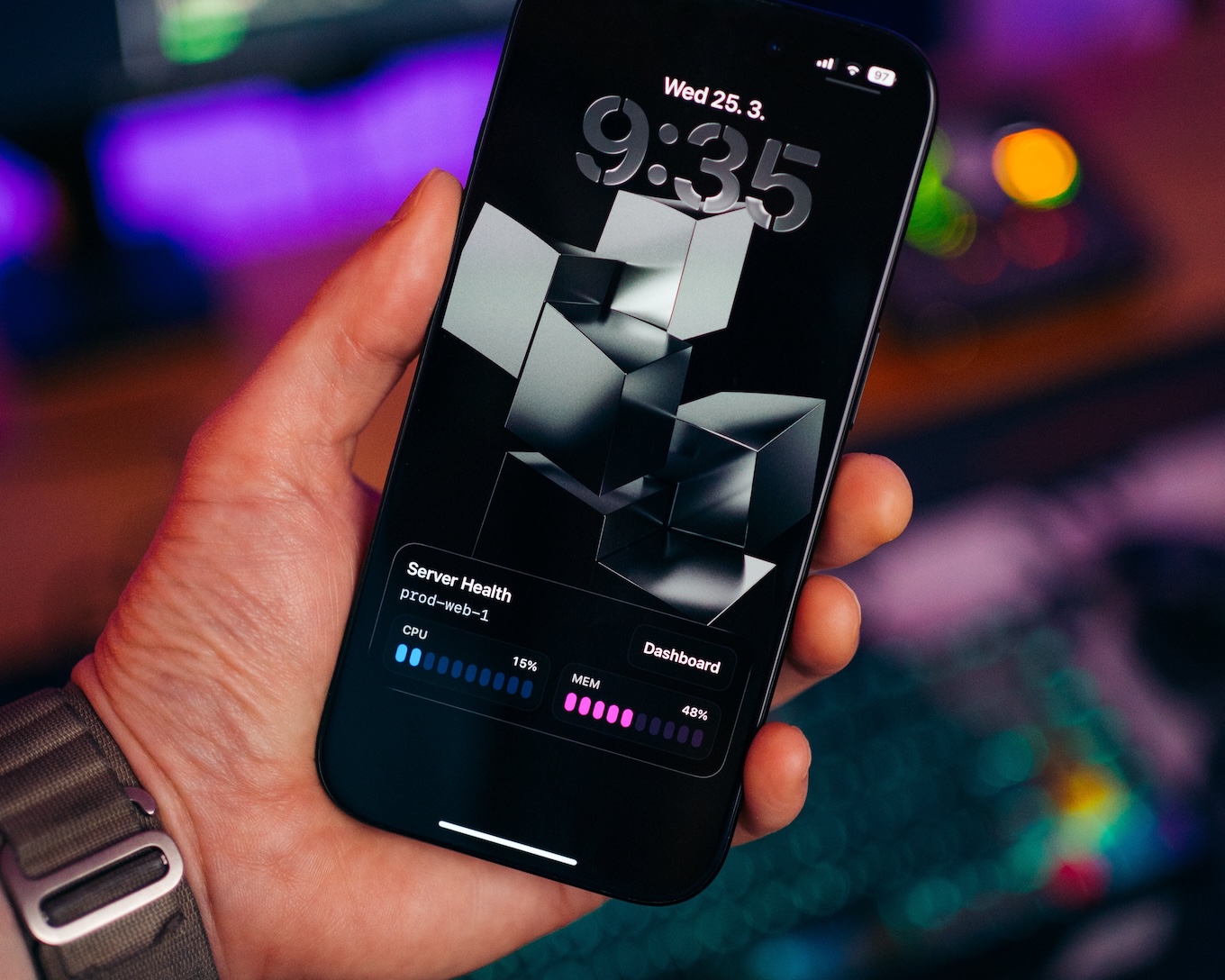
Most of the time I don't need a full dashboard. I just need CPU and memory usage at a glance.
Here is a simple way to keep live infrastructure metrics visible on your iPhone lock screen. I do this with ActivitySmith, bash script, and a cron job that keeps the same Live Activity updated on my lock screen.
The cron job fires every minute, and the Live Activity has been sitting on my lock screen for the last few days. Battery impact is noticeable, but not enough that I'd consider it a problem.
The exact script I run every minute
The script samples CPU and memory, sends the latest state to ActivitySmith, and exits.
#!/bin/bashset -euo pipefailAPI_BASE_URL="https://activitysmith.com/api"API_KEY="YOUR_API_KEY"STREAM_KEY="vps-us-fremont-ca"export LC_ALL=C# CPU usage (%)CPU=$(top -bn2 | awk -F'id,' '/Cpu\(s\)/ { split($1, a, ",") idle=a[length(a)] gsub(/[^0-9.]/, "", idle) cpu=100-idle}END { printf("%.0f", cpu) }')# Memory usage (%)MEM=$(free | awk '/Mem:/ { printf("%.0f", ($3 / $2) * 100) }')JSON=$(cat <<EOF{ "content_state": { "title": "Server Health", "subtitle": "vps-us-fremont-ca", "type": "metrics", "metrics": [ { "label": "CPU", "value": $CPU, "unit": "%" }, { "label": "MEM", "value": $MEM, "unit": "%" } ] }, "action": { "title": "Dashboard", "type": "open_url", "url": "https://cloud.example.com/nodes/84039/metrics" }}EOF)curl --fail --silent --show-error \ -X PUT "$API_BASE_URL/live-activity/stream/$STREAM_KEY" \ -H "Authorization: Bearer $API_KEY" \ -H "Content-Type: application/json" \ -d "$JSON"echoThe cron line
* * * * * /opt/monitoring/vps-health-live-activity.shI use one stable stream_key per server. In this case, vps-us-fremont-ca identifies this VPS, so every cron run updates the same Live Activity instead of starting a new one.
A few implementation details
top -bn2uses the second sample, which gives a more useful CPU reading than the first snapshot.freegives me a quick memory percentage without adding more dependencies.
What I like about it
- I can check the server state in one glance.
- If something spikes, one tap on the
Dashboardbutton takes me straight to the VPS dashboard.
The honest downside is battery but the impact is low, and I can always just clear the Live Activity from the lock screen.