

Chatway Chatway
  • Home
  • Product
  • Pricing
  • Built For
  • Resources
    • ImageHelp Center
    • ImageBlog
    • ImageIntegrations
    • ImageSocial Media Buttons
    • ImageGlossary
  • What’s New
  • Sign In →
  • Home
  • Product
  • Pricing
  • Built For
  • Resources
    • ImageHelp Center
    • ImageBlog
    • ImageIntegrations
    • ImageSocial Media Buttons
    • ImageGlossary
  • What’s New
  • Sign In →
Sign In Sign Up for Free Free Sign Up

How to enable push notifications

  • Help Center >
  • Getting started >
  • How to enable push notifications

In this guide we’ll show you how to enable push notifications for your Chatway live chat widget.

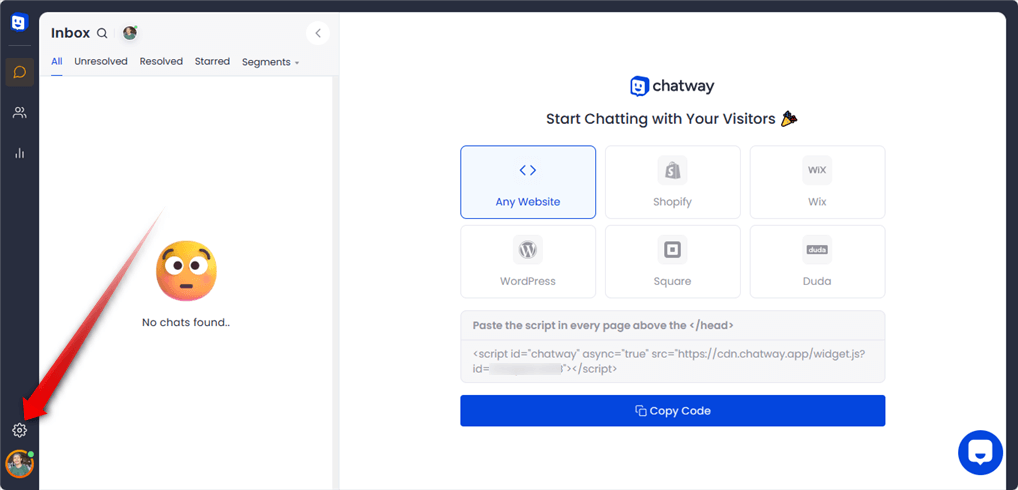
Step 1: Start by opening your Chatway dashboard and click on the settings icon on top of your Chatway profile picture in the bottom left corner:
Image

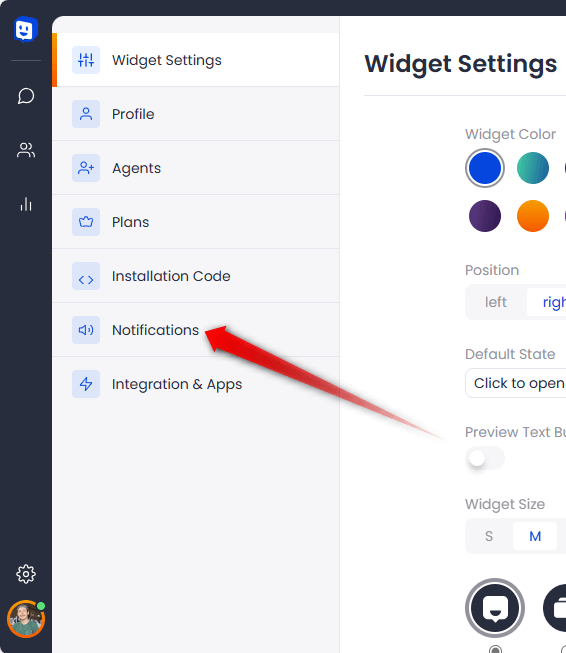
Step 2: From the page that will open, select “Notifications”.
Image

Step 3: Now you can click on any of these toggles to enable push notifications for when you are online or offline, or both:

Image

To set up mobile app notifications, open the mobile app menu and select Notification Settings.

Image
Image
Image

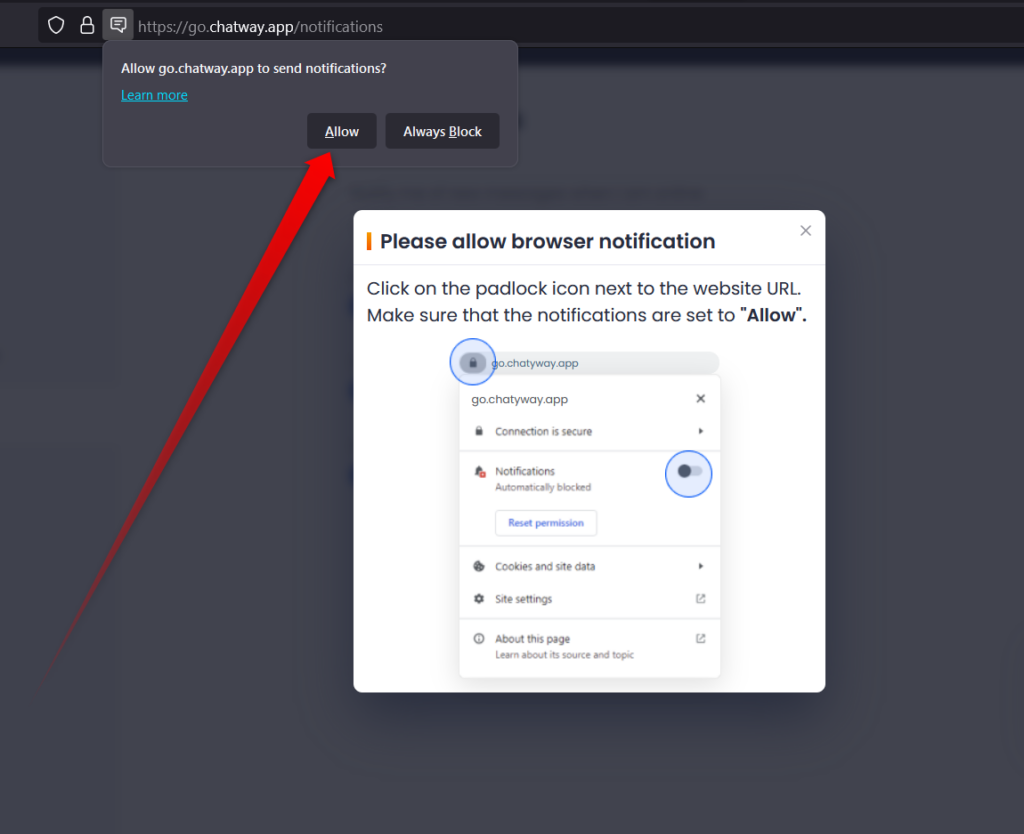
Important: Please make sure to allow browser notifications by clicking on the icon next to the website URL:
Image

And that’s it. Now you’ll receive push notifications for new messages!

Plans That Fit Every Stage of Your Growth

Start free and upgrade as your needs expand. Whether you’re working solo, leading a team, or scaling big, we’ve got a plan built for you.

Sign Up for Free

No Credit Card Required

Chatway essential features
Capterra Capterra 2 Grid Leader Grid Leader High performancer 1 High performancer 2 High performancer 3 High performancer 4 High performancer 5 GetApp Customer Support
chatway footer logo

Improve live chat communication and unlock customer satisfaction with Chatway.

app store logo play store logo
5 stars reviews
1,000+ Five-Star Reviews on iOS & android app stores

Company

  • Contact Us
  • About Us
  • Privacy Policy
  • GDPR
  • Terms of Service

Resources

  • AI Support Agent
  • Integrations
  • Chatway API
  • Help Center
  • Comparison Page

© 2026 Chatway. All rights reserved.

GDPR icon
Accessibility Adjustments

Powered byOneTap

How long do you want to hide the toolbar?
Hide Toolbar Duration
Select your accessibility profile
Vision Impaired Mode
Enhances website's visuals
Seizure Safe Profile
Clear flashes & reduces color
ADHD Friendly Mode
Focused browsing, distraction-free
Blindness Mode
Reduces distractions, improves focus
Epilepsy Safe Mode
Dims colors and stops blinking
Content Modules
Font Size

Default

Line Height

Default

Color Modules
Orientation Modules
Advertisement
Advertisement