
Descripción
Members es un plugin de membresías para WordPress basado en perfiles y capacidades. Le da a tus usuarios la mejor experiencia de membresía proporcionándote potentes herramientas para añadir perfiles y capacidades y asignarlos a tus usuarios.
Members te permite establecer permisos para restringir el contenido de tu sitio proporcionando una sencilla interfaz de usuario (IU) para el potente sistema de perfiles y capacidades de WordPress, que tradicionalmente solo ha estado disponible para los desarrolladores que saben programarlo a mano.
Características del plugin
- Gestor de perfiles: Te permite editar, crear y borrar perfiles, y también capacidades de estos perfiles.
- Múltiples perfiles de usuario: Da uno, dos o incluso más perfiles a cualquier usuario.
- Denegar capacidades de forma expresa: Deniega capacidades específicas a perfiles de usuarios concretos.
- Clonar perfiles: Crea un nuevo perfil clonando un perfil existente.
- Permisos de contenido / Contenido restringido: Protege el contenido para determinar qué usuarios (por perfiles) tienen acceso a la entrada de contenido.
- Shortcodes: Shortcodes para controlar quién tiene acceso al contenido.
- Widgets: Un widget de formulario de acceso y un widget de usuarios para mostrarlos en las barras laterales de tu tema.
- Sitio privado: Puedes hacer que tu sitio y su feed sean completamente privados si así lo quieres.
- Administrator Rescue (Magic Link): If you lose access to the WordPress admin (e.g. after editing roles), you can request a secure, time-limited link by email to restore your Administrator role and Members capabilities—no support ticket or database access required.
- Integración del plugin: Members es muy recomendado por otros desarrolladores de WordPress. Muchos plugins existentes integran directamente en ellos sus perfiles y capacidades personalizadas.
Integración perfecta con MemberPress
If you’re looking to build a business out of your membership site by creating paid memberships there’s no better way than to use MemberPress. Members and MemberPress work together to provide the ultimate member experience and will help you start and profit from your amazing WordPress membership sites!
Ahora todas las extensiones están incluidas
¡Members ahora incluye TODAS sus extensiones sin ningún coste! Aquí están algunas de las impresionantes características que añaden a Members:
- Permisos de bloques: Permite a los propietarios del sitio ocultar o mostrar bloques en función del estado del usuario conectado, su perfil o su capacidad.
- Capacidades de privacidad: Crea capacidades adicionales para controlar las características de privacidad y datos personales de WordPress (RGPD).
- Acceso al escritorio: Permite a los administradores del sitio controlar qué usuarios tienen acceso al escritorio WordPress mediante perfiles.
- Crear capacidades del núcleo: Añade las capacidades create_posts y create_pages a las entradas/páginas para separarlas de sus equivalentes edit_*, proporcionando capacidades de edición más flexibles.
- Category and Tag Caps: La extensión Category and Tag Caps crea capacidades personalizadas para el núcleo de las taxonomías de categorías y etiquetas de entradas. Esto permite a los propietarios del sitio tener un control preciso sobre quién puede gestionar, editar, borrar o asignar categorías/etiquetas.
- Niveles de perfil: Expone el antiguo sistema de niveles de usuario, que corrige el fallo del desplegable de autor de WordPress cuando los usuarios no tienen un perfil con uno de los niveles asignados.
- Jerarquía de perfiles: Crea un sistema jerárquico de perfiles.
- Integración con ACF: Crea capacidades personalizadas para el plugin Advanced Custom Fields (ACF) que gestionar con el plugin Members.
- Integración con EDD: Integra las capacidades del plugin Easy Digital Downloads en la gestión de perfiles del plugin Members.
- Integración con GiveWP: Integra las capacidades de los plugins GiveWP y GiveWP Recurring Donations en la gestión de perfiles del plugin Members.
- Integración con Meta Box: Integra las capacidades del plugin Meta Box en la gestión de perfiles del plugin Members.
- Integración con WooCommerce: Integra las capacidades del plugin WooCommerce en la gestión de perfiles del plugin Members.
Para más información, visita la página de inicio del plugin Members.
¿Te gusta este plugin?
The Members plugin is a massive project with 1,000s of lines of code to maintain. A major update can take weeks or months of work. We don’t make any money directly from this plugin while other, similar plugins charge substantial fees to even download them or get updates. Please consider helping the cause by:
Documentation
Soporte
Si necesitas que el plugin sea compatible con nosotros, puedes visitar nuestra página de soporte.
Desarrollo del plugin
Si eres autor de un tema, un plugin o, simplemente, un aficionado al código, puedes seguir el desarrollo de este plugin en su repositorio de GitHub.
Capturas

Pantalla de gestión de perfiles 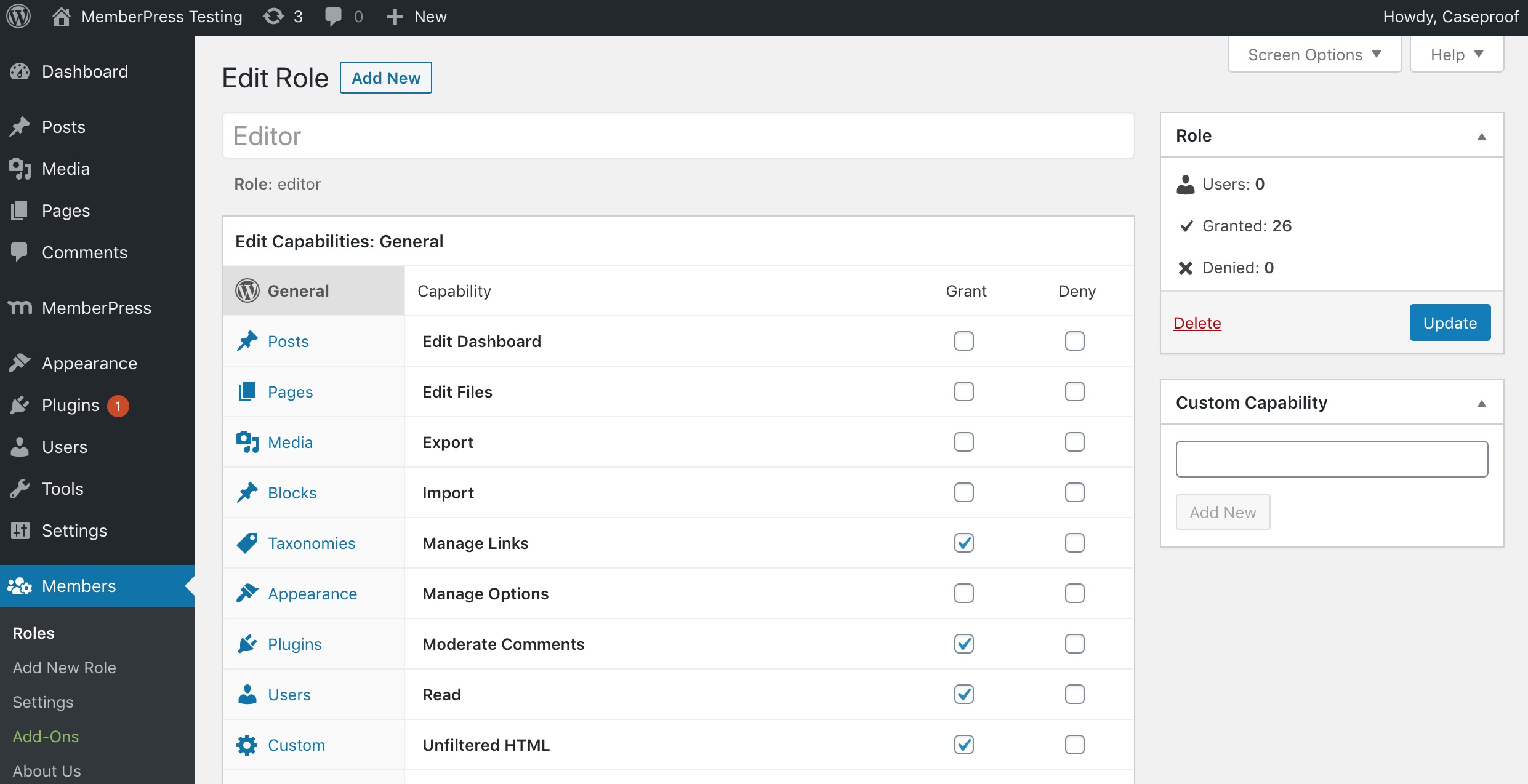
Pantalla de edición de perfiles 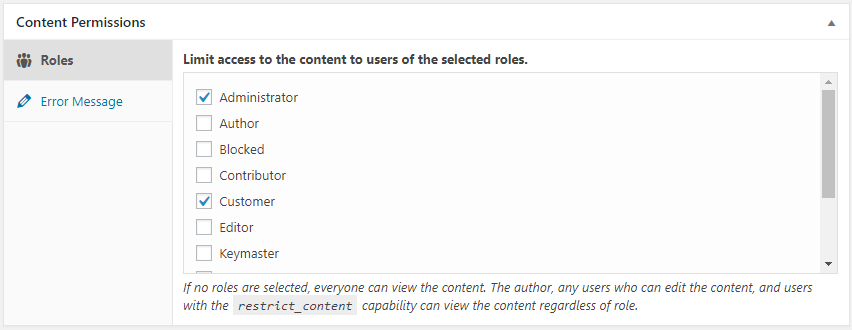
Caja meta de permisos de contenido (pantalla del editor de entradas/páginas) 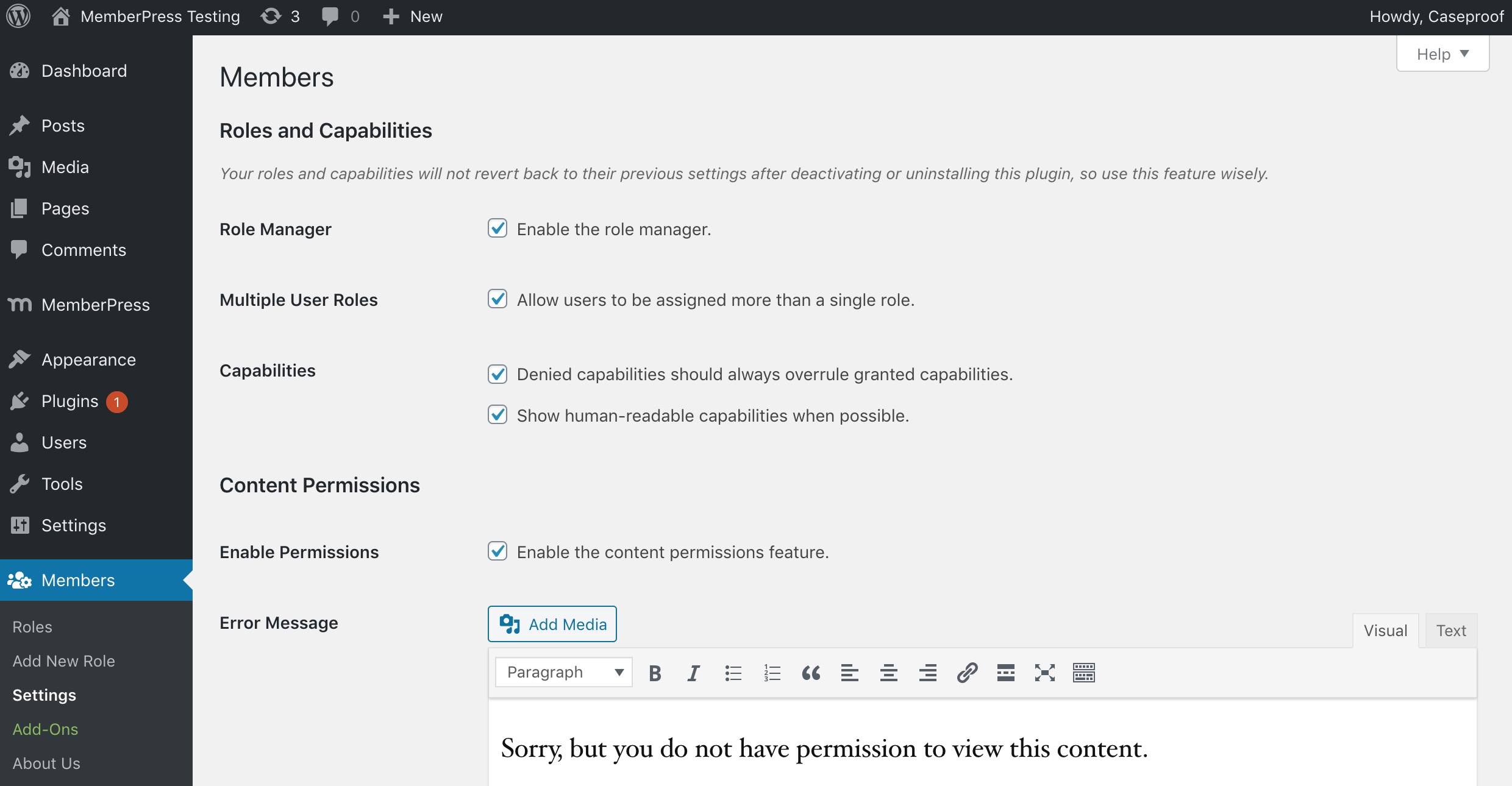
Pantalla de ajustes del plugin 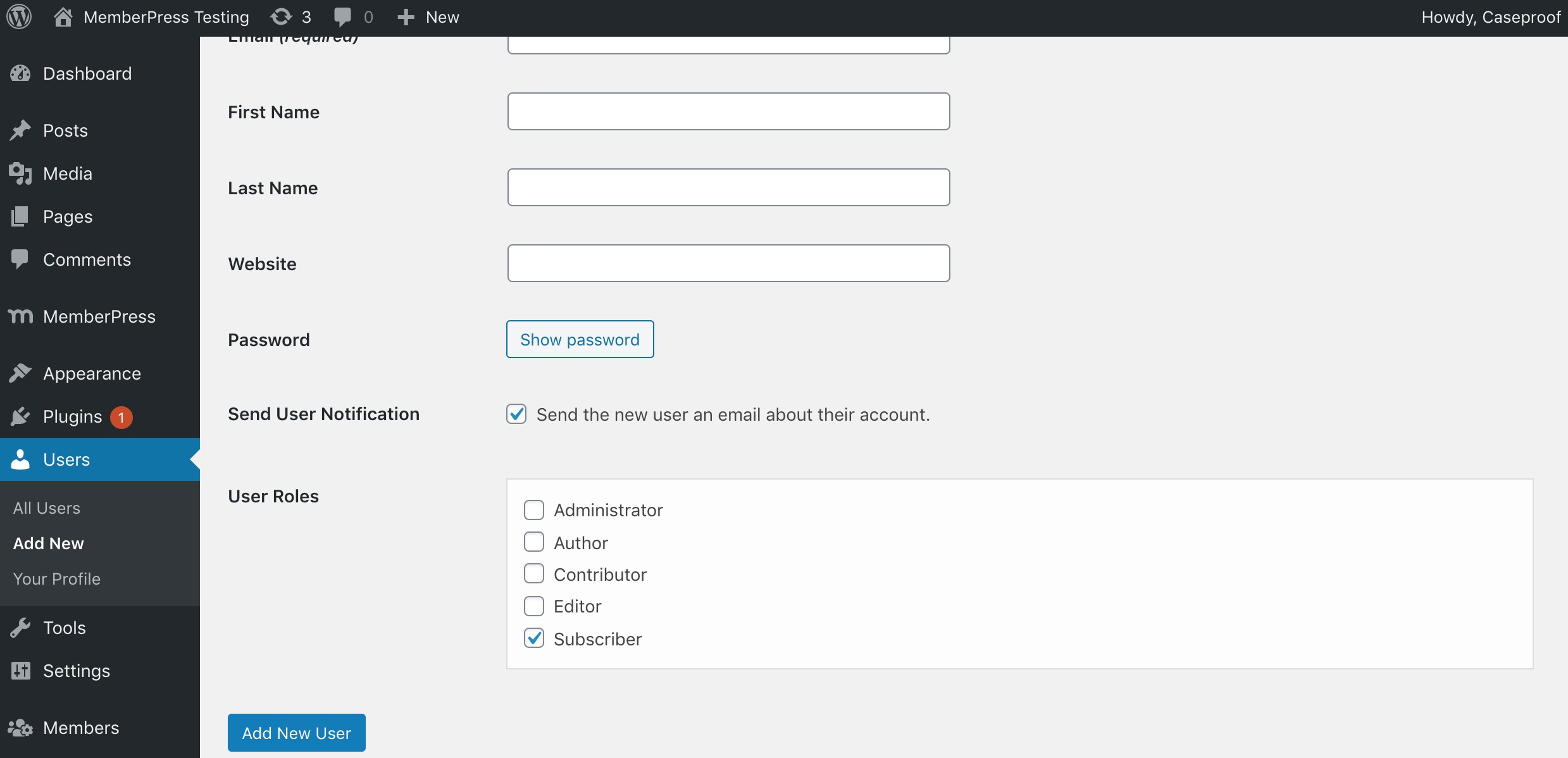
Elegir múltiples perfiles por usuario (pantalla de edición de usuarios)


Instalación
- Sube
membersal directorio/wp-content/plugins/. - Activa el plugin a través del menú «Plugins» en WordPress.
- Ve a «Ajustes > Members» para elegir qué ajustes te gustaría usar.
Hay instrucciones más detalladas en el archivo readme.html del plugin.
FAQ
-
¿Por qué se creó este plugin?
-
We weren’t satisfied with the current user, role, and permissions plugins available. Yes, some of them are good, but nothing fit what we had in mind perfectly. Some offered few features. Some worked completely outside of the WordPress APIs. Others lacked the GPL license.
So, we just built something we actually enjoyed using.
-
What’s the difference between Members and MemberPress?
-
Members and MemberPress solve different problems and are designed to work together.
Members is a free roles and capabilities plugin. It gives you a UI on top of WordPress’ native roles and capabilities system so you can create and edit roles, assign multiple roles to users, and restrict content by role or capability. It’s the right tool when you need to control who can do what inside your site—dashboard access, content permissions, and capability management—without charging for access.
MemberPress is a premium, all-in-one WordPress membership platform built for monetization and much more. In addition to paid subscriptions, payment processing (Stripe, PayPal, and more), recurring billing, coupons, and drip content, MemberPress also includes:
- Courses — a built-in LMS for creating and selling online courses with lessons, quizzes, and progress tracking.
- CoachKit — tools for running coaching programs, including milestones, habits, and client check-ins.
- Community Groups — private member communities and discussion spaces tied to your memberships.
- Member Profiles & Directories — customizable front-end profiles and searchable member directories.
- Email marketing integrations, affiliate program support, and many more premium features.
It’s the right tool when you need to sell access to content, courses, coaching, or communities—and grow a full membership business around it.
The two plugins are complementary, not competing. Many sites use Members for fine-grained role and capability management alongside MemberPress for everything membership-business related. For a full side-by-side comparison, see Members vs MemberPress.
-
¿Cómo lo uso?
-
La mayoría de las cosas deberían ser bastante sencillas, pero también puedes ver la documentación en línea.
-
Requisitos PHP mínimos.
-
Ahora Members necesita PHP 7.4 o superior
-
No puedo acceder a las utilidades del «Gestor de perfiles».
-
When the plugin is first activated, it runs a script that sets specific capabilities to the «Administrator» role on your site that grants you access to this feature. So, you must be logged in with the administrator account to access the role manager.
Si, por algún motivo, tienes perfil de administrador y a pesar de ello no puedes acceder al gestor de perfiles, desactiva el plugin. A continuación vuelve a activarlo.
-
En multisitio, ¿por qué los administradores no pueden gestionar perfiles?
-
If you have a multisite installation, only Super Admins can create, edit, and delete roles by default. This is a security measure to make sure that you absolutely trust sub-site admins to make these types of changes to roles. If you’re certain you want to allow this, add the Create Roles (
create_roles), Edit Roles (edit_roles), and/or Delete Roles (delete_roles) capabilities to the role on each sub-site where you want to allow this. -
How do I use Administrator Rescue (Magic Link) if I’m locked out?
-
If you can no longer access the WordPress admin (for example, after changing your role or capabilities), you can restore your Administrator access yourself:
- Go to your site’s login page:
yoursite.com/wp-login.php - In the address bar, add
?action=members_rescueso the URL is:yoursite.com/wp-login.php?action=members_rescue - Enter the email address of an account that has (or had) the built-in Administrator role, or is a Super Admin (multisite).
- Click «Send Rescue Link». If that account is eligible, a secure link will be sent to that email (you may need to check spam).
- Open the link from the email within 15 minutes. Your Administrator role and Members capabilities will be restored, and you’ll be redirected to the login page to sign in.
Only users with the built-in WordPress «Administrator» role (or Super Admins on multisite) can use this feature; custom or cloned roles are not eligible. The link expires after 15 minutes and is limited to a few attempts per IP to prevent abuse.
- Go to your site’s login page:
-
¡Ayuda ¡Me he bloqueado a mi mismo en mi sitio!
-
Please read the documentation for the plugin before actually using it, especially a plugin that controls permissions for your site. We cannot stress this enough. This is a powerful plugin that allows you to make direct changes to roles and capabilities in the database.
If you have the built-in Administrator role (or are a Super Admin on multisite) but lost access to the admin (e.g. after editing roles), try the Administrator Rescue (Magic Link) first: go to
yoursite.com/wp-login.php?action=members_rescue, enter your admin email, and use the link we send you to restore access.If that doesn’t apply or didn’t work, stop by our support forums to see if we can help. Your web host may also be able to restore your site from a recent backup, but we only recommend that as a last resort, as it could mean losing work or members added since the backup.
Reseñas


Colaboradores y desarrolladores
«Members – Membership & User Role Editor Plugin» es un software de código abierto. Las siguientes personas han colaborado con este plugin.
Colaboradores

«Members – Membership & User Role Editor Plugin» está traducido en 21 idiomas. Gracias a los traductores por sus contribuciones.
Traduce «Members – Membership & User Role Editor Plugin» a tu idioma.
¿Interesado en el desarrollo?
Revisa el código , echa un vistazo al repositorio SVN o suscríbete al registro de desarrollo por RSS.
Registro de cambios
3.2.21
- Fixed: Privacy Caps add-on not granting privacy capabilities to administrators on fresh activations
- Removed: Legacy standalone-plugin code from bundled add-ons (dead activation hooks, obsolete build scripts, orphaned readme/uninstall files)
3.2.20
- Added: Reset roles
- Added: Add rescue link for Administrator roles only
- Changed: Refreshed branding with updated WordPress.org banner and icon assets, header SVG, and logo
- Changed: Updated About page design
- Changed: Optimized role user count retrieval using transients for improved performance
- Fixed: Missing header banner on some admin pages
- Removed: Bundled POT file (translations now delivered via WordPress.org language packs)
3.2.19
- Fixed: Added support for WF 2FA error messages
- Fixed: Missing «you are already logged in» string
- Fixed: Add-on page RTL CSS fix
- Fixed: Block permissions fixes
- Fixed: Fix redirect_to issue on shortcode
- Fixed: Other minor bugfixes
3.2.18
- Fixed: Add-on activate toggle display issue on narrow screens
- Fixed: Login error redirection
- Fixed: Outdated Login form styling
- Fixed: Allow changing display name for some Roles
3.2.17
- Added: Bulk select/unselect checkboxes on Role capabilities
3.2.16
- Fixed: Protected posts being forced-hidden from API search even if setting was off
3.2.15
- Added: Growth Tools menu item
- Fixed: Translation errors
- Fixed: Styles and formatting on add-ons and about pages
3.2.14
- Fixed: Error in REST API calls when posts results not an array
3.2.12
- Fixed: Cleaned up prior author name and links
- Fixed: Cleaned up broken or incorrect links
- Fixed: Removed some unnecessary files
- Fixed: Incorrect gettext calls
- Fixed: Removed unneeded load_plugin_textdomain calls
- Fixed: Updated POT translation file
3.2.11
- Fixed: Translation warnings after WP 6.7
- Fixed: Add option to hide protected content from REST API searches
- Fixed: Add support for Loco Translate plugin (via new loco.xml file)
3.2.10
- Fixed: Capability checks on AJAX calls
- Fixed: PHP warning for $wp_embed
- Changed: Now requires PHP 7.4 minimum
3.2.9
- Fixed: PHP 8.1 deprecation notice on ACF integration (props @DSGND)
3.2.8
- Added: members_wp_roles filter to WP roles in Content Permission box
- Fixed: Content Permission icon in Panel block
- Fixed: Position of Field Group menu item in ACF
3.2.6-7
- Fixed: PHP 8+ compatibility
- Added: members_show_roles_page_cap filter for edit_roles_cap
- Fixed: Improperly named variable
3.2.5
- Fixed: WP Cron task for in-plugin notifications running unnecessarily
3.2.4
- Fixed: More package deployment fixes
3.2.3
- Added: Footer with helpful links
- Fixed: Package files deployed unnecessarily
- Fixed: Debug warnings
- Fixed: Correct bootstrap file required
3.2.2
- Fixed: Undefined index notice
3.2.1
- Fixed: Uncaught TypeError: in_array()
3.2.0
- Added: Members Notifications
- Changed: Converted
jQuery.fn.click()(deprecated) tojQuery.fn.on('click') - Changed: Replaced references to Affiliate Royale with Easy Affiliate
- Changed: WP Tested Up To version (5.9)
3.1.7
- Fixed: Hierarchical roles missing settings
- Changed: Refactored checks for whether MemberPress is active; added
members_is_memberpress_active() - Changed: «Paid Memberships» section of Content Permissions meta box should not show when MemberPress is active
- Changed: Wording from «Upgrade to MemberPress» to «Add MemberPress»
3.1.6
- Added: «Miscellaneous» settings section
- Added: «Disable Review Prompt» setting to permanently remove the review prompt
- Added:
MEMBERS_DISABLE_REVIEW_PROMPTconstant to permanently remove the review prompt - Changed: WP Tested Up To version (5.8)
- Fixed: Using transients for review prompt caused the prompt to persist when dismissed; switched to using options instead
- Fixed: Users widget not working in new block-based widgets editor
3.1.5
- Fixed: Block permissions not working for nested blocks (e.g. columns)
3.1.4
- Changed: Converted instance of wp.editor to wp.blockEditor
- Changed: Check for MemberPress constant instead of using
is_plugin_active() - Fixed: Compatibility for PHP 8
3.1.3
- Changed: Disabled Content Permissions side meta box
- Fixed: Issue with comma-separated roles that include spaces
3.1.2
- Fixed: Review prompt should only show to admins
3.1.1
- Changed: Admin UI cleanup
3.1.0
- Changed: Admin UI
- Fixed: Issue with custom capabilities not saving to custom roles
3.0.10
- Fixed: Users who can promote should be able to assign roles to their own account
3.0.9
- Fixed: ACF integration trying to bump priority on ACF menu
3.0.8
- Fixed: Settings page error
3.0.7
- Fixed: Issues related to translated admin menu slug
3.0.6
- Fixed: Settings page throwing error on non-English sites
3.0.5
- Fixed: Collapse Permissions block editor section by default
3.0.4
- Added: Filter for applying custom validation to settings
- Fixed: Inaccessible settings page in Admin Access
3.0.3
- Changed: Display icons using file_get_contents() instead of include() to prevent executing them as PHP
- Fixed: PHP warnings being thrown
- Fixed: Make sure admin menu is always accessible
3.0.2
- Fixed: Minimized SVG icons to fix issues with parsing them
3.0.1
- Fixed: Some JS and image files weren’t checked in via SVN; bumped version to add them
3.0
- Added: Rolled all add-ons into core
- Changed: Consolidated all Members-related settings under one admin menu item
- Changed: Made login and user widgets enabled by default, and removed settings
