Description
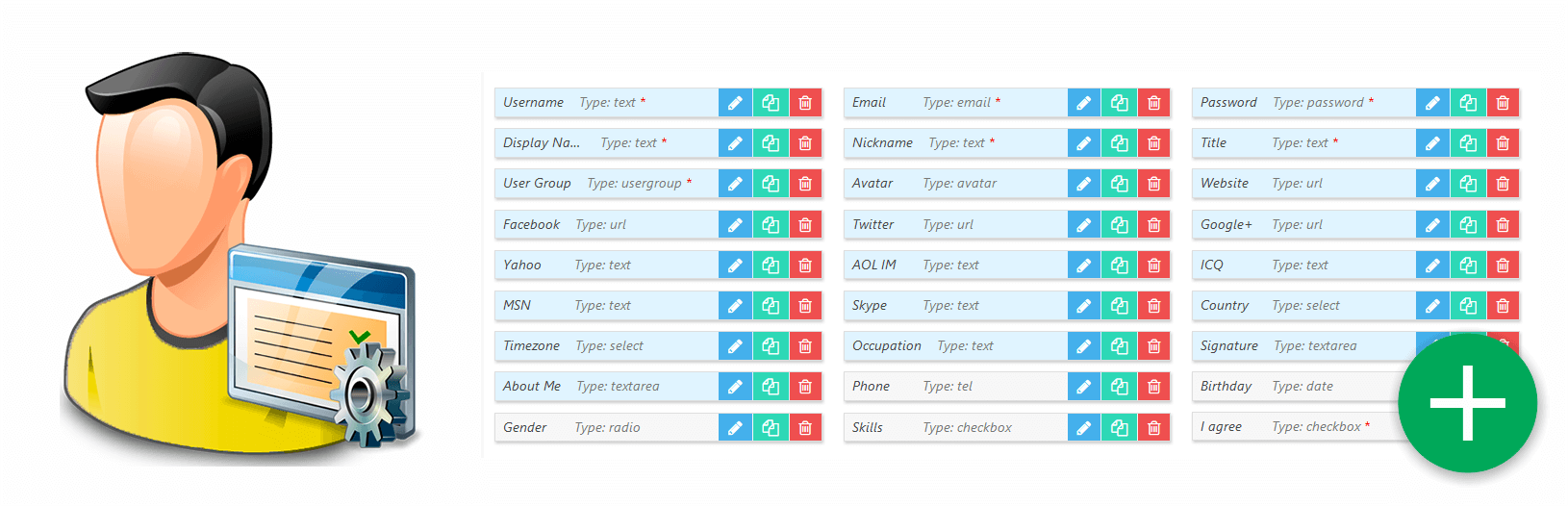
This is an advanced user profile builder system designed for creating powerful online community and membership site. It includes form builder tools for Registration form, Account Settings form and for Members Search form. Also you can manage User Profile page fields and layout with a similar tool. Once addon is installed all available default fields will be listed on addon field settings page. Here you can manage default fields and create new fields. You can find more information in wpForo User Custom Fields Documentation.

wpForo User Custom Fields Features
- Allows to manage default profile fields and add new custom profile fields.
- Field types: Text, Email, Phone, Url, Date, Color Picker, Number, Password, Drop Down, Radio, Checkbox, Textarea, File Upload, Avatar, Usergroup, HTML.
- Field options: Label, Placeholder, Title, Description, Max/Min length/value, Icon, Required, Can User Edit, Admin note, Who can view, Who can edit, and many more field specific options.
- Fields have own Edit and View permission for each Usergroup.
- Interactive drag and drop Form Builder tools for each form. Allows to set form layout (rows, columns) and add fields in certain area of forms.
- Integrated with Profile Builder plugin. You can choose fields from Profile Builder and use them in wpForo. The value of integrated fields can be displayed in wpForo Members Directory, in users Profile Pages, in Topics and Posts next to the author information. Also, you can use the integrated fields in the Members Search form.
- Tool to Backup, Export and Import all settings (custom fields, forms’ structure, etc…)
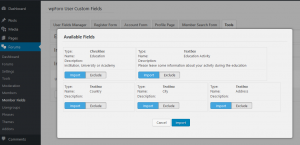
- Tool to import users custom fields data from BuddyPress to wpForo (BuddyPress to wpForo Migration tool).
Custom Profile Page
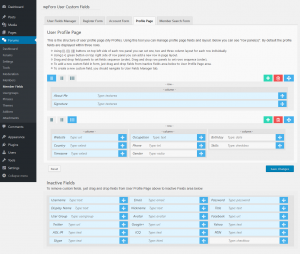
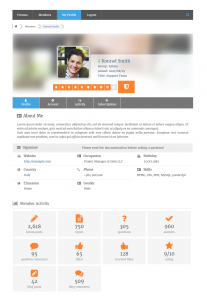
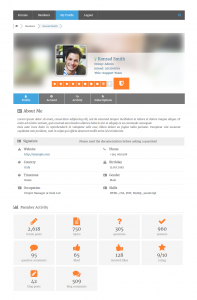
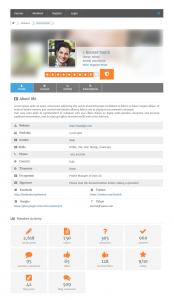
Page builder tool in Profile Page tab (documentation).
Custom Registration Form
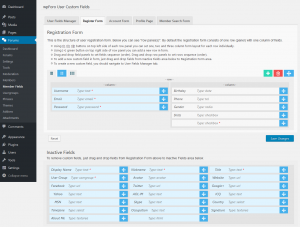
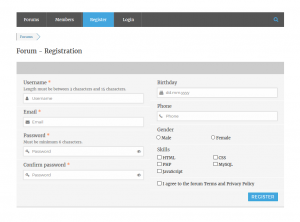
Form builder tool in Register Form tab (documentation).
Custom Account Setting Form
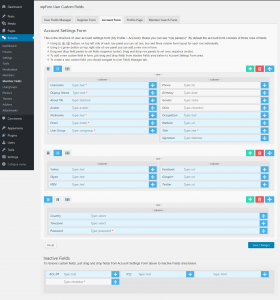
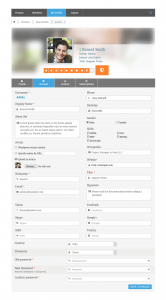
Form builder tool in Account Form tab (documentation).
Custom Members Search Form
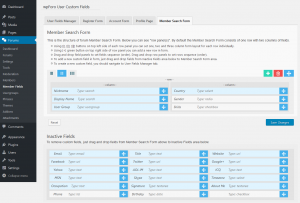
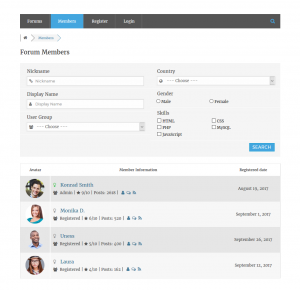
Form builder tool in Member Search Form tab (documentation).
Import user custom fields from BuddyPress to wpForo
Installation and Configuration
- This addon installs like any other plugin for WordPress.
Access to wpForo User Custom Fields addon is provided immediately once you paid for your order. Upon completing registration/checkout, you may log in at gVectors.com. We will also send you an email after registration/checkout, with a link to the login page. Then download the installation package.
- Downloaded addon zip file from gVectors Shop account page
- Navigate to Dashboard > Plugins > Add new and upload addon ZIP file, then activate it.
- Once the plugin is active, navigate to WordPress Dashboard > Forums > Member Fields to begin configuration…
- It’ll ask you to activate with license key you got via email or in your account page, just insert the key and activate it.
If for some reason you cannot install this plugin using WordPress plugin upload system please do that with this alternative way. Unzip, and then upload the /wpforo-user-custom-fields/ folder to your /wp-content/plugins/ directory using an FTP application like FileZilla; or any other FTP program is fine also. Make sure you have not double /wpforo-user-custom-fields/wpforo-user-custom-fields/ directories nested inside each other, please correct this before you continue. Then in WordPress, go to WordPress Dashboard > Plugins, and then activate the wpForo User Custom Fields addon.
3.3.5
Fixed: topic overview issue.
3.3.4
Fixed: Extra letter at the end of the radio input values
Fixed: Undefined array key “fieldKey”
3.3.3
Added: PHP 8.4 Compatibility
3.3.1
Fixed: Issue with carriage return symbol when saving the field
3.3.0
Changed: gVectors API URL
3.2.9
Fixed: Issues with admin notices
3.2.7
Added: Saving fields via ajax on drag
Fixed: Tabs ordering issue
3.2.6
Added: Compatible with wpForo 2.3.4 and above.
3.2.5
Fixed Bug: Problems with Social Network Fields



 Official wpForo Addon










Pre Sale Support
Hello! Does the User Custom Fields add-on currently support displaying custom field values next to the author avatar in forum posts and topics?
Hi,
Please read this support topic:
https://gvectors.com/forum/wpforo-user-custom-fields/how-to-display-the-custom-fields-in-the-post-php-topic-php/
The same question is discussed there.
Hi, I wanna to ask if it is possible to remove the “Website” field from the user profile? I see that it is a light blue field, which means it cannot be deleted. I would like users to be unable to enter their website in the registration form and, above all, to be unable to edit their profile later and add their website. Even though it is a required field, could this addon be helpful in any way?
Hi,
Sure, you can. Please follow the steps below:
1. Go to Dashboard > wpForo > Members Fields > Tab Manager.
2. Edit the Account tab and move the Website field into the Inactive Fields section.
3. Navigate to Dashboard > wpForo > Members Fields > Registration Form and add the Website field.
4. If you want to display the website field value (just the URL, not editable), add it in the Profile tab. You can manage the tab in Dashboard > wpForo > Members Fields > Tab Manager.
Clear all caches and check again.
I have simple requirement. Adding location to the user custom field. Any hope!
I found that it add “r” with country name!
Hi,
This is not the right place to ask this question. This is the pre-sale question section, where you can ask all pre-sale questions you have, before purchasing this plugin. Just open a new support topic in the wpForo – User Custom Fields addon’s support forum: https://gvectors.com/forum/wpforo-user-custom-fields/
If we give the possibility to display the location (country) in the registration form or in the profile, does the location also appear in the WordPress backend to quickly see where a member comes from without having to search in the forum itself?
wp-foro – members or Worspress users?
Hi Sven,
It can appear in the members Profile or Account page on the frontend.
Subject: Clarification on Using the “User Custom Fields” Add-on on a Test Subdomain
Dear WPForo Support Team,
I am considering purchasing the User Custom Fields add-on for WPForo and would like to clarify its licensing terms before proceeding.
Currently, I plan to test and configure this add-on on a staging/test subdomain of my primary site, such as test.mysite.com, before deploying it to my live domain (mysite.com). My question is:
Is it possible to use the User Custom Fields add-on on a test subdomain (e.g., test.mysite.com) without violating the single-site license terms?
If not, does WPForo provide any special permissions or temporary licenses for staging environments?
I want to ensure compliance with your licensing policies while also having the flexibility to test and configure the add-on thoroughly before going live.
Thank you for your assistance. I look forward to your clarification.
Best regards,
Hi,
Please follow this support topic: https://gvectors.com/forum/product-license-questions/license-activation-on-development-website/#post-25171
The smae question is discussed there.
Profile Completeness
https://docs.wbcomdesigns.com/docs/buddypress-private-community-pro/pcp-profile-progress/profile-progress/
I would like to reduce spam by allowing new members to post their photo avatars, for example, after they have finished uploading them. Is there a feature?
Or if it’s compatible with this plugin, can I implement it?
https://docs.wpuserregistration.com/docs/user-registration-profile-completeness/?_gl=1*1wv0yy2*_ga*Nzg4MTAxMzIyLjE3MzU4ODkwMjA.*_ga_MWT9MR4LE0*MTczNjA5MzgyOS4yLjEuMTczNjA5NDA1Ny4wLjAuMA..
Hi,
Please rephrase your question.
Hello,
Just one question:
I understand that custom fields created are stored in the field “field” in the wp_wpforo_profiles table, but does the plugIn still display those custom fields on the wp backoffice profile layout, at least in readOnly if not editable there?
Hi,
Could you please clarify what you mean by ‘WP backoffice profile layout’?
I mean on the WordPress classic user-edit.php interface.
Dear Ben,
I’m sorry, but the addon doesn’t have such a feature.
Hello, do we receive premium support if we purchase an addon?
Please read about it here : Support Policy and Terms & Conditions
Hi
I read the license agreement but still cannot be sure … we want to buy a few addons, they will be first installed on a dev site with a different url from the production site … Can I do this with the single site license ? we can at some point disable the dev site, but I’m wondering if the site url can be swaped when dev is over ?
Thks.
Pierre
Please note, that the activation is only necessary for getting new version updates. So you can use addons on staging websites without key activation, there is not any limit in functions and features if you don’t activate it.
Ok thanks !
I purchased this plugin and using it on my forum. I would like to know if it is possible to send the values from custom fields in the registration form in the new user mail send to admin after registration.
Hi Sven, sorry for the late response.
Please create a new topic at wpForo User Custom Fields addon Forum.
Is it possible to block the possibility of writing when the user does not have some fields in his profile filled?
I mean you’ll get a message – enter your full name and address in your profile to write your subject. It is sufficient if this principle is limited to categories
Hi Wiktor,
If you’re talking about the possibility of writing a post, that’s not possible to do.
Does this addon replace the full contents of the current wpforo profile?
is it possible to upload a self hosted video in profil ? would be amazing
Hello i have installed this plugin 2 days ago and now i seem to have a heap of spam registrations. I am not wanting to use the registration page more wanted it for the profile. however it seems that there are a heap of users being able to setup profiles selling stuff. i do not know how to stop them.
i have disabled the addon however they can still register and upload their profile pictures etc.
can you tell me if we have this addon does the information get stored in the backend wpForo members section? we would like an easy way to collate this data and extract it
Hi Natalie,
All custom field data will be saved in the “fields” field of the wp_wpforo_profiles table as a serialized array. Other data are saved in wp_users and wp_usermeta tables. The doc: https://wpforo.com/docs/root/gdpr/right-to-data-portability/#1-export-user-profile-data
Hi.
Is it possible to add a custom field to the user fields to add files to the user account area?
I want both the user himself and the administrator of the website to be able to add files to the user profile, is this posible?
Thanks, regards
Hi Julia,
Yes, you can add it. You can add it either in the Account Tab or in a Custom Profile Tab, just use a field with “File” type.
Can this addon be used to create a custom header image using CSS?
Example:
element.style {
background: linear-gradient(
0deg
, #00000054, #00000054), url(www.example.com/example.jpg);
}
I would like to allow users to add a header photo to their profile.
Thanks!
Hi KevinA,
I’m sorry, but not. It’s better to customize wpForo template files in update safe way. You’ll deal with the profile.php file. Here is the documentation:
hi can we create a tab called “my blog” and inside all blog posts from this user will be displayed ?
Hi appifox,
You’ll be able to create the custom tab [my blog] and put any shortcode you want. But you should find a plugin which will provide you a shortcode with an ability to show all posts by user ID. You should find such plugin before buying this addon. here are some suggestions. Just contact them and make sure their plugins shortcodes can display post list by user id:
These prices are very expensive for Turks, is it possible to give a price in TL?
Hi Habbosan,
Please contact us via support[at]gvectors.com email address and provide a list of all addons you want to buy.
Hi Robert,
Is it possible to upload a csv of users and field answers to set their custom field data? I need to onboard around 900 new people into a company website.
Thanks!
Hi Arien Freymuth,
We don’t follow you well. Could you please try to explain in other words.
We are going to import 900 people into our company website. While doing that, we want to assign field data to them. For example, Company, Phone number, Location. Does the Import option in the tools section of this add-on give us the ability to upload a spreadsheet of emails and custom data so we can enter all of this information for our users?
Hi Arien,
Please follow to this support topic: https://gvectors.com/forum/wpforo-user-custom-fields/bulk-import-meta-data-into-custom-fields/#post-26514
Hello! Will the user custom fields add-on allow me to remove the “registered date” from the Members tab? If not, is there any way to remove that? Thanks!
Chris,
You can remove it without the addon. Just use the CSS code below:
#wpforo #wpforo-wrap .wpforo-profile-wrap .profile-stat-data-item:nth-child(2) {display: none;
}
Put the code in the “Custom CSS code” textarea, located in the Dashboard > Forums > Settings > Styles Tab.
Please don’t forget to delete all caches and press Ctrl+F5 (twice) on the frontend before checking to reload the updated CSS file.
Hi Astghik. Rats. I added that code, but “registered date” still appears in the member search/member directory. It disappeared from the profile though, which is great. Any ideas on how to remove “registered date” from members tab?
Add the following codes as well:
th.wpf-members-regdate {

    display: none;

}

td.wpf-members-regdate.wpfcl-1 {

    display: none;

}
Is it possible i can have access directly to this addon in a demo site so i can try setup what i wish to do to see if i can get the look i want before buying?
Im trying to add:
Playstation Gamertag:
Nintendo friend code:
Pc Steam:
Oculus name:
Xbox Gamertag:
Twitch:
YouTube:
Epic games:
Activision:
About me:
Gaming History:
Age:
Avatar image.
Also is their anyway to display these members into a member list eg a swuad oage as i need a Playstation Team page, xbox team page etc.
Thanks
Hi Kerjam88,
We cannot give you admin access to the website, however, we’ve created the fields you want. Please try to register and check the fields.
https://addons.wpforo.com/community/?foro=signup
We’ve added some fields in the member search section, so you can check out the member search as well:
https://addons.wpforo.com/community/members/
Hello,
my wpforo installation has different usergroups, with different permissions. Now I´would like to modify my registration process, so that new users enter a specific invitation code and that by this code they will be registerd to my wordpresspage AND automatically to the usergroup that is linked with the invitation code.
Is it possible with this plugin?
We don’t follow you well. Could you please clarify a bit? How the users will get the invention code.
BTW: the addon allows the members to choose the secondary usergroups. In this case, you can add the “User Groups Secondary” field in the registration form and users will be able to choose their usergroup in the registration process.
Please excuse my lack of clarity. I’ll try to describe it a little more precisely:
The users receive the code from me during a seminar or sent by email beforehand. A code for all participants of the respective seminar.
Participants in seminar A should register with code A and then automatically be assigned to user group A in the forum.
Participants in seminar B, on the other hand, receive code B, register with it and are then assigned to user group B.
In this way, the seminar participants can only access the area of the forum that is intended for them.
At least that’s how I imagine it and I wonder if that works with your add-on.
Hi Thoger,
This addon doesn’t have any option or feature to do that. So your question can be discussed in wpForo support forum. And here is a good topic which may be related to your question: https://wpforo.com/community/how-to-and-troubleshooting-2/how-to-create-an-invite-only-forum/#post-21150
Hi Tom,
thank you for your quick reply and the reference to the related topic.
I am already using wpforo with Ultimate member, but I am getting a mess with the profiles of both plugins, this addon can help me create a registration form but I have a doubt can the fields be conditioned?
And also, is there a way to prevent users from automatically registering and pending acceptance?
Thank you, I expect a prompt response that if I need a little to know if you can buy this addon or not
Hi Diego Molina,
The add-on is designed for creating powerful online community. It includes form builder tools for Registration form, Account Settings form and for Members Search form. Also you can manage User Profile page fields and layout with a similar tool. You can find more information in wpForo User Custom Fields Documentation.
Please note: user registration and account creation is a part of WordPress core. wpForo only provides a registration form. You should use some additional plugin for this purpose.
I bought it before, but I didn’t know I had to pay every year
All our products subject to yearly license for future updates. However, you’re still able to use the version you have for an unlimited time. Please read the license agreement here: https://gvectors.com/terms-and-conditions/#gaining-download-access
Can we ask questions on the user custom field that are not shown on the public member profile but only seen by the administrator
This is also possible.
The add-on has “Who can view? (View permission for certain usergroup)” option for the Custom fields.
More info here: https://wpforo.com/docs/root/addons/wpforo-user-custom-fields/user-fields-manager/
Hello~ If I use user custom field , can I put in shortcode for chart and table?
Hi dennis,
Thank you for your interest in wpForo – User Custom Fields add-on.
This feature will be available very soon. Once we update the wpForo plugin you’ll be able to use shortcode for chart and table.
Hi, one question before buying: With wpForo registration an user get an account before he confirm email. I checked this. If I buy this plugin, can I set it that this will not happen? Or only with reCaptcha to block bots before registration?
I am considering a purchase of WPforo User Custom Fields. Do you provide a discount for non-profits? Also, we have Restricted Content Pro installed on our site. I recently added WPforo and so far they are playing well together. Do you know if this add-on will also be OK with RCP?
Hi Sandra Patton,
Thank you for your interest in wpForo – User Custom Fields add-on!
Please contact us via support[at]gvectors.com email address.
I’m sorry, but I’m not familiar with this plugin. We’ve not tested it yet. I guess, if it works fine with wpForo, there shouldn’t be any problem with the wpForo – User Custom Fields add-on as well.
Do you provide a discount for non-profits? All of the vendors we have purchased from have provided a discount for any 501c3 registered non-profit. I would be glad to submit any evidence required.
Can this plugin display on the user profile page not only its own fields, but already existing fields created by other plugins (for example: NADI)?
Hi MrRipley,
I’m really sorry, but this add-on doesn’t have such a feature.
The add-on allows to create the following field types: Text, Email, Phone, Url, Date, Color Picker, Number, Password, Drop Down, Radio, Checkbox, Textarea, File Upload, Avatar, Usergroup, HTML.
Yes, very sorry. I highly recommend you to support third-party plugins (at least NADI) in the future. Forgive, please, but at the moment I have no reason to buy a plugin 🙁
Does this add-on complement or does it replace the Ultimate Members plugin?
Can you hide a field? that is not public
Hi Robert,
I’d like to make sure if this addon has a function of deleting/unregister by users.
You said it’s going to have one on forum, but any of description here has mentioned about it.
https://wpforo.com/community/how-to-and-troubleshooting-2/un-register-delete-account/#post-11612
Does it show on member account page? Could you give brief descriptions?
If it sounds complicating, I’m thinking to migrate to other platform…
Hi RYK,
This feature will be added in the wpForo plugin core in future versions.
This addon is designed to extend the forum profile system and doesn’t have such a functionality. You can create a custom Registration form with custom fields, add custom fields in the User Profile system and in Members Search form.
Doc you can find here: https://wpforo.com/docs/root/addons/wpforo-user-custom-fields/
Do you allow admin approval before a new registration is active?
Hi Robert,
User registration is being processed through the default WordPress registration system. If you already have a registration approval function in WP then it’ll work for wpForo. If you don’t have such function please search for Registration activation plugins, they should work for wpForo too. These are two good examples:
https://wordpress.org/plugins/new-user-approve/
https://wordpress.org/plugins/wp-approve-user/
Hi. If a user signs up through the forums registration path and uses these extended profile custom fields as they fill out the registration process, is this a different functionality than if the person was, say, on the home page and registered to the web site through WP outside the forums? In other words, would this plugin get invoked in both places? Im trying to make sure the registration process is the same in WP and if someone lands on the WPForo and registers. And would a user’s profile info possibly be different in WPForo compared to if they are just logged into WP? Or am I confusing everything up and its all one site-wide solution at work here? Im just looking for uniformality no matter where the registration is in terms of profile and profile maintenance on the member’s end. Thanks.
Can user profile keys or values be based on user meta data?
Hi Matthew,
I’m really sorry, but user’s profile keys or values cannot be based on user metadata
Can I disable some fields from editing but still display in a user profile?
Hi Jacques,
Yes you can, all non-required fields can be removed from editing. Please read the addon documentation for more info:
https://wpforo.com/docs/root/addons/wpforo-user-custom-fields/user-fields-manager/
With this paid addon will we be able to remove the current profile fields such as Social Networks individually or as a whole? I am interested in using this as a full replacement for BuddyPress and have already fully replaced bbPress. You guys have an outstanding forum plugin!!!
Thank you CJ Lackner Jr,
Yes you’ll be able to remove all non required fields, as well as all Social networks fields. Also this addon as built-in BuddyPress importer tool. This helps to migrate all buddyPress fields to wpForo user Fields addon.
If the person refuses to click on the box “I agree to the forum Terms and Privacy policy,” which I assume is a field the admin creates, does that mean that person cannot register until he/she does click on the box? Thank you.
If you set this field as required, visitors will not be able to register, it’ll always ask for checking this field.
Hi I’m using your awesome plugin and I planning to replace my existing BuddyPress user profiles with your Forums user profiles (and completely remove buddypress)
However on BuddyPress I have some extended custom profile fields
If I install your plugin is there anyway to import these fields on your user profile fields? In other words to synchronize these existing fields as well?
Is there also a way on your plugin front end account settings to remove obsolete social fields like AOL IM and ICQ (we are lo longer in 1997)?
Thank you
Hi Alex,
Thank you for your interest in wpForo addons. At the moment we’re working on BuddyPress to wpForo User Custom Fields addon data migrator tool. This will be available soon. Using this tool all custom field data from BuddyPress will be migrated to wpForo User Profile System.
Hi!
It’s possible to show custom field under avatar in the forum ??
Or it’s just for members page ?
I’m very interesting but paid 35$ for just the gender… 🙁
Hi Anna,
I’m sorry but it’s not possible yet. We’ll add this in upcoming versions. it’s under development at the moment.
It’s will be add in addon or in basic forum ? ( only for the gender for exemple )
Thank you for your answer.
This will be added in addon. wpForo core doesn’t have user custom fields.
Can you customize fields to “nofollow” or URL verification (url for facebook field must start with https://facebook.com/)?
Hi kevin
There is no such option yet. We’ll take this under consideration for future releases.
Thanks for offering this. Will users be able to edit their custom fields on the front end?
Hello!
Sure, this is a front-end Profile extending addon. As you can see in screenshots All fields can be managed by users in My Profile > Account front-end page.
Dear buyers,
this is the right place where you can ask all per-sale questions you have, before purchasing this plugin. We’ll be in touch and reply within 1-2 hours for GMT +1 to +12 and within 4-6 hours for GMT -1 to -12. Our customer support representatives are available 7 days a week from 6am to 10pm (GMT 0:00, London) ; excluding all major holidays.