Image

Use A Gap-Cap To Embed Hardware In Your Next 3D Print

Embedding fasteners or other hardware into 3D prints is a useful technique, but it can bring challenges when applied to large or non-flat objects. The solution? Use a gap-cap.

ImageThe gap-cap technique is essentially a 3D printed lid. One pauses a print, inserts hardware, then covers it with a lid before resuming the print. The lid — or gap-cap — does three things. It seals in the part, it fills in empty space left above the component, and it provides a nice flat surface for subsequent layers which makes the whole process much cleaner and more reliable.

This whole technique is a bit reminiscent of the idea of manual supports, except that the inserted piece is intended to be sealed into the print along with the embedded hardware under it.

If you have never inserted anything larger than a nut or small magnet into a 3D print, you may wonder why one needs to bother with a gap-cap at all. The short version is that what works for printing over small bits doesn’t reliably carry over to big, odd-shaped bits.

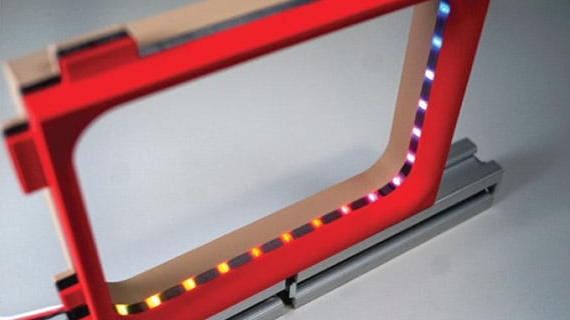
For one thing, filament generally doesn’t like to stick to embedded hardware. As the size of the inserted object increases, especially if it isn’t flat, it increasingly complicates the printer’s ability to seal it in cleanly. Because most nuts are small, even if the printer gets a little messy it probably doesn’t matter much. But what works for small nuts won’t work for something like an LED strip mounted on its side, as shown here.

Image
Cross-section of a print with an embedded LED strip. The print pauses (A), LED strip is inserted and capped with a gap-cap (B, C), then printing resumes and completes (D).

In cases like these a gap-cap is ideal. By pre-printing a form-fitting cap that covers the inserted hardware, one provides a smooth and flat surface that both seals the component in snugly while providing an ideal surface upon which to resume printing.

If needed, a bit of glue can help ensure a gap-cap doesn’t shift and cause trouble when printing resumes, but we can’t help but recall the pause-and-attach technique of embedding printed elements with the help of a LEGO-like connection. Perhaps a gap-cap designed in such a way would avoid needing any kind of adhesive at all.
Image

3D Print Becomes Cast Iron Wrench Via Microwave

Consumer-grade 3D printing is good for prototyping and making relatively soft plastic stuff. If you wanna make tough things, though, it’s really hard to beat the strength of metal. [Shake the Future] has produced a guide on using 3D printing in a process to produce solid parts out of actual cast iron.

The concept is simple. [Shake the Future] uses silicon carbide crucibles, which can heat up by absorbing microwave energy. Put one in an insulated container, dump some metal in, and throw it in a microwave, and soon enough you have a pot of molten metal you can use to cast stuff.

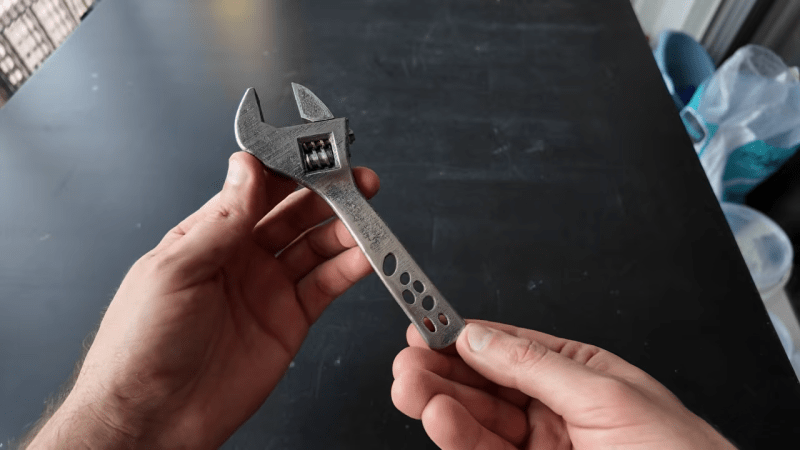
ImageLet’s say you want to make an adjustable wrench, which is how [Shake the Future] demonstrates this technique. The first step is to print the wrench parts in plastic, such as PLA. These parts are then packed into fine sand to create casting molds. The PLA is burned out of the mold, leaving a negative imprint of the geometry. Molten cast iron can then be poured into the mold to create the part in solid metal.

It’s a messy technique that requires a lot of manual labor, but it does work quite well. There are some tricks to learn, though, particularly when it comes to successfully casting parts with holes or fine geometric features.

And before you think that you’re going to put the hardware store out of business, it should also be noted that it failed on first encounter with a real-world nut. The thinnest part by the screw just wasn’t strong enough.

Still, it’s a great demo, and if you’ve ever wanted to make a bespoke cast iron part of your own, this work may be very relevant to you. Alternatively, consider learning about DIY aluminium castingjust consider the pitfalls involved.

Continue reading “3D Print Becomes Cast Iron Wrench Via Microwave”

Image

Testing Expensive Graphene-Reinforced Nylon Filament

Although usually nylon (generally PA6) filament is pretty cheap, there are some more exotic variants out there, such as the PA12-based Lyten 3D graphene filament that comes in at a cool $150 for a 1 kg spool. Worse for [Dr. Igor Gaspar] here was that the company doesn’t ship to the EU, and didn’t respond to emails about obtaining a sample for testing. Fortunately he got a spool via a different route, so that he could test whether this is the strongest nylon filament or not.

The full name for this filament is PA1205, though it’s not certain what the ’05’ part stands for. PA12 is a less moisture-sensitive version of PA6, however. Among the manufacturer’s claims are that it’s the strongest nylon filament, as well as very lightweight and heat-resistant. Interestingly the datasheet recommends printing with an 0.6 mm nozzle, which is the only major deviation from typical nylon FDM filaments. Of course, printing with an 0.4 mm nozzle had to be tried.

With a standard PA-CF preset in Bambu Lab’s slicer the printing of test parts worked without issues, which was promising. With load testing the filament made a good showing compared to average PA filaments, though as with most fiber reinforced filaments it’s more brittle than the pure material. Compared to PA-CF this PA1205 was much less brittle than PA-CF, however. Overall it’s not a bad filament, but for the asking price it’s a tough ask.

Continue reading “Testing Expensive Graphene-Reinforced Nylon Filament”

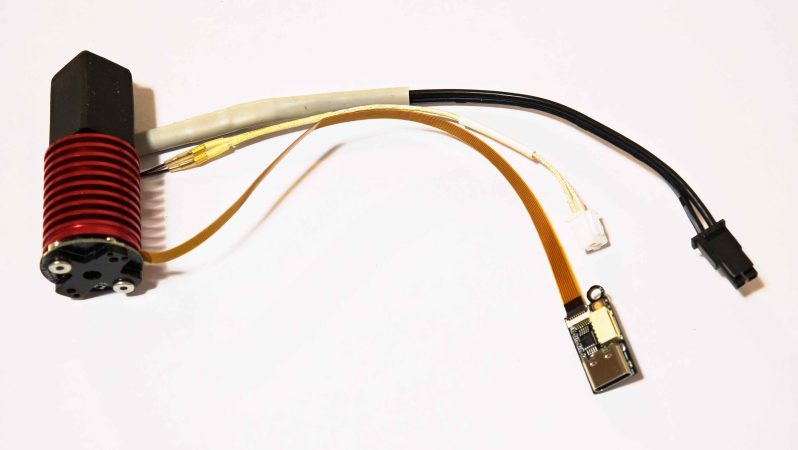
A hotend equipped with the bd_pressure sensor. The nozzle is facing upwards.

Direct Pressure Advance Measurement For Fast Calibration

Some people love fiddling with their 3D printers, others love printing. Some fiddle so they can spend more time printing, which is probably where this latest project comes in: an automated pressure advance calibration tool by [markniu].

Most of us don’t take enough care with pressure advance (PA). But if you want absolutely perfect prints, its something you should be calibrating for every type filament in your collection. Some would argue, ideally every individual spool. While that sort of dialing in can be fun, it takes away from actually running off prints. Bambu printers automate PA by scanning the usual sort of calibration print, but that’s still a very indirect measurement. Why not, just advance the filament, and measure the pressure at the nozzle directly? That is what PA is meant to account for, after all: the pressure of the plastic in the hotend causing oozing and blobbing at corners.

Image
Did we mention it connects via USB-C? That’s helpfully broken out well away from the heat with a ribbon cable.

[mark]’s solution comes very close to a direct measurement. It uses a strain gauge that sits directly on top of the heatbreak, with the sound logic that the strain there experienced will be directly proportional to the pressure inside, at least along the axis of flow. Instead of filling half the bed with lines, the calibration process instead is a ‘printer poop’ style extrusion that doesn’t take nearly as long, and seems to save plastic, too. Since this puts a strain gauge in your hotend, you also get the bonus of being able to use it for bed leveling if you should so desire.

[mark] is claiming sub-90 second calibration — as you can see in the demo video embedded below — versus over seven minutes for the indirect calibration print. The value is plugged directly into Klipper, assuming you configured everything correctly, which should be easy enough looking at the instructions on the GitHub. Continue reading “Direct Pressure Advance Measurement For Fast Calibration”

Image

Testing Whether Heated Chambers Help Brittle Filaments

Some FDM filaments are pretty brittle even if properly dried and stored, especially those which contain carbon fiber (CF) or similar additives like glass fiber (GF). This poses a problem in that these filaments can snap even within the PTFE tube as they’re being guided towards the extruder. Here a community theory is that having an actively heated chamber can help prevent this scenario, but is it actually true? [Dr. Igor Gaspar] of the My Tech Fun YouTube channel gave this myth a try to either confirm or bust it.

Image

The comments suggested that heating the chamber to 65°C will help, but there’s little information online to support this theorem. To test the claim, a heated chamber was used along with a bending rig to see at which angle the filament would snap. In total five different filaments from three manufacturers (Polymaker, Qidi and YXPolyer) were tested, including Qidi’s PET-GF and PAHT-GF as the sole non-CF filaments.

A big question is how long exactly the filament will spend inside the heated chamber after making its way from the spool, which would be about 2.5 minutes with a 500 mm tube. For the test 5 minutes was used for the best possible result. Despite this, the results show that even with the standard deviation kept in mind, the heating actually seems to make the filaments even more brittle.

Considering that in general CF seems to simply weaken the polymer matrix after printing, this finding adds to the question of whether these CF and GF-infused filaments make any sense at all.

Continue reading “Testing Whether Heated Chambers Help Brittle Filaments”

Image

Hacking The System In A Moral Panic: We Need To Talk

It seems that for as long as there have been readily available 3D printers, there have been moral panics about their being used to print firearms. The latest surrounds a Washington State Legislature bill, HB2320, which criminalises the printing of unregistered guns. Perhaps most controversially, it seeks so impose a requirement on printers sold in the state to phone home and check a database of known firearms and refuse to print them when asked.

This has drawn a wave of protest from the 3D printing community, and seems from where we are sitting to be a spectacularly ill-conceived piece of legislation. It’s simply not clear how it could be implemented, given the way 3D printers and slicing software actually work.

Oddly This Isn’t About Firearms

The root of the problem with this bill and others like it lies in ignorance, and a misplaced belief in the power of legislation. Firearms are just the example here, but we can think of others and we’re sure you can too. Legislators aren’t stupid, but by and large they don’t come from technology or engineering backgrounds.

Meanwhile they have voters to keep happy, and therefore when a moral panic like this one arises their priority is to be seen to be doing something about it. They dream up a technically infeasible solution, push to get it written into law, and their job is done. Let the engineers figure out how to make it work. Continue reading “Hacking The System In A Moral Panic: We Need To Talk”

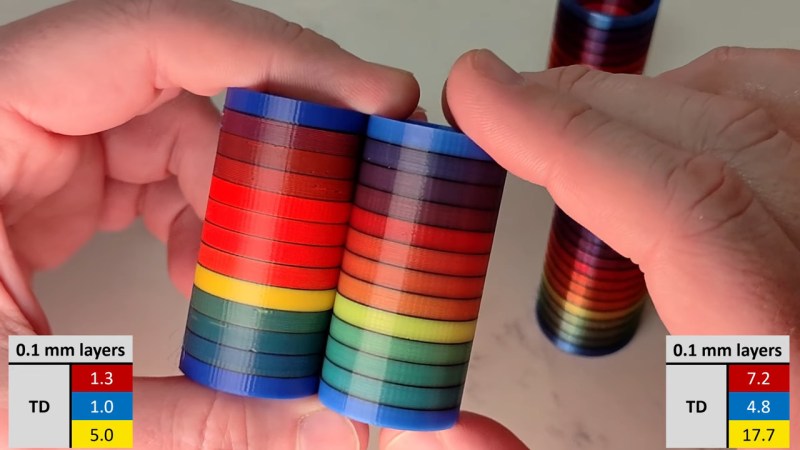
Two test towers, showing the palette potential of three (R, B, Y) filaments.

FullSpectrum Is Like HueForge For 3D Models, But Bring Your Toolchanger

Full-color 3D printing is something of a holy grail, if nothing else, just because of how much it impresses the normies. We’ve seen a lot of multi-material units in the past few years, and with Snapmaker’s U1 and the Prusa XL, it looks like tool changers are coming back into vogue. Just in time, [Ratdoux] has a fork of OrcaSlicer called FullSpectrum that brings HueForge-like color mixing to tool-changing printers.

The hook behind FullSpectrum is very simple: stacking thin layers of colors, preferably with semi-translucent filament, allows for a surprising degree of mixing. The towers in the image above have only three colors: red, blue, and yellow. It’s not literally full-spectrum, but you can generate surprisingly large palettes this way. You aren’t limited to single-layer mixes, either: A-A-B repeats, and even arbitrary patterns of four colors are possible, assuming you have a four-head tool-changing printer like the Snapmaker U1 this is being developed for.

FullSpectrum is, in fact, a fork of Snapmaker’s fork of OrcaSlicer, which is itself forked from Bambu Slicer, which forked off of PrusaSlicer, which originated as a fork of Slic3r. Some complain about the open-source chaos of endless forking, but you can see in that chain how much innovation it gets us — including this technique of color mixing by alternating layers.

Continue reading “FullSpectrum Is Like HueForge For 3D Models, But Bring Your Toolchanger”