Image

Stadia Controller Reborn As Bluetooth Gamepad Adapter

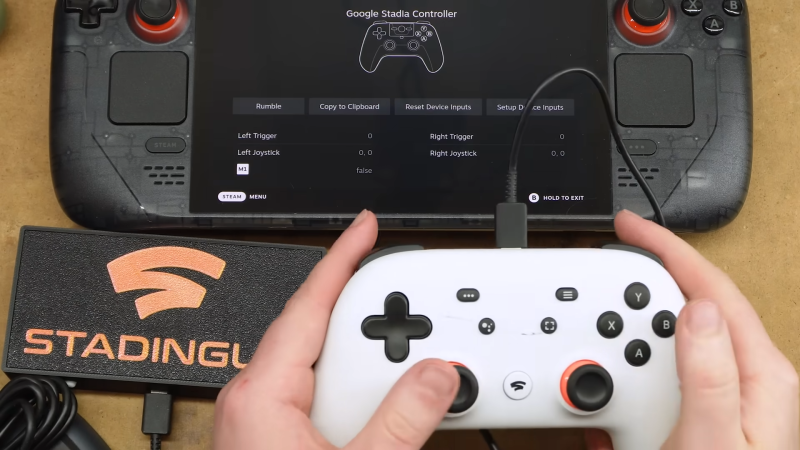
Tech has a problem, an e-waste problem. Google is a common offender when it comes to this, creating a product just to end support a couple of years later. Thankfully, there are some lasting capabilities left in their defunct Stadia controllers. After hearing about these capabilities, [Bringus Studios] managed to turn this future e-waste into something new: a Bluetooth adapter for game controllers.

To give some credit to Google, once they announced the Stadia program was winding down, they released an updated firmware that let you use the controller as a generic Bluetooth gamepad. But there was also a rather unusual feature added — if another controller is connected to it via USB, its output will be passed along over Bluetooth as if it was coming from the Stadia controller itself.

This would allow you to wirelessly connect an Xbox 360 or PlayStation 3 controller to your computer, for example. But while a neat trick, having the two controllers plugged into each other is a bit awkward. So [Bringus Studios] decided to take the Stadia controller apart and turn it into a dedicated Bluetooth interface.

Continue reading “Stadia Controller Reborn As Bluetooth Gamepad Adapter”

Image

Slug Algorithm For On-GPU Rendering Of Fonts With Bézier Curves Now In Public Domain

The Slug Algorithm has been around for a decade now, mostly quietly rendering fonts and later entire GUIs using Bézier curves directly on the GPU for games and other types of software, but due to its proprietary nature it didn’t see much adoption outside of commercial settings. This has now changed with its author, [Eric Lengyel], releasing it to the public domain without any limitations.

Originally [Eric] had received a software patent in 2019 for the algorithm that would have prevented anyone else from implementing it until the patent’s expiration in 2038. Since 2016 [Eric] and his business have however had in his eyes sufficient benefit from the patent, making it unnecessary to hold on to it any longer and retain such exclusivity.

To help anyone with implementing their own version of the algorithm, there is a GitHub repository containing reference shader implementations with plenty of inline comments that should help anyone with some shader experience get started.

Although pretty niche in the eyes of the average person, the benefits of using on-GPU rendering of elements like fonts are obvious in terms of rendering optimization. With this change open source rendering engines for games and more can finally also use it as well.

Thanks to [Footleg] for the tip.

Image

Conway’s Game Of Life With Physical Buttons

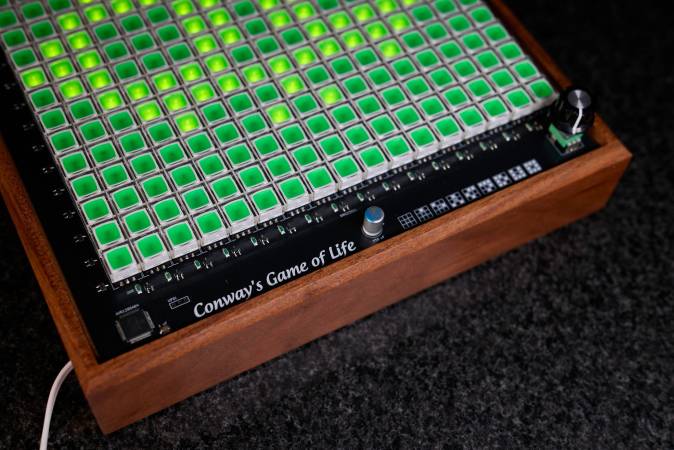
Conway’s Game of Life excels in its simplicity, creating a cellular automaton on a 2D grid where each cell obeys a set of very simple rules that determine whether a cell is ‘alive’ or ‘dead’. After setting an initial condition the ‘game’ then evolves naturally from there, creating an endless series of patterns as a simplified form of bacterial evolution. Of course, setting an initial state and then watching cells light up or fade away seems like a natural fit for light-up buttons. After struggling with intrusive thoughts related to such a project for a while, [Michal Zalewski] finally gave in, creating a pretty amazing looking result.

Although there is no set size for the game board, [Michal] was constrained by his budget for the selected NKK JB15LPF-JF tactile buttons, resulting in a 17×17 matrix. That’s 289 buttons, for those keeping score, which comes down to over $1,000 over at e.g. Digikey even with quantity-based pricing. Add to this the custom PCB and a Microchip AVR128DA64 squeezed in a corner of said PCB to run the whole show and it’s quite the investment.

Finishing up the PCB, driving the lights is done with a duty cycle as the matrix is scanned along with detecting inputs in a similar manner. This required the addition of MOSFETs and transistors, the details of which can be found in the downloadable project files, along with the firmware source code. In the article a video of the board in action can be watched, allowing one to admire the very pretty wooden enclosure as well.

Image

Sega Genesis Finally Gets Long-Awaited Stock Ticker App 37 Years After Launch

Until now, if you were seated at your Sega Genesis and wanted to check your stock portfolio, you were out of luck. You had to get a smartphone, or a computer, or maybe even a television to look up stock prices and understand your financial position. Thankfully, though, Sega’s neglect of its hero platform has finally been corrected. [Mike Wolak] has given the 16-bit console the real-time stock ticker it so desperately needed. 

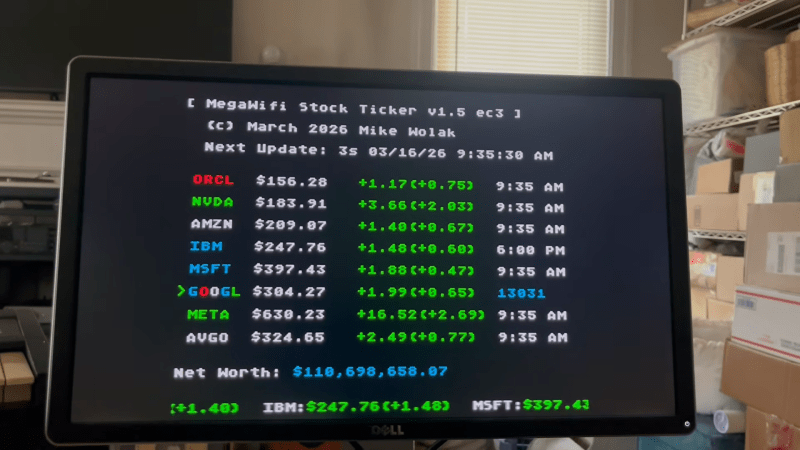
The build runs on a MegaWiFi cartridge, which uses an ESP8266 or ESP32 microcontroller to add WiFi communication to the Sega Genesis (or Mega Drive). [Mike] wrote a custom program for the platform that would query the Finnhub HTTPS API and display live stock prices via the Genesis’s Video Display Processor. It does so via a clean console-like interface that would be familiar to users of other 16-bit machines from this era, though seeing so much textual output would have been uncommon.

ImageBy default, the stock ticker is set to show prices for major tech stocks, but you can set it up to display any major symbol available in the Finnhub data stream. You can configure up to eight custom stocks and input your holdings, and the software will calculate and display your net worth in real time.

All the files are available for those eager to monitor their portfolios on a Sega, as the financial gods intended. [Mike] notes it took a little work to get this project over the line, particularly as the ESP32-C3 doesn’t support HTTPs with stock firmware. A few other hacks were needed to keep the Genesis updating the screen during HTTP queries, too.

If you have a concentrated portfolio and a spare Sega Genesis, this could be a fun retro way to keep an eye on your holdings. Alternatively, you might prefer to go the classic paper tape route.

Continue reading “Sega Genesis Finally Gets Long-Awaited Stock Ticker App 37 Years After Launch”

Image

ATtiny85 Plays The Chrome Dinosaur Game

If you’ve ever had your internet connection drop out while running Chrome, you’ve probably seen a little dinosaur pop up to tell you what’s going on. You might have then tapped a key and learned that it’s actually a little mini-game built into the browser where you have to hop your intrepid T-rex over a bunch of cactii. [Albert David] is well familiar with this little Easter egg, and set about building a system to automatically play the game for him.

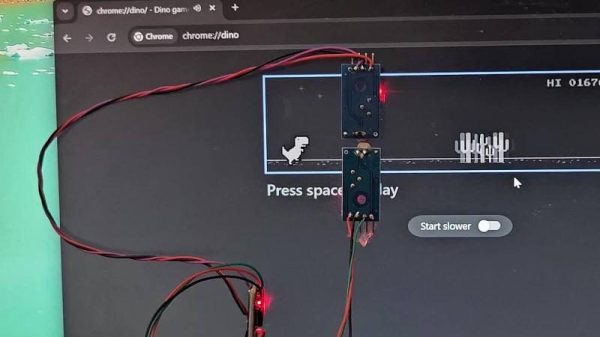
The build uses an Digispark ATtiny85 microcontroller board to run the show. It’s set up to plug in to a PC and enumerate as a USB HID device, so it can spoof the required key presses to play the game. To sense the game state, the device uses a pair of LM393 light-dependent resistor comparator modules. The bottom sensor is used to detect cactus obstacles in the game, while the upper sensor detects flying bird obstacles. Armed with this information, the microcontroller can deliver keypresses at just the right time to jump over cactuses while dodging birds overhead.

[Albert] does a great job of explaining how the project came together in the write-up. There are also useful calibration instructions that indicate how to place the sensors and tweak their thresholds so they trigger reliably and help you net a suitably high score.

Interestingly enough, this isn’t the first time we’ve seen a microcontroller take Chrome’s hidden game for a spin. The game itself has become popular enough that we’ve also seen it ported to other platforms.
Continue reading “ATtiny85 Plays The Chrome Dinosaur Game”

Image

Building A Robot Partner To Play Air Hockey With

Air hockey is one of those sports that’s both incredibly fun, but also incredibly frustrating as playing it by yourself is a rather lonely and unfulfilling experience. This is where an air hockey playing robot like the one by [Basement Builds] could come in handy. After all, after you finished building an air hockey table from scratch, how hard could it be to make a robot that merely moves the paddle around to hit the puck with?

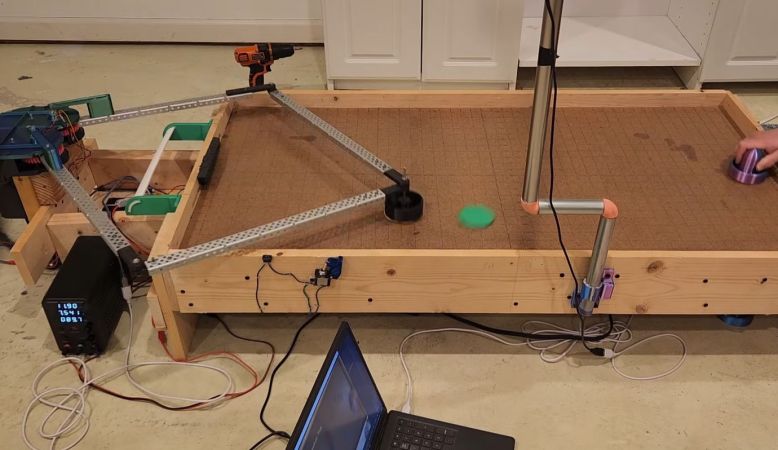
An air hockey table is indeed not extremely complicated, being mostly just a chamber that has lots of small holes on the top through which the air is pushed. This creates the air layer on which the puck appears to float, and allows for super-fast movement. For this part countless chamfered holes were drilled to get smooth airflow, with an inline 12 VDC duct fan providing up to 270 CFM (~7.6 m3/minute).

Initially the robot used a CoreXY gantry configuration, which proved to be unreliable and rather cumbersome, so instead two motors were used, each connected to its own gearbox. These manipulate the paddle position by changing the geometry of the arms. Interestingly, the gearbox uses TPU for its gears to absorb any impacts and increase endurance as pure PLA ended up falling apart.

The position of the puck is recorded by an overhead camera, from where a Python script – using the OpenCV library running on a PC – determines how to adjust the arms, which is executed by Arduino C++ code running on a board attached to the robot. You could just copy this code yourself, but as the video makes clear, this is basically cheating as you don’t get to enjoy doing all the trigonometry and physics-related calculating and debugging fun.

Continue reading “Building A Robot Partner To Play Air Hockey With”

Image

Pokemon Go Had Players Capturing More Than They Realized

Released in 2016, Pokemon Go quickly became a worldwide phenomenon. Even folks who weren’t traditionally interested in the monster-taming franchise were wandering around with their smartphones out, on the hunt for virtual creatures that would appear via augmented reality. Although the number of active users has dropped over the years, it’s estimated that more than 50 million users currently log in and play every month.

ImageFrom a gameplay standpoint, Go is brilliant. Although the Pokemon that players seek out obviously aren’t real, searching for them closely approximates the in-game experience that the franchise has been known for since its introduction on the Game Boy back in 1996.

But now, instead of moving a character through a virtual landscape in search of the elusive “pocket monsters”, players find them dotted throughout the real world. To be successful, players need to leave their homes and travel to where the Pokemon are physically located — which often happens to be a high-traffic area or other point of interest.

As a game, it’s hard to imagine Pokemon Go being a bigger success. At the peak of its popularity, throngs of players were literally causing traffic jams as they roamed the streets in search of invisible creatures. But what players may not have realized as they scanned the world around them through the game was that they were helping developer Niantic build something even more valuable.

Continue reading Pokemon Go Had Players Capturing More Than They Realized”