Image

Using FireWire On A Raspberry Pi Before Linux Drops Support

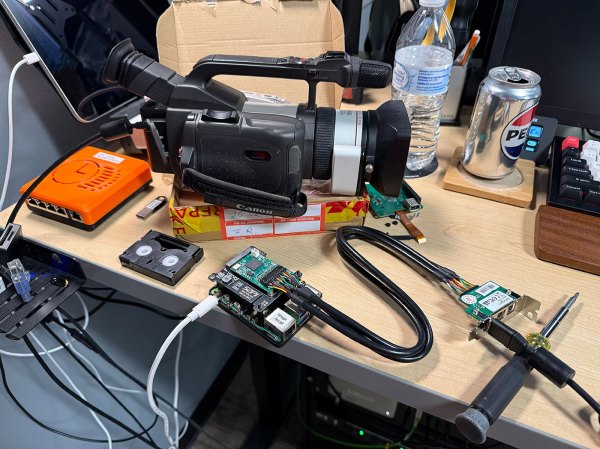
Once the premium option for data transfers and remote control for high-end audiovisual and other devices, FireWire (IEEE 1394) has been dying a slow death ever since Apple and Sony switched over to USB. Recently Apple correspondingly dropped support for it in MacOS 26, and Linux will follow in 2029. The bright side of this when you’re someone like [Jeff Geerling] is that this means three more years of Linux support for one’s FireWire gear, including on the Raspberry Pi with prosumer gear from 1999.

If you’re not concerned about running the latest and greatest – and supported – software, then using an old or modern Mac or PC is of course an option, but with Linux support still available [Jeff] really wanted to get it working on Linux. Particularly on a Raspberry Pi in order to stay on brand.

Adding a FireWire port to a Raspberry Pi SBC is easy enough with an RPi 5 board as you can put a Mini PCIe HAT on it into which you slot a mini PCIe to Firewire adapter. At this point lspci shows the new device, but to use it you need to recompile the Linux kernel with Firewire support. On the Raspberry Pi you then also need to enable it in the device tree overlay, as shown in the article.

Continue reading “Using FireWire On A Raspberry Pi Before Linux Drops Support”

Image

The Most Secure, Modern Computer Might Be A Mac

The Linux world is currently seeing an explosion in new users, thanks in large part to Microsoft turning its Windows operating system into the most intrusive piece of spyware in modern computing. For those who value privacy and security, Linux has long been the safe haven where there’s reasonable certainty that the operating system itself isn’t harvesting user data or otherwise snooping where it shouldn’t be. Yet even after solving the OS problem, a deeper issue remains: the hardware itself. Since around 2008, virtually every Intel and AMD processor has included coprocessors running closed-source code known as the Intel Management Engine (IME) or AMD Platform Security Processor (PSP).

Image
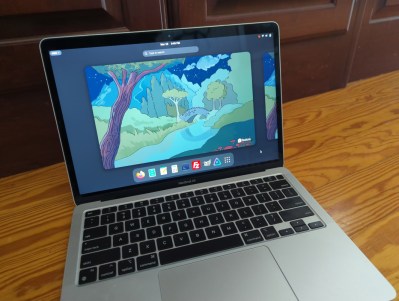
M1 MacBook Air, now with more freedom

These components operate entirely outside the user’s and operating system’s control. They are given privileged access to memory, storage, and networking and can retain that access even when the CPU is not running, creating systemic vulnerabilities that cannot be fully mitigated by software alone. One practical approach to minimizing exposure to opaque management subsystems like the IME or PSP is to use platforms that do not use x86 hardware in the first place. Perhaps surprisingly, the ARM-based Apple M1 and M2 computers offer a compelling option, providing a more constrained and clearly defined trust model for Linux users who prioritize privacy and security.

Before getting into why Apple Silicon can be appealing for those with this concern, we first need to address the elephant in the room: Apple’s proprietary, closed-source operating system. Luckily, the Asahi Linux project has done most of the heavy lifting for those with certain Apple Silicon machines who want to go more open-source. In fact, Asahi is one of the easiest Linux installs to perform today even when compared to beginner-friendly distributions like Mint or Fedora, provided you are using fully supported M1 or M2 machines rather than attempting an install on newer, less-supported models. The installer runs as a script within macOS, eliminating the need to image a USB stick. Once the script is executed, the user simply follows the prompts, restarts the computer, and boots into the new Linux environment. Privacy-conscious users may also want to take a few optional steps, such as verifying the Asahi checksum and encrypting the installation with LUKS but these steps are not too challenging for experienced users. Continue reading “The Most Secure, Modern Computer Might Be A Mac”

Image

Linux Fu: UPNP A Port Mapping Odyssey

If you’ve ever run a game server or used BitTorrent, you probably know that life is easier if your router supports UPnP (Universal Plug and Play). This is a fairly old tech — created by a standards group in 1999 — that allows a program to open an incoming port into your home network. Of course, most routers let you do this manually, but outside of the Hackaday universe, most people don’t know how to log into their routers, much less how to configure an open UDP port.

I recently found myself using a temporary setup where I could not access the router directly, but I needed some open ports. That got me thinking: if a program can open a port using UPnP, why can’t I? Turns out, of course, you can. Maybe.

Caveats

The first thing, of course, is that you need your firewall open, but that’s true no matter how you open up the router. If the firewall is in the router, then you are at the mercy of the router firmware to realize that if UPnP opens something up, it needs to open the firewall, too.

Continue reading “Linux Fu: UPNP A Port Mapping Odyssey”

Image

Remotely Unlocking An Encrypted Hard Disk

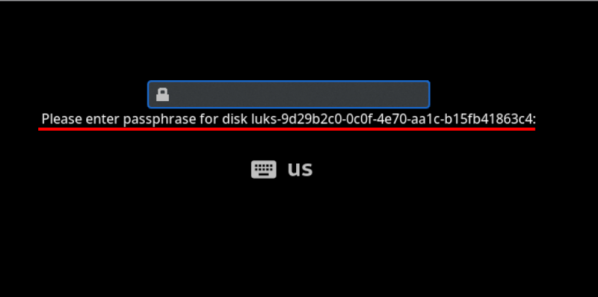
Can you remotely unlock an encrypted hard disk? [Jyn] needed to unlock their home server after it rebooted even if they weren’t home. Normally, they used Tailscale to remote in, but you can’t use tailscale to connect to the machine before the hard drive decrypts, right? Well, you can, sort of, and [Jyn] explains how.

The entertaining post points out something you probably knew, but never thought much about. When your Linux box boots, it starts a very tiny compressed Linux in RAM. On [Jyn’s] machine using Arch, this is the initramfs.

That’s not news, but because it is an actual limited Linux system (including systemd), you can add tools to it. In this case, adding dropbear (an ssh server) and Tailscale to the limited boot-time Linux.

Continue reading “Remotely Unlocking An Encrypted Hard Disk”

Image

Linux Hotplug Events Explained

There was a time when Linux was much simpler. You’d load a driver, it would find your device at boot up, or it wouldn’t. That was it. Now, though, people plug and unplug USB devices all the time and expect the system to react appropriately. [Arcanenibble] explains all “the gory details” about what really happens when you plug or unplug a device.

You might think, “Oh, libusb handles that.” But, of course, it doesn’t do the actual work. In fact, there are two possible backends: netlink or udev. However, the libusb developers strongly recommend udev. Turns out, udev also depends on netlink underneath, so if you use udev, you are sort of using netlink anyway.

If netlink sounds familiar, it is a generic BSD-socket-like API the kernel can use to send notifications to userspace. The post shows example code for listening to kernel event messages via netlink, just like udev does.

When udev sees a device add message from netlink, it resends a related udev message using… netlink! Turns out, netlink can send messages between two userspace programs, not just between the kernel and userspace. That means that the code to read udev events isn’t much different from the netlink example.

The next hoop is the udev event format. It uses a version number, but it seems stable at version 0xfeedcafe. Part of the structure contains a hash code that allows a bloom filter to quickly weed out uninteresting events, at least most of the time.

The post documents much of the obscure inner workings of USB hotplug events. However, there are some security nuances that aren’t clear. If you can explain them, we bet [Arcanenibble] would like to hear from you.

If you like digging into the Linux kernel and its friends, you might want to try creating kernel modules. If you get overwhelmed trying to read the kernel source, maybe go back a few versions.

Image

Linux Fu: The USB WiFi Dongle Exercise

Image
The TX50U isn’t very Linux-friendly

If you’ve used Linux for a long time, you know that we are spoiled these days. Getting a new piece of hardware back in the day was often a horrible affair, requiring custom kernels and lots of work. Today, it should be easier. The default drivers on most distros cover a lot of ground, kernel modules make adding drivers easier, and dkms can automate the building of modules for specific kernels, even if it isn’t perfect.

So ordering a cheap WiFi dongle to improve your old laptop’s network connection should be easy, right? Obviously, the answer is no or this would be a very short post.

Plug and Pray

The USB dongle in question is a newish TP-Link Archer TX50U. It is probably perfectly serviceable for a Windows computer, and I got a “deal” on it. Plugging it in caused it to show up in the list of USB devices, but no driver attached to it, nor were any lights on the device blinking. Bad sign. Pro tip: lsusb -t will show you what drivers are attached to which devices. If you see a device with no driver, you know you have a problem. Use -tv if you want a little more detail.

The lsusb output shows the devices as a Realtek, so that tells you a little about the chipset inside. Unfortunately, it doesn’t tell you exactly which chip is in use.

Continue reading “Linux Fu: The USB WiFi Dongle Exercise”

Image

Full-Blown Cross-Assembler…in A Bash Script

Have you ever dreamed of making a bash script that assembles Intel 8080 machine code? [Chris Smith] did exactly that when he created xa.sh, a cross-assembler written entirely in Bourne shell script.

Image
Assembly language (like the above) goes in, a binary comes out.

The script exists in part as a celebration of the power inherent in a standard Unix shell with quite ordinary POSIX-compliant command line tools like awk, sed, and printf. But [Chris] admits that mostly he found the whole project amusing.

It’s designed in a way that adding support for 6502 and 6809 machine code would be easy, assuming 8080 support isn’t already funny enough on its own.

It’s not particularly efficient and it’s got some quirks, most of which involve syntax handling (hexadecimal notation should stick to 0 or 0x prefixes instead of $ to avoid shell misinterpretations) but it works.

Want to give it a try? It’s a shell script, so pull a copy and and just make it executable. As long as the usual command-line tools exist (meaning your system is from sometime in the last thirty-odd years), it should run just fine as-is.

An ambitious bash script like this one recalls how our own Al Williams shared ways to make better bash scripts by treating it just a bit more like the full-blown programming language it qualifies as.