Image

Stream Deck Radio Controller Built With Cheap Yellow Display

Stream decks are pretty useful in all kinds of contexts, but commercial models can feel a bit pricy for what is effectively a bunch of buttons. [WhiskeyTangoHotel] has whipped up one of their own on the cheap using some readily available parts.

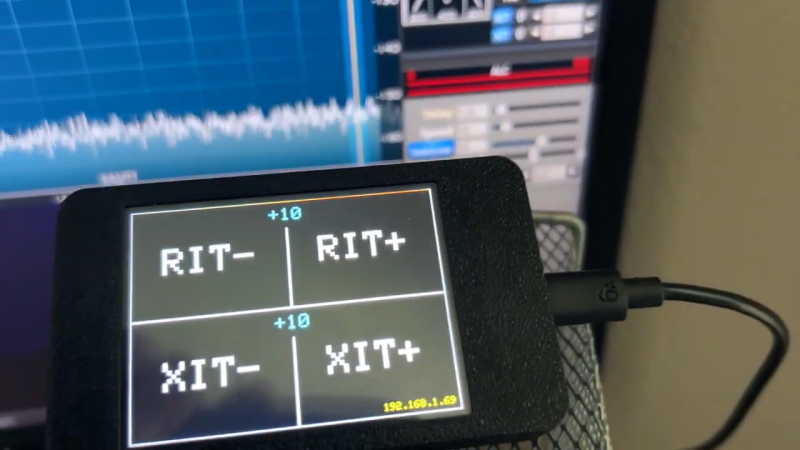
The build came about due to the use of Stream Decks as a common way to control the Flex-6400 software-defined radio. [WhiskeyTangoHotel] figured that using a full-priced Elgato Stream Deck was overkill for this purpose, and that a cheaper interface could be put together for less. Enter the Cheap Yellow Display—a combination of the ESP32 microcontroller with a 2.8-inch touchscreen LCD. It was simple enough to code the device such that it had four big touch buttons to control RIT-, RIT+, XIT-, and XIT+ on the Flex-6400. Plus, with the ESP32 having WiFi onboard, it’s able to control the radio wirelessly—you just need to feed the unit 5 volts, and you’re up and running.

Continue reading “Stream Deck Radio Controller Built With Cheap Yellow Display”
Image

An Electric Jellyfish For Androids

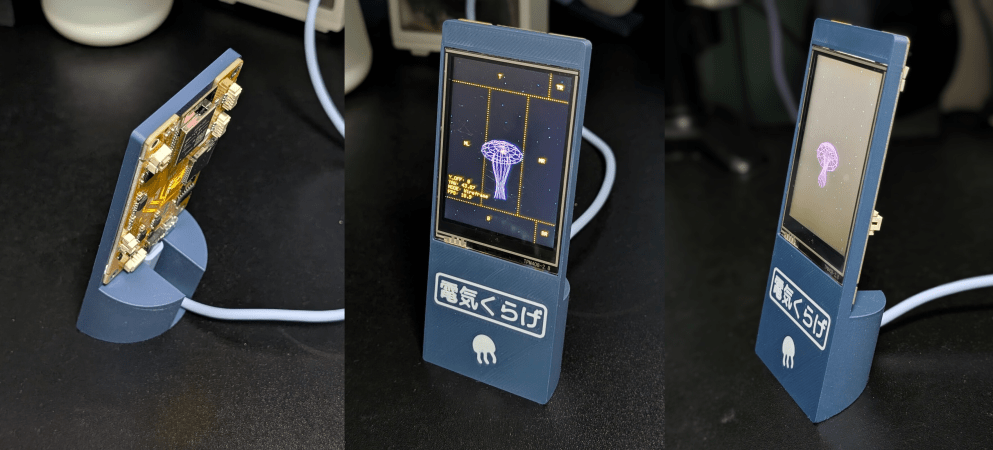
We have to admit, we didn’t know that we wanted a desktop electric jellyfish until seeing [likeablob]’s Denki-Kurage, but it’s one of those projects that just fills a need so perfectly. The need being, of course, to have a Bladerunner-inspired electric animal on your desk, as well as having a great simple application for that Cheap Yellow Display (CYD) that you impulse purchased two years ago.

Maybe we’re projecting a little bit, but you should absolutely check this project out if you’re interested in doing anything with one of the CYDs. They are a perfect little experimentation platform, with a touchscreen, an ESP32, USB, and an SD card socket: everything you need to build a fun desktop control panel project that speaks either Bluetooth or WiFi.

We love [likeablob]’s aesthetic here. The wireframe graphics, the retro-cyber fonts in the configuration mode, and even the ability to change the strength of the current that the electric jellyfish is swimming against make this look so cool. And the build couldn’t be much simpler either. Flash the code using an online web flasher, 3D print out the understated frame, screw the CYD in, et voila! Here’s a direct GitHub link if you’re interested in the wireframe graphics routines.

We’ve seen a bunch of other projects with the CYD, mostly of the obvious control-panel variety. But while we’re all for functionality, it’s nice to see some frivolity as well. Have you made a CYD project lately? Let us know!

Image

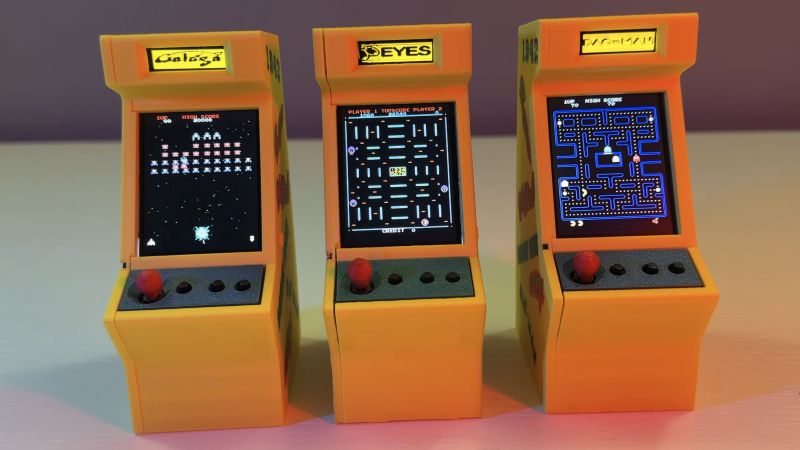
Mini Multi-Arcade Game Cabinets With An ESP32 And Galagino

Most people love arcade games, but putting a full-sized arcade cabinet in the living room can lead to certain unpleasant complications. Ergo the market for fun-sized cabinets has exploded alongside the availability of cheap SBCs and MCUs that can run classical arcade titles. Microcontrollers like the ESP32 with its dual 240 MHz cores can run circles around the CPU grunt of 1980s arcade hardware. Cue [Till Harbaum]’s Galagino ESP32-based arcade emulator project, that recently saw some community versions and cabinet takes.

There was a port to the PlatformIO framework by [speckhoiler] which also added a few more arcade titles and repurposed the enclosure of an off-the-shelf ‘My Arcade’ by stuffing in an ESP32-based ‘Cheap Yellow Display‘ (CYD) board instead. These boards include the ESP32 module, a touch display, micro SD card slot, sound output, and more; making it an interesting all-in-one solution for this purpose.

Most recently [Davide Gatti] and friends ported the Galagino software to the Arduino platform and added a 3D printed enclosure, though you will still need to source a stack of parts which are listed in the bill of materials. What you do get is a top display that displays the current game title in addition to the display of the usual CYD core, along with an enclosure that can be printed both in single- or multi-color.

There’s also a build video that [Davide Gatti] made, but it’s only in Italian, so a bit of a crash course in this language may be required for some finer details.

Continue reading “Mini Multi-Arcade Game Cabinets With An ESP32 And Galagino”

A hand operating a numeric touch pad

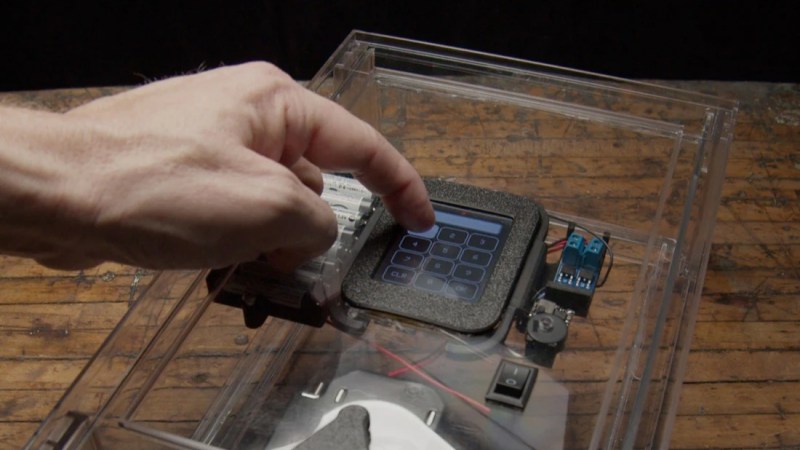
Building An Escape Room Lockbox With The ESP32 Cheap Yellow Display (CYD)

Here’s something fun from [Chad Kapper] over on HackMakeMod: Escape Room Lockbox with the Cheap Yellow Display.

You may have heard of the “cheap yellow display” (CYD), so-called due to the board’s typical color. It’s a dodgy cheapo board with, among other things, TFT display, touchscreen, and ESP32 built-in. You can learn more about the CYD over here: Getting Started with ESP32 Cheap Yellow Display Board – CYD (ESP32-2432S028R).

In this build eight AA batteries are used to deliver 12 volts to operate a solenoid controlling a latch and 5 volts for the microcontroller. The encasing is clear in order to entice players in an escape-room style sitting. The custom software is included down the bottom of the project page and it is also available from arduino.cc, if that’s your bag.

Of course we’ve done plenty of other ESP32 TFT projects before, such as Piko – Your ESP32 Powered Fitness Buddy and ESP32 Brings New Features To Classic Geiger Circuit.

Image

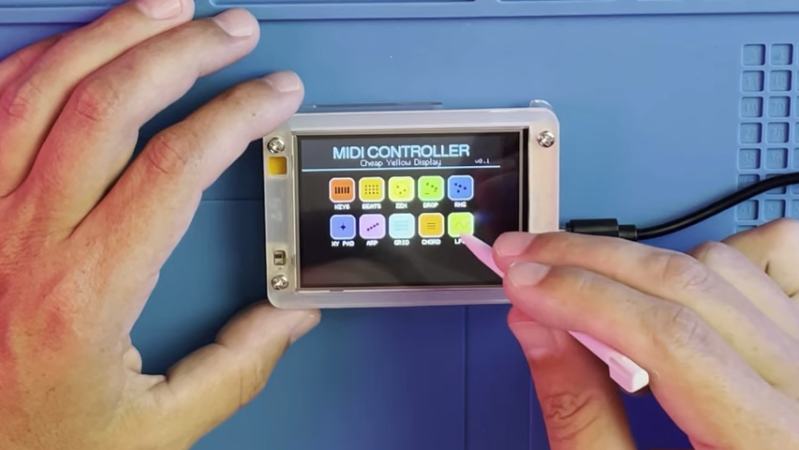
A Touchscreen MIDI Controller For The DIY Set

MIDI controllers are easy to come by these days. Many modern keyboards have USB functionality in this regard, and there are all kinds of pads and gadgets that will spit out MIDI, too. But you might also like to build your own, like this touchscreen design from [Nick Culbertson].

The build takes advantage of a device colloquially called the Cheap Yellow Display. It consists of a 320 x 240 TFT touchscreen combined with a built-in ESP32-WROOM-32, available under the part number ESP32-2432S028R.

Continue reading “A Touchscreen MIDI Controller For The DIY Set”

Image

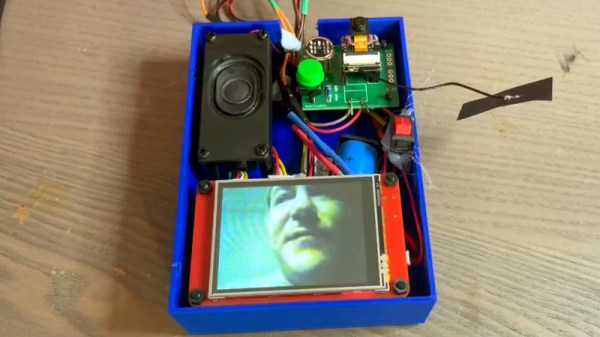
A Cheap Yellow Display Makes A Video Walkie Talkie

The ESP32 series of microprocessors with their cheap high-power cores and built-in wireless networking have brought us a wide variety of impressive projects over the years. We’re not sure we’ve quite seen the like of [Jonathan R]’s video walkie talkie before though, a pair of units which as you might guess, deliver two-way video and audio communications.

The trick involves not one but two ESP32s: an ESP32-S3 based camera module, and a more traditional Tensilica ESP32 in a screen module. It’s an opportunity for an interesting comparison, as one device uses the Cheap Yellow Display board, and the other uses an Elecrow equivalent. The audio uses ESP-NOW, while the video uses WiFi, and since the on-board audio amplifiers aren’t great, there’s a small amp module.

The video below has a comprehensive run-down including the rationale behind the design choices, as well as a demonstration. There’s a small lag, but nothing too unacceptable for what is after all an extremely cheap device. Perhaps after all this time, the video phone has finally arrived!

Continue reading “A Cheap Yellow Display Makes A Video Walkie Talkie”

Image

Three SPI Busses Are One Too Many On This Cheap Yellow Display

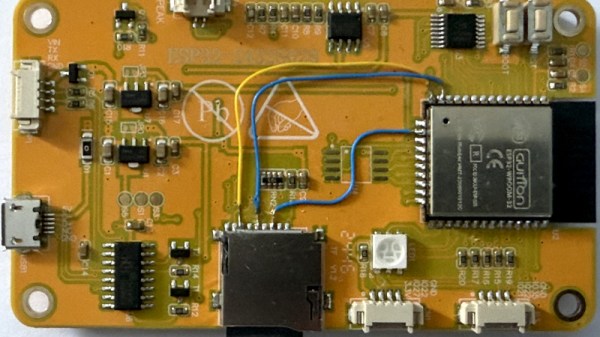
The Cheap Yellow Display may not be the fastest of ESP32 boards with its older model chip and 4 MB of memory, but its low price and useful array of on-board peripherals has made it something of a hit in our community. Getting the most out of the hardware still presents some pitfalls though, as [Mark Stevens] found out when using one for an environmental data logger. The problem was that display, touch sensor, and SD card had different SPI busses, of which the software would only recognise two. His solution involves a simple hardware mod, which may benefit many others doing similar work.

It’s simple enough, put the LCD and SD card on the same bus, retaining their individual chip select lines. There’s a track to be cut and a bit of wiring to be done, but nothing that should tax most readers too much. We’re pleased to see more work being done with this board, as it remains a promising platform, and any further advancements for it are a good thing. If you’re interested in giving it a go, then we’ve got some inspiration for you.