Image

Playful ‘Space Dice’ Kit Shows Off Clever Design

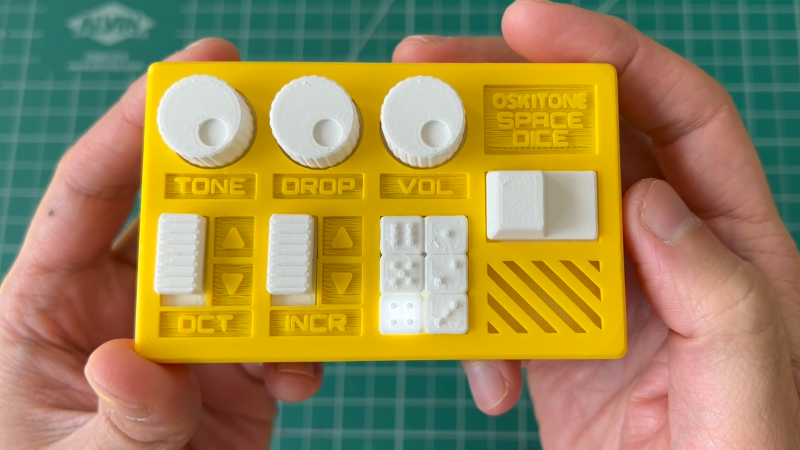
[Tommy] at Oskitone has been making hardware synth kits for years, and his designs are always worth checking out. His newest offering Space Dice is an educational kit that is a combination vintage sci-fi space laser sound generator, and six-sided die roller. What’s more, as a kit it represents an effort to be genuinely educational, rather than just using it as a meaningless marketing term.

There are several elements we find pretty interesting in Space Dice. One is the fact that, like most of [Tommy]’s designs, there isn’t a microcontroller in sight. Synthesizers based mostly on CMOS logic chips have been a mainstay of DIY electronics for years, as have “electronic dice” circuits. This device mashes both together in an accessible way that uses a minimum of components.

ImageThere are only three chips inside: a CD4093 quad NAND with Schmitt-trigger inputs used as a relaxation oscillator, a CD4040 binary counter used as a prescaler, and a CD4017 decade counter responsible for spinning a signal around six LEDs while sound is generated, to represent an electronic die. Sound emerges from a speaker on the backside of the PCB, which we’re delighted to see is driven not by a separate amplifier chip, but by unused gates on the CD4093 acting as a simple but effective square wave booster.

In addition, [Tommy] puts effort into minimizing part count and complexity, ensuring that physical assembly does not depend on separate fasteners or adhesives. We also like the way he uses a lever assembly to make the big activation button — mounted squarely above the 9 V battery — interface with a button on the PCB that is physically off to the side. The result is an enclosure that is compact and tidy.

We recommend checking out [Tommy]’s concise writeup on the design details of Space Dice for some great design insights, and take a look at the assembly guide to see for yourself the attention paid to making the process an educational one. We love the concept of presenting an evolving schematic diagram, which changes and fills out as each assembly step is performed and tested.

Watch it in action in a demo video, embedded just below. Space Dice is available for purchase but if you prefer to roll your own, all the design files and documentation are available online from the project’s GitHub repository.

Continue reading “Playful ‘Space Dice’ Kit Shows Off Clever Design”
Image

Use A Gap-Cap To Embed Hardware In Your Next 3D Print

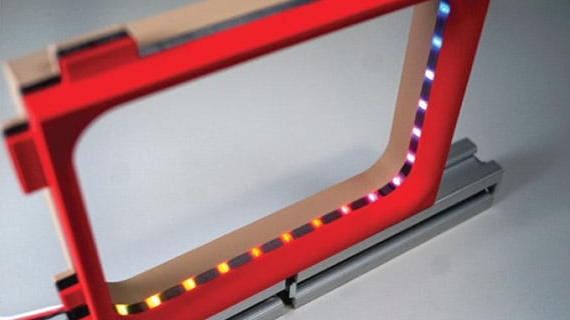
Embedding fasteners or other hardware into 3D prints is a useful technique, but it can bring challenges when applied to large or non-flat objects. The solution? Use a gap-cap.

ImageThe gap-cap technique is essentially a 3D printed lid. One pauses a print, inserts hardware, then covers it with a lid before resuming the print. The lid — or gap-cap — does three things. It seals in the part, it fills in empty space left above the component, and it provides a nice flat surface for subsequent layers which makes the whole process much cleaner and more reliable.

This whole technique is a bit reminiscent of the idea of manual supports, except that the inserted piece is intended to be sealed into the print along with the embedded hardware under it.

If you have never inserted anything larger than a nut or small magnet into a 3D print, you may wonder why one needs to bother with a gap-cap at all. The short version is that what works for printing over small bits doesn’t reliably carry over to big, odd-shaped bits.

For one thing, filament generally doesn’t like to stick to embedded hardware. As the size of the inserted object increases, especially if it isn’t flat, it increasingly complicates the printer’s ability to seal it in cleanly. Because most nuts are small, even if the printer gets a little messy it probably doesn’t matter much. But what works for small nuts won’t work for something like an LED strip mounted on its side, as shown here.

Image
Cross-section of a print with an embedded LED strip. The print pauses (A), LED strip is inserted and capped with a gap-cap (B, C), then printing resumes and completes (D).

In cases like these a gap-cap is ideal. By pre-printing a form-fitting cap that covers the inserted hardware, one provides a smooth and flat surface that both seals the component in snugly while providing an ideal surface upon which to resume printing.

If needed, a bit of glue can help ensure a gap-cap doesn’t shift and cause trouble when printing resumes, but we can’t help but recall the pause-and-attach technique of embedding printed elements with the help of a LEGO-like connection. Perhaps a gap-cap designed in such a way would avoid needing any kind of adhesive at all.

Image

3D Printed Wire Stripper Uses PLA Blades

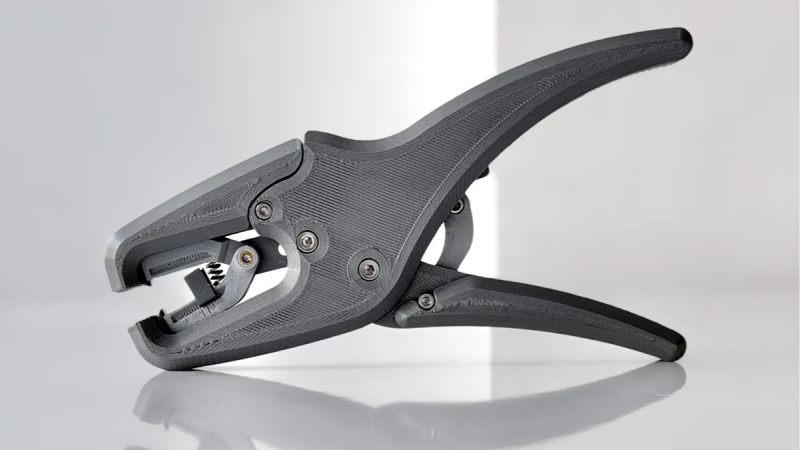
One might think that [Da_Rius]’s mostly 3D printed wire stripper would count its insulation-shearing blades among the small number of metal parts required, but that turns out to not be the case. The blades are actually printed in PLA, and seem to work just fine for this purpose. (We imagine they need somewhat frequent replacement, but still.)

ImageProper wire strippers are one of the most useful tools for a budding electronics enthusiast, because stripping hookup wire is a common task and purpose-built strippers make for quick and consistent results.

As far as tools go they are neither particularly expensive nor difficult to source, but making one’s own has a certain appeal to it. The process of assembling the tool is doubtless a rewarding one, and it looks like it results in a pretty good conversation starter if nothing else.

As mentioned, the tool is mostly 3D printed and does require some metal parts: fasteners, heat-set inserts, and a couple springs. Metal nuts and heat-set inserts are easy enough to obtain, but springs of particular size and shape are a bit trickier.

It is perfectly possible to make custom springs, and as it happens [Da_Rius] already has that covered with a separate project for using a hex key and printed jig to make exactly the right shapes and sizes from pre-tempered spring wire.

Image

This Printed Zipper Repair Requires No Unsewing

If a zipper breaks, a 3D printer might not be the first tool one reaches for — but it’s more feasible than one might think. [MisterJ]’s zipper slider replacement is the kind of 3D print that used to be the domain of well-tuned printers only, but most hobbyist printers should be able to handle it nowadays.

Image
The two-part design allows installation without unsewing the zipper ends. Note the print orientation of the green part, which maximizes the strength of the peg by making the layer lines perpendicular to the load.

What really sets this design apart from other printed versions is its split construction. Putting a new slider onto a zipper usually requires one to free the ends of the zipper by unsewing them. [MisterJ]’s two-part design instead allows the slider to be assembled directly onto the zipper, without the hassle of unsewing and re-sewing anything. That’s a pretty significant improvement in accessibility.

Want to make some adjustments? Good news, because the files are in STEP format which any CAD program will readily understand. We remember when PrusaSlicer first gained native STEP support and we’re delighted that it’s now a common feature in 3D printer software.

[MisterJ]’s zipper slider design is available in a variety of common sizes, in both standard (zipper teeth face outward) and reverse (zipper teeth face inward) configurations. Naturally a metal slider is more durable than a plastic one, but being able to replace broken parts of a zipper with a 3D printer is a pretty handy thing. Speaking of which, you can also 3D print a zipper box replacement should the squarish bit on the bottom get somehow wrecked or lost.

Image

Evolved Nerf RC Tank Now Leaves Welts

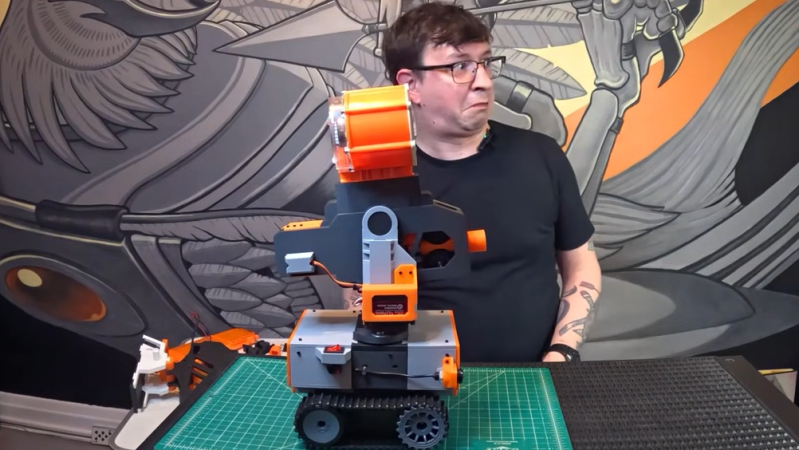
[Joshua Clay] recently unveiled his newest RC Nerf Dart Robot and talks through his design choices, pointing out that in his aim to have it launch darts fast and hard he may have somewhat overshot the mark. He found out first hand during testing that it shoots hard enough to leave welts through a sweatshirt and probably should be downgraded a bit. Thankfully, one of the features of his new unit is a highly modular design that makes iterating easier than ever.

Image
A modular, glue-free assembly that leaves wiring accessible helps make design iterations faster and easier.

This model is an evolution of his first Nerfbot, and the new one is a smaller, tighter design that trades a wheeled base for a tracked one, among other changes.

The tank platform is one example of [Joshua] using affordable, off-the-shelf solutions where it makes sense to do so. For example, the inexpensive tank-track platform means he can focus on the rest of the bot without having to design or make his own tank treads. Similarly, to control the bot he opts for a PlayStation 4 controller, paired to the bot over Bluetooth. It’s high quality, inexpensive, commonly available, and easily interfaced with the RP2040 that runs the show.

[Joshua] aims for a modular, LEGO-inspired mechanical assembly that makes maintenance, wiring, and iteration as easy as possible. We especially like how the battery, wiring, and things like gears for the pan-and-tilt mechanism of the Nerf launcher are easily accessible.

The dart launcher uses two flywheels to grip and propel each dart fed from a high-capacity magazine, and you can watch it move and shoot around the 9:44 mark in the video, embedded below. It’s plenty loud, but the camera is barely able to register darts leaving the barrel.

If you like the looks of [Joshua]’s newest Nerfbot, keep an eye out because he’s got more to share about it and is considering other features like a camera. In the meantime, there are a few more photos on his website.

Continue reading “Evolved Nerf RC Tank Now Leaves Welts”

Image

Let Hauntimator Steer Your Next Animatronic Display

Animatronic displays aren’t just for Halloween, and hackers today have incredible access to effective, affordable parts with which to make spectacles of light, sound, and movement. But the hardware is only half the battle. Getting everything synchronized properly can be a daunting task, so get a head start on your next holiday display with the Hauntimator by [1031-Systems].

Image
Synchronizing control channels to audio is at the heart of solid animations.

After all, synchronizing movements, sound, and light by trial and error can get tiresome even in small setups. Anyone who makes such a display — and contemplates doing it twice — tends to quickly look into making things modular.

At its heart, Hauntimator works with a Raspberry Pi Pico-based controller board. The GUI makes it easy to create control channels for different hardware (for example, doing things like moving servos) and synchronize them to audio. Once an animation is validated, it gets uploaded to the control board where it runs itself. It’s open-source and designed to make plugins easy, so give it a look. There’s a video channel with some demonstrations of the tools that should fill in any blanks.

Intrigued by animatronics, but not sure where to begin? Get inspired by checking out this DIY set of servo-driven eyes, and see for yourself the benefits of smooth motor control for generating lifelike motion.

Image

Robot Looks Exactly Like A Roll Of Filament, If Filament Had Eyes

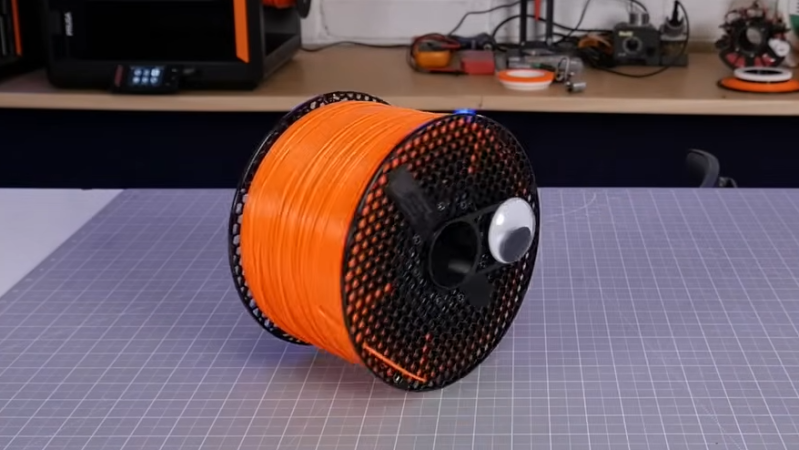
[Matt Denton]’s SpoolBot is a surprisingly agile remote-controlled robot that doesn’t just repurpose filament spool leftovers. It looks exactly like a 2 kg spool of filament; that’s real filament wound around the outside of the drum. In fact, Spoolie the SpoolBot looks so much like the real thing that [Matt] designed a googly-eye add-on, because the robot is so easily misplaced.

Image
The robot’s mass rotates around a central hub in order to move forward or back.

SpoolBot works by rotating its mass around the central hub, which causes it to roll forward or back. Steering is accomplished by tank-style turning of the independent spool ends. While conceptually simple, quite a bit of work is necessary to ensure SpoolBot rolls true, and doesn’t loop itself around inside the shell during maneuvers. Doing that means sensors, and software work.

To that end, a couple of rotary encoders complement the gearmotors and an IMU takes care of overall positional sensing while an ESP32 runs the show. The power supply uses NiMH battery packs, in part for their added weight. Since SpoolBot works by shifting its internal mass, heavier batteries are more effective.

The receiver is a standard RC PWM receiver which means any RC transmitter can be used, but [Matt] shows off a slick one-handed model that not only works well with SpoolBot but tucks neatly into the middle of the spool for storage. Just in case SpoolBot was not hard enough to spot among other filament rolls, we imagine.

The googly-eye add-on solves that, however. They clip to the central hub and so always show “forward” for the robot. They do add quite a bit of personality, as well as a visual indication of the internals’ position relative to the outside.

The GitHub repository and Printables page have all the design files, and the video (embedded just below) shows every piece of the internals.

The kind of hardware available nowadays makes self-balancing devices much more practical and accessible than they ever have been. Really, SpoolBot has quite a lot in common with other self-balancing robots and self-balancing electric vehicles (which are really just larger, ridable self-balancing robots) so there’s plenty of room for experimentation no matter one’s budget or skill level.

Continue reading “Robot Looks Exactly Like A Roll Of Filament, If Filament Had Eyes”