Image

The Rise And Fall Of Free Dial Up Internet

In the early days of the Internet, having a high-speed IP connection in your home or even a small business was, if not impossible, certainly a rarity. Connecting to a computer in those days required you to use your phone. Early modems used acoustic couplers, but by the time most people started trying to connect, modems that plugged into your phone jack were the norm.

The problem was: whose computer did you call? There were commercial dial-up services like DIALOG that offered very expensive services, such as database searches via modem. That could be expensive. You had a fee for the phone. Then you might have a per-minute charge for the phone call, especially if the computer was in another city. Then you had to pay the service provider, which could be very expensive.

Even before the consumer Internet, this wasn’t workable. Tymnet and Telenet were two services that had the answer. They maintained banks of modems practically everywhere. You dialed a local number, which was probably a “free” call included in your monthly bill, and then used a simple command to connect to a remote computer of your choice. There were other competitors, including CompuServe, which would become a major force in the fledgling consumer market.

While some local internet service providers (ISPs) had their own modem banks, when you saw the rise of national ISPs, they were riding on one of several nationwide modem systems and paying by the minute for the privilege. Eventually, some ISPs reached the scale that made dedicated modem banks worthwhile. This made it easier to offer flat-rate pricing, and the presumed likelihood of everyone dialing in at once made it possible to oversubscribe any given number of modems.

The Cost

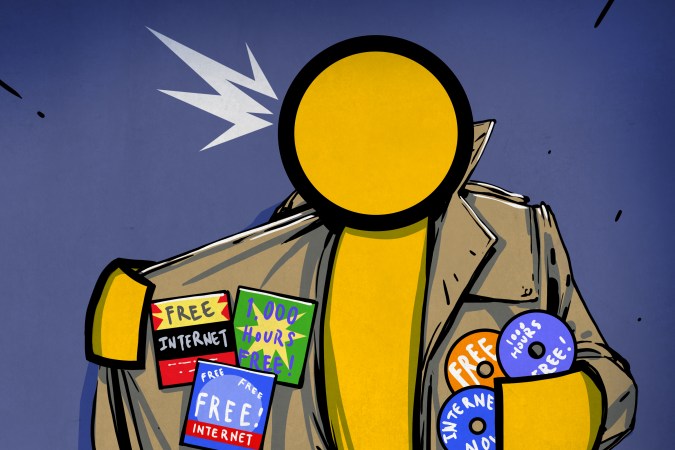
Once consumer services like CompuServe, The Source, and AOL started operations, the cost was less, but still not inexpensive. Some early services charged higher rates during business hours, for example. There was also the cost of a phone line, and if you didn’t want to tie up your home phone, you needed a second line dedicated to the modem. It all added up.

By the late 1990s, a dial-up provider might cost you $25 a month or less, not counting your phone line. That’s about $60 in today’s money, just for reference. But the Internet was also booming as a place to sell advertising.

Continue reading “The Rise And Fall Of Free Dial Up Internet”
Image

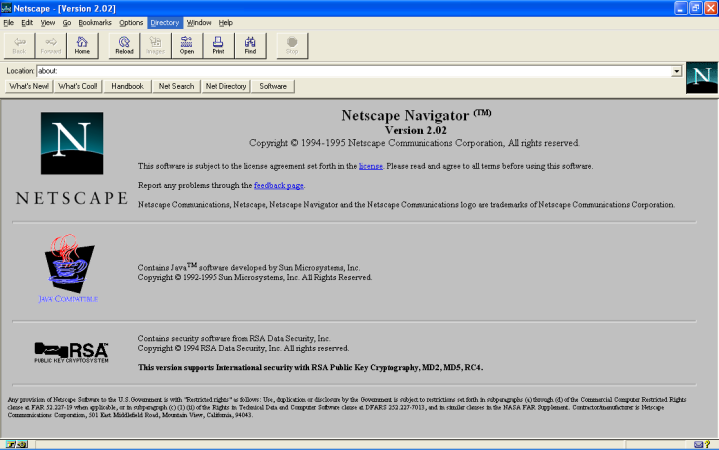
Zombie Netscape Won’t Die

The very concept of the web browser began with a humble piece of software called NCSA Mosaic, all the way back in 1993. It was soon eclipsed by Netscape Navigator, and later Internet Explorer, which became the titans of the 1990s browser market. In turn, they too would falter. Navigator’s dying corpse ended up feeding what would become Mozilla Firefox, and Internet Explorer later morphed into the unexceptional browser known as Edge.

Few of us have had any reason to think about Netscape Navigator since its demise in 2008. And yet, the name lingers on. A zombie from a forgotten age, risen again to haunt us today.

Continue reading “Zombie Netscape Won’t Die”

Image

Tiny UPS Keeps WiFi Online

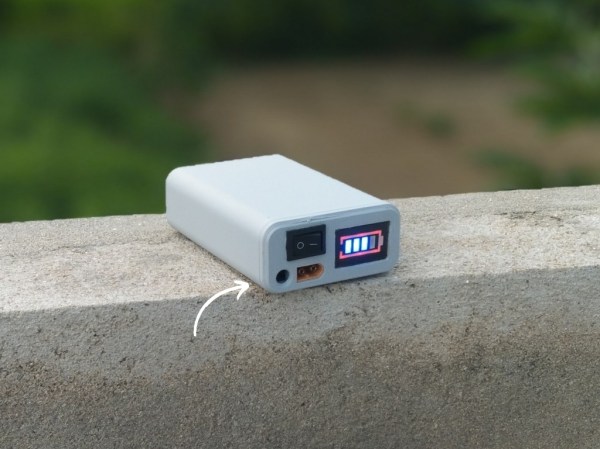
For any mission-critical computer system, it’s a good idea to think about how the system will handle power outages. At the very least it’s a good idea to give the computer enough time to gracefully shut down if the power outage will last for an indefinite time. But for extremely critical infrastructure, like our home Wi-Fi, we might consider a more long-term battery backup that can let us get through the longest of power outages.

Part of why this project from [Next Builder] works so well is that most off-the-shelf routers don’t actually use that much energy. Keeping that and a modem online when the power is out only requires a few lithium batteries. To that end, three lithium ion cells are arranged in series to provide the router with between 9 and 12 volts, complete with a battery management system (BMS) to ensure they aren’t over- or under-charged and that they are balanced. The router plugs directly into a barrel jack, eliminating any switching losses from having to use an inverter during battery operation.

While [Next Builder] is a student who lives in an area with frequent interruptions to the electricity supply, this does a good job of keeping him online. If you’re planning for worse or longer outages, a design like this is easily adapted for more batteries provided the correct BMS is used to keep the cells safely charged and regulated. You can also adapt much larger UPS systems to power more of your home’s electrical system, provided you can find enough batteries.

Image

The Internet We Didn’t Get

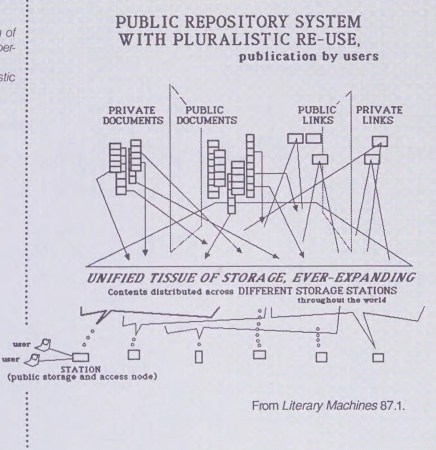
Collective human consciousness is full of imagined or mythical dream-like utopias, hidden away behind mountains, across or under oceans, hidden in mist, or deep in the jungle. From Atlantis, Avalon, El Dorado, and Shangri-La, we have not stopped imagining these secret, fantastical places. One of these, Xanadu, is actually a real place but has been embellished over the years into a place of legend and myth, and thus became the namesake of an Internet we never got to see like all of those other mystical, hidden places.

The Xanadu project got its start in the 1960s at around the same time the mouse and what we might recognize as a modern computer user interface were created. At its core was hypertext with the ability to link not just other pages but references and files together into one network. It also had version control, rights management, bi-directional links, and a number of additional features that would be revolutionary even today. Another core feature was transclusion, a method for making sure that original authors were compensated when their work was linked. However, Xanadu was hampered by a number of issues including lack of funding, infighting among the project’s contributors, and the development of an almost cult-like devotion to the vision, not unlike some of today’s hype around generative AI. Surprisingly, despite these faults, the project received significant funding from Autodesk, but even with this support the project ultimately failed.

Instead of this robust, bi-directional web imagined as early as the 1960s, the Internet we know of today is the much simpler World Wide Web which has many features of Xanadu we recognize. Not only is it less complex to implement, it famously received institutional backing from CERN immediately rather than stagnating for decades. The article linked above contains a tremendous amount of detail around this story that’s worth checking out. For all its faults and lack of success, though, Xanadu is a interesting image of what the future of the past could have been like if just a few things had shaken out differently, and it will instead remain a mythical place like so many others.

Image

End Of The Eternal September, As AOL Discontinues Dial-Up

If you used the internet at home a couple of decades or more ago, you’ll know the characteristic sound of a modem  connecting to its dial-up server. That noise is a thing of the past, as we long ago moved to fibre, DSL, or wireless providers that are always on. It’s a surprise then to read that AOL are discontinuing their dial-up service at the end of September this year, in part for the reminder that AOL are still a thing, and for the surprise that in 2025 they still operate a dial-up service.

There was a brief period in which instead of going online via the internet itself, the masses were offered online services through walled gardens of corporate content. Companies such as AOL and Compuserve bombarded consumers with floppies and CD-ROMs containing their software, and even Microsoft dipped a toe in the market with the original MSN service before famously pivoting the whole organisation in favour of the internet in mid 1995. Compuserve was absorbed by AOL, which morphed into the most popular consumer dial-up ISP over the rest of that decade. The dotcom boom saw them snapped up for an exorbitant price by Time Warner, only for the expected bonanza to never arrive, and by 2023 the AOL name was dropped from the parent company’s letterhead. Over the next decade it dwindled into something of an irrelevance, and is now owned by Yahoo! as a content and email portal. This dial-up service seems to have been the last gasp of its role as an ISP.

So the eternal September, so-called because the arrival of AOL users on Usenet felt like an everlasting version of the moment a fresh cadre of undergrads arrived in September, may at least in an AOL sense, finally be over. If you’re one of the estimated 0.2% of Americans still using a dial-up connection don’t despair, because there are a few other ISPs still (just) serving your needs.

Image

Remembering The ISP That David Bowie Ran For Eight Years

The seeds of the Internet were first sown in the late 1960s, with computers laced together in continent-spanning networks to aid in national defence. However, it was in the late 1990s that the end-user explosion took place, as everyday people flocked online in droves.

Many astute individuals saw the potential at the time, and rushed to establish their own ISPs to capitalize on the burgeoning market. Amongst them was a famous figure of some repute. David Bowie might have been best known for his cast of rock-and-roll characters and number one singles, but he was also an internet entrepreneur who got in on the ground floor—with BowieNet.

Continue reading “Remembering The ISP That David Bowie Ran For Eight Years”

Image

Forgotten Internet: Giving (or Getting) The Finger

Hey, you know that guy in accounting, Marco? If you want to find out more about him, you’d probably go surf LinkedIn or maybe a social media site. Inside a company, you might look on instant messaging for a profile and even find out if he is at his desk or away. But back in the 1970s, those weren’t options. But if Marco was on the computer system, maybe you could finger him. While that sounds strange to say today, Finger was a common service provided by computer services at the time. It was like a LinkedIn profile page for the 1970s.

Based on RFC 742, Finger was the brainchild for [Les Earnest]. From a user’s point of view, you put a few files in your home directory (usually .project and .plan; both hidden files), and when someone “fingered” you, they’d see some human-friendly output about your account like your name and office location, if you were logged in or not, and the contents of your project and plan files.

Modern versions may also show your public PGP key and other data. You could usually put a file in your home directory called .nofinger if you wanted to stop people from fingering you.

Continue reading “Forgotten Internet: Giving (or Getting) The Finger”