Image

Linux Fu: UPNP A Port Mapping Odyssey

If you’ve ever run a game server or used BitTorrent, you probably know that life is easier if your router supports UPnP (Universal Plug and Play). This is a fairly old tech — created by a standards group in 1999 — that allows a program to open an incoming port into your home network. Of course, most routers let you do this manually, but outside of the Hackaday universe, most people don’t know how to log into their routers, much less how to configure an open UDP port.

I recently found myself using a temporary setup where I could not access the router directly, but I needed some open ports. That got me thinking: if a program can open a port using UPnP, why can’t I? Turns out, of course, you can. Maybe.

Caveats

The first thing, of course, is that you need your firewall open, but that’s true no matter how you open up the router. If the firewall is in the router, then you are at the mercy of the router firmware to realize that if UPnP opens something up, it needs to open the firewall, too.

Continue reading “Linux Fu: UPNP A Port Mapping Odyssey”

Image

Remotely Unlocking An Encrypted Hard Disk

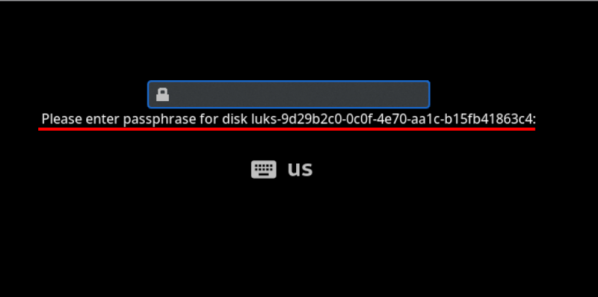
Can you remotely unlock an encrypted hard disk? [Jyn] needed to unlock their home server after it rebooted even if they weren’t home. Normally, they used Tailscale to remote in, but you can’t use tailscale to connect to the machine before the hard drive decrypts, right? Well, you can, sort of, and [Jyn] explains how.

The entertaining post points out something you probably knew, but never thought much about. When your Linux box boots, it starts a very tiny compressed Linux in RAM. On [Jyn’s] machine using Arch, this is the initramfs.

That’s not news, but because it is an actual limited Linux system (including systemd), you can add tools to it. In this case, adding dropbear (an ssh server) and Tailscale to the limited boot-time Linux.

Continue reading “Remotely Unlocking An Encrypted Hard Disk”

Image

Linux Hotplug Events Explained

There was a time when Linux was much simpler. You’d load a driver, it would find your device at boot up, or it wouldn’t. That was it. Now, though, people plug and unplug USB devices all the time and expect the system to react appropriately. [Arcanenibble] explains all “the gory details” about what really happens when you plug or unplug a device.

You might think, “Oh, libusb handles that.” But, of course, it doesn’t do the actual work. In fact, there are two possible backends: netlink or udev. However, the libusb developers strongly recommend udev. Turns out, udev also depends on netlink underneath, so if you use udev, you are sort of using netlink anyway.

If netlink sounds familiar, it is a generic BSD-socket-like API the kernel can use to send notifications to userspace. The post shows example code for listening to kernel event messages via netlink, just like udev does.

When udev sees a device add message from netlink, it resends a related udev message using… netlink! Turns out, netlink can send messages between two userspace programs, not just between the kernel and userspace. That means that the code to read udev events isn’t much different from the netlink example.

The next hoop is the udev event format. It uses a version number, but it seems stable at version 0xfeedcafe. Part of the structure contains a hash code that allows a bloom filter to quickly weed out uninteresting events, at least most of the time.

The post documents much of the obscure inner workings of USB hotplug events. However, there are some security nuances that aren’t clear. If you can explain them, we bet [Arcanenibble] would like to hear from you.

If you like digging into the Linux kernel and its friends, you might want to try creating kernel modules. If you get overwhelmed trying to read the kernel source, maybe go back a few versions.

Image

A Live ISO For Those Vibe Coding Experiments

Vibe coding is all the rage at the moment if you follow certain parts of the Internet. It’s very easy to dunk upon it, whether it’s to mock the sea of people who’ve drunk the Kool-Aid and want the magic machine to make them a million dollar app with no work, or the vibe coded web apps with security holes you could drive a bus through.

But AI-assisted coding is now a thing that will stick around whether you like it or not, and there are many who want to dip a toe in the water to see what the fuss is about. For those who don’t quite trust the magic machines in their inner sanctum, [jscottmiller] is here with Clix, a bootable live Linux environment which puts Claude Code safely in a sandbox away from your family silver.

Physically it’s a NixOS live USB image with the Sway tiling Wayland compositor, and as he puts it: “Claude Code ready to go”. It has a shared partition for swapping files with Windows or macOS machines, and it’s persistent. The AI side of it has permissive settings, which means the mechanical overlord can reach parts of the OS you wouldn’t normally let it anywhere near; the point of having it in a live environment in the first place.

We can see the attraction of using an environment such as this one for experimenting without commitment, but we’d be interested to hear your views in the comments. It’s about a year since we asked you all about vibe coding, has the art moved forward in that time?

Image

Bash Via Transpiler

It is no secret that we often use and abuse bash to write things that ought to be in a different language. But bash does have its attractions. In the modern world, it is practically everywhere. It can also be very expressive, but perhaps hard to read.

We’ve talked about Amber before, a language that is made to be easier to read and write, but transpiles to bash so it can run anywhere. The FOSDEM 2026 conference featured a paper by [Daniele Scasciafratte] that shows how to best use Amber. If you prefer slides to a video, you can read a copy of the presentation.

Continue reading “Bash Via Transpiler”

Image

FLOSS Weekly Episode 864: Work Hard, Save Money, Retire Early

This week Jonathan chats with Bill Shotts about The Linux Command Line! That’s Bill’s book published by No Starch Press, all about how to make your way around the Linux command line! Bill has had quite a career doing Unix administration, and has thoughts on the current state of technology. Watch to find out more!

Continue reading “FLOSS Weekly Episode 864: Work Hard, Save Money, Retire Early”

Image

An Event Badge Re-Imagined As A Cyberdeck

We’re used to handheld Linux devices of varying usefulness appearing on a regular basis, but there’s something about the one in a video from [Rootkit Labs] which sets it aside from the herd. It’s a fork of a conference badge.

The WHY2025 badge had pretty capable hardware, with an ESP32-P4, a really nice screen, and the lovely SolderParty keyboard. Here it’s been forked, to become a carrier board for their previous project, the Flipper Blackhat. This is a Linux add-on for the Flipepr Zero, and it seems that plenty of people wanted it in a more useful context. The result is something that looks a lot like a WHY badge, but running Linux.

It’s a great shame when badges end up lying unused after the event, and ones like the WHY 2025 badge are a serious effort to make something that endures. Here, the badge endures in spirit by being forked and re-engineered, and we like it a lot. The full video is below the break.

Continue reading “An Event Badge Re-Imagined As A Cyberdeck”