Image

DR-DOS Is Back, But Not Quite As We Knew It

If you weren’t around for the early PC era, or were a little more casual about operating systems, you could perhaps be forgiven for not knowing that DOS is not synonymous with MS-DOS. MS-DOS was just Microsoft’s implementation — or rather, an implementation they purchased — of a Disk Operating System, one that was…let’s just say “inspired by” Digital Research’s CP/M.

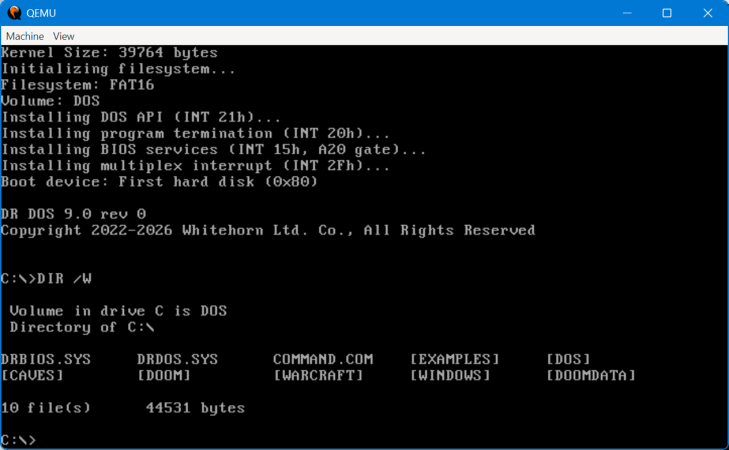
Digital Research shot back with DR-DOS, an operating system that was both compatible with and much superior in some ways to MS-DOS. The last version was released in 1991, after Novell bought the struggling Digital Research. Now it’s back, or at least, it’s on its way back with a fully clean-room implementation by a fellow who calls himself [CheeseWeezel] on Reddit.

He’s gone so far as to purchase the trademark, so this re-creation is the official DR-DOS. In any case [CheeseWeezel]’s DR-DOS is considered version 9.0, and is currently in Beta. The clean-sheet re-implementation of DR-DOS’s API was sadly necessary due to the rather tortured history of the IP after DR was bought by Novel, who sold DR-DOS to Caldera, who briefly open-sourced the code before retracting the license and selling on. Some of you may remember a controversy where a previous rights holder, DR DOS INC, was found purloining FreeDOS code in violation of the GPL. Perhaps because of that, [CheeseWeezel] isn’t using any old code, and isn’t open-sourcing what he’s done. Right now, the beta of DR-DOS 9 is free for non-commercial use, but as is standard for EULAs, that could change at any time without warning. [CheeseWeezel] is still working full compatibility, but at this point it at least runs DOOM.

Still, given the origins of DOS in Digital Research’s early work on CP/M, it warms the heart to see what many of us thought of as the “true” DOS survive in some form in the 21st century. Arguably it already had, in the form of SvarDOS, but you can’t use that to make smug jokes about your operating system having PhD instead of a measly master’s. If you did not like DOS, we recall the joke from Mac users was that those were the degrees needed to operate the PC. Speaking of DOS, you don’t necessarily need a retrocomputer to run it.

Thanks to [OldDOSMan] for the tip!

Image

Jenny’s Daily Drivers: Haiku R1/beta5

Back in the mid 1990s, the release of Microsoft’s Windows 95 operating system cemented the Redmond software company’s dominance over most of the desktop operating system space. Apple were still in their period in the doldrums waiting for Steve Jobs to return with his NeXT, while other would-be challengers such as IBM’s OS/2 or Commodore’s Amiga were sinking into obscurity.

Into this unpromising marketplace came Be inc, with their BeBox computer and its very nice BeOS operating system. To try it out as we did at a trade show some time in the late ’90s was to step into a very polished multitasking multimedia OS, but sadly one which failed to gather sufficient traction to survive. The story ended in the early 2000s as Be were swallowed by Palm, and a dedicated band of BeOS enthusiasts set about implementing a free successor OS. This has become Haiku, and while it’s not BeOS it retains API compatibility with and certainly feels a lot like its inspiration. It’s been on my list for a Daily Drivers article for a while now, so it’s time to download the ISO and give it a go. I’m using the AMD64 version.

Continue reading “Jenny’s Daily Drivers: Haiku R1/beta5”

Image

Jenny’s Daily Drivers: ReactOS 0.4.15

When picking operating systems for a closer look here in the Daily Drivers series, the aim has not been to merely pick the next well-known Linux distro off the pile, but to try out the interesting, esoteric or minority OS. The need remains to use it as a daily driver though, so each one we try has to have at least some chance of being a useful everyday environment in which a Hackaday piece could be written. With some of them such as the then-current BSD or Slackware versions we tried for interest’s sake a while back that’s not a surprising achievement, but for the minority operating systems it’s quite a thing. Today’s choice, ReactOS 0.4.15, is among the closest we’ve come so far to that ideal.

For The N’th Time In The Last 20 Years, I download A ReactOS ISO

A Windows-style ReactOS desktop with a web browser showing Hackaday
It’s fair to say there are still a few quirks, but it works.

ReactOS is an open-source clone of a Windows operating system from the early 2000s, having a lot on common with Windows XP. It started in the late 1990s and has slowly progressed ever since, making periodic releases that, bit-by-bit, have grown into a usable whole. I last looked at it for Hackaday with version 0.4.13 in 2020, so have five years made any difference? Time to download that ISO and give it a go.

Installing ReactOS has that bright blue and yellow screen feeling of a Windows install from around the millennium, but I found it to be surprisingly quick and pain free despite a few messages about unidentified hardware. The display driver it chose was a VESA one but since it supported all my monitor’s resolutions and colour depths that’s not the hardship it might once have been. Continue reading “Jenny’s Daily Drivers: ReactOS 0.4.15”

Image

C Project Turns Into Full-Fledged OS

While some of us may have learned C in order to interact with embedded electronics or deep with computing hardware of some sort, others learn C for the challenge alone. Compared to newer languages like Python there’s a lot that C leaves up to the programmer that can be incredibly daunting. At the beginning of the year [Ethan] set out with a goal of learning C for its own sake and ended up with a working operating system from scratch programmed in not only C but Assembly as well.

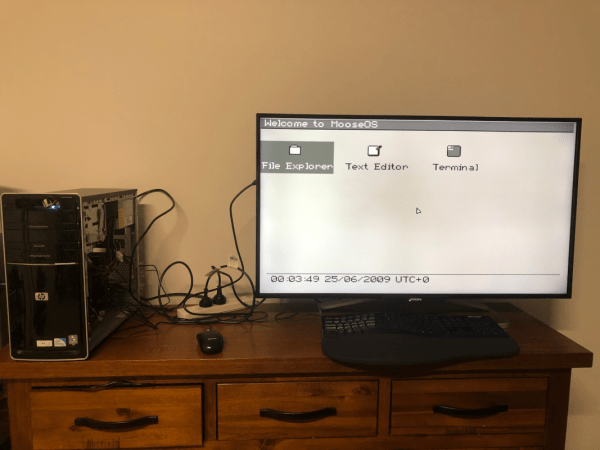
[Ethan] calls his project Moderate Overdose of System Eccentricity, or MooseOS. Original programming and testing was done in QEMU on a Mac where he was able to build all of the core components of the operating system one-by-one including a kernel, a basic filesystem, and drivers for PS/2 peripherals as well as 320×200 VGA video. It also includes a dock-based GUI with design cues from operating systems like Macintosh System 1. From that GUI users can launch a few applications, from a text editor, a file explorer, or a terminal. There’s plenty of additional information about this OS on his GitHub page as well as a separate blog post.

The project didn’t stay confined to the QEMU virtual machine either. A friend of his was throwing away a 2009-era desktop which [Ethan] quickly grabbed to test his operating system on bare metal. There was just one fault that the real hardware threw that QEMU never did, but with a bit of troubleshooting it was able to run. He also notes that this was inspired by a wiki called OSDev which, although a bit dated now, is a great place to go to learn about the fundamentals of operating systems. We’d also recommend checking out this project that performs a similar task but on the RISC-V instruction set instead.

Image

Jenny’s Daily Drivers: KDE Linux

ImageOver this series test-driving operating systems, we’ve tried to bring you the unusual, the esoteric, or the less mainstream among the world of the desktop OS. It would become very boring very quickly of we simply loaded up a succession of Linux distros, so we’ve avoided simply testing the latest Debian, or Fedora.

That’s not to say that there’s no space for a Linux distro on these pages if it is merited though, as for example we marked its 30th anniversary with a look at Slackware. If a distro has something interesting to offer it’s definitely worth a look, which brings us to today’s subject.

KDE Linux is an eponymous distro produced by the makers of the KDE Plasma desktop environment and associated applications, and it serves as a technical demo of what KDE can be, a reference KDE-based distribution, and an entirely new desktop Linux distribution all in one. As such, it always has the latest in all things KDE, but aside from that perhaps what makes it even more interesting is that as an entirely new distribution it has a much more modern structure than many of the ones we’re used to that have their roots in decades past. Where in a traditional distro the system is built from the ground up on install, KDE Linux is an immutable base distribution, in which successive versions are supplied as prebuilt images  on which the user space is overlaid. This makes it very much worth a look. Continue reading “Jenny’s Daily Drivers: KDE Linux”

Image

Think You Need A New PC For Windows 11? Think Again

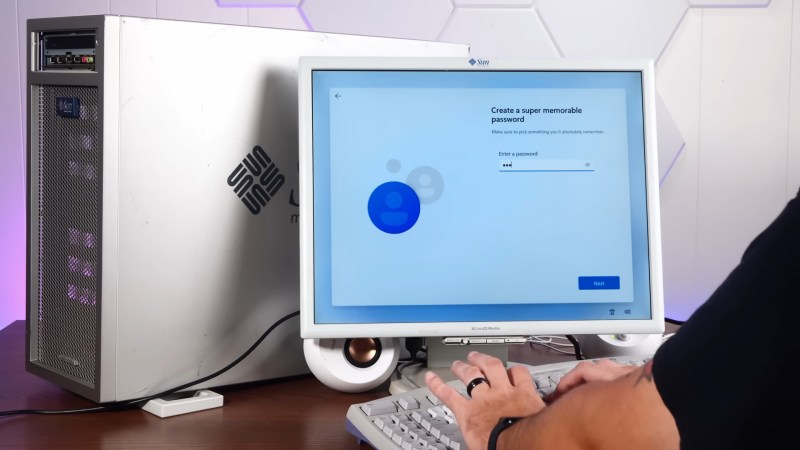
As the sun sets on Windows 10 support, many venues online decry the tsunami of e-waste Windows 11’s nonsensical hardware requirements are expected to create. Still more will offer advice: which Linux distribution is best for your aging PC? [Sean] from Action Retro has an alternate solution: get a 20 year old Sun Workstation, and run Windows 11 on that. 

The Workstation in question from 2005 is apparently among the first Sun made using AMD’s shiny new 64-bit Opteron processor. Since Windows has no legacy 32-bit support– something it shares with certain Linux distributions– this is amongst the oldest hardware that could conceivably install and run Redmond’s latest.

And it can! Not in unaltered form, of course– the real hack here is courtesy of [ntdevlabs], whose “Tiny11” project strips all the cruft from Windows 11, including its hardware compatibility checker. [ntdevlabs] has produced a Tiny11Builder script that is available on GitHub, but the specific version [Sean] used is available on Archive.org.

[Sean] needed the archived version of Tiny11 because Windows 11 builds newer than 22H2 use the POPCNT operation, which was not present in AMD’s first revision of the x86_64 instruction set. POPCNT is part of Intel’s SSE4 extension from 2007, a couple years after this workstation shipped.

If you’re sick of being told to switch to Linux, but can’t stomach staying with Windows either, maybe check out Haiku, which we reported as ready for daily driving early last year.

Continue reading “Think You Need A New PC For Windows 11? Think Again”

Image

Personal Reflections On Immutable Linux

Immutable distributions are slowly spreading across the Linux world– but should you care? Are they hacker friendly? What does “immutable” mean, anyway?

Immutable means “not subject or susceptible to change” according to Merriam-Webster, which is not 100% accurate in this context, but it’s close enough and the name is there so we’re stuck with it. Immutable distributions are subject to change, it’s just that how you change them is quite a bit different than bog-standard Linux. Will this matter to you? Read on to find out! (Or, if you know the answers already, read on to find out how angry you should be in the comments section.) Continue reading “Personal Reflections On Immutable Linux”