Image

Real Robot Makes Debut In Programming Game

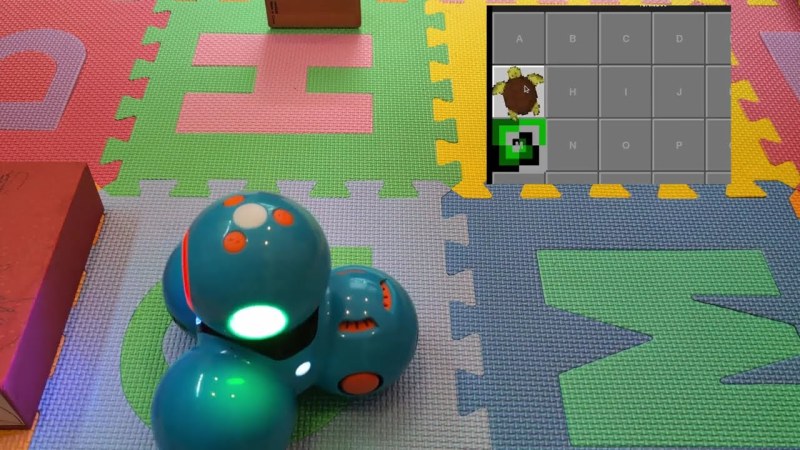
Sometimes the right tool for the right job appears almost out of nowhere. That was certainly the case for [Jonathan] who came across an unusual but well-designed robot at a secondhand shop. The robot needed a bit of work to get back into a usable condition, but after that it was ready for use. For such a unique machine, it needed a unique place to work as well, so in this build [Jonathan] uses it as a real robot to recreate a popular board game meant to teach programming to children.

In the original board game, called Robot Turtles, there are no actual robots. Instead, players use cards to control turtles to reach objectives in much the same way that a programmer would solve a similar problem with a computer. A board game with such a name almost demands a robot, so [Jonathan] found a larger playing surface in the form of soft matting blocks, each with a number or letter, that can be assembled into a grid. To make the game, he built a Python application on top of the interface he reverse-engineered in a previous build. It handles the robot interface, control, input, and a PyGame GUI. The game can either be played in real-time, or the robot’s moves can be queued.

In addition to keyboard input, the bot can also be controlled by putting cards from the actual board game itself on an NFC reader he made. [Jonathan] has a four-year-old at home, so he hopes that all of these projects will have an impression and encourage experimentation and discovery of computers and programming.

Continue reading “Real Robot Makes Debut In Programming Game”
Image

Game Dev On IBook G4 With NetBSD

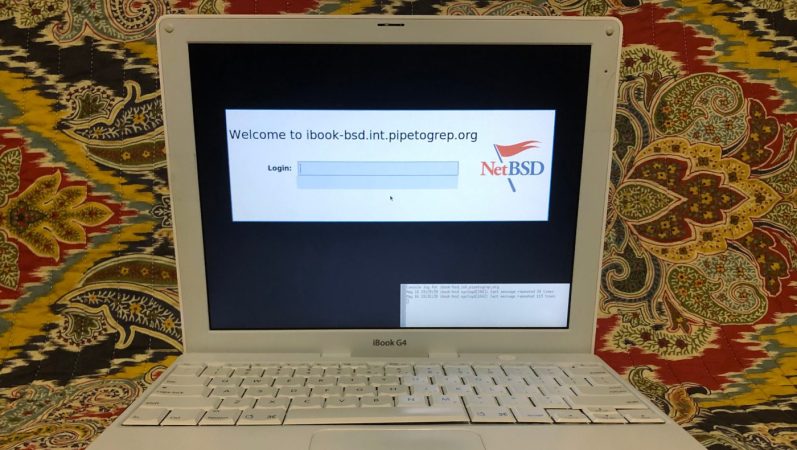
What can you do with a laptop enough to drink even in the Puritan ex-colonies? 21 years is a long time for computer hardware– but [Chris] is using his early-2004 iBook G4 for game dev thanks to NetBSD.

Some of you might consider game dev a strong word; obviously he’s not working on AAA titles on the machine he affectionately calls “Brick”. NetBSD includes pygame in its repositories, though, and that’s enough for a 2D puzzle game he’s working on called Slantics. It’s on GitHub, if you’re curious.

Image
Slantics: possibly the only game written on PPC Macintosh hardware this year.

Why NetBSD? Well, [Chris] wants to use his vintage hardware so that, in his words “collecting does not become hoarding” and as the slogan goes: “Of course it runs NetBSD!” It’s hard to remember sometimes that it’s been two decades since the last PPC Macintosh. After that long, PPC support in Linux is fading, as you might expect.

[Chris] tried the community-supported PPC32 port of Debian Sid, but the installer didn’t work reliably, and driver issues made running it “Death by a thousand cuts”. NetBSD, with it’s institutional obsession with running on anything and everything, works perfectly on this legally-adult hardware. Even better, [Chris] reports NetBSD running considerably faster, getting 60 FPS in pygame vs 25 FPS under Linux.

This is almost certainly not the year of the BSD Desktop, but if you’ve got an old PPC machine you feel like dusting off to enjoy a low-powered modern workflow, NetBSD may be your AI-code-free jam. It’s great to see old hardware still doing real work. If you’d rather relive the glory days, you can plug that PPC into a wayback proxy to browse like it’s 2005 again. If you get bored of nostalgia, there’s always MorphOS, which still targets PPC.

Image

PyGame Celebrates 20 Years By Releasing PyGame 2.0

Python is an absolutely fantastic language for tossing bits of data around and gluing different software components together. But eventually you may find yourself looking to make a program with an output a bit more advanced than the print() statement. Once you’ve crossed into the land of graphical Python programming, you’ll quickly find that the PyGame library is often recommended as a great way to start pushing pixels even if you’re not strictly making a game.

Today, the project is celebrating an incredible milestone: 20 years of helping Python developers turn their ideas into reality. Started by [Pete Shinners] in 2000 as a way to interface with Simple DirectMedia Layer (SDL), the project was quickly picked up by the community and morphed into a portable 2D/3D graphics library that lets developers deploy their code on everything from Android phones to desktop computers.

Things haven’t always gone smoothly for the open source library, and for awhile development had stalled out. But the current team has been making great progress, and decided today’s anniversary was the perfect time to officially roll out PyGame 2.0. With more than 3,300 changes committed since the team started working on their 2.0 branch in July of 2018, it’s a bit tough to summarize what’s new. Suffice to say, the library is more capable than ever and is ready to tackle everything from simple 2D art up to 4K GPU-accelerated applications.

Image
Rip and tear in PyGame 2.0

If you haven’t given PyGame a try in awhile, don’t worry. The team has put special effort into making the library as backwards compatible as possible, so if you’ve got an old project kicking around that you haven’t touched in a decade, it should still run against the latest and greatest version. If you’ve never used it before, the team says they’ll soon be releasing new tutorials that show you how to get the most out of this new release.

Whether you’re putting together your own implementation of Conway’s “Game of Life” or creating the graphical front-end for your own Linux distribution, PyGame is a powerful tool to have in your collection. Our sincere congratulations to all PyGame developers, past and present, for making it to this auspicious occasion. We can’t wait to see what the next decade will bring.

[Thanks to deshipu for the tip.]

Image

Python Is All You’ll Ever Need In This Linux Distro

Choosing the perfect Linux distribution that satisfies your personal needs and likings can be an impossible task, and oftentimes requires a hint of Stockholm syndrome as compromise. In extreme cases, you might end up just rolling your own distro. But while frustration is always a great incentive for change, for [Josh Moore] it was rather curiosity and playful interest that led him to create snakeware, a Linux distribution where the entire user space not only runs on Python, but is Python.

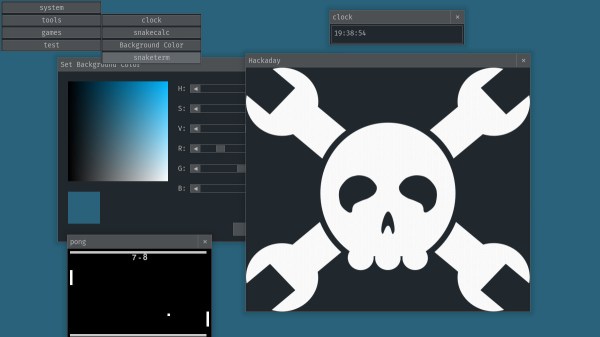
Imagine you would boot your Linux system, and instead of the shell of your choice, you would be greeted by an interactive Python interpreter, and everything you do on the system will be within the realms of that interpreter — that’s the gist of snakeware. Now, this might sound rather limiting at first, but keep in mind we’re talking about Python here, a language known for its versatility, with an abundance of packages that get things done quick and easy, which is exactly what [Josh] is aiming for. To get an idea of that, snakeware also includes snakewm, a graphical user interface written with pygame that bundles a couple of simple applications as demonstration, including a terminal to execute Python one-liners.

Note that this is merely a proof of concept at this stage, but [Josh] is inviting everyone to contribute and extend his creation. If you want to give it a go without building the entire system, the GitHub repository has a prebuilt image to run in QEMU, and the window manager will run as regular Python application on your normal system, too. To get just a quick glimpse of it, check the demo video after the break.

Sure, die-hard Linux enthusiasts will hardly accept a distribution without their favorite shell and preferable language, but hey, at least it gets by without systemd. And while snakeware probably won’t compete with more established distributions in the near future, it’s certainly an interesting concept that embraces thinking outside the box and trying something different. It would definitely fit well on a business card.

Continue reading “Python Is All You’ll Ever Need In This Linux Distro”

Image

Cylindrical LED Display Comes Full Circle

According to [makeTVee], his latest project started out as an experiment to see how well the LED matrix techniques he’s worked with in the past would translate to a cylindrical form factor. We’re going to go ahead and say that not only was the test a success, but that the concept definitely holds promise for displays that are both functional and aesthetically pleasing. This build stops a bit short of being a complete implementation, but what he has so far is very promising and we hope he continues fleshing it out.

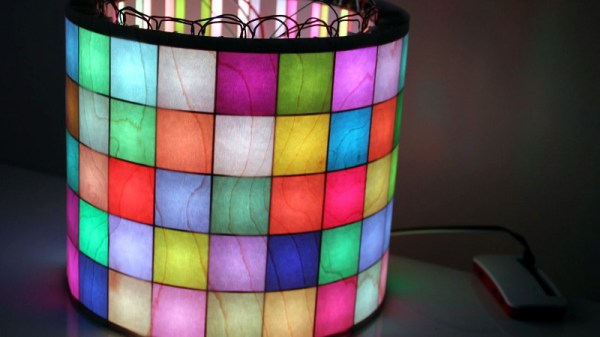
ImageA laser cutter was used to create the interlocking segments that make up the display’s frame, but we imagine you could pull off a similar design using 3D printed parts if you don’t have access to a laser. Strips of WS2812 LEDs are mounted along the inside of the cylinder so that each individual LED lines up with the center of a cell. To finish off the outside of the cylinder [makeTVee] used a thin wood veneer called MicroWOOD, which gives the LEDs a nice diffused glow. The wood grain in the veneer also provides an organic touch that keeps the whole thing from looking too sterile.

Of course, a display like this only works if you’ve got software to drive it. To that end, [makeTVee] has used pygame to create a simulator on his computer that shows what the display would look like if it were unrolled and flattened it out. This makes it a lot easier to create content, as you can see the whole display at once. He says the source for the new tool will be coming to GitHub soon, and we’re very interested in taking a look.

If this display looks familiar, it’s probably because a distinctly flatter version of it took the top spot in our “Visualize it with Pi” contest last year.

Continue reading “Cylindrical LED Display Comes Full Circle”

Image

Tough Pi-ano Can Take A Punch

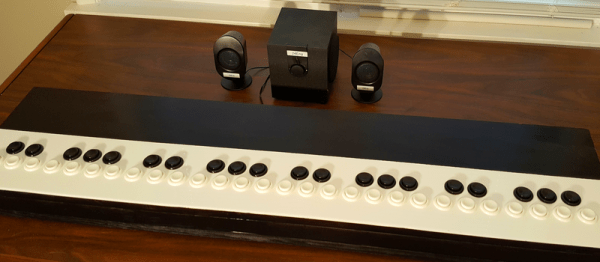
There will be no delicate solos for [24 Hour Engineer’s] Tough Pi-ano. It was built to soak punishment from aggressive youngsters in musical therapy, specifically those on the autism spectrum and those with Down’s syndrome. The Tough Pi-ano will be bolted to a wall with heavy-duty shelf brackets so it can’t fall on anyone. The keyboard is covered in plastic and it doesn’t have any exposed metal so there will be no splinters.

[24 Hour Engineer] made a short video demonstration and if you listen closely, he has a pun in all but one sentence. We love that kind of easter egg in YouTube videos. Check it out after the break.

Inside the 48-key instrument are four Raspberry Pi Zeros where each Pi controls one octave. The redundancy ensures that a hardware failure only drops out a single octave and the kids can keep playing until replacement parts arrive. Each Pi has identical programming and a thumbwheel switch tells it which octave it will be emulating.

Programming was done with Python and Pygame and all the inputs are run to a homemade “hat” where the wires are soldered. Pygame’s sole responsibility is to monitor the GPIO and then play the appropriate note when a button is pressed, slapped, punched or sat upon.

Similar in name, the Touch Piano has no moving parts or perhaps you would rather use your Raspberry Pi in an upright piano.

Continue reading “Tough Pi-ano Can Take A Punch”

Image

Learn To Program With Literate Programming

My heyday in programming was about five years ago, and I’ve really let my skills fade. I started finding myself making excuses for my lack of ability. I’d tackle harder ways to work around problems just so I wouldn’t have to code. Worst of all, I’d find myself shelving projects because I no longer enjoyed coding enough to do that portion. So I decided to put in the time and get back up to speed.

Normally, I’d get back into programming out of necessity. I’d go on a coding binge, read a lot of documentation, and cut and paste a lot of code. It works, but I’d end up with a really mixed understanding of what I did to get the working code. This time I wanted to structure my learning so I’d end up with a more, well, structured understanding.

However, there’s a problem. Programming books are universally boring. I own a really big pile of them, and that’s after I gave a bunch away. It’s not really the fault of the writer; it’s an awkward subject to teach. It usually starts off by torturing the reader with a chapter or two of painfully basic concepts with just enough arcana sprinkled in to massage a migraine into existence. Typically they also like to mention that the arcana will be demystified in another chapter. The next step is to make you play typist and transcribe a big block of code with new and interesting bits into an editor and run it. Presumably, the act of typing along leaves the reader with such a burning curiosity that the next seventeen pages of dry monologue about the thirteen lines of code are transformed into riveting prose within the reader’s mind. Maybe a structured understanding just isn’t worth it.

I wanted to find a new way to study programming. One where I could interact with the example code as I typed it. I wanted to end up with a full understanding before I pressed that run button for the first time, not after.

When I first read about literate programming, my very first instinct said: “nope, not doing that.” Donald Knuth, who is no small name in computing, proposes a new way of doing things in his Literate Programming. Rather than writing the code in the order the compiler likes to see it, write the code in the order you’d like to think about it along with a constant narrative about your thoughts while you’re developing it. The method by which he’d like people to achieve this feat is with the extensive use of macros. So, for example, a literate program would start with a section like this:

Continue reading “Learn To Program With Literate Programming”