Image

This Week In Security: Linux Flaws, Python Ownage, And A Botnet Shutdown

The ides of security March are upon us — Qualys reports the discovery by their threat research unit of vulnerabilities in the Linux AppArmor system used by SUSE, Debian, Ubuntu, and Kubernetes as an additional security mechanism and application firewall.

AppArmor was added to Linux in 2010, and the vulnerabilities Qualys discovered have been present since 2017, and allow unprivileged (non-root) local users to elevate privileges by executing arbitrary code in the kernel, gaining root access, or perform a denial-of-service attack across the entire system by replacing all AppArmor behavior with “deny all” rules.

All Linux kernels since Linux 4.11 are vulnerable. If your Linux distribution enables AppArmor, and quite a few do, you’ll want to be updating as soon as fixes are available from your distribution maintainers. On systems with untrusted users, such as shared environments, VPS server environments, and the like, this is even more critical and urgent. Even on single-user systems, vulnerabilities like these allow other exploits, like the Python attack below, mechanisms to elevate their access and persistence.

At the time of writing, the full details of the AppArmor vulnerability are limited until the Linux Kernel team releases a stable version with the fixes for distribution maintainers. Qualys has published the technical write-up with the currently public information.

Python Projects Compromised

StepSecurity reports on a new campaign to infect Python projects on GitHub with a complex malware that, once deployed, appears to be yet another crypto and login stealer.

The attacker first gains access to the GitHub credentials via another info stealing worm – the Glassworm stealer infects VSCode extensions with over 35,000 downloads of infected extensions in October of 2025. Glassworm harvests NPM, GitHub, and OpenVSX credentials and sends them to a remote command and control (C2) server. It also harvests a wide range of crypto currency wallet extensions to steal crypto directly. Continue reading “This Week In Security: Linux Flaws, Python Ownage, And A Botnet Shutdown”

Image

Real Robot Makes Debut In Programming Game

Sometimes the right tool for the right job appears almost out of nowhere. That was certainly the case for [Jonathan] who came across an unusual but well-designed robot at a secondhand shop. The robot needed a bit of work to get back into a usable condition, but after that it was ready for use. For such a unique machine, it needed a unique place to work as well, so in this build [Jonathan] uses it as a real robot to recreate a popular board game meant to teach programming to children.

In the original board game, called Robot Turtles, there are no actual robots. Instead, players use cards to control turtles to reach objectives in much the same way that a programmer would solve a similar problem with a computer. A board game with such a name almost demands a robot, so [Jonathan] found a larger playing surface in the form of soft matting blocks, each with a number or letter, that can be assembled into a grid. To make the game, he built a Python application on top of the interface he reverse-engineered in a previous build. It handles the robot interface, control, input, and a PyGame GUI. The game can either be played in real-time, or the robot’s moves can be queued.

In addition to keyboard input, the bot can also be controlled by putting cards from the actual board game itself on an NFC reader he made. [Jonathan] has a four-year-old at home, so he hopes that all of these projects will have an impression and encourage experimentation and discovery of computers and programming.

Continue reading “Real Robot Makes Debut In Programming Game”

Image

An E-Ink Macropad For Improved Productivity

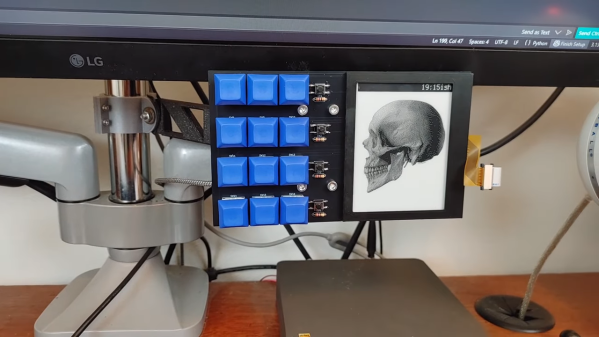
Why press many button when few button do trick? That was the thinking of [Bike Cook Robots] when it came time to revamp his desk. To that end, he whipped up a tidy macropad to make daily computing tasks easier.

The build is based around an Adafruit RP2040 Feather ThinkInk devboard, chosen because it plugs straight into a readily-available 4.2 inch e-ink. The display is tasked with showing icons that correspond to the macro assignments for the 3 x 4 array of mechanical keyboard switches. Everything is wrapped up in a 3D printed frame, with an bracket to mount it to the monitor arms on the desk. The macropad is set up to talk to a custom Python app that runs on the host machine, which handles triggering actions and can also talk back to the pad itself.

The combination of e-ink display and button pad is a great way to display the function of each key without excess complexity. We’ve seen some other great builds in this space before, too.

Continue reading “An E-Ink Macropad For Improved Productivity”

Detail of Horus's face, from a statue of Horus and Set placing the crown of Upper Egypt on the head of Ramesses III. Twentieth Dynasty, early 12th century BC.

HORUS Framework: A Rust Robotics Library

[neos-builder] wrote in to let us know about their innovation: the HORUS Framework — Hybrid Optimized Robotics Unified System — a production-grade robotics framework built in Rust for real-time performance and memory safety.

This is a batteries included system which aims to have everything you might need available out of the box. [neos-builder] said their vision is to create a robotics framework that is “thick” as a whole (we can’t avoid this as the tools, drivers, etc. make it impossible to be slim and fit everyone’s needs), but modular by choice.

[neos-builder] goes on to say that HORUS aims to provide developers an interface where they can focus on writing algorithms and logic, not on setting up their environments and solving configuration issues and resolving DLL hell. With HORUS instead of writing one monolithic program, you build independent nodes, connected by topics, which are run by a scheduler. If you’d like to know more the documentation is extensive.

The list of features is far too long for us to repeat here, but one cool feature in addition to the real-time performance and modular design that jumped out at us was this system’s ability to process six million messages per second, sustained. That’s a lot of messages! Another neat feature is the system’s ability to “freeze” the environment, thereby assuring everyone on the team is using the same version of included components, no more “but it works on my machine!” And we should probably let you know that Python integration is a feature, connected by shared-memory inter-process communication (IPC).

If you’re interested in robotics and/or real-time systems you should definitely be aware of HORUS. Thanks to [neos-builder] for writing in about it. If you’re interested in real-time systems you might like to read Real-Time BART In A Box Smaller Than Your Coffee Mug and Real-Time Beamforming With Software-Defined Radio.

Image

Simple Tricks To Make Your Python Code Faster

Python has become one of the most popular programming languages out there, particularly for beginners and those new to the hacker/maker world. Unfortunately, while it’s easy to  get something up and running in Python, it’s performance compared to other languages is generally lacking. Often, when starting out, we’re just happy to have our code run successfully. Eventually, though, performance always becomes a priority. When that happens for you, you might like to check out the nifty tips from [Evgenia Verbina] on how to make your Python code faster.

Many of the tricks are simple common sense. For example, it’s useful to avoid creating duplicates of large objects in memory, so altering an object instead of copying it can save a lot of processing time. Another easy win is using the Python math module instead of using the exponent (**) operator since math calls some C code that runs super fast. Others may be unfamiliar to new coders—like the benefits of using sets instead of lists for faster lookups, particularly when it comes to working with larger datasets. These sorts of efficiency gains might be merely useful, or they might be a critical part of making sure your project is actually practical and fit for purpose.

It’s worth looking over the whole list, even if you’re an intermediate coder. You might find some easy wins that drastically improve your code for minimal effort. We’ve explored similar tricks for speeding up code on embedded platforms like Arduino, too. If you’ve got your own nifty Python speed hacks, don’t hesitate to notify the tipsline!

Audio field emission map

Audio Sound Capture Project Needs Help

When you are capturing audio from a speaker, you are rarely capturing the actual direct output of such a system. There are reflections and artifacts caused by anything and everything in the environment that make it to whatever detector you might be using. With the modern computation age, you would think there would be a way to compensate for such artifacts, and this is what [d.fapinov] set out to do.

[d.fapinov] has put together a code base for simulating and reversing environmental audio artifacts made to rival systems, entirely orders of magnitude higher in cost. The system relies on similar principles used in radio wave antenna transmission to calculate the audio output map, called spherical harmonic expansion. Once this map is calculated and separated from outside influence, you can truly measure the output of an audio device.

The only problem is that the project needs to be tested in the real world. [d.fapinov] has gotten this far but is unable to continue with the project. A way to measure audio from precise locations around the output is required, as well as the appropriate control for such a device.

Audio enthusiasts go deep into this tech, and if you want to become one of them, check out this article on audio compression and distortion.

A 2D simple regression analysis.

Making Math Less Stressful With A Python Super-Calculator

In a recent write-up, [David Delony] explains how he built a Wolfram Mathematica-like engine with Python.

Core to the system is SymPy for symbolic math support. [David] said being able to work with symbolic math easily has helped his understanding of calculus and linear algebra. For statistics support he includes NumPy, pandas, and SciPy. NumPy is useful for creating multidimensional arrays and supports basic descriptive statistics such as mean, median, and standard deviation; pandas is a library for operating on tabular data arranged into “DataFrames”, it can load data from spreadsheets (including Excel) and relational databases; and SciPy is a “grab bag” of operations designed for scientific computing, it includes some useful statistics operations, including common probability distributions, such as the binomial, normal, and Student’s t-distribution.

For regression analysis [David] includes statsmodels and Pingouin. If you’re not familiar with the term “regression analysis” it basically refers to the process of curve fitting. When your data is two-dimensional, with one dependent variable, the simple linear regression algorithm will generate a function that fits the data as y = mx + b, including the slope (m) and the y-intercept (b); this can be extrapolated to higher dimensional data and other types of regression.

If you have an interest in symbolic math you might enjoy learning about Mathematica And Wolfram On The Raspberry Pi.