Image

DIY Reflow Plate Runs On USB Power Delivery

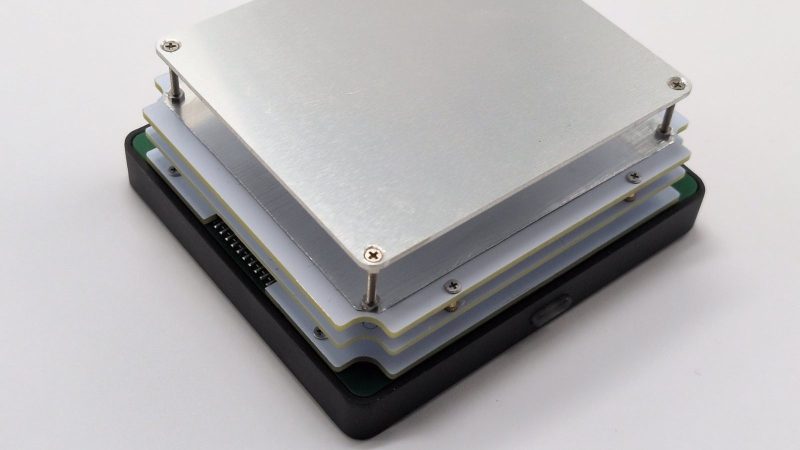
If you’re working with surface mount components, you’re likely going to want a reflow plate at some point. [Vitaly] was in need of just such a tool, and thus whipped up a compact reflow plate that is conveniently powered via USB-C. 

This reflow rig is designed for smaller work, with a working area of 80 mm x 70 mm. There are two options for the heating element—either a metal core PCB-based heater, or a metal ceramic heater. The former is good for working with Sn42Bi58 solder paste at 138 C, according to [Vitaly], while the latter will happily handle Sn63Pb37 at 183 C if the dirty stuff is more your jam.

Image

Running the show is an ESP32-C3-WROOM, which serves up a web-based control panel over Bluetooth for setting the heating profiles. Using Bluetooth over WiFi might seem like an odd choice at first, but it means you don’t have to add the hot plate to the local wireless network to access it, handy if you’re on the move. It’s also worth noting that you can’t run this off any old USB charger—you’ll need one compatible with USB Power Delivery (PD) that can deliver at least 100 watts.

If you’re needing to whip up small boards with regularity, a hotplate like this one can really come in handy. Files are on GitHub for those eager to build their own.

This isn’t the first time we’ve seen USB-C powering a small reflow plate. Of course, if you make your PCBs self heating, you can sidestep all that entirely.
Image

Bit-Banging The USB-PD Protocol

For one-off projects, adding a few integrated circuits to a PCB is not too big of a deal. The price of transistors is extremely low thanks to Moore and his laws, so we’re fairly free to throw chips around like peanuts. But for extremely space-constrained projects, huge production runs, or for engineering challenges, every bit of PCB real estate counts. [g3gg0] falls into the latter group, and this project aims to remove the dedicated USB-PD module from a lighting project and instead bit-bang the protocol with the ESP32 already on the board.

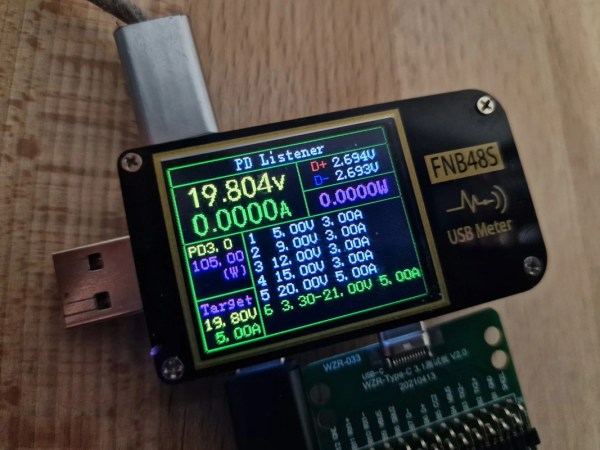
The modern USB power delivery (PD) protocol isn’t quite as simple as older USB ports that simply present a 5V source to whatever plugs itself into the port. But with the added complexity we get a lot more capability including different voltages and greater power handling capabilities. The first step with the PD protocol is to communicate with a power source, which requires a 1.2V 600kHz signal. Just generating the signal is challenging enough, but the data encoding for USB requires level changes to encode bits rather than voltage levels directly. With that handled, the program can then move on to encoding packets and sending them out over the bus.

After everything is said and done, [g3gg0] has a piece of software that lets the ESP32 request voltages from a power supply, sniff and log PD communication, and inject commands with vendor defined messages (VDM), all without needing to use something like a CH224K chip which would normally offload the USB-PD tasks. For anyone looking to save PCB space for whatever reason, this could be a valuable starting point. To see some more capabilities of the protocol, check out this USB-PD power supply that can deliver 2 kW.

Image

A Modern Battery For A Classic Laptop

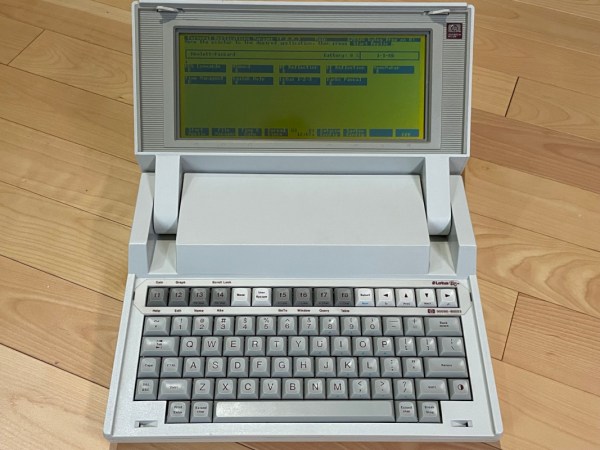
Aside from their ability to operate fairly well in extreme temperatures, lead-acid batteries don’t have many benefits compared to more modern battery technology. They’re heavy, not particularly energy dense, have limited charge cycles, and often can’t be fully discharged without damage or greatly increased wear. With that in mind, one can imagine that a laptop that uses a battery like this would be not only extremely old but also limited by this technology. Of course, in the modern day we can do a lot to bring these retro machines up to modern standards like adding in some lithium batteries to this HP laptop.

Simply swapping the batteries in this computer won’t get the job done though, as lead-acid and lithium batteries need different circuitry in order to be safe while also getting the maximum amount of energy out. [CYUL] is using a cheap UPS module from AliExpress which comes with two 18650 cells to perform this conversion, although with a high likelihood of counterfeiting in this market, the 18650s were swapped out with two that were known to be from Samsung. The USB module also needs to be modified a bit to change the voltage output to match the needs of the HP-110Plus, and of course a modernized rebuild like this wouldn’t be complete without a USB-C port to function as the new power jack.

[CYUL] notes at the end of the build log that even without every hardware upgrade made to this computer (and ignoring its limited usefulness in the modern world) it has a limited shelf life as the BIOS won’t work past 2035. Hopefully with computers like this we’ll start seeing some firmware modifications as well that’ll let them work indefinitely into the future. For modern computers we’ll hope to avoid the similar 2038 problem by switching everything over to 64 bit systems and making other software updates as well.

Image

USB And The Myth Of 500 Milliamps

If you’re designing a universal port, you will be expected to provide power. This was a lesson learned in the times of LPT and COM ports, where factory-made peripherals and DIY boards alike had to pull peculiar tricks to get a few milliamps, often tapping data lines. Do it wrong, and a port will burn up – in the best case, it’ll be your port, in worst case, ports of a number of your customers.

Image
Want a single-cable device on a COM port? You might end up doing something like this.

Having a dedicated power rail on your connector simply solves this problem. We might’ve never gotten DB-11 and DB-27, but we did eventually get USB, with one of its four pins dedicated to a 5 V power rail. I vividly remember seeing my first USB port, on the side of a Thinkpad 390E that my dad bought in 2000s – I was eight years old at the time. It was merely USB 1.0, and yet, while I never got to properly make use of that port, it definitely marked the beginning of my USB adventures.

About six years later, I was sitting at my desk, trying to build a USB docking station for my EEE PC, as I was hoping, with tons of peripherals inside. Shorting out the USB port due to faulty connections or too many devices connected at once was a regular occurrence; thankfully, the laptop persevered as much as I did. Trying to do some research, one thing I kept stumbling upon was the 500 mA limit. That didn’t really help, since none of the devices I used even attempted to indicate their power consumption on the package – you would get a USB hub saying “100 mA” or a mouse saying “500 mA” with nary an elaboration.

Fifteen more years have passed, and I am here, having gone through hundreds of laptop schematics, investigated and learned from design decisions, harvested laptops for both parts and even ICs on their motherboards, designed and built laptop mods, nowadays I’m even designing my own laptop motherboards! If you ever read about the 500 mA limit and thought of it as a constraint for your project, worry not – it’s not as cut and dried as the specification might have you believe.
Continue reading “USB And The Myth Of 500 Milliamps”

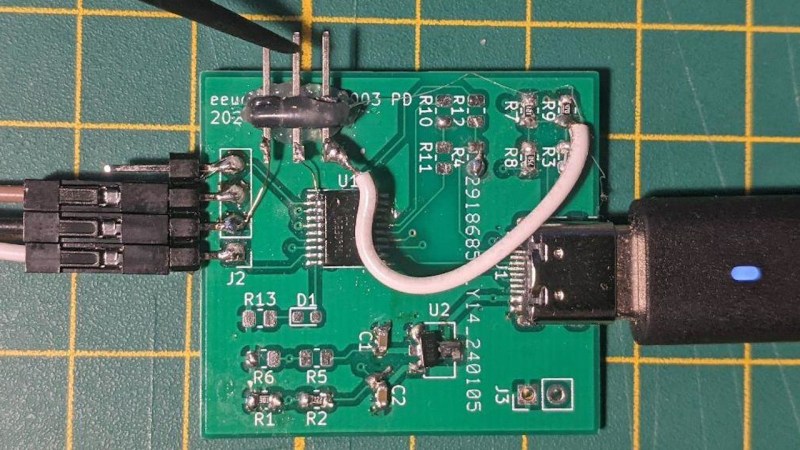
A devboard with the CH32V003, with a few resistors and bodges, with a USB-C cable plugged into it, and a programmer plus an extra probe attached.

USB PD On CH32V003 Teaches You Everything

How do you talk USB Power Delivery (PD)? Grab a PHY? Use a MCU with one built-in? Well, if you’re hardcore enough, you can do it with just a few resistors and GPIOs. [eeucalyptus] shows you their implementation of USB-PD on a CH32V003, which has no PD peripheral. This includes building a PD trigger, completely open source, and walking you through the entire low-level PD basics, too!

It helps that CH32V003 is a 32-bit MCU with a good few resources and peripherals, for instance, an internal comparator. Other than that, you don’t need much in terms of hardware resources, but you do need a steady hand — parts of the firmware had to be written in assembly to keep up with PD timing. Want to tinker with the fruit of this research, perhaps, further build upon the code? There’s an example board on GitHub, too!

Want to try your own luck with this method? There’s a schematic, and logic analyzer captures, and a board to refer to. Again, more than enough information on every single low-level detail! Otherwise, grab an MCU pre-programmed to talk PD, maybe a trigger board chip, or maybe even a PD PHY and implement PD communications with it directly – it’s pretty easy!

We thank [Julianna] for sharing this with us!

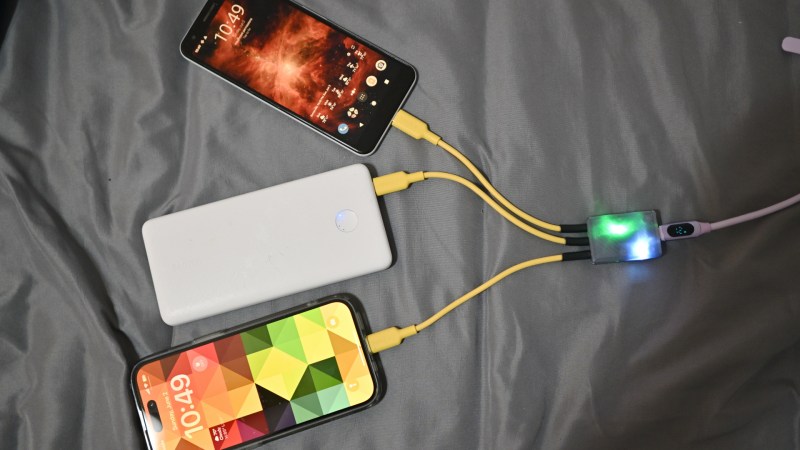
The splitter with a 3D-printed case and three yellow cables coming out of it, powering two phones and one powerbank at the same time

Split A USB-C PD Port Into Three Port-ions

There’s no shortage of USB-C chargers in all sorts of configurations, but sometimes, you simply need a few more charging ports on the go, and you got a single one. Well then, check out [bluepylons]’s USB-C splitter, which takes a single USB-C 5V/3A port and splits it into three 5V/1A plugs, wonderful for charging a good few devices on the go!

This adapter does things right – it actually checks that 3A is provided, with just a comparator, and uses that to switch power to the three outputs, correctly signalling to the consumer devices that they may consume about 1A from the plugs. This hack’s documentation is super considerate – you get detailed instructions on how to reproduce it, every nuance you might want to keep in mind, and even different case options depending on whether you want to pot the case or instead use a thermal pad for a specific component which might have to dissipate some heat during operation!

This hack has been documented with notable care for whoever might want to walk the journey of building one for themselves, so if you ever need a splitter, this one is a wonderful weekend project you are sure to complete. Wonder what kind of project would be a polar opposite, but in all the best ways? Why, this 2kW USB-PD PSU, most certainly.

Image

Getting Started With USB-C And Common Pitfalls With Charging And Data Transfer

USB-C is one of those things that generally everyone seems to agree on that it is a ‘good thing’, but is it really? In this first part of a series on USB-C, [Andreas Spiess] takes us through the theory of USB-C and USB Power Delivery (PD), as well as data transfer with USB-C cables. Even ignoring the obvious conclusion that with USB-C USB should now actually be called the ‘Universal Parallel Bus’ on account of its two pairs of differential data lines, there’s quite a bit of theory and associated implementation details involved.

The Raspberry Pi 4B's wrong USB-C CC-pin configuration is a good teaching example.
The Raspberry Pi 4B’s wrong USB-C CC-pin configuration is a good teaching example.

Starting with the USB 2.0 ‘legacy mode’ and the very boring and predictable 5 V power delivery in this mode, [Andreas] shows why you may not get any power delivered to a device with USB-C connector. Most likely the Downstream Facing Peripheral (DFP, AKA not the host) lacks the required resistors on the CC (Configuration Channel) pins, which are both what the other USB-C end uses to determine the connector orientation, as well as what type of device is connected.

This is where early Raspberry Pi 4B users for example saw themselves caught by surprise when their boards didn’t power up except with some USB cables.

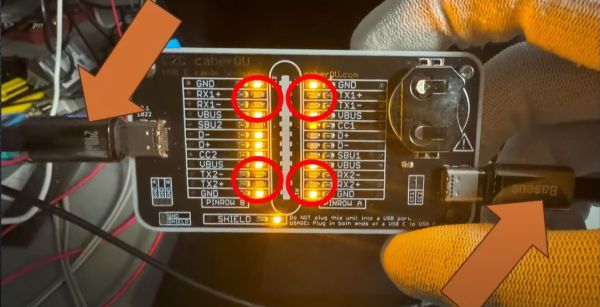
The saga continues through [Andreas]’s collection of USB-C cables, as he shows that many of them lack the TX/RX pairs, and that’s before trying to figure out which cables have the e-marker chip to allow for higher voltages and currents.

On the whole we’re still excited about what USB-C brings to the table, but the sheer complexity and number of variables make that there are a myriad of ways in which something cannot work as expected. Ergo Caveat Emptor.

Continue reading “Getting Started With USB-C And Common Pitfalls With Charging And Data Transfer”