
ຄຳອະທິບາຍ
This control works in a similar way to the existing drop-down menu, but rather than a fixed list of options that the user must select from it is presented to the user as a textbox.
Once the user begins typing a list of possible options will be shown, selecting one will fill in the rest of the field with the selected option, if the desired option is not present in the list then the user can type in their own option.
ພາບໜ້າຈໍ
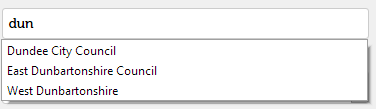
User has typed in ‘dun’ and matches are shown.

ການຕິດຕັ້ງ
- Ensure Contact Form 7 is installed and activated.
- Install the plugin through the WordPress plugins screen or upload the plugin files to the
/wp-content/plugins/cf7-datalistdirectory. - Activate the plugin through the ‘Plugins’ screen in WordPress.
ຄຳຖາມທີ່ພົບເລື້ອຍ
- How do I use this?
-
When editing a Contact Form 7 form you should now be able to add a datalist tag.
- Which browsers support this?
-
According to MDN https://developer.mozilla.org/en-US/docs/Web/HTML/Element/datalist this is supported by Chrome 20+ (33+ on mobile), Edge, Firefox 4+, IE10+ and Opera 9.5+ but not Safari.
ການຣີວິວ


ຜູ້ຮ່ວມພັດທະນາ ແລະ ຜູ້ພັດທະນາ
“Contact Form 7 – Datalist” ແມ່ນຊອຟແວໂອເພັນຊອດ (Open Source). ບຸກຄົນຕໍ່ໄປນີ້ໄດ້ມີສ່ວນຮ່ວມໃນການພັດທະນາປລັກອິນນີ້.
ຜູ້ຮ່ວມພັດທະນາ
ແປ “Contact Form 7 – Datalist” ເປັນພາສາຂອງເຈົ້າ.
ສົນໃຈຮ່ວມພັດທະນາບໍ່?
ເບິ່ງລະຫັດ, ກວດເບິ່ງ ຄັງເກັບ SVN, ຫຼື ຕິດຕາມ ບັນທຶກການພັດທະນາ ຜ່ານ RSS.
ບັນທຶກການປ່ຽນແປງ
1.2
- Tested for WordPress 5.0.
1.1
- Fixed Contact Form 7 depreciation errors.
1.0
- Initial release.
