<?xml version="1.0" encoding="utf-8"?>
<feed xmlns="http://www.w3.org/2005/Atom">

  <title><![CDATA[paul-samuels.com]]></title>
  <link href="http://paul-samuels.com/atom.xml" rel="self"/>
  <link href="http://paul-samuels.com/"/>
  <updated>2026-02-03T00:18:00+00:00</updated>
  <id>http://paul-samuels.com/</id>
  <author>
    <name><![CDATA[Paul Samuels]]></name>
    <email><![CDATA[paulio1987@gmail.com]]></email>
  </author>

  
  <entry>
    <title type="html"><![CDATA[Hacking with Ktor]]></title>
    <link href="http://paul-samuels.com/blog/2026/02/02/hacking-with-ktor/"/>
    <updated>2026-02-02T21:51:00+00:00</updated>
    <id>http://paul-samuels.com/blog/2026/02/02/hacking-with-ktor</id>
    <content type="html"><![CDATA[<p>Every now and then when I’m out walking my dog I nerd snipe myself and start thinking of interesting little programming challenges to toy around with.
This post explores using Ktor to build a tiny reverse proxy that forwards Snowplow events and pushes notifications over WebSockets so a debug UI can react in real time.</p>

<hr />

<h2 id="background">Background</h2>

<p>The app I work on uses Snowplow for event tracking.
When you send events, the payload has to adhere to strict JSON schemas.
When you send an event with the right structure then everything is good, but if you get the structure wrong then the validation kicks in and events are lost to a bad queue.</p>

<p>Snowplow provides a debug collector that you can run locally and it will give you good information about whether the events you are sending are valid or not.
The issue I was toying with is that the app I want to use to observe the debug collector doesn’t know when new data is available in order to update its UI.</p>

<p>The service structure looks something like this:</p>

<div class="language-plaintext highlighter-rouge"><div class="highlight"><pre class="highlight"><code>+-----+   sends events   +-----------+    needs to update   +-----------+
| iOS |-----------------&gt;| Collector |&lt;---------------------| Debug GUI |
+-----+                  +-----------+                      +-----------+
</code></pre></div></div>

<p>The <code class="language-plaintext highlighter-rouge">Debug GUI</code> is a small local tool we plan to write to inspect what the collector has received, but it currently has no way of knowing when new data arrives.
For the sake of my experiment I had the limitation that I cannot change the code in iOS or the Collector.
It’s not cheating but the iOS client already has the ability to change the location of the Collector so I can point traffic where I want.</p>

<p>A couple of less fun solutions that would work would be:</p>

<ul>
  <li>Manual - add a refresh button to the <code class="language-plaintext highlighter-rouge">Debug GUI</code></li>
  <li>Noisy - add polling to the <code class="language-plaintext highlighter-rouge">Debug GUI</code></li>
</ul>

<p>I opted to explore option 3 as noted at the top of the post, which is to create a reverse proxy to sit in the middle and be able to observe when events occur and push them to the <code class="language-plaintext highlighter-rouge">Debug GUI</code>.
This looks something like this</p>

<div class="language-plaintext highlighter-rouge"><div class="highlight"><pre class="highlight"><code>+-----+   sends events   +-------+   forwards   +-----------+
| iOS |-----------------&gt;| Proxy |-------------&gt;| Collector |
+-----+                  +-------+              +-----------+
                             |
                             |  sends messages  +-----------+
                             '-----------------&gt;| Debug GUI |
                                                +-----------+
</code></pre></div></div>

<p>With a rough structure to aim for I started experimenting.</p>

<hr />

<h2 id="creating-a-basic-proxy">Creating a basic proxy</h2>

<p>I’m not aiming for production readiness as this is only for a local debugging tool but I started with a new empty project and manually added all the ktor bits I would need.
As a start I know I’ll need both client and server libraries for Ktor and as I know I’ll be using WebSockets I looked ahead at the docs and noticed they were suggesting to use Netty for WebSocket support.
The basic configuration then looks like this:</p>

<p><code class="language-plaintext highlighter-rouge">gradle/libs.versions.toml</code></p>
<div class="language-toml highlighter-rouge"><div class="highlight"><pre class="highlight"><code><span class="k">[</span><span class="n">versions</span><span class="k">]</span>
<span class="n">ktor</span> <span class="o">=</span><span class="w"> </span><span class="s">"3.4.0"</span>

<span class="k">[</span><span class="n">libraries</span><span class="k">]</span>
<span class="n">ktor-client-cio</span> <span class="o">=</span><span class="w"> </span><span class="p">{</span><span class="w"> </span><span class="n">module</span><span class="w"> </span><span class="p">=</span><span class="w"> </span><span class="s">"io.ktor:ktor-client-cio"</span><span class="p">,</span><span class="w"> </span><span class="n">version</span><span class="p">.</span><span class="n">ref</span><span class="w"> </span><span class="p">=</span><span class="w"> </span><span class="s">"ktor"</span><span class="w"> </span><span class="p">}</span>
<span class="n">ktor-client-core</span> <span class="o">=</span><span class="w"> </span><span class="p">{</span><span class="w"> </span><span class="n">module</span><span class="w"> </span><span class="p">=</span><span class="w"> </span><span class="s">"io.ktor:ktor-client-core"</span><span class="p">,</span><span class="w"> </span><span class="n">version</span><span class="p">.</span><span class="n">ref</span><span class="w"> </span><span class="p">=</span><span class="w"> </span><span class="s">"ktor"</span><span class="w"> </span><span class="p">}</span>
<span class="n">ktor-server-core</span> <span class="o">=</span><span class="w"> </span><span class="p">{</span><span class="w"> </span><span class="n">module</span><span class="w"> </span><span class="p">=</span><span class="w"> </span><span class="s">"io.ktor:ktor-server-core"</span><span class="p">,</span><span class="w"> </span><span class="n">version</span><span class="p">.</span><span class="n">ref</span><span class="w"> </span><span class="p">=</span><span class="w"> </span><span class="s">"ktor"</span><span class="w"> </span><span class="p">}</span>
<span class="n">ktor-server-netty</span> <span class="o">=</span><span class="w"> </span><span class="p">{</span><span class="w"> </span><span class="n">module</span><span class="w"> </span><span class="p">=</span><span class="w"> </span><span class="s">"io.ktor:ktor-server-netty"</span><span class="p">,</span><span class="w"> </span><span class="n">version</span><span class="p">.</span><span class="n">ref</span><span class="w"> </span><span class="p">=</span><span class="w"> </span><span class="s">"ktor"</span><span class="w"> </span><span class="p">}</span>

<span class="k">[</span><span class="n">bundles</span><span class="k">]</span>
<span class="n">ktor-client</span> <span class="o">=</span><span class="w"> </span><span class="p">[</span>
    <span class="s">"ktor-client-cio"</span><span class="p">,</span>
    <span class="s">"ktor-client-core"</span><span class="p">,</span>
<span class="p">]</span>
<span class="n">ktor-server</span> <span class="o">=</span><span class="w"> </span><span class="p">[</span>
    <span class="s">"ktor-server-core"</span><span class="p">,</span>
    <span class="s">"ktor-server-netty"</span><span class="p">,</span>
<span class="p">]</span>
</code></pre></div></div>

<p><code class="language-plaintext highlighter-rouge">build.gradle.kts</code></p>
<div class="language-kotlin highlighter-rouge"><div class="highlight"><pre class="highlight"><code><span class="o">..</span><span class="p">.</span>

<span class="nf">dependencies</span> <span class="p">{</span>
    <span class="nf">implementation</span><span class="p">(</span><span class="n">libs</span><span class="p">.</span><span class="n">bundles</span><span class="p">.</span><span class="n">ktor</span><span class="p">.</span><span class="n">client</span><span class="p">)</span>
    <span class="nf">implementation</span><span class="p">(</span><span class="n">libs</span><span class="p">.</span><span class="n">bundles</span><span class="p">.</span><span class="n">ktor</span><span class="p">.</span><span class="n">server</span><span class="p">)</span>
<span class="p">}</span>

<span class="o">..</span><span class="p">.</span>
</code></pre></div></div>

<p>With all the dependencies in place I can implement a <code class="language-plaintext highlighter-rouge">main</code> function that starts a server that will receive requests on port 9090 and forward them to 9091 before returning the result.</p>

<p><code class="language-plaintext highlighter-rouge">src/main/kotlin/Main.kt</code></p>
<div class="language-kotlin highlighter-rouge"><div class="highlight"><pre class="highlight"><code><span class="k">fun</span> <span class="nf">main</span><span class="p">()</span> <span class="p">{</span>
    <span class="nf">embeddedServer</span><span class="p">(</span><span class="nc">Netty</span><span class="p">,</span> <span class="n">port</span> <span class="p">=</span> <span class="mi">9090</span><span class="p">,</span> <span class="n">host</span> <span class="p">=</span> <span class="s">"0.0.0.0"</span><span class="p">)</span> <span class="p">{</span>
        <span class="kd">val</span> <span class="py">client</span> <span class="p">=</span> <span class="nc">HttpClient</span><span class="p">(</span><span class="nc">CIO</span><span class="p">)</span>

        <span class="nf">routing</span> <span class="p">{</span>
            <span class="nf">route</span><span class="p">(</span><span class="s">"{...}"</span><span class="p">)</span> <span class="p">{</span>
                <span class="nf">handle</span> <span class="p">{</span>
                    <span class="kd">val</span> <span class="py">path</span> <span class="p">=</span> <span class="n">call</span><span class="p">.</span><span class="n">request</span><span class="p">.</span><span class="n">uri</span>

                    <span class="kd">val</span> <span class="py">response</span> <span class="p">=</span> <span class="n">client</span><span class="p">.</span><span class="nf">request</span><span class="p">(</span><span class="s">"http://localhost:9091$path"</span><span class="p">)</span> <span class="p">{</span>
                        <span class="n">method</span> <span class="p">=</span> <span class="n">call</span><span class="p">.</span><span class="n">request</span><span class="p">.</span><span class="n">httpMethod</span>

                        <span class="n">call</span><span class="p">.</span><span class="n">request</span><span class="p">.</span><span class="n">headers</span><span class="p">.</span><span class="nf">forEach</span> <span class="p">{</span> <span class="n">key</span><span class="p">,</span> <span class="n">values</span> <span class="p">-&gt;</span>
                            <span class="n">values</span><span class="p">.</span><span class="nf">forEach</span> <span class="p">{</span> <span class="nf">header</span><span class="p">(</span><span class="n">key</span><span class="p">,</span> <span class="n">it</span><span class="p">)</span> <span class="p">}</span>
                        <span class="p">}</span>

                        <span class="nf">setBody</span><span class="p">(</span><span class="n">call</span><span class="p">.</span><span class="nf">receiveChannel</span><span class="p">())</span>
                    <span class="p">}</span>

                    <span class="n">call</span><span class="p">.</span><span class="nf">respondBytes</span><span class="p">(</span>
                        <span class="n">bytes</span> <span class="p">=</span> <span class="n">response</span><span class="p">.</span><span class="nf">bodyAsBytes</span><span class="p">(),</span>
                        <span class="n">status</span> <span class="p">=</span> <span class="n">response</span><span class="p">.</span><span class="n">status</span><span class="p">,</span>
                        <span class="n">contentType</span> <span class="p">=</span> <span class="n">response</span><span class="p">.</span><span class="nf">contentType</span><span class="p">()</span>
                    <span class="p">)</span>
                <span class="p">}</span>
            <span class="p">}</span>
        <span class="p">}</span>
    <span class="p">}.</span><span class="nf">start</span><span class="p">(</span><span class="n">wait</span> <span class="p">=</span> <span class="k">true</span><span class="p">)</span>
<span class="p">}</span>
</code></pre></div></div>

<p>The code isn’t super exciting but the high level idea is to copy the path, headers and body and construct an identical request to the service I am wrapping.
The results of calling the wrapped service are then just sent back to the original caller.
Because I forward the request body as a channel, large payloads can stream through without being buffered in memory.</p>

<p>After firing this up and changing my iOS client to point from port 9091 to 9090 I could see everything was working as if I’d done nothing.
This was a bit worrying as I wasn’t sure I’d actually done anything so I placed a few breakpoints to confirm my code was actually being executed.</p>

<p>The proxy works, but it doesn’t observe anything yet - so next I added a WebSocket endpoint that interested tools can subscribe to.</p>

<hr />

<h2 id="adding-websockets">Adding WebSockets</h2>

<p>The general idea now is to continue the existing proxying logic but instead of just returning the result I’m also going to expose a WebSocket endpoint that I will publish new data to.
To publish new data I’m going to need to be able to parse the data coming from the collector which means my dependency shopping list now includes WebSockets and json serialization.</p>

<p><code class="language-plaintext highlighter-rouge">gradle/libs.versions.toml</code></p>
<div class="language-diff highlighter-rouge"><div class="highlight"><pre class="highlight"><code>  [libraries]
  ktor-client-cio = { module = "io.ktor:ktor-client-cio", version.ref = "ktor" }
<span class="gi">+ ktor-client-content-negotiation = { module = "io.ktor:ktor-client-content-negotiation", version.ref = "ktor" }
</span>  ktor-client-core = { module = "io.ktor:ktor-client-core", version.ref = "ktor" }
<span class="gi">+ ktor-client-serialization = { module = "io.ktor:ktor-serialization-kotlinx-json", version.ref = "ktor" }
</span>  ktor-server-core = { module = "io.ktor:ktor-server-core", version.ref = "ktor" }
<span class="gi">+ ktor-server-content-negotiation = { module = "io.ktor:ktor-server-content-negotiation", version.ref = "ktor" }
</span>  ktor-server-netty = { module = "io.ktor:ktor-server-netty", version.ref = "ktor" }
<span class="gi">+ ktor-server-websockets = { module = "io.ktor:ktor-server-websockets", version.ref = "ktor" }
</span><span class="err">
</span><span class="gi">+ [plugins]
+ kotlinx-serialization = { id = "org.jetbrains.kotlin.plugin.serialization", version = "2.3.0" }
</span><span class="err">
</span>  [bundles]
  ktor-client = [
      "ktor-client-cio",
<span class="gi">+     "ktor-client-content-negotiation",
</span>      "ktor-client-core",
<span class="gi">+     "ktor-client-serialization"
</span>  ]
  ktor-server = [
      "ktor-server-core",
<span class="gi">+     "ktor-server-content-negotiation",
</span>      "ktor-server-netty",
<span class="gi">+     "ktor-server-websockets"
</span>  ]
</code></pre></div></div>

<p><code class="language-plaintext highlighter-rouge">build.gradle.kts</code></p>
<div class="language-diff highlighter-rouge"><div class="highlight"><pre class="highlight"><code>  plugins {
      kotlin("jvm") version "2.2.21"
<span class="gi">+     alias(libs.plugins.kotlinx.serialization)
</span>  }
<span class="err">
</span>  ...
</code></pre></div></div>

<p>With all the dependencies installed I looked at the <a href="https://ktor.io/docs/server-create-websocket-application.html">docs</a> for guidance and came up with this just to verify the general setup</p>

<p><code class="language-plaintext highlighter-rouge">src/main/kotlin/Main.kt</code></p>
<div class="language-kotlin highlighter-rouge"><div class="highlight"><pre class="highlight"><code><span class="k">suspend</span> <span class="k">fun</span> <span class="nf">main</span><span class="p">()</span> <span class="p">{</span>
    <span class="nf">embeddedServer</span><span class="p">(</span><span class="nc">Netty</span><span class="p">,</span> <span class="n">port</span> <span class="p">=</span> <span class="mi">9090</span><span class="p">,</span> <span class="n">host</span> <span class="p">=</span> <span class="s">"0.0.0.0"</span><span class="p">)</span> <span class="p">{</span>
        <span class="nf">install</span><span class="p">(</span><span class="nc">WebSockets</span><span class="p">)</span>

        <span class="kd">val</span> <span class="py">subscribers</span> <span class="p">=</span> <span class="nc">Collections</span><span class="p">.</span><span class="n">synchronizedList</span><span class="p">&lt;</span><span class="nc">WebSocketServerSession</span><span class="p">&gt;(</span><span class="nf">mutableListOf</span><span class="p">())</span>

        <span class="nf">routing</span> <span class="p">{</span>
            <span class="nf">webSocket</span><span class="p">(</span><span class="s">"/ws"</span><span class="p">)</span> <span class="p">{</span>
                <span class="nf">println</span><span class="p">(</span><span class="s">"Web socket connected"</span><span class="p">)</span>
                <span class="n">subscribers</span> <span class="p">+=</span> <span class="k">this</span>

                <span class="nf">repeat</span><span class="p">(</span><span class="mi">10</span><span class="p">)</span> <span class="p">{</span>
                    <span class="nf">send</span><span class="p">(</span><span class="s">"Message $it"</span><span class="p">)</span>
                    <span class="nf">delay</span><span class="p">(</span><span class="mi">1</span><span class="p">.</span><span class="n">seconds</span><span class="p">)</span>
                <span class="p">}</span>

                <span class="k">try</span> <span class="p">{</span>
                    <span class="k">for</span> <span class="p">(</span><span class="n">frame</span> <span class="k">in</span> <span class="n">incoming</span><span class="p">)</span> <span class="p">{</span>
                        <span class="c1">// ignore client messages</span>
                    <span class="p">}</span>
                <span class="p">}</span> <span class="k">finally</span> <span class="p">{</span>
                    <span class="n">subscribers</span> <span class="p">-=</span> <span class="k">this</span>
                <span class="p">}</span>

                <span class="nf">close</span><span class="p">(</span><span class="nc">CloseReason</span><span class="p">(</span><span class="nc">CloseReason</span><span class="p">.</span><span class="nc">Codes</span><span class="p">.</span><span class="nc">NORMAL</span><span class="p">,</span> <span class="s">"All done"</span><span class="p">))</span>
            <span class="p">}</span>
        <span class="p">}</span>
    <span class="p">}.</span><span class="nf">start</span><span class="p">(</span><span class="n">wait</span> <span class="p">=</span> <span class="k">true</span><span class="p">)</span>
<span class="p">}</span>
</code></pre></div></div>

<p>When this server is run and I connect to the WebSocket (I used <a href="https://github.com/vi/websocat">websocat</a> for testing) the server will print that a connection was made and then start sending <code class="language-plaintext highlighter-rouge">Message 0</code>-<code class="language-plaintext highlighter-rouge">Message 9</code> with a second delay between each message.
This works nicely and the socket is kept open by the infinite read loop that waits for input and just throws it away on repeat.</p>

<p>Now I know I can do the proxying and establish WebSockets it’s time to stitch things together.</p>

<hr />

<h2 id="consume-and-emit-events">Consume and emit events</h2>

<p>The actual collector doesn’t actually return any useful data when we inspect the traffic so in reality I will need to make a further network request to fetch data.
For the sake of this example, let’s pretend the collector returns the data directly in the response body rather than requiring a follow-up request.</p>

<p>I started by setting up the JSON parsing side of things.
The reason for parsing the JSON is that the payload from the collector contains a lot of stuff that the <code class="language-plaintext highlighter-rouge">Debug GUI</code> doesn’t need, so it makes sense to return a filtered view.</p>

<div class="language-kotlin highlighter-rouge"><div class="highlight"><pre class="highlight"><code><span class="kd">val</span> <span class="py">json</span> <span class="p">=</span> <span class="nc">Json</span> <span class="p">{</span>
    <span class="n">ignoreUnknownKeys</span> <span class="p">=</span> <span class="k">true</span>
    <span class="n">explicitNulls</span> <span class="p">=</span> <span class="k">false</span>
<span class="p">}</span>

<span class="nf">embeddedServer</span><span class="p">(</span><span class="nc">Netty</span><span class="p">,</span> <span class="n">port</span> <span class="p">=</span> <span class="mi">9090</span><span class="p">,</span> <span class="n">host</span> <span class="p">=</span> <span class="s">"0.0.0.0"</span><span class="p">)</span> <span class="p">{</span>
    <span class="nf">install</span><span class="p">(</span><span class="nc">WebSockets</span><span class="p">)</span> <span class="p">{</span>
        <span class="n">contentConverter</span> <span class="p">=</span> <span class="nc">KotlinxWebsocketSerializationConverter</span><span class="p">(</span><span class="n">json</span><span class="p">)</span>
    <span class="p">}</span>

    <span class="nf">install</span><span class="p">(</span><span class="nc">ServerContentNegotiation</span><span class="p">)</span> <span class="p">{</span>
        <span class="nf">json</span><span class="p">(</span><span class="n">json</span><span class="p">)</span>
    <span class="p">}</span>

    <span class="kd">val</span> <span class="py">client</span> <span class="p">=</span> <span class="nc">HttpClient</span><span class="p">(</span><span class="nc">CIO</span><span class="p">)</span> <span class="p">{</span>
        <span class="nf">install</span><span class="p">(</span><span class="nc">ContentNegotiation</span><span class="p">)</span> <span class="p">{</span>
            <span class="nf">json</span><span class="p">(</span><span class="n">json</span><span class="p">)</span>
        <span class="p">}</span>
    <span class="p">}</span>

    <span class="o">..</span><span class="p">.</span>
<span class="p">}</span>
</code></pre></div></div>

<p>The above code creates a more lenient <code class="language-plaintext highlighter-rouge">Json</code> instance that will ignore unknown keys as I’m not going to reconstruct the shape of the entire response.
With this created it’s wired into the <code class="language-plaintext highlighter-rouge">ContentNegotiation</code> plugins for the client/server.
Annoyingly because both the client and server call the plugin <code class="language-plaintext highlighter-rouge">ContentNegotiation</code> you need to fully qualify to have them both in one project - I opted for aliasing on the import.</p>

<p>Next I updated the routing to wire things together</p>

<div class="language-kotlin highlighter-rouge"><div class="highlight"><pre class="highlight"><code><span class="nf">routing</span> <span class="p">{</span>
    <span class="nf">webSocket</span><span class="p">(</span><span class="s">"/ws"</span><span class="p">)</span> <span class="p">{</span>
        <span class="nf">println</span><span class="p">(</span><span class="s">"Web socket connected"</span><span class="p">)</span>
        <span class="n">subscribers</span> <span class="p">+=</span> <span class="k">this</span>
        <span class="k">try</span> <span class="p">{</span>
            <span class="k">for</span> <span class="p">(</span><span class="n">frame</span> <span class="k">in</span> <span class="n">incoming</span><span class="p">)</span> <span class="p">{</span>
                <span class="c1">// ignore client messages</span>
            <span class="p">}</span>
        <span class="p">}</span> <span class="k">finally</span> <span class="p">{</span>
            <span class="n">subscribers</span> <span class="p">-=</span> <span class="k">this</span>
        <span class="p">}</span>
    <span class="p">}</span>

    <span class="nf">route</span><span class="p">(</span><span class="s">"{...}"</span><span class="p">)</span> <span class="p">{</span>
        <span class="nf">handle</span> <span class="p">{</span>
            <span class="kd">val</span> <span class="py">path</span> <span class="p">=</span> <span class="n">call</span><span class="p">.</span><span class="n">request</span><span class="p">.</span><span class="n">uri</span>

            <span class="kd">val</span> <span class="py">response</span> <span class="p">=</span> <span class="n">client</span><span class="p">.</span><span class="nf">request</span><span class="p">(</span><span class="s">"http://localhost:9091$path"</span><span class="p">)</span> <span class="p">{</span>
                <span class="n">method</span> <span class="p">=</span> <span class="n">call</span><span class="p">.</span><span class="n">request</span><span class="p">.</span><span class="n">httpMethod</span>

                <span class="n">call</span><span class="p">.</span><span class="n">request</span><span class="p">.</span><span class="n">headers</span><span class="p">.</span><span class="nf">forEach</span> <span class="p">{</span> <span class="n">key</span><span class="p">,</span> <span class="n">values</span> <span class="p">-&gt;</span>
                    <span class="n">values</span><span class="p">.</span><span class="nf">forEach</span> <span class="p">{</span> <span class="nf">header</span><span class="p">(</span><span class="n">key</span><span class="p">,</span> <span class="n">it</span><span class="p">)</span> <span class="p">}</span>
                <span class="p">}</span>

                <span class="nf">setBody</span><span class="p">(</span><span class="n">call</span><span class="p">.</span><span class="nf">receiveChannel</span><span class="p">())</span>
            <span class="p">}</span>

            <span class="kd">val</span> <span class="py">bodyText</span> <span class="p">=</span> <span class="n">response</span><span class="p">.</span><span class="nf">bodyAsText</span><span class="p">()</span>
            <span class="kd">val</span> <span class="py">items</span> <span class="p">=</span> <span class="n">json</span><span class="p">.</span><span class="n">decodeFromString</span><span class="p">&lt;</span><span class="nc">List</span><span class="p">&lt;</span><span class="nc">Item</span><span class="p">&gt;&gt;(</span><span class="n">bodyText</span><span class="p">)</span>

            <span class="kd">val</span> <span class="py">targets</span> <span class="p">=</span> <span class="nf">synchronized</span><span class="p">(</span><span class="n">subscribers</span><span class="p">)</span> <span class="p">{</span> <span class="n">subscribers</span><span class="p">.</span><span class="nf">toList</span><span class="p">()</span> <span class="p">}</span>
            <span class="k">for</span> <span class="p">(</span><span class="n">subscriber</span> <span class="k">in</span> <span class="n">targets</span><span class="p">)</span> <span class="p">{</span>
                <span class="n">subscriber</span><span class="p">.</span><span class="nf">sendSerialized</span><span class="p">(</span><span class="n">items</span><span class="p">)</span>
            <span class="p">}</span>

            <span class="n">call</span><span class="p">.</span><span class="nf">respondBytes</span><span class="p">(</span>
                <span class="n">bytes</span> <span class="p">=</span> <span class="n">bodyText</span><span class="p">.</span><span class="nf">toByteArray</span><span class="p">(),</span>
                <span class="n">status</span> <span class="p">=</span> <span class="n">response</span><span class="p">.</span><span class="n">status</span><span class="p">,</span>
                <span class="n">contentType</span> <span class="p">=</span> <span class="n">response</span><span class="p">.</span><span class="nf">contentType</span><span class="p">()</span>
            <span class="p">)</span>
        <span class="p">}</span>
    <span class="p">}</span>
<span class="p">}</span>
</code></pre></div></div>

<p>With this in place I spun everything up and connected to the endpoint with websocat and started sending events and then…
Nothing, absolutely nothing was happening.</p>

<p>There was nothing in the logs so I slapped a break point in and stepped through things.
It turns out there was an exception being thrown on the <code class="language-plaintext highlighter-rouge">val items = json.decodeFromString&lt;List&lt;Item&gt;&gt;(bodyText)</code> line but because there is no configuration for logging this error was just swallowed 🤦🏼‍♂️.</p>

<p>As it happens I’d messed up the structure of my <code class="language-plaintext highlighter-rouge">@Serializable</code> types but it was an annoying lesson that logging was not installed.</p>

<p>Having to drop down to stepping through the code line by line was a tedius, so the obvious fix was to install <code class="language-plaintext highlighter-rouge">CallLogging</code> and an <code class="language-plaintext highlighter-rouge">slf4j</code> backend.</p>

<p>In my case that was</p>

<div class="language-toml highlighter-rouge"><div class="highlight"><pre class="highlight"><code><span class="n">ktor-server-call-logging</span> <span class="o">=</span><span class="w"> </span><span class="p">{</span><span class="w"> </span><span class="n">module</span><span class="w"> </span><span class="p">=</span><span class="w"> </span><span class="s">"io.ktor:ktor-server-call-logging"</span><span class="p">,</span><span class="w"> </span><span class="n">version</span><span class="p">.</span><span class="n">ref</span><span class="w"> </span><span class="p">=</span><span class="w"> </span><span class="s">"ktor"</span><span class="w"> </span><span class="p">}</span>
<span class="n">logback</span> <span class="o">=</span><span class="w"> </span><span class="p">{</span><span class="w"> </span><span class="n">module</span><span class="w"> </span><span class="p">=</span><span class="w"> </span><span class="s">"ch.qos.logback:logback-classic"</span><span class="p">,</span><span class="w"> </span><span class="n">version</span><span class="p">.</span><span class="n">ref</span><span class="w"> </span><span class="p">=</span><span class="w"> </span><span class="s">"logback"</span><span class="w"> </span><span class="p">}</span>
</code></pre></div></div>

<p>With the corrected data structures I spun it up again and everything worked perfectly.</p>

<hr />

<h2 id="wrap-up">Wrap up</h2>

<p>In the end I had a tiny Ktor service that transparently proxied Snowplow traffic and broadcast filtered events over WebSockets to any connected UI.</p>

<p>This was actually a fun exploration and I reckon I’ll be able to take the learnings forward.
The main take away on this one was that I should just try stuff - in the past I’ve wanted to do similar things with wrapping services but I’d assumed it would be too tricky.
The whole thing took a couple of hours of experimenting and then it was all just clicking, which just reminds me that the things I put off aren’t ever that bad if you just start.</p>
]]></content>
  </entry>
  
  <entry>
    <title type="html"><![CDATA[Call Once]]></title>
    <link href="http://paul-samuels.com/blog/2026/01/30/call-once/"/>
    <updated>2026-01-30T00:37:00+00:00</updated>
    <id>http://paul-samuels.com/blog/2026/01/30/call-once</id>
    <content type="html"><![CDATA[<p>In this post I explore Swift’s <code class="language-plaintext highlighter-rouge">@propertyWrapper</code>s and parameter packs to implement a common behaviour.</p>

<p>I ran into some code that captured work in a closure and ensured it was only invoked once.
The pattern for this one-shot closure looked like this:</p>

<div class="language-swift highlighter-rouge"><div class="highlight"><pre class="highlight"><code><span class="kd">class</span> <span class="kt">Example</span> <span class="p">{</span>
    <span class="kd">private</span> <span class="k">var</span> <span class="nv">delayedWork</span><span class="p">:</span> <span class="p">(()</span> <span class="o">-&gt;</span> <span class="kt">Void</span><span class="p">)?</span>

    <span class="kd">func</span> <span class="nf">functionThatQueuesWork</span><span class="p">()</span> <span class="p">{</span>
        <span class="n">delayedWork</span> <span class="o">=</span> <span class="p">{</span> <span class="nf">print</span><span class="p">(</span><span class="s">"some work"</span><span class="p">)</span> <span class="p">}</span>
    <span class="p">}</span>

    <span class="kd">func</span> <span class="nf">functionThatInvokesTheWork</span><span class="p">()</span> <span class="p">{</span>
        <span class="k">if</span> <span class="k">let</span> <span class="nv">delayedWork</span> <span class="p">{</span>
            <span class="k">self</span><span class="o">.</span><span class="n">delayedWork</span> <span class="o">=</span> <span class="kc">nil</span>
            <span class="nf">delayedWork</span><span class="p">()</span>
        <span class="p">}</span>
    <span class="p">}</span>
<span class="p">}</span>
</code></pre></div></div>

<p>Upon seeing this I wondered a) if we had a helper for this pattern b) if not what could the API look like.
Basically I was nerd sniped into exploring what a reusable API could look like.</p>

<hr />

<h2 id="a-basic-property-wrapper">A Basic Property Wrapper</h2>

<p>As always I find it best to start with concrete types then try and make things generic later on.
The closure above is pretty simple - it takes no arguments and returns nothing so it’s a good place to start.</p>

<p>A rough scaffold to get some types lined up would look like this:</p>

<div class="language-swift highlighter-rouge"><div class="highlight"><pre class="highlight"><code><span class="kd">@propertyWrapper</span> <span class="kd">class</span> <span class="kt">CallOnce</span> <span class="p">{</span>
    <span class="k">var</span> <span class="nv">wrappedValue</span><span class="p">:</span> <span class="p">()</span> <span class="o">-&gt;</span> <span class="kt">Void</span>

    <span class="nf">init</span><span class="p">(</span><span class="nv">wrappedValue</span><span class="p">:</span> <span class="kd">@escaping</span> <span class="p">()</span> <span class="o">-&gt;</span> <span class="kt">Void</span><span class="p">)</span> <span class="p">{</span>
        <span class="k">self</span><span class="o">.</span><span class="n">wrappedValue</span> <span class="o">=</span> <span class="n">wrappedValue</span>
    <span class="p">}</span>
<span class="p">}</span>
</code></pre></div></div>

<p>This compiles but doesn’t really do anything useful for us as it’s literally just wrapping a closure with no additional behaviour.
We need to mirror the previously mentioned logic, which was to store the closure then ensure it’s only called once.
We currently have storage with <code class="language-plaintext highlighter-rouge">var wrappedValue</code> but we need to arrange for this to be some kind of no-op after it’s been invoked.</p>

<p>The simplest thing I can think of is to override the setter for <code class="language-plaintext highlighter-rouge">wrappedValue</code> and wrap the incoming closure with the additional logic.
In order to do this we’ll need to define some backing storage.</p>

<p>Let’s start with storing the closure by adding some storage and just delegating to that</p>

<div class="language-swift highlighter-rouge"><div class="highlight"><pre class="highlight"><code><span class="kd">@propertyWrapper</span> <span class="kd">class</span> <span class="kt">CallOnce</span> <span class="p">{</span>
    <span class="kd">private</span> <span class="k">var</span> <span class="nv">function</span><span class="p">:</span> <span class="p">()</span> <span class="o">-&gt;</span> <span class="kt">Void</span> <span class="o">=</span> <span class="p">{}</span>

    <span class="k">var</span> <span class="nv">wrappedValue</span><span class="p">:</span> <span class="p">()</span> <span class="o">-&gt;</span> <span class="kt">Void</span> <span class="p">{</span>
        <span class="k">get</span> <span class="p">{</span> <span class="n">function</span> <span class="p">}</span>
        <span class="k">set</span> <span class="p">{</span> <span class="n">function</span> <span class="o">=</span> <span class="n">newValue</span> <span class="p">}</span>
    <span class="p">}</span>

    <span class="nf">init</span><span class="p">(</span><span class="nv">wrappedValue</span><span class="p">:</span> <span class="kd">@escaping</span> <span class="p">()</span> <span class="o">-&gt;</span> <span class="kt">Void</span><span class="p">)</span> <span class="p">{</span>
        <span class="k">self</span><span class="o">.</span><span class="n">wrappedValue</span> <span class="o">=</span> <span class="n">wrappedValue</span>
    <span class="p">}</span>
<span class="p">}</span>
</code></pre></div></div>

<p>Here I’ve opted to keep the <code class="language-plaintext highlighter-rouge">wrappedValue</code> as non optional and instead I’m just going to use a no-op instead of assigning <code class="language-plaintext highlighter-rouge">function = nil</code>.</p>

<p>To handle the functionality of changing the passed in closure to a no-op I’ll add a helper method that both <code class="language-plaintext highlighter-rouge">init</code> and the setter can use.</p>

<div class="language-swift highlighter-rouge"><div class="highlight"><pre class="highlight"><code><span class="kd">@propertyWrapper</span> <span class="kd">class</span> <span class="kt">CallOnce</span> <span class="p">{</span>
    <span class="kd">private</span> <span class="k">var</span> <span class="nv">function</span><span class="p">:</span> <span class="p">()</span> <span class="o">-&gt;</span> <span class="kt">Void</span> <span class="o">=</span> <span class="p">{}</span>

    <span class="k">var</span> <span class="nv">wrappedValue</span><span class="p">:</span> <span class="p">()</span> <span class="o">-&gt;</span> <span class="kt">Void</span> <span class="p">{</span>
        <span class="k">get</span> <span class="p">{</span> <span class="n">function</span> <span class="p">}</span>
        <span class="k">set</span> <span class="p">{</span> <span class="nf">decorate</span><span class="p">(</span><span class="n">newValue</span><span class="p">)</span> <span class="p">}</span>
    <span class="p">}</span>

    <span class="nf">init</span><span class="p">(</span><span class="nv">wrappedValue</span><span class="p">:</span> <span class="kd">@escaping</span> <span class="p">()</span> <span class="o">-&gt;</span> <span class="kt">Void</span><span class="p">)</span> <span class="p">{</span>
        <span class="nf">decorate</span><span class="p">(</span><span class="n">wrappedValue</span><span class="p">)</span>
    <span class="p">}</span>

    <span class="kd">private</span> <span class="kd">func</span> <span class="nf">decorate</span><span class="p">(</span><span class="n">_</span> <span class="nv">function</span><span class="p">:</span> <span class="kd">@escaping</span> <span class="p">()</span> <span class="o">-&gt;</span> <span class="kt">Void</span><span class="p">)</span> <span class="p">{</span>
        <span class="k">self</span><span class="o">.</span><span class="n">function</span> <span class="o">=</span> <span class="p">{</span> <span class="p">[</span><span class="k">weak</span> <span class="k">self</span><span class="p">]</span> <span class="k">in</span>
            <span class="k">defer</span> <span class="p">{</span> <span class="k">self</span><span class="p">?</span><span class="o">.</span><span class="n">function</span> <span class="o">=</span> <span class="p">{}</span> <span class="p">}</span>
            <span class="nf">function</span><span class="p">()</span>
        <span class="p">}</span>
    <span class="p">}</span>
<span class="p">}</span>
</code></pre></div></div>

<p>I capture <code class="language-plaintext highlighter-rouge">self</code> weakly so the wrapper doesn’t participate in a retain cycle with the stored closure if it’s already gone, the no-op behavior is fine.</p>

<p>You’ll probably have noticed by now that this is making no attempt to be thread safe and accessing this property wrapper from the correct isolation context is left to the caller.</p>

<p>This all works great now but only for simple closure types.</p>

<hr />

<h2 id="making-it-slightly-more-generic">Making it slightly more generic</h2>

<p>To make this slightly more reusable we could open it up to allow any return type.
This is fairly simple to do as we just need to introduce one new generic and slot it in to any place where we currently have a return type of <code class="language-plaintext highlighter-rouge">Void</code>.</p>

<div class="language-diff highlighter-rouge"><div class="highlight"><pre class="highlight"><code><span class="gd">- @propertyWrapper class CallOnce {
-     private var function: () -&gt; Void = { }
</span><span class="gi">+ @propertyWrapper class CallOnce&lt;Output&gt; {
+     private var function: () -&gt; Output? = { nil }
</span><span class="err">
</span><span class="gd">-     var wrappedValue: () -&gt; Void {
</span><span class="gi">+     var wrappedValue: () -&gt; Output? {
</span>          get { function }
          set { decorate(newValue) }
      }
<span class="err">
</span><span class="gd">-     init(wrappedValue: @escaping () -&gt; Void) {
</span><span class="gi">+     init(wrappedValue: @escaping () -&gt; Output?) {
</span>          decorate(wrappedValue)
      }
<span class="err">
</span><span class="gd">-     private func decorate(_ function: @escaping () -&gt; Void) {
</span><span class="gi">+     private func decorate(_ function: @escaping () -&gt; Output?) {
</span>          self.function = { [weak self] in
<span class="gd">-             defer { self?.function = {} }
</span><span class="gi">+             defer { self?.function = { nil } }
</span>              return function()
          }
      }
  }
</code></pre></div></div>

<p>Again this is working but wouldn’t it be nice if we could support any shape of function?</p>

<hr />

<h2 id="parameter-packs-to-the-rescue">Parameter packs to the rescue</h2>

<p>The way this is going to work is that we are going to add a parameter pack in a similar way to how we added the <code class="language-plaintext highlighter-rouge">Output</code> generic.
Swift’s parameter packs let us abstract over an arbitrary number of parameters in a function signature.
When we introduce the generic we use the <code class="language-plaintext highlighter-rouge">each</code> syntax then anytime after that when we want to use them again we use <code class="language-plaintext highlighter-rouge">repeat each</code>.</p>

<div class="language-diff highlighter-rouge"><div class="highlight"><pre class="highlight"><code><span class="gd">- @propertyWrapper class CallOnce&lt;Output&gt; {
-     private var function: () -&gt; Output? = { nil }
</span><span class="gi">+ @propertyWrapper class CallOnce&lt;each Argument, Output&gt; {
+     private var function: (repeat each Argument) -&gt; Output? = { (_: repeat each Argument) in nil }
</span><span class="err">
</span><span class="gd">-     var wrappedValue: () -&gt; Output? {
</span><span class="gi">+     var wrappedValue: (repeat each Argument) -&gt; Output? {
</span>          get { function }
          set { decorate(newValue) }
      }
<span class="err">
</span><span class="gd">-     init(wrappedValue: @escaping () -&gt; Output?) {
</span><span class="gi">+     init(wrappedValue: @escaping (repeat each Argument) -&gt; Output?) {
</span>          decorate(wrappedValue)
      }
<span class="err">
</span><span class="gd">-     private func decorate(_ function: @escaping () -&gt; Output?) {
-         self.function = { [weak self] in
-             defer { self?.function = { nil } }
-             return function()
-         }
</span><span class="gi">+     private func decorate(_ function: @escaping (repeat each Argument) -&gt; Output?) {
+         self.function = { [weak self] (argument: repeat each Argument) in
+             defer { self?.function = { (_: repeat each Argument) in nil } }
+             return function(repeat each argument)
+         }
</span>     }
  }
</code></pre></div></div>

<p>Without the diff markup that looks like this</p>

<div class="language-swift highlighter-rouge"><div class="highlight"><pre class="highlight"><code><span class="kd">@propertyWrapper</span> <span class="kd">class</span> <span class="kt">CallOnce</span><span class="o">&lt;</span><span class="k">each</span> <span class="kt">Argument</span><span class="p">,</span> <span class="kt">Output</span><span class="o">&gt;</span> <span class="p">{</span>
    <span class="kd">private</span> <span class="k">var</span> <span class="nv">function</span><span class="p">:</span> <span class="p">(</span><span class="k">repeat</span> <span class="k">each</span> <span class="kt">Argument</span><span class="p">)</span> <span class="o">-&gt;</span> <span class="kt">Output</span><span class="p">?</span> <span class="o">=</span> <span class="p">{</span> <span class="p">(</span><span class="nv">_</span><span class="p">:</span> <span class="k">repeat</span> <span class="k">each</span> <span class="kt">Argument</span><span class="p">)</span> <span class="k">in</span> <span class="kc">nil</span> <span class="p">}</span>

    <span class="k">var</span> <span class="nv">wrappedValue</span><span class="p">:</span> <span class="p">(</span><span class="k">repeat</span> <span class="k">each</span> <span class="kt">Argument</span><span class="p">)</span> <span class="o">-&gt;</span> <span class="kt">Output</span><span class="p">?</span> <span class="p">{</span>
        <span class="k">get</span> <span class="p">{</span> <span class="n">function</span> <span class="p">}</span>
        <span class="k">set</span> <span class="p">{</span> <span class="nf">decorate</span><span class="p">(</span><span class="n">newValue</span><span class="p">)</span> <span class="p">}</span>
    <span class="p">}</span>

    <span class="nf">init</span><span class="p">(</span><span class="nv">wrappedValue</span><span class="p">:</span> <span class="kd">@escaping</span> <span class="p">(</span><span class="k">repeat</span> <span class="k">each</span> <span class="kt">Argument</span><span class="p">)</span> <span class="o">-&gt;</span> <span class="kt">Output</span><span class="p">?)</span> <span class="p">{</span>
        <span class="nf">decorate</span><span class="p">(</span><span class="n">wrappedValue</span><span class="p">)</span>
    <span class="p">}</span>

    <span class="kd">private</span> <span class="kd">func</span> <span class="nf">decorate</span><span class="p">(</span><span class="n">_</span> <span class="nv">function</span><span class="p">:</span> <span class="kd">@escaping</span> <span class="p">(</span><span class="k">repeat</span> <span class="k">each</span> <span class="kt">Argument</span><span class="p">)</span> <span class="o">-&gt;</span> <span class="kt">Output</span><span class="p">?)</span> <span class="p">{</span>
        <span class="k">self</span><span class="o">.</span><span class="n">function</span> <span class="o">=</span> <span class="p">{</span> <span class="p">[</span><span class="k">weak</span> <span class="k">self</span><span class="p">]</span> <span class="p">(</span><span class="nv">argument</span><span class="p">:</span> <span class="k">repeat</span> <span class="k">each</span> <span class="kt">Argument</span><span class="p">)</span> <span class="k">in</span>
            <span class="k">defer</span> <span class="p">{</span> <span class="k">self</span><span class="p">?</span><span class="o">.</span><span class="n">function</span> <span class="o">=</span> <span class="p">{</span> <span class="p">(</span><span class="nv">_</span><span class="p">:</span> <span class="k">repeat</span> <span class="k">each</span> <span class="kt">Argument</span><span class="p">)</span> <span class="k">in</span> <span class="kc">nil</span> <span class="p">}</span> <span class="p">}</span>
            <span class="k">return</span> <span class="nf">function</span><span class="p">(</span><span class="k">repeat</span> <span class="k">each</span> <span class="n">argument</span><span class="p">)</span>
        <span class="p">}</span>
    <span class="p">}</span>
<span class="p">}</span>
</code></pre></div></div>

<p>This is pretty handy and can handle any shape of function now.
If we applied this to the original code we’d have this</p>

<div class="language-swift highlighter-rouge"><div class="highlight"><pre class="highlight"><code><span class="kd">class</span> <span class="kt">Example</span> <span class="p">{</span>
    <span class="kd">@CallOnce</span> <span class="kd">private</span> <span class="k">var</span> <span class="nv">delayedWork</span><span class="p">:</span> <span class="p">()</span> <span class="o">-&gt;</span> <span class="kt">Void</span><span class="p">?</span> <span class="o">=</span> <span class="p">{</span> <span class="kc">nil</span> <span class="p">}</span>

    <span class="kd">func</span> <span class="nf">functionThatQueuesWork</span><span class="p">()</span> <span class="p">{</span>
        <span class="n">delayedWork</span> <span class="o">=</span> <span class="p">{</span> <span class="nf">print</span><span class="p">(</span><span class="s">"some work"</span><span class="p">)</span> <span class="p">}</span>
    <span class="p">}</span>

    <span class="kd">func</span> <span class="nf">functionThatInvokesTheWork</span><span class="p">()</span> <span class="p">{</span>
        <span class="nf">delayedWork</span><span class="p">()</span>
    <span class="p">}</span>
<span class="p">}</span>
</code></pre></div></div>

<p>Now if we instantiate this type, enqueue some work and repeatedly invoke it we’d only see one log</p>

<p>The initializer syntax is a little clunky because the wrapper expects an initial closure, even if it’s just a no-op.</p>

<div class="language-swift highlighter-rouge"><div class="highlight"><pre class="highlight"><code><span class="k">let</span> <span class="nv">example</span> <span class="o">=</span> <span class="kt">Example</span><span class="p">()</span>
<span class="n">example</span><span class="o">.</span><span class="nf">functionThatQueuesWork</span><span class="p">()</span>
<span class="n">example</span><span class="o">.</span><span class="nf">functionThatInvokesTheWork</span><span class="p">()</span> <span class="c1">//=&gt; "some work"</span>
<span class="n">example</span><span class="o">.</span><span class="nf">functionThatInvokesTheWork</span><span class="p">()</span> <span class="c1">//=&gt; nil</span>
</code></pre></div></div>

<hr />

<h2 id="conclusion">Conclusion</h2>

<p>I’m not sure this is actually useful but it’s always a fun exercise to try and see how you can utilise different features to craft the functionality you need.
I find knowing the available primitives and having the hands on experience of piecing them together is really powerful for helping me solve problems and just generally not be phased when a challenge comes in that I’m unfamiliar with.
Even if this exact wrapper never ships, the exercise paid off by forcing me to combine property wrappers and parameter packs into something concrete.</p>
]]></content>
  </entry>
  
  <entry>
    <title type="html"><![CDATA[Make nice tools]]></title>
    <link href="http://paul-samuels.com/blog/2026/01/15/make-nice-tools/"/>
    <updated>2026-01-15T23:10:00+00:00</updated>
    <id>http://paul-samuels.com/blog/2026/01/15/make-nice-tools</id>
    <content type="html"><![CDATA[<p>I spend a lot of time thinking about developer experience at all levels, from what makes a helpful error message deep in a framework to how we make people’s dev environments easy to spin up.
In this post I’ll walk through how a local development tool I wrote evolved over 4.5 years and what that taught me about designing developer facing tools.</p>

<p>This isn’t a post about Docker, SwiftUI or Compose.
It’s about what I learned building a developer tool that people actually used and what I got wrong along the way.</p>

<hr />

<h2 id="the-problem">The Problem</h2>

<p>For my day job I work in the native apps team at Autotrader on the iOS/platform side of things.
As a team we don’t only own the Android/iOS code bases, we also own a few backend services that power the apps, the number of backend services has grown over time.
This means that if you want to make changes to a backend service and test it locally in a simulator you need to spin up all the related services locally.</p>

<p>As a simplified example imagine this setup</p>

<div class="language-plaintext highlighter-rouge"><div class="highlight"><pre class="highlight"><code>+-----+     +-----------+     +-----------+
| iOS |-----| Service A |-----| Service B |
+-----+     +-----------+     +-----------+
</code></pre></div></div>

<p>To run this locally there are many ways I can configure things.
One scenario might be that I want to make changes to <code class="language-plaintext highlighter-rouge">Service B</code>, which means I still need to spin up <code class="language-plaintext highlighter-rouge">Service A</code> to allow the communication.</p>

<p>In the beginning this was all done manually - you’d load up the projects for <code class="language-plaintext highlighter-rouge">Service A</code> and <code class="language-plaintext highlighter-rouge">Service B</code> in IntelliJ and run them both locally.
This worked but it pushed both cognitive and operational complexity onto individual developers, which is exactly where DX debt hurts most.</p>

<hr />

<h2 id="first-solution">First Solution</h2>

<p>Some people will have been screaming “use docker compose” and you’d be right that’s what I did.
All of our services were already containerised so there was nothing to change there.
I just needed to write the <code class="language-plaintext highlighter-rouge">docker-compose.yml</code> to configure everything, which I did and it worked fine.</p>

<p>There were a few issues that made me feel uncomfortable stopping here</p>

<ul>
  <li>Not everyone is comfortable on the command line so this can be intimidating</li>
  <li>Docker is possibly not a tech a lot of Android/iOS devs delve into</li>
  <li>The UI isn’t great</li>
</ul>

<p>To elaborate on that last point the UI for interacting with this new setup would be one of the following:</p>

<div class="language-plaintext highlighter-rouge"><div class="highlight"><pre class="highlight"><code>docker compose up
docker compose up service-a
docker compose up service-b
</code></pre></div></div>

<p>Not everyone knows about reverse history search in bash (<code class="language-plaintext highlighter-rouge">ctrl + r</code>) so scraping around for these commands or pressing up a million times at the prompt isn’t the best experience.
There’s also an issue with discoverability as you’d need to know the correct spelling of each service you want to run.</p>

<p>It seemed pretty clear that some kind of simple UI would really reduce the barrier to entry for using this tool.</p>

<hr />

<h2 id="put-some-ui-on-it">Put Some UI on it</h2>

<p>I’d dabbled in macOS apps before and honestly not enjoyed the experience too much as all my previous experience was in UIKit.
Luckily SwiftUI exists so I thought I’d use it as a learning experience to make a menu bar app that essentially wraps the docker compose.</p>

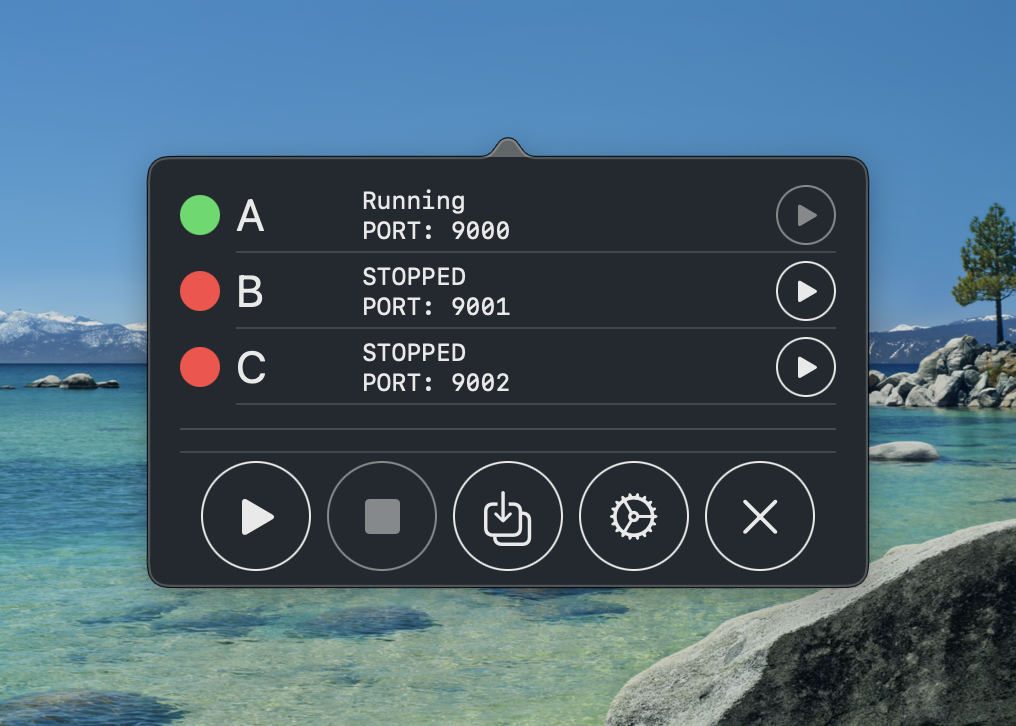
<p>This is what that first version looked like</p>

<p><img src="http://paul-samuels.com/images/dev-companion-01.png" alt="simple first version" /></p>

<p>Yup it’s not going to win any design awards but the power of this abstraction can’t be overstated.</p>

<ul>
  <li>We are completely abstracting away docker from the mobile app devs</li>
  <li>All available services are visible and just a button tap away from being started/stopped</li>
  <li>We show useful debug information like what ports things are running on</li>
  <li>We show the running status of each service and detect if running via docker or as .jar (read: most likely in IntelliJ)</li>
</ul>

<p>This wasn’t a quick task and I ended up burning a lot of the midnight oil as it was an interesting task.
There were lots of gotchas with handling subprocesses and their environments and coordinating lots of state events to the UI.</p>

<p>I was pretty happy with this step until I realised my first mistake…</p>

<hr />

<h2 id="how-do-i-install-it">How do I install it?</h2>

<p>The first lesson was that building a tool isn’t good enough; you need to make it accessible.
I’m not sure if it’s common knowledge but developers tend to be very <del>lazy</del> energy efficient and having a multi step install is just a recipe for support pain.</p>

<p>It wasn’t long before I added an install script so people could simply run a <code class="language-plaintext highlighter-rouge">curl | bash</code> and enjoy a nicely installed app without manually</p>

<ul>
  <li>Finding the repo</li>
  <li>Navigating to releases</li>
  <li>Downloading the binary</li>
  <li>Doing some gatekeeper to get it out of quarantine</li>
  <li>Finally be able to launch the app</li>
</ul>

<p>Obviously whenever I shared installation instructions I did the good citizen thing and issued a disclaimer that people shouldn’t blindly trust me and pipe my remotely hosted bash script into an interpreter without reading it first.</p>

<hr />

<h2 id="success-and-growing-pains">Success and Growing Pains</h2>

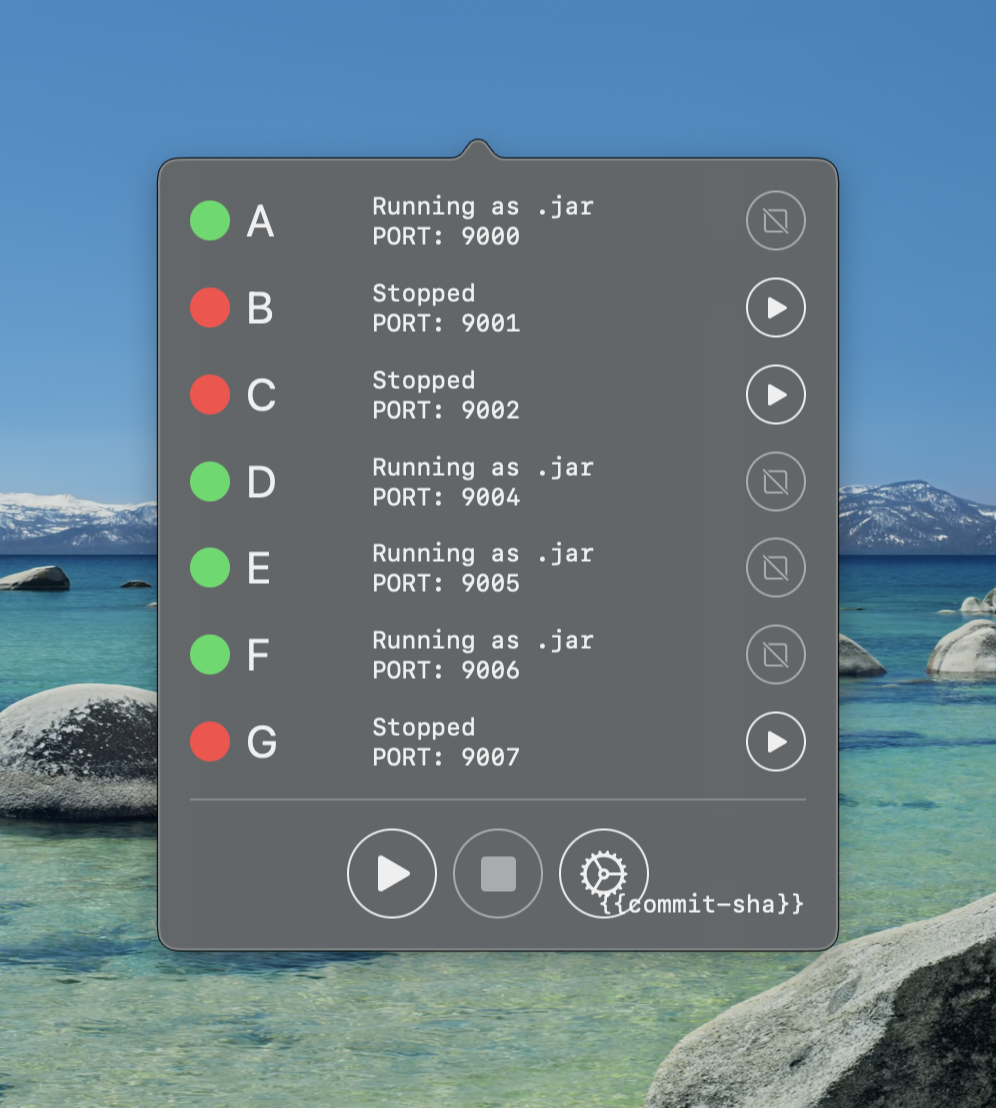
<p>The tool in the form of a macOS menu bar app written in SwiftUI had a good 4 year run.
New services were added and bugs were fixed and it ended up looking more like this</p>

<p><img src="http://paul-samuels.com/images/dev-companion-02.png" alt="second version" /></p>

<p>One fun lesson that you can see played out in the screen shot is that I added <code class="language-plaintext highlighter-rouge">{ {commit-sha} }</code>, which is populated on a release build with the git sha.
This was because people have a tendency to not update things, especially when it involved manually running a <code class="language-plaintext highlighter-rouge">curl | bash</code>.
Although adding some version identifier was helpful for support, it was just a plaster and the actual requirement I wish I noticed earlier is that this really needed to automatically update itself.</p>

<p>As you can see from the growth of services the tool is popular enough to have been updated multiple times <strong>but</strong> it wasn’t popular enough to help people overcome the thought of a steep learning curve required to contribute.
The project was mostly maintained by myself and in all honesty I’d made some questionable architectural decisions early on and Combine heavy state management made the learning curve steeper than it needed to be.</p>

<p>Another detail that I’d started to notice with the way this had grown is that a long list of services is only good if the user knows how they relate.
In an evolving estate where many teams contribute it may not be very obvious what services you need to run to enable you to work.
You could spin up all the services but that’s sometimes overkill and hard on our poor little CPUs.</p>

<p>The project needed change but needed some inspiration…</p>

<hr />

<h2 id="a-reimagining">A Reimagining</h2>

<p>So here I was thinking</p>

<ul>
  <li>This codebase is a pain to maintain</li>
  <li>I want to better visualise how services hang together</li>
  <li>I want more people to be able to contribute</li>
  <li>I want the tool to autoupdate</li>
</ul>

<p>My colleague (who doesn’t like being named) was working on a Compose Desktop app to help debug our apps.
As they’d done all the hard work of getting a project scaffolded and off the ground I decided to see how hard it would be to port the SwiftUI tool to Compose, update the UI and incorporate it into this debug app.</p>

<p>This was actually a perfect opportunity to rethink architectural choices as it was an entirely different language and although I’d consider myself proficient in Kotlin I’d never done Compose so it would be a fun experience.
Doing the work in this codebase also opened up the contributor pool considerably as now any Android dev could contribute and conveniently all of our iOS devs are solid Kotlin devs already.
At this point, the limiting factor wasn’t UX polish - it was who felt capable of contributing.</p>

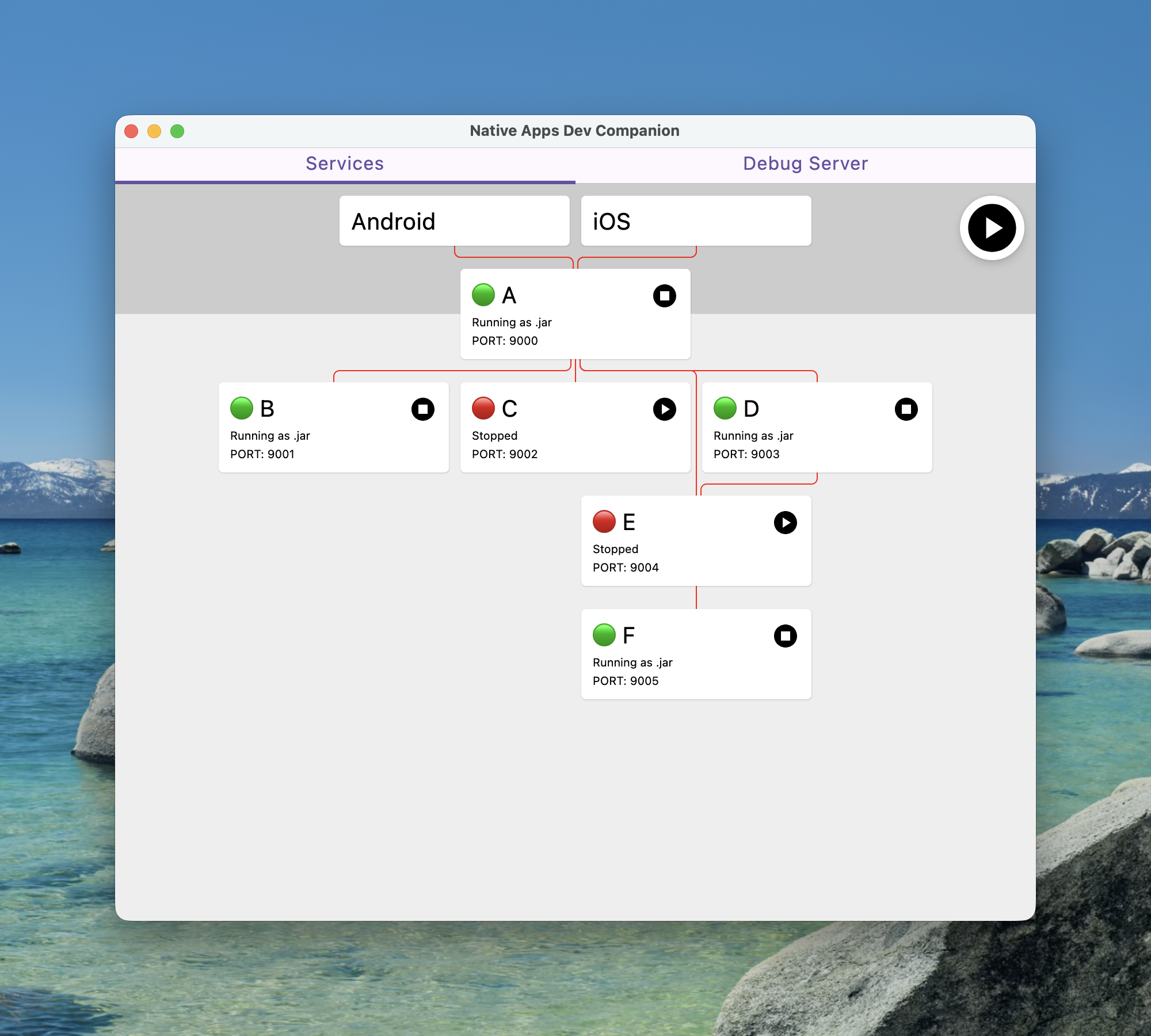
<p>After some fun learning and porting all the process management over I ended up with something like this</p>

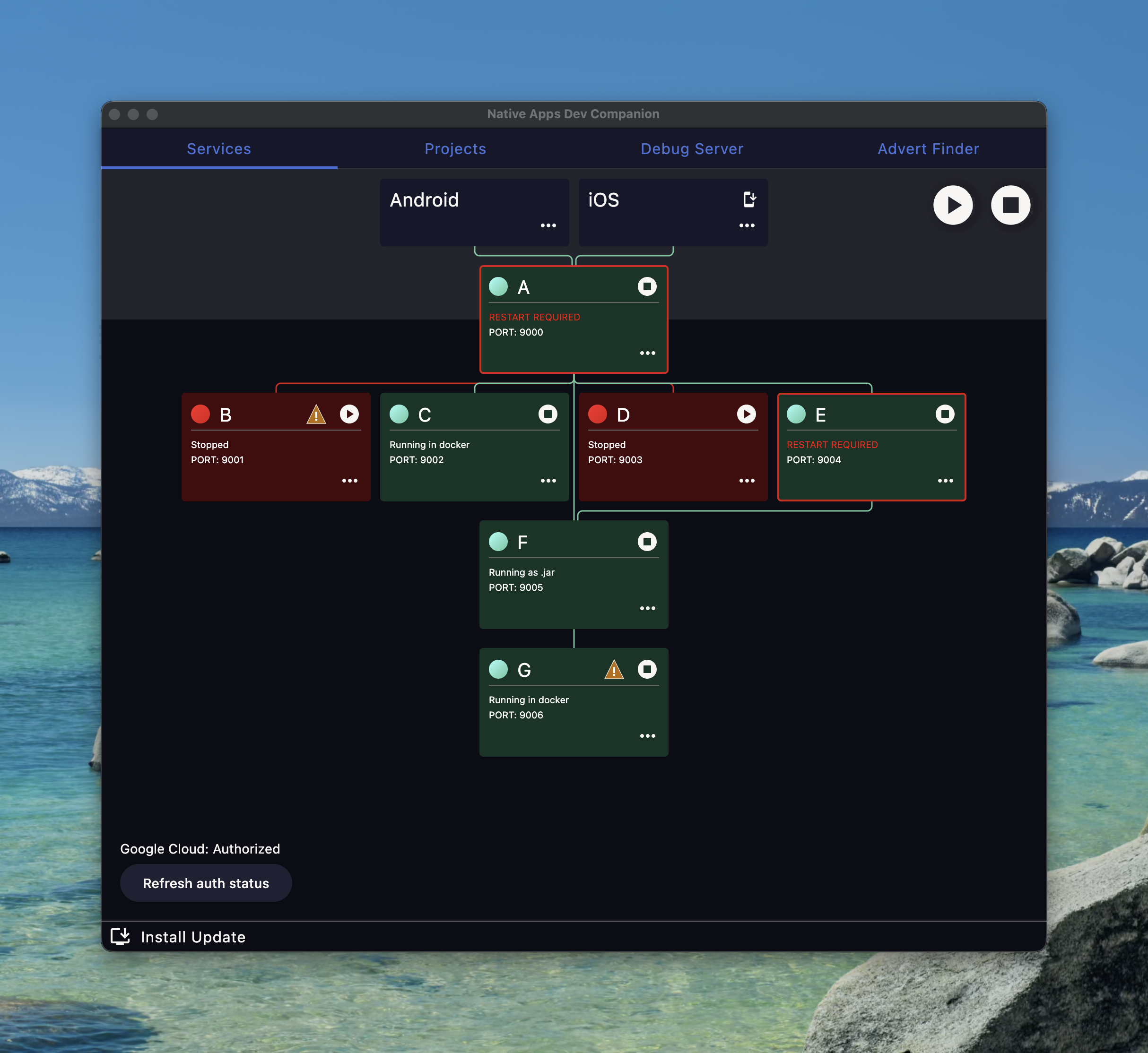
<p><img src="http://paul-samuels.com/images/dev-companion-03.png" alt="current version" /></p>

<p>Personally I think I nailed the visualisation requirement as you can now at a glance see what services you’d need running to access different parts of the estate.
The red connecting lines do actually go black to show that the apps can access services but I hastily made changes to get the anonymised screenshot and messed that detection up.</p>

<p>The other main thing with this tool was the autoupdate ability.
I leant on having more contributors and got a colleague to write the autoupdate process logic and it works great.
We even held back giving anyone access to the tool until the autoupdate was available as we just didn’t want to deal with the support.</p>

<p>I was feeling pretty good about this developer experience…</p>

<hr />

<h2 id="arrgghh-sso">Arrgghh SSO</h2>

<p>Then a new requirement came in in the form of services needing to get tokens to communicate to our preprod environment.
Actually this wasn’t a new thing as I’d just been avoiding doing anything about it for a few years but it was being more broadly rolled out so I couldn’t ignore it anymore.</p>

<p>As with most things I put off, the programming part didn’t actually end up being super complicated.
Essentially when a service requires an auth token we need to invoke an external helper tool that does all the SSO magic and then inject the returned token into the relevant service when it is started.
The more complicated part was figuring out how the UI would educate users that they might need to get permission to do this for each service and then signpost how/where they do that.</p>

<p>Once a user is setup they just press the play button like normal and everything is automatic.
If the user isn’t configured then they get an ⚠️ on the service, which tells them how to resolve the misconfiguration.</p>

<hr />

<h2 id="make-sure-you-are-listening">Make sure you are listening</h2>

<p>Another lesson that I completely missed was tuning into the frequency of support requests.
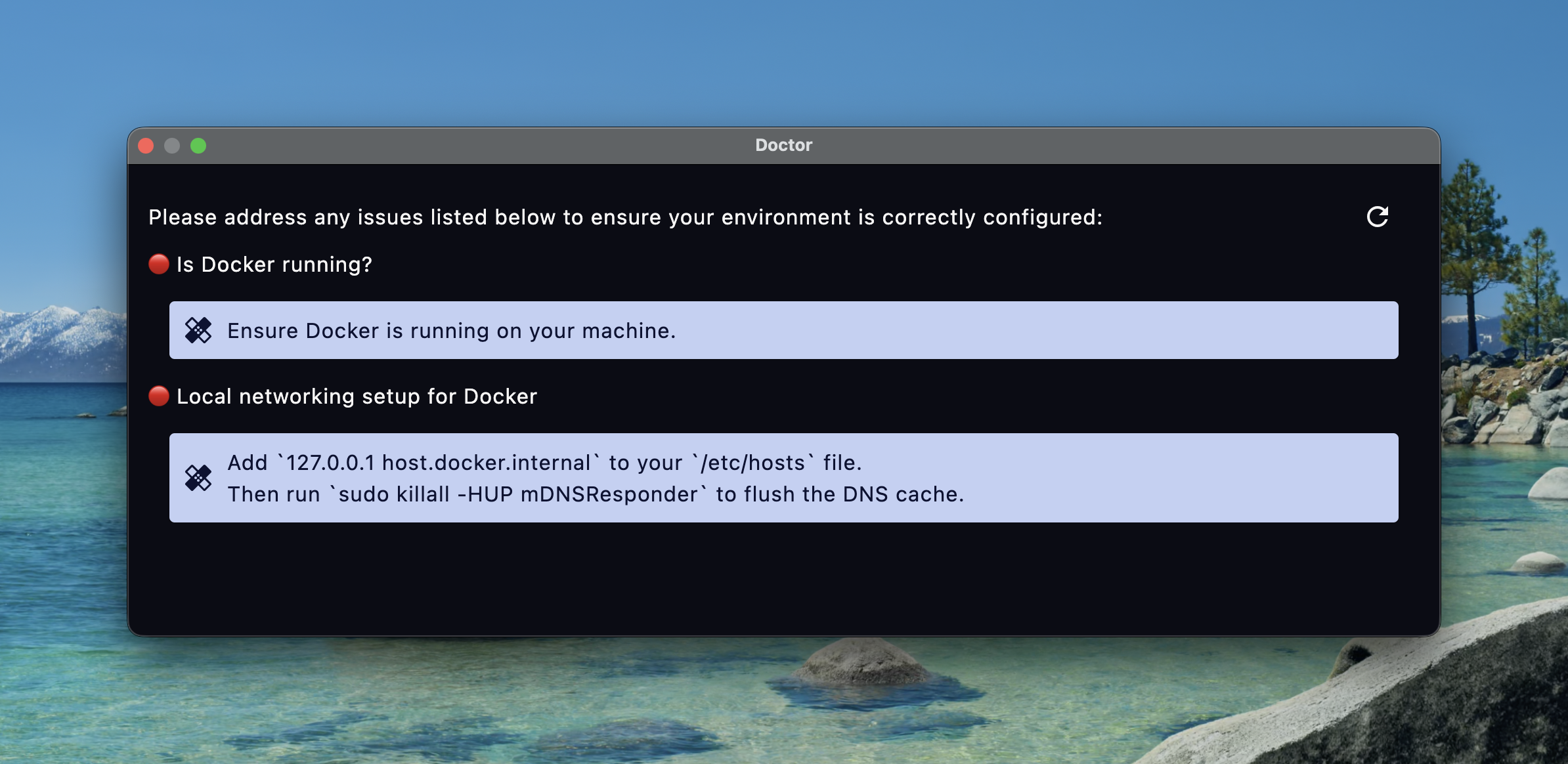
Behind the scenes to get all of the networking setup correctly to allow docker to communicate with localhost seamlessly people need to add an entry to <code class="language-plaintext highlighter-rouge">/etc/hosts</code>.
This was constantly missed but quickly resolved with a trip to the docs.
Unfortunately no one knew where the docs were so I’d just be dishing out the link constantly.</p>

<p>Instead of redirecting people to the docs and then helping them through the steps I decided to add a “Doctor” command that will diagnose common misconfigurations/issues and give remediation steps.</p>

<p><img src="http://paul-samuels.com/images/dev-companion-doctor.png" alt="doctor" /></p>

<hr />

<h2 id="build-it-remove-friction-and-they-will-come"><del>Build it</del> Remove friction and they will come</h2>

<p>I think there’s a few good victory stories on getting more contributors.
Some that come to mind are:</p>

<p>A massive eye saver from one of the iOS devs was adding dark mode.
A pretty impressive feat considering he’d never done Compose and actually didn’t just tweak colours he went full hog and made various components much more pleasing on the eyes.</p>

<p><img src="http://paul-samuels.com/images/dev-companion-04.png" alt="dark mode" /></p>

<p>Another capability added by a few iOS devs was the ability to install the latest development build into your simulator and launch it.
This is a massive productivity boost especially for web developers who now don’t need to learn how to get the project running and interact with Xcode.
There is still a requirement to have Xcode installed but after that it’s zero knowledge.</p>

<p>One of the QA engineers added hot reloading to make the development experience on the tool that improves developer experience better.</p>

<hr />

<h2 id="building-a-platform">Building a platform</h2>

<p>Another observation that we made was that we now have a platform to build out tools that are automatically updating and installed by many people.
This has lead to me sitting with another QA engineer to help them port their command line tool for finding all kinds of difficult to find adverts that people need for testing/development.</p>

<p>I think in total we spent about an hour getting something working together and then he’s been a one man feature factory improving things.</p>

<hr />

<h2 id="wrap-up">Wrap up</h2>

<p>I really think developer experience is important.
Making and evolving tools is a nice way to show your colleagues that you value their time and hear their frustrations.
It’s also been highly rewarding seeing other people get involved and seeing people interested in building a DX culture.
I have no metrics on how much time this tool has saved others but I personally use it multiple times a day and the time I’ve saved alone has more than paid off for the personal investment I’ve put into this.</p>
]]></content>
  </entry>
  
  <entry>
    <title type="html"><![CDATA[From Runtime Explosions to Compiler Checked Simplicity]]></title>
    <link href="http://paul-samuels.com/blog/2025/12/21/from-runtime-explosions-to-compiler-checked-simplicity/"/>
    <updated>2025-12-21T23:38:00+00:00</updated>
    <id>http://paul-samuels.com/blog/2025/12/21/from-runtime-explosions-to-compiler-checked-simplicity</id>
    <content type="html"><![CDATA[<p>When I’m solving problems I rarely move in a straight line.
I tend to circle the goal, trying a handful of bad or awkward ideas before something clicks.
With experience those loops get shorter, but they never really go away.</p>

<p>This post is about one of those loops: a small problem in some of our KSP generated code.
I’ll walk through a few iterations of the solution and end with a much simpler approach that let the compiler do the hard work instead of us.</p>

<hr />

<h2 id="the-problem">The problem</h2>

<p>We have some KSP (Kotlin Symbol Processor) code that generates helper functions for routing within our application.
Inside the generated functions we were blindly taking in arguments and attempting to serialize them with kotlinx.serialization e.g.</p>

<div class="language-kotlin highlighter-rouge"><div class="highlight"><pre class="highlight"><code><span class="k">fun</span> <span class="nf">routeToCheckout</span><span class="p">(</span><span class="n">cart</span><span class="p">:</span> <span class="nc">Cart</span><span class="p">)</span> <span class="p">{</span>
    <span class="kd">val</span> <span class="py">encodedCart</span> <span class="p">=</span> <span class="nc">Json</span><span class="p">.</span><span class="nf">encodeToString</span><span class="p">(</span><span class="n">cart</span><span class="p">)</span>
    <span class="o">..</span><span class="p">.</span>
<span class="p">}</span>
</code></pre></div></div>

<p>The issue here is that if <code class="language-plaintext highlighter-rouge">Cart</code> is not annotated with <code class="language-plaintext highlighter-rouge">@Serializable</code> then this code will explode at runtime, which is less than ideal.</p>

<hr />

<h2 id="solutions">Solutions</h2>

<p>Your friend and mine (your LLM of choice) suggested explicitly taking a serializer at the call site.
This would force the caller to guarantee that a serializer exists.</p>

<p>In practice though, it felt wrong. Requiring consumers of this generated API to manually thread serializers through their code makes the API harder to use and leaks an implementation detail that callers shouldn’t need to care about.</p>

<p>The other suggestion from the LLM was to use a <code class="language-plaintext highlighter-rouge">reified inline</code> function but that was not an option based on the code setup.</p>

<hr />

<h2 id="attempt-1">Attempt 1</h2>

<p>Using the suggestions from the LLM I thought maybe we could just blindly generate the serializer into the body of the function and then the compiler would reject our code if the serializer didn’t exist e.g.</p>

<div class="language-kotlin highlighter-rouge"><div class="highlight"><pre class="highlight"><code><span class="k">fun</span> <span class="nf">routeToCheckout</span><span class="p">(</span><span class="n">cart</span><span class="p">:</span> <span class="nc">Cart</span><span class="p">)</span> <span class="p">{</span>
    <span class="kd">val</span> <span class="py">encodedCart</span> <span class="p">=</span> <span class="nc">Json</span><span class="p">.</span><span class="nf">encodeToString</span><span class="p">(</span><span class="nc">Cart</span><span class="p">.</span><span class="nf">serializer</span><span class="p">(),</span> <span class="n">cart</span><span class="p">)</span>
    <span class="o">..</span><span class="p">.</span>
<span class="p">}</span>
</code></pre></div></div>

<p>This works as the compiler will now error if <code class="language-plaintext highlighter-rouge">Cart.serializer()</code> does not exist, which is much better than a runtime exception.
Granted this does have a less than ideal failure mode as the consumer of this KSP processor could end up with their code not compiling and being pointed to generated code.
Whilst not great I was happy with the compromise and we can generate a comment as well to help steer anyone who does end up here e.g.</p>

<div class="language-kotlin highlighter-rouge"><div class="highlight"><pre class="highlight"><code><span class="k">fun</span> <span class="nf">routeToCheckout</span><span class="p">(</span><span class="n">cart</span><span class="p">:</span> <span class="nc">Cart</span><span class="p">)</span> <span class="p">{</span>
    <span class="cm">/*
     * If you find yourself here with a compilation error, ensure that the relevant
     * type has a serializer defined.
     */</span>
    <span class="kd">val</span> <span class="py">encodedCart</span> <span class="p">=</span> <span class="nc">Json</span><span class="p">.</span><span class="nf">encodeToString</span><span class="p">(</span><span class="nc">Cart</span><span class="p">.</span><span class="nf">serializer</span><span class="p">(),</span> <span class="n">cart</span><span class="p">)</span>
    <span class="o">..</span><span class="p">.</span>
<span class="p">}</span>
</code></pre></div></div>

<hr />

<h2 id="never-smooth-sailing">Never smooth sailing</h2>

<p>I applied this latest code to a larger code base and it immediately flagged the code that caused the original issue that prompted this investigation in the first place, which was reassuring.
It also highlighted a few other call sites that would exhibit the same breakage but luckily those code paths weren’t executed.
More annoyingly the new code found that we sometimes pass more complex types that use Kotlin collections e.g. we had types like <code class="language-plaintext highlighter-rouge">List&lt;String&gt;</code> or <code class="language-plaintext highlighter-rouge">Map&lt;String, CustomType&gt;</code>.
Obviously I didn’t see the wood for the trees and started “making it work” but it got real ugly real quick with all the potential nesting.
The serializers in the above cases would be</p>

<div class="language-kotlin highlighter-rouge"><div class="highlight"><pre class="highlight"><code><span class="nc">ListSerializer</span><span class="p">(</span><span class="nc">String</span><span class="p">.</span><span class="nf">serializer</span><span class="p">())</span>
<span class="nc">MapSerializer</span><span class="p">(</span><span class="nc">String</span><span class="p">.</span><span class="nf">serializer</span><span class="p">(),</span> <span class="nc">CustomType</span><span class="p">.</span><span class="nf">serializer</span><span class="p">())</span>
</code></pre></div></div>

<p>To do this I started thinking about writing a recursive function that would keep traversing through the types building up these serializers and special casing the various Kotlin collection types.</p>

<hr />

<h2 id="could-we-do-it-simpler">Could we do it simpler?</h2>

<p>Luckily at this point I’d already asked my colleague <del>Jack</del>Mack for his thoughts, which was <code class="language-plaintext highlighter-rouge">could we do it simpler?</code>.
The key insight he’d had after hearing me ramble on about my current progress was that we don’t actually need to reproduce the exact serializer to pass to <code class="language-plaintext highlighter-rouge">Json.encodeToString</code>; the root of the problem is that we want to prove that each type mentioned has a serializer.</p>

<p>The new idea was to simply list out all the types outside of the <code class="language-plaintext highlighter-rouge">Json.encodeToString</code> function and let the compiler just do its thing.
So essentially for the <code class="language-plaintext highlighter-rouge">Map&lt;String, CustomType&gt;</code> example the target is something like</p>

<div class="language-kotlin highlighter-rouge"><div class="highlight"><pre class="highlight"><code><span class="k">fun</span> <span class="nf">routeToPage</span><span class="p">(</span><span class="n">customTypes</span><span class="p">:</span> <span class="nc">Map</span><span class="p">&lt;</span><span class="nc">String</span><span class="p">,</span> <span class="nc">CustomType</span><span class="p">&gt;)</span> <span class="p">{</span>
    <span class="cm">/*
     * If you find yourself here with a compilation error, ensure that the relevant
     * type has a serializer defined.
     */</span>
    <span class="nc">CustomType</span><span class="p">.</span><span class="nf">serializer</span><span class="p">()</span>

    <span class="kd">val</span> <span class="py">encodedCustomTypes</span> <span class="p">=</span> <span class="nc">Json</span><span class="p">.</span><span class="nf">encodeToString</span><span class="p">(</span><span class="n">customTypes</span><span class="p">)</span>
    <span class="o">..</span><span class="p">.</span>
<span class="p">}</span>
</code></pre></div></div>

<p>We don’t need to worry about checking <code class="language-plaintext highlighter-rouge">String.serializer()</code> or <code class="language-plaintext highlighter-rouge">MapSerializer</code> exist because we know the library provides those.</p>

<hr />

<h2 id="getting-our-prompt-on">Getting our prompt on</h2>

<p>Once the target shape was clear, the remaining work became much more mechanical.
We needed a way to walk the types involved in a function signature, including any type parameters and extract the set of domain types we cared about.</p>

<p>This was ideal for a quick human/LLM pairing session.</p>

<hr />

<h2 id="conclusion">Conclusion</h2>

<p>This problem went through several iterations, each one technically “working” but increasingly complex.
The turning point came from stepping back and questioning what we were really trying to achieve.</p>

<p>We didn’t need to construct the correct serializer.
We didn’t need to mirror kotlinx.serialization’s internal rules.
We just needed proof at compile time that the types flowing through our generated APIs were <code class="language-plaintext highlighter-rouge">@Serializable</code>.</p>

<p>By narrowing the problem to that single requirement, the solution became smaller, clearer and more robust.
It also produced better failures: early, explicit and enforced by the compiler rather than discovered at runtime.</p>

<p>It’s a useful reminder that when a solution starts to grow unwieldy, the answer is often not more code, but a better question.</p>

<p>The best part is that this is now another pattern my brain can store away and recognise more quickly in the future, reducing the number of iterations when I hit similar problems again.</p>
]]></content>
  </entry>
  
  <entry>
    <title type="html"><![CDATA[Kotlin Gotchas: Why Your ?.let Sometimes Fails to Compile]]></title>
    <link href="http://paul-samuels.com/blog/2025/11/08/kotlin-gotchas-why-your-optional-let-sometimes-fails-to-compile/"/>
    <updated>2025-11-08T21:36:00+00:00</updated>
    <id>http://paul-samuels.com/blog/2025/11/08/kotlin-gotchas-why-your-optional-let-sometimes-fails-to-compile</id>
    <content type="html"><![CDATA[<p>Kotlin’s <code class="language-plaintext highlighter-rouge">let</code> is a great tool for writing expressive code, but I’ve noticed it can introduce subtle fragility when used the wrong way - especially alongside certain compiler features.
Let’s start with a question - should this code compile?</p>

<p><strong>Types</strong></p>
<div class="language-kotlin highlighter-rouge"><div class="highlight"><pre class="highlight"><code><span class="kd">class</span> <span class="nc">Example</span> <span class="p">{</span>
    <span class="kd">val</span> <span class="py">title</span><span class="p">:</span> <span class="nc">String</span><span class="p">?</span> <span class="p">=</span> <span class="k">null</span>
<span class="p">}</span>

<span class="kd">data class</span> <span class="nc">Id</span><span class="p">(</span><span class="kd">val</span> <span class="py">value</span><span class="p">:</span> <span class="nc">String</span><span class="p">)</span>
</code></pre></div></div>

<p><strong>Usage</strong></p>
<div class="language-kotlin highlighter-rouge"><div class="highlight"><pre class="highlight"><code><span class="kd">val</span> <span class="py">example</span> <span class="p">=</span> <span class="nc">Example</span><span class="p">()</span>

<span class="n">example</span><span class="p">.</span><span class="n">title</span><span class="o">?.</span><span class="nf">let</span> <span class="p">{</span>
    <span class="nc">Id</span><span class="p">(</span><span class="n">example</span><span class="p">.</span><span class="n">title</span><span class="p">)</span>
<span class="p">}</span>
</code></pre></div></div>

<p>At first glance, this should compile - and it does. But we can make small, seemingly harmless tweaks that suddenly break it.</p>

<hr />

<h2 id="failing-to-compile">Failing to Compile</h2>

<p>The first breaking change would be to make <code class="language-plaintext highlighter-rouge">title</code> a computed property</p>

<div class="language-diff highlighter-rouge"><div class="highlight"><pre class="highlight"><code>  class Example {
<span class="gd">-     val title: String? = null
</span><span class="gi">+     val title: String? get() = null
</span>  }
</code></pre></div></div>

<p>With this change, we get the following error:</p>

<blockquote>
  <p>Smart cast to ‘String’ is impossible, because ‘title’ is a property that has an open or custom getter.</p>
</blockquote>

<p>This error rather cunningly suggests another change that also causes it to fail.</p>

<div class="language-diff highlighter-rouge"><div class="highlight"><pre class="highlight"><code><span class="gd">-  class Example {
-     val title: String? = null
</span><span class="gi">+  open class Example {
+     open val title: String? = null
</span>  }
</code></pre></div></div>

<p>One final change I can think of that breaks for the same underlying reason but is achieved in a different way is to declare <code class="language-plaintext highlighter-rouge">Example</code> in a different module from the usage code.
This gives the error</p>

<blockquote>
  <p>Smart cast to ‘String’ is impossible, because ‘title’ is a public API property declared in different module.</p>
</blockquote>

<p>So what’s going on here?</p>

<hr />

<h2 id="failing-to-smart-cast">Failing to Smart Cast</h2>

<p>We’ve seen <code class="language-plaintext highlighter-rouge">Smart cast</code> mentioned in both errors but what does that mean?
A smart cast is when the Kotlin compiler automatically treats a variable as a non-null or a more specific type after it’s checked - but only if it can guarantee the value won’t change in the meantime.</p>

<p>In the original working code, the compiler can see that <code class="language-plaintext highlighter-rouge">Example.title</code> is declared as <code class="language-plaintext highlighter-rouge">val</code> and cannot be reassigned.
So inside the scope of the <code class="language-plaintext highlighter-rouge">?.let</code> the compiler is able to prove that the value cannot change.</p>

<p>All these breaking changes are just different ways of preventing the compiler from making that guarantee.</p>

<p>There’s another subtle language feature that allows us to write this code without realising the mistake.</p>

<hr />

<h2 id="ignoring-closure-arguments">Ignoring Closure Arguments</h2>

<p>Kotlin allows you to silently ignore closure arguments.
This contrasts with languages like Swift, which require you to explicitly mark when you’re ignoring one.
For example in Swift we cannot implicitly ignore closure arguments so the compiler would force us to make this change</p>

<div class="language-diff highlighter-rouge"><div class="highlight"><pre class="highlight"><code><span class="gd">- example.title?.let {
</span><span class="gi">+ example.title?.let { _ -&gt;
</span>      Id(example.title)
  }
</code></pre></div></div>

<p>Thinking about this actually points to the root issue, we should use the argument passed to the closure rather than doing the <code class="language-plaintext highlighter-rouge">example.title</code> access again.</p>

<hr />

<h2 id="recommendation">Recommendation</h2>

<p>Now that we understand <em>why</em>, the fix should be clearer.
Instead of relying on a <code class="language-plaintext highlighter-rouge">Smart cast</code> and ignoring the lambda argument, we should just use the closure argument <code class="language-plaintext highlighter-rouge">it</code> directly:
This means our call site would change like this</p>

<div class="language-diff highlighter-rouge"><div class="highlight"><pre class="highlight"><code>  example.title?.let {
<span class="gd">-     Id(example.title)
</span><span class="gi">+     Id(it)
</span>  }
</code></pre></div></div>

<p>Personally, I would go a step further and favour the more concise call site:</p>

<div class="language-diff highlighter-rouge"><div class="highlight"><pre class="highlight"><code><span class="gd">- example.title?.let {
-     Id(it)
- }
</span><span class="gi">+ example.title?.let(::Id)
</span></code></pre></div></div>

<p>This is an example of point-free style.</p>

<hr />

<h2 id="using-point-free-style">Using Point Free Style</h2>

<p>Not everyone is a fan of method references because <code class="language-plaintext highlighter-rouge">::</code> looks odd and scary at first.
Once you get used to it, it’s really handy for writing super concise code.</p>

<p>It’s subtle but the second line here packs a punch.</p>

<div class="language-kotlin highlighter-rouge"><div class="highlight"><pre class="highlight"><code><span class="n">example</span><span class="p">.</span><span class="n">title</span><span class="o">?.</span><span class="nf">let</span> <span class="p">{</span> <span class="nc">Id</span><span class="p">(</span><span class="n">it</span><span class="p">)</span> <span class="p">}</span>
<span class="n">example</span><span class="p">.</span><span class="n">title</span><span class="o">?.</span><span class="nf">let</span><span class="p">(</span><span class="o">::</span><span class="nc">Id</span><span class="p">)</span>
</code></pre></div></div>

<p>In essence we are taking the data from <code class="language-plaintext highlighter-rouge">let</code> and plumbing it straight into the <code class="language-plaintext highlighter-rouge">Id</code> constructor.
In the first line we are doing this manually by providing a closure and then invoking the <code class="language-plaintext highlighter-rouge">Id</code> constructor.
In the second line we are just composing these functions together.</p>

<p>It’s subtle, especially in such a short example.
With the first line, I have to mentally parse the closure, verify how <code class="language-plaintext highlighter-rouge">it</code> is used, and ensure <code class="language-plaintext highlighter-rouge">it</code> isn’t modified before being passed to <code class="language-plaintext highlighter-rouge">Id</code>.
With the second line I don’t have to do any of that - I just know that the <code class="language-plaintext highlighter-rouge">let</code> will feed the value straight into <code class="language-plaintext highlighter-rouge">Id</code>.</p>

<hr />

<h2 id="conclusion">Conclusion</h2>

<p>Keeping in mind that the original code listing worked, we could arguably just not worry about any of this.
I personally think the end code is simpler and more descriptive about the intent but that can be debated.
Also the original code has the issue that unrelated changes can start breaking things, which is something that I think we should always try to avoid.
This is definitely one of those changes that I would suggest in a pull request but feel guilty about not providing a thorough explanation of the reasoning.
This post gives me extended notes I can point to when explaining the change.</p>
]]></content>
  </entry>
  
  <entry>
    <title type="html"><![CDATA[Generic Algorithms Without Constraints]]></title>
    <link href="http://paul-samuels.com/blog/2025/11/06/generic-algorithms-without-constraints/"/>
    <updated>2025-11-06T21:20:00+00:00</updated>
    <id>http://paul-samuels.com/blog/2025/11/06/generic-algorithms-without-constraints</id>
    <content type="html"><![CDATA[<p>It’s often a red flag if we see duplicated code and we generally try to reduce it as much as possible.
When we control all the code, we can massage structures to make this task easier but we don’t always have this flexibility.</p>

<p>This post explores how to remove duplication when two functions share logic but act on unrelated types with no shared interface - using Kotlin and Swift as examples.</p>

<p>Let’s look at a more challenging case.</p>

<hr />

<h2 id="the-problem">The Problem</h2>

<p>The algorithm itself isn’t important here, but consider the following starting point:</p>

<div class="code-tabs">
    <div class="tab-buttons">
        <button class="tab-button active" data-lang="swift">Swift</button>
        <button class="tab-button" data-lang="kotlin">Kotlin</button>
    </div>

    <div class="tab-content active" data-lang="swift">
        
<figure class="highlight"><pre><code class="language-swift" data-lang="swift"><span class="kd">struct</span> <span class="kt">InputA</span> <span class="p">{</span> <span class="k">let</span> <span class="nv">name</span><span class="p">:</span> <span class="kt">String</span><span class="p">;</span> <span class="k">let</span> <span class="nv">tag</span><span class="p">:</span> <span class="kt">String</span><span class="p">?</span> <span class="p">}</span>
<span class="kd">struct</span> <span class="kt">InputB</span> <span class="p">{</span> <span class="k">let</span> <span class="nv">name</span><span class="p">:</span> <span class="kt">String</span><span class="p">;</span> <span class="k">let</span> <span class="nv">tag</span><span class="p">:</span> <span class="kt">String</span><span class="p">?</span> <span class="p">}</span>

<span class="kd">struct</span> <span class="kt">Output</span> <span class="p">{</span>
    <span class="k">let</span> <span class="nv">name</span><span class="p">:</span> <span class="kt">String</span>
    <span class="k">let</span> <span class="nv">tag</span><span class="p">:</span> <span class="kt">String</span>

    <span class="nf">init</span><span class="p">(</span><span class="nv">inputA</span><span class="p">:</span> <span class="kt">InputA</span><span class="p">,</span> <span class="nv">tag</span><span class="p">:</span> <span class="kt">String</span><span class="p">)</span> <span class="p">{</span>
        <span class="k">self</span><span class="o">.</span><span class="n">name</span> <span class="o">=</span> <span class="n">inputA</span><span class="o">.</span><span class="n">name</span>
        <span class="k">self</span><span class="o">.</span><span class="n">tag</span> <span class="o">=</span> <span class="n">tag</span>
    <span class="p">}</span>

    <span class="nf">init</span><span class="p">(</span><span class="nv">inputB</span><span class="p">:</span> <span class="kt">InputB</span><span class="p">,</span> <span class="nv">tag</span><span class="p">:</span> <span class="kt">String</span><span class="p">)</span> <span class="p">{</span>
        <span class="k">self</span><span class="o">.</span><span class="n">name</span> <span class="o">=</span> <span class="n">inputB</span><span class="o">.</span><span class="n">name</span>
        <span class="k">self</span><span class="o">.</span><span class="n">tag</span> <span class="o">=</span> <span class="n">tag</span>
    <span class="p">}</span>
<span class="p">}</span>

<span class="kd">func</span> <span class="nf">processInputAs</span><span class="p">(</span><span class="nv">inputs</span><span class="p">:</span> <span class="p">[</span><span class="kt">InputA</span><span class="p">])</span> <span class="o">-&gt;</span> <span class="p">[</span><span class="kt">Output</span><span class="p">]</span> <span class="p">{</span>
    <span class="n">inputs</span>
        <span class="o">.</span><span class="n">compactMap</span> <span class="p">{</span> <span class="n">input</span> <span class="k">in</span>
            <span class="n">input</span><span class="o">.</span><span class="n">tag</span><span class="o">.</span><span class="n">map</span> <span class="p">{</span> <span class="kt">Output</span><span class="p">(</span><span class="nv">inputA</span><span class="p">:</span> <span class="n">input</span><span class="p">,</span> <span class="nv">tag</span><span class="p">:</span> <span class="nv">$0</span><span class="p">)</span> <span class="p">}</span>
        <span class="p">}</span>
<span class="p">}</span>

<span class="kd">func</span> <span class="nf">processInputBs</span><span class="p">(</span><span class="nv">inputBs</span><span class="p">:</span> <span class="p">[</span><span class="kt">InputB</span><span class="p">])</span> <span class="o">-&gt;</span> <span class="p">[</span><span class="kt">Output</span><span class="p">]</span> <span class="p">{</span>
    <span class="n">inputBs</span>
        <span class="o">.</span><span class="n">compactMap</span> <span class="p">{</span> <span class="n">input</span> <span class="k">in</span>
            <span class="n">input</span><span class="o">.</span><span class="n">tag</span><span class="o">.</span><span class="n">map</span> <span class="p">{</span> <span class="kt">Output</span><span class="p">(</span><span class="nv">inputB</span><span class="p">:</span> <span class="n">input</span><span class="p">,</span> <span class="nv">tag</span><span class="p">:</span> <span class="nv">$0</span><span class="p">)</span> <span class="p">}</span>
        <span class="p">}</span>
<span class="p">}</span></code></pre></figure>

    </div>

    <div class="tab-content" data-lang="kotlin">
        
<figure class="highlight"><pre><code class="language-kotlin" data-lang="kotlin"><span class="kd">data class</span> <span class="nc">InputA</span><span class="p">(</span><span class="kd">val</span> <span class="py">name</span><span class="p">:</span> <span class="nc">String</span><span class="p">,</span> <span class="kd">val</span> <span class="py">tag</span><span class="p">:</span> <span class="nc">String</span><span class="p">?)</span>
<span class="kd">data class</span> <span class="nc">InputB</span><span class="p">(</span><span class="kd">val</span> <span class="py">name</span><span class="p">:</span> <span class="nc">String</span><span class="p">,</span> <span class="kd">val</span> <span class="py">tag</span><span class="p">:</span> <span class="nc">String</span><span class="p">?)</span>

<span class="kd">data class</span> <span class="nc">Output</span> <span class="k">private</span> <span class="k">constructor</span><span class="p">(</span><span class="kd">val</span> <span class="py">name</span><span class="p">:</span> <span class="nc">String</span><span class="p">,</span> <span class="kd">val</span> <span class="py">tag</span><span class="p">:</span> <span class="nc">String</span><span class="p">)</span> <span class="p">{</span>
    <span class="k">constructor</span><span class="p">(</span><span class="n">inputA</span><span class="p">:</span> <span class="nc">InputA</span><span class="p">,</span> <span class="n">tag</span><span class="p">:</span> <span class="nc">String</span><span class="p">)</span> <span class="p">:</span> <span class="k">this</span><span class="p">(</span><span class="n">inputA</span><span class="p">.</span><span class="n">name</span><span class="p">,</span> <span class="n">tag</span><span class="p">)</span>
    <span class="k">constructor</span><span class="p">(</span><span class="n">inputB</span><span class="p">:</span> <span class="nc">InputB</span><span class="p">,</span> <span class="n">tag</span><span class="p">:</span> <span class="nc">String</span><span class="p">)</span> <span class="p">:</span> <span class="k">this</span><span class="p">(</span><span class="n">inputB</span><span class="p">.</span><span class="n">name</span><span class="p">,</span> <span class="n">tag</span><span class="p">)</span>
<span class="p">}</span>

<span class="k">fun</span> <span class="nf">processInputAs</span><span class="p">(</span><span class="n">inputs</span><span class="p">:</span> <span class="nc">List</span><span class="p">&lt;</span><span class="nc">InputA</span><span class="p">&gt;):</span> <span class="nc">List</span><span class="p">&lt;</span><span class="nc">Output</span><span class="p">&gt;</span> <span class="p">{</span>
    <span class="k">return</span> <span class="n">inputs</span>
        <span class="p">.</span><span class="nf">mapNotNull</span> <span class="p">{</span>
            <span class="n">it</span><span class="p">.</span><span class="n">tag</span><span class="o">?.</span><span class="nf">let</span> <span class="p">{</span> <span class="n">tag</span> <span class="p">-&gt;</span> <span class="nc">Output</span><span class="p">(</span><span class="n">inputA</span> <span class="p">=</span> <span class="n">it</span><span class="p">,</span> <span class="n">tag</span> <span class="p">=</span> <span class="n">tag</span><span class="p">)</span> <span class="p">}</span>
        <span class="p">}</span>
<span class="p">}</span>

<span class="k">fun</span> <span class="nf">processInputBs</span><span class="p">(</span><span class="n">inputs</span><span class="p">:</span> <span class="nc">List</span><span class="p">&lt;</span><span class="nc">InputB</span><span class="p">&gt;):</span> <span class="nc">List</span><span class="p">&lt;</span><span class="nc">Output</span><span class="p">&gt;</span> <span class="p">{</span>
    <span class="k">return</span> <span class="n">inputs</span>
        <span class="p">.</span><span class="nf">mapNotNull</span> <span class="p">{</span>
            <span class="n">it</span><span class="p">.</span><span class="n">tag</span><span class="o">?.</span><span class="nf">let</span> <span class="p">{</span> <span class="n">tag</span> <span class="p">-&gt;</span> <span class="nc">Output</span><span class="p">(</span><span class="n">inputB</span> <span class="p">=</span> <span class="n">it</span><span class="p">,</span> <span class="n">tag</span> <span class="p">=</span> <span class="n">tag</span><span class="p">)</span> <span class="p">}</span>
        <span class="p">}</span>
<span class="p">}</span></code></pre></figure>

    </div>
</div>

<p>As shown above, both <code class="language-plaintext highlighter-rouge">processInputAs</code> and <code class="language-plaintext highlighter-rouge">processInputBs</code> are nearly identical.
The issue is that these two functions operate on different input types with no common supertype.
This means we can’t write a simple generic function with a constrained type parameter, because we have no common supertype to constrain against.</p>

<p>So how might we solve this duplication if our types did share a common shape?</p>

<hr />

<h3 id="when-a-shared-constraint-exists">When a Shared Constraint Exists</h3>

<p>If <code class="language-plaintext highlighter-rouge">InputA</code> and <code class="language-plaintext highlighter-rouge">InputB</code> did have a common supertype we could trivially create a single function that handles them both.</p>

<div class="code-tabs">
    <div class="tab-buttons">
        <button class="tab-button active" data-lang="swift">Swift</button>
        <button class="tab-button" data-lang="kotlin">Kotlin</button>
    </div>

    <div class="tab-content active" data-lang="swift">
        
<figure class="highlight"><pre><code class="language-swift" data-lang="swift"><span class="kd">protocol</span> <span class="kt">Input</span> <span class="p">{</span>
    <span class="k">var</span> <span class="nv">name</span><span class="p">:</span> <span class="kt">String</span> <span class="p">{</span> <span class="k">get</span> <span class="p">}</span>
    <span class="k">var</span> <span class="nv">tag</span><span class="p">:</span> <span class="kt">String</span><span class="p">?</span> <span class="p">{</span> <span class="k">get</span> <span class="p">}</span>
<span class="p">}</span>

<span class="kd">struct</span> <span class="kt">InputA</span><span class="p">:</span> <span class="kt">Input</span> <span class="p">{</span>
    <span class="k">let</span> <span class="nv">name</span><span class="p">:</span> <span class="kt">String</span>
    <span class="k">let</span> <span class="nv">tag</span><span class="p">:</span> <span class="kt">String</span><span class="p">?</span>
<span class="p">}</span>

<span class="kd">struct</span> <span class="kt">InputB</span><span class="p">:</span> <span class="kt">Input</span> <span class="p">{</span>
    <span class="k">let</span> <span class="nv">name</span><span class="p">:</span> <span class="kt">String</span>
    <span class="k">let</span> <span class="nv">tag</span><span class="p">:</span> <span class="kt">String</span><span class="p">?</span>
<span class="p">}</span>

<span class="kd">struct</span> <span class="kt">Output</span> <span class="p">{</span>
    <span class="k">let</span> <span class="nv">name</span><span class="p">:</span> <span class="kt">String</span>
    <span class="k">let</span> <span class="nv">tag</span><span class="p">:</span> <span class="kt">String</span>

    <span class="nf">init</span><span class="p">(</span><span class="nv">input</span><span class="p">:</span> <span class="kt">Input</span><span class="p">,</span> <span class="nv">tag</span><span class="p">:</span> <span class="kt">String</span><span class="p">)</span> <span class="p">{</span>
        <span class="k">self</span><span class="o">.</span><span class="n">name</span> <span class="o">=</span> <span class="n">input</span><span class="o">.</span><span class="n">name</span>
        <span class="k">self</span><span class="o">.</span><span class="n">tag</span> <span class="o">=</span> <span class="n">tag</span>
    <span class="p">}</span>
<span class="p">}</span>

<span class="kd">func</span> <span class="nf">processInputs</span><span class="p">(</span><span class="nv">inputs</span><span class="p">:</span> <span class="p">[</span><span class="kt">Input</span><span class="p">])</span> <span class="o">-&gt;</span> <span class="p">[</span><span class="kt">Output</span><span class="p">]</span> <span class="p">{</span>
    <span class="n">inputs</span>
        <span class="o">.</span><span class="n">compactMap</span> <span class="p">{</span> <span class="n">input</span> <span class="k">in</span>
            <span class="n">input</span><span class="o">.</span><span class="n">tag</span><span class="o">.</span><span class="n">map</span> <span class="p">{</span> <span class="kt">Output</span><span class="p">(</span><span class="nv">input</span><span class="p">:</span> <span class="n">input</span><span class="p">,</span> <span class="nv">tag</span><span class="p">:</span> <span class="nv">$0</span><span class="p">)</span> <span class="p">}</span>
        <span class="p">}</span>
<span class="p">}</span></code></pre></figure>

    </div>

    <div class="tab-content" data-lang="kotlin">
        
<figure class="highlight"><pre><code class="language-kotlin" data-lang="kotlin"><span class="kd">interface</span> <span class="nc">Input</span> <span class="p">{</span>
    <span class="kd">val</span> <span class="py">name</span><span class="p">:</span> <span class="nc">String</span>
    <span class="kd">val</span> <span class="py">tag</span><span class="p">:</span> <span class="nc">String</span><span class="p">?</span>
<span class="p">}</span>

<span class="kd">data class</span> <span class="nc">InputA</span><span class="p">(</span><span class="k">override</span> <span class="kd">val</span> <span class="py">name</span><span class="p">:</span> <span class="nc">String</span><span class="p">,</span> <span class="k">override</span> <span class="kd">val</span> <span class="py">tag</span><span class="p">:</span> <span class="nc">String</span><span class="p">?):</span> <span class="nc">Input</span>
<span class="kd">data class</span> <span class="nc">InputB</span><span class="p">(</span><span class="k">override</span> <span class="kd">val</span> <span class="py">name</span><span class="p">:</span> <span class="nc">String</span><span class="p">,</span> <span class="k">override</span> <span class="kd">val</span> <span class="py">tag</span><span class="p">:</span> <span class="nc">String</span><span class="p">?):</span> <span class="nc">Input</span>

<span class="kd">data class</span> <span class="nc">Output</span> <span class="k">private</span> <span class="k">constructor</span><span class="p">(</span><span class="kd">val</span> <span class="py">name</span><span class="p">:</span> <span class="nc">String</span><span class="p">,</span> <span class="kd">val</span> <span class="py">tag</span><span class="p">:</span> <span class="nc">String</span><span class="p">)</span> <span class="p">{</span>
    <span class="k">companion</span> <span class="k">object</span> <span class="p">{</span>
        <span class="k">operator</span> <span class="k">fun</span> <span class="p">&lt;</span><span class="nc">T</span><span class="p">:</span> <span class="nc">Input</span><span class="p">&gt;</span> <span class="nf">invoke</span><span class="p">(</span><span class="n">input</span><span class="p">:</span> <span class="nc">T</span><span class="p">,</span> <span class="n">tag</span><span class="p">:</span> <span class="nc">String</span><span class="p">)</span> <span class="p">=</span> <span class="nc">Output</span><span class="p">(</span><span class="n">input</span><span class="p">.</span><span class="n">name</span><span class="p">,</span> <span class="n">tag</span><span class="p">)</span>
    <span class="p">}</span>
<span class="p">}</span>

<span class="k">fun</span> <span class="nf">processInputs</span><span class="p">(</span><span class="n">inputs</span><span class="p">:</span> <span class="nc">List</span><span class="p">&lt;</span><span class="nc">Input</span><span class="p">&gt;):</span> <span class="nc">List</span><span class="p">&lt;</span><span class="nc">Output</span><span class="p">&gt;</span> <span class="p">{</span>
    <span class="k">return</span> <span class="n">inputs</span>
        <span class="p">.</span><span class="nf">mapNotNull</span> <span class="p">{</span>
            <span class="n">it</span><span class="p">.</span><span class="n">tag</span><span class="o">?.</span><span class="nf">let</span> <span class="p">{</span> <span class="n">tag</span> <span class="p">-&gt;</span> <span class="nc">Output</span><span class="p">(</span><span class="n">input</span> <span class="p">=</span> <span class="n">it</span><span class="p">,</span> <span class="n">tag</span> <span class="p">=</span> <span class="n">tag</span><span class="p">)</span> <span class="p">}</span>
        <span class="p">}</span>
<span class="p">}</span></code></pre></figure>

    </div>
</div>

<p>Unfortunately, in our original framing, <code class="language-plaintext highlighter-rouge">InputA</code> and <code class="language-plaintext highlighter-rouge">InputB</code> share no common supertype.
This can occur in situations where you don’t own the types as they come from a third-party library or maybe the types are generated with something like OpenAPI.</p>

<p>When I hit this situation, I tend to look at the two functions side by side and highlight the differences.</p>

<hr />

<h2 id="reveal-the-differences">Reveal The Differences</h2>

<p>For these functions the differences are going to be:</p>

<ul>
  <li>The type of the argument</li>
  <li>How we access <code class="language-plaintext highlighter-rouge">tag</code> (keep in mind the code looks the same but <code class="language-plaintext highlighter-rouge">InputA</code> and <code class="language-plaintext highlighter-rouge">InputB</code> are distinct types)</li>
  <li>How we construct <code class="language-plaintext highlighter-rouge">Output</code>.</li>
</ul>

<p>In the listing below I’ve highlighted these areas with multiple <code class="language-plaintext highlighter-rouge">?</code>s.</p>

<div class="code-tabs">
    <div class="tab-buttons">
        <button class="tab-button active" data-lang="swift">Swift</button>
        <button class="tab-button" data-lang="kotlin">Kotlin</button>
    </div>

    <div class="tab-content active" data-lang="swift">
        
<figure class="highlight"><pre><code class="language-swift" data-lang="swift"><span class="kd">func</span> <span class="nf">processInputs</span><span class="p">(</span><span class="nv">inputs</span><span class="p">:</span> <span class="p">[??????])</span> <span class="o">-&gt;</span> <span class="p">[</span><span class="kt">Output</span><span class="p">]</span> <span class="p">{</span>
    <span class="n">inputs</span>
        <span class="o">.</span><span class="n">compactMap</span> <span class="p">{</span> <span class="n">input</span> <span class="k">in</span>
            <span class="n">input</span><span class="o">.</span><span class="p">???</span><span class="o">.</span><span class="n">map</span> <span class="p">{</span> <span class="p">??????(</span><span class="nv">input</span><span class="p">:</span> <span class="n">input</span><span class="p">,</span> <span class="nv">tag</span><span class="p">:</span> <span class="nv">$0</span><span class="p">)</span> <span class="p">}</span>
        <span class="p">}</span>
<span class="p">}</span></code></pre></figure>

    </div>

    <div class="tab-content" data-lang="kotlin">
        
<figure class="highlight"><pre><code class="language-kotlin" data-lang="kotlin"><span class="k">fun</span> <span class="nf">processInputs</span><span class="p">(</span><span class="n">inputs</span><span class="p">:</span> <span class="nc">List</span><span class="p">&lt;?????&gt;):</span> <span class="nc">List</span><span class="p">&lt;</span><span class="nc">Output</span><span class="p">&gt;</span> <span class="p">{</span>
    <span class="k">return</span> <span class="n">inputs</span>
        <span class="p">.</span><span class="nf">mapNotNull</span> <span class="p">{</span>
            <span class="n">it</span><span class="p">.???</span><span class="o">?.</span><span class="nf">let</span> <span class="p">{</span> <span class="n">tag</span> <span class="p">-&gt;</span> <span class="p">??????(</span><span class="n">input</span> <span class="p">=</span> <span class="n">it</span><span class="p">,</span> <span class="n">tag</span> <span class="p">=</span> <span class="n">tag</span><span class="p">)</span> <span class="p">}</span>
        <span class="p">}</span>
<span class="p">}</span></code></pre></figure>

    </div>
</div>

<hr />

<h2 id="solving-the-problem">Solving the Problem</h2>

<p>For the first point, we can’t avoid not knowing the type - there’s nothing common to constrain to.
So we’ll have to just introduce a type parameter.</p>

<div class="code-tabs">
    <div class="tab-buttons">
        <button class="tab-button active" data-lang="swift">Swift</button>
        <button class="tab-button" data-lang="kotlin">Kotlin</button>
    </div>

    <div class="tab-content active" data-lang="swift">
        
<figure class="highlight"><pre><code class="language-swift" data-lang="swift"><span class="kd">func</span> <span class="n">processInputs</span><span class="o">&lt;</span><span class="kt">T</span><span class="o">&gt;</span><span class="p">(</span><span class="nv">inputs</span><span class="p">:</span> <span class="p">[</span><span class="kt">T</span><span class="p">])</span> <span class="o">-&gt;</span> <span class="p">[</span><span class="kt">Output</span><span class="p">]</span> <span class="p">{</span>
    <span class="n">inputs</span>
        <span class="o">.</span><span class="n">compactMap</span> <span class="p">{</span> <span class="n">input</span> <span class="k">in</span>
            <span class="n">input</span><span class="o">.</span><span class="p">???</span><span class="o">.</span><span class="n">map</span> <span class="p">{</span> <span class="p">??????(</span><span class="nv">input</span><span class="p">:</span> <span class="n">input</span><span class="p">,</span> <span class="nv">tag</span><span class="p">:</span> <span class="nv">$0</span><span class="p">)</span> <span class="p">}</span>
        <span class="p">}</span>
<span class="p">}</span></code></pre></figure>

    </div>

    <div class="tab-content" data-lang="kotlin">
        
<figure class="highlight"><pre><code class="language-kotlin" data-lang="kotlin"><span class="k">fun</span> <span class="p">&lt;</span><span class="nc">T</span><span class="p">&gt;</span> <span class="nf">processInputs</span><span class="p">(</span><span class="n">inputs</span><span class="p">:</span> <span class="nc">List</span><span class="p">&lt;</span><span class="nc">T</span><span class="p">&gt;):</span> <span class="nc">List</span><span class="p">&lt;</span><span class="nc">Output</span><span class="p">&gt;</span> <span class="p">{</span>
    <span class="k">return</span> <span class="n">inputs</span>
        <span class="p">.</span><span class="nf">mapNotNull</span> <span class="p">{</span>
            <span class="n">it</span><span class="p">.???</span><span class="o">?.</span><span class="nf">let</span> <span class="p">{</span> <span class="n">tag</span> <span class="p">-&gt;</span> <span class="p">??????(</span><span class="n">input</span> <span class="p">=</span> <span class="n">it</span><span class="p">,</span> <span class="n">tag</span> <span class="p">=</span> <span class="n">tag</span><span class="p">)</span> <span class="p">}</span>
        <span class="p">}</span>
<span class="p">}</span></code></pre></figure>

    </div>
</div>

<p>Next, we need to teach the function how to read the tag value.
As we only know we have a <code class="language-plaintext highlighter-rouge">T</code> we can provide a function that takes a <code class="language-plaintext highlighter-rouge">T</code> and returns the <code class="language-plaintext highlighter-rouge">String?</code> we expect.</p>

<div class="code-tabs">
    <div class="tab-buttons">
        <button class="tab-button active" data-lang="swift">Swift</button>
        <button class="tab-button" data-lang="kotlin">Kotlin</button>
    </div>

    <div class="tab-content active" data-lang="swift">
        
<figure class="highlight"><pre><code class="language-swift" data-lang="swift"><span class="kd">func</span> <span class="n">processInputs</span><span class="o">&lt;</span><span class="kt">T</span><span class="o">&gt;</span><span class="p">(</span>
    <span class="nv">inputs</span><span class="p">:</span> <span class="p">[</span><span class="kt">T</span><span class="p">],</span>
    <span class="nv">tag</span><span class="p">:</span> <span class="p">(</span><span class="kt">T</span><span class="p">)</span> <span class="o">-&gt;</span> <span class="kt">String</span><span class="p">?</span>
<span class="p">)</span> <span class="o">-&gt;</span> <span class="p">[</span><span class="kt">Output</span><span class="p">]</span> <span class="p">{</span>
    <span class="n">inputs</span>
        <span class="o">.</span><span class="n">compactMap</span> <span class="p">{</span> <span class="n">input</span> <span class="k">in</span>
            <span class="nf">tag</span><span class="p">(</span><span class="n">input</span><span class="p">)</span><span class="o">.</span><span class="n">map</span> <span class="p">{</span> <span class="p">??????(</span><span class="nv">input</span><span class="p">:</span> <span class="n">input</span><span class="p">,</span> <span class="nv">tag</span><span class="p">:</span> <span class="nv">$0</span><span class="p">)</span> <span class="p">}</span>
        <span class="p">}</span>
<span class="p">}</span></code></pre></figure>

    </div>

    <div class="tab-content" data-lang="kotlin">
        
<figure class="highlight"><pre><code class="language-kotlin" data-lang="kotlin"><span class="k">fun</span> <span class="p">&lt;</span><span class="nc">T</span><span class="p">&gt;</span> <span class="nf">processInputs</span><span class="p">(</span>
    <span class="n">inputs</span><span class="p">:</span> <span class="nc">List</span><span class="p">&lt;</span><span class="nc">T</span><span class="p">&gt;,</span>
    <span class="n">tag</span><span class="p">:</span> <span class="p">(</span><span class="nc">T</span><span class="p">)</span> <span class="p">-&gt;</span> <span class="nc">String</span><span class="p">?</span>
<span class="p">):</span> <span class="nc">List</span><span class="p">&lt;</span><span class="nc">Output</span><span class="p">&gt;</span> <span class="p">{</span>
    <span class="k">return</span> <span class="n">inputs</span>
        <span class="p">.</span><span class="nf">mapNotNull</span> <span class="p">{</span>
            <span class="nf">tag</span><span class="p">(</span><span class="n">it</span><span class="p">)</span><span class="o">?.</span><span class="nf">let</span> <span class="p">{</span> <span class="n">tag</span> <span class="p">-&gt;</span> <span class="p">??????(</span><span class="n">input</span> <span class="p">=</span> <span class="n">it</span><span class="p">,</span> <span class="n">tag</span> <span class="p">=</span> <span class="n">tag</span><span class="p">)</span> <span class="p">}</span>
        <span class="p">}</span>
<span class="p">}</span></code></pre></figure>

    </div>
</div>

<p>Finally, we need to teach the function how to create the new outputs.</p>

<div class="code-tabs">
    <div class="tab-buttons">
        <button class="tab-button active" data-lang="swift">Swift</button>
        <button class="tab-button" data-lang="kotlin">Kotlin</button>
    </div>

    <div class="tab-content active" data-lang="swift">
        
<figure class="highlight"><pre><code class="language-swift" data-lang="swift"><span class="kd">func</span> <span class="n">processInputs</span><span class="o">&lt;</span><span class="kt">T</span><span class="o">&gt;</span><span class="p">(</span>
    <span class="nv">inputs</span><span class="p">:</span> <span class="p">[</span><span class="kt">T</span><span class="p">],</span>
    <span class="nv">tag</span><span class="p">:</span> <span class="p">(</span><span class="kt">T</span><span class="p">)</span> <span class="o">-&gt;</span> <span class="kt">String</span><span class="p">?,</span>
    <span class="nv">makeOutput</span><span class="p">:</span> <span class="p">(</span><span class="kt">T</span><span class="p">,</span> <span class="kt">String</span><span class="p">)</span> <span class="o">-&gt;</span> <span class="kt">Output</span>
<span class="p">)</span> <span class="o">-&gt;</span> <span class="p">[</span><span class="kt">Output</span><span class="p">]</span> <span class="p">{</span>
    <span class="n">inputs</span>
        <span class="o">.</span><span class="n">compactMap</span> <span class="p">{</span> <span class="n">input</span> <span class="k">in</span>
            <span class="nf">tag</span><span class="p">(</span><span class="n">input</span><span class="p">)</span><span class="o">.</span><span class="n">map</span> <span class="p">{</span> <span class="nf">makeOutput</span><span class="p">(</span><span class="n">input</span><span class="p">,</span> <span class="nv">$0</span><span class="p">)</span> <span class="p">}</span>
        <span class="p">}</span>
<span class="p">}</span></code></pre></figure>

    </div>

    <div class="tab-content" data-lang="kotlin">
        
<figure class="highlight"><pre><code class="language-kotlin" data-lang="kotlin"><span class="k">fun</span> <span class="p">&lt;</span><span class="nc">T</span><span class="p">&gt;</span> <span class="nf">processInputs</span><span class="p">(</span>
    <span class="n">inputs</span><span class="p">:</span> <span class="nc">List</span><span class="p">&lt;</span><span class="nc">T</span><span class="p">&gt;,</span>
    <span class="n">tag</span><span class="p">:</span> <span class="p">(</span><span class="nc">T</span><span class="p">)</span> <span class="p">-&gt;</span> <span class="nc">String</span><span class="p">?,</span>
    <span class="n">makeOutput</span><span class="p">:</span> <span class="p">(</span><span class="nc">T</span><span class="p">,</span> <span class="nc">String</span><span class="p">)</span> <span class="p">-&gt;</span> <span class="nc">Output</span>
<span class="p">):</span> <span class="nc">List</span><span class="p">&lt;</span><span class="nc">Output</span><span class="p">&gt;</span> <span class="p">{</span>
    <span class="k">return</span> <span class="n">inputs</span>
        <span class="p">.</span><span class="nf">mapNotNull</span> <span class="p">{</span>
            <span class="nf">tag</span><span class="p">(</span><span class="n">it</span><span class="p">)</span><span class="o">?.</span><span class="nf">let</span> <span class="p">{</span> <span class="n">tag</span> <span class="p">-&gt;</span> <span class="nf">makeOutput</span><span class="p">(</span><span class="n">it</span><span class="p">,</span> <span class="n">tag</span><span class="p">)</span> <span class="p">}</span>
        <span class="p">}</span>
<span class="p">}</span></code></pre></figure>

    </div>
</div>

<p>With this helper function in place we can update our original <code class="language-plaintext highlighter-rouge">processInputAs</code> and <code class="language-plaintext highlighter-rouge">processInputBs</code> functions to call through to the shared code.</p>

<hr />

<h2 id="pulling-it-together">Pulling it Together</h2>

<div class="code-tabs">
    <div class="tab-buttons">
        <button class="tab-button active" data-lang="swift">Swift</button>
        <button class="tab-button" data-lang="kotlin">Kotlin</button>
    </div>

    <div class="tab-content active" data-lang="swift">
        
<figure class="highlight"><pre><code class="language-swift" data-lang="swift"><span class="kd">func</span> <span class="nf">processInputAs</span><span class="p">(</span><span class="nv">inputs</span><span class="p">:</span> <span class="p">[</span><span class="kt">InputA</span><span class="p">])</span> <span class="o">-&gt;</span> <span class="p">[</span><span class="kt">Output</span><span class="p">]</span> <span class="p">{</span>
    <span class="nf">processInputs</span><span class="p">(</span><span class="nv">inputs</span><span class="p">:</span> <span class="n">inputs</span><span class="p">,</span> <span class="nv">tag</span><span class="p">:</span> <span class="p">\</span><span class="o">.</span><span class="n">tag</span><span class="p">,</span> <span class="nv">makeOutput</span><span class="p">:</span> <span class="kt">Output</span><span class="o">.</span><span class="kd">init</span><span class="p">)</span>
<span class="p">}</span>

<span class="kd">func</span> <span class="nf">processInputBs</span><span class="p">(</span><span class="nv">inputs</span><span class="p">:</span> <span class="p">[</span><span class="kt">InputB</span><span class="p">])</span> <span class="o">-&gt;</span> <span class="p">[</span><span class="kt">Output</span><span class="p">]</span> <span class="p">{</span>
    <span class="nf">processInputs</span><span class="p">(</span><span class="nv">inputs</span><span class="p">:</span> <span class="n">inputs</span><span class="p">,</span> <span class="nv">tag</span><span class="p">:</span> <span class="p">\</span><span class="o">.</span><span class="n">tag</span><span class="p">,</span> <span class="nv">makeOutput</span><span class="p">:</span> <span class="kt">Output</span><span class="o">.</span><span class="kd">init</span><span class="p">)</span>
<span class="p">}</span>

<span class="kd">private</span> <span class="kd">func</span> <span class="n">processInputs</span><span class="o">&lt;</span><span class="kt">T</span><span class="o">&gt;</span><span class="p">(</span>
    <span class="nv">inputs</span><span class="p">:</span> <span class="p">[</span><span class="kt">T</span><span class="p">],</span>
    <span class="nv">tag</span><span class="p">:</span> <span class="p">(</span><span class="kt">T</span><span class="p">)</span> <span class="o">-&gt;</span> <span class="kt">String</span><span class="p">?,</span>
    <span class="nv">makeOutput</span><span class="p">:</span> <span class="p">(</span><span class="kt">T</span><span class="p">,</span> <span class="kt">String</span><span class="p">)</span> <span class="o">-&gt;</span> <span class="kt">Output</span>
<span class="p">)</span> <span class="o">-&gt;</span> <span class="p">[</span><span class="kt">Output</span><span class="p">]</span> <span class="p">{</span>
    <span class="n">inputs</span>
        <span class="o">.</span><span class="n">compactMap</span> <span class="p">{</span> <span class="n">input</span> <span class="k">in</span>
            <span class="nf">tag</span><span class="p">(</span><span class="n">input</span><span class="p">)</span><span class="o">.</span><span class="n">map</span> <span class="p">{</span> <span class="nf">makeOutput</span><span class="p">(</span><span class="n">input</span><span class="p">,</span> <span class="nv">$0</span><span class="p">)</span> <span class="p">}</span>
        <span class="p">}</span>
<span class="p">}</span></code></pre></figure>

    </div>

    <div class="tab-content" data-lang="kotlin">
        
<figure class="highlight"><pre><code class="language-kotlin" data-lang="kotlin"><span class="k">fun</span> <span class="nf">processInputAs</span><span class="p">(</span><span class="n">inputs</span><span class="p">:</span> <span class="nc">List</span><span class="p">&lt;</span><span class="nc">InputA</span><span class="p">&gt;):</span> <span class="nc">List</span><span class="p">&lt;</span><span class="nc">Output</span><span class="p">&gt;</span> <span class="p">{</span>
    <span class="k">return</span> <span class="nf">processInputs</span><span class="p">(</span><span class="n">inputs</span><span class="p">,</span> <span class="nc">InputA</span><span class="o">::</span><span class="n">tag</span><span class="p">,</span> <span class="nc">Output</span><span class="p">.</span><span class="nc">Companion</span><span class="o">::</span><span class="n">invoke</span><span class="p">)</span>
<span class="p">}</span>

<span class="k">fun</span> <span class="nf">processInputBs</span><span class="p">(</span><span class="n">inputs</span><span class="p">:</span> <span class="nc">List</span><span class="p">&lt;</span><span class="nc">InputB</span><span class="p">&gt;):</span> <span class="nc">List</span><span class="p">&lt;</span><span class="nc">Output</span><span class="p">&gt;</span> <span class="p">{</span>
    <span class="k">return</span> <span class="nf">processInputs</span><span class="p">(</span><span class="n">inputs</span><span class="p">,</span> <span class="nc">InputB</span><span class="o">::</span><span class="n">tag</span><span class="p">,</span> <span class="nc">Output</span><span class="p">.</span><span class="nc">Companion</span><span class="o">::</span><span class="n">invoke</span><span class="p">)</span>
<span class="p">}</span>

<span class="k">fun</span> <span class="p">&lt;</span><span class="nc">T</span><span class="p">&gt;</span> <span class="nf">processInputs</span><span class="p">(</span>
    <span class="n">inputs</span><span class="p">:</span> <span class="nc">List</span><span class="p">&lt;</span><span class="nc">T</span><span class="p">&gt;,</span>
    <span class="n">tag</span><span class="p">:</span> <span class="p">(</span><span class="nc">T</span><span class="p">)</span> <span class="p">-&gt;</span> <span class="nc">String</span><span class="p">?,</span>
    <span class="n">makeOutput</span><span class="p">:</span> <span class="p">(</span><span class="nc">T</span><span class="p">,</span> <span class="nc">String</span><span class="p">)</span> <span class="p">-&gt;</span> <span class="nc">Output</span>
<span class="p">):</span> <span class="nc">List</span><span class="p">&lt;</span><span class="nc">Output</span><span class="p">&gt;</span> <span class="p">{</span>
    <span class="k">return</span> <span class="n">inputs</span>
        <span class="p">.</span><span class="nf">mapNotNull</span> <span class="p">{</span>
            <span class="nf">tag</span><span class="p">(</span><span class="n">it</span><span class="p">)</span><span class="o">?.</span><span class="nf">let</span> <span class="p">{</span> <span class="n">tag</span> <span class="p">-&gt;</span> <span class="nf">makeOutput</span><span class="p">(</span><span class="n">it</span><span class="p">,</span> <span class="n">tag</span><span class="p">)</span> <span class="p">}</span>
        <span class="p">}</span>
<span class="p">}</span></code></pre></figure>

    </div>
</div>

<hr />

<h2 id="conclusion">Conclusion</h2>

<p>We don’t always need shared supertypes to make algorithms generic.
With a little upfront work teaching the algorithm how to access and create data, we can operate on unrelated types just as effectively.
Both Kotlin and Swift make this especially clean through their support for passing method and initializer references - keeping our higher-order functions readable and expressive.</p>
]]></content>
  </entry>
  
  <entry>
    <title type="html"><![CDATA[Do Ya Still Need It]]></title>
    <link href="http://paul-samuels.com/blog/2025/10/29/do-ya-still-need-it/"/>
    <updated>2025-10-29T21:20:00+00:00</updated>
    <id>http://paul-samuels.com/blog/2025/10/29/do-ya-still-need-it</id>
    <content type="html"><![CDATA[<p>Most of us are familiar with YAGNI (“You Aren’t Gonna Need It”), that old developer mantra reminding us not to add code or functionality until it’s truly needed.
But if we have a mantra for not adding unnecessary code, it seems only fitting we have one for removing code that’s outlived its usefulness.
That’s where my internal monologue often kicks in: <strong>DYSNI - Do Ya Still Need It?</strong></p>

<hr />

<h2 id="ruthless-simplification-with-dysni">Ruthless Simplification with DYSNI</h2>

<p>At the day job, my colleagues Adam and Ellen (aka the only two who foolishly raised their hands when I asked for volunteers to help remove some Objective-C) and I were doing some Objective-C cleanup.</p>

<p>We still have a portion of Objective-C in our codebase, but we’re aiming to remove it.
The team’s Objective-C skills aren’t being exercised and risk atrophying, new hires rarely have experience with it, and its presence complicates adopting modern technologies such as Swift Concurrency.</p>

<p>The first instinct when migrating from Objective-C is usually to just port the code like for like.
There’s often an attempt to make things feel more Swifty, but ultimately the original structure tends to linger.</p>

<p>By asking DYSNI on repeat, we were able to take a pretty gnarly abstraction and simplify it right down.</p>

<hr />

<h2 id="the-problem">The Problem</h2>

<p>The starting point we had was this lovely structure</p>

<div class="language-plaintext highlighter-rouge"><div class="highlight"><pre class="highlight"><code>     +------------------------+
     |      CommandBlock      |
     +------------------------+
     | +executeWithCompletion |
     +------------------------+
        ^                  ^
       /                    \
      /                      \
+----------+            +----------+
| CommandA |            | CommandB |
+----------+            +----------+
</code></pre></div></div>

<p>The signature of the completion handler was <code class="language-plaintext highlighter-rouge">void (^)(NSDictionary *userInfo, BOOL success, NSError *error)</code> (don’t we all just miss the Objective-C syntax?).
The way this was being used is that there was a view controller that held a reference to the current command</p>

<figure class="highlight"><pre><code class="language-objc" data-lang="objc"><span class="k">@property</span> <span class="p">(</span><span class="n">nonatomic</span><span class="p">,</span> <span class="n">strong</span><span class="p">)</span> <span class="n">CommandBlock</span> <span class="o">*</span><span class="n">currentCommandBlock</span><span class="p">;</span></code></pre></figure>

<p>The currently executing block would be stored in this ivar until it completed its work and then it was <code class="language-plaintext highlighter-rouge">nil</code>‘d out.</p>

<hr />

<h2 id="the-first-dysni">The first DYSNI</h2>

<p>We started in possibly the worst place but hey that’s how reality is sometimes.
We asked Do Ya Still Need It whilst looking at this hierarchy.
The thinking was that if you have a class with a single method, it could be represented as a single anonymous function.
So instead of holding onto the <code class="language-plaintext highlighter-rouge">CommandBlock</code> instance itself we could just hold on to the function reference <code class="language-plaintext highlighter-rouge">execute(completion:)</code> with a view to removing the base class at some point.</p>

<p>Why was this a bad starting point?
Because we had to remember Objective-C block syntax… on the second attempt, we got it working and made the following change</p>

<div class="language-diff highlighter-rouge"><div class="highlight"><pre class="highlight"><code><span class="gd">- @property (nonatomic, strong) CommandBlock *currentCommandBlock;
</span><span class="gi">+ @property (nonatomic, strong) void (^action)(void (^)(NSDictionary *userInfo, BOOL success, NSError *error));
</span></code></pre></div></div>

<p>Just as we were about to update everything, we paused and asked DYSNI again…</p>

<hr />

<h2 id="the-second-dysni">The second DYSNI</h2>

<p>Before updating all the code, we wondered if we should check all the callers to see what <code class="language-plaintext highlighter-rouge">userInfo</code> is even being used for.
Upon tracing things through for a bit we found that precisely zero callers were using <code class="language-plaintext highlighter-rouge">userInfo</code>, so we made the change</p>

<div class="language-diff highlighter-rouge"><div class="highlight"><pre class="highlight"><code><span class="gd">- @property (nonatomic, strong) void (^action)(void (^)(NSDictionary *userInfo, BOOL success, NSError *error));
</span><span class="gi">+ @property (nonatomic, strong) void (^action)(void (^)(BOOL success, NSError *error));
</span></code></pre></div></div>

<p>That worked well and we kind of assumed that <code class="language-plaintext highlighter-rouge">success</code> and <code class="language-plaintext highlighter-rouge">error</code> would be used.
Thankfully that assumption didn’t stop us asking DYSNI.</p>

<hr />

<h2 id="the-third-dysni">The third DYSNI</h2>

<p>We questioned who’s using <code class="language-plaintext highlighter-rouge">error</code> so we did the same dance but this time we found one caller was actually reading the <code class="language-plaintext highlighter-rouge">error</code>.
Out of curiosity, we followed that caller through and found they didn’t actually do anything with <code class="language-plaintext highlighter-rouge">error</code> so</p>

<div class="language-diff highlighter-rouge"><div class="highlight"><pre class="highlight"><code><span class="gd">- @property (nonatomic, strong) void (^action)(void (^)(BOOL success, NSError *error));
</span><span class="gi">+ @property (nonatomic, strong) void (^action)(void (^)(BOOL success));
</span></code></pre></div></div>

<p>We had a flow going so you guessed it…</p>

<hr />

<h2 id="the-fourth-dysni">The fourth DYSNI</h2>

<p>We had to ask is anyone using <code class="language-plaintext highlighter-rouge">success</code> or do callers just want to understand when the operation has finished?
In this case <code class="language-plaintext highlighter-rouge">success</code> is required so we couldn’t delete it 😢 but never fear because we made things much simpler already.
Thanks to those small DYSNI checks, no future readers of the code would need to ask the same questions we just have.</p>

<hr />

<h2 id="the-fifth-dysni">The fifth DYSNI</h2>

<p>At this point we’d spent a fair bit of time in the weeds looking at this function so we zoomed out a bit and asked are these commands even required at all?
What we found was that at some point all uses of <code class="language-plaintext highlighter-rouge">CommandA</code> had been removed from the codebase but this was never tidied up.
This unlocked many more opportunities to simplify, for starters we got our delete on and went from</p>

<div class="language-plaintext highlighter-rouge"><div class="highlight"><pre class="highlight"><code>     +------------------------+
     |      CommandBlock      |
     +------------------------+
     | +executeWithCompletion |
     +------------------------+
        ^                  ^
       /                    \
      /                      \
+----------+            +----------+
| CommandA |            | CommandB |
+----------+            +----------+
</code></pre></div></div>

<p>to</p>

<div class="language-plaintext highlighter-rouge"><div class="highlight"><pre class="highlight"><code>+----------+
| CommandB |
+----------+
</code></pre></div></div>

<hr />

<h2 id="the-sixth-dysni">The sixth DYSNI</h2>

<p>With this simplification done we went back and asked the question we didn’t want to ask but knew we should, do we still need the function signature we spent ages messing around with?
The answer was no we do not - it turns out that we don’t know why there was an instance variable in the first place.
Our best guess is that the original developers assumed they needed to keep a reference to the command whilst it was executing and then <code class="language-plaintext highlighter-rouge">nil</code> it out on completion.
In reality, the command is a one shot deal that keeps itself alive until the work is completed then it would naturally go out of scope.</p>

<p>With this knowledge we said goodbye to the ivar</p>

<div class="language-diff highlighter-rouge"><div class="highlight"><pre class="highlight"><code><span class="gd">- @property (nonatomic, strong) void (^action)(void (^)(BOOL success));
</span></code></pre></div></div>

<p>Instead we just new up an instance of the command and invoke it</p>

<figure class="highlight"><pre><code class="language-objc" data-lang="objc"><span class="p">[</span><span class="n">CommandB</span><span class="p">.</span><span class="n">new</span> <span class="nf">executeWithCompletion</span><span class="p">:</span><span class="o">^</span><span class="p">(</span><span class="n">BOOL</span> <span class="n">success</span><span class="p">)</span> <span class="p">{</span>
    <span class="c1">// do some stuff</span>
<span class="p">}];</span></code></pre></figure>

<p>*Controversial use of dot syntax on the <code class="language-plaintext highlighter-rouge">new</code> there 👀.</p>

<hr />

<h2 id="conclusion">Conclusion</h2>

<p>Asking the question “Do Ya Still Need It?” can be a surprisingly powerful tool.
The story above resulted in a diff of <code class="language-plaintext highlighter-rouge">126 insertions(+), 928 deletions(-)</code>, which is a great result.
Not only did we reduce line count, but we also encoded our new understanding of the problem into more modern approaches, which will hopefully be easier for future readers to pick up.</p>

<p>Sometimes, when I ask DYSNI, I get the sense people think I’m being lazy or annoying on pull requests but ruthlessly simplifying things down means less work now and less complexity to unpick later.</p>
]]></content>
  </entry>
  
  <entry>
    <title type="html"><![CDATA[Git Rebase Tips and Tricks]]></title>
    <link href="http://paul-samuels.com/blog/2025/10/28/git-rebase-tips-and-tricks/"/>
    <updated>2025-10-28T21:11:00+00:00</updated>
    <id>http://paul-samuels.com/blog/2025/10/28/git-rebase-tips-and-tricks</id>
    <content type="html"><![CDATA[<p>I don’t use a rebase flow on every project, but when I do, here are the habits that help keep things smooth.</p>

<h2 id="the-basic-command">The Basic Command</h2>

<p>I use this formulation of the <code class="language-plaintext highlighter-rouge">git rebase</code> command</p>

<div class="language-plaintext highlighter-rouge"><div class="highlight"><pre class="highlight"><code>             (1) The commit where we branched from
              |
              |           (2) The branch we want to rebase on top of
              |            |
              |            |              (3) The flag to keep merge bubbles
              |            |               |
           .------. .-------------. .-------------.
git rebase old_base --onto new_base --rebase-merges
</code></pre></div></div>

<ol>
  <li>By providing the <code class="language-plaintext highlighter-rouge">old_base</code> explicitly we avoid scenarios where git gets confused<sup id="fnref:1"><a href="#fn:1" class="footnote" rel="footnote" role="doc-noteref">1</a></sup>.</li>
  <li>The branch we want to replay all of our commits on top of.</li>
  <li>This keeps the empty commits that create merge bubbles.</li>
</ol>

<p>Keeping merge bubbles is seemingly another contentious topic but I find them valuable.
For example with this listing using <code class="language-plaintext highlighter-rouge">git lol</code><sup id="fnref:2"><a href="#fn:2" class="footnote" rel="footnote" role="doc-noteref">2</a></sup> I can see that feature1 was potentially less complicated than feature2 because it required less commits.</p>

<div class="language-plaintext highlighter-rouge"><div class="highlight"><pre class="highlight"><code>*   cb08e97c1a Merge pull request #2 from feature2
|\
| * a5c310e392 Implement feature2
| * e07178d052 Refactor to make feature possible
|/
*   3fe7557433 Merge pull request #1 from feature1
|\
| * 07b845a110 Implement feature1
|/
*
</code></pre></div></div>

<p>* The branch names/commit messages in these examples are not good examples of naming/describing but I’ve kept them short to keep the example small.</p>

<p>This view also allows me to know what commits would need reverting if I want to back out a feature.</p>

<hr />

<h2 id="verifying-the-result">Verifying the Result</h2>

<h3 id="clean-rebase">Clean Rebase</h3>

<p>If the rebase was clean and there were no conflicts that I had to resolve, I tend to verify that the result is good by diffing between my local branch and the remote.
For this I have another alias <code class="language-plaintext highlighter-rouge">git dfr</code><sup id="fnref:3"><a href="#fn:3" class="footnote" rel="footnote" role="doc-noteref">3</a></sup> (short for <code class="language-plaintext highlighter-rouge">diff remote</code>).
A successful result would essentially just contain a diff showing the changes that went into the base branch after the point the current branch was forked.</p>

<p>This breaks down when rebasing a branch that has gotten quite out of date with the new base.
Keep in mind that the diff includes all the changes that went into the new base branch.
This can produce a <em>lot</em> of output, and if you weren’t the one who made those changes, it can be tricky to reason about.</p>

<h3 id="rebase-that-had-merge-conflicts">Rebase that had merge conflicts</h3>

<p>When I’ve had to resolve merge conflicts during the rebase the above diff isn’t very helpful because the changes dealing with the merge conflicts are mixed in with the changes that went into the new base branch.
To get a better view of things I reach for <code class="language-plaintext highlighter-rouge">git range-diff old_base..old_head new_base..new_head</code>.</p>

<p>What this command does is it tries to find the same commit in both ranges using heuristics like commit message.
It then creates a diff between each pair of commits.
The output of this command is a little hard to read because there are potentially two levels of <code class="language-plaintext highlighter-rouge">±</code> indicators in the gutter.
Persevere and it will make sense especially if you have coloured output in your terminal.</p>

<hr />

<h2 id="fixing-when-it-goes-wrong">Fixing when it goes wrong</h2>

<p>Using the verification steps above, I sometimes discover that I’ve messed up a merge conflict.
I’d rather try and fix the broken commit itself over adding a new commit.
To achieve this I reach for an interactive rebase following these steps:</p>

<ul>
  <li>Find the SHA of the parent for the broken commit</li>
  <li>Run <code class="language-plaintext highlighter-rouge">git rebase --interactive parent_sha --rebase-merges</code></li>
  <li>In the text editor find the sha I want to edit and change its option to <code class="language-plaintext highlighter-rouge">e</code>/<code class="language-plaintext highlighter-rouge">edit</code></li>
  <li>Follow the usual process of a rebase to step through the reapplication of commits</li>
</ul>

<p>If you’ve ever used <code class="language-plaintext highlighter-rouge">git rebase -i</code> before you’ll notice that adding the <code class="language-plaintext highlighter-rouge">--rebase-merges</code> flag really steps up the difficulty level.
For simple edits it’s easy enough to just ignore the commands like <code class="language-plaintext highlighter-rouge">label</code>, <code class="language-plaintext highlighter-rouge">reset</code>, <code class="language-plaintext highlighter-rouge">merge</code> etc and concentrate on the normal options you may be used to.</p>

<hr />

<h2 id="starting-again">Starting again</h2>

<p>Sometimes stuff really goes wrong and it’s time to admit defeat (for now) and call <code class="language-plaintext highlighter-rouge">git rebase --abort</code>.
Even after years of rebasing, I still end up here a lot. It’s not a sign of failure - usually it just means the first attempt went wrong and I’ve learned what to do differently next time.</p>

<hr />

<h2 id="pushing-changes">Pushing changes</h2>

<p>I always use the <code class="language-plaintext highlighter-rouge">--force-with-lease</code> flag when pushing changes as it’s slightly safer than plain <code class="language-plaintext highlighter-rouge">--force</code>.
Essentially <code class="language-plaintext highlighter-rouge">--force-with-lease</code> bails out if git notices that your copy of the remote is not up to date.
This reduces the chances of you clobbering someone else’s work because you’d need to do a <code class="language-plaintext highlighter-rouge">git fetch</code> to get the latest changes and then resolve any conflicts locally.</p>

<hr />

<h2 id="preventing-pain">Preventing pain</h2>

<p>To reduce painful rebases it’s good practice to rebase early and often.
The longer you leave branches to diverge the more chances you have of getting conflicts so integrating as early as possible is beneficial.</p>

<hr />

<h2 id="conclusion">Conclusion</h2>

<p>The tips and tricks above have taken years to figure out.
As well as knowing the commands I think practicing and trial/error are really the only way you get better at this stuff so don’t be afraid to get stuck in.</p>

<hr />

<div class="footnotes" role="doc-endnotes">
  <ol>
    <li id="fn:1">
      <p>When doing a rebase flow if you get a bit behind you can find yourself needing to rebase branches on top of bases that have themselves been rebased.
In this case git tends to pick the wrong base because it has to find the first commit in common.
This can result in duplicate commits ending up in the output and potentially more merge conflicts to handle. <a href="#fnref:1" class="reversefootnote" role="doc-backlink">&#8617;</a></p>
    </li>
    <li id="fn:2">
      <p>The alias is configured in <code class="language-plaintext highlighter-rouge">~/.gitconfig</code> in an <code class="language-plaintext highlighter-rouge">[alias]</code> section</p>
      <div class="language-plaintext highlighter-rouge"><div class="highlight"><pre class="highlight"><code>[alias]
    lol = log --graph --decorate --pretty=oneline --abbrev-commit
</code></pre></div>      </div>
      <p><a href="#fnref:2" class="reversefootnote" role="doc-backlink">&#8617;</a></p>
    </li>
    <li id="fn:3">
      <p>The alias is configured in <code class="language-plaintext highlighter-rouge">~/.gitconfig</code> in an <code class="language-plaintext highlighter-rouge">[alias]</code> section</p>
      <div class="language-plaintext highlighter-rouge"><div class="highlight"><pre class="highlight"><code>[alias]
    dfr = !sh -c 'git diff origin/$(git symbolic-ref --short HEAD)..$(git symbolic-ref --short HEAD) "$@"'
</code></pre></div>      </div>
      <p><a href="#fnref:3" class="reversefootnote" role="doc-backlink">&#8617;</a></p>
    </li>
  </ol>
</div>
]]></content>
  </entry>
  
  <entry>
    <title type="html"><![CDATA[Sometimes a Great DX Is Just a Horrible Pop Up]]></title>
    <link href="http://paul-samuels.com/blog/2025/10/27/sometimes-a-great-dx-is-just-a-horrible-pop-up/"/>
    <updated>2025-10-27T23:10:00+00:00</updated>
    <id>http://paul-samuels.com/blog/2025/10/27/sometimes-a-great-dx-is-just-a-horrible-pop-up</id>
    <content type="html"><![CDATA[<p>Great developer experience isn’t always about polished UIs sometimes it’s as simple as surfacing the right problem at the right time.
One small feature I added to our tech estate that always makes me smile when I use it is a <em>horrible global pop up</em>.
Here’s what lead me to build it.</p>

<hr />

<h2 id="the-problem">The Problem</h2>

<p>I work on a mobile app team that owns parts of the backend estate.
We often need spin up multiple web services locally and point our simulator at them.
We’ve built a GUI that reduces all the complexity of configuring these services down to a few play buttons.</p>

<p>This worked well for years until we started needing to talk to various services using OAuth.
To boot these services we now need to obtain a JWT and inject it into the container.</p>

<p>Obtaining the JWTs is easy as our delivery platform team provide helpful tooling.
Where we hit pain is that developers are used to starting these services and forgetting about them, potentially having them run for days.
This doesn’t work so well now with the JWTs having short expiry times meaning that services start to fail in interesting ways that may not be super obvious to debug.</p>

<hr />

<h2 id="the-solution">The Solution</h2>

<p>I solved this by adding a global pop up that shows which service’s token has expired and provides a restart button.
I could have automatically restarted services but it feels more user friendly to let developers decide when this is going to happen.
It looks like this:</p>

<p><img src="http://paul-samuels.com/images/expired-oauth-tokens.png" alt="An example of the pop up discussed in the post" /></p>

<p>* The image capture software I used makes this pop up look novelty sized, it’s not this big in reality but it made me chuckle so I’ve left it in.</p>

<p><strong>Design notes on the behaviour of the pop up</strong></p>

<ul>
  <li>It sits on top of all windows</li>
  <li>It can be dismissed but comes back if you activate the application again</li>
  <li>If more than one service needs restarting it offers a single button to restart them all</li>
</ul>

<h3 id="how-does-it-work-technically">How does it work technically?</h3>

<p>I’m glad you asked… as the services are all running in docker we can run <code class="language-plaintext highlighter-rouge">docker inspect &lt;container-id&gt;</code>, which returns a load of helpful information about the running container.
Nestled away under <code class="language-plaintext highlighter-rouge">Config</code> &gt; <code class="language-plaintext highlighter-rouge">Env</code> is all the environment variables that were provided to run the docker container.
We can grab the environment variable that contains the JWT and then decode the payload to get access to the expiry information.</p>

<p>Our tooling is built using Kotlin Compose Desktop so these code snippets are for Kotlin.
We start by declaring a <code class="language-plaintext highlighter-rouge">@Serializable</code> type that represents the payload and use a handy custom serializer to get the <code class="language-plaintext highlighter-rouge">expiresAt</code> value in the right format.</p>

<figure class="highlight"><pre><code class="language-kotlin" data-lang="kotlin"><span class="nd">@Serializable</span>
<span class="k">private</span> <span class="kd">data class</span> <span class="nc">OAuthPayload</span><span class="p">(</span>
    <span class="nd">@Serializable</span><span class="p">(</span><span class="n">with</span> <span class="p">=</span> <span class="nc">DateSerializer</span><span class="o">::</span><span class="k">class</span><span class="p">)</span> <span class="kd">val</span> <span class="py">expiresAt</span><span class="p">:</span> <span class="nc">LocalDateTime</span><span class="p">,</span>
<span class="p">)</span></code></pre></figure>

<p>With this type declared we need to unpack the JWT, decode the base64 value and then parse the JSON body.</p>

<figure class="highlight"><pre><code class="language-kotlin" data-lang="kotlin"><span class="kd">val</span> <span class="p">(</span><span class="py">_</span><span class="p">,</span> <span class="py">payload</span><span class="p">,</span> <span class="py">_</span><span class="p">)</span> <span class="p">=</span> <span class="n">it</span><span class="p">.</span><span class="nf">split</span><span class="p">(</span><span class="s">"."</span><span class="p">)</span>
<span class="n">json</span><span class="p">.</span><span class="n">decodeFromString</span><span class="p">&lt;</span><span class="nc">OAuthPayload</span><span class="p">&gt;(</span><span class="n">payload</span><span class="p">.</span><span class="nf">decodeBase64String</span><span class="p">()).</span><span class="n">expiresAt</span></code></pre></figure>

<p>At this point we know when the token expires and we can just schedule for the UI to appear at the right time.</p>

<hr />

<h2 id="the-result">The Result</h2>

<p>As a developer I always get a sense of satisfaction when I tap the button and it automagically gets me a new token and restarts my service.
I knew the pain of manually getting a token and then trying to remember the right docker commands to stop the running service, export my fresh new JWT then restart the service so I enjoy seeing the friction removed.</p>

<p>As someone supporting other developers, I love that I can’t remember the last time someone came to me that had been tripped up by expired tokens.</p>

<hr />

<h2 id="conclusion">Conclusion</h2>

<p>Not everything has to be an engineering master piece it just has to solve a problem.
These OAuth tokens were a real usability issue for developers who are mainly focussed on the front end, where running backend services locally is more of a secondary concern.
The best developer tools don’t just automate they anticipate where developers might trip up and quietly save the day.</p>
]]></content>
  </entry>
  
  <entry>
    <title type="html"><![CDATA[Chill Out with the Defaults]]></title>
    <link href="http://paul-samuels.com/blog/2025/10/25/chill-out-with-the-defaults/"/>
    <updated>2025-10-25T12:21:00+00:00</updated>
    <id>http://paul-samuels.com/blog/2025/10/25/chill-out-with-the-defaults</id>
    <content type="html"><![CDATA[<p>I predominantly work in Swift and Kotlin, both of which support default arguments.
As with any feature it’s worth being careful as overuse can lead to unexpected design trade-offs.</p>

<p>A common pattern I keep seeing in various codebases I work on is that data transfer objects are being defined using default arguments in their constructors.
I think this leads to a few issues that I’ll explore in this post.</p>

<h2 id="a-simple-example">A Simple Example</h2>

<p>Here’s a typical example of a class with a default argument on <code class="language-plaintext highlighter-rouge">tags</code>.</p>

<div class="code-tabs">
    <div class="tab-buttons">
        <button class="tab-button active" data-lang="swift">Swift</button>
        <button class="tab-button" data-lang="kotlin">Kotlin</button>
    </div>

    <div class="tab-content active" data-lang="swift">
        
<figure class="highlight"><pre><code class="language-swift" data-lang="swift"><span class="kd">struct</span> <span class="kt">BlogPost</span> <span class="p">{</span>
    <span class="k">let</span> <span class="nv">title</span><span class="p">:</span> <span class="kt">String</span>
    <span class="k">let</span> <span class="nv">tags</span><span class="p">:</span> <span class="p">[</span><span class="kt">String</span><span class="p">]</span>

    <span class="nf">init</span><span class="p">(</span><span class="nv">title</span><span class="p">:</span> <span class="kt">String</span><span class="p">,</span> <span class="nv">tags</span><span class="p">:</span> <span class="p">[</span><span class="kt">String</span><span class="p">]</span> <span class="o">=</span> <span class="p">[])</span> <span class="p">{</span>
        <span class="k">self</span><span class="o">.</span><span class="n">title</span> <span class="o">=</span> <span class="n">title</span>
        <span class="k">self</span><span class="o">.</span><span class="n">tags</span> <span class="o">=</span> <span class="n">tags</span>
    <span class="p">}</span>
<span class="p">}</span></code></pre></figure>

    </div>

    <div class="tab-content" data-lang="kotlin">
        
<figure class="highlight"><pre><code class="language-kotlin" data-lang="kotlin"><span class="kd">data class</span> <span class="nc">BlogPost</span><span class="p">(</span>
    <span class="kd">val</span> <span class="py">title</span><span class="p">:</span> <span class="nc">String</span><span class="p">,</span>
    <span class="kd">val</span> <span class="py">tags</span><span class="p">:</span> <span class="nc">List</span><span class="p">&lt;</span><span class="nc">String</span><span class="p">&gt;</span> <span class="p">=</span> <span class="nf">emptyList</span><span class="p">()</span>
<span class="p">)</span></code></pre></figure>

    </div>
</div>

<p>It’s not always clear why this is done.
I suspect it’s often out of habit or convenience for testing.
My suspicion that this is related to testing comes from seeing this pattern repeatedly even though the production code is explicitly providing every argument and therefore never makes use of the defaults but the tests do.
It gets my spidey senses tingling when it feels like we are weakening our production code in the service of adding tests.</p>

<p>The unintended consequence of these defaults is that the compiler can no longer be as helpful.</p>

<hr />

<h2 id="exhaustivity-tangent">Exhaustivity Tangent</h2>

<p>Just to make sure we are on the same page let’s talk about exhaustivity checking with enums as hopefully people will have experience with this.
If we declare an enum and later switch over its cases the compiler can check to make sure we cover every case (assuming we don’t add a <code class="language-plaintext highlighter-rouge">default</code> case.)</p>

<p>For example let’s start with a <code class="language-plaintext highlighter-rouge">PostStatus</code> with two cases</p>

<div class="code-tabs">
    <div class="tab-buttons">
        <button class="tab-button active" data-lang="swift">Swift</button>
        <button class="tab-button" data-lang="kotlin">Kotlin</button>
    </div>

    <div class="tab-content active" data-lang="swift">
        
<figure class="highlight"><pre><code class="language-swift" data-lang="swift"><span class="kd">enum</span> <span class="kt">PostStatus</span> <span class="p">{</span>
    <span class="k">case</span> <span class="n">draft</span>
    <span class="k">case</span> <span class="n">published</span>
<span class="p">}</span>

<span class="kd">func</span> <span class="nf">outputFolder</span><span class="p">(</span><span class="nv">status</span><span class="p">:</span> <span class="kt">PostStatus</span><span class="p">)</span> <span class="o">-&gt;</span> <span class="kt">String</span> <span class="p">{</span>
    <span class="k">switch</span> <span class="n">status</span> <span class="p">{</span>
        <span class="k">case</span> <span class="o">.</span><span class="nv">draft</span><span class="p">:</span> <span class="s">"/dev/null"</span>
        <span class="k">case</span> <span class="o">.</span><span class="nv">published</span><span class="p">:</span> <span class="s">"blog"</span>
    <span class="p">}</span>
<span class="p">}</span></code></pre></figure>

    </div>

    <div class="tab-content" data-lang="kotlin">
        
<figure class="highlight"><pre><code class="language-kotlin" data-lang="kotlin"><span class="k">enum</span> <span class="kd">class</span> <span class="nc">PostStatus</span> <span class="p">{</span>
    <span class="nc">Draft</span><span class="p">,</span>
    <span class="nc">Published</span>
<span class="p">}</span>

<span class="k">fun</span> <span class="nf">outputFolder</span><span class="p">(</span><span class="n">status</span><span class="p">:</span> <span class="nc">PostStatus</span><span class="p">):</span> <span class="nc">String</span> <span class="p">{</span>
    <span class="k">return</span> <span class="k">when</span> <span class="p">(</span><span class="n">status</span><span class="p">)</span> <span class="p">{</span>
        <span class="nc">PostStatus</span><span class="p">.</span><span class="nc">Draft</span> <span class="p">-&gt;</span> <span class="s">"/dev/null"</span>
        <span class="nc">PostStatus</span><span class="p">.</span><span class="nc">Published</span> <span class="p">-&gt;</span> <span class="s">"blog"</span>
    <span class="p">}</span>
<span class="p">}</span></code></pre></figure>

    </div>
</div>

<p>If we add a third case of <code class="language-plaintext highlighter-rouge">archived</code> then the compiler will force us to revisit our <code class="language-plaintext highlighter-rouge">outputFolder</code> function as it’s no longer exhaustive:</p>

<div class="code-tabs">
    <div class="tab-buttons">
        <button class="tab-button active" data-lang="swift">Swift</button>
        <button class="tab-button" data-lang="kotlin">Kotlin</button>
    </div>

    <div class="tab-content active" data-lang="swift">
        
<figure class="highlight"><pre><code class="language-swift" data-lang="swift"><span class="kd">enum</span> <span class="kt">PostStatus</span> <span class="p">{</span>
    <span class="k">case</span> <span class="n">archived</span>
    <span class="k">case</span> <span class="n">draft</span>
    <span class="k">case</span> <span class="n">published</span>
<span class="p">}</span>

<span class="kd">func</span> <span class="nf">outputFolder</span><span class="p">(</span><span class="nv">status</span><span class="p">:</span> <span class="kt">PostStatus</span><span class="p">)</span> <span class="o">-&gt;</span> <span class="kt">String</span> <span class="p">{</span>
    <span class="k">switch</span> <span class="n">status</span> <span class="p">{</span> <span class="c1">// Error -&gt; Switch must be exhaustive</span>
        <span class="k">case</span> <span class="o">.</span><span class="nv">draft</span><span class="p">:</span> <span class="s">"/dev/null"</span>
        <span class="k">case</span> <span class="o">.</span><span class="nv">published</span><span class="p">:</span> <span class="s">"blog"</span>
    <span class="p">}</span>
<span class="p">}</span></code></pre></figure>

    </div>

    <div class="tab-content" data-lang="kotlin">
        
<figure class="highlight"><pre><code class="language-kotlin" data-lang="kotlin"><span class="k">enum</span> <span class="kd">class</span> <span class="nc">PostStatus</span> <span class="p">{</span>
    <span class="nc">Archived</span><span class="p">,</span>
    <span class="nc">Draft</span><span class="p">,</span>
    <span class="nc">Published</span>
<span class="p">}</span>

<span class="k">fun</span> <span class="nf">outputFolder</span><span class="p">(</span><span class="n">status</span><span class="p">:</span> <span class="nc">PostStatus</span><span class="p">):</span> <span class="nc">String</span> <span class="p">{</span>
    <span class="k">return</span> <span class="k">when</span> <span class="p">(</span><span class="n">status</span><span class="p">)</span> <span class="p">{</span> <span class="c1">// Error -&gt; 'when' expression must be exhaustive. Add the 'Archived' branch or an 'else' branch.</span>
        <span class="nc">PostStatus</span><span class="p">.</span><span class="nc">Draft</span> <span class="p">-&gt;</span> <span class="s">"/dev/null"</span>
        <span class="nc">PostStatus</span><span class="p">.</span><span class="nc">Published</span> <span class="p">-&gt;</span> <span class="s">"blog"</span>
    <span class="p">}</span>
<span class="p">}</span></code></pre></figure>

    </div>
</div>

<p>This is great because it means the compiler will guide us step by step through every callsite so we can decide what the appropriate action to take is.</p>

<hr />

<h2 id="missing-exhaustivity-">Missing Exhaustivity 😢</h2>

<p>If we agree that exhaustivity checking is a good thing then we can extend the same logic to the first example.
Let’s say we create instances of our <code class="language-plaintext highlighter-rouge">BlogPost</code> type in a few places in our codebase and we want to add a new property of <code class="language-plaintext highlighter-rouge">isBehindPaywall</code>.
If we add a default value then the compiler doesn’t help us by highlighting all the callsites that we should reconsider.
If we are lucky then we make the change and all is fine, if we aren’t so lucky then we could accidentally have blog posts being hidden/shown when they are not supposed to be.
In this case I’d much rather the compiler makes me check every callsite so I can make the correct decision.</p>

<p>In practice all this means is that I have to explicitly specify the <code class="language-plaintext highlighter-rouge">isBehindPaywall</code> argument and accept that there might be some duplication:</p>

<div class="code-tabs">
    <div class="tab-buttons">
        <button class="tab-button active" data-lang="swift">Swift</button>
        <button class="tab-button" data-lang="kotlin">Kotlin</button>
    </div>

    <div class="tab-content active" data-lang="swift">
        
<figure class="highlight"><pre><code class="language-swift" data-lang="swift"><span class="c1">// Explicit</span>
<span class="kt">BlogPost</span><span class="p">(</span><span class="nv">title</span><span class="p">:</span> <span class="s">"Some blog post"</span><span class="p">,</span> <span class="nv">isBehindPaywall</span><span class="p">:</span> <span class="kc">false</span><span class="p">)</span>

<span class="c1">// Implicit</span>
<span class="kt">BlogPost</span><span class="p">(</span><span class="nv">title</span><span class="p">:</span> <span class="s">"Some blog post"</span><span class="p">)</span></code></pre></figure>

    </div>

    <div class="tab-content" data-lang="kotlin">
        
<figure class="highlight"><pre><code class="language-kotlin" data-lang="kotlin"><span class="c1">// Explicit</span>
<span class="nc">BlogPost</span><span class="p">(</span><span class="n">title</span> <span class="p">=</span> <span class="s">"Some blog post"</span><span class="p">,</span> <span class="n">isBehindPaywall</span> <span class="p">=</span> <span class="k">false</span><span class="p">)</span>

<span class="c1">// Implicit</span>
<span class="nc">BlogPost</span><span class="p">(</span><span class="n">title</span> <span class="p">=</span> <span class="s">"Some blog post"</span><span class="p">)</span></code></pre></figure>

    </div>
</div>

<hr />

<h2 id="local-reasoning">Local Reasoning</h2>

<p>The explicit version above has another strength to it that is due to the improved local reasoning.
If I want to know how the <code class="language-plaintext highlighter-rouge">isBehindPaywall</code> state was decided I can simply look at the callsite that instantiated the instance.
In the defaults case this isn’t as simple - first I need to look at the callsite then if no value was provided I need to look up the declaration of <code class="language-plaintext highlighter-rouge">BlogPost</code>.
With IDEs that click through this might not seem like a hardship but it also means we are vulnerable to changes being made at a distance e.g. someone could change the default value and it could have wide ranging side effects to any callsite that didn’t explicitly add a value.</p>

<hr />

<h2 id="discoverability">Discoverability</h2>

<p>You might think it’s fine when I add the property I’ll go and check every callsite myself manually.
This is all well and good if you are the sole owner of the codebase and if you aren’t publishing your code as a library.
But bear in mind it’s not a permanent fix as anyone can come along and create an instance of <code class="language-plaintext highlighter-rouge">BlogPost</code> and they may or may not see the <code class="language-plaintext highlighter-rouge">isBehindPaywall</code> option, which means they could get it wrong.</p>

<p>The issue is when people come to create instances of our <code class="language-plaintext highlighter-rouge">BlogPost</code> type they can get away without providing a value for <code class="language-plaintext highlighter-rouge">isBehindPaywall</code> and be blissfully unaware it even exists or its impact e.g.</p>

<div class="code-tabs">
    <div class="tab-buttons">
        <button class="tab-button active" data-lang="swift">Swift</button>
        <button class="tab-button" data-lang="kotlin">Kotlin</button>
    </div>

    <div class="tab-content active" data-lang="swift">
        
<figure class="highlight"><pre><code class="language-swift" data-lang="swift"><span class="kt">BlogPost</span><span class="p">(</span><span class="nv">title</span><span class="p">:</span> <span class="s">"My Blog post"</span><span class="p">)</span></code></pre></figure>

    </div>

    <div class="tab-content" data-lang="kotlin">
        
<figure class="highlight"><pre><code class="language-kotlin" data-lang="kotlin"><span class="nc">BlogPost</span><span class="p">(</span><span class="n">title</span> <span class="p">=</span> <span class="s">"My Blog post"</span><span class="p">)</span></code></pre></figure>

    </div>
</div>

<hr />

<h2 id="respecting-boundaries">Respecting Boundaries</h2>

<p>Another subtle issue is whether something like a data transfer object should even have this knowledge bestowed upon it or if some code that has the business rules should be in charge.</p>

<p>Consider this scenario I had recently:</p>

<p>I have a backend service that supplies data for Android and iOS clients.
The backend uses kotlinx.serialization, iOS uses some legacy <code class="language-plaintext highlighter-rouge">JSONSerialization</code> code and Android is using Gson.</p>

<div class="language-plaintext highlighter-rouge"><div class="highlight"><pre class="highlight"><code>       +---------+
       | Backend |
       | kotlinx |
       +---------+

+---------+  +-------------------+
| Android |  |        iOS        |
|   Gson  |  | JSONSerialization |
+---------+  +-------------------+
</code></pre></div></div>

<p>With this setup we have 3 different code bases that are bound by an informal contract of what the JSON should look like.
Each platform is using different libraries to encode/decode and could have subtle differences in how this is done.</p>

<p>We also have a Kotlin Multiplatform library so it makes sense to refactor like this:</p>

<ul>
  <li>Extract the code from the backend service to the Kotlin Multiplatform module</li>
  <li>Utilise this kotlinx.serialization based code from all 3 places</li>
</ul>

<div class="language-plaintext highlighter-rouge"><div class="highlight"><pre class="highlight"><code>       +-----------------------+
       | kotlinx.serialization |
       +-----------------------+
            ^      ^      ^
           /       |       \
          /   +---------+   \
         |    | Backend |    |
         |    +---------+    |
         |                   |
       +---------+    +---------+
       | Android |    |   iOS   |
       +---------+    +---------+
</code></pre></div></div>

<p>We still have 3 code bases that have to agree on how the JSON is structured but now that is handled in a more concrete way by providing the type and the encoding/decoding logic in a shared library.</p>

<p>With this refactor originally the type that lived in the backend service had default values encoded into it but with this new split it doesn’t really make sense.
The Android/iOS clients are supposed to be totally dumb and just trust the data handed to them but the original type knows too much with defaults being baked in.
It makes much more sense to strip the defaults and keep the business rules on the server populate these values, which means that the type is a simple as possible.</p>

<hr />

<h2 id="conclusion">Conclusion</h2>

<p>It may seem like I’m beating on default arguments but in reality I use them all the time.
My main point is <strong>before adding defaults, ask what you might lose</strong>.
Sometimes, explicit arguments add a little duplication but make your code safer, more discoverable and easier to reason about.</p>
]]></content>
  </entry>
  
  <entry>
    <title type="html"><![CDATA[Explaining Regex Locally with Xcode]]></title>
    <link href="http://paul-samuels.com/blog/2025/09/28/explaining-regex-locally-with-xcode/"/>
    <updated>2025-09-28T17:02:00+00:00</updated>
    <id>http://paul-samuels.com/blog/2025/09/28/explaining-regex-locally-with-xcode</id>
    <content type="html"><![CDATA[<p>Crafting regular expressions is fun - when you nail the incantation you feel like a wizard <strong>but</strong> as time passes, that once elegant spell can start to look like the output of an Enigma machine.
My approach when needing to figure out what an old regex was doing was to paste it into whatever the top search result for “Explain regular expression” was.</p>

<p>Something that I’ve been doing for a while but hadn’t really thought about was using Xcode’s <code class="language-plaintext highlighter-rouge">Refactor</code> &gt; <code class="language-plaintext highlighter-rouge">Convert to Regex Builder</code> as a way to explain a regular expression without having data leave my machine.
Yes, it’s a shocker but one of Xcode’s refactoring tools actually works for me.
It works surprisingly well and as a bonus gets those endorphins flowing knowing that my data is safe from some AI drivel.</p>

<p>Here’s what this looks like in practice using an example of decoding a regex for UK postcodes taken from <a href="https://stackoverflow.com/questions/164979/regex-for-matching-uk-postcodes">this Stackoverflow post</a>.</p>

<div class="language-swift highlighter-rouge"><div class="highlight"><pre class="highlight"><code><span class="k">let</span> <span class="nv">postcodeRegex</span> <span class="o">=</span> <span class="sr">/^([a-zA-Z]{1,2}[a-zA-Z\d]{1,2})\s(\d[a-zA-Z]{2})$/</span>
</code></pre></div></div>

<p>After running <code class="language-plaintext highlighter-rouge">Refactor</code> &gt; <code class="language-plaintext highlighter-rouge">Convert to Regex Builder</code> we get</p>

<div class="language-swift highlighter-rouge"><div class="highlight"><pre class="highlight"><code><span class="kt">Regex</span> <span class="p">{</span>
    <span class="sr">/^/</span>
    <span class="kt">Capture</span> <span class="p">{</span>
        <span class="kt">Regex</span> <span class="p">{</span>
            <span class="kt">Repeat</span><span class="p">(</span><span class="mi">1</span><span class="o">...</span><span class="mi">2</span><span class="p">)</span> <span class="p">{</span>
                <span class="kt">CharacterClass</span><span class="p">(</span>
                    <span class="p">(</span><span class="s">"a"</span><span class="o">...</span><span class="s">"z"</span><span class="p">),</span>
                    <span class="p">(</span><span class="s">"A"</span><span class="o">...</span><span class="s">"Z"</span><span class="p">)</span>
                <span class="p">)</span>
            <span class="p">}</span>
            <span class="kt">Repeat</span><span class="p">(</span><span class="mi">1</span><span class="o">...</span><span class="mi">2</span><span class="p">)</span> <span class="p">{</span>
                <span class="kt">CharacterClass</span><span class="p">(</span>
                    <span class="p">(</span><span class="s">"a"</span><span class="o">...</span><span class="s">"z"</span><span class="p">),</span>
                    <span class="p">(</span><span class="s">"A"</span><span class="o">...</span><span class="s">"Z"</span><span class="p">),</span>
                    <span class="o">.</span><span class="n">digit</span>
                <span class="p">)</span>
            <span class="p">}</span>
        <span class="p">}</span>
    <span class="p">}</span>
    <span class="kt">One</span><span class="p">(</span><span class="o">.</span><span class="n">whitespace</span><span class="p">)</span>
    <span class="kt">Capture</span> <span class="p">{</span>
        <span class="kt">Regex</span> <span class="p">{</span>
            <span class="kt">One</span><span class="p">(</span><span class="o">.</span><span class="n">digit</span><span class="p">)</span>
            <span class="kt">Repeat</span><span class="p">(</span><span class="nv">count</span><span class="p">:</span> <span class="mi">2</span><span class="p">)</span> <span class="p">{</span>
                <span class="kt">CharacterClass</span><span class="p">(</span>
                    <span class="p">(</span><span class="s">"a"</span><span class="o">...</span><span class="s">"z"</span><span class="p">),</span>
                    <span class="p">(</span><span class="s">"A"</span><span class="o">...</span><span class="s">"Z"</span><span class="p">)</span>
                <span class="p">)</span>
            <span class="p">}</span>
        <span class="p">}</span>
    <span class="p">}</span>
    <span class="sr">/$/</span>
<span class="p">}</span>
</code></pre></div></div>

<p>Depending on your level of experience with regex you might think this is actually more wordy/overkill (in this case I’d agree) but the point is each part of the regex is broken out into smaller parts that have names explaining what they are doing.
Normally concepts like <code class="language-plaintext highlighter-rouge">Capture</code>, <code class="language-plaintext highlighter-rouge">Repeat</code> and <code class="language-plaintext highlighter-rouge">CharacterClass</code> require you to understand regex syntax but the builder makes them much more approachable.
With the builder style a dev with no experience with regex could make sense of this without needing to look up regex rules and how they are applied.</p>

<h2 id="wrap-up">Wrap up</h2>

<p>Even if it wasn’t designed as an “explain this regex” feature, that’s exactly how I use it and it’s a lifesaver when revisiting old code.</p>
]]></content>
  </entry>
  
  <entry>
    <title type="html"><![CDATA[Turning CI Logs into Actions]]></title>
    <link href="http://paul-samuels.com/blog/2025/09/07/turning-ci-logs-into-actions/"/>
    <updated>2025-09-07T21:41:00+00:00</updated>
    <id>http://paul-samuels.com/blog/2025/09/07/turning-ci-logs-into-actions</id>
    <content type="html"><![CDATA[<p>When a CI job fails, the first thing you usually do is scroll through a wall of logs trying to spot the error. It’s tedious, slow, and often the exact same dance on every project. You could bolt on scripts to comment on PRs or ping Slack, but then you’re duplicating logic across repos and languages and spreading around more auth tokens than you’d like.</p>

<p>What if instead, your build just emitted special log lines, and a wrapper tool noticed them and took action? That way your CI stays simple, projects don’t need extra secrets, and you get rich behaviour like PR comments or Slack alerts “for free.”</p>

<p>One way around this is to do something similar to what Xcode does where if I emit a log like <code class="language-plaintext highlighter-rouge">warning: This is a warning</code> it will furnish the UI with a nice warning triangle.
So in our case if we provide an executable that knows all about pinging slack, GitHub and other services we care about we can have this program wrap our build script and look for special logs.
When it sees a log it knows how to handle it can perform the right action.
With this new parent process being responsible for executing our build script we can choose to strip out any environment variables we don’t want to share, meaning the parent process can be auth’d to talk to slack and the child will know nothing about it.</p>

<hr />

<h2 id="less-writing-more-writing-code">Less writing more <strike>writing</strike> code</h2>

<p>Thankfully <a href="https://github.com/swiftlang/swift-subprocess">swift-subprocess</a> has us pretty nicely set up for running the child process and parsing logs.</p>

<figure class="highlight"><pre><code class="language-swift" data-lang="swift"><table class="rouge-table"><tbody><tr><td class="gutter gl"><pre class="lineno">1
2
3
4
5
6
7
8
9
10
11
12
13
14
15
16
17
18
19
20
</pre></td><td class="code"><pre><span class="kd">import</span> <span class="kt">Foundation</span>
<span class="kd">import</span> <span class="kt">Subprocess</span>

<span class="k">let</span> <span class="nv">terminationStatus</span> <span class="o">=</span> <span class="k">try</span> <span class="k">await</span> <span class="nf">run</span><span class="p">(</span>
    <span class="o">.</span><span class="nf">path</span><span class="p">(</span><span class="s">"/bin/bash"</span><span class="p">),</span>
    <span class="nv">arguments</span><span class="p">:</span> <span class="p">[</span><span class="s">"-c"</span><span class="p">,</span> <span class="kt">ProcessInfo</span><span class="o">.</span><span class="n">processInfo</span><span class="o">.</span><span class="n">arguments</span><span class="o">.</span><span class="nf">dropFirst</span><span class="p">()</span><span class="o">.</span><span class="nf">joined</span><span class="p">(</span><span class="nv">separator</span><span class="p">:</span> <span class="s">" "</span><span class="p">)],</span>
    <span class="nv">error</span><span class="p">:</span> <span class="o">.</span><span class="n">standardError</span>
<span class="p">)</span> <span class="p">{</span> <span class="n">execution</span><span class="p">,</span> <span class="n">standardOutput</span> <span class="k">in</span>
    <span class="k">for</span> <span class="k">try</span> <span class="k">await</span> <span class="n">line</span> <span class="k">in</span> <span class="n">standardOutput</span><span class="o">.</span><span class="nf">lines</span><span class="p">()</span> <span class="p">{</span>
        <span class="c1">// Parse the log text</span>
        <span class="nf">print</span><span class="p">(</span><span class="n">line</span><span class="p">,</span> <span class="nv">terminator</span><span class="p">:</span> <span class="s">""</span><span class="p">)</span>
    <span class="p">}</span>
<span class="p">}</span><span class="o">.</span><span class="n">terminationStatus</span>

<span class="k">switch</span> <span class="n">terminationStatus</span> <span class="p">{</span>
<span class="k">case</span> <span class="kd">let</span> <span class="o">.</span><span class="nf">exited</span><span class="p">(</span><span class="n">code</span><span class="p">):</span>
    <span class="nf">exit</span><span class="p">(</span><span class="n">code</span><span class="p">)</span>
<span class="k">case</span> <span class="kd">let</span> <span class="o">.</span><span class="nf">unhandledException</span><span class="p">(</span><span class="n">code</span><span class="p">):</span>
    <span class="nf">exit</span><span class="p">(</span><span class="n">code</span><span class="p">)</span>
<span class="p">}</span>
</pre></td></tr></tbody></table></code></pre></figure>

<p>Let’s unpack the interesting bits:</p>

<ul>
  <li>Lines 4-8 are going to execute the command we pass in a bash subprocess.</li>
  <li>Line 6 is dropping the first argument as this will be the path to the executable. The rest is the command we want to execute.</li>
  <li>Line 7 ensures that stderr isn’t dropped on the floor as we want our command to be as transparent as possible.</li>
  <li>Lines 9-12 are where the magic is going to happen soon.</li>
  <li>Line 11 is just printing stdout otherwise our program will appear to just swallow all output.</li>
  <li>Lines 15-20 are just taking the result of the subprocess and making it the final result.</li>
</ul>

<p>I haven’t explored the full API surface yet but this approach seems reasonable.</p>

<p>At a high level, we will invoke our new executable that I’ll call <code class="language-plaintext highlighter-rouge">log-commander</code> with our normal build script something like this</p>

<div class="language-bash highlighter-rouge"><div class="highlight"><pre class="highlight"><code>log-commander bundle <span class="nb">exec </span>fastlane build
</code></pre></div></div>

<p>Under the hood <code class="language-plaintext highlighter-rouge">log-commander</code> will essentially execute <code class="language-plaintext highlighter-rouge">/bin/bash -c "bundle exec fastlane build"</code> and then proxy all output and the final result.</p>

<hr />

<h2 id="lets-make-it-do-something-interesting">Let’s make it do something interesting</h2>

<p>As it stands we’ve not achieved much so let’s teach <code class="language-plaintext highlighter-rouge">log-commander</code> to comment on a PR.
We’ll assume that <code class="language-plaintext highlighter-rouge">log-commander</code> will be provided the <code class="language-plaintext highlighter-rouge">GITHUB_AUTH</code>, <code class="language-plaintext highlighter-rouge">GITHUB_ISSUE_ID</code>, <code class="language-plaintext highlighter-rouge">GITHUB_OWNER</code> and <code class="language-plaintext highlighter-rouge">GITHUB_REPO</code> as environment variables.
With this we can create a simple client to post a comment to a PR on GitHub</p>

<div class="language-swift highlighter-rouge"><div class="highlight"><pre class="highlight"><code><span class="kd">class</span> <span class="kt">GitHubClient</span> <span class="p">{</span>
    <span class="kd">private</span> <span class="k">let</span> <span class="nv">baseURL</span><span class="p">:</span> <span class="kt">URL</span>
    <span class="kd">private</span> <span class="k">let</span> <span class="nv">session</span><span class="p">:</span> <span class="kt">URLSession</span>

    <span class="nf">init</span><span class="p">()</span> <span class="p">{</span>
        <span class="k">let</span> <span class="nv">sessionConfiguration</span> <span class="o">=</span> <span class="kt">URLSessionConfiguration</span><span class="o">.</span><span class="k">default</span>
        <span class="n">sessionConfiguration</span><span class="o">.</span><span class="n">httpAdditionalHeaders</span> <span class="o">=</span> <span class="p">[</span>
            <span class="s">"Accept"</span><span class="p">:</span> <span class="s">"application/vnd.github.v3+json"</span><span class="p">,</span>
            <span class="s">"Authorization"</span><span class="p">:</span> <span class="s">"Bearer </span><span class="se">\(</span><span class="nf">getOrFatalError</span><span class="p">(</span><span class="s">"TOKEN"</span><span class="p">)</span><span class="se">)</span><span class="s">"</span><span class="p">,</span>
            <span class="s">"X-GitHub-Api-Version"</span><span class="p">:</span> <span class="s">"2022-11-28"</span><span class="p">,</span>
        <span class="p">]</span>
        <span class="k">self</span><span class="o">.</span><span class="n">session</span> <span class="o">=</span> <span class="o">.</span><span class="nf">init</span><span class="p">(</span><span class="nv">configuration</span><span class="p">:</span> <span class="n">sessionConfiguration</span><span class="p">)</span>
        <span class="k">self</span><span class="o">.</span><span class="n">baseURL</span> <span class="o">=</span> <span class="kt">URL</span><span class="p">(</span><span class="nv">string</span><span class="p">:</span> <span class="nf">getOrFatalError</span><span class="p">(</span><span class="s">"URL"</span><span class="p">))</span><span class="o">!</span>
            <span class="o">.</span><span class="nf">appending</span><span class="p">(</span><span class="nv">components</span><span class="p">:</span> <span class="s">"repos"</span><span class="p">,</span> <span class="nf">getOrFatalError</span><span class="p">(</span><span class="s">"OWNER"</span><span class="p">),</span> <span class="nf">getOrFatalError</span><span class="p">(</span><span class="s">"REPO"</span><span class="p">))</span>
    <span class="p">}</span>

    <span class="kd">func</span> <span class="nf">postComment</span><span class="p">(</span><span class="n">_</span> <span class="nv">message</span><span class="p">:</span> <span class="kt">String</span><span class="p">)</span> <span class="k">async</span> <span class="k">throws</span> <span class="p">{</span>
        <span class="k">let</span> <span class="nv">url</span> <span class="o">=</span> <span class="n">baseURL</span><span class="o">.</span><span class="nf">appending</span><span class="p">(</span><span class="nv">components</span><span class="p">:</span> <span class="s">"issues"</span><span class="p">,</span> <span class="nf">getOrFatalError</span><span class="p">(</span><span class="s">"ISSUE_ID"</span><span class="p">),</span> <span class="s">"comments"</span><span class="p">)</span>
        <span class="k">var</span> <span class="nv">urlRequest</span> <span class="o">=</span> <span class="kt">URLRequest</span><span class="p">(</span><span class="nv">url</span><span class="p">:</span> <span class="n">url</span><span class="p">)</span>
        <span class="n">urlRequest</span><span class="o">.</span><span class="n">httpMethod</span> <span class="o">=</span> <span class="s">"POST"</span>
        <span class="n">urlRequest</span><span class="o">.</span><span class="n">httpBody</span> <span class="o">=</span> <span class="k">try</span> <span class="kt">JSONEncoder</span><span class="p">()</span><span class="o">.</span><span class="nf">encode</span><span class="p">([</span><span class="s">"body"</span><span class="p">:</span> <span class="n">message</span><span class="p">])</span>
        <span class="k">let</span> <span class="p">(</span><span class="nv">_</span><span class="p">,</span> <span class="nv">response</span><span class="p">)</span> <span class="o">=</span> <span class="k">try</span> <span class="k">await</span> <span class="n">session</span><span class="o">.</span><span class="nf">data</span><span class="p">(</span><span class="nv">for</span><span class="p">:</span> <span class="n">urlRequest</span><span class="p">)</span>

        <span class="k">if</span> <span class="p">(</span><span class="n">response</span> <span class="k">as?</span> <span class="kt">HTTPURLResponse</span><span class="p">)?</span><span class="o">.</span><span class="n">statusCode</span> <span class="o">!=</span> <span class="mi">201</span> <span class="p">{</span>
            <span class="k">throw</span> <span class="kt">NSError</span><span class="p">(</span><span class="nv">domain</span><span class="p">:</span> <span class="s">"GitHubClient"</span><span class="p">,</span> <span class="nv">code</span><span class="p">:</span> <span class="p">(</span><span class="n">response</span> <span class="k">as?</span> <span class="kt">HTTPURLResponse</span><span class="p">)?</span><span class="o">.</span><span class="n">statusCode</span> <span class="p">??</span> <span class="o">-</span><span class="mi">1</span><span class="p">,</span> <span class="nv">userInfo</span><span class="p">:</span> <span class="kc">nil</span><span class="p">)</span>
        <span class="p">}</span>
    <span class="p">}</span>
<span class="p">}</span>

<span class="kd">private</span> <span class="kd">func</span> <span class="nf">getOrFatalError</span><span class="p">(</span><span class="n">_</span> <span class="nv">key</span><span class="p">:</span> <span class="kt">String</span><span class="p">)</span> <span class="o">-&gt;</span> <span class="kt">String</span> <span class="p">{</span>
    <span class="k">if</span> <span class="k">let</span> <span class="nv">value</span> <span class="o">=</span> <span class="kt">ProcessInfo</span><span class="o">.</span><span class="n">processInfo</span><span class="o">.</span><span class="n">environment</span><span class="p">[</span><span class="s">"GITHUB_</span><span class="se">\(</span><span class="n">key</span><span class="se">)</span><span class="s">"</span><span class="p">]</span> <span class="p">{</span>
        <span class="n">value</span>
    <span class="p">}</span> <span class="k">else</span> <span class="p">{</span>
        <span class="nf">fatalError</span><span class="p">(</span><span class="s">"Required 'GITHUB_</span><span class="se">\(</span><span class="n">key</span><span class="se">)</span><span class="s">' environment variable not set"</span><span class="p">)</span>
    <span class="p">}</span>
<span class="p">}</span>
</code></pre></div></div>

<p>* Proper error handling is left as an exercise for the reader.</p>

<hr />

<h2 id="connecting-the-dots">Connecting the dots</h2>

<p>Now we have the top level code to wrap our normal build process and a client to communicate with GitHub we just need to link them together.
I’m going to go with the idea that if a line contains an opening and closing curly brace then I’ll attempt to parse it as a JSON payload.
If it parses correctly then the <code class="language-plaintext highlighter-rouge">log-commander</code> will post the comment to GitHub.
Any unsuccessful decoding will just be ignored.</p>

<p>To achieve this we’ll introduce a structure that represents the command we care about parsing</p>

<div class="language-swift highlighter-rouge"><div class="highlight"><pre class="highlight"><code><span class="kd">struct</span> <span class="kt">Action</span><span class="p">:</span> <span class="kt">Decodable</span> <span class="p">{</span>
    <span class="k">let</span> <span class="nv">prComment</span><span class="p">:</span> <span class="kt">PRComment</span><span class="p">?</span>

    <span class="kd">struct</span> <span class="kt">PRComment</span><span class="p">:</span> <span class="kt">Decodable</span> <span class="p">{</span>
        <span class="k">let</span> <span class="nv">message</span><span class="p">:</span> <span class="kt">String</span>
    <span class="p">}</span>
<span class="p">}</span>
</code></pre></div></div>

<p>I’m nesting the <code class="language-plaintext highlighter-rouge">PRComment</code> under an <code class="language-plaintext highlighter-rouge">Action</code> struct so I can build up different actions that will require different data.</p>

<p>With this we can update our line parsing to something like this</p>

<div class="language-swift highlighter-rouge"><div class="highlight"><pre class="highlight"><code><span class="k">let</span> <span class="nv">decoder</span> <span class="o">=</span> <span class="kt">JSONDecoder</span><span class="p">()</span>
<span class="n">decoder</span><span class="o">.</span><span class="n">keyDecodingStrategy</span> <span class="o">=</span> <span class="o">.</span><span class="n">convertFromSnakeCase</span>

<span class="k">for</span> <span class="k">try</span> <span class="k">await</span> <span class="n">line</span> <span class="k">in</span> <span class="n">standardOutput</span><span class="o">.</span><span class="nf">lines</span><span class="p">()</span> <span class="p">{</span>
    <span class="nf">print</span><span class="p">(</span><span class="n">line</span><span class="p">,</span> <span class="nv">terminator</span><span class="p">:</span> <span class="s">""</span><span class="p">)</span>

    <span class="k">guard</span>
        <span class="k">let</span> <span class="nv">openingBrace</span> <span class="o">=</span> <span class="n">line</span><span class="o">.</span><span class="nf">firstIndex</span><span class="p">(</span><span class="nv">of</span><span class="p">:</span> <span class="s">"{"</span><span class="p">),</span>
        <span class="k">let</span> <span class="nv">closingBrace</span> <span class="o">=</span> <span class="n">line</span><span class="o">.</span><span class="nf">lastIndex</span><span class="p">(</span><span class="nv">of</span><span class="p">:</span> <span class="s">"}"</span><span class="p">),</span>
        <span class="k">let</span> <span class="nv">message</span> <span class="o">=</span> <span class="k">try</span><span class="p">?</span> <span class="n">decoder</span><span class="o">.</span><span class="nf">decode</span><span class="p">(</span><span class="kt">Action</span><span class="o">.</span><span class="k">self</span><span class="p">,</span> <span class="nv">from</span><span class="p">:</span> <span class="kt">Data</span><span class="p">(</span><span class="n">line</span><span class="p">[</span><span class="n">openingBrace</span><span class="o">...</span><span class="n">closingBrace</span><span class="p">]</span><span class="o">.</span><span class="n">utf8</span><span class="p">))</span>
    <span class="k">else</span> <span class="p">{</span> <span class="k">continue</span> <span class="p">}</span>

    <span class="k">if</span> <span class="k">let</span> <span class="nv">prComment</span> <span class="o">=</span> <span class="n">message</span><span class="o">.</span><span class="n">prComment</span><span class="p">?</span><span class="o">.</span><span class="n">message</span> <span class="p">{</span>
        <span class="k">try</span> <span class="k">await</span> <span class="n">client</span><span class="o">.</span><span class="nf">postComment</span><span class="p">(</span><span class="n">prComment</span><span class="p">)</span>
    <span class="p">}</span>
<span class="p">}</span>
</code></pre></div></div>

<p>Now if we just emit a log statement in our normal build tool that looks like this</p>

<div class="language-plaintext highlighter-rouge"><div class="highlight"><pre class="highlight"><code>{"pr_comment":{"message":"Example"}}
</code></pre></div></div>

<p>The <code class="language-plaintext highlighter-rouge">log-commander</code> will parse this out and post a comment on the PR with the message <code class="language-plaintext highlighter-rouge">Example</code>.</p>

<hr />

<h2 id="tidying-up">Tidying up</h2>

<p>I mentioned that we don’t want the child process to know about GitHub auth and this can be taken care of by manipulating the environment in the initial <code class="language-plaintext highlighter-rouge">run</code> invocation something like this:</p>

<div class="language-swift highlighter-rouge"><div class="highlight"><pre class="highlight"><code><span class="nv">environment</span><span class="p">:</span> <span class="o">.</span><span class="n">inherit</span><span class="o">.</span><span class="nf">updating</span><span class="p">([</span><span class="s">"GITHUB_TOKEN"</span><span class="p">:</span> <span class="s">""</span><span class="p">])</span>
</code></pre></div></div>

<hr />

<h2 id="wrap-up">Wrap up</h2>

<p>I like the idea of writing this logic once and then sharing it among teams to make debugging life easier.
Instead of scrolling endlessly through CI logs or wiring up ad-hoc scripts for every project, you get a single wrapper that turns structured logs into actions.
This blog showed GitHub PR comments but you could extend to do Slack alerts, build metrics or whatever if you can dream up.
It also makes it super low friction to get rich behaviour - e.g. wrap your normal invocation to your build command with this tool and then create some specially formatted logs.</p>
]]></content>
  </entry>
  
  <entry>
    <title type="html"><![CDATA[Self-hosting a Vapor app on a Raspberry Pi]]></title>
    <link href="http://paul-samuels.com/blog/2025/08/19/self-hosting-a-vapor-app-on-a-raspberry-pi/"/>
    <updated>2025-08-19T21:52:00+00:00</updated>
    <id>http://paul-samuels.com/blog/2025/08/19/self-hosting-a-vapor-app-on-a-raspberry-pi</id>
    <content type="html"><![CDATA[<p>There’s something oddly satisfying about seeing a piece of physical hardware with its little flashy light brrring along executing some Swift code I wrote to serve requests over the internet.
The hardware is a tiny Raspberry Pi and the app was custom made purely to help my brother out who lives 200 miles away and doesn’t have a mac so software sharing options are complicated.</p>

<h2 id="a-blocker">A blocker</h2>

<p>After building an app I was then stuck with where do I actually deploy this?
I’ll admit I looked around and got stuck because:</p>

<ul>
  <li>I’m not making any money from this so didn’t want to pay for hosting</li>
  <li>Even if I pay there’s complexity with setting up accounts for docker repositories to host images and handing deployment etc</li>
</ul>

<p>I gave up and resorted to just having my brother tell me when he needed the app, then I’d run it locally on my machine and then use <a href="https://ngrok.com">ngrok</a> to give him access over the public internet.
Not ideal at all.</p>

<h2 id="some-light">Some light</h2>

<p>I was talking to my colleague Jack and he was telling me about how he uses a few Raspberry Pis for home automation and that he can access various bits over the public internet.
This sounded cool so I bought a Raspberry Pi and then subsequently filed all this information under “I can’t do that” and moved on.
Apparently Jack is on some kind of commission and kept asking how I was getting on with my Raspberry Pi, to the point where it was getting embarrassing that I hadn’t done anymore than turn the thing on.
I explained that the thing really putting me off was opening ports and managing iptables etc, to which Jack said don’t do that use Cloudflare tunnels instead.
A Cloudflare tunnel avoids the pain of opening ports because you run an app locally that makes an outbound connection to Cloudflare. 
Cloudflare then routes traffic from a public URL back down that secure tunnel to your app.</p>

<h2 id="one-late-evening">One late evening</h2>

<p>I sat down and set myself the target of deploying this Vapor app so my brother could use it with having to have me fire it up on my mac.
Here’s the set up steps:</p>

<ul>
  <li>Install an OS on the Raspberry Pi and get it connected to my network (you use the <a href="https://www.raspberrypi.com/software/">Raspberry Pi Imager</a> for this)</li>
  <li>Install Docker on the Pi - Raspbian is based off Debian so I used the <a href="https://docs.docker.com/engine/install/debian/">instructions for debian</a></li>
  <li>Run a docker registry on the Pi so I can build on my mac but push the image to the Pi<br />
I did originally try building on the Pi and it didn’t pan out well.
I reckon it was having power spike issues based on the fact I was using a noddy phone charger and nothing beefier.</li>
  <li>On my mac allow to push to my pi repository using insecure http (YOLO it’s only on my private network anyway)<br />
This involved adding some configuration like the following to the Docker Engine config
    <div class="language-plaintext highlighter-rouge"><div class="highlight"><pre class="highlight"><code>"insecure-registries": [
  "raspberrypi.local:5000"
]
</code></pre></div>    </div>
  </li>
  <li>Build the app on my mac, tag it and push to the registry on my Pi</li>
  <li>Configure a Cloudflare tunnel<br />
Using the config in the compose file in the next step I essentially need to configure Cloudflare to map a public url to <code class="language-plaintext highlighter-rouge">http://app:8080</code>.
The odd url is taking advantage of the fact that the Cloudflare tunnel is running in Docker as well so we can use the app name to resolve to the app’s address</li>
  <li>Create a compose file that will spin up my app and a Cloudflare tunnel<br />
I found a really good <a href="https://fullmetalbrackets.com/blog/self-host-website-cloudflare-tunnel">blog post</a> that helped me write
    <div class="language-plaintext highlighter-rouge"><div class="highlight"><pre class="highlight"><code>services:
  app:
    restart: unless-stopped
    container_name: app
    image: localhost:5000/app:0.0.1
    ports:
      - '8080:8080'
    command: ["serve", "--env", "production", "--hostname", "0.0.0.0", "--port", "8080"]

  tunnel:
    restart: unless-stopped
    container_name: tunnel
    image: cloudflare/cloudflared:latest
    command: tunnel run
    environment:
      - TUNNEL_TOKEN=
</code></pre></div>    </div>

    <p>This is going to pull my app’s image from the registry and spin it up on port 8080, whilst also starting a Cloudflare tunnel (the <code class="language-plaintext highlighter-rouge">TUNNEL_TOKEN</code> environment variable can be retrieved from your Cloudflare Zero Trust dashboard)</p>
  </li>
  <li>Spin up the containers and prosper</li>
</ul>

<h2 id="wrap-up">Wrap up</h2>

<p>As per usual the hardest part of this project was actually getting started.
Thanks to Jack for the initial idea and then pestering I managed to get this all set up and I’m pretty happy with how repeatable it all is.
In fact if you are reading this blog post then boom, this is also running on the same Raspberry Pi via a different tunnel exposing a static webserver.</p>
]]></content>
  </entry>
  
  <entry>
    <title type="html"><![CDATA[Subtle retain cycle is subtle]]></title>
    <link href="http://paul-samuels.com/blog/2025/06/19/subtle-retain-cycle-is-subtle/"/>
    <updated>2025-06-19T21:48:00+00:00</updated>
    <id>http://paul-samuels.com/blog/2025/06/19/subtle-retain-cycle-is-subtle</id>
    <content type="html"><![CDATA[<p>Retain cycles are often a pain to track down and here’s an example of a less obvious one we had recently.</p>

<hr />

<h2 id="the-problem">The problem</h2>

<p>Here’s a simplified reproduction of the issue</p>

<div class="language-swift highlighter-rouge"><div class="highlight"><pre class="highlight"><code><span class="kd">class</span> <span class="kt">Example</span> <span class="p">{</span>
    <span class="k">var</span> <span class="nv">task</span><span class="p">:</span> <span class="kt">Task</span><span class="o">&lt;</span><span class="kt">Void</span><span class="p">,</span> <span class="kt">Never</span><span class="o">&gt;</span><span class="p">?</span>

    <span class="nf">init</span><span class="p">()</span> <span class="p">{</span>
        <span class="n">task</span> <span class="o">=</span> <span class="kt">Task</span> <span class="p">{</span> <span class="p">[</span><span class="k">weak</span> <span class="k">self</span><span class="p">]</span> <span class="k">in</span>
            <span class="k">guard</span> <span class="k">let</span> <span class="nv">self</span> <span class="k">else</span> <span class="p">{</span> <span class="k">return</span> <span class="p">}</span>

            <span class="k">repeat</span> <span class="p">{</span>
                <span class="nf">performSomeWork</span><span class="p">()</span>
            <span class="p">}</span> <span class="k">while</span> <span class="o">!</span><span class="kt">Task</span><span class="o">.</span><span class="n">isCancelled</span>
        <span class="p">}</span>
    <span class="p">}</span>

    <span class="kd">func</span> <span class="nf">performSomeWork</span><span class="p">()</span> <span class="p">{</span> <span class="p">}</span>

    <span class="kd">deinit</span> <span class="p">{</span>
        <span class="nf">print</span><span class="p">(</span><span class="s">"deinit"</span><span class="p">)</span>
        <span class="n">task</span><span class="p">?</span><span class="o">.</span><span class="nf">cancel</span><span class="p">()</span>
    <span class="p">}</span>
<span class="p">}</span>
</code></pre></div></div>

<p>Let’s not focus too much on the exact code as it doesn’t do anything except illustrate the issue.
When running this code the <code class="language-plaintext highlighter-rouge">deinit</code> will never run because the <code class="language-plaintext highlighter-rouge">Task</code> is creating a retain cycle keeping <code class="language-plaintext highlighter-rouge">Example</code> alive indefinitely.</p>

<p>At first glance this looks like fairly standard code - the part of interest is</p>

<div class="language-swift highlighter-rouge"><div class="highlight"><pre class="highlight"><code><span class="n">task</span> <span class="o">=</span> <span class="kt">Task</span> <span class="p">{</span> <span class="p">[</span><span class="k">weak</span> <span class="k">self</span><span class="p">]</span> <span class="k">in</span>
    <span class="k">guard</span> <span class="k">let</span> <span class="nv">self</span> <span class="k">else</span> <span class="p">{</span> <span class="k">return</span> <span class="p">}</span>

    <span class="k">repeat</span> <span class="p">{</span>
        <span class="nf">performSomeWork</span><span class="p">()</span>
    <span class="p">}</span> <span class="k">while</span> <span class="o">!</span><span class="kt">Task</span><span class="o">.</span><span class="n">isCancelled</span>
<span class="p">}</span>
</code></pre></div></div>

<p>In the above we see the common weak/strong dance that we are all used to but we still have a cycle so what gives?</p>

<p>We are spinning a loop in the task that only stops when the task is cancelled.
The only place we currently call cancel is in the <code class="language-plaintext highlighter-rouge">deinit</code> of the <code class="language-plaintext highlighter-rouge">Example</code> class so this loop is partly responsible for the cycle.
The key thing to look for is who is taking a strong reference and what is the scope of that reference?</p>

<div class="language-swift highlighter-rouge"><div class="highlight"><pre class="highlight"><code><span class="n">task</span> <span class="o">=</span> <span class="kt">Task</span> <span class="p">{</span> <span class="p">[</span><span class="k">weak</span> <span class="k">self</span><span class="p">]</span> <span class="k">in</span>        <span class="c1">//</span>
    <span class="k">guard</span> <span class="k">let</span> <span class="nv">self</span> <span class="k">else</span> <span class="p">{</span> <span class="k">return</span> <span class="p">}</span>  <span class="c1">// - strong reference taken here</span>
                                    <span class="c1">//</span>
    <span class="k">repeat</span> <span class="p">{</span>                        <span class="c1">//</span>
        <span class="nf">performSomeWork</span><span class="p">()</span>           <span class="c1">//</span>
    <span class="p">}</span> <span class="k">while</span> <span class="o">!</span><span class="kt">Task</span><span class="o">.</span><span class="n">isCancelled</span>       <span class="c1">//</span>
<span class="p">}</span>                                   <span class="c1">// - goes out of scope here</span>
</code></pre></div></div>

<p>The problem we have looking at the scope is that the strong reference is in scope until the end of the function, but we have our <code class="language-plaintext highlighter-rouge">repeat</code> loop before the end of the function so we will never get to the end.</p>

<hr />

<h2 id="breaking-the-cycle">Breaking the cycle</h2>

<p>There’s many ways to break the cycle - let’s look at a few</p>

<h3 id="change-the-scope-of-the-strong-reference">Change the scope of the strong reference</h3>

<div class="language-swift highlighter-rouge"><div class="highlight"><pre class="highlight"><code><span class="n">task</span> <span class="o">=</span> <span class="kt">Task</span> <span class="p">{</span> <span class="p">[</span><span class="k">weak</span> <span class="k">self</span><span class="p">]</span> <span class="k">in</span>            <span class="c1">//</span>
    <span class="k">repeat</span> <span class="p">{</span>                            <span class="c1">//</span>
        <span class="k">guard</span> <span class="k">let</span> <span class="nv">self</span> <span class="k">else</span> <span class="p">{</span> <span class="k">return</span> <span class="p">}</span>  <span class="c1">// - strong reference taken here</span>
        <span class="nf">performSomeWork</span><span class="p">()</span>               <span class="c1">//</span>
    <span class="p">}</span> <span class="k">while</span> <span class="o">!</span><span class="kt">Task</span><span class="o">.</span><span class="n">isCancelled</span>           <span class="c1">// - goes out of scope here</span>
<span class="p">}</span>                                       <span class="c1">//</span>
</code></pre></div></div>

<p>If we move the <code class="language-plaintext highlighter-rouge">guard</code> inside the <code class="language-plaintext highlighter-rouge">repeat</code> then it will only take a strong reference for the body of repeat.
This means that the strong reference is released and retaken each time through the loop.
Due to the guard being evaluated fresh each time this allows the cycle to be broken.</p>

<h3 id="use-the-weak-reference-everywhere">Use the weak reference everywhere</h3>

<div class="language-swift highlighter-rouge"><div class="highlight"><pre class="highlight"><code><span class="n">task</span> <span class="o">=</span> <span class="kt">Task</span> <span class="p">{</span> <span class="p">[</span><span class="k">weak</span> <span class="k">self</span><span class="p">]</span> <span class="k">in</span>
    <span class="k">repeat</span> <span class="p">{</span>
        <span class="k">self</span><span class="p">?</span><span class="o">.</span><span class="nf">performSomeWork</span><span class="p">()</span>
    <span class="p">}</span> <span class="k">while</span> <span class="o">!</span><span class="kt">Task</span><span class="o">.</span><span class="n">isCancelled</span>
<span class="p">}</span>
</code></pre></div></div>

<p>In this example it looks pretty clean to do this but in real code you might not be able to have the nullability in which case you’d end up using <code class="language-plaintext highlighter-rouge">guard</code> or <code class="language-plaintext highlighter-rouge">if let</code> to unwrap things (just be careful on scope).</p>

<h3 id="manually-break-the-cycle">Manually break the cycle</h3>

<div class="language-swift highlighter-rouge"><div class="highlight"><pre class="highlight"><code><span class="n">task</span><span class="p">?</span><span class="o">.</span><span class="nf">cancel</span><span class="p">()</span>
</code></pre></div></div>

<p>For this you’d have to have some other code get a reference to the task and call <code class="language-plaintext highlighter-rouge">cancel()</code> at the appropriate time.</p>

<hr />

<h2 id="be-careful">Be careful</h2>

<p>Another thing you might try to break the cycle is using the capture groups.</p>

<div class="language-swift highlighter-rouge"><div class="highlight"><pre class="highlight"><code><span class="n">task</span> <span class="o">=</span> <span class="kt">Task</span> <span class="p">{</span> <span class="p">[</span><span class="n">performSomeWork</span><span class="p">]</span> <span class="k">in</span>
    <span class="k">repeat</span> <span class="p">{</span>
        <span class="nf">performSomeWork</span><span class="p">()</span>
    <span class="p">}</span> <span class="k">while</span> <span class="o">!</span><span class="kt">Task</span><span class="o">.</span><span class="n">isCancelled</span>
<span class="p">}</span>
</code></pre></div></div>

<p>For this example we are back to retain cycle city.
The issue is instance methods have an implicit reference to <code class="language-plaintext highlighter-rouge">self</code> so this won’t do the job.</p>

<p>The capture group would indeed work if we are getting a reference to something that doesn’t have a <code class="language-plaintext highlighter-rouge">self</code> reference for example instance properties.</p>

<hr />

<p>You could write a unit to verify that the reference does not leak something like <a href="https://paul-samuels.com/blog/2018/11/20/unit-testing-retain-cycles">this</a>.
In this example though you’d need to add a short delay before you set the system under test to <code class="language-plaintext highlighter-rouge">nil</code> to ensure that the <code class="language-plaintext highlighter-rouge">Task</code> has had enough time to start working and take any strong reference you want to validate is held correctly.</p>

<h2 id="conclusion">Conclusion</h2>

<p>Retain cycles are a pain and the ol’ chuck a <code class="language-plaintext highlighter-rouge">weak</code> on things doesn’t always work so it’s worth writing tests and using instruments to hunt things down.</p>
]]></content>
  </entry>
  
  <entry>
    <title type="html"><![CDATA[KSP and Me]]></title>
    <link href="http://paul-samuels.com/blog/2025/06/16/ksp-and-me/"/>
    <updated>2025-06-16T22:11:00+00:00</updated>
    <id>http://paul-samuels.com/blog/2025/06/16/ksp-and-me</id>
    <content type="html"><![CDATA[<p>I’ve been using Kotlin Symbol Processing (KSP) for a few years so I thought I’d reflect on how I like to work with it to stay productive.</p>

<hr />

<h2 id="first-things-first">First things First</h2>

<p>Let’s start by recognising if you are new to KSP it is hard to get up to speed, it’s not impossible but it will require some graft to really get stuck in.
Many of the blog posts I read when I was starting were very good at helping you get something compiling but then pretty much finished there.
Without someone holding my hand or giving me cues of where to look I was kind of stuck not really knowing the potential of the tool I was learning.</p>

<hr />

<h2 id="dont-treat-what-you-read-on-the-internet-as-gospel">Don’t treat what you read on the internet as gospel</h2>

<p>Many of the blog posts I read when starting out had a similar pattern of suggesting you should use the visitor pattern and KotlinPoet, without really saying why you’d want to use them.
I’ve read the Gang of Four book many moons ago but had all but forgotten the visitor pattern and I’d never heard of KotlinPoet so that’s two things I was expected to learn just to follow an introductory tutorial.</p>

<p>Thankfully I’m a few years in and I’ve mostly managed to avoid using the visitor pattern for my use cases.
My coding style these days leans more towards a functional style so less common OO patterns just feel alien and slow me down.</p>

<p>For example to get all of a class’ nested children I could use the visitor pattern something like this:</p>

<div class="language-kotlin highlighter-rouge"><div class="highlight"><pre class="highlight"><code><span class="kd">class</span> <span class="nc">MyVisitor</span><span class="p">:</span> <span class="nc">KSDefaultVisitor</span><span class="p">&lt;</span><span class="nc">Unit</span><span class="p">,</span> <span class="nc">Klass</span><span class="p">?&gt;()</span> <span class="p">{</span>
    <span class="k">override</span> <span class="k">fun</span> <span class="nf">visitClassDeclaration</span><span class="p">(</span><span class="n">classDeclaration</span><span class="p">:</span> <span class="nc">KSClassDeclaration</span><span class="p">,</span> <span class="n">data</span><span class="p">:</span> <span class="nc">Unit</span><span class="p">)</span> <span class="p">=</span> <span class="nc">Klass</span><span class="p">(</span>
        <span class="n">classDeclaration</span><span class="p">.</span><span class="n">simpleName</span><span class="p">.</span><span class="nf">asString</span><span class="p">(),</span>
        <span class="n">classDeclaration</span><span class="p">.</span><span class="n">declarations</span><span class="p">.</span><span class="nf">mapNotNull</span> <span class="p">{</span> <span class="n">it</span><span class="p">.</span><span class="nf">accept</span><span class="p">(</span><span class="k">this</span><span class="p">,</span> <span class="nc">Unit</span><span class="p">)</span> <span class="p">}.</span><span class="nf">toList</span><span class="p">()</span>
    <span class="p">)</span>

    <span class="k">override</span> <span class="k">fun</span> <span class="nf">defaultHandler</span><span class="p">(</span><span class="n">node</span><span class="p">:</span> <span class="nc">KSNode</span><span class="p">,</span> <span class="n">data</span><span class="p">:</span> <span class="nc">Unit</span><span class="p">):</span> <span class="nc">Klass</span><span class="p">?</span> <span class="p">=</span> <span class="k">null</span>
<span class="p">}</span>
</code></pre></div></div>

<p>Tangent: None of the examples I read at the time actually accumulated results in this functional style using the second type parameter but instead opted but having an instance variable that you accessed after parsing was completed.</p>

<p>Or I could use a more functional style like this:</p>

<div class="language-kotlin highlighter-rouge"><div class="highlight"><pre class="highlight"><code><span class="k">fun</span> <span class="nc">KSClassDeclaration</span><span class="p">.</span><span class="nf">nestedClasses</span><span class="p">():</span> <span class="nc">Klass</span> <span class="p">=</span> <span class="nc">Klass</span><span class="p">(</span>
    <span class="n">simpleName</span><span class="p">.</span><span class="nf">asString</span><span class="p">(),</span>
    <span class="n">declarations</span><span class="p">.</span><span class="n">filterIsInstance</span><span class="p">&lt;</span><span class="nc">KSClassDeclaration</span><span class="p">&gt;().</span><span class="nf">map</span><span class="p">(</span><span class="nc">KSClassDeclaration</span><span class="o">::</span><span class="n">nestedClasses</span><span class="p">).</span><span class="nf">toList</span><span class="p">()</span>
<span class="p">)</span>
</code></pre></div></div>

<p>The functional style I personally find more direct and I can see the recursion happening I’m not relying on learning what the various conformances to visitor are and which is right for my use case and the methods I need to use/implement (<code class="language-plaintext highlighter-rouge">accept</code>, <code class="language-plaintext highlighter-rouge">defaultHandler</code>) and why.</p>

<p>Anyway I’m not trying to sell one approach over the other because that’s for you and your team to thrash out.
I’m mostly just saying if it works then use it, you don’t have to feel like I did that I was somehow holding it wrong because my code didn’t look like all the blog posts I was reading.</p>

<p>The other good thing to report is that I haven’t needed to learn KotlinPoet, again for the things I’ve worked on multiline string literals have been more than adequate.
I mean I know what the Kotlin code I want to generate should look like so having an extra layer in the middle doesn’t add much for me personally.</p>

<hr />

<h2 id="separate-parsing-and-generating">Separate parsing and generating</h2>

<p>When I started I kept trying to build up the final String of what the Kotlin source code should be whilst parsing the code.
This is not a great idea as you soon tie yourself in knots.
What compilers tend to do, which is the pattern I follow now is</p>

<ul>
  <li>Parse the input into some intermediate representation</li>
  <li>Process the intermediate representation</li>
  <li>Render the output</li>
</ul>

<p>For step 1 I like to take the types provided by KSP such as <code class="language-plaintext highlighter-rouge">KSClassDeclaration</code> and extract out the information I need into simple <code class="language-plaintext highlighter-rouge">data class</code> types.
That way the processing logic I write next doesn’t need to know about KSP and the task is more focussed on gathering all the data that my processor thinks is interesting.</p>

<p>Once I have the data I’ll then do any validation, filtering or mapping to new representations.
At this point I’m working with simple immutable <code class="language-plaintext highlighter-rouge">data class</code>s with well named properties, which is much preferred to having all my business logic calling all combinations of deeply nested <code class="language-plaintext highlighter-rouge">resolve()</code>, <code class="language-plaintext highlighter-rouge">declaration</code>, <code class="language-plaintext highlighter-rouge">asString()</code>, etc.</p>

<p>The final step is rendering, which is very often now just a collection of string templates that interpolate in the nicely structured data from the previous step.</p>

<p>I think there are a few great advantages to separating things out:</p>

<ul>
  <li>You can generate different code for different targets (e.g. Kotlin/JS vs Kotlin/JVM) in a much simpler way</li>
  <li>Future readers don’t have to follow a potential mess of building a string whilst parsing</li>
  <li>More easily add unit tests around the business rules in the processor</li>
</ul>

<hr />

<h2 id="validate-before-you-generate">Validate before you generate</h2>

<p>Linked to the mistake mentioned in the section above about trying to do things in one go I would fully recommend writing out the code you want to generate manually and checking it works.
I’ve found that I was constantly starting off with a simple picture of what I needed to generate and it seemed so obvious what was needed that I started writing the generation code.
The issue is I’m not a very good developer and the simple code I imagine never really works and often requires changes.
It’s much simpler to edit, compile and run code directly rather than trying to change the code to generate new code so that you can run and validate it.</p>

<hr />

<h2 id="example-use-cases">Example use cases</h2>

<p>The biggest pain point for me was not having that spark of inspiration for what I could be doing with KSP.
Here’s a few things that me and my team have used KSP for:</p>

<ul>
  <li>Validation tasks
    <ul>
      <li>Ensuring that a module correctly uses functions or computed properties, this is a bit niche but this module houses UI strings
  and if we use properties then every single string would end up in the JS artifact even if it wasn’t referenced.
  To avoid every JS artifact having every possible string we rely on the dead code elimination you get when the compiler notices you
  don’t invoke a function.</li>
      <li>Ensuring that certain types conform to <code class="language-plaintext highlighter-rouge">Serializable</code> to support Android.
  If we forget the conformance then we could crash at runtime if an activity tries to serialize state.</li>
    </ul>
  </li>
  <li>Generate type aliases
    <ul>
      <li>KMP doesn’t export typealises to <code class="language-plaintext highlighter-rouge">iOS</code> and the naming rules for types can be a little funky.
  Some times subtypes have dot separators (<code class="language-plaintext highlighter-rouge">Parent.Child</code>) and other times the symbol names are just smashed together (<code class="language-plaintext highlighter-rouge">ParentChild</code>).
  This is super confusing and we want to alias the most recent versions of some generated types so
  <code class="language-plaintext highlighter-rouge">iOS</code> developers never know about the actual versioning.
  The processor for this outputs <code class="language-plaintext highlighter-rouge">Swift</code> code, which is then packaged via SKIE.</li>
    </ul>
  </li>
  <li>Generate type safe routing helpers
    <ul>
      <li>A colleague wrote a processor that will read various spring boot annotations to calculate the path for an endpoint and what arguments are required.
  This is then all used to generate typesafe helper functions that allow people to do routing in a much safer manor.</li>
    </ul>
  </li>
  <li>Generate DSL versions
    <ul>
      <li>Me and a colleague wrote a pretty comprehensive processor that generates type safe versioned DSLs allowing us to
  migrate away from a system that meant adding a new version of our DSL required fairly specialised knowledge of
  our versioning system + many hours-days of work and resulted in inconsistent results to now mostly just bumping a number.</li>
    </ul>
  </li>
  <li>Generating observability wrappers
    <ul>
      <li>Me and various colleagues wrote a processor that takes a class with some annotations sprinkled on it and generates a wrapper class
  that knows when properties are being written and will require us to recompute a new state.
  This processor also generates type safe bindings that allow us to bind our UI to these properties.</li>
    </ul>
  </li>
  <li>Generate per request caches in webflux
    <ul>
      <li>I’m still learning webflux but a requirement came up to have a per request cache, this would normally be done with
  an <code class="language-plaintext highlighter-rouge">@Cacheable</code> annotation on a method in a normal thread based spring boot application.
  What I ended up spiking was having KSP look for an annotation of <code class="language-plaintext highlighter-rouge">@Memoize</code> which then generated a <code class="language-plaintext highlighter-rouge">CoWebFilter</code> to create a typed
  caffeine cache and slap it in the coroutine context.
  Then the KSP would generate a wrapper class that delegates to the original after trying the cache.
  This generated delegate wrapper would have a <code class="language-plaintext highlighter-rouge">@Primary</code> annotation so spring would wire it in rather than original.</li>
    </ul>
  </li>
</ul>

<p>There’s plenty more example uses out there these days if you look around but all of the above are either in live active projects or hopefully will be soon.</p>

<hr />

<h2 id="conclusion">Conclusion</h2>

<p>I think it’s great to have good documentation on how to use a library but sometimes the thing that is missing is the little bit of inspiration that get you thinking about how you could apply a technology to your project.
I’m glad we embraced KSP and we have done away with so much boilerplate code and all the opportunities for mistakes and inconsistencies to sneak in that makes maintenance harder.</p>
]]></content>
  </entry>
  
  <entry>
    <title type="html"><![CDATA[CustomTestStringConvertible]]></title>
    <link href="http://paul-samuels.com/blog/2025/03/24/custom-test-string-convertible/"/>
    <updated>2025-03-24T23:11:00+00:00</updated>
    <id>http://paul-samuels.com/blog/2025/03/24/custom-test-string-convertible</id>
    <content type="html"><![CDATA[<p>SwiftTesting’s parameterised tests are really great.
I’ve been finding that I often want to give each example a nice name that shows in the test navigator as the default <code class="language-plaintext highlighter-rouge">String(describing:)</code> approach doesn’t always hit the mark.</p>

<p>Let’s take the contrived example of testing an <code class="language-plaintext highlighter-rouge">enum</code> initialiser that allows the enum to be constructed with a case insensitive string.</p>

<hr />

<h2 id="attempt-1">Attempt 1</h2>

<p>As a first stab we might go for</p>

<div class="language-swift highlighter-rouge"><div class="highlight"><pre class="highlight"><code><span class="kd">struct</span> <span class="kt">SoftwareTests</span> <span class="p">{</span>
    <span class="kd">@Test</span><span class="p">(</span><span class="s">"Lowercase names can be used"</span><span class="p">)</span>
    <span class="kd">func</span> <span class="nf">lowercaseNamesCanBeUsed</span><span class="p">()</span> <span class="p">{</span>
        <span class="cp">#expect(Software("macos") == .macOS)</span>
    <span class="p">}</span>

    <span class="kd">@Test</span><span class="p">(</span><span class="s">"Uppercase names can be used"</span><span class="p">)</span>
    <span class="kd">func</span> <span class="nf">uppercaseNamesCanBeUsed</span><span class="p">()</span> <span class="p">{</span>
        <span class="cp">#expect(Software("MACOS") == .macOS)</span>
    <span class="p">}</span>

    <span class="kd">@Test</span><span class="p">(</span><span class="s">"Unknown names are mapped to unknown"</span><span class="p">)</span>
    <span class="kd">func</span> <span class="nf">unknownNamesAreMappedToUnknown</span><span class="p">()</span> <span class="p">{</span>
        <span class="cp">#expect(Software("??") == .unknown)</span>
    <span class="p">}</span>
<span class="p">}</span>
</code></pre></div></div>

<p>This is fine and results in the test navigator showing our tests like this:</p>

<div class="language-bash highlighter-rouge"><div class="highlight"><pre class="highlight"><code>└── SoftwareTests
    ├── Lowercase names can be used
    ├── Uppercase names can be used
    └── Unknown names are mapped to unknown
</code></pre></div></div>

<p>This all looks fairly reasonable but even in this simple example we can see duplication.
Each test repeats the exact same pattern in the expectation.
Full disclosure I probably wouldn’t bother changing this code as it’s already fairly concise but let’s imagine that the test bodies were a little longer and there was duplicated set up happening in the bodies.</p>

<hr />

<h2 id="attempt-2">Attempt 2</h2>

<p>In this case you’d want to jump to some parameterised tests which might look like this:</p>

<div class="language-swift highlighter-rouge"><div class="highlight"><pre class="highlight"><code><span class="kd">struct</span> <span class="kt">SoftwareTests</span> <span class="p">{</span>
    <span class="kd">@Test</span><span class="p">(</span>
        <span class="s">"Init is case insensitive and handles unknown cases"</span><span class="p">,</span>
        <span class="nv">arguments</span><span class="p">:</span> <span class="p">[</span>
            <span class="p">(</span><span class="nv">input</span><span class="p">:</span> <span class="s">"macos"</span><span class="p">,</span> <span class="nv">expected</span><span class="p">:</span> <span class="kt">Software</span><span class="o">.</span><span class="n">macOS</span><span class="p">),</span>
            <span class="p">(</span><span class="nv">input</span><span class="p">:</span> <span class="s">"MACOS"</span><span class="p">,</span> <span class="nv">expected</span><span class="p">:</span> <span class="kt">Software</span><span class="o">.</span><span class="n">macOS</span><span class="p">),</span>
            <span class="p">(</span><span class="nv">input</span><span class="p">:</span> <span class="s">"??"</span><span class="p">,</span> <span class="nv">expected</span><span class="p">:</span> <span class="kt">Software</span><span class="o">.</span><span class="n">unknown</span><span class="p">),</span>
        <span class="p">]</span>
    <span class="p">)</span>
    <span class="kd">func</span> <span class="nf">initIsCaseInsensitiveAndHandlesUnknownCases</span><span class="p">(</span><span class="nv">input</span><span class="p">:</span> <span class="kt">String</span><span class="p">,</span> <span class="nv">expected</span><span class="p">:</span> <span class="kt">Software</span><span class="p">)</span> <span class="p">{</span>
        <span class="cp">#expect(Software(input) == expected)</span>
    <span class="p">}</span>
<span class="p">}</span>
</code></pre></div></div>

<p>The duplication is gone and the different permutations are run in parallel which is great for test performance.
The issue is that we’ve made the test navigator view a little less useful as it now looks like this:</p>

<div class="language-bash highlighter-rouge"><div class="highlight"><pre class="highlight"><code>└── SoftwareTests
    └── Init is <span class="k">case</span> insensitive and handles unknown cases
        ├── <span class="s2">"macos"</span>, .macOS
        ├── <span class="s2">"MACOS"</span>, .macOS
        └── <span class="s2">"??"</span>, .unknown
</code></pre></div></div>

<p>Those labels don’t really mean much unless you read the test implementation.
Something to note is that the actual <code class="language-plaintext highlighter-rouge">arguments</code> declaration in the <code class="language-plaintext highlighter-rouge">@Test</code> annotation is using labels to make it easier to read the test set up to know which field is the <code class="language-plaintext highlighter-rouge">input</code> vs the <code class="language-plaintext highlighter-rouge">expected</code>.
Although the code source is enhanced with these labels the test navigator is not so clear.</p>

<hr />

<h2 id="attempt-3">Attempt 3</h2>

<p>Let’s fix the previous issue using the <code class="language-plaintext highlighter-rouge">CustomTestStringConvertible</code> protocol</p>

<div class="language-swift highlighter-rouge"><div class="highlight"><pre class="highlight"><code><span class="kd">struct</span> <span class="kt">SoftwareTests</span> <span class="p">{</span>
    <span class="kd">@Test</span><span class="p">(</span>
        <span class="s">"Init is case insensitive and handles unknown cases"</span><span class="p">,</span>
        <span class="nv">arguments</span><span class="p">:</span> <span class="kt">CaseInsensitiveInit</span><span class="o">.</span><span class="n">allCases</span>
    <span class="p">)</span>
    <span class="kd">func</span> <span class="nf">initIsCaseInsensitiveAndHandlesUnknownCases</span><span class="p">(</span><span class="nv">fixture</span><span class="p">:</span> <span class="kt">CaseInsensitiveInit</span><span class="p">)</span> <span class="p">{</span>
        <span class="cp">#expect(Software(fixture.input) == fixture.expected)</span>
    <span class="p">}</span>

    <span class="kd">struct</span> <span class="kt">CaseInsensitiveInit</span><span class="p">:</span> <span class="kt">CustomTestStringConvertible</span><span class="p">,</span> <span class="kt">CaseIterable</span> <span class="p">{</span>
        <span class="k">let</span> <span class="nv">input</span><span class="p">:</span> <span class="kt">String</span>
        <span class="k">let</span> <span class="nv">expected</span><span class="p">:</span> <span class="kt">Software</span>
        <span class="k">let</span> <span class="nv">testDescription</span><span class="p">:</span> <span class="kt">String</span>

        <span class="kd">static</span> <span class="k">let</span> <span class="nv">allCases</span><span class="p">:</span> <span class="p">[</span><span class="kt">CaseInsensitiveInit</span><span class="p">]</span> <span class="o">=</span> <span class="p">[</span>
            <span class="o">.</span><span class="nf">init</span><span class="p">(</span><span class="nv">input</span><span class="p">:</span> <span class="s">"macos"</span><span class="p">,</span> <span class="nv">expected</span><span class="p">:</span> <span class="o">.</span><span class="n">macOS</span><span class="p">,</span> <span class="nv">testDescription</span><span class="p">:</span> <span class="s">"Lowercase names can be used"</span><span class="p">),</span>
            <span class="o">.</span><span class="nf">init</span><span class="p">(</span><span class="nv">input</span><span class="p">:</span> <span class="s">"MACOS"</span><span class="p">,</span> <span class="nv">expected</span><span class="p">:</span> <span class="o">.</span><span class="n">macOS</span><span class="p">,</span> <span class="nv">testDescription</span><span class="p">:</span> <span class="s">"Uppercase names can be used"</span><span class="p">),</span>
            <span class="o">.</span><span class="nf">init</span><span class="p">(</span><span class="nv">input</span><span class="p">:</span> <span class="s">"??"</span><span class="p">,</span> <span class="nv">expected</span><span class="p">:</span> <span class="o">.</span><span class="n">unknown</span><span class="p">,</span> <span class="nv">testDescription</span><span class="p">:</span> <span class="s">"Unknown names are mapped to unknown"</span><span class="p">),</span>
        <span class="p">]</span>
    <span class="p">}</span>
<span class="p">}</span>
</code></pre></div></div>

<p>With this set up the test navigator is looking much nicer:</p>

<div class="language-bash highlighter-rouge"><div class="highlight"><pre class="highlight"><code>└── SoftwareTests
    └── Init is <span class="k">case</span> insensitive and handles unknown cases
        ├── Lowercase names can be used
        ├── Uppercase names can be used
        └── Unknown names are mapped to unknown
</code></pre></div></div>

<p>We’ve restored the handy naming whilst keeping the ability for the framework to optimise and call all the cases in parallel.</p>

<hr />

<h2 id="going-further">Going further</h2>

<p>With the above we have to add boiler plate but the benefits are quite useful.
There are common types where we can provide helper functions to make this process a little smoother like booleans.
If we create a little helper like this:</p>

<div class="language-swift highlighter-rouge"><div class="highlight"><pre class="highlight"><code><span class="kd">struct</span> <span class="kt">DescribedBool</span><span class="p">:</span> <span class="kt">CustomTestStringConvertible</span> <span class="p">{</span>
    <span class="k">let</span> <span class="nv">testDescription</span><span class="p">:</span> <span class="kt">String</span>
    <span class="k">let</span> <span class="nv">value</span><span class="p">:</span> <span class="kt">Bool</span>
<span class="p">}</span>

<span class="kd">func</span> <span class="nf">boolTestStringConvertible</span><span class="p">(</span><span class="nv">label</span><span class="p">:</span> <span class="p">(</span><span class="kt">Bool</span><span class="p">)</span> <span class="o">-&gt;</span> <span class="kt">String</span><span class="p">)</span> <span class="o">-&gt;</span> <span class="p">[</span><span class="kt">DescribedBool</span><span class="p">]</span> <span class="p">{</span>
   <span class="p">[</span>
    <span class="o">.</span><span class="nf">init</span><span class="p">(</span><span class="nv">testDescription</span><span class="p">:</span> <span class="nf">label</span><span class="p">(</span><span class="kc">false</span><span class="p">),</span> <span class="nv">value</span><span class="p">:</span> <span class="kc">false</span><span class="p">),</span>
    <span class="o">.</span><span class="nf">init</span><span class="p">(</span><span class="nv">testDescription</span><span class="p">:</span> <span class="nf">label</span><span class="p">(</span><span class="kc">true</span><span class="p">),</span> <span class="nv">value</span><span class="p">:</span> <span class="kc">true</span><span class="p">),</span>
   <span class="p">]</span>
<span class="p">}</span>
</code></pre></div></div>

<p>Then we can write tests that can be described a lot easier</p>

<div class="language-swift highlighter-rouge"><div class="highlight"><pre class="highlight"><code><span class="kd">@Test</span><span class="p">(</span><span class="s">"Display an appropriate install state"</span><span class="p">,</span> <span class="nv">arguments</span><span class="p">:</span> <span class="n">boolTestStringConvertible</span> <span class="p">{</span> <span class="s">"installed = </span><span class="se">\(</span><span class="nv">$0</span><span class="se">)</span><span class="s">"</span><span class="p">})</span>
<span class="kd">func</span> <span class="nf">displayAnAppropriateInstallState</span><span class="p">(</span><span class="nv">fixture</span><span class="p">:</span> <span class="kt">DescribedBool</span><span class="p">)</span> <span class="p">{</span>
    <span class="c1">// ...</span>
<span class="p">}</span>
</code></pre></div></div>

<p>NB: The above will hopefully work in future but due to way the macro currently works it doesn’t like there being a closure in the arguments position.
We can work around this by adding a little shim</p>

<div class="language-swift highlighter-rouge"><div class="highlight"><pre class="highlight"><code><span class="kd">@Test</span><span class="p">(</span><span class="s">"Display an appropriate install state"</span><span class="p">,</span> <span class="nv">arguments</span><span class="p">:</span> <span class="nf">installedCases</span><span class="p">())</span>
<span class="kd">func</span> <span class="nf">displayAnAppropriateInstallState</span><span class="p">(</span><span class="nv">fixture</span><span class="p">:</span> <span class="kt">DescribedBool</span><span class="p">)</span> <span class="p">{</span>
    <span class="c1">// ...</span>
<span class="p">}</span>

<span class="kd">private</span> <span class="kd">static</span> <span class="kd">func</span> <span class="nf">installedCases</span><span class="p">()</span> <span class="o">-&gt;</span> <span class="p">[</span><span class="kt">DescribedBool</span><span class="p">]</span> <span class="p">{</span>
    <span class="n">boolTestStringConvertible</span> <span class="p">{</span> <span class="s">"installed = </span><span class="se">\(</span><span class="nv">$0</span><span class="se">)</span><span class="s">"</span> <span class="p">}</span>
<span class="p">}</span>
</code></pre></div></div>

<p>With this in place we get nice descriptions like this:</p>

<div class="language-bash highlighter-rouge"><div class="highlight"><pre class="highlight"><code>└── SoftwareTests
    └── Display an appropriate <span class="nb">install </span>state
        ├── installed <span class="o">=</span> <span class="nb">false</span>
        └── installed <span class="o">=</span> <span class="nb">true</span>
</code></pre></div></div>

<hr />

<h1 id="conclusion">Conclusion</h1>

<p>SwiftTesting parameterised tests are great.
It’s also very easy just to slap a load of test cases in simple tuples and exercise a lot of things but maybe lose some clarity in the test navigator around what the tests are doing.
Using <code class="language-plaintext highlighter-rouge">CustomTestStringConvertible</code> is a nice way to bring some order back and help yourself and other travellers of your code base to navigate some hopefully extensive tests suites.</p>
]]></content>
  </entry>
  
  <entry>
    <title type="html"><![CDATA[Building Complex Things]]></title>
    <link href="http://paul-samuels.com/blog/2025/03/03/building-complex-things/"/>
    <updated>2025-03-03T01:08:00+00:00</updated>
    <id>http://paul-samuels.com/blog/2025/03/03/building-complex-things</id>
    <content type="html"><![CDATA[<p>I’m always fascinated when people build complex things, not so much by the final artifact but by the journey they travelled to get to the end result.
Projects are very rarely plotted with a straight line from problem statement to final solution but when all you see is the final product it’s easy to discount the work that went into its creation with all the interesting choices and solutions to problems you’ll never know existed.</p>

<p>Here’s a retelling of a journey I went on to build a macOS virtualised CI solution.
This is not a how to guide but in theory if you follow along you could build out your own working solution.</p>

<hr />

<h2 id="it-began">It Began</h2>

<p>Our CI set up at work is a few Mac Studios that each have two CI runners installed per physical machine.
The machines themselves had all been configured with a well crafted script that my colleague Sam made that installed all required tooling and got the environment into a good shape.
The problem that we kept facing is that on first set up the machines were in a known good state but after that it was the wild west.
Anyone could remote onto the machine and run anything they liked, whilst no one would ever do anything malicious, over time the machines drift or just generally become less healthy and builds become less repeatable.</p>

<p>I’d been thinking for a while about virtualisation and repeatable builds.
All of our backend is set up around docker which gives you this but wouldn’t it be nice to have it for our builds that required macOS.</p>

<p>When Apple brought out the M1 chips they made virtualisation easier and they even had sample code for creating virtual machines.
Although this was cool I didn’t get much further than having a play around as it felt like a lot more work would be required for me to use the technology.</p>

<p>I knew that people had gotten virtualisation to work to the point where they were offering cloud based CI services and after a bit of research I stumbled upon <a href="https://tart.run">tart</a>, which I bookmarked and then didn’t look at for months.
It wasn’t until I saw some Tweets/Toots/Skeets (whatever the bloody platform was at the time) from Simon B. Støvring talking about his CI work that I started investigating properly.</p>

<hr />

<h2 id="the-first-virtual-machine">The first virtual machine</h2>

<p>Despite my hesitation on getting started it actually was quite simple to create a virtual machine and begin to mess around (I kicked myself for putting off trying sooner).</p>

<p>After installing <code class="language-plaintext highlighter-rouge">tart</code> from homebrew</p>

<div class="language-bash highlighter-rouge"><div class="highlight"><pre class="highlight"><code>brew <span class="nb">install </span>cirruslabs/cli/tart
</code></pre></div></div>

<p>It’s then a case of providing the url for an IPSW to a <code class="language-plaintext highlighter-rouge">tart create</code> invocation, that will then download the IPSW and create a virtual machine.</p>

<div class="language-bash highlighter-rouge"><div class="highlight"><pre class="highlight"><code>tart create example <span class="se">\</span>
  <span class="nt">--disk-size</span><span class="o">=</span>120 <span class="se">\</span>
  <span class="nt">--from-ipsw</span><span class="o">=</span>https://updates.cdn-apple.com/2024FallFCS/fullrestores/072-30094/44BD016F-6EE3-4EE5-8890-6F9AA008C537/UniversalMac_15.1.1_24B91_Restore.ipsw
</code></pre></div></div>

<p>The IPSW link above will no doubt go out of date pretty quickly but you can find the download urls at <a href="https://ipsw.me">https://ipsw.me</a>.
I know the website looks a bit scammy and has adverts everywhere but it’s providing links to Apple domains so ¯_(ツ)_/¯.</p>

<p>After running the above (which will take a small eternity as the IPSW is a big download, don’t worry the download is cached for future invocations) you end up with… your terminal prompt back.
To actually run the machine you just created you need to run</p>

<div class="language-bash highlighter-rouge"><div class="highlight"><pre class="highlight"><code>tart run example
</code></pre></div></div>

<p><code class="language-plaintext highlighter-rouge">example</code> is the name I passed to the create command - if you create a machine with a different name make sure to run that instead.</p>

<p>This will boot the machine and allow you to start configuring the OS the same as if you fired up new macOS hardware for the first time.
This was pretty exciting and brought back memories of the Dave Verwer course where I first learnt iOS and specifically the cool feeling from the first time deploying code I’d written onto a physical device.</p>

<p>At this point I was still a long way from the end goal but I’d made a start so the momentum kept me moving.
The first thing I wanted to prove was could I actually get projects to build inside the virtual machine and was the performance alright.
I think I discovered that I could get our project to build but for some reason the tests just would not run.
When I hit this road block I moved things to the back burner again.</p>

<hr />

<h2 id="asking-for-help">Asking for help</h2>

<p>Weeks had passed and I was still keen to make this work and from following Simon B. Støvring on Mastodon I’d seen more posts he had made and discovered all the documentation that had been written for some tooling he’d made called Tartelet (see <a href="https://github.com/shapehq/tartelet/wiki">tartelet docs</a>).
Sure that I could make this work I tried again but kept getting the same result, I eventually just reached out on slack and got helpful responses from Simon and someone with the handle <code class="language-plaintext highlighter-rouge">biscuit</code>, which suggested two things to try</p>

<ul>
  <li>prewarming simulators using something like https://github.com/biscuitehh/yeetd/blob/main/Resources/prewarm_simulators.sh</li>
  <li>bumping up the available memory on the virtual machines</li>
</ul>

<p>I can’t specifically remember which one of the above it was but I now had proved to myself that I could indeed run our project inside virtual machines including the tests and the performance wasn’t noticeably worse than our existing set up.</p>

<hr />

<h2 id="repeatable-configuration">Repeatable Configuration</h2>

<p>The next thing I wanted to achieve was creating machines repeatably - for this I turned to the Tartelet <a href="https://github.com/shapehq/tartelet/wiki">docs</a> mentioned before.
The Tartelet docs talk you through sensible configuration to use for a CI runner but the configuration is done using the GUI.
The problem I had is that I’m the type of person who locks my front door, walks to my car then turns around to check the front door is locked.
This means that I just didn’t feel comfortable having to manually configure machines incase I mess a step up or mistype something.</p>

<p>After a bit of research I found the company that created tart (remember they provide a CI service) also has a repo that contains their configuration for building machines <a href="https://github.com/cirruslabs/macos-image-templates">here</a>.
The first take away is that they are using <a href="https://www.packer.io">Packer</a> to provision machines.
In this case Packer is using a <a href="https://developer.hashicorp.com/packer/integrations/cirruslabs/tart/latest/components/builder/tart">tart plugin</a>, which is using the <code class="language-plaintext highlighter-rouge">tart</code> tool under the hood.
So after installing <code class="language-plaintext highlighter-rouge">packer</code> with <code class="language-plaintext highlighter-rouge">mise</code> and then the <code class="language-plaintext highlighter-rouge">tart</code> plugin I was set to explore building machines from scratch using just code.</p>

<div class="language-bash highlighter-rouge"><div class="highlight"><pre class="highlight"><code>mise <span class="nb">install </span>packer
packer plugins <span class="nb">install </span>github.com/cirruslabs/tart
</code></pre></div></div>

<p>Using the cirrus labs templates as a starting point I ended up with something like this to build a Sequoia machine</p>

<div class="language-bash highlighter-rouge"><div class="highlight"><pre class="highlight"><code>packer <span class="o">{</span>
  required_plugins <span class="o">{</span>
    tart <span class="o">=</span> <span class="o">{</span>
      version <span class="o">=</span> <span class="s2">"&gt;= 1.12.0"</span>
      <span class="nb">source</span> <span class="o">=</span> <span class="s2">"github.com/cirruslabs/tart"</span>
    <span class="o">}</span>
  <span class="o">}</span>
<span class="o">}</span>

<span class="nb">source</span> <span class="s2">"tart-cli"</span> <span class="s2">"tart"</span> <span class="o">{</span>
  from_ipsw <span class="o">=</span> <span class="s2">"https://updates.cdn-apple.com/2024FallFCS/fullrestores/072-30094/44BD016F-6EE3-4EE5-8890-6F9AA008C537/UniversalMac_15.1.1_24B91_Restore.ipsw"</span>
  vm_name <span class="o">=</span> <span class="s2">"base-sequoia"</span>
  cpu_count <span class="o">=</span> 8
  memory_gb <span class="o">=</span> 8
  disk_size_gb <span class="o">=</span> 100
  headless <span class="o">=</span> <span class="nb">false
  </span>ssh_password <span class="o">=</span> <span class="s2">"runner"</span>
  ssh_username <span class="o">=</span> <span class="s2">"runner"</span>
  ssh_timeout <span class="o">=</span> <span class="s2">"120s"</span>
  boot_command <span class="o">=</span> <span class="o">[</span>
    // hello, hola, bonjour, etc.
    // <span class="o">&gt;</span> Tap get started
    <span class="s2">"&lt;wait60s&gt;&lt;spacebar&gt;"</span>,

    // Language
    // <span class="o">&gt;</span> Typing english gets us to English UK
    <span class="s2">"&lt;wait10s&gt;english&lt;enter&gt;"</span>,

    // Select Your Country or Region
    <span class="s2">"&lt;wait20s&gt;united kingdom&lt;leftShiftOn&gt;&lt;tab&gt;&lt;leftShiftOff&gt;&lt;spacebar&gt;"</span>,

    // Written and Spoken Languages
    // <span class="o">&gt;</span> Tap <span class="k">continue</span>
    <span class="s2">"&lt;wait10s&gt;&lt;leftShiftOn&gt;&lt;tab&gt;&lt;leftShiftOff&gt;&lt;spacebar&gt;"</span>,

    // Accessibility
    // <span class="o">&gt;</span> Tap Not now
    <span class="s2">"&lt;wait10s&gt;&lt;leftShiftOn&gt;&lt;tab&gt;&lt;leftShiftOff&gt;&lt;spacebar&gt;"</span>,

    // Data &amp; Privacy
    // <span class="o">&gt;</span> Tap <span class="k">continue</span>
    <span class="s2">"&lt;wait10s&gt;&lt;leftShiftOn&gt;&lt;tab&gt;&lt;leftShiftOff&gt;&lt;spacebar&gt;"</span>,

    // Migration Assistant
    // <span class="o">&gt;</span> Tap Not now
    <span class="s2">"&lt;wait10s&gt;&lt;tab&gt;&lt;tab&gt;&lt;tab&gt;&lt;spacebar&gt;"</span>,

    // Sign In with Your Apple ID
    // <span class="o">&gt;</span> Tap Set up later
    <span class="s2">"&lt;wait10s&gt;&lt;leftShiftOn&gt;&lt;tab&gt;&lt;leftShiftOff&gt;&lt;leftShiftOn&gt;&lt;tab&gt;&lt;leftShiftOff&gt;&lt;spacebar&gt;"</span>,

    // Are you sure you want to skip signing <span class="k">in </span>with an Apple ID?
    // <span class="o">&gt;</span> Tap Skip
    <span class="s2">"&lt;wait10s&gt;&lt;tab&gt;&lt;spacebar&gt;"</span>,

    // Terms and Conditions
    // <span class="o">&gt;</span> Tap Agree
    <span class="s2">"&lt;wait10s&gt;&lt;leftShiftOn&gt;&lt;tab&gt;&lt;leftShiftOff&gt;&lt;spacebar&gt;"</span>,

    // I have <span class="nb">read </span>and agree to the macOS Software License Agreement
    // <span class="o">&gt;</span> Tap Agree
    <span class="s2">"&lt;wait10s&gt;&lt;tab&gt;&lt;spacebar&gt;"</span>,

    // Create a Computer Account
    // <span class="o">&gt;</span> Set username, account name, password all to runner
    <span class="s2">"&lt;wait10s&gt;runner&lt;tab&gt;&lt;tab&gt;runner&lt;tab&gt;runner&lt;tab&gt;&lt;tab&gt;&lt;tab&gt;&lt;spacebar&gt;"</span>,

    // Enable Location Services
    // <span class="o">&gt;</span> Deselect and tap <span class="k">continue</span>
    <span class="s2">"&lt;wait30s&gt;&lt;leftShiftOn&gt;&lt;tab&gt;&lt;leftShiftOff&gt;&lt;spacebar&gt;"</span>,

    // Are you sure you don<span class="s1">'t want to use Location Services?
    // &gt; Tap continue
    "&lt;wait10s&gt;&lt;tab&gt;&lt;spacebar&gt;",

    // Select Your Time Zone
    // &gt; Type UTC and tap continue
    "&lt;wait10s&gt;&lt;tab&gt;&lt;tab&gt;UTC&lt;enter&gt;&lt;leftShiftOn&gt;&lt;tab&gt;&lt;tab&gt;&lt;leftShiftOff&gt;&lt;spacebar&gt;",

    // Analytics
    // &gt; Tap continue
    "&lt;wait10s&gt;&lt;leftShiftOn&gt;&lt;tab&gt;&lt;leftShiftOff&gt;&lt;spacebar&gt;",

    // Screen Time
    // &gt; Tap Set up later
    "&lt;wait10s&gt;&lt;tab&gt;&lt;spacebar&gt;",

    // Siri
    // &gt; Deselect and tap continue
    "&lt;wait10s&gt;&lt;tab&gt;&lt;spacebar&gt;&lt;leftShiftOn&gt;&lt;tab&gt;&lt;leftShiftOff&gt;&lt;spacebar&gt;",

    // Choose your look
    // &gt; Select light mode
    "&lt;wait10s&gt;&lt;leftShiftOn&gt;&lt;tab&gt;&lt;leftShiftOff&gt;&lt;spacebar&gt;",

    // Welcome to Mac
    "&lt;spacebar&gt;",

    // Open terminal
    "&lt;wait10s&gt;&lt;leftAltOn&gt;n&lt;leftAltOff&gt;&lt;wait3s&gt;&lt;leftAltOn&gt;&lt;leftShiftOn&gt;g&lt;leftShiftOff&gt;&lt;leftAltOff&gt;/Applications/Utilities/Terminal.app&lt;enter&gt;&lt;wait3s&gt;&lt;leftAltOn&gt;o&lt;leftAltOff&gt;&lt;wait3s&gt;defaults write NSGlobalDomain AppleKeyboardUIMode -int 3&lt;enter&gt;&lt;wait5s&gt;&lt;leftAltOn&gt;q&lt;leftAltOff&gt;",

    // Open system settings
    "&lt;wait10s&gt;&lt;leftAltOn&gt;n&lt;leftAltOff&gt;&lt;wait3s&gt;&lt;leftAltOn&gt;&lt;leftShiftOn&gt;g&lt;leftShiftOff&gt;&lt;leftAltOff&gt;/Applications/System Settings.app&lt;enter&gt;&lt;wait3s&gt;&lt;leftAltOn&gt;o&lt;leftAltOff&gt;",

    // Search for '</span>sharing<span class="s1">'
    "&lt;wait10s&gt;&lt;leftAltOn&gt;f&lt;leftAltOff&gt;sharing&lt;enter&gt;",

    // Tab to '</span>Screen Sharing<span class="s1">' and enable it
    "&lt;wait10s&gt;&lt;tab&gt;&lt;tab&gt;&lt;tab&gt;&lt;tab&gt;&lt;tab&gt;&lt;spacebar&gt;",

    // Navigate to '</span>Remote Login<span class="s1">' and enable it
    "&lt;wait10s&gt;&lt;tab&gt;&lt;tab&gt;&lt;tab&gt;&lt;tab&gt;&lt;tab&gt;&lt;tab&gt;&lt;tab&gt;&lt;tab&gt;&lt;tab&gt;&lt;tab&gt;&lt;tab&gt;&lt;tab&gt;&lt;spacebar&gt;",

    // Close settings
    "&lt;wait5s&gt;&lt;leftAltOn&gt;q&lt;leftAltOff&gt;"
  ]

  // A workaround for Virtualization.Framework'</span>s installation process not fully finishing <span class="k">in </span>a timely manner
  create_grace_time <span class="o">=</span> <span class="s2">"30s"</span>
  run_extra_args <span class="o">=</span> <span class="o">[]</span>
<span class="o">}</span>

build <span class="o">{</span>
  sources <span class="o">=</span> <span class="o">[</span><span class="s2">"source.tart-cli.tart"</span><span class="o">]</span>

  provisioner <span class="s2">"shell"</span> <span class="o">{</span>
    inline <span class="o">=</span> <span class="o">[</span>
      <span class="s2">"echo '🟢 </span><span class="se">\\</span><span class="s2">033[1mEnable passwordless sudo</span><span class="se">\\</span><span class="s2">033[0m'"</span>,
      <span class="s2">"echo '└── echo runner | sudo -S sh -c </span><span class="se">\"</span><span class="s2">mkdir -p /etc/sudoers.d/; echo </span><span class="se">\\</span><span class="s2">047runner ALL=(ALL) NOPASSWD: ALL</span><span class="se">\\</span><span class="s2">047 | EDITOR=tee visudo /etc/sudoers.d/runner-nopasswd</span><span class="se">\"</span><span class="s2">'"</span>,
      <span class="s2">"echo runner | sudo -S sh -c </span><span class="se">\"</span><span class="s2">mkdir -p /etc/sudoers.d/; echo 'runner ALL=(ALL) NOPASSWD: ALL' | EDITOR=tee visudo /etc/sudoers.d/runner-nopasswd</span><span class="se">\"</span><span class="s2">"</span>
    <span class="o">]</span>
  <span class="o">}</span>

  provisioner <span class="s2">"shell"</span> <span class="o">{</span>
    inline <span class="o">=</span> <span class="o">[</span>
      <span class="s2">"echo '🟢 </span><span class="se">\\</span><span class="s2">033[1mEnable autologin</span><span class="se">\\</span><span class="s2">033[0m'"</span>,
      <span class="s2">"echo '├── printf </span><span class="se">\\</span><span class="s2">047</span><span class="se">\\</span><span class="s2">x0f</span><span class="se">\\</span><span class="s2">xfc</span><span class="se">\\</span><span class="s2">x3c</span><span class="se">\\</span><span class="s2">x4d</span><span class="se">\\</span><span class="s2">xb7</span><span class="se">\\</span><span class="s2">xce</span><span class="se">\\</span><span class="s2">xdd</span><span class="se">\\</span><span class="s2">x8d</span><span class="se">\\</span><span class="s2">x65</span><span class="se">\\</span><span class="s2">xd0</span><span class="se">\\</span><span class="s2">x6c</span><span class="se">\\</span><span class="s2">x2c</span><span class="se">\\</span><span class="s2">047 &gt; /tmp/kcpassword'"</span>,
      <span class="s2">"printf '</span><span class="se">\\</span><span class="s2">x0f</span><span class="se">\\</span><span class="s2">xfc</span><span class="se">\\</span><span class="s2">x3c</span><span class="se">\\</span><span class="s2">x4d</span><span class="se">\\</span><span class="s2">xb7</span><span class="se">\\</span><span class="s2">xce</span><span class="se">\\</span><span class="s2">xdd</span><span class="se">\\</span><span class="s2">x8d</span><span class="se">\\</span><span class="s2">x65</span><span class="se">\\</span><span class="s2">xd0</span><span class="se">\\</span><span class="s2">x6c</span><span class="se">\\</span><span class="s2">x2c' &gt; /tmp/kcpassword"</span>,
      <span class="s2">"echo '├── sudo mv /tmp/kcpassword /etc/kcpassword'"</span>,
      <span class="s2">"sudo mv /tmp/kcpassword /etc/kcpassword"</span>,
      <span class="s2">"echo '├── sudo chmod 600 /etc/kcpassword'"</span>,
      <span class="s2">"sudo chmod 600 /etc/kcpassword"</span>,
      <span class="s2">"echo '├── sudo chown root:wheel /etc/kcpassword'"</span>,
      <span class="s2">"sudo chown root:wheel /etc/kcpassword"</span>,
      <span class="s2">"echo '└── sudo defaults write /Library/Preferences/com.apple.loginwindow autoLoginUser runner'"</span>,
      <span class="s2">"sudo defaults write /Library/Preferences/com.apple.loginwindow autoLoginUser runner"</span>
    <span class="o">]</span>
  <span class="o">}</span>

  provisioner <span class="s2">"shell"</span> <span class="o">{</span>
    inline <span class="o">=</span> <span class="o">[</span>
      <span class="s2">"echo '🟢 </span><span class="se">\\</span><span class="s2">033[1mDisable screensaver</span><span class="se">\\</span><span class="s2">033[0m'"</span>,
      <span class="s2">"echo '├── sudo defaults write /Library/Preferences/com.apple.screensaver loginWindowIdleTime 0'"</span>,
      <span class="s2">"sudo defaults write /Library/Preferences/com.apple.screensaver loginWindowIdleTime 0"</span>,
      <span class="s2">"echo '└── defaults -currentHost write com.apple.screensaver idleTime 0'"</span>,
      <span class="s2">"defaults -currentHost write com.apple.screensaver idleTime 0"</span>
    <span class="o">]</span>
  <span class="o">}</span>

  provisioner <span class="s2">"shell"</span> <span class="o">{</span>
    inline <span class="o">=</span> <span class="o">[</span>
      <span class="s2">"echo '🟢 </span><span class="se">\\</span><span class="s2">033[1mDisable sleeping</span><span class="se">\\</span><span class="s2">033[0m'"</span>,
      <span class="s2">"echo '├── sudo systemsetup -setdisplaysleep Off 2&gt; /dev/null'"</span>,
      <span class="s2">"sudo systemsetup -setdisplaysleep Off 2&gt; /dev/null"</span>,
      <span class="s2">"echo '├── sudo systemsetup -setsleep Off 2&gt; /dev/null'"</span>,
      <span class="s2">"sudo systemsetup -setsleep Off 2&gt; /dev/null"</span>,
      <span class="s2">"echo '└── sudo systemsetup -setcomputersleep Off 2&gt; /dev/null'"</span>,
      <span class="s2">"sudo systemsetup -setcomputersleep Off 2&gt; /dev/null"</span>
    <span class="o">]</span>
  <span class="o">}</span>

  provisioner <span class="s2">"shell"</span> <span class="o">{</span>
    inline <span class="o">=</span> <span class="o">[</span>
      <span class="s2">"echo '🟢 </span><span class="se">\\</span><span class="s2">033[1mDisable screen lock</span><span class="se">\\</span><span class="s2">033[0m'"</span>,
      <span class="s2">"echo '└── sysadminctl -screenLock off -password runner'"</span>,
      <span class="s2">"sysadminctl -screenLock off -password runner"</span>
    <span class="o">]</span>
  <span class="o">}</span>

  provisioner <span class="s2">"shell"</span> <span class="o">{</span>
    inline <span class="o">=</span> <span class="o">[</span>
      <span class="s2">"echo '🟢 </span><span class="se">\\</span><span class="s2">033[1mDisable spotlight indexing</span><span class="se">\\</span><span class="s2">033[0m'"</span>,
      <span class="s2">"echo '└── sudo mdutil -a -i off'"</span>,
      <span class="s2">"sudo mdutil -a -i off"</span>
    <span class="o">]</span>
  <span class="o">}</span>
<span class="o">}</span>
</code></pre></div></div>

<p>If this is stored in a file called <code class="language-plaintext highlighter-rouge">sequoia.pkr.hcl</code> and you run <code class="language-plaintext highlighter-rouge">packer build sequoia.pkr.hcl</code> and then wait you’ll end up with a new machine in <code class="language-plaintext highlighter-rouge">tart</code> called <code class="language-plaintext highlighter-rouge">base-sequoia</code> that has various basic things configured like passwordless login, turning off screensaver etc.
Arriving at the above configuration took a short eternity with a lot of trial and error tweaking things and rerunning.</p>

<p>Some notes on the hcl file above:</p>

<p><code class="language-plaintext highlighter-rouge">hcl</code> is a configuration language that has all kinds of features, which I did start using but then in the spirit of not wanting future maintainers of this tooling having to learn yet another thing I opted to entirely wrap it.
The above is generated by calling a thin kotlin dsl I wrote, which has a few advantages in my mind</p>

<ul>
  <li>Other team mates can more easily help maintain things by calling the Kotlin dsl and not having to worry about learning hcl</li>
  <li>With a dsl I can make things like <code class="language-plaintext highlighter-rouge">&lt;leftShiftOn&gt;&lt;tab&gt;&lt;leftShiftOff&gt;</code> safer by managing the on/off state</li>
  <li>IDEs are going to be miles better at supporting Kotlin as opposed to a custom markup language</li>
  <li>I’m in control of the dsl output, which allowed me to do pretty printing of the commands</li>
</ul>

<p>That last bullet deserves some expansion.
By Default invoking shell commands in packer won’t actually tell you what is being invoked.
In the output all you see is lines like <code class="language-plaintext highlighter-rouge">Provisioning with shell script: /var/folders/wl/92q0hw051vnbwncp7lxsp3m80000gq/T/packer-shell2461613400</code>.
When you are debugging configuration or even just want to see the progress it’s super helpful to be able to see where you are up to especially in case of failure.
With this in mind I made it so in the dsl you’d call a function like this</p>

<div class="language-kotlin highlighter-rouge"><div class="highlight"><pre class="highlight"><code><span class="nf">script</span><span class="p">(</span><span class="s">"Disable sleeping"</span><span class="p">)</span> <span class="p">{</span>
    <span class="s">"""
    sudo systemsetup -setdisplaysleep Off 2&gt; /dev/null
    sudo systemsetup -setsleep Off 2&gt; /dev/null
    sudo systemsetup -setcomputersleep Off 2&gt; /dev/null
    """</span><span class="p">.</span><span class="nf">trimIndent</span><span class="p">()</span>
<span class="p">}</span>
</code></pre></div></div>

<p>This would generate this hcl configuration</p>

<div class="language-hcl highlighter-rouge"><div class="highlight"><pre class="highlight"><code>  <span class="nx">provisioner</span> <span class="s2">"shell"</span> <span class="p">{</span>
    <span class="nx">inline</span> <span class="o">=</span> <span class="p">[</span>
      <span class="s2">"echo '🟢 </span><span class="err">\\</span><span class="s2">033[1mDisable sleeping</span><span class="err">\\</span><span class="s2">033[0m'"</span><span class="p">,</span>
      <span class="s2">"echo '├── sudo systemsetup -setdisplaysleep Off 2&gt; /dev/null'"</span><span class="p">,</span>
      <span class="s2">"sudo systemsetup -setdisplaysleep Off 2&gt; /dev/null"</span><span class="p">,</span>
      <span class="s2">"echo '├── sudo systemsetup -setsleep Off 2&gt; /dev/null'"</span><span class="p">,</span>
      <span class="s2">"sudo systemsetup -setsleep Off 2&gt; /dev/null"</span><span class="p">,</span>
      <span class="s2">"echo '└── sudo systemsetup -setcomputersleep Off 2&gt; /dev/null'"</span><span class="p">,</span>
      <span class="s2">"sudo systemsetup -setcomputersleep Off 2&gt; /dev/null"</span>
    <span class="p">]</span>
  <span class="p">}</span>
</code></pre></div></div>

<p>At run time you’d actually see this</p>

<div class="language-plaintext highlighter-rouge"><div class="highlight"><pre class="highlight"><code>==&gt; tart-cli.tart: Provisioning with shell script: /var/folders/wl/92q0hw051vnbwncp7lxsp3m80000gq/T/packer-shell2461613400
    tart-cli.tart: 🟢 Disable sleeping
    tart-cli.tart: ├── sudo systemsetup -setdisplaysleep Off 2&gt; /dev/null
    tart-cli.tart: warning: this combination of display sleep and system sleep may prevent system sleep.
    tart-cli.tart: setdisplaysleep: Never
    tart-cli.tart: ├── sudo systemsetup -setsleep Off 2&gt; /dev/null
    tart-cli.tart: setsleep: Never (computer, display, hard disk)
    tart-cli.tart: └── sudo systemsetup -setcomputersleep Off 2&gt; /dev/null
    tart-cli.tart: setcomputersleep: Never
</code></pre></div></div>

<p>It might not be pretty but I was borrowing the lines (<code class="language-plaintext highlighter-rouge">├─</code>, <code class="language-plaintext highlighter-rouge">└─</code>) from the <code class="language-plaintext highlighter-rouge">tree</code> command to give a bit of structure to show that the high level step is <code class="language-plaintext highlighter-rouge">🟢 Disable sleeping</code> and after that you have the commands that make this process up starting with <code class="language-plaintext highlighter-rouge">├─</code>, <code class="language-plaintext highlighter-rouge">└─</code> and then the std{out,err} of those commands below that.</p>

<hr />

<h2 id="marvel-at-what-the-above-achieved">Marvel at what the above achieved</h2>

<p>At this point I kept running <code class="language-plaintext highlighter-rouge">tart list</code> and <code class="language-plaintext highlighter-rouge">tart run base-sequoia</code> just to marvel at the fact I had indeed got a machine working and can yield the power of starting and stopping it on command.</p>

<hr />

<h2 id="more-boring-configuration">More boring configuration</h2>

<p>Having a machine with no software installed is pretty boring so the next step was spending ages figuring out the incantations to get things like <code class="language-plaintext highlighter-rouge">Xcode</code> and <code class="language-plaintext highlighter-rouge">Ruby</code> (for fastlane) installed.
I was doing this like a cave man by starting the machine, opening the terminal and manually typing commands (as copy/paste doesn’t work across machines) until a colleague gave a disapproving look and said “why don’t you just ssh into the machine?”.
Things went faster after that.</p>

<p>The basic config for getting Xcode installed looked something like</p>

<div class="language-bash highlighter-rouge"><div class="highlight"><pre class="highlight"><code>packer <span class="o">{</span>
  required_plugins <span class="o">{</span>
    tart <span class="o">=</span> <span class="o">{</span>
      version <span class="o">=</span> <span class="s2">"&gt;= 1.12.0"</span>
      <span class="nb">source</span> <span class="o">=</span> <span class="s2">"github.com/cirruslabs/tart"</span>
    <span class="o">}</span>
  <span class="o">}</span>
<span class="o">}</span>

<span class="nb">source</span> <span class="s2">"tart-cli"</span> <span class="s2">"tart"</span> <span class="o">{</span>
  vm_base_name <span class="o">=</span> <span class="s2">"base-sequoia"</span>
  vm_name <span class="o">=</span> <span class="s2">"xcode"</span>
  cpu_count <span class="o">=</span> 8
  memory_gb <span class="o">=</span> 8
  disk_size_gb <span class="o">=</span> 100
  headless <span class="o">=</span> <span class="nb">true
  </span>ssh_password <span class="o">=</span> <span class="s2">"runner"</span>
  ssh_username <span class="o">=</span> <span class="s2">"runner"</span>
  ssh_timeout <span class="o">=</span> <span class="s2">"120s"</span>
  run_extra_args <span class="o">=</span> <span class="o">[]</span>
<span class="o">}</span>

build <span class="o">{</span>
  sources <span class="o">=</span> <span class="o">[</span><span class="s2">"source.tart-cli.tart"</span><span class="o">]</span>

  provisioner <span class="s2">"shell"</span> <span class="o">{</span>
    inline <span class="o">=</span> <span class="o">[</span>
      <span class="s2">"echo '🟢 </span><span class="se">\\</span><span class="s2">033[1mCreate directory for artifacts we want to install</span><span class="se">\\</span><span class="s2">033[0m'"</span>,
      <span class="s2">"echo '└── mkdir -p /Users/runner/Downloads/packer'"</span>,
      <span class="s2">"mkdir -p /Users/runner/Downloads/packer"</span>
    <span class="o">]</span>
  <span class="o">}</span>

  provisioner <span class="s2">"file"</span> <span class="o">{</span>
    sources <span class="o">=</span> <span class="o">[</span>
      pathexpand<span class="o">(</span><span class="s2">"~/XcodesCache/Command_Line_Tools_for_Xcode_16.1.dmg"</span><span class="o">)</span>,
      pathexpand<span class="o">(</span><span class="s2">"~/XcodesCache/Xcode_16.1.xip"</span><span class="o">)</span>,
      pathexpand<span class="o">(</span><span class="s2">"~/XcodesCache/iOS_18.1_Simulator_Runtime.dmg"</span><span class="o">)</span>
    <span class="o">]</span>
    destination <span class="o">=</span> <span class="s2">"/Users/runner/Downloads/packer/"</span>
  <span class="o">}</span>

  provisioner <span class="s2">"shell"</span> <span class="o">{</span>
    inline <span class="o">=</span> <span class="o">[</span>
      <span class="s2">"echo '🟢 </span><span class="se">\\</span><span class="s2">033[1mCreate ~/.zprofile</span><span class="se">\\</span><span class="s2">033[0m'"</span>,
      <span class="s2">"echo '└── echo </span><span class="se">\"</span><span class="s2">export LANG=en_US.UTF-8</span><span class="se">\"</span><span class="s2"> &gt;&gt; ~/.zprofile'"</span>,
      <span class="s2">"echo </span><span class="se">\"</span><span class="s2">export LANG=en_US.UTF-8</span><span class="se">\"</span><span class="s2"> &gt;&gt; ~/.zprofile"</span>
    <span class="o">]</span>
  <span class="o">}</span>

  provisioner <span class="s2">"shell"</span> <span class="o">{</span>
    inline <span class="o">=</span> <span class="o">[</span>
      <span class="s2">"echo '🟢 </span><span class="se">\\</span><span class="s2">033[1mInstall command line tools</span><span class="se">\\</span><span class="s2">033[0m'"</span>,
      <span class="s2">"echo '├── hdiutil attach </span><span class="se">\"</span><span class="s2">/Users/runner/Downloads/packer/Command_Line_Tools_for_Xcode_16.1.dmg</span><span class="se">\"</span><span class="s2">'"</span>,
      <span class="s2">"hdiutil attach </span><span class="se">\"</span><span class="s2">/Users/runner/Downloads/packer/Command_Line_Tools_for_Xcode_16.1.dmg</span><span class="se">\"</span><span class="s2">"</span>,
      <span class="s2">"echo '├── sudo installer -pkg </span><span class="se">\"</span><span class="s2">/Volumes/Command Line Developer Tools/Command Line Tools.pkg</span><span class="se">\"</span><span class="s2"> -target </span><span class="se">\"</span><span class="s2">/Volumes/Macintosh HD</span><span class="se">\"</span><span class="s2">'"</span>,
      <span class="s2">"sudo installer -pkg </span><span class="se">\"</span><span class="s2">/Volumes/Command Line Developer Tools/Command Line Tools.pkg</span><span class="se">\"</span><span class="s2"> -target </span><span class="se">\"</span><span class="s2">/Volumes/Macintosh HD</span><span class="se">\"</span><span class="s2">"</span>,
      <span class="s2">"echo '└── hdiutil detach </span><span class="se">\"</span><span class="s2">/Volumes/Command Line Developer Tools</span><span class="se">\"</span><span class="s2">'"</span>,
      <span class="s2">"hdiutil detach </span><span class="se">\"</span><span class="s2">/Volumes/Command Line Developer Tools</span><span class="se">\"</span><span class="s2">"</span>
    <span class="o">]</span>
  <span class="o">}</span>

  provisioner <span class="s2">"shell"</span> <span class="o">{</span>
    inline <span class="o">=</span> <span class="o">[</span>
      <span class="s2">"echo '🟢 </span><span class="se">\\</span><span class="s2">033[1mInstall homebrew</span><span class="se">\\</span><span class="s2">033[0m'"</span>,
      <span class="s2">"echo '├── /bin/bash -c </span><span class="se">\"</span><span class="si">$(</span>curl <span class="nt">-fsSL</span> https://raw.githubusercontent.com/Homebrew/install/HEAD/install.sh<span class="si">)</span><span class="se">\"</span><span class="s2">'"</span>,
      <span class="s2">"/bin/bash -c </span><span class="se">\"</span><span class="si">$(</span>curl <span class="nt">-fsSL</span> https://raw.githubusercontent.com/Homebrew/install/HEAD/install.sh<span class="si">)</span><span class="se">\"</span><span class="s2">"</span>,
      <span class="s2">"echo '├── eval </span><span class="se">\"</span><span class="si">$(</span>/opt/homebrew/bin/brew shellenv<span class="si">)</span><span class="se">\"</span><span class="s2">'"</span>,
      <span class="s2">"eval </span><span class="se">\"</span><span class="si">$(</span>/opt/homebrew/bin/brew shellenv<span class="si">)</span><span class="se">\"</span><span class="s2">"</span>,
      <span class="s2">"echo '├── echo </span><span class="se">\\</span><span class="s2">047eval </span><span class="se">\"</span><span class="si">$(</span>/opt/homebrew/bin/brew shellenv<span class="si">)</span><span class="se">\"\\</span><span class="s2">047 &gt;&gt; ~/.zprofile'"</span>,
      <span class="s2">"echo 'eval </span><span class="se">\"</span><span class="si">$(</span>/opt/homebrew/bin/brew shellenv<span class="si">)</span><span class="se">\"</span><span class="s2">' &gt;&gt; ~/.zprofile"</span>,
      <span class="s2">"echo '├── echo </span><span class="se">\\</span><span class="s2">047export HOMEBREW_NO_AUTO_UPDATE=1</span><span class="se">\\</span><span class="s2">047 &gt;&gt; ~/.zprofile'"</span>,
      <span class="s2">"echo 'export HOMEBREW_NO_AUTO_UPDATE=1' &gt;&gt; ~/.zprofile"</span>,
      <span class="s2">"echo '└── echo </span><span class="se">\\</span><span class="s2">047export HOMEBREW_NO_INSTALL_CLEANUP=1</span><span class="se">\\</span><span class="s2">047 &gt;&gt; ~/.zprofile'"</span>,
      <span class="s2">"echo 'export HOMEBREW_NO_INSTALL_CLEANUP=1' &gt;&gt; ~/.zprofile"</span>
    <span class="o">]</span>
  <span class="o">}</span>

  provisioner <span class="s2">"shell"</span> <span class="o">{</span>
    inline <span class="o">=</span> <span class="o">[</span>
      <span class="s2">"echo '🟢 </span><span class="se">\\</span><span class="s2">033[1mInstall mise</span><span class="se">\\</span><span class="s2">033[0m'"</span>,
      <span class="s2">"echo '├── curl https://mise.run | sh'"</span>,
      <span class="s2">"curl https://mise.run | sh"</span>,
      <span class="s2">"echo '├── export PATH=</span><span class="se">\"</span><span class="nv">$HOME</span><span class="s2">/.local/bin:</span><span class="nv">$PATH</span><span class="se">\"</span><span class="s2">'"</span>,
      <span class="s2">"export PATH=</span><span class="se">\"</span><span class="nv">$HOME</span><span class="s2">/.local/bin:</span><span class="nv">$PATH</span><span class="se">\"</span><span class="s2">"</span>,
      <span class="s2">"echo '├── echo </span><span class="se">\\</span><span class="s2">047eval </span><span class="se">\"</span><span class="si">$(</span>~/.local/bin/mise activate zsh<span class="si">)</span><span class="se">\"\\</span><span class="s2">047 &gt;&gt; ~/.zprofile'"</span>,
      <span class="s2">"echo 'eval </span><span class="se">\"</span><span class="si">$(</span>~/.local/bin/mise activate zsh<span class="si">)</span><span class="se">\"</span><span class="s2">' &gt;&gt; ~/.zprofile"</span>,
      <span class="s2">"echo '├── mkdir -p ~/.config || true'"</span>,
      <span class="s2">"mkdir -p ~/.config || true"</span>,
      <span class="s2">"echo '├── echo </span><span class="se">\\</span><span class="s2">047[alias]</span><span class="se">\\</span><span class="s2">047 &gt;&gt; ~/.config/mise.toml'"</span>,
      <span class="s2">"echo '[alias]' &gt;&gt; ~/.config/mise.toml"</span>,
      <span class="s2">"echo '└── echo </span><span class="se">\"</span><span class="s2">xcodes = </span><span class="se">\\</span><span class="s2">047asdf:younke/asdf-xcodes</span><span class="se">\\</span><span class="s2">047</span><span class="se">\"</span><span class="s2"> &gt;&gt; ~/.config/mise.toml'"</span>,
      <span class="s2">"echo </span><span class="se">\"</span><span class="s2">xcodes = 'asdf:younke/asdf-xcodes'</span><span class="se">\"</span><span class="s2"> &gt;&gt; ~/.config/mise.toml"</span>
    <span class="o">]</span>
  <span class="o">}</span>

  provisioner <span class="s2">"shell"</span> <span class="o">{</span>
    inline <span class="o">=</span> <span class="o">[</span>
      <span class="s2">"echo '🟢 </span><span class="se">\\</span><span class="s2">033[1mInstall Xcode</span><span class="se">\\</span><span class="s2">033[0m'"</span>,
      <span class="s2">"echo '├── </span><span class="se">\"</span><span class="nv">$HOME</span><span class="s2">/.local/bin/mise</span><span class="se">\"</span><span class="s2"> trust --yes'"</span>,
      <span class="s2">"</span><span class="se">\"</span><span class="nv">$HOME</span><span class="s2">/.local/bin/mise</span><span class="se">\"</span><span class="s2"> trust --yes"</span>,
      <span class="s2">"echo '├── </span><span class="se">\"</span><span class="nv">$HOME</span><span class="s2">/.local/bin/mise</span><span class="se">\"</span><span class="s2"> use xcodes@</span><span class="se">\"</span><span class="s2">1.6.0</span><span class="se">\"</span><span class="s2"> --yes'"</span>,
      <span class="s2">"</span><span class="se">\"</span><span class="nv">$HOME</span><span class="s2">/.local/bin/mise</span><span class="se">\"</span><span class="s2"> use xcodes@</span><span class="se">\"</span><span class="s2">1.6.0</span><span class="se">\"</span><span class="s2"> --yes"</span>,
      <span class="s2">"echo '├── eval </span><span class="se">\"</span><span class="si">$(</span><span class="se">\"</span><span class="nv">$HOME</span>/.local/bin/mise<span class="se">\"</span> activate <span class="nt">--shims</span><span class="si">)</span><span class="se">\"</span><span class="s2">'"</span>,
      <span class="s2">"eval </span><span class="se">\"</span><span class="si">$(</span><span class="se">\"</span><span class="nv">$HOME</span>/.local/bin/mise<span class="se">\"</span> activate <span class="nt">--shims</span><span class="si">)</span><span class="se">\"</span><span class="s2">"</span>,
      <span class="s2">"echo '├── xcodes install </span><span class="se">\"</span><span class="s2">16.1</span><span class="se">\"</span><span class="s2"> --path </span><span class="se">\"</span><span class="s2">/Users/runner/Downloads/packer/Xcode_16.1.xip</span><span class="se">\"</span><span class="s2"> --experimental-unxip --empty-trash'"</span>,
      <span class="s2">"xcodes install </span><span class="se">\"</span><span class="s2">16.1</span><span class="se">\"</span><span class="s2"> --path </span><span class="se">\"</span><span class="s2">/Users/runner/Downloads/packer/Xcode_16.1.xip</span><span class="se">\"</span><span class="s2"> --experimental-unxip --empty-trash"</span>,
      <span class="s2">"echo '├── sudo xcodes select </span><span class="se">\"</span><span class="s2">16.1</span><span class="se">\"</span><span class="s2">'"</span>,
      <span class="s2">"sudo xcodes select </span><span class="se">\"</span><span class="s2">16.1</span><span class="se">\"</span><span class="s2">"</span>,
      <span class="s2">"echo '├── xcodebuild -runFirstLaunch'"</span>,
      <span class="s2">"xcodebuild -runFirstLaunch"</span>,
      <span class="s2">"echo '└── xcrun simctl runtime add </span><span class="se">\"</span><span class="s2">/Users/runner/Downloads/packer/iOS_18.1_Simulator_Runtime.dmg</span><span class="se">\"</span><span class="s2">'"</span>,
      <span class="s2">"xcrun simctl runtime add </span><span class="se">\"</span><span class="s2">/Users/runner/Downloads/packer/iOS_18.1_Simulator_Runtime.dmg</span><span class="se">\"</span><span class="s2">"</span>
    <span class="o">]</span>
  <span class="o">}</span>

  provisioner <span class="s2">"shell"</span> <span class="o">{</span>
    inline <span class="o">=</span> <span class="o">[</span>
      <span class="s2">"echo '🟢 </span><span class="se">\\</span><span class="s2">033[1mInstall Ruby</span><span class="se">\\</span><span class="s2">033[0m'"</span>,
      <span class="s2">"echo '├── eval </span><span class="se">\"</span><span class="si">$(</span>/opt/homebrew/bin/brew shellenv<span class="si">)</span><span class="se">\"</span><span class="s2">'"</span>,
      <span class="s2">"eval </span><span class="se">\"</span><span class="si">$(</span>/opt/homebrew/bin/brew shellenv<span class="si">)</span><span class="se">\"</span><span class="s2">"</span>,
      <span class="s2">"echo '├── brew install readline libyaml gmp'"</span>,
      <span class="s2">"brew install readline libyaml gmp"</span>,
      <span class="s2">"echo '└── </span><span class="se">\"</span><span class="nv">$HOME</span><span class="s2">/.local/bin/mise</span><span class="se">\"</span><span class="s2"> use ruby@</span><span class="se">\"</span><span class="s2">3.3.0</span><span class="se">\"</span><span class="s2">'"</span>,
      <span class="s2">"</span><span class="se">\"</span><span class="nv">$HOME</span><span class="s2">/.local/bin/mise</span><span class="se">\"</span><span class="s2"> use ruby@</span><span class="se">\"</span><span class="s2">3.3.0</span><span class="se">\"</span><span class="s2">"</span>
    <span class="o">]</span>
  <span class="o">}</span>

  provisioner <span class="s2">"shell"</span> <span class="o">{</span>
    inline <span class="o">=</span> <span class="o">[</span>
      <span class="s2">"echo '🟢 </span><span class="se">\\</span><span class="s2">033[1mDelete install artifacts</span><span class="se">\\</span><span class="s2">033[0m'"</span>,
      <span class="s2">"echo '└── rm -rf /Users/runner/Downloads/packer'"</span>,
      <span class="s2">"rm -rf /Users/runner/Downloads/packer"</span>
    <span class="o">]</span>
  <span class="o">}</span>
<span class="o">}</span>
</code></pre></div></div>

<p>There’s a few things to note with the above:</p>

<ul>
  <li>Duplicated hardcoded version numbers - in reality these are interpolated in and not manually maintained.</li>
  <li>Assets related to installing Xcode are copied from the host machine to avoid needing to auth with Apple to download things.</li>
  <li>Homebrew is installed after Xcode command line tools - again to avoid being asked to auth with Apple to download the installer.</li>
</ul>

<hr />

<h2 id="marvel-some-more">Marvel some more</h2>

<p>Again it was time to reflect on how far we’d come and how it wasn’t easy.
Figuring out the exact shell commands to install all the things you need was a combination of Google, ChatGPT, talking to colleagues and just trying loads of things.</p>

<p>Between the two packer files above I learnt a load of new things</p>

<ul>
  <li>Various admin commands to disable screensavers and screen locks</li>
  <li>What on earth kcpassword was</li>
  <li>Mounting/unmounting volumes</li>
  <li>More in depth knowledge of installing/working with <code class="language-plaintext highlighter-rouge">mise</code></li>
  <li>Ruby is still an absolute pain to install right</li>
</ul>

<p>To even get this far though there’s a lot of foundational knowledge that I used</p>

<ul>
  <li>Being comfortable with the command line</li>
  <li>Having the ability to navigate directories/files from the command line</li>
  <li>Understanding environment variables in shell environments</li>
  <li>Understanding file permissions</li>
  <li>Knowing which commands look safe to run that were found on random internet searches</li>
  <li>Knowing when to use <code class="language-plaintext highlighter-rouge">sudo</code> and not just using it blindly causing issues later on</li>
</ul>

<hr />

<h2 id="what-about-ci">What about CI?</h2>

<p>Now we had machines running the next step was actually hooking up to the CI machinery to run some workloads.
There were many misfires at this stage with trying different approaches.
The most promising was to add more provisioning steps to install the CI runner inside the virtual machine and then orchestrate having 2 virtual machines booted that self registered with the CI server to run workloads.
Once the virtual machine had run a workload it would then need to destroy itself and another machine be spun up in its place.</p>

<p>Although the above worked and seemed reasonable it was tricky and means that you always have to have virtual machines fired up even when not in use.
It also felt a bit wrong having the virtual machines needing to know about CI when that information could be hidden from them - for instance I often just spin up the virtual machines to try things out in a clean environment but I don’t want to worry about it adding my personal machine to the CI work pool.
Discussing this with a colleague we came to the conclusion that actually we could have a couple of CI runners on the bare metal and when they receive a work load they would clone a virtual machine and boot it, then copy the source files into the virtual machine before running the job.
If you squint hard enough this feels a bit like docker where you’d have various layers being created to configure the environment then you’d copy your source code in and operate on that.</p>

<p>We messed around for a while trying to do this with combinations of <code class="language-plaintext highlighter-rouge">tart</code> commands directly and then one of us (can’t remember who) had the spark that we should just use <code class="language-plaintext highlighter-rouge">Packer</code> again for this as it has already massively simplified the task of copying files to/from the virtual machine as well as running shell tasks.</p>

<p>With this in mind we need a new packer file:</p>

<div class="language-bash highlighter-rouge"><div class="highlight"><pre class="highlight"><code>packer <span class="o">{</span>
  required_plugins <span class="o">{</span>
    tart <span class="o">=</span> <span class="o">{</span>
      version <span class="o">=</span> <span class="s2">"&gt;= 1.12.0"</span>
      <span class="nb">source</span> <span class="o">=</span> <span class="s2">"github.com/cirruslabs/tart"</span>
    <span class="o">}</span>
  <span class="o">}</span>
<span class="o">}</span>

<span class="nb">source</span> <span class="s2">"tart-cli"</span> <span class="s2">"tart"</span> <span class="o">{</span>
  vm_base_name <span class="o">=</span> <span class="s2">"xcode"</span>
  vm_name <span class="o">=</span> <span class="s2">"runner"</span>
  cpu_count <span class="o">=</span> 8
  memory_gb <span class="o">=</span> 8
  disk_size_gb <span class="o">=</span> 100
  headless <span class="o">=</span> <span class="nb">true
  </span>ssh_password <span class="o">=</span> <span class="s2">"runner"</span>
  ssh_username <span class="o">=</span> <span class="s2">"runner"</span>
  ssh_timeout <span class="o">=</span> <span class="s2">"120s"</span>
<span class="o">}</span>

build <span class="o">{</span>
  sources <span class="o">=</span> <span class="o">[</span><span class="s2">"source.tart-cli.tart"</span><span class="o">]</span>

  provisioner <span class="s2">"shell"</span> <span class="o">{</span>
    inline <span class="o">=</span> <span class="o">[</span>
      <span class="s2">"echo '🟢 </span><span class="se">\\</span><span class="s2">033[1mCreate workspace directory</span><span class="se">\\</span><span class="s2">033[0m'"</span>,
      <span class="s2">"echo '└── mkdir -p </span><span class="nv">$HOME</span><span class="s2">/workspace'"</span>,
      <span class="s2">"mkdir -p </span><span class="nv">$HOME</span><span class="s2">/workspace"</span>
    <span class="o">]</span>
  <span class="o">}</span>

  provisioner <span class="s2">"file"</span> <span class="o">{</span>
    <span class="nb">source</span> <span class="o">=</span> <span class="s2">"./"</span>
    destination <span class="o">=</span> <span class="s2">"</span><span class="nv">$HOME</span><span class="s2">/workspace"</span>
    direction <span class="o">=</span> <span class="s2">"upload"</span>
  <span class="o">}</span>

  provisioner <span class="s2">"shell"</span> <span class="o">{</span>
    inline <span class="o">=</span> <span class="o">[</span>
      <span class="s2">"echo '🟢 </span><span class="se">\\</span><span class="s2">033[1mRun the entry point</span><span class="se">\\</span><span class="s2">033[0m'"</span>,
      <span class="s2">"echo '├── cd </span><span class="nv">$HOME</span><span class="s2">/workspace'"</span>,
      <span class="s2">"cd </span><span class="nv">$HOME</span><span class="s2">/workspace"</span>,
      <span class="s2">"echo '└── echo Hello, World!'"</span>,
      <span class="s2">"echo 'Hello, World!'"</span>
    <span class="o">]</span>
  <span class="o">}</span>
<span class="o">}</span>
</code></pre></div></div>

<p>This packer file will upload the current directory into the vm, then run <code class="language-plaintext highlighter-rouge">echo 'Hello, World!'</code>.
Although this is pretty pointless it does demonstrate that everything works and we have the following:</p>

<ul>
  <li>A clean machine is run by cloning the <code class="language-plaintext highlighter-rouge">xcode</code> machine</li>
  <li>We can copy our source code into the virtual machine</li>
  <li>We can execute arbitrary code as an entry point</li>
</ul>

<p>Most CI solutions will allow you to create a template or reuse configuration.
We use GoCD at work, which is “interesting” but we was able to find a way to make it so we could have a template that will invoke something like the packer file above but allow each pipeline to provide the entry point to invoke inside the virtual machine.</p>

<hr />

<h2 id="entry-points-and-configuration">Entry points and configuration</h2>

<p>When we started I think I was tunnel visioned and made it so that in the CI template if you provided an entry point of <code class="language-plaintext highlighter-rouge">publish</code> it would follow a convention of looking for an executable file in your repo called <code class="language-plaintext highlighter-rouge">.gocd/publish</code>.
Although this worked it wasn’t super discoverable and if you wanted to share configuration between pipelines you were pretty much forced to start sourcing bash files from bash files 🤮.</p>

<p>The final straw for this set up was when we needed to pass environment variables to the workloads.
My colleague took the fun task of changing this set up to instead read a configuration file written in json that describes the entry point, environment variables and any other config you might want to pass to a pipeline.</p>

<hr />

<h2 id="getting-data-out-of-the-virtual-machine">Getting data out of the virtual machine</h2>

<p>When CI fails it’s helpful to know why and sometimes those details don’t appear in the logs but in various artifacts scattered throughout build folders.
Packer gives a mechanism for this by allowing you to register an action on failure, in these cases we opt to copy files from a known directory to the host so they can be uploaded to the CI server before the virtual machine is deleted.
Having the CI always upload files it finds in a directory is handy because it means you can put reports or artifacts in this special folder on the VM and know it will be uploaded to the CI regardless of whether there was a failure or not.</p>

<hr />

<h2 id="android">Android</h2>

<p>Although we had plans to have Android builds run in docker to save the macOS runners we still needed to support Android because we have some Kotlin Multiplatform projects that we just want to build in one place.
I’m not going to pretend to know what wizardry went on here but a big problem with the Virtualization framework is that is doesn’t support nested emulation, which means no Android emulators.
To get around this my colleague created an ssh tunnel between the host and the VM and runs the emulators on the bare metal but connects Adb in the virtual machine via this tunnel.
This works well.</p>

<hr />

<h2 id="taking-stock-of-things">Taking stock of things</h2>

<p>The above represents the foundational thinking blocks that underpin the solution we built.
It took quite a while to build out as it was mostly stewing as an idea whilst the pieces starting drifting together slowly from different experiments.
Not all effort is equal - there we some tasks where it felt like I’d made a massive leap towards the end goal and then others where the work was important but it felt like a hard slog.</p>

<p>Where we ended up after some more iterations was we have a Kotlin Multiplatform command line tool that controls all of the above.
There’s a dsl that hides away the hcl files and instead you have a nice Kotlin interface.
The tooling has the ability to build machines in “layers” where each subsequent machine depends on the machine above existing.
This means that you only need to rebuild machines (which can be slow) when required.
We also have a json file that each repo uses to configure various things like caching, environment variables and the entry points themselves.</p>

<hr />

<h2 id="other-use-cases">Other use cases</h2>

<p>At some point we used Github’s virtual runners and when something went wrong it was an absolute nightmare to debug without access to the machine after the run.
With this set up I’m never more than a few commands away from being in the same environment as the one that produced the failure so I can explore and try things out to get to the root issue.</p>

<p>Being able to build virtual machines easily in a repeatable way is empowering as it means if I want to jump on the beta release trains for macOS or Xcode versions I can do it without risking my primary machine.</p>

<p>I’ve also found it useful having the ability to have a clean machine with no software installed to help quickly iterate install scripts to provide to colleagues.
It’s amazing how many assumptions you can make about other people’s system having similar set ups to your own which all fly out the window when you use a clean machine.</p>

<hr />

<h2 id="conclusion">Conclusion</h2>

<p>Working on this kicked my ass and I’d picked it up and put it down a few times but as it was a nagging idea I really wanted to see it through.
Fortunately once it had some legs and I was pretty confident we could get it done I spent dedicated time on this with my colleague Jack.
The end solution builds on the above adding several key things that are needed to productionise it.
We’ve been using it for various macOS and Kotlin Multiplatform projects for ~6 months and all the iOS pipelines for ~2 months and despite some teething issues we’ve not really seen many issues.</p>

<p>In the above I’ve mentioned colleagues a few times and it’s worth stating that this project was probably only doable because of being fortunate to work with people who can solve problems, brainstorm and muck in across a wide range of technologies and tolerate listening to me talk nonsense and rewrite my stuff multiple times as I realised that the me who wrote code yesterday was an idiot.</p>
]]></content>
  </entry>
  
  <entry>
    <title type="html"><![CDATA[Project Scripts]]></title>
    <link href="http://paul-samuels.com/blog/2025/02/23/project-scripts/"/>
    <updated>2025-02-23T21:34:00+00:00</updated>
    <id>http://paul-samuels.com/blog/2025/02/23/project-scripts</id>
    <content type="html"><![CDATA[<h2 id="tldr">TL;DR</h2>

<p>Try creating a <code class="language-plaintext highlighter-rouge">cli</code> executable in your project that exposes common project tasks that are written in the project’s core language.
This allows better contribution and less single points of failure with pockets of knowledge in the team.</p>

<hr />

<h2 id="scene-setting">Scene setting</h2>

<p>Over time projects accumulate helper scripts to perform various admin tasks.
I’ve historically tried to avoid <code class="language-plaintext highlighter-rouge">bash</code> as much as possible for these scripts because the projects I work on often have teams of people unfamiliar with <code class="language-plaintext highlighter-rouge">bash</code> or its idiosyncrasies.
With this in mind I’ve then gravitated towards <code class="language-plaintext highlighter-rouge">Ruby</code> because I’ve always loved the language and it’s a safer choice in my mind.
Unfortunately I’ve been kidding myself because as much as I love <code class="language-plaintext highlighter-rouge">Ruby</code> it still has the same issue as bash with people not knowing it and also it’s a right pain to make sure people’s environment are set up.</p>

<p>The next logical step is to just use the main project’s language for building up tasks.
This is potentially easier said than done but I’ve seen success with doing it.
As a mobile developer this means using <code class="language-plaintext highlighter-rouge">Swift</code> with <code class="language-plaintext highlighter-rouge">SPM</code> to build out tasks on the iOS side and <code class="language-plaintext highlighter-rouge">Kotlin</code> with <code class="language-plaintext highlighter-rouge">gradle</code> on the backend/mulitplatform parts.</p>

<hr />

<h2 id="the-good">The good</h2>

<p>In taking this approach I’ve removed myself from being the single point of failure on maintaining stuff.
This not only means that I don’t have to be on hand to debug things but also opens the door for easier contribution/reuse.
For example with <code class="language-plaintext highlighter-rouge">Swift</code> being the langauge used to write an admin script other people have contributed various tasks with the obvious plus being that the whole team can much more easily adopt and understand what is being done without trying to understand cryptic personal scripts.</p>

<p>Using languages like <code class="language-plaintext highlighter-rouge">Swift</code>/<code class="language-plaintext highlighter-rouge">Kotlin</code> encourages me to write more reusable code than if I was just slinging <code class="language-plaintext highlighter-rouge">bash</code> around.
For example I’d write a <code class="language-plaintext highlighter-rouge">Github</code> client that can be reused rather than being lazy and copy/pasta’ing <code class="language-plaintext highlighter-rouge">curl</code> invocations around with duplicated configuration.</p>

<p>You have the full power of available libraries like type safe serialisation with <code class="language-plaintext highlighter-rouge">Codable</code> or by pulling in something like <code class="language-plaintext highlighter-rouge">kotlinx.serialization</code>.
I can’t even count how many times I’ve written dodgy JSON interpolation in scripts when really I should have just not been lazy and used the right tools for the job.</p>

<p>Debugging is a super power for these scripts even though I might end up cave man debugging (<code class="language-plaintext highlighter-rouge">print</code>) I love having the option to use a debugger and inspect all the things or try changing state on the fly to see what would happen.</p>

<p>Types, types, types…
I love types and they are really handy for helping me write safe code.</p>

<h2 id="the-bad">The bad</h2>

<p>Both <code class="language-plaintext highlighter-rouge">Swift</code> and <code class="language-plaintext highlighter-rouge">Kotlin</code> just aren’t that great as scripting languages even though I really want them to be.
This may be a personal lack of competence but when I’m writing scripts I’m looking for super fast feedback, which means I’ll often start just <code class="language-plaintext highlighter-rouge">curl</code>ing things on the command line or opening <code class="language-plaintext highlighter-rouge">TextMate</code>, setting it to bash and hitting <code class="language-plaintext highlighter-rouge">⌘+R</code>.
With both of these I’m running code straight away with very little ceremony, which I simply can’t reliably do for <code class="language-plaintext highlighter-rouge">Swift</code> or <code class="language-plaintext highlighter-rouge">Kotlin</code> as both pretty much require that I use an IDE to help with types and missed keywords (<code class="language-plaintext highlighter-rouge">try</code>, <code class="language-plaintext highlighter-rouge">await</code>, <code class="language-plaintext highlighter-rouge">suspend</code>…).
This may sound contradictory to <code class="language-plaintext highlighter-rouge">Types, types, types...</code> but at different points in the development process I value different things.
Often when I am just trying things out I’m not very professional and just want to throw code around to see what works before I put on my big developer pants and do the job properly.</p>

<p>Another weakness is forking.
In <code class="language-plaintext highlighter-rouge">bash</code> or <code class="language-plaintext highlighter-rouge">Ruby</code> I can just slap backticks around a command to have it run in a subshell and then collect the result.
It’s just not that simple in <code class="language-plaintext highlighter-rouge">Swift</code>/<code class="language-plaintext highlighter-rouge">Kotlin</code> even when pulling in libraries, which I do.</p>

<hr />

<h2 id="approach">Approach</h2>

<p>I’m not 100% sold on the exact naming/layout but as a reference this is what I set up.
We have a shim at the root of the project called <code class="language-plaintext highlighter-rouge">cli</code>, this file’s job is to essentially <code class="language-plaintext highlighter-rouge">cd</code> into the project that has the tasks and call <code class="language-plaintext highlighter-rouge">swift build</code> followed by running the built exectuable.
It’s a little bit of redirection but it’s certainly easier than expecting people to remember the calling convention.
My other thinking is that if we come to some standarisation that in our projects you just call <code class="language-plaintext highlighter-rouge">./cli</code> to be presented with all the various admin tasks then it’s just one thing to learn.</p>

<p>With this in place we currently use <code class="language-plaintext highlighter-rouge">swift-argument-parser</code> to build a cli that has various subcommands as an example for some inspiration here’s some top level tasks that we’ve built out</p>

<div class="language-bash highlighter-rouge"><div class="highlight"><pre class="highlight"><code>OVERVIEW: A utility <span class="k">for </span>working with the ios repo.

USAGE: cli &lt;subcommand&gt;

OPTIONS:
  <span class="nt">-h</span>, <span class="nt">--help</span>              Show <span class="nb">help </span>information.

SUBCOMMANDS:
  ci                      Commands the CI pipeline uses
  code-gen                Regenerate generated code <span class="k">for </span>the app.
  collect-debug-info      Print information useful <span class="k">for </span>getting <span class="nb">help </span>with debugging.
  doctor                  Help diagnose environment <span class="nb">set </span>up issues.
  firewall                Add/Remove firewall rules <span class="k">for </span>simulator
  kmp-doctor              Update <span class="nb">local </span>repository to add KMP files into Xcode
  set-marketing-value     Create a branch with a commit that updates to the passed version number.
  sim                     Utilities <span class="k">for </span>working with simulators.
</code></pre></div></div>

<p>On the <code class="language-plaintext highlighter-rouge">Kotlin</code> side we’ve been using <code class="language-plaintext highlighter-rouge">clikt</code> to perform the role of <code class="language-plaintext highlighter-rouge">swift-argument-parser</code> but set up is very similar.</p>

<hr />

<h2 id="misfires">Misfires</h2>

<p>I spent far too long trying to use cute tricks like <code class="language-plaintext highlighter-rouge">#!/usr/bin/env kotlin</code> with <code class="language-plaintext highlighter-rouge">kts</code> files to get the “scripting” feel with the language of choice.
I personally found this a complete train wreck as I had to pull in loads of dependencies using <code class="language-plaintext highlighter-rouge">@file:DependsOn</code> and then very quickly hit the fact that I can’t write <code class="language-plaintext highlighter-rouge">Kotlin</code> without an IDE.
For some reason IntelliJ was giving me no help with limited syntax highlighting and no suggestions.
To actually get anything working I had to create a project, import dependencies in the normal way and then once I had code that worked and had all the right imports etc I could copy/pasta it over.
At which point I sat scratching my head wondering why my brain hadn’t stopped me doing such a ridiculous thing - e.g. if I only committed the <code class="language-plaintext highlighter-rouge">kts</code> file I’d be committing the lossy version of my work that is hard to debug or work with.</p>
]]></content>
  </entry>
  
  <entry>
    <title type="html"><![CDATA[Collecting debug information]]></title>
    <link href="http://paul-samuels.com/blog/2024/07/04/collecting-debug-information/"/>
    <updated>2024-07-04T22:54:00+00:00</updated>
    <id>http://paul-samuels.com/blog/2024/07/04/collecting-debug-information</id>
    <content type="html"><![CDATA[<p>I work in a team with many colleagues where we are responsible for several code bases.
Often if someone has an issue with running a project you end up either assuming you’ll have the same environment and forget to ask or spend time probing for details about the person’s system.
I think this is an ideal case for putting a small script in your project that will collect information that will be generally useful for helping debug project level issues.</p>

<p>For example on an iOS project I might have a script like this as a starting point</p>

<p><code class="language-plaintext highlighter-rouge">bin/collect-debug-info</code></p>
<div class="language-bash highlighter-rouge"><div class="highlight"><pre class="highlight"><code><span class="c">#!/bin/bash</span>

<span class="nb">cat</span> <span class="o">&lt;&lt;</span> <span class="no">EOF</span><span class="sh">
OS: </span><span class="si">$(</span>sw_vers <span class="nt">--productName</span><span class="si">)</span><span class="sh"> </span><span class="si">$(</span>sw_vers <span class="nt">--productVersion</span><span class="si">)</span><span class="sh"> (</span><span class="si">$(</span>sw_vers <span class="nt">--buildVersion</span><span class="si">)</span><span class="sh">)
Git: </span><span class="si">$(</span>git rev-parse <span class="nt">--abbrev-ref</span> HEAD<span class="si">)</span><span class="sh"> (</span><span class="si">$(</span>git rev-parse HEAD<span class="si">)</span><span class="sh">)
Xcode: </span><span class="si">$(</span>xcode-select <span class="nt">-p</span><span class="si">)</span><span class="sh">

Simulators:
</span><span class="si">$(</span>xcrun simctl list devices booted<span class="si">)</span><span class="sh">

Mise </span><span class="si">$(</span>mise <span class="nt">--version</span><span class="si">)</span><span class="sh">:
</span><span class="si">$(</span>mise list <span class="nt">--current</span><span class="si">)</span><span class="sh">
</span><span class="no">EOF
</span></code></pre></div></div>

<p>An example output might be:</p>

<div class="language-plaintext highlighter-rouge"><div class="highlight"><pre class="highlight"><code>OS: macOS 14.3.1 (23D60)
Git: main (aaaaaaaaaaaaaaaaaaaaaaaaaaaaaaaaaaaaaaaa)
Xcode: /Applications/Xcode-15.4.0.app/Contents/Developer

Simulators:
== Devices ==
-- iOS 16.4 --
-- iOS 17.0 --
-- iOS 17.0 --
-- iOS 17.2 --
-- iOS 17.4 --
-- iOS 17.5 --
    iPhone 11 (AAAAAAAA-AAAA-AAAA-AAAA-AAAAAAAAAAAAE) (Booted)

Mise 2024.7.0 macos-arm64 (e518900 2024-07-03):
jq              1.7.1    ~/src/ios/my-proj/.mise.toml latest
ruby            3.3.0    ~/src/ios/my-proj/.mise.toml 3.3.0
swiftformat     0.53.9   ~/src/ios/my-proj/.mise.toml 0.53.9
swiftlint       0.55.0   ~/src/ios/my-proj/.mise.toml 0.55.0
tuist           4.17.0   ~/src/ios/my-proj/.mise.toml 4.17.0
xcodes          1.4.1    ~/src/ios/my-proj/.mise.toml 1.4.1
</code></pre></div></div>

<p>Now when someone asks for help and I suspect there might be environment issues I can just ask for the output of <code class="language-plaintext highlighter-rouge">bin/collect-debug-info</code> and we’ll be up to speed debugging in no time.
This is the kind of script you can build up over time and add all kinds of useful info as and when you decide it would be useful to collect.</p>
]]></content>
  </entry>
  
  <entry>
    <title type="html"><![CDATA[Slowly migrating from Objective-C to Swift]]></title>
    <link href="http://paul-samuels.com/blog/2024/05/28/slowly-migrating-from-objc/"/>
    <updated>2024-05-28T21:16:00+00:00</updated>
    <id>http://paul-samuels.com/blog/2024/05/28/slowly-migrating-from-objc</id>
    <content type="html"><![CDATA[<p>I had a case recently where I wanted to migrate an Objective-C class to Swift but as it was a large class.
I wanted to go one method at a time to allow easier reviewing and to keep my sanity, whilst having each step still pass all unit tests.
I quickly hit issues where it seemed like I would have to bite the bullet and just do it as a single large commit.
Helpfully I saw a proposal to allow you to provide <a href="https://forums.swift.org/t/pitch-3-objective-c-implementations-in-swift/71315/2">Objective-C implementations in Swift</a>, which lead me to finding the <code class="language-plaintext highlighter-rouge">_</code> version of the feature spelt <code class="language-plaintext highlighter-rouge">@_objcImplementation</code> that is perfect for my quick migration until the full implementation lands.</p>

<hr />

<h2 id="starting-point">Starting point</h2>

<p>Let’s say I have the following simple class that I want to migrate one function at a time</p>

<p><code class="language-plaintext highlighter-rouge">MyObject.h</code></p>

<div class="language-objc highlighter-rouge"><div class="highlight"><pre class="highlight"><code><span class="k">@interface</span> <span class="nc">MyObject</span><span class="p">:</span> <span class="nc">NSObject</span>

<span class="k">-</span> <span class="p">(</span><span class="kt">void</span><span class="p">)</span><span class="n">doSomething1</span><span class="p">;</span>
<span class="k">-</span> <span class="p">(</span><span class="kt">void</span><span class="p">)</span><span class="n">doSomething2</span><span class="p">;</span>

<span class="k">@end</span>
</code></pre></div></div>

<p><code class="language-plaintext highlighter-rouge">MyObject.m</code></p>

<div class="language-objc highlighter-rouge"><div class="highlight"><pre class="highlight"><code><span class="k">@interface</span> <span class="nc">MyObject</span> <span class="p">()</span>

<span class="k">@property</span> <span class="p">(</span><span class="n">nonatomic</span><span class="p">,</span> <span class="n">copy</span><span class="p">)</span> <span class="n">NSString</span> <span class="o">*</span><span class="n">title</span><span class="p">;</span>

<span class="k">@end</span>

<span class="k">@implementation</span> <span class="nc">MyObject</span>

<span class="k">-</span> <span class="p">(</span><span class="kt">void</span><span class="p">)</span><span class="n">doSomething1</span> <span class="p">{</span> <span class="p">...</span> <span class="p">}</span>
<span class="k">-</span> <span class="p">(</span><span class="kt">void</span><span class="p">)</span><span class="n">doSomething2</span> <span class="p">{</span> <span class="p">...</span> <span class="p">}</span>

<span class="k">@end</span>
</code></pre></div></div>

<p>The above is a class with two public methods and a “private” property declared in an anonymous category.</p>

<hr />

<h2 id="one-step-migration">One step migration</h2>

<p>If I wanted to migrate this in one go I can delete the <code class="language-plaintext highlighter-rouge">.m</code> file and create a Swift file like this</p>

<p><code class="language-plaintext highlighter-rouge">MyObject.swift</code></p>

<div class="language-swift highlighter-rouge"><div class="highlight"><pre class="highlight"><code><span class="kd">@_objcImplementation</span> <span class="kt">MyObject</span> <span class="p">{</span> <span class="p">}</span>
</code></pre></div></div>

<p>At this point the compiler will complain about the missing implementations</p>

<blockquote>
  <p>Extension for main class interface should provide implementation for instance method ‘doSomething1()’; this will become an error before ‘@_objcImplementation’ is stabilized</p>

  <p>Extension for main class interface should provide implementation for instance method ‘doSomething2()’; this will become an error before ‘@_objcImplementation’ is stabilized</p>
</blockquote>

<p>To make the compiler happy I need to provide all the implementations like so:</p>

<p><code class="language-plaintext highlighter-rouge">MyObject.swift</code></p>

<div class="language-swift highlighter-rouge"><div class="highlight"><pre class="highlight"><code><span class="kd">@_objcImplementation</span> <span class="kt">MyObject</span> <span class="p">{</span>
    <span class="kd">func</span> <span class="nf">doSomething1</span><span class="p">()</span> <span class="p">{</span> <span class="o">...</span> <span class="p">}</span>
    <span class="kd">func</span> <span class="nf">doSomething2</span><span class="p">()</span> <span class="p">{</span> <span class="o">...</span> <span class="p">}</span>
<span class="p">}</span>
</code></pre></div></div>

<p>This might be fine for small classes but my goal was to be able to break the task down into small chunks whilst keeping everything compiling and tests passing.</p>

<hr />

<h2 id="create-named-categories">Create named categories</h2>

<p>To do this in a more controlled way the best thing to do is to split the <code class="language-plaintext highlighter-rouge">@interface</code> into named categories and then specify the category name in the annotation.
For example I called my category <code class="language-plaintext highlighter-rouge">SwiftMigration</code></p>

<p><code class="language-plaintext highlighter-rouge">MyObject.h</code></p>

<div class="language-objc highlighter-rouge"><div class="highlight"><pre class="highlight"><code><span class="k">@interface</span> <span class="nc">MyObject</span><span class="p">:</span> <span class="nc">NSObject</span>

<span class="k">-</span> <span class="p">(</span><span class="kt">void</span><span class="p">)</span><span class="n">doSomething2</span><span class="p">;</span>

<span class="k">@end</span>

<span class="k">@interface</span> <span class="nc">MyObject</span> <span class="p">(</span><span class="nl">SwiftMigration</span><span class="p">)</span>

<span class="k">-</span> <span class="p">(</span><span class="kt">void</span><span class="p">)</span><span class="n">doSomething1</span><span class="p">;</span>

<span class="k">@end</span>
</code></pre></div></div>

<p>The corresponding Swift file that targets the category now only needs to implement the one method and would look like this:</p>

<p><code class="language-plaintext highlighter-rouge">MyObject.swift</code></p>

<div class="language-swift highlighter-rouge"><div class="highlight"><pre class="highlight"><code><span class="kd">@_objcImplementation</span><span class="p">(</span><span class="kt">SwiftMigration</span><span class="p">)</span> <span class="kd">extension</span> <span class="kt">MyObject</span> <span class="p">{</span>
    <span class="kd">func</span> <span class="nf">doSomething1</span><span class="p">()</span> <span class="p">{</span> <span class="o">...</span> <span class="p">}</span>
<span class="p">}</span>
</code></pre></div></div>

<p>With this approach I can go one method at a time and it doesn’t feel like such a big risk doing the port.</p>

<hr />

<h2 id="properties">Properties</h2>

<p>In the example above I have a property declared in an anonymous category which essentially makes it private to my class implementation.
Normally you cannot declare new storage in <code class="language-plaintext highlighter-rouge">extension</code>s but with <code class="language-plaintext highlighter-rouge">@_objcImplementation</code> you are allowed to declare storage on the top implementation (the unnamed one), which would look like this:</p>

<p><code class="language-plaintext highlighter-rouge">MyObject.swift</code></p>

<div class="language-swift highlighter-rouge"><div class="highlight"><pre class="highlight"><code><span class="kd">@_objcImplementation</span> <span class="kd">extension</span> <span class="kt">MyObject</span> <span class="p">{</span>
    <span class="kd">private</span> <span class="k">var</span> <span class="nv">title</span><span class="p">:</span> <span class="kt">String</span><span class="p">?</span>
<span class="p">}</span>
</code></pre></div></div>

<hr />

<h2 id="final-clean-up">Final clean up</h2>

<p>Whether migrating in one go or piece by piece it’s then worth asking if the <code class="language-plaintext highlighter-rouge">@_objcImplementation</code> is required at all or if you can delete the header file and make it a pure Swift class.
There are cases where you might need to continue to use the new capabilities like if you still have code in Objective-C that subclasses your class.</p>

<hr />

<h1 id="general-migration-strategies">General migration strategies</h1>

<p>There are other ways of avoiding rewriting large amounts of code whilst still taking advantage of Swift.
I use these techniques to help avoid adding any new Objective-C.</p>

<h2 id="extensions">Extensions</h2>

<p>Swift extensions are a great way for adding new Swift code to legacy Objective-C code.
In the simple case where all call sites will only be Swift based you can create an extension and don’t annotate it as <code class="language-plaintext highlighter-rouge">@objc</code></p>

<p><code class="language-plaintext highlighter-rouge">MyObject.swift</code></p>

<div class="language-swift highlighter-rouge"><div class="highlight"><pre class="highlight"><code><span class="kd">extension</span> <span class="kt">MyObject</span> <span class="p">{</span>
    <span class="kd">func</span> <span class="nf">doSomethingNew</span><span class="p">()</span> <span class="p">{</span> <span class="o">...</span> <span class="p">}</span>
<span class="p">}</span>
</code></pre></div></div>

<p>I will even prefer doing this over writing too much new Objective-C in the a class.
For example I might just annotate my <code class="language-plaintext highlighter-rouge">doSomethingNew</code> function as <code class="language-plaintext highlighter-rouge">@objc</code> and then call it on <code class="language-plaintext highlighter-rouge">self</code>.
This isn’t perfect for encapsulation but I don’t generally write frameworks and I’m happy to ignore the purity for the added safety.</p>

<p><code class="language-plaintext highlighter-rouge">MyObject.m</code></p>

<div class="language-objc highlighter-rouge"><div class="highlight"><pre class="highlight"><code><span class="k">@implementation</span> <span class="nc">MyObject</span>

<span class="k">-</span> <span class="p">(</span><span class="kt">void</span><span class="p">)</span><span class="n">doSomething</span>
<span class="p">{</span>
    <span class="p">[</span><span class="n">self</span> <span class="nf">doSomethingNew</span><span class="p">];</span>
<span class="p">}</span>

<span class="k">@end</span>
</code></pre></div></div>

<hr />

<h2 id="shims">Shims</h2>

<p>In cases where I know the interop between Swift and Objective-C should be fairly short lived I’ll often create small shims.
The aim is to write the Swift code in the most natural style and then just write ugly bridge code in the shim with the knowledge that in future I can delete the shim and won’t need to reevaluate the interface of the underlying class.
For example I might have</p>

<div class="language-swift highlighter-rouge"><div class="highlight"><pre class="highlight"><code><span class="kd">class</span> <span class="kt">MyObject</span> <span class="p">{</span>
    <span class="kd">func</span> <span class="nf">doSomething</span><span class="p">(</span><span class="nv">completion</span><span class="p">:</span> <span class="p">(</span><span class="kt">Result</span><span class="o">&lt;</span><span class="kt">String</span><span class="p">,</span> <span class="kt">Error</span><span class="o">&gt;</span><span class="p">)</span> <span class="o">-&gt;</span> <span class="kt">Error</span><span class="p">)</span> <span class="p">{</span> <span class="o">...</span> <span class="p">}</span>
<span class="p">}</span>
</code></pre></div></div>

<p>With the above I can’t annotate the method with <code class="language-plaintext highlighter-rouge">@objc</code> because Objective-C can’t represent the <code class="language-plaintext highlighter-rouge">Result</code> type.
Instead of making this less Swifty I’d write a shim like this</p>

<div class="language-swift highlighter-rouge"><div class="highlight"><pre class="highlight"><code><span class="kd">class</span> <span class="kt">MyObject</span> <span class="p">{</span>
    <span class="kd">@objc</span>
    <span class="kd">func</span> <span class="nf">doSomething</span><span class="p">(</span><span class="nv">completion</span><span class="p">:</span> <span class="p">(</span><span class="kt">Bool</span><span class="p">,</span> <span class="kt">String</span><span class="p">?,</span> <span class="kt">Error</span><span class="p">?)</span> <span class="o">-&gt;</span> <span class="kt">Error</span><span class="p">)</span> <span class="p">{</span>
        <span class="n">doSomething</span> <span class="p">{</span> <span class="n">result</span> <span class="k">in</span>
            <span class="k">switch</span> <span class="n">result</span> <span class="p">{</span>
            <span class="k">case</span> <span class="kd">let</span> <span class="o">.</span><span class="nf">success</span><span class="p">(</span><span class="n">string</span><span class="p">):</span>
                <span class="nf">completion</span><span class="p">(</span><span class="kc">true</span><span class="p">,</span> <span class="n">string</span><span class="p">,</span> <span class="kc">nil</span><span class="p">)</span>
            <span class="k">case</span> <span class="kd">let</span> <span class="o">.</span><span class="nf">failure</span><span class="p">(</span><span class="n">error</span><span class="p">):</span>
                <span class="nf">completion</span><span class="p">(</span><span class="kc">false</span><span class="p">,</span> <span class="kc">nil</span><span class="p">,</span> <span class="n">error</span><span class="p">)</span>
            <span class="p">}</span>
        <span class="p">}</span>
    <span class="p">}</span>

    <span class="kd">func</span> <span class="nf">doSomething</span><span class="p">(</span><span class="nv">completion</span><span class="p">:</span> <span class="p">(</span><span class="kt">Result</span><span class="o">&lt;</span><span class="kt">String</span><span class="p">,</span> <span class="kt">Error</span><span class="o">&gt;</span><span class="p">)</span> <span class="o">-&gt;</span> <span class="kt">Error</span><span class="p">)</span> <span class="p">{</span> <span class="o">...</span> <span class="p">}</span>
<span class="p">}</span>
</code></pre></div></div>

<hr />

<h1 id="wrap-up">Wrap up</h1>

<p>Although it may not always make sense it’s amazing how many bugs you find when you look at porting Objective-C to Swift.
There’s the obvious errors that language features help you avoid writing and then there is just being forced to look at old code with fresh eyes and new patterns.</p>
]]></content>
  </entry>
  
</feed>