Wolfram Function Repository
Instant-use add-on functions for the Wolfram Language
Function Repository Resource:
Convert an expression to a pure function by specifying which symbols should be used as input arguments
ResourceFunction["ExpressionToFunction"][expr,var1,var2,…] returns Function[{var1,var2,…},expr]. | |
ResourceFunction["ExpressionToFunction"][expr,…,{vari,1,vari,2,…},…] bundles {vari,1,vari,2,…} together in one function slot as a vector argument. | |
ResourceFunction["ExpressionToFunction"][expr,varspec1→index1,varspec2→index2,…] binds variables specified by varspeci to Slot[indexi]. |
| Attributes | None | attributes that the pure function should have |
| Evaluated | False | whether to evaluate the function body |
Create a function from a simple polynomial:
| In[1]:= | ![polyFun = ResourceFunction["ExpressionToFunction"][1 + 2 x + x^2, x]](https://www.wolframcloud.com/obj/resourcesystem/images/bd7/bd773914-a5be-4cf8-9e22-197b7b8abdd4/2b00adb970503afc.png) |
| Out[1]= |  |
Evaluate the polynomial at a given value:
| In[2]:= | ![polyFun[1]](https://www.wolframcloud.com/obj/resourcesystem/images/bd7/bd773914-a5be-4cf8-9e22-197b7b8abdd4/1bf1772c32ae49f3.png) |
| Out[2]= |  |
Convert a multivariate PDF to a function:
| In[3]:= | ![pdf = PDF[BinormalDistribution[1/3], {x, y}]](https://www.wolframcloud.com/obj/resourcesystem/images/bd7/bd773914-a5be-4cf8-9e22-197b7b8abdd4/11c1748c79d18ed3.png) |
| Out[3]= |  |
| In[4]:= | ![pdfFun = ResourceFunction["ExpressionToFunction"][Evaluate[pdf], x, y]](https://www.wolframcloud.com/obj/resourcesystem/images/bd7/bd773914-a5be-4cf8-9e22-197b7b8abdd4/6c0d0b9d8915ac15.png) |
| Out[4]= |  |
| In[5]:= | ![N@pdfFun[0, 1]](https://www.wolframcloud.com/obj/resourcesystem/images/bd7/bd773914-a5be-4cf8-9e22-197b7b8abdd4/037daa048f2e1217.png) |
| Out[5]= |  |
Bind x and y to the first slot of the function as a vector:
| In[6]:= | ![pdfFun2 = ResourceFunction["ExpressionToFunction"][Evaluate[pdf], {x, y}]](https://www.wolframcloud.com/obj/resourcesystem/images/bd7/bd773914-a5be-4cf8-9e22-197b7b8abdd4/5d5728fd06f390d9.png) |
| Out[6]= |  |
| In[7]:= | ![N@pdfFun2[{0, 1}]](https://www.wolframcloud.com/obj/resourcesystem/images/bd7/bd773914-a5be-4cf8-9e22-197b7b8abdd4/7acbf8ea7043cc18.png) |
| Out[7]= |  |
Bind arguments to keys in an Association:
| In[8]:= | ![powerFun = ResourceFunction["ExpressionToFunction"][x^y, x -> "Base", y -> "Exponent"]](https://www.wolframcloud.com/obj/resourcesystem/images/bd7/bd773914-a5be-4cf8-9e22-197b7b8abdd4/6b82a0caa6e753b2.png) |
| Out[8]= |  |
| In[9]:= | ![powerFun[<|"Base" -> 2, "Exponent" -> 3|>]](https://www.wolframcloud.com/obj/resourcesystem/images/bd7/bd773914-a5be-4cf8-9e22-197b7b8abdd4/68cf010f51a46e16.png) |
| Out[9]= |  |
Bind multiple symbols to a single slot:
| In[10]:= | ![ResourceFunction["ExpressionToFunction"][x + y, {x, y}][{E, Pi}]](https://www.wolframcloud.com/obj/resourcesystem/images/bd7/bd773914-a5be-4cf8-9e22-197b7b8abdd4/4f3899cfa1758324.png) |
| Out[10]= |  |
| In[11]:= | ![powerFun2 = ResourceFunction["ExpressionToFunction"][x^
y, {x, y} -> "BaseExponentTuple"]](https://www.wolframcloud.com/obj/resourcesystem/images/bd7/bd773914-a5be-4cf8-9e22-197b7b8abdd4/469f280d3a37ad82.png) |
| Out[11]= |  |
| In[12]:= | ![powerFun2[<|"BaseExponentTuple" -> {2, 3}|>]](https://www.wolframcloud.com/obj/resourcesystem/images/bd7/bd773914-a5be-4cf8-9e22-197b7b8abdd4/5e4690091d80580e.png) |
| Out[12]= |  |
Combine named slots with positional slots:
| In[13]:= | ![powerFun3 = ResourceFunction["ExpressionToFunction"][z*x^y, z -> "z", {x, y} -> 2]](https://www.wolframcloud.com/obj/resourcesystem/images/bd7/bd773914-a5be-4cf8-9e22-197b7b8abdd4/3e47d2f32d0217e9.png) |
| Out[13]= |  |
| In[14]:= | ![powerFun3[<|"z" -> Pi|>, {E, 2}]](https://www.wolframcloud.com/obj/resourcesystem/images/bd7/bd773914-a5be-4cf8-9e22-197b7b8abdd4/4df84d8d0a1c557c.png) |
| Out[14]= |  |
Use the Attributes option to return a function that holds its arguments:
| In[15]:= | ![addToSymbol = ResourceFunction["ExpressionToFunction"][var = var + val, var, val, Attributes -> HoldFirst]](https://www.wolframcloud.com/obj/resourcesystem/images/bd7/bd773914-a5be-4cf8-9e22-197b7b8abdd4/1aec62c8585e581c.png) |
| Out[15]= |  |
| In[16]:= |  |
| Out[16]= |  |
| In[17]:= | ![addToSymbol[counter, 2]](https://www.wolframcloud.com/obj/resourcesystem/images/bd7/bd773914-a5be-4cf8-9e22-197b7b8abdd4/20217c9aaef7f330.png) |
| Out[17]= |  |
| In[18]:= |  |
| Out[18]= |  |
By default, the function body remains unevaluated:
| In[19]:= | ![ResourceFunction["ExpressionToFunction"][
PDF[BinormalDistribution[1/3], {x, y}], {x, y}]](https://www.wolframcloud.com/obj/resourcesystem/images/bd7/bd773914-a5be-4cf8-9e22-197b7b8abdd4/3f242b3d2567fa06.png) |
| Out[19]= |  |
Use Evaluated → True to evaluate the PDF:
| In[20]:= | ![ResourceFunction["ExpressionToFunction"][
PDF[BinormalDistribution[1/3], {x, y}], {x, y}, Evaluated -> True]](https://www.wolframcloud.com/obj/resourcesystem/images/bd7/bd773914-a5be-4cf8-9e22-197b7b8abdd4/1358a19bb2e2703e.png) |
| Out[20]= |  |
When x has a value, using Evaluate directly on the first argument gives the wrong result:
| In[21]:= | ![x = 1.;
ResourceFunction["ExpressionToFunction"][
Evaluate@PDF[BinormalDistribution[1/3], {x, y}], {x, y}]](https://www.wolframcloud.com/obj/resourcesystem/images/bd7/bd773914-a5be-4cf8-9e22-197b7b8abdd4/5ea1aae481b1cd65.png) |
| Out[21]= |  |
Use Evaluated → True to Block x while the body is being evaluated:
| In[22]:= | ![ResourceFunction["ExpressionToFunction"][
PDF[BinormalDistribution[1/3], {x, y}], {x, y}, Evaluated -> True]](https://www.wolframcloud.com/obj/resourcesystem/images/bd7/bd773914-a5be-4cf8-9e22-197b7b8abdd4/08ba8fd664275d35.png) |
| Out[22]= |  |
Group x and y together as a vector argument and map over a list of points:
| In[23]:= | ![pdfVectorFun = ResourceFunction["ExpressionToFunction"][
PDF[BinormalDistribution[1/3], {x, y}], {x, y}, Evaluated -> True]](https://www.wolframcloud.com/obj/resourcesystem/images/bd7/bd773914-a5be-4cf8-9e22-197b7b8abdd4/524e092d85fdc1f5.png) |
| Out[23]= |  |
| In[24]:= |  |
| In[25]:= | ![points = Map[pdfVectorFun, CoordinateBoundsArray[dataRange, 0.1], {2}];](https://www.wolframcloud.com/obj/resourcesystem/images/bd7/bd773914-a5be-4cf8-9e22-197b7b8abdd4/26ea2591a5a1b9a9.png) |
| In[26]:= | ![ListContourPlot[points, DataRange -> dataRange]](https://www.wolframcloud.com/obj/resourcesystem/images/bd7/bd773914-a5be-4cf8-9e22-197b7b8abdd4/1fe621ce6d78f4b0.png) |
| Out[26]= | 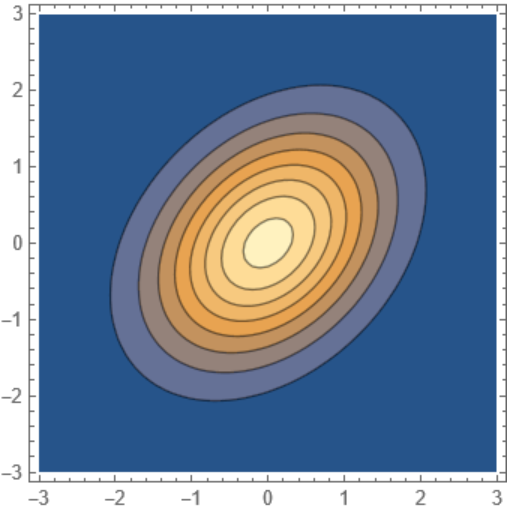 |
Add a parameter of the PDF as an argument:
| In[27]:= | ![parameterizedPDF = ResourceFunction["ExpressionToFunction"][
PDF[BinormalDistribution[\[Rho]], {x, y}],
{x, y},
\[Rho],
Evaluated -> True
]](https://www.wolframcloud.com/obj/resourcesystem/images/bd7/bd773914-a5be-4cf8-9e22-197b7b8abdd4/40e56be4f255c8b8.png) |
| Out[27]= |  |
| In[28]:= | ![parameterizedPDF[{2, 1}, 1/10]](https://www.wolframcloud.com/obj/resourcesystem/images/bd7/bd773914-a5be-4cf8-9e22-197b7b8abdd4/2fbfdaa7fd6b1c0d.png) |
| Out[28]= |  |
Convert the solution of a differential equation to a function:
| In[29]:= | ![sol = DSolveValue[{y'[x] + y[x] == a Sin[x], y[0] == 0}, y[x], x]](https://www.wolframcloud.com/obj/resourcesystem/images/bd7/bd773914-a5be-4cf8-9e22-197b7b8abdd4/2febcf5fd5ea5139.png) |
| Out[29]= |  |
| In[30]:= | ![dSolveFun = ResourceFunction["ExpressionToFunction"][sol, x, a, Evaluated -> True]](https://www.wolframcloud.com/obj/resourcesystem/images/bd7/bd773914-a5be-4cf8-9e22-197b7b8abdd4/3c46f6bfb9ab10e1.png) |
| Out[30]= |  |
| In[31]:= | ![dSolveFun[10, 1]](https://www.wolframcloud.com/obj/resourcesystem/images/bd7/bd773914-a5be-4cf8-9e22-197b7b8abdd4/6029b3c3269feefe.png) |
| Out[31]= |  |
Represent the function at parameter value a=10 with OperatorApplied, then map over a range of x values:
| In[32]:= | ![AssociationMap[
OperatorApplied[dSolveFun][10],
Range[0, 10, 0.1]
] // ListPlot](https://www.wolframcloud.com/obj/resourcesystem/images/bd7/bd773914-a5be-4cf8-9e22-197b7b8abdd4/2f4989e8e9c005f1.png) |
| Out[32]= | 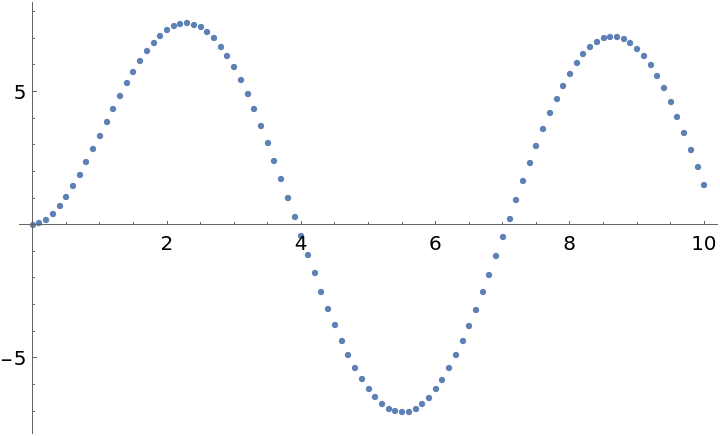 |
The resource function ExpressionToFunctionOperator is the operator form of ExpressionToFunction:
| In[33]:= | ![ResourceFunction["ExpressionToFunction"][x^y, {x, y}]](https://www.wolframcloud.com/obj/resourcesystem/images/bd7/bd773914-a5be-4cf8-9e22-197b7b8abdd4/447b692df6235482.png) |
| Out[33]= |  |
| In[34]:= | ![x^y // ResourceFunction["ExpressionToFunctionOperator"][{x, y}]](https://www.wolframcloud.com/obj/resourcesystem/images/bd7/bd773914-a5be-4cf8-9e22-197b7b8abdd4/54bab06310c72dc5.png) |
| Out[34]= |  |
Note, in particular, that both functions hold the expression that's being transformed into a function unless Evaluated→True is used:
| In[35]:= | ![ResourceFunction["ExpressionToFunction"][
PDF[BinormalDistribution[1/3], {x, y}], {x, y}]](https://www.wolframcloud.com/obj/resourcesystem/images/bd7/bd773914-a5be-4cf8-9e22-197b7b8abdd4/6931d949c5d6ff4d.png) |
| Out[35]= |  |
| In[36]:= | ![PDF[BinormalDistribution[1/3], {x, y}] // ResourceFunction["ExpressionToFunctionOperator"][{x, y}]](https://www.wolframcloud.com/obj/resourcesystem/images/bd7/bd773914-a5be-4cf8-9e22-197b7b8abdd4/63b07f02f3a04d75.png) |
| Out[36]= |  |
With evaluation of the expression:
| In[37]:= | ![ResourceFunction["ExpressionToFunction"][
PDF[BinormalDistribution[1/3], {x, y}], {x, y}, Evaluated -> True]](https://www.wolframcloud.com/obj/resourcesystem/images/bd7/bd773914-a5be-4cf8-9e22-197b7b8abdd4/7a686d0fbec67ca9.png) |
| Out[37]= |  |
| In[38]:= | ![PDF[BinormalDistribution[1/3], {x, y}] // ResourceFunction["ExpressionToFunctionOperator"][{x, y}, Evaluated -> True]](https://www.wolframcloud.com/obj/resourcesystem/images/bd7/bd773914-a5be-4cf8-9e22-197b7b8abdd4/3c265952cb7363ae.png) |
| Out[38]= |  |
ExpressionToFunction is meant for expressions that do not already contain functions and may malfunction for such expressions if the replacement variables exist inside such functions:
| In[39]:= | ![badFun = ResourceFunction["ExpressionToFunction"][
Function[#1 + x]@y, {x, y} -> 1]](https://www.wolframcloud.com/obj/resourcesystem/images/bd7/bd773914-a5be-4cf8-9e22-197b7b8abdd4/69261ef88ffc302e.png) |
| Out[39]= |  |
| In[40]:= | ![badFun[{x0, y0}]](https://www.wolframcloud.com/obj/resourcesystem/images/bd7/bd773914-a5be-4cf8-9e22-197b7b8abdd4/6c5c1a942736a2e0.png) |
| Out[40]= |  |
The correct result would be:
| In[41]:= | ![ReleaseHold[
Hold[Function[#1 + x]@y] /. {x -> x0, y -> y0}
]](https://www.wolframcloud.com/obj/resourcesystem/images/bd7/bd773914-a5be-4cf8-9e22-197b7b8abdd4/033b21fd914cf93a.png) |
| Out[41]= |  |
The problem can sometimes be avoided by evaluating the inner function away:
| In[42]:= | ![ResourceFunction["ExpressionToFunction"][
Function[#1 + x]@y, {x, y} -> 1, Evaluated -> True][{x0, y0}]](https://www.wolframcloud.com/obj/resourcesystem/images/bd7/bd773914-a5be-4cf8-9e22-197b7b8abdd4/2a768443d1659540.png) |
| Out[42]= |  |
Wolfram Language 11.3 (March 2018) or above
This work is licensed under a Creative Commons Attribution 4.0 International License
