Wolfram Function Repository
Instant-use add-on functions for the Wolfram Language
Function Repository Resource:
Generate an HTTP response that prompts the browser to download as a given file name
ResourceFunction["FileDownloadResponse"][expr,"filename"] generates an HTTPResponse that informs the browser that the content should be downloaded as the given filename. | |
ResourceFunction["FileDownloadResponse"][expr,"filename",fmt] uses fmt as the ExportForm. | |
ResourceFunction["FileDownloadResponse"][expr,"filename",fmt,metadata] includes metadata as part of the HTTPResponse. |
| "StatusCode" | 200 | HTTP status code |
| "ContentType" | "text/html" | MIME type for content |
| "Cookies" | {} | cookies to handle (using CookieFunction) |
| "Headers" | {} | a list of rules giving HTTP response headers |
| "Body" | response body as a string |
| "BodyByteArray" | response body as a ByteArray object |
| "BodyBytes" | response body as a list of byte values |
| "CharacterEncoding" | character encoding in the response body (e.g. "UTF8") |
| "Properties" | list of available properties |
| "StatusCodeDescription" | plain text description of status code |
| CharacterEncoding | Automatic | character encoding to apply to the response |
| CachePersistence | Inherited | how long to keep server-side cached versions of computations that are done |
| "ContentType" | Automatic | specify a content-type header |
Generate an HTTPResponse:
| In[1]:= | ![ResourceFunction[
"FileDownloadResponse"][{{1, 2, 3}, {4, 5, 6}}, "download.csv"]](https://www.wolframcloud.com/obj/resourcesystem/images/6da/6dae347c-893e-4490-a54e-4e8dc6e0d969/72e31165d42c1572.png) |
| Out[1]= |  |
The content disposition is set with the given file name:
| In[2]:= | ![%["Headers"]](https://www.wolframcloud.com/obj/resourcesystem/images/6da/6dae347c-893e-4490-a54e-4e8dc6e0d969/76b02b04d68ef208.png) |
| Out[2]= |  |
Specify a format:
| In[3]:= | ![ResourceFunction[
"FileDownloadResponse"][{{1, 2, 3}, {4, 5, 6}}, "download.data", "Package"]](https://www.wolframcloud.com/obj/resourcesystem/images/6da/6dae347c-893e-4490-a54e-4e8dc6e0d969/206086ebeef53663.png) |
| Out[3]= |  |
Provide additional metadata for the HTTPResponse:
| In[4]:= | ![ResourceFunction[
"FileDownloadResponse"]["I'm a teapot", "download.txt", Automatic, <|
"StatusCode" -> 418|>]](https://www.wolframcloud.com/obj/resourcesystem/images/6da/6dae347c-893e-4490-a54e-4e8dc6e0d969/743c979624ddc17d.png) |
| Out[4]= |  |
The MIME type is determined automatically from the file name when a format is not explicitly given:
| In[5]:= | ![ResourceFunction["FileDownloadResponse"][{{1, 2, 3}, {4, 5, 6}}, "download.csv"]["ContentType"]](https://www.wolframcloud.com/obj/resourcesystem/images/6da/6dae347c-893e-4490-a54e-4e8dc6e0d969/31885ec6787b5d52.png) |
| Out[5]= |  |
| In[6]:= | ![(* Evaluate this cell to get the example input *) CloudGet["https://www.wolframcloud.com/obj/fa304c2f-9c6c-4c96-b174-475940f498e1"]](https://www.wolframcloud.com/obj/resourcesystem/images/6da/6dae347c-893e-4490-a54e-4e8dc6e0d969/23319ad54cb5ba34.png) |
| Out[6]= |  |
| In[7]:= | ![(* Evaluate this cell to get the example input *) CloudGet["https://www.wolframcloud.com/obj/a94dbb3b-300f-46c3-9055-1c9d3fb50668"]](https://www.wolframcloud.com/obj/resourcesystem/images/6da/6dae347c-893e-4490-a54e-4e8dc6e0d969/679343d61f12f442.png) |
| Out[7]= |  |
It defaults to text if unknown:
| In[8]:= | ![ResourceFunction["FileDownloadResponse"][{{1, 2, 3}, {4, 5, 6}}, "download"]["ContentType"]](https://www.wolframcloud.com/obj/resourcesystem/images/6da/6dae347c-893e-4490-a54e-4e8dc6e0d969/0825150990ec9adf.png) |
| Out[8]= |  |
A format can be given explicitly to override the content type:
| In[9]:= | ![ResourceFunction["FileDownloadResponse"][{{1, 2, 3}, {4, 5, 6}}, "download", "CSV"]["ContentType"]](https://www.wolframcloud.com/obj/resourcesystem/images/6da/6dae347c-893e-4490-a54e-4e8dc6e0d969/3e2a31829106a2e0.png) |
| Out[9]= |  |
Specify custom headers:
| In[10]:= | ![ResourceFunction[
"FileDownloadResponse"]["Hello world", "hello.txt", Automatic, <|
"Headers" -> {"My-Header" -> "Does it work?"}|>]](https://www.wolframcloud.com/obj/resourcesystem/images/6da/6dae347c-893e-4490-a54e-4e8dc6e0d969/14bdab9578d83ac5.png) |
| Out[10]= |  |
| In[11]:= | ![%["Headers"]](https://www.wolframcloud.com/obj/resourcesystem/images/6da/6dae347c-893e-4490-a54e-4e8dc6e0d969/7b09decbeed68f38.png) |
| Out[11]= |  |
Specify a character encoding:
| In[12]:= | ![ResourceFunction["FileDownloadResponse"]["Hello world", "hello.txt", CharacterEncoding -> "UTF-8"]](https://www.wolframcloud.com/obj/resourcesystem/images/6da/6dae347c-893e-4490-a54e-4e8dc6e0d969/7e96bda4a2184817.png) |
| Out[12]= |  |
| In[13]:= | ![ResourceFunction["FileDownloadResponse"]["Hello world", "hello.txt", CharacterEncoding -> "ASCII"]](https://www.wolframcloud.com/obj/resourcesystem/images/6da/6dae347c-893e-4490-a54e-4e8dc6e0d969/469e15d07c4b7d1a.png) |
| Out[13]= |  |
Deploy a file download that is cached for 3 seconds:
| In[14]:= | ![obj = CloudDeploy[
Delayed[ResourceFunction["FileDownloadResponse"][
DateString[{"Time", ".", "Millisecond"}], "date.txt", CachePersistence -> 3]]]](https://www.wolframcloud.com/obj/resourcesystem/images/6da/6dae347c-893e-4490-a54e-4e8dc6e0d969/68c40b59a9502439.png) |
| Out[14]= |  |
| In[15]:= | ![Table[Pause[1]; URLRead[obj, "Body"], 5]](https://www.wolframcloud.com/obj/resourcesystem/images/6da/6dae347c-893e-4490-a54e-4e8dc6e0d969/230fe3be56aee1a6.png) |
| Out[15]= |  |
Specify a MIME type for the response:
| In[16]:= | ![ResourceFunction["FileDownloadResponse"][Range[10], "download", "ContentType" -> "application/octet-stream"]](https://www.wolframcloud.com/obj/resourcesystem/images/6da/6dae347c-893e-4490-a54e-4e8dc6e0d969/0bf50a81b1aea137.png) |
| Out[16]= |  |
Generate an HTTPResponse from a FormFunction for downloading an image:
| In[17]:= | ![FormFunction[{"image" -> ExampleData["TestImage"][[All, 2]]},
ResourceFunction["FileDownloadResponse"][
ExampleData[{"TestImage", #image}], #image <> ".png"] &
]](https://www.wolframcloud.com/obj/resourcesystem/images/6da/6dae347c-893e-4490-a54e-4e8dc6e0d969/6430e1bcf33bb7c5.png) |
| Out[17]= | 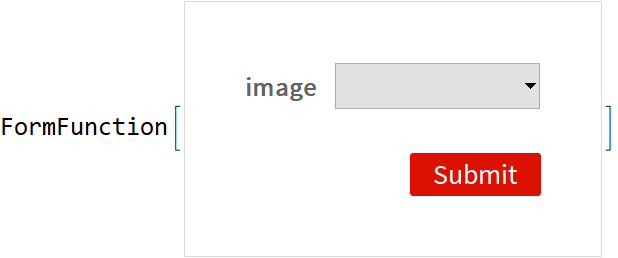 |
Deploy it to the cloud:
| In[18]:= | ![CloudDeploy[%]](https://www.wolframcloud.com/obj/resourcesystem/images/6da/6dae347c-893e-4490-a54e-4e8dc6e0d969/1cb13461e642571e.png) |
| Out[18]= |  |
Specifying the content type in the metadata will override the format:
| In[19]:= | ![ResourceFunction[
"FileDownloadResponse"][{{1, 2, 3}, {4, 5, 6}}, "download.csv", "CSV", <|"ContentType" -> "text/html"|>]](https://www.wolframcloud.com/obj/resourcesystem/images/6da/6dae347c-893e-4490-a54e-4e8dc6e0d969/1bfd487d48b07f22.png) |
| Out[19]= |  |
Providing a content disposition header in the metadata can override the given file name:
| In[20]:= | ![ResourceFunction[
"FileDownloadResponse"][{{1, 2, 3}, {4, 5, 6}}, "download.csv", "CSV", <|
"Headers" -> {"content-disposition" -> "attachment; filename=override.csv"}|>]](https://www.wolframcloud.com/obj/resourcesystem/images/6da/6dae347c-893e-4490-a54e-4e8dc6e0d969/288644a8c62ec631.png) |
| Out[20]= |  |
| In[21]:= | ![%["Headers"]](https://www.wolframcloud.com/obj/resourcesystem/images/6da/6dae347c-893e-4490-a54e-4e8dc6e0d969/09801c4c2e64c44d.png) |
| Out[21]= |  |
This work is licensed under a Creative Commons Attribution 4.0 International License
