
Açıklama
Members, rollere ve yetkinliklere dayalı bir WordPress üyelik eklentisidir. Roller ve yetkinlikler eklemek ve bunları kullanıcılarınıza atamak için size güçlü araçlar sunarak kullanıcılarınıza en iyi üye deneyimini sunar.
Members, WordPress’in güçlü roller ve yetkinlikler sistemi için basit bir kullanıcı arayüzü (UI) sağlayarak sitenizde içeriği kısıtlamak için izinler ayarlamanıza olanak tanır; bu sistem geleneksel olarak yalnızca bunu elle kodlamayı bilen geliştiricilerin kullanımına sunulmuştur.
Eklenti özellikleri
- Rol yöneticisi: Rolleri ve bu roller için yetkinlikleri oluşturmanızı, silmenizi ve düzenlemenizi sağlar.
- Çoklu kullanıcı rolleri: Herhangi bir kullanıcıya bir, iki veya daha fazla rol verin.
- Yetkinlikleri Açıkça Reddet: Belirli kullanıcı rollerine belirli yetkinlikleri reddedin.
- Rolleri kopyala: Var olan rolü kopyalayarak yeni rol yapın.
- İçerik İzinleri / Kısıtlı İçerikler: Hangi kullanıcıların (role göre) gönderi içeriğine erişiminin bulunduğunu belirlemek için içeriği korur.
- Kısa kodlar: İçeriğe kimlerin erişimi olduğunu kontrol etmek için kullanılan kısa kodlar.
- Widget’lar: Temanızın kenar çubuklarında gösterilecek bir oturum açma widget’ı ve kullanıcı widget’ı.
- Özel site: İsterseniz sitenizi ve beslemeleri tamamen özel yapabilirsiniz.
- Administrator Rescue (Magic Link): If you lose access to the WordPress admin (e.g. after editing roles), you can request a secure, time-limited link by email to restore your Administrator role and Members capabilities—no support ticket or database access required.
- Eklenti Entegrasyonu: Members, diğer WordPress geliştiricileri tarafından şiddetle tavsiye edilir. Mevcut birçok eklenti kendi özel rollerini ve yetkinliklerini doğrudan buna entegre eder.
Sorunsuz MemberPress Entegrasyonu
If you’re looking to build a business out of your membership site by creating paid memberships there’s no better way than to use MemberPress. Members and MemberPress work together to provide the ultimate member experience and will help you start and profit from your amazing WordPress membership sites!
Tüm Eklentiler artık dahil
Members artık TÜM modüllerini tamamen ücretsiz olarak içeriyor! Members’a ekledikleri harika özelliklerden bazıları şunlar:
- Engelleme İzinleri: Site sahiplerinin, kullanıcı oturum açma durumu, kullanıcı rolü veya yetkinliğine göre engellemeleri gizlemesine veya göstermesine olanak tanır.
- Gizlilik Başlıkları: WordPress’in gizlilik ve kişisel veri özellikleri (GDPR) üzerinde kontrol sağlamak için ek yetkinlikler oluşturur.
- Yönetici Erişimi: Site yöneticilerinin, hangi kullanıcıların rol aracılığıyla WordPress yöneticisine erişiminin bulunduğunu kontrol etmelerine olanak tanır.
- Core Create Başlıkları: Gönderilere/sayfalara create_posts ve create_pages başlıkları ekleyerek bunları edit_* karşılıklarından ayırır ve daha esnek düzenleme yetkinlikleri sağlar.
- Kategoriler ve Etiket Başlıkları: Kategori ve Etiket Başlıkları modülü, çekirdek kategori ve gönderi etiketi sınfılandırmaları için özel yetkinlikler oluşturur. Böylece site sahiplerinin kategorileri/etiketleri kimlerin yönetebileceği, düzenleyebileceği, silebileceği veya atayabileceği konusunda kesin kontrole sahip olmasını sağlar.
- Role Levels: Exposes the old user levels system, which fixes the WordPress author drop-down bug when users don’t have a role with one of the assigned levels.
- Rol Hiyerarşisi: Hiyerarşik bir rol sistemi oluşturur.
- ACF Entegrasyonu: Members eklentisi ile yönetmek amacıyla, Gelişmiş Özel Alanlar (ACF) eklentisi için özel yetkinlikler oluşturur.
- EDD Entegrasyonu: Easy Digital Downloads eklentisi yetkinliklerini, Members eklentisinin rol yöneticisine entegre eder.
- GiveWP Entegrasyonu: GiveWP ve GiveWP Tekrarlayan Bağışlar eklentisi yetkinliklerini, Members eklentisinin rol yöneticisine entegre eder.
- Meta Box Entegrasyonu: Meta Box eklentisi yetkinliklerini, Members eklentisinin rol yöneticisine entegre eder.
- WooCommerce Entegrasyonu: WooCommerce eklentisi yetkinliklerini, Members eklentisinin rol yöneticisine entegre eder.
For more info, visit the Members plugin home page.
Bu eklentiyi beğendiniz mi?
The Members plugin is a massive project with 1,000s of lines of code to maintain. A major update can take weeks or months of work. We don’t make any money directly from this plugin while other, similar plugins charge substantial fees to even download them or get updates. Please consider helping the cause by:
Documentation
Support
If you need plugin support from us, you can visit our support page.
Eklenti geliştirme
Eğer bir tema yazarı, eklenti yazarı veya sadece kod meraklısıysanız, bu eklentinin gelişimini GitHub havuzu üzerinden izleyebilirsiniz.
Ekran Görüntüleri

Rol yönetim ekranı 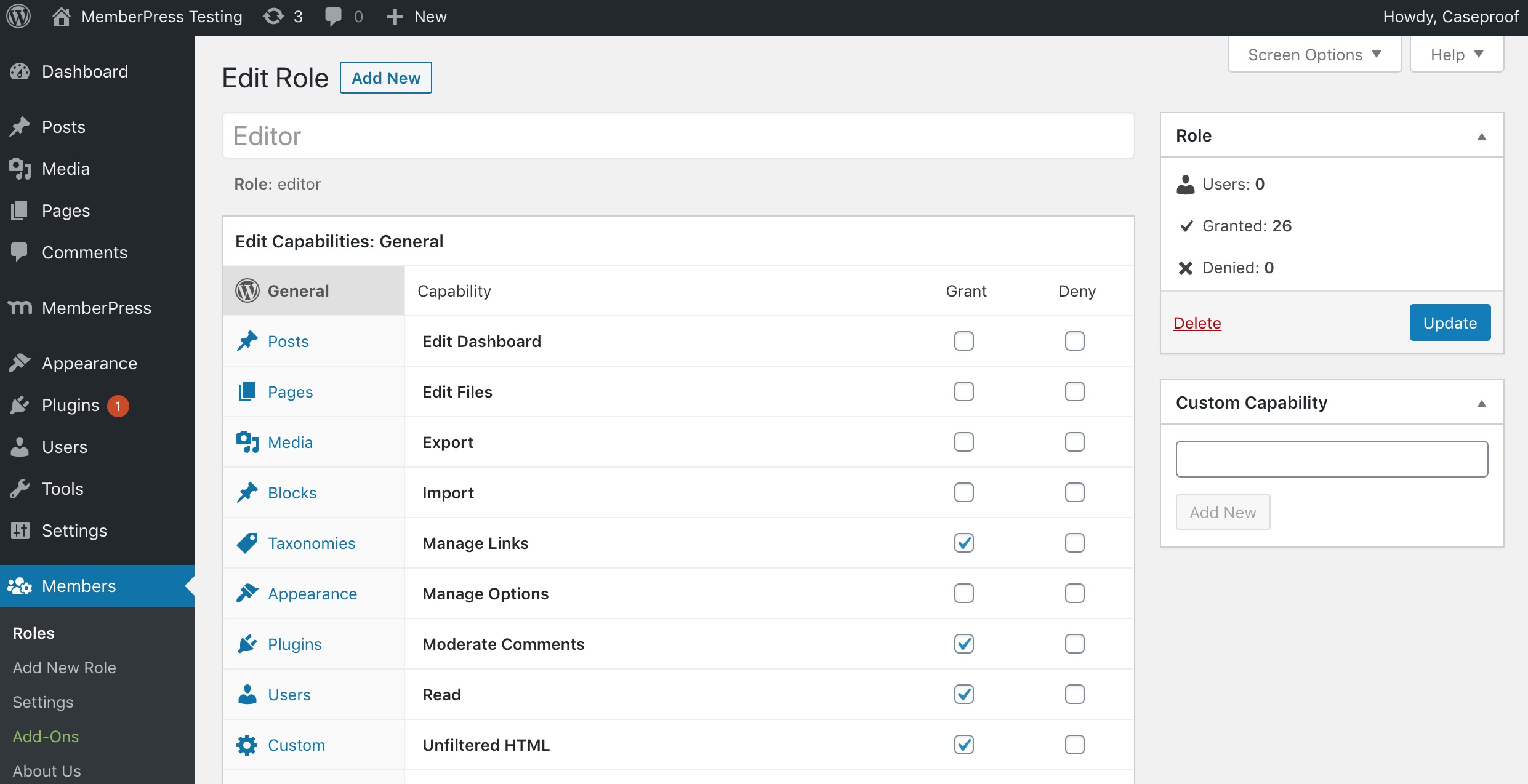
Rol düzenleme ekranı 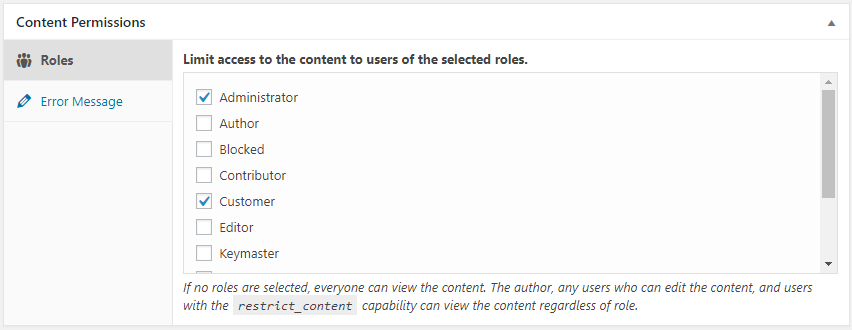
İçerik izinleri meta kutusu (sayfa/yazı düzenleme ekranı) 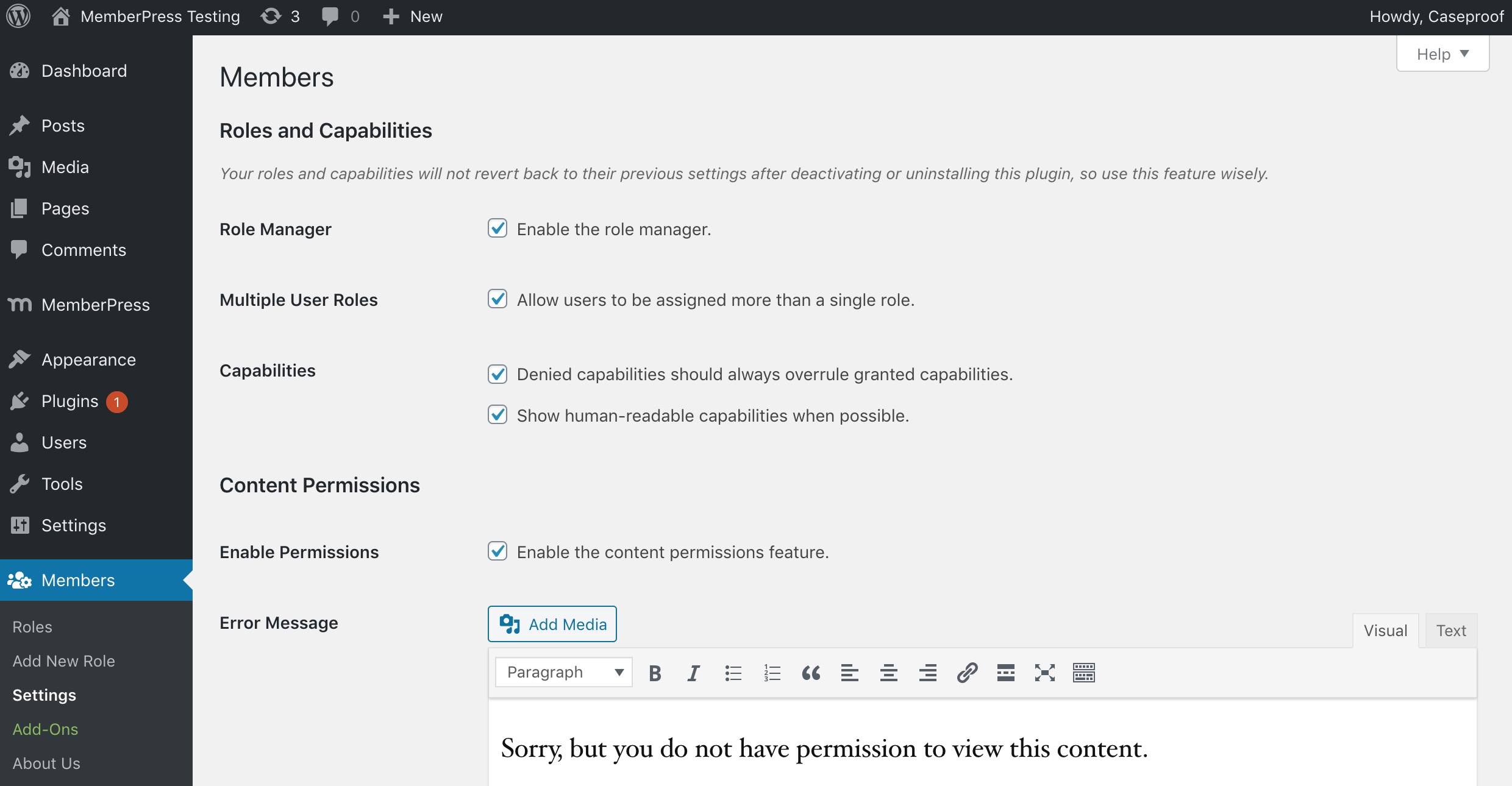
Eklenti ayarları ekranı 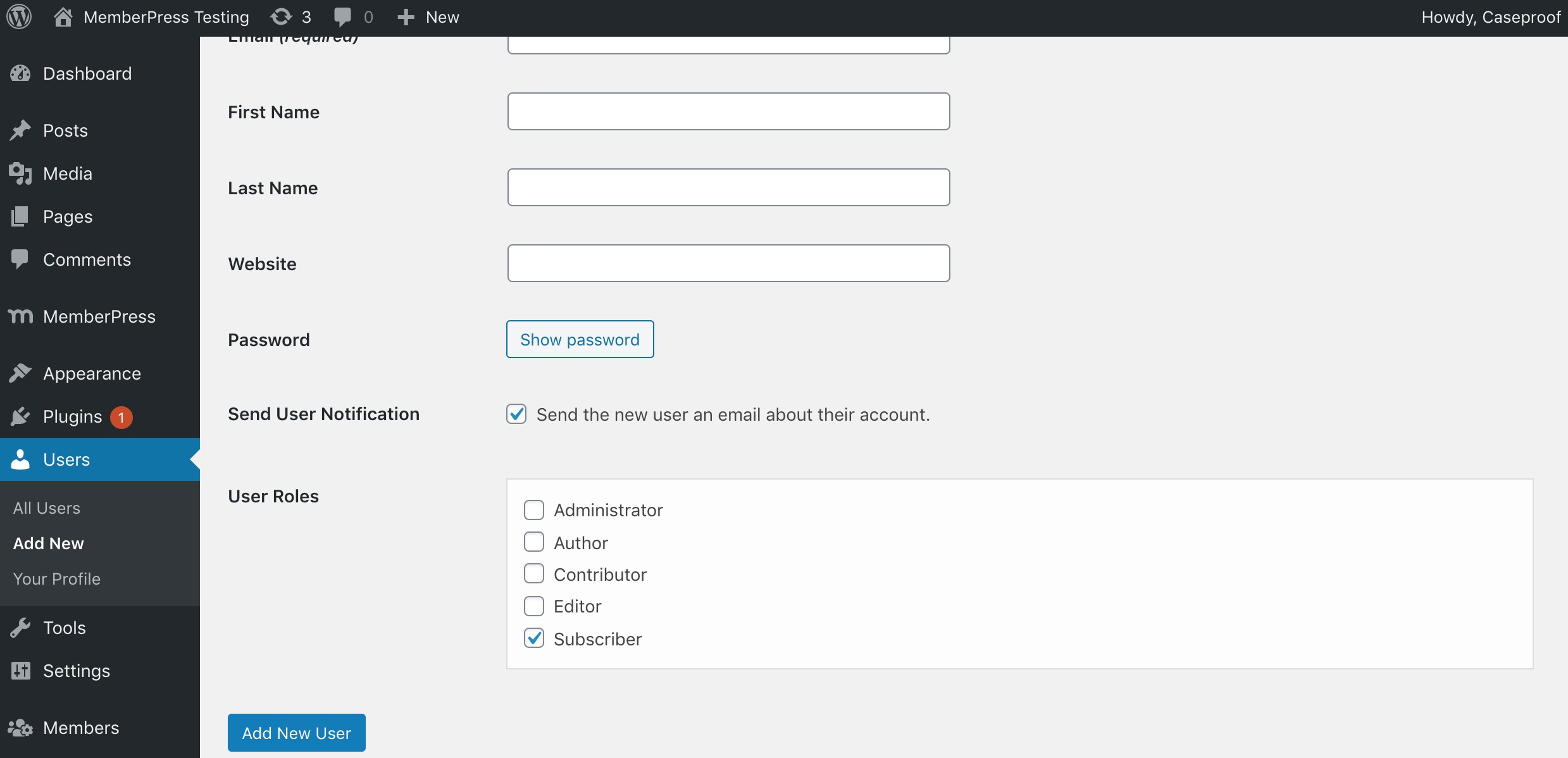
Her kullanıcı için çoklu rol seç (kullanıcı düzenleme ekranı)


Yükleme
Memberseklentisini/wp-content/plugins/klasörüne yükleyin.- Eklentiyi WordPress’deki ‘Eklentiler’ menüsünden etkinleştirin.
- Kullanmak istediğiniz ayarları seçmek için “Ayarlar > Members” sayfasına gidin.
Daha ayrıntılı talimatlar eklentinin readme.html dosyasında bulunmaktadır.
SSS
-
Bu eklenti neden oluşturuldu?
-
We weren’t satisfied with the current user, role, and permissions plugins available. Yes, some of them are good, but nothing fit what we had in mind perfectly. Some offered few features. Some worked completely outside of the WordPress APIs. Others lacked the GPL license.
So, we just built something we actually enjoyed using.
-
What’s the difference between Members and MemberPress?
-
Members and MemberPress solve different problems and are designed to work together.
Members is a free roles and capabilities plugin. It gives you a UI on top of WordPress’ native roles and capabilities system so you can create and edit roles, assign multiple roles to users, and restrict content by role or capability. It’s the right tool when you need to control who can do what inside your site—dashboard access, content permissions, and capability management—without charging for access.
MemberPress is a premium, all-in-one WordPress membership platform built for monetization and much more. In addition to paid subscriptions, payment processing (Stripe, PayPal, and more), recurring billing, coupons, and drip content, MemberPress also includes:
- Courses — a built-in LMS for creating and selling online courses with lessons, quizzes, and progress tracking.
- CoachKit — tools for running coaching programs, including milestones, habits, and client check-ins.
- Community Groups — private member communities and discussion spaces tied to your memberships.
- Member Profiles & Directories — customizable front-end profiles and searchable member directories.
- Email marketing integrations, affiliate program support, and many more premium features.
It’s the right tool when you need to sell access to content, courses, coaching, or communities—and grow a full membership business around it.
The two plugins are complementary, not competing. Many sites use Members for fine-grained role and capability management alongside MemberPress for everything membership-business related. For a full side-by-side comparison, see Members vs MemberPress.
-
Onu nasıl kullanırım?
-
Most things should be fairly straightforward, but you can also view the docs online.
-
Mininum PHP gereksinimleri.
-
Members now requires PHP 7.4+
-
“Rol Yöneticisi” özelliklerine erişemiyorum.
-
When the plugin is first activated, it runs a script that sets specific capabilities to the “Administrator” role on your site that grants you access to this feature. So, you must be logged in with the administrator account to access the role manager.
Eğer, bir şekilde yönetici rolüne ve rol yöneticisine erişemiyorsanız eklentiyi devre dışı bırakın. Sonra, yeniden etkinleştirin.
-
Çoklu sitede yöneticiler neden rolleri yönetemiyor?
-
If you have a multisite installation, only Super Admins can create, edit, and delete roles by default. This is a security measure to make sure that you absolutely trust sub-site admins to make these types of changes to roles. If you’re certain you want to allow this, add the Create Roles (
create_roles), Edit Roles (edit_roles), and/or Delete Roles (delete_roles) capabilities to the role on each sub-site where you want to allow this. -
How do I use Administrator Rescue (Magic Link) if I’m locked out?
-
If you can no longer access the WordPress admin (for example, after changing your role or capabilities), you can restore your Administrator access yourself:
- Go to your site’s login page:
yoursite.com/wp-login.php - In the address bar, add
?action=members_rescueso the URL is:yoursite.com/wp-login.php?action=members_rescue - Enter the email address of an account that has (or had) the built-in Administrator role, or is a Super Admin (multisite).
- Click “Send Rescue Link”. If that account is eligible, a secure link will be sent to that email (you may need to check spam).
- Open the link from the email within 15 minutes. Your Administrator role and Members capabilities will be restored, and you’ll be redirected to the login page to sign in.
Only users with the built-in WordPress “Administrator” role (or Super Admins on multisite) can use this feature; custom or cloned roles are not eligible. The link expires after 15 minutes and is limited to a few attempts per IP to prevent abuse.
- Go to your site’s login page:
-
Yardım et! Kendi sitemde kendimi kilitledim!
-
Please read the documentation for the plugin before actually using it, especially a plugin that controls permissions for your site. We cannot stress this enough. This is a powerful plugin that allows you to make direct changes to roles and capabilities in the database.
If you have the built-in Administrator role (or are a Super Admin on multisite) but lost access to the admin (e.g. after editing roles), try the Administrator Rescue (Magic Link) first: go to
yoursite.com/wp-login.php?action=members_rescue, enter your admin email, and use the link we send you to restore access.If that doesn’t apply or didn’t work, stop by our support forums to see if we can help. Your web host may also be able to restore your site from a recent backup, but we only recommend that as a last resort, as it could mean losing work or members added since the backup.
İncelemeler


Katkıda Bulunanlar ve Geliştiriciler
“Members – Üyelik ve Kullanıcı Rolü Düzenleyici Eklentisi” açık kaynaklı yazılımdır. Aşağıdaki kişiler bu eklentiye katkıda bulunmuşlardır.
Katkıda bulunanlar

“Members – Üyelik ve Kullanıcı Rolü Düzenleyici Eklentisi” 21 dile çevrildi. Katkıda bulundukları için çevirmenlere teşekkürler.
“Members – Üyelik ve Kullanıcı Rolü Düzenleyici Eklentisi” eklentisini dilinize çevirin.
Geliştirmeyle ilgilenir misiniz?
Kodu görüntüleyin, SVN deposuna göz atın ya da RSS ile geliştirme günlüğüne abone olun.
Değişiklik Kaydı
3.2.21
- Fixed: Privacy Caps add-on not granting privacy capabilities to administrators on fresh activations
- Removed: Legacy standalone-plugin code from bundled add-ons (dead activation hooks, obsolete build scripts, orphaned readme/uninstall files)
3.2.20
- Added: Reset roles
- Added: Add rescue link for Administrator roles only
- Changed: Refreshed branding with updated WordPress.org banner and icon assets, header SVG, and logo
- Changed: Updated About page design
- Changed: Optimized role user count retrieval using transients for improved performance
- Fixed: Missing header banner on some admin pages
- Removed: Bundled POT file (translations now delivered via WordPress.org language packs)
3.2.19
- Fixed: Added support for WF 2FA error messages
- Fixed: Missing “you are already logged in” string
- Fixed: Add-on page RTL CSS fix
- Fixed: Block permissions fixes
- Fixed: Fix redirect_to issue on shortcode
- Fixed: Other minor bugfixes
3.2.18
- Fixed: Add-on activate toggle display issue on narrow screens
- Fixed: Login error redirection
- Fixed: Outdated Login form styling
- Fixed: Allow changing display name for some Roles
3.2.17
- Added: Bulk select/unselect checkboxes on Role capabilities
3.2.16
- Fixed: Protected posts being forced-hidden from API search even if setting was off
3.2.15
- Added: Growth Tools menu item
- Fixed: Translation errors
- Fixed: Styles and formatting on add-ons and about pages
3.2.14
- Fixed: Error in REST API calls when posts results not an array
3.2.12
- Fixed: Cleaned up prior author name and links
- Fixed: Cleaned up broken or incorrect links
- Fixed: Removed some unnecessary files
- Fixed: Incorrect gettext calls
- Fixed: Removed unneeded load_plugin_textdomain calls
- Fixed: Updated POT translation file
3.2.11
- Fixed: Translation warnings after WP 6.7
- Fixed: Add option to hide protected content from REST API searches
- Fixed: Add support for Loco Translate plugin (via new loco.xml file)
3.2.10
- Fixed: Capability checks on AJAX calls
- Fixed: PHP warning for $wp_embed
- Changed: Now requires PHP 7.4 minimum
3.2.9
- Fixed: PHP 8.1 deprecation notice on ACF integration (props @DSGND)
3.2.8
- Added: members_wp_roles filter to WP roles in Content Permission box
- Fixed: Content Permission icon in Panel block
- Fixed: Position of Field Group menu item in ACF
3.2.6-7
- Fixed: PHP 8+ compatibility
- Added: members_show_roles_page_cap filter for edit_roles_cap
- Fixed: Improperly named variable
3.2.5
- Fixed: WP Cron task for in-plugin notifications running unnecessarily
3.2.4
- Fixed: More package deployment fixes
3.2.3
- Added: Footer with helpful links
- Fixed: Package files deployed unnecessarily
- Fixed: Debug warnings
- Fixed: Correct bootstrap file required
3.2.2
- Fixed: Undefined index notice
3.2.1
- Fixed: Uncaught TypeError: in_array()
3.2.0
- Added: Members Notifications
- Changed: Converted
jQuery.fn.click()(deprecated) tojQuery.fn.on('click') - Changed: Replaced references to Affiliate Royale with Easy Affiliate
- Changed: WP Tested Up To version (5.9)
3.1.7
- Fixed: Hierarchical roles missing settings
- Changed: Refactored checks for whether MemberPress is active; added
members_is_memberpress_active() - Changed: “Paid Memberships” section of Content Permissions meta box should not show when MemberPress is active
- Changed: Wording from “Upgrade to MemberPress” to “Add MemberPress”
3.1.6
- Added: “Miscellaneous” settings section
- Added: “Disable Review Prompt” setting to permanently remove the review prompt
- Added:
MEMBERS_DISABLE_REVIEW_PROMPTconstant to permanently remove the review prompt - Changed: WP Tested Up To version (5.8)
- Fixed: Using transients for review prompt caused the prompt to persist when dismissed; switched to using options instead
- Fixed: Users widget not working in new block-based widgets editor
3.1.5
- Fixed: Block permissions not working for nested blocks (e.g. columns)
3.1.4
- Changed: Converted instance of wp.editor to wp.blockEditor
- Changed: Check for MemberPress constant instead of using
is_plugin_active() - Fixed: Compatibility for PHP 8
3.1.3
- Changed: Disabled Content Permissions side meta box
- Fixed: Issue with comma-separated roles that include spaces
3.1.2
- Fixed: Review prompt should only show to admins
3.1.1
- Changed: Admin UI cleanup
3.1.0
- Changed: Admin UI
- Fixed: Issue with custom capabilities not saving to custom roles
3.0.10
- Fixed: Users who can promote should be able to assign roles to their own account
3.0.9
- Fixed: ACF integration trying to bump priority on ACF menu
3.0.8
- Fixed: Settings page error
3.0.7
- Fixed: Issues related to translated admin menu slug
3.0.6
- Fixed: Settings page throwing error on non-English sites
3.0.5
- Fixed: Collapse Permissions block editor section by default
3.0.4
- Added: Filter for applying custom validation to settings
- Fixed: Inaccessible settings page in Admin Access
3.0.3
- Changed: Display icons using file_get_contents() instead of include() to prevent executing them as PHP
- Fixed: PHP warnings being thrown
- Fixed: Make sure admin menu is always accessible
3.0.2
- Fixed: Minimized SVG icons to fix issues with parsing them
3.0.1
- Fixed: Some JS and image files weren’t checked in via SVN; bumped version to add them
3.0
- Added: Rolled all add-ons into core
- Changed: Consolidated all Members-related settings under one admin menu item
- Changed: Made login and user widgets enabled by default, and removed settings
